Operating Systems
Lecture#4
Scheduler and its types,
Scheduling Algorithms
Week#2,Aug,23rd
Scheduling and Scheduler
Definition: When more than one process is runnable,
the operating system must decide which one run first.
The part of the operating system concerned with this
decision is called the scheduler, and algorithm it uses
is called the scheduling algorithm.
Scheduling and Scheduler
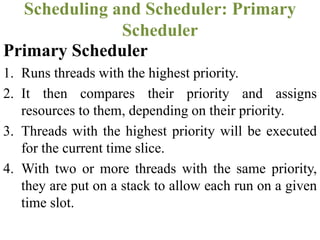
Types of Scheduler
Types of Scheduler
Primary Scheduler Secondary Scheduler
Primary Scheduler
1. Runs threads with the highest priority.
2. It then compares their priority and assigns
resources to them, depending on their priority.
3. Threads with the highest priority will be executed
for the current time slice.
4. With two or more threads with the same priority,
they are put on a stack to allow each run on a given
time slot.
Scheduling and Scheduler: Primary
Scheduler
Secondary Scheduler
1. It is responsible for increasing the priority of non-
executing threads.
2. It is important that those low-priority threads are
given a chance to run on the operating system and
this is the function of this type of scheduler.
Scheduling and Scheduler: Secondary
Scheduler
• How scheduler knows the current status of each
process?
• We need to define states of processes so that
scheduler can respond to each process
Scheduling and Scheduler
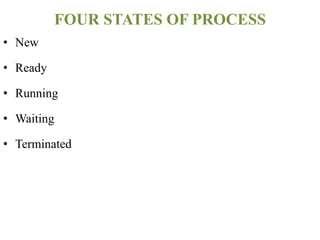
FOUR STATES OF PROCESS
• New
• Ready
• Running
• Waiting
• Terminated
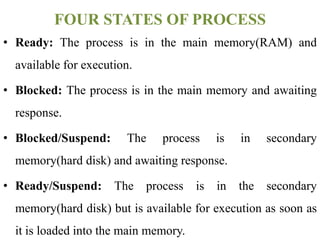
FOUR STATES OF PROCESS
• Ready: The process is in the main memory(RAM) and
available for execution.
• Blocked: The process is in the main memory and awaiting
response.
• Blocked/Suspend: The process is in secondary
memory(hard disk) and awaiting response.
• Ready/Suspend: The process is in the secondary
memory(hard disk) but is available for execution as soon as
it is loaded into the main memory.
FOUR STATES OF PROCESS
• These four states helps the scheduler to respond
to each process according to its current state so
that process can be handled efficiently.
FOUR STATES OF PROCESS
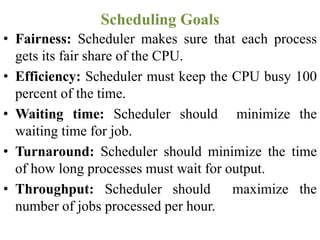
Scheduling Goals
• Fairness: Scheduler makes sure that each process
gets its fair share of the CPU.
• Efficiency: Scheduler must keep the CPU busy 100
percent of the time.
• Waiting time: Scheduler should minimize the
waiting time for job.
• Turnaround: Scheduler should minimize the time
of how long processes must wait for output.
• Throughput: Scheduler should maximize the
number of jobs processed per hour.
Scheduling Goals
CPU Scheduling
• Example (Enter the bank and process a transaction)
• Arrival Time: The time at which the process enters
the ready queue or state
• Burst Time: Time required by a process to get
executed on CPU
• Completion Time: Time at which the process
completes its execution
CPU Scheduling
• Turn Around Time; {Completion Time – Arrival
Time}
• Waiting Time: {Turn Around Time – Burst Time}
• Response Time: {(The time at which a process gets
CPU first time) – (Arrival Time)}
CPU Scheduling
Scheduling Algorithms
Two types of scheduling algorithms:
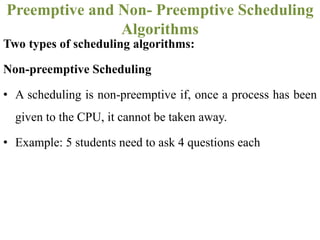
Non-preemptive Scheduling
• A scheduling is non-preemptive if, once a process has been
given to the CPU, it cannot be taken away.
• Example: 5 students need to ask 4 questions each
Preemptive and Non- Preemptive Scheduling
Algorithms
Two types of scheduling algorithms:
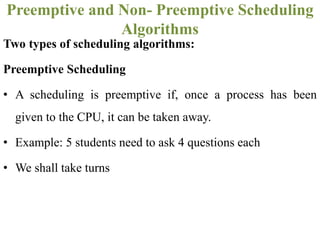
Preemptive Scheduling
• A scheduling is preemptive if, once a process has been
given to the CPU, it can be taken away.
• Example: 5 students need to ask 4 questions each
• We shall take turns
Preemptive and Non- Preemptive Scheduling
Algorithms
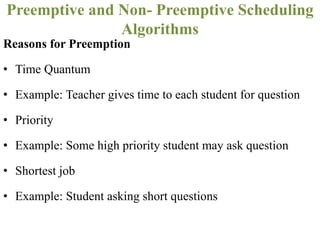
Reasons for Preemption
• Time Quantum
• Example: Teacher gives time to each student for question
• Priority
• Example: Some high priority student may ask question
• Shortest job
• Example: Student asking short questions
Preemptive and Non- Preemptive Scheduling
Algorithms
1. FCFS Scheduling
2. SJF Scheduling
3. SRTN Scheduling
4. Priority Scheduling
5. Round Robin (RR) Scheduling
Scheduling Algorithms
FCFS(First Come First Serve)
Scheduling algorithm
• It is Non-preemptive Algorithm
• Follows First-In-First-Out (FIFO) rule
• Run-to-Completion
• Run-Until-Finish
FCFS Scheduling algorithm
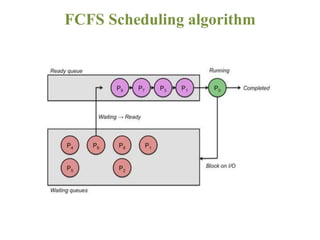
• Runs the processes in the order they arrive.
• Removes a process from the processor only if it is in block
state or terminates.
• Advantage: Good for long processes when they finally
get on.
• Disadvantage: Bad for short processes if they are behind
a long process.
FCFS Scheduling algorithm
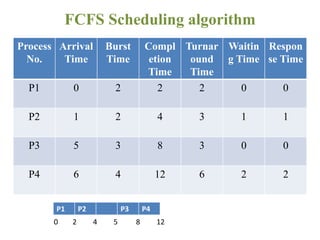
Process
No.
Arrival
Time
Burst
Time
Compl
etion
Time
Turnar
ound
Time
Waitin
g Time
Respon
se Time
P1 0 2 2 2 0 0
P2 1 2 4 3 1 1
P3 5 3 8 3 0 0
P4 6 4 12 6 2 2
FCFS Scheduling algorithm
P1 P2 P3 P4
0 2 4 5 8 12
SJF(Shortest Job First) Scheduling
algorithm
• Shortest-Job-First (SJF) is a non-preemptive scheduling
algorithm.
• In this algorithm the process which takes the shortest
time to complete is run first.
• It thus completes the processes that need a short time to
be served and hence processes can be efficiently handled.
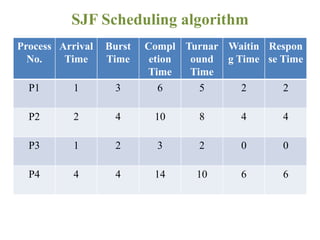
SJF Scheduling algorithm
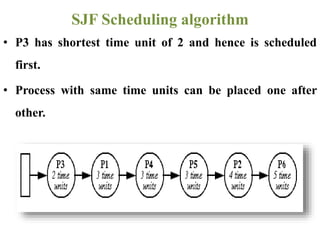
• P3 has shortest time unit of 2 and hence is scheduled
first.
• Process with same time units can be placed one after
other.
SJF Scheduling algorithm
Process
No.
Arrival
Time
Burst
Time
Compl
etion
Time
Turnar
ound
Time
Waitin
g Time
Respon
se Time
P1 1 3 6 5 2 2
P2 2 4 10 8 4 4
P3 1 2 3 2 0 0
P4 4 4 14 10 6 6
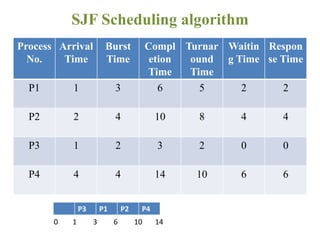
SJF Scheduling algorithm
Process
No.
Arrival
Time
Burst
Time
Compl
etion
Time
Turnar
ound
Time
Waitin
g Time
Respon
se Time
P1 1 3 6 5 2 2
P2 2 4 10 8 4 4
P3 1 2 3 2 0 0
P4 4 4 14 10 6 6
SJF Scheduling algorithm
P3 P1 P2 P4
0 1 3 6 10 14
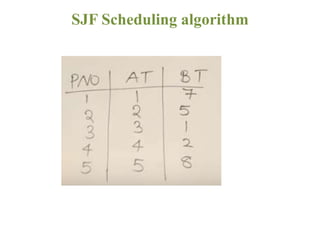
SJF Scheduling algorithm
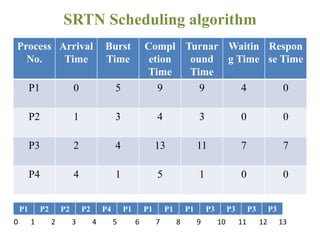
SRTN(Shortest Remaining Time Next)
Scheduling algorithm
1. It is preemptive version of SJF.
2. Short job is given immediate preference to a running
longer job.
3. The scheduler always chooses the process whose
remaining run time is the shortest.
4. Must estimate expected remaining processing time
5. If the new job needs less time to finish than the current
process, the current SJF process is suspended and the new
job is finished by SRTN.
SRTN Scheduling algorithm
Process
No.
Arrival
Time
Burst
Time
Compl
etion
Time
Turnar
ound
Time
Waitin
g Time
Respon
se Time
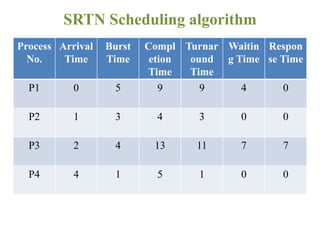
P1 0 5 9 9 4 0
P2 1 3 4 3 0 0
P3 2 4 13 11 7 7
P4 4 1 5 1 0 0
SRTN Scheduling algorithm
Process
No.
Arrival
Time
Burst
Time
Compl
etion
Time
Turnar
ound
Time
Waitin
g Time
Respon
se Time
P1 0 5 9 9 4 0
P2 1 3 4 3 0 0
P3 2 4 13 11 7 7
P4 4 1 5 1 0 0
SRTN Scheduling algorithm
0 1 2 3 4 5 6 7 8 9 10 11 12 13
P1 P2 P2 P2 P4 P1 P1 P1 P1 P3 P3 P3 P3
SRTN Scheduling algorithm
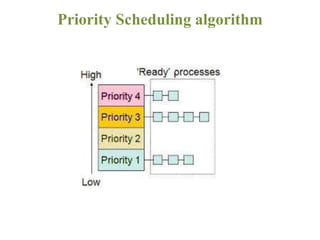
Priority Scheduling algorithm
• Each process is assigned a priority, and priority based
process is allowed to run first.
• Equal-Priority processes are scheduled in FCFS order.
• The shortest-Job-First (SJF) algorithm is a special case of
general priority scheduling algorithm.
Priority Scheduling algorithm
• Examples of Internal priorities are
– Time limits.
– Memory requirements.
– File requirements,
for example, number of open files.
– CPU Vs I/O requirements.
Priority Scheduling algorithm
• Externally defined priorities are set by criteria that are
external to operating system such as
– The importance of process.
– Type or amount of funds being paid for computer use.
Priority Scheduling algorithm
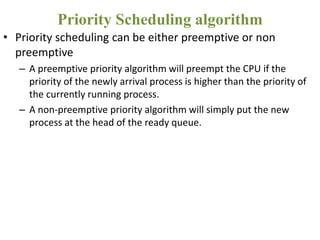
• Priority scheduling can be either preemptive or non
preemptive
– A preemptive priority algorithm will preempt the CPU if the
priority of the newly arrival process is higher than the priority of
the currently running process.
– A non-preemptive priority algorithm will simply put the new
process at the head of the ready queue.
Priority Scheduling algorithm
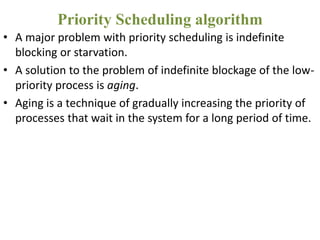
• A major problem with priority scheduling is indefinite
blocking or starvation.
• A solution to the problem of indefinite blockage of the low-
priority process is aging.
• Aging is a technique of gradually increasing the priority of
processes that wait in the system for a long period of time.
Priority Scheduling algorithm
Prio
rity
Proc
ess
No.
Arriva
l Time
Bur
st
Tim
e
Compl
etion
Time
Turnar
ound
Time
Waitin
g Time
Respon
se Time
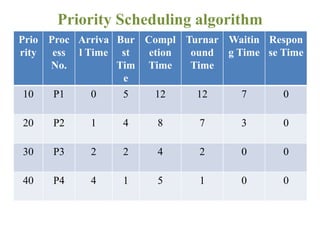
10 P1 0 5 12 12 7 0
20 P2 1 4 8 7 3 0
30 P3 2 2 4 2 0 0
40 P4 4 1 5 1 0 0
Priority Scheduling algorithm
Prio
rity
Proc
ess
No.
Arriva
l Time
Bur
st
Tim
e
Compl
etion
Time
Turnar
ound
Time
Waitin
g Time
Respon
se Time
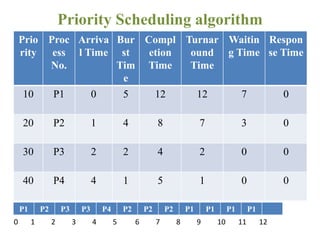
10 P1 0 5 12 12 7 0
20 P2 1 4 8 7 3 0
30 P3 2 2 4 2 0 0
40 P4 4 1 5 1 0 0
Priority Scheduling algorithm
0 1 2 3 4 5 6 7 8 9 10 11 12
P1 P2 P3 P3 P4 P2 P2 P2 P1 P1 P1 P1
Round Robin Scheduling algorithm
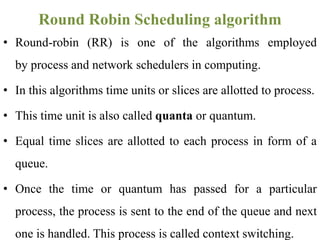
• Round-robin (RR) is one of the algorithms employed
by process and network schedulers in computing.
• In this algorithms time units or slices are allotted to process.
• This time unit is also called quanta or quantum.
• Equal time slices are allotted to each process in form of a
queue.
• Once the time or quantum has passed for a particular
process, the process is sent to the end of the queue and next
one is handled. This process is called context switching.
Round Robin Scheduling algorithm
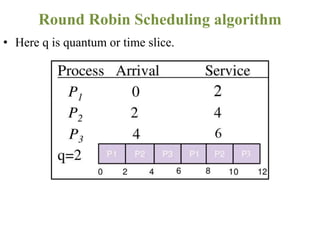
• Here q is quantum or time slice.
Round Robin Scheduling algorithm
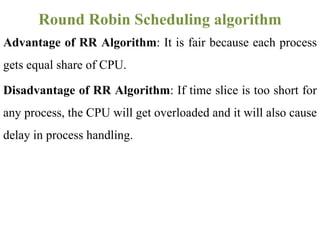
Advantage of RR Algorithm: It is fair because each process
gets equal share of CPU.
Disadvantage of RR Algorithm: If time slice is too short for
any process, the CPU will get overloaded and it will also cause
delay in process handling.
Round Robin Scheduling algorithm
• In a computer for example, the user starts three
applications, Email, a web browser, and a word
processor.
• These applications are loaded into system memory as
processes and each is allowed to run without the user
considering which applications are running in the
background.
Application of RR Scheduling algorithm
Proces
s No.
Arrival
Time
Burst
Time
Compl
etion
Time
Turnar
ound
Time
Waitin
g Time
Respon
se Time
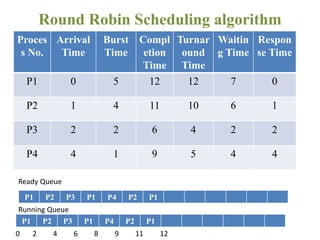
P1 0 5 12 12 7 0
P2 1 4 11 10 6 1
P3 2 2 6 4 2 2
P4 4 1 9 5 4 4
Round Robin Scheduling algorithm
0 2 4 6 8 9 11 12
P1 P2 P3 P1 P4 P2 P1
Ready Queue
Running Queue
DEADLOCK
• In this section we will now study some important
concepts related to deadlocks.
• This is also a major problem that an O.S has to solve.
• Recall how a deadlock occurs.
• A deadlock is a situation in which two computer programs
sharing the same resource are preventing each other from
accessing the resource, resulting in both programs ceasing
to function.
DEADLOCK
RESOURCE
 A resource is anything that can be used by
only a single process at any instant of time.
A resource can be the hardware device or a
piece of information.
For example a printer is a hardware resource.
RESOURCE
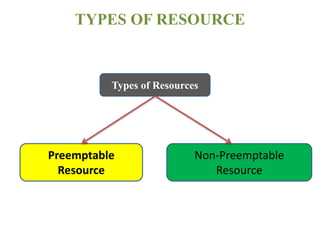
TYPES OF RESOURCE
Types of Resources
Preemptable
Resource
Non-Preemptable
Resource
Preemptable Resource :
• It is one that can be taken away from the process owing
it.
• Main memory(RAM) is an example of preemptable
resource.
Non-Preemptable Resource:
• It is one that cannot be taken away from the process
owing it.
• CD-ROM, Tape Drives, Printers etc are the examples of
non-preemptable resources.
RESOURCE
programming .pptx

programming .pptx

  • 1.
    Operating Systems Lecture#4 Scheduler andits types, Scheduling Algorithms Week#2,Aug,23rd
  • 2.
  • 3.
    Definition: When morethan one process is runnable, the operating system must decide which one run first. The part of the operating system concerned with this decision is called the scheduler, and algorithm it uses is called the scheduling algorithm. Scheduling and Scheduler
  • 4.
    Types of Scheduler Typesof Scheduler Primary Scheduler Secondary Scheduler
  • 5.
    Primary Scheduler 1. Runsthreads with the highest priority. 2. It then compares their priority and assigns resources to them, depending on their priority. 3. Threads with the highest priority will be executed for the current time slice. 4. With two or more threads with the same priority, they are put on a stack to allow each run on a given time slot. Scheduling and Scheduler: Primary Scheduler
  • 6.
    Secondary Scheduler 1. Itis responsible for increasing the priority of non- executing threads. 2. It is important that those low-priority threads are given a chance to run on the operating system and this is the function of this type of scheduler. Scheduling and Scheduler: Secondary Scheduler
  • 7.
    • How schedulerknows the current status of each process? • We need to define states of processes so that scheduler can respond to each process Scheduling and Scheduler
  • 8.
  • 9.
    • New • Ready •Running • Waiting • Terminated FOUR STATES OF PROCESS
  • 10.
    • Ready: Theprocess is in the main memory(RAM) and available for execution. • Blocked: The process is in the main memory and awaiting response. • Blocked/Suspend: The process is in secondary memory(hard disk) and awaiting response. • Ready/Suspend: The process is in the secondary memory(hard disk) but is available for execution as soon as it is loaded into the main memory. FOUR STATES OF PROCESS
  • 11.
    • These fourstates helps the scheduler to respond to each process according to its current state so that process can be handled efficiently. FOUR STATES OF PROCESS
  • 12.
  • 13.
    • Fairness: Schedulermakes sure that each process gets its fair share of the CPU. • Efficiency: Scheduler must keep the CPU busy 100 percent of the time. • Waiting time: Scheduler should minimize the waiting time for job. • Turnaround: Scheduler should minimize the time of how long processes must wait for output. • Throughput: Scheduler should maximize the number of jobs processed per hour. Scheduling Goals
  • 14.
  • 15.
    • Example (Enterthe bank and process a transaction) • Arrival Time: The time at which the process enters the ready queue or state • Burst Time: Time required by a process to get executed on CPU • Completion Time: Time at which the process completes its execution CPU Scheduling
  • 16.
    • Turn AroundTime; {Completion Time – Arrival Time} • Waiting Time: {Turn Around Time – Burst Time} • Response Time: {(The time at which a process gets CPU first time) – (Arrival Time)} CPU Scheduling
  • 17.
  • 18.
    Two types ofscheduling algorithms: Non-preemptive Scheduling • A scheduling is non-preemptive if, once a process has been given to the CPU, it cannot be taken away. • Example: 5 students need to ask 4 questions each Preemptive and Non- Preemptive Scheduling Algorithms
  • 19.
    Two types ofscheduling algorithms: Preemptive Scheduling • A scheduling is preemptive if, once a process has been given to the CPU, it can be taken away. • Example: 5 students need to ask 4 questions each • We shall take turns Preemptive and Non- Preemptive Scheduling Algorithms
  • 20.
    Reasons for Preemption •Time Quantum • Example: Teacher gives time to each student for question • Priority • Example: Some high priority student may ask question • Shortest job • Example: Student asking short questions Preemptive and Non- Preemptive Scheduling Algorithms
  • 21.
    1. FCFS Scheduling 2.SJF Scheduling 3. SRTN Scheduling 4. Priority Scheduling 5. Round Robin (RR) Scheduling Scheduling Algorithms
  • 22.
    FCFS(First Come FirstServe) Scheduling algorithm
  • 23.
    • It isNon-preemptive Algorithm • Follows First-In-First-Out (FIFO) rule • Run-to-Completion • Run-Until-Finish FCFS Scheduling algorithm
  • 24.
    • Runs theprocesses in the order they arrive. • Removes a process from the processor only if it is in block state or terminates. • Advantage: Good for long processes when they finally get on. • Disadvantage: Bad for short processes if they are behind a long process. FCFS Scheduling algorithm
  • 25.
  • 26.
    Process No. Arrival Time Burst Time Compl etion Time Turnar ound Time Waitin g Time Respon se Time P10 2 2 2 0 0 P2 1 2 4 3 1 1 P3 5 3 8 3 0 0 P4 6 4 12 6 2 2 FCFS Scheduling algorithm P1 P2 P3 P4 0 2 4 5 8 12
  • 27.
    SJF(Shortest Job First)Scheduling algorithm
  • 28.
    • Shortest-Job-First (SJF)is a non-preemptive scheduling algorithm. • In this algorithm the process which takes the shortest time to complete is run first. • It thus completes the processes that need a short time to be served and hence processes can be efficiently handled. SJF Scheduling algorithm
  • 29.
    • P3 hasshortest time unit of 2 and hence is scheduled first. • Process with same time units can be placed one after other. SJF Scheduling algorithm
  • 30.
    Process No. Arrival Time Burst Time Compl etion Time Turnar ound Time Waitin g Time Respon se Time P11 3 6 5 2 2 P2 2 4 10 8 4 4 P3 1 2 3 2 0 0 P4 4 4 14 10 6 6 SJF Scheduling algorithm
  • 31.
    Process No. Arrival Time Burst Time Compl etion Time Turnar ound Time Waitin g Time Respon se Time P11 3 6 5 2 2 P2 2 4 10 8 4 4 P3 1 2 3 2 0 0 P4 4 4 14 10 6 6 SJF Scheduling algorithm P3 P1 P2 P4 0 1 3 6 10 14
  • 32.
  • 33.
    SRTN(Shortest Remaining TimeNext) Scheduling algorithm
  • 34.
    1. It ispreemptive version of SJF. 2. Short job is given immediate preference to a running longer job. 3. The scheduler always chooses the process whose remaining run time is the shortest. 4. Must estimate expected remaining processing time 5. If the new job needs less time to finish than the current process, the current SJF process is suspended and the new job is finished by SRTN. SRTN Scheduling algorithm
  • 35.
    Process No. Arrival Time Burst Time Compl etion Time Turnar ound Time Waitin g Time Respon se Time P10 5 9 9 4 0 P2 1 3 4 3 0 0 P3 2 4 13 11 7 7 P4 4 1 5 1 0 0 SRTN Scheduling algorithm
  • 36.
    Process No. Arrival Time Burst Time Compl etion Time Turnar ound Time Waitin g Time Respon se Time P10 5 9 9 4 0 P2 1 3 4 3 0 0 P3 2 4 13 11 7 7 P4 4 1 5 1 0 0 SRTN Scheduling algorithm 0 1 2 3 4 5 6 7 8 9 10 11 12 13 P1 P2 P2 P2 P4 P1 P1 P1 P1 P3 P3 P3 P3
  • 37.
  • 38.
  • 39.
    • Each processis assigned a priority, and priority based process is allowed to run first. • Equal-Priority processes are scheduled in FCFS order. • The shortest-Job-First (SJF) algorithm is a special case of general priority scheduling algorithm. Priority Scheduling algorithm
  • 40.
  • 41.
    • Examples ofInternal priorities are – Time limits. – Memory requirements. – File requirements, for example, number of open files. – CPU Vs I/O requirements. Priority Scheduling algorithm
  • 42.
    • Externally definedpriorities are set by criteria that are external to operating system such as – The importance of process. – Type or amount of funds being paid for computer use. Priority Scheduling algorithm
  • 43.
    • Priority schedulingcan be either preemptive or non preemptive – A preemptive priority algorithm will preempt the CPU if the priority of the newly arrival process is higher than the priority of the currently running process. – A non-preemptive priority algorithm will simply put the new process at the head of the ready queue. Priority Scheduling algorithm
  • 44.
    • A majorproblem with priority scheduling is indefinite blocking or starvation. • A solution to the problem of indefinite blockage of the low- priority process is aging. • Aging is a technique of gradually increasing the priority of processes that wait in the system for a long period of time. Priority Scheduling algorithm
  • 45.
    Prio rity Proc ess No. Arriva l Time Bur st Tim e Compl etion Time Turnar ound Time Waitin g Time Respon seTime 10 P1 0 5 12 12 7 0 20 P2 1 4 8 7 3 0 30 P3 2 2 4 2 0 0 40 P4 4 1 5 1 0 0 Priority Scheduling algorithm
  • 46.
    Prio rity Proc ess No. Arriva l Time Bur st Tim e Compl etion Time Turnar ound Time Waitin g Time Respon seTime 10 P1 0 5 12 12 7 0 20 P2 1 4 8 7 3 0 30 P3 2 2 4 2 0 0 40 P4 4 1 5 1 0 0 Priority Scheduling algorithm 0 1 2 3 4 5 6 7 8 9 10 11 12 P1 P2 P3 P3 P4 P2 P2 P2 P1 P1 P1 P1
  • 47.
  • 48.
    • Round-robin (RR)is one of the algorithms employed by process and network schedulers in computing. • In this algorithms time units or slices are allotted to process. • This time unit is also called quanta or quantum. • Equal time slices are allotted to each process in form of a queue. • Once the time or quantum has passed for a particular process, the process is sent to the end of the queue and next one is handled. This process is called context switching. Round Robin Scheduling algorithm
  • 49.
    • Here qis quantum or time slice. Round Robin Scheduling algorithm
  • 50.
    Advantage of RRAlgorithm: It is fair because each process gets equal share of CPU. Disadvantage of RR Algorithm: If time slice is too short for any process, the CPU will get overloaded and it will also cause delay in process handling. Round Robin Scheduling algorithm
  • 51.
    • In acomputer for example, the user starts three applications, Email, a web browser, and a word processor. • These applications are loaded into system memory as processes and each is allowed to run without the user considering which applications are running in the background. Application of RR Scheduling algorithm
  • 52.
    Proces s No. Arrival Time Burst Time Compl etion Time Turnar ound Time Waitin g Time Respon seTime P1 0 5 12 12 7 0 P2 1 4 11 10 6 1 P3 2 2 6 4 2 2 P4 4 1 9 5 4 4 Round Robin Scheduling algorithm 0 2 4 6 8 9 11 12 P1 P2 P3 P1 P4 P2 P1 P1 P2 P3 P1 P4 P2 P1 Ready Queue Running Queue
  • 53.
  • 54.
    • In thissection we will now study some important concepts related to deadlocks. • This is also a major problem that an O.S has to solve. • Recall how a deadlock occurs. • A deadlock is a situation in which two computer programs sharing the same resource are preventing each other from accessing the resource, resulting in both programs ceasing to function. DEADLOCK
  • 55.
  • 56.
     A resourceis anything that can be used by only a single process at any instant of time. A resource can be the hardware device or a piece of information. For example a printer is a hardware resource. RESOURCE
  • 57.
    TYPES OF RESOURCE Typesof Resources Preemptable Resource Non-Preemptable Resource
  • 58.
    Preemptable Resource : •It is one that can be taken away from the process owing it. • Main memory(RAM) is an example of preemptable resource. Non-Preemptable Resource: • It is one that cannot be taken away from the process owing it. • CD-ROM, Tape Drives, Printers etc are the examples of non-preemptable resources. RESOURCE