Welcome! KrazyKoder is a revolutionary Training Portal for IT Students! Please go through this brief presentation to orient yourself with the basics of our system
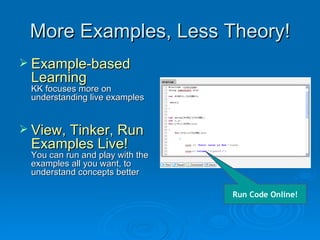
More Examples, Less Theory! Example-based Learning KK focuses more on understanding live examples View, Tinker, Run Examples Live! You can run and play with the examples all you want, to understand concepts better    Run Code Online!
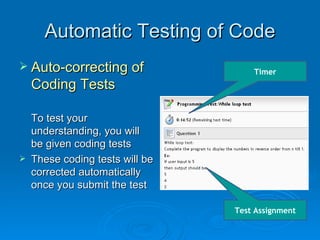
Automatic Testing of Code Auto-correcting of Coding Tests To test your understanding, you will be given coding tests These coding tests will be corrected automatically once you submit the test Test Assignment Timer
Basic Navigation Navigating a course is very Simple! Use the  and  icons at the bottom  to navigate the course. It’s really that simple!
More Features Side Menus For more features, use the side menus The side menus can be shown/hidden by clicking the small  and  icons at the top.
Left Side Menu Left Side Menu has these features: Profile page (wall, messaging, FB integration) Multimedia Chatroom (Text / Audio / Video ) Forum Timeline Reports Messaging And a few others ..!
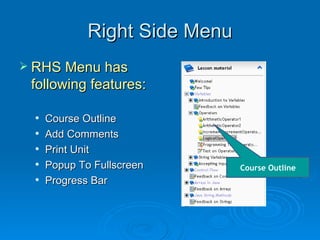
Right Side Menu RHS Menu has following features: Course Outline Add Comments Print Unit  Popup To Fullscreen Progress Bar Course Outline
Done! That’s It! You’re done with a basic orientation! Now go have fun learning Java! Click the  icon at the bottom to proceed!

Krazykoder features intro

  • 1.
    Welcome! KrazyKoder isa revolutionary Training Portal for IT Students! Please go through this brief presentation to orient yourself with the basics of our system
  • 2.
    More Examples, LessTheory! Example-based Learning KK focuses more on understanding live examples View, Tinker, Run Examples Live! You can run and play with the examples all you want, to understand concepts better Run Code Online!
  • 3.
    Automatic Testing ofCode Auto-correcting of Coding Tests To test your understanding, you will be given coding tests These coding tests will be corrected automatically once you submit the test Test Assignment Timer
  • 4.
    Basic Navigation Navigatinga course is very Simple! Use the and icons at the bottom to navigate the course. It’s really that simple!
  • 5.
    More Features SideMenus For more features, use the side menus The side menus can be shown/hidden by clicking the small and icons at the top.
  • 6.
    Left Side MenuLeft Side Menu has these features: Profile page (wall, messaging, FB integration) Multimedia Chatroom (Text / Audio / Video ) Forum Timeline Reports Messaging And a few others ..!
  • 7.
    Right Side MenuRHS Menu has following features: Course Outline Add Comments Print Unit Popup To Fullscreen Progress Bar Course Outline
  • 8.
    Done! That’s It!You’re done with a basic orientation! Now go have fun learning Java! Click the icon at the bottom to proceed!