Software Development Lifecycles
Created By: Tarek Roshdy
Software Development Lifecycle
A Software Development Lifecycle Model describes the types of activities
performed at each stage in a software development project, and how the
activities relate to one another logically and chronologically.
THE
SOFTWARE
DEVELOPMENT
CYCLE
Software Development Lifecycle
SDLC
Iterative &
Incremental
Sequential
Sequential Software Development
• A sequential development model
describes the software development
process as a linear, sequential flow of
activities.
• This means that any phase in the
development process should begin when
the previous phase is complete.
• In theory, there is no overlap of phases,
but in practice, it is beneficial to have
early feedback from the following phase
Waterfall Model
• In the Waterfall model, the development
activities are completed one after
another.
• In this model, test activities only occur
after all other development activities
have been completed
V-Model
Unlike the Waterfall model, the V-model integrates the test process throughout
the development process, implementing the principle of early testing.
Iterative & Incremental Models
Scrum
Each iteration tends to be relatively short (e.g., hours, days, or a few weeks), and the feature increments
are correspondingly small, such as a few enhancements and/or two or three new features
What is Software Testing?
Created By: Tarek Roshdy
What is Software Testing?
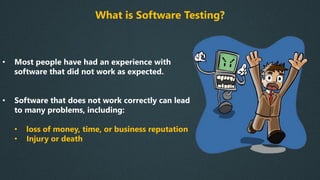
• Most people have had an experience with
software that did not work as expected.
• Software that does not work correctly can lead
to many problems, including:
• loss of money, time, or business reputation
• Injury or death
What is Software Testing?
• Software testing is a way to:
✓ assess the quality of the software
✓ reduce the risk of software failure in
operation
What is Software Testing?
• Software Testing ≠ Test Execution
• software testing is a process which
includes many different activities
• Execution is only one of these activities.
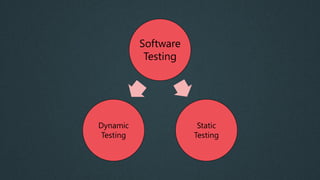
Software
Testing
Static
Testing
Dynamic
Testing
Software
Testing
Verification
Validation
Objectives of Software Testing
Work-product
Evaluation
Requirements
Fulfillment
Building
Confidence
Finding
Defects
Preventing
Defects
Providing
Information to
Stakeholders
Reduce Risk
Compliance
with Laws
Objectives
may vary
Relationship between Testing & Debugging
Testing Debugging
Confirmation
Testing
Test Process
Created By: Tarek Roshdy
Test Process
There is no one universal software test process, but there are common sets of test activities without
which testing will be less likely to achieve its established objectives
Test Process Activities
Test
Planning
Test
Monitoring
& Control
Test Analysis Test Design
Test
Implementatio
n
Test
Execution
Test
Completion
Test Levels
Created By: Tarek Roshdy
Test Levels
• Test levels are groups of test activities that are
organized and managed together.
• Each test level is an instance of the test process
• Test levels are related to other activities within the
software development lifecycle.
Acceptance
System
Integration
Unit
Component (Unit) Testing
Component testing (also known as unit or module testing) focuses on components that are
separately testable
Integration Testing
Integration testing focuses on interactions between components or systems
Integration
Testing
System
Integration
Component
Integration
Integration Testing
• Component integration testing is often
the responsibility of developers.
• System integration testing is generally the
responsibility of testers.
System Testing
System testing focuses on the behavior and capabilities of a whole system or product
System Testing
• System testing often produces information that is used
by stakeholders to make release decisions
• The test environment should ideally correspond to the
final target or production environment
• System testing should focus on the overall, end-to-end
behavior of the system as a whole
• Independent testers typically carry out system testing.
Acceptance Testing
Acceptance testing, like system testing, typically focuses on the behavior and capabilities of a
whole system or product
Alpha & Beta Testing
• Alpha Testing is done inside the organization
• Beta Testing is done by users at their location
Testing Types
Created By: Tarek Roshdy
1-Functional Testing:
-Testing what the system does
-Usually answered with (Yes/No)
2-Non-functional Testing:
-Testing how the system performs
-Hard to answer with Yes/No
-Usually measured as a range
3-Black-Box Testing:
-Testing without knowing the internal structure of the system
4-White-Box Testing:
-Testing while monitoring the internal structure of the system
5-Dynamic Testing
-Testing that includes executing the software
6-Static Testing
-Testing that doesn’t includes executing the software
7-Retesting (Confirmation Testing)
Testing after debugging to ensure defects are fixed
8-Regression Testing
Testing unchanged areas to ensure they are not affected by changes
9-Smoke Testing
Testing main functionalities to ensure that the build is stable enough to continue testing
Test Case Writing
Created By: Tarek Roshdy
What is a test case?
A set of preconditions, inputs, actions (where applicable), expected results
and postconditions, developed based on test conditions.
1-Test Case Title:
• Verify login with a valid username & password
2-Precondition:
• User is already registered using valid credentials
3-Test Steps
1. Enter a valid username
2. Enter a valid password
3. Click on sign in
4-Expected result:
• User is logged in successfully and redirected to (XYZ) page
5-Test Scenario (Test Suite)
• Login
6-Test Environment
• Windows 10 – Chrome – Wi-Fi
• Samsung Galaxy Note 10 - Android 10 – 4G Network
• iPhone 11 – iOS 13.3.1 – 5G Network
7-Actual Result:
• Very important note: Never fill the actual result field until you execute
the test case
8-Status
New (Ready to test) The test case is not executed
Pass The test case is executed and the actual result
is the same as the expected result
Fail The test case is executed and the actual result
is different from the expected result
Blocked/Skipped The test case can’t be executed
Title Login with a valid username & password
Precondition User is already registered using valid credentials
Test Steps 1. Enter a valid username
2. Enter a valid password
3. Click on sign in
Expected Result -User is logged in successfully
-User is redirected to Home page
Test Suite Login
Test Environment Samsung Galaxy Note 10 - Android 10 – 4G Network
Actual Result Same as expected
Status Pass
Example Test Case
Bug Report Writing
Created By: Tarek Roshdy
What is a defect report?
Documentation of the occurrence, nature, and status of a defect.
What is a defect?
An imperfection or deficiency in a work product where it does not meet its
requirements or specifications. [Synonyms: bug, fault]
1-Bug Report Title:
• Section -> Description
• Register -> No error message appears when user leaves password field empty
2-Steps to reproduce:
• Must be very specific
• Ex:
1. Open www.facebook.com
2. Click on the hamburger icon in the upper left corner
3. Scroll down to the bottom of the screen
4. Click on Settings
5. Click on data usage
6. Change data usage to “minimum limit”
3-Expected Result:
• The same expected result like in the test case
4-Actual Result:
• What really happened when the steps are executed
5-Test Environment
• Specify the environment(s) in which the defect occurred
• Windows 10 – Chrome – Wi-Fi
• Samsung Galaxy Note 10 - Android 10 – 4G Network
• iPhone 11 – iOS 13.3.1 – 5G Network
6-Screenshot or video:
• The screenshot must show the whole screen
• A red rectangle should be around the defect area
• The video should show the clicks on the keyboard
7-Bug priority:
• Critical: Login isn’t working-Application crashes in Home page – Wrong cart value
• High: Login page responds slowly – User is not able to add profile image
• Medium: Some pages have poor performance- Portrait mode isn’t working correctly
• Low: Spelling mistakes – Image misalignment
Defects’ Types
1-Functional:
• Forgot password functionality isn’t working
2-Visual (UI):
3-Content:
4-Performance:
• Videos take too much time to play
5-Suggestion:
• The font of the placeholder should be bigger
8-Status
New (Ready to test) The test case is not executed
Pass The test case is executed and the actual result
is the same as the expected result
Fail The test case is executed and the actual result
is different from the expected result
Blocked/Skipped The test case can’t be executed
Title Login -> Forgot password button isn’t working
Steps to reproduce 1. Click on Login
2. Click on Forgot password
Expected Result The button can be clicked and user should be
redirected to a page to enter his email
Actual result Clicking on the button doesn’t have any impact
Test Environment Samsung Galaxy Note 10 - Android 10 – 4G Network
Priority High
Type Functional
Screenshot
Example Defect Report

Course Slides.pdf