®
WEBINAR: Automation Demystified
Part 5: Codeless Test Automation
• July 10th, 2019 – Denis Markovtsev, @dmarkovtsev
We will be starting the webinar shortly, please stand by…
All phones will be automatically on mute until the Q&A.
®
2 | 7/10/2019 © Copyright 2006-2019 Inflectra Corporation
Webinar Series: Useful Information
• Housekeeping Matters
• Post Webinar Follow-Up:
• Blog
• Webinar Recording
• Presentation On Slideshare
• Post-Webinar Quiz
• Webinar Series: Test Automation,
Demystified
• Webinar Series Certificate Rules &
FAQs
®
3 | 7/10/2019 © Copyright 2006-2019 Inflectra Corporation
Hey, I am Denis
• Working on Rapise test
automation tool @Inflectra
• 20 years in software
development
• 10 years in test automation
• Twitter: @dmarkovtsev
• Email: denis@Inflectra.com
®
4 | 7/10/2019 © Copyright 2006-2019 Inflectra Corporation
Codeless Test Automation
 What does
codeless mean?
 Why we need
codeless?
 Who does
codeless
automation?
®
5 | 7/10/2019 © Copyright 2006-2019 Inflectra Corporation
Ways to Write Less Code
 Use software libraries
 Use a tool providing keyword-driven features
®
6 | 7/10/2019 © Copyright 2006-2019 Inflectra Corporation
Keywords
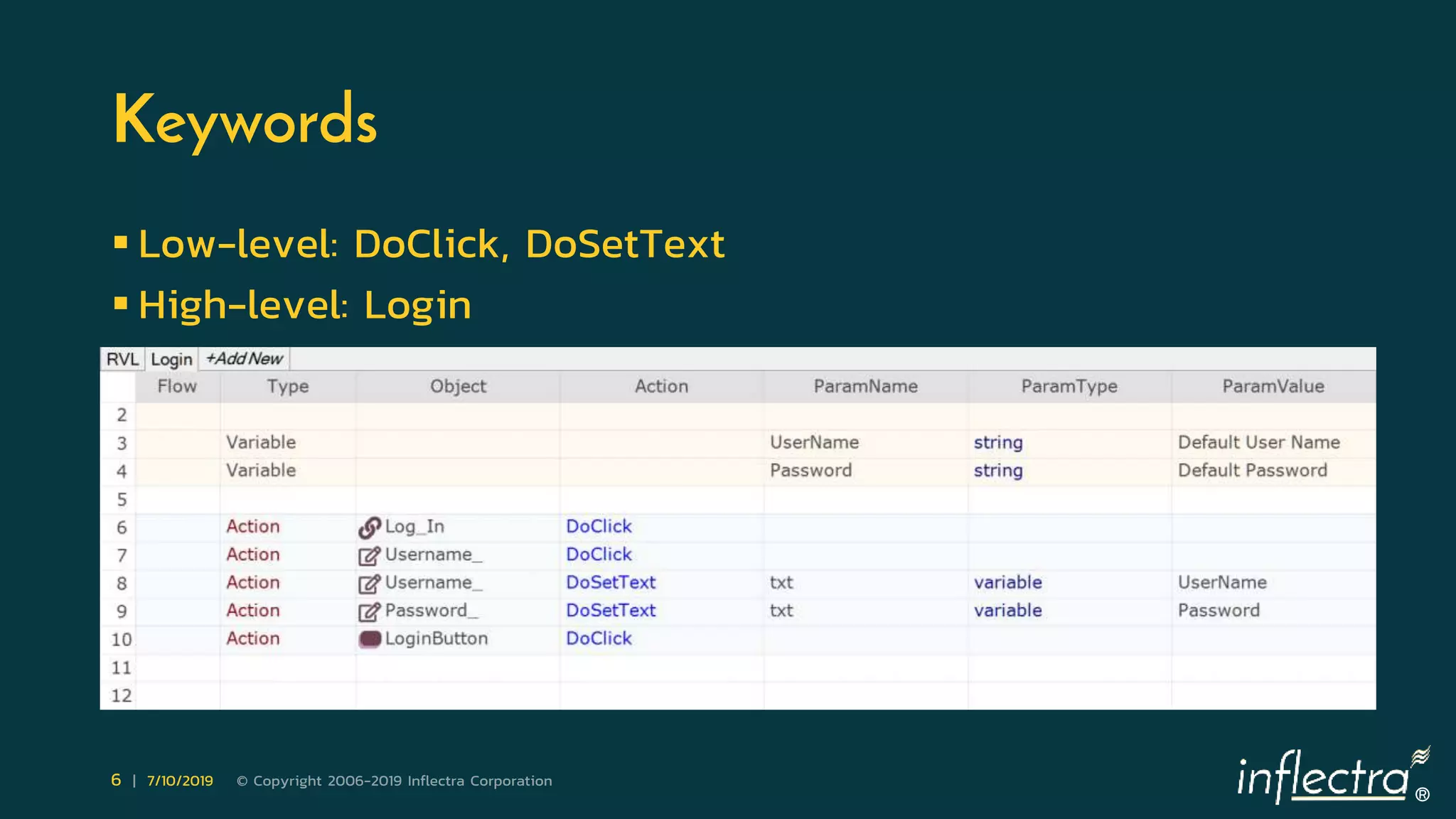
 Low-level: DoClick, DoSetText
 High-level: Login
®
7 | 7/10/2019 © Copyright 2006-2019 Inflectra Corporation
Data In Rows
®
8 | 7/10/2019 © Copyright 2006-2019 Inflectra Corporation
Data In Columns
®
9 | 7/10/2019 © Copyright 2006-2019 Inflectra Corporation
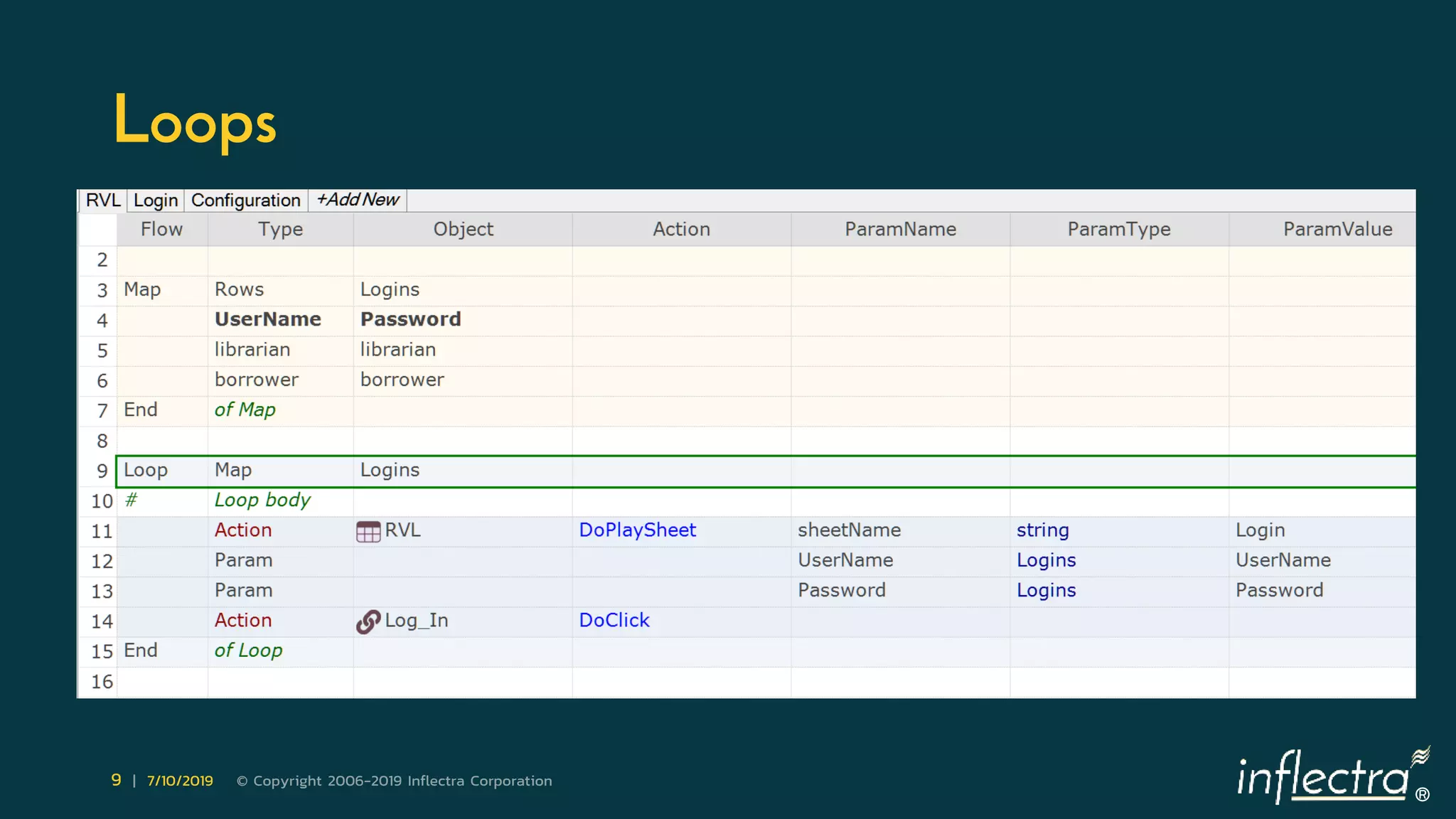
Loops
®
10 | 7/10/2019 © Copyright 2006-2019 Inflectra Corporation
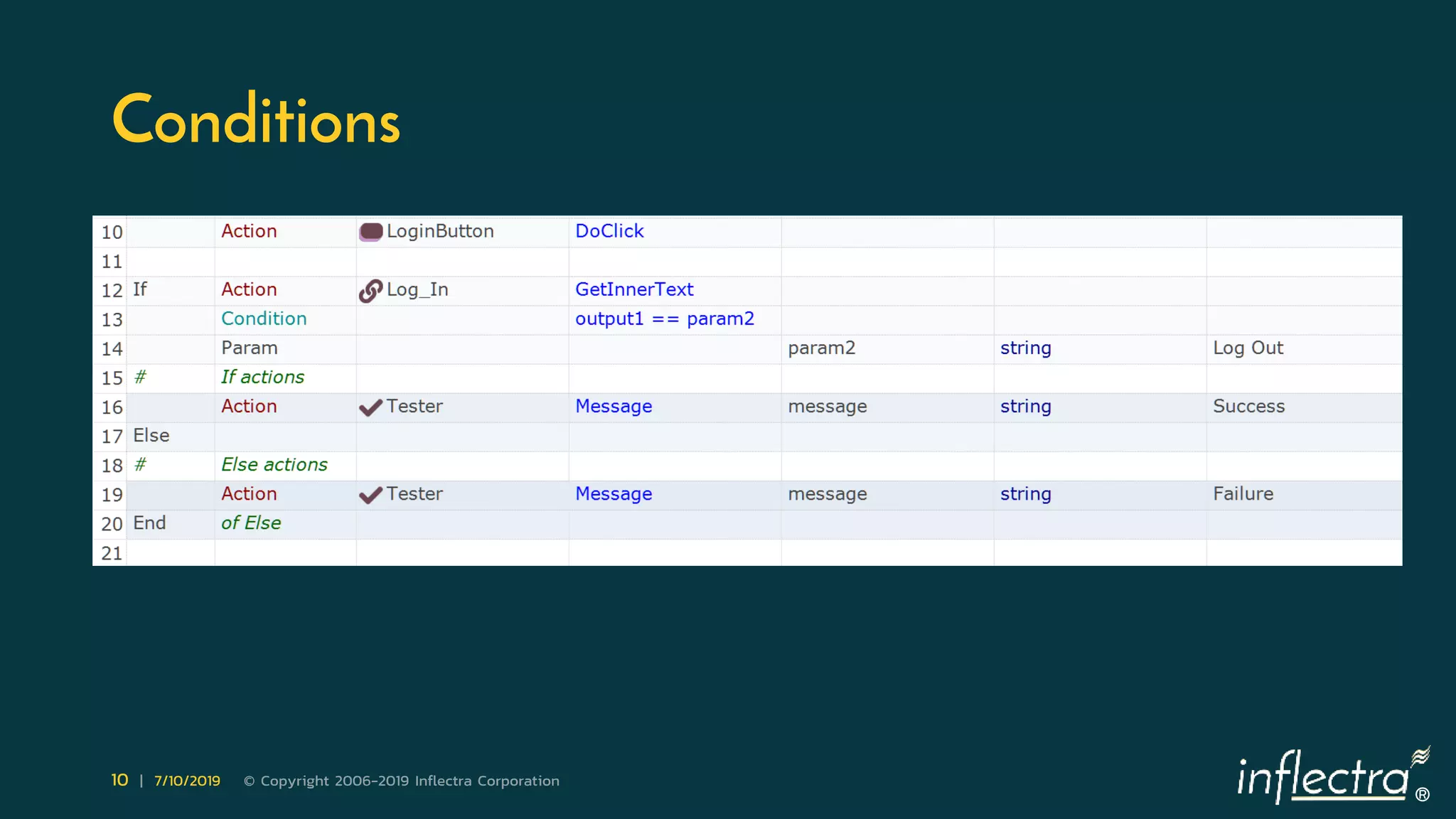
Conditions
®
11 | 7/10/2019 © Copyright 2006-2019 Inflectra Corporation
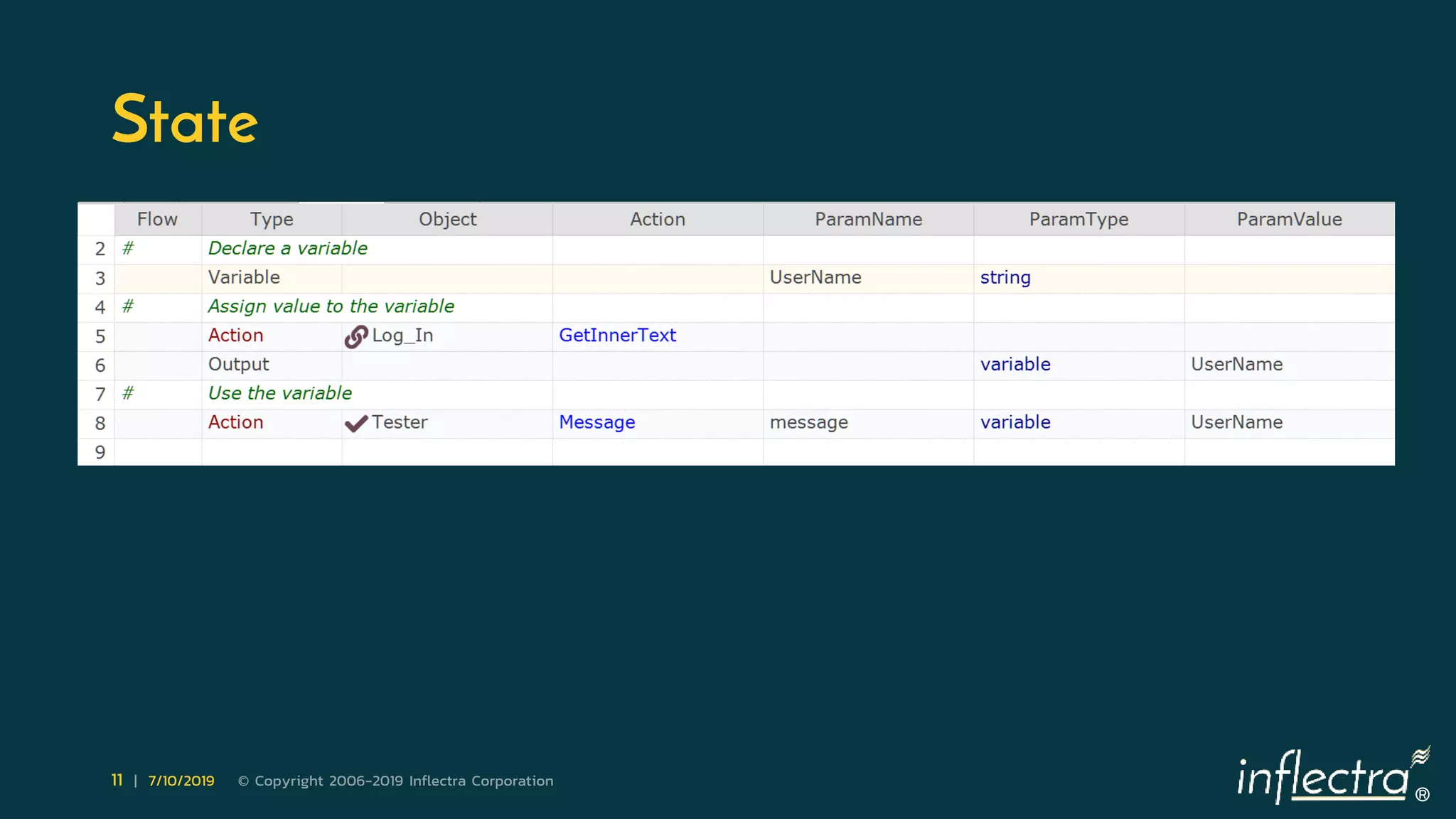
State
®
12 | 7/10/2019 © Copyright 2006-2019 Inflectra Corporation
Stop!
 But loops, conditions, variables – it is programming, isn’t it?
 Well, let’s tale a look at voice assistants:
 Alexa, what temperature is Miami in the summer?
®
13 | 7/10/2019 © Copyright 2006-2019 Inflectra Corporation
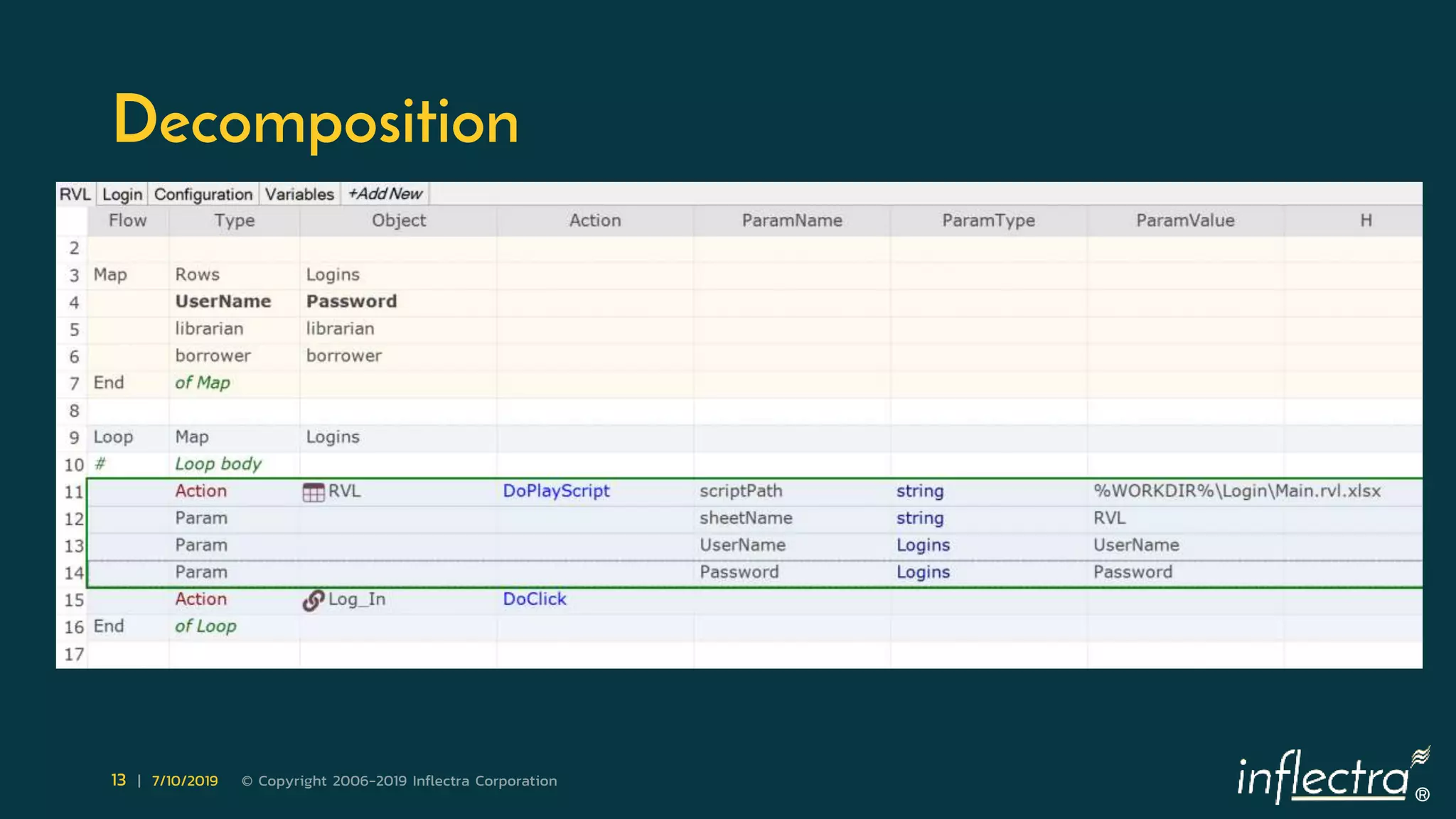
Decomposition
®
14 | 7/10/2019 © Copyright 2006-2019 Inflectra Corporation
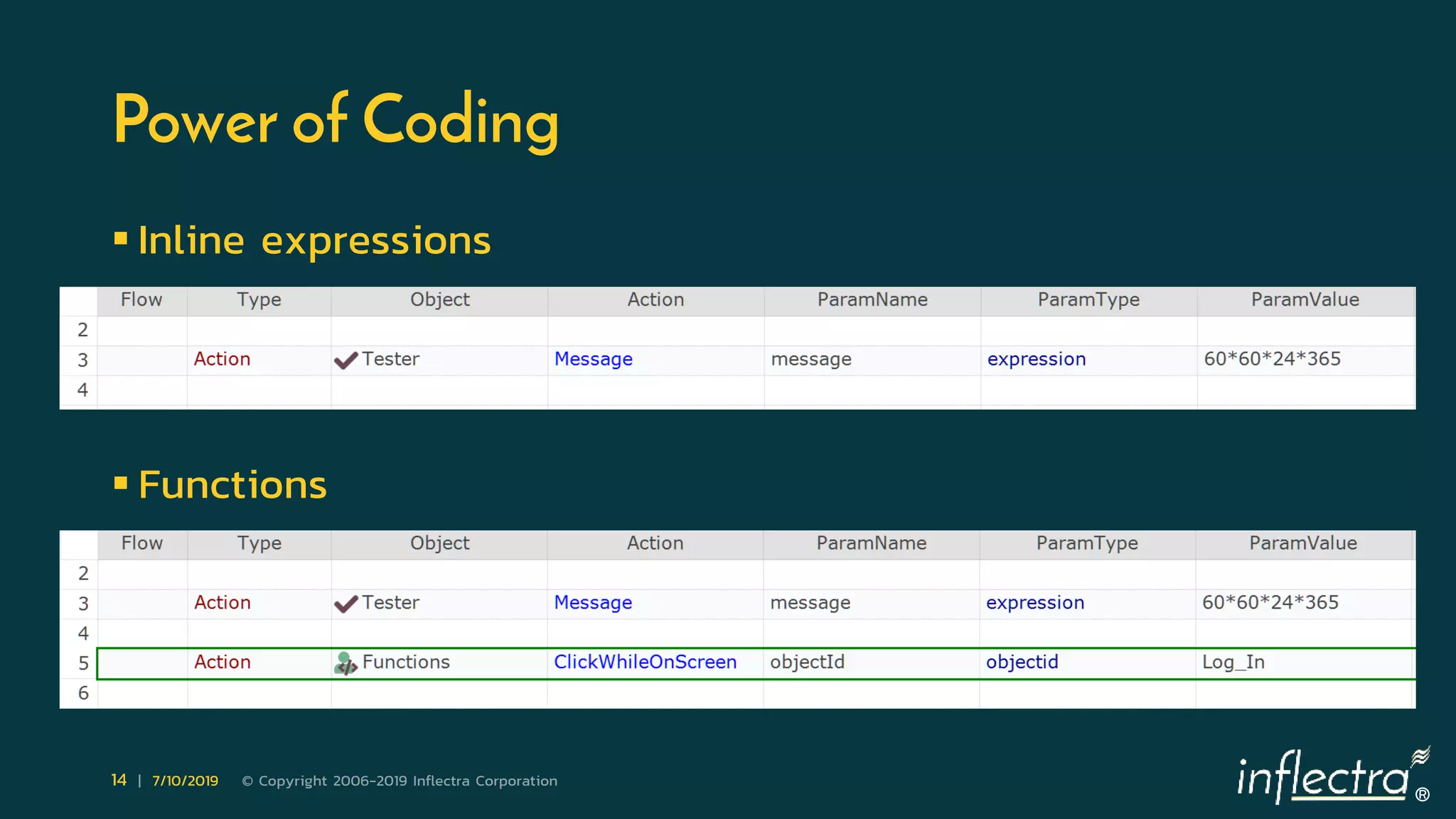
Power of Coding
 Inline expressions
 Functions
®
15 | 7/10/2019 © Copyright 2006-2019 Inflectra Corporation
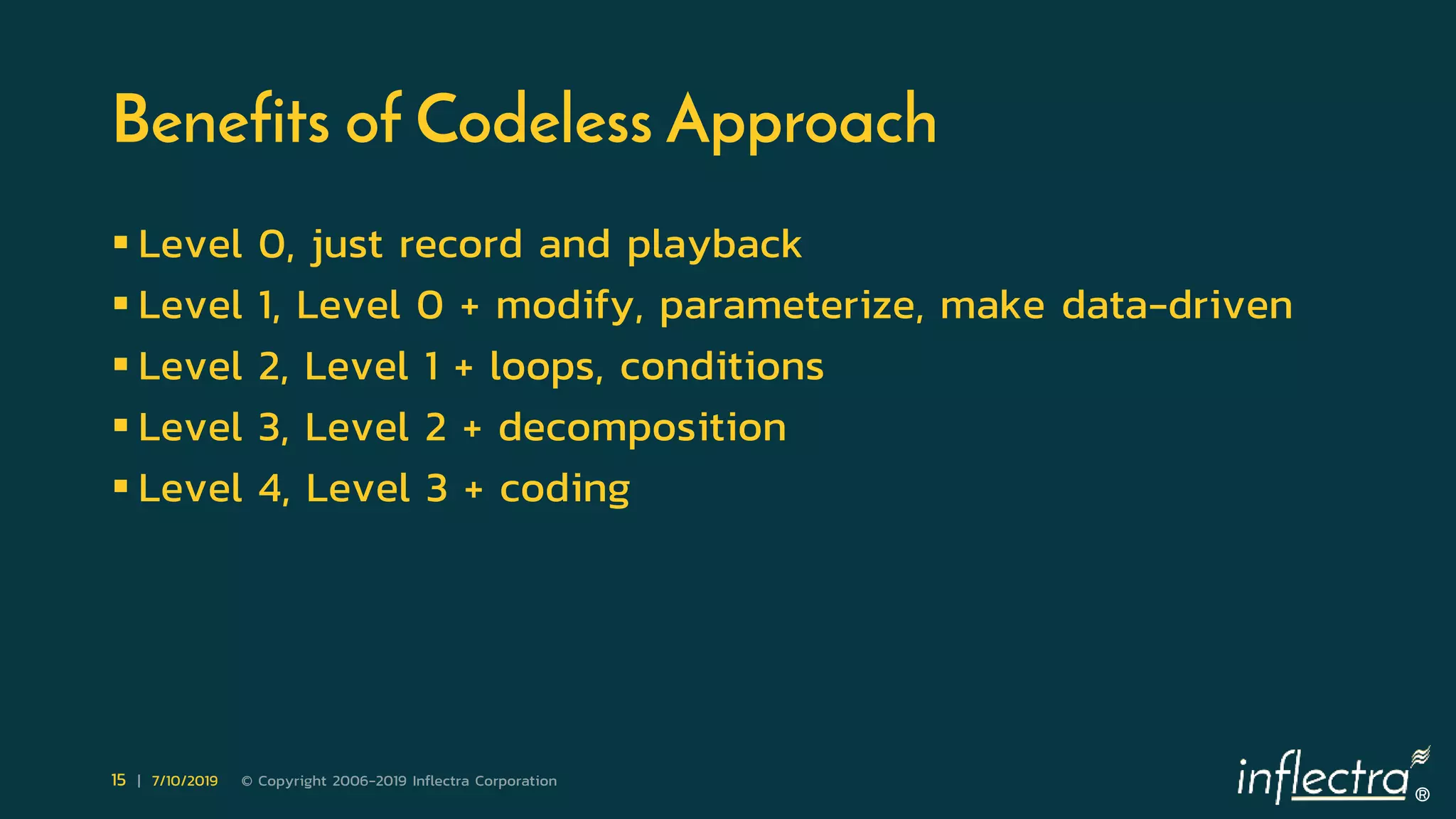
Benefits of Codeless Approach
 Level 0, just record and playback
 Level 1, Level 0 + modify, parameterize, make data-driven
 Level 2, Level 1 + loops, conditions
 Level 3, Level 2 + decomposition
 Level 4, Level 3 + coding
®
16 | 7/10/2019 © Copyright 2006-2019 Inflectra Corporation
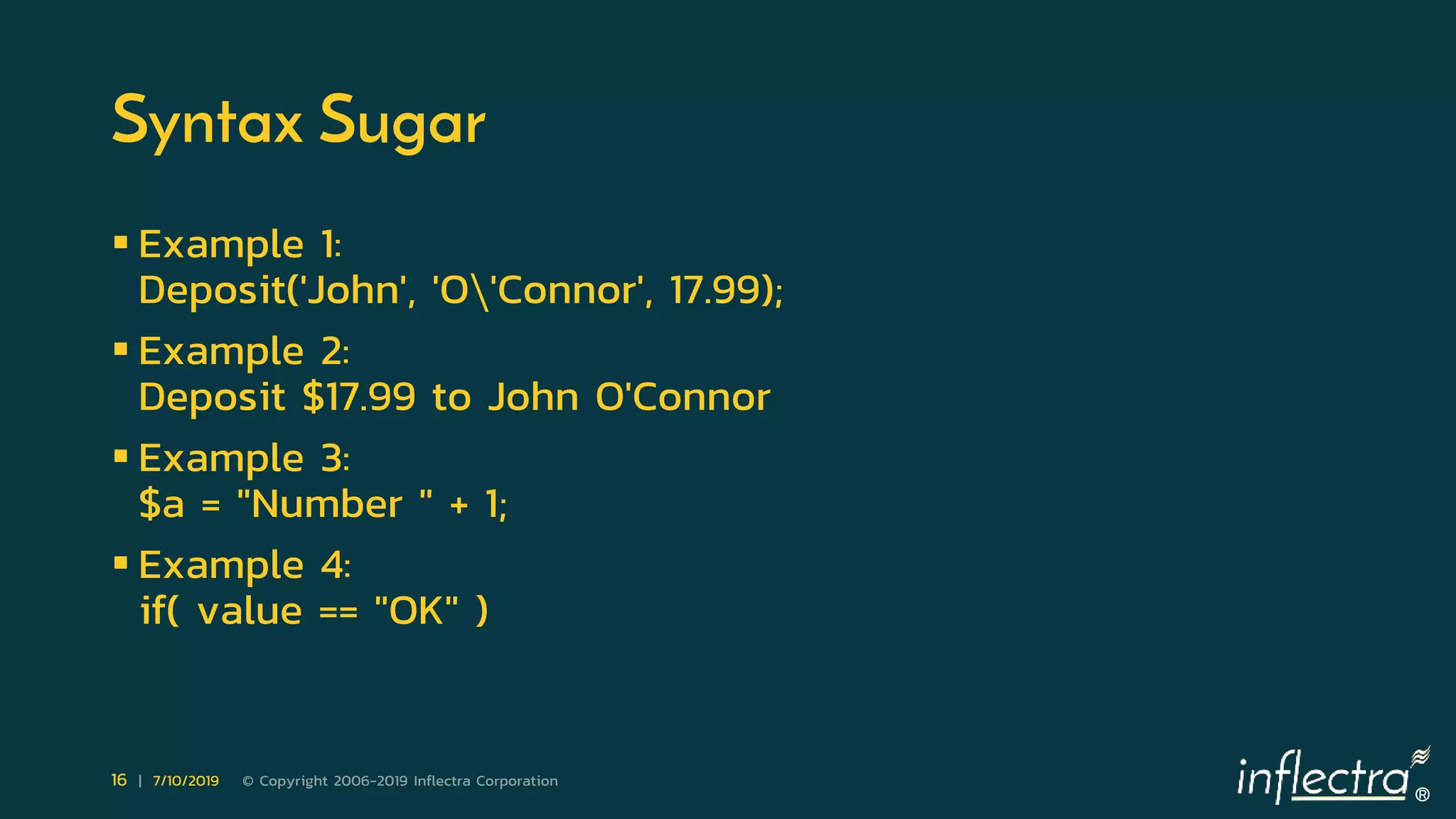
Syntax Sugar
 Example 1:
Deposit('John', 'O'Connor', 17.99);
 Example 2:
Deposit $17.99 to John O'Connor
 Example 3:
$a = "Number " + 1;
 Example 4:
if( value == "OK" )
®
17 | 7/10/2019 © Copyright 2006-2019 Inflectra Corporation
Guidance
®
18 | 7/10/2019 © Copyright 2006-2019 Inflectra Corporation
Execute Anything
®
19 | 7/10/2019 © Copyright 2006-2019 Inflectra Corporation
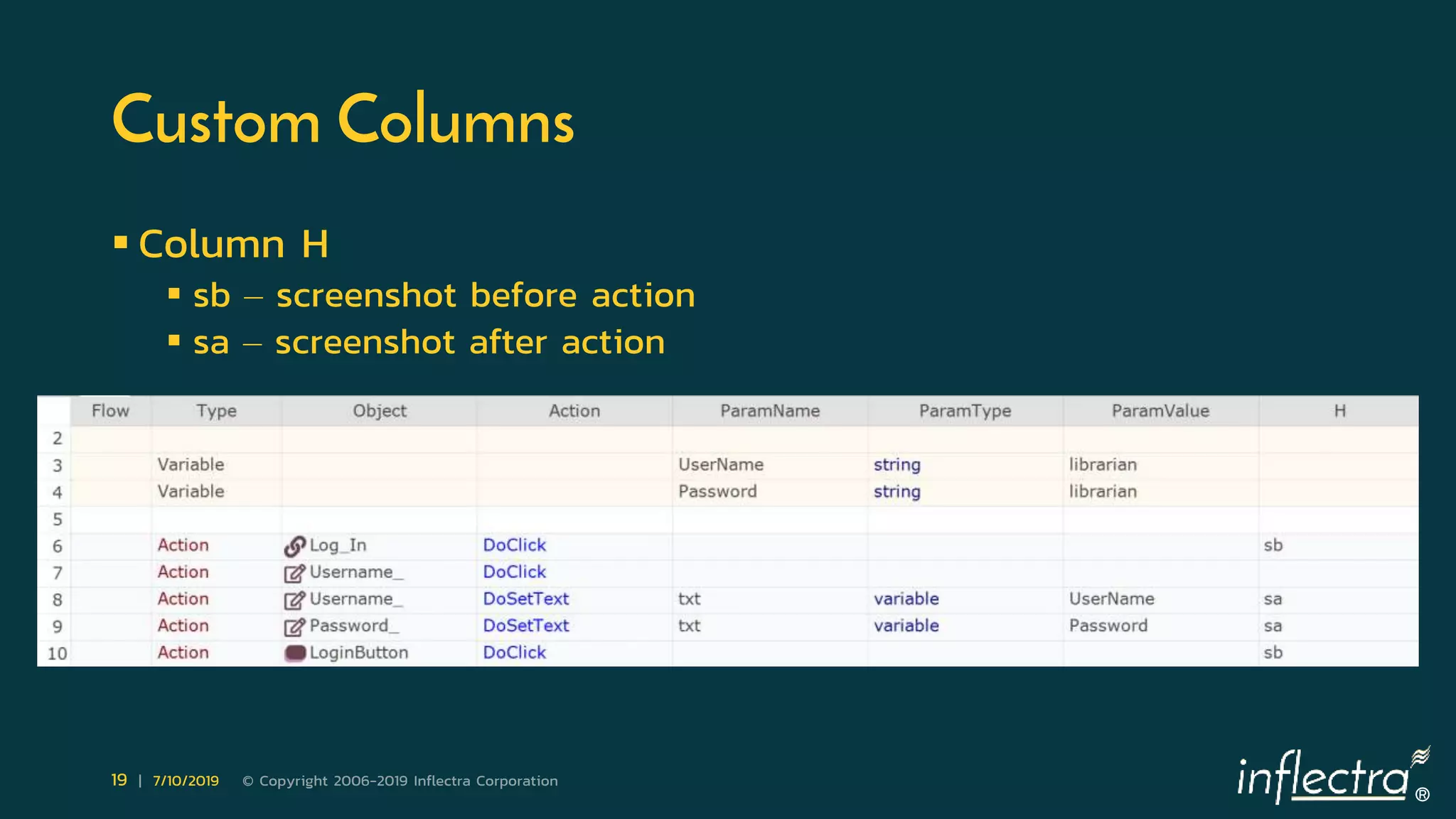
Custom Columns
 Column H
 sb – screenshot before action
 sa – screenshot after action
®
20 | 7/10/2019 © Copyright 2006-2019 Inflectra Corporation
Limitations of Codeless Approach
 Depend on the complexity of a testing scenario
®
21 | 7/10/2019 © Copyright 2006-2019 Inflectra Corporation
Selecting Scenarios for Codeless Automation
 Start with recording & playback
 Avoid loops and conditions at the beginning
 Become comfortable with data-driven testing
 Specific roles:
 qa engineer
 architect
 programmer
 domain expert
®
22 | 7/10/2019 © Copyright 2006-2019 Inflectra Corporation
Next Webinar
 Common Scenarios in Test Automation
 Even if your application is automation-friendly, many projects still
fail. In this webinar we will talk about why and how to avoid this.
Automation has its own problems and bumps on the road. If
automation testing is managed in the same way as manual testing
then you are likely to meet some of these issues.
 Presenter: Alexey Grinevich – automation expert at Inflectra
 https://www.inflectra.com/Company/Event/live-webinar-
common-scenarios-in-test-automation-857.aspx
®
23 | 7/10/2019 © Copyright 2006-2019 Inflectra Corporation
Questions are Welcome
Contact me
• Twitter: @dmarkovtsev
• Email: denis@inflectra.com
• Web: https://www.inflectra.com/Rapise/
®
24 | 7/10/2019 © Copyright 2006-2019 Inflectra Corporation
Q&A
Thank You for Watching
Subscribe to Our Channel for More Videos on Software Testing

Codeless Test Automation - A Webinar Presentation

  • 1.
    ® WEBINAR: Automation Demystified Part5: Codeless Test Automation • July 10th, 2019 – Denis Markovtsev, @dmarkovtsev We will be starting the webinar shortly, please stand by… All phones will be automatically on mute until the Q&A.
  • 2.
    ® 2 | 7/10/2019© Copyright 2006-2019 Inflectra Corporation Webinar Series: Useful Information • Housekeeping Matters • Post Webinar Follow-Up: • Blog • Webinar Recording • Presentation On Slideshare • Post-Webinar Quiz • Webinar Series: Test Automation, Demystified • Webinar Series Certificate Rules & FAQs
  • 3.
    ® 3 | 7/10/2019© Copyright 2006-2019 Inflectra Corporation Hey, I am Denis • Working on Rapise test automation tool @Inflectra • 20 years in software development • 10 years in test automation • Twitter: @dmarkovtsev • Email: denis@Inflectra.com
  • 4.
    ® 4 | 7/10/2019© Copyright 2006-2019 Inflectra Corporation Codeless Test Automation  What does codeless mean?  Why we need codeless?  Who does codeless automation?
  • 5.
    ® 5 | 7/10/2019© Copyright 2006-2019 Inflectra Corporation Ways to Write Less Code  Use software libraries  Use a tool providing keyword-driven features
  • 6.
    ® 6 | 7/10/2019© Copyright 2006-2019 Inflectra Corporation Keywords  Low-level: DoClick, DoSetText  High-level: Login
  • 7.
    ® 7 | 7/10/2019© Copyright 2006-2019 Inflectra Corporation Data In Rows
  • 8.
    ® 8 | 7/10/2019© Copyright 2006-2019 Inflectra Corporation Data In Columns
  • 9.
    ® 9 | 7/10/2019© Copyright 2006-2019 Inflectra Corporation Loops
  • 10.
    ® 10 | 7/10/2019© Copyright 2006-2019 Inflectra Corporation Conditions
  • 11.
    ® 11 | 7/10/2019© Copyright 2006-2019 Inflectra Corporation State
  • 12.
    ® 12 | 7/10/2019© Copyright 2006-2019 Inflectra Corporation Stop!  But loops, conditions, variables – it is programming, isn’t it?  Well, let’s tale a look at voice assistants:  Alexa, what temperature is Miami in the summer?
  • 13.
    ® 13 | 7/10/2019© Copyright 2006-2019 Inflectra Corporation Decomposition
  • 14.
    ® 14 | 7/10/2019© Copyright 2006-2019 Inflectra Corporation Power of Coding  Inline expressions  Functions
  • 15.
    ® 15 | 7/10/2019© Copyright 2006-2019 Inflectra Corporation Benefits of Codeless Approach  Level 0, just record and playback  Level 1, Level 0 + modify, parameterize, make data-driven  Level 2, Level 1 + loops, conditions  Level 3, Level 2 + decomposition  Level 4, Level 3 + coding
  • 16.
    ® 16 | 7/10/2019© Copyright 2006-2019 Inflectra Corporation Syntax Sugar  Example 1: Deposit('John', 'O'Connor', 17.99);  Example 2: Deposit $17.99 to John O'Connor  Example 3: $a = "Number " + 1;  Example 4: if( value == "OK" )
  • 17.
    ® 17 | 7/10/2019© Copyright 2006-2019 Inflectra Corporation Guidance
  • 18.
    ® 18 | 7/10/2019© Copyright 2006-2019 Inflectra Corporation Execute Anything
  • 19.
    ® 19 | 7/10/2019© Copyright 2006-2019 Inflectra Corporation Custom Columns  Column H  sb – screenshot before action  sa – screenshot after action
  • 20.
    ® 20 | 7/10/2019© Copyright 2006-2019 Inflectra Corporation Limitations of Codeless Approach  Depend on the complexity of a testing scenario
  • 21.
    ® 21 | 7/10/2019© Copyright 2006-2019 Inflectra Corporation Selecting Scenarios for Codeless Automation  Start with recording & playback  Avoid loops and conditions at the beginning  Become comfortable with data-driven testing  Specific roles:  qa engineer  architect  programmer  domain expert
  • 22.
    ® 22 | 7/10/2019© Copyright 2006-2019 Inflectra Corporation Next Webinar  Common Scenarios in Test Automation  Even if your application is automation-friendly, many projects still fail. In this webinar we will talk about why and how to avoid this. Automation has its own problems and bumps on the road. If automation testing is managed in the same way as manual testing then you are likely to meet some of these issues.  Presenter: Alexey Grinevich – automation expert at Inflectra  https://www.inflectra.com/Company/Event/live-webinar- common-scenarios-in-test-automation-857.aspx
  • 23.
    ® 23 | 7/10/2019© Copyright 2006-2019 Inflectra Corporation Questions are Welcome Contact me • Twitter: @dmarkovtsev • Email: denis@inflectra.com • Web: https://www.inflectra.com/Rapise/
  • 24.
    ® 24 | 7/10/2019© Copyright 2006-2019 Inflectra Corporation Q&A Thank You for Watching Subscribe to Our Channel for More Videos on Software Testing

Editor's Notes

  • #4 Thea, thank you for the intro. Thanks everyone for joining today. My name is Denis! I create software products for about 20 years. Last 10 years I do it in test automation field. Currently I am in love with Rapise – test automation tool we develop at Inflectra. Follow me on Twitter and send questions by email. You are very welcome.
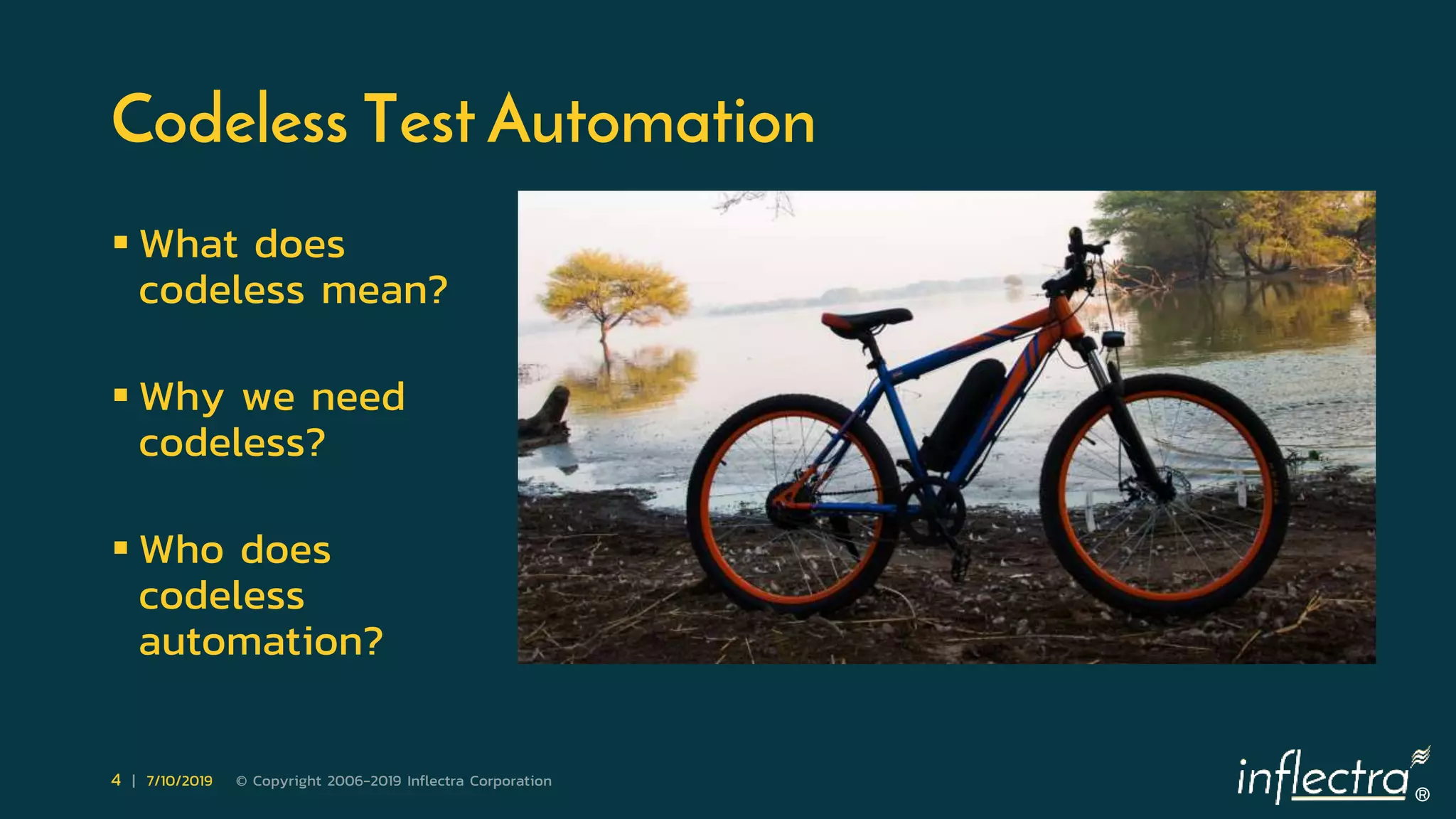
  • #5 What does codeless mean? Obviously, it means to code less, write less code. Even software developers use codeless techniques. They do not program everything. They actively use code generators, compilers, visual composition tools, models. So codeless test automation is not something new. It has deep roots in software development. So codeless is anything that helps us write less code. Why we need codeless? For two main reasons. Firstly, it should speed up the testing process, allow to produce more results in less time. Secondly, it should lower the learning curve and demand less skills from a user. This, second, aspect is very important. These days we use so many software systems that we simply have very small amount of time to spend on learning, and it is very hard to keep all the necessary details in active memory. A software system should guide a user wherever possible. Who does codeless automation? Software testers come from very different background, some from manual testing, some are domain experts, some are developers. All of them should benefit from codeless features of a software testing tool. I would compare codeless approach with electric bikes. Having an accumulator on your bike allows to get further, with less efforts and requires less skills. It allows everyone to enjoy mountain nature without ability to produce 1000 watts of power like a pro cyclist.
  • #6 How to write less code in UI test automation? What are common ways of achieving the goal? 1. Still write code using one of high-level programming languages and use software libraries (like Selenium and Appium) that help simplifying some tasks. 2. Use a tool providing keyword-driven testing features. First option is still good old programming. Feature set of the second option greatly depends on a tool used.
  • #7 What is a keyword? It is a name for an action to perform over the application being tested. A keyword may use input data like UI element to interact with and text to enter. Keywords can be low-level and available in a testing tool out-of-the-box. For example, “DoClick” on an element, “DoSetText” into an edit field. Keywords also can be high-level and consist of a set of lower level keywords or require programmers to implement them first. Here is an example of a high-level keyword “Login”. It consists of low-level keywords “DoClick” and “DoSetText”. In many tools keyword driven-testing stops at this point. What is beyond keywords?
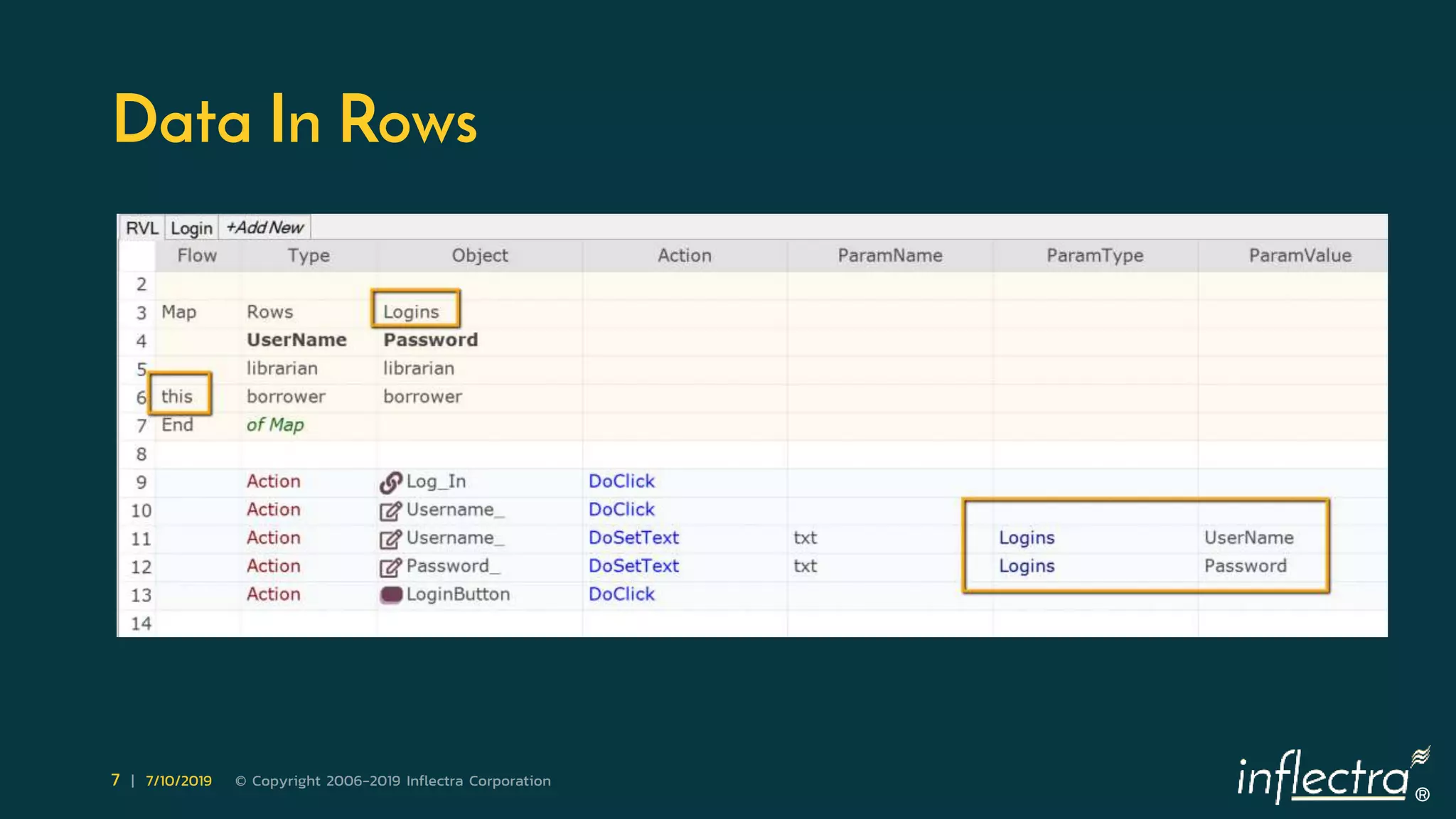
  • #8 One of the goals of test automation is to use different sets of data in the same testing scenario. Usually data is put into external spreadsheet or text file. It is a good approach but it can be improved. What about having data and keywords/actions within the same view? It makes test development more convenient. Especially when it is easy to select what row of data to use. In the example above the test will use second line of the data table during playback.
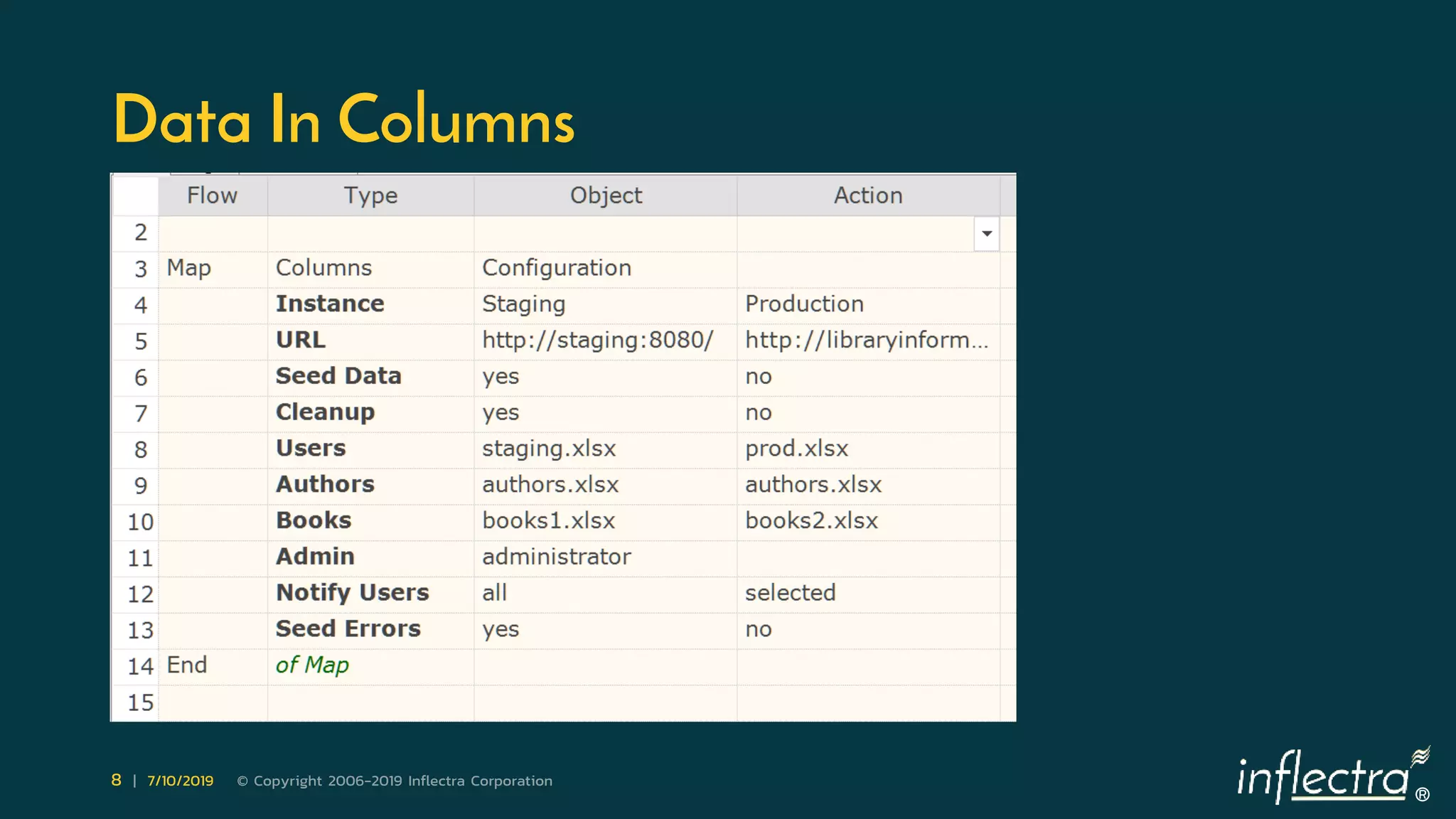
  • #9 When you deal with test configuration it may have so many parameters that it is inconvenient to put them into a row (to avoid horizontal scrolling). It is better to put them into columns.
  • #10 If it is possible to make a test using linear sequence of steps it is better to go this way. Such tests are easier to create and maintain. Working with linear step sequences does not require dealing with conditions and loops. Typically, conditions and loops are perceived as almost programming. But they also can be created without coding. On the example below we loop through all rows of Logins table and test login to the system with different user/password pairs.
  • #11 To check if login is successful or not we can use a condition.
  • #12 Keywords and loops/conditions may not be enough to implement complex scenarios. You may need to remember some values during test execution. This is where variables are used.
  • #13 You may notice that we still do not write code in a text editor but the more complex our scenarios become the more programming concepts we use. This is inevitable, computers still do not understand natural language as humans do and we have to speak their formal way. If you will look at voice assistants like Alexa, Siri, Cortana or Google Assistant you will see that even these cutting-edge technologies understand limited number of sentences built in a specific way. Here is an example from things to try Alexa sends every week: Alexa, what temperature is Miami in the summer? It is a sentence built with specific pattern in mind. Testing is much more complex thing than finding information on weather conditions in Miami.
  • #14 If scenario is long or there are many scenarios repeating the same steps then we need a way to breakdown steps into manageable pieces. We may consider a group of steps as a high-level keyword as discussed in the Keywords section above or we can execute one test from another.
  • #15 If you have programming experience you still may want to use codeless approach. When appropriate there are ways of doing coding within keyword-oriented environment. Inline Expressions Printing number of seconds in a year. Functions One may create a function and program specific logic that would look cumbersome in a codeless representation. And use it in codeless environment.
  • #16 The main benefit is that it makes possible to work at different levels of complexity. Level 0, just record and playback Level 1, Level 0 + modify, parameterize, make data-driven Level 2, Level 1 + loops, conditions Level 3, Level 2 + decomposition Level 4, Level 3 + coding Levels 0 and 1 are open to everyone, no special skills required. Levels 2 and 3 are accessible with minimal training or with basic programming skills. Level 4 requires programming experience. So, any team can start doing test automation. Of course, the complexity of testing scenarios depends on experience of team members. The good news is that to operate on Level 4 a team can have just one Level 4 tester to implement all the complex stuff. Another benefit is that codeless approach does not require to remember the syntax. There is no so-called syntax sugar and the system guides you.
  • #17 Most of programming languages including JavaScript were designed by people with mathematical background. So, this statement appears clear and simple for a programmer: Deposit('John', 'O\'Connor', 17.99); A programmer easily reads this as: Deposit $17.99 to John O'Connor What is the difference between these notations? Symbols ' " ; , . ( ) [ ] { } & $ % # @ do have meaning for language notation however are not important for understanding the matter. Syntax sugar makes problems even for programmers. When switching from similarly looking languages some differences easily cause frustration. For example, the same construct: $a = "Number " + 1; means text concatenation in JavaScript, however the same is mathematical operation in PHP. Comparison like: if( value == "OK" ) is good for JavaScript or C# world and produces always false results in Java. Even if we have programming skills it is still a problem to switch from one language to another, it may lead to potential issues.
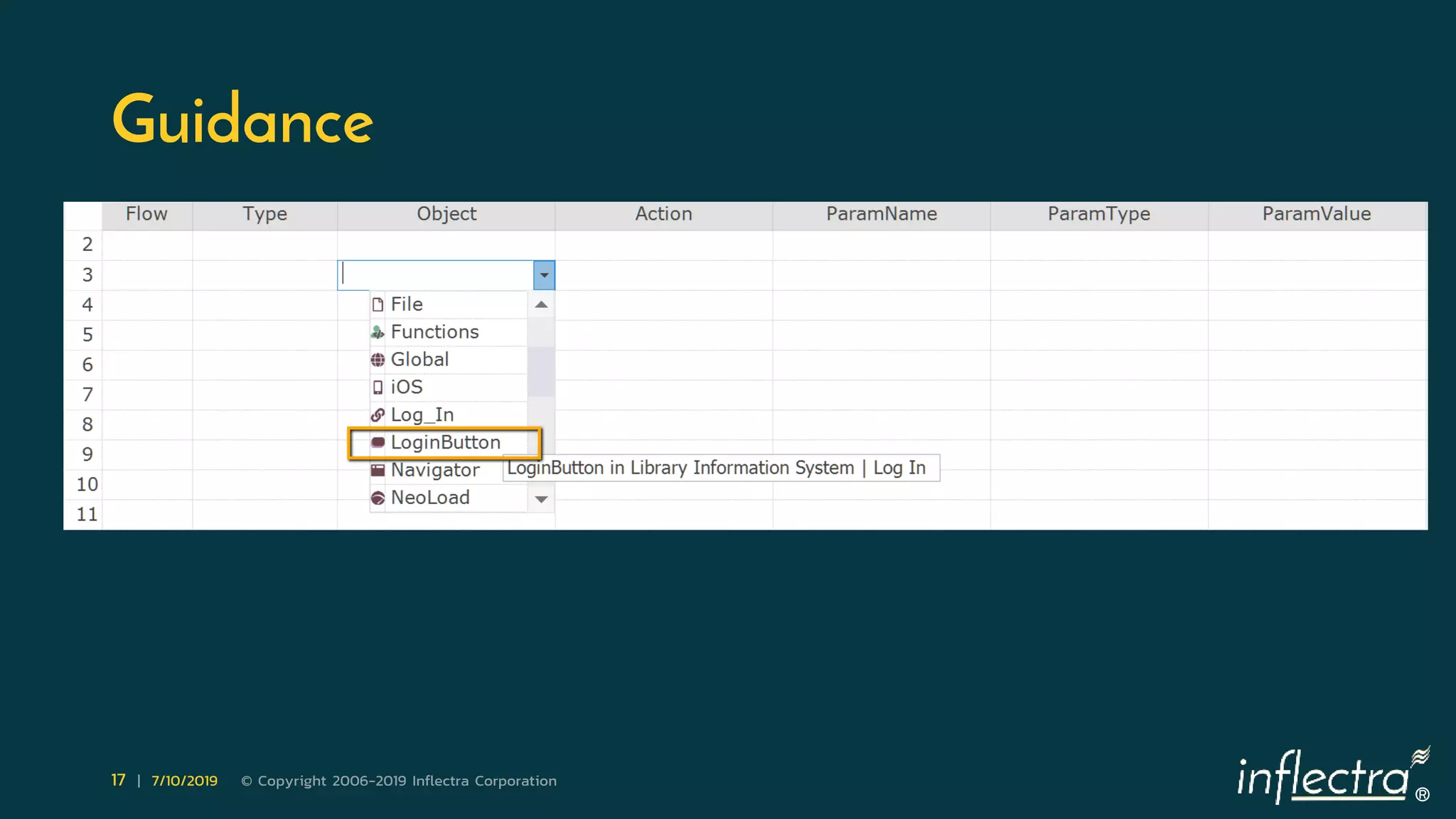
  • #18 A codeless system guides a user along the way. Want to click on an element? Choose the element from the dropdown. Then choose DoClick keyword from another dropdown. Want to enter text into an edit field? Choose the element, choose DoSetText keyword and enter text. To create a condition choose If from the dropdown. A template is generated. Select condition and fill necessary cells.
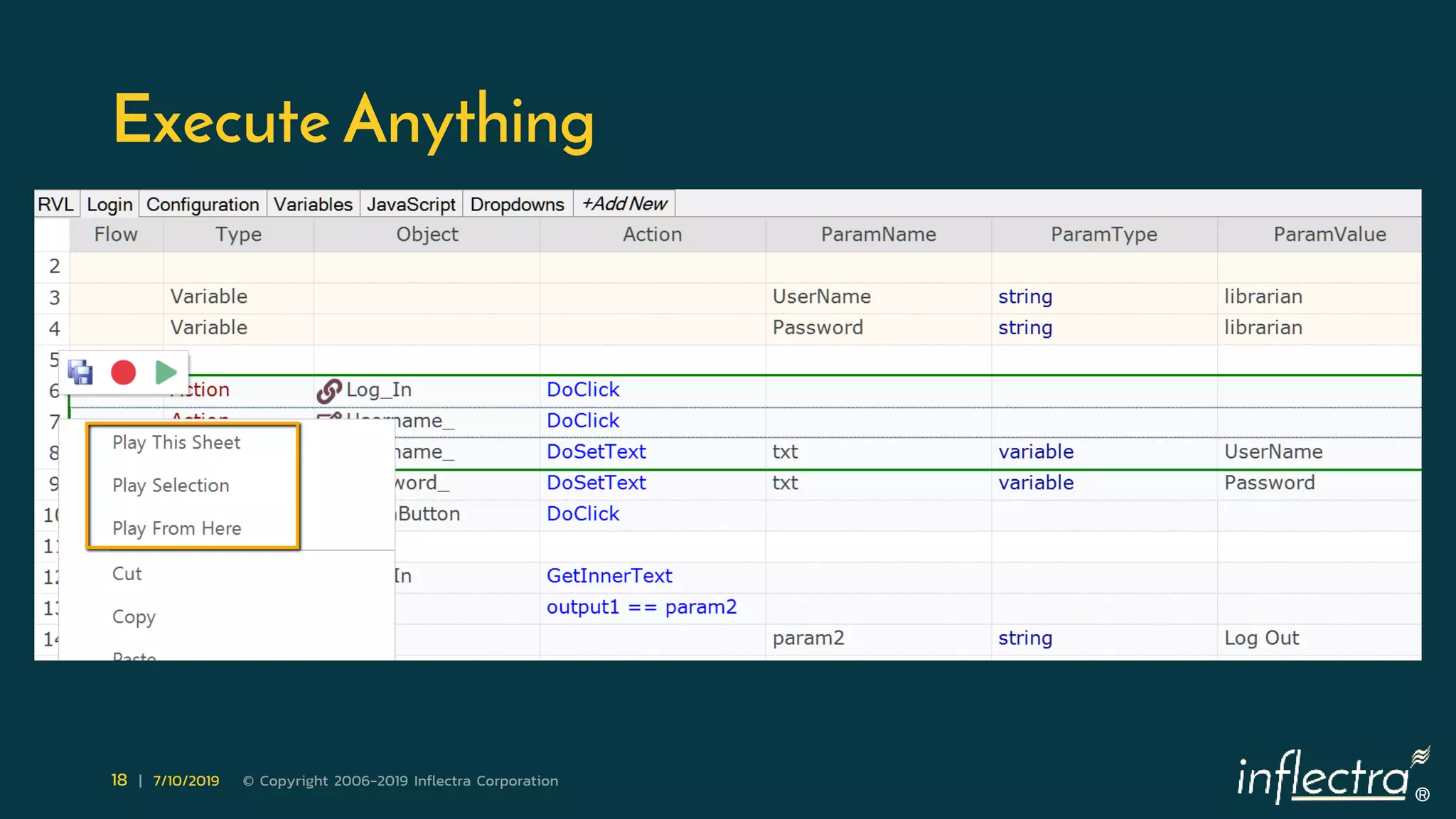
  • #19 When test is being created you may need to run a specific part of it. For example, to reach the point where you’ve stopped test development yesterday, to check new steps you just added or play the test from a specific point till the end. You may need to run a high-level keyword to test it.
  • #20 One of the most exciting things in codeless automation is that we can extend codeless features at user level. We may define additional columns and enhance keyword-driven approach. Every step in a codeless test has before and after triggers. A QA team may implement triggers (using programming) to give meaning to additional columns in the test grid. With custom columns and triggers it’s possible to do a lot of cool things like automatic printing of data to a report or external file or specifying IDs of requirements tested by a specific piece.
  • #21 Limitations are mostly imposed by the complexity of test scenarios. If there is complex logic and a lot of calculations are required then it may be more effective and faster to just use a programming language.
  • #22 When you just start doing codeless test automation I recommend to start from recording and playback. Remember that not all manual testing scenarios should be or can be automated. The idea of test automation is to offload boring checks from manual testers. So, at least for the beginning, long end-to-end scenarios with switching between windows, applications and conditional logic should be avoided. When you are comfortable with short recording and playback tests proceed to data-driven testing. Then try loops and conditions, but do not overuse them. Keep scenarios simple. If you plan on doing many tests with common steps you need an architect in the team. Someone who will design the test coverage and make a breakdown into building blocks, define high-level keywords. From certain level of complexity you may need a real programmer in the team. Use his or her resources wisely. A programmer should implement low level helpers and make them useful for the whole team. Domain experts should be busy with data tables and be a driving force for data-driven testing. And remember as good accumulator should open great possibilities for e-bike owner as codeless test automation should save time for QA team and make testing easier and more effective. This is the goal. With questions reach me on twitter @dmarkovtsev, I am always happy to help.
  • #23 How far you can go with codeless automation depends on scenarios you choose. Even if your application is automation friendly it does not automatically mean you will succeed with testing it. If test automation is managed in the same way as manual testing then you are likely to hit road blocks. We’ll talk about common testing scenarios and potential issues in the next webinar. Presenter of the next webinar is Alexey Grinevich – automation expert at Inflectra.
  • #24 Thanks for listening. We are now opening for questions.