
JavaEa®
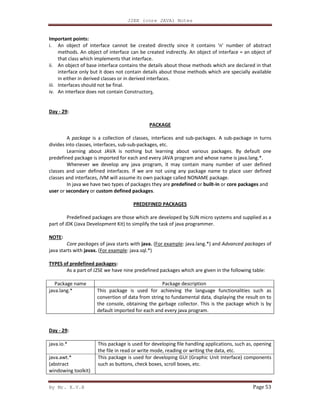
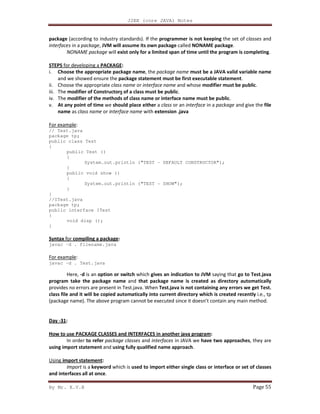
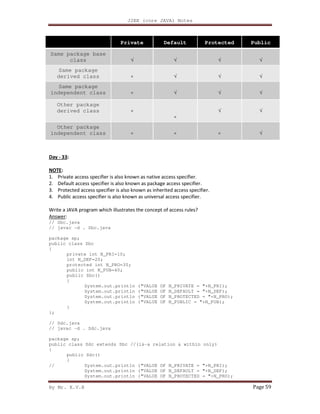
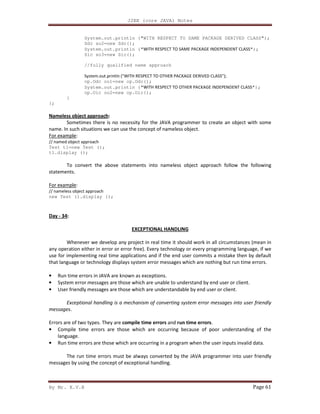
.
com
Downloadmorematerials
------------VISIT---------------------
http://ameerpetmaterials.blogspot.in/
http://ameerpetmatbooks.blogspot.in/
http://satyajohnny.blogspot.in/
By Mr. K.V.R
Day - 1:
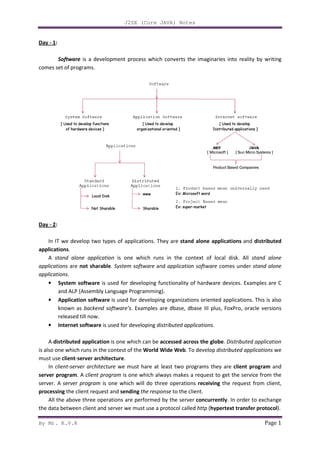
Software is a development process which converts the imaginaries into reality by writing
comes set of programs.
Day - 2:
In IT we develop two types of applications. They are
applications.
A stand alone application
applications are not sharable. System software
applications.
• System software is used for developing functionality of hardware devices. Examples are C
and ALP (Assembly Language Programming).
• Application software is used for developing organizations oriented applications. This is also
known as backend software’s
released till now.
• Internet software is used for developing
A distributed application is one which can be
is also one which runs in the contest of the
must use client-server architecture
In client-server architecture
server program. A client program
server. A server program is one which will do three operations
processing the client request and
All the above three operations are performed by the server
the data between client and server we must use a protocol called
J2SE (Core JAVA) Notes
is a development process which converts the imaginaries into reality by writing
In IT we develop two types of applications. They are stand alone applications
is one which runs in the context of local disk.
System software and application software comes under
is used for developing functionality of hardware devices. Examples are C
and ALP (Assembly Language Programming).
is used for developing organizations oriented applications. This is also
backend software’s. Examples are dbase, dbase III plus, FoxPro, oracle versions
is used for developing distributed applications.
is one which can be accessed across the globe. Distributed application
which runs in the contest of the World Wide Web. To develop distributed applications
server architecture.
we must hare at least two programs they are
client program is one which always makes a request to get the service from the
is one which will do three operations receiving the request from client,
the client request and sending the response to the client.
rations are performed by the server concurrently. In order to exchange
the data between client and server we must use a protocol called http (hypertext transfer protocol
Page 1
is a development process which converts the imaginaries into reality by writing
stand alone applications and distributed
is one which runs in the context of local disk. All stand alone
comes under stand alone
is used for developing functionality of hardware devices. Examples are C
is used for developing organizations oriented applications. This is also
Examples are dbase, dbase III plus, FoxPro, oracle versions
Distributed application
distributed applications we
we must hare at least two programs they are client program and
is one which always makes a request to get the service from the
the request from client,
In order to exchange
hypertext transfer protocol).
By Mr. K.V.R
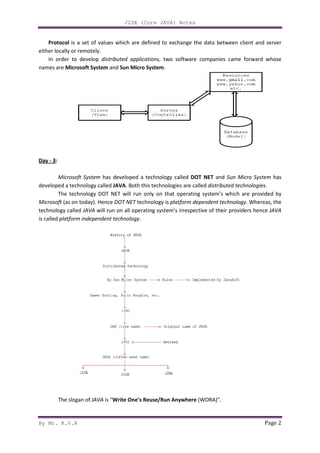
Protocol is a set of values which are defined to exchange the data between client an
either locally or remotely.
In order to develop distributed applications
names are Microsoft System and
Day - 3:
Microsoft System has developed a technology called
developed a technology called JAVA
The technology DOT NET
Microsoft (as on today). Hence DOT NET
technology called JAVA will run on all operating system’s irrespective of their providers hence
is called platform independent technology
The slogan of JAVA is “Write One’s Reuse/Run Anywhere
J2SE (Core JAVA) Notes
is a set of values which are defined to exchange the data between client an
distributed applications, two software companies came forward
and Sun Micro System.
has developed a technology called DOT NET and Sun
JAVA. Both this technologies are called distributed technologies
DOT NET will run only on that operating system’s which are provided by
DOT NET technology is platform dependent technology
will run on all operating system’s irrespective of their providers hence
platform independent technology.
Write One’s Reuse/Run Anywhere (WORA)”.
Page 2
is a set of values which are defined to exchange the data between client and server
two software companies came forward whose
Sun Micro System has
distributed technologies.
operating system’s which are provided by
form dependent technology. Whereas, the
will run on all operating system’s irrespective of their providers hence JAVA
J2SE (Core JAVA) Notes
By Mr. K.V.R Page 3
DOT NET technology is not freely downloadable where as JAVA freely downloadable. DOT
NET supports Microsoft developed design patterns (general designed patterns are not supported)
whereas JAVA supports all the design patterns which are available in IT.
Design pattern is a predefined and proved rule by third party industry experts to avoid the
receiving problems which are occurring in software development.
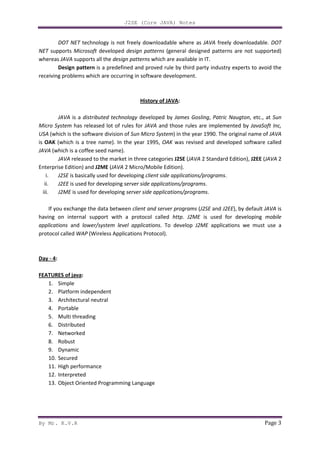
History of JAVA:
JAVA is a distributed technology developed by James Gosling, Patric Naugton, etc., at Sun
Micro System has released lot of rules for JAVA and those rules are implemented by JavaSoft Inc,
USA (which is the software division of Sun Micro System) in the year 1990. The original name of JAVA
is OAK (which is a tree name). In the year 1995, OAK was revised and developed software called
JAVA (which is a coffee seed name).
JAVA released to the market in three categories J2SE (JAVA 2 Standard Edition), J2EE (JAVA 2
Enterprise Edition) and J2ME (JAVA 2 Micro/Mobile Edition).
i. J2SE is basically used for developing client side applications/programs.
ii. J2EE is used for developing server side applications/programs.
iii. J2ME is used for developing server side applications/programs.
If you exchange the data between client and server programs (J2SE and J2EE), by default JAVA is
having on internal support with a protocol called http. J2ME is used for developing mobile
applications and lower/system level applications. To develop J2ME applications we must use a
protocol called WAP (Wireless Applications Protocol).
Day - 4:
FEATURES of java:
1. Simple
2. Platform independent
3. Architectural neutral
4. Portable
5. Multi threading
6. Distributed
7. Networked
8. Robust
9. Dynamic
10. Secured
11. High performance
12. Interpreted
13. Object Oriented Programming Language
J2SE (Core JAVA) Notes
By Mr. K.V.R Page 4
1. Simple: JAVA is simple because of the following factors:
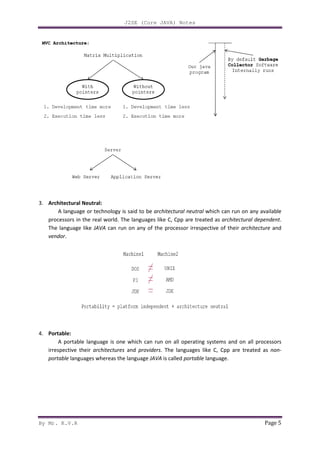
i. JAVA is free from pointers hence we can achieve less development time and less
execution time [whenever we write a JAVA program we write without pointers and
internally it is converted into the equivalent pointer program].
ii. Rich set of API (application protocol interface) is available to develop any complex
application.
iii. The software JAVA contains a program called garbage collector which is always used to
collect unreferenced (unused) memory location for improving performance of a JAVA
program. [Garbage collector is the system JAVA program which runs in the background
along with regular JAVA program to collect unreferenced memory locations by running
at periodical interval of times for improving performance of JAVA applications.
iv. JAVA contains user friendly syntax’s for developing JAVA applications.
2. Platform Independent:
A program or technology is said to be platform independent if and only if which can run on
all available operating systems.
The languages like C, Cpp are treated as platform dependent languages since these
languages are taking various amount of memory spaces on various operating systems [the
operating system dos understands everything in the form of its native format called Mozart (MZ)
whereas the operating system Unix understands everything in its negative format called
embedded linking format (elf). When we write a C or Cpp program on dos operating and if we
try to transfer that program to Unix operating system, we are unable to execute since the format
of these operating systems are different and more over the C, Cpp software does not contain
any special programs which converts one format of one operating system to another format of
other operating system].
The language like JAVA will have a common data types and the common memory spaces on
all operating systems and the JAVA software contains the special programs which converts the
format of one operating system to another format of other operating system. Hence JAVA
language is treated as platform independent language.
DAY - 5:
[JAVA language is also treated as server independent language since the server side program
can run on any of the server which is available in the real world (web server or application
server). JAVA can retrieve or store the data in any one of the data base product which is
available in rest world irrespective of their vendors (developers) hence JAVA language is product
independent language.
In order to deal with server side program from the client side, we can use C language client
program, Cpp client program, DOT NET client program, etc. hence JAVA language is a simple,
platform independent, server independent, data base/product independent and language
independent programming language].
By Mr. K.V.R
3. Architectural Neutral:
A language or technology is said to be
processors in the real world.
The language like JAVA can run on any of the processor irrespective of their
vendor.
4. Portable:
A portable language is one which can run on all operating systems and on all processors
irrespective their architectures
portable languages whereas the language
J2SE (Core JAVA) Notes
A language or technology is said to be architectural neutral which can run on any available
processors in the real world. The languages like C, Cpp are treated as architectural dependent
can run on any of the processor irrespective of their
A portable language is one which can run on all operating systems and on all processors
architectures and providers. The languages like C, Cpp are treated as
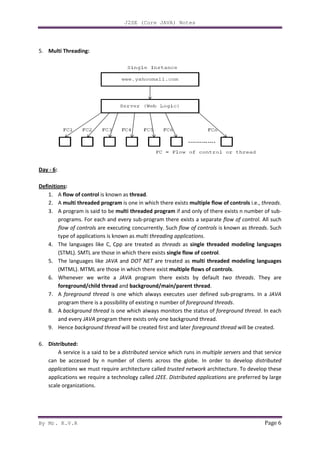
languages whereas the language JAVA is called portable language.
Page 5
which can run on any available
architectural dependent.
can run on any of the processor irrespective of their architecture and
A portable language is one which can run on all operating systems and on all processors
The languages like C, Cpp are treated as non-
By Mr. K.V.R
5. Multi Threading:
Day - 6:
Definitions:
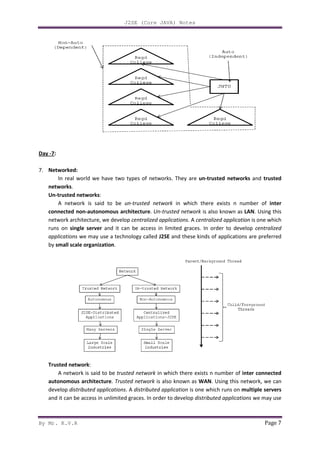
1. A flow of control is known as
2. A multi threaded program
3. A program is said to be multi threaded program
programs. For each and every sub
flow of controls are executing concurrently. Such
type of applications is kno
4. The languages like C, Cpp are treated as
(STML). SMTL are those in which there exists
5. The languages like JAVA
(MTML). MTML are those in which there exist
6. Whenever we write a
foreground/child thread
7. A foreground thread is one which always executes user defined sub
program there is a possibility of existing n number of
8. A background thread is one which always monitors the status of
and every JAVA program t
9. Hence background thread
6. Distributed:
A service is a said to be a
can be accessed by n number of clients across the globe. In order to develop
applications we must require architecture called
applications we require a technology called
scale organizations.
J2SE (Core JAVA) Notes
is known as thread.
multi threaded program is one in which there exists multiple flow of controls
multi threaded program if and only of there exists n number of sub
programs. For each and every sub-program there exists a separate flow of control
are executing concurrently. Such flow of controls is known as
type of applications is known as multi threading applications.
The languages like C, Cpp are treated as threads as single threaded modeling languages
(STML). SMTL are those in which there exists single flow of control.
JAVA and DOT NET are treated as multi threaded modeling languages
(MTML). MTML are those in which there exist multiple flows of controls
Whenever we write a JAVA program there exists by default two threads
foreground/child thread and background/main/parent thread.
is one which always executes user defined sub-programs. In a
program there is a possibility of existing n number of foreground threads
is one which always monitors the status of foreground thread
program there exists only one background thread.
background thread will be created first and later foreground thread
A service is a said to be a distributed service which runs in multiple servers
by n number of clients across the globe. In order to develop
we must require architecture called trusted network architecture. To develop these
applications we require a technology called J2EE. Distributed applications are preferr
Page 6
multiple flow of controls i.e., threads.
if and only of there exists n number of sub-
flow of control. All such
is known as threads. Such
single threaded modeling languages
d modeling languages
multiple flows of controls.
two threads. They are
programs. In a JAVA
foreground threads.
foreground thread. In each
foreground thread will be created.
multiple servers and that service
by n number of clients across the globe. In order to develop distributed
architecture. To develop these
are preferred by large
By Mr. K.V.R
Day -7:
7. Networked:
In real world we have two types of networks. They are
networks.
Un-trusted networks:
A network is said to be
connected non-autonomous architecture
network architecture, we develop
runs on single server and it can be access in limited graces.
applications we may use a technology called
by small scale organization.
Trusted network:
A network is said to be
autonomous architecture. Trusted network
develop distributed applications
and it can be access in unlimited graces.
J2SE (Core JAVA) Notes
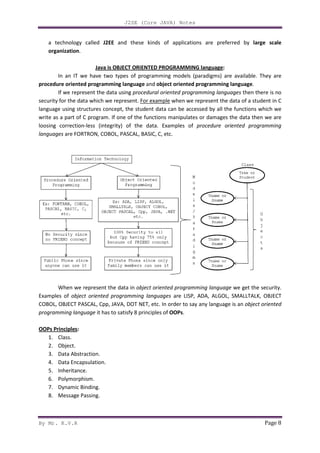
In real world we have two types of networks. They are un-trusted networks
A network is said to be un-trusted network in which there exists n number of
autonomous architecture. Un-trusted network is also known as
network architecture, we develop centralized applications. A centralized application
and it can be access in limited graces. In order to develop
we may use a technology called J2SE and these kinds of applications are preferred
A network is said to be trusted network in which there exists n number of
Trusted network is also known as WAN. Using this network, we can
distributed applications. A distributed application is one which runs on
and it can be access in unlimited graces. In order to develop distributed applications
Page 7
trusted networks and trusted
in which there exists n number of inter
is also known as LAN. Using this
centralized application is one which
In order to develop centralized
and these kinds of applications are preferred
in which there exists n number of inter connected
Using this network, we can
is one which runs on multiple servers
distributed applications we may use
By Mr. K.V.R
a technology called J2EE
organization.
Java is OBJECT ORIENTED PROGRAMMING
In an IT we have two types of programming models (pa
procedure oriented programming language
If we represent the data using
security for the data which we represent
language using structures concept, the student data can be accessed by all the functions which we
write as a part of C program. If one of the functions manipulates or damages the data then we are
loosing correction-less (integrity) of the data.
languages are FORTRON, COBOL, PASCAL, BASIC, C, etc.
When we represent the data in
Examples of object oriented programming languages
COBOL, OBJECT PASCAL, Cpp, JAVA
programming language it has to satisfy 8 principles of
OOPs Principles:
1. Class.
2. Object.
3. Data Abstraction.
4. Data Encapsulation.
5. Inheritance.
6. Polymorphism.
7. Dynamic Binding.
8. Message Passing.
J2SE (Core JAVA) Notes
and these kinds of applications are preferred by
OBJECT ORIENTED PROGRAMMING language:
In an IT we have two types of programming models (paradigms) are available. They are
procedure oriented programming language and object oriented programming language
If we represent the data using procedural oriented programming languages
security for the data which we represent. For example when we represent the data of a student in C
language using structures concept, the student data can be accessed by all the functions which we
If one of the functions manipulates or damages the data then we are
less (integrity) of the data. Examples of procedure oriented programming
are FORTRON, COBOL, PASCAL, BASIC, C, etc.
When we represent the data in object oriented programming language
programming languages are LISP, ADA, ALGOL, SMALLTALK, OBJECT
JAVA, DOT NET, etc. In order to say any language is an
it has to satisfy 8 principles of OOPs.
Page 8
and these kinds of applications are preferred by large scale
radigms) are available. They are
object oriented programming language.
procedural oriented programming languages then there is no
when we represent the data of a student in C
language using structures concept, the student data can be accessed by all the functions which we
If one of the functions manipulates or damages the data then we are
procedure oriented programming
object oriented programming language we get the security.
are LISP, ADA, ALGOL, SMALLTALK, OBJECT
In order to say any language is an object oriented
By Mr. K.V.R
Day - 8:
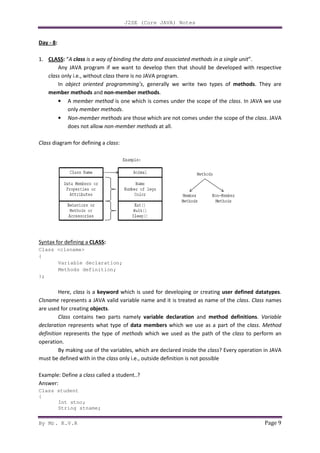
1. CLASS: “A class is a way of binding the data and associated methods in a single unit
Any JAVA program if we want to develop then that should be developed with respective
class only i.e., without class
In object oriented programming’s
member methods and non-member methods
• A member method is one which is comes under the scope of the
only member methods
• Non-member methods
does not allow non-member methods
Class diagram for defining a class
Syntax for defining a CLASS:
Class <clsname>
{
Variable declaration;
Methods definition;
};
Here, class is a keyword
Clsname represents a JAVA valid variable name and it is treated as name of the
are used for creating objects.
Class contains two parts namely
declaration represents what type of
definition represents the type of
operation.
By making use of the variables
must be defined with in the class
Example: Define a class called a student..?
Answer:
Class student
{
Int stno;
String stname;
J2SE (Core JAVA) Notes
is a way of binding the data and associated methods in a single unit
program if we want to develop then that should be developed with respective
there is no JAVA program.
object oriented programming’s, generally we write two types of
member methods.
is one which is comes under the scope of the class
member methods.
member methods are those which are not comes under the scope of the
member methods at all.
class:
eclaration;
efinition;
keyword which is used for developing or creating user defined datatypes
valid variable name and it is treated as name of the
contains two parts namely variable declaration and method definitions
represents what type of data members which we use as a part of the
represents the type of methods which we used as the path of the
By making use of the variables, which are declared inside the class? Every operation in
class only i.e., outside definition is not possible
called a student..?
Page 9
is a way of binding the data and associated methods in a single unit”.
program if we want to develop then that should be developed with respective
, generally we write two types of methods. They are
class. In JAVA we use
are those which are not comes under the scope of the class. JAVA
user defined datatypes.
valid variable name and it is treated as name of the class. Class names
method definitions. Variable
a part of the class. Method
which we used as the path of the class to perform an
Every operation in JAVA
J2SE (Core JAVA) Notes
By Mr. K.V.R Page 10
Float marks;
String cname;
Int getnohoursstudy ()
{
…………
…………
}
String getgrade ()
{
…………
…………
}
} [;]—optional
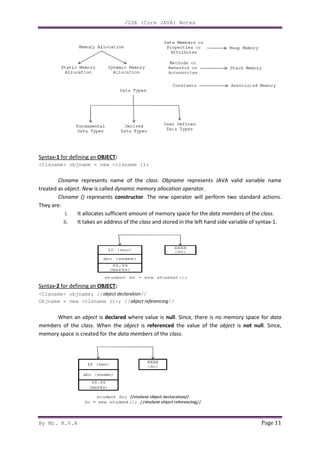
Whenever we define a class there is no memory space for data members of the class. Memory
space will be created for the data members of the class when we create object.
NOTE:
1. In JAVA memory space for the data members will be creating on heap memory (Dynamic
memory).
2. Memory space for methods will be creating on stack memory (that too when we call the
methods).
3. All constants of any JAVA program is available in associative memory (retrieving data from
associative memory is negligible).
4. The class definition exists only one time but whose objects can exists many number of times
i.e., a class is acting as a formula form.
Day - 9:
2. OBJECT: In order to store the data for the data members of the class, we must create an object.
1. Instance (instance is a mechanism of allocating sufficient amount of memory space for data
members of a class) of a class is known as an object.
2. Class variable is known as an object.
3. Grouped item (grouped item is a variable which allows us to store more than one value) is
known as an object.
4. Value form of a class is known as an object.
5. Blue print of a class is known as an object.
6. Logical runtime entity is known as an object.
7. Real world entities are called as objects.
NOTE:
• JAVA always follows dynamic memory allocation but not static memory allocation.
• In order to create a memory space in JAVA we must use an operator called new. This new
operator is known as dynamic memory allocation operator.
By Mr. K.V.R
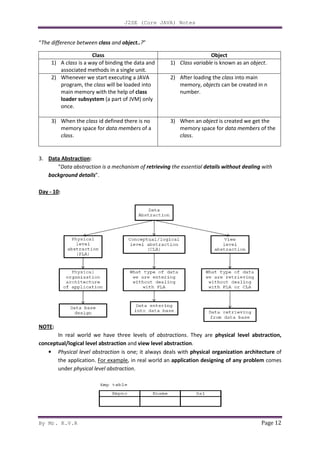
Syntax-1 for defining an OBJECT:
<Clsname> objname = new <clsname (
Clsname represents name of the
treated as object. New is called dynamic memory allocation operator
Clsname () represents constructor
They are:
i. It allocates sufficient amount of memory space for the
ii. It takes an address of the
Syntax-2 for defining an OBJECT:
<Clsname> objname; //object declaration
Objname = new <clsname ()>; //
When an object is declared
members of the class. When the
memory space is created for the
J2SE (Core JAVA) Notes
:
clsname ()>
represents name of the class. Objname represents JAVA valid variable name
dynamic memory allocation operator.
constructor. The new operator will perform two standard actions.
It allocates sufficient amount of memory space for the data members
It takes an address of the class and stored in the left hand side variable of syntax
:
object declaration//
)>; //object referencing//
declared where value is null. Since, there is no memory space for
When the object is referenced the value of the object
memory space is created for the data members of the class.
Page 11
valid variable name
operator will perform two standard actions.
data members of the class.
and stored in the left hand side variable of syntax-1.
. Since, there is no memory space for data
object is not null. Since,
By Mr. K.V.R
“The difference between class and
3. Data Abstraction:
“Data abstraction is a mechanism of
background details”.
Day - 10:
NOTE:
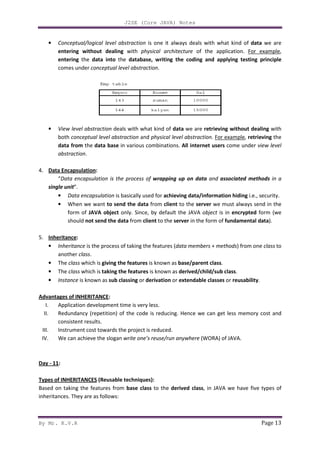
In real world we have three levels of
conceptual/logical level abstraction
• Physical level abstraction
the application. For example
under physical level abstraction
Class
1) A class is a way of binding the data and
associated methods in a single unit.
2) Whenever we start executing a
program, the class will be loaded into
main memory with the help of
loader subsystem (a part of JVM) only
once.
3) When the class id defined there is no
memory space for data members
class.
J2SE (Core JAVA) Notes
and object..?”
Data abstraction is a mechanism of retrieving the essential details without dealing
In real world we have three levels of abstractions. They are physical level abstraction,
conceptual/logical level abstraction and view level abstraction.
Physical level abstraction is one; it always deals with physical organization architecture
For example, in real world an application designing of any problem
physical level abstraction.
Object
is a way of binding the data and
associated methods in a single unit.
1) Class variable is known as an
Whenever we start executing a JAVA
will be loaded into
main memory with the help of class
(a part of JVM) only
2) After loading the class
memory, objects can be created in n
number.
id defined there is no
data members of a
3) When an object is created we get the
memory space for data members
class.
Page 12
details without dealing with
physical level abstraction,
physical organization architecture of
application designing of any problem comes
is known as an object.
class into main
can be created in n
is created we get the
data members of the
By Mr. K.V.R
• Conceptual/logical level abstraction
entering without dealing
entering the data into
comes under conceptual level abstraction
• View level abstraction deals with what kind of
both conceptual level abstraction
data from the data base
abstraction.
4. Data Encapsulation:
“Data encapsulation is the process of
single unit”.
• Data encapsulation
• When we want to send the data
form of JAVA object
should not send the data
5. Inheritance:
• Inheritance is the process of taking the features (
another class.
• The class which is giving the features
• The class which is taking the features
• Instance is known as sub classing
Advantages of INHERITANCE:
I. Application development time is very less.
II. Redundancy (repetition) of the code is reducing. Hence we can get less memory cost and
consistent results.
III. Instrument cost towards the project is reduced.
IV. We can achieve the slogan
Day - 11:
Types of INHERITANCES (Reusable techniques):
Based on taking the features from
inheritances. They are as follows:
J2SE (Core JAVA) Notes
Conceptual/logical level abstraction is one it always deals with what kind of
without dealing with physical architecture of the application.
the database, writing the coding and applying testing principle
conceptual level abstraction.
deals with what kind of data we are retrieving without dealing
conceptual level abstraction and physical level abstraction. For example
data base in various combinations. All internet users come under
a encapsulation is the process of wrapping up on data and associated methods
is basically used for achieving data/information hiding
send the data from client to the server we must always send in the
object only. Since, by default the JAVA object is in
not send the data from client to the server in the form of fundamental data
is the process of taking the features (data members + methods
giving the features is known as base/parent class.
taking the features is known as derived/child/sub class
sub classing or derivation or extendable classes or
Application development time is very less.
Redundancy (repetition) of the code is reducing. Hence we can get less memory cost and
Instrument cost towards the project is reduced.
We can achieve the slogan write one’s reuse/run anywhere (WORA) of JAVA
(Reusable techniques):
Based on taking the features from base class to the derived class, in JAVA we have five types of
inheritances. They are as follows:
Page 13
is one it always deals with what kind of data we are
of the application. For example,
database, writing the coding and applying testing principle
retrieving without dealing with
For example, retrieving the
come under view level
associated methods in a
achieving data/information hiding i.e., security.
we must always send in the
is in encrypted form (we
fundamental data).
methods) from one class to
derived/child/sub class.
or reusability.
Redundancy (repetition) of the code is reducing. Hence we can get less memory cost and
JAVA.
we have five types of
By Mr. K.V.R
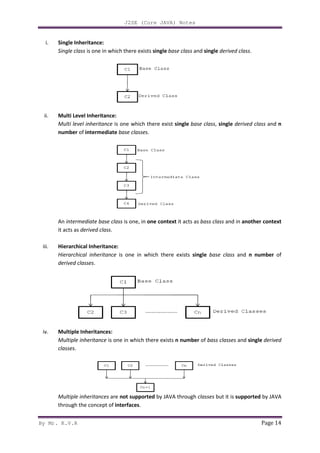
i. Single Inheritance:
Single class is one in which there exists
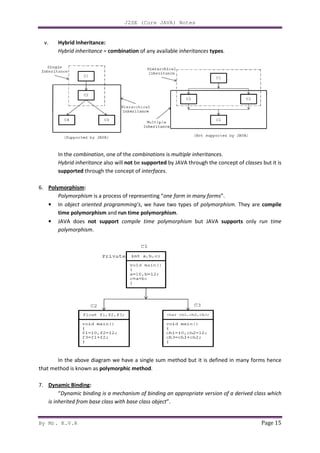
ii. Multi Level Inheritance:
Multi level inheritance is one which there exist
number of intermediate
An intermediate base class
it acts as derived class.
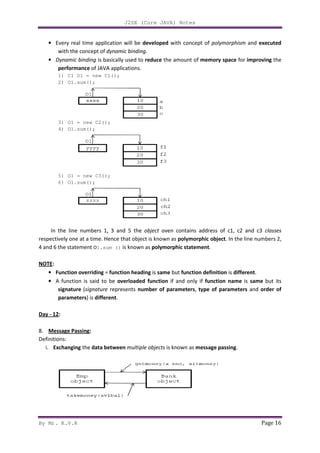
iii. Hierarchical Inheritance:
Hierarchical inheritance
derived classes.
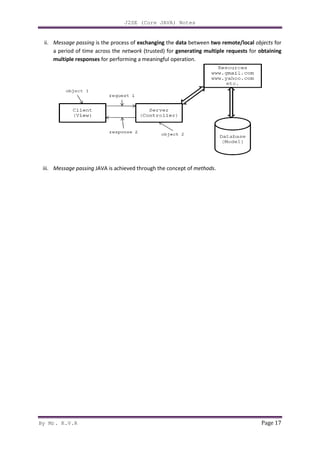
iv. Multiple Inheritances:
Multiple inheritance is one in which there exists
classes.
Multiple inheritances are
through the concept of interfaces
J2SE (Core JAVA) Notes
is one in which there exists single base class and single derived class
Multi Level Inheritance:
is one which there exist single base class, single
intermediate base classes.
intermediate base class is one, in one context it acts as bass class and in
Hierarchical Inheritance:
Hierarchical inheritance is one in which there exists single base class
is one in which there exists n number of bass classes
are not supported by JAVA through classes but it is
interfaces.
Page 14
derived class.
single derived class and n
and in another context
base class and n number of
bass classes and single derived
but it is supported by JAVA
By Mr. K.V.R
v. Hybrid Inheritance:
Hybrid inheritance = combination
In the combination, one of the
Hybrid inheritance also will
supported through the concept of
6. Polymorphism:
Polymorphism is a process of representing “
• In object oriented programming’s
time polymorphism and
• JAVA does not support
polymorphism.
In the above diagram we have a single sum method but it is defined in many forms hence
that method is known as polymorphic method
7. Dynamic Binding:
“Dynamic binding is a mechanism of binding an appropriate version of a derived class which
is inherited from base class with base class object
J2SE (Core JAVA) Notes
combination of any available inheritances types.
, one of the combinations is multiple inheritances.
also will not be supported by JAVA through the concept of
through the concept of interfaces.
is a process of representing “one form in many forms”.
object oriented programming’s, we have two types of polymorphism
and run time polymorphism.
not support compile time polymorphism but JAVA supports
In the above diagram we have a single sum method but it is defined in many forms hence
polymorphic method.
Dynamic binding is a mechanism of binding an appropriate version of a derived class which
m base class with base class object”.
Page 15
through the concept of classes but it is
polymorphism. They are compile
supports only run time
In the above diagram we have a single sum method but it is defined in many forms hence
Dynamic binding is a mechanism of binding an appropriate version of a derived class which
By Mr. K.V.R
• Every real time application will be
with the concept of dynamic binding
• Dynamic binding is basically used to
performance of JAVA applications.
1) C1 O1 = new C1();
2) O1.sum();
3) O1 = new C2();
4) O1.sum();
5) O1 = new C3();
6) O1.sum();
In the line numbers 1, 3 and
respectively one at a time. Hence that object is known as
4 and 6 the statement O1.sum ()
NOTE:
• Function overriding = function heading
• A function is said to be
signature (signature represents
parameters) is different
Day - 12:
8. Message Passing:
Definitions:
i. Exchanging the data between
J2SE (Core JAVA) Notes
Every real time application will be developed with concept of polymorphism
dynamic binding.
is basically used to reduce the amount of memory space
applications.
C1 O1 = new C1();
In the line numbers 1, 3 and 5 the object oven contains address of c1, c2 and c3
respectively one at a time. Hence that object is known as polymorphic object. In the line numbers 2,
1.sum () is known as polymorphic statement.
function heading is same but function definition is
A function is said to be overloaded function if and only if function name
represents number of parameters, type of parameters
different.
between multiple objects is known as message passing
Page 16
polymorphism and executed
memory space for improving the
oven contains address of c1, c2 and c3 classes
In the line numbers 2,
is different.
function name is same but its
type of parameters and order of
message passing.
By Mr. K.V.R
ii. Message passing is the process of
a period of time across the
multiple responses for performing
iii. Message passing JAVA is achieved through the concept of
J2SE (Core JAVA) Notes
is the process of exchanging the data between two remote/local
a period of time across the network (trusted) for generating multiple requests
for performing a meaningful operation.
is achieved through the concept of methods.
Page 17
two remote/local objects for
multiple requests for obtaining
By Mr. K.V.R
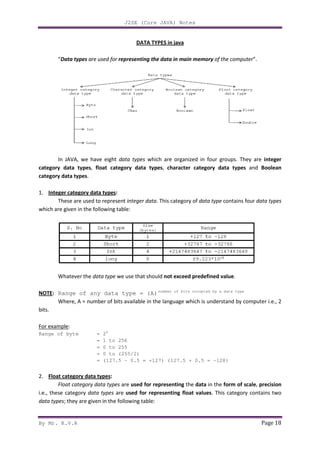
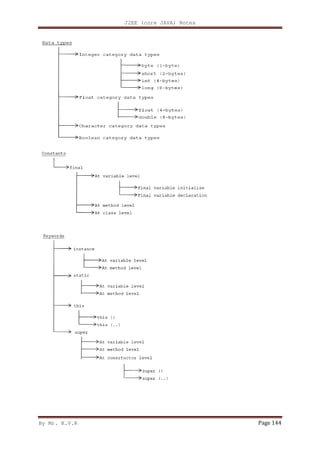
“Data types are used for
In JAVA, we have eight
category data types, float category data types
category data types.
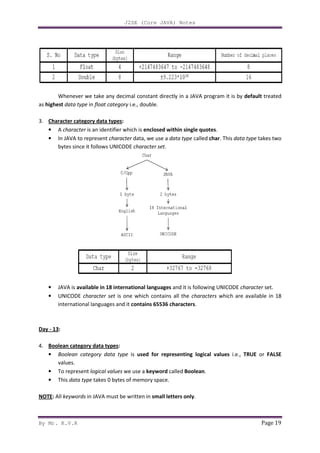
1. Integer category data types
These are used to represent
which are given in the following table:
Whatever the data type
NOTE: Range of any data type = (A)
Where, A = number of bits available in the language which is understand by computer i.e., 2
bits.
For example:
Range of byte = 28
= 1 to 256
= 0 to 255
= 0 to
= (127.5
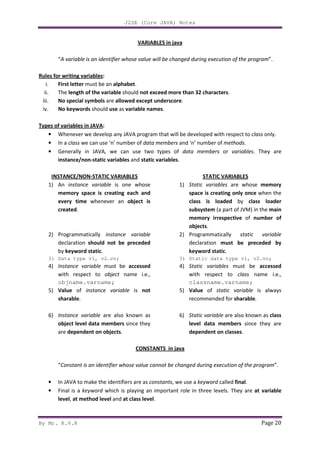
2. Float category data types:
Float category data types
i.e., these category data types
data types; they are given in the following table:
J2SE (Core JAVA) Notes
DATA TYPES in java
are used for representing the data in main memory of the computer
, we have eight data types which are organized in four groups. They are
float category data types, character category data types
Integer category data types:
These are used to represent integer data. This category of data type contains four
which are given in the following table:
we use that should not exceed predefined value
Range of any data type = (A)number of bits occupied by a data type
Where, A = number of bits available in the language which is understand by computer i.e., 2
= 1 to 256
= 0 to 255
= 0 to (255/2)
= (127.5 - 0.5 = +127) (127.5 + 0.5 = -128)
Float category data types are used for representing the data in the form of scale
are used for representing float values. This category contains two
they are given in the following table:
Page 18
of the computer”.
which are organized in four groups. They are integer
character category data types and Boolean
contains four data types
not exceed predefined value.
number of bits occupied by a data type
Where, A = number of bits available in the language which is understand by computer i.e., 2
form of scale, precision
. This category contains two
By Mr. K.V.R
Whenever we take any decimal constant directly in a
as highest data type in float category
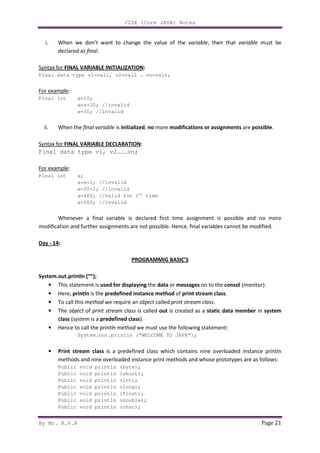
3. Character category data types
• A character is an identifier which is
• In JAVA to represent character
bytes since it follows UNICODE
• JAVA is available in 18 international languages
• UNICODE character set
international languages and it
Day - 13:
4. Boolean category data types
• Boolean category data type
values.
• To represent logical values
• This data type takes 0 bytes of memory space
NOTE: All keywords in JAVA must be written in
J2SE (Core JAVA) Notes
Whenever we take any decimal constant directly in a JAVA program it is by
float category i.e., double.
Character category data types:
is an identifier which is enclosed within single quotes.
character data, we use a data type called char. This
bytes since it follows UNICODE character set.
available in 18 international languages and it is following UNICODE
is one which contains all the characters which are available in 18
international languages and it contains 65536 characters.
Boolean category data types:
data type is used for representing logical values
logical values we use a keyword called Boolean.
takes 0 bytes of memory space.
must be written in small letters only.
Page 19
program it is by default treated
. This data type takes two
and it is following UNICODE character set.
which are available in 18
i.e., TRUE or FALSE
J2SE (Core JAVA) Notes
By Mr. K.V.R Page 20
VARIABLES in java
“A variable is an identifier whose value will be changed during execution of the program”.
Rules for writing variables:
i. First letter must be an alphabet.
ii. The length of the variable should not exceed more than 32 characters.
iii. No special symbols are allowed except underscore.
iv. No keywords should use as variable names.
Types of variables in JAVA:
• Whenever we develop any JAVA program that will be developed with respect to class only.
• In a class we can use ‘n’ number of data members and ‘n’ number of methods.
• Generally in JAVA, we can use two types of data members or variables. They are
instance/non-static variables and static variables.
INSTANCE/NON-STATIC VARIABLES
1) An instance variable is one whose
memory space is creating each and
every time whenever an object is
created.
2) Programmatically instance variable
declaration should not be preceded
by keyword static.
3) Data type v1, v2…vn;
4) Instance variable must be accessed
with respect to object name i.e.,
objname.varname;
5) Value of instance variable is not
sharable.
6) Instance variable are also known as
object level data members since they
are dependent on objects.
STATIC VARIABLES
1) Static variables are whose memory
space is creating only once when the
class is loaded by class loader
subsystem (a part of JVM) in the main
memory irrespective of number of
objects.
2) Programmatically static variable
declaration must be preceded by
keyword static.
3) Static data type v1, v2…vn;
4) Static variables must be accessed
with respect to class name i.e.,
classname.varname;
5) Value of static variable is always
recommended for sharable.
6) Static variable are also known as class
level data members since they are
dependent on classes.
CONSTANTS in java
“Constant is an identifier whose value cannot be changed during execution of the program”.
• In JAVA to make the identifiers are as constants, we use a keyword called final.
• Final is a keyword which is playing an important role in three levels. They are at variable
level, at method level and at class level.
J2SE (Core JAVA) Notes
By Mr. K.V.R Page 21
i. When we don’t want to change the value of the variable, then that variable must be
declared as final.
Syntax for FINAL VARIABLE INITIALIZATION:
Final data type v1=val1, v2=val2 … vn=valn;
For example:
Final int a=10;
a=a+20; //invalid
a=30; //invalid
ii. When the final variable is initialized, no more modifications or assignments are possible.
Syntax for FINAL VARIABLE DECLARATION:
Final data type v1, v2………vn;
For example:
Final int a;
a=a+1; //invalid
a=30+2; //invalid
a=400; //valid for 1st
time
a=500; //invalid
Whenever a final variable is declared first time assignment is possible and no more
modification and further assignments are not possible. Hence, final variables cannot be modified.
Day - 14:
PROGRAMMIG BASIC’S
System.out.println (“”);
• This statement is used for displaying the data or messages on to the consol (monitor).
• Here, println is the predefined instance method of print stream class.
• To call this method we require an object called print stream class.
• The object of print stream class is called out is created as a static data member in system
class (system is a predefined class).
• Hence to call the println method we must use the following statement:
System.out.println (“WELCOME TO JAVA”);
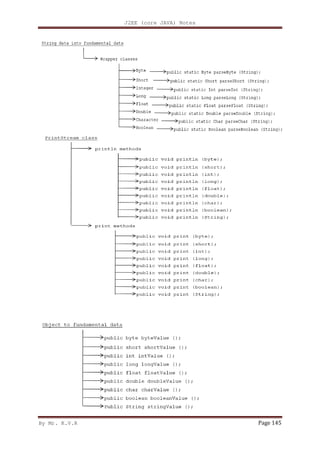
• Print stream class is a predefined class which contains nine overloaded instance println
methods and nine overloaded instance print methods and whose prototypes are as follows:
Public void println (byte);
Public void println (short);
Public void println (int);
Public void println (long);
Public void println (float);
Public void println (double);
Public void println (char);
J2SE (Core JAVA) Notes
By Mr. K.V.R Page 22
Public void println (Boolean);
Public void println (string);
Public void print (byte);
Public void print (short);
Public void print (int);
Public void print (long);
Public void print (float);
Public void print (double);
Public void print (char);
Public void print (Boolean);
Public void print (string);
Day - 15:
For example 1:
Int a=40000;
System.out.println (a); //40000
System.out.println (“value of a=” + a); //value of a=40000
System.out.println (a + “is the value of a”); //40000 is the value of a
For example 2:
Int a=10, b=20, c;
C = a + b;
System.out.println (c); //30
System.out.println (“sum=” + c); //sum=30
System.out.println (c + “is the sum”); // 30 is the sum
System.out.println (“sum of” + a + “and” + b + “=” + c); //sum of 10 and 20 is 30
For example 3:
System.out.println (“WELCOME TO JAVA”);
STRUCUTURE of a java program
Package details:
class <clsname>
{
Data member’s declaration;
User defined methods;
Public static void main (string k [])
{
Block of statements ();
}
}
• Every program in JAVA must be developed with respect to class.
• Data member’s declaration represents the type of data members which we use as a part of
the class.
By Mr. K.V.R
• User defined methods represents the type of
perform some meaningful operation by making use of the
• Here main represents the name of the
represents return type of
anything.
• Since main method is executing only once hence it must be
method can be called/accessed by everybody and hence it belongs to
• Block of statements represents the valid executable statements of
user defined methods.
Write a JAVA program to display a message “welcome to
Answer:
class First
{
Public static void main (string k []);
{
System.out.println (“welcome to
}
}
NOTE:
• While giving the file name
class with an extension
• Whenever we give println
J2SE (Core JAVA) Notes
represents the type of methods which we use as a part of the
perform some meaningful operation by making use of the data members
represents the name of the method where the program execution starts and
epresents return type of main method which indicates main method
is executing only once hence it must be static method
can be called/accessed by everybody and hence it belongs to public method
represents the valid executable statements of JAVA
program to display a message “welcome to JAVA”?
Public static void main (string k []);
System.out.println (“welcome to JAVA”);
file name to a JAVA program we must give the file name
“.java” in which ever the class main method presents.
println it will prints in the new line whereas print prints in the same line
Page 23
which we use as a part of the class to
data members of class.
where the program execution starts and void
main method does not return
static method. Since main
public method.
JAVA which will call the
the file name as name of the
presents.
prints in the same line.
By Mr. K.V.R
Steps for COMPILING and
Write a JAVA program which illustrates the concept of
Answer:
class Second
{
Void disp1 ()
{
System.out.println (“disp1
}
Static void disp2 ()
{
System.out.println (“disp2
}
Public static void main (string k [])
{
System.out.println (“main
Second so = new Second ();
so. disp1 ();
Second. disp2 (
System.out.println (“main
}
} //second
NOTE:
1. One static method can
belongs to same class.
2. One instance method can
instance method belongs to same class
J2SE (Core JAVA) Notes
teps for COMPILING and RUNNING the java program
program which illustrates the concept of instance methods and static methods
System.out.println (“disp1-instance”);
Static void disp2 ()
System.out.println (“disp2-static”);
Public static void main (string k [])
System.out.println (“main-beginning”);
Second so = new Second ();
so. disp1 ();
Second. disp2 ();
System.out.println (“main-end”);
can call another static method directly provide both the static method
can call another instance method directly provide
instance method belongs to same class.
Page 24
static methods?
both the static method
provide both the static
J2SE (Core JAVA) Notes
By Mr. K.V.R Page 25
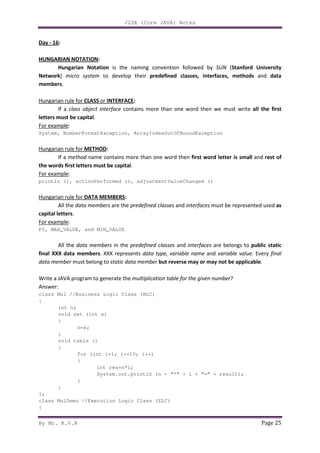
Day - 16:
HUNGARIAN NOTATION:
Hungarian Notation is the naming convention followed by SUN (Stanford University
Network) micro system to develop their predefined classes, interfaces, methods and data
members.
Hungarian rule for CLASS or INTERFACE:
If a class object interface contains more than one word then we must write all the first
letters must be capital.
For example:
System, NumberFormatException, ArrayIndexOutOfBoundException
Hungarian rule for METHOD:
If a method name contains more than one word then first word letter is small and rest of
the words first letters must be capital.
For example:
println (), actionPerformed (), adjustmentValueChanged ()
Hungarian rule for DATA MEMBERS:
All the data members are the predefined classes and interfaces must be represented used as
capital letters.
For example:
PI, MAX_VALUE, and MIN_VALUE
All the data members in the predefined classes and interfaces are belongs to public static
final XXX data members. XXX represents data type, variable name and variable value. Every final
data member must belong to static data member but reverse may or may not be applicable.
Write a JAVA program to generate the multiplication table for the given number?
Answer:
class Mul //Business Logic Class (BLC)
{
int n;
void set (int x)
{
n=x;
}
void table ()
{
for (int i=1; i<=10; i++)
{
int res=n*i;
System.out.println (n + “*” + i + “=” + result);
}
}
};
class MulDemo //Execution Logic Class (ELC)
{
J2SE (Core JAVA) Notes
By Mr. K.V.R Page 26
Public static class main (string k [])
{
Mul mo = new Mul ();
mo.set (4);
mo.table ();
}
};
NOTE:
• The data members of a class can be used in all the functions of the class.
• The variable which we use as a part of function heading is known as formal parameters and
they can be used within the function only.
• The variables which we use as a part of function definition/body then those variables known
as local variables and they can be used within its scope i.e., function definition.
• The variables which we use within the function call then those variables are known as actual
parameters.
For example:
int n=4;
mo.set (n);
Where ’n’ is the actual parameter.
Day - 17:
The following table gives the details about those classes and methods used for converting
storing data to fundamental data:
DATA TYPES
1. byte
2. short
3. int
4. long
5. float
6. double
7. char
8. boolean
WRAPPER CLASS
1. Byte
2. Short
3. Integer
4. Long
5. Float
6. Double
7. Char
8. Boolean
CONVERTION METHOD FROM STRING DATA TO
FUNDAMENTAL DATA TYPE
1. public static byte parseByte (string)
2. public static short parseShort (string)
3. public static int parseInt (string)
4. public static long parseLong (string)
5. public static float parseFloat (string)
6. public static double parseDouble
(string)
7. public static char parseChar (string)
8. public static boolean parseBoolean
(string)
Whenever we develop a JAVA program it is recommended to write ‘n’ number of business
logic classes and single execution logic class. A business logic class is one which contains ‘n’ number
of user defined methods in which we write business logic. Business logic is one which is provided by
JAVA programmer according business rules (requirements) started by customer. Whatever data we
represent in JAVA runtime environment it is by default treated as objects of string data. As a
programmer when we start any JAVA program an object of string class is created depends on
number of values we pass.
J2SE (Core JAVA) Notes
By Mr. K.V.R Page 27
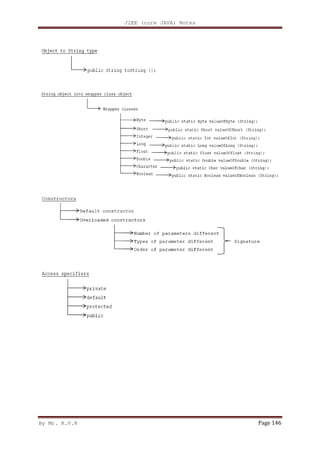
Wrapper classes are basically used for converting the string data into fundamental data
type. Each and every wrapper class contains the following generalized parse methods.
public static Xxx parseXxx (String);
here, Xxx represents fundamental data type.
Length is an implicit attribute created by JVM to determine number of elements or size of the array.
For example:
int a [] = {10, 20, 30, 40};
System.out.println (a. length); //4
String s1 [] = {10, 20, 30};
System.out.println (s1.length); //3
class Data
{
public static void main (String s [])
{
int noa=s.length;
System.out.println ("NUMBER OF VALUES ="+noa);
System.out.println (s [0] +s [1]);
int x=Integer.parseInt (s [0]); //8
int y=Integer.parseInt (s [1]); //9
int z=x+y;
System.out.println ("SUM ="+z);
}
};
8 and 9 lines used for converting string into int data type.
Write a JAVA program for printing the data which we pass from command prompt?
Answer:
class Print
{
public static void main (String k [])
{
System.out.println ("NUMBER OF VALUES ="+k.length);
for (int i=0; i<k.length; i++)
{
System.out.println (k[i] +" ");
}
}
};
Write a JAVA program which computes sum of two numbers by accepting the data from command
prompt (DOS)?
Answer:
class Sum
{
int a, b, c; //a,b,c are data members
void assign (int x, int y) //x,y are formal parameters
{
a=x;
b=y;
J2SE (Core JAVA) Notes
By Mr. K.V.R Page 28
}
void add () //add () is business logic method
{
c=a+b;
}
void disp () //disp () is business logic method
{
System.out.println ("SUM OF "+a+" AND "+b+" = "+c);
}
};
class SumDemo
{
public static void main (String k [])
{
int x=Integer.parseInt (k [0]);
int y=Integer.parseInt (k [1]);
Sum so=new Sum ();
so. assign(x, y);
so. add ();
so.disp ();
}
};
NOTE: The data which we pass through command prompt is called command line arguments.
Write a JAVA program to check weather the given number is prime or not?
Answer:
class Prime
{
int n;
void set (int x)
{
n=x;
}
String decide ()
{
int i;
for (i=2; i<n; i++)
{
if (n%i==0)
{
break;
}
}
if (i==n)
{
return "PRIME";
}
else
{
return "NOT"+"PRIME";
}
}
};
class PrimeDemo
J2SE (Core JAVA) Notes
By Mr. K.V.R Page 29
{
public static void main (String k [])
{
int n=Integer.parseInt (k [0]);
Prime po=new Prime ();
po.set (n);
String so=po.decide ();
System.out.println (so);
}
};
Write a JAVA program which converts an ordinary number into roman number?
Answer:
class Roman
{
int n;
void set (int x)
{
n=x;
}
void convert ()
{
if (n<=0)
{
System.out.print ("NO ROMAN FOR THE GIVEN NUMBER");
}
else
{
while (n>=1000)
{
System.out.print ("M");
n=n-1000;
}
if (n>=900)
{
System.out.print ("CM");
n=n-900;
}
if (n>=500)
{
System.out.print ("D");
n=n-500;
}
if (n>=400)
{
System.out.print ("CD");
n=n-400;
}
while (n>=100)
{
System.out.print ("C");
n=n-100;
}
if (n>=90)
{
J2SE (Core JAVA) Notes
By Mr. K.V.R Page 30
System.out.print ("XC");
n=n-90;
}
if (n>=50)
{
System.out.print ("L");
n=n-50;
}
if (n>=40)
{
System.out.print ("XL");
n=n-40;
}
while (n>=10)
{
System.out.print ("X");
n=n-10;
}
if (n>=9)
{
System.out.print ("IX");
n=n-9;
}
if (n>=5)
{
System.out.print ("V");
n=n-5;
}
if (n>=4)
{
System.out.print ("IV");
n=n-4;
}
while (n>=1)
{
System.out.print ("I");
n=n-1;
}
System.out.println ();
}
}
};
class RomanDemo
{
public static void main (String k [])
{
int n=Integer.parseInt (k [0]);
Roman r=new Roman ();
r.set (n);
r.convert ();
}
};
J2SE (Core JAVA) Notes
By Mr. K.V.R Page 31
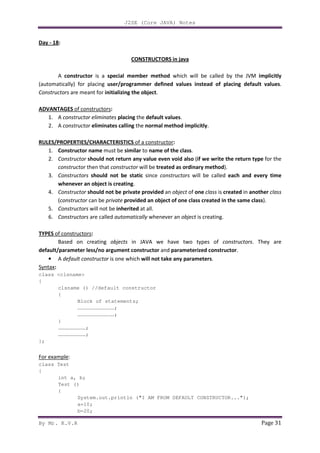
Day - 18:
CONSTRUCTORS in java
A constructor is a special member method which will be called by the JVM implicitly
(automatically) for placing user/programmer defined values instead of placing default values.
Constructors are meant for initializing the object.
ADVANTAGES of constructors:
1. A constructor eliminates placing the default values.
2. A constructor eliminates calling the normal method implicitly.
RULES/PROPERTIES/CHARACTERISTICS of a constructor:
1. Constructor name must be similar to name of the class.
2. Constructor should not return any value even void also (if we write the return type for the
constructor then that constructor will be treated as ordinary method).
3. Constructors should not be static since constructors will be called each and every time
whenever an object is creating.
4. Constructor should not be private provided an object of one class is created in another class
(constructor can be private provided an object of one class created in the same class).
5. Constructors will not be inherited at all.
6. Constructors are called automatically whenever an object is creating.
TYPES of constructors:
Based on creating objects in JAVA we have two types of constructors. They are
default/parameter less/no argument constructor and parameterized constructor.
• A default constructor is one which will not take any parameters.
Syntax:
class <clsname>
{
clsname () //default constructor
{
Block of statements;
………………………………;
………………………………;
}
………………………;
………………………;
};
For example:
class Test
{
int a, b;
Test ()
{
System.out.println ("I AM FROM DEFAULT CONSTRUCTOR...");
a=10;
b=20;
J2SE (Core JAVA) Notes
By Mr. K.V.R Page 32
System.out.println ("VALUE OF a = "+a);
System.out.println ("VALUE OF b = "+b);
}
};
class TestDemo
{
public static void main (String [] args)
{
Test t1=new Test ();
}
};
RULE-1:
Whenever we create an object only with default constructor, defining the default
constructor is optional. If we are not defining default constructor of a class, then JVM will call
automatically system defined default constructor (SDDC). If we define, JVM will call
user/programmer defined default constructor (UDDC).
Day - 19:
• A parameterized constructor is one which takes some parameters.
Syntax:
class <clsname>
{
…………………………;
…………………………;
<clsname> (list of parameters) //parameterized constructor
{
Block of statements (s);
}
…………………………;
…………………………;
}
For example:
class Test
{
int a, b;
Test (int n1, int n2)
{
System.out.println ("I AM FROM PARAMETER CONSTRUCTOR...");
a=n1;
b=n2;
System.out.println ("VALUE OF a = "+a);
System.out.println ("VALUE OF b = "+b);
}
};
class TestDemo1
{
public static void main (String k [])
{
J2SE (Core JAVA) Notes
By Mr. K.V.R Page 33
Test t1=new Test (10, 20);
}
};
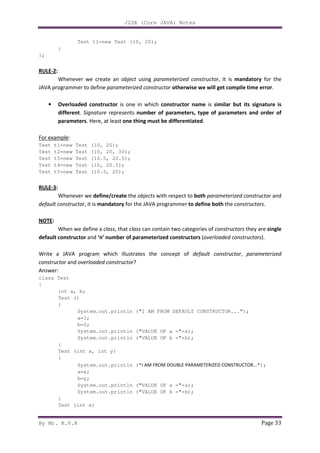
RULE-2:
Whenever we create an object using parameterized constructor, it is mandatory for the
JAVA programmer to define parameterized constructor otherwise we will get compile time error.
• Overloaded constructor is one in which constructor name is similar but its signature is
different. Signature represents number of parameters, type of parameters and order of
parameters. Here, at least one thing must be differentiated.
For example:
Test t1=new Test (10, 20);
Test t2=new Test (10, 20, 30);
Test t3=new Test (10.5, 20.5);
Test t4=new Test (10, 20.5);
Test t5=new Test (10.5, 20);
RULE-3:
Whenever we define/create the objects with respect to both parameterized constructor and
default constructor, it is mandatory for the JAVA programmer to define both the constructors.
NOTE:
When we define a class, that class can contain two categories of constructors they are single
default constructor and ‘n’ number of parameterized constructors (overloaded constructors).
Write a JAVA program which illustrates the concept of default constructor, parameterized
constructor and overloaded constructor?
Answer:
class Test
{
int a, b;
Test ()
{
System.out.println ("I AM FROM DEFAULT CONSTRUCTOR...");
a=1;
b=2;
System.out.println ("VALUE OF a ="+a);
System.out.println ("VALUE OF b ="+b);
}
Test (int x, int y)
{
System.out.println ("I AM FROM DOUBLE PARAMETERIZED CONSTRUCTOR...");
a=x;
b=y;
System.out.println ("VALUE OF a ="+a);
System.out.println ("VALUE OF b ="+b);
}
Test (int x)
J2SE (Core JAVA) Notes
By Mr. K.V.R Page 34
{
System.out.println ("I AM FROM SINGLE PARAMETERIZED CONSTRUCTOR...");
a=x;
b=x;
System.out.println ("VALUE OF a ="+a);
System.out.println ("VALUE OF b ="+b);
}
Test (Test T)
{
System.out.println ("I AM FROM OBJECT PARAMETERIZED CONSTRUCTOR...");
a=T.a;
b=T.b;
System.out.println ("VALUE OF a ="+a);
System.out.println ("VALUE OF b ="+b);
}
};
class TestDemo2
{
public static void main (String k [])
{
Test t1=new Test ();
Test t2=new Test (10, 20);
Test t3=new Test (1000);
Test t4=new Test (t1);
}
};
NOTE: By default the parameter passing mechanism is call by reference.
‘this ‘: ‘this’ is an internal or implicit object created by JAVA for two purposes. They are
i. ‘this’ object is internally pointing to current class object.
i. Whenever the formal parameters and data members of the class are similar, to differentiate
the data members of the class from formal parameters, the data members of class must be
proceeded by ‘this’.
Day - 20:
this (): this () is used for calling current class default constructor from current class parameterized
constructors.
this (…): this (…) is used for calling current class parameterized constructor from other category
constructors of the same class.
For example:
class Test
{
int a, b;
Test ()
{
2- this (10); //calling current class single parameterized constructor
J2SE (Core JAVA) Notes
By Mr. K.V.R Page 35
System.out.println ("I AM FROM DEFAULT CONSTRUCTOR...");
a=1;
b=2;
System.out.println ("VALUE OF a = "+a);
System.out.println ("VALUE OF b = "+b);
}
Test (int x) ---2
{
3- this (100, 200); //calling current class double parameterized constructor
System.out.println ("I AM FROM SINGLE PARAMETERIZED CONSTRUCTOR...");
a=b=x;
System.out.println ("VALUE OF a = "+a);
System.out.println ("VALUE OF b = "+b);
}
Test (int a, int b) ---3
{
System.out.println ("I AM FROM DEFAULT CONSTRUCTOR...");
this.a=a;
this.b=b;
System.out.println ("VALUE OF a = "+this.a);
System.out.println ("VALUE OF b = "+this.b);
System.out.println ("VALUE OF a = "+a);
System.out.println ("VALUE OF b = "+b);
}
};
class TestDemo3
{
public static void main (String k [])
{
1- Test t1=new Test ();
}
};
Rule for ‘this’:
Whenever we use either this () or this (…) in the current class constructors, that statements
must be used as first statement only.
The order of the output containing this () or this (...) will be in the reverse order of the input
which we gave as inputs.
For more clarity refer the above program.
For example we need output as follows:
I AM FROM DEFAULT CONSTRUCTOR… ---1
VALUE OF a = 1
VALUE OF b = 2
I AM FROM SINGLE PARAMETERIZED CONSTRUCTOR… ---2
VALUE OF a = 100
VALUE OF b = 200
I AM FROM DOUBLE PARAMETERIZED CONSTRUCTOR… ---3
VALUE OF a = 10
VALUE OF b = 10
We must write in the following order as input:
Test (10); ---3
Test (100, 200); ---2
J2SE (Core JAVA) Notes
By Mr. K.V.R Page 36
Test (); ---1
NOTE:
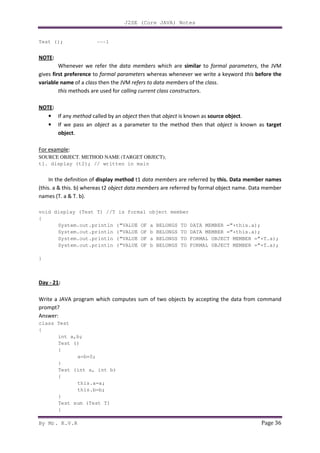
Whenever we refer the data members which are similar to formal parameters, the JVM
gives first preference to formal parameters whereas whenever we write a keyword this before the
variable name of a class then the JVM refers to data members of the class.
this methods are used for calling current class constructors.
NOTE:
• If any method called by an object then that object is known as source object.
• If we pass an object as a parameter to the method then that object is known as target
object.
For example:
SOURCE OBJECT. METHOD NAME (TARGET OBJECT);
t1. display (t2); // written in main
In the definition of display method t1 data members are referred by this. Data member names
(this. a & this. b) whereas t2 object data members are referred by formal object name. Data member
names (T. a & T. b).
void display (Test T) //T is formal object member
{
System.out.println (“VALUE OF a BELONGS TO DATA MEMBER =”+this.a);
System.out.println (“VALUE OF b BELONGS TO DATA MEMBER =”+this.a);
System.out.println (“VALUE OF a BELONGS TO FORMAL OBJECT MEMBER =”+T.a);
System.out.println (“VALUE OF b BELONGS TO FORMAL OBJECT MEMBER =”+T.a);
}
Day - 21:
Write a JAVA program which computes sum of two objects by accepting the data from command
prompt?
Answer:
class Test
{
int a,b;
Test ()
{
a=b=0;
}
Test (int a, int b)
{
this.a=a;
this.b=b;
}
Test sum (Test T)
{
J2SE (Core JAVA) Notes
By Mr. K.V.R Page 37
Test T11=new Test ();
T11.a=this.a+T.a;
T11.b=this.b+T.b;
return (T11);
}
void display ()
{
System.out.println ("VALUE OF a = "+a);
System.out.println ("VALUE OF b = "+b);
}
};
class SumDemo1
{
public static void main (String k[])
{
int n1=Integer.parseInt (k[0]);
int n2=Integer.parseInt (k[1]);
int n3=Integer.parseInt (k[2]);
int n4=Integer.parseInt (k[3]);
Test t1=new Test (n1,n2);
Test t2=new Test (n3,n4);
Test t3=new Test ();
// t3=t1+t2; invalid statement
t3=t1.sum (t2);
System.out.println ("t1 VALUES ARE AS FOLLOWS...");
t1.display ();
System.out.println ("t2 VALUES ARE AS FOLLOWS...");
t2.display ();
System.out.println ("t3 VALUES ARE AS FOLLOWS...");
t3.display ();
}
};
TYPES of RELATIONSHIPS in java
Based on reusing the data members from one class to another class in JAVA we have three
types of relationships. They are is-a relationship, has-a relationship and uses-a relationship.
• Is-a relationship is one in which data members of one class is obtained into another class
through the concept of inheritance.
• Has-a relationship is one in which an object of one class is created as a data member in
another class.
• Uses-a relationship is one in which a method of one class is using an object of another class.
Inheritance is the technique which allows us to inherit the data members and methods from
base class to derived class.
• Base class is one which always gives its features to derived classes.
• Derived class is one which always takes features from base class.
A Derived class is one which contains some of features of its own plus some of the data
members from base class.
J2SE (Core JAVA) Notes
By Mr. K.V.R Page 38
Syntax for INHERITING the features from base class to derived class:
class <clsname-2> extends <clsname-1>
{
Variable declaration;
Method definition;
};
Here, clsname-1 and clsname-2 represents derived class and base class respectively.
Extends is a keyword which is used for inheriting the data members and methods from base class to
the derived class and it also improves functionality of derived class.
NOTE:
• Final classes cannot be inherited.
• If the base class contains private data members then that type of data members will not be
inherited into derived class.
Whenever we develop any inheritance application, it is always recommended to create an object
of bottom most derived class. Since, bottom most derived class contains all the features from its
super classes.
Day - 22:
• One class can extend only one class at a time. Since, JAVA does not support multiple
inheritance.
Whenever we inherit the base class members into derived class, when we creates an object of
derived class, JVM always creates the memory space for base class members first and later memory
space will be created for derived class members.
For example:
class c1;
{
int a;
void f1()
{
…………;
}
};
class c2 extends c1
{
int b;
void f2()
{
…………;
}
};
J2SE (Core JAVA) Notes
By Mr. K.V.R Page 39
NOTE:
• Whatever the data members are coming from base class to the derived class, the base class
members are logically declared in derived class, the base class methods are logically defined
in derived class.
• Private data members and private methods of the base class will not be inherited at all.
Write a JAVA program computes sum of two numbers using inheritance?
Answer:
class Bc
{
int a;
};
class Dc extends Bc
{
int b;
void set (int x, int y)
{
a=x;
b=y;
}
void sum ()
{
System.out.println ("SUM = "+(a+b));
}
};
class InDemo
{
public static void main (String k [])
{
int n1=Integer.parseInt (k [0]);
int n2=Integer.parseInt (k [1]);
Dc do1=new Dc ();
do1.set (n1, n2);
do1.sum ();
}
};
For every class in JAVA we have a super class called object class. The purpose of object class
is that it provides garbage collector for collecting unreferenced memory locations from the derived
classes.
‘Super’ keyword:
Super keyword is used for differentiating the base class features with derived class features.
Super keyword is placing an important role in three places. They are at variable level, at method
level and at constructor level.
• Super at variable level
Whenever we inherit the base class members into derived class, there is a possibility that
base class members are similar to derived class members.
In order to distinguish the base class members with derived class members in the derived
class, the base class members will be preceded by a keyword super.
J2SE (Core JAVA) Notes
By Mr. K.V.R Page 40
Syntax for super at VARIABLE LEVEL:
super. base class member name
For example:
class Bc
{
int a;
};
class Dc extends Bc
{
int a;
void set (int x, int y)
{
super.a=x;
a=y; //by default 'a' is preceded with 'this.' since 'this.' represents current class
}
void sum ()
{
System.out.println ("SUM = "+(super.a+a));
}
};
class InDemo1
{
public static void main (String k [])
{
int n1=Integer.parseInt (k[0]);
int n2=Integer.parseInt (k[1]);
Dc do1=new Dc ();
do1.set (n1, n2);
do1.sum ();
}
};
• Super at method level
Whenever we inherit the base class methods into the derived class, there is a possibility that
base class methods are similar to derived methods.
To differentiate the base class methods with derived class methods in the derived class, the
base class methods must be preceded by a keyword super.
Syntax for super at method level: super. base class method name
For example:
class Bc
{
void display ()
{
System.out.println ("BASE CLASS - DISPLAY...");
}
};
class Dc extends Bc
{
void display ()
{
By Mr. K.V.R
super.display (); //refers to base class display method
System.out.println ("DERIVED CLASS
}
};
class InDemo2
{
public static void main (String k [])
{
Dc do1=new Dc ();
do1.display ();
}
};
Day - 23:
• Super at constructor level
Whenever we develop any inheritance application, we use to create always object of bottom
most derived class. When we create an object of bottom most derived class, it in turns calls its
immediate super class default constructor and it in turns calls its
constructor. Therefore, in JAVA
top and the execution starts from top to bottom.
Consider the following multi level inheritance:
Super () is used for calling super class default constructor from default constructor or from
parameterized constructor of derived class.
Super (…) is used for calling super class parameterized constructor either from default
constructor or from parameterized constructor of derived class. It is always mandatory.
RULES:
Whenever we use either super () or super (…) in derived class constructors they must be
used as first statement.
J2SE (Core JAVA) Notes
super.display (); //refers to base class display method
System.out.println ("DERIVED CLASS - DISPLAY...");
public static void main (String k [])
Dc do1=new Dc ();
do1.display ();
Super at constructor level
Whenever we develop any inheritance application, we use to create always object of bottom
most derived class. When we create an object of bottom most derived class, it in turns calls its
immediate super class default constructor and it in turns calls its top most super class default
JAVA environment, constructors will be called always from bottom to
top and the execution starts from top to bottom.
Consider the following multi level inheritance:
is used for calling super class default constructor from default constructor or from
parameterized constructor of derived class. It is optional.
is used for calling super class parameterized constructor either from default
arameterized constructor of derived class. It is always mandatory.
Whenever we use either super () or super (…) in derived class constructors they must be
Page 41
super.display (); //refers to base class display method
Whenever we develop any inheritance application, we use to create always object of bottom
most derived class. When we create an object of bottom most derived class, it in turns calls its
top most super class default
environment, constructors will be called always from bottom to
is used for calling super class default constructor from default constructor or from
is used for calling super class parameterized constructor either from default
arameterized constructor of derived class. It is always mandatory.
Whenever we use either super () or super (…) in derived class constructors they must be
By Mr. K.V.R
1. Whenever we want to call default constructor of base class from
derived class using super () in default constructor of derived class is optional.
For example:
class Bc
{
Bc ()
{
System.out.println ("I AM FROM BASE CLASS...");
}
};
class Ibc extends Bc
{
Ibc ()
{
System.out.println ("I
}
};
class Dc extends Ibc
{
Dc ()
{
super (); //optional
System.out.println ("I AM FROM DERIVED CLASS...");
}
};
class InDemo3
{
public static void main (String k [])
{
Dc o1=new Dc ();
}
};
2. Whenever we want to call the super class parameterized class from parameterized class of
the derived class using super (…) in parameterized class of derived class is mandatory.
J2SE (Core JAVA) Notes
Whenever we want to call default constructor of base class from default constructor of
derived class using super () in default constructor of derived class is optional.
System.out.println ("I AM FROM BASE CLASS...");
System.out.println ("I AM FROM INTERMEDIATE BASE CLASS...");
super (); //optional
System.out.println ("I AM FROM DERIVED CLASS...");
public static void main (String k [])
Dc o1=new Dc ();
want to call the super class parameterized class from parameterized class of
the derived class using super (…) in parameterized class of derived class is mandatory.
Page 42
default constructor of
derived class using super () in default constructor of derived class is optional.
AM FROM INTERMEDIATE BASE CLASS...");
want to call the super class parameterized class from parameterized class of
the derived class using super (…) in parameterized class of derived class is mandatory.
J2SE (Core JAVA) Notes
By Mr. K.V.R Page 43
For example:
class C1
{
int a;
C1 (int a)
{
System.out.println ("PARAMETERIZED CONSTRUCTOR - C1");
this.a=a;
System.out.println ("VALUE OF a = "+a);
}
};
class C2 extends C1
{
int b;
C2 (int a, int b)
{
super (a);
System.out.println ("PARAMETERIZED CONSTRUCTOR – C2");
this.b=b;
System.out.println ("VALUE OF b = "+b);
}
};
class InDemo4
{
public static void main (String k [])
{
C2 o2=new C2 (10, 20);
}
};
3. Whenever we want to call default constructor of base class from parameterized class of
derived class using super () in parameterized class of derived class is optional.
For example:
class C1
{
int a;
C1 ()
{
System.out.println ("PARAMETERIZED CONSTRUCTOR - C1");
this.a=a;
System.out.println ("VALUE OF a = "+a);
}
};
class C2 extends C1
{
int b;
C2 (int b)
{
super (); //optional
System.out.println ("PARAMETERIZED CONSTRUCTOR - C2");
this.b=b;
System.out.println ("VALUE OF b = "+b);
}
};
J2SE (Core JAVA) Notes
By Mr. K.V.R Page 44
class InDemo5
{
public static void main (String k [])
{
C2 o2=new C2 (20);
}
};
4. Whenever we want to call parameterized class of base class from default constructor of
derived class using super (…) in default constructor of derived class is mandatory.
For example:
class C1
{
int a;
C1 (int a)
{
System.out.println ("PARAMETERIZED CONSTRUCTOR - C1");
this.a=a;
System.out.println ("VALUE OF a = "+a);
}
};
class C2 extends C1
{
int b;
C2 ()
{
super (10);
System.out.println ("DEFAULT CONSTRUCTOR - C2");
this.b=20;
System.out.println ("VALUE OF b = "+b);
}
};
class InDemo6
{
public static void main (String k [])
{
C2 o2=new C2 ();
}
};
Day - 24:
Best example for the above given rules:
class Bc
{
Bc ()
{
System.out.println ("BASE CLASS - DEFAULT CONSTRUCTOR");
}
Bc (int x)
{
this ();
J2SE (Core JAVA) Notes
By Mr. K.V.R Page 45
System.out.println ("BASE CLASS - PARAMETERIZED CONSTRUCTOR");
}
};
class Ibc extends Bc
{
Ibc ()
{
super (100);
System.out.println ("INTERMEDIATE BASE CLASS - DEFAULT CONSTRUCTOR");
}
Ibc (int x)
{
this ();
System.out.println ("INTERMEDIATE BASE CLASS - PARAMETERIZED CONSTRUCTOR");
}
};
class Dc extends Ibc
{
Dc ()
{
this (10);
System.out.println ("DERIVED CLASS - DEFAULT CONSTRUCTOR");
}
Dc (int x)
{
super (10);
System.out.println ("DERIVED CLASS - PARAMETERIZED CONSTRUCTOR");
}
};
class StDemo
{
public static void main (String k [])
{
Dc do1=new Dc ();
}
};
ABSTRACT CLASSES:
In JAVA we have two types of classes. They are concrete classes and abstract classes.
• A concrete class is one which contains fully defined methods. Defined methods are also
known as implemented or concrete methods. With respect to concrete class, we can create
an object of that class directly.
For example:
class C1
{
int a,b;
void f1 ()
{
…………;
…………;
}
void f2 ()
{
J2SE (Core JAVA) Notes
By Mr. K.V.R Page 46
…………;
…………;
}
};
To call the above method:
C1 O1=new C1 ();
O1.f1 ();
O1.f2 ();
• An abstract class is one which contains some defined methods and some undefined
methods. Undefined methods are also known as unimplemented or abstract methods.
Abstract method is one which does not contain any definition. To make the method as
abstract we have to use a keyword called abstract before the function declaration.
Syntax for ABSTRACT CLASS:
abstract return_type method_name (method parameters if any);
For example:
Abstract void sum ();
The abstract methods make us to understand what a method can do but it does not give
how the method can be implemented. Every abstract method belongs to a class under class is known
as abstract class, to make the class as abstract we use a keyword called abstract before the class
specification.
Syntax for ABSTRACT CLASS:
abstract class <clsname>
{
Abstract return_type method_name (method parameters if any);
};
For example:
abstract class Op
{
abstract void sum ();
};
Day - 25:
With respect to abstract class we cannot create an object direct but we can create
indirectly. An object abstract class is equal to an object of that class which extends that abstract
class.
For example:
class CC extends AC
{
…………;
J2SE (Core JAVA) Notes
By Mr. K.V.R Page 47
…………;
};
AC Ao=new AC (); //invalid
AC Ao=new CC ();
or
AC Ao;
Ao=new CC ();
Write a JAVA program for computing sum of two integers and floats using abstract classes?
Answer:
abstract class Op
{
abstract void sum ();
};
class isum extends Op
{
void sum ()
{
int a,b,c;
a=10;
b=20;
c=a+b;
System.out.println ("INT VALUE = "+c);
}
};
class fsum extends Op
{
void sum ()
{
float f1,f2,f3;
f1=10.26f;
f2=20.32f;
f3=f1+f2;
System.out.println ("FLOAT VALUE = "+f3);
}
};
class AbDemo
{
public static void main (String k [])
{
// Op o1=new Op (); invalid
Op o2;
o2=new isum ();
o2.sum ();
o2=new fsum ();
o2.sum ();
}
};
Abstract classes should not be final, since, they are always reusable. Abstract classes are
basically used to implement polymorphism; we use the concept of dynamic binding. Hence,
abstract classes, polymorphism and dynamic binding will improve the performance of JAVA J2EE
applications by reducing amount of memory space.
By Mr. K.V.R
Whenever we inherit ‘n’ number of
class, if the derived class defines all ‘n’
concrete class. If the derived class
methods then the derived class
we use a keyword called abstract
An abstract base class is one
An abstract derived class is one
inherited from abstract base class
Day - 26:
Implement the above diagram by using abstract class’s polymorphism and dynamic binding.
Answer:
abstract class C1
{
abstract void f1 ();
abstract void f2 ();
};
abstract class C2 extends C1
{
void f1 ()
{
System.out.println
}
};
class C3 extends C2
{
void f1 ()
{
super.f1 ();
System.out.println ("f1
}
void f2 ()
J2SE (Core JAVA) Notes
‘n’ number of abstract methods from abstract base class
derived class defines all ‘n’ number of abstract methods then the
derived class is not defining at least one abstract method out of ‘n’ abstract
is known as abstract derived class and to make that class abstract
abstract.
is one which contains physical representation of abstract methods
is one which contains logical declaration of abstract methods which are
inherited from abstract base class.
Implement the above diagram by using abstract class’s polymorphism and dynamic binding.
abstract void f1 ();
abstract void f2 ();
abstract class C2 extends C1
System.out.println ("f1-C2-original");
System.out.println ("f1-C3-OVERRIDDEN");
Page 48
abstract base class to derived
then the derived class is
not defining at least one abstract method out of ‘n’ abstract
to make that class abstract,
which contains physical representation of abstract methods.
which contains logical declaration of abstract methods which are
Implement the above diagram by using abstract class’s polymorphism and dynamic binding.
J2SE (Core JAVA) Notes
By Mr. K.V.R Page 49
{
System.out.println ("f2-C3");
}
void f3 ()
{
System.out.println ("f3-C3-SPECIALLY DEFINED");
}
};
class AbDemo1
{
public static void main (String k [])
{
C3 o3=new C3 ();
o3.f1 ();
o3.f2 ();
o3.f3 ();
// C2 o2=new C2 (); invalid
C2 o2=new C3 ();
o2.f1 ();
o2.f2 ();
// o2.f3 (); invalid
C1 o1=new C3 (); // or o2
o1.f1 ();
o1.f2 ();
// o1.f3 ();
}
};
Output:
With respect to Concrete Class:
C3 o3=new C3 ();
o3.f1 (); // f1 - overridden - C3
o3.f2 (); // f2 - C3
o3.f3 (); // f3 - defined in - C3
With respect to Abstract Derived Class:
C2 o2=new C2 (); // invalid
C2 o2=new C3 ();
o2.f1 (); // f1 - overridden - C3
o2.f2 (); // f2 - C3
o2.f3 (); // invalid
With respect to Abstract Base Class:
C1 o1;
o1=o2; // it mean., new C3 ()
o1.f1 (); // f1 - overridden - C3
o1.f2 (); // f2 - C3
o1.f3 (); // invalid
An object of either concrete base class or abstract base class contains the details about
those methods which are available in that class only but this object (concrete base class or abstract
base class) does not contains details of those methods which are specially defined in derived
class’s.
J2SE (Core JAVA) Notes
By Mr. K.V.R Page 50
Application:
Write a JAVA program to display the fonts of the system?
Answer:
import java.awt.GraphicsEnvironment;
class Fonts
{
public static void main (String k [])
{
GraphicsEnvironment
ge=GraphicsEnvironment.getLocalGraphicsEnvironment ();
String s []=ge.getAvailableFontFamilyNames ();
System.out.println ("NUMBER OF FONTS = "+s.length);
for (int i=0; i<s.length; i++)
{
System.out.println (s [i]);
}
}
};
A factory method is one whose return type is similar to name of the class where it presents.
For example:
getLocalGraphicsEnvironment ();
RULES for factory method:
1. The return type of the factory method must be similar to name of the class where it
presents.
2. Every factory method must be static (so that we can call with respect to name of the class).
3. Every factory method must be public.
Factory methods are used for creating an object without using new operator. Every
predefined abstract class contains at least one factory method for creating an object of abstract
class.
Whenever we define a concrete class, that concrete class also can be made it as abstract
and it is always further reusable or extendable by further classes.
When we define only concrete class we may extend or we may not extend by derived
classes.
J2EE (core JAVA) Notes
By Mr. K.V.R Page 51
Day - 27:
Interfaces:
1. Interfaces are basically used to develop user defined data types.
2. With respect to interfaces we can achieve the concept of multiple inheritances.
3. With interfaces we can achieve the concept of polymorphism, dynamic binding and hence we
can improve the performance of a JAVA program in turns of memory space and execution time.
An interface is a construct which contains the collection of purely undefined methods or an
interface is a collection of purely abstract methods.
Syntax for defining an interface:
Interface <interface name>
{
Variable declaration;
Method declaration;
}
Interface is a keyword which is used for developing user defined data types. Interface
name represent a JAVA valid variable name and it is treated as name of the interface. With respect
to interface we cannot create an object directly but we can create indirectly.
Variable declaration represents the type of data members which we use a part of
interface. Whatever the variables we use in the interface are meant for general purpose (the
variables like PI, e, etc.).
Whatever the variables we write in the interface, they are by default belongs to:
public static final xxx data members
xxx represents data type, variable name and variable value.
All variables must be initialized (otherwise it will be compilation error). Method declaration
represents the type of methods we use as a part of interface. All the methods of interface are
undefined methods and to make those methods as abstract, the JAVA programmer need not to
write a keyword abstract explicitly before the declaration of interface method.
Since all the methods of interface are meant for general purpose hence they must give
universal access. To make it as universal access the JAVA programmer need not to write a keyword
public explicitly before the method declaration. Hence, by default all the methods of interfaces
belong to public abstract methods.
For example:
Interface i1
{
Int a; //invalid since, initializing is mandatory
Int b=20;
Void f1 ();
Void f2 ();
}
Day - 28:
NOTE:
Whenever we compile an interface, we get <interface name>.class as an
intermediate file, if no errors are present in interface.
J2EE (core JAVA) Notes
By Mr. K.V.R Page 52
Syntax-1 for reusing the features of interface(s) to class:
[abstract] class <clsname> implements <intf 1>,<intf 2>.........<intf n>
{
variable declaration;
method definition or declaration;
};
In the above syntax clsname represents name of the class which is inheriting the features
from ‘n’ number of interfaces. ‘Implements’ is a keyword which is used to inherit the features of
interface(s) to a derived class.
NOTE:
When we inherit ‘n’ number of abstract methods from ‘n’ number of interfaces to the
derived class, if the derived class provides definition for all ‘n’ number of abstract methods then the
derived class is known as concrete class. If the derived class is not providing definition for at least
one abstract class and it must be made as abstract by using a keyword abstract.
i. One class can extend only one class.
ii. One class can implement ‘n’ number of interfaces.
iii. One interface can extends more than one interface.
iv. Interface cannot implements or extends a class. Since defined things cannot be made as
undefined things.
Syntax-2 inheriting ‘n’ number of interfaces to another interface:
interface <intf 0 name> extends <intf 1>,<intf 2>.........<intf n>
{
variable declaration cum initialization;
method declaration;
};
For example:
interface I1
{
int a=10;
void f1 ();
};
interface I2 extends I1
{
int b=20;
void f2 ();
};
If one interface is taking the features of another interface then that inheritance is known as
interface inheritance
Syntax-3:
[abstract] class <derived class name> extends <base class name>
implements <intf 1>,<intf 2>.........<intf n>
{
variable declaration;
method definition or declaration;
};
Whenever we use both extends and implements keywords as a part of JAVA program we
must always write extends keyword first and latter we must use implements keyword.
J2EE (core JAVA) Notes
By Mr. K.V.R Page 53
Important points:
i. An object of interface cannot be created directly since it contains ‘n’ number of abstract
methods. An object of interface can be created indirectly. An object of interface = an object of
that class which implements that interface.
ii. An object of base interface contains the details about those methods which are declared in that
interface only but it does not contain details about those methods which are specially available
in either in derived classes or in derived interfaces.
iii. Interfaces should not be final.
iv. An interface does not contain Constructors.
Day - 29:
PACKAGE
A package is a collection of classes, interfaces and sub-packages. A sub-package in turns
divides into classes, interfaces, sub-sub-packages, etc.
Learning about JAVA is nothing but learning about various packages. By default one
predefined package is imported for each and every JAVA program and whose name is java.lang.*.
Whenever we develop any java program, it may contain many number of user defined
classes and user defined interfaces. If we are not using any package name to place user defined
classes and interfaces, JVM will assume its own package called NONAME package.
In java we have two types of packages they are predefined or built-in or core packages and
user or secondary or custom defined packages.
PREDEFINED PACKAGES
Predefined packages are those which are developed by SUN micro systems and supplied as a
part of JDK (Java Development Kit) to simplify the task of java programmer.
NOTE:
Core packages of java starts with java. (For example: java.lang.*) and Advanced packages of
java starts with javax. (For example: java.sql.*)
TYPES of predefined packages:
As a part of J2SE we have nine predefined packages which are given in the following table:
Package name Package description
java.lang.* This package is used for achieving the language functionalities such as
convertion of data from string to fundamental data, displaying the result on to
the console, obtaining the garbage collector. This is the package which is by
default imported for each and every java program.
Day - 29:
java.io.* This package is used for developing file handling applications, such as, opening
the file in read or write mode, reading or writing the data, etc.
java.awt.*
(abstract
windowing toolkit)
This package is used for developing GUI (Graphic Unit Interface) components
such as buttons, check boxes, scroll boxes, etc.
J2EE (core JAVA) Notes
By Mr. K.V.R Page 54
java.awt.event.* Event is the sub package of awt package. This package is used for providing
the functionality to GUI components, such as, when button is clicked or when
check box is checked, when scroll box is adjusted either vertically or
horizontally.
java.applet.* This package is used for developing browser oriented applications. In other
words this package is used for developing distributed programs.
An applet is a java program which runs in the context of www or browser.
java.net.* This package is used for developing client server applications.
java.util.* This package is used for developing quality or reliable applications in java or
J2EE. This package contains various classes and interfaces which improves the
performance of J2ME applications. This package is also known as collection
framework (collection framework is the standardized mechanism of grouping
of similar or different type of objects into single object. This single object is
known as collection object).
java.text.* This package is used for formatting date and time on day to day business
operations.
java.lang.reflect.* Reflect is the sub package of lang package. This package is basically used to
study runtime information about the class or interface. Runtime information
represents data members of the class or interface, Constructors of the class,
types of methods of the class or interface.
java.sql.* This package is used for retrieving the data from data base and performing
various operations on data base.
USER DEFINED PACKAGES
A user defined package is one which is developed by java programmers to simplify the task
of the java programmers to keep set of classes, interfaces and sub packages which are commonly
used. Any class or interface is commonly used by many java programmers that class or interface
must be placed in packages.
Syntax:
package pack1[.pack2[.pack3……[.packn]…..]];
Here, package is a keyword which is used for creating user defined packages, pack1 represents
upper package and pack2 to packn represents sub packages.
For example:
package p1; statement-1
package p1.p2; statement-2
The statements 1 and 2 are called package statements.
RULE:
Whenever we create user defined package statement as a part of java program, we must use
package statement as a first executable statement.
Day - 30:
NOTE:
Whenever we develop any JAVA program it contains ‘n’ number of classes and interfaces.
Each and every class and interface which are developed by the programmer must belong to a
J2EE (core JAVA) Notes
By Mr. K.V.R Page 55
package (according to industry standards). If the programmer is not keeping the set of classes and
interfaces in a package, JVM will assume its own package called NONAME package.
NONAME package will exist only for a limited span of time until the program is completing.
STEPS for developing a PACKAGE:
i. Choose the appropriate package name, the package name must be a JAVA valid variable name
and we showed ensure the package statement must be first executable statement.
ii. Choose the appropriate class name or interface name and whose modifier must be public.
iii. The modifier of Constructors of a class must be public.
iv. The modifier of the methods of class name or interface name must be public.
v. At any point of time we should place either a class or an interface in a package and give the file
name as class name or interface name with extension .java
For example:
// Test.java
package tp;
public class Test
{
public Test ()
{
System.out.println ("TEST - DEFAULT CONSTRUCTOR");
}
public void show ()
{
System.out.println ("TEST - SHOW");
}
}
//ITest.java
package tp;
public interface ITest
{
void disp ();
}
Syntax for compiling a package:
javac –d . filename.java
For example:
javac –d . Test.java
Here, -d is an option or switch which gives an indication to JVM saying that go to Test.java
program take the package name and that package name is created as directory automatically
provides no errors are present in Test.java. When Test.java is not containing any errors we get Test.
class file and it will be copied automatically into current directory which is created recently i.e., tp
(package name). The above program cannot be executed since it doesn’t contain any main method.
Day -31:
How to use PACKAGE CLASSES and INTERFACES in another java program:
In order to refer package classes and interfaces in JAVA we have two approaches, they are
using import statement and using fully qualified name approach.
Using import statement:
Import is a keyword which is used to import either single class or interface or set of classes
and interfaces all at once.
J2EE (core JAVA) Notes
By Mr. K.V.R Page 56
Syntax -1:
Import pack1 [.pack2 [.………[.packn]]].*;
For example:
Import p1.*; ---1
Import p1.p2.*; ---2
Import p1.p2.p3.*; ---3
When statement 1 is executing we can import or we can access all the classes and
interfaces of package p1 only but not its sub packages p2 and p3 classes and interfaces.
When statement 2 is executing we can import as the classes and interfaces of package p2
only but not p1 and p3 classes and interfaces.
When statement 3 is executing we can import as the classes and interfaces of package p3
only but not p1 and p2 classes and interfaces.
Syntax-2:
Import pack1 [.pack2 [.…………[.packn]]].class name/interface name;
For example:
Import p1.c1; ---4
Import p1.p2.c3; ---5
When statement 4 is executing can import c1 class of package p1 only but not other classes
and interfaces of p1 package, p2 package and p3 package.
Write a JAVA program which illustrates the usage of package classes?
Answer:
Import approach:
import tp.Test;
class PackDemo
{
public static void main (String [] args)
{
Test t1=new Test ();
t1.show ();
}
};
When we compile the above program we get the following error “package tp does not
exist”. To avoid the above error we must set the classpath as., SET CLASSPATH =
%CLASSPATH%;.;
This is the alternate technique for import statement:
p1.c2 o2=new p1.c2 ();
p1.p2.p3.c4 o4=new p1.p2.p3.c4 ();
p1.p2.i3 o3=new p1.p2.p3.c4 ();
Fully qualified approach:
class PackDemo
{
public static void main (String [] args)
{
tp.Test t1=new tp.Test ();
t1.show ();
}
};
J2EE (core JAVA) Notes
By Mr. K.V.R Page 57
NOTE:
1. Whenever we develop user defined packages, to use the classes and interfaces of user defined
packages in some other program, we must set classpath before there usage.
2. In order to set the classpath for predefined packages we must use the following statement:
D:coreset classpath=C: Program FilesJavajdk1.5.0librt.jar;.; [rt.jar contains
all the .class files for the predefined classes which are supplied as a port of predefined packages by
the SUN micro systems.]
Day - 32:
When two classes or an interface belongs to the same package and if they want to refer
those classes or interfaces need not to be referred by its package name.
For example:
// I1.java
// javac -d . I1.java
package ip;
public interface I1
{
public void f1 ();
public void f2 ();
};
// C01.java
// javac -d . C01.java
package cp;
public abstract class C01 implements ip.I1
{
public void f1 ()
{
System.out.println ("F1 - C01");
}
};
// C02.java
// javac -d . C02.java
package cp;
public class C02 extends C01
{
public void f2 ()
{
System.out.println ("F2 - C02");
}
public void f1 ()
{
super. f1 ();
System.out.println ("F1 - C02 - OVER RIDDEN");
}
};
// PackDemo.java
// javac PackDemo.java
import ip.I1;
class PackDemo
{
public static void main (String [] args)
By Mr. K.V.R
{
System.out.println ("CP.C02");
cp.C02 o2=new cp.C02 ();
o2.f1 ();
o2.f2 ();
System.out.println ("CP.C01");
cp.C01 o1=new cp.C02 ();
o1.f1 ();
o1.f2 ();
I1 io;
io=o1; //new cp.C02 ();
io.f1 ();
io.f2 ();
}
};
In order to run the above program we must run with respect to package name.
1 javac –d . PackDemo1.java
2 java mp.PackDemo1 or java mp/PackDemo1
In order to use the data from one package to anoth
have to use the concept of access specifiers. In JAVA we have four types of access specifiers. They
are private, default (not a keyword)
Access specifiers makes us to understand how to access the
class, interface to interface and interfaces to class) and across the package (class to class, interface
to interface and interfaces to class). In other words access specifiers represent the visibility of data
or accessibility of data.
Syntax for declaring a variable along with
[Access specifiers] [Static] [Final] data type v1 [=val1], v2 [=val2] …vn [=valn];
For example:
Public static final int a=10;
Protected int d;
Int x; [If we are not using any access specifier it is by
Private int e;
J2EE (core JAVA) Notes
System.out.println ("CP.C02");
cp.C02 o2=new cp.C02 ();
System.out.println ("CP.C01");
cp.C01 o1=new cp.C02 ();
io=o1; //new cp.C02 ();
In order to run the above program we must run with respect to package name.
d . PackDemo1.java
java mp.PackDemo1 or java mp/PackDemo1
ACCESS SPECIFIERS in java
In order to use the data from one package to another package or within the package, we
have to use the concept of access specifiers. In JAVA we have four types of access specifiers. They
(not a keyword), protected and public.
Access specifiers makes us to understand how to access the data within the package (class to
class, interface to interface and interfaces to class) and across the package (class to class, interface
to interface and interfaces to class). In other words access specifiers represent the visibility of data
along with access specifiers:
[Access specifiers] [Static] [Final] data type v1 [=val1], v2 [=val2] …vn [=valn];
static final int a=10;
ess specifier it is by default treated as default access specifier]
Page 58
er package or within the package, we
have to use the concept of access specifiers. In JAVA we have four types of access specifiers. They
data within the package (class to
class, interface to interface and interfaces to class) and across the package (class to class, interface
to interface and interfaces to class). In other words access specifiers represent the visibility of data
[Access specifiers] [Static] [Final] data type v1 [=val1], v2 [=val2] …vn [=valn];
J2EE (core JAVA) Notes
By Mr. K.V.R Page 59
Private Default Protected Public
Same package base
class √ √ √ √
Same package
derived class × √ √ √
Same package
independent class × √ √ √
Other package
derived class ×
×
√ √
Other package
independent class × × × √
Day - 33:
NOTE:
1. Private access specifier is also known as native access specifier.
2. Default access specifier is also known as package access specifier.
3. Protected access specifier is also known as inherited access specifier.
4. Public access specifier is also known as universal access specifier.
Write a JAVA program which illustrates the concept of access rules?
Answer:
// Sbc.java
// javac -d . Sbc.java
package sp;
public class Sbc
{
private int N_PRI=10;
int N_DEF=20;
protected int N_PRO=30;
public int N_PUB=40;
public Sbc()
{
System.out.println ("VALUE OF N_PRIVATE = "+N_PRI);
System.out.println ("VALUE OF N_DEFAULT = "+N_DEF);
System.out.println ("VALUE OF N_PROTECTED = "+N_PRO);
System.out.println ("VALUE OF N_PUBLIC = "+N_PUB);
}
};
// Sdc.java
// javac -d . Sdc.java
package sp;
public class Sdc extends Sbc //(is-a relation & within only)
{
public Sdc()
{
// System.out.println ("VALUE OF N_PRIVATE = "+N_PRI);
System.out.println ("VALUE OF N_DEFAULT = "+N_DEF);
System.out.println ("VALUE OF N_PROTECTED = "+N_PRO);
J2EE (core JAVA) Notes
By Mr. K.V.R Page 60
System.out.println ("VALUE OF N_PUBLIC = "+N_PUB);
}
};
// Sic.java
// javac -d . Sic.java
package sp;
public class Sic
{
Sbc so=new Sbc(); // (has-a relation & within only)
public Sic()
{
// System.out.println ("VALUE OF N_PRIVATE = "+so.N_PRI);
System.out.println ("VALUE OF N_DEFAULT = "+so.N_DEF);
System.out.println ("VALUE OF N_PROTECTED = "+so.N_PRO);
System.out.println ("VALUE OF N_PUBLIC = "+so.N_PUB);
}
};
// Odc.java
// javac -d . Odc.java
package op;
public class Odc extends sp.Sbc // (is-a relation & across)
{
public Odc ()
{
// System.out.println ("VALUE OF N_PRIVATE = "+N_PRI);
// System.out.println ("VALUE OF N_DEFAULT = "+N_DEF);
System.out.println ("VALUE OF N_PROTECTED = "+N_PRO);
System.out.println ("VALUE OF N_PUBLIC = "+N_PUB);
}
};
// Oic.java
// javac -d . Oic.java
package op;
public class Oic
{
sp.Sbc so=new sp.Sbc (); // (has-a relation & across)
public Oic ()
{
// System.out.println ("VALUE OF N_PRIVATE = "+so.N_PRI);
// System.out.println ("VALUE OF N_DEFAULT = "+so.N_DEF);
// System.out.println ("VALUE OF N_PROTECTED = "+so.N_PRO);
System.out.println ("VALUE OF N_PUBLIC = "+so.N_PUB);
}
};
// ASDemo.java
// javac ASDemo.java
import sp.Sbc;
import sp.Sdc;
import sp.Sic;
class ASDemo
{
public static void main (String [] args)
{
// import approach
System.out.println ("WITH RESPECT TO SAME PACKAGE BASE CLASS");
Sbc so1=new Sbc();
J2EE (core JAVA) Notes
By Mr. K.V.R Page 61
System.out.println ("WITH RESPECT TO SAME PACKAGE DERIVED CLASS");
Sdc so2=new Sdc();
System.out.println ("WITH RESPECT TO SAME PACKAGE INDEPENDENT CLASS");
Sic so3=new Sic();
//fully qualified name approach
System.out.println ("WITH RESPECT TO OTHER PACKAGE DERIVED CLASS");
op.Odc oo1=new op.Odc();
System.out.println ("WITH RESPECT TO OTHER PACKAGE INDEPENDENT CLASS");
op.Oic oo2=new op.Oic();
}
};
Nameless object approach:
Sometimes there is no necessity for the JAVA programmer to create an object with some
name. In such situations we can use the concept of nameless object.
For example:
// named object approach
Test t1=new Test ();
t1.display ();
To convert the above statements into nameless object approach follow the following
statements.
For example:
// nameless object approach
new Test ().display ();
Day - 34:
EXCEPTIONAL HANDLING
Whenever we develop any project in real time it should work in all circumstances (mean in
any operation either in error or error free). Every technology or every programming language, if we
use for implementing real time applications and if the end user commits a mistake then by default
that language or technology displays system error messages which are nothing but run time errors.
• Run time errors in JAVA are known as exceptions.
• System error messages are those which are unable to understand by end user or client.
• User friendly messages are those which are understandable by end user or client.
Exceptional handling is a mechanism of converting system error messages into user friendly
messages.
Errors are of two types. They are compile time errors and run time errors.
• Compile time errors are those which are occurring because of poor understanding of the
language.
• Run time errors are those which are occurring in a program when the user inputs invalid data.
The run time errors must be always converted by the JAVA programmer into user friendly
messages by using the concept of exceptional handling.
By Mr. K.V.R
In JAVA run time environment, to perform any kind of operation or task or an action that will
be performed with respect to either class or an interface.
Whenever we pass invalid data as an input to t
environment displays an error message, that error message is treated as a class.
Types of exceptions:
In JAVA we have two types of exceptions they are
custom defined exceptions.
1. Predefined exceptions are those which are developed by SUN micro system and supplied as a
part of JDK to deal with universal problems. Some of the universal problems are
invalid format of the number, invalid bounce of the array
Day -35:
Predefined exceptions are divided into two types. They are
synchronous exceptions.
Asynchronous exceptions are those which are always deals with hardware problems. In order
to deal with asynchronous exceptions
java.lang.Error class is the super class for all
Synchronous exceptions are one which always deals with programmatic errors. In order to
deal with synchronous exceptions we must use a pred
J2EE (core JAVA) Notes
In JAVA run time environment, to perform any kind of operation or task or an action that will
be performed with respect to either class or an interface.
Whenever we pass invalid data as an input to the JAVA program then JAVA run time
environment displays an error message, that error message is treated as a class.
In JAVA we have two types of exceptions they are predefined exceptions
ned exceptions are those which are developed by SUN micro system and supplied as a
part of JDK to deal with universal problems. Some of the universal problems are dividing by zero
invalid bounce of the array, etc.
Predefined exceptions are divided into two types. They are asynchronous exceptions
are those which are always deals with hardware problems. In order
asynchronous exceptions there is a predefined class called java.lang.Error
class is the super class for all asynchronous exceptions.
are one which always deals with programmatic errors. In order to
we must use a predefined class called java.lang.Exception
Page 62
In JAVA run time environment, to perform any kind of operation or task or an action that will
he JAVA program then JAVA run time
predefined exceptions and user or
ned exceptions are those which are developed by SUN micro system and supplied as a
dividing by zero,
asynchronous exceptions and
are those which are always deals with hardware problems. In order
java.lang.Error.
are one which always deals with programmatic errors. In order to
java.lang.Exception class.
By Mr. K.V.R
java.lang.Exception is the super class for all
divided into two types. They are checked exceptions
i. A checked exception is one which
found and interface not found.
ii. Unchecked exceptions are those which are always deals with programmatic run time errors such
as ArithmeticException, NumberFormatException, ArrayIndexOutOfBoundsExcept
An exception is an object which occurs at run time which describes the nature of the message.
The nature of the message can be either system error message or user friendly message.
How an EXCEPTION OCCURS
1. Whenever we pass irrelevant input to a JAVA program, JVM cannot process the irrelevant input.
2. Since JVM is unable to process by user input, hence it can contact to JRE for getting an
appropriate exception class.
3. JRE contacts to java.lang.Throwable for finding
4. java.lang.Throwable decides what type of exception it is and pass the message to JRE.
5. JRE pass the type of exception to JAVA API.
6. [6.1 & 6.2] From the JAVA API either java.lang.Error class or java.lang.Exception class will fo
an appropriate sub class exception.
7. Either java.lang.Error class or java.lang.Exception class gives an appropriate exception class to
JRE.
8. JRE will give an appropriate exception class to JVM.
9. JVM will create an object of appropriate exception class whi
generates system error message.
10. In order to make the program very strong (robust), JAVA programmer must convert the system
error messages into user friendly messages by using the concept of exceptional handling.
User friendly messages are understand by normal user effectively hence our program is robust.
HIERARCHY
java.class.Object super class for all JAVA class’s.
J2EE (core JAVA) Notes
is the super class for all synchronous exceptions. Synchronous exceptions
checked exceptions and unchecked exceptions.
is one which always deals with compile time errors regarding
.
are those which are always deals with programmatic run time errors such
as ArithmeticException, NumberFormatException, ArrayIndexOutOfBoundsException, etc.
An exception is an object which occurs at run time which describes the nature of the message.
The nature of the message can be either system error message or user friendly message.
EXCEPTION OCCURS in a java RUN TIME ENVIRONMENT
never we pass irrelevant input to a JAVA program, JVM cannot process the irrelevant input.
Since JVM is unable to process by user input, hence it can contact to JRE for getting an
JRE contacts to java.lang.Throwable for finding what type of exception it is.
java.lang.Throwable decides what type of exception it is and pass the message to JRE.
JRE pass the type of exception to JAVA API.
[6.1 & 6.2] From the JAVA API either java.lang.Error class or java.lang.Exception class will fo
an appropriate sub class exception.
Either java.lang.Error class or java.lang.Exception class gives an appropriate exception class to
JRE will give an appropriate exception class to JVM.
JVM will create an object of appropriate exception class which is obtained from JRE and it
generates system error message.
In order to make the program very strong (robust), JAVA programmer must convert the system
error messages into user friendly messages by using the concept of exceptional handling.
y messages are understand by normal user effectively hence our program is robust.
HIERARCHY chart of EXCEPTIONAL HANDLING
super class for all JAVA class’s.
Page 63
Synchronous exceptions are
always deals with compile time errors regarding class not
are those which are always deals with programmatic run time errors such
ion, etc.
An exception is an object which occurs at run time which describes the nature of the message.
The nature of the message can be either system error message or user friendly message.
never we pass irrelevant input to a JAVA program, JVM cannot process the irrelevant input.
Since JVM is unable to process by user input, hence it can contact to JRE for getting an
java.lang.Throwable decides what type of exception it is and pass the message to JRE.
[6.1 & 6.2] From the JAVA API either java.lang.Error class or java.lang.Exception class will found
Either java.lang.Error class or java.lang.Exception class gives an appropriate exception class to
ch is obtained from JRE and it
In order to make the program very strong (robust), JAVA programmer must convert the system
error messages into user friendly messages by using the concept of exceptional handling.
y messages are understand by normal user effectively hence our program is robust.
By Mr. K.V.R
Day - 36:
Syntax for exceptional handling:
In order to handle he excep
catch, finally, throws and throw.
try
{
Block of statements which are to be monitored by JVM at run time (or
problematic errors);
}
catch (Type_of_exception1 object1)
{
Block of statements which provides user friendly messages;
}
catch (Type_of_exception2 object2)
{
Block of statements which provides user friendly messages;
}
.
.
.
catch (Type_of_exception3 object3)
{
Block of statements which provides user friendly messages;
}
finally
{
Block of statements which releases the resources;
}
Try block:
1. This is the block in which we write the block of statements which are to be monitored by JVM at
run time i.e., try block must contain those statements which causes problems at run time.
2. If any exception is taking place the control will be jumped automatically to appropriate catch
block.
3. If any exception is taking place in try block execution will be terminated and the rest of the
statements in try block will not be executed at all and the cont
4. For every try block we must have at least one catch block. It is highly recommended to write ‘n’
number of catch’s for ‘n’ number of problematic statements.
J2EE (core JAVA) Notes
In order to handle he exceptions in JAVA we must use the following keywords. They are
Block of statements which are to be monitored by JVM at run time (or
catch (Type_of_exception1 object1)
which provides user friendly messages;
catch (Type_of_exception2 object2)
Block of statements which provides user friendly messages;
catch (Type_of_exception3 object3)
Block of statements which provides user friendly messages;
Block of statements which releases the resources;
This is the block in which we write the block of statements which are to be monitored by JVM at
run time i.e., try block must contain those statements which causes problems at run time.
y exception is taking place the control will be jumped automatically to appropriate catch
If any exception is taking place in try block execution will be terminated and the rest of the
statements in try block will not be executed at all and the control will go to catch block.
For every try block we must have at least one catch block. It is highly recommended to write ‘n’
number of catch’s for ‘n’ number of problematic statements.
Page 64
tions in JAVA we must use the following keywords. They are try,
Block of statements which are to be monitored by JVM at run time (or
This is the block in which we write the block of statements which are to be monitored by JVM at
run time i.e., try block must contain those statements which causes problems at run time.
y exception is taking place the control will be jumped automatically to appropriate catch
If any exception is taking place in try block execution will be terminated and the rest of the
rol will go to catch block.
For every try block we must have at least one catch block. It is highly recommended to write ‘n’
J2EE (core JAVA) Notes
By Mr. K.V.R Page 65
Catch block:
1. This is used for providing user friendly messages by catching system error messages.
2. In the catch we must declare an object of the appropriate execution class and it will be internally
referenced JVM whenever the appropriate situation taking place.
3. If we write ‘n’ number of catch’s as a part of JAVA program then only one catch will be executing
at any point.
4. After executing appropriate catch block even if we use return statement in the catch block the
control never goes to try block.
Finally block:
1. This is the block which is executing compulsory whether the exception is taking place or not.
2. This block contains same statements which releases the resources which are obtained in try
block (resources are opening files, opening databases, etc.).
3. Writing the finally block is optional.
For example:
class Ex1
{
public static void main (String [] args)
{
try
{
String s1=args[0];
String s2=args[1];
int n1=Integer.parseInt (s1);
int n2=Integer.parseInt (s2);
int n3=n1/n2;
System.out.println ("DIVISION VALUE = "+n3);
}
catch (ArithmeticException Ae)
{
System.out.println ("DONT ENTER ZERO FOR DENOMINATOR...");
}
catch (NumberFormatException Nfe)
{
System.out.println ("PASS ONLY INTEGER VALUES...");
}
catch (ArrayIndexOutOfBoundsException Aioobe)
{
System.out.println ("PASS DATA FROM COMMAND PROMPT...");
}
finally
{
System.out.println ("I AM FROM FINALLY...");
}
}
};
Day - 37:
Throws block: This is the keyword which gives an indication to the calling function to keep the
called function under try and catch blocks.
Syntax:
<Return type> method name (number of parameters if any) throws type of
exception1,type of exception2,………type of exception;
J2EE (core JAVA) Notes
By Mr. K.V.R Page 66
Write a JAVA program which illustrates the concept of throws keyword?
Answer:
(CALLED FUNCTION)
package ep;
public class Ex2
{
public void div (String s1, String s2) throws ArithmeticException, NumberFormatException
{
int n1=Integer.parseInt (s1);
int n2=Integer.parseInt (s2);
int n3=n1/n2;
System.out.println ("DIVISOIN = "+n3);
}
};
(CALLING FUNCTION)
import ep.Ex2;
class Ex3
{
public static void main (String [] args)
{
try
{
String s1=args [0];
String s2=args [1];
Ex2 eo=new Ex2 ();
eo.div (s1,s2);
}
catch (ArithmeticException Ae)
{
System.out.println ("DONT ENTER ZERO FOR DENOMINATOR");
}
catch (NumberFormatException Nfe)
{
System.out.println ("PASS INTEGER VALUES ONLY");
}
catch (ArrayIndexOutOfBoundsException Aioobe)
{
System.out.println ("PASS VALUES FROM COMMAND PROMPT");
}
}
};
Day - 38:
Number of ways to find details of the exception:
In JAVA there are three ways to find the details of the exception. They are using an object of
java.lang.Exception class, using public void printStackTrace method and using public string
getMessage method.
i. Using an object of java.lang.Exception: An object of Exception class prints the name of the
exception and nature of the message.
For example:
try
{
int x=Integer.parseInt ("10x");
}
catch (Exception e)
{
J2EE (core JAVA) Notes
By Mr. K.V.R Page 67
System.out.println (e); // java.lang.NumberFormatException : for input string 10x
} name of the exception nature of the message
ii. Using printStackTrace method: This is the method which is defined in java.lang.Throwable class
and it is inherited into java.lang.Error class and java.lang.Exception class. This method will
display name of the exception, nature of the message and line number where the exception has
taken place.
For example:
try
{
......;
int x=10/0;
......;
}
catch (Exception e)
{
e.printStackTrace (); // java.lang.ArithmeticException : / by zero : at line no: 4
} name of the exception nature of the message line number
iii. Using getMessage method: This is also a method which is defined in java.lang.Throwable class
and it is inherited into both Error and Exception classes. This method will display only nature of
the message.
For example:
try
{
......;
int x=10/0;
......;
}
catch (Exception e)
{
System.out.println (e.getMessage ()); // / by zero
} nature of the message
USER or CUSTOM DEFINED EXCEPTIONS
User defined exceptions are those which are developed by JAVA programmer as a part of
application development for dealing with specific problems such as negative salaries, negative ages,
etc.
Guide lines for developing user defined exceptions:
• Choose the appropriate package name.
• Choose the appropriate user defined class.
• Every user defined class which we have choose in step 2 must extends either java.lang.Exception
or java.lang.RunTimeException class.
• Every user defined sub-class Exception must contain a parameterized Constructor by taking
string as a parameter.
• Every user defined sub-class exception parameterized Constructor must called parameterized
Constructor of either java.lang.Exception or java.lang.RunTimeException class by using super
(string parameter always).
For example:
package na; // step1
public class Nage extends Exception // step2 & step3
{
public Nage (String s) // step4
J2EE (core JAVA) Notes
By Mr. K.V.R Page 68
{
super (s);// step5
}
};
Day - 39:
Write a JAVA program which illustrates the concept of user defined exceptions?
Answer:
package na;
public class Nage extends Exception
{
public Nage (String s)
{
super (s);
}
};
package ap;
import na.Nage;
public class Age
{
public void decide (String s) throws NumberFormatException, Nage
{
int ag= Integer.parseInt (s);
if (ag<=0)
{
Nage na=new Nage ("U HAV ENTERED INVALID AGE..!");
throw (na);
}
else
{
System.out.println ("OK, U HAV ENTERED VALID AGE..!");
}
}
};
import na.Nage;
import ap.Age;
class CDemo
{
public static void main(String[] args)
{
try
{
String s1=args [0];
ap.Age Ao=new ap.Age ();
Ao.decide (s1);
}
catch (Nage na)
{
System.out.println (na);
}
catch (NumberFormatException nfe)
{
System.out.println ("PASS ONLY INTEGER VALUES..!");
}
catch (ArithmeticException ae)
{
System.out.println ("PASS INTEGER VALUES ONLY..!");
}
catch (ArrayIndexOutOfBoundsException aioobe)
J2EE (core JAVA) Notes
By Mr. K.V.R Page 69
{
System.out.println ("PASS VALUES THROUGH COMMAND PROMPT..!");
}
catch (Exception e)
{
System.out.println (e);
}
}
};
NOTE: Main method should not throw any exception since the main method is called by JVM and
JVM cannot provide user friendly message.
APPLET’s
In JAVA we write two types of programs or applications. They are standalone applications
and distributed applications.
• A standalone application is one which runs in the context of local disk and whose result is not
sharable. Every standalone application runs from command prompt and it contains main method
along with System.out.println statements.
• A distributed application is one which runs in the context of browser or World Wide Web and it
can be accessed across the globe. Any technology which runs in the browser will have ‘n’
number of life cycle methods and it does not contain main methods and System.out.println
statements.
In JAVA, SUN micro initially has developed a concept called applets which runs in the context of
browser. “An applet is a JAVA program which runs in the context of browser or World Wide Web”.
In order to deal with applets we must import a package called java.applet.*. This package
contains only one class Applet whose fully qualified name is java.applet.Applet.
Since applets are running in the browser, the class Applet contains the life cycle methods.
Life cycle methods are also called as loop back methods.
Day - 40:
In java.applet.Applet we have four life cycle methods. They are public void init (), public
void start (), public void stop () and public void destroy ().
1. Public void init (): This is the method which is called by the browser only one time after loading
the applet. In this method we write some block of statements which will perform one time
operations, such as, obtaining the resources like opening the files, obtaining the database
connection, initializing the parameters, etc.
2. Public void start (): After calling the init method, the next method which is from second request
to sub-sequent requests the start method only will be called i.e., short method will be called
each and every time. In this method we write the block of statement which provides business
logic.
3. Public void stop (): This id the method which is called by the browser when we minimize the
window. In this method we write the block of statements which will temporarily releases the
resources which are obtained in init method.
4. Public void destroy (): This is the method which will be called by the browser when we close the
window button or when we terminate the applet application. In this method we write same
block of statements which will releases the resources permanently which are obtained in init
method.
J2EE (core JAVA) Notes
By Mr. K.V.R Page 70
Another method which is not a life cycle method is public void paint (). This is the method which
will be called by the browser after completion of start method. This method is used for displaying
the data on to the browser. Paint method is internally calling the method called drawString whose
prototype is given below.
java.awt.Graphics
(Graphics => public void drawString (String, int row position, int column position))
An object of Graphics class will be created automatically after loading the applet into the
browser.
STEPS for developing APPLET PROGRAM:
1. Import java.applet.Applet package.
2. Choose the user defined class that must extends java.applet.Applet class and ensure the
modifier of the class must be public.
3. Overwrite the life cycle methods of the applet if require.
4. Save the program and compile.
5. Run the applet: To run the applet we have two ways. They are using HTML program and using
applet viewer tool.
Using HTML program: In order to run the applet through HTML program we must use the following
tag.
Syntax:
<applet code =”.class file of the applet” height = height value width = width
value>
</applet>
For example:
File name: MyApp.html
<HTML>
<HEAD>
<TITLE> My applet example </TITLE>
</HEAD>
<BODY>
<APPLET code="MyApp" height=100 width=150>
</APPLET>
</BODY>
</HTML>
Using appletviewer:
Appletviewer is a tool supplied by SUN micro system to run the applet programs from the
command prompt (in the case of browser is not supporting).
Syntax: appletviewer filename.java
For example:
appletviewer MyApp.java
When we use appletviewer to run the above applet, MyApp.java program must contain the
following tag within the multi line comment.
/*<applet code= “MyApp” height=300 width=300> </applet>*/
Write an applet program which displays “AshaKrishna My Love”?
Answer:
/*<applet code= “MyApp” height=300 width=300> </applet>*/
import java.applet.Applet;
public class MyApp extends Applet
J2EE (core JAVA) Notes
By Mr. K.V.R Page 71
{
public void paint(java.awt.Graphics g)
{
g.drawString ("AshaKrishna MyLove", 20, 15);
}
};
Day - 41:
NOTE: To set the font we must use a class called Font.
Syntax: Font f=new Font (“arial”, Font.BOLD, 40);
In the Graphics class we have the following method which will set the font.
java.awt.Graphics
public void setFont (Font fobj)
For example:
g.setFont (f);
Write a JAVA program which illustrates the life cycle methods of applet?
Answer:
import java.applet.*;
import java.awt.*;
/*<applet code="MyApp1" height=300 width=300>
</applet>*/
public class MyApp1 extends Applet
{
String s=" ";
public void init ()
{
setBackground (Color.green);
setForeground (Color.red);
s=s+" INIT ";
}
public void start ()
{
s=s+" START ";
}
public void stop ()
{
s=s+" STOP ";
}
public void destroy ()
{
s=s+" DESTROY ";
}
public void paint (Graphics g)
{
Font f=new Font ("arial", Font.BOLD, 40);
g.setFont (f);
g.drawString (s,100,100);
}
};
awt (abstract windowing toolkit):
In JAVA we can develop to types of GUI (Graphic User Interface) applications. They are
standalone GUI applications and distributed GUI applications.
By Mr. K.V.R
• A standalone GUI application is one which runs in the context of local disk and our class must
extends a predefined class called
• A distributed GUI application is one wh
extend java.applet.Applet class.
As a part of GUI applications we use to create two types of components. They are
components and active components
• A passive component is one where there is no
• An active component is one where there is an interaction from the user. For example button,
check box, scroll bar, etc.
The active and passive components in JAVA are available in terms of classes. In order to
with any GUI applications we must import a package called java.awt.* (contains various classes and
interfaces for creating GUI components) and java.awt.event.* (contains various classes and
interfaces which will provide functionality to GUI components
Day - 42:
AWT hierarchy chart:
Whenever we develop any GUI application we must have readily available window
component and window component must contain frame component. Any GUI component which we
want to create gives the corresponding class and
Container class.
J2EE (core JAVA) Notes
A standalone GUI application is one which runs in the context of local disk and our class must
extends a predefined class called java.lang.Frame class.
A distributed GUI application is one which runs in the context of browser and our class must
class.
As a part of GUI applications we use to create two types of components. They are
active components.
A passive component is one where there is no interaction from the user. For example label.
An active component is one where there is an interaction from the user. For example button,
The active and passive components in JAVA are available in terms of classes. In order to
with any GUI applications we must import a package called java.awt.* (contains various classes and
interfaces for creating GUI components) and java.awt.event.* (contains various classes and
interfaces which will provide functionality to GUI components).
Whenever we develop any GUI application we must have readily available window
component and window component must contain frame component. Any GUI component which we
want to create gives the corresponding class and adds all those components to the object of
Page 72
A standalone GUI application is one which runs in the context of local disk and our class must
ich runs in the context of browser and our class must
As a part of GUI applications we use to create two types of components. They are passive
interaction from the user. For example label.
An active component is one where there is an interaction from the user. For example button,
The active and passive components in JAVA are available in terms of classes. In order to deal
with any GUI applications we must import a package called java.awt.* (contains various classes and
interfaces for creating GUI components) and java.awt.event.* (contains various classes and
Whenever we develop any GUI application we must have readily available window
component and window component must contain frame component. Any GUI component which we
adds all those components to the object of
By Mr. K.V.R
A Container is a class whose object allows us to add ‘n’ number of similar or different GUI
components to make a final application
Except Object class and Applet class all the classes in the a
to java.awt.* package.
Write a JAVA program which creates Window and Frame?
Answer:
import java.awt.*;
class myf extends Frame
{
Myf ()
{
setText (“AshaKrishna”);
setSize (100, 100);
setBackground (Colo
setForeground (Color, red);
setVisible (true);
}
};
class FDemo
{
Public static void main (String [] args)
{
Myf mo=new myf ();
}
};
The methods in line numbers 1 and 2 defined in java.awt.Window class. The methods in
numbers 3, 4 and 5 are defined in java.awt.Component class.
Label class:
Label is a class which is used for creating label as a part of windows application. The
component label comes under passive component. Labels always improve the functionali
readability of active components. Creating a label is nothing but creating an object of label
components.
Label class API:
Data members:
public static final int LEFT (0)
J2EE (core JAVA) Notes
A Container is a class whose object allows us to add ‘n’ number of similar or different GUI
components to make a final application.
Except Object class and Applet class all the classes in the above hierarchy chart are belongs
Write a JAVA program which creates Window and Frame?
setText (“AshaKrishna”); ---1
setSize (100, 100); ---2
setBackground (Color, cyan); ---3
setForeground (Color, red); ---4
setVisible (true); ---5
static void main (String [] args)
Myf mo=new myf ();
The methods in line numbers 1 and 2 defined in java.awt.Window class. The methods in
numbers 3, 4 and 5 are defined in java.awt.Component class.
Label is a class which is used for creating label as a part of windows application. The
component label comes under passive component. Labels always improve the functionali
readability of active components. Creating a label is nothing but creating an object of label
static final int LEFT (0) //by default the alignment is always left only
Page 73
A Container is a class whose object allows us to add ‘n’ number of similar or different GUI
bove hierarchy chart are belongs
The methods in line numbers 1 and 2 defined in java.awt.Window class. The methods in line
Label is a class which is used for creating label as a part of windows application. The
component label comes under passive component. Labels always improve the functionality and
readability of active components. Creating a label is nothing but creating an object of label
J2EE (core JAVA) Notes
By Mr. K.V.R Page 74
public static final int CENTER (1)
public static final int RIGHT (2)
The above three statements are called alignment parameters or modifiers.
Constructors:
Label ()
Label (String)
Label (String label name, int alignment modifier)
Instance methods:
public void setText (String);
public String getText ();
public void setAlignment (int);
public int getAlignment ();
For example we can write a program as follows:
Label l=new Label ();
l=setText (“ENTER EMPNO”);
l=setAlignment (Label.CENTER)
or
Label l1=new Label (“ENTER EMPNAME”);
String Label=l1.getText ();
l1.setAlignment (Label.RIGHT);
or
Label l=new Label (“ENTER EMPSAL”, Label.CENTER);
Day - 43:
Event Delegation Model:
Whenever we want to develop any windows applications one must deal with event
delegation model. Event delegation model contains four properties. They are:
In order to process any active components, we must know either name or caption or label or
reference of the component (object).
Whenever we interact any active component, the corresponding active component will have
one predefined Event class, whose object will be created and that object contains two details:
1. Name of the component.
2. Reference of the component.
The general form of every Event class is xxx event.
For example:
Component name
print
choice
textField
textArea
scrollbar
Event name
java.awt.event.ActionEvent
java.awt.event.ItemEvent
java.awt.event.TextEvent
java.awt.event.AdjustmentEvent
In order to perform any action or operation when an interactive component is interacted we
must write some set of statements into the appropriate methods. These methods are not defined or
J2EE (core JAVA) Notes
By Mr. K.V.R Page 75
developed by SUN micro system, but they have supplied those methods with no definition i.e.,
undefined methods.
In JAVA purely undefined methods are abstract methods present in interfaces. Interfaces in
awt are called listeners. Hence, every interactive component must have a predefined listener whose
general notation is xxx listener.
For example:
Component name
Button
Choice
TextField
TextArea
Scrollbar
Listener name
java.awt.event.ActionListener
java.awt.event.ItemListener
java.awt.event.TextListener
java.awt.event.AdjustmentListener
Identity what is the undefined method or abstract method in xxx Listener.
For example:
Component name
Button
Choice
TextField
TextArea
Undefined method name
public void actionPerformed (java.awt.event.ActionEvent)
public void actionPerformed (java.awt.event.ItemEvent)
public void actionPerformed (java.awt.event.TextEvent)
Each and every interactive component must be registered and unregistered with particular
event and Listener. The general form of registration and un-registration methods is as follows:
public void addxxxListener (xxxListener);
public void removexxxListener (xxxListener);
For example:
Component name Registration method Un-registration method
Button public void addActionListener
(ActionListener);
public void removeActionListener
(ActionListener);
Choice public void addItemListener
(ItemListener);
public void removeItemListener
(ItemListener);
TextField public void addTextListener
(TextListener);
public void removeTextListener
(TextListener);
TextArea public void addTextListener
(TextListener);
public void removeTextListener
(TextListener);
Day - 44:
BUTTON:
Button is an active component which is used to perform some operations such as saving the
details into the database, deleting the details from the database, etc.
Creating a button is nothing but creating an object of Button class.
Button API:
Constructors:
Button ();
Button (String);
Instance methods:
public void add ActionListener (ActionListener);
public void remove ActionListener (ActionListener);
J2EE (core JAVA) Notes
By Mr. K.V.R Page 76
Write a java program to illustrate the concept of buttons?
Answer:
import java.awt.*;
import java.awt.event.*;
class BDemo extends Frame implements ActionListener
{
Button b1,b2,b3,b4;
Label l;
BDemo ()
{
super ("BUTTON EXAMPLE...");// set title
setSize (200,200);
b1=new Button ("NORTH");
b2=new Button ("SOUTH");
b3=new Button ("EAST/EXIT");
b4=new Button ("WEST");
l=new Label ();
l.setAlignment (Label.CENTER);
add (b1,"North");
add (b2,"South");
add (b3,"East");
add (b4,"West");
add (l);// add at center of border layout by default
b1.addActionListener (this);
b2.addActionListener (this);
b3.addActionListener (this);
b4.addActionListener (this);
setVisible (true);
}
public void actionPerformed (ActionEvent ae)
{
if (ae.getSource ()==b1)
{
System.out.println ("U HAVE CLICKED "+b1.getLabel ());
// String s1=b1.getLabel ();
// l.setText (s1);
l.setText (b1.getLabel ());
}
if (ae.getSource ()==b2)
{
System.out.println ("U HAVE CLICKED "+b2.getLabel ());
l.setText (b2.getLabel ());
}
if (ae.getSource ()==b3)
{
System.out.println ("U HAVE CLICKED "+b3.getLabel ());
l.setText (b3.getLabel ());
// System.exit (0);
}
if (ae.getSource ()==b4)
{
System.out.println ("U HAVE CLICKED "+b4.getLabel ());
l.setText (b4.getLabel ());
}
}// actionPerformed
};// BDemo
class BDemo1
{
public static void main (String [] args)
{
new BDemo ();
}
};
J2EE (core JAVA) Notes
By Mr. K.V.R Page 77
Output:
U HAVE CLICKED WEST
U HAVE CLICKED SOUTH
U HAVE CLICKED EAST/EXIT
U HAVE CLICKED NORTH
Steps for developing awt program:
1. Import the appropriate packages.
2. Choose the appropriate class and it must extend java.awt.Frame and implements appropriate
Listener if required.
3. Identify which components we want and declare them as data members in the class.
4. Set the title for the window.
5. Set the size of the window.
6. Create the components which are identified in step 3.
7. Add the created components to container.
8. Register the events of the appropriate interactive component with appropriate Listener.
9. Make the components to be visible.
10. Define the undefined methods in the current class which is coming from appropriate Listener.
This method provides functionality to GUI component.
Rewrite the above program using applets?
Answer:
import java.applet.Applet;
import java.awt.*;
import java.awt.event.*;
/*<applet code="ButtonApp" height=200 width=200>
</applet>*/
public class ButtonApp extends Applet implements ActionListener
{
Button b1, b2, b3, b4;
Label l;
public void init ()
{
setLayout (new BorderLayout ());
b1=new Button ("North");
b2=new Button ("East");
b3=new Button ("West");
b4=new Button ("South");
l=new Label ();
l.setAlignment (Label.CENTER);
add (b1, "North");
add (b2, "East");
add (b3, "West");
add (b4, "South");
add (l);
}
public void Start ()
{
b1.addActionListener (this);
b2.addActionListener (this);
b3.addActionListener (this);
b4.addActionListener (this);
}
public void actionPerformed (ActionEvent ae)
{
if (ae.getSource ()==b1)
{
l.setLabel (b1.getLabel ());
}
if (ae.getSource ()==b2)
J2EE (core JAVA) Notes
By Mr. K.V.R Page 78
{
l.setLabel (b2.getLabel ());
}
if (ae.getSource ()==b3)
{
l.setLabel (b3.getLabel ());
}
if (ae.getSource ()==b4)
{
l.setLabel (b4.getLabel ());
}
}
};
Steps for developing a FRAME application or APPLET application:
1. Import appropriate packages for GUI components (java.awt.*) providing functionality to GUI
components (java.awt.event.*) and for applet development (java.applet.Applet).
2. Every user defined class must extend either Frame or Applet and it must implement appropriate
Listener if required.
3. Identify which components are required to develop a GUI application.
4. Use life cycle methods (init, start, destroy) in the case of applet, use default Constructor in the
case of Frame for creating the components, adding the components, registering the
components, etc.
5. Set the title of the window.
6. Set the size of the window.
7. Set the layout if required.
8. Create those components which are identified.
9. Add the created components to container.
10. Every interactive component must be registered with appropriate Listener.
11. Make the components to be visible in the case of Frame only.
12. Implement or define the abstract method which is coming from appropriate Listener.
CHOICE:
Choice is the GUI component which allows us to add ‘n’ number of items. This component
allows selecting a single item at a time.
Creating a choice component is nothing but creating an object of Choice class.
Choice API:
Constructors:
choice ();
Instance methods:
public void add (String); 1
public void addItem (String); 2
public void add (int pos, String); 3
public void addItem (int pos, String); 4
public String getSelectedItem (); 5
public int getSelectedIndex (); 6
public void remove (String); 7
public void remove (int); 8
public void removeAll (); 9
public void addItemListener (ItemListener); 10
public void removeItemListener (ItemListener); 11
• Methods 1 and 2 are used for adding items to the choice component at end.
• Methods 3 and 4 are used for adding the items at the specified position.
J2EE (core JAVA) Notes
By Mr. K.V.R Page 79
• Methods 5 and 6 are used for obtaining the items either based on its name or on its index.
• Methods 7 and 8 are used for removing the item of the choice component either based on its
name or on its index (position).
• Method 9 is used for removing all the items of choice components.
• Methods 10 and 11 are used for registering and unregistering the events of choice components.
Day - 45:
Write a java program which illustrates the concept of Choice?
Answer:
import java.awt.*;
import java.awt.event.*;
import java.applet.*;
/*<applet code="ChoApp" height=300 width=300>
</applet>*/
public class ChoApp extends Applet
{
Choice ch1, ch2;
Label l1,l2;
public void init ()
{
setBackground (Color.yellow);
setForeground (Color.red);
l1=new Label ("AVAILABLE FONTS: ");
l2=new Label ("REMOVED FONTS: ");
ch1=new Choice ();
ch2=new Choice ();
add (l1);add (ch1);
add (l2); add (ch2);
GraphicsEnvironment ge=GraphicsEnvironment.getLocalGraphicsEnvironment ();
String f[]=ge.getAvailableFontFamilyNames ();
for (int i=0; i<f.length; i++)
{
ch1.add (f [i]);
}
}// init ()
public void start ()
{
ch1.addItemListener (new ch1 ());
}
class ch1 implements ItemListener
{
public void itemStateChanged (ItemEvent ie);
{
if (ie.getSource ()==ch1)
{
String s1=ch1.getSelectedItem ();
ch2.add (s1);
ch1.remove (s2);
}
}
}// ch1-inner class
}// ChoApp class
CHECKBOX:
Checkbox is basically used for maintaining checklist purpose checkbox is an interactive
component which contains a square symbol and a label.
Creating a checkbox is nothing but creating an object of checkbox class
J2EE (core JAVA) Notes
By Mr. K.V.R Page 80
Checkbox API:
Constructors:
checkbox ();
checkbox (String);
checkbox (String, boolean);
Instance methods:
public void setLabel (String);
public String getLabel ();
public void setState (boolean);
public boolean getState ();
public void addItemListener (ItemListener);
public void removeItemListener (ItemListener);
Write a java program which illustrates the concept of Checkbox?
Answer:
import java.applet.Applet;
import java.awt.*;
import java.awt.event.*;
/*<applet code="CheckboxApp" height=200 width=200>
</applet>*/
public class CheckboxApp extends Applet
{
Checkbox cb;
Label l,l1;
public void init ()
{
cb1=new Checkbox ("Java");
l=new Label ("Course: ");
l1=new Label ();
add (cb);
add (l);
add (l1);
}
public void Start ()
{
cb1.addItemListener (new itl ());
}
class itl implements ItemListener
{
public void itemStateChanged (ItemEvent ie)
{
Object obj=ie.getItemSelectable ();
Checkbox cb1= (Checkbox) obj;
if (cb1.getState ())
{
l1.setText ("U HAVE SELECTED "+cb1.getLabel ());
}
else
{
l1.setText ("U HAVE SELECTED NONE");
}
}
}
J2EE (core JAVA) Notes
By Mr. K.V.R Page 81
};
RADIO BUTTONS:
In java.awt we are not having a special class for radio buttons but we can create radio
button from Checkbox class.
In java.awt we have a predefined class called CheckboxGroup through which we can add all
the checkboxes to the object of CheckboxGroup class.
Steps for converting checkboxes into radio button:
1. Create objects of CheckboxGroup class.
For example:
CheckboxGroup cbg1=new CheckboxGroup ();
CheckboxGroup cbg2=new CheckboxGroup ();
CheckboxGroup cbg3=new CheckboxGroup ();
CheckboxGroup cbg4=new CheckboxGroup ();
CheckboxGroup object allows to select a single checkbox among ‘n’ number of checkboxes.
2. Create ‘n’ number of objects of Checkbox class.
For example:
Checkbox b1, b2, b3, b4;
b1=new Checkbox (“C”);
b2=new Checkbox (“Cpp”);
b3=new Checkbox (“Java”);
b4=new Checkbox (“Oracle9i”);
3. Decide which checkboxes are adding to which CheckboxGroup object. In order to add the
checkboxes to the CheckboxGroup object, in Checkbox class we have the following method:
public void setCheckboxGroup (CheckboxGroup);
For example:
cb1.setCheckboxGroup (cbg1);
cb2.setCheckboxGroup (cbg2);
cb3.setCheckboxGroup (cbg3);
cb4.setCheckboxGroup (cbg4);
4. Register the events of checkbox with ItemListener by using the following method:
public void addItemListener (ItemListener);
NOTE: Instead of using a setCheckboxGroup method we can also used the following Constructor
which is present in Checkbox class.
Checkbox (String, CheckboxGroup, boolean);
Checkbox (String, boolean, CheckboxGroup);
For example:
Checkbox cb1=new Checkbox (“C”, cbg1, false);
Checkbox cb2=new Checkbox (“Cpp”, cbg2, false);
Checkbox cb3=new Checkbox (“Java”, cbg3, false);
Checkbox cb4=new Checkbox (“Oracle9i”, cbg4, false);
J2EE (core JAVA) Notes
By Mr. K.V.R Page 82
Write a java program which illustrates the concept of Radio Button?
Answer:
import java.awt.*;
import java.awt.event.*;
class RadioApp extends Frame
{
Checkbox cb1, cb2, cb3, cb4, cb5;
Label l, l1;
RadioApp ()
{
setSize (200, 200);
setLayout (new FlowLayout ());
CheckboxGroup cbg1=new CheckboxGroup();
CheckboxGroup cbg2=new CheckboxGroup();
cb1=new Checkbox ("C", cbg1, false);
cb2=new Checkbox ("Cpp", cbg1, false);
cb3=new Checkbox ("Java", cbg2, false);
cb4=new Checkbox ("Oracle9i", cbg2, false);
cb5=new Checkbox ("exit");
l=new Label ("Course : ");
l1=new Label ();
add (l);
add (cb1);
add (cb2);
add (cb3);
add (cb4);
add (cb5);
add (l1);
cb1.addItemListener (new itl ());
cb2.addItemListener (new itl ());
cb3.addItemListener (new itl ());
cb4.addItemListener (new itl ());
cb5.addItemListener (new itl ());
setVisible (true);
}
class itl implements ItemListener
{
public void itemStateChanged (ItemEvent ie)
{
Object obj=ie.getItemSelectable ();
Checkbox cb=(Checkbox) obj;
if (cb.getState ())
{
l1.setText ("U HAVE SELECTED : "+cb.getLabel ());
String lab=cb.getLabel ();
if (lab.equalsIgnoreCase ("exit"))
{
System.exit (0);
}
}
else
{
l1.setText ("U HAVE SELECTED NONE");
}
}
}
J2EE (core JAVA) Notes
By Mr. K.V.R Page 83
};
class RadioAppDemo
{
public static void main (String [] args)
{
new RadioApp ();
}
};
Day -46:
TEXTFIELD:
TextField is GUI interactive component which allows entering the data in single line.
Whatever the data, we enter to text field, by default that data will be treated as string.
If we are able to read the data of text field then that text field is known as editable or non-
echo or normal text field.
If we are unable to read the data of the text field then that text field is known as echo text
field and the character which is available is known as echo character.
Creating a text box is nothing but creating an object of TextField class.
TextField API:
Constructors:
TextField ();
TextField (int);// int represents size of the text field
TextField (String);// data in the text field
TextField (String, int);
Instance methods:
public void setSize (int);
public int getSize ();
public void setText (String);
public String getText ();
public void setEchoChar (char);
public char getEchoChar ();
public void setEditable (boolean);
public boolean getEditable();
public boolean isEditable ();
public void addTextListener (TextListener);
public void removeTextListener (TextListener);
Write a java program which illustrates the concept of TextField?
Answer:
import java.awt.*;
import java.awt.event.*;
class Textfield extends Frame
{
Label l1, l2, l3;
TextField tf1, tf2, tf3;
Button b1, b2, b3, b4;
Textfield ()
{
setTitle ("Operations");
setSize (200, 200);
J2EE (core JAVA) Notes
By Mr. K.V.R Page 84
setLayout (new FlowLayout ());
l1=new Label ("ENTER FIRST NUMBER");
l2=new Label ("ENTER SECOND NUMBER");
l3=new Label ("ENTER THIRD NUMBER");
tf1=new TextField (15);
tf2=new TextField (15);
tf3=new TextField (15);
b1=new Button ("Sum");
b2=new Button ("Sub");
b3=new Button ("Mul");
b4=new Button ("Exit");
add (l1);
add (l2);
add (l3);
add (tf1);
add (tf2);
add (tf3);
add (b1);
add (b2);
add (b3);
add (b4);
b1.addActionListener (new al());
b2.addActionListener (new al());
b3.addActionListener (new al());
b4.addActionListener (new al());
setVisible (true);
}
class al implements ActionListener
{
public void actionPerformed (ActionEvent ae)
{
String cap=ae.getActionCommand ();
if (cap.equalsIgnoreCase ("Sum"))
{
String s1=tf1.getText ();
String s2=tf2.getText ();
int n1=Integer.parseInt (s1);
int n2=Integer.parseInt (s2);
int n3=n1+n2;
String s=String.valueOf (n3);
tf3.setText (s);
}
if (cap.equalsIgnoreCase ("Sub"))
{
String s1=tf1.getText ();
String s2=tf2.getText ();
int n1=Integer.parseInt (s1);
int n2=Integer.parseInt (s2);
int n3=n1-n2;
String s=String.valueOf (n3);
tf3.setText (s);
}
if (cap.equalsIgnoreCase ("Mul"))
{
String s1=tf1.getText ();
String s2=tf2.getText ();
J2EE (core JAVA) Notes
By Mr. K.V.R Page 85
int n1=Integer.parseInt (s1);
int n2=Integer.parseInt (s2);
int n3=n1*n2;
String s=String.valueOf (n3);
tf3.setText (s);
}
if (cap.equalsIgnoreCase ("Exit"))
{
System.exit (0);
}
}
}
};
class TextfieldDemo
{
public static void main (String [] args)
{
new Textfield ();
}
};
Write a java program to close the window of awt?
Answer:
import java.awt.*;
import java.awt.event.*;
class CloseWin extends Frame
{
CloseWin ()
{
setTitle ("Java Example");
setBackground (Color.green);
setSize (200, 200);
this.addWindowListener (new WinAdap ());
setVisible (true);
}
class WinAdap extends WindowAdapter
{
public void windowClosing (WindowEvent we)
{
System.exit (0);
}
}
};
class CloseWinDemo
{
public static void main (String [] args)
{
new CloseWin ();
}
};
Adapter class:
It is one which contains null body definition for those methods which are inheriting from
appropriate Listener.
J2EE (core JAVA) Notes
By Mr. K.V.R Page 86
In java.awt.event.* we have Listener interface called WidowListener which contains seven
abstract methods. In the derived class implements WindowListener interface; it is mandatory for
derived class to define all the methods even though the derived class is not required. If the derived
class wants to define the required methods, it has to extend its corresponding adapter class called
java.awt.event.WindowAdapter and this class contains null body definition for WindowListener
interface methods.
Therefore which our Listener interface contains more than one undefined method for that
Listener interfaces we have the appropriate adapter class whose general notation is XXXAdapter.
For example:
Listener Adapter
WindowListener WindowAdapter
ActionListener WindowAdapter
MouseListener MouseAdapter
MouseMotionListener MouseMotionAdapter
TEXTAREA:
TextArea is the GUI interactive component in which we can enter multiple lines of
information such as addresses, remarks, achievements, etc.
Creating a TextArea is nothing but creating an object of TextArea class. Whenever we create
a TextArea component by default Scrollbars will be in invisible mode. Whenever number of rows are
exceeding automatically we get vertical scrollbar whereas when number of columns are exceeding
we get horizontal scrollbar.
TextArea API:
Data members:
public static final int SCROLLBARS_NONE;
public static final int SCROLLBARS_BOTH;
public static final int SCROLLBARS_VERTICAL_ONLY;
public static final int SCROLLBARS_HORIZONTAL_ONLY;
Constructors:
TextArea ();
TextArea (int rows, int cols);
TextArea (int rows, int cols, int scroll visibility modifier);
Instance methods:
public void setRows (int rows);
public void setColums (int cols);
public int getRows ();
public int getCols ();
public void setScrollbarVisibility (int);
public int getScrollbarVisibility ();
public void setText (String);
public String getText ();
public void append (String);
public void replace (int start pos, int end pos, String);
public void addTextListener (TextListener); registered
public void removeTextListener (TextListener); unregistered
J2EE (core JAVA) Notes
By Mr. K.V.R Page 87
Write a java program which illustrates the concept of TextArea?
Answer:
import java.awt.*;
import java.awt.event.*;
import java.applet.Applet.*;
/*<applet code="TextareaApp" height=200 width=200>
</applet>*/
public class TextareaApp extends Applet
{
Label l1, l2;
TextField tf;
TextArea ta;
public void init ()
{
setBackground (Color.yellow);
l1=new Label ("Enter a text");
l2=new Label ("Copied text");
tf=new TextField (20);
ta=new TextArea ();
add (l1);add (l2);add (tf);add (ta);
}
public void start ()
{
tf.addTextListener (new tl ());
}
class tl implements TextListener
{
public void textValueChanged (TextEvent te)
{
ta.setText ("");
String s=tf.getText ();
ta.append (s+"n");
}
}
};
LIST:
List is the GUI interactive component which allows to select either single or multiple items at
a time.
Creating List component is nothing but creating an object of List class.
List API:
Constructors:
List ();
List (int size);
List (int size, boolean mode);
Instance methods:
public void setSize (int size);
public int getSize ();
public void add (String);
public void addItem (String);
public void add (int, String);
J2EE (core JAVA) Notes
By Mr. K.V.R Page 88
public void addItem (int, String);
public String getSelectedItem ();
public String [] getSelectedItems ();
public int getSelectedIndex ();
public int [] getSelectedIndexes ();
public void remove (int index);
public void remove (String item);
public void removeAll ();
public void addItemListener (ItemListener); single click of List item
public void removeItemListener (ItemListener); single click of List item
public void addActionListener (ActionListener); double click of List item
public void removeActionListener (ActionListener); double click of List item
Day -47:
NOTE:
When we want to select the items of the list with single click then we must register with
ItemListener to select items of the list with double click then we must register with ActionListener.
Write a java program which illustrates the concept of List?
Answer:
import java.awt.*;
import java.awt.event.*;
import java.applet.Applet;
/*<applet code="ListApp" height=200 width=200>
</applet>*/
public class ListApp extends Applet
{
Label l1, l2;
List li;
TextArea ta;
public void init ()
{
setBackground (Color.yellow);
l1=new Label ("Available fonts");
l2=new Label ("Selected fonts");
ta=new TextArea ();
li=new List ();
li.setMultipleMode (true);
GraphicsEnvironment ge=GraphicsEnvironment.getLocalGraphicsEnvironment ();
String s []=ge.getAvailableFontFamilyNames ();
for (int i=0; i<s.length; i++)
{
li.add (s [i]);
}
add (l1);add (li);add (l2);add (ta);
}
public void start ()
{
li.addItemListener (new itl ());
li.addActionListener (new atl ());
}
J2EE (core JAVA) Notes
By Mr. K.V.R Page 89
class itl implements ItemListener
{
public void itemStateChanged (ItemEvent ie)
{
if (ie.getSource ()==li)
{
String s1 []=li.getSelectedItems ();
for (int j=0; j<s1.length; j++)
{
ta.append (s1 [j]+"n");
}
}
}
}
class atl implements ActionListener
{
public void actionPerformed (ActionEvent ae)
{
if (ae.getSource ()==li)
{
String s2 []=li.getSelectedItems ();
for (int l=0; l<s2.length; l++)
{
ta.append (s2 [l]+"n");
}
}
}
}
};
Mouse operation:
Mouse is the hardware component which always deals with user interactive with various
active components. On mouse we can perform two types of operations, they are basic operations
and advanced operations.
• To deal with basic operations of mouse we must take an interface called MouseListener. This
interface contains the following undefined methods:
public void mousePressed (MouseEvent);
public void mouseClicked (MouseEvent);
public void mouseExited (MouseEvent);
public void mouseReleased (MouseEvent);
public void mouseEntered (MouseEvent);
In order to perform the basic operations of the mouse we must have the following
registration method which are present in component class.
public void addMouseListener (MouseListener);
public void removeMouseListener (MouseListener);
• To perform advanced operations of mouse we must use a predefined interface called
MouseMotionListener and it contains the following methods:
public void mouseDragged (MouseEvent);
public void mouseMoved (MouseEvent);
In order to deal with advanced operations we must have the following registration methods:
public void addMouseMotionListener (MouseMotionListener);
public void removeMouseMotionListener (MouseMotionListener);
J2EE (core JAVA) Notes
By Mr. K.V.R Page 90
Write a java program which illustrates the basic and advanced operations of mouse?
Answer:
import java.awt.*;
import java.awt.event.*;
import java.applet.Applet;
/*<applet code="mouse" width=300 height=300>
</applet>*/
public class mouse extends Applet
{
String msg;
int x,y;
public void init (0
{
x=100;
y=100;
msg=null;
setBackground (Color.yellow);
setForeground (Color.green);
}
public void start ()
{
addMouseListener (new ml (this));
addMouseMotionListener (new mml (this));
}
public void paint (Graphics g)
{
Font f=new Font ("verdana", Font.BOLD, 60);
g.getFont (f);
g.drawString (msg+"("+x+","+y+")",x,y);
}
class ml implements MouseListener
{
mouse m;
ml (mouse m)
{
this.m=m;
}
public void mouseEntered (MouseEvent me)
{
m.showStatus ("MOUSE ENTERED IN THE WINDOW");
}
public void mouseExited (MouseEvent me)
{
m.showStatus ("MOUSE EXITED FROM WINDOW");
}
public void mousePressed (MouseEvent me)
{
m.msg="Mouse Pressed";
m.x=me.getX ();
m.y=me.getY ();
m.repaint ();
}
public void mouseReleased (MouseEvent me)
{
m.msg="Mouse Released";
m.x=me.getX ();
J2EE (core JAVA) Notes
By Mr. K.V.R Page 91
m.y=me.getY ();
m.repaint ();
}
public void mouseClicked (MouseEvent me)
{
m.msg="Mouse Clicked";
m.x=me.getX ();
m.y=me.getY ();
m.repaint ();
}
class mml extends MouseMotionAdapter
{
mouse m;
mml (mouse m)
{
this.m=m;
}
public void mouseMoved (MouseEvent me)
{
m.msg="Mouse Moved";
m.x=me.getX ();
m.y=me.getY ();
m.repaint ();
}
public void mouseDragged (MouseEvent me)
{
m.msg="Mouse Dragged";
m.x=me.getX ();
m.y=me.getY ();
m.repaint ();
}
}
}
};
NOTE:
java.applet.Applet;
public void showStatus (String); 1
public void repaint (); 2
Method 1 is used for setting the status of applet window and Method 2 is used for calling
the paint method automatically for number of times.
SCROLLBAR:
Scrollbar is the GUI component which allows us to see invisible number of rows and invisible
number of columns with vertical and horizontal scrollbars.
Write a java program which illustrates the concept of Scrollbar?
Answer:
import java.awt.*;
import java.awt.event.*;
import java.applet.*;
/*<applet code="Scroll" width=300 height=300>
J2EE (core JAVA) Notes
By Mr. K.V.R Page 92
</applet>*/
public class Scroll extends Applet implements AdjustmentListener
{
Scrollbar hsb, vsb;
int hr, vr;
public void init ()
{
hsb=new Scrollbar (Scrollbar.HORIZONTAL, 10, 100, 10, 1000);
vsb=new Scrollbar (Scrollbar.VERTICAL, 10, 100, 10, 1000);
add (hsb);
add (vsb);
hsb.addAdjustmentListener (this);
vsb.addAdjustmentListener (this);
setVisible (true);
}
public void adjustmentValueChanged (AdjustmentEvent ae)
{
hr=hsb.getValue ();
vr=vsb.getValue ();
repaint ();
}
public void paint (Graphics g)
{
g.setColor (Color.cyan);
g.fillOval (20, 20, hr, vr);
}
};
Day - 48:
IO STREAMS:
Generally, in JAVA programming we write two types of applications or programs. They are
volatile or non-persistent program and non-volatile or persistent program.
• A volatile program is one whose result is always stored in main memory of the computer i.e.,
RAM. Whatever the data which is stored in the main memory of the computer that data will be
temporary i.e., the data which is available in main memory is volatile.
• A non-volatile program is one whose result is stored in secondary storage devices i.e., hard disk,
magnetic tapes, etc. the data which is stored in secondary storage devices is permanent. To
store the data we have two approaches. They are using files and using database.
If we store the data permanently in the form of a file, then the data of that file can be
modified by any unauthorized user. Hence, industry always recommends not storing the data in the
files. Since, files do not provide any security. Hence, industry always recommends storing the data in
the form of database. Since, most of the popular databases provide security in the form of user
names and passwords.
In order to store the data permanently in the form of files we must use or import a package
called java.io.*
• Collection of records is known as file. A record is a collection of field values.
• A stream is a flow of data between primary memory and secondary memory either locally
(within the system) or globally (across the network) or [A stream is a flow of bytes between
primary memory and secondary memory either locally (within the system) or globally (across the
By Mr. K.V.R
network)] or [A stream is a flow of bits between primary memory and secondary memory either
locally (within the system) or globally (across th
Types of operations or modes on files
On files we perform two types of operations they are
following diagram will illustrate how to open the file either in read mode or in write mode or in both
modes:
Types of streams in JAVA:
Based on transferring the data between primary memory to secondary memory and
secondary memory to primary memory. In JAVA we have two types of streams they are byte streams
and char streams.
Byte streams are those in which the data will
primary memory to secondary memory and secondary memory to primary memory either locally or
globally. java.io.* package contains some set of classes and interfaces which will transfer one byte at
a time.
Hierarchy chart for byte streams:
Day -49:
InputStream class:
This is an abstract class; hence we cannot create an object of this class directly. This class is
basically used to open the file in read
1. public int read ();
2. public int length (); // total size of the file
3. public int available (); // available number of bytes only
4. public void close ();
In JAVA end of file (EOF) is indicated by
OutputStream class:
This is also an abstract class; hence we cann
class is used for opening the file in write
1. public void write (int);
2. public int length ();
J2EE (core JAVA) Notes
is a flow of bits between primary memory and secondary memory either
locally (within the system) or globally (across the network)].
Types of operations or modes on files:
On files we perform two types of operations they are read mode and write mode
following diagram will illustrate how to open the file either in read mode or in write mode or in both
Based on transferring the data between primary memory to secondary memory and
secondary memory to primary memory. In JAVA we have two types of streams they are byte streams
are those in which the data will be transferred one byte at a time between
primary memory to secondary memory and secondary memory to primary memory either locally or
globally. java.io.* package contains some set of classes and interfaces which will transfer one byte at
This is an abstract class; hence we cannot create an object of this class directly. This class is
read mode. In this class we have the following methods:
int length (); // total size of the file
int available (); // available number of bytes only
In JAVA end of file (EOF) is indicated by -1.
This is also an abstract class; hence we cannot create an object of this class directly. This
write mode. In this class we have the following methods:
Page 93
is a flow of bits between primary memory and secondary memory either
write mode. The
following diagram will illustrate how to open the file either in read mode or in write mode or in both
Based on transferring the data between primary memory to secondary memory and
secondary memory to primary memory. In JAVA we have two types of streams they are byte streams
be transferred one byte at a time between
primary memory to secondary memory and secondary memory to primary memory either locally or
globally. java.io.* package contains some set of classes and interfaces which will transfer one byte at
This is an abstract class; hence we cannot create an object of this class directly. This class is
mode. In this class we have the following methods:
ot create an object of this class directly. This
mode. In this class we have the following methods:
J2EE (core JAVA) Notes
By Mr. K.V.R Page 94
3. public void available ();
4. public void close ();
FileInputStream class:
This is the concrete (which we can create an object or it contains all defined methods) sub-
class of all InputStream class. This class is always used to open the file in read mode. Opening the file
in read mode is nothing but creating an object of FileInputStream class.
Constructor:
FileInputStream (String fname) throws FileNotFoundException
For example:
FileInputStream fis=new FileInputStream (“abc.txt”);
If the file name abc.txt does not exist then an object of FileInputStream fis is null and hence
we get FileNotFoundException. If the file name abc.txt is existing then the file abc.txt will be opened
successfully in read mode and an object fis will point to beginning of the file.
FileOutputStream class:
This is the concrete sub-class of all OutputStream classes. This class is always used for
opening the file in write mode is nothing but creating an object of FileOutputStream class.
Constructors:
1. FileOutputStream (String fname);
2. FileOutputStream (String fname, boolean flag);
If the flag is true the data will be appended to the existing file else if flag is false the data will
be overlapped with the existing file data.
If the file is opened in write mode then the object of FileOutputStream will point to that file
which is opened in write mode. If the file is unable to open in write mode an object of
FileOutputStream contains null.
Day -50:
Write the following JAVA programs: 1) create a file that should contain 1 to 10 numbers. 2) read the
data from the file which is created above.
Answer:
1)
import java.io.*;
class Fos
{
public static void main (String [] args)
{
try
{
String fname=args [0];
FileOutputStream fos=new FileOutputStream (fname, true);// mean append mode
for (int i=1; i<=10; i++)
{
fos.write (i);
}
fos.close ();
}
catch (IOException ioe)
{
System.out.println (ioe);
J2EE (core JAVA) Notes
By Mr. K.V.R Page 95
}
catch (ArrayIndexOutOfBoundsException aiobe)
{
System.out.println ("PLEASE PASS THE FILE NAME..!");
}
System.out.println ("DATA WRITTEN..!");
}
};
2)
import java.io.*;
class Fis
{
public static void main(String[] args)
{
try
{
String fname=args [0];
FileInputStream fis=new FileInputStream (fname);
int i;
while ((i=fis.read ())!=-1)
{
System.out.println (i);
}
fis.close ();
}
catch (FileNotFoundException fnfe)
{
System.out.println ("FILE DOES NOT EXIST..!");
}
catch (IOException ioe)
{
System.out.println (ioe);
}
catch (ArrayIndexOutOfBoundsException aiobe)
{
System.out.println ("PLEASE PASS THE FILE NAME..!");
}
}
};
DataInputStream class:
This is used for two purposes. They are reading the data from input device like keyboard
and reading the data from remote machine like server.
In order to perform the above operations we must create an object of DataInputStream
class.
Constructors:
DataInputStream (InputStream);
For example:
DataInputStream dis=new DataInputStream (System.in);
An object of InputStream called ‘in’ is created as a static data member in System class.
Instance methods:
1. public byte readByte ();
2. public char readChar ();
3. public short readShort ();
4. public int readInt ();
5. public long readLong ();
J2EE (core JAVA) Notes
By Mr. K.V.R Page 96
6. public float readFloat ();
7. public double readDouble ();
8. public boolean readBoolean ();
9. public String readLine ();
DataOutputStream class:
This is used for displaying the data onto the console and also used for writing the data to
remote machine.
Constructor:
DataOutputStream (OutputStream);
For example:
DataOutputStream dos=new DataOutputStream (System.out);
Instance methods:
Old methods:
1. public void writeByte (byte);
2. public void writeChar (char);
3. public void writeShort (short);
4. public void writeInt (int);
5. public void writeLong (long);
6. public void writeFloat (float);
7. public void writeDouble (double);
8. public void writeBoolean (boolean);
9. public void writeLine (String);
New methods:
1. public void write (byte);
2. public void write (char);
3. public void write (short);
4. public void write (int);
5. public void write (long);
6. public void write (float);
7. public void write (double);
8. public void write (boolean);
9. public void write (String);
Write a JAVA program to read two numbers from keyboard and display their product (using older
methods)?
Answer:
import java.io.*;
class DataRead
{
public static void main (String [] args)
{
try
{
DataInputStream dis=new DataInputStream (System.in);
System.out.println ("Enter first number : ");
String s1=dis.readLine ();
System.out.println ("Enter second number : ");
String s2=dis.readLine ();
int n1=Integer.parseInt (s1);
int n2=Integer.parseInt (s2);
int n3=n1*n2;
System.out.println ("Product = "+n3);
}
catch (FileNotFoundException fnfe)
{
System.out.println ("FILE DOES NOT EXISTS");
J2EE (core JAVA) Notes
By Mr. K.V.R Page 97
}
catch (IOException ioe)
{
System.out.println (ioe);
}
catch (NumberFormatException nfe)
{
System.out.println ("PASS INTEGER VALUES ONLY");
}
}
};
Day - 51:
Implement copy command of DOS?
Answer:
import java.io.*;
class Xcopy
{
public static void main(String[] args)
{
FileInputStream fis=null;
FileOutputStream fos=null;
if (args.length!=2)
{
System.out.println ("INVALID ARGUMENTS..!");
}
else
{
try
{
fis=new FileInputStream (args [0]);
fos=new FileOutputStream (args [1], true);
int i;
do
{
i=fis.read ();
char ch=(char)i;// type casting int value into char value
fos.write (ch);
}
while (i!=-1);
}
catch (FileNotFoundException fnfe)
{
System.out.println (args [0]+"DOES NOT EXIST..!");
}
catch (IOException ioe)
{
System.out.println (ioe);
}
catch (Exception e)
{
e.printStackTrace ();
}
finally
{
try
{
if (fis!=null)// file is closed when it is opened
{
fis.close ();
J2EE (core JAVA) Notes
By Mr. K.V.R Page 98
}
if (fos!=null)
{
fos.close ();
}
}
catch (IOException ioe)
{
ioe.printStackTrace ();
}
catch (Exception e)
{
e.printStackTrace ();
}
}// finally
}// else
}//main
};
Implement type command of DOS?
Answer:
import java.io.*;
class DosType
{
public static void main (String [] args)
{
FileInputStream fis=null;
if (args.length!=2)
{
System.out.println ("INVALID ARGS");
}
else
{
try
{
fis=new FileInputStream (args [0]);
int i;
do
{
i=fis.read ();
char ch=(char) i;
System.out.println (ch);
}
while (i!=-1);
}
catch (FileNotFoundException fnfe)
{
System.out.println (args [0]+" DOES NOT EXIT");
}
catch (Exception e)
{
e.printStackTrace ();
}
finally
{
try
{
if (fis!=null)
{
fis.close ();
}
}
catch (Exception e)
{
J2EE (core JAVA) Notes
By Mr. K.V.R Page 99
e.printStackTrace ();
}
}// finally
}// else
}// main
};// DosType
Serialization: Serialization is the process of saving the state of the object permanently in the form of
a file.
Steps for developing serialization sub-class:
1. Choose the appropriate package name.
2. Choose the appropriate class name whose object is participating in serialization.
3. Whichever class we have chosen in step 2 that must implements a predefined interface called
java.io.Serializable (this interface does not contain any abstract methods and such type of
interface is known as marked or tagged interface).
4. Choose set of properties or data members of the class.
5. Define set of setter methods (these are called mutators or modifiers).
6. Define set of getter methods (these are also known as inspectors).
Write a JAVA program for student serializable sub-class?
Answer:
package sp;
import java.io.*;
public class Student implements Serializable
{
int stno;
String sname;
float marks;
public void setSno (int stno)
{
this.stno=stno;
}
public void setSno (String sname)
{
this.sname=sname;
}
public void setSno (float marks)
{
this.marks=marks;
}
public int getStno ()
{
return (stno);
}
public String getSname ()
{
return (sname);
}
public float getMarks ()
{
return (marks);
}
};
J2EE (core JAVA) Notes
By Mr. K.V.R Page 100
Day - 52:
SERIALIZATION PROCESS:
1. Create an object of serializable sub-class.
For example:
Student so=new Student ();
2. Accept the data either from keyboard or from command prompt.
3. Call set of set methods to set the values for the serializable sub-class (Student) object.
For example:
so.setSno (sno);
4. Choose the file name and open it into write mode with the help of FileOutputStream class.
5. Since an object of FileOutputStream class cannot write the entire object at a line to the file. In
order to write the entire object at a time to the file we must create an object of
ObjectOutputStream class and it contains the following Constructor:
ObjectOutputStream (FileOutputStream);
For example:
ObjectOutputStream oos=new ObjectOutputStream (fos);
The object oos is pointing to object fos, hence such type of streams are called chained or
sequenced stream.
6. ObjectOutputStream class contains the following instance method, which will write the entire
object at a time to the file.
For example:
ObjectOutpurStream.writeObject (so);
Write a JAVA program to save or serialize student data?
Answer:
import java.io.*;
class StudentData
{
public static void main (String [] args)
{
try
{
sp.Student so=new sp.Student ();
DataInputStream dis=new DataInputStream (System.in);
System.out.println ("ENTER STUDENT NUMBER : ");
int stno=Integer.parseInt (dis.readLine ());
System.out.println ("ENTER STUDENT NAME : ");
String sname=dis.readLine ();
System.out.println ("ENTER STUDENT MARKS : ");
float marks=Float.parseFloat (dis.readLine ());
so.setStno (stno);
so.setSname (sname);
so.setMarks (marks);
System.out.println ("ENTER THE FILE NAME TO WRITE THE DATA");
String fname=dis.readLine ();
FileOutputStream fos=new FileOutputStream (fname);
ObjectOutputStream oos=new ObjectOutputStream (fos);
oos.writeObject (so);
System.out.println ("STUDENT DATA IS SERIALIZED");
fos.close ();
oos.close ();
}
catch (IOException ioe)
{
J2EE (core JAVA) Notes
By Mr. K.V.R Page 101
System.out.println ("PROBLEM IN CREATING THE FILE");
}
catch (Exception e)
{
System.out.println (e);
}
}
};
Day – 53:
DESERIALIZATION PROCESS: De-serialization is a process of reducing the data from the file in the
form of object.
Steps for developing deserialization process:
1. Create an object of that class which was serialized.
For example:
Student so=new Student ();
2. Choose the file name and open it into read mode with the help of FileInputStream class.
For example:
FileInputStream fis=new FileInputStream (“Student”);
3. Create an object of ObjectInputStream class. The Constructor of ObjectInputStream class is
taking an object of FileInputStream class.
For example:
ObjectInputStream ois=new ObjectInputStream (fis);
4. ObjectInputStream class contains the following method which will read the entire object or
record.
public Object readObject ();
For example:
Object obj=ois.readObject ();
5. Typecast an object of java.lang.Object class into appropriate Serializable sub-class object for
calling get methods which are specially defined in Serializable sub-class.
For example:
So= (Student) obj;
6. Apply set of get methods for printing the data of Serializable sub-class object.
For example:
int stno=so.getStno ();
String sname=so.getSname ();
flaot marks=so.getMarks ();
7. Close the chained stream.
For example:
fis.close ();
ois.close ();
Write a JAVA program to retrieve or de-serialize student data?
Answer:
import java.io.*;
import sp.Student;
class DeSerial
{
J2EE (core JAVA) Notes
By Mr. K.V.R Page 102
public static void main (String [] args)
{
try
{
Student so=new Student ();
DataInputStream dis=new DataInputStream (System.in);
System.out.println ("ENTER FILE NAME TO READ");
String fname=dis.readLine ();
FileInputStream fis=new FileInputStream (fname);
ObjectInputStream ois=new ObjectInputStream (fis);
Object obj=dis.readObject ();
so=(Object) obj;
System.out.println ("STUDENT NUMBER "+so.getStno ());
System.out.println ("STUDENT NAME "+so.getSname ());
System.out.println ("STUDENT MARKS "+so.getMarks ());
fis.close ();
ois.close ();
}
catch (FileNotFoundException fnfe)
{
System.out.println ("FILE DOES NOT EXISTS");
}
catch (Exception e)
{
System.out.println (e);
}
}
};
Types of serialization:
In java we have four types of serialization; they are complete serialization, selective
serialization, manual serialization and automatic serialization.
• Complete serialization is one in which all the data members of the class participates in
serialization process.
• Selective serialization is one in which few data members of the class or selected members of the
class are participating in serialization process.
In order to avoid the variable from the serialization process, make that variable
declaration as transient i.e., transient variables never participate in serialization process.
• Manual serialization is one in which the user defined classes always implements
java.io.Serializable interface.
• Automatic serialization is one in which object of sub-class of Serializable sub-class participates in
serialization process.
class RegStudent extends Student
{
………………..
………………..
};
Buffered Streams:
Buffered streams are basically used to reduce physical number of read and write operation
i.e., buffered streams always increases the performance of ordinary streams.
In byte streams we have two buffered streams, they are BufferedInputStream and
BufferedOutputStream.
J2EE (core JAVA) Notes
By Mr. K.V.R Page 103
BufferedInputStream:
BufferedInputStream class is used for reducing number of physical read operation. When we
create an object of BufferedInputStream, we get a temporary peace of memory space whose default
size is 1024 bytes and it can be increased by multiples of 2.
Constructor:
public BufferedInputStream (FileInputStream);
For example:
FileInputStream fis=new FileInputStream (“abc.dat”);
BufferedInputStream bis=new BufferedInputStream (fis);
BufferedOutputStream:
BufferedOutputStream class is used for reducing number of physical write operation when
we create an object of BufferedOutputStream, we get a temporary peace of memory space whose
default size is 1024 bytes and it can be increased by multiple of 2.
Constructor:
public BufferedOutputStream (FileOutputStream);
For example:
FileOutputStream fos=new FileOutputStream (“abc.dat”);
BufferedOutputStream bos=new BufferedOutputStream (fos);
Day - 54:
Byte streams will transfer one byte of data and they will be implemented in system level
applications such as flow of data in electronic circuits, development of ftp protocol etc.
Character streams are those in which 2 bytes of data will be transferred and it can be
implemented in higher level applications such as internet applications, development of protocols
etc., like http etc.
MULTI THREADING:
Thread:
1. A flow of control is known as thread.
2. If a program contains multiple flow of controls for achieving concurrent execution then that
program is known as multi threaded program.
3. A program is said to be a multi threaded program if and only if in which there exist ‘n’ number of
sub-programs there exist a separate flow of control. All such flow of controls are executing
concurrently such flow of controls are known as threads and such type of applications or
programs is called multi threaded programs.
The languages like C, C++ comes under single threaded modeling languages, since there exist
single flow of controls where as the languages like JAVA, DOT NET are treated as multi threaded
modeling languages, since there is a possibility of creating multiple flow of controls.
When we write any JAVA program there exist two threads they are fore ground thread and back
ground thread.
Fore ground threads are those which are executing user defined sub-programs where as back
ground threads are those which are monitoring the status of fore ground thread. There is a
J2EE (core JAVA) Notes
By Mr. K.V.R Page 104
possibility of creating ‘n’ number of fore ground threads and always there exist single back ground
thread.
Multi threading is the specialized form of multi tasking of operating system.
Day - 55:
In information technology we can develop two types of applications. They are process based
applications and thread based applications.
Process Based Applications
1. It is the one in which there exist single
flow of control.
2. All C, C++ applications comes under it.
3. Context switch is more (context switch is
the concept of operating system and it
says switching the control from one
address page to another address page).
4. For each and every sub-program there
exist separate address pages.
5. These are treated as heavy weight
components.
6. In this we can achieve only sequential
execution and they are not
recommending for developing internet
applications.
Thread Based Applications
1. It is the one in which there exist multiple
flow of controls.
2. All JAVA, DOT NET applications comes
under it.
3. Context switch is very less.
4. Irrespective of ‘n’ number of sub-
programs there exist single address page.
5. These are treated as light weight
components.
6. In thread based applications we can
achieve both sequential and concurrent
execution and they are always
recommended for developing interact
applications.
States of a thread:
When we write any multi threading applications, there exist ‘n’ numbers of threads. All the
threads will under go different types of states. In JAVA for a thread we have five states. They are
new, ready, running, waiting and halted or dead state.
New state: It is one in which the thread about to enter into main memory.
Ready state: It is one in which the thread is entered into memory space allocated and it is waiting for
CPU for executing.
Running state: A state is said to be a running state if and only if the thread is under the control of
CPU.
Waiting state: It is one in which the thread is waiting because of the following factors:
a) For the repeating CPU burst time of the thread (CPU burst time is an amount of the required by
the thread by the CPU).
b) Make the thread to sleep for sleep for some specified amount of time.
c) Make the thread to suspend.
d) Make the thread to wait for a period of time.
e) Make the thread to wait without specifying waiting time.
Halted state: It is one in which the thread has completed its total execution.
As long as the thread is in new and halted states whose execution status is false where as
when the thread is in ready, running and waiting states that execution states is true.
J2EE (core JAVA) Notes
By Mr. K.V.R Page 105
Creating a thread:
In order to create a thread in JAVA we have two ways. They are by using java.lang.Thread
class and by using java.lang.Runnable interface.
In multi threading we get only one exception known as java.lang.InterruptedException.
Day - 56:
Using java.lang.Thread:
Creating a flow of control in JAVA is nothing but creating an object of java.lang.Thread class.
An object of Thread class can be created in three ways. They are:
i) Directly Thread t=new Thread ();
ii) Using factory method Thread t1=Thread.currentThread ();
iii) Using sub-class of Thread class
class C1 extends Thread
{
……………………;
……………………;
};
C1 o1=new C1 ();
Thread t1=new C1 ();
Here, C1 is the sub-class of Thread class.
Thread API:
public static final int MAX_PRIORITY (10);
public static final int MIN_PRIORITY (1);
public static final int NORM_PRIORITY (5);
The above data members are used for setting the priority to threads are created. By default,
whenever a thread is created whose default priority NORM_PRIORITY.
Constructors:
i) Thread (): With this Constructor we can create an object of the Thread class whose default
thread name is Thread-0.
For example:
Thread t=new Thread ();
System.out.println (t.getName ());// Thread-0
ii) Thread (String): This Constructor is used for creating a thread and we can give the user specified
thread name.
For example:
Thread t=new Thread (“JAVA”);
t.setName (“JAVA”);
t.setPriority (Thread.MAX_PRIORITY);
iii) Thread (Runnable): This Constructor is used for converting Runnable object into Thread object
for entering into run method of Runnable interface by making use of start method of Thread
class without giving thread name.
iv) Thread (Runnable, String): This Constructor is similar to above Constructor but we give thread
name through this Constructor.
Instance methods:
public final void setName (String);
public final String getName ();
J2EE (core JAVA) Notes
By Mr. K.V.R Page 106
The above two methods are used for setting the name of the thread and getting the name
from the thread respectively.
For example:
Thread t1=new Thread ();
T1.setName (“JAVA”);
String tp=t1.getName ();
System.out.println (tp);// JAVA
public final void setPriority (int);
public final int getPriority ();
The above two methods are used for setting the priority to the thread and getting the
priority of the thread respectively.
For example:
Thread t1=new Thread ();
Int pri=t1.getPriority ();
System.out.println (pri);// 5 by default
t1.setPriority (Thread.MAX_PRIORITY);
pri=t1.getPriority ();
System.out.println (pri); // 10
public void run ():
Any JAVA programmer want to define a logic for the thread that logic must be defined only
run () method. When the thread is started, the JVM looks for the appropriate run () method for
executing the logic of the thread. Thread class is a concrete class and it contains all defined methods
and all these methods are being to final except run () method. run () method is by default contains a
definition with null body. Since we are providing the logic for the thread in run () method. Hence it
must be overridden by extending Thread class into our own class.
For example:
class C1 extends Thread
{
public void run ()
{
………………………;
………………………;
}
};
public final void start ():
This is the method which is used for making the Thread to start to execute the thread logic.
The method start is internally calling the method run ().
For example:
Thread t1=new Thread ();
t1.start ();
Thread t2=Thread.currentThread ();
t2.start ();
public final void suspend ():
This method is used for suspending the thread from current execution of thread. When the
thread is suspended, it sends to waiting state by keeping the temporary results in process control
block (PCB) or job control block (JCB).
J2EE (core JAVA) Notes
By Mr. K.V.R Page 107
public final void resume ():
This method is used for bringing the suspended thread from waiting state to ready state.
When the thread is resumed to start executing from where it left out previously by retrieving the
previous result from PCB.
public final void stop ():
This method is used to stop the execution of the current thread and the thread goes to
halted state from running state. When the thread is restarted it starts executing from the beginning
only.
public final void wait (long msec):
This method is used for making the currently executing thread into waiting state for a period
of time. Once this period of time is over, automatically the waiting thread will enter into ready state
from waiting state.
Day - 57:
Static methods:
i) public static void sleep (long msec) throws InterruptedException method is used (waiting
state). If the sleep time is over automatically thread will come from waiting state to ready state.
For example:
Thread.sleep (1000);
ii) public static Thread currentThread () is used for obtaining the threads which are running in the
main memory of the computer.
For example:
Thread t=Thread.currentThread ();
System.out.println (t);// Thread [main (fat), 5, main (bat)]
Write a JAVA program to find the threads which are running internally and print priority values.
Answer:
class ThDemo
{
public static void main (String [] args)
{
Thread t=Thread.currentThread ();
System.out.println (t);
t.setName ("ABC");
System.out.println (t);
System.out.println ("IS IT ALIVE..?"+t.isAlive ());// true
Thread t1=new Thread ();// new state
System.out.println ("IS IT ALIVE..?"+t.isAlive ());// false
System.out.println ("DEFAULT NAME OF THREAD = "+t1.getName ());// Thread-0
System.out.println ("MAXIMUM PRIORITY VALUE = "+Thread.MAX_PRIORITY);// 10
System.out.println ("MINIMUM PRIORITY VALUE = "+Thread.MIN_PRIORITY);// 1
System.out.println ("NORMAL PRIORITY VALUE = "+Thread.NORM_PRIORITY);// 5
}
};
Output:
Thread[main,5,main]
Thread[ABC,5,main]
IS IT ALIVE..?true
IS IT ALIVE..?true
DEFAULT NAME OF THREAD = Thread-0
MAXIMUM PRIORITY VALUE = 10
J2EE (core JAVA) Notes
By Mr. K.V.R Page 108
MINIMUM PRIORITY VALUE = 1
NORMAL PRIORITY VALUE = 5
Instance methods:
public boolean isAlive () method is used for checking whether the thread is executing or not. It
returns ‘true’ as long as the thread is in ready running and waiting states. It returns ‘false’ as long as
the thread is in new and halted state.
Write a thread program which displays 1 to 10 numbers after each and every 1 second.
Answer:
class Th1 extends Thread
{
public void run ()
{
try
{
for (int i=1; i<=10; i++)
{
System.out.println ("VALUE OF I = "+i);
Thread.sleep (1000);
}
}
catch (InterruptedException ie)
{
System.out.println (ie);
}
}
};
class ThDemo1
{
public static void main (String [] args)
{
Th1 t1=new Th1 ();
System.out.println ("IS T1 ALIVE BEFORE START = "+t1.isAlive ());
t1.start ();
System.out.println ("IS T1 ALIVE AFTER START = "+t1.isAlive ());
}
};
Output:
IS T1 ALIVE BEFORE START = false
IS T1 ALIVE AFTER START = true
VALUE OF I = 1
VALUE OF I = 2
VALUE OF I = 3
VALUE OF I = 4
VALUE OF I = 5
VALUE OF I = 6
VALUE OF I = 7
VALUE OF I = 8
VALUE OF I = 9
VALUE OF I = 10
Day - 58:
Re-write the above program using runnable interface.
Answer:
class Th1 implements Runnable
{
J2EE (core JAVA) Notes
By Mr. K.V.R Page 109
public void run ()
{
try
{
for (int i=1; i<=10; i++)
{
System.out.println ("VALUE OF I = "+i);
Thread.sleep (1000);
}
}
catch (InterruptedException ie)
{
System.out.println (ie);
}
}
};
class ThDemo2
{
public static void main (String [] args)
{
Runnable t=new Th1 ();
Thread t1=new Thread (t, "ABC");
System.out.println ("THREAD NAME = "+t1.getName ());
System.out.println ("IS T1 ALIVE BEFORE START = "+t1.isAlive ());
t1.start ();
System.out.println ("IS T1 ALIVE AFTER START = "+t1.isAlive ());
}
};
Output:
THREAD NAME = ABC
IS T1 ALIVE BEFORE START = false
IS T1 ALIVE AFTER START = true
VALUE OF I = 1
VALUE OF I = 2
VALUE OF I = 3
VALUE OF I = 4
VALUE OF I = 5
VALUE OF I = 6
VALUE OF I = 7
VALUE OF I = 8
VALUE OF I = 9
VALUE OF I = 10
Write a JAVA program which produces 1 to 10 numbers in which even numbers are produced by one
thread and odd numbers are produced by another thread.
Answer:
class Th1 extends Thread
{
public void run ()
{
try
{
for (int i=1; i<=10; i+=2)
{
System.out.println ("VALUE OF ODD : "+i);
Thread.sleep (1000);
}
}
catch (InterruptedException ie)
{
System.out.println (ie);
}
J2EE (core JAVA) Notes
By Mr. K.V.R Page 110
}
};
class Th2 implements Runnable
{
public void run ()
{
try
{
for (int j=2; j<=10; j+=2)
{
System.out.println ("VALUE OF EVEN : "+j);
Thread.sleep (1000);
}
}
catch (InterruptedException ie)
{
System.out.println (ie);
}
}
};
class ThDemo6
{
public static void main (String [] args)
{
Th1 t1=new Th1 ();// object of Thread class
Th2 t2=new Th2 ();// object of Runnable class
Thread t=new Thread (t2);// Runnable is converted into Thread object
System.out.println ("BEFORE START T1 IS : "+t1.isAlive ());
System.out.println ("BEFORE START T2 IS : "+t.isAlive ());
t1.start ();
t.start ();
System.out.println ("AFTER START T1 IS : "+t1.isAlive ());
System.out.println ("AFTER START T2 IS : "+t.isAlive ());
try
{
t1.join ();// to make thread to join together for getting performance
t.join ();
}
catch (InterruptedException ie)
{
System.out.println (ie);
}
System.out.println ("AFTER JOINING T1 IS : "+t1.isAlive ());
System.out.println ("AFTER JOINING T2 IS : "+t.isAlive ());
}
};
Output:
BEFORE START T1 IS : false
BEFORE START T2 IS : false
AFTER START T1 IS : true
AFTER START T2 IS : true
VALUE OF ODD : 1
VALUE OF EVEN : 2
VALUE OF ODD : 3
VALUE OF EVEN : 4
VALUE OF ODD : 5
VALUE OF EVEN : 6
VALUE OF ODD : 7
VALUE OF EVEN : 8
VALUE OF ODD : 9
VALUE OF EVEN : 10
AFTER JOINING T1 IS : false
AFTER JOINING T2 IS : false
By Mr. K.V.R
public void join () Throws InterruptedException
This method is used for making the fore ground threads to join together so that JVM ca
the garbage collector only one time for collecting all of them instead of collecting individually.
How a thread executes internally?
Answer:
Day -59:
SYNCHRONIZATION:
It is the process of allowing only one thread at a time among ‘n’ number o
area which is sharable to perform write operation.
If anything (either data members or methods or objects or classes) is sharable then we must
apply the concept of synchronization.
Let us assume that there is a sharable variable calle
There are two threads t1 and t2 respectively. t1 and t2 want to update the balance variable with
their respective values i.e., 10 and 20 at the same time. After completion of these two threads the
final value in the balance is either 10 or 20 but not 30 which is the inconsistent result. To achieve the
consistent result we must apply the concept of synchronization.
When we apply synchronization concept on the above scenario, when two threads are
started at same time, the first thread which is started is given a chance to update balance variable
with its respective value. When second thread is trying to access the balance variable value JVM
J2EE (core JAVA) Notes
void join () Throws InterruptedException:
This method is used for making the fore ground threads to join together so that JVM ca
the garbage collector only one time for collecting all of them instead of collecting individually.
It is the process of allowing only one thread at a time among ‘n’ number of threads into that
area which is sharable to perform write operation.
If anything (either data members or methods or objects or classes) is sharable then we must
apply the concept of synchronization.
Let us assume that there is a sharable variable called balance whose initial value is zero.
There are two threads t1 and t2 respectively. t1 and t2 want to update the balance variable with
their respective values i.e., 10 and 20 at the same time. After completion of these two threads the
alance is either 10 or 20 but not 30 which is the inconsistent result. To achieve the
consistent result we must apply the concept of synchronization.
When we apply synchronization concept on the above scenario, when two threads are
he first thread which is started is given a chance to update balance variable
with its respective value. When second thread is trying to access the balance variable value JVM
Page 111
This method is used for making the fore ground threads to join together so that JVM can call
the garbage collector only one time for collecting all of them instead of collecting individually.
f threads into that
If anything (either data members or methods or objects or classes) is sharable then we must
d balance whose initial value is zero.
There are two threads t1 and t2 respectively. t1 and t2 want to update the balance variable with
their respective values i.e., 10 and 20 at the same time. After completion of these two threads the
alance is either 10 or 20 but not 30 which is the inconsistent result. To achieve the
When we apply synchronization concept on the above scenario, when two threads are
he first thread which is started is given a chance to update balance variable
with its respective value. When second thread is trying to access the balance variable value JVM
J2EE (core JAVA) Notes
By Mr. K.V.R Page 112
makes the second thread to wait until first thread completes its execution by locking balance
variable value. After completion of first thread the value in the balance is 10 and second thread will
be allowed to update balance variable value. After completion of second thread the value of the
balance is 30, which is the consistent result. Hence, in synchronization locking and unlocking is taking
place until all the threads are completed their execution.
Synchronization Techniques:
In JAVA we have two types of synchronization techniques. They are synchronized methods
and synchronized blocks.
1. Synchronized methods:
If any method is sharable for ‘n’ number of threads then make the method as synchronized
by using a keyword synchronized.
In JAVA we have two types of synchronized methods. They are synchronized Instance
methods and synchronized static methods.
Synchronized Instance methods: If the ordinary instance method is made it as synchronized then
the object of the corresponding class will be locked.
Syntax:
synchronized <return type> method name (method parameters if any)
{
Block of statements;
}
For example:
class Account
{
int bal=0;
synchronized void deposit (int amt)
{
bal=bal+amt;
System.out.println (“CURRENT BALANCE = ”+bal);
}
};
Synchronized static method: If an ordinary static method is made it as synchronized then the
corresponding class will be locked.
Syntax:
synchronized static <return type> method name (method parameters if any)
{
Block of statements;
}
For example:
class Account
{
static int bal=0;
synchronized static void deposit (static int amt)
{
bal=bal+amt;
System.out.println (“CURRENT BALANCE = ”+bal);
}
};
J2EE (core JAVA) Notes
By Mr. K.V.R Page 113
Day -60:
2. Synchronized block:
This is an alternative technique for obtaining the concept of synchronization instead of
synchronized methods.
When we inherit non-synchronized methods from either base class or interface into the
derived class, we cannot make the inherited method as synchronized. Hence, we must use
synchronized blocks.
Syntax:
synchronized (object of current class)
{
Block of statement(s);
}
For example:
class BankOp
{
void deposit (int amt);// p a instance
};
class Account implements BankOp
{
int bal=0;
public void deposit (int amt)
{
synchronized (this);
{
bal=bal+amt;
System.out.println (“current value=”+bal);
}
}
};
Write a synchronization program in which there exist an account, there exist ‘n’ number of
customers and all the customers want to deposit 10 rupees to the existing balance of account.
Answer:
class Account
{
private int bal=0;
synchronized void deposit (int amt)
{
bal=bal+amt;
System.out.println ("CURRENT BALANCE="+bal);
}
int getBal ()
{
return (bal);
}
};
class cust extends Thread
{
Account ac;// has-a relationship
cust (Account ac)
{
this.ac=ac;
}
public void run ()
{
ac.deposit (10);
}
J2EE (core JAVA) Notes
By Mr. K.V.R Page 114
};
class SyncDemo
{
public static final int noc=5;
public static void main (String [] args)
{
Account ac=new Account ();
cust cu []=new cust [noc];
for (int i=0; i<noc; i++)
{
cu [i]=new cust (ac);// giving account object 'ac' to each & every customer object
}
for (int i=0; i<noc; i++)
{
cu [i].start ();
}
for (int i=0; i<noc; i++)
{
System.out.println ("IS ALIVE..? "+cu [i].isAlive ());
}
try
{
for (int i=0; i<noc; i++)
{
cu [i].join ();
}
}
catch (InterruptedException ie)
{
System.out.println (ie);
}
for (int i=0; i<noc; i++)
{
System.out.println ("IS ALIVE..? "+cu [i].isAlive ());
}
System.out.println ("TOTAL BALANCE="+ac.getBal ());
}
};
Output:
IS ALIVE..? true
IS ALIVE..? true
IS ALIVE..? true
IS ALIVE..? true
CURRENT BALANCE=10
CURRENT BALANCE=20
CURRENT BALANCE=30
CURRENT BALANCE=40
CURRENT BALANCE=50
IS ALIVE..? false
IS ALIVE..? false
IS ALIVE..? false
IS ALIVE..? false
IS ALIVE..? false
IS ALIVE..? false
TOTAL BALANCE=50
NOTE:
If we execute the above program on single user operating systems it is mandatory for the
JAVA programmer to write synchronized keyword since user operating system cannot take care
about synchronization by default. Whereas if we run the above program in multi user or threaded
operating systems we need not to use a keyword synchronized (optional).
By Mr. K.V.R
It is always recommended to write synchronized keyword irrespective which ever operating
system we use.
Inter thread communication:
If two or more threads are exchanging the dat
thread communication. In inter thread communication; an output of one thread is given as an input
to another thread. In order to develop inter thread communication applications we must make use
of a class called java.lang.Object.
Methods in java.lang.Object:
1. public void wait (long msec)
2. public void wait (long msec, int nanosec)
3. public void wait ()
4. public void notify ()
5. public void notifyAll ()
Methods 1 and 2 are used for making the thread to wait for some per
waiting time is over automatically the thread will come from waiting state to ready state. Method 3
is used for making the thread to wait without specifying waiting time. Method 4 is used for bringing
a single waiting thread into ready state. Method 5 is used for bringing all the threads from waiting
state to ready state.
Day - 61:
Develop producer consumer program by using inter thread communication?
Answer:
class Q
{
int n;
boolean valset;
synchronized void put (int i)
{
J2EE (core JAVA) Notes
It is always recommended to write synchronized keyword irrespective which ever operating
If two or more threads are exchanging the data then that communication is known as inter
thread communication. In inter thread communication; an output of one thread is given as an input
to another thread. In order to develop inter thread communication applications we must make use
void wait (long msec)
void wait (long msec, int nanosec)
Methods 1 and 2 are used for making the thread to wait for some period of time. Once the
waiting time is over automatically the thread will come from waiting state to ready state. Method 3
is used for making the thread to wait without specifying waiting time. Method 4 is used for bringing
y state. Method 5 is used for bringing all the threads from waiting
Develop producer consumer program by using inter thread communication?
synchronized void put (int i)
Page 115
It is always recommended to write synchronized keyword irrespective which ever operating
a then that communication is known as inter
thread communication. In inter thread communication; an output of one thread is given as an input
to another thread. In order to develop inter thread communication applications we must make use
iod of time. Once the
waiting time is over automatically the thread will come from waiting state to ready state. Method 3
is used for making the thread to wait without specifying waiting time. Method 4 is used for bringing
y state. Method 5 is used for bringing all the threads from waiting
J2EE (core JAVA) Notes
By Mr. K.V.R Page 116
try
{
if (valset)
{
wait ();
}
}
catch (InterruptedException ie)
{
System.out.println (ie);
}
n=i;
System.out.println ("PUT="+i);
valset=true;
notify ();
}// put
synchronized int get ()
{
try
{
if (!valset)
{
wait ();
}
}
catch (InterruptedException ie)
{
System.out.println (ie);
}
System.out.println ("GET="+n);
valset=false;
notify ();
return (n);
}// get
};// Q
class Producer implements Runnable
{
Q q;
Thread t;
Producer (Q q)
{
this.q=q;
t=new Thread (this, "Producer");
t.start ();
}
public void run ()
{
int i=0;
System.out.println ("NAME OF THE THREAD = "+t.getName ());
while (true)
{
q.put (++i);
}
}
};// Producer
class Consumer implements Runnable
{
Q q;
Thread t;
Consumer (Q q)
{
this.q=q;
t=new Thread (this, "Consumer");
t.start ();
By Mr. K.V.R
}
public void run ()
{
System.out.println ("NAME OF THE THREAD = "+t.getName ());
while (true)
{
int i=q.get ();
}
}
};// Consumer
class PCDemo
{
public static void main (String [] args)
{
Q q=new Q ();
Producer p=new Producer (q);
Consumer c=new Consumer (q);
}
};// PCDemo
Day - 62:
COLLECTION FRAMEWORK:
Collection framework is the standardized mechanism of grouping of similar or diss
of objects into a single object. This single object is known as collection framework object.
Goals of collection frameworks:
1. Collection framework improves the
transfer the bulk amount of data
framework we can transfer that entire data at a time).
2. Collection framework allows us to prove
3. Collection framework is dynamic in nature i.e., they are
is fixed in nature and they allows similar type of data).
4. Collection framework contains
collection object at the end of another collection object).
5. Collection framework is algorithmic oriented
searching techniques of data structures as a predefined concepts).
J2EE (core JAVA) Notes
System.out.println ("NAME OF THE THREAD = "+t.getName ());
int i=q.get ();
static void main (String [] args)
Producer p=new Producer (q);
Consumer c=new Consumer (q);
Collection framework is the standardized mechanism of grouping of similar or diss
of objects into a single object. This single object is known as collection framework object.
Collection framework improves the performance of JAVA, J2EE projects (when we want to
transfer the bulk amount of data from client to server and server to client, using collection
framework we can transfer that entire data at a time).
Collection framework allows us to prove similar or dissimilar type of objects.
Collection framework is dynamic in nature i.e., they are extends (arrays contains the size which
is fixed in nature and they allows similar type of data).
Collection framework contains adaptability feature (adaptability is the process of adding one
collection object at the end of another collection object).
algorithmic oriented (collection framework contains various sorting and
searching techniques of data structures as a predefined concepts).
Page 117
System.out.println ("NAME OF THE THREAD = "+t.getName ());
Collection framework is the standardized mechanism of grouping of similar or dissimilar type
of objects into a single object. This single object is known as collection framework object.
of JAVA, J2EE projects (when we want to
from client to server and server to client, using collection
(arrays contains the size which
feature (adaptability is the process of adding one
(collection framework contains various sorting and
By Mr. K.V.R
6. In order to deal with collection framework we must import a package called
Collection framework is divided into two categories. They are
legacy (old) collection framework.
NEW COLLECTION FRAMEWORK:
New collection framework is again broadly divided into two categories. They are
dimensional collection framework
One dimensional collection framework
A one dimensional collection framework is one in which the data is organized either in the
form of row or in the form of column by containing similar or dissimilar catego
single object. This single object is known as one dimensional collection framework object. One
dimensional collection framework contains
one dimensional collection framework classes
a) One dimensional collection framework interfaces
As a part of one dimensional collection framework interfaces in JAVA we have five
interfaces. They are collection, list, set, sorted set
Day - 63:
java.util.Collection:
Collection is an interface whose object allows us to organize similar or different type of
objects into single object. The Collection interface is having the following features:
i) It is available at the top of the hierarchy of all the interfaces which are available in the col
framework.
ii) An object of Collection allows us to add duplicate elements.
iii) Collection object always displays the data in forward direction only.
iv) Collection object will print the data on the console in random order.
v) Collection object always allows us t
element at the specific position.
java.util.List:
i) List is the sub-interface of java.util.Collection
ii) List object also allows us to add duplicates.
iii) List object automatically displays the d
iv) List object allows us to add an element either at the ending position or at specific position.
v) List object allows us to retrieve the data in forward direction, backward direction and random
retrieval.
J2EE (core JAVA) Notes
In order to deal with collection framework we must import a package called java.util.*
ramework is divided into two categories. They are new collection framework
New collection framework is again broadly divided into two categories. They are
and two dimensional collection framework.
One dimensional collection framework:
A one dimensional collection framework is one in which the data is organized either in the
form of row or in the form of column by containing similar or dissimilar categories of objects into a
single object. This single object is known as one dimensional collection framework object. One
dimensional collection framework contains one dimensional collection framework interfaces
one dimensional collection framework classes.
One dimensional collection framework interfaces:
As a part of one dimensional collection framework interfaces in JAVA we have five
collection, list, set, sorted set and queue.
nterface whose object allows us to organize similar or different type of
objects into single object. The Collection interface is having the following features:
It is available at the top of the hierarchy of all the interfaces which are available in the col
An object of Collection allows us to add duplicate elements.
Collection object always displays the data in forward direction only.
Collection object will print the data on the console in random order.
Collection object always allows us to insert an element at end only i.e., we cannot insert an
element at the specific position.
java.util.Collection interface.
List object also allows us to add duplicates.
List object automatically displays the data in sorted order.
List object allows us to add an element either at the ending position or at specific position.
List object allows us to retrieve the data in forward direction, backward direction and random
Page 118
java.util.*
new collection framework and
New collection framework is again broadly divided into two categories. They are one
A one dimensional collection framework is one in which the data is organized either in the
ries of objects into a
single object. This single object is known as one dimensional collection framework object. One
one dimensional collection framework interfaces and
As a part of one dimensional collection framework interfaces in JAVA we have five
nterface whose object allows us to organize similar or different type of
It is available at the top of the hierarchy of all the interfaces which are available in the collection
o insert an element at end only i.e., we cannot insert an
List object allows us to add an element either at the ending position or at specific position.
List object allows us to retrieve the data in forward direction, backward direction and random
J2EE (core JAVA) Notes
By Mr. K.V.R Page 119
java.util.Set:
i) Set is the sub-interface of java.util.Collection interface.
ii) An object of Set does not allows duplicates i.e., all the elements in the set must be distinct
(unique).
iii) Set object always displays the data in random order.
iv) Set object allows us to add the elements only at ending position.
v) Set object allows us to retrieve the data only in forward direction.
java.util.SortedSet:
i) SortedSet is the sub-interface of java.util.Set interface.
ii) SortedSet object does not allows duplicates.
iii) SortedSet object will displays the data automatically in sorted order.
iv) SortedSet object allows us to add the elements only at ending position.
v) SortedSet object allows us to retrieve only in forward direction.
java.util.Queue
Methods in Collection interface:
1. public int size (): This method is used for determining the number of elements in Collection
interface object.
2. public boolean add (java.lang.Object): This method is used for adding an object to Collection
object. When we use this method to add the object to Collection objects and List object, this
method always returns true. Since, Collection object and List object allows duplicates. When we
apply the same method with Set and SortedSet methods and when we are trying to add
duplicates, this method returns false.
NOTE:
Whatever the data we want to add through collection framework object that fundamental
data must be converted into the corresponding wrapper class object and all the objects of wrapper
classes are treated as objects of java.lang.Object class.
Day - 64:
3. public boolean addAll (Collection):
This method is used for adding the entire collection object at the end of another Collection
object. As long as we apply this method with List and Collection interfaces, it returns true. Since,
they allow duplicates. When we apply this method with Set and SortedSet, this method may return
false. Since, duplicates are not allowed.
NOTE:
Collection framework is nothing but assembling different or similar type of objects and
dissembling similar or different type of objects and it is shown in the following diagrammatic
representation.
By Mr. K.V.R
4. public boolean isEmpty ():
Returns true when there are no object found in Collection interface object otherwise return
false.
5. public Object [] toArray ():
This method is used for extracting the data from Collectio
objects of java.lang.Object class.
For example:
int s=0;
Object obj []=s.toArray ();
for (int i=0; i<obj.length; i++)
{
Interger io= (Integer) obj [i];
int x=io.intValue ();
s=s+x;
}
System.out.println (“Sum = ”+s);
6. public Iterator iterator ():
This method is used for extracting the data from Collection framework object.
For example:
Iterator itr=co.iterator ();
Int s=0;
While (itr.hasNext ())
J2EE (core JAVA) Notes
Returns true when there are no object found in Collection interface object otherwise return
This method is used for extracting the data from Collection object in the form of array of
for (int i=0; i<obj.length; i++)
Interger io= (Integer) obj [i];
System.out.println (“Sum = ”+s);
This method is used for extracting the data from Collection framework object.
Iterator itr=co.iterator ();
Page 120
Returns true when there are no object found in Collection interface object otherwise return
n object in the form of array of
J2EE (core JAVA) Notes
By Mr. K.V.R Page 121
{
Object obj=itr.next ();
Integer io= (Integer) obj;
int x=io.intValue ();
s=s+x;
}
Day -65:
Iterator interface: Iterator is an interface which always uses the extract the data from any Collection
object.
Methods in Iterator interface:
1. public boolean hasNext ()
2. public Object next ()
3. public Object remove ()
Method 1 is used for checking whether we have next element or not. If next element
available in Collection object it returns true otherwise it returns false. Method 2 is used for obtaining
the next element in the Collection object. Method 3 is used for removing the element from
Collection object. Methods 2 and 3 can be used as long as method 1 returns true.
List: List is an interface which extends Collection.
Methods in List interface:
1. public Object get (int): This method is used for obtaining that element from the specified
position. If the get method is not returning any value because of invalid position the value of
object of object is NULL.
2. public Object remove (int): This method is used for removing the objects from List object based
on position.
3. public Object remove (Object): This method is used for removing the objects from List object
based on content.
4. Public void add (int pos, Object): This method is used for adding an object at the specified
position.
5. public void addAll (int pos, Collection): This method is used for adding one Collection object to
another Collection object at the specified position.
6. public List headList (Object obj): This method is used for obtaining those objects Xi’s which are
less than or equal to target object (Xi≤obj).
7. public List tailList (Object obj): This method is used for obtaining those objects Xi’s which are
greater than target object (Xi>obj or Xi≥(obj-1)).
8. public List subList (Object obj1, Object obj2): This method is used for obtaining those values
which are a part of List i.e., range of values [or] In subList method is select those values Xi’s
which are less than or equal to object 1 and greater than object 2 (obj1≤Xi<obj2).
9. public ListIterator listIterator (): This method is used for extracting the data from List object
either in forward or in backward or in both the directions. ListIterator is an interface which
extends Iterator interface. This interface contains the following methods:
public boolean hasPrevious (); 1
public Object previous (); 2
public void set (Object); 3
All the methods of iterator are also coming. Method-1 is used for checking weather we have
previous element or not, this method returns true as long as we have previous elements otherwise
By Mr. K.V.R
false. Method-2 is used for obtaining previous element. Method
Collection object returns true. Methods 2 and 3 can be used as long as method
Day - 66:
One dimentional collection framework
One dimensional collection
framework interfaces. The following table gives the collection
Interfaces
Collection Abstract
List AbstractList extends AbstractCollection implements List
Set AbstractSet extends AbstractCollection implements Set
SortedSet AbstractSequentialList extends AbstractList implements SortedSet
LinkedList extends AbstractSequential
ArrayList extends AbstractSequential
HashSet extends AbstractSet
TreeSet extends
Collection framework classes contains the definition for those methods which are coming
from Collection interfaces i.e., all Collection interface methods defined in collection classes
AbstractCollection implements Collection, AbstractList e
AbstractSet extends AbstractCollection implements Set, AbstractSequentialList extends AbstractList
implements SortedSet, LinkedList extends AbstractSequential, ArrayList extends AbstractSequential,
HashSet extends AbstractSet and TreeSet extends AbstractSet.
The classes AbstractCollection implements Collection, AbstractList extends
AbstractCollection implements List, AbstractSet extends AbstractCollection implements Set and
AbstractSequentialList extends AbstractL
make use of them as a part of real time applications but we make use of the classes LinkedList
extends AbstractSequential, ArrayList extends AbstractSequential, HashSet extends AbstractSet and
TreeSet extends AbstractSet.
java.util.LinkedList:
LinkedList is the concrete sub
similar or dissimilar type of objects. Creating a LinkedList is nothing but creating an object of
java.util.LinkedList class.
The data is organized in LinkedList in the form of nodes. The node contains two parts, they
are data part, address part.
Data part always gives the actual data which we want to represent.
address of the next node.
For the last node in the LinkedList the address part must be NULL which indicates end of the
LinkedList.
J2EE (core JAVA) Notes
2 is used for obtaining previous element. Method-3 is used for modifying the existing
Collection object returns true. Methods 2 and 3 can be used as long as method-1 returns true.
framework classes:
One dimensional collection framework classes are defining all the method
interfaces. The following table gives the collection framework classes and its hierarchy.
Classes
AbstractCollection implements Collection
AbstractList extends AbstractCollection implements List
AbstractSet extends AbstractCollection implements Set
AbstractSequentialList extends AbstractList implements SortedSet
LinkedList extends AbstractSequential
ArrayList extends AbstractSequential
HashSet extends AbstractSet
TreeSet extends AbstractSet
classes contains the definition for those methods which are coming
from Collection interfaces i.e., all Collection interface methods defined in collection classes
AbstractCollection implements Collection, AbstractList extends AbstractCollection implements List,
AbstractSet extends AbstractCollection implements Set, AbstractSequentialList extends AbstractList
implements SortedSet, LinkedList extends AbstractSequential, ArrayList extends AbstractSequential,
AbstractSet and TreeSet extends AbstractSet.
The classes AbstractCollection implements Collection, AbstractList extends
AbstractCollection implements List, AbstractSet extends AbstractCollection implements Set and
AbstractSequentialList extends AbstractList implements SortedSet are abstract classes we never
make use of them as a part of real time applications but we make use of the classes LinkedList
extends AbstractSequential, ArrayList extends AbstractSequential, HashSet extends AbstractSet and
LinkedList is the concrete sub-class of collection classes. LinkedList object allows us to group
similar or dissimilar type of objects. Creating a LinkedList is nothing but creating an object of
The data is organized in LinkedList in the form of nodes. The node contains two parts, they
always gives the actual data which we want to represent. Address part
the last node in the LinkedList the address part must be NULL which indicates end of the
Page 122
ed for modifying the existing
1 returns true.
classes are defining all the methods of collection
classes and its hierarchy.
AbstractSequentialList extends AbstractList implements SortedSet
classes contains the definition for those methods which are coming
from Collection interfaces i.e., all Collection interface methods defined in collection classes
xtends AbstractCollection implements List,
AbstractSet extends AbstractCollection implements Set, AbstractSequentialList extends AbstractList
implements SortedSet, LinkedList extends AbstractSequential, ArrayList extends AbstractSequential,
The classes AbstractCollection implements Collection, AbstractList extends
AbstractCollection implements List, AbstractSet extends AbstractCollection implements Set and
ist implements SortedSet are abstract classes we never
make use of them as a part of real time applications but we make use of the classes LinkedList
extends AbstractSequential, ArrayList extends AbstractSequential, HashSet extends AbstractSet and
class of collection classes. LinkedList object allows us to group
similar or dissimilar type of objects. Creating a LinkedList is nothing but creating an object of
The data is organized in LinkedList in the form of nodes. The node contains two parts, they
Address part represents
the last node in the LinkedList the address part must be NULL which indicates end of the
By Mr. K.V.R
LinkedList API:
Constructors:
LinkedList ();
LinkedList (int size);
Instance methods:
Object getFirst (); 1
Object getLast (); 2
public void addFirst (Object obj);
public void addLast (Object obj);
public void removeFirst ();
public void removeLast ();
Methods 1 and 2 are used for obtaining first and last objects of LinkedList respectively.
Methods 3 and 4 are used for adding similar or dif
Methods 5 and 6 are used for removing first and last objects from LinkedList respectively.
Set: Set does not contain any special method except Collection interface methods.
SortedSet:
SortedSet extends Set. The following are the methods which are specially available in
SortedSet interface.
public Object first ();
public Object last ();
public SortedSet headSet (Object obj); x
public SortedSet tailSet (Object obj1, Object obj2);
Day - 67:
Write a java program which implements the concept of LinkedList?
Answer:
import java.util.*;
class Linkedlist
{
public static void main (String [] args)
{
LinkedList ll=new LinkedList ();
System.out.println ("CONTENTS OF l1 = "+ll);
System.out.printl
ll.add (new Integer (10));
ll.add (new Integer (20));
ll.add (new Integer (30));
ll.add (new Integer (40));
J2EE (core JAVA) Notes
Object obj); 3
void addLast (Object obj); 4
void removeFirst (); 5
6
Methods 1 and 2 are used for obtaining first and last objects of LinkedList respectively.
Methods 3 and 4 are used for adding similar or different objects to the LinkedList object respectively.
Methods 5 and 6 are used for removing first and last objects from LinkedList respectively.
Set does not contain any special method except Collection interface methods.
ds Set. The following are the methods which are specially available in
SortedSet headSet (Object obj); xi <= obj
SortedSet tailSet (Object obj1, Object obj2);
ite a java program which implements the concept of LinkedList?
static void main (String [] args)
LinkedList ll=new LinkedList ();
System.out.println ("CONTENTS OF l1 = "+ll);
System.out.println ("SIZE = "+ll.size ());
ll.add (new Integer (10));
ll.add (new Integer (20));
ll.add (new Integer (30));
ll.add (new Integer (40));
Page 123
Methods 1 and 2 are used for obtaining first and last objects of LinkedList respectively.
ferent objects to the LinkedList object respectively.
Methods 5 and 6 are used for removing first and last objects from LinkedList respectively.
ds Set. The following are the methods which are specially available in
J2EE (core JAVA) Notes
By Mr. K.V.R Page 124
System.out.println ("CONTENTS OF ll = "+ll);
System.out.println ("SIZE = "+ll.size ());
// retrieving data of ll using toArray ()
Object obj []=ll.toArray ();
int s=0;
for (int i=0; i<obj.length; i++)
{
Integer io= (Integer) obj [i];
int x=io.intValue ();
s=s+x;
}
System.out.println ("SUM USING toArray () = "+s);
ll.addFirst (new Integer (5));
ll.addFirst (new Integer (6));
System.out.println ("CONTENTS OF ll = "+ll);
System.out.println ("SIZE = "+ll.size ());
// retrieving data of ll using iterator ()
Iterator itr=ll.iterator ();
int s1=0;
while (itr.hasNext ())
{
Object obj1=itr.next ();
Integer io1= (Integer) obj1;
int x1=io1.intValue ();
s1=s1+x1;
}
System.out.println ("SUM USING iterator () = "+s1);
// retrieving data of ll using ListIterator ()
ListIterator litr=ll.listIterator ();
while (litr.hasNext ())
{
Object obj2=litr.next ();
System.out.print (obj2+",");
}
System.out.println ("n");
while (litr.hasPrevious ())
{
Object obj3=litr.next ();
System.out.print (obj3+",");
}
System.out.println ("n");
Object obj4=ll.get (2);// random retrieval
System.out.println (obj4);
}
};
Disadvantages of LinkedList:
1. Additional memory space is created for address part of the node in heap memory.
2. Retrieval time is more.
3. Since, we are wasting most of the memory space for addresses, performance will be
reduced.
J2EE (core JAVA) Notes
By Mr. K.V.R Page 125
java.util.ArrayList:
ArrayList is also concrete sub-class of collection framework classes whose object allows us to
organize the data either in similar type or in different type.
Creating ArrayList is nothing but creating an object of ArrayList class.
ArrayList API:
ArrayList ();
ArrayList (int size);
Advantages of ArrayList over LinkedList:
1. No additional memory space is required for data of ArrayList.
2. Retrieval time is quite faster.
3. Performance is high. Since, there is no memory space is required for maintaining address of
data of ArrayList.
Day - 68:
HashSet and TreeSet:
HashSet
1. It extends AbstractSet.
2. It follows hashing mechanism to
organize its data.
3. We cannot determine in which order
it displays its data.
4. Retrieval time is more.
5. The operations like insertion, deletion
and modifications takes more amount
of time.
6. Creating HashSet is nothing but
creating an object of HashSet () class.
TreeSet
1. It extends AbstractSet and
implements SortedSet.
2. It follows binary trees (AVL trees) to
organize the data.
3. It always displays the data in sorted
order.
4. Retrieval time is less.
5. The operations like insertion, deletion
and modifications take very less time.
6. Creating TreeSet is nothing but
creating an object of TreeSet () class.
Write a JAVA program which illustrates the concept of TreeSet?
Answer:
import java.util.*;
class tshs
{
public static void main (String [] args)
{
TreeSet ts=new TreeSet ();
System.out.println ("CONTENTS OF ts = "+ts);
System.out.println ("SIZE OF ts = "+ts.size ());
ts.add (new Integer (17));
ts.add (new Integer (188));
ts.add (new Integer (-17));
ts.add (new Integer (20));
ts.add (new Integer (200));
ts.add (new Integer (177));
System.out.println ("CONTENTS OF ts = "+ts);
System.out.println ("SIZE OF ts = "+ts.size ());
Iterator itr=ts.iterator ();
J2SE (core JAVA) Notes
By Mr. K.V.R Page 126
while (itr.hasNext ())
{
Object obj=itr.next ();
System.out.println (obj);
}
}
};
Write a JAVA program which illustrates the concept of HashSet?
Answer:
import java.util.*;
class hsts
{
public static void main (String [] args)
{
HashSet hs=new HashSet ();
System.out.println ("CONTENTS OF hs = "+hs);
System.out.println ("SIZE OF hs = "+hs.size ());
hs.add (new Integer (17));
hs.add (new Integer (188));
hs.add (new Integer (-17));
hs.add (new Integer (20));
hs.add (new Integer (200));
hs.add (new Integer (177));
System.out.println ("CONTENTS OF hs = "+hs);
System.out.println ("SIZE OF hs = "+hs.size ());
Iterator itr=hs.iterator ();
while (itr.hasNext ())
{
Object obj=itr.next ();
System.out.println (obj);
}
}
};
Two dimensional framework or maps:
Two dimensional framework organize the data in the form of (key,value) pair. The value of
key is an object and they must be unique. The value of value is also an object which may or may not
be unique. Two dimensional framework contains collection of interfaces and collection of classes
which are also known as map interfaces and map classes.
Map interfaces:
In maps we have three essential interfaces; they are java.util.Map, java.util.Map.Entry and
java.util.SortedMap
java.util.Map:
java.util.Map extends Collection. An object of Map allows to organize the data in the form of
(key, value) pair. Here key and value must be objects. An object of Map allows displaying the data in
that order in which order we have added the data.
Methods:
public boolean put (Object kobj, Object vobj):
This method is used for adding the data in the form of (key, value). This method returns false
when we are trying to add duplicate key and values. This method returns true as long as we enter
unique key objects.
J2SE (core JAVA) Notes
By Mr. K.V.R
public boolean putAll (Map): This method is used for adding one Map object at the end of another
Map object.
public Set entrySet (): This method is used for obt
object.
public Object get (Object vobj): This method is used for obtaining value of value by passing value of
key object.
public void remove (Object kobj): This method is used for removing the entire map entry
the value of key object.
NOTE:
The following diagram gives an idea about how to organize the data in the form of (key,
value) and how to retrieve the data from Map object.
Day - 69:
java.util.Map.Entry:
Here Map is an interface and Entry i
for retrieving the data separately in the form of key object and value object from the Map object.
J2SE (core JAVA) Notes
This method is used for adding one Map object at the end of another
This method is used for obtaining the data of the map in the form of Set
This method is used for obtaining value of value by passing value of
This method is used for removing the entire map entry
The following diagram gives an idea about how to organize the data in the form of (key,
value) and how to retrieve the data from Map object.
Here Map is an interface and Entry is the class in Map interface. java.util.Map.Entry is used
for retrieving the data separately in the form of key object and value object from the Map object.
Page 127
This method is used for adding one Map object at the end of another
aining the data of the map in the form of Set
This method is used for obtaining value of value by passing value of
This method is used for removing the entire map entry by passing
The following diagram gives an idea about how to organize the data in the form of (key,
s the class in Map interface. java.util.Map.Entry is used
for retrieving the data separately in the form of key object and value object from the Map object.
J2SE (core JAVA) Notes
By Mr. K.V.R Page 128
Methods:
public Object getKey (); 1
public Object getValue (); 2
Method 1 and 2 is used for obtaining key object and value object separately.
java.util.SortedSet:
SortedMap extends Map. An object of SortedMap displays the data by default in sorted
order.
Methods:
public Object first ();
public Object last ();
public SortedSet headMap (Object kobj); xi <= kobj
public SortedSet tailMap (Object kobj); xi > kobj
public SortedSet subMap (Object kobj, Object vobj); kobj1 <= xi < kobj2
Map classes:
Map classes contains all the definitions for the abstract methods of Map interface. In
java.util.* package we have the following Map classes and whose hierarchy is given below:
1. AbstractMap implements Map
2. AbstractSortedMap extends AbstractMap implements SortedMap
3. HashMap extends AbstractMap
4. TreeMap extends AbstractSortedMap
HashMap TreeMap
1. It extends AbstractMap. 1. It extends AbstractSortedMap.
2. It follows hashing mechanism. 2. It follows binary tree concept to obtain
data in (k, v) form.
3. Retrieval time is more. 3. Retrieval time is less.
4. Insert, update and delete operations
takes more time.
4. Insert, update and delete operations
takes less time.
5. Creating an object of HashMap 5. Creating an object of TreeMap.
6. Random order. 6. Sorted order.
Creating Hashtable is nothing but creating an object of Hashtable class.
J2EE (core JAVA) Notes
By Mr. K.V.R Page 129
Write a java program which illustrates the concept of HashMap?
Answer:
import java.util.*;
class hmtm
{
public static void main (String [] args)
{
HashMap hm=new HashMap ();
System.out.println ("CONTENTS OF hm = "+hm);
System.out.println ("SIZE OF hm = "+hm.size ());
hm.put (new Integer (10), new Float(129.97f));
hm.put (new Integer (1), new Float(143.93f));
hm.put (new Integer (100), new Float(99.8f));
System.out.println ("CONTENTS OF hm = "+hm);
System.out.println ("SIZE OF hm = "+hm.size ());
Set s=hm.entrySet ();
Iterator itr=s.iterator ();
while (itr.hasNext ())
{
Map.Entry me= (Map.Entry) itr.next ();
Object kobj=me.getKey ();
Object vobj=me.getValue ();
System.out.println (vobj+"-->"+kobj);
}
}
};
Write a java program which illustrates the concept of TreeMap?
Answer:
import java.util.*;
class tmhm
{
public static void main (String [] args)
{
TreeMap tm=new TreeMap ();
System.out.println ("CONTENTS OF tm = "+tm);
System.out.println ("SIZE OF tm = "+tm.size ());
tm.put (new Integer (10), new Float(129.97f));
tm.put (new Integer (1), new Float(143.93f));
tm.put (new Integer (100), new Float(99.8f));
System.out.println ("CONTENTS OF tm = "+tm);
System.out.println ("SIZE OF tm = "+tm.size ());
Set s=tm.entrySet ();
Iterator itr=s.iterator ();
while (itr.hasNext ())
{
Map.Entry me= (Map.Entry) itr.next ();
Object kobj=me.getKey ();
Object vobj=me.getValue ();
System.out.println (vobj+"-->"+kobj);
}
}
};
J2EE (core JAVA) Notes
By Mr. K.V.R Page 130
Day - 70:
Legacy collection framework:
When SUN Micro Systems has developed java, collection framework was known as data
structures. Data structures in java were unable to meet industry requirements at that time. Hence
data structures of java was reengineered and they have added ‘n’ number of classes and interfaces
and in later stages the data structures of java is known as new collection framework we have one
interface and classes.
Interface:
We have only one interface, namely java.util.Enumeration. This interface is used for
extracting the data from legacy collection framework classes.
Classes:
As a part of legacy collection framework we have the following essential classes: Vector,
Stack, Dictionary, Hashtable and properties. Here, Vector and Stack belongs to one dimensional
classes whereas Dictionary, Hashtable and Properties belongs to two dimensional classes.
What is the difference between normal collection framework and legacy collection framework?
Answer: All the classes in the normal collection framework are by default belongs to non-
synchronized classes whereas all classes in legacy collection framework are by default belongs to
synchronized classes.
Vector:
Its functionality is exactly similar to ArrayList but Vector class belongs to synchronized
whereas ArrayList belongs to non-synchronized class.
Creating a Vector is nothing but creating an object of java.util.Vector class.
Vector API:
Constructors:
Vector (); 1
Vector (int size); 2
Instance methods:
public int size (); 3
public void addItem (Object obj); [old] 4
public void addElement (Object obj); [new] 5
public void addItem (int pos, Object obj); 6
public void addElement (int pos, Object obj); 7
public Object getItem (int pos); 8
public Object remove (int pos); 9
public void remove (Object obj ); 10
public void removeAll (); 11
public Enumeration elements (); 12
The methods 4,5,6 and 7 are used for adding an object to the vector either at end or at
specified position. Method-12 is used for extracting the data from vector object.
Enumeration en=v.elements ();
By Mr. K.V.R
While (en.hasMoreElements ())
{
Object obj=en.nextElement ();
System.out.println (obj);
}
Write a java program which listed the concept of Vector?
Answer:
import java.util.*;
class vector
{
public static void main (String [] args)
{
Vector v=new Vector ();
v.addElement (new Integer (10));
v.addElement (new Float (100.37f));
v.addElement (new Boolean (true));
v.addElement ("K.V.R");
System.out.println ("SIZE = "+v.size ());
System.out.println ("CONTENTS = "+v);
Enumeration e
while (en.hasMoreElements ())
{
Object val=en.nextElement ();
System.out.println (val);
}
}
};
Methods in Enumeration method
public boolean hasMoreElements ();
public Object nextElement ();
Method-1 is used for checki
false when we have next element otherwise it returns false. Method
element. Method-2 can be used as long as method
Stack: Stack is the sub-class of Vector class. The basic working principal of Stack is Last In First Out.
Stack API:
Constructors:
Stack ();
Stack (int size);
Instance methods:
public boolean empty ();
public void push (Object);
public Object pop (); 3
public Object peek (); 4
J2EE (core JAVA) Notes
While (en.hasMoreElements ())
Object obj=en.nextElement ();
System.out.println (obj);
Write a java program which listed the concept of Vector?
public static void main (String [] args)
tor v=new Vector ();
v.addElement (new Integer (10));
v.addElement (new Float (100.37f));
v.addElement (new Boolean (true));
v.addElement ("K.V.R");
System.out.println ("SIZE = "+v.size ());
System.out.println ("CONTENTS = "+v);
Enumeration en=v.elements ();
while (en.hasMoreElements ())
Object val=en.nextElement ();
System.out.println (val);
Methods in Enumeration method:
public boolean hasMoreElements (); 1
public Object nextElement (); 2
1 is used for checking weather we have next elements or not. This method returns
false when we have next element otherwise it returns false. Method-2 is used for obtaining next
2 can be used as long as method-1 returns true .
Vector class. The basic working principal of Stack is Last In First Out.
1
(Object); 2
4
Page 131
ng weather we have next elements or not. This method returns
2 is used for obtaining next
Vector class. The basic working principal of Stack is Last In First Out.
J2EE (core JAVA) Notes
By Mr. K.V.R Page 132
public int search (Object); 5
Method-1 returns true when the Stack does not contain any elements otherwise false.
Method-2 is used for inserting an object into the Stack. Method-3 is used to remove top most
elements permanently. Method-4 is used to retrieve top most elements without removing. Method-
5 returns relative position of the element, if it found otherwise returns -1.
Write a java program which illustrates the concept of Stack?
Answer:
import java.util.*;
class stack
{
public static void main (String [] args)
{
Stack st=new Stack ();
System.out.println ("IS STACK EMPTY ? "+st.empty ());
System.out.println (st);
st.push (new Integer (10));
st.push (new Integer (20));
st.push (new Integer (30));
st.push (new Integer (40));
System.out.println (st);
System.out.println ("TOP MOST ELEMENT = "+st.peek ());
System.out.println (st);
System.out.println ("DELETED ELEMENT = "+st.pop ());
System.out.println ("MODIFIED STACK = "+st.peek ());
System.out.println ("IS 10 FOUND ? "+st.search (new Integer (10)));
Enumeration en=st.elements ();
while (en.hasMoreElements ())
{
Object obj=en.nextElement ();
System.out.println (obj);
}
}
};
Day - 71:
Dictionary:
Dictionary is an abstract class, whose object allows to retrieve to store the data in the form
of (key, value) pair. An object of Dictionary never allows duplicate values as key objects and null
values.
Hashtable:
Hashtable is the concrete sub-class of duplicates and where object allows us to store in the
form of (key, value) pair. Hashtable object organizes its data by following hashing mechanism. We
cannot determine in which order the Hashtable displays its data.
Hashtable API:
Constructor:
Hashtable ();
J2EE (core JAVA) Notes
By Mr. K.V.R Page 133
Instance methods:
public boolean put (Object kobj, Object vobj); 1
public void remove (Object kobj); 2
public Object get (Object kobj); 3
public Enumeration keys (); 4
Method-1 is used for obtaining value object by passing key object. If the key object is not
found then the value object is null. Method-2 is used for extracting key objects from Hashtable.
Write a java program which illustrates the concept of Hashtable?
Answer:
import java.util.*;
class hashtable
{
public static void main (String [] args)
{
Hashtable ht=new Hashtable ();
ht.put ("AP","Hyd");
ht.put ("Orissa","Bhuvaneshwar");
ht.put ("Karnatake","Bng");
ht.put ("TN","Chennai");
ht.put ("Bihar","Patna");
System.out.println (ht);
Enumeration en=ht.keys ();
while (en.hasMoreElements ())
{
Object k=en.nextElement ();
Object v=ht.get (k);
System.out.println (k+" "+v);
}
if (args.length==0)
{
System.out.println ("PASS THE STATE");
}
else
{
String st=args [0];
Object cap=ht.get (st);
if (cap==null)
{
System.out.println (cap+" IS THE CAPITAL OF "+st);
}
}
}
};
Properties class:
Properties is the sub-class of Hashtable class. Properties class object is used for reading of
maintaining system environmental variables and reading the data from resource data file or
properties file.
Properties API:
Constructor:
Properties ();
J2EE (core JAVA) Notes
By Mr. K.V.R Page 134
Instance Methods:
public void setProperty (Object kobj, Object vobj);
public Object getProperty (Object kobj);
public void load (InputStream);
Write a java program which illustrates the concept of Properties class?
Answer:
import java.util.*;
import java.io.*;
class properties
{
public static void main (String [] args)
{
try
{
Properties p=new Properties ();
FileInputStream fis=new FileInputStream ("x.prop");
p.load (fis);
Object vobj1=p.get ("dno");
Object vobj2=p.get ("dname");
Object vobj3=p.get ("pwd");
System.out.println ("USER NAME : "+vobj2);
System.out.println ("DEPT NUMBER : "+vobj1);
System.out.println ("PASSWORD : "+vobj3);
}
catch (Exception e)
{
System.out.println (e);
}
}
};
Day - 72:
NETWORK PROGRAMMING:
Collection of interconnected autonomous or non-autonomous computers is known as
network.
Autonomous represents independent processing power whereas non-autonomous
represents dependent processing.
Aims of networking:
1. Fastest and reliable communication can be achieved.
2. Communication cost is so less.
3. Data can be shared either locally (centralized application) or globally (distributed
application).
As a part of networking we write two types of programs. They are client side programming
and server side programming.
• A client side programming is one which always makes a request to get the service from the
server side program.
By Mr. K.V.R
• A server side programming
gives response back to the client.
In order to exchange the data between the client and server we must have a protocol. A
protocol is the set of rules which exchange the data between client and server programs.
When we are developing any client and server ap
client side and server side.
Steps to be performed at client side
1. Connect to the server side program.
pass server name or domain naming services or IP address
2. Make a request by passing data.
3. After performing some operations at server side, the client side program must receive the
response from the server side.
4. Read the response data which is sent by the server.
Steps to be performed at server side
1. Every server side program must run at certain port number (
numerical ID at which logical execution of the program is taking place
2. Every server must have a physical name to access the services or programs which are
running. Server can be access in two ways.
on IP address (127.0.0.1 default)
3. Every server side program must receive client request.
4. Every server side program must read request data (request parameter).
5. Process the data or request.
6. Send the response back to the client.
Socket: In order to develop the program at client side we must use the class Socket.
Socket API:
Constructor:
Socket (String hname, int Portno) throws UnknownHostException, IOException
Instance methods:
public OutputStream getOutputStream ();
public InputStream getInputStream ();
public void close (); 3
Method-1 is used for establishing the connection with server socket by passing host name
and port number of the server side program. Method
J2EE (core JAVA) Notes
server side programming is one which receives client request, process the request and
response back to the client.
In order to exchange the data between the client and server we must have a protocol. A
protocol is the set of rules which exchange the data between client and server programs.
When we are developing any client and server application we must follow certain steps at
Steps to be performed at client side:
Connect to the server side program. To connect to the server the client side program must
ss server name or domain naming services or IP address.
Make a request by passing data.
After performing some operations at server side, the client side program must receive the
response from the server side.
Read the response data which is sent by the server.
Steps to be performed at server side:
er side program must run at certain port number (a port number is a logical
numerical ID at which logical execution of the program is taking place).
Every server must have a physical name to access the services or programs which are
access in two ways. On name (localhost by default) called DNS
on IP address (127.0.0.1 default).
Every server side program must receive client request.
Every server side program must read request data (request parameter).
Process the data or request.
end the response back to the client.
order to develop the program at client side we must use the class Socket.
Socket (String hname, int Portno) throws UnknownHostException, IOException
Stream getOutputStream (); 1
public InputStream getInputStream (); 2
1 is used for establishing the connection with server socket by passing host name
and port number of the server side program. Method-2 is used for writing the data to the server side
Page 135
is one which receives client request, process the request and
In order to exchange the data between the client and server we must have a protocol. A
protocol is the set of rules which exchange the data between client and server programs.
plication we must follow certain steps at
To connect to the server the client side program must
After performing some operations at server side, the client side program must receive the
a port number is a logical
Every server must have a physical name to access the services or programs which are
On name (localhost by default) called DNS and
order to develop the program at client side we must use the class Socket.
Socket (String hname, int Portno) throws UnknownHostException, IOException
1 is used for establishing the connection with server socket by passing host name
ng the data to the server side
J2EE (core JAVA) Notes
By Mr. K.V.R Page 136
program. Method-3 is used for receiving or reading the response given by the server side program.
Method-4 is used for closing socket or client communication with the server.
Socket s=new Socket (“localhost”, 7001);
ServerSocket: In order to develop the program at server side we must use the class ServerSocket.
ServerSocket API:
Constructor:
ServerSocket (int portno) throws IOException 1
Instance methods:
public Socket accept (); 2
public void close (); 3
Method-1 is used for making the server side program to run at certain port number.
Method-2 is used for accepting socket data (client data). Method-3 is used for closing or terminating
server side program i.e., ServerSocket program.
Write a java program which illustrates the concept of Socket and ServerSocket classes?
Answer:
server.java:
import java.net.*;
import java.io.*;
class server
{
public static void main (String [] args)
{
try
{
int pno=Integer.parseInt (args [0]);
ServerSocket ss=new ServerSocket (pno);
System.out.println ("SERVER IS READY");
while (true)
{
Socket s=ss.accept ();
InputStream is=s.getInputStream ();
DataInputStream dis=new DataInputStream (is);
int n=dis.readInt ();
System.out.println ("VALUE OF CLIENT = "+n);
int res=n*n;
OutputStream os=s.getOutputStream ();
DataOutputStream dos=new DataOutputStream (os);
dos.writeInt (res);
}
}
catch (Exception e)
{
System.out.println (e);
}
}
};
J2EE (core JAVA) Notes
By Mr. K.V.R Page 137
client.java:
import java.io.*;
import java.net.*;
class client
{
public static void main (String [] args)
{
try
{
String sname=args [0];
int pno=Integer.parseInt (args [1]);
Socket s=new Socket (sname, pno);
System.out.println ("CLIENT CONNECTED TO SERVER");
OutputStream os=s.getOutputStream ();
DataOutputStream dos=new DataOutputStream (os);
int n=Integer.parseInt (args [2]);
dos.writeInt (n);
InputStream is=s.getInputStream ();
DataInputStream dis=new DataInputStream (is);
int res=dis.readInt ();
System.out.println ("RESULT FROM SERVER = "+res);
}
catch (Exception e)
{
System.out.println (e);
}
}
};
Day - 73:
Disadvantages of networking:
1. We are able to develop only one-one communication or half-duplex or walky talky
applications only.
2. We are able to get only language dependency (client side and server side we must write only
java programs).
3. There is no support of predefined protocol called http.
4. There is no internal support of third party servers such as tomcat, weblogic, etc.
5. We are able to develop only intranet applications but not internet applications.
DESIGN PATTERNS:
Design patterns are set of predefined proved rules by industry experts to avoid recurring
problems which are occurring in software development. As a part of information technology we
have some hundreds of design patterns but as a part of J2SE so far we have two types of design
patterns. They are factory method and Singleton class.
• A method is said to be a factory method if and only if whose return type must be similar to
name of the class where it presents.
Rules for factory method:
1. Every factory method must be public method.
J2EE (core JAVA) Notes
By Mr. K.V.R Page 138
2. Every factory method must be similar to name of the class where it presents.
• A Singleton class is one which allows us to create only one object for JVM. Every Singleton
class must contain one object on its own and it should be declared as private. Every
Singleton class contains at least one factory method. Default constructor of Singleton class
must be made it as private.
Write a java program which illustrates the concept of factory method and Singleton process?
Answer:
class Stest
{
private static Stest st;
private Stest ()
{
System.out.println ("OBJECT CREATED FIRST TIME");
}
public static Stest create ()
{
if (st==null)
{
st=new Stest ();
}
else
{
System.out.println ("OBJECT ALREADY CREATED");
}
return (st);
}
};
class DpDemo
{
public static void main (String [] args)
{
Stest st1=Stest.create ();
Stest st2=Stest.create ();
Stest st3=Stest.create ();
if ((st1==st2)&&(st2==st3)&&(st3==st1))
{
System.out.println ("ALL OBJECTS ARE SAME");
}
else
{
System.out.println ("ALL OBJECTS ARE NOT SAME");
}
}
};
Day - 74:
STRING HANDLING: A string is the sequence of characters enclosed within double quotes.
For example:
“Java is a programming language”
J2EE (core JAVA) Notes
By Mr. K.V.R Page 139
In order to deal with strings we have two classes. They are java.lang.String and
java.lang.StringBuffer
What is the difference between String and StringBuffer classes?
Answer: String class is by default not mutable (non-modifiable) and StringBuffer class is mutable
(modifiable).
String API:
Constructors:
String (); 1
String (String); 2
String (char []); 3
Constructor-1 is used for creating empty string. Constructor-2 is used for creating a String
object by taking another string parameter. Constructor-3 is used for converting sequence of
characters into string.
Instance methods:
public char charAt (int); 1
public int length (); 2
public boolean equals (String); 3
public boolean equalsIgnoreCase (String); 4
public String concat (String); 5
public boolean startsWith (String); 6
public boolean endsWith (String); 7
Method-1 is used for obtaining a character from a string by specifying valid character
position. Method-2 is used for obtaining number of characters in the string. Method-3 is used for
comparing two strings. If two strings are equal in its case and meaning then this method returns true
otherwise false. Method-4 is used for comparing two strings by considering meaning by ignoring
case. Method-5 is used for concatenating two strings and the result is stored in another string.
Method-6 returns true provided the target String object present in first position of source String
object otherwise false. Method-7 returns true provided the String object present in last position of
source String object otherwise false.
Static methods:
public static String valueOf (byte);
public static String valueOf (short);
public static String valueOf (int);
public static String valueOf (long);
public static String valueOf (float);
public static String valueOf (double);
public static String valueOf (char);
public static String valueOf (boolean);
These methods are used for converting any fundamental value into String object and this
method is overloaded method.
public String substring (int start); 1
J2EE (core JAVA) Notes
By Mr. K.V.R Page 140
public String substring (int start, int end); 2
Method-1 is used for obtaining the characters from specified position to end character
position. Method-2 is used for obtaining those characters by specifying starting position to ending
position.
What is the similarity between String and StringBuffer classes?
Answer: Both String and StringBuffer classes are public final. Hence, they are not extended by any of
the derived classes and we cannot override the methods of String and StringBuffer class.
Day - 75:
StringBuffer class:
Whenever we create an object of StringBuffer we get 16 additional characters memory
space. Hence an object of StringBuffer is mutable object.
StringBuffer API:
1. StringBuffer ()
2. StringBuffer (String)
3. StringBuffer (char [])
4. StringBuffer (int size)
Constructor-1 is used for creating an object of StringBuffer whose default capacity is 16 additional
characters memory space.
For example:
StringBuffer sb=new StringBuffer ();
System.out.println (sb.capacity ());
Constructor-2 is used for converting String object into StringBuffer object.
For example:
String s=”HELLO”;
StringBuffer sb=new StringBuffer (s);
System.out.println (sb.capacity ());
System.out.println (sb.length ());
Constructor-3 is used for converting array of characters into StringBuffer object.
For example:
char ch [] = {‘J’, ‘A’, ‘V’, ‘A’};
StringBuffer sb=new StringBuffer (ch);
System.out.println (sb);
Constructor-4 is used for creating an StringBuffer object with from specific size.
For example:
StringBuffer sb=new StringBuffer (256);
Sb=“JAVA IS AN APPLICATION”;
Instance methods:
1. public int length ();
This method is used for determining the length of the string.
2. public int capacity ();
This method is used for determining the capacity of StringBuffer object. Capacity of
StringBuffer object is equal to the number of characters in the StringBuffer plus 16
additional characters memory space.
J2EE (core JAVA) Notes
By Mr. K.V.R Page 141
For example:
StringBuffer sb=new StringBuffer (“HELLO”);
System.out.println (sb.length ());
int cap=sb.capacity ();
System.out.println (cap);
3. public StringBuffer reverse ();
This method is used for obtaining reverse of source StringBuffer object.
For example:
StringBuffer sb=new StringBuffer (“HELLO”);
StringBuffer sb1=sb.reverse ();
System.out.println (sb1);
4. public void append (byte);
5. public void append (short);
6. public void append (int);
7. public void append (long);
8. public void append (float);
9. public void append (double);
10.public void append (char);
11.public void append (boolean);
12.public void append (String);
All the above methods mean (4 to 12) are used for appending the numerical data or the
string data at the end of source StringBuffer object.
13.public StringBuffer deleteCharAt (int);
This method is used for removing the character at the specified position and obtaining the
result as StringBuffer object.
For example:
StringBuffer sb=new StringBuffer (“JAVA PROGRAM”);
StringBuffer sb1=sb.deleteCharAt (8);
System.out.println (sb1);
14.public StringBuffer delete (int start, int end);
This method is used for removing the specified number of characters from one position to
another position.
For example:
StringBuffer sb=new StringBuffer (“JAVA PROGRAM”);
StringBuffer sb1=sb.delete (5,8);
System.out.println (sb1);
15.public StringBuffer replace (String, int, int);
This method is used for replacing the string into StringBuffer object form one specified
position to another specified position.
For example:
StringBuffer sb=new StringBuffer (“JAVA PROGRAM”);
System.out.println (sb1);
16.public StringBuffer insert (String, int, int);
This method is used for inserting the string data from one specified position to another
specified position.
For example:
StringBuffer sb=new StringBuffer (“JAVA PROGRAM”);
StringBuffer sb1=sb.insert (“J2SE/, 0 ,3”);
System.out.println (sb1);
By Mr. K.V.R
Day - 76:
In JVM we have three layers, they are:
1. Class loader sub system
It is a part of JVM which loads the class files into main memory of the computer.
While generating class files by the JVM it checks for existence of java API which we are using
as a part of java program. It the java API is not found it generates compilation error.
2. Runtime data area:
When the class files are loaded into main memory JVM requires the following
runtime data area, they are
Heap memory: It is used for allocating the memory space for
at runtime.
Java stacks/method area
amount of memory space in the main memory on stack memory known as method area.
PC register: PC stands for Program Counter which i
PC register always gives address of next instruction of java program to the JVM.
3. Execute engine:
When a JVM is compiling in a java program in that context JVM is known as
compiler. When a JVM is running a java program in that context JVM is known as interpreter.
JVM reads the byte code of
instructions which are used by JVM for generating the result of the java programs.
Method interface in th
JVM (execution engine) and java API. Java API contains collection of packages.
TOOLS used in JDK:
Tools are nothing but the exe file which are developed by SUN micro system to run various
applications of java, J2EE.
1. appletviewer:
This is a tool used for running applet application when the browser is not supporting
properly.
J2EE (core JAVA) Notes
we have three layers, they are:
Class loader sub system:
It is a part of JVM which loads the class files into main memory of the computer.
While generating class files by the JVM it checks for existence of java API which we are using
a program. It the java API is not found it generates compilation error.
When the class files are loaded into main memory JVM requires the following
runtime data area, they are
It is used for allocating the memory space for the data members of the class
Java stacks/method area: In order to execute any method in java, JVM allocated some
amount of memory space in the main memory on stack memory known as method area.
PC stands for Program Counter which is known as general purpose register. The
PC register always gives address of next instruction of java program to the JVM.
JVM Architecture
When a JVM is compiling in a java program in that context JVM is known as
is running a java program in that context JVM is known as interpreter.
JVM reads the byte code of .class line by line. Byte codes are set of optimized
instructions which are used by JVM for generating the result of the java programs.
Method interface in the JVM architecture represents the middle man role between
JVM (execution engine) and java API. Java API contains collection of packages.
Tools are nothing but the exe file which are developed by SUN micro system to run various
This is a tool used for running applet application when the browser is not supporting
Page 142
It is a part of JVM which loads the class files into main memory of the computer.
While generating class files by the JVM it checks for existence of java API which we are using
a program. It the java API is not found it generates compilation error.
When the class files are loaded into main memory JVM requires the following
the data members of the class
In order to execute any method in java, JVM allocated some
amount of memory space in the main memory on stack memory known as method area.
s known as general purpose register. The
PC register always gives address of next instruction of java program to the JVM.
When a JVM is compiling in a java program in that context JVM is known as
is running a java program in that context JVM is known as interpreter.
class line by line. Byte codes are set of optimized
instructions which are used by JVM for generating the result of the java programs.
e JVM architecture represents the middle man role between
JVM (execution engine) and java API. Java API contains collection of packages.
Tools are nothing but the exe file which are developed by SUN micro system to run various
This is a tool used for running applet application when the browser is not supporting
By Mr. K.V.R
2. jar:
jar stands for java archive. We use jar file for developing business component or
application class (In J2EE applications
war stands for web archive used for developing web components (Servlets and JSP
are called web components).
Syntax for create war/jar
jar cfv filename.war/jar *.class
For example:
jar cfv sathya.jar *
3. java: It is used to run a java program.
4. javac: It is used to compile a java program.
5. javap: It is used to see the API of the specific class or interface which belongs to a specified
package.
J2EE (core JAVA) Notes
jar stands for java archive. We use jar file for developing business component or
application class (In J2EE applications we generate jar file for EJB applications).
war stands for web archive used for developing web components (Servlets and JSP
are called web components).
war/jar file:
jar cfv filename.war/jar *.class
jar cfv sathya.jar *.class
It is used to run a java program.
It is used to compile a java program.
It is used to see the API of the specific class or interface which belongs to a specified
Page 143
jar stands for java archive. We use jar file for developing business component or
we generate jar file for EJB applications).
war stands for web archive used for developing web components (Servlets and JSP
It is used to see the API of the specific class or interface which belongs to a specified
By Mr. K.V.R
J2EE (core JAVA) Notes
Page 144
By Mr. K.V.R
J2EE (core JAVA) Notes
Page 145
By Mr. K.V.R
J2EE (core JAVA) Notes
Page 146

Core java kvr - satya

  • 1.
  • 2.
    By Mr. K.V.R Day- 1: Software is a development process which converts the imaginaries into reality by writing comes set of programs. Day - 2: In IT we develop two types of applications. They are applications. A stand alone application applications are not sharable. System software applications. • System software is used for developing functionality of hardware devices. Examples are C and ALP (Assembly Language Programming). • Application software is used for developing organizations oriented applications. This is also known as backend software’s released till now. • Internet software is used for developing A distributed application is one which can be is also one which runs in the contest of the must use client-server architecture In client-server architecture server program. A client program server. A server program is one which will do three operations processing the client request and All the above three operations are performed by the server the data between client and server we must use a protocol called J2SE (Core JAVA) Notes is a development process which converts the imaginaries into reality by writing In IT we develop two types of applications. They are stand alone applications is one which runs in the context of local disk. System software and application software comes under is used for developing functionality of hardware devices. Examples are C and ALP (Assembly Language Programming). is used for developing organizations oriented applications. This is also backend software’s. Examples are dbase, dbase III plus, FoxPro, oracle versions is used for developing distributed applications. is one which can be accessed across the globe. Distributed application which runs in the contest of the World Wide Web. To develop distributed applications server architecture. we must hare at least two programs they are client program is one which always makes a request to get the service from the is one which will do three operations receiving the request from client, the client request and sending the response to the client. rations are performed by the server concurrently. In order to exchange the data between client and server we must use a protocol called http (hypertext transfer protocol Page 1 is a development process which converts the imaginaries into reality by writing stand alone applications and distributed is one which runs in the context of local disk. All stand alone comes under stand alone is used for developing functionality of hardware devices. Examples are C is used for developing organizations oriented applications. This is also Examples are dbase, dbase III plus, FoxPro, oracle versions Distributed application distributed applications we we must hare at least two programs they are client program and is one which always makes a request to get the service from the the request from client, In order to exchange hypertext transfer protocol).
  • 3.
    By Mr. K.V.R Protocolis a set of values which are defined to exchange the data between client an either locally or remotely. In order to develop distributed applications names are Microsoft System and Day - 3: Microsoft System has developed a technology called developed a technology called JAVA The technology DOT NET Microsoft (as on today). Hence DOT NET technology called JAVA will run on all operating system’s irrespective of their providers hence is called platform independent technology The slogan of JAVA is “Write One’s Reuse/Run Anywhere J2SE (Core JAVA) Notes is a set of values which are defined to exchange the data between client an distributed applications, two software companies came forward and Sun Micro System. has developed a technology called DOT NET and Sun JAVA. Both this technologies are called distributed technologies DOT NET will run only on that operating system’s which are provided by DOT NET technology is platform dependent technology will run on all operating system’s irrespective of their providers hence platform independent technology. Write One’s Reuse/Run Anywhere (WORA)”. Page 2 is a set of values which are defined to exchange the data between client and server two software companies came forward whose Sun Micro System has distributed technologies. operating system’s which are provided by form dependent technology. Whereas, the will run on all operating system’s irrespective of their providers hence JAVA
  • 4.
    J2SE (Core JAVA)Notes By Mr. K.V.R Page 3 DOT NET technology is not freely downloadable where as JAVA freely downloadable. DOT NET supports Microsoft developed design patterns (general designed patterns are not supported) whereas JAVA supports all the design patterns which are available in IT. Design pattern is a predefined and proved rule by third party industry experts to avoid the receiving problems which are occurring in software development. History of JAVA: JAVA is a distributed technology developed by James Gosling, Patric Naugton, etc., at Sun Micro System has released lot of rules for JAVA and those rules are implemented by JavaSoft Inc, USA (which is the software division of Sun Micro System) in the year 1990. The original name of JAVA is OAK (which is a tree name). In the year 1995, OAK was revised and developed software called JAVA (which is a coffee seed name). JAVA released to the market in three categories J2SE (JAVA 2 Standard Edition), J2EE (JAVA 2 Enterprise Edition) and J2ME (JAVA 2 Micro/Mobile Edition). i. J2SE is basically used for developing client side applications/programs. ii. J2EE is used for developing server side applications/programs. iii. J2ME is used for developing server side applications/programs. If you exchange the data between client and server programs (J2SE and J2EE), by default JAVA is having on internal support with a protocol called http. J2ME is used for developing mobile applications and lower/system level applications. To develop J2ME applications we must use a protocol called WAP (Wireless Applications Protocol). Day - 4: FEATURES of java: 1. Simple 2. Platform independent 3. Architectural neutral 4. Portable 5. Multi threading 6. Distributed 7. Networked 8. Robust 9. Dynamic 10. Secured 11. High performance 12. Interpreted 13. Object Oriented Programming Language
  • 5.
    J2SE (Core JAVA)Notes By Mr. K.V.R Page 4 1. Simple: JAVA is simple because of the following factors: i. JAVA is free from pointers hence we can achieve less development time and less execution time [whenever we write a JAVA program we write without pointers and internally it is converted into the equivalent pointer program]. ii. Rich set of API (application protocol interface) is available to develop any complex application. iii. The software JAVA contains a program called garbage collector which is always used to collect unreferenced (unused) memory location for improving performance of a JAVA program. [Garbage collector is the system JAVA program which runs in the background along with regular JAVA program to collect unreferenced memory locations by running at periodical interval of times for improving performance of JAVA applications. iv. JAVA contains user friendly syntax’s for developing JAVA applications. 2. Platform Independent: A program or technology is said to be platform independent if and only if which can run on all available operating systems. The languages like C, Cpp are treated as platform dependent languages since these languages are taking various amount of memory spaces on various operating systems [the operating system dos understands everything in the form of its native format called Mozart (MZ) whereas the operating system Unix understands everything in its negative format called embedded linking format (elf). When we write a C or Cpp program on dos operating and if we try to transfer that program to Unix operating system, we are unable to execute since the format of these operating systems are different and more over the C, Cpp software does not contain any special programs which converts one format of one operating system to another format of other operating system]. The language like JAVA will have a common data types and the common memory spaces on all operating systems and the JAVA software contains the special programs which converts the format of one operating system to another format of other operating system. Hence JAVA language is treated as platform independent language. DAY - 5: [JAVA language is also treated as server independent language since the server side program can run on any of the server which is available in the real world (web server or application server). JAVA can retrieve or store the data in any one of the data base product which is available in rest world irrespective of their vendors (developers) hence JAVA language is product independent language. In order to deal with server side program from the client side, we can use C language client program, Cpp client program, DOT NET client program, etc. hence JAVA language is a simple, platform independent, server independent, data base/product independent and language independent programming language].
  • 6.
    By Mr. K.V.R 3.Architectural Neutral: A language or technology is said to be processors in the real world. The language like JAVA can run on any of the processor irrespective of their vendor. 4. Portable: A portable language is one which can run on all operating systems and on all processors irrespective their architectures portable languages whereas the language J2SE (Core JAVA) Notes A language or technology is said to be architectural neutral which can run on any available processors in the real world. The languages like C, Cpp are treated as architectural dependent can run on any of the processor irrespective of their A portable language is one which can run on all operating systems and on all processors architectures and providers. The languages like C, Cpp are treated as languages whereas the language JAVA is called portable language. Page 5 which can run on any available architectural dependent. can run on any of the processor irrespective of their architecture and A portable language is one which can run on all operating systems and on all processors The languages like C, Cpp are treated as non-
  • 7.
    By Mr. K.V.R 5.Multi Threading: Day - 6: Definitions: 1. A flow of control is known as 2. A multi threaded program 3. A program is said to be multi threaded program programs. For each and every sub flow of controls are executing concurrently. Such type of applications is kno 4. The languages like C, Cpp are treated as (STML). SMTL are those in which there exists 5. The languages like JAVA (MTML). MTML are those in which there exist 6. Whenever we write a foreground/child thread 7. A foreground thread is one which always executes user defined sub program there is a possibility of existing n number of 8. A background thread is one which always monitors the status of and every JAVA program t 9. Hence background thread 6. Distributed: A service is a said to be a can be accessed by n number of clients across the globe. In order to develop applications we must require architecture called applications we require a technology called scale organizations. J2SE (Core JAVA) Notes is known as thread. multi threaded program is one in which there exists multiple flow of controls multi threaded program if and only of there exists n number of sub programs. For each and every sub-program there exists a separate flow of control are executing concurrently. Such flow of controls is known as type of applications is known as multi threading applications. The languages like C, Cpp are treated as threads as single threaded modeling languages (STML). SMTL are those in which there exists single flow of control. JAVA and DOT NET are treated as multi threaded modeling languages (MTML). MTML are those in which there exist multiple flows of controls Whenever we write a JAVA program there exists by default two threads foreground/child thread and background/main/parent thread. is one which always executes user defined sub-programs. In a program there is a possibility of existing n number of foreground threads is one which always monitors the status of foreground thread program there exists only one background thread. background thread will be created first and later foreground thread A service is a said to be a distributed service which runs in multiple servers by n number of clients across the globe. In order to develop we must require architecture called trusted network architecture. To develop these applications we require a technology called J2EE. Distributed applications are preferr Page 6 multiple flow of controls i.e., threads. if and only of there exists n number of sub- flow of control. All such is known as threads. Such single threaded modeling languages d modeling languages multiple flows of controls. two threads. They are programs. In a JAVA foreground threads. foreground thread. In each foreground thread will be created. multiple servers and that service by n number of clients across the globe. In order to develop distributed architecture. To develop these are preferred by large
  • 8.
    By Mr. K.V.R Day-7: 7. Networked: In real world we have two types of networks. They are networks. Un-trusted networks: A network is said to be connected non-autonomous architecture network architecture, we develop runs on single server and it can be access in limited graces. applications we may use a technology called by small scale organization. Trusted network: A network is said to be autonomous architecture. Trusted network develop distributed applications and it can be access in unlimited graces. J2SE (Core JAVA) Notes In real world we have two types of networks. They are un-trusted networks A network is said to be un-trusted network in which there exists n number of autonomous architecture. Un-trusted network is also known as network architecture, we develop centralized applications. A centralized application and it can be access in limited graces. In order to develop we may use a technology called J2SE and these kinds of applications are preferred A network is said to be trusted network in which there exists n number of Trusted network is also known as WAN. Using this network, we can distributed applications. A distributed application is one which runs on and it can be access in unlimited graces. In order to develop distributed applications Page 7 trusted networks and trusted in which there exists n number of inter is also known as LAN. Using this centralized application is one which In order to develop centralized and these kinds of applications are preferred in which there exists n number of inter connected Using this network, we can is one which runs on multiple servers distributed applications we may use
  • 9.
    By Mr. K.V.R atechnology called J2EE organization. Java is OBJECT ORIENTED PROGRAMMING In an IT we have two types of programming models (pa procedure oriented programming language If we represent the data using security for the data which we represent language using structures concept, the student data can be accessed by all the functions which we write as a part of C program. If one of the functions manipulates or damages the data then we are loosing correction-less (integrity) of the data. languages are FORTRON, COBOL, PASCAL, BASIC, C, etc. When we represent the data in Examples of object oriented programming languages COBOL, OBJECT PASCAL, Cpp, JAVA programming language it has to satisfy 8 principles of OOPs Principles: 1. Class. 2. Object. 3. Data Abstraction. 4. Data Encapsulation. 5. Inheritance. 6. Polymorphism. 7. Dynamic Binding. 8. Message Passing. J2SE (Core JAVA) Notes and these kinds of applications are preferred by OBJECT ORIENTED PROGRAMMING language: In an IT we have two types of programming models (paradigms) are available. They are procedure oriented programming language and object oriented programming language If we represent the data using procedural oriented programming languages security for the data which we represent. For example when we represent the data of a student in C language using structures concept, the student data can be accessed by all the functions which we If one of the functions manipulates or damages the data then we are less (integrity) of the data. Examples of procedure oriented programming are FORTRON, COBOL, PASCAL, BASIC, C, etc. When we represent the data in object oriented programming language programming languages are LISP, ADA, ALGOL, SMALLTALK, OBJECT JAVA, DOT NET, etc. In order to say any language is an it has to satisfy 8 principles of OOPs. Page 8 and these kinds of applications are preferred by large scale radigms) are available. They are object oriented programming language. procedural oriented programming languages then there is no when we represent the data of a student in C language using structures concept, the student data can be accessed by all the functions which we If one of the functions manipulates or damages the data then we are procedure oriented programming object oriented programming language we get the security. are LISP, ADA, ALGOL, SMALLTALK, OBJECT In order to say any language is an object oriented
  • 10.
    By Mr. K.V.R Day- 8: 1. CLASS: “A class is a way of binding the data and associated methods in a single unit Any JAVA program if we want to develop then that should be developed with respective class only i.e., without class In object oriented programming’s member methods and non-member methods • A member method is one which is comes under the scope of the only member methods • Non-member methods does not allow non-member methods Class diagram for defining a class Syntax for defining a CLASS: Class <clsname> { Variable declaration; Methods definition; }; Here, class is a keyword Clsname represents a JAVA valid variable name and it is treated as name of the are used for creating objects. Class contains two parts namely declaration represents what type of definition represents the type of operation. By making use of the variables must be defined with in the class Example: Define a class called a student..? Answer: Class student { Int stno; String stname; J2SE (Core JAVA) Notes is a way of binding the data and associated methods in a single unit program if we want to develop then that should be developed with respective there is no JAVA program. object oriented programming’s, generally we write two types of member methods. is one which is comes under the scope of the class member methods. member methods are those which are not comes under the scope of the member methods at all. class: eclaration; efinition; keyword which is used for developing or creating user defined datatypes valid variable name and it is treated as name of the contains two parts namely variable declaration and method definitions represents what type of data members which we use as a part of the represents the type of methods which we used as the path of the By making use of the variables, which are declared inside the class? Every operation in class only i.e., outside definition is not possible called a student..? Page 9 is a way of binding the data and associated methods in a single unit”. program if we want to develop then that should be developed with respective , generally we write two types of methods. They are class. In JAVA we use are those which are not comes under the scope of the class. JAVA user defined datatypes. valid variable name and it is treated as name of the class. Class names method definitions. Variable a part of the class. Method which we used as the path of the class to perform an Every operation in JAVA
  • 11.
    J2SE (Core JAVA)Notes By Mr. K.V.R Page 10 Float marks; String cname; Int getnohoursstudy () { ………… ………… } String getgrade () { ………… ………… } } [;]—optional Whenever we define a class there is no memory space for data members of the class. Memory space will be created for the data members of the class when we create object. NOTE: 1. In JAVA memory space for the data members will be creating on heap memory (Dynamic memory). 2. Memory space for methods will be creating on stack memory (that too when we call the methods). 3. All constants of any JAVA program is available in associative memory (retrieving data from associative memory is negligible). 4. The class definition exists only one time but whose objects can exists many number of times i.e., a class is acting as a formula form. Day - 9: 2. OBJECT: In order to store the data for the data members of the class, we must create an object. 1. Instance (instance is a mechanism of allocating sufficient amount of memory space for data members of a class) of a class is known as an object. 2. Class variable is known as an object. 3. Grouped item (grouped item is a variable which allows us to store more than one value) is known as an object. 4. Value form of a class is known as an object. 5. Blue print of a class is known as an object. 6. Logical runtime entity is known as an object. 7. Real world entities are called as objects. NOTE: • JAVA always follows dynamic memory allocation but not static memory allocation. • In order to create a memory space in JAVA we must use an operator called new. This new operator is known as dynamic memory allocation operator.
  • 12.
    By Mr. K.V.R Syntax-1for defining an OBJECT: <Clsname> objname = new <clsname ( Clsname represents name of the treated as object. New is called dynamic memory allocation operator Clsname () represents constructor They are: i. It allocates sufficient amount of memory space for the ii. It takes an address of the Syntax-2 for defining an OBJECT: <Clsname> objname; //object declaration Objname = new <clsname ()>; // When an object is declared members of the class. When the memory space is created for the J2SE (Core JAVA) Notes : clsname ()> represents name of the class. Objname represents JAVA valid variable name dynamic memory allocation operator. constructor. The new operator will perform two standard actions. It allocates sufficient amount of memory space for the data members It takes an address of the class and stored in the left hand side variable of syntax : object declaration// )>; //object referencing// declared where value is null. Since, there is no memory space for When the object is referenced the value of the object memory space is created for the data members of the class. Page 11 valid variable name operator will perform two standard actions. data members of the class. and stored in the left hand side variable of syntax-1. . Since, there is no memory space for data object is not null. Since,
  • 13.
    By Mr. K.V.R “Thedifference between class and 3. Data Abstraction: “Data abstraction is a mechanism of background details”. Day - 10: NOTE: In real world we have three levels of conceptual/logical level abstraction • Physical level abstraction the application. For example under physical level abstraction Class 1) A class is a way of binding the data and associated methods in a single unit. 2) Whenever we start executing a program, the class will be loaded into main memory with the help of loader subsystem (a part of JVM) only once. 3) When the class id defined there is no memory space for data members class. J2SE (Core JAVA) Notes and object..?” Data abstraction is a mechanism of retrieving the essential details without dealing In real world we have three levels of abstractions. They are physical level abstraction, conceptual/logical level abstraction and view level abstraction. Physical level abstraction is one; it always deals with physical organization architecture For example, in real world an application designing of any problem physical level abstraction. Object is a way of binding the data and associated methods in a single unit. 1) Class variable is known as an Whenever we start executing a JAVA will be loaded into main memory with the help of class (a part of JVM) only 2) After loading the class memory, objects can be created in n number. id defined there is no data members of a 3) When an object is created we get the memory space for data members class. Page 12 details without dealing with physical level abstraction, physical organization architecture of application designing of any problem comes is known as an object. class into main can be created in n is created we get the data members of the
  • 14.
    By Mr. K.V.R •Conceptual/logical level abstraction entering without dealing entering the data into comes under conceptual level abstraction • View level abstraction deals with what kind of both conceptual level abstraction data from the data base abstraction. 4. Data Encapsulation: “Data encapsulation is the process of single unit”. • Data encapsulation • When we want to send the data form of JAVA object should not send the data 5. Inheritance: • Inheritance is the process of taking the features ( another class. • The class which is giving the features • The class which is taking the features • Instance is known as sub classing Advantages of INHERITANCE: I. Application development time is very less. II. Redundancy (repetition) of the code is reducing. Hence we can get less memory cost and consistent results. III. Instrument cost towards the project is reduced. IV. We can achieve the slogan Day - 11: Types of INHERITANCES (Reusable techniques): Based on taking the features from inheritances. They are as follows: J2SE (Core JAVA) Notes Conceptual/logical level abstraction is one it always deals with what kind of without dealing with physical architecture of the application. the database, writing the coding and applying testing principle conceptual level abstraction. deals with what kind of data we are retrieving without dealing conceptual level abstraction and physical level abstraction. For example data base in various combinations. All internet users come under a encapsulation is the process of wrapping up on data and associated methods is basically used for achieving data/information hiding send the data from client to the server we must always send in the object only. Since, by default the JAVA object is in not send the data from client to the server in the form of fundamental data is the process of taking the features (data members + methods giving the features is known as base/parent class. taking the features is known as derived/child/sub class sub classing or derivation or extendable classes or Application development time is very less. Redundancy (repetition) of the code is reducing. Hence we can get less memory cost and Instrument cost towards the project is reduced. We can achieve the slogan write one’s reuse/run anywhere (WORA) of JAVA (Reusable techniques): Based on taking the features from base class to the derived class, in JAVA we have five types of inheritances. They are as follows: Page 13 is one it always deals with what kind of data we are of the application. For example, database, writing the coding and applying testing principle retrieving without dealing with For example, retrieving the come under view level associated methods in a achieving data/information hiding i.e., security. we must always send in the is in encrypted form (we fundamental data). methods) from one class to derived/child/sub class. or reusability. Redundancy (repetition) of the code is reducing. Hence we can get less memory cost and JAVA. we have five types of
  • 15.
    By Mr. K.V.R i.Single Inheritance: Single class is one in which there exists ii. Multi Level Inheritance: Multi level inheritance is one which there exist number of intermediate An intermediate base class it acts as derived class. iii. Hierarchical Inheritance: Hierarchical inheritance derived classes. iv. Multiple Inheritances: Multiple inheritance is one in which there exists classes. Multiple inheritances are through the concept of interfaces J2SE (Core JAVA) Notes is one in which there exists single base class and single derived class Multi Level Inheritance: is one which there exist single base class, single intermediate base classes. intermediate base class is one, in one context it acts as bass class and in Hierarchical Inheritance: Hierarchical inheritance is one in which there exists single base class is one in which there exists n number of bass classes are not supported by JAVA through classes but it is interfaces. Page 14 derived class. single derived class and n and in another context base class and n number of bass classes and single derived but it is supported by JAVA
  • 16.
    By Mr. K.V.R v.Hybrid Inheritance: Hybrid inheritance = combination In the combination, one of the Hybrid inheritance also will supported through the concept of 6. Polymorphism: Polymorphism is a process of representing “ • In object oriented programming’s time polymorphism and • JAVA does not support polymorphism. In the above diagram we have a single sum method but it is defined in many forms hence that method is known as polymorphic method 7. Dynamic Binding: “Dynamic binding is a mechanism of binding an appropriate version of a derived class which is inherited from base class with base class object J2SE (Core JAVA) Notes combination of any available inheritances types. , one of the combinations is multiple inheritances. also will not be supported by JAVA through the concept of through the concept of interfaces. is a process of representing “one form in many forms”. object oriented programming’s, we have two types of polymorphism and run time polymorphism. not support compile time polymorphism but JAVA supports In the above diagram we have a single sum method but it is defined in many forms hence polymorphic method. Dynamic binding is a mechanism of binding an appropriate version of a derived class which m base class with base class object”. Page 15 through the concept of classes but it is polymorphism. They are compile supports only run time In the above diagram we have a single sum method but it is defined in many forms hence Dynamic binding is a mechanism of binding an appropriate version of a derived class which
  • 17.
    By Mr. K.V.R •Every real time application will be with the concept of dynamic binding • Dynamic binding is basically used to performance of JAVA applications. 1) C1 O1 = new C1(); 2) O1.sum(); 3) O1 = new C2(); 4) O1.sum(); 5) O1 = new C3(); 6) O1.sum(); In the line numbers 1, 3 and respectively one at a time. Hence that object is known as 4 and 6 the statement O1.sum () NOTE: • Function overriding = function heading • A function is said to be signature (signature represents parameters) is different Day - 12: 8. Message Passing: Definitions: i. Exchanging the data between J2SE (Core JAVA) Notes Every real time application will be developed with concept of polymorphism dynamic binding. is basically used to reduce the amount of memory space applications. C1 O1 = new C1(); In the line numbers 1, 3 and 5 the object oven contains address of c1, c2 and c3 respectively one at a time. Hence that object is known as polymorphic object. In the line numbers 2, 1.sum () is known as polymorphic statement. function heading is same but function definition is A function is said to be overloaded function if and only if function name represents number of parameters, type of parameters different. between multiple objects is known as message passing Page 16 polymorphism and executed memory space for improving the oven contains address of c1, c2 and c3 classes In the line numbers 2, is different. function name is same but its type of parameters and order of message passing.
  • 18.
    By Mr. K.V.R ii.Message passing is the process of a period of time across the multiple responses for performing iii. Message passing JAVA is achieved through the concept of J2SE (Core JAVA) Notes is the process of exchanging the data between two remote/local a period of time across the network (trusted) for generating multiple requests for performing a meaningful operation. is achieved through the concept of methods. Page 17 two remote/local objects for multiple requests for obtaining
  • 19.
    By Mr. K.V.R “Datatypes are used for In JAVA, we have eight category data types, float category data types category data types. 1. Integer category data types These are used to represent which are given in the following table: Whatever the data type NOTE: Range of any data type = (A) Where, A = number of bits available in the language which is understand by computer i.e., 2 bits. For example: Range of byte = 28 = 1 to 256 = 0 to 255 = 0 to = (127.5 2. Float category data types: Float category data types i.e., these category data types data types; they are given in the following table: J2SE (Core JAVA) Notes DATA TYPES in java are used for representing the data in main memory of the computer , we have eight data types which are organized in four groups. They are float category data types, character category data types Integer category data types: These are used to represent integer data. This category of data type contains four which are given in the following table: we use that should not exceed predefined value Range of any data type = (A)number of bits occupied by a data type Where, A = number of bits available in the language which is understand by computer i.e., 2 = 1 to 256 = 0 to 255 = 0 to (255/2) = (127.5 - 0.5 = +127) (127.5 + 0.5 = -128) Float category data types are used for representing the data in the form of scale are used for representing float values. This category contains two they are given in the following table: Page 18 of the computer”. which are organized in four groups. They are integer character category data types and Boolean contains four data types not exceed predefined value. number of bits occupied by a data type Where, A = number of bits available in the language which is understand by computer i.e., 2 form of scale, precision . This category contains two
  • 20.
    By Mr. K.V.R Wheneverwe take any decimal constant directly in a as highest data type in float category 3. Character category data types • A character is an identifier which is • In JAVA to represent character bytes since it follows UNICODE • JAVA is available in 18 international languages • UNICODE character set international languages and it Day - 13: 4. Boolean category data types • Boolean category data type values. • To represent logical values • This data type takes 0 bytes of memory space NOTE: All keywords in JAVA must be written in J2SE (Core JAVA) Notes Whenever we take any decimal constant directly in a JAVA program it is by float category i.e., double. Character category data types: is an identifier which is enclosed within single quotes. character data, we use a data type called char. This bytes since it follows UNICODE character set. available in 18 international languages and it is following UNICODE is one which contains all the characters which are available in 18 international languages and it contains 65536 characters. Boolean category data types: data type is used for representing logical values logical values we use a keyword called Boolean. takes 0 bytes of memory space. must be written in small letters only. Page 19 program it is by default treated . This data type takes two and it is following UNICODE character set. which are available in 18 i.e., TRUE or FALSE
  • 21.
    J2SE (Core JAVA)Notes By Mr. K.V.R Page 20 VARIABLES in java “A variable is an identifier whose value will be changed during execution of the program”. Rules for writing variables: i. First letter must be an alphabet. ii. The length of the variable should not exceed more than 32 characters. iii. No special symbols are allowed except underscore. iv. No keywords should use as variable names. Types of variables in JAVA: • Whenever we develop any JAVA program that will be developed with respect to class only. • In a class we can use ‘n’ number of data members and ‘n’ number of methods. • Generally in JAVA, we can use two types of data members or variables. They are instance/non-static variables and static variables. INSTANCE/NON-STATIC VARIABLES 1) An instance variable is one whose memory space is creating each and every time whenever an object is created. 2) Programmatically instance variable declaration should not be preceded by keyword static. 3) Data type v1, v2…vn; 4) Instance variable must be accessed with respect to object name i.e., objname.varname; 5) Value of instance variable is not sharable. 6) Instance variable are also known as object level data members since they are dependent on objects. STATIC VARIABLES 1) Static variables are whose memory space is creating only once when the class is loaded by class loader subsystem (a part of JVM) in the main memory irrespective of number of objects. 2) Programmatically static variable declaration must be preceded by keyword static. 3) Static data type v1, v2…vn; 4) Static variables must be accessed with respect to class name i.e., classname.varname; 5) Value of static variable is always recommended for sharable. 6) Static variable are also known as class level data members since they are dependent on classes. CONSTANTS in java “Constant is an identifier whose value cannot be changed during execution of the program”. • In JAVA to make the identifiers are as constants, we use a keyword called final. • Final is a keyword which is playing an important role in three levels. They are at variable level, at method level and at class level.
  • 22.
    J2SE (Core JAVA)Notes By Mr. K.V.R Page 21 i. When we don’t want to change the value of the variable, then that variable must be declared as final. Syntax for FINAL VARIABLE INITIALIZATION: Final data type v1=val1, v2=val2 … vn=valn; For example: Final int a=10; a=a+20; //invalid a=30; //invalid ii. When the final variable is initialized, no more modifications or assignments are possible. Syntax for FINAL VARIABLE DECLARATION: Final data type v1, v2………vn; For example: Final int a; a=a+1; //invalid a=30+2; //invalid a=400; //valid for 1st time a=500; //invalid Whenever a final variable is declared first time assignment is possible and no more modification and further assignments are not possible. Hence, final variables cannot be modified. Day - 14: PROGRAMMIG BASIC’S System.out.println (“”); • This statement is used for displaying the data or messages on to the consol (monitor). • Here, println is the predefined instance method of print stream class. • To call this method we require an object called print stream class. • The object of print stream class is called out is created as a static data member in system class (system is a predefined class). • Hence to call the println method we must use the following statement: System.out.println (“WELCOME TO JAVA”); • Print stream class is a predefined class which contains nine overloaded instance println methods and nine overloaded instance print methods and whose prototypes are as follows: Public void println (byte); Public void println (short); Public void println (int); Public void println (long); Public void println (float); Public void println (double); Public void println (char);
  • 23.
    J2SE (Core JAVA)Notes By Mr. K.V.R Page 22 Public void println (Boolean); Public void println (string); Public void print (byte); Public void print (short); Public void print (int); Public void print (long); Public void print (float); Public void print (double); Public void print (char); Public void print (Boolean); Public void print (string); Day - 15: For example 1: Int a=40000; System.out.println (a); //40000 System.out.println (“value of a=” + a); //value of a=40000 System.out.println (a + “is the value of a”); //40000 is the value of a For example 2: Int a=10, b=20, c; C = a + b; System.out.println (c); //30 System.out.println (“sum=” + c); //sum=30 System.out.println (c + “is the sum”); // 30 is the sum System.out.println (“sum of” + a + “and” + b + “=” + c); //sum of 10 and 20 is 30 For example 3: System.out.println (“WELCOME TO JAVA”); STRUCUTURE of a java program Package details: class <clsname> { Data member’s declaration; User defined methods; Public static void main (string k []) { Block of statements (); } } • Every program in JAVA must be developed with respect to class. • Data member’s declaration represents the type of data members which we use as a part of the class.
  • 24.
    By Mr. K.V.R •User defined methods represents the type of perform some meaningful operation by making use of the • Here main represents the name of the represents return type of anything. • Since main method is executing only once hence it must be method can be called/accessed by everybody and hence it belongs to • Block of statements represents the valid executable statements of user defined methods. Write a JAVA program to display a message “welcome to Answer: class First { Public static void main (string k []); { System.out.println (“welcome to } } NOTE: • While giving the file name class with an extension • Whenever we give println J2SE (Core JAVA) Notes represents the type of methods which we use as a part of the perform some meaningful operation by making use of the data members represents the name of the method where the program execution starts and epresents return type of main method which indicates main method is executing only once hence it must be static method can be called/accessed by everybody and hence it belongs to public method represents the valid executable statements of JAVA program to display a message “welcome to JAVA”? Public static void main (string k []); System.out.println (“welcome to JAVA”); file name to a JAVA program we must give the file name “.java” in which ever the class main method presents. println it will prints in the new line whereas print prints in the same line Page 23 which we use as a part of the class to data members of class. where the program execution starts and void main method does not return static method. Since main public method. JAVA which will call the the file name as name of the presents. prints in the same line.
  • 25.
    By Mr. K.V.R Stepsfor COMPILING and Write a JAVA program which illustrates the concept of Answer: class Second { Void disp1 () { System.out.println (“disp1 } Static void disp2 () { System.out.println (“disp2 } Public static void main (string k []) { System.out.println (“main Second so = new Second (); so. disp1 (); Second. disp2 ( System.out.println (“main } } //second NOTE: 1. One static method can belongs to same class. 2. One instance method can instance method belongs to same class J2SE (Core JAVA) Notes teps for COMPILING and RUNNING the java program program which illustrates the concept of instance methods and static methods System.out.println (“disp1-instance”); Static void disp2 () System.out.println (“disp2-static”); Public static void main (string k []) System.out.println (“main-beginning”); Second so = new Second (); so. disp1 (); Second. disp2 (); System.out.println (“main-end”); can call another static method directly provide both the static method can call another instance method directly provide instance method belongs to same class. Page 24 static methods? both the static method provide both the static
  • 26.
    J2SE (Core JAVA)Notes By Mr. K.V.R Page 25 Day - 16: HUNGARIAN NOTATION: Hungarian Notation is the naming convention followed by SUN (Stanford University Network) micro system to develop their predefined classes, interfaces, methods and data members. Hungarian rule for CLASS or INTERFACE: If a class object interface contains more than one word then we must write all the first letters must be capital. For example: System, NumberFormatException, ArrayIndexOutOfBoundException Hungarian rule for METHOD: If a method name contains more than one word then first word letter is small and rest of the words first letters must be capital. For example: println (), actionPerformed (), adjustmentValueChanged () Hungarian rule for DATA MEMBERS: All the data members are the predefined classes and interfaces must be represented used as capital letters. For example: PI, MAX_VALUE, and MIN_VALUE All the data members in the predefined classes and interfaces are belongs to public static final XXX data members. XXX represents data type, variable name and variable value. Every final data member must belong to static data member but reverse may or may not be applicable. Write a JAVA program to generate the multiplication table for the given number? Answer: class Mul //Business Logic Class (BLC) { int n; void set (int x) { n=x; } void table () { for (int i=1; i<=10; i++) { int res=n*i; System.out.println (n + “*” + i + “=” + result); } } }; class MulDemo //Execution Logic Class (ELC) {
  • 27.
    J2SE (Core JAVA)Notes By Mr. K.V.R Page 26 Public static class main (string k []) { Mul mo = new Mul (); mo.set (4); mo.table (); } }; NOTE: • The data members of a class can be used in all the functions of the class. • The variable which we use as a part of function heading is known as formal parameters and they can be used within the function only. • The variables which we use as a part of function definition/body then those variables known as local variables and they can be used within its scope i.e., function definition. • The variables which we use within the function call then those variables are known as actual parameters. For example: int n=4; mo.set (n); Where ’n’ is the actual parameter. Day - 17: The following table gives the details about those classes and methods used for converting storing data to fundamental data: DATA TYPES 1. byte 2. short 3. int 4. long 5. float 6. double 7. char 8. boolean WRAPPER CLASS 1. Byte 2. Short 3. Integer 4. Long 5. Float 6. Double 7. Char 8. Boolean CONVERTION METHOD FROM STRING DATA TO FUNDAMENTAL DATA TYPE 1. public static byte parseByte (string) 2. public static short parseShort (string) 3. public static int parseInt (string) 4. public static long parseLong (string) 5. public static float parseFloat (string) 6. public static double parseDouble (string) 7. public static char parseChar (string) 8. public static boolean parseBoolean (string) Whenever we develop a JAVA program it is recommended to write ‘n’ number of business logic classes and single execution logic class. A business logic class is one which contains ‘n’ number of user defined methods in which we write business logic. Business logic is one which is provided by JAVA programmer according business rules (requirements) started by customer. Whatever data we represent in JAVA runtime environment it is by default treated as objects of string data. As a programmer when we start any JAVA program an object of string class is created depends on number of values we pass.
  • 28.
    J2SE (Core JAVA)Notes By Mr. K.V.R Page 27 Wrapper classes are basically used for converting the string data into fundamental data type. Each and every wrapper class contains the following generalized parse methods. public static Xxx parseXxx (String); here, Xxx represents fundamental data type. Length is an implicit attribute created by JVM to determine number of elements or size of the array. For example: int a [] = {10, 20, 30, 40}; System.out.println (a. length); //4 String s1 [] = {10, 20, 30}; System.out.println (s1.length); //3 class Data { public static void main (String s []) { int noa=s.length; System.out.println ("NUMBER OF VALUES ="+noa); System.out.println (s [0] +s [1]); int x=Integer.parseInt (s [0]); //8 int y=Integer.parseInt (s [1]); //9 int z=x+y; System.out.println ("SUM ="+z); } }; 8 and 9 lines used for converting string into int data type. Write a JAVA program for printing the data which we pass from command prompt? Answer: class Print { public static void main (String k []) { System.out.println ("NUMBER OF VALUES ="+k.length); for (int i=0; i<k.length; i++) { System.out.println (k[i] +" "); } } }; Write a JAVA program which computes sum of two numbers by accepting the data from command prompt (DOS)? Answer: class Sum { int a, b, c; //a,b,c are data members void assign (int x, int y) //x,y are formal parameters { a=x; b=y;
  • 29.
    J2SE (Core JAVA)Notes By Mr. K.V.R Page 28 } void add () //add () is business logic method { c=a+b; } void disp () //disp () is business logic method { System.out.println ("SUM OF "+a+" AND "+b+" = "+c); } }; class SumDemo { public static void main (String k []) { int x=Integer.parseInt (k [0]); int y=Integer.parseInt (k [1]); Sum so=new Sum (); so. assign(x, y); so. add (); so.disp (); } }; NOTE: The data which we pass through command prompt is called command line arguments. Write a JAVA program to check weather the given number is prime or not? Answer: class Prime { int n; void set (int x) { n=x; } String decide () { int i; for (i=2; i<n; i++) { if (n%i==0) { break; } } if (i==n) { return "PRIME"; } else { return "NOT"+"PRIME"; } } }; class PrimeDemo
  • 30.
    J2SE (Core JAVA)Notes By Mr. K.V.R Page 29 { public static void main (String k []) { int n=Integer.parseInt (k [0]); Prime po=new Prime (); po.set (n); String so=po.decide (); System.out.println (so); } }; Write a JAVA program which converts an ordinary number into roman number? Answer: class Roman { int n; void set (int x) { n=x; } void convert () { if (n<=0) { System.out.print ("NO ROMAN FOR THE GIVEN NUMBER"); } else { while (n>=1000) { System.out.print ("M"); n=n-1000; } if (n>=900) { System.out.print ("CM"); n=n-900; } if (n>=500) { System.out.print ("D"); n=n-500; } if (n>=400) { System.out.print ("CD"); n=n-400; } while (n>=100) { System.out.print ("C"); n=n-100; } if (n>=90) {
  • 31.
    J2SE (Core JAVA)Notes By Mr. K.V.R Page 30 System.out.print ("XC"); n=n-90; } if (n>=50) { System.out.print ("L"); n=n-50; } if (n>=40) { System.out.print ("XL"); n=n-40; } while (n>=10) { System.out.print ("X"); n=n-10; } if (n>=9) { System.out.print ("IX"); n=n-9; } if (n>=5) { System.out.print ("V"); n=n-5; } if (n>=4) { System.out.print ("IV"); n=n-4; } while (n>=1) { System.out.print ("I"); n=n-1; } System.out.println (); } } }; class RomanDemo { public static void main (String k []) { int n=Integer.parseInt (k [0]); Roman r=new Roman (); r.set (n); r.convert (); } };
  • 32.
    J2SE (Core JAVA)Notes By Mr. K.V.R Page 31 Day - 18: CONSTRUCTORS in java A constructor is a special member method which will be called by the JVM implicitly (automatically) for placing user/programmer defined values instead of placing default values. Constructors are meant for initializing the object. ADVANTAGES of constructors: 1. A constructor eliminates placing the default values. 2. A constructor eliminates calling the normal method implicitly. RULES/PROPERTIES/CHARACTERISTICS of a constructor: 1. Constructor name must be similar to name of the class. 2. Constructor should not return any value even void also (if we write the return type for the constructor then that constructor will be treated as ordinary method). 3. Constructors should not be static since constructors will be called each and every time whenever an object is creating. 4. Constructor should not be private provided an object of one class is created in another class (constructor can be private provided an object of one class created in the same class). 5. Constructors will not be inherited at all. 6. Constructors are called automatically whenever an object is creating. TYPES of constructors: Based on creating objects in JAVA we have two types of constructors. They are default/parameter less/no argument constructor and parameterized constructor. • A default constructor is one which will not take any parameters. Syntax: class <clsname> { clsname () //default constructor { Block of statements; ………………………………; ………………………………; } ………………………; ………………………; }; For example: class Test { int a, b; Test () { System.out.println ("I AM FROM DEFAULT CONSTRUCTOR..."); a=10; b=20;
  • 33.
    J2SE (Core JAVA)Notes By Mr. K.V.R Page 32 System.out.println ("VALUE OF a = "+a); System.out.println ("VALUE OF b = "+b); } }; class TestDemo { public static void main (String [] args) { Test t1=new Test (); } }; RULE-1: Whenever we create an object only with default constructor, defining the default constructor is optional. If we are not defining default constructor of a class, then JVM will call automatically system defined default constructor (SDDC). If we define, JVM will call user/programmer defined default constructor (UDDC). Day - 19: • A parameterized constructor is one which takes some parameters. Syntax: class <clsname> { …………………………; …………………………; <clsname> (list of parameters) //parameterized constructor { Block of statements (s); } …………………………; …………………………; } For example: class Test { int a, b; Test (int n1, int n2) { System.out.println ("I AM FROM PARAMETER CONSTRUCTOR..."); a=n1; b=n2; System.out.println ("VALUE OF a = "+a); System.out.println ("VALUE OF b = "+b); } }; class TestDemo1 { public static void main (String k []) {
  • 34.
    J2SE (Core JAVA)Notes By Mr. K.V.R Page 33 Test t1=new Test (10, 20); } }; RULE-2: Whenever we create an object using parameterized constructor, it is mandatory for the JAVA programmer to define parameterized constructor otherwise we will get compile time error. • Overloaded constructor is one in which constructor name is similar but its signature is different. Signature represents number of parameters, type of parameters and order of parameters. Here, at least one thing must be differentiated. For example: Test t1=new Test (10, 20); Test t2=new Test (10, 20, 30); Test t3=new Test (10.5, 20.5); Test t4=new Test (10, 20.5); Test t5=new Test (10.5, 20); RULE-3: Whenever we define/create the objects with respect to both parameterized constructor and default constructor, it is mandatory for the JAVA programmer to define both the constructors. NOTE: When we define a class, that class can contain two categories of constructors they are single default constructor and ‘n’ number of parameterized constructors (overloaded constructors). Write a JAVA program which illustrates the concept of default constructor, parameterized constructor and overloaded constructor? Answer: class Test { int a, b; Test () { System.out.println ("I AM FROM DEFAULT CONSTRUCTOR..."); a=1; b=2; System.out.println ("VALUE OF a ="+a); System.out.println ("VALUE OF b ="+b); } Test (int x, int y) { System.out.println ("I AM FROM DOUBLE PARAMETERIZED CONSTRUCTOR..."); a=x; b=y; System.out.println ("VALUE OF a ="+a); System.out.println ("VALUE OF b ="+b); } Test (int x)
  • 35.
    J2SE (Core JAVA)Notes By Mr. K.V.R Page 34 { System.out.println ("I AM FROM SINGLE PARAMETERIZED CONSTRUCTOR..."); a=x; b=x; System.out.println ("VALUE OF a ="+a); System.out.println ("VALUE OF b ="+b); } Test (Test T) { System.out.println ("I AM FROM OBJECT PARAMETERIZED CONSTRUCTOR..."); a=T.a; b=T.b; System.out.println ("VALUE OF a ="+a); System.out.println ("VALUE OF b ="+b); } }; class TestDemo2 { public static void main (String k []) { Test t1=new Test (); Test t2=new Test (10, 20); Test t3=new Test (1000); Test t4=new Test (t1); } }; NOTE: By default the parameter passing mechanism is call by reference. ‘this ‘: ‘this’ is an internal or implicit object created by JAVA for two purposes. They are i. ‘this’ object is internally pointing to current class object. i. Whenever the formal parameters and data members of the class are similar, to differentiate the data members of the class from formal parameters, the data members of class must be proceeded by ‘this’. Day - 20: this (): this () is used for calling current class default constructor from current class parameterized constructors. this (…): this (…) is used for calling current class parameterized constructor from other category constructors of the same class. For example: class Test { int a, b; Test () { 2- this (10); //calling current class single parameterized constructor
  • 36.
    J2SE (Core JAVA)Notes By Mr. K.V.R Page 35 System.out.println ("I AM FROM DEFAULT CONSTRUCTOR..."); a=1; b=2; System.out.println ("VALUE OF a = "+a); System.out.println ("VALUE OF b = "+b); } Test (int x) ---2 { 3- this (100, 200); //calling current class double parameterized constructor System.out.println ("I AM FROM SINGLE PARAMETERIZED CONSTRUCTOR..."); a=b=x; System.out.println ("VALUE OF a = "+a); System.out.println ("VALUE OF b = "+b); } Test (int a, int b) ---3 { System.out.println ("I AM FROM DEFAULT CONSTRUCTOR..."); this.a=a; this.b=b; System.out.println ("VALUE OF a = "+this.a); System.out.println ("VALUE OF b = "+this.b); System.out.println ("VALUE OF a = "+a); System.out.println ("VALUE OF b = "+b); } }; class TestDemo3 { public static void main (String k []) { 1- Test t1=new Test (); } }; Rule for ‘this’: Whenever we use either this () or this (…) in the current class constructors, that statements must be used as first statement only. The order of the output containing this () or this (...) will be in the reverse order of the input which we gave as inputs. For more clarity refer the above program. For example we need output as follows: I AM FROM DEFAULT CONSTRUCTOR… ---1 VALUE OF a = 1 VALUE OF b = 2 I AM FROM SINGLE PARAMETERIZED CONSTRUCTOR… ---2 VALUE OF a = 100 VALUE OF b = 200 I AM FROM DOUBLE PARAMETERIZED CONSTRUCTOR… ---3 VALUE OF a = 10 VALUE OF b = 10 We must write in the following order as input: Test (10); ---3 Test (100, 200); ---2
  • 37.
    J2SE (Core JAVA)Notes By Mr. K.V.R Page 36 Test (); ---1 NOTE: Whenever we refer the data members which are similar to formal parameters, the JVM gives first preference to formal parameters whereas whenever we write a keyword this before the variable name of a class then the JVM refers to data members of the class. this methods are used for calling current class constructors. NOTE: • If any method called by an object then that object is known as source object. • If we pass an object as a parameter to the method then that object is known as target object. For example: SOURCE OBJECT. METHOD NAME (TARGET OBJECT); t1. display (t2); // written in main In the definition of display method t1 data members are referred by this. Data member names (this. a & this. b) whereas t2 object data members are referred by formal object name. Data member names (T. a & T. b). void display (Test T) //T is formal object member { System.out.println (“VALUE OF a BELONGS TO DATA MEMBER =”+this.a); System.out.println (“VALUE OF b BELONGS TO DATA MEMBER =”+this.a); System.out.println (“VALUE OF a BELONGS TO FORMAL OBJECT MEMBER =”+T.a); System.out.println (“VALUE OF b BELONGS TO FORMAL OBJECT MEMBER =”+T.a); } Day - 21: Write a JAVA program which computes sum of two objects by accepting the data from command prompt? Answer: class Test { int a,b; Test () { a=b=0; } Test (int a, int b) { this.a=a; this.b=b; } Test sum (Test T) {
  • 38.
    J2SE (Core JAVA)Notes By Mr. K.V.R Page 37 Test T11=new Test (); T11.a=this.a+T.a; T11.b=this.b+T.b; return (T11); } void display () { System.out.println ("VALUE OF a = "+a); System.out.println ("VALUE OF b = "+b); } }; class SumDemo1 { public static void main (String k[]) { int n1=Integer.parseInt (k[0]); int n2=Integer.parseInt (k[1]); int n3=Integer.parseInt (k[2]); int n4=Integer.parseInt (k[3]); Test t1=new Test (n1,n2); Test t2=new Test (n3,n4); Test t3=new Test (); // t3=t1+t2; invalid statement t3=t1.sum (t2); System.out.println ("t1 VALUES ARE AS FOLLOWS..."); t1.display (); System.out.println ("t2 VALUES ARE AS FOLLOWS..."); t2.display (); System.out.println ("t3 VALUES ARE AS FOLLOWS..."); t3.display (); } }; TYPES of RELATIONSHIPS in java Based on reusing the data members from one class to another class in JAVA we have three types of relationships. They are is-a relationship, has-a relationship and uses-a relationship. • Is-a relationship is one in which data members of one class is obtained into another class through the concept of inheritance. • Has-a relationship is one in which an object of one class is created as a data member in another class. • Uses-a relationship is one in which a method of one class is using an object of another class. Inheritance is the technique which allows us to inherit the data members and methods from base class to derived class. • Base class is one which always gives its features to derived classes. • Derived class is one which always takes features from base class. A Derived class is one which contains some of features of its own plus some of the data members from base class.
  • 39.
    J2SE (Core JAVA)Notes By Mr. K.V.R Page 38 Syntax for INHERITING the features from base class to derived class: class <clsname-2> extends <clsname-1> { Variable declaration; Method definition; }; Here, clsname-1 and clsname-2 represents derived class and base class respectively. Extends is a keyword which is used for inheriting the data members and methods from base class to the derived class and it also improves functionality of derived class. NOTE: • Final classes cannot be inherited. • If the base class contains private data members then that type of data members will not be inherited into derived class. Whenever we develop any inheritance application, it is always recommended to create an object of bottom most derived class. Since, bottom most derived class contains all the features from its super classes. Day - 22: • One class can extend only one class at a time. Since, JAVA does not support multiple inheritance. Whenever we inherit the base class members into derived class, when we creates an object of derived class, JVM always creates the memory space for base class members first and later memory space will be created for derived class members. For example: class c1; { int a; void f1() { …………; } }; class c2 extends c1 { int b; void f2() { …………; } };
  • 40.
    J2SE (Core JAVA)Notes By Mr. K.V.R Page 39 NOTE: • Whatever the data members are coming from base class to the derived class, the base class members are logically declared in derived class, the base class methods are logically defined in derived class. • Private data members and private methods of the base class will not be inherited at all. Write a JAVA program computes sum of two numbers using inheritance? Answer: class Bc { int a; }; class Dc extends Bc { int b; void set (int x, int y) { a=x; b=y; } void sum () { System.out.println ("SUM = "+(a+b)); } }; class InDemo { public static void main (String k []) { int n1=Integer.parseInt (k [0]); int n2=Integer.parseInt (k [1]); Dc do1=new Dc (); do1.set (n1, n2); do1.sum (); } }; For every class in JAVA we have a super class called object class. The purpose of object class is that it provides garbage collector for collecting unreferenced memory locations from the derived classes. ‘Super’ keyword: Super keyword is used for differentiating the base class features with derived class features. Super keyword is placing an important role in three places. They are at variable level, at method level and at constructor level. • Super at variable level Whenever we inherit the base class members into derived class, there is a possibility that base class members are similar to derived class members. In order to distinguish the base class members with derived class members in the derived class, the base class members will be preceded by a keyword super.
  • 41.
    J2SE (Core JAVA)Notes By Mr. K.V.R Page 40 Syntax for super at VARIABLE LEVEL: super. base class member name For example: class Bc { int a; }; class Dc extends Bc { int a; void set (int x, int y) { super.a=x; a=y; //by default 'a' is preceded with 'this.' since 'this.' represents current class } void sum () { System.out.println ("SUM = "+(super.a+a)); } }; class InDemo1 { public static void main (String k []) { int n1=Integer.parseInt (k[0]); int n2=Integer.parseInt (k[1]); Dc do1=new Dc (); do1.set (n1, n2); do1.sum (); } }; • Super at method level Whenever we inherit the base class methods into the derived class, there is a possibility that base class methods are similar to derived methods. To differentiate the base class methods with derived class methods in the derived class, the base class methods must be preceded by a keyword super. Syntax for super at method level: super. base class method name For example: class Bc { void display () { System.out.println ("BASE CLASS - DISPLAY..."); } }; class Dc extends Bc { void display () {
  • 42.
    By Mr. K.V.R super.display(); //refers to base class display method System.out.println ("DERIVED CLASS } }; class InDemo2 { public static void main (String k []) { Dc do1=new Dc (); do1.display (); } }; Day - 23: • Super at constructor level Whenever we develop any inheritance application, we use to create always object of bottom most derived class. When we create an object of bottom most derived class, it in turns calls its immediate super class default constructor and it in turns calls its constructor. Therefore, in JAVA top and the execution starts from top to bottom. Consider the following multi level inheritance: Super () is used for calling super class default constructor from default constructor or from parameterized constructor of derived class. Super (…) is used for calling super class parameterized constructor either from default constructor or from parameterized constructor of derived class. It is always mandatory. RULES: Whenever we use either super () or super (…) in derived class constructors they must be used as first statement. J2SE (Core JAVA) Notes super.display (); //refers to base class display method System.out.println ("DERIVED CLASS - DISPLAY..."); public static void main (String k []) Dc do1=new Dc (); do1.display (); Super at constructor level Whenever we develop any inheritance application, we use to create always object of bottom most derived class. When we create an object of bottom most derived class, it in turns calls its immediate super class default constructor and it in turns calls its top most super class default JAVA environment, constructors will be called always from bottom to top and the execution starts from top to bottom. Consider the following multi level inheritance: is used for calling super class default constructor from default constructor or from parameterized constructor of derived class. It is optional. is used for calling super class parameterized constructor either from default arameterized constructor of derived class. It is always mandatory. Whenever we use either super () or super (…) in derived class constructors they must be Page 41 super.display (); //refers to base class display method Whenever we develop any inheritance application, we use to create always object of bottom most derived class. When we create an object of bottom most derived class, it in turns calls its top most super class default environment, constructors will be called always from bottom to is used for calling super class default constructor from default constructor or from is used for calling super class parameterized constructor either from default arameterized constructor of derived class. It is always mandatory. Whenever we use either super () or super (…) in derived class constructors they must be
  • 43.
    By Mr. K.V.R 1.Whenever we want to call default constructor of base class from derived class using super () in default constructor of derived class is optional. For example: class Bc { Bc () { System.out.println ("I AM FROM BASE CLASS..."); } }; class Ibc extends Bc { Ibc () { System.out.println ("I } }; class Dc extends Ibc { Dc () { super (); //optional System.out.println ("I AM FROM DERIVED CLASS..."); } }; class InDemo3 { public static void main (String k []) { Dc o1=new Dc (); } }; 2. Whenever we want to call the super class parameterized class from parameterized class of the derived class using super (…) in parameterized class of derived class is mandatory. J2SE (Core JAVA) Notes Whenever we want to call default constructor of base class from default constructor of derived class using super () in default constructor of derived class is optional. System.out.println ("I AM FROM BASE CLASS..."); System.out.println ("I AM FROM INTERMEDIATE BASE CLASS..."); super (); //optional System.out.println ("I AM FROM DERIVED CLASS..."); public static void main (String k []) Dc o1=new Dc (); want to call the super class parameterized class from parameterized class of the derived class using super (…) in parameterized class of derived class is mandatory. Page 42 default constructor of derived class using super () in default constructor of derived class is optional. AM FROM INTERMEDIATE BASE CLASS..."); want to call the super class parameterized class from parameterized class of the derived class using super (…) in parameterized class of derived class is mandatory.
  • 44.
    J2SE (Core JAVA)Notes By Mr. K.V.R Page 43 For example: class C1 { int a; C1 (int a) { System.out.println ("PARAMETERIZED CONSTRUCTOR - C1"); this.a=a; System.out.println ("VALUE OF a = "+a); } }; class C2 extends C1 { int b; C2 (int a, int b) { super (a); System.out.println ("PARAMETERIZED CONSTRUCTOR – C2"); this.b=b; System.out.println ("VALUE OF b = "+b); } }; class InDemo4 { public static void main (String k []) { C2 o2=new C2 (10, 20); } }; 3. Whenever we want to call default constructor of base class from parameterized class of derived class using super () in parameterized class of derived class is optional. For example: class C1 { int a; C1 () { System.out.println ("PARAMETERIZED CONSTRUCTOR - C1"); this.a=a; System.out.println ("VALUE OF a = "+a); } }; class C2 extends C1 { int b; C2 (int b) { super (); //optional System.out.println ("PARAMETERIZED CONSTRUCTOR - C2"); this.b=b; System.out.println ("VALUE OF b = "+b); } };
  • 45.
    J2SE (Core JAVA)Notes By Mr. K.V.R Page 44 class InDemo5 { public static void main (String k []) { C2 o2=new C2 (20); } }; 4. Whenever we want to call parameterized class of base class from default constructor of derived class using super (…) in default constructor of derived class is mandatory. For example: class C1 { int a; C1 (int a) { System.out.println ("PARAMETERIZED CONSTRUCTOR - C1"); this.a=a; System.out.println ("VALUE OF a = "+a); } }; class C2 extends C1 { int b; C2 () { super (10); System.out.println ("DEFAULT CONSTRUCTOR - C2"); this.b=20; System.out.println ("VALUE OF b = "+b); } }; class InDemo6 { public static void main (String k []) { C2 o2=new C2 (); } }; Day - 24: Best example for the above given rules: class Bc { Bc () { System.out.println ("BASE CLASS - DEFAULT CONSTRUCTOR"); } Bc (int x) { this ();
  • 46.
    J2SE (Core JAVA)Notes By Mr. K.V.R Page 45 System.out.println ("BASE CLASS - PARAMETERIZED CONSTRUCTOR"); } }; class Ibc extends Bc { Ibc () { super (100); System.out.println ("INTERMEDIATE BASE CLASS - DEFAULT CONSTRUCTOR"); } Ibc (int x) { this (); System.out.println ("INTERMEDIATE BASE CLASS - PARAMETERIZED CONSTRUCTOR"); } }; class Dc extends Ibc { Dc () { this (10); System.out.println ("DERIVED CLASS - DEFAULT CONSTRUCTOR"); } Dc (int x) { super (10); System.out.println ("DERIVED CLASS - PARAMETERIZED CONSTRUCTOR"); } }; class StDemo { public static void main (String k []) { Dc do1=new Dc (); } }; ABSTRACT CLASSES: In JAVA we have two types of classes. They are concrete classes and abstract classes. • A concrete class is one which contains fully defined methods. Defined methods are also known as implemented or concrete methods. With respect to concrete class, we can create an object of that class directly. For example: class C1 { int a,b; void f1 () { …………; …………; } void f2 () {
  • 47.
    J2SE (Core JAVA)Notes By Mr. K.V.R Page 46 …………; …………; } }; To call the above method: C1 O1=new C1 (); O1.f1 (); O1.f2 (); • An abstract class is one which contains some defined methods and some undefined methods. Undefined methods are also known as unimplemented or abstract methods. Abstract method is one which does not contain any definition. To make the method as abstract we have to use a keyword called abstract before the function declaration. Syntax for ABSTRACT CLASS: abstract return_type method_name (method parameters if any); For example: Abstract void sum (); The abstract methods make us to understand what a method can do but it does not give how the method can be implemented. Every abstract method belongs to a class under class is known as abstract class, to make the class as abstract we use a keyword called abstract before the class specification. Syntax for ABSTRACT CLASS: abstract class <clsname> { Abstract return_type method_name (method parameters if any); }; For example: abstract class Op { abstract void sum (); }; Day - 25: With respect to abstract class we cannot create an object direct but we can create indirectly. An object abstract class is equal to an object of that class which extends that abstract class. For example: class CC extends AC { …………;
  • 48.
    J2SE (Core JAVA)Notes By Mr. K.V.R Page 47 …………; }; AC Ao=new AC (); //invalid AC Ao=new CC (); or AC Ao; Ao=new CC (); Write a JAVA program for computing sum of two integers and floats using abstract classes? Answer: abstract class Op { abstract void sum (); }; class isum extends Op { void sum () { int a,b,c; a=10; b=20; c=a+b; System.out.println ("INT VALUE = "+c); } }; class fsum extends Op { void sum () { float f1,f2,f3; f1=10.26f; f2=20.32f; f3=f1+f2; System.out.println ("FLOAT VALUE = "+f3); } }; class AbDemo { public static void main (String k []) { // Op o1=new Op (); invalid Op o2; o2=new isum (); o2.sum (); o2=new fsum (); o2.sum (); } }; Abstract classes should not be final, since, they are always reusable. Abstract classes are basically used to implement polymorphism; we use the concept of dynamic binding. Hence, abstract classes, polymorphism and dynamic binding will improve the performance of JAVA J2EE applications by reducing amount of memory space.
  • 49.
    By Mr. K.V.R Wheneverwe inherit ‘n’ number of class, if the derived class defines all ‘n’ concrete class. If the derived class methods then the derived class we use a keyword called abstract An abstract base class is one An abstract derived class is one inherited from abstract base class Day - 26: Implement the above diagram by using abstract class’s polymorphism and dynamic binding. Answer: abstract class C1 { abstract void f1 (); abstract void f2 (); }; abstract class C2 extends C1 { void f1 () { System.out.println } }; class C3 extends C2 { void f1 () { super.f1 (); System.out.println ("f1 } void f2 () J2SE (Core JAVA) Notes ‘n’ number of abstract methods from abstract base class derived class defines all ‘n’ number of abstract methods then the derived class is not defining at least one abstract method out of ‘n’ abstract is known as abstract derived class and to make that class abstract abstract. is one which contains physical representation of abstract methods is one which contains logical declaration of abstract methods which are inherited from abstract base class. Implement the above diagram by using abstract class’s polymorphism and dynamic binding. abstract void f1 (); abstract void f2 (); abstract class C2 extends C1 System.out.println ("f1-C2-original"); System.out.println ("f1-C3-OVERRIDDEN"); Page 48 abstract base class to derived then the derived class is not defining at least one abstract method out of ‘n’ abstract to make that class abstract, which contains physical representation of abstract methods. which contains logical declaration of abstract methods which are Implement the above diagram by using abstract class’s polymorphism and dynamic binding.
  • 50.
    J2SE (Core JAVA)Notes By Mr. K.V.R Page 49 { System.out.println ("f2-C3"); } void f3 () { System.out.println ("f3-C3-SPECIALLY DEFINED"); } }; class AbDemo1 { public static void main (String k []) { C3 o3=new C3 (); o3.f1 (); o3.f2 (); o3.f3 (); // C2 o2=new C2 (); invalid C2 o2=new C3 (); o2.f1 (); o2.f2 (); // o2.f3 (); invalid C1 o1=new C3 (); // or o2 o1.f1 (); o1.f2 (); // o1.f3 (); } }; Output: With respect to Concrete Class: C3 o3=new C3 (); o3.f1 (); // f1 - overridden - C3 o3.f2 (); // f2 - C3 o3.f3 (); // f3 - defined in - C3 With respect to Abstract Derived Class: C2 o2=new C2 (); // invalid C2 o2=new C3 (); o2.f1 (); // f1 - overridden - C3 o2.f2 (); // f2 - C3 o2.f3 (); // invalid With respect to Abstract Base Class: C1 o1; o1=o2; // it mean., new C3 () o1.f1 (); // f1 - overridden - C3 o1.f2 (); // f2 - C3 o1.f3 (); // invalid An object of either concrete base class or abstract base class contains the details about those methods which are available in that class only but this object (concrete base class or abstract base class) does not contains details of those methods which are specially defined in derived class’s.
  • 51.
    J2SE (Core JAVA)Notes By Mr. K.V.R Page 50 Application: Write a JAVA program to display the fonts of the system? Answer: import java.awt.GraphicsEnvironment; class Fonts { public static void main (String k []) { GraphicsEnvironment ge=GraphicsEnvironment.getLocalGraphicsEnvironment (); String s []=ge.getAvailableFontFamilyNames (); System.out.println ("NUMBER OF FONTS = "+s.length); for (int i=0; i<s.length; i++) { System.out.println (s [i]); } } }; A factory method is one whose return type is similar to name of the class where it presents. For example: getLocalGraphicsEnvironment (); RULES for factory method: 1. The return type of the factory method must be similar to name of the class where it presents. 2. Every factory method must be static (so that we can call with respect to name of the class). 3. Every factory method must be public. Factory methods are used for creating an object without using new operator. Every predefined abstract class contains at least one factory method for creating an object of abstract class. Whenever we define a concrete class, that concrete class also can be made it as abstract and it is always further reusable or extendable by further classes. When we define only concrete class we may extend or we may not extend by derived classes.
  • 52.
    J2EE (core JAVA)Notes By Mr. K.V.R Page 51 Day - 27: Interfaces: 1. Interfaces are basically used to develop user defined data types. 2. With respect to interfaces we can achieve the concept of multiple inheritances. 3. With interfaces we can achieve the concept of polymorphism, dynamic binding and hence we can improve the performance of a JAVA program in turns of memory space and execution time. An interface is a construct which contains the collection of purely undefined methods or an interface is a collection of purely abstract methods. Syntax for defining an interface: Interface <interface name> { Variable declaration; Method declaration; } Interface is a keyword which is used for developing user defined data types. Interface name represent a JAVA valid variable name and it is treated as name of the interface. With respect to interface we cannot create an object directly but we can create indirectly. Variable declaration represents the type of data members which we use a part of interface. Whatever the variables we use in the interface are meant for general purpose (the variables like PI, e, etc.). Whatever the variables we write in the interface, they are by default belongs to: public static final xxx data members xxx represents data type, variable name and variable value. All variables must be initialized (otherwise it will be compilation error). Method declaration represents the type of methods we use as a part of interface. All the methods of interface are undefined methods and to make those methods as abstract, the JAVA programmer need not to write a keyword abstract explicitly before the declaration of interface method. Since all the methods of interface are meant for general purpose hence they must give universal access. To make it as universal access the JAVA programmer need not to write a keyword public explicitly before the method declaration. Hence, by default all the methods of interfaces belong to public abstract methods. For example: Interface i1 { Int a; //invalid since, initializing is mandatory Int b=20; Void f1 (); Void f2 (); } Day - 28: NOTE: Whenever we compile an interface, we get <interface name>.class as an intermediate file, if no errors are present in interface.
  • 53.
    J2EE (core JAVA)Notes By Mr. K.V.R Page 52 Syntax-1 for reusing the features of interface(s) to class: [abstract] class <clsname> implements <intf 1>,<intf 2>.........<intf n> { variable declaration; method definition or declaration; }; In the above syntax clsname represents name of the class which is inheriting the features from ‘n’ number of interfaces. ‘Implements’ is a keyword which is used to inherit the features of interface(s) to a derived class. NOTE: When we inherit ‘n’ number of abstract methods from ‘n’ number of interfaces to the derived class, if the derived class provides definition for all ‘n’ number of abstract methods then the derived class is known as concrete class. If the derived class is not providing definition for at least one abstract class and it must be made as abstract by using a keyword abstract. i. One class can extend only one class. ii. One class can implement ‘n’ number of interfaces. iii. One interface can extends more than one interface. iv. Interface cannot implements or extends a class. Since defined things cannot be made as undefined things. Syntax-2 inheriting ‘n’ number of interfaces to another interface: interface <intf 0 name> extends <intf 1>,<intf 2>.........<intf n> { variable declaration cum initialization; method declaration; }; For example: interface I1 { int a=10; void f1 (); }; interface I2 extends I1 { int b=20; void f2 (); }; If one interface is taking the features of another interface then that inheritance is known as interface inheritance Syntax-3: [abstract] class <derived class name> extends <base class name> implements <intf 1>,<intf 2>.........<intf n> { variable declaration; method definition or declaration; }; Whenever we use both extends and implements keywords as a part of JAVA program we must always write extends keyword first and latter we must use implements keyword.
  • 54.
    J2EE (core JAVA)Notes By Mr. K.V.R Page 53 Important points: i. An object of interface cannot be created directly since it contains ‘n’ number of abstract methods. An object of interface can be created indirectly. An object of interface = an object of that class which implements that interface. ii. An object of base interface contains the details about those methods which are declared in that interface only but it does not contain details about those methods which are specially available in either in derived classes or in derived interfaces. iii. Interfaces should not be final. iv. An interface does not contain Constructors. Day - 29: PACKAGE A package is a collection of classes, interfaces and sub-packages. A sub-package in turns divides into classes, interfaces, sub-sub-packages, etc. Learning about JAVA is nothing but learning about various packages. By default one predefined package is imported for each and every JAVA program and whose name is java.lang.*. Whenever we develop any java program, it may contain many number of user defined classes and user defined interfaces. If we are not using any package name to place user defined classes and interfaces, JVM will assume its own package called NONAME package. In java we have two types of packages they are predefined or built-in or core packages and user or secondary or custom defined packages. PREDEFINED PACKAGES Predefined packages are those which are developed by SUN micro systems and supplied as a part of JDK (Java Development Kit) to simplify the task of java programmer. NOTE: Core packages of java starts with java. (For example: java.lang.*) and Advanced packages of java starts with javax. (For example: java.sql.*) TYPES of predefined packages: As a part of J2SE we have nine predefined packages which are given in the following table: Package name Package description java.lang.* This package is used for achieving the language functionalities such as convertion of data from string to fundamental data, displaying the result on to the console, obtaining the garbage collector. This is the package which is by default imported for each and every java program. Day - 29: java.io.* This package is used for developing file handling applications, such as, opening the file in read or write mode, reading or writing the data, etc. java.awt.* (abstract windowing toolkit) This package is used for developing GUI (Graphic Unit Interface) components such as buttons, check boxes, scroll boxes, etc.
  • 55.
    J2EE (core JAVA)Notes By Mr. K.V.R Page 54 java.awt.event.* Event is the sub package of awt package. This package is used for providing the functionality to GUI components, such as, when button is clicked or when check box is checked, when scroll box is adjusted either vertically or horizontally. java.applet.* This package is used for developing browser oriented applications. In other words this package is used for developing distributed programs. An applet is a java program which runs in the context of www or browser. java.net.* This package is used for developing client server applications. java.util.* This package is used for developing quality or reliable applications in java or J2EE. This package contains various classes and interfaces which improves the performance of J2ME applications. This package is also known as collection framework (collection framework is the standardized mechanism of grouping of similar or different type of objects into single object. This single object is known as collection object). java.text.* This package is used for formatting date and time on day to day business operations. java.lang.reflect.* Reflect is the sub package of lang package. This package is basically used to study runtime information about the class or interface. Runtime information represents data members of the class or interface, Constructors of the class, types of methods of the class or interface. java.sql.* This package is used for retrieving the data from data base and performing various operations on data base. USER DEFINED PACKAGES A user defined package is one which is developed by java programmers to simplify the task of the java programmers to keep set of classes, interfaces and sub packages which are commonly used. Any class or interface is commonly used by many java programmers that class or interface must be placed in packages. Syntax: package pack1[.pack2[.pack3……[.packn]…..]]; Here, package is a keyword which is used for creating user defined packages, pack1 represents upper package and pack2 to packn represents sub packages. For example: package p1; statement-1 package p1.p2; statement-2 The statements 1 and 2 are called package statements. RULE: Whenever we create user defined package statement as a part of java program, we must use package statement as a first executable statement. Day - 30: NOTE: Whenever we develop any JAVA program it contains ‘n’ number of classes and interfaces. Each and every class and interface which are developed by the programmer must belong to a
  • 56.
    J2EE (core JAVA)Notes By Mr. K.V.R Page 55 package (according to industry standards). If the programmer is not keeping the set of classes and interfaces in a package, JVM will assume its own package called NONAME package. NONAME package will exist only for a limited span of time until the program is completing. STEPS for developing a PACKAGE: i. Choose the appropriate package name, the package name must be a JAVA valid variable name and we showed ensure the package statement must be first executable statement. ii. Choose the appropriate class name or interface name and whose modifier must be public. iii. The modifier of Constructors of a class must be public. iv. The modifier of the methods of class name or interface name must be public. v. At any point of time we should place either a class or an interface in a package and give the file name as class name or interface name with extension .java For example: // Test.java package tp; public class Test { public Test () { System.out.println ("TEST - DEFAULT CONSTRUCTOR"); } public void show () { System.out.println ("TEST - SHOW"); } } //ITest.java package tp; public interface ITest { void disp (); } Syntax for compiling a package: javac –d . filename.java For example: javac –d . Test.java Here, -d is an option or switch which gives an indication to JVM saying that go to Test.java program take the package name and that package name is created as directory automatically provides no errors are present in Test.java. When Test.java is not containing any errors we get Test. class file and it will be copied automatically into current directory which is created recently i.e., tp (package name). The above program cannot be executed since it doesn’t contain any main method. Day -31: How to use PACKAGE CLASSES and INTERFACES in another java program: In order to refer package classes and interfaces in JAVA we have two approaches, they are using import statement and using fully qualified name approach. Using import statement: Import is a keyword which is used to import either single class or interface or set of classes and interfaces all at once.
  • 57.
    J2EE (core JAVA)Notes By Mr. K.V.R Page 56 Syntax -1: Import pack1 [.pack2 [.………[.packn]]].*; For example: Import p1.*; ---1 Import p1.p2.*; ---2 Import p1.p2.p3.*; ---3 When statement 1 is executing we can import or we can access all the classes and interfaces of package p1 only but not its sub packages p2 and p3 classes and interfaces. When statement 2 is executing we can import as the classes and interfaces of package p2 only but not p1 and p3 classes and interfaces. When statement 3 is executing we can import as the classes and interfaces of package p3 only but not p1 and p2 classes and interfaces. Syntax-2: Import pack1 [.pack2 [.…………[.packn]]].class name/interface name; For example: Import p1.c1; ---4 Import p1.p2.c3; ---5 When statement 4 is executing can import c1 class of package p1 only but not other classes and interfaces of p1 package, p2 package and p3 package. Write a JAVA program which illustrates the usage of package classes? Answer: Import approach: import tp.Test; class PackDemo { public static void main (String [] args) { Test t1=new Test (); t1.show (); } }; When we compile the above program we get the following error “package tp does not exist”. To avoid the above error we must set the classpath as., SET CLASSPATH = %CLASSPATH%;.; This is the alternate technique for import statement: p1.c2 o2=new p1.c2 (); p1.p2.p3.c4 o4=new p1.p2.p3.c4 (); p1.p2.i3 o3=new p1.p2.p3.c4 (); Fully qualified approach: class PackDemo { public static void main (String [] args) { tp.Test t1=new tp.Test (); t1.show (); } };
  • 58.
    J2EE (core JAVA)Notes By Mr. K.V.R Page 57 NOTE: 1. Whenever we develop user defined packages, to use the classes and interfaces of user defined packages in some other program, we must set classpath before there usage. 2. In order to set the classpath for predefined packages we must use the following statement: D:coreset classpath=C: Program FilesJavajdk1.5.0librt.jar;.; [rt.jar contains all the .class files for the predefined classes which are supplied as a port of predefined packages by the SUN micro systems.] Day - 32: When two classes or an interface belongs to the same package and if they want to refer those classes or interfaces need not to be referred by its package name. For example: // I1.java // javac -d . I1.java package ip; public interface I1 { public void f1 (); public void f2 (); }; // C01.java // javac -d . C01.java package cp; public abstract class C01 implements ip.I1 { public void f1 () { System.out.println ("F1 - C01"); } }; // C02.java // javac -d . C02.java package cp; public class C02 extends C01 { public void f2 () { System.out.println ("F2 - C02"); } public void f1 () { super. f1 (); System.out.println ("F1 - C02 - OVER RIDDEN"); } }; // PackDemo.java // javac PackDemo.java import ip.I1; class PackDemo { public static void main (String [] args)
  • 59.
    By Mr. K.V.R { System.out.println("CP.C02"); cp.C02 o2=new cp.C02 (); o2.f1 (); o2.f2 (); System.out.println ("CP.C01"); cp.C01 o1=new cp.C02 (); o1.f1 (); o1.f2 (); I1 io; io=o1; //new cp.C02 (); io.f1 (); io.f2 (); } }; In order to run the above program we must run with respect to package name. 1 javac –d . PackDemo1.java 2 java mp.PackDemo1 or java mp/PackDemo1 In order to use the data from one package to anoth have to use the concept of access specifiers. In JAVA we have four types of access specifiers. They are private, default (not a keyword) Access specifiers makes us to understand how to access the class, interface to interface and interfaces to class) and across the package (class to class, interface to interface and interfaces to class). In other words access specifiers represent the visibility of data or accessibility of data. Syntax for declaring a variable along with [Access specifiers] [Static] [Final] data type v1 [=val1], v2 [=val2] …vn [=valn]; For example: Public static final int a=10; Protected int d; Int x; [If we are not using any access specifier it is by Private int e; J2EE (core JAVA) Notes System.out.println ("CP.C02"); cp.C02 o2=new cp.C02 (); System.out.println ("CP.C01"); cp.C01 o1=new cp.C02 (); io=o1; //new cp.C02 (); In order to run the above program we must run with respect to package name. d . PackDemo1.java java mp.PackDemo1 or java mp/PackDemo1 ACCESS SPECIFIERS in java In order to use the data from one package to another package or within the package, we have to use the concept of access specifiers. In JAVA we have four types of access specifiers. They (not a keyword), protected and public. Access specifiers makes us to understand how to access the data within the package (class to class, interface to interface and interfaces to class) and across the package (class to class, interface to interface and interfaces to class). In other words access specifiers represent the visibility of data along with access specifiers: [Access specifiers] [Static] [Final] data type v1 [=val1], v2 [=val2] …vn [=valn]; static final int a=10; ess specifier it is by default treated as default access specifier] Page 58 er package or within the package, we have to use the concept of access specifiers. In JAVA we have four types of access specifiers. They data within the package (class to class, interface to interface and interfaces to class) and across the package (class to class, interface to interface and interfaces to class). In other words access specifiers represent the visibility of data [Access specifiers] [Static] [Final] data type v1 [=val1], v2 [=val2] …vn [=valn];
  • 60.
    J2EE (core JAVA)Notes By Mr. K.V.R Page 59 Private Default Protected Public Same package base class √ √ √ √ Same package derived class × √ √ √ Same package independent class × √ √ √ Other package derived class × × √ √ Other package independent class × × × √ Day - 33: NOTE: 1. Private access specifier is also known as native access specifier. 2. Default access specifier is also known as package access specifier. 3. Protected access specifier is also known as inherited access specifier. 4. Public access specifier is also known as universal access specifier. Write a JAVA program which illustrates the concept of access rules? Answer: // Sbc.java // javac -d . Sbc.java package sp; public class Sbc { private int N_PRI=10; int N_DEF=20; protected int N_PRO=30; public int N_PUB=40; public Sbc() { System.out.println ("VALUE OF N_PRIVATE = "+N_PRI); System.out.println ("VALUE OF N_DEFAULT = "+N_DEF); System.out.println ("VALUE OF N_PROTECTED = "+N_PRO); System.out.println ("VALUE OF N_PUBLIC = "+N_PUB); } }; // Sdc.java // javac -d . Sdc.java package sp; public class Sdc extends Sbc //(is-a relation & within only) { public Sdc() { // System.out.println ("VALUE OF N_PRIVATE = "+N_PRI); System.out.println ("VALUE OF N_DEFAULT = "+N_DEF); System.out.println ("VALUE OF N_PROTECTED = "+N_PRO);
  • 61.
    J2EE (core JAVA)Notes By Mr. K.V.R Page 60 System.out.println ("VALUE OF N_PUBLIC = "+N_PUB); } }; // Sic.java // javac -d . Sic.java package sp; public class Sic { Sbc so=new Sbc(); // (has-a relation & within only) public Sic() { // System.out.println ("VALUE OF N_PRIVATE = "+so.N_PRI); System.out.println ("VALUE OF N_DEFAULT = "+so.N_DEF); System.out.println ("VALUE OF N_PROTECTED = "+so.N_PRO); System.out.println ("VALUE OF N_PUBLIC = "+so.N_PUB); } }; // Odc.java // javac -d . Odc.java package op; public class Odc extends sp.Sbc // (is-a relation & across) { public Odc () { // System.out.println ("VALUE OF N_PRIVATE = "+N_PRI); // System.out.println ("VALUE OF N_DEFAULT = "+N_DEF); System.out.println ("VALUE OF N_PROTECTED = "+N_PRO); System.out.println ("VALUE OF N_PUBLIC = "+N_PUB); } }; // Oic.java // javac -d . Oic.java package op; public class Oic { sp.Sbc so=new sp.Sbc (); // (has-a relation & across) public Oic () { // System.out.println ("VALUE OF N_PRIVATE = "+so.N_PRI); // System.out.println ("VALUE OF N_DEFAULT = "+so.N_DEF); // System.out.println ("VALUE OF N_PROTECTED = "+so.N_PRO); System.out.println ("VALUE OF N_PUBLIC = "+so.N_PUB); } }; // ASDemo.java // javac ASDemo.java import sp.Sbc; import sp.Sdc; import sp.Sic; class ASDemo { public static void main (String [] args) { // import approach System.out.println ("WITH RESPECT TO SAME PACKAGE BASE CLASS"); Sbc so1=new Sbc();
  • 62.
    J2EE (core JAVA)Notes By Mr. K.V.R Page 61 System.out.println ("WITH RESPECT TO SAME PACKAGE DERIVED CLASS"); Sdc so2=new Sdc(); System.out.println ("WITH RESPECT TO SAME PACKAGE INDEPENDENT CLASS"); Sic so3=new Sic(); //fully qualified name approach System.out.println ("WITH RESPECT TO OTHER PACKAGE DERIVED CLASS"); op.Odc oo1=new op.Odc(); System.out.println ("WITH RESPECT TO OTHER PACKAGE INDEPENDENT CLASS"); op.Oic oo2=new op.Oic(); } }; Nameless object approach: Sometimes there is no necessity for the JAVA programmer to create an object with some name. In such situations we can use the concept of nameless object. For example: // named object approach Test t1=new Test (); t1.display (); To convert the above statements into nameless object approach follow the following statements. For example: // nameless object approach new Test ().display (); Day - 34: EXCEPTIONAL HANDLING Whenever we develop any project in real time it should work in all circumstances (mean in any operation either in error or error free). Every technology or every programming language, if we use for implementing real time applications and if the end user commits a mistake then by default that language or technology displays system error messages which are nothing but run time errors. • Run time errors in JAVA are known as exceptions. • System error messages are those which are unable to understand by end user or client. • User friendly messages are those which are understandable by end user or client. Exceptional handling is a mechanism of converting system error messages into user friendly messages. Errors are of two types. They are compile time errors and run time errors. • Compile time errors are those which are occurring because of poor understanding of the language. • Run time errors are those which are occurring in a program when the user inputs invalid data. The run time errors must be always converted by the JAVA programmer into user friendly messages by using the concept of exceptional handling.
  • 63.
    By Mr. K.V.R InJAVA run time environment, to perform any kind of operation or task or an action that will be performed with respect to either class or an interface. Whenever we pass invalid data as an input to t environment displays an error message, that error message is treated as a class. Types of exceptions: In JAVA we have two types of exceptions they are custom defined exceptions. 1. Predefined exceptions are those which are developed by SUN micro system and supplied as a part of JDK to deal with universal problems. Some of the universal problems are invalid format of the number, invalid bounce of the array Day -35: Predefined exceptions are divided into two types. They are synchronous exceptions. Asynchronous exceptions are those which are always deals with hardware problems. In order to deal with asynchronous exceptions java.lang.Error class is the super class for all Synchronous exceptions are one which always deals with programmatic errors. In order to deal with synchronous exceptions we must use a pred J2EE (core JAVA) Notes In JAVA run time environment, to perform any kind of operation or task or an action that will be performed with respect to either class or an interface. Whenever we pass invalid data as an input to the JAVA program then JAVA run time environment displays an error message, that error message is treated as a class. In JAVA we have two types of exceptions they are predefined exceptions ned exceptions are those which are developed by SUN micro system and supplied as a part of JDK to deal with universal problems. Some of the universal problems are dividing by zero invalid bounce of the array, etc. Predefined exceptions are divided into two types. They are asynchronous exceptions are those which are always deals with hardware problems. In order asynchronous exceptions there is a predefined class called java.lang.Error class is the super class for all asynchronous exceptions. are one which always deals with programmatic errors. In order to we must use a predefined class called java.lang.Exception Page 62 In JAVA run time environment, to perform any kind of operation or task or an action that will he JAVA program then JAVA run time predefined exceptions and user or ned exceptions are those which are developed by SUN micro system and supplied as a dividing by zero, asynchronous exceptions and are those which are always deals with hardware problems. In order java.lang.Error. are one which always deals with programmatic errors. In order to java.lang.Exception class.
  • 64.
    By Mr. K.V.R java.lang.Exceptionis the super class for all divided into two types. They are checked exceptions i. A checked exception is one which found and interface not found. ii. Unchecked exceptions are those which are always deals with programmatic run time errors such as ArithmeticException, NumberFormatException, ArrayIndexOutOfBoundsExcept An exception is an object which occurs at run time which describes the nature of the message. The nature of the message can be either system error message or user friendly message. How an EXCEPTION OCCURS 1. Whenever we pass irrelevant input to a JAVA program, JVM cannot process the irrelevant input. 2. Since JVM is unable to process by user input, hence it can contact to JRE for getting an appropriate exception class. 3. JRE contacts to java.lang.Throwable for finding 4. java.lang.Throwable decides what type of exception it is and pass the message to JRE. 5. JRE pass the type of exception to JAVA API. 6. [6.1 & 6.2] From the JAVA API either java.lang.Error class or java.lang.Exception class will fo an appropriate sub class exception. 7. Either java.lang.Error class or java.lang.Exception class gives an appropriate exception class to JRE. 8. JRE will give an appropriate exception class to JVM. 9. JVM will create an object of appropriate exception class whi generates system error message. 10. In order to make the program very strong (robust), JAVA programmer must convert the system error messages into user friendly messages by using the concept of exceptional handling. User friendly messages are understand by normal user effectively hence our program is robust. HIERARCHY java.class.Object super class for all JAVA class’s. J2EE (core JAVA) Notes is the super class for all synchronous exceptions. Synchronous exceptions checked exceptions and unchecked exceptions. is one which always deals with compile time errors regarding . are those which are always deals with programmatic run time errors such as ArithmeticException, NumberFormatException, ArrayIndexOutOfBoundsException, etc. An exception is an object which occurs at run time which describes the nature of the message. The nature of the message can be either system error message or user friendly message. EXCEPTION OCCURS in a java RUN TIME ENVIRONMENT never we pass irrelevant input to a JAVA program, JVM cannot process the irrelevant input. Since JVM is unable to process by user input, hence it can contact to JRE for getting an JRE contacts to java.lang.Throwable for finding what type of exception it is. java.lang.Throwable decides what type of exception it is and pass the message to JRE. JRE pass the type of exception to JAVA API. [6.1 & 6.2] From the JAVA API either java.lang.Error class or java.lang.Exception class will fo an appropriate sub class exception. Either java.lang.Error class or java.lang.Exception class gives an appropriate exception class to JRE will give an appropriate exception class to JVM. JVM will create an object of appropriate exception class which is obtained from JRE and it generates system error message. In order to make the program very strong (robust), JAVA programmer must convert the system error messages into user friendly messages by using the concept of exceptional handling. y messages are understand by normal user effectively hence our program is robust. HIERARCHY chart of EXCEPTIONAL HANDLING super class for all JAVA class’s. Page 63 Synchronous exceptions are always deals with compile time errors regarding class not are those which are always deals with programmatic run time errors such ion, etc. An exception is an object which occurs at run time which describes the nature of the message. The nature of the message can be either system error message or user friendly message. never we pass irrelevant input to a JAVA program, JVM cannot process the irrelevant input. Since JVM is unable to process by user input, hence it can contact to JRE for getting an java.lang.Throwable decides what type of exception it is and pass the message to JRE. [6.1 & 6.2] From the JAVA API either java.lang.Error class or java.lang.Exception class will found Either java.lang.Error class or java.lang.Exception class gives an appropriate exception class to ch is obtained from JRE and it In order to make the program very strong (robust), JAVA programmer must convert the system error messages into user friendly messages by using the concept of exceptional handling. y messages are understand by normal user effectively hence our program is robust.
  • 65.
    By Mr. K.V.R Day- 36: Syntax for exceptional handling: In order to handle he excep catch, finally, throws and throw. try { Block of statements which are to be monitored by JVM at run time (or problematic errors); } catch (Type_of_exception1 object1) { Block of statements which provides user friendly messages; } catch (Type_of_exception2 object2) { Block of statements which provides user friendly messages; } . . . catch (Type_of_exception3 object3) { Block of statements which provides user friendly messages; } finally { Block of statements which releases the resources; } Try block: 1. This is the block in which we write the block of statements which are to be monitored by JVM at run time i.e., try block must contain those statements which causes problems at run time. 2. If any exception is taking place the control will be jumped automatically to appropriate catch block. 3. If any exception is taking place in try block execution will be terminated and the rest of the statements in try block will not be executed at all and the cont 4. For every try block we must have at least one catch block. It is highly recommended to write ‘n’ number of catch’s for ‘n’ number of problematic statements. J2EE (core JAVA) Notes In order to handle he exceptions in JAVA we must use the following keywords. They are Block of statements which are to be monitored by JVM at run time (or catch (Type_of_exception1 object1) which provides user friendly messages; catch (Type_of_exception2 object2) Block of statements which provides user friendly messages; catch (Type_of_exception3 object3) Block of statements which provides user friendly messages; Block of statements which releases the resources; This is the block in which we write the block of statements which are to be monitored by JVM at run time i.e., try block must contain those statements which causes problems at run time. y exception is taking place the control will be jumped automatically to appropriate catch If any exception is taking place in try block execution will be terminated and the rest of the statements in try block will not be executed at all and the control will go to catch block. For every try block we must have at least one catch block. It is highly recommended to write ‘n’ number of catch’s for ‘n’ number of problematic statements. Page 64 tions in JAVA we must use the following keywords. They are try, Block of statements which are to be monitored by JVM at run time (or This is the block in which we write the block of statements which are to be monitored by JVM at run time i.e., try block must contain those statements which causes problems at run time. y exception is taking place the control will be jumped automatically to appropriate catch If any exception is taking place in try block execution will be terminated and the rest of the rol will go to catch block. For every try block we must have at least one catch block. It is highly recommended to write ‘n’
  • 66.
    J2EE (core JAVA)Notes By Mr. K.V.R Page 65 Catch block: 1. This is used for providing user friendly messages by catching system error messages. 2. In the catch we must declare an object of the appropriate execution class and it will be internally referenced JVM whenever the appropriate situation taking place. 3. If we write ‘n’ number of catch’s as a part of JAVA program then only one catch will be executing at any point. 4. After executing appropriate catch block even if we use return statement in the catch block the control never goes to try block. Finally block: 1. This is the block which is executing compulsory whether the exception is taking place or not. 2. This block contains same statements which releases the resources which are obtained in try block (resources are opening files, opening databases, etc.). 3. Writing the finally block is optional. For example: class Ex1 { public static void main (String [] args) { try { String s1=args[0]; String s2=args[1]; int n1=Integer.parseInt (s1); int n2=Integer.parseInt (s2); int n3=n1/n2; System.out.println ("DIVISION VALUE = "+n3); } catch (ArithmeticException Ae) { System.out.println ("DONT ENTER ZERO FOR DENOMINATOR..."); } catch (NumberFormatException Nfe) { System.out.println ("PASS ONLY INTEGER VALUES..."); } catch (ArrayIndexOutOfBoundsException Aioobe) { System.out.println ("PASS DATA FROM COMMAND PROMPT..."); } finally { System.out.println ("I AM FROM FINALLY..."); } } }; Day - 37: Throws block: This is the keyword which gives an indication to the calling function to keep the called function under try and catch blocks. Syntax: <Return type> method name (number of parameters if any) throws type of exception1,type of exception2,………type of exception;
  • 67.
    J2EE (core JAVA)Notes By Mr. K.V.R Page 66 Write a JAVA program which illustrates the concept of throws keyword? Answer: (CALLED FUNCTION) package ep; public class Ex2 { public void div (String s1, String s2) throws ArithmeticException, NumberFormatException { int n1=Integer.parseInt (s1); int n2=Integer.parseInt (s2); int n3=n1/n2; System.out.println ("DIVISOIN = "+n3); } }; (CALLING FUNCTION) import ep.Ex2; class Ex3 { public static void main (String [] args) { try { String s1=args [0]; String s2=args [1]; Ex2 eo=new Ex2 (); eo.div (s1,s2); } catch (ArithmeticException Ae) { System.out.println ("DONT ENTER ZERO FOR DENOMINATOR"); } catch (NumberFormatException Nfe) { System.out.println ("PASS INTEGER VALUES ONLY"); } catch (ArrayIndexOutOfBoundsException Aioobe) { System.out.println ("PASS VALUES FROM COMMAND PROMPT"); } } }; Day - 38: Number of ways to find details of the exception: In JAVA there are three ways to find the details of the exception. They are using an object of java.lang.Exception class, using public void printStackTrace method and using public string getMessage method. i. Using an object of java.lang.Exception: An object of Exception class prints the name of the exception and nature of the message. For example: try { int x=Integer.parseInt ("10x"); } catch (Exception e) {
  • 68.
    J2EE (core JAVA)Notes By Mr. K.V.R Page 67 System.out.println (e); // java.lang.NumberFormatException : for input string 10x } name of the exception nature of the message ii. Using printStackTrace method: This is the method which is defined in java.lang.Throwable class and it is inherited into java.lang.Error class and java.lang.Exception class. This method will display name of the exception, nature of the message and line number where the exception has taken place. For example: try { ......; int x=10/0; ......; } catch (Exception e) { e.printStackTrace (); // java.lang.ArithmeticException : / by zero : at line no: 4 } name of the exception nature of the message line number iii. Using getMessage method: This is also a method which is defined in java.lang.Throwable class and it is inherited into both Error and Exception classes. This method will display only nature of the message. For example: try { ......; int x=10/0; ......; } catch (Exception e) { System.out.println (e.getMessage ()); // / by zero } nature of the message USER or CUSTOM DEFINED EXCEPTIONS User defined exceptions are those which are developed by JAVA programmer as a part of application development for dealing with specific problems such as negative salaries, negative ages, etc. Guide lines for developing user defined exceptions: • Choose the appropriate package name. • Choose the appropriate user defined class. • Every user defined class which we have choose in step 2 must extends either java.lang.Exception or java.lang.RunTimeException class. • Every user defined sub-class Exception must contain a parameterized Constructor by taking string as a parameter. • Every user defined sub-class exception parameterized Constructor must called parameterized Constructor of either java.lang.Exception or java.lang.RunTimeException class by using super (string parameter always). For example: package na; // step1 public class Nage extends Exception // step2 & step3 { public Nage (String s) // step4
  • 69.
    J2EE (core JAVA)Notes By Mr. K.V.R Page 68 { super (s);// step5 } }; Day - 39: Write a JAVA program which illustrates the concept of user defined exceptions? Answer: package na; public class Nage extends Exception { public Nage (String s) { super (s); } }; package ap; import na.Nage; public class Age { public void decide (String s) throws NumberFormatException, Nage { int ag= Integer.parseInt (s); if (ag<=0) { Nage na=new Nage ("U HAV ENTERED INVALID AGE..!"); throw (na); } else { System.out.println ("OK, U HAV ENTERED VALID AGE..!"); } } }; import na.Nage; import ap.Age; class CDemo { public static void main(String[] args) { try { String s1=args [0]; ap.Age Ao=new ap.Age (); Ao.decide (s1); } catch (Nage na) { System.out.println (na); } catch (NumberFormatException nfe) { System.out.println ("PASS ONLY INTEGER VALUES..!"); } catch (ArithmeticException ae) { System.out.println ("PASS INTEGER VALUES ONLY..!"); } catch (ArrayIndexOutOfBoundsException aioobe)
  • 70.
    J2EE (core JAVA)Notes By Mr. K.V.R Page 69 { System.out.println ("PASS VALUES THROUGH COMMAND PROMPT..!"); } catch (Exception e) { System.out.println (e); } } }; NOTE: Main method should not throw any exception since the main method is called by JVM and JVM cannot provide user friendly message. APPLET’s In JAVA we write two types of programs or applications. They are standalone applications and distributed applications. • A standalone application is one which runs in the context of local disk and whose result is not sharable. Every standalone application runs from command prompt and it contains main method along with System.out.println statements. • A distributed application is one which runs in the context of browser or World Wide Web and it can be accessed across the globe. Any technology which runs in the browser will have ‘n’ number of life cycle methods and it does not contain main methods and System.out.println statements. In JAVA, SUN micro initially has developed a concept called applets which runs in the context of browser. “An applet is a JAVA program which runs in the context of browser or World Wide Web”. In order to deal with applets we must import a package called java.applet.*. This package contains only one class Applet whose fully qualified name is java.applet.Applet. Since applets are running in the browser, the class Applet contains the life cycle methods. Life cycle methods are also called as loop back methods. Day - 40: In java.applet.Applet we have four life cycle methods. They are public void init (), public void start (), public void stop () and public void destroy (). 1. Public void init (): This is the method which is called by the browser only one time after loading the applet. In this method we write some block of statements which will perform one time operations, such as, obtaining the resources like opening the files, obtaining the database connection, initializing the parameters, etc. 2. Public void start (): After calling the init method, the next method which is from second request to sub-sequent requests the start method only will be called i.e., short method will be called each and every time. In this method we write the block of statement which provides business logic. 3. Public void stop (): This id the method which is called by the browser when we minimize the window. In this method we write the block of statements which will temporarily releases the resources which are obtained in init method. 4. Public void destroy (): This is the method which will be called by the browser when we close the window button or when we terminate the applet application. In this method we write same block of statements which will releases the resources permanently which are obtained in init method.
  • 71.
    J2EE (core JAVA)Notes By Mr. K.V.R Page 70 Another method which is not a life cycle method is public void paint (). This is the method which will be called by the browser after completion of start method. This method is used for displaying the data on to the browser. Paint method is internally calling the method called drawString whose prototype is given below. java.awt.Graphics (Graphics => public void drawString (String, int row position, int column position)) An object of Graphics class will be created automatically after loading the applet into the browser. STEPS for developing APPLET PROGRAM: 1. Import java.applet.Applet package. 2. Choose the user defined class that must extends java.applet.Applet class and ensure the modifier of the class must be public. 3. Overwrite the life cycle methods of the applet if require. 4. Save the program and compile. 5. Run the applet: To run the applet we have two ways. They are using HTML program and using applet viewer tool. Using HTML program: In order to run the applet through HTML program we must use the following tag. Syntax: <applet code =”.class file of the applet” height = height value width = width value> </applet> For example: File name: MyApp.html <HTML> <HEAD> <TITLE> My applet example </TITLE> </HEAD> <BODY> <APPLET code="MyApp" height=100 width=150> </APPLET> </BODY> </HTML> Using appletviewer: Appletviewer is a tool supplied by SUN micro system to run the applet programs from the command prompt (in the case of browser is not supporting). Syntax: appletviewer filename.java For example: appletviewer MyApp.java When we use appletviewer to run the above applet, MyApp.java program must contain the following tag within the multi line comment. /*<applet code= “MyApp” height=300 width=300> </applet>*/ Write an applet program which displays “AshaKrishna My Love”? Answer: /*<applet code= “MyApp” height=300 width=300> </applet>*/ import java.applet.Applet; public class MyApp extends Applet
  • 72.
    J2EE (core JAVA)Notes By Mr. K.V.R Page 71 { public void paint(java.awt.Graphics g) { g.drawString ("AshaKrishna MyLove", 20, 15); } }; Day - 41: NOTE: To set the font we must use a class called Font. Syntax: Font f=new Font (“arial”, Font.BOLD, 40); In the Graphics class we have the following method which will set the font. java.awt.Graphics public void setFont (Font fobj) For example: g.setFont (f); Write a JAVA program which illustrates the life cycle methods of applet? Answer: import java.applet.*; import java.awt.*; /*<applet code="MyApp1" height=300 width=300> </applet>*/ public class MyApp1 extends Applet { String s=" "; public void init () { setBackground (Color.green); setForeground (Color.red); s=s+" INIT "; } public void start () { s=s+" START "; } public void stop () { s=s+" STOP "; } public void destroy () { s=s+" DESTROY "; } public void paint (Graphics g) { Font f=new Font ("arial", Font.BOLD, 40); g.setFont (f); g.drawString (s,100,100); } }; awt (abstract windowing toolkit): In JAVA we can develop to types of GUI (Graphic User Interface) applications. They are standalone GUI applications and distributed GUI applications.
  • 73.
    By Mr. K.V.R •A standalone GUI application is one which runs in the context of local disk and our class must extends a predefined class called • A distributed GUI application is one wh extend java.applet.Applet class. As a part of GUI applications we use to create two types of components. They are components and active components • A passive component is one where there is no • An active component is one where there is an interaction from the user. For example button, check box, scroll bar, etc. The active and passive components in JAVA are available in terms of classes. In order to with any GUI applications we must import a package called java.awt.* (contains various classes and interfaces for creating GUI components) and java.awt.event.* (contains various classes and interfaces which will provide functionality to GUI components Day - 42: AWT hierarchy chart: Whenever we develop any GUI application we must have readily available window component and window component must contain frame component. Any GUI component which we want to create gives the corresponding class and Container class. J2EE (core JAVA) Notes A standalone GUI application is one which runs in the context of local disk and our class must extends a predefined class called java.lang.Frame class. A distributed GUI application is one which runs in the context of browser and our class must class. As a part of GUI applications we use to create two types of components. They are active components. A passive component is one where there is no interaction from the user. For example label. An active component is one where there is an interaction from the user. For example button, The active and passive components in JAVA are available in terms of classes. In order to with any GUI applications we must import a package called java.awt.* (contains various classes and interfaces for creating GUI components) and java.awt.event.* (contains various classes and interfaces which will provide functionality to GUI components). Whenever we develop any GUI application we must have readily available window component and window component must contain frame component. Any GUI component which we want to create gives the corresponding class and adds all those components to the object of Page 72 A standalone GUI application is one which runs in the context of local disk and our class must ich runs in the context of browser and our class must As a part of GUI applications we use to create two types of components. They are passive interaction from the user. For example label. An active component is one where there is an interaction from the user. For example button, The active and passive components in JAVA are available in terms of classes. In order to deal with any GUI applications we must import a package called java.awt.* (contains various classes and interfaces for creating GUI components) and java.awt.event.* (contains various classes and Whenever we develop any GUI application we must have readily available window component and window component must contain frame component. Any GUI component which we adds all those components to the object of
  • 74.
    By Mr. K.V.R AContainer is a class whose object allows us to add ‘n’ number of similar or different GUI components to make a final application Except Object class and Applet class all the classes in the a to java.awt.* package. Write a JAVA program which creates Window and Frame? Answer: import java.awt.*; class myf extends Frame { Myf () { setText (“AshaKrishna”); setSize (100, 100); setBackground (Colo setForeground (Color, red); setVisible (true); } }; class FDemo { Public static void main (String [] args) { Myf mo=new myf (); } }; The methods in line numbers 1 and 2 defined in java.awt.Window class. The methods in numbers 3, 4 and 5 are defined in java.awt.Component class. Label class: Label is a class which is used for creating label as a part of windows application. The component label comes under passive component. Labels always improve the functionali readability of active components. Creating a label is nothing but creating an object of label components. Label class API: Data members: public static final int LEFT (0) J2EE (core JAVA) Notes A Container is a class whose object allows us to add ‘n’ number of similar or different GUI components to make a final application. Except Object class and Applet class all the classes in the above hierarchy chart are belongs Write a JAVA program which creates Window and Frame? setText (“AshaKrishna”); ---1 setSize (100, 100); ---2 setBackground (Color, cyan); ---3 setForeground (Color, red); ---4 setVisible (true); ---5 static void main (String [] args) Myf mo=new myf (); The methods in line numbers 1 and 2 defined in java.awt.Window class. The methods in numbers 3, 4 and 5 are defined in java.awt.Component class. Label is a class which is used for creating label as a part of windows application. The component label comes under passive component. Labels always improve the functionali readability of active components. Creating a label is nothing but creating an object of label static final int LEFT (0) //by default the alignment is always left only Page 73 A Container is a class whose object allows us to add ‘n’ number of similar or different GUI bove hierarchy chart are belongs The methods in line numbers 1 and 2 defined in java.awt.Window class. The methods in line Label is a class which is used for creating label as a part of windows application. The component label comes under passive component. Labels always improve the functionality and readability of active components. Creating a label is nothing but creating an object of label
  • 75.
    J2EE (core JAVA)Notes By Mr. K.V.R Page 74 public static final int CENTER (1) public static final int RIGHT (2) The above three statements are called alignment parameters or modifiers. Constructors: Label () Label (String) Label (String label name, int alignment modifier) Instance methods: public void setText (String); public String getText (); public void setAlignment (int); public int getAlignment (); For example we can write a program as follows: Label l=new Label (); l=setText (“ENTER EMPNO”); l=setAlignment (Label.CENTER) or Label l1=new Label (“ENTER EMPNAME”); String Label=l1.getText (); l1.setAlignment (Label.RIGHT); or Label l=new Label (“ENTER EMPSAL”, Label.CENTER); Day - 43: Event Delegation Model: Whenever we want to develop any windows applications one must deal with event delegation model. Event delegation model contains four properties. They are: In order to process any active components, we must know either name or caption or label or reference of the component (object). Whenever we interact any active component, the corresponding active component will have one predefined Event class, whose object will be created and that object contains two details: 1. Name of the component. 2. Reference of the component. The general form of every Event class is xxx event. For example: Component name print choice textField textArea scrollbar Event name java.awt.event.ActionEvent java.awt.event.ItemEvent java.awt.event.TextEvent java.awt.event.TextEvent java.awt.event.AdjustmentEvent In order to perform any action or operation when an interactive component is interacted we must write some set of statements into the appropriate methods. These methods are not defined or
  • 76.
    J2EE (core JAVA)Notes By Mr. K.V.R Page 75 developed by SUN micro system, but they have supplied those methods with no definition i.e., undefined methods. In JAVA purely undefined methods are abstract methods present in interfaces. Interfaces in awt are called listeners. Hence, every interactive component must have a predefined listener whose general notation is xxx listener. For example: Component name Button Choice TextField TextArea Scrollbar Listener name java.awt.event.ActionListener java.awt.event.ItemListener java.awt.event.TextListener java.awt.event.TextListener java.awt.event.AdjustmentListener Identity what is the undefined method or abstract method in xxx Listener. For example: Component name Button Choice TextField TextArea Undefined method name public void actionPerformed (java.awt.event.ActionEvent) public void actionPerformed (java.awt.event.ItemEvent) public void actionPerformed (java.awt.event.TextEvent) public void actionPerformed (java.awt.event.TextEvent) Each and every interactive component must be registered and unregistered with particular event and Listener. The general form of registration and un-registration methods is as follows: public void addxxxListener (xxxListener); public void removexxxListener (xxxListener); For example: Component name Registration method Un-registration method Button public void addActionListener (ActionListener); public void removeActionListener (ActionListener); Choice public void addItemListener (ItemListener); public void removeItemListener (ItemListener); TextField public void addTextListener (TextListener); public void removeTextListener (TextListener); TextArea public void addTextListener (TextListener); public void removeTextListener (TextListener); Day - 44: BUTTON: Button is an active component which is used to perform some operations such as saving the details into the database, deleting the details from the database, etc. Creating a button is nothing but creating an object of Button class. Button API: Constructors: Button (); Button (String); Instance methods: public void add ActionListener (ActionListener); public void remove ActionListener (ActionListener);
  • 77.
    J2EE (core JAVA)Notes By Mr. K.V.R Page 76 Write a java program to illustrate the concept of buttons? Answer: import java.awt.*; import java.awt.event.*; class BDemo extends Frame implements ActionListener { Button b1,b2,b3,b4; Label l; BDemo () { super ("BUTTON EXAMPLE...");// set title setSize (200,200); b1=new Button ("NORTH"); b2=new Button ("SOUTH"); b3=new Button ("EAST/EXIT"); b4=new Button ("WEST"); l=new Label (); l.setAlignment (Label.CENTER); add (b1,"North"); add (b2,"South"); add (b3,"East"); add (b4,"West"); add (l);// add at center of border layout by default b1.addActionListener (this); b2.addActionListener (this); b3.addActionListener (this); b4.addActionListener (this); setVisible (true); } public void actionPerformed (ActionEvent ae) { if (ae.getSource ()==b1) { System.out.println ("U HAVE CLICKED "+b1.getLabel ()); // String s1=b1.getLabel (); // l.setText (s1); l.setText (b1.getLabel ()); } if (ae.getSource ()==b2) { System.out.println ("U HAVE CLICKED "+b2.getLabel ()); l.setText (b2.getLabel ()); } if (ae.getSource ()==b3) { System.out.println ("U HAVE CLICKED "+b3.getLabel ()); l.setText (b3.getLabel ()); // System.exit (0); } if (ae.getSource ()==b4) { System.out.println ("U HAVE CLICKED "+b4.getLabel ()); l.setText (b4.getLabel ()); } }// actionPerformed };// BDemo class BDemo1 { public static void main (String [] args) { new BDemo (); } };
  • 78.
    J2EE (core JAVA)Notes By Mr. K.V.R Page 77 Output: U HAVE CLICKED WEST U HAVE CLICKED SOUTH U HAVE CLICKED EAST/EXIT U HAVE CLICKED NORTH Steps for developing awt program: 1. Import the appropriate packages. 2. Choose the appropriate class and it must extend java.awt.Frame and implements appropriate Listener if required. 3. Identify which components we want and declare them as data members in the class. 4. Set the title for the window. 5. Set the size of the window. 6. Create the components which are identified in step 3. 7. Add the created components to container. 8. Register the events of the appropriate interactive component with appropriate Listener. 9. Make the components to be visible. 10. Define the undefined methods in the current class which is coming from appropriate Listener. This method provides functionality to GUI component. Rewrite the above program using applets? Answer: import java.applet.Applet; import java.awt.*; import java.awt.event.*; /*<applet code="ButtonApp" height=200 width=200> </applet>*/ public class ButtonApp extends Applet implements ActionListener { Button b1, b2, b3, b4; Label l; public void init () { setLayout (new BorderLayout ()); b1=new Button ("North"); b2=new Button ("East"); b3=new Button ("West"); b4=new Button ("South"); l=new Label (); l.setAlignment (Label.CENTER); add (b1, "North"); add (b2, "East"); add (b3, "West"); add (b4, "South"); add (l); } public void Start () { b1.addActionListener (this); b2.addActionListener (this); b3.addActionListener (this); b4.addActionListener (this); } public void actionPerformed (ActionEvent ae) { if (ae.getSource ()==b1) { l.setLabel (b1.getLabel ()); } if (ae.getSource ()==b2)
  • 79.
    J2EE (core JAVA)Notes By Mr. K.V.R Page 78 { l.setLabel (b2.getLabel ()); } if (ae.getSource ()==b3) { l.setLabel (b3.getLabel ()); } if (ae.getSource ()==b4) { l.setLabel (b4.getLabel ()); } } }; Steps for developing a FRAME application or APPLET application: 1. Import appropriate packages for GUI components (java.awt.*) providing functionality to GUI components (java.awt.event.*) and for applet development (java.applet.Applet). 2. Every user defined class must extend either Frame or Applet and it must implement appropriate Listener if required. 3. Identify which components are required to develop a GUI application. 4. Use life cycle methods (init, start, destroy) in the case of applet, use default Constructor in the case of Frame for creating the components, adding the components, registering the components, etc. 5. Set the title of the window. 6. Set the size of the window. 7. Set the layout if required. 8. Create those components which are identified. 9. Add the created components to container. 10. Every interactive component must be registered with appropriate Listener. 11. Make the components to be visible in the case of Frame only. 12. Implement or define the abstract method which is coming from appropriate Listener. CHOICE: Choice is the GUI component which allows us to add ‘n’ number of items. This component allows selecting a single item at a time. Creating a choice component is nothing but creating an object of Choice class. Choice API: Constructors: choice (); Instance methods: public void add (String); 1 public void addItem (String); 2 public void add (int pos, String); 3 public void addItem (int pos, String); 4 public String getSelectedItem (); 5 public int getSelectedIndex (); 6 public void remove (String); 7 public void remove (int); 8 public void removeAll (); 9 public void addItemListener (ItemListener); 10 public void removeItemListener (ItemListener); 11 • Methods 1 and 2 are used for adding items to the choice component at end. • Methods 3 and 4 are used for adding the items at the specified position.
  • 80.
    J2EE (core JAVA)Notes By Mr. K.V.R Page 79 • Methods 5 and 6 are used for obtaining the items either based on its name or on its index. • Methods 7 and 8 are used for removing the item of the choice component either based on its name or on its index (position). • Method 9 is used for removing all the items of choice components. • Methods 10 and 11 are used for registering and unregistering the events of choice components. Day - 45: Write a java program which illustrates the concept of Choice? Answer: import java.awt.*; import java.awt.event.*; import java.applet.*; /*<applet code="ChoApp" height=300 width=300> </applet>*/ public class ChoApp extends Applet { Choice ch1, ch2; Label l1,l2; public void init () { setBackground (Color.yellow); setForeground (Color.red); l1=new Label ("AVAILABLE FONTS: "); l2=new Label ("REMOVED FONTS: "); ch1=new Choice (); ch2=new Choice (); add (l1);add (ch1); add (l2); add (ch2); GraphicsEnvironment ge=GraphicsEnvironment.getLocalGraphicsEnvironment (); String f[]=ge.getAvailableFontFamilyNames (); for (int i=0; i<f.length; i++) { ch1.add (f [i]); } }// init () public void start () { ch1.addItemListener (new ch1 ()); } class ch1 implements ItemListener { public void itemStateChanged (ItemEvent ie); { if (ie.getSource ()==ch1) { String s1=ch1.getSelectedItem (); ch2.add (s1); ch1.remove (s2); } } }// ch1-inner class }// ChoApp class CHECKBOX: Checkbox is basically used for maintaining checklist purpose checkbox is an interactive component which contains a square symbol and a label. Creating a checkbox is nothing but creating an object of checkbox class
  • 81.
    J2EE (core JAVA)Notes By Mr. K.V.R Page 80 Checkbox API: Constructors: checkbox (); checkbox (String); checkbox (String, boolean); Instance methods: public void setLabel (String); public String getLabel (); public void setState (boolean); public boolean getState (); public void addItemListener (ItemListener); public void removeItemListener (ItemListener); Write a java program which illustrates the concept of Checkbox? Answer: import java.applet.Applet; import java.awt.*; import java.awt.event.*; /*<applet code="CheckboxApp" height=200 width=200> </applet>*/ public class CheckboxApp extends Applet { Checkbox cb; Label l,l1; public void init () { cb1=new Checkbox ("Java"); l=new Label ("Course: "); l1=new Label (); add (cb); add (l); add (l1); } public void Start () { cb1.addItemListener (new itl ()); } class itl implements ItemListener { public void itemStateChanged (ItemEvent ie) { Object obj=ie.getItemSelectable (); Checkbox cb1= (Checkbox) obj; if (cb1.getState ()) { l1.setText ("U HAVE SELECTED "+cb1.getLabel ()); } else { l1.setText ("U HAVE SELECTED NONE"); } } }
  • 82.
    J2EE (core JAVA)Notes By Mr. K.V.R Page 81 }; RADIO BUTTONS: In java.awt we are not having a special class for radio buttons but we can create radio button from Checkbox class. In java.awt we have a predefined class called CheckboxGroup through which we can add all the checkboxes to the object of CheckboxGroup class. Steps for converting checkboxes into radio button: 1. Create objects of CheckboxGroup class. For example: CheckboxGroup cbg1=new CheckboxGroup (); CheckboxGroup cbg2=new CheckboxGroup (); CheckboxGroup cbg3=new CheckboxGroup (); CheckboxGroup cbg4=new CheckboxGroup (); CheckboxGroup object allows to select a single checkbox among ‘n’ number of checkboxes. 2. Create ‘n’ number of objects of Checkbox class. For example: Checkbox b1, b2, b3, b4; b1=new Checkbox (“C”); b2=new Checkbox (“Cpp”); b3=new Checkbox (“Java”); b4=new Checkbox (“Oracle9i”); 3. Decide which checkboxes are adding to which CheckboxGroup object. In order to add the checkboxes to the CheckboxGroup object, in Checkbox class we have the following method: public void setCheckboxGroup (CheckboxGroup); For example: cb1.setCheckboxGroup (cbg1); cb2.setCheckboxGroup (cbg2); cb3.setCheckboxGroup (cbg3); cb4.setCheckboxGroup (cbg4); 4. Register the events of checkbox with ItemListener by using the following method: public void addItemListener (ItemListener); NOTE: Instead of using a setCheckboxGroup method we can also used the following Constructor which is present in Checkbox class. Checkbox (String, CheckboxGroup, boolean); Checkbox (String, boolean, CheckboxGroup); For example: Checkbox cb1=new Checkbox (“C”, cbg1, false); Checkbox cb2=new Checkbox (“Cpp”, cbg2, false); Checkbox cb3=new Checkbox (“Java”, cbg3, false); Checkbox cb4=new Checkbox (“Oracle9i”, cbg4, false);
  • 83.
    J2EE (core JAVA)Notes By Mr. K.V.R Page 82 Write a java program which illustrates the concept of Radio Button? Answer: import java.awt.*; import java.awt.event.*; class RadioApp extends Frame { Checkbox cb1, cb2, cb3, cb4, cb5; Label l, l1; RadioApp () { setSize (200, 200); setLayout (new FlowLayout ()); CheckboxGroup cbg1=new CheckboxGroup(); CheckboxGroup cbg2=new CheckboxGroup(); cb1=new Checkbox ("C", cbg1, false); cb2=new Checkbox ("Cpp", cbg1, false); cb3=new Checkbox ("Java", cbg2, false); cb4=new Checkbox ("Oracle9i", cbg2, false); cb5=new Checkbox ("exit"); l=new Label ("Course : "); l1=new Label (); add (l); add (cb1); add (cb2); add (cb3); add (cb4); add (cb5); add (l1); cb1.addItemListener (new itl ()); cb2.addItemListener (new itl ()); cb3.addItemListener (new itl ()); cb4.addItemListener (new itl ()); cb5.addItemListener (new itl ()); setVisible (true); } class itl implements ItemListener { public void itemStateChanged (ItemEvent ie) { Object obj=ie.getItemSelectable (); Checkbox cb=(Checkbox) obj; if (cb.getState ()) { l1.setText ("U HAVE SELECTED : "+cb.getLabel ()); String lab=cb.getLabel (); if (lab.equalsIgnoreCase ("exit")) { System.exit (0); } } else { l1.setText ("U HAVE SELECTED NONE"); } } }
  • 84.
    J2EE (core JAVA)Notes By Mr. K.V.R Page 83 }; class RadioAppDemo { public static void main (String [] args) { new RadioApp (); } }; Day -46: TEXTFIELD: TextField is GUI interactive component which allows entering the data in single line. Whatever the data, we enter to text field, by default that data will be treated as string. If we are able to read the data of text field then that text field is known as editable or non- echo or normal text field. If we are unable to read the data of the text field then that text field is known as echo text field and the character which is available is known as echo character. Creating a text box is nothing but creating an object of TextField class. TextField API: Constructors: TextField (); TextField (int);// int represents size of the text field TextField (String);// data in the text field TextField (String, int); Instance methods: public void setSize (int); public int getSize (); public void setText (String); public String getText (); public void setEchoChar (char); public char getEchoChar (); public void setEditable (boolean); public boolean getEditable(); public boolean isEditable (); public void addTextListener (TextListener); public void removeTextListener (TextListener); Write a java program which illustrates the concept of TextField? Answer: import java.awt.*; import java.awt.event.*; class Textfield extends Frame { Label l1, l2, l3; TextField tf1, tf2, tf3; Button b1, b2, b3, b4; Textfield () { setTitle ("Operations"); setSize (200, 200);
  • 85.
    J2EE (core JAVA)Notes By Mr. K.V.R Page 84 setLayout (new FlowLayout ()); l1=new Label ("ENTER FIRST NUMBER"); l2=new Label ("ENTER SECOND NUMBER"); l3=new Label ("ENTER THIRD NUMBER"); tf1=new TextField (15); tf2=new TextField (15); tf3=new TextField (15); b1=new Button ("Sum"); b2=new Button ("Sub"); b3=new Button ("Mul"); b4=new Button ("Exit"); add (l1); add (l2); add (l3); add (tf1); add (tf2); add (tf3); add (b1); add (b2); add (b3); add (b4); b1.addActionListener (new al()); b2.addActionListener (new al()); b3.addActionListener (new al()); b4.addActionListener (new al()); setVisible (true); } class al implements ActionListener { public void actionPerformed (ActionEvent ae) { String cap=ae.getActionCommand (); if (cap.equalsIgnoreCase ("Sum")) { String s1=tf1.getText (); String s2=tf2.getText (); int n1=Integer.parseInt (s1); int n2=Integer.parseInt (s2); int n3=n1+n2; String s=String.valueOf (n3); tf3.setText (s); } if (cap.equalsIgnoreCase ("Sub")) { String s1=tf1.getText (); String s2=tf2.getText (); int n1=Integer.parseInt (s1); int n2=Integer.parseInt (s2); int n3=n1-n2; String s=String.valueOf (n3); tf3.setText (s); } if (cap.equalsIgnoreCase ("Mul")) { String s1=tf1.getText (); String s2=tf2.getText ();
  • 86.
    J2EE (core JAVA)Notes By Mr. K.V.R Page 85 int n1=Integer.parseInt (s1); int n2=Integer.parseInt (s2); int n3=n1*n2; String s=String.valueOf (n3); tf3.setText (s); } if (cap.equalsIgnoreCase ("Exit")) { System.exit (0); } } } }; class TextfieldDemo { public static void main (String [] args) { new Textfield (); } }; Write a java program to close the window of awt? Answer: import java.awt.*; import java.awt.event.*; class CloseWin extends Frame { CloseWin () { setTitle ("Java Example"); setBackground (Color.green); setSize (200, 200); this.addWindowListener (new WinAdap ()); setVisible (true); } class WinAdap extends WindowAdapter { public void windowClosing (WindowEvent we) { System.exit (0); } } }; class CloseWinDemo { public static void main (String [] args) { new CloseWin (); } }; Adapter class: It is one which contains null body definition for those methods which are inheriting from appropriate Listener.
  • 87.
    J2EE (core JAVA)Notes By Mr. K.V.R Page 86 In java.awt.event.* we have Listener interface called WidowListener which contains seven abstract methods. In the derived class implements WindowListener interface; it is mandatory for derived class to define all the methods even though the derived class is not required. If the derived class wants to define the required methods, it has to extend its corresponding adapter class called java.awt.event.WindowAdapter and this class contains null body definition for WindowListener interface methods. Therefore which our Listener interface contains more than one undefined method for that Listener interfaces we have the appropriate adapter class whose general notation is XXXAdapter. For example: Listener Adapter WindowListener WindowAdapter ActionListener WindowAdapter MouseListener MouseAdapter MouseMotionListener MouseMotionAdapter TEXTAREA: TextArea is the GUI interactive component in which we can enter multiple lines of information such as addresses, remarks, achievements, etc. Creating a TextArea is nothing but creating an object of TextArea class. Whenever we create a TextArea component by default Scrollbars will be in invisible mode. Whenever number of rows are exceeding automatically we get vertical scrollbar whereas when number of columns are exceeding we get horizontal scrollbar. TextArea API: Data members: public static final int SCROLLBARS_NONE; public static final int SCROLLBARS_BOTH; public static final int SCROLLBARS_VERTICAL_ONLY; public static final int SCROLLBARS_HORIZONTAL_ONLY; Constructors: TextArea (); TextArea (int rows, int cols); TextArea (int rows, int cols, int scroll visibility modifier); Instance methods: public void setRows (int rows); public void setColums (int cols); public int getRows (); public int getCols (); public void setScrollbarVisibility (int); public int getScrollbarVisibility (); public void setText (String); public String getText (); public void append (String); public void replace (int start pos, int end pos, String); public void addTextListener (TextListener); registered public void removeTextListener (TextListener); unregistered
  • 88.
    J2EE (core JAVA)Notes By Mr. K.V.R Page 87 Write a java program which illustrates the concept of TextArea? Answer: import java.awt.*; import java.awt.event.*; import java.applet.Applet.*; /*<applet code="TextareaApp" height=200 width=200> </applet>*/ public class TextareaApp extends Applet { Label l1, l2; TextField tf; TextArea ta; public void init () { setBackground (Color.yellow); l1=new Label ("Enter a text"); l2=new Label ("Copied text"); tf=new TextField (20); ta=new TextArea (); add (l1);add (l2);add (tf);add (ta); } public void start () { tf.addTextListener (new tl ()); } class tl implements TextListener { public void textValueChanged (TextEvent te) { ta.setText (""); String s=tf.getText (); ta.append (s+"n"); } } }; LIST: List is the GUI interactive component which allows to select either single or multiple items at a time. Creating List component is nothing but creating an object of List class. List API: Constructors: List (); List (int size); List (int size, boolean mode); Instance methods: public void setSize (int size); public int getSize (); public void add (String); public void addItem (String); public void add (int, String);
  • 89.
    J2EE (core JAVA)Notes By Mr. K.V.R Page 88 public void addItem (int, String); public String getSelectedItem (); public String [] getSelectedItems (); public int getSelectedIndex (); public int [] getSelectedIndexes (); public void remove (int index); public void remove (String item); public void removeAll (); public void addItemListener (ItemListener); single click of List item public void removeItemListener (ItemListener); single click of List item public void addActionListener (ActionListener); double click of List item public void removeActionListener (ActionListener); double click of List item Day -47: NOTE: When we want to select the items of the list with single click then we must register with ItemListener to select items of the list with double click then we must register with ActionListener. Write a java program which illustrates the concept of List? Answer: import java.awt.*; import java.awt.event.*; import java.applet.Applet; /*<applet code="ListApp" height=200 width=200> </applet>*/ public class ListApp extends Applet { Label l1, l2; List li; TextArea ta; public void init () { setBackground (Color.yellow); l1=new Label ("Available fonts"); l2=new Label ("Selected fonts"); ta=new TextArea (); li=new List (); li.setMultipleMode (true); GraphicsEnvironment ge=GraphicsEnvironment.getLocalGraphicsEnvironment (); String s []=ge.getAvailableFontFamilyNames (); for (int i=0; i<s.length; i++) { li.add (s [i]); } add (l1);add (li);add (l2);add (ta); } public void start () { li.addItemListener (new itl ()); li.addActionListener (new atl ()); }
  • 90.
    J2EE (core JAVA)Notes By Mr. K.V.R Page 89 class itl implements ItemListener { public void itemStateChanged (ItemEvent ie) { if (ie.getSource ()==li) { String s1 []=li.getSelectedItems (); for (int j=0; j<s1.length; j++) { ta.append (s1 [j]+"n"); } } } } class atl implements ActionListener { public void actionPerformed (ActionEvent ae) { if (ae.getSource ()==li) { String s2 []=li.getSelectedItems (); for (int l=0; l<s2.length; l++) { ta.append (s2 [l]+"n"); } } } } }; Mouse operation: Mouse is the hardware component which always deals with user interactive with various active components. On mouse we can perform two types of operations, they are basic operations and advanced operations. • To deal with basic operations of mouse we must take an interface called MouseListener. This interface contains the following undefined methods: public void mousePressed (MouseEvent); public void mouseClicked (MouseEvent); public void mouseExited (MouseEvent); public void mouseReleased (MouseEvent); public void mouseEntered (MouseEvent); In order to perform the basic operations of the mouse we must have the following registration method which are present in component class. public void addMouseListener (MouseListener); public void removeMouseListener (MouseListener); • To perform advanced operations of mouse we must use a predefined interface called MouseMotionListener and it contains the following methods: public void mouseDragged (MouseEvent); public void mouseMoved (MouseEvent); In order to deal with advanced operations we must have the following registration methods: public void addMouseMotionListener (MouseMotionListener); public void removeMouseMotionListener (MouseMotionListener);
  • 91.
    J2EE (core JAVA)Notes By Mr. K.V.R Page 90 Write a java program which illustrates the basic and advanced operations of mouse? Answer: import java.awt.*; import java.awt.event.*; import java.applet.Applet; /*<applet code="mouse" width=300 height=300> </applet>*/ public class mouse extends Applet { String msg; int x,y; public void init (0 { x=100; y=100; msg=null; setBackground (Color.yellow); setForeground (Color.green); } public void start () { addMouseListener (new ml (this)); addMouseMotionListener (new mml (this)); } public void paint (Graphics g) { Font f=new Font ("verdana", Font.BOLD, 60); g.getFont (f); g.drawString (msg+"("+x+","+y+")",x,y); } class ml implements MouseListener { mouse m; ml (mouse m) { this.m=m; } public void mouseEntered (MouseEvent me) { m.showStatus ("MOUSE ENTERED IN THE WINDOW"); } public void mouseExited (MouseEvent me) { m.showStatus ("MOUSE EXITED FROM WINDOW"); } public void mousePressed (MouseEvent me) { m.msg="Mouse Pressed"; m.x=me.getX (); m.y=me.getY (); m.repaint (); } public void mouseReleased (MouseEvent me) { m.msg="Mouse Released"; m.x=me.getX ();
  • 92.
    J2EE (core JAVA)Notes By Mr. K.V.R Page 91 m.y=me.getY (); m.repaint (); } public void mouseClicked (MouseEvent me) { m.msg="Mouse Clicked"; m.x=me.getX (); m.y=me.getY (); m.repaint (); } class mml extends MouseMotionAdapter { mouse m; mml (mouse m) { this.m=m; } public void mouseMoved (MouseEvent me) { m.msg="Mouse Moved"; m.x=me.getX (); m.y=me.getY (); m.repaint (); } public void mouseDragged (MouseEvent me) { m.msg="Mouse Dragged"; m.x=me.getX (); m.y=me.getY (); m.repaint (); } } } }; NOTE: java.applet.Applet; public void showStatus (String); 1 public void repaint (); 2 Method 1 is used for setting the status of applet window and Method 2 is used for calling the paint method automatically for number of times. SCROLLBAR: Scrollbar is the GUI component which allows us to see invisible number of rows and invisible number of columns with vertical and horizontal scrollbars. Write a java program which illustrates the concept of Scrollbar? Answer: import java.awt.*; import java.awt.event.*; import java.applet.*; /*<applet code="Scroll" width=300 height=300>
  • 93.
    J2EE (core JAVA)Notes By Mr. K.V.R Page 92 </applet>*/ public class Scroll extends Applet implements AdjustmentListener { Scrollbar hsb, vsb; int hr, vr; public void init () { hsb=new Scrollbar (Scrollbar.HORIZONTAL, 10, 100, 10, 1000); vsb=new Scrollbar (Scrollbar.VERTICAL, 10, 100, 10, 1000); add (hsb); add (vsb); hsb.addAdjustmentListener (this); vsb.addAdjustmentListener (this); setVisible (true); } public void adjustmentValueChanged (AdjustmentEvent ae) { hr=hsb.getValue (); vr=vsb.getValue (); repaint (); } public void paint (Graphics g) { g.setColor (Color.cyan); g.fillOval (20, 20, hr, vr); } }; Day - 48: IO STREAMS: Generally, in JAVA programming we write two types of applications or programs. They are volatile or non-persistent program and non-volatile or persistent program. • A volatile program is one whose result is always stored in main memory of the computer i.e., RAM. Whatever the data which is stored in the main memory of the computer that data will be temporary i.e., the data which is available in main memory is volatile. • A non-volatile program is one whose result is stored in secondary storage devices i.e., hard disk, magnetic tapes, etc. the data which is stored in secondary storage devices is permanent. To store the data we have two approaches. They are using files and using database. If we store the data permanently in the form of a file, then the data of that file can be modified by any unauthorized user. Hence, industry always recommends not storing the data in the files. Since, files do not provide any security. Hence, industry always recommends storing the data in the form of database. Since, most of the popular databases provide security in the form of user names and passwords. In order to store the data permanently in the form of files we must use or import a package called java.io.* • Collection of records is known as file. A record is a collection of field values. • A stream is a flow of data between primary memory and secondary memory either locally (within the system) or globally (across the network) or [A stream is a flow of bytes between primary memory and secondary memory either locally (within the system) or globally (across the
  • 94.
    By Mr. K.V.R network)]or [A stream is a flow of bits between primary memory and secondary memory either locally (within the system) or globally (across th Types of operations or modes on files On files we perform two types of operations they are following diagram will illustrate how to open the file either in read mode or in write mode or in both modes: Types of streams in JAVA: Based on transferring the data between primary memory to secondary memory and secondary memory to primary memory. In JAVA we have two types of streams they are byte streams and char streams. Byte streams are those in which the data will primary memory to secondary memory and secondary memory to primary memory either locally or globally. java.io.* package contains some set of classes and interfaces which will transfer one byte at a time. Hierarchy chart for byte streams: Day -49: InputStream class: This is an abstract class; hence we cannot create an object of this class directly. This class is basically used to open the file in read 1. public int read (); 2. public int length (); // total size of the file 3. public int available (); // available number of bytes only 4. public void close (); In JAVA end of file (EOF) is indicated by OutputStream class: This is also an abstract class; hence we cann class is used for opening the file in write 1. public void write (int); 2. public int length (); J2EE (core JAVA) Notes is a flow of bits between primary memory and secondary memory either locally (within the system) or globally (across the network)]. Types of operations or modes on files: On files we perform two types of operations they are read mode and write mode following diagram will illustrate how to open the file either in read mode or in write mode or in both Based on transferring the data between primary memory to secondary memory and secondary memory to primary memory. In JAVA we have two types of streams they are byte streams are those in which the data will be transferred one byte at a time between primary memory to secondary memory and secondary memory to primary memory either locally or globally. java.io.* package contains some set of classes and interfaces which will transfer one byte at This is an abstract class; hence we cannot create an object of this class directly. This class is read mode. In this class we have the following methods: int length (); // total size of the file int available (); // available number of bytes only In JAVA end of file (EOF) is indicated by -1. This is also an abstract class; hence we cannot create an object of this class directly. This write mode. In this class we have the following methods: Page 93 is a flow of bits between primary memory and secondary memory either write mode. The following diagram will illustrate how to open the file either in read mode or in write mode or in both Based on transferring the data between primary memory to secondary memory and secondary memory to primary memory. In JAVA we have two types of streams they are byte streams be transferred one byte at a time between primary memory to secondary memory and secondary memory to primary memory either locally or globally. java.io.* package contains some set of classes and interfaces which will transfer one byte at This is an abstract class; hence we cannot create an object of this class directly. This class is mode. In this class we have the following methods: ot create an object of this class directly. This mode. In this class we have the following methods:
  • 95.
    J2EE (core JAVA)Notes By Mr. K.V.R Page 94 3. public void available (); 4. public void close (); FileInputStream class: This is the concrete (which we can create an object or it contains all defined methods) sub- class of all InputStream class. This class is always used to open the file in read mode. Opening the file in read mode is nothing but creating an object of FileInputStream class. Constructor: FileInputStream (String fname) throws FileNotFoundException For example: FileInputStream fis=new FileInputStream (“abc.txt”); If the file name abc.txt does not exist then an object of FileInputStream fis is null and hence we get FileNotFoundException. If the file name abc.txt is existing then the file abc.txt will be opened successfully in read mode and an object fis will point to beginning of the file. FileOutputStream class: This is the concrete sub-class of all OutputStream classes. This class is always used for opening the file in write mode is nothing but creating an object of FileOutputStream class. Constructors: 1. FileOutputStream (String fname); 2. FileOutputStream (String fname, boolean flag); If the flag is true the data will be appended to the existing file else if flag is false the data will be overlapped with the existing file data. If the file is opened in write mode then the object of FileOutputStream will point to that file which is opened in write mode. If the file is unable to open in write mode an object of FileOutputStream contains null. Day -50: Write the following JAVA programs: 1) create a file that should contain 1 to 10 numbers. 2) read the data from the file which is created above. Answer: 1) import java.io.*; class Fos { public static void main (String [] args) { try { String fname=args [0]; FileOutputStream fos=new FileOutputStream (fname, true);// mean append mode for (int i=1; i<=10; i++) { fos.write (i); } fos.close (); } catch (IOException ioe) { System.out.println (ioe);
  • 96.
    J2EE (core JAVA)Notes By Mr. K.V.R Page 95 } catch (ArrayIndexOutOfBoundsException aiobe) { System.out.println ("PLEASE PASS THE FILE NAME..!"); } System.out.println ("DATA WRITTEN..!"); } }; 2) import java.io.*; class Fis { public static void main(String[] args) { try { String fname=args [0]; FileInputStream fis=new FileInputStream (fname); int i; while ((i=fis.read ())!=-1) { System.out.println (i); } fis.close (); } catch (FileNotFoundException fnfe) { System.out.println ("FILE DOES NOT EXIST..!"); } catch (IOException ioe) { System.out.println (ioe); } catch (ArrayIndexOutOfBoundsException aiobe) { System.out.println ("PLEASE PASS THE FILE NAME..!"); } } }; DataInputStream class: This is used for two purposes. They are reading the data from input device like keyboard and reading the data from remote machine like server. In order to perform the above operations we must create an object of DataInputStream class. Constructors: DataInputStream (InputStream); For example: DataInputStream dis=new DataInputStream (System.in); An object of InputStream called ‘in’ is created as a static data member in System class. Instance methods: 1. public byte readByte (); 2. public char readChar (); 3. public short readShort (); 4. public int readInt (); 5. public long readLong ();
  • 97.
    J2EE (core JAVA)Notes By Mr. K.V.R Page 96 6. public float readFloat (); 7. public double readDouble (); 8. public boolean readBoolean (); 9. public String readLine (); DataOutputStream class: This is used for displaying the data onto the console and also used for writing the data to remote machine. Constructor: DataOutputStream (OutputStream); For example: DataOutputStream dos=new DataOutputStream (System.out); Instance methods: Old methods: 1. public void writeByte (byte); 2. public void writeChar (char); 3. public void writeShort (short); 4. public void writeInt (int); 5. public void writeLong (long); 6. public void writeFloat (float); 7. public void writeDouble (double); 8. public void writeBoolean (boolean); 9. public void writeLine (String); New methods: 1. public void write (byte); 2. public void write (char); 3. public void write (short); 4. public void write (int); 5. public void write (long); 6. public void write (float); 7. public void write (double); 8. public void write (boolean); 9. public void write (String); Write a JAVA program to read two numbers from keyboard and display their product (using older methods)? Answer: import java.io.*; class DataRead { public static void main (String [] args) { try { DataInputStream dis=new DataInputStream (System.in); System.out.println ("Enter first number : "); String s1=dis.readLine (); System.out.println ("Enter second number : "); String s2=dis.readLine (); int n1=Integer.parseInt (s1); int n2=Integer.parseInt (s2); int n3=n1*n2; System.out.println ("Product = "+n3); } catch (FileNotFoundException fnfe) { System.out.println ("FILE DOES NOT EXISTS");
  • 98.
    J2EE (core JAVA)Notes By Mr. K.V.R Page 97 } catch (IOException ioe) { System.out.println (ioe); } catch (NumberFormatException nfe) { System.out.println ("PASS INTEGER VALUES ONLY"); } } }; Day - 51: Implement copy command of DOS? Answer: import java.io.*; class Xcopy { public static void main(String[] args) { FileInputStream fis=null; FileOutputStream fos=null; if (args.length!=2) { System.out.println ("INVALID ARGUMENTS..!"); } else { try { fis=new FileInputStream (args [0]); fos=new FileOutputStream (args [1], true); int i; do { i=fis.read (); char ch=(char)i;// type casting int value into char value fos.write (ch); } while (i!=-1); } catch (FileNotFoundException fnfe) { System.out.println (args [0]+"DOES NOT EXIST..!"); } catch (IOException ioe) { System.out.println (ioe); } catch (Exception e) { e.printStackTrace (); } finally { try { if (fis!=null)// file is closed when it is opened { fis.close ();
  • 99.
    J2EE (core JAVA)Notes By Mr. K.V.R Page 98 } if (fos!=null) { fos.close (); } } catch (IOException ioe) { ioe.printStackTrace (); } catch (Exception e) { e.printStackTrace (); } }// finally }// else }//main }; Implement type command of DOS? Answer: import java.io.*; class DosType { public static void main (String [] args) { FileInputStream fis=null; if (args.length!=2) { System.out.println ("INVALID ARGS"); } else { try { fis=new FileInputStream (args [0]); int i; do { i=fis.read (); char ch=(char) i; System.out.println (ch); } while (i!=-1); } catch (FileNotFoundException fnfe) { System.out.println (args [0]+" DOES NOT EXIT"); } catch (Exception e) { e.printStackTrace (); } finally { try { if (fis!=null) { fis.close (); } } catch (Exception e) {
  • 100.
    J2EE (core JAVA)Notes By Mr. K.V.R Page 99 e.printStackTrace (); } }// finally }// else }// main };// DosType Serialization: Serialization is the process of saving the state of the object permanently in the form of a file. Steps for developing serialization sub-class: 1. Choose the appropriate package name. 2. Choose the appropriate class name whose object is participating in serialization. 3. Whichever class we have chosen in step 2 that must implements a predefined interface called java.io.Serializable (this interface does not contain any abstract methods and such type of interface is known as marked or tagged interface). 4. Choose set of properties or data members of the class. 5. Define set of setter methods (these are called mutators or modifiers). 6. Define set of getter methods (these are also known as inspectors). Write a JAVA program for student serializable sub-class? Answer: package sp; import java.io.*; public class Student implements Serializable { int stno; String sname; float marks; public void setSno (int stno) { this.stno=stno; } public void setSno (String sname) { this.sname=sname; } public void setSno (float marks) { this.marks=marks; } public int getStno () { return (stno); } public String getSname () { return (sname); } public float getMarks () { return (marks); } };
  • 101.
    J2EE (core JAVA)Notes By Mr. K.V.R Page 100 Day - 52: SERIALIZATION PROCESS: 1. Create an object of serializable sub-class. For example: Student so=new Student (); 2. Accept the data either from keyboard or from command prompt. 3. Call set of set methods to set the values for the serializable sub-class (Student) object. For example: so.setSno (sno); 4. Choose the file name and open it into write mode with the help of FileOutputStream class. 5. Since an object of FileOutputStream class cannot write the entire object at a line to the file. In order to write the entire object at a time to the file we must create an object of ObjectOutputStream class and it contains the following Constructor: ObjectOutputStream (FileOutputStream); For example: ObjectOutputStream oos=new ObjectOutputStream (fos); The object oos is pointing to object fos, hence such type of streams are called chained or sequenced stream. 6. ObjectOutputStream class contains the following instance method, which will write the entire object at a time to the file. For example: ObjectOutpurStream.writeObject (so); Write a JAVA program to save or serialize student data? Answer: import java.io.*; class StudentData { public static void main (String [] args) { try { sp.Student so=new sp.Student (); DataInputStream dis=new DataInputStream (System.in); System.out.println ("ENTER STUDENT NUMBER : "); int stno=Integer.parseInt (dis.readLine ()); System.out.println ("ENTER STUDENT NAME : "); String sname=dis.readLine (); System.out.println ("ENTER STUDENT MARKS : "); float marks=Float.parseFloat (dis.readLine ()); so.setStno (stno); so.setSname (sname); so.setMarks (marks); System.out.println ("ENTER THE FILE NAME TO WRITE THE DATA"); String fname=dis.readLine (); FileOutputStream fos=new FileOutputStream (fname); ObjectOutputStream oos=new ObjectOutputStream (fos); oos.writeObject (so); System.out.println ("STUDENT DATA IS SERIALIZED"); fos.close (); oos.close (); } catch (IOException ioe) {
  • 102.
    J2EE (core JAVA)Notes By Mr. K.V.R Page 101 System.out.println ("PROBLEM IN CREATING THE FILE"); } catch (Exception e) { System.out.println (e); } } }; Day – 53: DESERIALIZATION PROCESS: De-serialization is a process of reducing the data from the file in the form of object. Steps for developing deserialization process: 1. Create an object of that class which was serialized. For example: Student so=new Student (); 2. Choose the file name and open it into read mode with the help of FileInputStream class. For example: FileInputStream fis=new FileInputStream (“Student”); 3. Create an object of ObjectInputStream class. The Constructor of ObjectInputStream class is taking an object of FileInputStream class. For example: ObjectInputStream ois=new ObjectInputStream (fis); 4. ObjectInputStream class contains the following method which will read the entire object or record. public Object readObject (); For example: Object obj=ois.readObject (); 5. Typecast an object of java.lang.Object class into appropriate Serializable sub-class object for calling get methods which are specially defined in Serializable sub-class. For example: So= (Student) obj; 6. Apply set of get methods for printing the data of Serializable sub-class object. For example: int stno=so.getStno (); String sname=so.getSname (); flaot marks=so.getMarks (); 7. Close the chained stream. For example: fis.close (); ois.close (); Write a JAVA program to retrieve or de-serialize student data? Answer: import java.io.*; import sp.Student; class DeSerial {
  • 103.
    J2EE (core JAVA)Notes By Mr. K.V.R Page 102 public static void main (String [] args) { try { Student so=new Student (); DataInputStream dis=new DataInputStream (System.in); System.out.println ("ENTER FILE NAME TO READ"); String fname=dis.readLine (); FileInputStream fis=new FileInputStream (fname); ObjectInputStream ois=new ObjectInputStream (fis); Object obj=dis.readObject (); so=(Object) obj; System.out.println ("STUDENT NUMBER "+so.getStno ()); System.out.println ("STUDENT NAME "+so.getSname ()); System.out.println ("STUDENT MARKS "+so.getMarks ()); fis.close (); ois.close (); } catch (FileNotFoundException fnfe) { System.out.println ("FILE DOES NOT EXISTS"); } catch (Exception e) { System.out.println (e); } } }; Types of serialization: In java we have four types of serialization; they are complete serialization, selective serialization, manual serialization and automatic serialization. • Complete serialization is one in which all the data members of the class participates in serialization process. • Selective serialization is one in which few data members of the class or selected members of the class are participating in serialization process. In order to avoid the variable from the serialization process, make that variable declaration as transient i.e., transient variables never participate in serialization process. • Manual serialization is one in which the user defined classes always implements java.io.Serializable interface. • Automatic serialization is one in which object of sub-class of Serializable sub-class participates in serialization process. class RegStudent extends Student { ……………….. ……………….. }; Buffered Streams: Buffered streams are basically used to reduce physical number of read and write operation i.e., buffered streams always increases the performance of ordinary streams. In byte streams we have two buffered streams, they are BufferedInputStream and BufferedOutputStream.
  • 104.
    J2EE (core JAVA)Notes By Mr. K.V.R Page 103 BufferedInputStream: BufferedInputStream class is used for reducing number of physical read operation. When we create an object of BufferedInputStream, we get a temporary peace of memory space whose default size is 1024 bytes and it can be increased by multiples of 2. Constructor: public BufferedInputStream (FileInputStream); For example: FileInputStream fis=new FileInputStream (“abc.dat”); BufferedInputStream bis=new BufferedInputStream (fis); BufferedOutputStream: BufferedOutputStream class is used for reducing number of physical write operation when we create an object of BufferedOutputStream, we get a temporary peace of memory space whose default size is 1024 bytes and it can be increased by multiple of 2. Constructor: public BufferedOutputStream (FileOutputStream); For example: FileOutputStream fos=new FileOutputStream (“abc.dat”); BufferedOutputStream bos=new BufferedOutputStream (fos); Day - 54: Byte streams will transfer one byte of data and they will be implemented in system level applications such as flow of data in electronic circuits, development of ftp protocol etc. Character streams are those in which 2 bytes of data will be transferred and it can be implemented in higher level applications such as internet applications, development of protocols etc., like http etc. MULTI THREADING: Thread: 1. A flow of control is known as thread. 2. If a program contains multiple flow of controls for achieving concurrent execution then that program is known as multi threaded program. 3. A program is said to be a multi threaded program if and only if in which there exist ‘n’ number of sub-programs there exist a separate flow of control. All such flow of controls are executing concurrently such flow of controls are known as threads and such type of applications or programs is called multi threaded programs. The languages like C, C++ comes under single threaded modeling languages, since there exist single flow of controls where as the languages like JAVA, DOT NET are treated as multi threaded modeling languages, since there is a possibility of creating multiple flow of controls. When we write any JAVA program there exist two threads they are fore ground thread and back ground thread. Fore ground threads are those which are executing user defined sub-programs where as back ground threads are those which are monitoring the status of fore ground thread. There is a
  • 105.
    J2EE (core JAVA)Notes By Mr. K.V.R Page 104 possibility of creating ‘n’ number of fore ground threads and always there exist single back ground thread. Multi threading is the specialized form of multi tasking of operating system. Day - 55: In information technology we can develop two types of applications. They are process based applications and thread based applications. Process Based Applications 1. It is the one in which there exist single flow of control. 2. All C, C++ applications comes under it. 3. Context switch is more (context switch is the concept of operating system and it says switching the control from one address page to another address page). 4. For each and every sub-program there exist separate address pages. 5. These are treated as heavy weight components. 6. In this we can achieve only sequential execution and they are not recommending for developing internet applications. Thread Based Applications 1. It is the one in which there exist multiple flow of controls. 2. All JAVA, DOT NET applications comes under it. 3. Context switch is very less. 4. Irrespective of ‘n’ number of sub- programs there exist single address page. 5. These are treated as light weight components. 6. In thread based applications we can achieve both sequential and concurrent execution and they are always recommended for developing interact applications. States of a thread: When we write any multi threading applications, there exist ‘n’ numbers of threads. All the threads will under go different types of states. In JAVA for a thread we have five states. They are new, ready, running, waiting and halted or dead state. New state: It is one in which the thread about to enter into main memory. Ready state: It is one in which the thread is entered into memory space allocated and it is waiting for CPU for executing. Running state: A state is said to be a running state if and only if the thread is under the control of CPU. Waiting state: It is one in which the thread is waiting because of the following factors: a) For the repeating CPU burst time of the thread (CPU burst time is an amount of the required by the thread by the CPU). b) Make the thread to sleep for sleep for some specified amount of time. c) Make the thread to suspend. d) Make the thread to wait for a period of time. e) Make the thread to wait without specifying waiting time. Halted state: It is one in which the thread has completed its total execution. As long as the thread is in new and halted states whose execution status is false where as when the thread is in ready, running and waiting states that execution states is true.
  • 106.
    J2EE (core JAVA)Notes By Mr. K.V.R Page 105 Creating a thread: In order to create a thread in JAVA we have two ways. They are by using java.lang.Thread class and by using java.lang.Runnable interface. In multi threading we get only one exception known as java.lang.InterruptedException. Day - 56: Using java.lang.Thread: Creating a flow of control in JAVA is nothing but creating an object of java.lang.Thread class. An object of Thread class can be created in three ways. They are: i) Directly Thread t=new Thread (); ii) Using factory method Thread t1=Thread.currentThread (); iii) Using sub-class of Thread class class C1 extends Thread { ……………………; ……………………; }; C1 o1=new C1 (); Thread t1=new C1 (); Here, C1 is the sub-class of Thread class. Thread API: public static final int MAX_PRIORITY (10); public static final int MIN_PRIORITY (1); public static final int NORM_PRIORITY (5); The above data members are used for setting the priority to threads are created. By default, whenever a thread is created whose default priority NORM_PRIORITY. Constructors: i) Thread (): With this Constructor we can create an object of the Thread class whose default thread name is Thread-0. For example: Thread t=new Thread (); System.out.println (t.getName ());// Thread-0 ii) Thread (String): This Constructor is used for creating a thread and we can give the user specified thread name. For example: Thread t=new Thread (“JAVA”); t.setName (“JAVA”); t.setPriority (Thread.MAX_PRIORITY); iii) Thread (Runnable): This Constructor is used for converting Runnable object into Thread object for entering into run method of Runnable interface by making use of start method of Thread class without giving thread name. iv) Thread (Runnable, String): This Constructor is similar to above Constructor but we give thread name through this Constructor. Instance methods: public final void setName (String); public final String getName ();
  • 107.
    J2EE (core JAVA)Notes By Mr. K.V.R Page 106 The above two methods are used for setting the name of the thread and getting the name from the thread respectively. For example: Thread t1=new Thread (); T1.setName (“JAVA”); String tp=t1.getName (); System.out.println (tp);// JAVA public final void setPriority (int); public final int getPriority (); The above two methods are used for setting the priority to the thread and getting the priority of the thread respectively. For example: Thread t1=new Thread (); Int pri=t1.getPriority (); System.out.println (pri);// 5 by default t1.setPriority (Thread.MAX_PRIORITY); pri=t1.getPriority (); System.out.println (pri); // 10 public void run (): Any JAVA programmer want to define a logic for the thread that logic must be defined only run () method. When the thread is started, the JVM looks for the appropriate run () method for executing the logic of the thread. Thread class is a concrete class and it contains all defined methods and all these methods are being to final except run () method. run () method is by default contains a definition with null body. Since we are providing the logic for the thread in run () method. Hence it must be overridden by extending Thread class into our own class. For example: class C1 extends Thread { public void run () { ………………………; ………………………; } }; public final void start (): This is the method which is used for making the Thread to start to execute the thread logic. The method start is internally calling the method run (). For example: Thread t1=new Thread (); t1.start (); Thread t2=Thread.currentThread (); t2.start (); public final void suspend (): This method is used for suspending the thread from current execution of thread. When the thread is suspended, it sends to waiting state by keeping the temporary results in process control block (PCB) or job control block (JCB).
  • 108.
    J2EE (core JAVA)Notes By Mr. K.V.R Page 107 public final void resume (): This method is used for bringing the suspended thread from waiting state to ready state. When the thread is resumed to start executing from where it left out previously by retrieving the previous result from PCB. public final void stop (): This method is used to stop the execution of the current thread and the thread goes to halted state from running state. When the thread is restarted it starts executing from the beginning only. public final void wait (long msec): This method is used for making the currently executing thread into waiting state for a period of time. Once this period of time is over, automatically the waiting thread will enter into ready state from waiting state. Day - 57: Static methods: i) public static void sleep (long msec) throws InterruptedException method is used (waiting state). If the sleep time is over automatically thread will come from waiting state to ready state. For example: Thread.sleep (1000); ii) public static Thread currentThread () is used for obtaining the threads which are running in the main memory of the computer. For example: Thread t=Thread.currentThread (); System.out.println (t);// Thread [main (fat), 5, main (bat)] Write a JAVA program to find the threads which are running internally and print priority values. Answer: class ThDemo { public static void main (String [] args) { Thread t=Thread.currentThread (); System.out.println (t); t.setName ("ABC"); System.out.println (t); System.out.println ("IS IT ALIVE..?"+t.isAlive ());// true Thread t1=new Thread ();// new state System.out.println ("IS IT ALIVE..?"+t.isAlive ());// false System.out.println ("DEFAULT NAME OF THREAD = "+t1.getName ());// Thread-0 System.out.println ("MAXIMUM PRIORITY VALUE = "+Thread.MAX_PRIORITY);// 10 System.out.println ("MINIMUM PRIORITY VALUE = "+Thread.MIN_PRIORITY);// 1 System.out.println ("NORMAL PRIORITY VALUE = "+Thread.NORM_PRIORITY);// 5 } }; Output: Thread[main,5,main] Thread[ABC,5,main] IS IT ALIVE..?true IS IT ALIVE..?true DEFAULT NAME OF THREAD = Thread-0 MAXIMUM PRIORITY VALUE = 10
  • 109.
    J2EE (core JAVA)Notes By Mr. K.V.R Page 108 MINIMUM PRIORITY VALUE = 1 NORMAL PRIORITY VALUE = 5 Instance methods: public boolean isAlive () method is used for checking whether the thread is executing or not. It returns ‘true’ as long as the thread is in ready running and waiting states. It returns ‘false’ as long as the thread is in new and halted state. Write a thread program which displays 1 to 10 numbers after each and every 1 second. Answer: class Th1 extends Thread { public void run () { try { for (int i=1; i<=10; i++) { System.out.println ("VALUE OF I = "+i); Thread.sleep (1000); } } catch (InterruptedException ie) { System.out.println (ie); } } }; class ThDemo1 { public static void main (String [] args) { Th1 t1=new Th1 (); System.out.println ("IS T1 ALIVE BEFORE START = "+t1.isAlive ()); t1.start (); System.out.println ("IS T1 ALIVE AFTER START = "+t1.isAlive ()); } }; Output: IS T1 ALIVE BEFORE START = false IS T1 ALIVE AFTER START = true VALUE OF I = 1 VALUE OF I = 2 VALUE OF I = 3 VALUE OF I = 4 VALUE OF I = 5 VALUE OF I = 6 VALUE OF I = 7 VALUE OF I = 8 VALUE OF I = 9 VALUE OF I = 10 Day - 58: Re-write the above program using runnable interface. Answer: class Th1 implements Runnable {
  • 110.
    J2EE (core JAVA)Notes By Mr. K.V.R Page 109 public void run () { try { for (int i=1; i<=10; i++) { System.out.println ("VALUE OF I = "+i); Thread.sleep (1000); } } catch (InterruptedException ie) { System.out.println (ie); } } }; class ThDemo2 { public static void main (String [] args) { Runnable t=new Th1 (); Thread t1=new Thread (t, "ABC"); System.out.println ("THREAD NAME = "+t1.getName ()); System.out.println ("IS T1 ALIVE BEFORE START = "+t1.isAlive ()); t1.start (); System.out.println ("IS T1 ALIVE AFTER START = "+t1.isAlive ()); } }; Output: THREAD NAME = ABC IS T1 ALIVE BEFORE START = false IS T1 ALIVE AFTER START = true VALUE OF I = 1 VALUE OF I = 2 VALUE OF I = 3 VALUE OF I = 4 VALUE OF I = 5 VALUE OF I = 6 VALUE OF I = 7 VALUE OF I = 8 VALUE OF I = 9 VALUE OF I = 10 Write a JAVA program which produces 1 to 10 numbers in which even numbers are produced by one thread and odd numbers are produced by another thread. Answer: class Th1 extends Thread { public void run () { try { for (int i=1; i<=10; i+=2) { System.out.println ("VALUE OF ODD : "+i); Thread.sleep (1000); } } catch (InterruptedException ie) { System.out.println (ie); }
  • 111.
    J2EE (core JAVA)Notes By Mr. K.V.R Page 110 } }; class Th2 implements Runnable { public void run () { try { for (int j=2; j<=10; j+=2) { System.out.println ("VALUE OF EVEN : "+j); Thread.sleep (1000); } } catch (InterruptedException ie) { System.out.println (ie); } } }; class ThDemo6 { public static void main (String [] args) { Th1 t1=new Th1 ();// object of Thread class Th2 t2=new Th2 ();// object of Runnable class Thread t=new Thread (t2);// Runnable is converted into Thread object System.out.println ("BEFORE START T1 IS : "+t1.isAlive ()); System.out.println ("BEFORE START T2 IS : "+t.isAlive ()); t1.start (); t.start (); System.out.println ("AFTER START T1 IS : "+t1.isAlive ()); System.out.println ("AFTER START T2 IS : "+t.isAlive ()); try { t1.join ();// to make thread to join together for getting performance t.join (); } catch (InterruptedException ie) { System.out.println (ie); } System.out.println ("AFTER JOINING T1 IS : "+t1.isAlive ()); System.out.println ("AFTER JOINING T2 IS : "+t.isAlive ()); } }; Output: BEFORE START T1 IS : false BEFORE START T2 IS : false AFTER START T1 IS : true AFTER START T2 IS : true VALUE OF ODD : 1 VALUE OF EVEN : 2 VALUE OF ODD : 3 VALUE OF EVEN : 4 VALUE OF ODD : 5 VALUE OF EVEN : 6 VALUE OF ODD : 7 VALUE OF EVEN : 8 VALUE OF ODD : 9 VALUE OF EVEN : 10 AFTER JOINING T1 IS : false AFTER JOINING T2 IS : false
  • 112.
    By Mr. K.V.R publicvoid join () Throws InterruptedException This method is used for making the fore ground threads to join together so that JVM ca the garbage collector only one time for collecting all of them instead of collecting individually. How a thread executes internally? Answer: Day -59: SYNCHRONIZATION: It is the process of allowing only one thread at a time among ‘n’ number o area which is sharable to perform write operation. If anything (either data members or methods or objects or classes) is sharable then we must apply the concept of synchronization. Let us assume that there is a sharable variable calle There are two threads t1 and t2 respectively. t1 and t2 want to update the balance variable with their respective values i.e., 10 and 20 at the same time. After completion of these two threads the final value in the balance is either 10 or 20 but not 30 which is the inconsistent result. To achieve the consistent result we must apply the concept of synchronization. When we apply synchronization concept on the above scenario, when two threads are started at same time, the first thread which is started is given a chance to update balance variable with its respective value. When second thread is trying to access the balance variable value JVM J2EE (core JAVA) Notes void join () Throws InterruptedException: This method is used for making the fore ground threads to join together so that JVM ca the garbage collector only one time for collecting all of them instead of collecting individually. It is the process of allowing only one thread at a time among ‘n’ number of threads into that area which is sharable to perform write operation. If anything (either data members or methods or objects or classes) is sharable then we must apply the concept of synchronization. Let us assume that there is a sharable variable called balance whose initial value is zero. There are two threads t1 and t2 respectively. t1 and t2 want to update the balance variable with their respective values i.e., 10 and 20 at the same time. After completion of these two threads the alance is either 10 or 20 but not 30 which is the inconsistent result. To achieve the consistent result we must apply the concept of synchronization. When we apply synchronization concept on the above scenario, when two threads are he first thread which is started is given a chance to update balance variable with its respective value. When second thread is trying to access the balance variable value JVM Page 111 This method is used for making the fore ground threads to join together so that JVM can call the garbage collector only one time for collecting all of them instead of collecting individually. f threads into that If anything (either data members or methods or objects or classes) is sharable then we must d balance whose initial value is zero. There are two threads t1 and t2 respectively. t1 and t2 want to update the balance variable with their respective values i.e., 10 and 20 at the same time. After completion of these two threads the alance is either 10 or 20 but not 30 which is the inconsistent result. To achieve the When we apply synchronization concept on the above scenario, when two threads are he first thread which is started is given a chance to update balance variable with its respective value. When second thread is trying to access the balance variable value JVM
  • 113.
    J2EE (core JAVA)Notes By Mr. K.V.R Page 112 makes the second thread to wait until first thread completes its execution by locking balance variable value. After completion of first thread the value in the balance is 10 and second thread will be allowed to update balance variable value. After completion of second thread the value of the balance is 30, which is the consistent result. Hence, in synchronization locking and unlocking is taking place until all the threads are completed their execution. Synchronization Techniques: In JAVA we have two types of synchronization techniques. They are synchronized methods and synchronized blocks. 1. Synchronized methods: If any method is sharable for ‘n’ number of threads then make the method as synchronized by using a keyword synchronized. In JAVA we have two types of synchronized methods. They are synchronized Instance methods and synchronized static methods. Synchronized Instance methods: If the ordinary instance method is made it as synchronized then the object of the corresponding class will be locked. Syntax: synchronized <return type> method name (method parameters if any) { Block of statements; } For example: class Account { int bal=0; synchronized void deposit (int amt) { bal=bal+amt; System.out.println (“CURRENT BALANCE = ”+bal); } }; Synchronized static method: If an ordinary static method is made it as synchronized then the corresponding class will be locked. Syntax: synchronized static <return type> method name (method parameters if any) { Block of statements; } For example: class Account { static int bal=0; synchronized static void deposit (static int amt) { bal=bal+amt; System.out.println (“CURRENT BALANCE = ”+bal); } };
  • 114.
    J2EE (core JAVA)Notes By Mr. K.V.R Page 113 Day -60: 2. Synchronized block: This is an alternative technique for obtaining the concept of synchronization instead of synchronized methods. When we inherit non-synchronized methods from either base class or interface into the derived class, we cannot make the inherited method as synchronized. Hence, we must use synchronized blocks. Syntax: synchronized (object of current class) { Block of statement(s); } For example: class BankOp { void deposit (int amt);// p a instance }; class Account implements BankOp { int bal=0; public void deposit (int amt) { synchronized (this); { bal=bal+amt; System.out.println (“current value=”+bal); } } }; Write a synchronization program in which there exist an account, there exist ‘n’ number of customers and all the customers want to deposit 10 rupees to the existing balance of account. Answer: class Account { private int bal=0; synchronized void deposit (int amt) { bal=bal+amt; System.out.println ("CURRENT BALANCE="+bal); } int getBal () { return (bal); } }; class cust extends Thread { Account ac;// has-a relationship cust (Account ac) { this.ac=ac; } public void run () { ac.deposit (10); }
  • 115.
    J2EE (core JAVA)Notes By Mr. K.V.R Page 114 }; class SyncDemo { public static final int noc=5; public static void main (String [] args) { Account ac=new Account (); cust cu []=new cust [noc]; for (int i=0; i<noc; i++) { cu [i]=new cust (ac);// giving account object 'ac' to each & every customer object } for (int i=0; i<noc; i++) { cu [i].start (); } for (int i=0; i<noc; i++) { System.out.println ("IS ALIVE..? "+cu [i].isAlive ()); } try { for (int i=0; i<noc; i++) { cu [i].join (); } } catch (InterruptedException ie) { System.out.println (ie); } for (int i=0; i<noc; i++) { System.out.println ("IS ALIVE..? "+cu [i].isAlive ()); } System.out.println ("TOTAL BALANCE="+ac.getBal ()); } }; Output: IS ALIVE..? true IS ALIVE..? true IS ALIVE..? true IS ALIVE..? true CURRENT BALANCE=10 CURRENT BALANCE=20 CURRENT BALANCE=30 CURRENT BALANCE=40 CURRENT BALANCE=50 IS ALIVE..? false IS ALIVE..? false IS ALIVE..? false IS ALIVE..? false IS ALIVE..? false IS ALIVE..? false TOTAL BALANCE=50 NOTE: If we execute the above program on single user operating systems it is mandatory for the JAVA programmer to write synchronized keyword since user operating system cannot take care about synchronization by default. Whereas if we run the above program in multi user or threaded operating systems we need not to use a keyword synchronized (optional).
  • 116.
    By Mr. K.V.R Itis always recommended to write synchronized keyword irrespective which ever operating system we use. Inter thread communication: If two or more threads are exchanging the dat thread communication. In inter thread communication; an output of one thread is given as an input to another thread. In order to develop inter thread communication applications we must make use of a class called java.lang.Object. Methods in java.lang.Object: 1. public void wait (long msec) 2. public void wait (long msec, int nanosec) 3. public void wait () 4. public void notify () 5. public void notifyAll () Methods 1 and 2 are used for making the thread to wait for some per waiting time is over automatically the thread will come from waiting state to ready state. Method 3 is used for making the thread to wait without specifying waiting time. Method 4 is used for bringing a single waiting thread into ready state. Method 5 is used for bringing all the threads from waiting state to ready state. Day - 61: Develop producer consumer program by using inter thread communication? Answer: class Q { int n; boolean valset; synchronized void put (int i) { J2EE (core JAVA) Notes It is always recommended to write synchronized keyword irrespective which ever operating If two or more threads are exchanging the data then that communication is known as inter thread communication. In inter thread communication; an output of one thread is given as an input to another thread. In order to develop inter thread communication applications we must make use void wait (long msec) void wait (long msec, int nanosec) Methods 1 and 2 are used for making the thread to wait for some period of time. Once the waiting time is over automatically the thread will come from waiting state to ready state. Method 3 is used for making the thread to wait without specifying waiting time. Method 4 is used for bringing y state. Method 5 is used for bringing all the threads from waiting Develop producer consumer program by using inter thread communication? synchronized void put (int i) Page 115 It is always recommended to write synchronized keyword irrespective which ever operating a then that communication is known as inter thread communication. In inter thread communication; an output of one thread is given as an input to another thread. In order to develop inter thread communication applications we must make use iod of time. Once the waiting time is over automatically the thread will come from waiting state to ready state. Method 3 is used for making the thread to wait without specifying waiting time. Method 4 is used for bringing y state. Method 5 is used for bringing all the threads from waiting
  • 117.
    J2EE (core JAVA)Notes By Mr. K.V.R Page 116 try { if (valset) { wait (); } } catch (InterruptedException ie) { System.out.println (ie); } n=i; System.out.println ("PUT="+i); valset=true; notify (); }// put synchronized int get () { try { if (!valset) { wait (); } } catch (InterruptedException ie) { System.out.println (ie); } System.out.println ("GET="+n); valset=false; notify (); return (n); }// get };// Q class Producer implements Runnable { Q q; Thread t; Producer (Q q) { this.q=q; t=new Thread (this, "Producer"); t.start (); } public void run () { int i=0; System.out.println ("NAME OF THE THREAD = "+t.getName ()); while (true) { q.put (++i); } } };// Producer class Consumer implements Runnable { Q q; Thread t; Consumer (Q q) { this.q=q; t=new Thread (this, "Consumer"); t.start ();
  • 118.
    By Mr. K.V.R } publicvoid run () { System.out.println ("NAME OF THE THREAD = "+t.getName ()); while (true) { int i=q.get (); } } };// Consumer class PCDemo { public static void main (String [] args) { Q q=new Q (); Producer p=new Producer (q); Consumer c=new Consumer (q); } };// PCDemo Day - 62: COLLECTION FRAMEWORK: Collection framework is the standardized mechanism of grouping of similar or diss of objects into a single object. This single object is known as collection framework object. Goals of collection frameworks: 1. Collection framework improves the transfer the bulk amount of data framework we can transfer that entire data at a time). 2. Collection framework allows us to prove 3. Collection framework is dynamic in nature i.e., they are is fixed in nature and they allows similar type of data). 4. Collection framework contains collection object at the end of another collection object). 5. Collection framework is algorithmic oriented searching techniques of data structures as a predefined concepts). J2EE (core JAVA) Notes System.out.println ("NAME OF THE THREAD = "+t.getName ()); int i=q.get (); static void main (String [] args) Producer p=new Producer (q); Consumer c=new Consumer (q); Collection framework is the standardized mechanism of grouping of similar or diss of objects into a single object. This single object is known as collection framework object. Collection framework improves the performance of JAVA, J2EE projects (when we want to transfer the bulk amount of data from client to server and server to client, using collection framework we can transfer that entire data at a time). Collection framework allows us to prove similar or dissimilar type of objects. Collection framework is dynamic in nature i.e., they are extends (arrays contains the size which is fixed in nature and they allows similar type of data). Collection framework contains adaptability feature (adaptability is the process of adding one collection object at the end of another collection object). algorithmic oriented (collection framework contains various sorting and searching techniques of data structures as a predefined concepts). Page 117 System.out.println ("NAME OF THE THREAD = "+t.getName ()); Collection framework is the standardized mechanism of grouping of similar or dissimilar type of objects into a single object. This single object is known as collection framework object. of JAVA, J2EE projects (when we want to from client to server and server to client, using collection (arrays contains the size which feature (adaptability is the process of adding one (collection framework contains various sorting and
  • 119.
    By Mr. K.V.R 6.In order to deal with collection framework we must import a package called Collection framework is divided into two categories. They are legacy (old) collection framework. NEW COLLECTION FRAMEWORK: New collection framework is again broadly divided into two categories. They are dimensional collection framework One dimensional collection framework A one dimensional collection framework is one in which the data is organized either in the form of row or in the form of column by containing similar or dissimilar catego single object. This single object is known as one dimensional collection framework object. One dimensional collection framework contains one dimensional collection framework classes a) One dimensional collection framework interfaces As a part of one dimensional collection framework interfaces in JAVA we have five interfaces. They are collection, list, set, sorted set Day - 63: java.util.Collection: Collection is an interface whose object allows us to organize similar or different type of objects into single object. The Collection interface is having the following features: i) It is available at the top of the hierarchy of all the interfaces which are available in the col framework. ii) An object of Collection allows us to add duplicate elements. iii) Collection object always displays the data in forward direction only. iv) Collection object will print the data on the console in random order. v) Collection object always allows us t element at the specific position. java.util.List: i) List is the sub-interface of java.util.Collection ii) List object also allows us to add duplicates. iii) List object automatically displays the d iv) List object allows us to add an element either at the ending position or at specific position. v) List object allows us to retrieve the data in forward direction, backward direction and random retrieval. J2EE (core JAVA) Notes In order to deal with collection framework we must import a package called java.util.* ramework is divided into two categories. They are new collection framework New collection framework is again broadly divided into two categories. They are and two dimensional collection framework. One dimensional collection framework: A one dimensional collection framework is one in which the data is organized either in the form of row or in the form of column by containing similar or dissimilar categories of objects into a single object. This single object is known as one dimensional collection framework object. One dimensional collection framework contains one dimensional collection framework interfaces one dimensional collection framework classes. One dimensional collection framework interfaces: As a part of one dimensional collection framework interfaces in JAVA we have five collection, list, set, sorted set and queue. nterface whose object allows us to organize similar or different type of objects into single object. The Collection interface is having the following features: It is available at the top of the hierarchy of all the interfaces which are available in the col An object of Collection allows us to add duplicate elements. Collection object always displays the data in forward direction only. Collection object will print the data on the console in random order. Collection object always allows us to insert an element at end only i.e., we cannot insert an element at the specific position. java.util.Collection interface. List object also allows us to add duplicates. List object automatically displays the data in sorted order. List object allows us to add an element either at the ending position or at specific position. List object allows us to retrieve the data in forward direction, backward direction and random Page 118 java.util.* new collection framework and New collection framework is again broadly divided into two categories. They are one A one dimensional collection framework is one in which the data is organized either in the ries of objects into a single object. This single object is known as one dimensional collection framework object. One one dimensional collection framework interfaces and As a part of one dimensional collection framework interfaces in JAVA we have five nterface whose object allows us to organize similar or different type of It is available at the top of the hierarchy of all the interfaces which are available in the collection o insert an element at end only i.e., we cannot insert an List object allows us to add an element either at the ending position or at specific position. List object allows us to retrieve the data in forward direction, backward direction and random
  • 120.
    J2EE (core JAVA)Notes By Mr. K.V.R Page 119 java.util.Set: i) Set is the sub-interface of java.util.Collection interface. ii) An object of Set does not allows duplicates i.e., all the elements in the set must be distinct (unique). iii) Set object always displays the data in random order. iv) Set object allows us to add the elements only at ending position. v) Set object allows us to retrieve the data only in forward direction. java.util.SortedSet: i) SortedSet is the sub-interface of java.util.Set interface. ii) SortedSet object does not allows duplicates. iii) SortedSet object will displays the data automatically in sorted order. iv) SortedSet object allows us to add the elements only at ending position. v) SortedSet object allows us to retrieve only in forward direction. java.util.Queue Methods in Collection interface: 1. public int size (): This method is used for determining the number of elements in Collection interface object. 2. public boolean add (java.lang.Object): This method is used for adding an object to Collection object. When we use this method to add the object to Collection objects and List object, this method always returns true. Since, Collection object and List object allows duplicates. When we apply the same method with Set and SortedSet methods and when we are trying to add duplicates, this method returns false. NOTE: Whatever the data we want to add through collection framework object that fundamental data must be converted into the corresponding wrapper class object and all the objects of wrapper classes are treated as objects of java.lang.Object class. Day - 64: 3. public boolean addAll (Collection): This method is used for adding the entire collection object at the end of another Collection object. As long as we apply this method with List and Collection interfaces, it returns true. Since, they allow duplicates. When we apply this method with Set and SortedSet, this method may return false. Since, duplicates are not allowed. NOTE: Collection framework is nothing but assembling different or similar type of objects and dissembling similar or different type of objects and it is shown in the following diagrammatic representation.
  • 121.
    By Mr. K.V.R 4.public boolean isEmpty (): Returns true when there are no object found in Collection interface object otherwise return false. 5. public Object [] toArray (): This method is used for extracting the data from Collectio objects of java.lang.Object class. For example: int s=0; Object obj []=s.toArray (); for (int i=0; i<obj.length; i++) { Interger io= (Integer) obj [i]; int x=io.intValue (); s=s+x; } System.out.println (“Sum = ”+s); 6. public Iterator iterator (): This method is used for extracting the data from Collection framework object. For example: Iterator itr=co.iterator (); Int s=0; While (itr.hasNext ()) J2EE (core JAVA) Notes Returns true when there are no object found in Collection interface object otherwise return This method is used for extracting the data from Collection object in the form of array of for (int i=0; i<obj.length; i++) Interger io= (Integer) obj [i]; System.out.println (“Sum = ”+s); This method is used for extracting the data from Collection framework object. Iterator itr=co.iterator (); Page 120 Returns true when there are no object found in Collection interface object otherwise return n object in the form of array of
  • 122.
    J2EE (core JAVA)Notes By Mr. K.V.R Page 121 { Object obj=itr.next (); Integer io= (Integer) obj; int x=io.intValue (); s=s+x; } Day -65: Iterator interface: Iterator is an interface which always uses the extract the data from any Collection object. Methods in Iterator interface: 1. public boolean hasNext () 2. public Object next () 3. public Object remove () Method 1 is used for checking whether we have next element or not. If next element available in Collection object it returns true otherwise it returns false. Method 2 is used for obtaining the next element in the Collection object. Method 3 is used for removing the element from Collection object. Methods 2 and 3 can be used as long as method 1 returns true. List: List is an interface which extends Collection. Methods in List interface: 1. public Object get (int): This method is used for obtaining that element from the specified position. If the get method is not returning any value because of invalid position the value of object of object is NULL. 2. public Object remove (int): This method is used for removing the objects from List object based on position. 3. public Object remove (Object): This method is used for removing the objects from List object based on content. 4. Public void add (int pos, Object): This method is used for adding an object at the specified position. 5. public void addAll (int pos, Collection): This method is used for adding one Collection object to another Collection object at the specified position. 6. public List headList (Object obj): This method is used for obtaining those objects Xi’s which are less than or equal to target object (Xi≤obj). 7. public List tailList (Object obj): This method is used for obtaining those objects Xi’s which are greater than target object (Xi>obj or Xi≥(obj-1)). 8. public List subList (Object obj1, Object obj2): This method is used for obtaining those values which are a part of List i.e., range of values [or] In subList method is select those values Xi’s which are less than or equal to object 1 and greater than object 2 (obj1≤Xi<obj2). 9. public ListIterator listIterator (): This method is used for extracting the data from List object either in forward or in backward or in both the directions. ListIterator is an interface which extends Iterator interface. This interface contains the following methods: public boolean hasPrevious (); 1 public Object previous (); 2 public void set (Object); 3 All the methods of iterator are also coming. Method-1 is used for checking weather we have previous element or not, this method returns true as long as we have previous elements otherwise
  • 123.
    By Mr. K.V.R false.Method-2 is used for obtaining previous element. Method Collection object returns true. Methods 2 and 3 can be used as long as method Day - 66: One dimentional collection framework One dimensional collection framework interfaces. The following table gives the collection Interfaces Collection Abstract List AbstractList extends AbstractCollection implements List Set AbstractSet extends AbstractCollection implements Set SortedSet AbstractSequentialList extends AbstractList implements SortedSet LinkedList extends AbstractSequential ArrayList extends AbstractSequential HashSet extends AbstractSet TreeSet extends Collection framework classes contains the definition for those methods which are coming from Collection interfaces i.e., all Collection interface methods defined in collection classes AbstractCollection implements Collection, AbstractList e AbstractSet extends AbstractCollection implements Set, AbstractSequentialList extends AbstractList implements SortedSet, LinkedList extends AbstractSequential, ArrayList extends AbstractSequential, HashSet extends AbstractSet and TreeSet extends AbstractSet. The classes AbstractCollection implements Collection, AbstractList extends AbstractCollection implements List, AbstractSet extends AbstractCollection implements Set and AbstractSequentialList extends AbstractL make use of them as a part of real time applications but we make use of the classes LinkedList extends AbstractSequential, ArrayList extends AbstractSequential, HashSet extends AbstractSet and TreeSet extends AbstractSet. java.util.LinkedList: LinkedList is the concrete sub similar or dissimilar type of objects. Creating a LinkedList is nothing but creating an object of java.util.LinkedList class. The data is organized in LinkedList in the form of nodes. The node contains two parts, they are data part, address part. Data part always gives the actual data which we want to represent. address of the next node. For the last node in the LinkedList the address part must be NULL which indicates end of the LinkedList. J2EE (core JAVA) Notes 2 is used for obtaining previous element. Method-3 is used for modifying the existing Collection object returns true. Methods 2 and 3 can be used as long as method-1 returns true. framework classes: One dimensional collection framework classes are defining all the method interfaces. The following table gives the collection framework classes and its hierarchy. Classes AbstractCollection implements Collection AbstractList extends AbstractCollection implements List AbstractSet extends AbstractCollection implements Set AbstractSequentialList extends AbstractList implements SortedSet LinkedList extends AbstractSequential ArrayList extends AbstractSequential HashSet extends AbstractSet TreeSet extends AbstractSet classes contains the definition for those methods which are coming from Collection interfaces i.e., all Collection interface methods defined in collection classes AbstractCollection implements Collection, AbstractList extends AbstractCollection implements List, AbstractSet extends AbstractCollection implements Set, AbstractSequentialList extends AbstractList implements SortedSet, LinkedList extends AbstractSequential, ArrayList extends AbstractSequential, AbstractSet and TreeSet extends AbstractSet. The classes AbstractCollection implements Collection, AbstractList extends AbstractCollection implements List, AbstractSet extends AbstractCollection implements Set and AbstractSequentialList extends AbstractList implements SortedSet are abstract classes we never make use of them as a part of real time applications but we make use of the classes LinkedList extends AbstractSequential, ArrayList extends AbstractSequential, HashSet extends AbstractSet and LinkedList is the concrete sub-class of collection classes. LinkedList object allows us to group similar or dissimilar type of objects. Creating a LinkedList is nothing but creating an object of The data is organized in LinkedList in the form of nodes. The node contains two parts, they always gives the actual data which we want to represent. Address part the last node in the LinkedList the address part must be NULL which indicates end of the Page 122 ed for modifying the existing 1 returns true. classes are defining all the methods of collection classes and its hierarchy. AbstractSequentialList extends AbstractList implements SortedSet classes contains the definition for those methods which are coming from Collection interfaces i.e., all Collection interface methods defined in collection classes xtends AbstractCollection implements List, AbstractSet extends AbstractCollection implements Set, AbstractSequentialList extends AbstractList implements SortedSet, LinkedList extends AbstractSequential, ArrayList extends AbstractSequential, The classes AbstractCollection implements Collection, AbstractList extends AbstractCollection implements List, AbstractSet extends AbstractCollection implements Set and ist implements SortedSet are abstract classes we never make use of them as a part of real time applications but we make use of the classes LinkedList extends AbstractSequential, ArrayList extends AbstractSequential, HashSet extends AbstractSet and class of collection classes. LinkedList object allows us to group similar or dissimilar type of objects. Creating a LinkedList is nothing but creating an object of The data is organized in LinkedList in the form of nodes. The node contains two parts, they Address part represents the last node in the LinkedList the address part must be NULL which indicates end of the
  • 124.
    By Mr. K.V.R LinkedListAPI: Constructors: LinkedList (); LinkedList (int size); Instance methods: Object getFirst (); 1 Object getLast (); 2 public void addFirst (Object obj); public void addLast (Object obj); public void removeFirst (); public void removeLast (); Methods 1 and 2 are used for obtaining first and last objects of LinkedList respectively. Methods 3 and 4 are used for adding similar or dif Methods 5 and 6 are used for removing first and last objects from LinkedList respectively. Set: Set does not contain any special method except Collection interface methods. SortedSet: SortedSet extends Set. The following are the methods which are specially available in SortedSet interface. public Object first (); public Object last (); public SortedSet headSet (Object obj); x public SortedSet tailSet (Object obj1, Object obj2); Day - 67: Write a java program which implements the concept of LinkedList? Answer: import java.util.*; class Linkedlist { public static void main (String [] args) { LinkedList ll=new LinkedList (); System.out.println ("CONTENTS OF l1 = "+ll); System.out.printl ll.add (new Integer (10)); ll.add (new Integer (20)); ll.add (new Integer (30)); ll.add (new Integer (40)); J2EE (core JAVA) Notes Object obj); 3 void addLast (Object obj); 4 void removeFirst (); 5 6 Methods 1 and 2 are used for obtaining first and last objects of LinkedList respectively. Methods 3 and 4 are used for adding similar or different objects to the LinkedList object respectively. Methods 5 and 6 are used for removing first and last objects from LinkedList respectively. Set does not contain any special method except Collection interface methods. ds Set. The following are the methods which are specially available in SortedSet headSet (Object obj); xi <= obj SortedSet tailSet (Object obj1, Object obj2); ite a java program which implements the concept of LinkedList? static void main (String [] args) LinkedList ll=new LinkedList (); System.out.println ("CONTENTS OF l1 = "+ll); System.out.println ("SIZE = "+ll.size ()); ll.add (new Integer (10)); ll.add (new Integer (20)); ll.add (new Integer (30)); ll.add (new Integer (40)); Page 123 Methods 1 and 2 are used for obtaining first and last objects of LinkedList respectively. ferent objects to the LinkedList object respectively. Methods 5 and 6 are used for removing first and last objects from LinkedList respectively. ds Set. The following are the methods which are specially available in
  • 125.
    J2EE (core JAVA)Notes By Mr. K.V.R Page 124 System.out.println ("CONTENTS OF ll = "+ll); System.out.println ("SIZE = "+ll.size ()); // retrieving data of ll using toArray () Object obj []=ll.toArray (); int s=0; for (int i=0; i<obj.length; i++) { Integer io= (Integer) obj [i]; int x=io.intValue (); s=s+x; } System.out.println ("SUM USING toArray () = "+s); ll.addFirst (new Integer (5)); ll.addFirst (new Integer (6)); System.out.println ("CONTENTS OF ll = "+ll); System.out.println ("SIZE = "+ll.size ()); // retrieving data of ll using iterator () Iterator itr=ll.iterator (); int s1=0; while (itr.hasNext ()) { Object obj1=itr.next (); Integer io1= (Integer) obj1; int x1=io1.intValue (); s1=s1+x1; } System.out.println ("SUM USING iterator () = "+s1); // retrieving data of ll using ListIterator () ListIterator litr=ll.listIterator (); while (litr.hasNext ()) { Object obj2=litr.next (); System.out.print (obj2+","); } System.out.println ("n"); while (litr.hasPrevious ()) { Object obj3=litr.next (); System.out.print (obj3+","); } System.out.println ("n"); Object obj4=ll.get (2);// random retrieval System.out.println (obj4); } }; Disadvantages of LinkedList: 1. Additional memory space is created for address part of the node in heap memory. 2. Retrieval time is more. 3. Since, we are wasting most of the memory space for addresses, performance will be reduced.
  • 126.
    J2EE (core JAVA)Notes By Mr. K.V.R Page 125 java.util.ArrayList: ArrayList is also concrete sub-class of collection framework classes whose object allows us to organize the data either in similar type or in different type. Creating ArrayList is nothing but creating an object of ArrayList class. ArrayList API: ArrayList (); ArrayList (int size); Advantages of ArrayList over LinkedList: 1. No additional memory space is required for data of ArrayList. 2. Retrieval time is quite faster. 3. Performance is high. Since, there is no memory space is required for maintaining address of data of ArrayList. Day - 68: HashSet and TreeSet: HashSet 1. It extends AbstractSet. 2. It follows hashing mechanism to organize its data. 3. We cannot determine in which order it displays its data. 4. Retrieval time is more. 5. The operations like insertion, deletion and modifications takes more amount of time. 6. Creating HashSet is nothing but creating an object of HashSet () class. TreeSet 1. It extends AbstractSet and implements SortedSet. 2. It follows binary trees (AVL trees) to organize the data. 3. It always displays the data in sorted order. 4. Retrieval time is less. 5. The operations like insertion, deletion and modifications take very less time. 6. Creating TreeSet is nothing but creating an object of TreeSet () class. Write a JAVA program which illustrates the concept of TreeSet? Answer: import java.util.*; class tshs { public static void main (String [] args) { TreeSet ts=new TreeSet (); System.out.println ("CONTENTS OF ts = "+ts); System.out.println ("SIZE OF ts = "+ts.size ()); ts.add (new Integer (17)); ts.add (new Integer (188)); ts.add (new Integer (-17)); ts.add (new Integer (20)); ts.add (new Integer (200)); ts.add (new Integer (177)); System.out.println ("CONTENTS OF ts = "+ts); System.out.println ("SIZE OF ts = "+ts.size ()); Iterator itr=ts.iterator ();
  • 127.
    J2SE (core JAVA)Notes By Mr. K.V.R Page 126 while (itr.hasNext ()) { Object obj=itr.next (); System.out.println (obj); } } }; Write a JAVA program which illustrates the concept of HashSet? Answer: import java.util.*; class hsts { public static void main (String [] args) { HashSet hs=new HashSet (); System.out.println ("CONTENTS OF hs = "+hs); System.out.println ("SIZE OF hs = "+hs.size ()); hs.add (new Integer (17)); hs.add (new Integer (188)); hs.add (new Integer (-17)); hs.add (new Integer (20)); hs.add (new Integer (200)); hs.add (new Integer (177)); System.out.println ("CONTENTS OF hs = "+hs); System.out.println ("SIZE OF hs = "+hs.size ()); Iterator itr=hs.iterator (); while (itr.hasNext ()) { Object obj=itr.next (); System.out.println (obj); } } }; Two dimensional framework or maps: Two dimensional framework organize the data in the form of (key,value) pair. The value of key is an object and they must be unique. The value of value is also an object which may or may not be unique. Two dimensional framework contains collection of interfaces and collection of classes which are also known as map interfaces and map classes. Map interfaces: In maps we have three essential interfaces; they are java.util.Map, java.util.Map.Entry and java.util.SortedMap java.util.Map: java.util.Map extends Collection. An object of Map allows to organize the data in the form of (key, value) pair. Here key and value must be objects. An object of Map allows displaying the data in that order in which order we have added the data. Methods: public boolean put (Object kobj, Object vobj): This method is used for adding the data in the form of (key, value). This method returns false when we are trying to add duplicate key and values. This method returns true as long as we enter unique key objects.
  • 128.
    J2SE (core JAVA)Notes By Mr. K.V.R public boolean putAll (Map): This method is used for adding one Map object at the end of another Map object. public Set entrySet (): This method is used for obt object. public Object get (Object vobj): This method is used for obtaining value of value by passing value of key object. public void remove (Object kobj): This method is used for removing the entire map entry the value of key object. NOTE: The following diagram gives an idea about how to organize the data in the form of (key, value) and how to retrieve the data from Map object. Day - 69: java.util.Map.Entry: Here Map is an interface and Entry i for retrieving the data separately in the form of key object and value object from the Map object. J2SE (core JAVA) Notes This method is used for adding one Map object at the end of another This method is used for obtaining the data of the map in the form of Set This method is used for obtaining value of value by passing value of This method is used for removing the entire map entry The following diagram gives an idea about how to organize the data in the form of (key, value) and how to retrieve the data from Map object. Here Map is an interface and Entry is the class in Map interface. java.util.Map.Entry is used for retrieving the data separately in the form of key object and value object from the Map object. Page 127 This method is used for adding one Map object at the end of another aining the data of the map in the form of Set This method is used for obtaining value of value by passing value of This method is used for removing the entire map entry by passing The following diagram gives an idea about how to organize the data in the form of (key, s the class in Map interface. java.util.Map.Entry is used for retrieving the data separately in the form of key object and value object from the Map object.
  • 129.
    J2SE (core JAVA)Notes By Mr. K.V.R Page 128 Methods: public Object getKey (); 1 public Object getValue (); 2 Method 1 and 2 is used for obtaining key object and value object separately. java.util.SortedSet: SortedMap extends Map. An object of SortedMap displays the data by default in sorted order. Methods: public Object first (); public Object last (); public SortedSet headMap (Object kobj); xi <= kobj public SortedSet tailMap (Object kobj); xi > kobj public SortedSet subMap (Object kobj, Object vobj); kobj1 <= xi < kobj2 Map classes: Map classes contains all the definitions for the abstract methods of Map interface. In java.util.* package we have the following Map classes and whose hierarchy is given below: 1. AbstractMap implements Map 2. AbstractSortedMap extends AbstractMap implements SortedMap 3. HashMap extends AbstractMap 4. TreeMap extends AbstractSortedMap HashMap TreeMap 1. It extends AbstractMap. 1. It extends AbstractSortedMap. 2. It follows hashing mechanism. 2. It follows binary tree concept to obtain data in (k, v) form. 3. Retrieval time is more. 3. Retrieval time is less. 4. Insert, update and delete operations takes more time. 4. Insert, update and delete operations takes less time. 5. Creating an object of HashMap 5. Creating an object of TreeMap. 6. Random order. 6. Sorted order. Creating Hashtable is nothing but creating an object of Hashtable class.
  • 130.
    J2EE (core JAVA)Notes By Mr. K.V.R Page 129 Write a java program which illustrates the concept of HashMap? Answer: import java.util.*; class hmtm { public static void main (String [] args) { HashMap hm=new HashMap (); System.out.println ("CONTENTS OF hm = "+hm); System.out.println ("SIZE OF hm = "+hm.size ()); hm.put (new Integer (10), new Float(129.97f)); hm.put (new Integer (1), new Float(143.93f)); hm.put (new Integer (100), new Float(99.8f)); System.out.println ("CONTENTS OF hm = "+hm); System.out.println ("SIZE OF hm = "+hm.size ()); Set s=hm.entrySet (); Iterator itr=s.iterator (); while (itr.hasNext ()) { Map.Entry me= (Map.Entry) itr.next (); Object kobj=me.getKey (); Object vobj=me.getValue (); System.out.println (vobj+"-->"+kobj); } } }; Write a java program which illustrates the concept of TreeMap? Answer: import java.util.*; class tmhm { public static void main (String [] args) { TreeMap tm=new TreeMap (); System.out.println ("CONTENTS OF tm = "+tm); System.out.println ("SIZE OF tm = "+tm.size ()); tm.put (new Integer (10), new Float(129.97f)); tm.put (new Integer (1), new Float(143.93f)); tm.put (new Integer (100), new Float(99.8f)); System.out.println ("CONTENTS OF tm = "+tm); System.out.println ("SIZE OF tm = "+tm.size ()); Set s=tm.entrySet (); Iterator itr=s.iterator (); while (itr.hasNext ()) { Map.Entry me= (Map.Entry) itr.next (); Object kobj=me.getKey (); Object vobj=me.getValue (); System.out.println (vobj+"-->"+kobj); } } };
  • 131.
    J2EE (core JAVA)Notes By Mr. K.V.R Page 130 Day - 70: Legacy collection framework: When SUN Micro Systems has developed java, collection framework was known as data structures. Data structures in java were unable to meet industry requirements at that time. Hence data structures of java was reengineered and they have added ‘n’ number of classes and interfaces and in later stages the data structures of java is known as new collection framework we have one interface and classes. Interface: We have only one interface, namely java.util.Enumeration. This interface is used for extracting the data from legacy collection framework classes. Classes: As a part of legacy collection framework we have the following essential classes: Vector, Stack, Dictionary, Hashtable and properties. Here, Vector and Stack belongs to one dimensional classes whereas Dictionary, Hashtable and Properties belongs to two dimensional classes. What is the difference between normal collection framework and legacy collection framework? Answer: All the classes in the normal collection framework are by default belongs to non- synchronized classes whereas all classes in legacy collection framework are by default belongs to synchronized classes. Vector: Its functionality is exactly similar to ArrayList but Vector class belongs to synchronized whereas ArrayList belongs to non-synchronized class. Creating a Vector is nothing but creating an object of java.util.Vector class. Vector API: Constructors: Vector (); 1 Vector (int size); 2 Instance methods: public int size (); 3 public void addItem (Object obj); [old] 4 public void addElement (Object obj); [new] 5 public void addItem (int pos, Object obj); 6 public void addElement (int pos, Object obj); 7 public Object getItem (int pos); 8 public Object remove (int pos); 9 public void remove (Object obj ); 10 public void removeAll (); 11 public Enumeration elements (); 12 The methods 4,5,6 and 7 are used for adding an object to the vector either at end or at specified position. Method-12 is used for extracting the data from vector object. Enumeration en=v.elements ();
  • 132.
    By Mr. K.V.R While(en.hasMoreElements ()) { Object obj=en.nextElement (); System.out.println (obj); } Write a java program which listed the concept of Vector? Answer: import java.util.*; class vector { public static void main (String [] args) { Vector v=new Vector (); v.addElement (new Integer (10)); v.addElement (new Float (100.37f)); v.addElement (new Boolean (true)); v.addElement ("K.V.R"); System.out.println ("SIZE = "+v.size ()); System.out.println ("CONTENTS = "+v); Enumeration e while (en.hasMoreElements ()) { Object val=en.nextElement (); System.out.println (val); } } }; Methods in Enumeration method public boolean hasMoreElements (); public Object nextElement (); Method-1 is used for checki false when we have next element otherwise it returns false. Method element. Method-2 can be used as long as method Stack: Stack is the sub-class of Vector class. The basic working principal of Stack is Last In First Out. Stack API: Constructors: Stack (); Stack (int size); Instance methods: public boolean empty (); public void push (Object); public Object pop (); 3 public Object peek (); 4 J2EE (core JAVA) Notes While (en.hasMoreElements ()) Object obj=en.nextElement (); System.out.println (obj); Write a java program which listed the concept of Vector? public static void main (String [] args) tor v=new Vector (); v.addElement (new Integer (10)); v.addElement (new Float (100.37f)); v.addElement (new Boolean (true)); v.addElement ("K.V.R"); System.out.println ("SIZE = "+v.size ()); System.out.println ("CONTENTS = "+v); Enumeration en=v.elements (); while (en.hasMoreElements ()) Object val=en.nextElement (); System.out.println (val); Methods in Enumeration method: public boolean hasMoreElements (); 1 public Object nextElement (); 2 1 is used for checking weather we have next elements or not. This method returns false when we have next element otherwise it returns false. Method-2 is used for obtaining next 2 can be used as long as method-1 returns true . Vector class. The basic working principal of Stack is Last In First Out. 1 (Object); 2 4 Page 131 ng weather we have next elements or not. This method returns 2 is used for obtaining next Vector class. The basic working principal of Stack is Last In First Out.
  • 133.
    J2EE (core JAVA)Notes By Mr. K.V.R Page 132 public int search (Object); 5 Method-1 returns true when the Stack does not contain any elements otherwise false. Method-2 is used for inserting an object into the Stack. Method-3 is used to remove top most elements permanently. Method-4 is used to retrieve top most elements without removing. Method- 5 returns relative position of the element, if it found otherwise returns -1. Write a java program which illustrates the concept of Stack? Answer: import java.util.*; class stack { public static void main (String [] args) { Stack st=new Stack (); System.out.println ("IS STACK EMPTY ? "+st.empty ()); System.out.println (st); st.push (new Integer (10)); st.push (new Integer (20)); st.push (new Integer (30)); st.push (new Integer (40)); System.out.println (st); System.out.println ("TOP MOST ELEMENT = "+st.peek ()); System.out.println (st); System.out.println ("DELETED ELEMENT = "+st.pop ()); System.out.println ("MODIFIED STACK = "+st.peek ()); System.out.println ("IS 10 FOUND ? "+st.search (new Integer (10))); Enumeration en=st.elements (); while (en.hasMoreElements ()) { Object obj=en.nextElement (); System.out.println (obj); } } }; Day - 71: Dictionary: Dictionary is an abstract class, whose object allows to retrieve to store the data in the form of (key, value) pair. An object of Dictionary never allows duplicate values as key objects and null values. Hashtable: Hashtable is the concrete sub-class of duplicates and where object allows us to store in the form of (key, value) pair. Hashtable object organizes its data by following hashing mechanism. We cannot determine in which order the Hashtable displays its data. Hashtable API: Constructor: Hashtable ();
  • 134.
    J2EE (core JAVA)Notes By Mr. K.V.R Page 133 Instance methods: public boolean put (Object kobj, Object vobj); 1 public void remove (Object kobj); 2 public Object get (Object kobj); 3 public Enumeration keys (); 4 Method-1 is used for obtaining value object by passing key object. If the key object is not found then the value object is null. Method-2 is used for extracting key objects from Hashtable. Write a java program which illustrates the concept of Hashtable? Answer: import java.util.*; class hashtable { public static void main (String [] args) { Hashtable ht=new Hashtable (); ht.put ("AP","Hyd"); ht.put ("Orissa","Bhuvaneshwar"); ht.put ("Karnatake","Bng"); ht.put ("TN","Chennai"); ht.put ("Bihar","Patna"); System.out.println (ht); Enumeration en=ht.keys (); while (en.hasMoreElements ()) { Object k=en.nextElement (); Object v=ht.get (k); System.out.println (k+" "+v); } if (args.length==0) { System.out.println ("PASS THE STATE"); } else { String st=args [0]; Object cap=ht.get (st); if (cap==null) { System.out.println (cap+" IS THE CAPITAL OF "+st); } } } }; Properties class: Properties is the sub-class of Hashtable class. Properties class object is used for reading of maintaining system environmental variables and reading the data from resource data file or properties file. Properties API: Constructor: Properties ();
  • 135.
    J2EE (core JAVA)Notes By Mr. K.V.R Page 134 Instance Methods: public void setProperty (Object kobj, Object vobj); public Object getProperty (Object kobj); public void load (InputStream); Write a java program which illustrates the concept of Properties class? Answer: import java.util.*; import java.io.*; class properties { public static void main (String [] args) { try { Properties p=new Properties (); FileInputStream fis=new FileInputStream ("x.prop"); p.load (fis); Object vobj1=p.get ("dno"); Object vobj2=p.get ("dname"); Object vobj3=p.get ("pwd"); System.out.println ("USER NAME : "+vobj2); System.out.println ("DEPT NUMBER : "+vobj1); System.out.println ("PASSWORD : "+vobj3); } catch (Exception e) { System.out.println (e); } } }; Day - 72: NETWORK PROGRAMMING: Collection of interconnected autonomous or non-autonomous computers is known as network. Autonomous represents independent processing power whereas non-autonomous represents dependent processing. Aims of networking: 1. Fastest and reliable communication can be achieved. 2. Communication cost is so less. 3. Data can be shared either locally (centralized application) or globally (distributed application). As a part of networking we write two types of programs. They are client side programming and server side programming. • A client side programming is one which always makes a request to get the service from the server side program.
  • 136.
    By Mr. K.V.R •A server side programming gives response back to the client. In order to exchange the data between the client and server we must have a protocol. A protocol is the set of rules which exchange the data between client and server programs. When we are developing any client and server ap client side and server side. Steps to be performed at client side 1. Connect to the server side program. pass server name or domain naming services or IP address 2. Make a request by passing data. 3. After performing some operations at server side, the client side program must receive the response from the server side. 4. Read the response data which is sent by the server. Steps to be performed at server side 1. Every server side program must run at certain port number ( numerical ID at which logical execution of the program is taking place 2. Every server must have a physical name to access the services or programs which are running. Server can be access in two ways. on IP address (127.0.0.1 default) 3. Every server side program must receive client request. 4. Every server side program must read request data (request parameter). 5. Process the data or request. 6. Send the response back to the client. Socket: In order to develop the program at client side we must use the class Socket. Socket API: Constructor: Socket (String hname, int Portno) throws UnknownHostException, IOException Instance methods: public OutputStream getOutputStream (); public InputStream getInputStream (); public void close (); 3 Method-1 is used for establishing the connection with server socket by passing host name and port number of the server side program. Method J2EE (core JAVA) Notes server side programming is one which receives client request, process the request and response back to the client. In order to exchange the data between the client and server we must have a protocol. A protocol is the set of rules which exchange the data between client and server programs. When we are developing any client and server application we must follow certain steps at Steps to be performed at client side: Connect to the server side program. To connect to the server the client side program must ss server name or domain naming services or IP address. Make a request by passing data. After performing some operations at server side, the client side program must receive the response from the server side. Read the response data which is sent by the server. Steps to be performed at server side: er side program must run at certain port number (a port number is a logical numerical ID at which logical execution of the program is taking place). Every server must have a physical name to access the services or programs which are access in two ways. On name (localhost by default) called DNS on IP address (127.0.0.1 default). Every server side program must receive client request. Every server side program must read request data (request parameter). Process the data or request. end the response back to the client. order to develop the program at client side we must use the class Socket. Socket (String hname, int Portno) throws UnknownHostException, IOException Stream getOutputStream (); 1 public InputStream getInputStream (); 2 1 is used for establishing the connection with server socket by passing host name and port number of the server side program. Method-2 is used for writing the data to the server side Page 135 is one which receives client request, process the request and In order to exchange the data between the client and server we must have a protocol. A protocol is the set of rules which exchange the data between client and server programs. plication we must follow certain steps at To connect to the server the client side program must After performing some operations at server side, the client side program must receive the a port number is a logical Every server must have a physical name to access the services or programs which are On name (localhost by default) called DNS and order to develop the program at client side we must use the class Socket. Socket (String hname, int Portno) throws UnknownHostException, IOException 1 is used for establishing the connection with server socket by passing host name ng the data to the server side
  • 137.
    J2EE (core JAVA)Notes By Mr. K.V.R Page 136 program. Method-3 is used for receiving or reading the response given by the server side program. Method-4 is used for closing socket or client communication with the server. Socket s=new Socket (“localhost”, 7001); ServerSocket: In order to develop the program at server side we must use the class ServerSocket. ServerSocket API: Constructor: ServerSocket (int portno) throws IOException 1 Instance methods: public Socket accept (); 2 public void close (); 3 Method-1 is used for making the server side program to run at certain port number. Method-2 is used for accepting socket data (client data). Method-3 is used for closing or terminating server side program i.e., ServerSocket program. Write a java program which illustrates the concept of Socket and ServerSocket classes? Answer: server.java: import java.net.*; import java.io.*; class server { public static void main (String [] args) { try { int pno=Integer.parseInt (args [0]); ServerSocket ss=new ServerSocket (pno); System.out.println ("SERVER IS READY"); while (true) { Socket s=ss.accept (); InputStream is=s.getInputStream (); DataInputStream dis=new DataInputStream (is); int n=dis.readInt (); System.out.println ("VALUE OF CLIENT = "+n); int res=n*n; OutputStream os=s.getOutputStream (); DataOutputStream dos=new DataOutputStream (os); dos.writeInt (res); } } catch (Exception e) { System.out.println (e); } } };
  • 138.
    J2EE (core JAVA)Notes By Mr. K.V.R Page 137 client.java: import java.io.*; import java.net.*; class client { public static void main (String [] args) { try { String sname=args [0]; int pno=Integer.parseInt (args [1]); Socket s=new Socket (sname, pno); System.out.println ("CLIENT CONNECTED TO SERVER"); OutputStream os=s.getOutputStream (); DataOutputStream dos=new DataOutputStream (os); int n=Integer.parseInt (args [2]); dos.writeInt (n); InputStream is=s.getInputStream (); DataInputStream dis=new DataInputStream (is); int res=dis.readInt (); System.out.println ("RESULT FROM SERVER = "+res); } catch (Exception e) { System.out.println (e); } } }; Day - 73: Disadvantages of networking: 1. We are able to develop only one-one communication or half-duplex or walky talky applications only. 2. We are able to get only language dependency (client side and server side we must write only java programs). 3. There is no support of predefined protocol called http. 4. There is no internal support of third party servers such as tomcat, weblogic, etc. 5. We are able to develop only intranet applications but not internet applications. DESIGN PATTERNS: Design patterns are set of predefined proved rules by industry experts to avoid recurring problems which are occurring in software development. As a part of information technology we have some hundreds of design patterns but as a part of J2SE so far we have two types of design patterns. They are factory method and Singleton class. • A method is said to be a factory method if and only if whose return type must be similar to name of the class where it presents. Rules for factory method: 1. Every factory method must be public method.
  • 139.
    J2EE (core JAVA)Notes By Mr. K.V.R Page 138 2. Every factory method must be similar to name of the class where it presents. • A Singleton class is one which allows us to create only one object for JVM. Every Singleton class must contain one object on its own and it should be declared as private. Every Singleton class contains at least one factory method. Default constructor of Singleton class must be made it as private. Write a java program which illustrates the concept of factory method and Singleton process? Answer: class Stest { private static Stest st; private Stest () { System.out.println ("OBJECT CREATED FIRST TIME"); } public static Stest create () { if (st==null) { st=new Stest (); } else { System.out.println ("OBJECT ALREADY CREATED"); } return (st); } }; class DpDemo { public static void main (String [] args) { Stest st1=Stest.create (); Stest st2=Stest.create (); Stest st3=Stest.create (); if ((st1==st2)&&(st2==st3)&&(st3==st1)) { System.out.println ("ALL OBJECTS ARE SAME"); } else { System.out.println ("ALL OBJECTS ARE NOT SAME"); } } }; Day - 74: STRING HANDLING: A string is the sequence of characters enclosed within double quotes. For example: “Java is a programming language”
  • 140.
    J2EE (core JAVA)Notes By Mr. K.V.R Page 139 In order to deal with strings we have two classes. They are java.lang.String and java.lang.StringBuffer What is the difference between String and StringBuffer classes? Answer: String class is by default not mutable (non-modifiable) and StringBuffer class is mutable (modifiable). String API: Constructors: String (); 1 String (String); 2 String (char []); 3 Constructor-1 is used for creating empty string. Constructor-2 is used for creating a String object by taking another string parameter. Constructor-3 is used for converting sequence of characters into string. Instance methods: public char charAt (int); 1 public int length (); 2 public boolean equals (String); 3 public boolean equalsIgnoreCase (String); 4 public String concat (String); 5 public boolean startsWith (String); 6 public boolean endsWith (String); 7 Method-1 is used for obtaining a character from a string by specifying valid character position. Method-2 is used for obtaining number of characters in the string. Method-3 is used for comparing two strings. If two strings are equal in its case and meaning then this method returns true otherwise false. Method-4 is used for comparing two strings by considering meaning by ignoring case. Method-5 is used for concatenating two strings and the result is stored in another string. Method-6 returns true provided the target String object present in first position of source String object otherwise false. Method-7 returns true provided the String object present in last position of source String object otherwise false. Static methods: public static String valueOf (byte); public static String valueOf (short); public static String valueOf (int); public static String valueOf (long); public static String valueOf (float); public static String valueOf (double); public static String valueOf (char); public static String valueOf (boolean); These methods are used for converting any fundamental value into String object and this method is overloaded method. public String substring (int start); 1
  • 141.
    J2EE (core JAVA)Notes By Mr. K.V.R Page 140 public String substring (int start, int end); 2 Method-1 is used for obtaining the characters from specified position to end character position. Method-2 is used for obtaining those characters by specifying starting position to ending position. What is the similarity between String and StringBuffer classes? Answer: Both String and StringBuffer classes are public final. Hence, they are not extended by any of the derived classes and we cannot override the methods of String and StringBuffer class. Day - 75: StringBuffer class: Whenever we create an object of StringBuffer we get 16 additional characters memory space. Hence an object of StringBuffer is mutable object. StringBuffer API: 1. StringBuffer () 2. StringBuffer (String) 3. StringBuffer (char []) 4. StringBuffer (int size) Constructor-1 is used for creating an object of StringBuffer whose default capacity is 16 additional characters memory space. For example: StringBuffer sb=new StringBuffer (); System.out.println (sb.capacity ()); Constructor-2 is used for converting String object into StringBuffer object. For example: String s=”HELLO”; StringBuffer sb=new StringBuffer (s); System.out.println (sb.capacity ()); System.out.println (sb.length ()); Constructor-3 is used for converting array of characters into StringBuffer object. For example: char ch [] = {‘J’, ‘A’, ‘V’, ‘A’}; StringBuffer sb=new StringBuffer (ch); System.out.println (sb); Constructor-4 is used for creating an StringBuffer object with from specific size. For example: StringBuffer sb=new StringBuffer (256); Sb=“JAVA IS AN APPLICATION”; Instance methods: 1. public int length (); This method is used for determining the length of the string. 2. public int capacity (); This method is used for determining the capacity of StringBuffer object. Capacity of StringBuffer object is equal to the number of characters in the StringBuffer plus 16 additional characters memory space.
  • 142.
    J2EE (core JAVA)Notes By Mr. K.V.R Page 141 For example: StringBuffer sb=new StringBuffer (“HELLO”); System.out.println (sb.length ()); int cap=sb.capacity (); System.out.println (cap); 3. public StringBuffer reverse (); This method is used for obtaining reverse of source StringBuffer object. For example: StringBuffer sb=new StringBuffer (“HELLO”); StringBuffer sb1=sb.reverse (); System.out.println (sb1); 4. public void append (byte); 5. public void append (short); 6. public void append (int); 7. public void append (long); 8. public void append (float); 9. public void append (double); 10.public void append (char); 11.public void append (boolean); 12.public void append (String); All the above methods mean (4 to 12) are used for appending the numerical data or the string data at the end of source StringBuffer object. 13.public StringBuffer deleteCharAt (int); This method is used for removing the character at the specified position and obtaining the result as StringBuffer object. For example: StringBuffer sb=new StringBuffer (“JAVA PROGRAM”); StringBuffer sb1=sb.deleteCharAt (8); System.out.println (sb1); 14.public StringBuffer delete (int start, int end); This method is used for removing the specified number of characters from one position to another position. For example: StringBuffer sb=new StringBuffer (“JAVA PROGRAM”); StringBuffer sb1=sb.delete (5,8); System.out.println (sb1); 15.public StringBuffer replace (String, int, int); This method is used for replacing the string into StringBuffer object form one specified position to another specified position. For example: StringBuffer sb=new StringBuffer (“JAVA PROGRAM”); System.out.println (sb1); 16.public StringBuffer insert (String, int, int); This method is used for inserting the string data from one specified position to another specified position. For example: StringBuffer sb=new StringBuffer (“JAVA PROGRAM”); StringBuffer sb1=sb.insert (“J2SE/, 0 ,3”); System.out.println (sb1);
  • 143.
    By Mr. K.V.R Day- 76: In JVM we have three layers, they are: 1. Class loader sub system It is a part of JVM which loads the class files into main memory of the computer. While generating class files by the JVM it checks for existence of java API which we are using as a part of java program. It the java API is not found it generates compilation error. 2. Runtime data area: When the class files are loaded into main memory JVM requires the following runtime data area, they are Heap memory: It is used for allocating the memory space for at runtime. Java stacks/method area amount of memory space in the main memory on stack memory known as method area. PC register: PC stands for Program Counter which i PC register always gives address of next instruction of java program to the JVM. 3. Execute engine: When a JVM is compiling in a java program in that context JVM is known as compiler. When a JVM is running a java program in that context JVM is known as interpreter. JVM reads the byte code of instructions which are used by JVM for generating the result of the java programs. Method interface in th JVM (execution engine) and java API. Java API contains collection of packages. TOOLS used in JDK: Tools are nothing but the exe file which are developed by SUN micro system to run various applications of java, J2EE. 1. appletviewer: This is a tool used for running applet application when the browser is not supporting properly. J2EE (core JAVA) Notes we have three layers, they are: Class loader sub system: It is a part of JVM which loads the class files into main memory of the computer. While generating class files by the JVM it checks for existence of java API which we are using a program. It the java API is not found it generates compilation error. When the class files are loaded into main memory JVM requires the following runtime data area, they are It is used for allocating the memory space for the data members of the class Java stacks/method area: In order to execute any method in java, JVM allocated some amount of memory space in the main memory on stack memory known as method area. PC stands for Program Counter which is known as general purpose register. The PC register always gives address of next instruction of java program to the JVM. JVM Architecture When a JVM is compiling in a java program in that context JVM is known as is running a java program in that context JVM is known as interpreter. JVM reads the byte code of .class line by line. Byte codes are set of optimized instructions which are used by JVM for generating the result of the java programs. Method interface in the JVM architecture represents the middle man role between JVM (execution engine) and java API. Java API contains collection of packages. Tools are nothing but the exe file which are developed by SUN micro system to run various This is a tool used for running applet application when the browser is not supporting Page 142 It is a part of JVM which loads the class files into main memory of the computer. While generating class files by the JVM it checks for existence of java API which we are using a program. It the java API is not found it generates compilation error. When the class files are loaded into main memory JVM requires the following the data members of the class In order to execute any method in java, JVM allocated some amount of memory space in the main memory on stack memory known as method area. s known as general purpose register. The PC register always gives address of next instruction of java program to the JVM. When a JVM is compiling in a java program in that context JVM is known as is running a java program in that context JVM is known as interpreter. class line by line. Byte codes are set of optimized instructions which are used by JVM for generating the result of the java programs. e JVM architecture represents the middle man role between JVM (execution engine) and java API. Java API contains collection of packages. Tools are nothing but the exe file which are developed by SUN micro system to run various This is a tool used for running applet application when the browser is not supporting
  • 144.
    By Mr. K.V.R 2.jar: jar stands for java archive. We use jar file for developing business component or application class (In J2EE applications war stands for web archive used for developing web components (Servlets and JSP are called web components). Syntax for create war/jar jar cfv filename.war/jar *.class For example: jar cfv sathya.jar * 3. java: It is used to run a java program. 4. javac: It is used to compile a java program. 5. javap: It is used to see the API of the specific class or interface which belongs to a specified package. J2EE (core JAVA) Notes jar stands for java archive. We use jar file for developing business component or application class (In J2EE applications we generate jar file for EJB applications). war stands for web archive used for developing web components (Servlets and JSP are called web components). war/jar file: jar cfv filename.war/jar *.class jar cfv sathya.jar *.class It is used to run a java program. It is used to compile a java program. It is used to see the API of the specific class or interface which belongs to a specified Page 143 jar stands for java archive. We use jar file for developing business component or we generate jar file for EJB applications). war stands for web archive used for developing web components (Servlets and JSP It is used to see the API of the specific class or interface which belongs to a specified
  • 145.
    By Mr. K.V.R J2EE(core JAVA) Notes Page 144
  • 146.
    By Mr. K.V.R J2EE(core JAVA) Notes Page 145
  • 147.
    By Mr. K.V.R J2EE(core JAVA) Notes Page 146