Computer programming Paradigms
1. process-oriented model
In a process-oriented model code acting on data.
Example: C
with this approach programs complexity is increased.
2. object-oriented programming
An object-oriented program can be characterized as
data controlling access to code
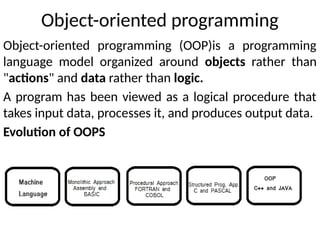
Object-oriented programming
Object-oriented programming (OOP)is a programming
language model organized around objects rather than
"actions" and data rather than logic.
A program has been viewed as a logical procedure that
takes input data, processes it, and produces output data.
Evolution of OOPS
History of OOPS
1. The basis for OOP started in the early 1960s
2. the first programming language to use objects was
Simula 67
3. Many consider that the first truly O-O language was
Smalltalk, developed at the Learning Research
Group at Xerox's Palo Alto Research Center in the
early 1970s.
4. C++ was implemented in 1982 under the name C
with Classes.
5. Bjarne Stroustrup design C++ by combining some
of the features of Simula with the syntax of C.
6. Later Java was introduced.
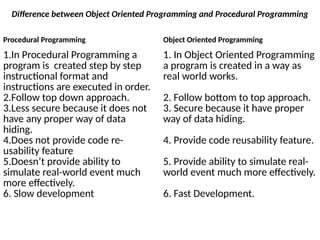
Difference between Object Oriented Programming and Procedural Programming
Procedural Programming Object Oriented Programming
1.In Procedural Programming a
program is created step by step
instructional format and
instructions are executed in order.
2.Follow top down approach.
3.Less secure because it does not
have any proper way of data
hiding.
4.Does not provide code re-
usability feature
5.Doesn’t provide ability to
simulate real-world event much
more effectively.
6. Slow development
1. In Object Oriented Programming
a program is created in a way as
real world works.
2. Follow bottom to top approach.
3. Secure because it have proper
way of data hiding.
4. Provide code reusability feature.
5. Provide ability to simulate real-
world event much more effectively.
6. Fast Development.
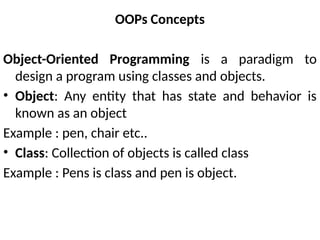
OOPs Concepts
Object-Oriented Programming is a paradigm to
design a program using classes and objects.
• Object: Any entity that has state and behavior is
known as an object
Example : pen, chair etc..
• Class: Collection of objects is called class
Example : Pens is class and pen is object.
OOPS Principles
1. Abstraction
2. Encapsulation
3. Inheritance
4. Polymorphism
Abstraction
Hiding internal details and showing functionality is
known as abstraction.
example: phone call, working of car
Advantages of Abstraction
1. Only show essential details to end user.
2. Hide complexity.
3. Security
Encapsulation
Binding (or wrapping) code and data together into a
single unit is known as encapsulation.
example: capsule
Advantages of Encapsulation:
1. A read-only (immutable) or write-only class can be
made.
2. Control over the data.
3. It helps in achieving high cohesion and low coupling
in the code.
Polymorphism
When one task is performed by different ways i.e.
known as polymorphism.
Example : God.
Types of polymorphism:
1.Static/compile time polymorphism (by method
overloading).
2.Dynamic/run time polymorphism (by method
overriding).
Inheritance
When one object acquires all the properties and
behaviors of parent object i.e. known as inheritance.
Why inheritance is used?
1. Code re-usability.
2. Run-time polymorphism
Types of inheritance:
1. Single inheritance
2. Multilevel inheritance
3. Hierarchical inheritance
4. multiple inheritance
5. Hybrid inheritance
Evolution of Java
• James Gosling, Mike Sheridan, and Patrick
Naughton initiated the Java language project in
June 1991. The small team of sun engineers called
Green Team.
• Originally designed for small, embedded systems in
electronic appliances like set-top boxes.
• Firstly, it was called "Greentalk" by James Gosling.
• Later, it was called Oak and was developed as a part
of the Green project.
• In 1995, Oak was renamed as "Java" because it was
already a trademark by Oak Technologies
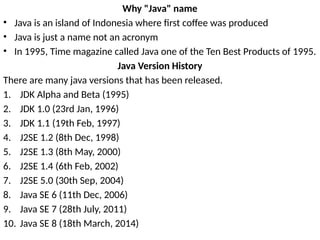
Why "Java" name
• Java is an island of Indonesia where first coffee was produced
• Java is just a name not an acronym
• In 1995, Time magazine called Java one of the Ten Best Products of 1995.
Java Version History
There are many java versions that has been released.
1. JDK Alpha and Beta (1995)
2. JDK 1.0 (23rd Jan, 1996)
3. JDK 1.1 (19th Feb, 1997)
4. J2SE 1.2 (8th Dec, 1998)
5. J2SE 1.3 (8th May, 2000)
6. J2SE 1.4 (6th Feb, 2002)
7. J2SE 5.0 (30th Sep, 2004)
8. Java SE 6 (11th Dec, 2006)
9. Java SE 7 (28th July, 2011)
10. Java SE 8 (18th March, 2014)
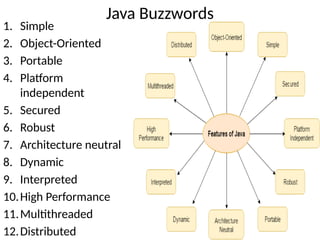
Java Buzzwords
1. Simple
2. Object-Oriented
3. Portable
4. Platform
independent
5. Secured
6. Robust
7. Architecture neutral
8. Dynamic
9. Interpreted
10.High Performance
11.Multithreaded
12.Distributed
Simple
It is simple because of the following factors:
1. It is free from pointer due to this execution time of
application is improved. [Whenever we write a Java
program without pointers then internally it is converted
into the equivalent pointer program].
2. It has Rich set of API (application protocol interface).
3. It has Garbage Collector which is always used to collect un-
Referenced (unused) Memory location for improving
performance of a Java program.
4. It contains user friendly syntax for developing any
applications.
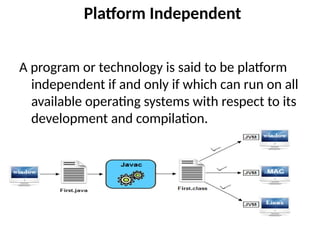
Platform Independent
A program or technology is said to be platform
independent if and only if which can run on all
available operating systems with respect to its
development and compilation.
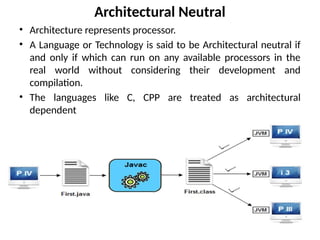
Architectural Neutral
• Architecture represents processor.
• A Language or Technology is said to be Architectural neutral if
and only if which can run on any available processors in the
real world without considering their development and
compilation.
• The languages like C, CPP are treated as architectural
dependent
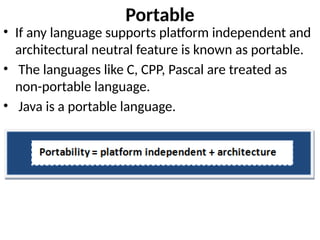
Portable
• If any language supports platform independent and
architectural neutral feature is known as portable.
• The languages like C, CPP, Pascal are treated as
non-portable language.
• Java is a portable language.
Multithreaded
• A flow of control is known as a thread.
• When any Language executes multiple thread at a
time that language is known as multithreaded.
• Java is multithreaded.
• Using this we can perform multiple tasks at time.
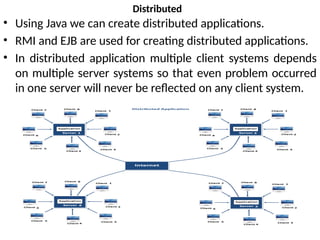
Distributed
• Using Java we can create distributed applications.
• RMI and EJB are used for creating distributed applications.
• In distributed application multiple client systems depends
on multiple server systems so that even problem occurred
in one server will never be reflected on any client system.
Robust
• Robust simply means strong.
• It is robust or strong Programming Language
because of its capability to handle Run-time
Error, automatic garbage collection, the lack of
pointer concept, Exception Handling. All these
points make It robust Language.
Dynamic
• It supports Dynamic memory allocation due to
this memory wastage is reduce and improve
performance of the application.
• The process of allocating the memory space
to the input of the program at a run-time is
known as dynamic memory allocation
Secure
• It is a more secure language compared to other
languages.
• In this language, all code is converted into byte
code after compilation which is not readable by
human.
High performance
• Java is an interpreted language, so it will never be
as fast as a compiled language like C or C++.
• But, Java enables high performance with the use of
just-in-time compiler.
Interpreted
• It is one of the highly interpreted programming
languages.
Object Oriented
• In java everything is Object which has some data
and behavior. Java can be easily extended as it is
based on Object Model.
• It supports OOP's concepts because of this it is
most secure language.
Environment setup
Requirement s to write Java Applications
1. For executing any java program, you need to install the JDK if you don't
have installed it.
2. set path of the jdk/bin directory.
3. create the java program
4. compile and run the java program
Path
• Path variable is set for providing path for all Java tools like java, javac,
javap, javah, jar, appletviewer. In Java to run any program we use java tool
and for compile Java code use javac tool. All these tools are available in bin
folder so we set path upto bin folder.
classpath
• classpath variable is set for providing path of all Java classes which is used
in our application. All classes are available in lib/rt.jar so we set classpath
upto lib/rt.jar.
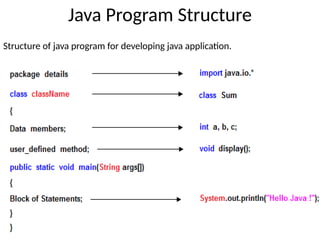
Java Program Structure
Structure of java program for developing java application.
Implementing a Java Program
Creating hello java example
import java.io;
class Hello
{
public static void main(String[] args)
{
System.out.println("Hello Java");
System.out.println("My First Java Program");
}
}
To compile: javac Hello.java
To execute: java Hello
Understanding Hello java program
• class keyword is used to declare a class in java.
• public keyword is an access modifier which represents
visibility, it means it is visible to all.
• static is a keyword, if we declare any method as static, it is
known as static method. The core advantage of static method
is that there is no need to create object to invoke the static
method. The main method is executed by the JVM, so it
doesn't require to create object to invoke the main method.
So it saves memory.
• void is the return type of the method, it means it doesn't
return any value.
• main represents startup of the program.
• String[] args is used for command line argument.
• System.out.println() is used to print statements.
Valid java main method signature
1. public static void main(String[] args)
2. public static void main(String []args)
3. public static void main(String args[])
4. public static void main(String... args)
5. static public void main(String[] args)
6. public static final void main(String[] args)
7. final public static void main(String[] args)
Invalid java main method signature
1. public void main(String[] args)
2. static void main(String[] args)
3. public void static main(String[] args)
4. abstract public static void main(String[] args)
JVM Architecture
JVM is a virtual machine or a program that
provides run-time environment in which java
byte code can be executed.
JVMs are available for many hardware and
software platforms.
The use of the same byte code for all JVMs on all
platforms make java platform independent.
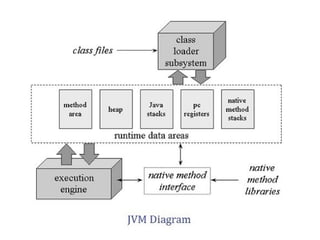
Class loader subsystem
Class loader subsystem will load the .class file into java stack
and later sufficient memory will be allocated for all the
properties of the java program into following five memory
locations
• Heap area
• Method area
• Java stack
• PC register
• Native stack
Heap area:
In which object references will be stored.
Method area
In which static variables non-static and static method will be stored.
Java Stack
In which all the non-static variable of class will be stored and whose
address referred by object reference.
Pc Register
Which holds the address of next executable instruction that means
that use the priority for the method in the execution process?
Native Stack
Native stack holds the instruction of native code (other than java
code) native stack depends on native library. Native interface will
access interface between native stack and native library.
Execution Engine
It is a part JVM that uses Virtual processor (for
execution).
which contain interpreter (for reading instructions)
and JIT (Just in time) compiler (for performance
improvement) for executing the instructions.
How JVM is created
When JRE installed on your machine, you got all
required code to create JVM.
JVM is created when you run a java program
Lifetime of JVM
When an application starts, a runtime instance is created.
When application ends, runtime environment destroyed.
If “n”no. of applications starts on one machine then “n”
no. of runtime instances are created and every
application run on its own JVM instance.
Main task of JVM
1. Search and locate the required files.
2. Convert byte code into executable code.
3. Allocate the memory into ram.
4. Execute the code.
5. Delete the executable code.
Difference between JVM, JRE and JDK
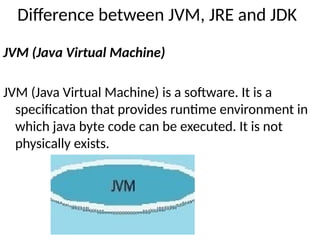
JVM (Java Virtual Machine)
JVM (Java Virtual Machine) is a software. It is a
specification that provides runtime environment in
which java byte code can be executed. It is not
physically exists.
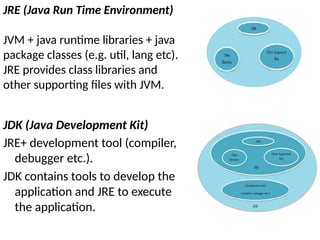
JDK (Java Development Kit)
JRE+ development tool (compiler,
debugger etc.).
JDK contains tools to develop the
application and JRE to execute
the application.
JRE (Java Run Time Environment)
JVM + java runtime libraries + java
package classes (e.g. util, lang etc).
JRE provides class libraries and
other supporting files with JVM.
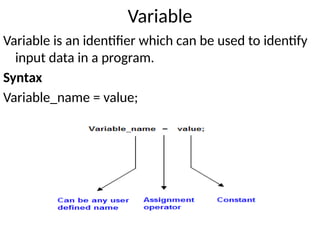
Variable
Variable is an identifier which can be used to identify
input data in a program.
Syntax
Variable_name = value;
Rules to write a Variable Name
1. Java variable names are case sensitive. The variable name
money is not the same as Money or MONEY.
2. Java variable names must start with a letter, or the $ or _
character.
3. After the first character in a Java variable name, the name can
also contain numbers.
4. No space are allowed in the variable declarations.
5. Except underscore ( _ ) no special symbol are allowed in the
middle of variable declaration
6. Variable name always should exist in the left hand side of
assignment operators.
7. Maximum length of variable is 64 characters.
8. Variable names cannot be equal to reserved key words in Java.
For instance, the words int or for are reserved words in Java.
Therefore you cannot name your variables int or for.
Java variable naming conventions:
These conventions are not necessary to follow. But it is a
good practice to write a java program.
1. Variable names are written in lowercase. Example:
variable or apple.
2. If variable names consist of multiple words, each word
after the first word has its first letter written in
uppercase. Example: variableName or bigApple.
3. Even though it is allowed, you do not normally start a
Java variable name with $ or _ .
4. Static final fields (constants) are named in all
uppercase, typically using an _ to separate the words in
the name. Example: EXCHANGE_RATE or COEFFICIENT.
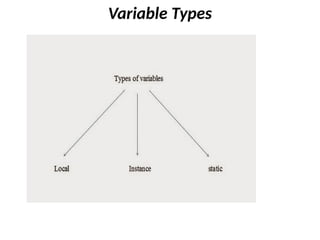
Variable Types
Local variable
A variable which is declared inside the method is called
local variable.
Instance variable
A variable which is declared inside the class but outside
the method, is called instance variable .
It is not declared as static.
Static variable
A variable that is declared within the class with static
keyword but outside of method, constructor, or block
is known as Static/class variable.
Static variables are accessed by
ClassName.VariableName
Example to understand the types of variables
class A{
int data=50;//instance variable
static int m=100;//static variable
void method()
{
int n=90;//local variable
}
}//end of class
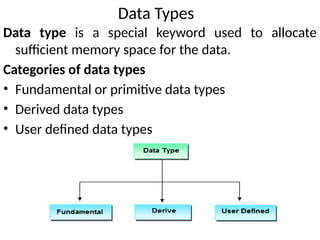
Data Types
Data type is a special keyword used to allocate
sufficient memory space for the data.
Categories of data types
• Fundamental or primitive data types
• Derived data types
• User defined data types
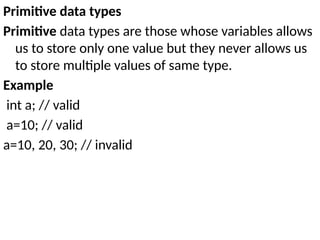
Primitive data types
Primitive data types are those whose variables allows
us to store only one value but they never allows us
to store multiple values of same type.
Example
int a; // valid
a=10; // valid
a=10, 20, 30; // invalid
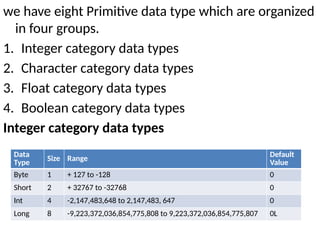
we have eight Primitive data type which are organized
in four groups.
1. Integer category data types
2. Character category data types
3. Float category data types
4. Boolean category data types
Integer category data types
Data
Type
Size Range
Default
Value
Byte 1 + 127 to -128 0
Short 2 + 32767 to -32768 0
Int 4 -2,147,483,648 to 2,147,483, 647 0
Long 8 -9,223,372,036,854,775,808 to 9,223,372,036,854,775,807 0L
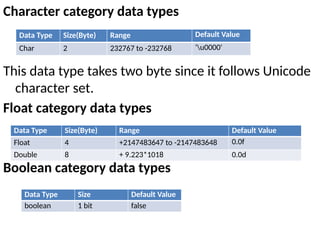
Character category data types
This data type takes two byte since it follows Unicode
character set.
Float category data types
Boolean category data types
Data Type Size(Byte) Range Default Value
Char 2 232767 to -232768 'u0000'
Data Type Size(Byte) Range Default Value
Float 4 +2147483647 to -2147483648 0.0f
Double 8 + 9.223*1018 0.0d
Data Type Size Default Value
boolean 1 bit false
Derived data types
Derived data types are those whose variables allow us
to store multiple values of same type. But they
never allows to store multiple values of different
types.
Example
int a[] = {10,20,30}; // valid
int b[] = {100, 'A', "ABC"}; // invalid
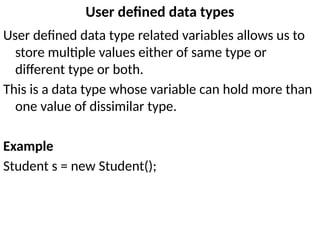
User defined data types
User defined data type related variables allows us to
store multiple values either of same type or
different type or both.
This is a data type whose variable can hold more than
one value of dissimilar type.
Example
Student s = new Student();
Type Conversion and Casting
assigning value of one type to variable of another
type.
In java we have two types of conversions.
1. implicit type conversion.
2. Explicit type conversion.
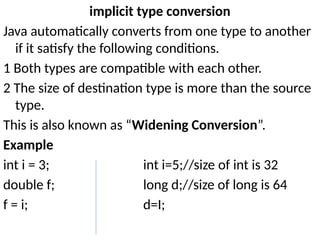
implicit type conversion
Java automatically converts from one type to another
if it satisfy the following conditions.
1 Both types are compatible with each other.
2 The size of destination type is more than the source
type.
This is also known as “Widening Conversion”.
Example
int i = 3; int i=5;//size of int is 32
double f; long d;//size of long is 64
f = i; d=I;
Example program
class TypeConversion
{
public static void main(String arg[])
{
byte b = 50;
short s = 4125;
int i = 800000;
long l = 107343L;
s = b;
i = s;
l = i;
float f = 25.0f;
double d = 327.98;
f = i;
d = f;
System.out.println("b = " + b );
System.out.println("s = " + s );
System.out.println("i = " + i );
System.out.println("l = " + l );
System.out.println("d = " + d );
System.out.println("f = " + f );
}
}
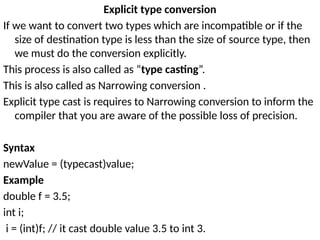
Explicit type conversion
If we want to convert two types which are incompatible or if the
size of destination type is less than the size of source type, then
we must do the conversion explicitly.
This process is also called as “type casting”.
This is also called as Narrowing conversion .
Explicit type cast is requires to Narrowing conversion to inform the
compiler that you are aware of the possible loss of precision.
Syntax
newValue = (typecast)value;
Example
double f = 3.5;
int i;
i = (int)f; // it cast double value 3.5 to int 3.
Example program
class DatatypeCasting
{
public static void main(String arg[])
{
byte b;
int i = 81;
double d = 323.142;
float f = 72.38f;
char c = 'A';
c = (char) i;
System.out.println("i = " + i + " c = " + c);
i = (int) d;
System.out.println("d = " + d + " i = " + i);
i = (int) f;
System.out.println("f = " + f + " i = " + i);
b = (byte) d;
System.out.println("d = " + d + " b = " + b);
}
}
Operators
Operator is a symbol that is used to perform operations.
Types of operators in java.
1. Arithmetic operators
2. Relation operators
3. Logical operators
4. Bitwise operators
5. Assignment operators
6. Ternary operator
7. Unary Operator
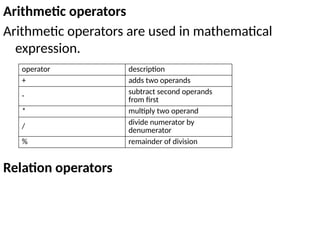
Arithmetic operators
Arithmetic operators are used in mathematical
expression.
Relation operators
operator description
+ adds two operands
-
subtract second operands
from first
* multiply two operand
/
divide numerator by
denumerator
% remainder of division
Relation operators
Logical operators
operator description
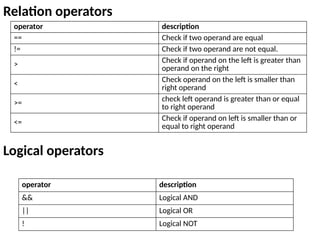
== Check if two operand are equal
!= Check if two operand are not equal.
>
Check if operand on the left is greater than
operand on the right
<
Check operand on the left is smaller than
right operand
>= check left operand is greater than or equal
to right operand
<=
Check if operand on left is smaller than or
equal to right operand
operator description
&& Logical AND
|| Logical OR
! Logical NOT
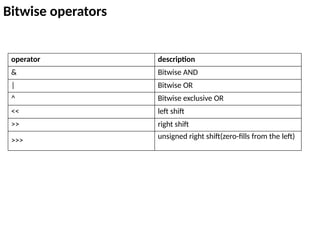
Bitwise operators
operator description
& Bitwise AND
| Bitwise OR
^ Bitwise exclusive OR
<< left shift
>> right shift
>>>
unsigned right shift(zero-fills from the left)
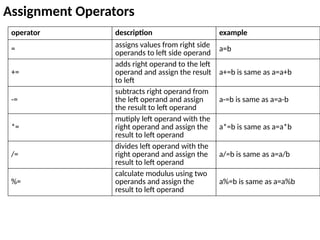
Assignment Operators
operator description example
= assigns values from right side
operands to left side operand
a=b
+=
adds right operand to the left
operand and assign the result
to left
a+=b is same as a=a+b
-=
subtracts right operand from
the left operand and assign
the result to left operand
a-=b is same as a=a-b
*=
mutiply left operand with the
right operand and assign the
result to left operand
a*=b is same as a=a*b
/=
divides left operand with the
right operand and assign the
result to left operand
a/=b is same as a=a/b
%=
calculate modulus using two
operands and assign the
result to left operand
a%=b is same as a=a%b
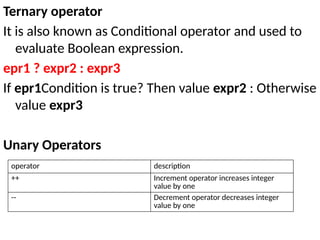
Ternary operator
It is also known as Conditional operator and used to
evaluate Boolean expression.
epr1 ? expr2 : expr3
If epr1Condition is true? Then value expr2 : Otherwise
value expr3
Unary Operators
operator description
++ Increment operator increases integer
value by one
-- Decrement operator decreases integer
value by one
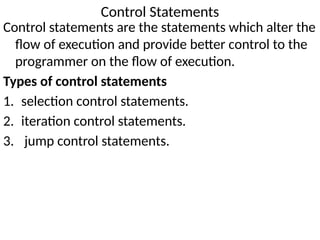
Control Statements
Control statements are the statements which alter the
flow of execution and provide better control to the
programmer on the flow of execution.
Types of control statements
1. selection control statements.
2. iteration control statements.
3. jump control statements.
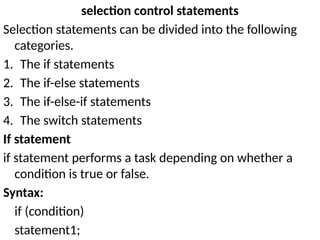
selection control statements
Selection statements can be divided into the following
categories.
1. The if statements
2. The if-else statements
3. The if-else-if statements
4. The switch statements
If statement
if statement performs a task depending on whether a
condition is true or false.
Syntax:
if (condition)
statement1;
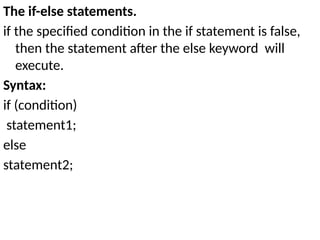
The if-else statements.
if the specified condition in the if statement is false,
then the statement after the else keyword will
execute.
Syntax:
if (condition)
statement1;
else
statement2;
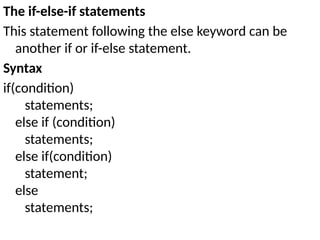
The if-else-if statements
This statement following the else keyword can be
another if or if-else statement.
Syntax
if(condition)
statements;
else if (condition)
statements;
else if(condition)
statement;
else
statements;
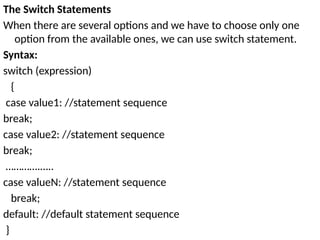
The Switch Statements
When there are several options and we have to choose only one
option from the available ones, we can use switch statement.
Syntax:
switch (expression)
{
case value1: //statement sequence
break;
case value2: //statement sequence
break;
………….…..
case valueN: //statement sequence
break;
default: //default statement sequence
}
Iteration Statements
Repeating the same code fragment several times until
a specified condition is satisfied is called iteration.
the following loop for iteration statements
1. The while loop
2. The for loop
3. The do-while loop
4. The for each loop
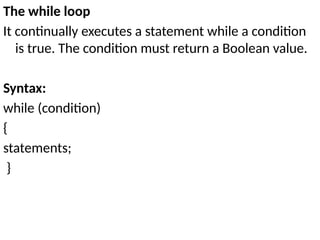
The while loop
It continually executes a statement while a condition
is true. The condition must return a Boolean value.
Syntax:
while (condition)
{
statements;
}
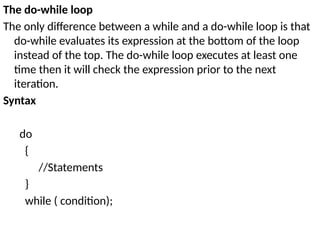
The do-while loop
The only difference between a while and a do-while loop is that
do-while evaluates its expression at the bottom of the loop
instead of the top. The do-while loop executes at least one
time then it will check the expression prior to the next
iteration.
Syntax
do
{
//Statements
}
while ( condition);
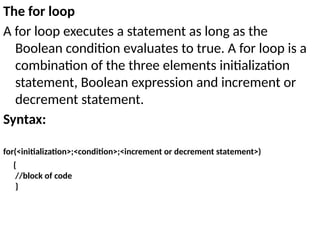
The for loop
A for loop executes a statement as long as the
Boolean condition evaluates to true. A for loop is a
combination of the three elements initialization
statement, Boolean expression and increment or
decrement statement.
Syntax:
for(<initialization>;<condition>;<increment or decrement statement>)
{
//block of code
}
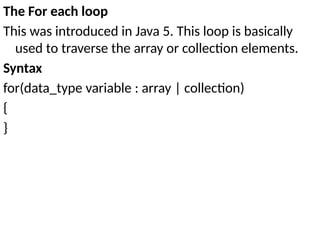
The For each loop
This was introduced in Java 5. This loop is basically
used to traverse the array or collection elements.
Syntax
for(data_type variable : array | collection)
{
}
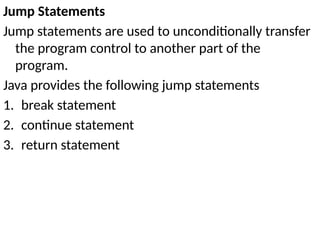
Jump Statements
Jump statements are used to unconditionally transfer
the program control to another part of the
program.
Java provides the following jump statements
1. break statement
2. continue statement
3. return statement
Break Statement
The break statement immediately quits the current
iteration and goes to the first statement following the
loop.
Continue Statement
The continue statement is used when you want to
continue running the loop with the next iteration and
want to skip the rest of the statements of the body for
the current iteration.
Return Statement
The return statement is used to immediately quit the
current method and return to the calling method. It is
mandatory to use a return statement for non-void
methods to return a value.
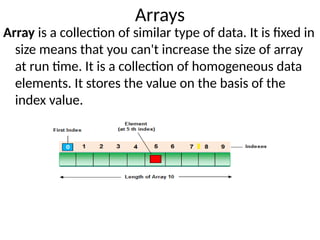
Arrays
Array is a collection of similar type of data. It is fixed in
size means that you can't increase the size of array
at run time. It is a collection of homogeneous data
elements. It stores the value on the basis of the
index value.
Advantage of Array
Code Optimization: It makes the code optimized, we
can retrieve or sort the data easily.
Random access: We can get any data located at any
index position.
Disadvantage of Array
Size Limit: We can store only fixed size of elements in
the array. It doesn't grow its size at runtime.
Types of Array
1. Single Dimensional Array
2. Multidimensional Array
Array Declaration
Single dimension array declaration
Syntax
3. int[] a;
4. int a[];
5. int []a
Multidimensional Array declaration
Syntax
6. int[][] a;
7. int a[][];
8. int [][]a;
9. int[] a[];
10. int[] []a;
11. int []a[];
Array creation
Every array in a Java is an object, Hence we can create
array by using new keyword.
Syntax
int[] arr = new int[10]; // The size of array is 10.
or
int[] arr = {10,20,30,40,50};
Accessing array elements
Access the elements of array by using index value of
an elements.
Syntax
arrayname[n-1];
For every array type has correspond classes .
Class arr
{
Public static void main(String[] args)
{
Int[] x=new int[3];
S.O.P(x.getClass().getName());// [I
}
}
Basic IO
Java I/O (Input and Output) is used to process the
input and produce the output.
It uses the concept of streams to make I/O operation
fast. The java.io package contains all the classes
required for input and output operations.
Stream
A stream is a sequence of data. In Java a stream is
composed of bytes.
In java,3 streams are created for us automatically. All
these streams are attached with console.
1) System.out: standard output stream
2) System.in: standard input stream
3) System.err: standard error stream
Let's see the code to print output and error message
to the console.
System.out.println("simple message");
System.err.println("error message");
Let's see the code to get input from console.
int i=System.in.read();//
returns ASCII code of 1st character
System.out.println((char)i);//will print the character
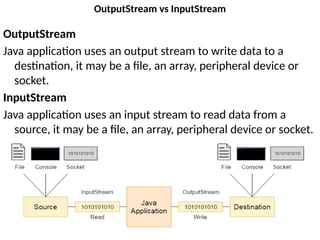
OutputStream vs InputStream
OutputStream
Java application uses an output stream to write data to a
destination, it may be a file, an array, peripheral device or
socket.
InputStream
Java application uses an input stream to read data from a
source, it may be a file, an array, peripheral device or socket.
Reading Console Input
In Java, there are 3 ways to read input from a console.
1. BufferedReader + InputStreamReader (Classic)
2. Scanner (JDK 1.5)
3. System.console (JDK 1.6)
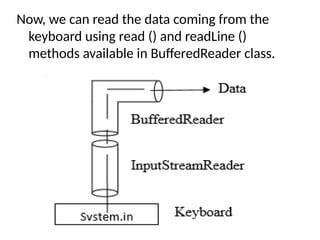
BufferedReader + InputStreamReader
InputStreamReader that can read data from the
keyboard.
Syntax
InputSteamReader obj = new InputStreamReader (System.in);
Connect InputStreamReader to BufferReader, which is
another input type of stream to read data properly.
Syntax
BufferedReader br = new BufferedReader (obj);
two steps can be combined and rewritten in a single
statement
Syntax
BufferedReader br = new BufferedReader (new InputStreamReader(System.in));
Now, we can read the data coming from the
keyboard using read () and readLine ()
methods available in BufferedReader class.
Scanner
In JDK 1.5,the developer starts to use java.util.Scanner
to read system input.
Syntax
Scanner scanner = new Scanner(System.in);
System.console
In JDK 1.6, the developer starts to switch to the more
simple and powerful java.io.Console class to read
system input.
It provides methods to read texts and passwords.
syntax
Console c=System.console();
Writing Console Output,
PrintStream is an output stream derived from
OutputStream,it also implements the low-
level method write().
write() can be used to write to the console.
Syntax
The simplest form of write() defined by the
PrintStream is
void write(int byteval)
Naming conventions
All the classes, interfaces, packages, methods and fields of java
programming language are given according to java naming
convention.
• class name should start with uppercase letter and be a noun e.g.
String, Color, Button, System, Thread etc.
• interface name should start with uppercase letter and be an
adjective e.g. Runnable, Remote, ActionListener etc.
• method name should start with lowercase letter and be a verb
e.g. actionPerformed(), main(), print(), println() etc.
• variable name should start with lowercase letter e.g. firstName,
orderNumber etc.
• package name should be in lowercase letter e.g. java, lang, sql,
util etc.
• constants name should be in all uppercase letters. e.g. RED,
YELLOW, MAX_PRIORITY etc.
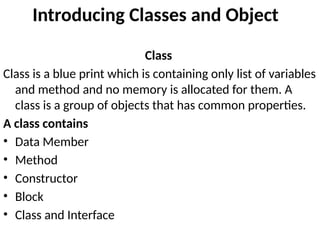
Introducing Classes and Object
Class
Class is a blue print which is containing only list of variables
and method and no memory is allocated for them. A
class is a group of objects that has common properties.
A class contains
• Data Member
• Method
• Constructor
• Block
• Class and Interface
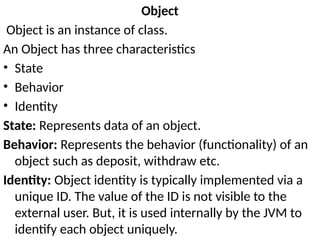
Object
Object is an instance of class.
An Object has three characteristics
• State
• Behavior
• Identity
State: Represents data of an object.
Behavior: Represents the behavior (functionality) of an
object such as deposit, withdraw etc.
Identity: Object identity is typically implemented via a
unique ID. The value of the ID is not visible to the
external user. But, it is used internally by the JVM to
identify each object uniquely.
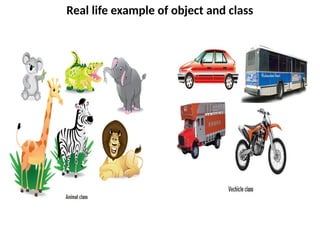
Real life example of object and class
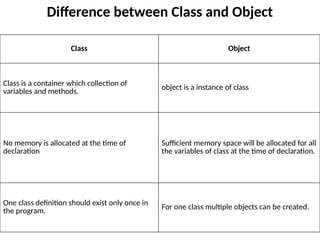
Difference between Class and Object
Class Object
Class is a container which collection of
variables and methods. object is a instance of class
No memory is allocated at the time of
declaration
Sufficient memory space will be allocated for all
the variables of class at the time of declaration.
One class definition should exist only once in
the program.
For one class multiple objects can be created.
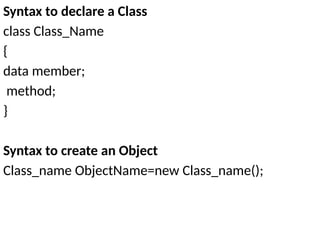
Syntax to declare a Class
class Class_Name
{
data member;
method;
}
Syntax to create an Object
Class_name ObjectName=new Class_name();
Example
class Employee
{
int eid; // data member (or instance variable)
String ename; // data member (or instance variable)
eid=101;
ename=“Vandana";
public static void main(String args[])
{
Employee e=new Employee(); // Creating an object of class
Employee
System.out.println("Employee ID: "+e.eid);
System.out.println("Name: "+e.ename);
}
}
Methods
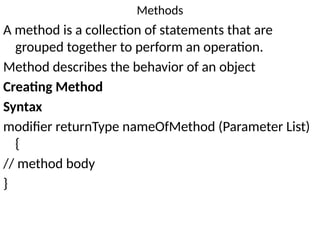
A method is a collection of statements that are
grouped together to perform an operation.
Method describes the behavior of an object
Creating Method
Syntax
modifier returnType nameOfMethod (Parameter List)
{
// method body
}
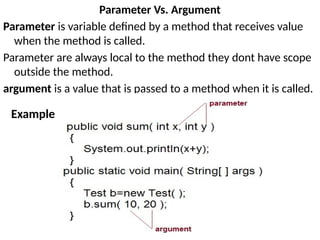
Parameter Vs. Argument
Parameter is variable defined by a method that receives value
when the method is called.
Parameter are always local to the method they dont have scope
outside the method.
argument is a value that is passed to a method when it is called.
Example
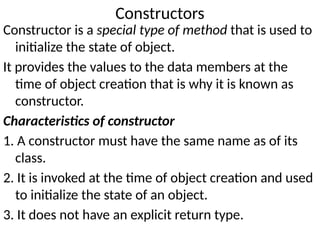
Constructors
Constructor is a special type of method that is used to
initialize the state of object.
It provides the values to the data members at the
time of object creation that is why it is known as
constructor.
Characteristics of constructor
1. A constructor must have the same name as of its
class.
2. It is invoked at the time of object creation and used
to initialize the state of an object.
3. It does not have an explicit return type.
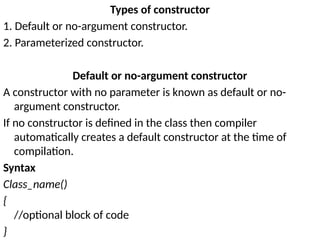
Types of constructor
1. Default or no-argument constructor.
2. Parameterized constructor.
Default or no-argument constructor
A constructor with no parameter is known as default or no-
argument constructor.
If no constructor is defined in the class then compiler
automatically creates a default constructor at the time of
compilation.
Syntax
Class_name()
{
//optional block of code
}
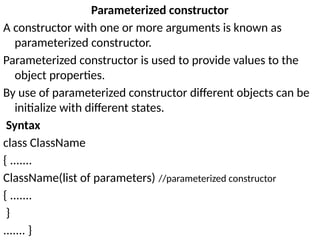
Parameterized constructor
A constructor with one or more arguments is known as
parameterized constructor.
Parameterized constructor is used to provide values to the
object properties.
By use of parameterized constructor different objects can be
initialize with different states.
Syntax
class ClassName
{ .......
ClassName(list of parameters) //parameterized constructor
{ .......
}
....... }
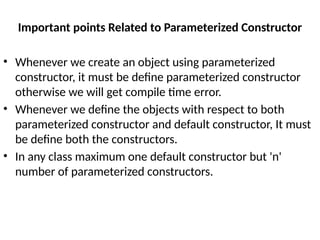
Important points Related to Parameterized Constructor
• Whenever we create an object using parameterized
constructor, it must be define parameterized constructor
otherwise we will get compile time error.
• Whenever we define the objects with respect to both
parameterized constructor and default constructor, It must
be define both the constructors.
• In any class maximum one default constructor but 'n'
number of parameterized constructors.
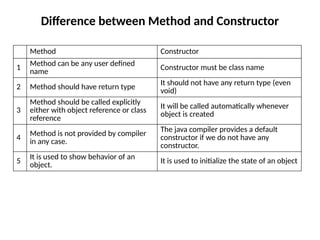
Difference between Method and Constructor
Method Constructor
1
Method can be any user defined
name
Constructor must be class name
2 Method should have return type
It should not have any return type (even
void)
3
Method should be called explicitly
either with object reference or class
reference
It will be called automatically whenever
object is created
4
Method is not provided by compiler
in any case.
The java compiler provides a default
constructor if we do not have any
constructor.
5
It is used to show behavior of an
object. It is used to initialize the state of an object
Garbage Collection
Garbage Collection is process of reclaiming the
runtime unused memory automatically.
In other words, it is a way to destroy the unused
objects.
Advantages of Garbage Collection
1. Programmer doesn't need to worry about
dereferencing an object.
2. It is done automatically by JVM.
3. Increases memory efficiency and decreases the
chances for memory leak.
How can an object be unreferenced
There are many ways:
1. By nulling the reference
2. By assigning a reference to another
3. By anonymous object
By nulling a reference
Employee e=new Employee();
e=null;
By assigning a reference to another
Employee e1=new Employee();
Employee e2=new Employee();
e1=e2;//
now the first object referred by e1 is available for garbage collection
By anonymous object
new Employee();
finalize() method
The finalize() method is invoked each time before the object
is garbage collected.
This method can be used to perform cleanup processing.
protected void finalize()
{
}
Important Points to Remember
1. finalize() method is defined in java.lang.Object class,
therefore it is available to all the classes.
2. finalize() method is declare as proctected inside Object
class.
3. finalize() method gets called only once by a Daemon
thread named GC (Garbage Collector)thread
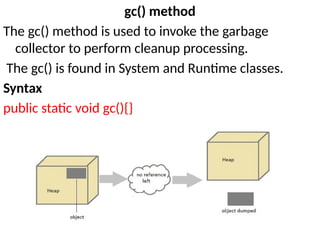
gc() method
The gc() method is used to invoke the garbage
collector to perform cleanup processing.
The gc() is found in System and Runtime classes.
Syntax
public static void gc(){}
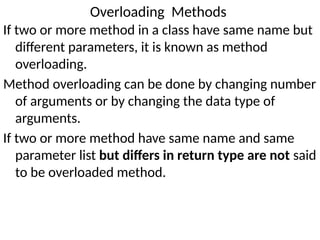
Overloading Methods
If two or more method in a class have same name but
different parameters, it is known as method
overloading.
Method overloading can be done by changing number
of arguments or by changing the data type of
arguments.
If two or more method have same name and same
parameter list but differs in return type are not said
to be overloaded method.
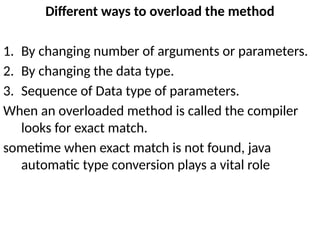
Different ways to overload the method
1. By changing number of arguments or parameters.
2. By changing the data type.
3. Sequence of Data type of parameters.
When an overloaded method is called the compiler
looks for exact match.
sometime when exact match is not found, java
automatic type conversion plays a vital role
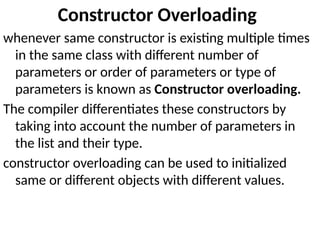
Constructor Overloading
whenever same constructor is existing multiple times
in the same class with different number of
parameters or order of parameters or type of
parameters is known as Constructor overloading.
The compiler differentiates these constructors by
taking into account the number of parameters in
the list and their type.
constructor overloading can be used to initialized
same or different objects with different values.
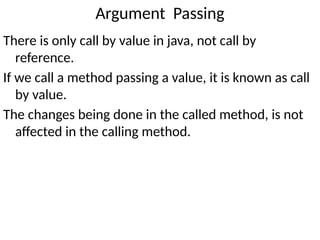
Argument Passing
There is only call by value in java, not call by
reference.
If we call a method passing a value, it is known as call
by value.
The changes being done in the called method, is not
affected in the calling method.
Recursion
The idea of calling one function from another
immediately suggests the possibility of a function
calling itself. The function-call mechanism in Java
supports this possibility, which is known as recursion.
Syntax:
returntype methodname()
{
//code to be executed
methodname();//calling same method
}
Final keyword
It is used to make a variable as a constant, Restrict
method overriding, Restrict inheritance.
final keyword can be used in following way.
1. Final at variable level
2. Final at method level
3. Final at class level
Final at variable level
Final keyword is used to make a variable as a constant.
A variable declared with the final keyword cannot be
modified by the program after initialization.
example
public class Circle
{
public static final double PI=3.14159;
public static void main(String[] args)
{
System.out.println(PI);
} }
Final at method level
It makes a method final, meaning that sub classes can not override this method.
Example
class Employee
{
final void disp()
{ System.out.println("Hello Good Morning");
} }
class Developer extends Employee
{
void disp()
{
System.out.println("How are you ?");
} }
class FinalDemo
{
public static void main(String args[])
{
Developer obj=new Developer();
obj.disp();
} }
Final at class level
It makes a class final, meaning that the class can not be inheriting by other classes.
example
final class Employee
{
int salary=10000;
}
class Developer extends Employee
{ void show()
{
System.out.println("Hello Good Morning");
} }
class FinalDemo
{
public static void main(String args[])
{
Developer obj=new Developer();
obj.show();
} }
static keyword
The static keyword is used for memory management
mainly.
The static can be:
1. variable (also known as class variable)
2. method (also known as class method)
3. block
4. nested class
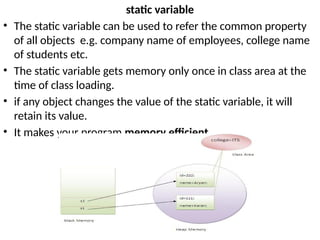
static variable
• The static variable can be used to refer the common property
of all objects e.g. company name of employees, college name
of students etc.
• The static variable gets memory only once in class area at the
time of class loading.
• if any object changes the value of the static variable, it will
retain its value.
• It makes your program memory efficient
static method
A static method belongs to the class rather than
object of a class.
A static method can be invoked without the need for
creating an instance of a class.
static method can access static data member and can
change the value of it.
Restrictions for static method
1. The static method can not use non static data
member or call non-static method directly.
2. this and super cannot be used in static context.
static block
Is used to initialize the static data member.
It is executed before main method at the time of class loading.
Example
class A2{
static
{
System.out.println("static block is invoked");
}
public static void main(String args[])
{
System.out.println("Hello main");
}
}
Command Line Arguments
‐
command-line argument is an argument i.e. passed at the
time of running the java program.
The arguments passed from the console can be received in
the java program and it can be used as an input.
Example
class CommandLineExample
{
public static void main(String args[])
{
System.out.println("Your first argument is: "+args[0]);
}
}

introduction to object orinted programming through java

  • 1.
    Computer programming Paradigms 1.process-oriented model In a process-oriented model code acting on data. Example: C with this approach programs complexity is increased. 2. object-oriented programming An object-oriented program can be characterized as data controlling access to code
  • 2.
    Object-oriented programming Object-oriented programming(OOP)is a programming language model organized around objects rather than "actions" and data rather than logic. A program has been viewed as a logical procedure that takes input data, processes it, and produces output data. Evolution of OOPS
  • 3.
    History of OOPS 1.The basis for OOP started in the early 1960s 2. the first programming language to use objects was Simula 67 3. Many consider that the first truly O-O language was Smalltalk, developed at the Learning Research Group at Xerox's Palo Alto Research Center in the early 1970s. 4. C++ was implemented in 1982 under the name C with Classes. 5. Bjarne Stroustrup design C++ by combining some of the features of Simula with the syntax of C. 6. Later Java was introduced.
  • 4.
    Difference between ObjectOriented Programming and Procedural Programming Procedural Programming Object Oriented Programming 1.In Procedural Programming a program is created step by step instructional format and instructions are executed in order. 2.Follow top down approach. 3.Less secure because it does not have any proper way of data hiding. 4.Does not provide code re- usability feature 5.Doesn’t provide ability to simulate real-world event much more effectively. 6. Slow development 1. In Object Oriented Programming a program is created in a way as real world works. 2. Follow bottom to top approach. 3. Secure because it have proper way of data hiding. 4. Provide code reusability feature. 5. Provide ability to simulate real- world event much more effectively. 6. Fast Development.
  • 5.
    OOPs Concepts Object-Oriented Programmingis a paradigm to design a program using classes and objects. • Object: Any entity that has state and behavior is known as an object Example : pen, chair etc.. • Class: Collection of objects is called class Example : Pens is class and pen is object.
  • 6.
    OOPS Principles 1. Abstraction 2.Encapsulation 3. Inheritance 4. Polymorphism
  • 7.
    Abstraction Hiding internal detailsand showing functionality is known as abstraction. example: phone call, working of car Advantages of Abstraction 1. Only show essential details to end user. 2. Hide complexity. 3. Security
  • 8.
    Encapsulation Binding (or wrapping)code and data together into a single unit is known as encapsulation. example: capsule Advantages of Encapsulation: 1. A read-only (immutable) or write-only class can be made. 2. Control over the data. 3. It helps in achieving high cohesion and low coupling in the code.
  • 9.
    Polymorphism When one taskis performed by different ways i.e. known as polymorphism. Example : God. Types of polymorphism: 1.Static/compile time polymorphism (by method overloading). 2.Dynamic/run time polymorphism (by method overriding).
  • 10.
    Inheritance When one objectacquires all the properties and behaviors of parent object i.e. known as inheritance. Why inheritance is used? 1. Code re-usability. 2. Run-time polymorphism Types of inheritance: 1. Single inheritance 2. Multilevel inheritance 3. Hierarchical inheritance 4. multiple inheritance 5. Hybrid inheritance
  • 11.
    Evolution of Java •James Gosling, Mike Sheridan, and Patrick Naughton initiated the Java language project in June 1991. The small team of sun engineers called Green Team. • Originally designed for small, embedded systems in electronic appliances like set-top boxes. • Firstly, it was called "Greentalk" by James Gosling. • Later, it was called Oak and was developed as a part of the Green project. • In 1995, Oak was renamed as "Java" because it was already a trademark by Oak Technologies
  • 12.
    Why "Java" name •Java is an island of Indonesia where first coffee was produced • Java is just a name not an acronym • In 1995, Time magazine called Java one of the Ten Best Products of 1995. Java Version History There are many java versions that has been released. 1. JDK Alpha and Beta (1995) 2. JDK 1.0 (23rd Jan, 1996) 3. JDK 1.1 (19th Feb, 1997) 4. J2SE 1.2 (8th Dec, 1998) 5. J2SE 1.3 (8th May, 2000) 6. J2SE 1.4 (6th Feb, 2002) 7. J2SE 5.0 (30th Sep, 2004) 8. Java SE 6 (11th Dec, 2006) 9. Java SE 7 (28th July, 2011) 10. Java SE 8 (18th March, 2014)
  • 13.
    Java Buzzwords 1. Simple 2.Object-Oriented 3. Portable 4. Platform independent 5. Secured 6. Robust 7. Architecture neutral 8. Dynamic 9. Interpreted 10.High Performance 11.Multithreaded 12.Distributed
  • 14.
    Simple It is simplebecause of the following factors: 1. It is free from pointer due to this execution time of application is improved. [Whenever we write a Java program without pointers then internally it is converted into the equivalent pointer program]. 2. It has Rich set of API (application protocol interface). 3. It has Garbage Collector which is always used to collect un- Referenced (unused) Memory location for improving performance of a Java program. 4. It contains user friendly syntax for developing any applications.
  • 15.
    Platform Independent A programor technology is said to be platform independent if and only if which can run on all available operating systems with respect to its development and compilation.
  • 16.
    Architectural Neutral • Architecturerepresents processor. • A Language or Technology is said to be Architectural neutral if and only if which can run on any available processors in the real world without considering their development and compilation. • The languages like C, CPP are treated as architectural dependent
  • 17.
    Portable • If anylanguage supports platform independent and architectural neutral feature is known as portable. • The languages like C, CPP, Pascal are treated as non-portable language. • Java is a portable language.
  • 18.
    Multithreaded • A flowof control is known as a thread. • When any Language executes multiple thread at a time that language is known as multithreaded. • Java is multithreaded. • Using this we can perform multiple tasks at time.
  • 19.
    Distributed • Using Javawe can create distributed applications. • RMI and EJB are used for creating distributed applications. • In distributed application multiple client systems depends on multiple server systems so that even problem occurred in one server will never be reflected on any client system.
  • 20.
    Robust • Robust simplymeans strong. • It is robust or strong Programming Language because of its capability to handle Run-time Error, automatic garbage collection, the lack of pointer concept, Exception Handling. All these points make It robust Language.
  • 21.
    Dynamic • It supportsDynamic memory allocation due to this memory wastage is reduce and improve performance of the application. • The process of allocating the memory space to the input of the program at a run-time is known as dynamic memory allocation
  • 22.
    Secure • It isa more secure language compared to other languages. • In this language, all code is converted into byte code after compilation which is not readable by human. High performance • Java is an interpreted language, so it will never be as fast as a compiled language like C or C++. • But, Java enables high performance with the use of just-in-time compiler.
  • 23.
    Interpreted • It isone of the highly interpreted programming languages. Object Oriented • In java everything is Object which has some data and behavior. Java can be easily extended as it is based on Object Model. • It supports OOP's concepts because of this it is most secure language.
  • 24.
    Environment setup Requirement sto write Java Applications 1. For executing any java program, you need to install the JDK if you don't have installed it. 2. set path of the jdk/bin directory. 3. create the java program 4. compile and run the java program Path • Path variable is set for providing path for all Java tools like java, javac, javap, javah, jar, appletviewer. In Java to run any program we use java tool and for compile Java code use javac tool. All these tools are available in bin folder so we set path upto bin folder. classpath • classpath variable is set for providing path of all Java classes which is used in our application. All classes are available in lib/rt.jar so we set classpath upto lib/rt.jar.
  • 25.
    Java Program Structure Structureof java program for developing java application.
  • 26.
    Implementing a JavaProgram Creating hello java example import java.io; class Hello { public static void main(String[] args) { System.out.println("Hello Java"); System.out.println("My First Java Program"); } } To compile: javac Hello.java To execute: java Hello
  • 27.
    Understanding Hello javaprogram • class keyword is used to declare a class in java. • public keyword is an access modifier which represents visibility, it means it is visible to all. • static is a keyword, if we declare any method as static, it is known as static method. The core advantage of static method is that there is no need to create object to invoke the static method. The main method is executed by the JVM, so it doesn't require to create object to invoke the main method. So it saves memory. • void is the return type of the method, it means it doesn't return any value. • main represents startup of the program. • String[] args is used for command line argument. • System.out.println() is used to print statements.
  • 28.
    Valid java mainmethod signature 1. public static void main(String[] args) 2. public static void main(String []args) 3. public static void main(String args[]) 4. public static void main(String... args) 5. static public void main(String[] args) 6. public static final void main(String[] args) 7. final public static void main(String[] args)
  • 29.
    Invalid java mainmethod signature 1. public void main(String[] args) 2. static void main(String[] args) 3. public void static main(String[] args) 4. abstract public static void main(String[] args)
  • 30.
    JVM Architecture JVM isa virtual machine or a program that provides run-time environment in which java byte code can be executed. JVMs are available for many hardware and software platforms. The use of the same byte code for all JVMs on all platforms make java platform independent.
  • 32.
    Class loader subsystem Classloader subsystem will load the .class file into java stack and later sufficient memory will be allocated for all the properties of the java program into following five memory locations • Heap area • Method area • Java stack • PC register • Native stack
  • 33.
    Heap area: In whichobject references will be stored. Method area In which static variables non-static and static method will be stored. Java Stack In which all the non-static variable of class will be stored and whose address referred by object reference. Pc Register Which holds the address of next executable instruction that means that use the priority for the method in the execution process? Native Stack Native stack holds the instruction of native code (other than java code) native stack depends on native library. Native interface will access interface between native stack and native library.
  • 34.
    Execution Engine It isa part JVM that uses Virtual processor (for execution). which contain interpreter (for reading instructions) and JIT (Just in time) compiler (for performance improvement) for executing the instructions. How JVM is created When JRE installed on your machine, you got all required code to create JVM. JVM is created when you run a java program
  • 35.
    Lifetime of JVM Whenan application starts, a runtime instance is created. When application ends, runtime environment destroyed. If “n”no. of applications starts on one machine then “n” no. of runtime instances are created and every application run on its own JVM instance. Main task of JVM 1. Search and locate the required files. 2. Convert byte code into executable code. 3. Allocate the memory into ram. 4. Execute the code. 5. Delete the executable code.
  • 36.
    Difference between JVM,JRE and JDK JVM (Java Virtual Machine) JVM (Java Virtual Machine) is a software. It is a specification that provides runtime environment in which java byte code can be executed. It is not physically exists.
  • 37.
    JDK (Java DevelopmentKit) JRE+ development tool (compiler, debugger etc.). JDK contains tools to develop the application and JRE to execute the application. JRE (Java Run Time Environment) JVM + java runtime libraries + java package classes (e.g. util, lang etc). JRE provides class libraries and other supporting files with JVM.
  • 38.
    Variable Variable is anidentifier which can be used to identify input data in a program. Syntax Variable_name = value;
  • 39.
    Rules to writea Variable Name 1. Java variable names are case sensitive. The variable name money is not the same as Money or MONEY. 2. Java variable names must start with a letter, or the $ or _ character. 3. After the first character in a Java variable name, the name can also contain numbers. 4. No space are allowed in the variable declarations. 5. Except underscore ( _ ) no special symbol are allowed in the middle of variable declaration 6. Variable name always should exist in the left hand side of assignment operators. 7. Maximum length of variable is 64 characters. 8. Variable names cannot be equal to reserved key words in Java. For instance, the words int or for are reserved words in Java. Therefore you cannot name your variables int or for.
  • 40.
    Java variable namingconventions: These conventions are not necessary to follow. But it is a good practice to write a java program. 1. Variable names are written in lowercase. Example: variable or apple. 2. If variable names consist of multiple words, each word after the first word has its first letter written in uppercase. Example: variableName or bigApple. 3. Even though it is allowed, you do not normally start a Java variable name with $ or _ . 4. Static final fields (constants) are named in all uppercase, typically using an _ to separate the words in the name. Example: EXCHANGE_RATE or COEFFICIENT.
  • 41.
  • 42.
    Local variable A variablewhich is declared inside the method is called local variable. Instance variable A variable which is declared inside the class but outside the method, is called instance variable . It is not declared as static. Static variable A variable that is declared within the class with static keyword but outside of method, constructor, or block is known as Static/class variable. Static variables are accessed by ClassName.VariableName
  • 43.
    Example to understandthe types of variables class A{ int data=50;//instance variable static int m=100;//static variable void method() { int n=90;//local variable } }//end of class
  • 44.
    Data Types Data typeis a special keyword used to allocate sufficient memory space for the data. Categories of data types • Fundamental or primitive data types • Derived data types • User defined data types
  • 45.
    Primitive data types Primitivedata types are those whose variables allows us to store only one value but they never allows us to store multiple values of same type. Example int a; // valid a=10; // valid a=10, 20, 30; // invalid
  • 46.
    we have eightPrimitive data type which are organized in four groups. 1. Integer category data types 2. Character category data types 3. Float category data types 4. Boolean category data types Integer category data types Data Type Size Range Default Value Byte 1 + 127 to -128 0 Short 2 + 32767 to -32768 0 Int 4 -2,147,483,648 to 2,147,483, 647 0 Long 8 -9,223,372,036,854,775,808 to 9,223,372,036,854,775,807 0L
  • 47.
    Character category datatypes This data type takes two byte since it follows Unicode character set. Float category data types Boolean category data types Data Type Size(Byte) Range Default Value Char 2 232767 to -232768 'u0000' Data Type Size(Byte) Range Default Value Float 4 +2147483647 to -2147483648 0.0f Double 8 + 9.223*1018 0.0d Data Type Size Default Value boolean 1 bit false
  • 48.
    Derived data types Deriveddata types are those whose variables allow us to store multiple values of same type. But they never allows to store multiple values of different types. Example int a[] = {10,20,30}; // valid int b[] = {100, 'A', "ABC"}; // invalid
  • 49.
    User defined datatypes User defined data type related variables allows us to store multiple values either of same type or different type or both. This is a data type whose variable can hold more than one value of dissimilar type. Example Student s = new Student();
  • 50.
    Type Conversion andCasting assigning value of one type to variable of another type. In java we have two types of conversions. 1. implicit type conversion. 2. Explicit type conversion.
  • 51.
    implicit type conversion Javaautomatically converts from one type to another if it satisfy the following conditions. 1 Both types are compatible with each other. 2 The size of destination type is more than the source type. This is also known as “Widening Conversion”. Example int i = 3; int i=5;//size of int is 32 double f; long d;//size of long is 64 f = i; d=I;
  • 52.
    Example program class TypeConversion { publicstatic void main(String arg[]) { byte b = 50; short s = 4125; int i = 800000; long l = 107343L; s = b; i = s; l = i; float f = 25.0f; double d = 327.98; f = i; d = f; System.out.println("b = " + b ); System.out.println("s = " + s ); System.out.println("i = " + i ); System.out.println("l = " + l ); System.out.println("d = " + d ); System.out.println("f = " + f ); } }
  • 53.
    Explicit type conversion Ifwe want to convert two types which are incompatible or if the size of destination type is less than the size of source type, then we must do the conversion explicitly. This process is also called as “type casting”. This is also called as Narrowing conversion . Explicit type cast is requires to Narrowing conversion to inform the compiler that you are aware of the possible loss of precision. Syntax newValue = (typecast)value; Example double f = 3.5; int i; i = (int)f; // it cast double value 3.5 to int 3.
  • 54.
    Example program class DatatypeCasting { publicstatic void main(String arg[]) { byte b; int i = 81; double d = 323.142; float f = 72.38f; char c = 'A'; c = (char) i; System.out.println("i = " + i + " c = " + c); i = (int) d; System.out.println("d = " + d + " i = " + i); i = (int) f; System.out.println("f = " + f + " i = " + i); b = (byte) d; System.out.println("d = " + d + " b = " + b); } }
  • 55.
    Operators Operator is asymbol that is used to perform operations. Types of operators in java. 1. Arithmetic operators 2. Relation operators 3. Logical operators 4. Bitwise operators 5. Assignment operators 6. Ternary operator 7. Unary Operator
  • 56.
    Arithmetic operators Arithmetic operatorsare used in mathematical expression. Relation operators operator description + adds two operands - subtract second operands from first * multiply two operand / divide numerator by denumerator % remainder of division
  • 57.
    Relation operators Logical operators operatordescription == Check if two operand are equal != Check if two operand are not equal. > Check if operand on the left is greater than operand on the right < Check operand on the left is smaller than right operand >= check left operand is greater than or equal to right operand <= Check if operand on left is smaller than or equal to right operand operator description && Logical AND || Logical OR ! Logical NOT
  • 58.
    Bitwise operators operator description &Bitwise AND | Bitwise OR ^ Bitwise exclusive OR << left shift >> right shift >>> unsigned right shift(zero-fills from the left)
  • 59.
    Assignment Operators operator descriptionexample = assigns values from right side operands to left side operand a=b += adds right operand to the left operand and assign the result to left a+=b is same as a=a+b -= subtracts right operand from the left operand and assign the result to left operand a-=b is same as a=a-b *= mutiply left operand with the right operand and assign the result to left operand a*=b is same as a=a*b /= divides left operand with the right operand and assign the result to left operand a/=b is same as a=a/b %= calculate modulus using two operands and assign the result to left operand a%=b is same as a=a%b
  • 60.
    Ternary operator It isalso known as Conditional operator and used to evaluate Boolean expression. epr1 ? expr2 : expr3 If epr1Condition is true? Then value expr2 : Otherwise value expr3 Unary Operators operator description ++ Increment operator increases integer value by one -- Decrement operator decreases integer value by one
  • 61.
    Control Statements Control statementsare the statements which alter the flow of execution and provide better control to the programmer on the flow of execution. Types of control statements 1. selection control statements. 2. iteration control statements. 3. jump control statements.
  • 62.
    selection control statements Selectionstatements can be divided into the following categories. 1. The if statements 2. The if-else statements 3. The if-else-if statements 4. The switch statements If statement if statement performs a task depending on whether a condition is true or false. Syntax: if (condition) statement1;
  • 63.
    The if-else statements. ifthe specified condition in the if statement is false, then the statement after the else keyword will execute. Syntax: if (condition) statement1; else statement2;
  • 64.
    The if-else-if statements Thisstatement following the else keyword can be another if or if-else statement. Syntax if(condition) statements; else if (condition) statements; else if(condition) statement; else statements;
  • 65.
    The Switch Statements Whenthere are several options and we have to choose only one option from the available ones, we can use switch statement. Syntax: switch (expression) { case value1: //statement sequence break; case value2: //statement sequence break; ………….….. case valueN: //statement sequence break; default: //default statement sequence }
  • 66.
    Iteration Statements Repeating thesame code fragment several times until a specified condition is satisfied is called iteration. the following loop for iteration statements 1. The while loop 2. The for loop 3. The do-while loop 4. The for each loop
  • 67.
    The while loop Itcontinually executes a statement while a condition is true. The condition must return a Boolean value. Syntax: while (condition) { statements; }
  • 68.
    The do-while loop Theonly difference between a while and a do-while loop is that do-while evaluates its expression at the bottom of the loop instead of the top. The do-while loop executes at least one time then it will check the expression prior to the next iteration. Syntax do { //Statements } while ( condition);
  • 69.
    The for loop Afor loop executes a statement as long as the Boolean condition evaluates to true. A for loop is a combination of the three elements initialization statement, Boolean expression and increment or decrement statement. Syntax: for(<initialization>;<condition>;<increment or decrement statement>) { //block of code }
  • 70.
    The For eachloop This was introduced in Java 5. This loop is basically used to traverse the array or collection elements. Syntax for(data_type variable : array | collection) { }
  • 71.
    Jump Statements Jump statementsare used to unconditionally transfer the program control to another part of the program. Java provides the following jump statements 1. break statement 2. continue statement 3. return statement
  • 72.
    Break Statement The breakstatement immediately quits the current iteration and goes to the first statement following the loop. Continue Statement The continue statement is used when you want to continue running the loop with the next iteration and want to skip the rest of the statements of the body for the current iteration. Return Statement The return statement is used to immediately quit the current method and return to the calling method. It is mandatory to use a return statement for non-void methods to return a value.
  • 73.
    Arrays Array is acollection of similar type of data. It is fixed in size means that you can't increase the size of array at run time. It is a collection of homogeneous data elements. It stores the value on the basis of the index value.
  • 74.
    Advantage of Array CodeOptimization: It makes the code optimized, we can retrieve or sort the data easily. Random access: We can get any data located at any index position. Disadvantage of Array Size Limit: We can store only fixed size of elements in the array. It doesn't grow its size at runtime.
  • 75.
    Types of Array 1.Single Dimensional Array 2. Multidimensional Array Array Declaration Single dimension array declaration Syntax 3. int[] a; 4. int a[]; 5. int []a Multidimensional Array declaration Syntax 6. int[][] a; 7. int a[][]; 8. int [][]a; 9. int[] a[]; 10. int[] []a; 11. int []a[];
  • 76.
    Array creation Every arrayin a Java is an object, Hence we can create array by using new keyword. Syntax int[] arr = new int[10]; // The size of array is 10. or int[] arr = {10,20,30,40,50}; Accessing array elements Access the elements of array by using index value of an elements. Syntax arrayname[n-1];
  • 77.
    For every arraytype has correspond classes . Class arr { Public static void main(String[] args) { Int[] x=new int[3]; S.O.P(x.getClass().getName());// [I } }
  • 78.
    Basic IO Java I/O(Input and Output) is used to process the input and produce the output. It uses the concept of streams to make I/O operation fast. The java.io package contains all the classes required for input and output operations. Stream A stream is a sequence of data. In Java a stream is composed of bytes. In java,3 streams are created for us automatically. All these streams are attached with console.
  • 79.
    1) System.out: standardoutput stream 2) System.in: standard input stream 3) System.err: standard error stream Let's see the code to print output and error message to the console. System.out.println("simple message"); System.err.println("error message"); Let's see the code to get input from console. int i=System.in.read();// returns ASCII code of 1st character System.out.println((char)i);//will print the character
  • 80.
    OutputStream vs InputStream OutputStream Javaapplication uses an output stream to write data to a destination, it may be a file, an array, peripheral device or socket. InputStream Java application uses an input stream to read data from a source, it may be a file, an array, peripheral device or socket.
  • 81.
    Reading Console Input InJava, there are 3 ways to read input from a console. 1. BufferedReader + InputStreamReader (Classic) 2. Scanner (JDK 1.5) 3. System.console (JDK 1.6) BufferedReader + InputStreamReader InputStreamReader that can read data from the keyboard. Syntax InputSteamReader obj = new InputStreamReader (System.in);
  • 82.
    Connect InputStreamReader toBufferReader, which is another input type of stream to read data properly. Syntax BufferedReader br = new BufferedReader (obj); two steps can be combined and rewritten in a single statement Syntax BufferedReader br = new BufferedReader (new InputStreamReader(System.in));
  • 83.
    Now, we canread the data coming from the keyboard using read () and readLine () methods available in BufferedReader class.
  • 84.
    Scanner In JDK 1.5,thedeveloper starts to use java.util.Scanner to read system input. Syntax Scanner scanner = new Scanner(System.in); System.console In JDK 1.6, the developer starts to switch to the more simple and powerful java.io.Console class to read system input. It provides methods to read texts and passwords. syntax Console c=System.console();
  • 85.
    Writing Console Output, PrintStreamis an output stream derived from OutputStream,it also implements the low- level method write(). write() can be used to write to the console. Syntax The simplest form of write() defined by the PrintStream is void write(int byteval)
  • 86.
    Naming conventions All theclasses, interfaces, packages, methods and fields of java programming language are given according to java naming convention. • class name should start with uppercase letter and be a noun e.g. String, Color, Button, System, Thread etc. • interface name should start with uppercase letter and be an adjective e.g. Runnable, Remote, ActionListener etc. • method name should start with lowercase letter and be a verb e.g. actionPerformed(), main(), print(), println() etc. • variable name should start with lowercase letter e.g. firstName, orderNumber etc. • package name should be in lowercase letter e.g. java, lang, sql, util etc. • constants name should be in all uppercase letters. e.g. RED, YELLOW, MAX_PRIORITY etc.
  • 87.
    Introducing Classes andObject Class Class is a blue print which is containing only list of variables and method and no memory is allocated for them. A class is a group of objects that has common properties. A class contains • Data Member • Method • Constructor • Block • Class and Interface
  • 88.
    Object Object is aninstance of class. An Object has three characteristics • State • Behavior • Identity State: Represents data of an object. Behavior: Represents the behavior (functionality) of an object such as deposit, withdraw etc. Identity: Object identity is typically implemented via a unique ID. The value of the ID is not visible to the external user. But, it is used internally by the JVM to identify each object uniquely.
  • 89.
    Real life exampleof object and class
  • 90.
    Difference between Classand Object Class Object Class is a container which collection of variables and methods. object is a instance of class No memory is allocated at the time of declaration Sufficient memory space will be allocated for all the variables of class at the time of declaration. One class definition should exist only once in the program. For one class multiple objects can be created.
  • 91.
    Syntax to declarea Class class Class_Name { data member; method; } Syntax to create an Object Class_name ObjectName=new Class_name();
  • 92.
    Example class Employee { int eid;// data member (or instance variable) String ename; // data member (or instance variable) eid=101; ename=“Vandana"; public static void main(String args[]) { Employee e=new Employee(); // Creating an object of class Employee System.out.println("Employee ID: "+e.eid); System.out.println("Name: "+e.ename); } }
  • 93.
    Methods A method isa collection of statements that are grouped together to perform an operation. Method describes the behavior of an object Creating Method Syntax modifier returnType nameOfMethod (Parameter List) { // method body }
  • 94.
    Parameter Vs. Argument Parameteris variable defined by a method that receives value when the method is called. Parameter are always local to the method they dont have scope outside the method. argument is a value that is passed to a method when it is called. Example
  • 95.
    Constructors Constructor is aspecial type of method that is used to initialize the state of object. It provides the values to the data members at the time of object creation that is why it is known as constructor. Characteristics of constructor 1. A constructor must have the same name as of its class. 2. It is invoked at the time of object creation and used to initialize the state of an object. 3. It does not have an explicit return type.
  • 96.
    Types of constructor 1.Default or no-argument constructor. 2. Parameterized constructor. Default or no-argument constructor A constructor with no parameter is known as default or no- argument constructor. If no constructor is defined in the class then compiler automatically creates a default constructor at the time of compilation. Syntax Class_name() { //optional block of code }
  • 97.
    Parameterized constructor A constructorwith one or more arguments is known as parameterized constructor. Parameterized constructor is used to provide values to the object properties. By use of parameterized constructor different objects can be initialize with different states. Syntax class ClassName { ....... ClassName(list of parameters) //parameterized constructor { ....... } ....... }
  • 98.
    Important points Relatedto Parameterized Constructor • Whenever we create an object using parameterized constructor, it must be define parameterized constructor otherwise we will get compile time error. • Whenever we define the objects with respect to both parameterized constructor and default constructor, It must be define both the constructors. • In any class maximum one default constructor but 'n' number of parameterized constructors.
  • 99.
    Difference between Methodand Constructor Method Constructor 1 Method can be any user defined name Constructor must be class name 2 Method should have return type It should not have any return type (even void) 3 Method should be called explicitly either with object reference or class reference It will be called automatically whenever object is created 4 Method is not provided by compiler in any case. The java compiler provides a default constructor if we do not have any constructor. 5 It is used to show behavior of an object. It is used to initialize the state of an object
  • 100.
    Garbage Collection Garbage Collectionis process of reclaiming the runtime unused memory automatically. In other words, it is a way to destroy the unused objects. Advantages of Garbage Collection 1. Programmer doesn't need to worry about dereferencing an object. 2. It is done automatically by JVM. 3. Increases memory efficiency and decreases the chances for memory leak.
  • 101.
    How can anobject be unreferenced There are many ways: 1. By nulling the reference 2. By assigning a reference to another 3. By anonymous object By nulling a reference Employee e=new Employee(); e=null; By assigning a reference to another Employee e1=new Employee(); Employee e2=new Employee(); e1=e2;// now the first object referred by e1 is available for garbage collection By anonymous object new Employee();
  • 102.
    finalize() method The finalize()method is invoked each time before the object is garbage collected. This method can be used to perform cleanup processing. protected void finalize() { } Important Points to Remember 1. finalize() method is defined in java.lang.Object class, therefore it is available to all the classes. 2. finalize() method is declare as proctected inside Object class. 3. finalize() method gets called only once by a Daemon thread named GC (Garbage Collector)thread
  • 103.
    gc() method The gc()method is used to invoke the garbage collector to perform cleanup processing. The gc() is found in System and Runtime classes. Syntax public static void gc(){}
  • 104.
    Overloading Methods If twoor more method in a class have same name but different parameters, it is known as method overloading. Method overloading can be done by changing number of arguments or by changing the data type of arguments. If two or more method have same name and same parameter list but differs in return type are not said to be overloaded method.
  • 105.
    Different ways tooverload the method 1. By changing number of arguments or parameters. 2. By changing the data type. 3. Sequence of Data type of parameters. When an overloaded method is called the compiler looks for exact match. sometime when exact match is not found, java automatic type conversion plays a vital role
  • 106.
    Constructor Overloading whenever sameconstructor is existing multiple times in the same class with different number of parameters or order of parameters or type of parameters is known as Constructor overloading. The compiler differentiates these constructors by taking into account the number of parameters in the list and their type. constructor overloading can be used to initialized same or different objects with different values.
  • 107.
    Argument Passing There isonly call by value in java, not call by reference. If we call a method passing a value, it is known as call by value. The changes being done in the called method, is not affected in the calling method.
  • 108.
    Recursion The idea ofcalling one function from another immediately suggests the possibility of a function calling itself. The function-call mechanism in Java supports this possibility, which is known as recursion. Syntax: returntype methodname() { //code to be executed methodname();//calling same method }
  • 109.
    Final keyword It isused to make a variable as a constant, Restrict method overriding, Restrict inheritance. final keyword can be used in following way. 1. Final at variable level 2. Final at method level 3. Final at class level
  • 110.
    Final at variablelevel Final keyword is used to make a variable as a constant. A variable declared with the final keyword cannot be modified by the program after initialization. example public class Circle { public static final double PI=3.14159; public static void main(String[] args) { System.out.println(PI); } }
  • 111.
    Final at methodlevel It makes a method final, meaning that sub classes can not override this method. Example class Employee { final void disp() { System.out.println("Hello Good Morning"); } } class Developer extends Employee { void disp() { System.out.println("How are you ?"); } } class FinalDemo { public static void main(String args[]) { Developer obj=new Developer(); obj.disp(); } }
  • 112.
    Final at classlevel It makes a class final, meaning that the class can not be inheriting by other classes. example final class Employee { int salary=10000; } class Developer extends Employee { void show() { System.out.println("Hello Good Morning"); } } class FinalDemo { public static void main(String args[]) { Developer obj=new Developer(); obj.show(); } }
  • 113.
    static keyword The statickeyword is used for memory management mainly. The static can be: 1. variable (also known as class variable) 2. method (also known as class method) 3. block 4. nested class
  • 114.
    static variable • Thestatic variable can be used to refer the common property of all objects e.g. company name of employees, college name of students etc. • The static variable gets memory only once in class area at the time of class loading. • if any object changes the value of the static variable, it will retain its value. • It makes your program memory efficient
  • 115.
    static method A staticmethod belongs to the class rather than object of a class. A static method can be invoked without the need for creating an instance of a class. static method can access static data member and can change the value of it. Restrictions for static method 1. The static method can not use non static data member or call non-static method directly. 2. this and super cannot be used in static context.
  • 116.
    static block Is usedto initialize the static data member. It is executed before main method at the time of class loading. Example class A2{ static { System.out.println("static block is invoked"); } public static void main(String args[]) { System.out.println("Hello main"); } }
  • 117.
    Command Line Arguments ‐ command-lineargument is an argument i.e. passed at the time of running the java program. The arguments passed from the console can be received in the java program and it can be used as an input. Example class CommandLineExample { public static void main(String args[]) { System.out.println("Your first argument is: "+args[0]); } }