Continuous Deployment 
Ron Heft 
CTO, The Social Station
About Me 
• Certified Force.com Developer 
and Salesforce Administrator. 
• 10+ years experience in full 
stack web development. 
• Focus on Java, PHP, Apex, 
and Javascript. 
• ronaldheft.com / @ronaldheft
About 
The Social Station 
• Social media marketing startup 
based out of Allentown, PA. 
• We’ve built a service to manage 
social media for small 
businesses. 
• Platform consists of multiple 
integrations with social media 
partners, an internal 
management application, and 
client-facing web applications / 
mobile apps. 
• Technology is key to our 
operation.
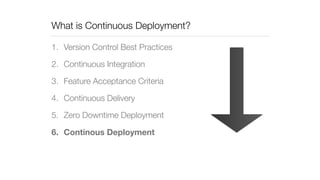
What is Continuous Deployment? 
1. Version Control Best Practices 
2. Continuous Integration 
3. Feature Acceptance Criteria 
4. Continuous Delivery 
5. Zero Downtime Deployment 
6. Continous Deployment
Using a Continuous Deployment Strategy 
• More adaptive to business needs. 
• Faster than agile.. 
• Embraces automation; less developer time spent on 
deployments. 
• Best for hosted internal / external applications. 
• Not compatible with self-install applications. 
• Implementing some layers of CD is better than no layers.
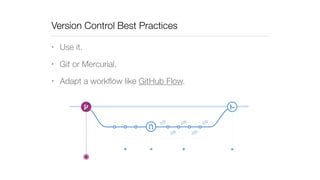
Version Control Best Practices 
• Use it. 
• Git or Mercurial. 
• Adapt a workflow like GitHub Flow.
Continuous 
Integration 
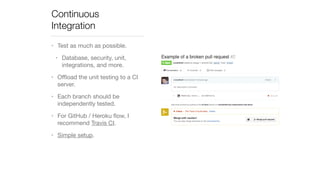
• Test as much as possible. 
• Database, security, unit, 
integrations, and more. 
• Offload the unit testing to a CI 
server. 
• Each branch should be 
independently tested. 
• For GitHub / Heroku flow, I 
recommend Travis CI. 
• Simple setup.
Feature Acceptance Criteria 
• The process for taking a feature branch and merging it 
into a release-ready branch. 
• Combination of CI tests, pull request, and discussion 
(code review). 
• Watch for changes that have not been automated or 
require downtime!
Continuous Delivery 
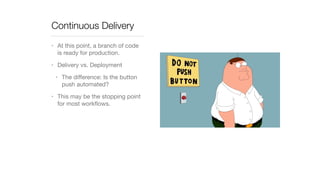
• At this point, a branch of code 
is ready for production. 
• Delivery vs. Deployment 
• The difference: Is the button 
push automated? 
• This may be the stopping point 
for most workflows.
Zero Downtime Deployment 
• For PaaS solutions like Salesforce and Heroku, the details 
are purely for background knowledge. 
• This is up to Salesforce to implement and handle. 
• Details on enabling zero downtime deployments in Heroku 
to follow.
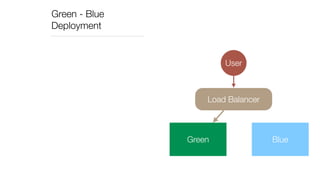
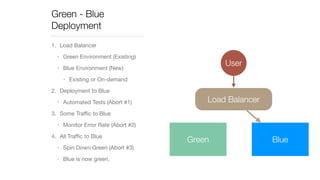
Green - Blue 
Deployment 
User 
Load Balancer 
Green Blue
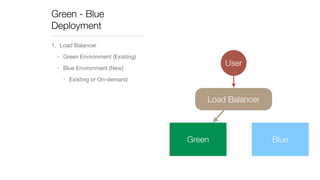
Green - Blue 
Deployment 
1. Load Balancer 
• Green Environment (Existing) 
• Blue Environment (New) 
• Existing or On-demand 
User 
Load Balancer 
Green Blue
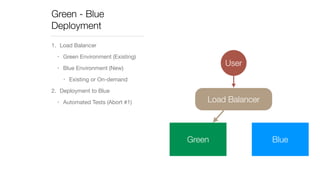
Green - Blue 
Deployment 
1. Load Balancer 
• Green Environment (Existing) 
• Blue Environment (New) 
• Existing or On-demand 
User 
2. Deployment to Blue 
• Automated Tests (Abort #1) Load Balancer 
Green Blue
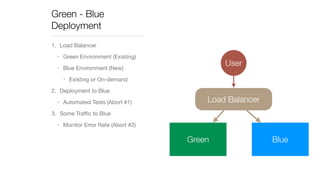
Green - Blue 
Deployment 
1. Load Balancer 
• Green Environment (Existing) 
• Blue Environment (New) 
• Existing or On-demand 
2. Deployment to Blue 
• Automated Tests (Abort #1) 
3. Some Traffic to Blue 
• Monitor Error Rate (Abort #2) 
User 
Load Balancer 
Green Blue
Green - Blue 
Deployment 
1. Load Balancer 
• Green Environment (Existing) 
• Blue Environment (New) 
• Existing or On-demand 
2. Deployment to Blue 
• Automated Tests (Abort #1) 
3. Some Traffic to Blue 
• Monitor Error Rate (Abort #2) 
4. All Traffic to Blue 
• Spin Down Green (Abort #3) 
• Blue is now green. 
User 
Load Balancer 
Green Blue
Blue - Green Deployment Considerations 
• Sessions (Not an issue with Heroku) 
• Simultaneous Environments 
• Database Changes 
• No destructive changes without downtime. 
• Message Queues 
• Version messages. 
• Front-end Applications 
• No destructive changes / alert users to refresh app.
Zero Downtime 
Deployments in Heroku 
• Pre-boot: Generally available 
since October 2014. 
• heroku features:enable preboot 
• Requires at least two web 
dynos. 
• Does not apply to worker 
dynos. 
• Deploys over ~5 minutes.
Continuous Deployment 
in Salesforce 
• Implementing is difficult, if not 
impossible. 
• Some enhancements coming to 
the process to make 
deployments faster. 
• “Quick Deployment” is in pilot 
now (Winter ’15). 
• Run production unit tests 
prior to deployment, then 
deploy up to 72 hours later.
Demo and Question Time

Continuous Deployment

  • 1.
    Continuous Deployment RonHeft CTO, The Social Station
  • 2.
    About Me •Certified Force.com Developer and Salesforce Administrator. • 10+ years experience in full stack web development. • Focus on Java, PHP, Apex, and Javascript. • ronaldheft.com / @ronaldheft
  • 3.
    About The SocialStation • Social media marketing startup based out of Allentown, PA. • We’ve built a service to manage social media for small businesses. • Platform consists of multiple integrations with social media partners, an internal management application, and client-facing web applications / mobile apps. • Technology is key to our operation.
  • 4.
    What is ContinuousDeployment? 1. Version Control Best Practices 2. Continuous Integration 3. Feature Acceptance Criteria 4. Continuous Delivery 5. Zero Downtime Deployment 6. Continous Deployment
  • 5.
    Using a ContinuousDeployment Strategy • More adaptive to business needs. • Faster than agile.. • Embraces automation; less developer time spent on deployments. • Best for hosted internal / external applications. • Not compatible with self-install applications. • Implementing some layers of CD is better than no layers.
  • 6.
    Version Control BestPractices • Use it. • Git or Mercurial. • Adapt a workflow like GitHub Flow.
  • 7.
    Continuous Integration •Test as much as possible. • Database, security, unit, integrations, and more. • Offload the unit testing to a CI server. • Each branch should be independently tested. • For GitHub / Heroku flow, I recommend Travis CI. • Simple setup.
  • 8.
    Feature Acceptance Criteria • The process for taking a feature branch and merging it into a release-ready branch. • Combination of CI tests, pull request, and discussion (code review). • Watch for changes that have not been automated or require downtime!
  • 9.
    Continuous Delivery •At this point, a branch of code is ready for production. • Delivery vs. Deployment • The difference: Is the button push automated? • This may be the stopping point for most workflows.
  • 10.
    Zero Downtime Deployment • For PaaS solutions like Salesforce and Heroku, the details are purely for background knowledge. • This is up to Salesforce to implement and handle. • Details on enabling zero downtime deployments in Heroku to follow.
  • 11.
    Green - Blue Deployment User Load Balancer Green Blue
  • 12.
    Green - Blue Deployment 1. Load Balancer • Green Environment (Existing) • Blue Environment (New) • Existing or On-demand User Load Balancer Green Blue
  • 13.
    Green - Blue Deployment 1. Load Balancer • Green Environment (Existing) • Blue Environment (New) • Existing or On-demand User 2. Deployment to Blue • Automated Tests (Abort #1) Load Balancer Green Blue
  • 14.
    Green - Blue Deployment 1. Load Balancer • Green Environment (Existing) • Blue Environment (New) • Existing or On-demand 2. Deployment to Blue • Automated Tests (Abort #1) 3. Some Traffic to Blue • Monitor Error Rate (Abort #2) User Load Balancer Green Blue
  • 15.
    Green - Blue Deployment 1. Load Balancer • Green Environment (Existing) • Blue Environment (New) • Existing or On-demand 2. Deployment to Blue • Automated Tests (Abort #1) 3. Some Traffic to Blue • Monitor Error Rate (Abort #2) 4. All Traffic to Blue • Spin Down Green (Abort #3) • Blue is now green. User Load Balancer Green Blue
  • 16.
    Blue - GreenDeployment Considerations • Sessions (Not an issue with Heroku) • Simultaneous Environments • Database Changes • No destructive changes without downtime. • Message Queues • Version messages. • Front-end Applications • No destructive changes / alert users to refresh app.
  • 17.
    Zero Downtime Deploymentsin Heroku • Pre-boot: Generally available since October 2014. • heroku features:enable preboot • Requires at least two web dynos. • Does not apply to worker dynos. • Deploys over ~5 minutes.
  • 18.
    Continuous Deployment inSalesforce • Implementing is difficult, if not impossible. • Some enhancements coming to the process to make deployments faster. • “Quick Deployment” is in pilot now (Winter ’15). • Run production unit tests prior to deployment, then deploy up to 72 hours later.
  • 19.