Get your decision RIGHT!!!

 Guide to Choose the Best Content
       Management System
What is CMS?

A Content Management System (CMS) is a computer program that
allows publishing, editing and modifying content as well as
maintenance from a central interface.

Such systems of content management provide procedures to
manage application, content & workflow in a easier collaborative
environment.

These procedures can be manual steps or an automated cascade.

CMS nowadays are used as platform to build web-based applications
be it websites, portals, integrated applications for front-end or back
end consumption.
Key Features in Enterprise CMS
Development & Product Simplification

CMS are affecting web application delivery. Understandably, the market favors simpler tools and
methodologies conducive to rich user experience and provide ease of extensibility and integration with other
technologies. The simplicity of a software product ensures lower costs, higher reliability, and increasing
ability to meet growth strategies. With the open source market’s use of newer and faster development tools,
frameworks and components, today’s enterprises have access to products that allows them to quickly evolve
with business needs while remaining light-weight, with built-in expansion mechanisms, like micro-kernel
architecture and plugins.

Unification of Presentation Strategies

There is continual growth of new applications and services within an enterprise. A truly effective CMS should
allow new features and services to be continually added into the existing portals. It must provide
authentication, authorization and role-based content delivery (RBCD). RBCD defines that each person
accessing the portal sees and has access to only the content that they are authorized to view. It is what
permits an enterprise to offer one unified view without compromising content security or user experience. It
also improves user productivity, reduces software maintenance costs across applications, and increases the
reuse of code, content, and policies.

A unified presentation layer using CMS also allows for the creation of “micro-sites” whereby a single portal
instance can host www.company.com as well as my.company.com, partner.company.com, and
employees.company.com. Additionally, multiple portals can be deployed across a portal fabric in which each
portal can leverage a common set of data, content, application services, identity services, and portlets.
Key Features in Enterprise CMS (cont)
Unification of Content, Portals , and the Application Platform

 In the past, CMS was used for only a portion of the web experience (e.g., website, an employee portal or
dashboard) alongside a number of other disparate products performing other functions. Application platforms
were used to build individual applications (e.g., using an application server to build a trouble ticket automation
application integrating to an existing system). The simplification of software has led to a new strategy to unify
infrastructures and technologies.

Unification of Departmental and Enterprise-Wide Software

Enterprise-wide projects and departmental projects are often supported by different sets of software. For
example, many companies use an IBM, Oracle, or BEA portal for enterprise-wide implementations and use
SharePoint® at the departmental level. Likewise, they will leverage major content repositories for enterprise-wide
content while leveraging open source repositories for the departmental requirements. Quite significantly, recent
trends show corporations looking to service both enterprise-wide solutions and departmental solutions with one
product to allow for code and feature reuse and to share the costs of unlimited licensing across a larger pool of
users.

Unification of Developer Strategies and Technologies
Developer technology changes have also fractured CMS software. For many years, PHP, Microsoft and Java
technologies have contended for favor. Now, developers are faced with an ever-growing list of technologies and
development languages to choose from: Java developers can choose between Spring and EJB, between SOAP
and REST, between Java and PHP/RUBY, between DOJO Toolkit and Microsoft Web Wizard, and maybe even
between Eclipse and Dreamweaver. IT teams make these choices when planning their application infrastructure,
but with the understanding that choosing one technology may exclude it from innovations available in others.
However, because portals aggregate content at the presentation layer, they allow multiple technologies to be used
in the application layer, thereby giving an enterprise access to the benefits of each.
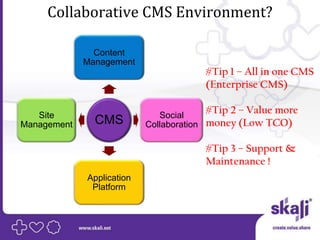
Collaborative CMS Environment?

               Content
             Management
                                      #Tip 1 – All in one CMS
                                      (Enterprise CMS)

   Site                       Social
                                      #Tip 2 – Value more
Management     CMS         Collaboration money (Low TCO)

                                      #Tip 3 – Support &
                                      Maintenance !
             Application
              Platform
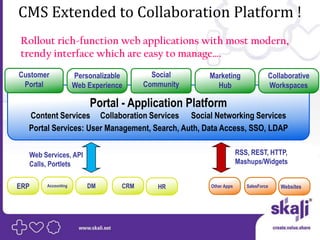
CMS Extended to Collaboration Platform !
Rollout rich-function web applications with most modern,
trendy interface which are easy to manage….
Customer            Personalizable       Social    Marketing                Collaborative
 Portal             Web Experience     Community     Hub                    Workspaces

                        Portal - Application Platform
  Content Services Collaboration Services Social Networking Services
  Portal Services: User Management, Search, Auth, Data Access, SSO, LDAP

  Web Services, API                                             RSS, REST, HTTP,
  Calls, Portlets                                               Mashups/Widgets


ERP    Accounting       DM       CRM      HR       Other Apps      SalesForce   Websites
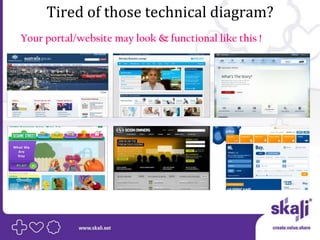
Tired of those technical diagram?
Your portal/website may look & functional like this !
All of this seems too complicated?
SKALI at your service !

• We use the leading Enterprise Open Source CMS Platform
  called LIFERAY.
• Skali is LIFERAY GOLD PARTNER in Malaysia
• We have proven expertise in Planning, URS, Design,
  Development, Testing, QA/QC & Training.
• More than 300 resources ready.
• Has delivered many type of portal – Collaboration,
  Intranet, Transactional, Government, FSI and many more…
If you wish to know more details about Liferay,
    please email us at enquiries@skali.net

Content Management System

  • 1.
    Get your decisionRIGHT!!! Guide to Choose the Best Content Management System
  • 2.
    What is CMS? AContent Management System (CMS) is a computer program that allows publishing, editing and modifying content as well as maintenance from a central interface. Such systems of content management provide procedures to manage application, content & workflow in a easier collaborative environment. These procedures can be manual steps or an automated cascade. CMS nowadays are used as platform to build web-based applications be it websites, portals, integrated applications for front-end or back end consumption.
  • 3.
    Key Features inEnterprise CMS Development & Product Simplification CMS are affecting web application delivery. Understandably, the market favors simpler tools and methodologies conducive to rich user experience and provide ease of extensibility and integration with other technologies. The simplicity of a software product ensures lower costs, higher reliability, and increasing ability to meet growth strategies. With the open source market’s use of newer and faster development tools, frameworks and components, today’s enterprises have access to products that allows them to quickly evolve with business needs while remaining light-weight, with built-in expansion mechanisms, like micro-kernel architecture and plugins. Unification of Presentation Strategies There is continual growth of new applications and services within an enterprise. A truly effective CMS should allow new features and services to be continually added into the existing portals. It must provide authentication, authorization and role-based content delivery (RBCD). RBCD defines that each person accessing the portal sees and has access to only the content that they are authorized to view. It is what permits an enterprise to offer one unified view without compromising content security or user experience. It also improves user productivity, reduces software maintenance costs across applications, and increases the reuse of code, content, and policies. A unified presentation layer using CMS also allows for the creation of “micro-sites” whereby a single portal instance can host www.company.com as well as my.company.com, partner.company.com, and employees.company.com. Additionally, multiple portals can be deployed across a portal fabric in which each portal can leverage a common set of data, content, application services, identity services, and portlets.
  • 4.
    Key Features inEnterprise CMS (cont) Unification of Content, Portals , and the Application Platform In the past, CMS was used for only a portion of the web experience (e.g., website, an employee portal or dashboard) alongside a number of other disparate products performing other functions. Application platforms were used to build individual applications (e.g., using an application server to build a trouble ticket automation application integrating to an existing system). The simplification of software has led to a new strategy to unify infrastructures and technologies. Unification of Departmental and Enterprise-Wide Software Enterprise-wide projects and departmental projects are often supported by different sets of software. For example, many companies use an IBM, Oracle, or BEA portal for enterprise-wide implementations and use SharePoint® at the departmental level. Likewise, they will leverage major content repositories for enterprise-wide content while leveraging open source repositories for the departmental requirements. Quite significantly, recent trends show corporations looking to service both enterprise-wide solutions and departmental solutions with one product to allow for code and feature reuse and to share the costs of unlimited licensing across a larger pool of users. Unification of Developer Strategies and Technologies Developer technology changes have also fractured CMS software. For many years, PHP, Microsoft and Java technologies have contended for favor. Now, developers are faced with an ever-growing list of technologies and development languages to choose from: Java developers can choose between Spring and EJB, between SOAP and REST, between Java and PHP/RUBY, between DOJO Toolkit and Microsoft Web Wizard, and maybe even between Eclipse and Dreamweaver. IT teams make these choices when planning their application infrastructure, but with the understanding that choosing one technology may exclude it from innovations available in others. However, because portals aggregate content at the presentation layer, they allow multiple technologies to be used in the application layer, thereby giving an enterprise access to the benefits of each.
  • 5.
    Collaborative CMS Environment? Content Management #Tip 1 – All in one CMS (Enterprise CMS) Site Social #Tip 2 – Value more Management CMS Collaboration money (Low TCO) #Tip 3 – Support & Maintenance ! Application Platform
  • 6.
    CMS Extended toCollaboration Platform ! Rollout rich-function web applications with most modern, trendy interface which are easy to manage…. Customer Personalizable Social Marketing Collaborative Portal Web Experience Community Hub Workspaces Portal - Application Platform Content Services Collaboration Services Social Networking Services Portal Services: User Management, Search, Auth, Data Access, SSO, LDAP Web Services, API RSS, REST, HTTP, Calls, Portlets Mashups/Widgets ERP Accounting DM CRM HR Other Apps SalesForce Websites
  • 7.
    Tired of thosetechnical diagram? Your portal/website may look & functional like this !
  • 8.
    All of thisseems too complicated? SKALI at your service ! • We use the leading Enterprise Open Source CMS Platform called LIFERAY. • Skali is LIFERAY GOLD PARTNER in Malaysia • We have proven expertise in Planning, URS, Design, Development, Testing, QA/QC & Training. • More than 300 resources ready. • Has delivered many type of portal – Collaboration, Intranet, Transactional, Government, FSI and many more…
  • 9.
    If you wishto know more details about Liferay, please email us at enquiries@skali.net