




Content Management:
No Mystery!


                           Mollye Barrett
    The Global Communication Conference
                       September, 2012
Getting Clear: Goals

•   Promises
•   Demystification
•   Types of content management
•   Focus on CCM
•   Content Lifecycle
•   What really happens in Content Management?
Content Management
     Promises
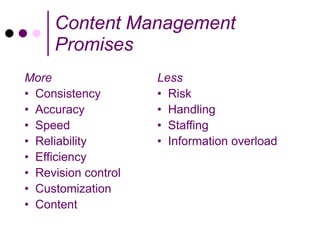
More                 Less
• Consistency        • Risk
• Accuracy           • Handling
• Speed              • Staffing
• Reliability        • Information overload
• Efficiency
• Revision control
• Customization
• Content
Ready for
Content
Management?
Not in Kansas Anymore

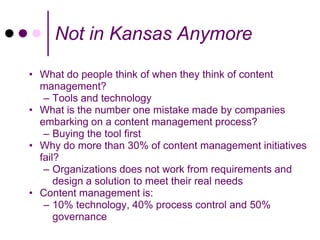
• What do people think of when they think of content
  management?
   – Tools and technology
• What is the number one mistake made by companies
  embarking on a content management process?
   – Buying the tool first
• Why do more than 30% of content management initiatives
  fail?
   – Organizations does not work from requirements and
      design a solution to meet their real needs
• Content management is:
   – 10% technology, 40% process control and 50%
      governance
What is CM?
The real core of CM is an organized way of creating, collecting,
managing and delivering content. This is a business process to
support business goals. Based on your requirements, software
is a part of the solution not the foundation.

Technical communicators look for systems:
 • Content defined by location
 • Extensive content reuse
 • Focuses on creation and editing (workflow)
 • Tight integration between authoring and the repository
 • Powerful, automated publishing engine (templates,
   scripting, etc)
 • Single sourcing application (one to many)
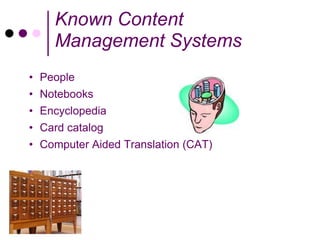
Known Content
    Management Systems
• People
• Notebooks
• Encyclopedia
• Card catalog
• Computer Aided Translation (CAT)
Document Management
Document Management (DMS) is a technology developed to
manage huge numbers of documents in organizations. Mature and
well-tested, document management systems:
 • Focus on managing documents (PDF, Word)
 • Chunks of content (document) are fairly large, and self-
   contained
 • Supports few, if any, links between documents
 • Limited integration with repository (check-in/check-out)
 • Focuses on storage and archiving
 • Includes workflow
 • Stores and presents documents (usually) in their native format

Enterprise: Alfresco, Documentum, FileNet, HP-Autonomy: iManage WorkSite,
Interwoven's Worksite, KnowledgeTree, Laserfiche, Nuxeo, OpenText , Oracle's
WebCenter Content, SharePoint, Teamwork, Xerox Docushare
Digital Asset Management
Digital Asset Management (DAM) is the technologies used to
import, annotate, catalog, store and retrieve digital assets that
include:
     • Digital photographs
     • Animations
     • Videos
     • Music


Enterprise: EMC (Documentum), Interwoven (MediaBin), ClearStory
(ActiveMedia), IBM FileNet (Ancept)
Middle: WAVE (MediaBank), Canto (Cumulus), Widen (Media Collective)
Light: Microsoft (SharePoint), Oracle (Universal Content Management),
Niche: Chuckwalla
Enterprise Content
       Management
Enterprise Content Management (ECM) is the technologies, tools,
and methods used to capture, manage, store, preserve, and
deliver content across an enterprise.
 • Tools and strategies allow management of an organization's
    unstructured information, wherever that information exists
 • ECM capabilities manage traditional content types (images,
    office documents, graphics, drawings, and print streams) as
    well as the new electronic objects (Web pages and content,
    email, video, and rich media assets) throughout the lifecycle of
    that content


Enterprise: EMC (Documentum), Open Text (Livelink), Vignette (V7)
Mid-range: EVER (EverSuite), SpringCM (SpringCM)
Web Content Management
Web Content Management (WCM) is the technology and methods
used to manage a web site
   • Internet
   • Intranet
   • Extranet


Enterprise: HP-Autonomy: Interwoven TeamSite, IBM Web Content Manager,
Vignette - OpenText
Upper: Adobe CQ5, Alfresco: Alfresco WCM, CoreMedia CMS, Oracle: FatWire,
Percussion: CM System, SDLTridion, Sitecore
Middle: CrownPeak CMS, e-Spirit: FirstSpirit, Ektron: CMS, Enonic CMS, eZ
publish, Hannon Hill: Cascade Server, Ingeniux Content Management System,
Limelight Networks: Dynamic Site Platform, Magnolia CMS
Simple: DotNetNuke, Joomla!, Kentico CMS, OU Campus, OpenCms, Telerik:
Sitefinity CMS, Terminalfour: Site Manager, WordPress
Component Content
       Management
Component Content Management (CCM) is a recent technology
and methods used to manage small, interconnected units of
structured content for multi-channel delivery (paper, web,
wireless)
 • Content is defined by location
 • Extensive content reuse
 • Focuses on creation and editing
 • Provides tight integration between authoring and the
    repository
 • Provides a powerful, automated publishing engine
    (templates, scripting, etc)

EMC (Documentum Technical), DocZone, Vasont, SiberLogic (SiberSafe),
PTC (Arbortext Content Manager), IXIASOFT (DITA CMS), Author-it
CCM for the Technical
         Communication Lifecycle
• Repository
    • Roles-based access control for check-in, check-out
    • Management of both content and metadata
    • Reuse at any level
• Linking, Link Integrity and Management
    • Components managed through all kinds of links
    • Automated consistency checks
• Content and Document History, Versioning
    • All content components versioned and complete history tracked
    • Any individual component or collection of components (document) at any version
      can be reproduced
• Workflow
    • Task Management
    • Role Based
• Automated, Conditional Publishing
    • Templating and publishing
    • Publish variant versions of content based on variables, schema constructs, abstract
      links
• Localization support and integration
Get Your Team Ready!
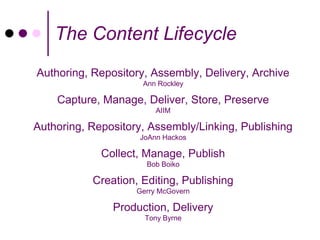
The Content Lifecycle
Authoring, Repository, Assembly, Delivery, Archive
                     Ann Rockley

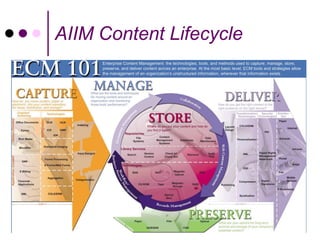
    Capture, Manage, Deliver, Store, Preserve
                         AIIM

Authoring, Repository, Assembly/Linking, Publishing
                    JoAnn Hackos

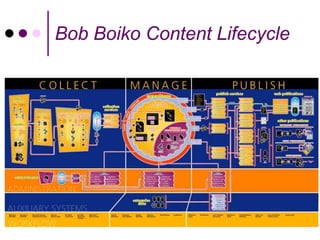
             Collect, Manage, Publish
                      Bob Boiko

           Creation, Editing, Publishing
                    Gerry McGovern

               Production, Delivery
                      Tony Byrne
Bob Boiko Content Lifecycle
AIIM Content Lifecycle
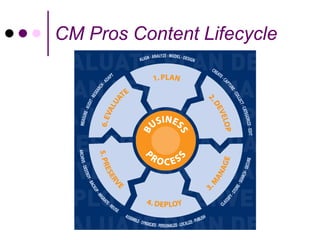
CM Pros Content Lifecycle
Focus on the Lifecycle

• More than authoring and
  publishing
   • Stumble with structure, fail
     with publishing
• Frame business process with
  the content lifecycle, not
  software functionality
   • Integration is 70%-80% of
     production cost
Changes
Some work stays the same, some changes
• Writers write, editors edit, illustrators illustrate and
  publishers publish
• Automation requires a different approach and new skills
   • Parallel activities require collaboration
   • Writers and editors find a single, consistent voice for
     many small units of content
   • Illustrators and publishers produce graphic content
     without the benefit of a constant visual page
   • Content combines with stylesheets to render a page
     automatically: no GUI for formatting
   • New roles: managers and CMS administrators
   • Workflow pushes content without human intervention
   • When the system works well, everything is faster!
Let’s talk
about your
content
management
needs!
Language of CM

• Not everyone is speaking the same language
   • Engineers design CMS and often create the GUI,
     document the system, create the help and
     provide the training
   • Industry terms are not well standardized and add
     to mystification
   • Consultants may over-complicate issues to
     justify work, pre-conceived bias, relationships
• Ann Rockley’s book helped provide us with a
  standard language to talk about CM
• Get clear on terms, relate to content lifecycle
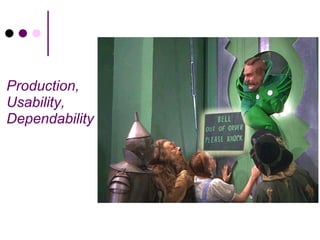
Production,
Usability,
Dependability
CM Products Maturing

• CM is a fairly new technology
• Products are evolving and maturing
• Technical Publication solutions not tailored for
  specific industries
• Once primarily focused on functionality, now
  improving usability
• Every content management system uses it’s own
  terminology, acronyms and language
• Tighter integration with authoring and localization
• Some systems are adding DAM-like features
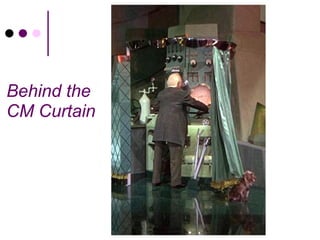
Behind the
CM Curtain
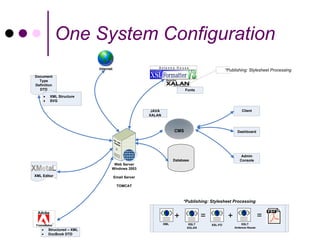
One System Configuration
                          Internet                                                           *Publishing: Stylesheet Processing
Document
  Type
Definition
  DTD                                                                   Fonts
        XML Structure
        SVG

                                                     JAVA                                             Client
                                                    XALAN


                                                                  CMS                              Dashboard


                                                                                                      Admin
                                                                  Database                           Console
                                  Web Server
                                 Windows 2003
XML Editor                           Email Server

                                      TOMCAT


                                                                       *Publishing: Stylesheet Processing


                                                                  +             =             +                   =
                                                            XML          XSLT       XSL-FO            XSLT
                                                                        XALAN                     Antenna House
       Structured – XML
       DocBook DTD
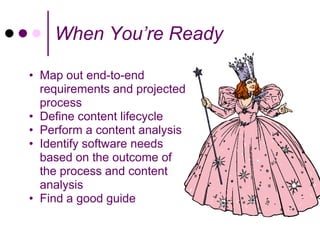
When You’re Ready

• Map out end-to-end
  requirements and projected
  process
• Define content lifecycle
• Perform a content analysis
• Identify software needs
  based on the outcome of
  the process and content
  analysis
• Find a good guide
Q&A


    Mollye Barrett
   ClearPath, LLC
 mollye@clearpath.cc

Content Management: No Mystery

  • 1.
    Content Management: No Mystery! Mollye Barrett The Global Communication Conference September, 2012
  • 2.
    Getting Clear: Goals • Promises • Demystification • Types of content management • Focus on CCM • Content Lifecycle • What really happens in Content Management?
  • 4.
    Content Management Promises More Less • Consistency • Risk • Accuracy • Handling • Speed • Staffing • Reliability • Information overload • Efficiency • Revision control • Customization • Content
  • 5.
  • 6.
    Not in KansasAnymore • What do people think of when they think of content management? – Tools and technology • What is the number one mistake made by companies embarking on a content management process? – Buying the tool first • Why do more than 30% of content management initiatives fail? – Organizations does not work from requirements and design a solution to meet their real needs • Content management is: – 10% technology, 40% process control and 50% governance
  • 7.
    What is CM? Thereal core of CM is an organized way of creating, collecting, managing and delivering content. This is a business process to support business goals. Based on your requirements, software is a part of the solution not the foundation. Technical communicators look for systems: • Content defined by location • Extensive content reuse • Focuses on creation and editing (workflow) • Tight integration between authoring and the repository • Powerful, automated publishing engine (templates, scripting, etc) • Single sourcing application (one to many)
  • 8.
    Known Content Management Systems • People • Notebooks • Encyclopedia • Card catalog • Computer Aided Translation (CAT)
  • 9.
    Document Management Document Management(DMS) is a technology developed to manage huge numbers of documents in organizations. Mature and well-tested, document management systems: • Focus on managing documents (PDF, Word) • Chunks of content (document) are fairly large, and self- contained • Supports few, if any, links between documents • Limited integration with repository (check-in/check-out) • Focuses on storage and archiving • Includes workflow • Stores and presents documents (usually) in their native format Enterprise: Alfresco, Documentum, FileNet, HP-Autonomy: iManage WorkSite, Interwoven's Worksite, KnowledgeTree, Laserfiche, Nuxeo, OpenText , Oracle's WebCenter Content, SharePoint, Teamwork, Xerox Docushare
  • 10.
    Digital Asset Management DigitalAsset Management (DAM) is the technologies used to import, annotate, catalog, store and retrieve digital assets that include: • Digital photographs • Animations • Videos • Music Enterprise: EMC (Documentum), Interwoven (MediaBin), ClearStory (ActiveMedia), IBM FileNet (Ancept) Middle: WAVE (MediaBank), Canto (Cumulus), Widen (Media Collective) Light: Microsoft (SharePoint), Oracle (Universal Content Management), Niche: Chuckwalla
  • 11.
    Enterprise Content Management Enterprise Content Management (ECM) is the technologies, tools, and methods used to capture, manage, store, preserve, and deliver content across an enterprise. • Tools and strategies allow management of an organization's unstructured information, wherever that information exists • ECM capabilities manage traditional content types (images, office documents, graphics, drawings, and print streams) as well as the new electronic objects (Web pages and content, email, video, and rich media assets) throughout the lifecycle of that content Enterprise: EMC (Documentum), Open Text (Livelink), Vignette (V7) Mid-range: EVER (EverSuite), SpringCM (SpringCM)
  • 12.
    Web Content Management WebContent Management (WCM) is the technology and methods used to manage a web site • Internet • Intranet • Extranet Enterprise: HP-Autonomy: Interwoven TeamSite, IBM Web Content Manager, Vignette - OpenText Upper: Adobe CQ5, Alfresco: Alfresco WCM, CoreMedia CMS, Oracle: FatWire, Percussion: CM System, SDLTridion, Sitecore Middle: CrownPeak CMS, e-Spirit: FirstSpirit, Ektron: CMS, Enonic CMS, eZ publish, Hannon Hill: Cascade Server, Ingeniux Content Management System, Limelight Networks: Dynamic Site Platform, Magnolia CMS Simple: DotNetNuke, Joomla!, Kentico CMS, OU Campus, OpenCms, Telerik: Sitefinity CMS, Terminalfour: Site Manager, WordPress
  • 13.
    Component Content Management Component Content Management (CCM) is a recent technology and methods used to manage small, interconnected units of structured content for multi-channel delivery (paper, web, wireless) • Content is defined by location • Extensive content reuse • Focuses on creation and editing • Provides tight integration between authoring and the repository • Provides a powerful, automated publishing engine (templates, scripting, etc) EMC (Documentum Technical), DocZone, Vasont, SiberLogic (SiberSafe), PTC (Arbortext Content Manager), IXIASOFT (DITA CMS), Author-it
  • 14.
    CCM for theTechnical Communication Lifecycle • Repository • Roles-based access control for check-in, check-out • Management of both content and metadata • Reuse at any level • Linking, Link Integrity and Management • Components managed through all kinds of links • Automated consistency checks • Content and Document History, Versioning • All content components versioned and complete history tracked • Any individual component or collection of components (document) at any version can be reproduced • Workflow • Task Management • Role Based • Automated, Conditional Publishing • Templating and publishing • Publish variant versions of content based on variables, schema constructs, abstract links • Localization support and integration
  • 15.
  • 16.
    The Content Lifecycle Authoring,Repository, Assembly, Delivery, Archive Ann Rockley Capture, Manage, Deliver, Store, Preserve AIIM Authoring, Repository, Assembly/Linking, Publishing JoAnn Hackos Collect, Manage, Publish Bob Boiko Creation, Editing, Publishing Gerry McGovern Production, Delivery Tony Byrne
  • 17.
  • 18.
  • 19.
    CM Pros ContentLifecycle
  • 20.
    Focus on theLifecycle • More than authoring and publishing • Stumble with structure, fail with publishing • Frame business process with the content lifecycle, not software functionality • Integration is 70%-80% of production cost
  • 21.
    Changes Some work staysthe same, some changes • Writers write, editors edit, illustrators illustrate and publishers publish • Automation requires a different approach and new skills • Parallel activities require collaboration • Writers and editors find a single, consistent voice for many small units of content • Illustrators and publishers produce graphic content without the benefit of a constant visual page • Content combines with stylesheets to render a page automatically: no GUI for formatting • New roles: managers and CMS administrators • Workflow pushes content without human intervention • When the system works well, everything is faster!
  • 22.
  • 23.
    Language of CM •Not everyone is speaking the same language • Engineers design CMS and often create the GUI, document the system, create the help and provide the training • Industry terms are not well standardized and add to mystification • Consultants may over-complicate issues to justify work, pre-conceived bias, relationships • Ann Rockley’s book helped provide us with a standard language to talk about CM • Get clear on terms, relate to content lifecycle
  • 24.
  • 25.
    CM Products Maturing •CM is a fairly new technology • Products are evolving and maturing • Technical Publication solutions not tailored for specific industries • Once primarily focused on functionality, now improving usability • Every content management system uses it’s own terminology, acronyms and language • Tighter integration with authoring and localization • Some systems are adding DAM-like features
  • 26.
  • 27.
    One System Configuration Internet *Publishing: Stylesheet Processing Document Type Definition DTD Fonts XML Structure SVG JAVA Client XALAN CMS Dashboard Admin Database Console Web Server Windows 2003 XML Editor Email Server TOMCAT *Publishing: Stylesheet Processing + = + = XML XSLT XSL-FO XSLT XALAN Antenna House Structured – XML DocBook DTD
  • 28.
    When You’re Ready •Map out end-to-end requirements and projected process • Define content lifecycle • Perform a content analysis • Identify software needs based on the outcome of the process and content analysis • Find a good guide
  • 29.
    Q&A Mollye Barrett ClearPath, LLC mollye@clearpath.cc