Considerations when building Mobile
App’s for your Business
Mark Bannerman
Managing Director – MicroStrategy South Africa

1
Agenda
• Introduction & Positioning
• Define your Strategy

• Build
• Deploy
• Next Wave

2
Introduction & Positioning

3
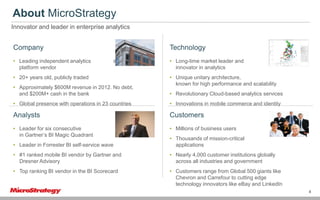
About MicroStrategy
Innovator and leader in enterprise analytics

Company
• Leading independent analytics
platform vendor

Technology
software

• 20+ years old, publicly traded
• Approximately $600M revenue in 2012. No debt,
and $200M+ cash in the bank

• Long-time market leader and
innovator in analytics
• Unique unitary architecture,
known for high performance and scalability
• Revolutionary Cloud-based analytics services

• Global presence with operations in 23 countries

• Innovations in mobile commerce and identity

Analysts

Customers

• Leader for six consecutive
in Gartner’s BI Magic Quadrant

years

• Millions of business users

• Leader in Forrester BI self-service wave

• Thousands of mission-critical
applications

• #1 ranked mobile BI vendor by Gartner and
Dresner Advisory

• Nearly 4,000 customer institutions globally
across all industries and government

• Top ranking BI vendor in the BI Scorecard

• Customers range from Global 500 giants like
Chevron and Carrefour to cutting edge
technology innovators like eBay and LinkedIn
4
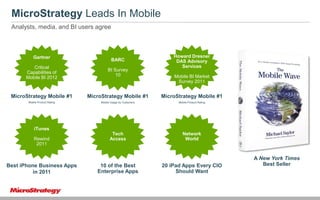
MicroStrategy Leads In Mobile
Analysts, media, and BI users agree

Gartner

BARC

Howard Dresner
DAS Advisory
Services

Critical
Capabilities of
Mobile BI 2012

BI Survey
10

MicroStrategy Mobile #1

MicroStrategy Mobile #1

MicroStrategy Mobile #1

Mobile Product Rating

Mobile Usage by Customers

Mobile Product Rating

Tech
Access

Network
World

Mobile BI Market
Survey 2011

iTunes
Rewind
2011

Best iPhone Business Apps
in 2011

10 of the Best
Enterprise Apps

20 iPad Apps Every CIO
Should Want

A New York Times
Best Seller
Introduction & Positioning

• There is a lot to consider:
o BYOD
o Security
o Mobile Device Management
o …..
• I will focus on the App lifecycle
o Strategy
o Build
o Deploy
o What next….

6
Define your Strategy

7
Define your Strategy
Considerations
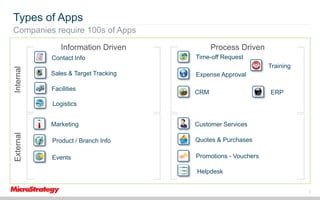
• Types of Applications
o Internal vs. External
o Information Driven or Process Driven
o Smart Phone vs. Feature Phone
• Constraints
o Budget
o Time
o Skills
o Business Maturity
o Complexity
o Sheer volume of mobile applications requiring development will become
enormous
8
Types of Apps
Companies require 100s of Apps
Information Driven
Internal

Contact Info

Process Driven
Time-off Request
Training

Sales & Target Tracking
Facilities

Expense Approval
CRM

ERP

Logistics

External

Marketing

Customer Services

Product / Branch Info

Quotes & Purchases

Events

Promotions - Vouchers
Helpdesk
9
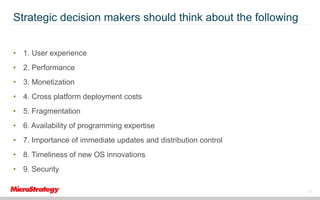
Strategic decision makers should think about the following
• 1. User experience
• 2. Performance

• 3. Monetization
• 4. Cross platform deployment costs
• 5. Fragmentation
• 6. Availability of programming expertise
• 7. Importance of immediate updates and distribution control

• 8. Timeliness of new OS innovations
• 9. Security
10
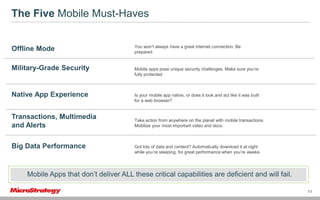
The Five Mobile Must-Haves

Offline Mode

You won’t always have a great internet connection. Be
prepared.

Military-Grade Security

Mobile apps pose unique security challenges. Make sure you’re
fully protected.

Native App Experience

Is your mobile app native, or does it look and act like it was built
for a web browser?

Transactions, Multimedia
and Alerts
Big Data Performance

Take action from anywhere on the planet with mobile transactions.
Mobilize your most important video and docs.

Got lots of data and content? Automatically download it at night
while you’re sleeping, for great performance when you’re awake.

Mobile Apps that don’t deliver ALL these critical capabilities are deficient and will fail.
11
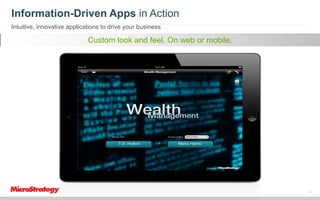
Information-Driven Apps in Action
Intuitive, innovative applications to drive your business

IntelligentPowerfulanalyze all relevant mobile.
Multimedia decision. Real-timesecurely.
Customaccess integrated analytics.feeds.
Quick look andfor Transact datadata.
Accessaand to feel. On web or
Make content. guided decision-making.
workflows important documents.

12
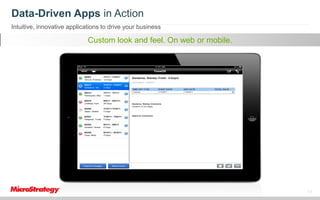
Data-Driven Apps in Action
Intuitive, innovative applications to drive your business

IntelligentPowerfulanalyze all relevant mobile.
Multimedia decision. Real-timesecurely.
Customaccess integrated analytics.feeds.
Quick look andfor Transact datadata.
Accessaand to feel. On web or
Make content. guided decision-making.
workflows important documents.

13
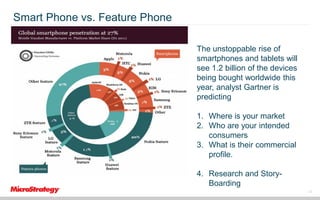
Smart Phone vs. Feature Phone
The unstoppable rise of
smartphones and tablets will
see 1.2 billion of the devices
being bought worldwide this
year, analyst Gartner is
predicting

1. Where is your market
2. Who are your intended
consumers
3. What is their commercial
profile.
4. Research and StoryBoarding
14
Research:

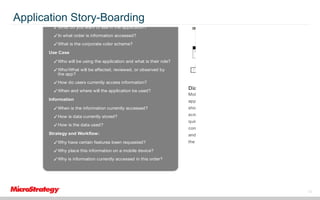
Application Story-Boarding
✓What is the current business process?

✓What do you want to see in the application?
✓In what order is information accessed?
✓What is the corporate color scheme?
Use Case
✓Who will be using the application and what is their role?
✓Who/What will be affected, reviewed, or observed by
the app?
✓How do users currently access information?
✓When and where will the application be used?
Information

Diagram the Right Workflow

Mobile apps require workflows or storyboards that describe the

app in detail. It begins as a wireframe mockup with placeholders

✓When is the information currently accessed?

showing the app process flow and designs for each individua

✓How is data currently stored?

screen. Once you have the foundation, you can create all the re

✓How is the data used?
Strategy and Workflow:
✓Why have certain features been requested?

quired reports and charts required for the app. Once the app is

complete, you can substitute actual screenshots of the reports

and charts for the wireframe placeholders, and begin assembling
the app.

✓Why place this information on a mobile device?
✓Why is information currently accessed in this order?

20

15
Build

16
Build
Considerations
• Native Code vs. App Development Framework
• Native App vs. HTML5

17
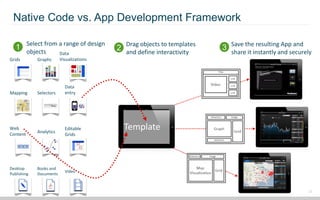
Native Code vs. App Development Framework
Select from a range of design

1 objects
Grids

Graphs

Data
Visualizations

Drag objects to templates

2 and define interactivity

3 Save the resulting App and

share it instantly and securely

Data
entry

Mapping

Selectors

Web
Content

Analytics

Editable
Grids

Desktop
Publishing

Books and
Documents

Video

Template

18
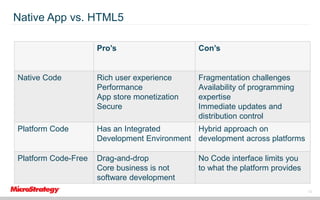
Native App vs. HTML5
Pro’s

Con’s

Native Code

Rich user experience
Performance
App store monetization
Secure

Fragmentation challenges
Availability of programming
expertise
Immediate updates and
distribution control

Platform Code

Has an Integrated
Hybrid approach on
Development Environment development across platforms

Platform Code-Free

Drag-and-drop
Core business is not
software development

No Code interface limits you
to what the platform provides
19
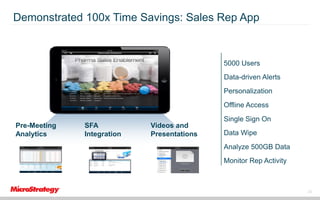
Demonstrated 100x Time Savings: Sales Rep App

5000 Users
Data-driven Alerts

Personalization
Offline Access
Pre-Meeting
Analytics

SFA
Integration

Videos and
Presentations

Single Sign On
Data Wipe
Analyze 500GB Data
Monitor Rep Activity

20
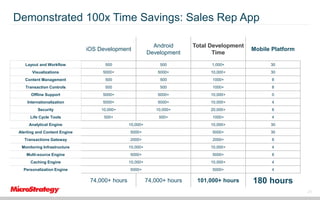
Demonstrated 100x Time Savings: Sales Rep App
iOS Development

Android
Development

Total Development
Time

Mobile Platform

Layout and Workflow

500

500

1,000+

30

Visualizations

5000+

5000+

10,000+

30

Content Management

500

500

1000+

8

Transaction Controls

500

500

1000+

8

Offline Support

5000+

5000+

10,000+

0

Internationalization

5000+

5000+

10,000+

4

Security

10,000+

10,000+

20,000+

8

Life Cycle Tools

500+

500+

1000+

4

Analytical Engine

10,000+

10,000+

30

Alerting and Content Engine

5000+

5000+

30

Transactions Gateway

2000+

2000+

8

Monitoring Infrastructure

10,000+

10,000+

4

Multi-source Engine

5000+

5000+

8

Caching Engine

10,000+

10,000+

4

Personalization Engine

5000+

5000+

4

101,000+ hours

180 hours

74,000+ hours

74,000+ hours

21
Deploy

22
Deploy
Considerations
• Multiple Platforms with regular OS updates
• Measuring your App’s Effectiveness
• Maintenance & Scaling

23
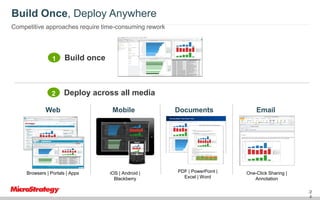
Build Once, Deploy Anywhere
Competitive approaches require time-consuming rework

1

Build once

2

Deploy across all media

Web

Mobile

Browsers | Portals | Apps

iOS | Android |
Blackberry

Documents

PDF | PowerPoint |
Excel | Word

Email

One-Click Sharing |
Annotation
24
2
4
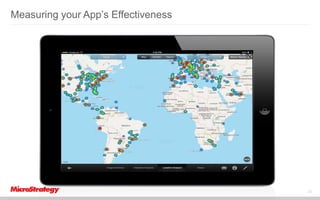
Measuring your App’s Effectiveness

25
Maintenance and Scaling
• Monitoring
Gain insight into usage by gathering Mobile Client Statistics
• App Redesign
Coding is time-consuming, using a Mobile App Platform means changing your
App is as simple as dragging and dropping
• Scale
Increase the number of Apps and number of users within a single, secure and
comprehensive platform.

26
The Next Wave

27
The Next Wave

“A truly disruptive technology appears and causes major changes to business,
society, or economies.
It yields non-linear effects, on so many levels, and at such a grand scale that it’s
very hard to grasp the scope until the dust settles.”
- Michael Saylor – The Mobile Wave

28

Considerations when building mobile app. Presented by Microstrategy

  • 1.
    Considerations when buildingMobile App’s for your Business Mark Bannerman Managing Director – MicroStrategy South Africa 1
  • 2.
    Agenda • Introduction &Positioning • Define your Strategy • Build • Deploy • Next Wave 2
  • 3.
  • 4.
    About MicroStrategy Innovator andleader in enterprise analytics Company • Leading independent analytics platform vendor Technology software • 20+ years old, publicly traded • Approximately $600M revenue in 2012. No debt, and $200M+ cash in the bank • Long-time market leader and innovator in analytics • Unique unitary architecture, known for high performance and scalability • Revolutionary Cloud-based analytics services • Global presence with operations in 23 countries • Innovations in mobile commerce and identity Analysts Customers • Leader for six consecutive in Gartner’s BI Magic Quadrant years • Millions of business users • Leader in Forrester BI self-service wave • Thousands of mission-critical applications • #1 ranked mobile BI vendor by Gartner and Dresner Advisory • Nearly 4,000 customer institutions globally across all industries and government • Top ranking BI vendor in the BI Scorecard • Customers range from Global 500 giants like Chevron and Carrefour to cutting edge technology innovators like eBay and LinkedIn 4
  • 5.
    MicroStrategy Leads InMobile Analysts, media, and BI users agree Gartner BARC Howard Dresner DAS Advisory Services Critical Capabilities of Mobile BI 2012 BI Survey 10 MicroStrategy Mobile #1 MicroStrategy Mobile #1 MicroStrategy Mobile #1 Mobile Product Rating Mobile Usage by Customers Mobile Product Rating Tech Access Network World Mobile BI Market Survey 2011 iTunes Rewind 2011 Best iPhone Business Apps in 2011 10 of the Best Enterprise Apps 20 iPad Apps Every CIO Should Want A New York Times Best Seller
  • 6.
    Introduction & Positioning •There is a lot to consider: o BYOD o Security o Mobile Device Management o ….. • I will focus on the App lifecycle o Strategy o Build o Deploy o What next…. 6
  • 7.
  • 8.
    Define your Strategy Considerations •Types of Applications o Internal vs. External o Information Driven or Process Driven o Smart Phone vs. Feature Phone • Constraints o Budget o Time o Skills o Business Maturity o Complexity o Sheer volume of mobile applications requiring development will become enormous 8
  • 9.
    Types of Apps Companiesrequire 100s of Apps Information Driven Internal Contact Info Process Driven Time-off Request Training Sales & Target Tracking Facilities Expense Approval CRM ERP Logistics External Marketing Customer Services Product / Branch Info Quotes & Purchases Events Promotions - Vouchers Helpdesk 9
  • 10.
    Strategic decision makersshould think about the following • 1. User experience • 2. Performance • 3. Monetization • 4. Cross platform deployment costs • 5. Fragmentation • 6. Availability of programming expertise • 7. Importance of immediate updates and distribution control • 8. Timeliness of new OS innovations • 9. Security 10
  • 11.
    The Five MobileMust-Haves Offline Mode You won’t always have a great internet connection. Be prepared. Military-Grade Security Mobile apps pose unique security challenges. Make sure you’re fully protected. Native App Experience Is your mobile app native, or does it look and act like it was built for a web browser? Transactions, Multimedia and Alerts Big Data Performance Take action from anywhere on the planet with mobile transactions. Mobilize your most important video and docs. Got lots of data and content? Automatically download it at night while you’re sleeping, for great performance when you’re awake. Mobile Apps that don’t deliver ALL these critical capabilities are deficient and will fail. 11
  • 12.
    Information-Driven Apps inAction Intuitive, innovative applications to drive your business IntelligentPowerfulanalyze all relevant mobile. Multimedia decision. Real-timesecurely. Customaccess integrated analytics.feeds. Quick look andfor Transact datadata. Accessaand to feel. On web or Make content. guided decision-making. workflows important documents. 12
  • 13.
    Data-Driven Apps inAction Intuitive, innovative applications to drive your business IntelligentPowerfulanalyze all relevant mobile. Multimedia decision. Real-timesecurely. Customaccess integrated analytics.feeds. Quick look andfor Transact datadata. Accessaand to feel. On web or Make content. guided decision-making. workflows important documents. 13
  • 14.
    Smart Phone vs.Feature Phone The unstoppable rise of smartphones and tablets will see 1.2 billion of the devices being bought worldwide this year, analyst Gartner is predicting 1. Where is your market 2. Who are your intended consumers 3. What is their commercial profile. 4. Research and StoryBoarding 14
  • 15.
    Research: Application Story-Boarding ✓What isthe current business process? ✓What do you want to see in the application? ✓In what order is information accessed? ✓What is the corporate color scheme? Use Case ✓Who will be using the application and what is their role? ✓Who/What will be affected, reviewed, or observed by the app? ✓How do users currently access information? ✓When and where will the application be used? Information Diagram the Right Workflow Mobile apps require workflows or storyboards that describe the app in detail. It begins as a wireframe mockup with placeholders ✓When is the information currently accessed? showing the app process flow and designs for each individua ✓How is data currently stored? screen. Once you have the foundation, you can create all the re ✓How is the data used? Strategy and Workflow: ✓Why have certain features been requested? quired reports and charts required for the app. Once the app is complete, you can substitute actual screenshots of the reports and charts for the wireframe placeholders, and begin assembling the app. ✓Why place this information on a mobile device? ✓Why is information currently accessed in this order? 20 15
  • 16.
  • 17.
    Build Considerations • Native Codevs. App Development Framework • Native App vs. HTML5 17
  • 18.
    Native Code vs.App Development Framework Select from a range of design 1 objects Grids Graphs Data Visualizations Drag objects to templates 2 and define interactivity 3 Save the resulting App and share it instantly and securely Data entry Mapping Selectors Web Content Analytics Editable Grids Desktop Publishing Books and Documents Video Template 18
  • 19.
    Native App vs.HTML5 Pro’s Con’s Native Code Rich user experience Performance App store monetization Secure Fragmentation challenges Availability of programming expertise Immediate updates and distribution control Platform Code Has an Integrated Hybrid approach on Development Environment development across platforms Platform Code-Free Drag-and-drop Core business is not software development No Code interface limits you to what the platform provides 19
  • 20.
    Demonstrated 100x TimeSavings: Sales Rep App 5000 Users Data-driven Alerts Personalization Offline Access Pre-Meeting Analytics SFA Integration Videos and Presentations Single Sign On Data Wipe Analyze 500GB Data Monitor Rep Activity 20
  • 21.
    Demonstrated 100x TimeSavings: Sales Rep App iOS Development Android Development Total Development Time Mobile Platform Layout and Workflow 500 500 1,000+ 30 Visualizations 5000+ 5000+ 10,000+ 30 Content Management 500 500 1000+ 8 Transaction Controls 500 500 1000+ 8 Offline Support 5000+ 5000+ 10,000+ 0 Internationalization 5000+ 5000+ 10,000+ 4 Security 10,000+ 10,000+ 20,000+ 8 Life Cycle Tools 500+ 500+ 1000+ 4 Analytical Engine 10,000+ 10,000+ 30 Alerting and Content Engine 5000+ 5000+ 30 Transactions Gateway 2000+ 2000+ 8 Monitoring Infrastructure 10,000+ 10,000+ 4 Multi-source Engine 5000+ 5000+ 8 Caching Engine 10,000+ 10,000+ 4 Personalization Engine 5000+ 5000+ 4 101,000+ hours 180 hours 74,000+ hours 74,000+ hours 21
  • 22.
  • 23.
    Deploy Considerations • Multiple Platformswith regular OS updates • Measuring your App’s Effectiveness • Maintenance & Scaling 23
  • 24.
    Build Once, DeployAnywhere Competitive approaches require time-consuming rework 1 Build once 2 Deploy across all media Web Mobile Browsers | Portals | Apps iOS | Android | Blackberry Documents PDF | PowerPoint | Excel | Word Email One-Click Sharing | Annotation 24 2 4
  • 25.
    Measuring your App’sEffectiveness 25
  • 26.
    Maintenance and Scaling •Monitoring Gain insight into usage by gathering Mobile Client Statistics • App Redesign Coding is time-consuming, using a Mobile App Platform means changing your App is as simple as dragging and dropping • Scale Increase the number of Apps and number of users within a single, secure and comprehensive platform. 26
  • 27.
  • 28.
    The Next Wave “Atruly disruptive technology appears and causes major changes to business, society, or economies. It yields non-linear effects, on so many levels, and at such a grand scale that it’s very hard to grasp the scope until the dust settles.” - Michael Saylor – The Mobile Wave 28