PACER: Fine-grained Interactive Paper via Camera-touch Hybrid Gestures on a Cell Phone Chunyuan Liao, Qiong Liu, Bee Liew, Lynn Wilcox FX Palo Alto Laboratory ACM CHI Conference Atlanta, GA, U.S.A. 4/15/2010
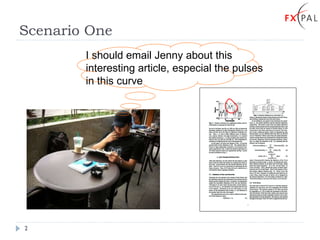
Scenario One I should email Jenny about this interesting article, especial the pulses in this curve
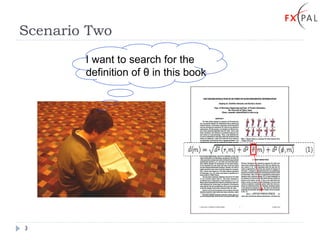
Scenario Two I want to search for the definition of  θ  in this book
Typical Solutions Step 1: Switch to digital media On-the-fly conversion Capture pictures and  apply OCR (Optical Character Recognition) Retrial of the digital version Find the digital version by file system browsing or web search Step 2: Locate the specific content Navigate to the specific page and find the figure  Step 3: Interact Mark the interesting region and email Type  θ  for full text search
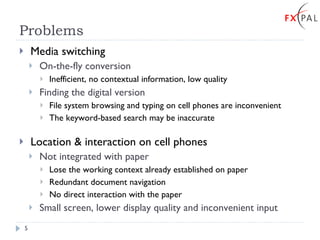
Problems Media switching On-the-fly conversion  Inefficient, no contextual information, low quality Finding the digital version File system browsing and typing on cell phones are inconvenient The keyword-based search may be inaccurate Location & interaction on cell phones Not integrated with paper Lose the working context already established on paper Redundant document navigation No direct interaction with the paper Small screen, lower display quality and inconvenient input
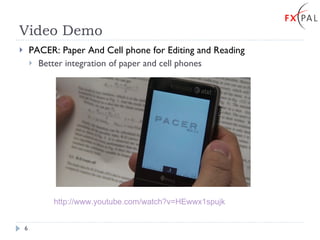
Video Demo  PACER: Paper And Cell phone for Editing and Reading Better integration of paper and cell phones http://www.youtube.com/watch?v=HEwwx1spujk
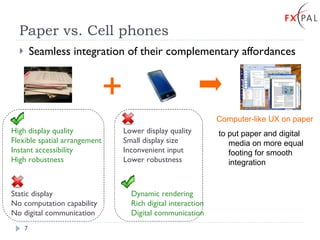
Paper vs. Cell phones Seamless integration of their complementary affordances High display quality Flexible spatial arrangement Instant accessibility High robustness Dynamic rendering Rich digital interaction Digital communication Lower display quality Small display size Inconvenient input Lower robustness Static display No computation capability No digital communication + Computer-like UX on paper to put paper and digital media on more equal footing for smooth integration
The State of the Art Interaction target granularity Text patches   [Erol, 08]   Pre-defined map regions   [Rohs,04] Interaction styles Point & Click   [Hare,08] Role of paper Paper as transient input source  [Arai,97] Paper as a proxy of digital documents  [Liao,08][Weibel,08][Tsandilas,09]  Recognition mechanisms Barcodes   [Rohs,08] ,  RFID   [Reilly,06] Anoto  [Liao,08][Weibel,08][Tsandilas,09] Text visual features   [Hull,07][Liu, 08] Image visual features   [Lowe,04] [Liu,09] Fine granularity Rich interaction styles User-specified arbitrary content and actions Generic documents Computer-like UX: PACER
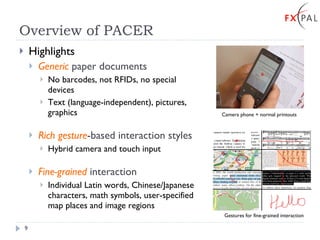
Overview of PACER Highlights Generic  paper documents No barcodes, not RFIDs, no special devices Text (language-independent), pictures, graphics Rich gesture -based interaction styles Hybrid camera and touch input Fine-grained  interaction Individual Latin words, Chinese/Japanese characters, math symbols, user-specified map places and image regions   Camera phone + normal printouts Gestures for fine-grained interaction +
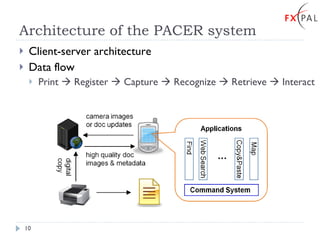
Architecture of the PACER system Client-server architecture Data flow Print    Register    Capture    Recognize    Retrieve    Interact
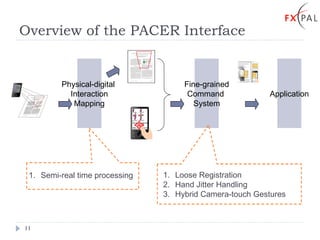
Overview of the PACER Interface Physical-digital  Interaction Mapping Fine-grained Command  System Semi-real time processing Loose Registration Hand Jitter Handling Hybrid Camera-touch Gestures Application +
Content-based Physical-Digital Interaction Mapping Similar to Augmented Reality (AR) Content-based approach Local  image visual features SIFT [Lowe,04], FIT[Liu,09] Robust to partial documents, occlusion, scaling and rotation Generic document content types Advantages of physical-digital linkage Rich contextual information Persistent digital info. associated with paper Feature Extraction Feature Matching image registration
Highlights (1): Semi-Real-Time Processing Challenge: Recognition and transmission are too expensive for continuous document tracking ~300ms for 320x240 pictures with a 2.8GHz 4-core CPU ~1000 ms for a complete SOAP call transaction Solutions:  Fast algorithms optimized for cell phones [Wagner,08] Remote recognition + local motion detection Recognition is slower but more accurate Camera-based motion detection is faster but accumulates errors Independent  of background content (good to loose registration!)
PACER Gestures Simulate pen-based computer interfaces  [Hinckley,05] Pointer: an individual word and character Underline, Bracket, Vertical Bar: a text line, sentence and chunk Lasso, Marquee: an arbitrary document region Path: a route Free-from Pointer Underline Bracket Vertical Bar Lasso Marquee Path Free-form
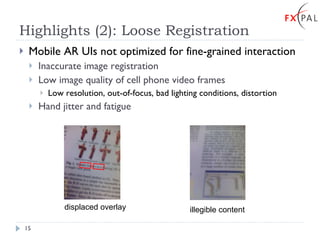
Highlights (2): Loose Registration Mobile AR UIs not optimized for fine-grained interaction Inaccurate image registration Low image quality of cell phone video frames Low resolution, out-of-focus, bad lighting conditions, distortion Hand jitter and fatigue displaced overlay illegible content
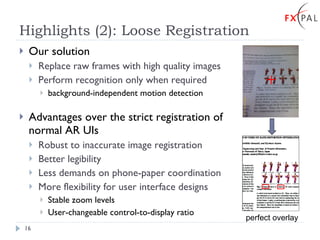
Highlights (2): Loose Registration Our solution Replace raw frames with high quality images Perform recognition only when required background-independent motion detection Advantages over the strict registration of normal AR UIs Robust to inaccurate image registration Better legibility Less demands on phone-paper coordination More flexibility for user interface designs Stable zoom levels User-changeable control-to-display ratio perfect overlay
Highlights (3): Hand Jitter Handling Hand jitter affects fine-grained interaction too Inherent with direct freehand pointing Hand-held projector [Forlines,05], Laser pointer [Olsen,01]  Solutions Filter  (Zoom-and-pick [Forlines,05]) Beautification  ( REXplorer [Kratz,09] ) Snap-to-object Physical pointer Logical pointer
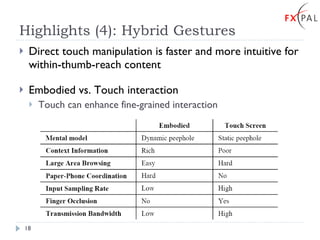
Highlights (4): Hybrid Gestures Direct touch manipulation is faster and more intuitive for within-thumb-reach content  Embodied vs. Touch interaction Touch can enhance fine-grained interaction
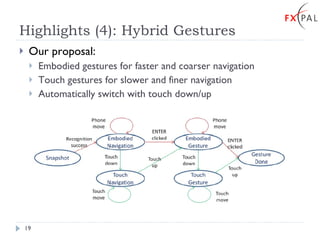
Highlights (4): Hybrid Gestures Our proposal: Embodied gestures for faster and coarser navigation Touch gestures for slower and finer navigation Automatically switch with touch down/up
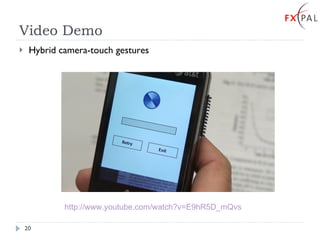
Video Demo Hybrid camera-touch gestures http://www.youtube.com/watch?v=E9hR5D_mQvs
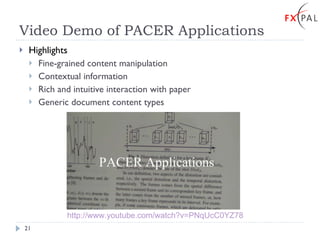
Video Demo of PACER Applications Highlights Fine-grained content manipulation Contextual information Rich and intuitive interaction with paper Generic document content types  http://www.youtube.com/watch?v=PNqUcC0YZ78
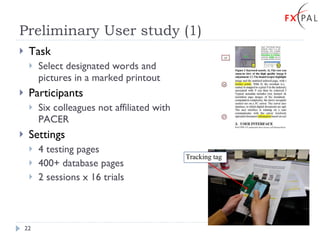
Preliminary User study (1) Task Select designated words and pictures in a marked printout Participants Six colleagues not affiliated with PACER Settings 4 testing pages 400+ database pages 2 sessions x 16 trials Tracking tag
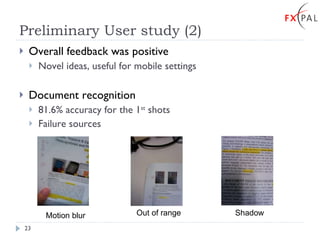
Preliminary User study (2) Overall feedback was positive Novel ideas, useful for mobile settings Document recognition 81.6% accuracy for the 1 st  shots Failure sources Motion blur Out of range Shadow
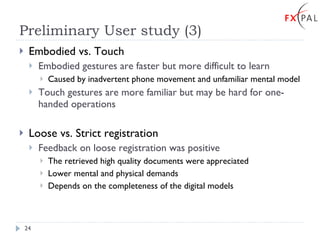
Preliminary User study (3) Embodied vs. Touch Embodied gestures are faster but more difficult to learn Caused by inadvertent phone movement and unfamiliar mental model Touch gestures are more familiar but may be hard for one-handed operations Loose vs. Strict registration Feedback on loose registration was positive The retrieved high quality documents were appreciated Lower mental and physical demands Depends on the completeness of the digital models
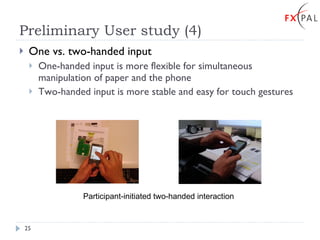
Preliminary User study (4) One vs. two-handed input One-handed input is more flexible for simultaneous manipulation of paper and the phone Two-handed input is more stable and easy for touch gestures Participant-initiated two-handed interaction
Conclusion & future work PACER is a cell phone-based interactive paper system Generic  paper documents linked to rich digital information Flexible interaction  with the hybrid camera-touch gestures Fine-grained  content manipulation Future work Understand embodied/touch and one/two-handed interaction Investigate loose vs. strict registrations in more application scenarios Integrate PACER with other devices like mobile projectors and digital pens Explore more application areas
Thank You! Acknowledgement Our colleague participants Don Kimber and Tony Dunnigan CHI reviewers More resources http://www.fxpal.com/paperui/

PACER: Fine-grained Interactive Paper via Camera-touch Hybrid Gestures on a Cell Phone

  • 1.
    PACER: Fine-grained InteractivePaper via Camera-touch Hybrid Gestures on a Cell Phone Chunyuan Liao, Qiong Liu, Bee Liew, Lynn Wilcox FX Palo Alto Laboratory ACM CHI Conference Atlanta, GA, U.S.A. 4/15/2010
  • 2.
    Scenario One Ishould email Jenny about this interesting article, especial the pulses in this curve
  • 3.
    Scenario Two Iwant to search for the definition of θ in this book
  • 4.
    Typical Solutions Step1: Switch to digital media On-the-fly conversion Capture pictures and apply OCR (Optical Character Recognition) Retrial of the digital version Find the digital version by file system browsing or web search Step 2: Locate the specific content Navigate to the specific page and find the figure Step 3: Interact Mark the interesting region and email Type θ for full text search
  • 5.
    Problems Media switchingOn-the-fly conversion Inefficient, no contextual information, low quality Finding the digital version File system browsing and typing on cell phones are inconvenient The keyword-based search may be inaccurate Location & interaction on cell phones Not integrated with paper Lose the working context already established on paper Redundant document navigation No direct interaction with the paper Small screen, lower display quality and inconvenient input
  • 6.
    Video Demo PACER: Paper And Cell phone for Editing and Reading Better integration of paper and cell phones http://www.youtube.com/watch?v=HEwwx1spujk
  • 7.
    Paper vs. Cellphones Seamless integration of their complementary affordances High display quality Flexible spatial arrangement Instant accessibility High robustness Dynamic rendering Rich digital interaction Digital communication Lower display quality Small display size Inconvenient input Lower robustness Static display No computation capability No digital communication + Computer-like UX on paper to put paper and digital media on more equal footing for smooth integration
  • 8.
    The State ofthe Art Interaction target granularity Text patches [Erol, 08] Pre-defined map regions [Rohs,04] Interaction styles Point & Click [Hare,08] Role of paper Paper as transient input source [Arai,97] Paper as a proxy of digital documents [Liao,08][Weibel,08][Tsandilas,09] Recognition mechanisms Barcodes [Rohs,08] , RFID [Reilly,06] Anoto [Liao,08][Weibel,08][Tsandilas,09] Text visual features [Hull,07][Liu, 08] Image visual features [Lowe,04] [Liu,09] Fine granularity Rich interaction styles User-specified arbitrary content and actions Generic documents Computer-like UX: PACER
  • 9.
    Overview of PACERHighlights Generic paper documents No barcodes, not RFIDs, no special devices Text (language-independent), pictures, graphics Rich gesture -based interaction styles Hybrid camera and touch input Fine-grained interaction Individual Latin words, Chinese/Japanese characters, math symbols, user-specified map places and image regions Camera phone + normal printouts Gestures for fine-grained interaction +
  • 10.
    Architecture of thePACER system Client-server architecture Data flow Print  Register  Capture  Recognize  Retrieve  Interact
  • 11.
    Overview of thePACER Interface Physical-digital Interaction Mapping Fine-grained Command System Semi-real time processing Loose Registration Hand Jitter Handling Hybrid Camera-touch Gestures Application +
  • 12.
    Content-based Physical-Digital InteractionMapping Similar to Augmented Reality (AR) Content-based approach Local image visual features SIFT [Lowe,04], FIT[Liu,09] Robust to partial documents, occlusion, scaling and rotation Generic document content types Advantages of physical-digital linkage Rich contextual information Persistent digital info. associated with paper Feature Extraction Feature Matching image registration
  • 13.
    Highlights (1): Semi-Real-TimeProcessing Challenge: Recognition and transmission are too expensive for continuous document tracking ~300ms for 320x240 pictures with a 2.8GHz 4-core CPU ~1000 ms for a complete SOAP call transaction Solutions: Fast algorithms optimized for cell phones [Wagner,08] Remote recognition + local motion detection Recognition is slower but more accurate Camera-based motion detection is faster but accumulates errors Independent of background content (good to loose registration!)
  • 14.
    PACER Gestures Simulatepen-based computer interfaces [Hinckley,05] Pointer: an individual word and character Underline, Bracket, Vertical Bar: a text line, sentence and chunk Lasso, Marquee: an arbitrary document region Path: a route Free-from Pointer Underline Bracket Vertical Bar Lasso Marquee Path Free-form
  • 15.
    Highlights (2): LooseRegistration Mobile AR UIs not optimized for fine-grained interaction Inaccurate image registration Low image quality of cell phone video frames Low resolution, out-of-focus, bad lighting conditions, distortion Hand jitter and fatigue displaced overlay illegible content
  • 16.
    Highlights (2): LooseRegistration Our solution Replace raw frames with high quality images Perform recognition only when required background-independent motion detection Advantages over the strict registration of normal AR UIs Robust to inaccurate image registration Better legibility Less demands on phone-paper coordination More flexibility for user interface designs Stable zoom levels User-changeable control-to-display ratio perfect overlay
  • 17.
    Highlights (3): HandJitter Handling Hand jitter affects fine-grained interaction too Inherent with direct freehand pointing Hand-held projector [Forlines,05], Laser pointer [Olsen,01] Solutions Filter (Zoom-and-pick [Forlines,05]) Beautification ( REXplorer [Kratz,09] ) Snap-to-object Physical pointer Logical pointer
  • 18.
    Highlights (4): HybridGestures Direct touch manipulation is faster and more intuitive for within-thumb-reach content Embodied vs. Touch interaction Touch can enhance fine-grained interaction
  • 19.
    Highlights (4): HybridGestures Our proposal: Embodied gestures for faster and coarser navigation Touch gestures for slower and finer navigation Automatically switch with touch down/up
  • 20.
    Video Demo Hybridcamera-touch gestures http://www.youtube.com/watch?v=E9hR5D_mQvs
  • 21.
    Video Demo ofPACER Applications Highlights Fine-grained content manipulation Contextual information Rich and intuitive interaction with paper Generic document content types http://www.youtube.com/watch?v=PNqUcC0YZ78
  • 22.
    Preliminary User study(1) Task Select designated words and pictures in a marked printout Participants Six colleagues not affiliated with PACER Settings 4 testing pages 400+ database pages 2 sessions x 16 trials Tracking tag
  • 23.
    Preliminary User study(2) Overall feedback was positive Novel ideas, useful for mobile settings Document recognition 81.6% accuracy for the 1 st shots Failure sources Motion blur Out of range Shadow
  • 24.
    Preliminary User study(3) Embodied vs. Touch Embodied gestures are faster but more difficult to learn Caused by inadvertent phone movement and unfamiliar mental model Touch gestures are more familiar but may be hard for one-handed operations Loose vs. Strict registration Feedback on loose registration was positive The retrieved high quality documents were appreciated Lower mental and physical demands Depends on the completeness of the digital models
  • 25.
    Preliminary User study(4) One vs. two-handed input One-handed input is more flexible for simultaneous manipulation of paper and the phone Two-handed input is more stable and easy for touch gestures Participant-initiated two-handed interaction
  • 26.
    Conclusion & futurework PACER is a cell phone-based interactive paper system Generic paper documents linked to rich digital information Flexible interaction with the hybrid camera-touch gestures Fine-grained content manipulation Future work Understand embodied/touch and one/two-handed interaction Investigate loose vs. strict registrations in more application scenarios Integrate PACER with other devices like mobile projectors and digital pens Explore more application areas
  • 27.
    Thank You! AcknowledgementOur colleague participants Don Kimber and Tony Dunnigan CHI reviewers More resources http://www.fxpal.com/paperui/