© 2019, Amazon Web Services, Inc. or its affiliates. All rights reserved.
Advanced network resource
management on Amazon EKS
C O N 4 1 1 - R
Claes Mogren
Software Developer
Amazon Web Services
Siddharth Vinothkumar
Software Developer
Amazon Web Services
Agenda
• Networking in Amazon Elastic Kubernetes Service (EKS)
• Current AWS Container Network Interface (CNI) solution for EKS
• Next-generation Amazon Virtual Private Cloud (VPC) CNI
• Coming features
• Questions
© 2019, Amazon Web Services, Inc. or its affiliates. All rights reserved.
Kubernetes networking tenets
• All containers can communicate with all other containers without NAT
• All nodes can communicate with all containers (and vice versa) without
NAT
• The IP address that a container sees itself as is the same IP address that
others see it as
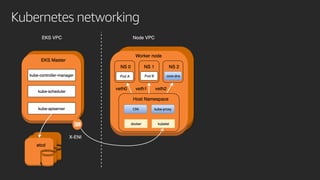
Kubernetes networking
CNI
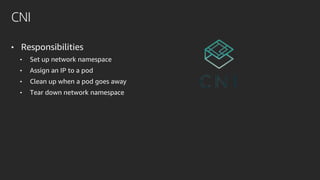
• Responsibilities
• Set up network namespace
• Assign an IP to a pod
• Clean up when a pod goes away
• Tear down network namespace
CNI
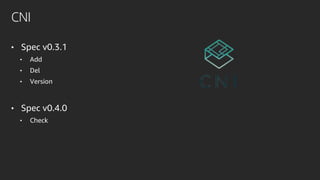
• Spec v0.3.1
• Add
• Del
• Version
• Spec v0.4.0
• Check
© 2019, Amazon Web Services, Inc. or its affiliates. All rights reserved.
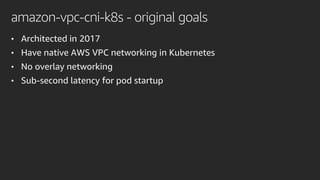
amazon-vpc-cni-k8s - original goals
• Architected in 2017
• Have native AWS VPC networking in Kubernetes
• No overlay networking
• Sub-second latency for pod startup
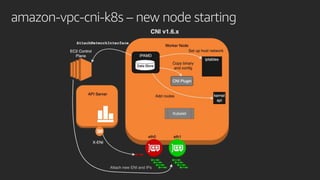
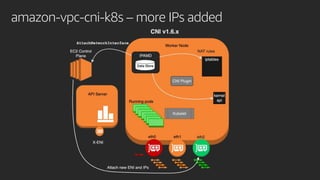
amazon-vpc-cni-k8s
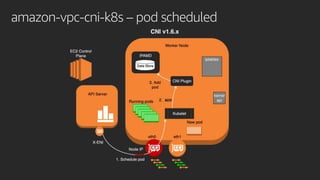
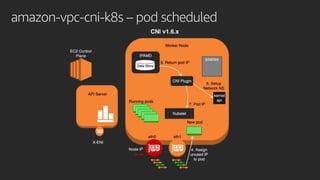
• aws-cni binary plugin
• Called by kubelet
• Communicates with ipamd using gRPC
• /opt/cni/bin/aws-cni
• IP address management daemon
• Call EC2 control plane
• Add ENIs and IPs to a cache
• Setup host networking
• Config file
• /etc/cni/net.d/10-aws.conflist
{
"cniVersion": "0.3.1",
"name": "aws-cni",
"plugins": [
{
"name": "aws-cni",
"type": "aws-cni",
"vethPrefix": ”eni"
},
{
"type": "portmap",
"capabilities":
{"portMappings": true},
"snat": true
}
]
}
amazon-vpc-cni-k8s – new node starting
amazon-vpc-cni-k8s – pod scheduled
amazon-vpc-cni-k8s – more IPs added
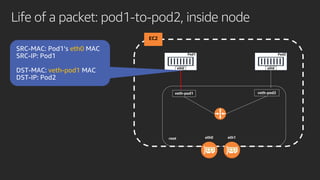
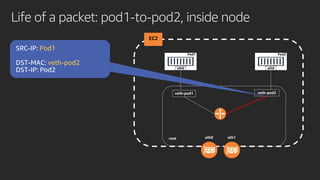
Life of a packet: pod1-to-pod2, inside node
EC2
Pod1
eth0
Pod2
eth0
root
veth-pod1 veth-pod2
eth0
veth-pod1
eth0 eth1
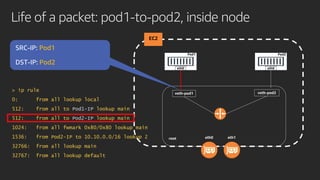
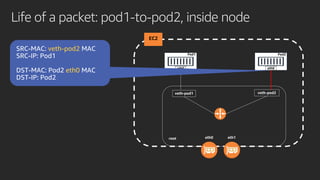
Life of a packet: pod1-to-pod2, inside node
EC2
Pod1
eth0
Pod2
eth0
root
veth-pod1 veth-pod2
Pod1
Pod2
> ip rule
0: from all lookup local
512: from all to Pod1-IP lookup main
512: from all to Pod2-IP lookup main
1024: from all fwmark 0x80/0x80 lookup main
1536: from Pod2-IP to 10.10.0.0/16 lookup 2
32766: from all lookup main
32767: from all lookup default
eth0 eth1
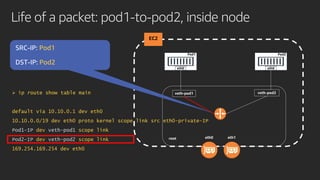
Life of a packet: pod1-to-pod2, inside node
EC2
Pod1
eth0
Pod2
eth0
root
veth-pod1 veth-pod2
Pod1
Pod2
 ip route show table main
default via 10.10.0.1 dev eth0
10.10.0.0/19 dev eth0 proto kernel scope link src eth0-private-IP
Pod1-IP dev veth-pod1 scope link
Pod2-IP dev veth-pod2 scope link
169.254.169.254 dev eth0
eth0 eth1
Life of a packet: pod1-to-pod2, inside node
EC2
Pod1
eth0
Pod2
eth0
root
veth-pod1 veth-pod2
Pod1
veth-pod2
eth0 eth1
Life of a packet: pod1-to-pod2, inside node
EC2
Pod1
eth0
Pod2
eth0
root
veth-pod1 veth-pod2
veth-pod2
eth0
eth0 eth1
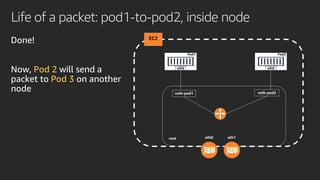
Life of a packet: pod1-to-pod2, inside node
EC2
Pod1
eth0
Pod2
eth0
root
veth-pod1 veth-pod2
eth0 eth1
Pod 2
Pod 3
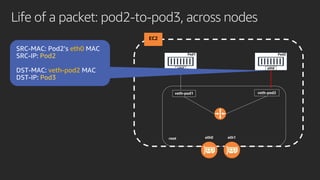
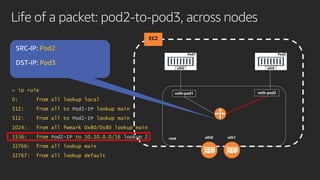
Life of a packet: pod2-to-pod3, across nodes
EC2
Pod1
eth0
Pod2
eth0
root
veth-pod1 veth-pod2
eth0
Pod2
veth-pod2
Pod3
eth0 eth1
Life of a packet: pod2-to-pod3, across nodes
EC2
Pod1
eth0
Pod2
eth0
root
veth-pod1 veth-pod2
Pod2
Pod3
eth0 eth1
> ip rule
0: from all lookup local
512: from all to Pod1-IP lookup main
512: from all to Pod2-IP lookup main
1024: from all fwmark 0x80/0x80 lookup main
1536: from Pod2-IP to 10.10.0.0/16 lookup 2
32766: from all lookup main
32767: from all lookup default
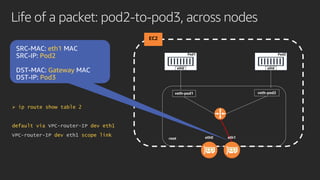
Life of a packet: pod2-to-pod3, across nodes
EC2
Pod1
eth0
Pod2
eth0
root
veth-pod1 veth-pod2
eth1
Pod2
Gateway
Pod3
 ip route show table 2
default via VPC-router-IP dev eth1
VPC-router-IP dev eth1 scope link eth0 eth1
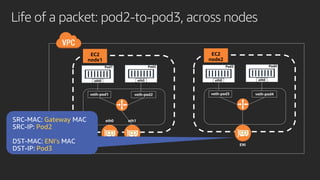
Life of a packet: pod2-to-pod3, across nodes
ENI
EC2
node1
Pod1
eth0
Pod2
eth0
veth-pod1 veth-pod2
EC2
node2
Pod3
eth0
Pod4
eth0
veth-pod3 veth-pod4
eth0 eth1Gateway
Pod2
ENI’s
Pod3
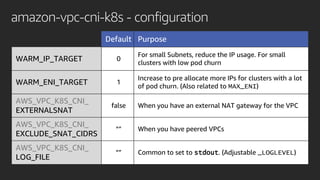
amazon-vpc-cni-k8s - configuration
Default Purpose
WARM_IP_TARGET 0
For small Subnets, reduce the IP usage. For small
clusters with low pod churn
WARM_ENI_TARGET 1
Increase to pre allocate more IPs for clusters with a lot
of pod churn. (Also related to MAX_ENI)
AWS_VPC_K8S_CNI_
EXTERNALSNAT
false When you have an external NAT gateway for the VPC
AWS_VPC_K8S_CNI_
EXCLUDE_SNAT_CIDRS
“” When you have peered VPCs
AWS_VPC_K8S_CNI_
LOG_FILE
“” Common to set to stdout. (Adjustable _LOGLEVEL)
amazon-vpc-cni-k8s - configuration
• Custom networking
• Nodes use primary ENI (eth0)
• Pods use secondary ENIs (eth1, eth2 …)
• Adjust --max-pods using --kubelet-extra-args on the nodes
• Subnets + security groups
• Additional CIDRs
• CG NAT common
amazon-vpc-cni-k8s - issues
• No “whole cluster” view
• Throttling in Amazon Elastic Compute Cloud (Amazon EC2)
• In memory cache consistency
• Resource leaks
• Create  Attach  Tag ENI  AssignPrivateIpAddresses
• Detach  Delete ENI
• A lot of VPC IPs allocated
amazon-vpc-cni-k8s – changes since last year
• 350+ new commits on GitHub
• Major highlights
• Support multiple VPCs and peered VPCs
• No more duplicate IP issues
• Added WARM_IP_TARGET and MINIMUM_IP_TARGET
• Reduce the risk of leaking ENIs
• Wait to make node ready until IPs are available
• Support for non-Docker runtimes (WIP)
© 2019, Amazon Web Services, Inc. or its affiliates. All rights reserved.
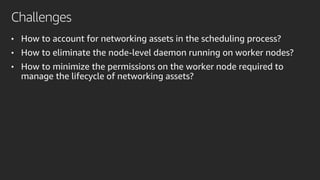
Challenges
• How to account for networking assets in the scheduling process?
• How to eliminate the node-level daemon running on worker nodes?
• How to minimize the permissions on the worker node required to
manage the lifecycle of networking assets?
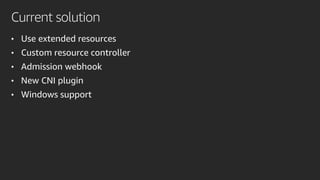
Current solution
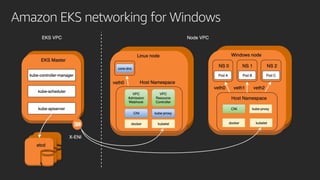
• Use extended resources
• Custom resource controller
• Admission webhook
• New CNI plugin
• Windows support
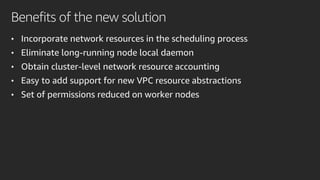
Benefits of the new solution
• Incorporate network resources in the scheduling process
• Eliminate long-running node local daemon
• Obtain cluster-level network resource accounting
• Easy to add support for new VPC resource abstractions
• Set of permissions reduced on worker nodes
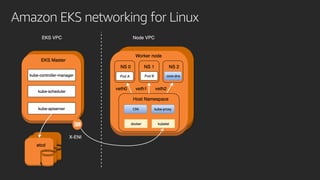
Amazon EKS networking for Linux
Amazon EKS networking for Windows
kube-scheduler
• Map pods to nodes in a cluster
• Complex and feature-rich
• Multiple dimensions to optimize
• Default scheduler
• Accounts for CPU and memory in the scheduling process
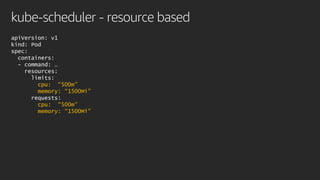
• Supports resource-based scheduling
kube-scheduler - resource based
apiVersion: v1
kind: Pod
spec:
containers:
- command: …
resources:
limits:
cpu: “500m”
memory: “1500Mi”
requests:
cpu: “500m”
memory: “1500Mi”
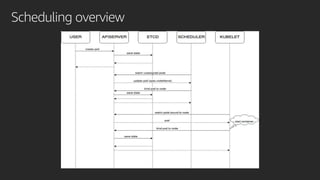
Scheduling overview
Amazon VPC resource controller
• Provision and manage VPC resources for the cluster
• Pluggable resource model
• Resource provider interface
• Platform agnostic
Amazon VPC resource controller
type Provider interface {
GetResourceName() string
GetDesiredWarmPoolSize() (int, int)
InitResourcePool(node Node) (*Pool, error)
CreateResource(node Node, quantity int) (resourceIDs []string, err error)
DeleteResource(node Node, resourceID string) error
}
Amazon VPC resource controller
• Current provider interface implementations
• ENI provider
• IP address provider
Amazon VPC resource controller
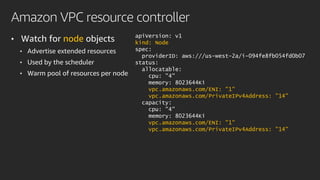
• Watch for node objects
• Advertise extended resources
• Used by the scheduler
• Warm pool of resources per node
apiVersion: v1
kind: Node
spec:
providerID: aws:///us-west-2a/i-094fe8fb054fd0b07
status:
allocatable:
cpu: "4"
memory: 8023644Ki
vpc.amazonaws.com/ENI: "1"
vpc.amazonaws.com/PrivateIPv4Address: ”14"
capacity:
cpu: "4"
memory: 8023644Ki
vpc.amazonaws.com/ENI: "1"
vpc.amazonaws.com/PrivateIPv4Address: "14"
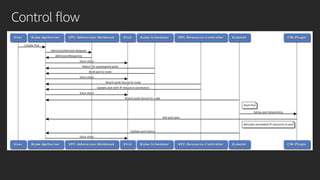
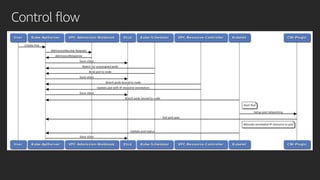
Control flow
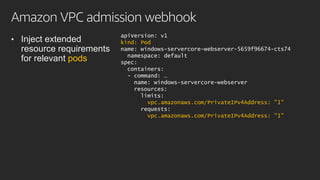
Amazon VPC admission webhook
• Inject extended
resource requirements
for relevant pods
apiVersion: v1
kind: Pod
name: windows-servercore-webserver-5659f96674-cts74
namespace: default
spec:
containers:
- command: …
name: windows-servercore-webserver
resources:
limits:
vpc.amazonaws.com/PrivateIPv4Address: "1"
requests:
vpc.amazonaws.com/PrivateIPv4Address: "1"
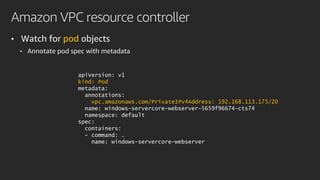
Amazon VPC resource controller
• Watch for pod objects
• Annotate pod spec with metadata
apiVersion: v1
kind: Pod
metadata:
annotations:
vpc.amazonaws.com/PrivateIPv4Address: 192.168.113.175/20
name: windows-servercore-webserver-5659f96674-cts74
namespace: default
spec:
containers:
- command: …
name: windows-servercore-webserver
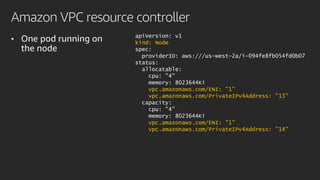
Amazon VPC resource controller
• One pod running on
the node
apiVersion: v1
kind: Node
spec:
providerID: aws:///us-west-2a/i-094fe8fb054fd0b07
status:
allocatable:
cpu: "4"
memory: 8023644Ki
vpc.amazonaws.com/ENI: "1"
vpc.amazonaws.com/PrivateIPv4Address: ”13"
capacity:
cpu: "4"
memory: 8023644Ki
vpc.amazonaws.com/ENI: "1"
vpc.amazonaws.com/PrivateIPv4Address: "14"
Amazon VPC shared ENI plugin
• Simple executable static binary – no daemon
• Gets pod spec from API server
• Parses annotations to get IP address
• Set up pod networking
• Connectivity
• Reachability
Control flow
© 2019, Amazon Web Services, Inc. or its affiliates. All rights reserved.
On the roadmap/coming soon
• Linux support
• Resource providers
• CIDR block resource provider
• Amazon Elastic Inference Accelerator resource provider
• ENI trunking
• Network policy controller
https://github.com/aws/containers-roadmap/issues/398
Shortcomings
• Production ready Linux support
• VPC peering support
• Multiple ENI support
• Custom network support
• Configurable MTU
© 2019, Amazon Web Services, Inc. or its affiliates. All rights reserved.
Thank you!
© 2019, Amazon Web Services, Inc. or its affiliates. All rights reserved.

CON411-R - Advanced network resource management on Amazon EKS

  • 2.
    © 2019, AmazonWeb Services, Inc. or its affiliates. All rights reserved. Advanced network resource management on Amazon EKS C O N 4 1 1 - R Claes Mogren Software Developer Amazon Web Services Siddharth Vinothkumar Software Developer Amazon Web Services
  • 3.
    Agenda • Networking inAmazon Elastic Kubernetes Service (EKS) • Current AWS Container Network Interface (CNI) solution for EKS • Next-generation Amazon Virtual Private Cloud (VPC) CNI • Coming features • Questions
  • 4.
    © 2019, AmazonWeb Services, Inc. or its affiliates. All rights reserved.
  • 5.
    Kubernetes networking tenets •All containers can communicate with all other containers without NAT • All nodes can communicate with all containers (and vice versa) without NAT • The IP address that a container sees itself as is the same IP address that others see it as
  • 6.
  • 7.
    CNI • Responsibilities • Setup network namespace • Assign an IP to a pod • Clean up when a pod goes away • Tear down network namespace
  • 8.
    CNI • Spec v0.3.1 •Add • Del • Version • Spec v0.4.0 • Check
  • 9.
    © 2019, AmazonWeb Services, Inc. or its affiliates. All rights reserved.
  • 10.
    amazon-vpc-cni-k8s - originalgoals • Architected in 2017 • Have native AWS VPC networking in Kubernetes • No overlay networking • Sub-second latency for pod startup
  • 11.
    amazon-vpc-cni-k8s • aws-cni binaryplugin • Called by kubelet • Communicates with ipamd using gRPC • /opt/cni/bin/aws-cni • IP address management daemon • Call EC2 control plane • Add ENIs and IPs to a cache • Setup host networking • Config file • /etc/cni/net.d/10-aws.conflist { "cniVersion": "0.3.1", "name": "aws-cni", "plugins": [ { "name": "aws-cni", "type": "aws-cni", "vethPrefix": ”eni" }, { "type": "portmap", "capabilities": {"portMappings": true}, "snat": true } ] }
  • 12.
  • 13.
  • 14.
  • 15.
  • 16.
    Life of apacket: pod1-to-pod2, inside node EC2 Pod1 eth0 Pod2 eth0 root veth-pod1 veth-pod2 eth0 veth-pod1 eth0 eth1
  • 17.
    Life of apacket: pod1-to-pod2, inside node EC2 Pod1 eth0 Pod2 eth0 root veth-pod1 veth-pod2 Pod1 Pod2 > ip rule 0: from all lookup local 512: from all to Pod1-IP lookup main 512: from all to Pod2-IP lookup main 1024: from all fwmark 0x80/0x80 lookup main 1536: from Pod2-IP to 10.10.0.0/16 lookup 2 32766: from all lookup main 32767: from all lookup default eth0 eth1
  • 18.
    Life of apacket: pod1-to-pod2, inside node EC2 Pod1 eth0 Pod2 eth0 root veth-pod1 veth-pod2 Pod1 Pod2  ip route show table main default via 10.10.0.1 dev eth0 10.10.0.0/19 dev eth0 proto kernel scope link src eth0-private-IP Pod1-IP dev veth-pod1 scope link Pod2-IP dev veth-pod2 scope link 169.254.169.254 dev eth0 eth0 eth1
  • 19.
    Life of apacket: pod1-to-pod2, inside node EC2 Pod1 eth0 Pod2 eth0 root veth-pod1 veth-pod2 Pod1 veth-pod2 eth0 eth1
  • 20.
    Life of apacket: pod1-to-pod2, inside node EC2 Pod1 eth0 Pod2 eth0 root veth-pod1 veth-pod2 veth-pod2 eth0 eth0 eth1
  • 21.
    Life of apacket: pod1-to-pod2, inside node EC2 Pod1 eth0 Pod2 eth0 root veth-pod1 veth-pod2 eth0 eth1 Pod 2 Pod 3
  • 22.
    Life of apacket: pod2-to-pod3, across nodes EC2 Pod1 eth0 Pod2 eth0 root veth-pod1 veth-pod2 eth0 Pod2 veth-pod2 Pod3 eth0 eth1
  • 23.
    Life of apacket: pod2-to-pod3, across nodes EC2 Pod1 eth0 Pod2 eth0 root veth-pod1 veth-pod2 Pod2 Pod3 eth0 eth1 > ip rule 0: from all lookup local 512: from all to Pod1-IP lookup main 512: from all to Pod2-IP lookup main 1024: from all fwmark 0x80/0x80 lookup main 1536: from Pod2-IP to 10.10.0.0/16 lookup 2 32766: from all lookup main 32767: from all lookup default
  • 24.
    Life of apacket: pod2-to-pod3, across nodes EC2 Pod1 eth0 Pod2 eth0 root veth-pod1 veth-pod2 eth1 Pod2 Gateway Pod3  ip route show table 2 default via VPC-router-IP dev eth1 VPC-router-IP dev eth1 scope link eth0 eth1
  • 25.
    Life of apacket: pod2-to-pod3, across nodes ENI EC2 node1 Pod1 eth0 Pod2 eth0 veth-pod1 veth-pod2 EC2 node2 Pod3 eth0 Pod4 eth0 veth-pod3 veth-pod4 eth0 eth1Gateway Pod2 ENI’s Pod3
  • 26.
    amazon-vpc-cni-k8s - configuration DefaultPurpose WARM_IP_TARGET 0 For small Subnets, reduce the IP usage. For small clusters with low pod churn WARM_ENI_TARGET 1 Increase to pre allocate more IPs for clusters with a lot of pod churn. (Also related to MAX_ENI) AWS_VPC_K8S_CNI_ EXTERNALSNAT false When you have an external NAT gateway for the VPC AWS_VPC_K8S_CNI_ EXCLUDE_SNAT_CIDRS “” When you have peered VPCs AWS_VPC_K8S_CNI_ LOG_FILE “” Common to set to stdout. (Adjustable _LOGLEVEL)
  • 27.
    amazon-vpc-cni-k8s - configuration •Custom networking • Nodes use primary ENI (eth0) • Pods use secondary ENIs (eth1, eth2 …) • Adjust --max-pods using --kubelet-extra-args on the nodes • Subnets + security groups • Additional CIDRs • CG NAT common
  • 28.
    amazon-vpc-cni-k8s - issues •No “whole cluster” view • Throttling in Amazon Elastic Compute Cloud (Amazon EC2) • In memory cache consistency • Resource leaks • Create  Attach  Tag ENI  AssignPrivateIpAddresses • Detach  Delete ENI • A lot of VPC IPs allocated
  • 29.
    amazon-vpc-cni-k8s – changessince last year • 350+ new commits on GitHub • Major highlights • Support multiple VPCs and peered VPCs • No more duplicate IP issues • Added WARM_IP_TARGET and MINIMUM_IP_TARGET • Reduce the risk of leaking ENIs • Wait to make node ready until IPs are available • Support for non-Docker runtimes (WIP)
  • 30.
    © 2019, AmazonWeb Services, Inc. or its affiliates. All rights reserved.
  • 31.
    Challenges • How toaccount for networking assets in the scheduling process? • How to eliminate the node-level daemon running on worker nodes? • How to minimize the permissions on the worker node required to manage the lifecycle of networking assets?
  • 32.
    Current solution • Useextended resources • Custom resource controller • Admission webhook • New CNI plugin • Windows support
  • 33.
    Benefits of thenew solution • Incorporate network resources in the scheduling process • Eliminate long-running node local daemon • Obtain cluster-level network resource accounting • Easy to add support for new VPC resource abstractions • Set of permissions reduced on worker nodes
  • 34.
  • 35.
  • 36.
    kube-scheduler • Map podsto nodes in a cluster • Complex and feature-rich • Multiple dimensions to optimize • Default scheduler • Accounts for CPU and memory in the scheduling process • Supports resource-based scheduling
  • 37.
    kube-scheduler - resourcebased apiVersion: v1 kind: Pod spec: containers: - command: … resources: limits: cpu: “500m” memory: “1500Mi” requests: cpu: “500m” memory: “1500Mi”
  • 38.
  • 39.
    Amazon VPC resourcecontroller • Provision and manage VPC resources for the cluster • Pluggable resource model • Resource provider interface • Platform agnostic
  • 40.
    Amazon VPC resourcecontroller type Provider interface { GetResourceName() string GetDesiredWarmPoolSize() (int, int) InitResourcePool(node Node) (*Pool, error) CreateResource(node Node, quantity int) (resourceIDs []string, err error) DeleteResource(node Node, resourceID string) error }
  • 41.
    Amazon VPC resourcecontroller • Current provider interface implementations • ENI provider • IP address provider
  • 42.
    Amazon VPC resourcecontroller • Watch for node objects • Advertise extended resources • Used by the scheduler • Warm pool of resources per node apiVersion: v1 kind: Node spec: providerID: aws:///us-west-2a/i-094fe8fb054fd0b07 status: allocatable: cpu: "4" memory: 8023644Ki vpc.amazonaws.com/ENI: "1" vpc.amazonaws.com/PrivateIPv4Address: ”14" capacity: cpu: "4" memory: 8023644Ki vpc.amazonaws.com/ENI: "1" vpc.amazonaws.com/PrivateIPv4Address: "14"
  • 43.
  • 44.
    Amazon VPC admissionwebhook • Inject extended resource requirements for relevant pods apiVersion: v1 kind: Pod name: windows-servercore-webserver-5659f96674-cts74 namespace: default spec: containers: - command: … name: windows-servercore-webserver resources: limits: vpc.amazonaws.com/PrivateIPv4Address: "1" requests: vpc.amazonaws.com/PrivateIPv4Address: "1"
  • 45.
    Amazon VPC resourcecontroller • Watch for pod objects • Annotate pod spec with metadata apiVersion: v1 kind: Pod metadata: annotations: vpc.amazonaws.com/PrivateIPv4Address: 192.168.113.175/20 name: windows-servercore-webserver-5659f96674-cts74 namespace: default spec: containers: - command: … name: windows-servercore-webserver
  • 46.
    Amazon VPC resourcecontroller • One pod running on the node apiVersion: v1 kind: Node spec: providerID: aws:///us-west-2a/i-094fe8fb054fd0b07 status: allocatable: cpu: "4" memory: 8023644Ki vpc.amazonaws.com/ENI: "1" vpc.amazonaws.com/PrivateIPv4Address: ”13" capacity: cpu: "4" memory: 8023644Ki vpc.amazonaws.com/ENI: "1" vpc.amazonaws.com/PrivateIPv4Address: "14"
  • 47.
    Amazon VPC sharedENI plugin • Simple executable static binary – no daemon • Gets pod spec from API server • Parses annotations to get IP address • Set up pod networking • Connectivity • Reachability
  • 48.
  • 49.
    © 2019, AmazonWeb Services, Inc. or its affiliates. All rights reserved.
  • 50.
    On the roadmap/comingsoon • Linux support • Resource providers • CIDR block resource provider • Amazon Elastic Inference Accelerator resource provider • ENI trunking • Network policy controller https://github.com/aws/containers-roadmap/issues/398
  • 51.
    Shortcomings • Production readyLinux support • VPC peering support • Multiple ENI support • Custom network support • Configurable MTU
  • 52.
    © 2019, AmazonWeb Services, Inc. or its affiliates. All rights reserved.
  • 53.
    Thank you! © 2019,Amazon Web Services, Inc. or its affiliates. All rights reserved.
  • 54.
    © 2019, AmazonWeb Services, Inc. or its affiliates. All rights reserved.

Editor's Notes

  • #11 AWS VPC route table limits were 50 at the time, but is now 1000.
  • #12 Node can not be “Unavailable” if the CNI goes away.
  • #13 5 ? upstream cni context for Split into 3
  • #14 5 ? upstream cni context for Split into 3
  • #15 5 ? upstream cni context for Split into 3
  • #16 5 ? upstream cni context for Split into 3
  • #17 TODO: add tables, ip route and ip rule output
  • #26 Add VPC router
  • #28 needs a new node secondary subnet secondary
  • #29 no cluster view
  • #32 CNI 1.x has been working well, but…
  • #34 Mention CIDR block provider, like kubenet
  • #35 AWS VPC route table limits were 50 at the time, but is now 1000.
  • #36 AWS VPC route table limits were 50 at the time, but is now 1000.
  • #39 move earlier update pod state
  • #44 Remove etcd, api server
  • #49 Remove etcd, api server