UNIVERSITY INSTITUTE OF TECHNOLOGY PARACHINAR
Computer
Programing
Course Instructor: Javed Ali
 Computer Program
 Writing a Program
 Solving Problems
 Computer Language
 Types of Computer
Languages
 Compiler & Interpreter
Contents
Computer Program
Software refers to programs that make
the computer perform some task.
A program is a set of instructions that
tells the computer what to do.
When you have written a program, the
computer will behave exactly as you have
instructed it.
It will do no more or no less than what is
contained in your specific instructions.
Writing a Program
Learning to write programs requires two skills.
1. You need to use specific terminology and
punctuation that can be understood by the
machine; that is, you need to learn a
programming language.
2. You need to develop a plan for solving a particular
problem. This plan or algorithm is a sequence of
steps that, when followed, will lead to a solution
of the problem.
Solving Problems
Initially, you may think that learning a
language is the more difficult task
because your problems will have
relatively easy solutions.
Nothing could be further from the
truth!
The single most important thing you
can do as a student of computer
science is to develop the skill to solve
problems.
Once you have this skill, you can learn
to write programs in several different
Computer Language
A microprocessor is designed to “understand” a set of
commands called an “instruction set”
All instructions must be provided to the CPU in its
native language, called machine language.
All data transmission, manipulation, storage, and
retrieval is done by the machine using electrical
pulses representing sequences of binary digits.
If eight-digit binary codes are used, there are 256
numbered instructions from 00000000 to 11111111.
Types of Computer
Languages
Low Level Language
High Level Language
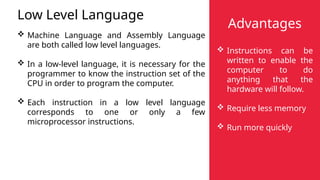
Low Level Language
 Machine Language and Assembly Language
are both called low level languages.
 In a low-level language, it is necessary for the
programmer to know the instruction set of the
CPU in order to program the computer.
 Each instruction in a low level language
corresponds to one or only a few
microprocessor instructions.
Advantages
 Instructions can be
written to enable the
computer to do
anything that the
hardware will follow.
 Require less memory
 Run more quickly
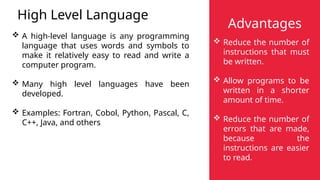
High Level Language
 A high-level language is any programming
language that uses words and symbols to
make it relatively easy to read and write a
computer program.
 Many high level languages have been
developed.
 Examples: Fortran, Cobol, Python, Pascal, C,
C++, Java, and others
Advantages
 Reduce the number of
instructions that must
be written.
 Allow programs to be
written in a shorter
amount of time.
 Reduce the number of
errors that are made,
because the
instructions are easier
to read.
Machine Language
Machine Language
 Instructions written in this form are
referred to as machine language.
 It is the native language that the CPU
“speaks” and “understands”.
 It is possible to write an entire program
in machine language.
 However, this is very time consuming
and difficult to read and understand.
Assembly Language
Assembly Language
 Assembly language uses letters and
numbers to represent machine
language instructions.
 An assembler is a program that reads
the codes the programmer writes in
assembly language and “assembles” a
machine language program based on
those codes.
 However, assembly language is still
difficult to read.
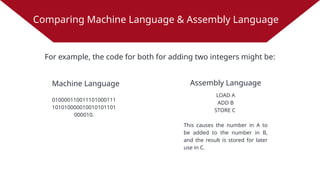
Comparing Machine Language & Assembly Language
Machine Language
010000110011101000111
101010000010010101101
000010.
For example, the code for both for adding two integers might be:
Assembly Language
LOAD A
ADD B
STORE C
This causes the number in A to
be added to the number in B,
and the result is stored for later
use in C.
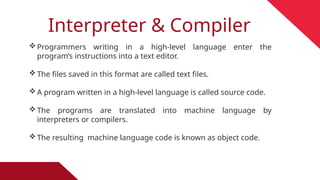
Interpreter & Compiler
Programmers writing in a high-level language enter the
program’s instructions into a text editor.
The files saved in this format are called text files.
A program written in a high-level language is called source code.
The programs are translated into machine language by
interpreters or compilers.
The resulting machine language code is known as object code.
Interpreter
 An interpreter is a program that translates the source code of a
high-level language into machine language.
 Each instruction is interpreted from the programming language as
needed (line by line of code)
 Every time the program is run, the interpreter must translate each
instruction again.
 In order to “run” the program, the interpreter must be loaded into
the computer’s memory.
Compiler
 A compiler is another program that translates a high-level
language into machine language.
 A compiler makes the translation once so that the source code
don’t have to be translated each time the program is run.
 The source code is translated into a file called an object file.
 A program called a linker is used to create an executable
program.
 Most modern compilers let you compile and link in a single
operation, and have an “IDE” (Integrated Development
Environment) to enter text, debug, compile, link, and run
programs.
Bug and Debug
Bug: An error in coding or logic that
causes a program to malfunction or to
produce incorrect results.
Debug: To detect, locate, and correct
logical or syntactical errors in a program.
Thank You

Computer Topic (Introduction to Programming).pptx

  • 1.
    UNIVERSITY INSTITUTE OFTECHNOLOGY PARACHINAR Computer Programing Course Instructor: Javed Ali
  • 2.
     Computer Program Writing a Program  Solving Problems  Computer Language  Types of Computer Languages  Compiler & Interpreter Contents
  • 3.
    Computer Program Software refersto programs that make the computer perform some task. A program is a set of instructions that tells the computer what to do. When you have written a program, the computer will behave exactly as you have instructed it. It will do no more or no less than what is contained in your specific instructions.
  • 4.
    Writing a Program Learningto write programs requires two skills. 1. You need to use specific terminology and punctuation that can be understood by the machine; that is, you need to learn a programming language. 2. You need to develop a plan for solving a particular problem. This plan or algorithm is a sequence of steps that, when followed, will lead to a solution of the problem.
  • 5.
    Solving Problems Initially, youmay think that learning a language is the more difficult task because your problems will have relatively easy solutions. Nothing could be further from the truth! The single most important thing you can do as a student of computer science is to develop the skill to solve problems. Once you have this skill, you can learn to write programs in several different
  • 6.
    Computer Language A microprocessoris designed to “understand” a set of commands called an “instruction set” All instructions must be provided to the CPU in its native language, called machine language. All data transmission, manipulation, storage, and retrieval is done by the machine using electrical pulses representing sequences of binary digits. If eight-digit binary codes are used, there are 256 numbered instructions from 00000000 to 11111111.
  • 7.
    Types of Computer Languages LowLevel Language High Level Language
  • 8.
    Low Level Language Machine Language and Assembly Language are both called low level languages.  In a low-level language, it is necessary for the programmer to know the instruction set of the CPU in order to program the computer.  Each instruction in a low level language corresponds to one or only a few microprocessor instructions. Advantages  Instructions can be written to enable the computer to do anything that the hardware will follow.  Require less memory  Run more quickly
  • 9.
    High Level Language A high-level language is any programming language that uses words and symbols to make it relatively easy to read and write a computer program.  Many high level languages have been developed.  Examples: Fortran, Cobol, Python, Pascal, C, C++, Java, and others Advantages  Reduce the number of instructions that must be written.  Allow programs to be written in a shorter amount of time.  Reduce the number of errors that are made, because the instructions are easier to read.
  • 10.
    Machine Language Machine Language Instructions written in this form are referred to as machine language.  It is the native language that the CPU “speaks” and “understands”.  It is possible to write an entire program in machine language.  However, this is very time consuming and difficult to read and understand. Assembly Language Assembly Language  Assembly language uses letters and numbers to represent machine language instructions.  An assembler is a program that reads the codes the programmer writes in assembly language and “assembles” a machine language program based on those codes.  However, assembly language is still difficult to read.
  • 11.
    Comparing Machine Language& Assembly Language Machine Language 010000110011101000111 101010000010010101101 000010. For example, the code for both for adding two integers might be: Assembly Language LOAD A ADD B STORE C This causes the number in A to be added to the number in B, and the result is stored for later use in C.
  • 12.
    Interpreter & Compiler Programmerswriting in a high-level language enter the program’s instructions into a text editor. The files saved in this format are called text files. A program written in a high-level language is called source code. The programs are translated into machine language by interpreters or compilers. The resulting machine language code is known as object code.
  • 13.
    Interpreter  An interpreteris a program that translates the source code of a high-level language into machine language.  Each instruction is interpreted from the programming language as needed (line by line of code)  Every time the program is run, the interpreter must translate each instruction again.  In order to “run” the program, the interpreter must be loaded into the computer’s memory.
  • 14.
    Compiler  A compileris another program that translates a high-level language into machine language.  A compiler makes the translation once so that the source code don’t have to be translated each time the program is run.  The source code is translated into a file called an object file.  A program called a linker is used to create an executable program.  Most modern compilers let you compile and link in a single operation, and have an “IDE” (Integrated Development Environment) to enter text, debug, compile, link, and run programs.
  • 15.
    Bug and Debug Bug:An error in coding or logic that causes a program to malfunction or to produce incorrect results. Debug: To detect, locate, and correct logical or syntactical errors in a program.
  • 16.