Computer Security
Privacy & Safety in the Digital World
Threats to your computer
• Computer Threat: Anything that can damage your computer or the
information on it.
• Computer Security: The measures you can take to
avoid damage or data loss.
Computer Privacy
•Ensuring your data, such as personal files and email, is
not accessible to anyone without your permission
•Includes measures you can take to restrict access to your
data and personal information both on your computer and
the internet
Computer Security
Digital Threats
Categories
Viruses, RootKits, Malware
Spyware
Online Scams
Online Predators
Identity Theft
Computer Security
Prevention
•Virus, malware, and spyware
protection
•Password protection
•Prudence in giving out
information
Viruses, Malware, & Spyware
Difference between Viruses, Malware, and Spyware
Malware = Malicious software.
- non-specific; covers a wide variety of threats
Viruses = A program that copies itself and spreads through
computers and files, locking down the machine.
- designed to wreak havoc and cause chaos
Spyware = Software that collects your information without
your knowledge and sends it back to the creator.
- designed to make money at your expense
Computer Security
Rootkits
•Designed to hide that a PC has been compromised
- Allows malware to hide in plain sight by disguising
themselves as necessary files
•Not harmful in and of themselves – what they hide is!
•Notoriously difficult to detect so hackers can access the
targeted computer without the user noticing
•Very difficult to remove
Computer Security
How Malware Spreads
• Clicking on a corrupted email attachment
• Clicking on a downloadable file from a website that contains a
virus or spyware
• Clicking on a link in an email, on a website, or on a social
networking site. The link redirects to a website that
automatically forces the browser to download a piece of
malware
Computer Security
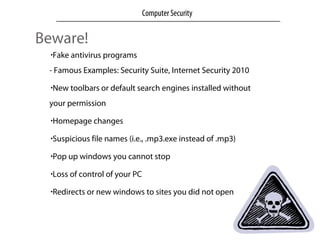
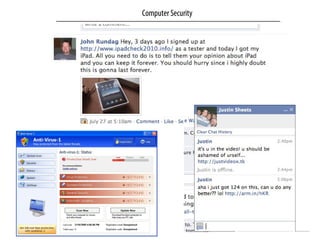
Beware!
•Fake antivirus programs
- Famous Examples: Security Suite, Internet Security 2010
•New toolbars or default search engines installed without
your permission
•Homepage changes
•Suspicious file names (i.e., .mp3.exe instead of .mp3)
•Pop up windows you cannot stop
•Loss of control of your PC
•Redirects or new windows to sites you did not open
Computer Security
Computer Security
Prevention Tips
•Keep all your operating system and all software updated
Most virus and spyware attacks occur through security holes
in popular software applications
•For your browser, use Firefox, Chrome or Safari rather than
Internet Explorer (IE). Because IE is so popular, malware
creators target security holes
•Don’t click on any pop ups or ads offering you anything for
free
•Know the name and display of your antivirus program
Computer Security
If something seems suspicious:
DO NOT OPEN IT!
Computer Security
Top Free Software Programs
•AVAST
- Antivirus software that checks downloaded files & monitors
websites for possible malware. Do not use more than one antivirus.
•Malwarebytes
- Manual scan that searches out rootkits and other potential
problems and threats.
•Spybot Search & Destroy
- Spyware scanner to identify and remove spyware.
Computer Security
Realities of the Digital World
•Deleting a post does not mean it disappears
•Digital content is easily forwarded and reposted
•Social networks & email providers do not make your private
information private by default
•It is up to you to look for the privacy settings
•Your online reputation has offline implications
Computer Security
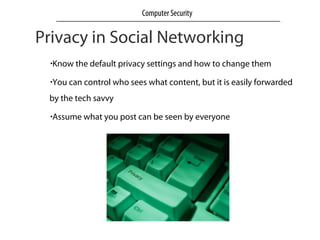
Privacy in Social Networking
•Know the default privacy settings and how to change them
•You can control who sees what content, but it is easily forwarded
by the tech savvy
•Assume what you post can be seen by everyone
Computer Security
Identity Theft
When someone uses your personal information without your
knowledge, usually for monetary gain.
Do not store personal financial information on laptops or
USB/Flash drives
Delete all personal information before disposing of
computers, hard drives, or portable drives
Review privacy policies
Never give out your password or personal information,
especially if the company contacted you to request it
Computer Security
http://www.netliteracy.org/
Computer Security

Computer security

  • 1.
    Computer Security Privacy &Safety in the Digital World
  • 2.
    Threats to yourcomputer • Computer Threat: Anything that can damage your computer or the information on it.
  • 3.
    • Computer Security:The measures you can take to avoid damage or data loss.
  • 4.
    Computer Privacy •Ensuring yourdata, such as personal files and email, is not accessible to anyone without your permission •Includes measures you can take to restrict access to your data and personal information both on your computer and the internet Computer Security
  • 5.
    Digital Threats Categories Viruses, RootKits,Malware Spyware Online Scams Online Predators Identity Theft Computer Security Prevention •Virus, malware, and spyware protection •Password protection •Prudence in giving out information
  • 6.
    Viruses, Malware, &Spyware Difference between Viruses, Malware, and Spyware Malware = Malicious software. - non-specific; covers a wide variety of threats Viruses = A program that copies itself and spreads through computers and files, locking down the machine. - designed to wreak havoc and cause chaos Spyware = Software that collects your information without your knowledge and sends it back to the creator. - designed to make money at your expense Computer Security
  • 7.
    Rootkits •Designed to hidethat a PC has been compromised - Allows malware to hide in plain sight by disguising themselves as necessary files •Not harmful in and of themselves – what they hide is! •Notoriously difficult to detect so hackers can access the targeted computer without the user noticing •Very difficult to remove Computer Security
  • 8.
    How Malware Spreads •Clicking on a corrupted email attachment • Clicking on a downloadable file from a website that contains a virus or spyware • Clicking on a link in an email, on a website, or on a social networking site. The link redirects to a website that automatically forces the browser to download a piece of malware Computer Security
  • 9.
    Beware! •Fake antivirus programs -Famous Examples: Security Suite, Internet Security 2010 •New toolbars or default search engines installed without your permission •Homepage changes •Suspicious file names (i.e., .mp3.exe instead of .mp3) •Pop up windows you cannot stop •Loss of control of your PC •Redirects or new windows to sites you did not open Computer Security
  • 10.
  • 11.
    Prevention Tips •Keep allyour operating system and all software updated Most virus and spyware attacks occur through security holes in popular software applications •For your browser, use Firefox, Chrome or Safari rather than Internet Explorer (IE). Because IE is so popular, malware creators target security holes •Don’t click on any pop ups or ads offering you anything for free •Know the name and display of your antivirus program Computer Security
  • 12.
    If something seemssuspicious: DO NOT OPEN IT! Computer Security
  • 13.
    Top Free SoftwarePrograms •AVAST - Antivirus software that checks downloaded files & monitors websites for possible malware. Do not use more than one antivirus. •Malwarebytes - Manual scan that searches out rootkits and other potential problems and threats. •Spybot Search & Destroy - Spyware scanner to identify and remove spyware. Computer Security
  • 14.
    Realities of theDigital World •Deleting a post does not mean it disappears •Digital content is easily forwarded and reposted •Social networks & email providers do not make your private information private by default •It is up to you to look for the privacy settings •Your online reputation has offline implications Computer Security
  • 15.
    Privacy in SocialNetworking •Know the default privacy settings and how to change them •You can control who sees what content, but it is easily forwarded by the tech savvy •Assume what you post can be seen by everyone Computer Security
  • 16.
    Identity Theft When someoneuses your personal information without your knowledge, usually for monetary gain. Do not store personal financial information on laptops or USB/Flash drives Delete all personal information before disposing of computers, hard drives, or portable drives Review privacy policies Never give out your password or personal information, especially if the company contacted you to request it Computer Security
  • 17.