PRINCIPLES OF
PROGRAMMING IN C
22CS2ESPOP - UNIT 2
Prof. SNEHA S BAGALKOT
Assistant Professor, Dept. of CSE
UNIT – 2: Decision Control and Looping Statements
▪Introduction to Decision Control Statements
▪Conditional Branching Statements (if, if-else, if-else-if, switch)
▪Iterative Statements (while, do-while, for)
▪Nested Loops
▪Break and Continue Statements
▪Example Programs
Introduction to Decision Control Statements
•Programs seen till now were sequential in nature.
•In cases where we need to run only a selected set of statements
conditional processing helps.
•Helps to specify what statements to run what to skip.
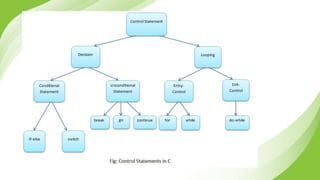
•C supports two type of decision control statements:
▪Conditional type branching
▪Unconditional type branching
Conditional Branching Statements (if, if-else,
if-else-if, switch)
•Conditional branching statements help to jump from one part of the
program to another based on whether or not a condition is satisfied
or not.
▪if statement
▪if-else statement
▪if-else-if statement
▪switch statement
Branching Statements
Conditional branching statements
▪ if statement
▪ if-else statement
▪ if-else-if statement
▪ switch statement
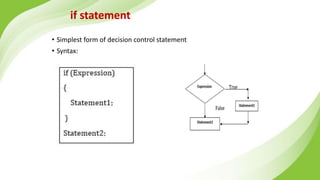
if statement
• Simplest form of decision control statement
• Syntax:
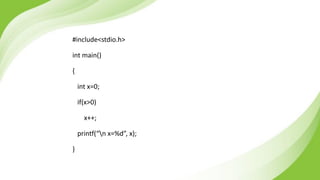
#include<stdio.h>
int main()
{
int x=0;
if(x>0)
x++;
printf(“n x=%d”, x);
}
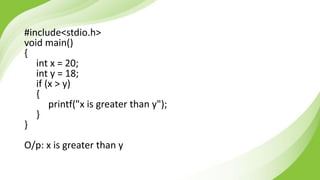
#include<stdio.h>
void main()
{
int x = 20;
int y = 18;
if (x > y)
{
printf("x is greater than y");
}
}
O/p: x is greater than y
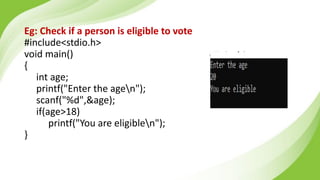
Eg: Check if a person is eligible to vote
#include<stdio.h>
void main()
{
int age;
printf("Enter the agen");
scanf("%d",&age);
if(age>18)
printf("You are eligiblen");
}
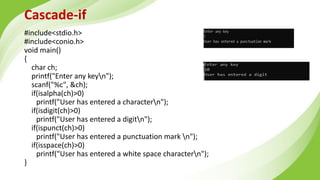
Cascade-if
#include<stdio.h>
#include<conio.h>
void main()
{
char ch;
printf("Enter any keyn");
scanf("%c", &ch);
if(isalpha(ch)>0)
printf("User has entered a charactern");
if(isdigit(ch)>0)
printf("User has entered a digitn");
if(ispunct(ch)>0)
printf("User has entered a punctuation mark n");
if(isspace(ch)>0)
printf("User has entered a white space charactern");
}
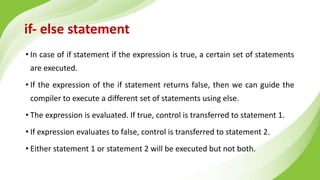
if- else statement
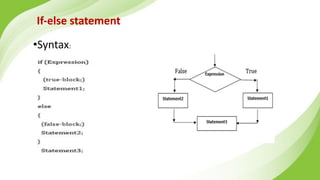
• In case of if statement if the expression is true, a certain set of statements
are executed.
• If the expression of the if statement returns false, then we can guide the
compiler to execute a different set of statements using else.
• The expression is evaluated. If true, control is transferred to statement 1.
• If expression evaluates to false, control is transferred to statement 2.
• Either statement 1 or statement 2 will be executed but not both.
If-else statement
•Syntax:
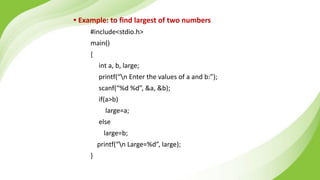
• Example: to find largest of two numbers
#include<stdio.h>
main()
{
int a, b, large;
printf(“n Enter the values of a and b:”);
scanf(“%d %d”, &a, &b);
if(a>b)
large=a;
else
large=b;
printf(“n Large=%d”, large);
}
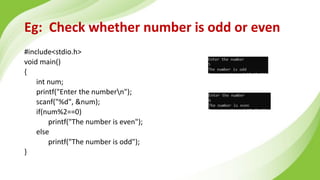
Eg: Check whether number is odd or even
#include<stdio.h>
void main()
{
int num;
printf("Enter the numbern");
scanf("%d", &num);
if(num%2==0)
printf("The number is even");
else
printf("The number is odd");
}
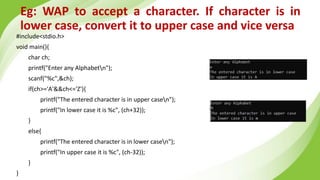
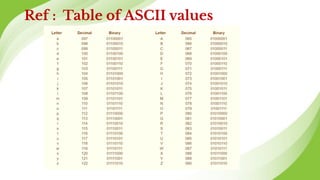
Eg: WAP to accept a character. If character is in
lower case, convert it to upper case and vice versa
#include<stdio.h>
void main(){
char ch;
printf("Enter any Alphabetn");
scanf("%c",&ch);
if(ch>='A'&&ch<='Z'){
printf("The entered character is in upper casen");
printf("In lower case it is %c", (ch+32));
}
else{
printf("The entered character is in lower casen");
printf("In upper case it is %c", (ch-32));
}
}
Ref : Table of ASCII values
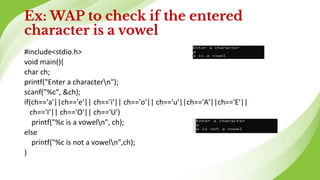
Ex: WAP to check if the entered
character is a vowel
#include<stdio.h>
void main(){
char ch;
printf("Enter a charactern");
scanf("%c", &ch);
if(ch=='a'||ch=='e'|| ch=='i'|| ch=='o'|| ch=='u'||ch=='A'||ch=='E'||
ch=='I'|| ch=='O'|| ch=='U')
printf("%c is a voweln", ch);
else
printf("%c is not a voweln",ch);
}
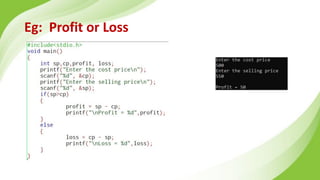
Eg: Profit or Loss
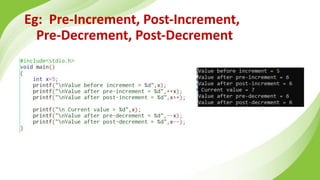
Eg: Pre-Increment, Post-Increment,
Pre-Decrement, Post-Decrement
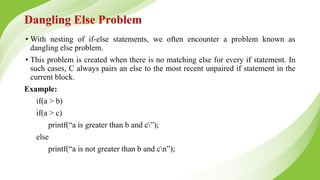
Dangling Else Problem
• With nesting of if-else statements, we often encounter a problem known as
dangling else problem.
• This problem is created when there is no matching else for every if statement. In
such cases, C always pairs an else to the most recent unpaired if statement in the
current block.
Example:
if(a > b)
if(a > c)
printf(“a is greater than b and c”);
else
printf(“a is not greater than b and cn”);
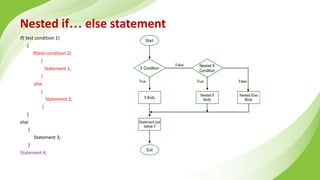
Nested if… else statement
if( test condition 1)
{
if(test condition 2)
{
Statement 1;
}
else
{
Statement 2;
}
}
else
{
Statement 3;
}
Statement X;
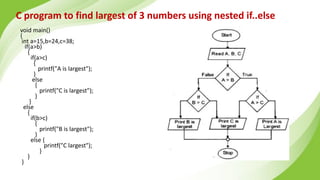
C program to find largest of 3 numbers using nested if..else
void main()
{
int a=15,b=24,c=38;
if(a>b)
{
if(a>c)
{
printf("A is largest");
}
else
{
printf("C is largest");
}
}
else
{
if(b>c)
{
printf("B is largest");
}
else {
printf("C largest");
}
}
}
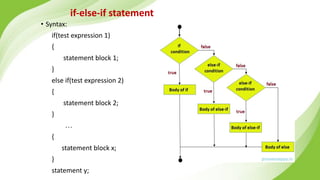
if-else-if statement
• Syntax:
if(test expression 1)
{
statement block 1;
}
else if(test expression 2)
{
statement block 2;
}
…
{
statement block x;
}
statement y;
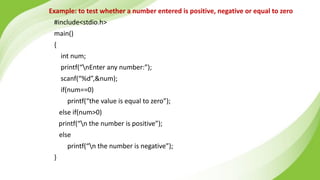
Example: to test whether a number entered is positive, negative or equal to zero
#include<stdio.h>
main()
{
int num;
printf(“nEnter any number:”);
scanf(“%d”,&num);
if(num==0)
printf(“the value is equal to zero”);
else if(num>0)
printf(“n the number is positive”);
else
printf(“n the number is negative”);
}
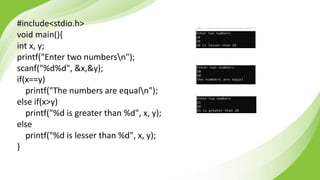
#include<stdio.h>
void main(){
int x, y;
printf("Enter two numbersn");
scanf("%d%d", &x,&y);
if(x==y)
printf("The numbers are equaln");
else if(x>y)
printf("%d is greater than %d", x, y);
else
printf("%d is lesser than %d", x, y);
}
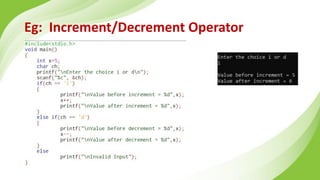
Eg: Increment/Decrement Operator
Programs
▪ Write a C program to read an integer, check if its positive, if so increment
and print it.
▪ Write a C program to check if a given number is even or odd.
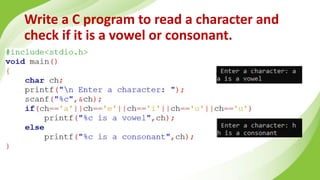
▪ Write a C program to read a character and check if it is a vowel or
consonant.
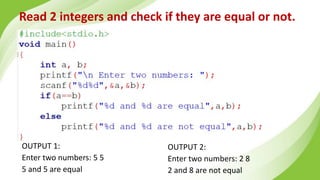
▪ Read 2 integers and check if they are equal or not.
▪ Check if given number is positive, negative or Zero.
▪ Find the largest of three integers.
Write a C program to read a character and
check if it is a vowel or consonant.
Read 2 integers and check if they are equal or not.
OUTPUT 2:
Enter two numbers: 2 8
2 and 8 are not equal
OUTPUT 1:
Enter two numbers: 5 5
5 and 5 are equal
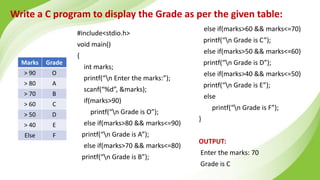
Write a C program to display the Grade as per the given table:
Marks Grade
> 90 O
> 80 A
> 70 B
> 60 C
> 50 D
> 40 E
Else F
#include<stdio.h>
void main()
{
int marks;
printf(“n Enter the marks:”);
scanf(“%d”, &marks);
if(marks>90)
printf(“n Grade is O”);
else if(marks>80 && marks<=90)
printf(“n Grade is A”);
else if(marks>70 && marks<=80)
printf(“n Grade is B”);
else if(marks>60 && marks<=70)
printf(“n Grade is C”);
else if(marks>50 && marks<=60)
printf(“n Grade is D”);
else if(marks>40 && marks<=50)
printf(“n Grade is E”);
else
printf(“n Grade is F”);
}
OUTPUT:
Enter the marks: 70
Grade is C
Write a C program to simulate the Traffic signal.
OUTPUT:
Enter the colour of signal[r, y or g]: r
Red Signal: Stop
Enter the colour of signal[r, y or g]: y
Yellow Signal: Wait
Enter the colour of signal[r, y or g]: g
Green Signal: Go
Enter the colour of signal[r, y or g]: w
Invalid
Write a C program to check if given input is a
letter [A-Z, a-z], digit [0-9] or special
character.
OUTPUT:
Enter a character: S
Uppercase letter
Enter a character: r
Lowercase letter
Enter a character: 6
Digit
Enter a character: #
Special character
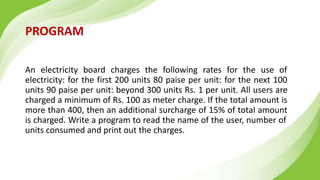
PROGRAM
An electricity board charges the following rates for the use of
electricity: for the first 200 units 80 paise per unit: for the next 100
units 90 paise per unit: beyond 300 units Rs. 1 per unit. All users are
charged a minimum of Rs. 100 as meter charge. If the total amount is
more than 400, then an additional surcharge of 15% of total amount
is charged. Write a program to read the name of the user, number of
units consumed and print out the charges.
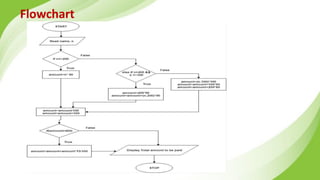
Algorithm
Step 1: [Start]
Begin
Step 2: [Input customer name]
Read name
Step 3: [Input unit consumed]
Read n
Step 4: [Check units consumed to calculate the amount]
if n < = 200
amount = n*80
otherwise check if n > 200 and n <= 300 then calculate
amount = 200 * 80
amount = amount +(n-200) *90
otherwise calculate
amount =(n-300)*100
amount = amount+100*90
amount = amount+200*80
end if
Step 5:[Calculate the amount]
amount = amount/100
amount = amount+100
Step 6: [Check if amount is greater than 400
then calculate additional charge of 15%]
if amount > 400 then
calculate amount amount + amount * 15/100
end if
Step 7: [Print total amount to be paid by the
customer]
Display amount
Step 8: [Finished]
Stop
Flowchart
#include<stdio.h>
void main()
{
char name[20];
int n;
float amount;
printf("Enter the consumer namen");
scanf("%s", name);
printf("Enter no. of units consumed n");
scanf("%d",&n);
if (n<=200)
{
amount=n*80;
}
else if(n>200 && n<=300)
{
amount=200*80;
amount=amount+(n-200)*90;
}
else
{
amount=(n-300)*100;
amount=amount+100*90;
amount=amount+200*80;
}
amount=amount/100; //To convert into Rupees
amount=amount+100; // Additional 100 Rupees to be added
if(amount>400)
{
amount=amount+amount*15/100;
}
printf("Total amount to be paid is %.2f Rsn",amount);
}
Output
Enter the consumer name :
Bhagya
Enter no. of units consumed
275
Total amount to be paid is = 327.50
Switch Case
● A switch case statement is a multi-way decision statement.
● Switch statements are used:
● When there is only one variable to evaluate in the expression.
● When many conditions are being tested for
● Switch case statement advantages include:
● Easy to debug, read, understand and maintain
● Execute faster than its equivalent if-else construct
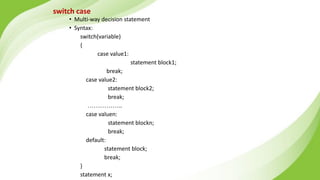
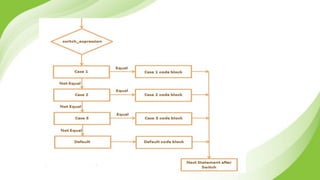
switch case
• Multi-way decision statement
• Syntax:
switch(variable)
{
case value1:
statement block1;
break;
case value2:
statement block2;
break;
……………..
case valuen:
statement blockn;
break;
default:
statement block;
break;
}
statement x;
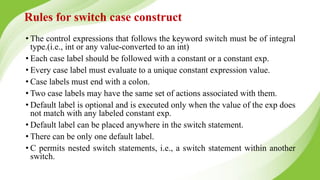
Rules for switch case construct
• The control expressions that follows the keyword switch must be of integral
type.(i.e., int or any value-converted to an int)
• Each case label should be followed with a constant or a constant exp.
• Every case label must evaluate to a unique constant expression value.
• Case labels must end with a colon.
• Two case labels may have the same set of actions associated with them.
• Default label is optional and is executed only when the value of the exp does
not match with any labeled constant exp.
• Default label can be placed anywhere in the switch statement.
• There can be only one default label.
• C permits nested switch statements, i.e., a switch statement within another
switch.
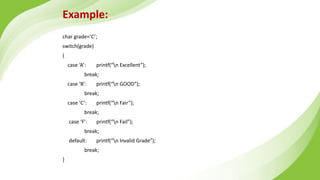
Example:
char grade=‘C’;
switch(grade)
{
case ‘A’: printf(“n Excellent”);
break;
case ‘B’: printf(“n GOOD”);
break;
case ‘C’: printf(“n Fair”);
break;
case ‘F’: printf(“n Fail”);
break;
default: printf(“n Invalid Grade”);
break;
}
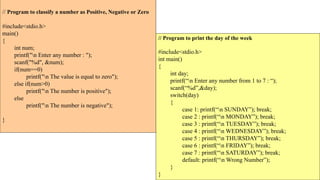
// Program to classify a number as Positive, Negative or Zero
#include<stdio.h>
main()
{
int num;
printf("n Enter any number : ");
scanf("%d", &num);
if(num==0)
printf("n The value is equal to zero");
else if(num>0)
printf("n The number is positive");
else
printf("n The number is negative");
}
// Program to print the day of the week
#include<stdio.h>
int main()
{
int day;
printf(“n Enter any number from 1 to 7 : “);
scanf(“%d”,&day);
switch(day)
{
case 1: printf(“n SUNDAY”); break;
case 2 : printf(“n MONDAY”); break;
case 3 : printf(“n TUESDAY”); break;
case 4 : printf(“n WEDNESDAY”); break;
case 5 : printf(“n THURSDAY”); break;
case 6 : printf(“n FRIDAY”); break;
case 7 : printf(“n SATURDAY”); break;
default: printf(“n Wrong Number”);
}
}
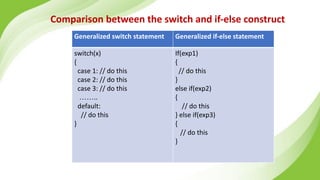
Comparison between the switch and if-else construct
Generalized switch statement Generalized if-else statement
switch(x)
{
case 1: // do this
case 2: // do this
case 3: // do this
……..
default:
// do this
}
If(exp1)
{
// do this
}
else if(exp2)
{
// do this
} else if(exp3)
{
// do this
}
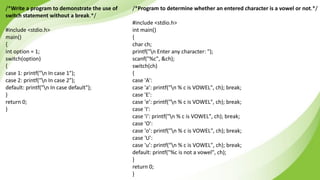
/*Write a program to demonstrate the use of
switch statement without a break.*/
#include <stdio.h>
main()
{
int option = 1;
switch(option)
{
case 1: printf("n In case 1");
case 2: printf("n In case 2");
default: printf("n In case default");
}
return 0;
}
/*Program to determine whether an entered character is a vowel or not.*/
#include <stdio.h>
int main()
{
char ch;
printf("n Enter any character: ");
scanf("%c", &ch);
switch(ch)
{
case 'A':
case 'a’: printf("n % c is VOWEL", ch); break;
case 'E':
case 'e’: printf("n % c is VOWEL", ch); break;
case 'I':
case 'i’: printf("n % c is VOWEL", ch); break;
case 'O':
case 'o’: printf("n % c is VOWEL", ch); break;
case 'U':
case 'u’: printf("n % c is VOWEL", ch); break;
default: printf("%c is not a vowel", ch);
}
return 0;
}
Design and Develop a program to solve simple
computational problems using arithmetic
expressions and use of each operator leading to
simulation of a simple calculator.
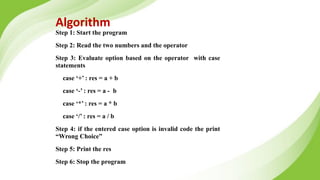
Algorithm
Step 1: Start the program
Step 2: Read the two numbers and the operator
Step 3: Evaluate option based on the operator with case
statements
case ‘+’ : res = a + b
case ‘-’ : res = a - b
case ‘*’ : res = a * b
case ‘/’ : res = a / b
Step 4: if the entered case option is invalid code the print
“Wrong Choice”
Step 5: Print the res
Step 6: Stop the program
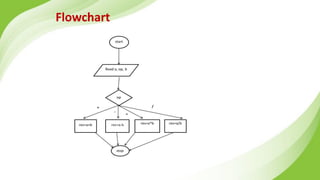
Flowchart
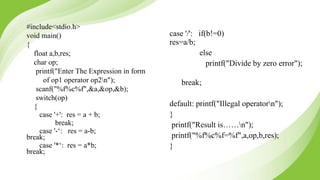
#include<stdio.h>
void main()
{
float a,b,res;
char op;
printf("Enter The Expression in form
of op1 operator op2n");
scanf("%f%c%f",&a,&op,&b);
switch(op)
{
case '+': res = a + b;
break;
case '-‘: res = a-b;
break;
case '*‘: res = a*b;
break;
case '/': if(b!=0)
res=a/b;
else
printf("Divide by zero error");
break;
default: printf("Illegal operatorn");
}
printf("Result is……n");
printf("%f%c%f=%f",a,op,b,res);
}
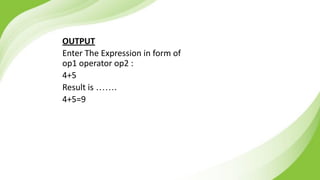
OUTPUT
Enter The Expression in form of
op1 operator op2 :
4+5
Result is …….
4+5=9
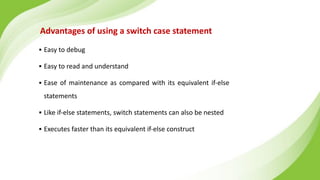
Advantages of using a switch case statement
▪ Easy to debug
▪ Easy to read and understand
▪ Ease of maintenance as compared with its equivalent if-else
statements
▪ Like if-else statements, switch statements can also be nested
▪ Executes faster than its equivalent if-else construct
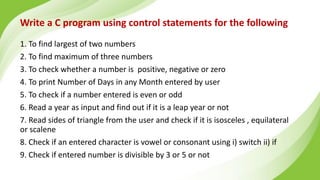
Write a C program using control statements for the following
1. To find largest of two numbers
2. To find maximum of three numbers
3. To check whether a number is positive, negative or zero
4. To print Number of Days in any Month entered by user
5. To check if a number entered is even or odd
6. Read a year as input and find out if it is a leap year or not
7. Read sides of triangle from the user and check if it is isosceles , equilateral
or scalene
8. Check if an entered character is vowel or consonant using i) switch ii) if
9. Check if entered number is divisible by 3 or 5 or not
Iterative Statements (while, do-while, for)
• Iterative statements are used to repeat the execution of a list of statements,
depending on the value of an integer expression.
• C language supports three types of iterative statements also known as
looping statements.
• They are :
• while loop
• do-while loop
• for loop
While Loop
• The while loop is used to repeat one or more statements while a particular
condition is true.
• In the while loop, the condition is tested before any of the statements in the
statement block is executed.
• If the condition is true, only then the statements will be executed otherwise the
control will jump to the immediate statement outside the while loop block.
• We must constantly update the condition of the while loop.
while (condition)
{
statement_block;
}
statement x;
While Loop
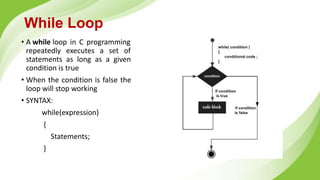
• A while loop in C programming
repeatedly executes a set of
statements as long as a given
condition is true
• When the condition is false the
loop will stop working
• SYNTAX:
while(expression)
{
Statements;
}
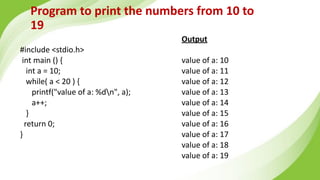
Program to print the numbers from 10 to
19
#include <stdio.h>
int main () {
int a = 10;
while( a < 20 ) {
printf("value of a: %dn", a);
a++;
}
return 0;
}
Output
value of a: 10
value of a: 11
value of a: 12
value of a: 13
value of a: 14
value of a: 15
value of a: 16
value of a: 17
value of a: 18
value of a: 19
Do While Loop
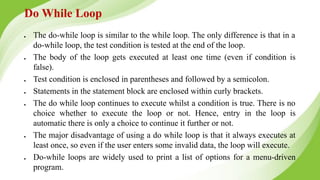
● The do-while loop is similar to the while loop. The only difference is that in a
do-while loop, the test condition is tested at the end of the loop.
● The body of the loop gets executed at least one time (even if condition is
false).
● Test condition is enclosed in parentheses and followed by a semicolon.
● Statements in the statement block are enclosed within curly brackets.
● The do while loop continues to execute whilst a condition is true. There is no
choice whether to execute the loop or not. Hence, entry in the loop is
automatic there is only a choice to continue it further or not.
● The major disadvantage of using a do while loop is that it always executes at
least once, so even if the user enters some invalid data, the loop will execute.
● Do-while loops are widely used to print a list of options for a menu-driven
program.
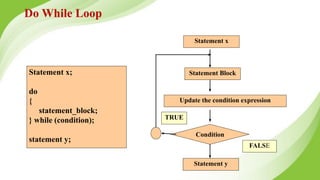
Statement x;
do
{
statement_block;
} while (condition);
statement y;
Statement x
Statement y
Statement Block
Update the condition expression
Condition
FALSE
TRUE
Do While Loop
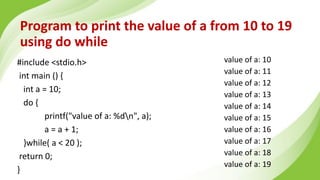
Program to print the value of a from 10 to 19
using do while
#include <stdio.h>
int main () {
int a = 10;
do {
printf("value of a: %dn", a);
a = a + 1;
}while( a < 20 );
return 0;
}
value of a: 10
value of a: 11
value of a: 12
value of a: 13
value of a: 14
value of a: 15
value of a: 16
value of a: 17
value of a: 18
value of a: 19
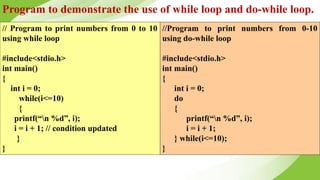
Program to demonstrate the use of while loop and do-while loop.
// Program to print numbers from 0 to 10
using while loop
#include<stdio.h>
int main()
{
int i = 0;
while(i<=10)
{
printf(“n %d”, i);
i = i + 1; // condition updated
}
}
//Program to print numbers from 0-10
using do-while loop
#include<stdio.h>
int main()
{
int i = 0;
do
{
printf(“n %d”, i);
i = i + 1;
} while(i<=10);
}
for loop
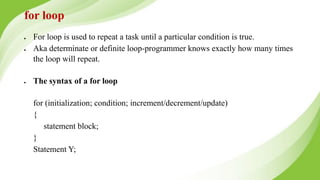
● For loop is used to repeat a task until a particular condition is true.
● Aka determinate or definite loop-programmer knows exactly how many times
the loop will repeat.
● The syntax of a for loop
for (initialization; condition; increment/decrement/update)
{
statement block;
}
Statement Y;
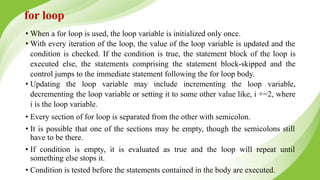
• When a for loop is used, the loop variable is initialized only once.
• With every iteration of the loop, the value of the loop variable is updated and the
condition is checked. If the condition is true, the statement block of the loop is
executed else, the statements comprising the statement block-skipped and the
control jumps to the immediate statement following the for loop body.
• Updating the loop variable may include incrementing the loop variable,
decrementing the loop variable or setting it to some other value like, i +=2, where
i is the loop variable.
• Every section of for loop is separated from the other with semicolon.
• It is possible that one of the sections may be empty, though the semicolons still
have to be there.
• If condition is empty, it is evaluated as true and the loop will repeat until
something else stops it.
• Condition is tested before the statements contained in the body are executed.
for loop
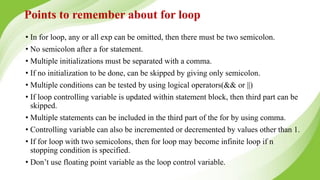
Points to remember about for loop
• In for loop, any or all exp can be omitted, then there must be two semicolon.
• No semicolon after a for statement.
• Multiple initializations must be separated with a comma.
• If no initialization to be done, can be skipped by giving only semicolon.
• Multiple conditions can be tested by using logical operators(&& or ||)
• If loop controlling variable is updated within statement block, then third part can be
skipped.
• Multiple statements can be included in the third part of the for by using comma.
• Controlling variable can also be incremented or decremented by values other than 1.
• If for loop with two semicolons, then for loop may become infinite loop if n
stopping condition is specified.
• Don’t use floating point variable as the loop control variable.
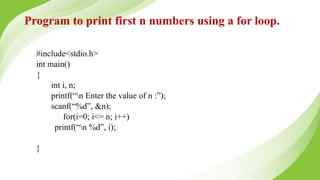
Program to print first n numbers using a for loop.
#include<stdio.h>
int main()
{
int i, n;
printf(“n Enter the value of n :”);
scanf(“%d”, &n);
for(i=0; i<= n; i++)
printf(“n %d”, i);
}
Examples
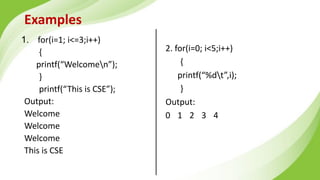
1. for(i=1; i<=3;i++)
{
printf(“Welcomen”);
}
printf(“This is CSE”);
Output:
Welcome
Welcome
Welcome
This is CSE
2. for(i=0; i<5;i++)
{
printf(“%dt”,i);
}
Output:
0 1 2 3 4
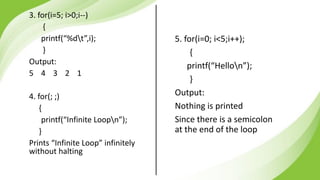
5. for(i=0; i<5;i++);
{
printf(“Hellon”);
}
Output:
Nothing is printed
Since there is a semicolon
at the end of the loop
3. for(i=5; i>0;i--)
{
printf(“%dt”,i);
}
Output:
5 4 3 2 1
4. for(; ;)
{
printf(“Infinite Loopn”);
}
Prints “Infinite Loop” infinitely
without halting
Selecting an appropriate loop
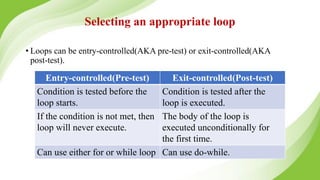
• Loops can be entry-controlled(AKA pre-test) or exit-controlled(AKA
post-test).
Entry-controlled(Pre-test) Exit-controlled(Post-test)
Condition is tested before the
loop starts.
Condition is tested after the
loop is executed.
If the condition is not met, then
loop will never execute.
The body of the loop is
executed unconditionally for
the first time.
Can use either for or while loop Can use do-while.
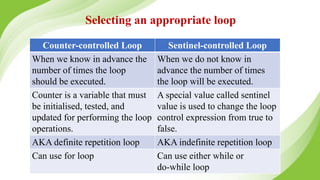
Counter-controlled Loop Sentinel-controlled Loop
When we know in advance the
number of times the loop
should be executed.
When we do not know in
advance the number of times
the loop will be executed.
Counter is a variable that must
be initialised, tested, and
updated for performing the loop
operations.
A special value called sentinel
value is used to change the loop
control expression from true to
false.
AKA definite repetition loop AKA indefinite repetition loop
Can use for loop Can use either while or
do-while loop
Selecting an appropriate loop
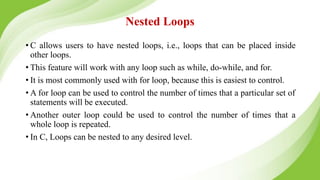
Nested Loops
• C allows users to have nested loops, i.e., loops that can be placed inside
other loops.
• This feature will work with any loop such as while, do-while, and for.
• It is most commonly used with for loop, because this is easiest to control.
• A for loop can be used to control the number of times that a particular set of
statements will be executed.
• Another outer loop could be used to control the number of times that a
whole loop is repeated.
• In C, Loops can be nested to any desired level.
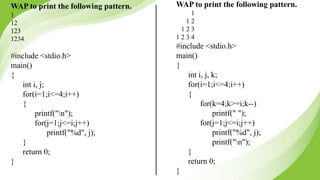
WAP to print the following pattern.
1
1 2
1 2 3
1 2 3 4
#include <stdio.h>
main()
{
int i, j, k;
for(i=1;i<=4;i++)
{
for(k=4;k>=i;k--)
printf(" ");
for(j=1;j<=i;j++)
printf("%d", j);
printf("n");
}
return 0;
}
WAP to print the following pattern.
1
12
123
1234
#include <stdio.h>
main()
{
int i, j;
for(i=1;i<=4;i++)
{
printf("n");
for(j=1;j<=i;j++)
printf("%d", j);
}
return 0;
}
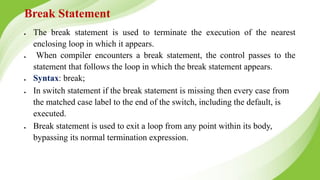
Break Statement
● The break statement is used to terminate the execution of the nearest
enclosing loop in which it appears.
● When compiler encounters a break statement, the control passes to the
statement that follows the loop in which the break statement appears.
● Syntax: break;
● In switch statement if the break statement is missing then every case from
the matched case label to the end of the switch, including the default, is
executed.
● Break statement is used to exit a loop from any point within its body,
bypassing its normal termination expression.
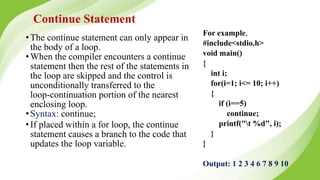
Continue Statement
•The continue statement can only appear in
the body of a loop.
•When the compiler encounters a continue
statement then the rest of the statements in
the loop are skipped and the control is
unconditionally transferred to the
loop-continuation portion of the nearest
enclosing loop.
•Syntax: continue;
•If placed within a for loop, the continue
statement causes a branch to the code that
updates the loop variable.
For example,
#include<stdio.h>
void main()
{
int i;
for(i=1; i<= 10; i++)
{
if (i==5)
continue;
printf("t %d", i);
}
}
Output: 1 2 3 4 6 7 8 9 10
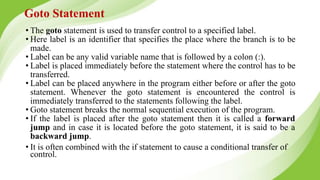
Goto Statement
• The goto statement is used to transfer control to a specified label.
• Here label is an identifier that specifies the place where the branch is to be
made.
• Label can be any valid variable name that is followed by a colon (:).
• Label is placed immediately before the statement where the control has to be
transferred.
• Label can be placed anywhere in the program either before or after the goto
statement. Whenever the goto statement is encountered the control is
immediately transferred to the statements following the label.
• Goto statement breaks the normal sequential execution of the program.
• If the label is placed after the goto statement then it is called a forward
jump and in case it is located before the goto statement, it is said to be a
backward jump.
• It is often combined with the if statement to cause a conditional transfer of
control.
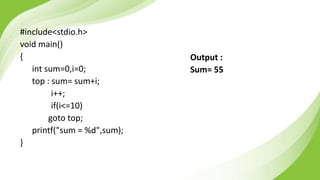
Write a C program to find sum of 10
natural numbers using goto
#include<stdio.h>
void main()
{
int sum=0,i=0;
top : sum= sum+i;
i++;
if(i<=10)
goto top;
printf("sum = %d",sum);
}
Output :
Sum= 55
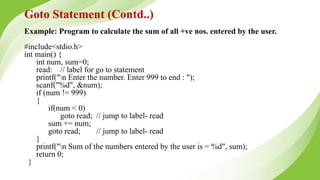
Example: Program to calculate the sum of all +ve nos. entered by the user.
#include<stdio.h>
int main() {
int num, sum=0;
read: // label for go to statement
printf("n Enter the number. Enter 999 to end : ");
scanf("%d", &num);
if (num != 999)
{
if(num < 0)
goto read; // jump to label- read
sum += num;
goto read; // jump to label- read
}
printf("n Sum of the numbers entered by the user is = %d", sum);
return 0;
}
Goto Statement (Contd..)
Example Programs
Write a program to demonstrate menu
based calculator using switch
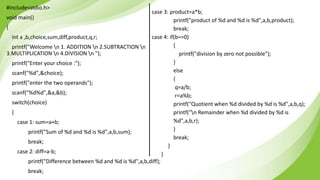
#include<stdio.h>
void main()
{
int a ,b,choice,sum,diff,product,q,r;
printf("Welcome n 1. ADDITION n 2.SUBTRACTION n
3.MULTIPLICATION n 4.DIVISION n ");
printf("Enter your choice :");
scanf("%d",&choice);
printf("enter the two operands");
scanf("%d%d",&a,&b);
switch(choice)
{
case 1: sum=a+b;
printf("Sum of %d and %d is %d",a,b,sum);
break;
case 2: diff=a-b;
printf("Difference between %d and %d is %d",a,b,diff);
break;
case 3: product=a*b;
printf("product of %d and %d is %d",a,b,product);
break;
case 4: if(b==0)
{
printf("division by zero not possible");
}
else
{
q=a/b;
r=a%b;
printf("Quotient when %d divided by %d is %d",a,b,q);
printf("n Remainder when %d divided by %d is
%d",a,b,r);
}
break;
}
}
Write a program to accept a name and print
the name for a specified number of times
#include<stdio.h>
void main()
{
char name[30];
int n ,i=0;
printf("enter name n");
scanf("%s",name);
printf("enter the number of times to print the name n");
scanf("%d",&n);
while(i<n)
{
printf("name is : %s n",name);
i++;
}
}
enter name
jim
enter the number
of times to print
the name
3
name is : jim
name is : jim
name is : jim
Display all numbers in a given range of m to
n
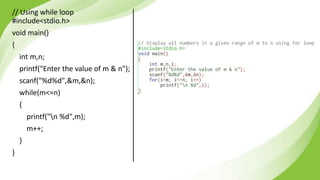
// Using while loop
#include<stdio.h>
void main()
{
int m,n;
printf("Enter the value of m & n");
scanf("%d%d",&m,&n);
while(m<=n)
{
printf("n %d",m);
m++;
}
}
Display all even numbers from a given range
of m to n
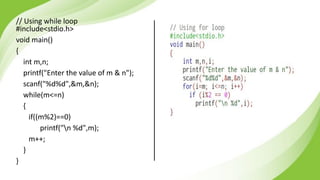
// Using while loop
#include<stdio.h>
void main()
{
int m,n;
printf("Enter the value of m & n");
scanf("%d%d",&m,&n);
while(m<=n)
{
if((m%2)==0)
printf("n %d",m);
m++;
}
}
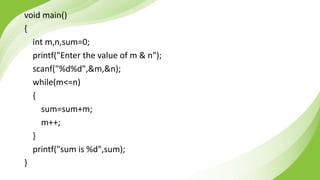
Compute and print the sum of natural
numbers from m to n
void main()
{
int m,n,sum=0;
printf("Enter the value of m & n");
scanf("%d%d",&m,&n);
while(m<=n)
{
sum=sum+m;
m++;
}
printf("sum is %d",sum);
}
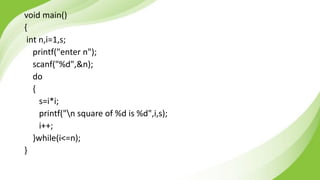
Use do-while loop to print squares of first n
natural numbers
void main()
{
int n,i=1,s;
printf("enter n");
scanf("%d",&n);
do
{
s=i*i;
printf("n square of %d is %d",i,s);
i++;
}while(i<=n);
}
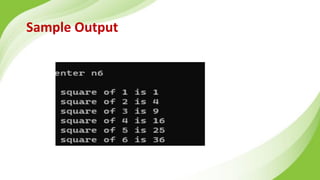
Sample Output
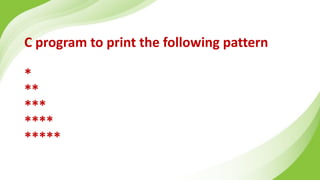
C program to print the following pattern
*
**
***
****
*****
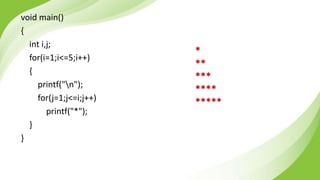
void main()
{
int i,j;
for(i=1;i<=5;i++)
{
printf("n");
for(j=1;j<=i;j++)
printf("*");
}
}
*
**
***
****
*****
Program to compute factorial of a given
number
void main()
{
int i, num,fact=1;
printf("Enter any number to calculate factorial: ");
scanf("%d", &num);
if(num==0)
fact=1;
else
{
for(i=1; i<=num; i++)
{
fact = fact * i;
}
}
printf("Factorial of %d = %d", num, fact);
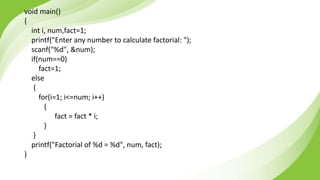
}
C program to print reverse of a number
#include<stdio.h>
void main()
{
int num, reverse = 0,digit;
printf("Enter any number to find reverse: ");
scanf("%d", &num);
while(num != 0)
{
digit = num % 10;
reverse = (reverse * 10) + digit;
num /= 10;
}
printf("Reverse = %d", reverse);
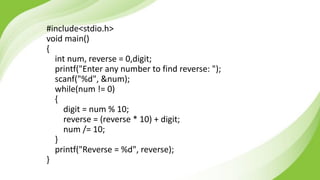
}
Program to check if an entered number is
palindrome or not
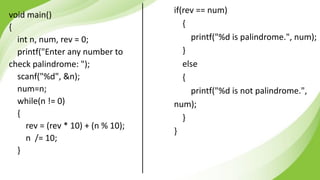
void main()
{
int n, num, rev = 0;
printf("Enter any number to
check palindrome: ");
scanf("%d", &n);
num=n;
while(n != 0)
{
rev = (rev * 10) + (n % 10);
n /= 10;
}
if(rev == num)
{
printf("%d is palindrome.", num);
}
else
{
printf("%d is not palindrome.",
num);
}
}
Program to read a number and print the
sum of digits in a number (using while loop)
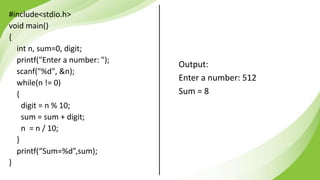
#include<stdio.h>
void main()
{
int n, sum=0, digit;
printf("Enter a number: ");
scanf("%d", &n);
while(n != 0)
{
digit = n % 10;
sum = sum + digit;
n = n / 10;
}
printf(“Sum=%d”,sum);
}
Output:
Enter a number: 512
Sum = 8
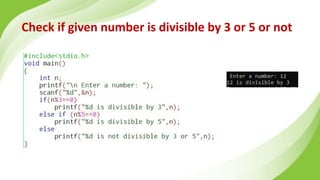
Check if given number is divisible by 3 or 5 or not
Print the number of days in the given month
#include<stdio.h>
void main()
{
int n;
printf("n Enter a number for month[1 to 12]: ");
scanf("%d", &n);
if(n==4 || n==6 || n==9 || n==11)
printf("n There are 30 days in the month");
else if (n==2)
printf("n There are either 28 or 29 days in the month");
else if (n==1 || n==3 || n==5 || n==7 || n==8 || n==10 || n==12)
printf("n There are 31 days in the month");
else
printf("n Invalid Input");
}
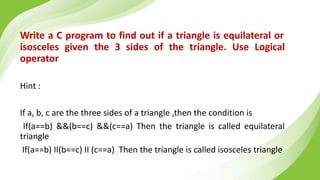
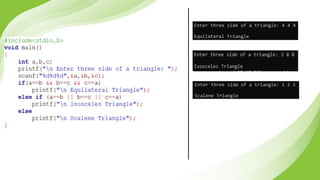
Write a C program to find out if a triangle is equilateral or
isosceles given the 3 sides of the triangle. Use Logical
operator
Hint :
If a, b, c are the three sides of a triangle ,then the condition is
If(a==b) &&(b==c) &&(c==a) Then the triangle is called equilateral
triangle
If(a==b) II(b==c) II (c==a) Then the triangle is called isosceles triangle
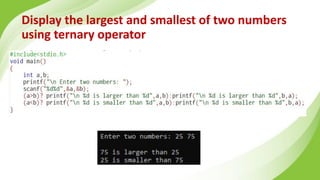
Display the largest and smallest of two numbers
using ternary operator
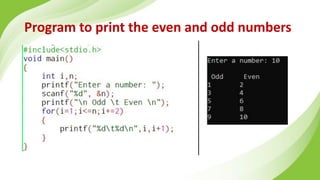
Program to print the even and odd numbers
Write a C program to find sum of given
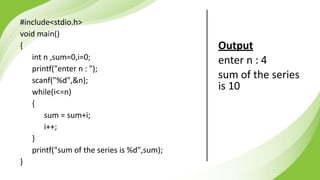
series using while loop (1+2+3+… +n)
#include<stdio.h>
void main()
{
int n ,sum=0,i=0;
printf("enter n : ");
scanf("%d",&n);
while(i<=n)
{
sum = sum+i;
i++;
}
printf("sum of the series is %d",sum);
}
Output
enter n : 4
sum of the series
is 10
Write a C program to find sum of
given series using while loop
(1^2+2^2+3^2+… +n^2)
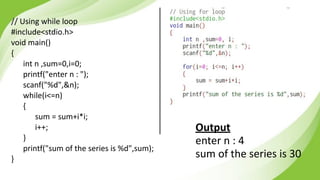
// Using while loop
#include<stdio.h>
void main()
{
int n ,sum=0,i=0;
printf("enter n : ");
scanf("%d",&n);
while(i<=n)
{
sum = sum+i*i;
i++;
}
printf("sum of the series is %d",sum);
}
Output
enter n : 4
sum of the series is 30
Write a C program to read inputs till 0
and find their sum
#include<stdio.h>
void main()
{
int n ,sum=0,i=0;
while(n!=0)
{
printf("enter number[ 0 to stop] : ");
scanf("%d",&n);
sum = sum+n;
}
printf("sum of the numbers is %d",sum);
}
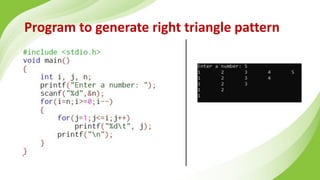
Program to generate right triangle pattern
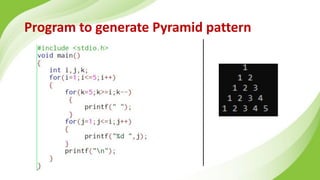
Program to generate Pyramid pattern
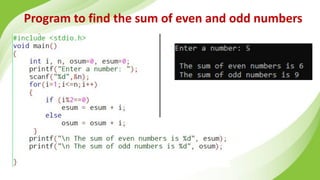
Program to find the sum of even and odd numbers
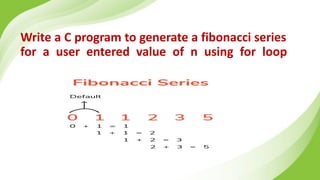
Write a C program to generate a fibonacci series
for a user entered value of n using for loop
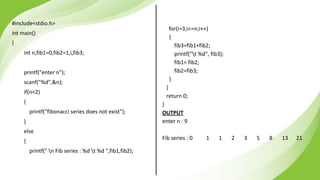
#include<stdio.h>
int main()
{
int n,fib1=0,fib2=1,i,fib3;
printf("enter n");
scanf("%d",&n);
if(n<2)
{
printf("fibonacci series does not exist");
}
else
{
printf(" n Fib series : %d t %d ",fib1,fib2);
for(i=3;i<=n;i++)
{
fib3=fib1+fib2;
printf("t %d", fib3);
fib1= fib2;
fib2=fib3;
}
}
return 0;
}
OUTPUT
enter n : 9
Fib series : 0 1 1 2 3 5 8 13 21
LAB PROGRAM 4
Develop a C program to print the sum of
even numbers from M to N.
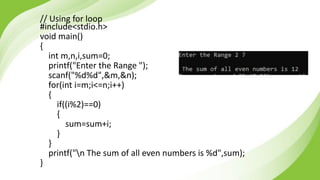
// Using for loop
#include<stdio.h>
void main()
{
int m,n,i,sum=0;
printf("Enter the Range ");
scanf("%d%d",&m,&n);
for(int i=m;i<=n;i++)
{
if((i%2)==0)
{
sum=sum+i;
}
}
printf("n The sum of all even numbers is %d",sum);
}
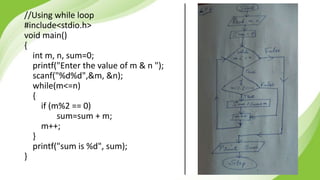
//Using while loop
#include<stdio.h>
void main()
{
int m, n, sum=0;
printf("Enter the value of m & n ");
scanf("%d%d",&m, &n);
while(m<=n)
{
if (m%2 == 0)
sum=sum + m;
m++;
}
printf("sum is %d", sum);
}
LAB PROGRAM 5
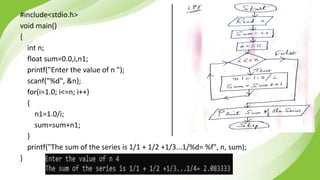
Develop a C program to sum the series
1+1/2+1/3+ …. 1/N.
#include<stdio.h>
void main()
{
int n;
float sum=0.0,i,n1;
printf("Enter the value of n ");
scanf("%d", &n);
for(i=1.0; i<=n; i++)
{
n1=1.0/i;
sum=sum+n1;
}
printf("The sum of the series is 1/1 + 1/2 +1/3...1/%d= %f", n, sum);
}
LAB PROGRAM 6
Develop a C program to compute the GCD of
two numbers.
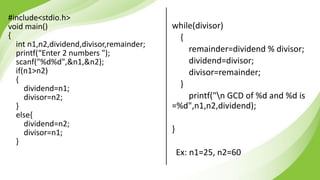
#include<stdio.h>
void main()
{
int n1,n2,dividend,divisor,remainder;
printf(“Enter 2 numbers ");
scanf("%d%d",&n1,&n2);
if(n1>n2)
{
dividend=n1;
divisor=n2;
}
else{
dividend=n2;
divisor=n1;
}
while(divisor)
{
remainder=dividend % divisor;
dividend=divisor;
divisor=remainder;
}
printf("n GCD of %d and %d is
=%d",n1,n2,dividend);
}
Ex: n1=25, n2=60
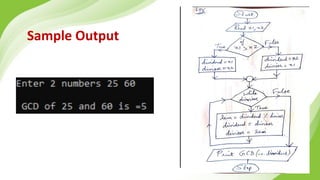
Sample Output
Tracing for GCD
Input n1= 25, n2=60
25>60 [False]
So, dividend=60, divisor=25
Iteration 1
25 != 0 [True]
rem= 60 % 25 = 10
dividend = 25
divisor = 10
Iteration 2
10 != 0 [True]
rem= 25 % 10 = 5
dividend = 10
divisor = 5
Iteration 3
5 != 0 [True]
rem= 10 % 5 = 0
dividend = 5
divisor = 0
Iteration 4
0 != 0 [False]
Therefore GCD=dividend = 5
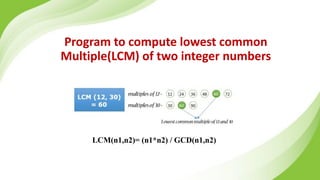
Program to compute lowest common
Multiple(LCM) of two integer numbers
LCM(n1,n2)= (n1*n2) / GCD(n1,n2)
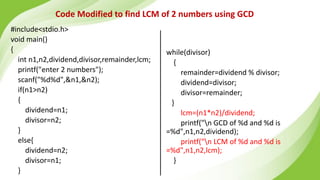
#include<stdio.h>
void main()
{
int n1,n2,dividend,divisor,remainder,lcm;
printf("enter 2 numbers");
scanf("%d%d",&n1,&n2);
if(n1>n2)
{
dividend=n1;
divisor=n2;
}
else{
dividend=n2;
divisor=n1;
}
while(divisor)
{
remainder=dividend % divisor;
dividend=divisor;
divisor=remainder;
}
lcm=(n1*n2)/dividend;
printf("n GCD of %d and %d is
=%d",n1,n2,dividend);
printf("n LCM of %d and %d is
=%d",n1,n2,lcm);
}
Code Modified to find LCM of 2 numbers using GCD
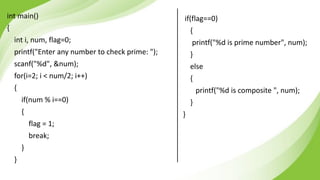
Program to classify if a given number as
prime or composite
int main()
{
int i, num, flag=0;
printf("Enter any number to check prime: ");
scanf("%d", &num);
for(i=2; i < num/2; i++)
{
if(num % i==0)
{
flag = 1;
break;
}
}
if(flag==0)
{
printf("%d is prime number", num);
}
else
{
printf("%d is composite ", num);
}
}
Write a C program to check if a
number is Armstrong or not
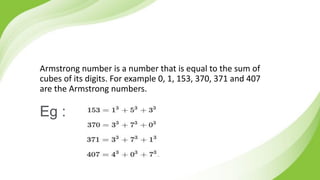
Armstrong number is a number that is equal to the sum of
cubes of its digits. For example 0, 1, 153, 370, 371 and 407
are the Armstrong numbers.
Eg :
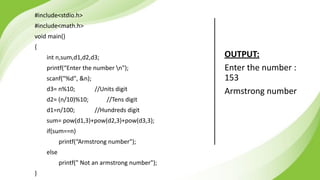
#include<stdio.h>
#include<math.h>
void main()
{
int n,sum,d1,d2,d3;
printf(“Enter the number n");
scanf("%d", &n);
d3= n%10; //Units digit
d2= (n/10)%10; //Tens digit
d1=n/100; //Hundreds digit
sum= pow(d1,3)+pow(d2,3)+pow(d3,3);
if(sum==n)
printf(“Armstrong number");
else
printf(" Not an armstrong number");
}
OUTPUT:
Enter the number :
153
Armstrong number
THANK
YOU

POP Unit 2.pptx.pdf for your time and gauss with example

  • 1.
    PRINCIPLES OF PROGRAMMING INC 22CS2ESPOP - UNIT 2 Prof. SNEHA S BAGALKOT Assistant Professor, Dept. of CSE
  • 2.
    UNIT – 2:Decision Control and Looping Statements ▪Introduction to Decision Control Statements ▪Conditional Branching Statements (if, if-else, if-else-if, switch) ▪Iterative Statements (while, do-while, for) ▪Nested Loops ▪Break and Continue Statements ▪Example Programs
  • 3.
    Introduction to DecisionControl Statements •Programs seen till now were sequential in nature. •In cases where we need to run only a selected set of statements conditional processing helps. •Helps to specify what statements to run what to skip. •C supports two type of decision control statements: ▪Conditional type branching ▪Unconditional type branching
  • 5.
    Conditional Branching Statements(if, if-else, if-else-if, switch) •Conditional branching statements help to jump from one part of the program to another based on whether or not a condition is satisfied or not. ▪if statement ▪if-else statement ▪if-else-if statement ▪switch statement
  • 6.
    Branching Statements Conditional branchingstatements ▪ if statement ▪ if-else statement ▪ if-else-if statement ▪ switch statement
  • 7.
    if statement • Simplestform of decision control statement • Syntax:
  • 8.
  • 9.
    #include<stdio.h> void main() { int x= 20; int y = 18; if (x > y) { printf("x is greater than y"); } } O/p: x is greater than y
  • 10.
    Eg: Check ifa person is eligible to vote #include<stdio.h> void main() { int age; printf("Enter the agen"); scanf("%d",&age); if(age>18) printf("You are eligiblen"); }
  • 11.
    Cascade-if #include<stdio.h> #include<conio.h> void main() { char ch; printf("Enterany keyn"); scanf("%c", &ch); if(isalpha(ch)>0) printf("User has entered a charactern"); if(isdigit(ch)>0) printf("User has entered a digitn"); if(ispunct(ch)>0) printf("User has entered a punctuation mark n"); if(isspace(ch)>0) printf("User has entered a white space charactern"); }
  • 12.
    if- else statement •In case of if statement if the expression is true, a certain set of statements are executed. • If the expression of the if statement returns false, then we can guide the compiler to execute a different set of statements using else. • The expression is evaluated. If true, control is transferred to statement 1. • If expression evaluates to false, control is transferred to statement 2. • Either statement 1 or statement 2 will be executed but not both.
  • 13.
  • 14.
    • Example: tofind largest of two numbers #include<stdio.h> main() { int a, b, large; printf(“n Enter the values of a and b:”); scanf(“%d %d”, &a, &b); if(a>b) large=a; else large=b; printf(“n Large=%d”, large); }
  • 15.
    Eg: Check whethernumber is odd or even #include<stdio.h> void main() { int num; printf("Enter the numbern"); scanf("%d", &num); if(num%2==0) printf("The number is even"); else printf("The number is odd"); }
  • 16.
    Eg: WAP toaccept a character. If character is in lower case, convert it to upper case and vice versa #include<stdio.h> void main(){ char ch; printf("Enter any Alphabetn"); scanf("%c",&ch); if(ch>='A'&&ch<='Z'){ printf("The entered character is in upper casen"); printf("In lower case it is %c", (ch+32)); } else{ printf("The entered character is in lower casen"); printf("In upper case it is %c", (ch-32)); } }
  • 17.
    Ref : Tableof ASCII values
  • 18.
    Ex: WAP tocheck if the entered character is a vowel #include<stdio.h> void main(){ char ch; printf("Enter a charactern"); scanf("%c", &ch); if(ch=='a'||ch=='e'|| ch=='i'|| ch=='o'|| ch=='u'||ch=='A'||ch=='E'|| ch=='I'|| ch=='O'|| ch=='U') printf("%c is a voweln", ch); else printf("%c is not a voweln",ch); }
  • 19.
  • 20.
  • 21.
    Dangling Else Problem •With nesting of if-else statements, we often encounter a problem known as dangling else problem. • This problem is created when there is no matching else for every if statement. In such cases, C always pairs an else to the most recent unpaired if statement in the current block. Example: if(a > b) if(a > c) printf(“a is greater than b and c”); else printf(“a is not greater than b and cn”);
  • 22.
    Nested if… elsestatement if( test condition 1) { if(test condition 2) { Statement 1; } else { Statement 2; } } else { Statement 3; } Statement X;
  • 23.
    C program tofind largest of 3 numbers using nested if..else void main() { int a=15,b=24,c=38; if(a>b) { if(a>c) { printf("A is largest"); } else { printf("C is largest"); } } else { if(b>c) { printf("B is largest"); } else { printf("C largest"); } } }
  • 24.
    if-else-if statement • Syntax: if(testexpression 1) { statement block 1; } else if(test expression 2) { statement block 2; } … { statement block x; } statement y;
  • 25.
    Example: to testwhether a number entered is positive, negative or equal to zero #include<stdio.h> main() { int num; printf(“nEnter any number:”); scanf(“%d”,&num); if(num==0) printf(“the value is equal to zero”); else if(num>0) printf(“n the number is positive”); else printf(“n the number is negative”); }
  • 26.
    #include<stdio.h> void main(){ int x,y; printf("Enter two numbersn"); scanf("%d%d", &x,&y); if(x==y) printf("The numbers are equaln"); else if(x>y) printf("%d is greater than %d", x, y); else printf("%d is lesser than %d", x, y); }
  • 27.
  • 28.
    Programs ▪ Write aC program to read an integer, check if its positive, if so increment and print it. ▪ Write a C program to check if a given number is even or odd. ▪ Write a C program to read a character and check if it is a vowel or consonant. ▪ Read 2 integers and check if they are equal or not. ▪ Check if given number is positive, negative or Zero. ▪ Find the largest of three integers.
  • 29.
    Write a Cprogram to read a character and check if it is a vowel or consonant.
  • 30.
    Read 2 integersand check if they are equal or not. OUTPUT 2: Enter two numbers: 2 8 2 and 8 are not equal OUTPUT 1: Enter two numbers: 5 5 5 and 5 are equal
  • 31.
    Write a Cprogram to display the Grade as per the given table: Marks Grade > 90 O > 80 A > 70 B > 60 C > 50 D > 40 E Else F #include<stdio.h> void main() { int marks; printf(“n Enter the marks:”); scanf(“%d”, &marks); if(marks>90) printf(“n Grade is O”); else if(marks>80 && marks<=90) printf(“n Grade is A”); else if(marks>70 && marks<=80) printf(“n Grade is B”); else if(marks>60 && marks<=70) printf(“n Grade is C”); else if(marks>50 && marks<=60) printf(“n Grade is D”); else if(marks>40 && marks<=50) printf(“n Grade is E”); else printf(“n Grade is F”); } OUTPUT: Enter the marks: 70 Grade is C
  • 32.
    Write a Cprogram to simulate the Traffic signal. OUTPUT: Enter the colour of signal[r, y or g]: r Red Signal: Stop Enter the colour of signal[r, y or g]: y Yellow Signal: Wait Enter the colour of signal[r, y or g]: g Green Signal: Go Enter the colour of signal[r, y or g]: w Invalid
  • 33.
    Write a Cprogram to check if given input is a letter [A-Z, a-z], digit [0-9] or special character. OUTPUT: Enter a character: S Uppercase letter Enter a character: r Lowercase letter Enter a character: 6 Digit Enter a character: # Special character
  • 34.
    PROGRAM An electricity boardcharges the following rates for the use of electricity: for the first 200 units 80 paise per unit: for the next 100 units 90 paise per unit: beyond 300 units Rs. 1 per unit. All users are charged a minimum of Rs. 100 as meter charge. If the total amount is more than 400, then an additional surcharge of 15% of total amount is charged. Write a program to read the name of the user, number of units consumed and print out the charges.
  • 35.
    Algorithm Step 1: [Start] Begin Step2: [Input customer name] Read name Step 3: [Input unit consumed] Read n Step 4: [Check units consumed to calculate the amount] if n < = 200 amount = n*80 otherwise check if n > 200 and n <= 300 then calculate amount = 200 * 80 amount = amount +(n-200) *90 otherwise calculate amount =(n-300)*100 amount = amount+100*90 amount = amount+200*80 end if Step 5:[Calculate the amount] amount = amount/100 amount = amount+100 Step 6: [Check if amount is greater than 400 then calculate additional charge of 15%] if amount > 400 then calculate amount amount + amount * 15/100 end if Step 7: [Print total amount to be paid by the customer] Display amount Step 8: [Finished] Stop
  • 36.
  • 37.
    #include<stdio.h> void main() { char name[20]; intn; float amount; printf("Enter the consumer namen"); scanf("%s", name); printf("Enter no. of units consumed n"); scanf("%d",&n); if (n<=200) { amount=n*80; } else if(n>200 && n<=300) { amount=200*80; amount=amount+(n-200)*90; } else { amount=(n-300)*100; amount=amount+100*90; amount=amount+200*80; } amount=amount/100; //To convert into Rupees amount=amount+100; // Additional 100 Rupees to be added if(amount>400) { amount=amount+amount*15/100; } printf("Total amount to be paid is %.2f Rsn",amount); }
  • 38.
    Output Enter the consumername : Bhagya Enter no. of units consumed 275 Total amount to be paid is = 327.50
  • 39.
    Switch Case ● Aswitch case statement is a multi-way decision statement. ● Switch statements are used: ● When there is only one variable to evaluate in the expression. ● When many conditions are being tested for ● Switch case statement advantages include: ● Easy to debug, read, understand and maintain ● Execute faster than its equivalent if-else construct
  • 40.
    switch case • Multi-waydecision statement • Syntax: switch(variable) { case value1: statement block1; break; case value2: statement block2; break; …………….. case valuen: statement blockn; break; default: statement block; break; } statement x;
  • 42.
    Rules for switchcase construct • The control expressions that follows the keyword switch must be of integral type.(i.e., int or any value-converted to an int) • Each case label should be followed with a constant or a constant exp. • Every case label must evaluate to a unique constant expression value. • Case labels must end with a colon. • Two case labels may have the same set of actions associated with them. • Default label is optional and is executed only when the value of the exp does not match with any labeled constant exp. • Default label can be placed anywhere in the switch statement. • There can be only one default label. • C permits nested switch statements, i.e., a switch statement within another switch.
  • 43.
    Example: char grade=‘C’; switch(grade) { case ‘A’:printf(“n Excellent”); break; case ‘B’: printf(“n GOOD”); break; case ‘C’: printf(“n Fair”); break; case ‘F’: printf(“n Fail”); break; default: printf(“n Invalid Grade”); break; }
  • 44.
    // Program toclassify a number as Positive, Negative or Zero #include<stdio.h> main() { int num; printf("n Enter any number : "); scanf("%d", &num); if(num==0) printf("n The value is equal to zero"); else if(num>0) printf("n The number is positive"); else printf("n The number is negative"); } // Program to print the day of the week #include<stdio.h> int main() { int day; printf(“n Enter any number from 1 to 7 : “); scanf(“%d”,&day); switch(day) { case 1: printf(“n SUNDAY”); break; case 2 : printf(“n MONDAY”); break; case 3 : printf(“n TUESDAY”); break; case 4 : printf(“n WEDNESDAY”); break; case 5 : printf(“n THURSDAY”); break; case 6 : printf(“n FRIDAY”); break; case 7 : printf(“n SATURDAY”); break; default: printf(“n Wrong Number”); } }
  • 45.
    Comparison between theswitch and if-else construct Generalized switch statement Generalized if-else statement switch(x) { case 1: // do this case 2: // do this case 3: // do this …….. default: // do this } If(exp1) { // do this } else if(exp2) { // do this } else if(exp3) { // do this }
  • 46.
    /*Write a programto demonstrate the use of switch statement without a break.*/ #include <stdio.h> main() { int option = 1; switch(option) { case 1: printf("n In case 1"); case 2: printf("n In case 2"); default: printf("n In case default"); } return 0; } /*Program to determine whether an entered character is a vowel or not.*/ #include <stdio.h> int main() { char ch; printf("n Enter any character: "); scanf("%c", &ch); switch(ch) { case 'A': case 'a’: printf("n % c is VOWEL", ch); break; case 'E': case 'e’: printf("n % c is VOWEL", ch); break; case 'I': case 'i’: printf("n % c is VOWEL", ch); break; case 'O': case 'o’: printf("n % c is VOWEL", ch); break; case 'U': case 'u’: printf("n % c is VOWEL", ch); break; default: printf("%c is not a vowel", ch); } return 0; }
  • 47.
    Design and Developa program to solve simple computational problems using arithmetic expressions and use of each operator leading to simulation of a simple calculator.
  • 48.
    Algorithm Step 1: Startthe program Step 2: Read the two numbers and the operator Step 3: Evaluate option based on the operator with case statements case ‘+’ : res = a + b case ‘-’ : res = a - b case ‘*’ : res = a * b case ‘/’ : res = a / b Step 4: if the entered case option is invalid code the print “Wrong Choice” Step 5: Print the res Step 6: Stop the program
  • 49.
  • 50.
    #include<stdio.h> void main() { float a,b,res; charop; printf("Enter The Expression in form of op1 operator op2n"); scanf("%f%c%f",&a,&op,&b); switch(op) { case '+': res = a + b; break; case '-‘: res = a-b; break; case '*‘: res = a*b; break; case '/': if(b!=0) res=a/b; else printf("Divide by zero error"); break; default: printf("Illegal operatorn"); } printf("Result is……n"); printf("%f%c%f=%f",a,op,b,res); }
  • 51.
    OUTPUT Enter The Expressionin form of op1 operator op2 : 4+5 Result is ……. 4+5=9
  • 52.
    Advantages of usinga switch case statement ▪ Easy to debug ▪ Easy to read and understand ▪ Ease of maintenance as compared with its equivalent if-else statements ▪ Like if-else statements, switch statements can also be nested ▪ Executes faster than its equivalent if-else construct
  • 53.
    Write a Cprogram using control statements for the following 1. To find largest of two numbers 2. To find maximum of three numbers 3. To check whether a number is positive, negative or zero 4. To print Number of Days in any Month entered by user 5. To check if a number entered is even or odd 6. Read a year as input and find out if it is a leap year or not 7. Read sides of triangle from the user and check if it is isosceles , equilateral or scalene 8. Check if an entered character is vowel or consonant using i) switch ii) if 9. Check if entered number is divisible by 3 or 5 or not
  • 54.
    Iterative Statements (while,do-while, for) • Iterative statements are used to repeat the execution of a list of statements, depending on the value of an integer expression. • C language supports three types of iterative statements also known as looping statements. • They are : • while loop • do-while loop • for loop
  • 55.
    While Loop • Thewhile loop is used to repeat one or more statements while a particular condition is true. • In the while loop, the condition is tested before any of the statements in the statement block is executed. • If the condition is true, only then the statements will be executed otherwise the control will jump to the immediate statement outside the while loop block. • We must constantly update the condition of the while loop. while (condition) { statement_block; } statement x;
  • 56.
    While Loop • Awhile loop in C programming repeatedly executes a set of statements as long as a given condition is true • When the condition is false the loop will stop working • SYNTAX: while(expression) { Statements; }
  • 57.
    Program to printthe numbers from 10 to 19 #include <stdio.h> int main () { int a = 10; while( a < 20 ) { printf("value of a: %dn", a); a++; } return 0; } Output value of a: 10 value of a: 11 value of a: 12 value of a: 13 value of a: 14 value of a: 15 value of a: 16 value of a: 17 value of a: 18 value of a: 19
  • 58.
    Do While Loop ●The do-while loop is similar to the while loop. The only difference is that in a do-while loop, the test condition is tested at the end of the loop. ● The body of the loop gets executed at least one time (even if condition is false). ● Test condition is enclosed in parentheses and followed by a semicolon. ● Statements in the statement block are enclosed within curly brackets. ● The do while loop continues to execute whilst a condition is true. There is no choice whether to execute the loop or not. Hence, entry in the loop is automatic there is only a choice to continue it further or not. ● The major disadvantage of using a do while loop is that it always executes at least once, so even if the user enters some invalid data, the loop will execute. ● Do-while loops are widely used to print a list of options for a menu-driven program.
  • 59.
    Statement x; do { statement_block; } while(condition); statement y; Statement x Statement y Statement Block Update the condition expression Condition FALSE TRUE Do While Loop
  • 60.
    Program to printthe value of a from 10 to 19 using do while #include <stdio.h> int main () { int a = 10; do { printf("value of a: %dn", a); a = a + 1; }while( a < 20 ); return 0; } value of a: 10 value of a: 11 value of a: 12 value of a: 13 value of a: 14 value of a: 15 value of a: 16 value of a: 17 value of a: 18 value of a: 19
  • 61.
    Program to demonstratethe use of while loop and do-while loop. // Program to print numbers from 0 to 10 using while loop #include<stdio.h> int main() { int i = 0; while(i<=10) { printf(“n %d”, i); i = i + 1; // condition updated } } //Program to print numbers from 0-10 using do-while loop #include<stdio.h> int main() { int i = 0; do { printf(“n %d”, i); i = i + 1; } while(i<=10); }
  • 62.
    for loop ● Forloop is used to repeat a task until a particular condition is true. ● Aka determinate or definite loop-programmer knows exactly how many times the loop will repeat. ● The syntax of a for loop for (initialization; condition; increment/decrement/update) { statement block; } Statement Y;
  • 63.
    • When afor loop is used, the loop variable is initialized only once. • With every iteration of the loop, the value of the loop variable is updated and the condition is checked. If the condition is true, the statement block of the loop is executed else, the statements comprising the statement block-skipped and the control jumps to the immediate statement following the for loop body. • Updating the loop variable may include incrementing the loop variable, decrementing the loop variable or setting it to some other value like, i +=2, where i is the loop variable. • Every section of for loop is separated from the other with semicolon. • It is possible that one of the sections may be empty, though the semicolons still have to be there. • If condition is empty, it is evaluated as true and the loop will repeat until something else stops it. • Condition is tested before the statements contained in the body are executed. for loop
  • 64.
    Points to rememberabout for loop • In for loop, any or all exp can be omitted, then there must be two semicolon. • No semicolon after a for statement. • Multiple initializations must be separated with a comma. • If no initialization to be done, can be skipped by giving only semicolon. • Multiple conditions can be tested by using logical operators(&& or ||) • If loop controlling variable is updated within statement block, then third part can be skipped. • Multiple statements can be included in the third part of the for by using comma. • Controlling variable can also be incremented or decremented by values other than 1. • If for loop with two semicolons, then for loop may become infinite loop if n stopping condition is specified. • Don’t use floating point variable as the loop control variable.
  • 65.
    Program to printfirst n numbers using a for loop. #include<stdio.h> int main() { int i, n; printf(“n Enter the value of n :”); scanf(“%d”, &n); for(i=0; i<= n; i++) printf(“n %d”, i); }
  • 66.
    Examples 1. for(i=1; i<=3;i++) { printf(“Welcomen”); } printf(“Thisis CSE”); Output: Welcome Welcome Welcome This is CSE 2. for(i=0; i<5;i++) { printf(“%dt”,i); } Output: 0 1 2 3 4
  • 67.
    5. for(i=0; i<5;i++); { printf(“Hellon”); } Output: Nothingis printed Since there is a semicolon at the end of the loop 3. for(i=5; i>0;i--) { printf(“%dt”,i); } Output: 5 4 3 2 1 4. for(; ;) { printf(“Infinite Loopn”); } Prints “Infinite Loop” infinitely without halting
  • 68.
    Selecting an appropriateloop • Loops can be entry-controlled(AKA pre-test) or exit-controlled(AKA post-test). Entry-controlled(Pre-test) Exit-controlled(Post-test) Condition is tested before the loop starts. Condition is tested after the loop is executed. If the condition is not met, then loop will never execute. The body of the loop is executed unconditionally for the first time. Can use either for or while loop Can use do-while.
  • 69.
    Counter-controlled Loop Sentinel-controlledLoop When we know in advance the number of times the loop should be executed. When we do not know in advance the number of times the loop will be executed. Counter is a variable that must be initialised, tested, and updated for performing the loop operations. A special value called sentinel value is used to change the loop control expression from true to false. AKA definite repetition loop AKA indefinite repetition loop Can use for loop Can use either while or do-while loop Selecting an appropriate loop
  • 70.
    Nested Loops • Callows users to have nested loops, i.e., loops that can be placed inside other loops. • This feature will work with any loop such as while, do-while, and for. • It is most commonly used with for loop, because this is easiest to control. • A for loop can be used to control the number of times that a particular set of statements will be executed. • Another outer loop could be used to control the number of times that a whole loop is repeated. • In C, Loops can be nested to any desired level.
  • 71.
    WAP to printthe following pattern. 1 1 2 1 2 3 1 2 3 4 #include <stdio.h> main() { int i, j, k; for(i=1;i<=4;i++) { for(k=4;k>=i;k--) printf(" "); for(j=1;j<=i;j++) printf("%d", j); printf("n"); } return 0; } WAP to print the following pattern. 1 12 123 1234 #include <stdio.h> main() { int i, j; for(i=1;i<=4;i++) { printf("n"); for(j=1;j<=i;j++) printf("%d", j); } return 0; }
  • 72.
    Break Statement ● Thebreak statement is used to terminate the execution of the nearest enclosing loop in which it appears. ● When compiler encounters a break statement, the control passes to the statement that follows the loop in which the break statement appears. ● Syntax: break; ● In switch statement if the break statement is missing then every case from the matched case label to the end of the switch, including the default, is executed. ● Break statement is used to exit a loop from any point within its body, bypassing its normal termination expression.
  • 73.
    Continue Statement •The continuestatement can only appear in the body of a loop. •When the compiler encounters a continue statement then the rest of the statements in the loop are skipped and the control is unconditionally transferred to the loop-continuation portion of the nearest enclosing loop. •Syntax: continue; •If placed within a for loop, the continue statement causes a branch to the code that updates the loop variable. For example, #include<stdio.h> void main() { int i; for(i=1; i<= 10; i++) { if (i==5) continue; printf("t %d", i); } } Output: 1 2 3 4 6 7 8 9 10
  • 74.
    Goto Statement • Thegoto statement is used to transfer control to a specified label. • Here label is an identifier that specifies the place where the branch is to be made. • Label can be any valid variable name that is followed by a colon (:). • Label is placed immediately before the statement where the control has to be transferred. • Label can be placed anywhere in the program either before or after the goto statement. Whenever the goto statement is encountered the control is immediately transferred to the statements following the label. • Goto statement breaks the normal sequential execution of the program. • If the label is placed after the goto statement then it is called a forward jump and in case it is located before the goto statement, it is said to be a backward jump. • It is often combined with the if statement to cause a conditional transfer of control.
  • 75.
    Write a Cprogram to find sum of 10 natural numbers using goto
  • 76.
    #include<stdio.h> void main() { int sum=0,i=0; top: sum= sum+i; i++; if(i<=10) goto top; printf("sum = %d",sum); } Output : Sum= 55
  • 77.
    Example: Program tocalculate the sum of all +ve nos. entered by the user. #include<stdio.h> int main() { int num, sum=0; read: // label for go to statement printf("n Enter the number. Enter 999 to end : "); scanf("%d", &num); if (num != 999) { if(num < 0) goto read; // jump to label- read sum += num; goto read; // jump to label- read } printf("n Sum of the numbers entered by the user is = %d", sum); return 0; } Goto Statement (Contd..)
  • 78.
  • 79.
    Write a programto demonstrate menu based calculator using switch
  • 80.
    #include<stdio.h> void main() { int a,b,choice,sum,diff,product,q,r; printf("Welcome n 1. ADDITION n 2.SUBTRACTION n 3.MULTIPLICATION n 4.DIVISION n "); printf("Enter your choice :"); scanf("%d",&choice); printf("enter the two operands"); scanf("%d%d",&a,&b); switch(choice) { case 1: sum=a+b; printf("Sum of %d and %d is %d",a,b,sum); break; case 2: diff=a-b; printf("Difference between %d and %d is %d",a,b,diff); break; case 3: product=a*b; printf("product of %d and %d is %d",a,b,product); break; case 4: if(b==0) { printf("division by zero not possible"); } else { q=a/b; r=a%b; printf("Quotient when %d divided by %d is %d",a,b,q); printf("n Remainder when %d divided by %d is %d",a,b,r); } break; } }
  • 81.
    Write a programto accept a name and print the name for a specified number of times
  • 82.
    #include<stdio.h> void main() { char name[30]; intn ,i=0; printf("enter name n"); scanf("%s",name); printf("enter the number of times to print the name n"); scanf("%d",&n); while(i<n) { printf("name is : %s n",name); i++; } } enter name jim enter the number of times to print the name 3 name is : jim name is : jim name is : jim
  • 83.
    Display all numbersin a given range of m to n
  • 84.
    // Using whileloop #include<stdio.h> void main() { int m,n; printf("Enter the value of m & n"); scanf("%d%d",&m,&n); while(m<=n) { printf("n %d",m); m++; } }
  • 85.
    Display all evennumbers from a given range of m to n
  • 86.
    // Using whileloop #include<stdio.h> void main() { int m,n; printf("Enter the value of m & n"); scanf("%d%d",&m,&n); while(m<=n) { if((m%2)==0) printf("n %d",m); m++; } }
  • 87.
    Compute and printthe sum of natural numbers from m to n
  • 88.
    void main() { int m,n,sum=0; printf("Enterthe value of m & n"); scanf("%d%d",&m,&n); while(m<=n) { sum=sum+m; m++; } printf("sum is %d",sum); }
  • 89.
    Use do-while loopto print squares of first n natural numbers
  • 90.
    void main() { int n,i=1,s; printf("entern"); scanf("%d",&n); do { s=i*i; printf("n square of %d is %d",i,s); i++; }while(i<=n); }
  • 91.
  • 92.
    C program toprint the following pattern * ** *** **** *****
  • 93.
  • 94.
    Program to computefactorial of a given number
  • 95.
    void main() { int i,num,fact=1; printf("Enter any number to calculate factorial: "); scanf("%d", &num); if(num==0) fact=1; else { for(i=1; i<=num; i++) { fact = fact * i; } } printf("Factorial of %d = %d", num, fact); }
  • 96.
    C program toprint reverse of a number
  • 97.
    #include<stdio.h> void main() { int num,reverse = 0,digit; printf("Enter any number to find reverse: "); scanf("%d", &num); while(num != 0) { digit = num % 10; reverse = (reverse * 10) + digit; num /= 10; } printf("Reverse = %d", reverse); }
  • 98.
    Program to checkif an entered number is palindrome or not
  • 99.
    void main() { int n,num, rev = 0; printf("Enter any number to check palindrome: "); scanf("%d", &n); num=n; while(n != 0) { rev = (rev * 10) + (n % 10); n /= 10; } if(rev == num) { printf("%d is palindrome.", num); } else { printf("%d is not palindrome.", num); } }
  • 100.
    Program to reada number and print the sum of digits in a number (using while loop)
  • 101.
    #include<stdio.h> void main() { int n,sum=0, digit; printf("Enter a number: "); scanf("%d", &n); while(n != 0) { digit = n % 10; sum = sum + digit; n = n / 10; } printf(“Sum=%d”,sum); } Output: Enter a number: 512 Sum = 8
  • 102.
    Check if givennumber is divisible by 3 or 5 or not
  • 103.
    Print the numberof days in the given month #include<stdio.h> void main() { int n; printf("n Enter a number for month[1 to 12]: "); scanf("%d", &n); if(n==4 || n==6 || n==9 || n==11) printf("n There are 30 days in the month"); else if (n==2) printf("n There are either 28 or 29 days in the month"); else if (n==1 || n==3 || n==5 || n==7 || n==8 || n==10 || n==12) printf("n There are 31 days in the month"); else printf("n Invalid Input"); }
  • 104.
    Write a Cprogram to find out if a triangle is equilateral or isosceles given the 3 sides of the triangle. Use Logical operator Hint : If a, b, c are the three sides of a triangle ,then the condition is If(a==b) &&(b==c) &&(c==a) Then the triangle is called equilateral triangle If(a==b) II(b==c) II (c==a) Then the triangle is called isosceles triangle
  • 106.
    Display the largestand smallest of two numbers using ternary operator
  • 107.
    Program to printthe even and odd numbers
  • 108.
    Write a Cprogram to find sum of given series using while loop (1+2+3+… +n)
  • 109.
    #include<stdio.h> void main() { int n,sum=0,i=0; printf("enter n : "); scanf("%d",&n); while(i<=n) { sum = sum+i; i++; } printf("sum of the series is %d",sum); } Output enter n : 4 sum of the series is 10
  • 110.
    Write a Cprogram to find sum of given series using while loop (1^2+2^2+3^2+… +n^2)
  • 111.
    // Using whileloop #include<stdio.h> void main() { int n ,sum=0,i=0; printf("enter n : "); scanf("%d",&n); while(i<=n) { sum = sum+i*i; i++; } printf("sum of the series is %d",sum); } Output enter n : 4 sum of the series is 30
  • 112.
    Write a Cprogram to read inputs till 0 and find their sum
  • 113.
    #include<stdio.h> void main() { int n,sum=0,i=0; while(n!=0) { printf("enter number[ 0 to stop] : "); scanf("%d",&n); sum = sum+n; } printf("sum of the numbers is %d",sum); }
  • 114.
    Program to generateright triangle pattern
  • 115.
    Program to generatePyramid pattern
  • 116.
    Program to findthe sum of even and odd numbers
  • 117.
    Write a Cprogram to generate a fibonacci series for a user entered value of n using for loop
  • 118.
    #include<stdio.h> int main() { int n,fib1=0,fib2=1,i,fib3; printf("entern"); scanf("%d",&n); if(n<2) { printf("fibonacci series does not exist"); } else { printf(" n Fib series : %d t %d ",fib1,fib2); for(i=3;i<=n;i++) { fib3=fib1+fib2; printf("t %d", fib3); fib1= fib2; fib2=fib3; } } return 0; } OUTPUT enter n : 9 Fib series : 0 1 1 2 3 5 8 13 21
  • 119.
    LAB PROGRAM 4 Developa C program to print the sum of even numbers from M to N.
  • 120.
    // Using forloop #include<stdio.h> void main() { int m,n,i,sum=0; printf("Enter the Range "); scanf("%d%d",&m,&n); for(int i=m;i<=n;i++) { if((i%2)==0) { sum=sum+i; } } printf("n The sum of all even numbers is %d",sum); }
  • 121.
    //Using while loop #include<stdio.h> voidmain() { int m, n, sum=0; printf("Enter the value of m & n "); scanf("%d%d",&m, &n); while(m<=n) { if (m%2 == 0) sum=sum + m; m++; } printf("sum is %d", sum); }
  • 122.
    LAB PROGRAM 5 Developa C program to sum the series 1+1/2+1/3+ …. 1/N.
  • 123.
    #include<stdio.h> void main() { int n; floatsum=0.0,i,n1; printf("Enter the value of n "); scanf("%d", &n); for(i=1.0; i<=n; i++) { n1=1.0/i; sum=sum+n1; } printf("The sum of the series is 1/1 + 1/2 +1/3...1/%d= %f", n, sum); }
  • 124.
    LAB PROGRAM 6 Developa C program to compute the GCD of two numbers.
  • 125.
    #include<stdio.h> void main() { int n1,n2,dividend,divisor,remainder; printf(“Enter2 numbers "); scanf("%d%d",&n1,&n2); if(n1>n2) { dividend=n1; divisor=n2; } else{ dividend=n2; divisor=n1; } while(divisor) { remainder=dividend % divisor; dividend=divisor; divisor=remainder; } printf("n GCD of %d and %d is =%d",n1,n2,dividend); } Ex: n1=25, n2=60
  • 126.
  • 127.
    Tracing for GCD Inputn1= 25, n2=60 25>60 [False] So, dividend=60, divisor=25 Iteration 1 25 != 0 [True] rem= 60 % 25 = 10 dividend = 25 divisor = 10 Iteration 2 10 != 0 [True] rem= 25 % 10 = 5 dividend = 10 divisor = 5 Iteration 3 5 != 0 [True] rem= 10 % 5 = 0 dividend = 5 divisor = 0 Iteration 4 0 != 0 [False] Therefore GCD=dividend = 5
  • 128.
    Program to computelowest common Multiple(LCM) of two integer numbers LCM(n1,n2)= (n1*n2) / GCD(n1,n2)
  • 129.
    #include<stdio.h> void main() { int n1,n2,dividend,divisor,remainder,lcm; printf("enter2 numbers"); scanf("%d%d",&n1,&n2); if(n1>n2) { dividend=n1; divisor=n2; } else{ dividend=n2; divisor=n1; } while(divisor) { remainder=dividend % divisor; dividend=divisor; divisor=remainder; } lcm=(n1*n2)/dividend; printf("n GCD of %d and %d is =%d",n1,n2,dividend); printf("n LCM of %d and %d is =%d",n1,n2,lcm); } Code Modified to find LCM of 2 numbers using GCD
  • 130.
    Program to classifyif a given number as prime or composite
  • 131.
    int main() { int i,num, flag=0; printf("Enter any number to check prime: "); scanf("%d", &num); for(i=2; i < num/2; i++) { if(num % i==0) { flag = 1; break; } } if(flag==0) { printf("%d is prime number", num); } else { printf("%d is composite ", num); } }
  • 132.
    Write a Cprogram to check if a number is Armstrong or not
  • 133.
    Armstrong number isa number that is equal to the sum of cubes of its digits. For example 0, 1, 153, 370, 371 and 407 are the Armstrong numbers. Eg :
  • 134.
    #include<stdio.h> #include<math.h> void main() { int n,sum,d1,d2,d3; printf(“Enterthe number n"); scanf("%d", &n); d3= n%10; //Units digit d2= (n/10)%10; //Tens digit d1=n/100; //Hundreds digit sum= pow(d1,3)+pow(d2,3)+pow(d3,3); if(sum==n) printf(“Armstrong number"); else printf(" Not an armstrong number"); } OUTPUT: Enter the number : 153 Armstrong number
  • 135.