Computer Organization and
Architecture
COURSE CODE
CS229(SY-CE/IT)
Why to Study Computer Organization & Architecture course?
 Students will use knowledge of it everyday and for the rest of life as well.
 As COA is perhaps the most fundamental subject in computer science.
 Knowing what's inside computer and how it works will help students to design
and develop new system.
 It will help students to implement applications in better, faster, cheaper, more
efficient and easier way.
 COA focuses on design of various components necessary to process
information digitally e.g. memory, ALU,CU, IO devices etc.
 The study of COA focuses on the interface between hardware and software.
 COA course is important in the GATE examination point of view. (5-11
marks/100).
 Because of these reasons COA/CO course is incorporated in every university
syllabus as a compulsory & core subject.
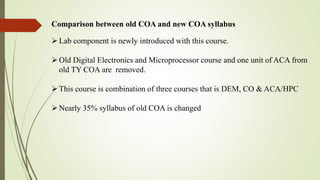
Comparison between old COA and new COA syllabus
Lab component is newly introduced with this course.
Old Digital Electronics and Microprocessor course and one unit of ACA from
old TY COA are removed.
This course is combination of three courses that is DEM, CO & ACA/HPC
Nearly 35% syllabus of old COA is changed
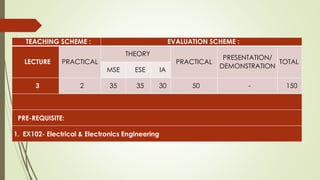
TEACHING SCHEME : EVALUATION SCHEME :
LECTURE PRACTICAL
THEORY
PRACTICAL
PRESENTATION/
DEMONSTRATION
TOTAL
MSE ESE IA
3 2 35 35 30 50 - 150
PRE-REQUISITE:
1. EX102- Electrical & Electronics Engineering
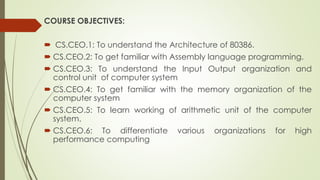
COURSE OBJECTIVES:
 CS.CEO.1: To understand the Architecture of 80386.
 CS.CEO.2: To get familiar with Assembly language programming.
 CS.CEO.3: To understand the Input Output organization and
control unit of computer system
 CS.CEO.4: To get familiar with the memory organization of the
computer system
 CS.CEO.5: To learn working of arithmetic unit of the computer
system.
 CS.CEO.6: To differentiate various organizations for high
performance computing
COURSE OUTCOMES:
Students successfully completing the course will be able to
 CS.CO.1: Explain the architecture of the 80386 processor.
 CS CO.2: Design and write assembly language programs for
different tasks.
 3CS.CO.3: Illustrate IO organizations and control unit.
 CS.CO.4: Analyze various memory organization techniques such as
Segmentation, Paging in the computer system.
 CS.CO.5: Illustrate arithmetic operations.
 CS.CO.6 : Compare various parallel processing architectures and
environments
THEORY:
Architecture of 80386 Processor 6 Hours
App/System/Case study:
Pentium processors
Contents:
80386 Architecture, Features of 80386, Registers, Global Descriptor
Table, Local Descriptor Table, Interrupt Descriptor Table, Data Types,
80386 addressing modes, CISC, RISC. Intel core i9 processor
Self study: Pentium processor architecture
Further Reading: Intel core i9 processor architecture
Unit II Input/output organization and Control unit 6 Hours
App/System/Case study:
Input/output Devices
Contents:
Input-Output Organization: Accessing I/O devices, Interrupts, direct
memory access. Buses. Standard IO interfaces, PCI, SCSI.
Control Unit- Basic concepts, Microprogrammed control, Hardwired
control, Pipeline control.
Self Study: Interface Circuits.
Further reading: USB.
Unit III The Memory System 5 Hours
App/System/Case study:
Memory hierarchy
Contents:
Basic concepts, semiconductor RAM memories, read-only
memories, speed, size and cost, cache memories, DRAM ,
SRAM,RAID, virtual memory. SSD.
Self Study: Secondary storage
Further reading: Flash memory
Unit IV Segmentation,Paging and Multitasking 9 Hours
App/System/Case study:
MMU in i7 Processor
Contents:
Segmentation – Introduction, support registers, related instructions, descriptors,
memory management through segmentation, logical to linear address
translations, protection by segmentation, privilege-level, protection related
instructions, inter-privilege level, transfer control, Paging-support registers, related
data structures ,linear to physical address translation ,TLB ,page level
protection.
Multitasking - support registers, related data structures, Task switching, Nested
task.
Self Study: Protected mode instructions
Further reading: Segmentation and Paging in Pentium Processor
Unit V Arithmetic Operations 6 Hours
App/System/Case study:
Binary representation of program
Contents:
Design of Fast Adders, Addition of positive numbers, Addition and
Subtraction of Signed Numbers, Multiplication of Positive Numbers,
Signed Operand Multiplication, Fast Multiplication, Floating-point
Numbers and Operations.
Self Study: Integer division
Further reading: Floating point processor architecture.
Unit VI Pipelining 6 Hours
App/System/Case study:
Ultra SPARC II Architecture
Contents:
Flynn's Classification, Basic Concepts, Data Hazards, Instruction
hazards, influence on instruction sets, data path and control
considerations, Superscalar, Performance considerations, SIMD
GPU architecture.
Self Study: SMP Architecture
Further reading: CC-NUMA Architecture.
TEXT BOOK:
1.Douglas V. Hall, “Microprocessors and Interfacing Programming and Hardware”,
8086.80286.80386.80486, Second Edition, Tata McGraw Hil
2. Intel 80386 Programmer's Reference Manual 1986, Intel Corporation, Order no.:
231630-011, December 1995.
3. Barry B. Brey, “The Intel Microprocessors: 8086/8088, 80186/80188, 80286, 80386,
80486, Pentium, Pentium pro Processor, Pentium II, Pentium III, Pentium 4, and
Core2 ... - Architecture, Programming, and Interfacing”.
4. W. Stallings, “Computer Organization and Architecture: Designing for
performance”, Pearson Education/ Prentice Hall of India, 2003, ISBN 978-93-325-
1870-4, 7th Edition.
5. Zaky S, Hamacher, “Computer Organization”, 5th Edition, McGraw-Hill
Publications, 2001, ISBN- 978-1-25-900537-5, 5th Edition.
REFERENCES:
1. M Morris Mano “Digital Logic and Computer Design” 1/e
Pearson, June 2016.
2. Kauffmann, “Computer System Architecture” by M. Mano, 2001,
Prentice-Hall ISBN 72157661505664197
3. John P Hays, “Computer Architecture and Organization”,
McGraw-Hill Publication, 1998, ISBN:9781259028564, 3rd Edition.
Type Examination Syllabus Marks Total Marks
MSE
Unit No. 1,2
& 3
35
ESE
Unit No. 1 to
6
35
Internal
Assessment
Unit No. 1 to
6
60
Continuous
Assessment
Practical
List
80 (10
marks per
practical
title)
End Sem
Assessment
Practical
List
40
Written exam /Online
examination
Activity, Assignments,
Quiz, Presentations etc.
Written exam /Online
examination 100
EXAMINATION SCHEME
Practical Exam/
Demonstration/ Report/
Review
Writing
Practical
performance
35
30
15
35
Mode of Assessment
Weightage in
Final Score
35
50
Practical
(CS229L)
Theory
(CS229)
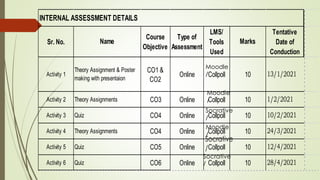
Sr. No.
Course
Objective
Type of
Assessment
LMS/
Tools
Used
Tentative
Date of
Conduction
Activity 1
CO1 &
CO2
Online Collpoll
Activity 2 CO3 Online Collpoll
Activity 3 CO4 Online Collpoll
Activity 4 CO4 Online Collpoll
Activity 5 CO5 Online Collpoll
Activity 6 CO6 Online Collpoll
10/2/2021
24/3/2021
12/4/2021
28/4/2021
13/1/2021
1/2/2021
10
10
10
10
INTERNAL ASSESSMENT DETAILS
Name
Theory Assignment & Poster
making with presentaion
Theory Assignments
Quiz
Theory Assignments
Quiz
Marks
10
10
Quiz
Moodle
/
Socrative
/
Non graded activities
Guest lectures
Flipped classroom, Jigsaw activities
Field visit
Computer assembling and maintenance workshop
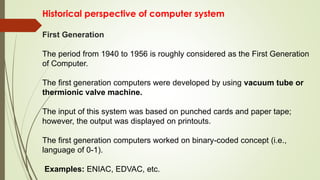
Historical perspective of computer system
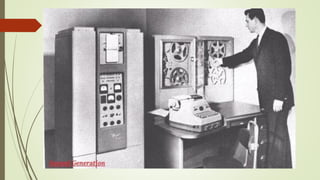
First Generation
The period from 1940 to 1956 is roughly considered as the First Generation
of Computer.
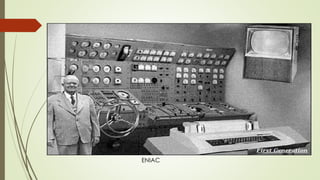
The first generation computers were developed by using vacuum tube or
thermionic valve machine.
The input of this system was based on punched cards and paper tape;
however, the output was displayed on printouts.
The first generation computers worked on binary-coded concept (i.e.,
language of 0-1).
Examples: ENIAC, EDVAC, etc.
ENIAC
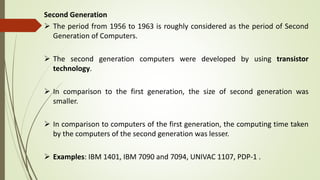
Second Generation
 The period from 1956 to 1963 is roughly considered as the period of Second
Generation of Computers.
 The second generation computers were developed by using transistor
technology.
 In comparison to the first generation, the size of second generation was
smaller.
 In comparison to computers of the first generation, the computing time taken
by the computers of the second generation was lesser.
 Examples: IBM 1401, IBM 7090 and 7094, UNIVAC 1107, PDP-1 .
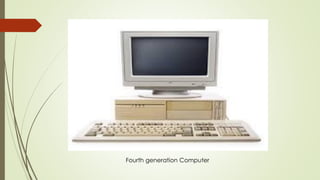
Fourth generation Computer
Fifth Generation
 The period 2010 to till date and beyond, roughly considered as the period of
fifth generation of computers.
 By the time, the computer generation was being categorized on the basis of
hardware only, but the fifth generation technology also included software.
 The computers of the fifth generation had high capability and large memory
capacity.
 Working with computers of this generation was fast and multiple tasks could
be performed simultaneously.
 Some of the popular advanced technologies of the fifth generation include
Artificial intelligence, Quantum computation, Nano technology, Parallel
processing, etc.
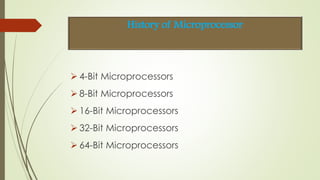
 4-Bit Microprocessors
 8-Bit Microprocessors
 16-Bit Microprocessors
 32-Bit Microprocessors
 64-Bit Microprocessors
History of Microprocessor
Introductıon
It had number of employees around 110,800 (2020) 77.87 billion U.S. dollars revenue
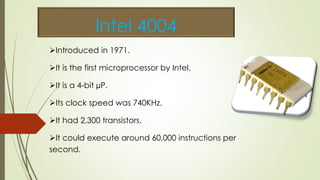
Intel 4004
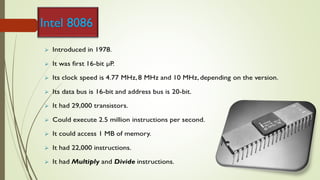
Introduced in 1971.
It is the first microprocessor by Intel.
It is a 4-bit µP.
Its clock speed was 740KHz.
It had 2,300 transistors.
It could execute around 60,000 instructions per
second.
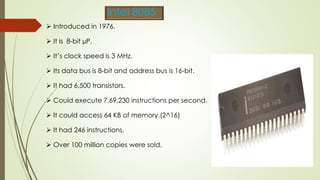
 Introduced in 1976.
 It is 8-bit µP.
 It’s clock speed is 3 MHz.
 Its data bus is 8-bit and address bus is 16-bit.
 It had 6,500 transistors.
 Could execute 7,69,230 instructions per second.
 It could access 64 KB of memory.(2^16)
 It had 246 instructions.
 Over 100 million copies were sold.
Intel 8085
Intel 8086
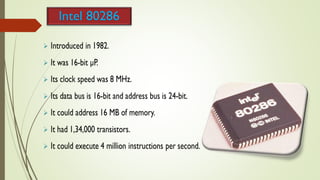
Intel 80286
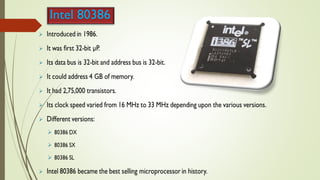
Intel 80386
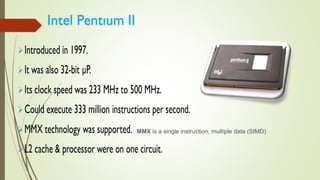
MMX is a single instruction, multiple data (SIMD)
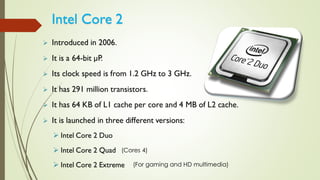
(Cores 4)
(For gaming and HD multimedia)
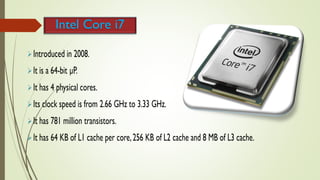
Intel Core i7
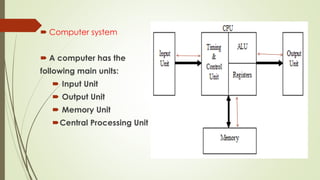
 Computer system
 A computer has the
following main units:
 Input Unit
 Output Unit
 Memory Unit
Central Processing Unit
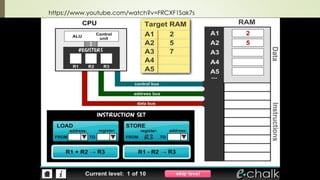
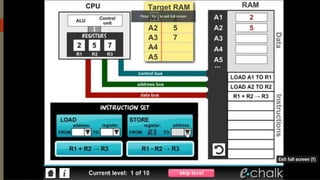
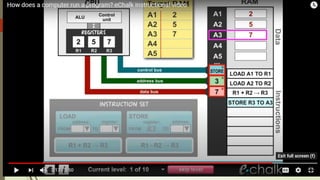
https://www.youtube.com/watch?v=FRCXF1Sak7s
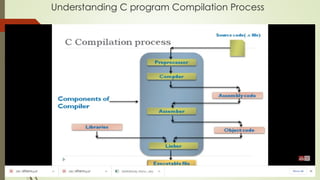
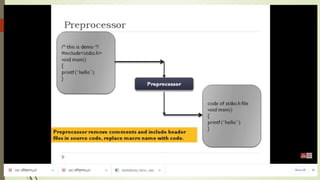
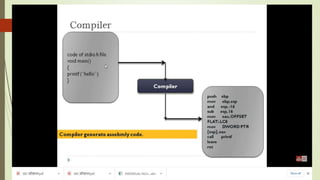
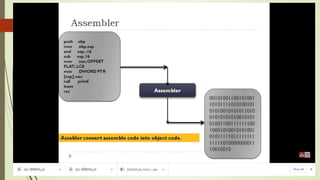
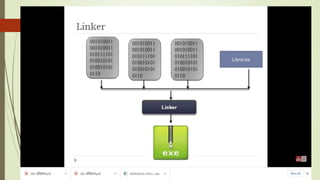
Understanding C program Compilation Process
Architecture of 80386 Processor
Salient Features of 80386
 First 32-bit microprocessor in the x86 family
 80286 architecture expanded for 32 bit operation
 32-bit Processor
 32-bit ALU, 32-bit Registers, 32-bit Data Bus, 32-bit Address Bus
 Uses 32-bit address for memory and 16-bit address for I/O ports
 Maximum physical memory 4 Gb.
 Maximum number of I/O ports 64 K.
 Built-in Memory Management Unit to support Segmentation, Paging and
Virtual Memory.(e.g. Working of post office)
 It supports 8/16/32 bit data operands (downwards compatibility)
 It has 32-bit internal registers
 It supports 32-bit data bus and 32-bit non-multiplexed address bus
 It supports
Physical Address of 4GB
Virtual Address of 64TB (16384*4 GB)
Maximum Segment size of 4GB
 It operates in 3 different modes
Real
Protected
Virtual 8086
 MMU provides virtual memory, paging and 4 levels of
protection
 Clock Frequency : 16 MHz,20MHz,25 MHz and 33MHz
 It has 132/100 pin package
 Pipelined architecture (Car assembly).
 It can operate on 17 different data types (rich).
 It support numeric 80387co-processor.
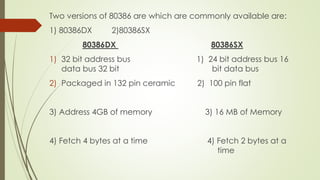
Two versions of 80386 are which are commonly available are:
1) 80386DX 2)80386SX
80386DX 80386SX
1) 32 bit address bus 1) 24 bit address bus 16
data bus 32 bit bit data bus
2) Packaged in 132 pin ceramic 2) 100 pin flat
3) Address 4GB of memory 3) 16 MB of Memory
4) Fetch 4 bytes at a time 4) Fetch 2 bytes at a
time
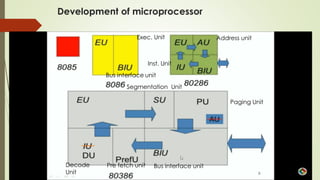
Development of microprocessor
Decode
Unit
Bus interface unit
Address unit
Inst. Unit
Exec. Unit
Segmentation Unit
Paging Unit
Pre fetch unit
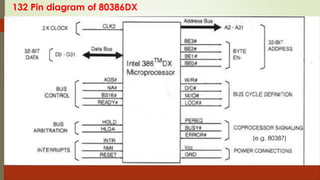
132 Pin diagram of 80386DX
(e.g. 80387)
W/R#: The write / read output distinguishes the write and read
cycles from one another.
• D/C#: This data / control output pin distinguishes between a
data transfer cycle from a machine control cycle.
• M/IO#: This output pin differentiates between the memory
and I/O cycles.
• LOCK#: The LOCK# output pin enables the CPU to prevent
the other bus masters from gaining the control of the system
bus.
• NA#: The next address input pin, if activated, allows address
pipelining, during 80386 bus cycles
ADS#: The address status output pin indicates that the address bus
and bus cycle definition pins( W/R#, D/C#, M/IO#, BE0#to BE3# )
are carrying the respective valid signals.
• READY#: The ready signals indicates to the CPU that the previous
bus cycle has been terminated and the bus is ready for the next
cycle. The signal is used to insert WAIT states in a bus cycle and is
useful for interfacing of slow devices with CPU.
• VCC: These are system power supply lines.
• VSS: These return lines for the power supply.
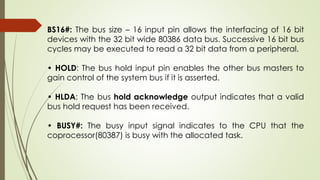
BS16#: The bus size – 16 input pin allows the interfacing of 16 bit
devices with the 32 bit wide 80386 data bus. Successive 16 bit bus
cycles may be executed to read a 32 bit data from a peripheral.
• HOLD: The bus hold input pin enables the other bus masters to
gain control of the system bus if it is asserted.
• HLDA: The bus hold acknowledge output indicates that a valid
bus hold request has been received.
• BUSY#: The busy input signal indicates to the CPU that the
coprocessor(80387) is busy with the allocated task.
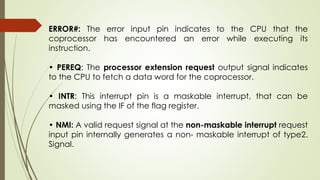
ERROR#: The error input pin indicates to the CPU that the
coprocessor has encountered an error while executing its
instruction.
• PEREQ: The processor extension request output signal indicates
to the CPU to fetch a data word for the coprocessor.
• INTR: This interrupt pin is a maskable interrupt, that can be
masked using the IF of the flag register.
• NMI: A valid request signal at the non-maskable interrupt request
input pin internally generates a non- maskable interrupt of type2.
Signal.
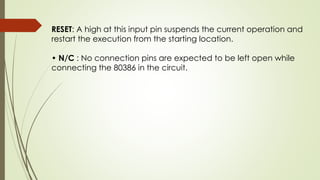
RESET: A high at this input pin suspends the current operation and
restart the execution from the starting location.
• N/C : No connection pins are expected to be left open while
connecting the 80386 in the circuit.
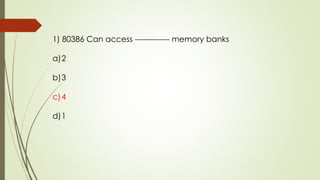
Quiz Time
1) 80386 Can access ------------- memory banks
a)2
b)3
c)4
d)1
1) 80386 Can access ------------- memory banks
a)2
b)3
c)4
d)1
2) 80386DX has -------- bit data bus and -------- bit address bus.
a)32 & 30
b)32 & 16
c)16 & 32
d)32 & 32
2) 80386 has -------- bit data bus and -------- bit address bus.
a)32 & 30
b)32 & 16
c)16 & 32
d)32 & 32
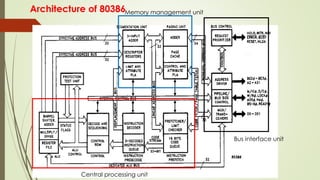
Architecture of 80386
Central processing unit
Memory management unit
Bus interface unit
The Internal Architecture of 80386 is divided into 3 main sections.
 1. Central processing unit(CPU)
a. Execution Unit
b. Instruction Unit
 2. Memory management unit(MMU)
a. Segmentation Unit
b. Paging Unit
 3. Bus interface unit(BIU)
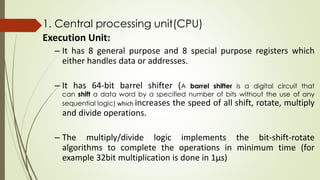
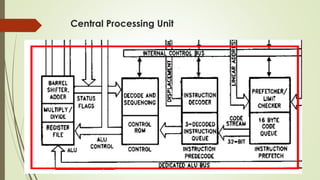
1. Central processing unit(CPU)
Execution Unit:
– It has 8 general purpose and 8 special purpose registers which
either handles data or addresses.
– It has 64-bit barrel shifter (A barrel shifter is a digital circuit that
can shift a data word by a specified number of bits without the use of any
sequential logic) which increases the speed of all shift, rotate, multiply
and divide operations.
– The multiply/divide logic implements the bit-shift-rotate
algorithms to complete the operations in minimum time (for
example 32bit multiplication is done in 1µs)
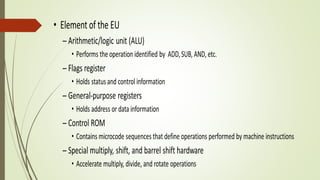
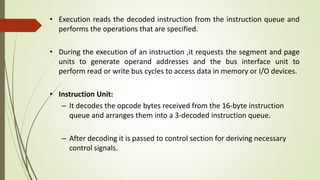
• Execution reads the decoded instruction from the instruction queue and
performs the operations that are specified.
• During the execution of an instruction ,it requests the segment and page
units to generate operand addresses and the bus interface unit to
perform read or write bus cycles to access data in memory or I/O devices.
• Instruction Unit:
– It decodes the opcode bytes received from the 16-byte instruction
queue and arranges them into a 3-decoded instruction queue.
– After decoding it is passed to control section for deriving necessary
control signals.
Central Processing Unit
Memory Management Unit
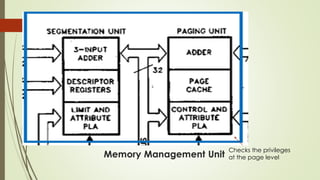
• MMU consists of a segmentation unit and paging unit.
• Segmentation Unit:
– It allows the use of two address components - segment and offset –
for relocability and sharing of code and data.
– It allows a maximum segment size of 4GB.
– It provides a 4-level protection mechanism for protecting and
isolating system’s code and data from those of application program.
– The limit and attribute PLA (Programmable Logical Array) checks
segment limits and attributes at segment level to avoid invalid accesses
to code and data in memory segment.
• Paging Unit
– It organizes physical memory in terms of pages of 4KB size.
– It works under the control of segmentation unit.
– It converts linear addresses into physical addresses.
– The control and attribute PLA checks privileges at page level.
Checks the privileges
at the page level
Bus Interface Unit
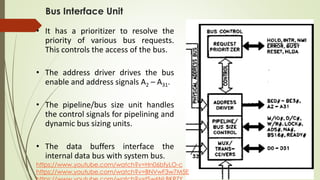
• It has a prioritizer to resolve the
priority of various bus requests.
This controls the access of the bus.
• The address driver drives the bus
enable and address signals A2 – A31.
• The pipeline/bus size unit handles
the control signals for pipelining and
dynamic bus sizing units.
• The data buffers interface the
internal data bus with system bus.
https://www.youtube.com/watch?v=Hn06bfyLO-c
https://www.youtube.com/watch?v=BNVwF3w7M5E
Quiz Time
1) 80386 Architecture is divided in --------- main sections
A) 4
B) 3
C) 2
D) 5
1) 80386 Architecture is divided in --------- main sections
A) 4
B) 3
C) 2
D) 5
2) 80386 organizes physical memory in terms of pages of ----------------- size.
a) 4 GB
b) 32 KB
c) 4 KB
d) 4 Byte
2) 80386 organizes physical memory in terms of pages of ----------------- size.
a) 4 GB
2) 32 KB
c) 4 KB
d) 4 Byte
• The Intel 386 DX has 32 register resources in the following categories:
– General Purpose Registers
– Segment Registers
– Instruction Pointer and Flags
– Control Registers
– System Address Registers
– Debug Registers
– Test Registers
General Purpose Registers
• Hold data or address values.
• It supports data of 1, 8, 16, 32 and 64 bits.
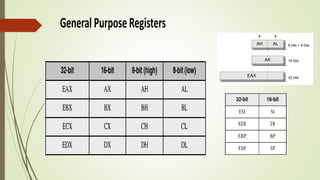
• 32-bit registers(8) : EAX, EBX, ECX, EDX, ESI, EDI, EBP, and ESP.
• The least significant 16 bits of the registers can be accessed as in
8086 with names of the registers AX, BX, CX, DX, SI, DI, BP, and SP.
• When accessed as a 16-bit operand, the upper 16 bits of the register
are neither used nor changed.
• 8-bit operations can be performed with AL, BL, CL and DL registers.
• The higher bytes are AH, BH, CH and DH.
• The individual byte accessibility offers flexibility for data operations.
Segment Registers
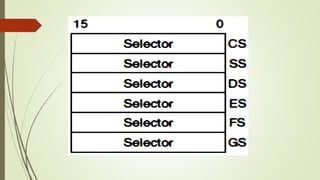
• Segment register (6) − 16 bits CS, DS, SS , ES , FS & GS etc.
• It holds the addresses of instructions and data in memory,
which are used by the processor to access memory locations.
• The segment registers are
– CS indicates the current code segment
– SS indicates the current stack segment
– DS, ES, FS and GS indicate four current data segments.
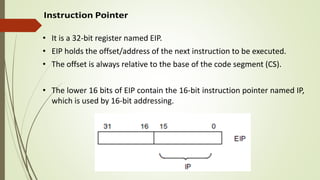
• It is a 32-bit register named EIP.
• EIP holds the offset/address of the next instruction to be executed.
• The offset is always relative to the base of the code segment (CS).
• The lower 16 bits of EIP contain the 16-bit instruction pointer named IP,
which is used by 16-bit addressing.
Quiz Time
1) General Purpose Registers supports ----------- bit/bits data size
a) 1
b) 8
c) 64
d) All the above
1) General Purpose Registers supports ----------- bit/bits data size
a) 1
b) 8
c) 64
d) All the above
2) In 80386, segment registers are --------- of ---------- bit size each.
a) 6 & 8
b) 6 & 16
c) 8 & 8
d) 8 & 16
2) In 80386, segment registers are --------- of ---------- bit size each.
a) 6 & 8
b) 6 & 16
c) 8 & 8
d) 8 & 16
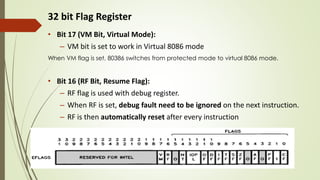
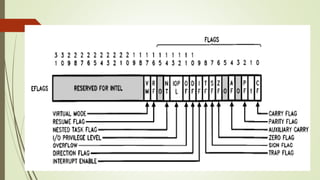
32 bit Flag Register
• Bit 17 (VM Bit, Virtual Mode):
– VM bit is set to work in Virtual 8086 mode
When VM flag is set, 80386 switches from protected mode to virtual 8086 mode.
• Bit 16 (RF Bit, Resume Flag):
– RF flag is used with debug register.
– When RF is set, debug fault need to be ignored on the next instruction.
– RF is then automatically reset after every instruction
• Bit 15 : Reserved
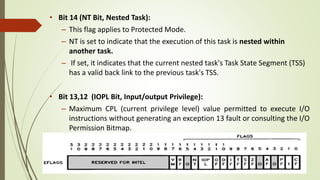
• Bit 14 (NT Bit, Nested Task):
– This flag applies to Protected Mode.
– NT is set to indicate that the execution of this task is nested within
another task.
– If set, it indicates that the current nested task's Task State Segment (TSS)
has a valid back link to the previous task's TSS.
• Bit 13,12 (IOPL Bit, Input/output Privilege):
– Maximum CPL (current privilege level) value permitted to execute I/O
instructions without generating an exception 13 fault or consulting the I/O
Permission Bitmap.
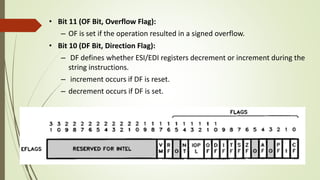
• Bit 11 (OF Bit, Overflow Flag):
– OF is set if the operation resulted in a signed overflow.
• Bit 10 (DF Bit, Direction Flag):
– DF defines whether ESI/EDI registers decrement or increment during the
string instructions.
– increment occurs if DF is reset.
– decrement occurs if DF is set.
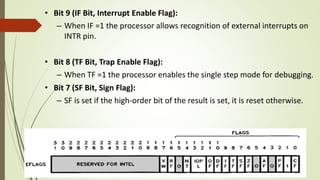
• Bit 9 (IF Bit, Interrupt Enable Flag):
– When IF =1 the processor allows recognition of external interrupts on
INTR pin.
• Bit 8 (TF Bit, Trap Enable Flag):
– When TF =1 the processor enables the single step mode for debugging.
• Bit 7 (SF Bit, Sign Flag):
– SF is set if the high-order bit of the result is set, it is reset otherwise.
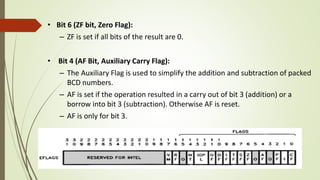
• Bit 6 (ZF bit, Zero Flag):
– ZF is set if all bits of the result are 0.
• Bit 4 (AF Bit, Auxiliary Carry Flag):
– The Auxiliary Flag is used to simplify the addition and subtraction of packed
BCD numbers.
– AF is set if the operation resulted in a carry out of bit 3 (addition) or a
borrow into bit 3 (subtraction). Otherwise AF is reset.
– AF is only for bit 3.
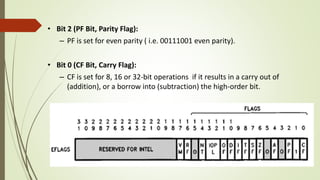
• Bit 2 (PF Bit, Parity Flag):
– PF is set for even parity ( i.e. 00111001 even parity).
• Bit 0 (CF Bit, Carry Flag):
– CF is set for 8, 16 or 32-bit operations if it results in a carry out of
(addition), or a borrow into (subtraction) the high-order bit.
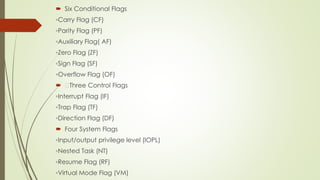
 Six Conditional Flags
◦Carry Flag (CF)
◦Parity Flag (PF)
◦Auxiliary Flag( AF)
◦Zero Flag (ZF)
◦Sign Flag (SF)
◦Overflow Flag (OF)
 Three Control Flags
◦Interrupt Flag (IF)
◦Trap Flag (TF)
◦Direction Flag (DF)
 Four System Flags
◦Input/output privilege level (IOPL)
◦Nested Task (NT)
◦Resume Flag (RF)
◦Virtual Mode Flag (VM)
Quiz Time
1) In 80386, 32 bit Flag Register _________ bits are reserved for Intel.
a) 15
b) 14
c) 16
d) 17
1) In 80386, 32 bit Flag Register _________ bits are reserved for Intel.
a) 15
b) 14
c) 16
d) 17
2 ) In 80386 , _________ bit is used for virtual mode.
a) 15
b) 14
c) 16
d) 17
2 )In 80386 , _________ bit is used for virtual mode.
a) 15
b) 14
c) 16
d) 17
3 ) In 80386 , there are _________ system flags.
a) 5
b) 4
c) 6
d) 3
3 )In 80386 , there are _________ system flags.
a) 5
b) 4
c) 6
d) 3
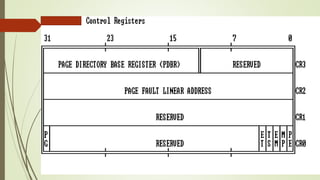
Control Registers
• Intel 386 DX has 4 control registers (CR0, CR1 ,CR2 & CR3) of 32 bits to hold
machine state of a global nature.
• These registers along with System Address Registers hold machine state that
affects all tasks in the system.
• To access Control Registers, load and store instructions are defined.
• CR0 contains 6 defined bits for control and status purposes.
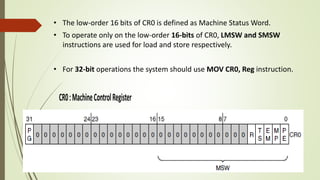
• The low-order 16 bits of CR0 is defined as Machine Status Word.
• To operate only on the low-order 16-bits of CR0, LMSW and SMSW
instructions are used for load and store respectively.
• For 32-bit operations the system should use MOV CR0, Reg instruction.
• Bit 31 (PG Bit, Paging Enable) : The PG bit is set to enable the on-chip paging
unit.
• Bit 4 (Reserved) : This bit is reserved by Intel.
• Bit 3 (TS Bit, Task Switched) : TS is automatically set whenever a task switch
operation is performed.
• Bit 2 (EM Bit, Emulate Coprocessor) :The EM bit indicates whether
coprocessor functions are to be emulated.
• Bit 1 (MP Bit, Monitor Coprocessor) :The EM and MP flags of CR0 control
how the processor reacts to coprocessor instructions.
• The MOV instruction can be executed only at privilege level zero (OS
level).
• Bit 0 (PE Bit, Protection Enable) :
– PE =1, enable the Protected Mode.
– If PE =0, processor operates in Real Mode.
Trap-and-emulate is a technique used by the virtual machine to emulate privileged
instructions and registers.
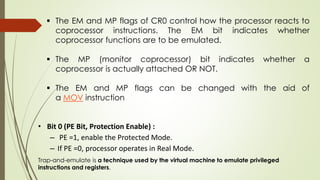
 The EM and MP flags of CR0 control how the processor reacts to
coprocessor instructions. The EM bit indicates whether
coprocessor functions are to be emulated.
 The MP (monitor coprocessor) bit indicates whether a
coprocessor is actually attached OR NOT.
 The EM and MP flags can be changed with the aid of
a MOV instruction
• CR1 is reserved for use in future Intel processors
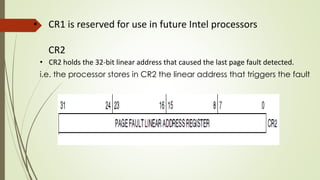
CR2
• CR2 holds the 32-bit linear address that caused the last page fault detected.
i.e. the processor stores in CR2 the linear address that triggers the fault
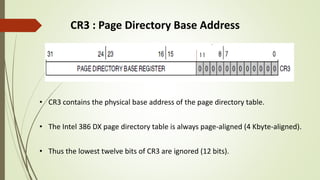
CR3 : Page Directory Base Address
• CR3 contains the physical base address of the page directory table.
• The Intel 386 DX page directory table is always page-aligned (4 Kbyte-aligned).
• Thus the lowest twelve bits of CR3 are ignored (12 bits).
11
1) In 80386, ------ control register is used for page fault linear
address.
a) CR0
b) CR1
c) CR2
d) CR3
Quiz Time
1) In 80386, ------ control register is used for page fault linear
address.
a) CR0
b) CR1
c) CR2
d) CR3
2) In 80386, ------ bits of CR0 register are used while other bits are
reserved.
a) 5
b) 4
c) 6
d) 3
2) In 80386, ------ bits of CR0 register are used while other bits are
reserved.
a)5
b) 4
c) 6
d) 3
3) -------- bits is the size of Page Directory Base Register in CR3.
a)18
b) 20
c) 22
d) 24
3) -------- bits is the size of Page Directory Base Register in CR3.
a)18
b) 20
c) 22
d) 24
4) In 80386, ---------- is the size of Machine Status Word (MSW)
a) 8
b) 16
c) 18
d) 17
4) In 80386, ---------- is the size of Machine Status Word
a) 8
b) 16
c) 18
d) 17
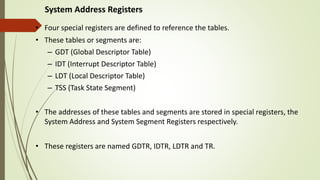
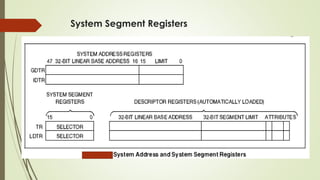
System Address Registers
• Four special registers are defined to reference the tables.
• These tables or segments are:
– GDT (Global Descriptor Table)
– IDT (Interrupt Descriptor Table)
– LDT (Local Descriptor Table)
– TSS (Task State Segment)
• The addresses of these tables and segments are stored in special registers, the
System Address and System Segment Registers respectively.
• These registers are named GDTR, IDTR, LDTR and TR.
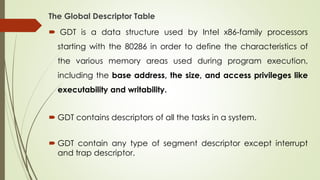
The Global Descriptor Table
 GDT is a data structure used by Intel x86-family processors
starting with the 80286 in order to define the characteristics of
the various memory areas used during program execution,
including the base address, the size, and access privileges like
executability and writability.
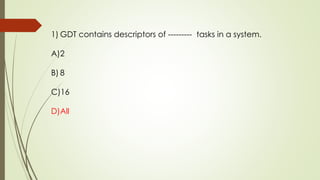
 GDT contains descriptors of all the tasks in a system.
 GDT contain any type of segment descriptor except interrupt
and trap descriptor.
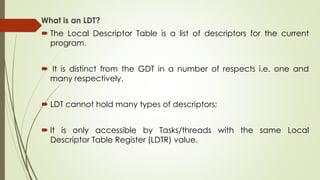
What is an LDT?
 The Local Descriptor Table is a list of descriptors for the current
program.
 It is distinct from the GDT in a number of respects i.e. one and
many respectively.
 LDT cannot hold many types of descriptors;
 It is only accessible by Tasks/threads with the same Local
Descriptor Table Register (LDTR) value.
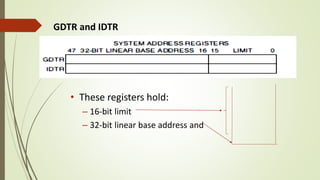
GDTR and IDTR
• These registers hold:
– 16-bit limit
– 32-bit linear base address and
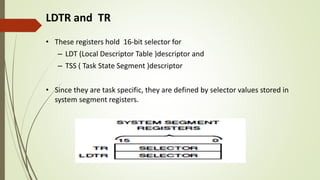
LDTR and TR
• These registers hold 16-bit selector for
– LDT (Local Descriptor Table )descriptor and
– TSS ( Task State Segment )descriptor
• Since they are task specific, they are defined by selector values stored in
system segment registers.
System Segment Registers
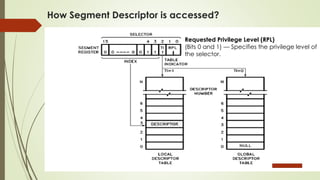
How Segment Descriptor is accessed?
Requested Privilege Level (RPL)
(Bits 0 and 1) — Specifies the privilege level of
the selector.
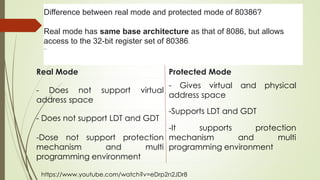
Real Mode Protected Mode
- Does not support virtual
address space
- Gives virtual and physical
address space
- Does not support LDT and GDT
-Dose not support protection
mechanism and multi
programming environment
-It supports protection
mechanism and multi
programming environment
Difference between real mode and protected mode of 80386?
Real mode has same base architecture as that of 8086, but allows
access to the 32-bit register set of 80386.
...
-Supports LDT and GDT
https://www.youtube.com/watch?v=eDrp2n2JDr8
Quiz Time
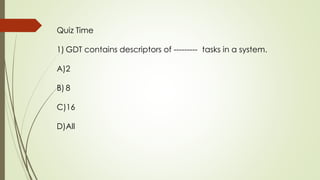
1) GDT contains descriptors of --------- tasks in a system.
A)2
B) 8
C)16
D)All
1) GDT contains descriptors of --------- tasks in a system.
A)2
B) 8
C)16
D)All
2) ------- bits is the size of GDTR/IDTR
A)32
B) 24
C)8
D)48
2) ------- bits is the size of GDTR/IDTR
A)32
B) 24
C)8
D)48
3) To select LDT/GDT -------- bit is used in segment register
a)1
b)2
c)3
d)4
3) To select LDT/GDT -------- bit is used in segment register
a)1
b)2
c)3
d)4
4) In 80386, ---------- is the size of descriptor register
a)4 byte
b)2 byte
c)8 byte
d)1 byte
In 803686, ---------- is the size of descriptor register in 803686
a)4 byte
b)2 byte
c)8 byte
d)1 byte
Segment selector
 In Real mode 16 bit segment registers hold the starting address of
the segment.
 In Protected mode these segment registers are used as segment
selector because it selects a segment descriptor.
 Segment descriptor is a structure of 8 bytes(64 bits) that is used to
describe and locate segment present in memory from descriptor
table.
 Selector is used to index (point) a descriptor from the table of
descriptors.
Hence
 Every memory access which a program can perform always
goes through a segment selector.
 In order to reference a segment, a program must use its index
inside the GDT or the LDT.
 Such an index is called a segment selector (or selector).
 The selector must generally be loaded into a segment register to
be used.
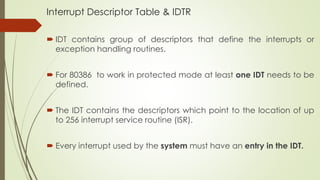
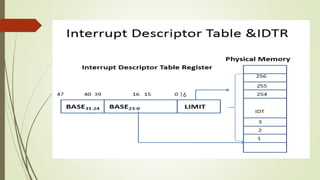
Interrupt Descriptor Table & IDTR
 IDT contains group of descriptors that define the interrupts or
exception handling routines.
 For 80386 to work in protected mode at least one IDT needs to be
defined.
 The IDT contains the descriptors which point to the location of up
to 256 interrupt service routine (ISR).
 Every interrupt used by the system must have an entry in the IDT.
16
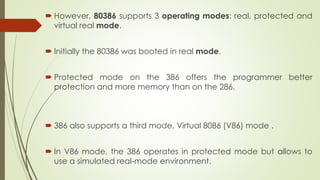
 However, 80386 supports 3 operating modes: real, protected and
virtual real mode.
 Initially the 80386 was booted in real mode.
 Protected mode on the 386 offers the programmer better
protection and more memory than on the 286.
 386 also supports a third mode, Virtual 8086 (V86) mode .
 In V86 mode, the 386 operates in protected mode but allows to
use a simulated real-mode environment.
Quiz Time
1) Segment descriptor is a structure of ------------------bytes
A)4
B) 2
C)8
D)16
1) Segment descriptor is a structure of ------------------ bytes
A)4
B) 2
C)8
D)16
2) IDT contains the descriptors which point to the location of
up to ----------- interrupt service routine.
a)64
b)128
c)256
d)32
2) IDT contains the descriptors which point to the location of up
to ----------- interrupt service routine.
a)64
b)128
c)256
d)32
Data Types
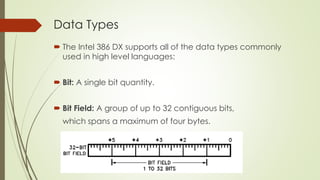
 The Intel 386 DX supports all of the data types commonly
used in high level languages:
 Bit: A single bit quantity.
 Bit Field: A group of up to 32 contiguous bits,
which spans a maximum of four bytes.
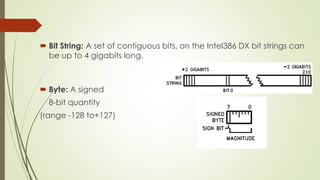
 Bit String: A set of contiguous bits, on the Intel386 DX bit strings can
be up to 4 gigabits long.
 Byte: A signed
8-bit quantity
(range -128 to+127)
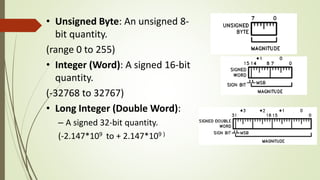
• Unsigned Byte: An unsigned 8-
bit quantity.
(range 0 to 255)
• Integer (Word): A signed 16-bit
quantity.
(-32768 to 32767)
• Long Integer (Double Word):
– A signed 32-bit quantity.
(-2.147*109 to + 2.147*109 )
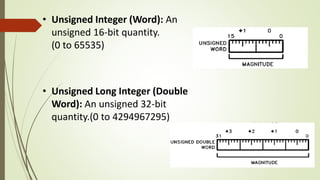
• Unsigned Integer (Word): An
unsigned 16-bit quantity.
(0 to 65535)
• Unsigned Long Integer (Double
Word): An unsigned 32-bit
quantity.(0 to 4294967295)
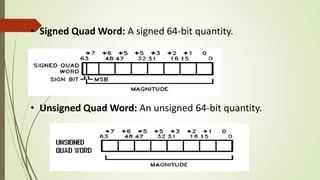
• Signed Quad Word: A signed 64-bit quantity.
• Unsigned Quad Word: An unsigned 64-bit quantity.
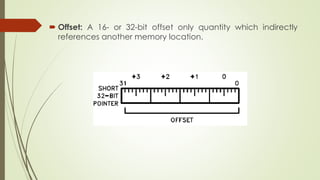
 Offset: A 16- or 32-bit offset only quantity which indirectly
references another memory location.
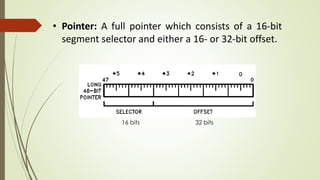
• Pointer: A full pointer which consists of a 16-bit
segment selector and either a 16- or 32-bit offset.
16 bits 32 bits
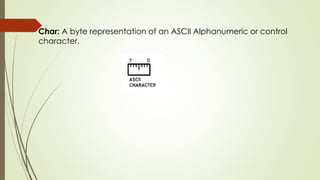
Char: A byte representation of an ASCII Alphanumeric or control
character.
Quiz Time
1) Signed quad word data type is having -------- bit size.
a)32
b)128
c)24
d)64
Signed quad word data type is having -------- bit size.
a)32
b)128
c)24
d)64
Data Addressing Modes
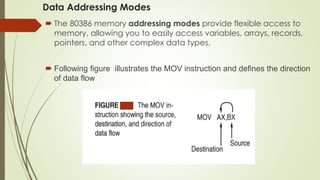
 The 80386 memory addressing modes provide flexible access to
memory, allowing you to easily access variables, arrays, records,
pointers, and other complex data types.
 Following figure illustrates the MOV instruction and defines the direction
of data flow
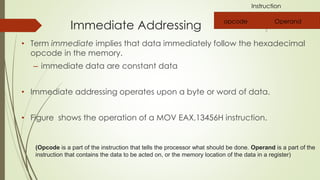
Immediate Addressing
• Term immediate implies that data immediately follow the hexadecimal
opcode in the memory.
– immediate data are constant data
• Immediate addressing operates upon a byte or word of data.
• Figure shows the operation of a MOV EAX,13456H instruction.
opcode Operand
(Opcode is a part of the instruction that tells the processor what should be done. Operand is a part of the
instruction that contains the data to be acted on, or the memory location of the data in a register)
Instruction
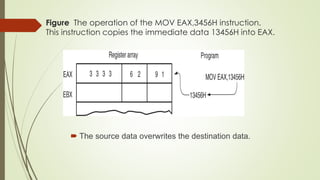
Figure The operation of the MOV EAX,3456H instruction.
This instruction copies the immediate data 13456H into EAX.
 The source data overwrites the destination data.
Register Addressing Mode
• The most common form of data addressing.
• The microprocessor contains these 8-bit register names used with
register addressing: AH, AL, BH, BL, CH, CL, DH, and DL.
• 16-bit register names: AX, BX, CX, DX, SP, BP, SI, and DI.
• In 80386 & above, extended 32-bit register names are: EAX,
EBX, ECX, EDX, ESP, EBP, EDI, and ESI.
• It is important for instructions, to use registers which are the
same size.
– never mix an 8-bit with a 16-bit register, an 8- or a 16-bit
register with a 32-bit register
– this is not allowed by the microprocessor and results in an
error when assembled
 for example Mov EAX, DX
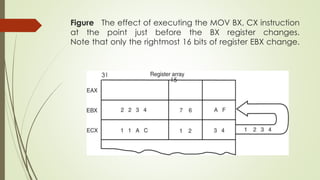
Figure The effect of executing the MOV BX, CX instruction
at the point just before the BX register changes.
Note that only the rightmost 16 bits of register EBX change.
15
31
• Figure shows the operation of the MOV BX, CX instruction.
• The source register’s contents do not change.
the destination register’s contents do change
• The contents of the destination register or destination memory
location change for all instructions except the CMP and TEST
instructions.
• The MOV BX, CX instruction does not affect the leftmost 16 bits of
register EBX.
 The remaining modes provide a mechanism for specifying the
effective address (EA)of an operand.
 The linear address consists of two components:
 The segment base address and
An effective address.
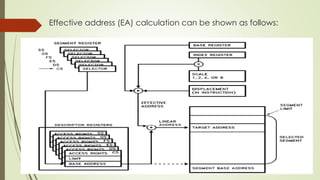
 The effective address is calculated by using four address elements:
DISPLACEMENT: An 8 bit or 32-bit immediate value
BASE: The contents of any general purpose register. It point to
the start of the local variable area.
INDEX: The index registers are used to access the elements of an
array, or a string of characters.
SCALE: The index register's value can be multiplied by a scale
factor, either 1, 2, 4 or 8.
Scaled index mode is especially useful for accessing arrays or
structures.
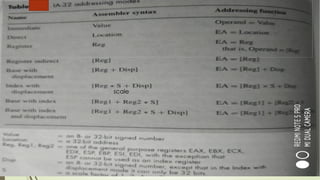
 Combinations of these 4 components make up the
additional addressing modes.
 The effective address (EA) of an operand is calculated
according to the following formula:
 EA = Base Register + (Index Register * Scaling) +
Displacement.
Effective address (EA) calculation can be shown as follows:
Direct Addressing Modes
• Applied to many instructions in a typical program.
• Two basic forms of direct data addressing:
– direct addressing, which applies to a MOV between a
memory location and AL, AX, or EAX registers.
– displacement addressing, which applies to almost any
instruction in the instruction set.
• Address is formed by adding the displacement to the default
data segment address or an alternate segment address.
Figure The operation of the MOV AL,[1234H] instruction
when DS=10000H .
• This instruction transfers a copy contents of memory location 11234H
into AL.
– the effective address is formed by adding
1234H (the offset address) and 10000H
Register Indirect Addressing Mode:
• Allows data to be addressed at any memory location through
an offset address held in any of the following registers: BP, BX, DI,
and SI.
• In addition, 80386 and above processors allow register indirect
addressing with any extended register except ESP.
 Indirect addressing often allows a program to refer to tabular
data located in memory.
 Figure 5 shows the table and the BX register used to
sequentially address each location in the table.
 To accomplish this task, load the starting location of the table
into the BX register with a MOV immediate instruction.
 After initializing the starting address of the table, use register
indirect addressing to store the 50 samples sequentially.
Figure 4 The operation of the MOV AX,[BX] instruction when BX =
1000H and DS = 0100H. Note that this instruction is shown after the
contents of memory are transferred to AX.
(100*10)
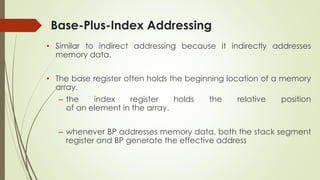
Base-Plus-Index Addressing
• Similar to indirect addressing because it indirectly addresses
memory data.
• The base register often holds the beginning location of a memory
array.
– the index register holds the relative position
of an element in the array.
– whenever BP addresses memory data, both the stack segment
register and BP generate the effective address
• Figure 6 shows how data are addressed by the
MOV DX,[BX + DI] instruction when the microprocessor operates
in the real mode.
• The Intel assembler requires this addressing mode appear as
[BX][DI] instead of [BX + DI].
• The MOV DX,[BX + DI] instruction is MOV DX,[BX][DI] for a
program written for the Intel ASM assembler.
Figure An example showing how the base-plus-index addressing
mode functions for the MOV DX,[BX + DI] instruction.
Notice that memory address 02010H is accessed because DS=0100H,
BX=1000H and DI=0010H.
scale
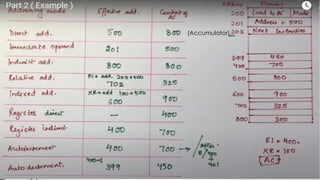
(Accumulator)
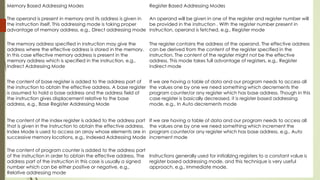
Memory Based Addressing Modes Register Based Addressing Modes
The operand is present in memory and its address is given in
the instruction itself. This addressing mode is taking proper
advantage of memory address, e.g., Direct addressing mode
An operand will be given in one of the register and register number will
be provided in the instruction . With the register number present in
instruction, operand is fetched, e.g., Register mode
The memory address specified in instruction may give the
address where the effective address is stored in the memory.
In this case effective memory address is present in the
memory address which is specified in the instruction, e.g.,
Indirect Addressing Mode
The register contains the address of the operand. The effective address
can be derived from the content of the register specified in the
instruction. The content of the register might not be the effective
address. This mode takes full advantage of registers, e.g., Register
indirect mode
The content of base register is added to the address part of
the instruction to obtain the effective address. A base register
is assumed to hold a base address and the address field of
the instruction gives displacement relative to the base
address, e.g., Base Register Addressing Mode
If we are having a table of data and our program needs to access all
the values one by one we need something which decrements the
program counter/or any register which has base address. Though in this
case register is basically decreased, it is register based addressing
mode, e.g., In Auto decrements mode
The content of the index register is added to the address part
that is given in the instruction to obtain the effective address.
Index Mode is used to access an array whose elements are in
successive memory locations, e.g., Indexed Addressing Mode
If we are having a table of data and our program needs to access all
the values one by one we need something which increment the
program counter/or any register which has base address, e.g., Auto
increment mode
The content of program counter is added to the address part
of the instruction in order to obtain the effective address. The
address part of the instruction in this case is usually a signed
number which can be either positive or negative, e.g.,
Relative addressing mode
Instructions generally used for initializing registers to a constant value is
register based addressing mode, and this technique is very useful
approach, e.g., Immediate mode.
CISC & RISC (Complex Instruction Set Computer & Reduced Instruction
Set Computer )
CISC
 In the early days of computer history, most computer families started with an
instruction set which was simple.
 The main reason for being simple then was the high cost of hardware/technology
and use.
 The hardware cost has dropped and the software cost has gone up steadily in the
past decades.
 Further more, the semantic gap between HLL features and computer architecture
has widened.
 Now a days more and more functions were built into the hardware, making the
instruction set large and complex.
 The growth of instruction sets was also increased because of the popularity of
using micro codes in some processors for special-purpose applications.
 A typical CISC instruction set contains approximately 120 to 350 instructions
using variable instruction/data formats, uses a small set of 8 to 24 general-
purpose registers (GPRs).
 Many HLL statements are directly implemented in hardware/firmware in a
CISC architecture.
 This may simplify the compiler development, improve execution efficiency,
and allow an extension from scalar instructions to vector instructions.
RISC
 We started with RISC instruction sets and gradually moved to CISC instruction sets
during the 1980s.
 After two decades of using CISC processors, computer users began to reevaluate
the performance relationship between instruction-set architecture and available
hardware/software technology.
 From many years computer scientists realized that only 25% of the instructions of a
complex instruction set are frequently used about 95% of the time.
 It means about 75% of hardware-supported instructions often are not used at all.
 Then why should we waste valuable chip area for rarely used instructions?
 It may be more advantageous to remove them completely from the hardware
and rely on software to implement them.
 Even if the software implementation is slow, the net result will be still a plus
due to their low frequency of use.
 Pushing rarely used instructions into software will vacate chip areas for
building more powerful RISC or superscalar processors, even with on-chip
caches or floating-point units.
 A RISC instruction set typically contains less than 100 instructions with a fixed
instruction format (32 bits).
 Where as CISC processor uses 120 to 350 instructions
 Only three to five simple addressing modes are used.
 Most instructions are register-based.
 Memory access is done by load/store instructions only.
 A large register file is used to improve fast context switching among multiple
programs, and most instructions execute in one cycle with hardwired control.
 Because of the reduction in instruction-set complexity (number of instructions) ,
the entire processor is implementable on a single VLSI chip.
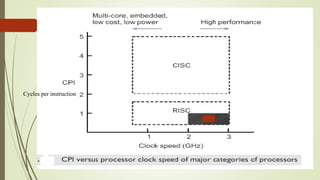
 The resulting benefits include a higher clock rate and a lower CPI (Cycles per
instruction) , which lead to higher MIPS ratings as reported on commercially
available RISC / superscalar processors.
Cycles per instruction
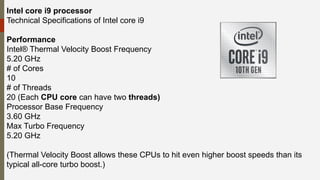
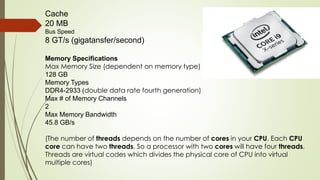
Intel core i9 processor
Technical Specifications of Intel core i9
Performance
Intel® Thermal Velocity Boost Frequency
5.20 GHz
# of Cores
10
# of Threads
20 (Each CPU core can have two threads)
Processor Base Frequency
3.60 GHz
Max Turbo Frequency
5.20 GHz
(Thermal Velocity Boost allows these CPUs to hit even higher boost speeds than its
typical all-core turbo boost.)
Cache
20 MB
Bus Speed
8 GT/s (gigatansfer/second)
Memory Specifications
Max Memory Size (dependent on memory type)
128 GB
Memory Types
DDR4-2933 (double data rate fourth generation)
Max # of Memory Channels
2
Max Memory Bandwidth
45.8 GB/s
(The number of threads depends on the number of cores in your CPU. Each CPU
core can have two threads. So a processor with two cores will have four threads.
Threads are virtual codes which divides the physical core of CPU into virtual
multiple cores)
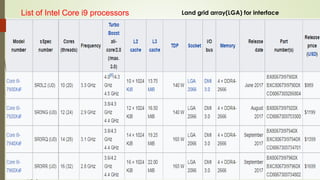
List of Intel Core i9 processors Land grid array(LGA) for interface

Computer Organisation and Architecture Unit I .pdf

  • 1.
  • 2.
    Why to StudyComputer Organization & Architecture course?  Students will use knowledge of it everyday and for the rest of life as well.  As COA is perhaps the most fundamental subject in computer science.  Knowing what's inside computer and how it works will help students to design and develop new system.  It will help students to implement applications in better, faster, cheaper, more efficient and easier way.  COA focuses on design of various components necessary to process information digitally e.g. memory, ALU,CU, IO devices etc.
  • 3.
     The studyof COA focuses on the interface between hardware and software.  COA course is important in the GATE examination point of view. (5-11 marks/100).  Because of these reasons COA/CO course is incorporated in every university syllabus as a compulsory & core subject.
  • 4.
    Comparison between oldCOA and new COA syllabus Lab component is newly introduced with this course. Old Digital Electronics and Microprocessor course and one unit of ACA from old TY COA are removed. This course is combination of three courses that is DEM, CO & ACA/HPC Nearly 35% syllabus of old COA is changed
  • 5.
    TEACHING SCHEME :EVALUATION SCHEME : LECTURE PRACTICAL THEORY PRACTICAL PRESENTATION/ DEMONSTRATION TOTAL MSE ESE IA 3 2 35 35 30 50 - 150 PRE-REQUISITE: 1. EX102- Electrical & Electronics Engineering
  • 6.
    COURSE OBJECTIVES:  CS.CEO.1:To understand the Architecture of 80386.  CS.CEO.2: To get familiar with Assembly language programming.  CS.CEO.3: To understand the Input Output organization and control unit of computer system  CS.CEO.4: To get familiar with the memory organization of the computer system  CS.CEO.5: To learn working of arithmetic unit of the computer system.  CS.CEO.6: To differentiate various organizations for high performance computing
  • 7.
    COURSE OUTCOMES: Students successfullycompleting the course will be able to  CS.CO.1: Explain the architecture of the 80386 processor.  CS CO.2: Design and write assembly language programs for different tasks.  3CS.CO.3: Illustrate IO organizations and control unit.  CS.CO.4: Analyze various memory organization techniques such as Segmentation, Paging in the computer system.  CS.CO.5: Illustrate arithmetic operations.  CS.CO.6 : Compare various parallel processing architectures and environments
  • 8.
    THEORY: Architecture of 80386Processor 6 Hours App/System/Case study: Pentium processors Contents: 80386 Architecture, Features of 80386, Registers, Global Descriptor Table, Local Descriptor Table, Interrupt Descriptor Table, Data Types, 80386 addressing modes, CISC, RISC. Intel core i9 processor Self study: Pentium processor architecture Further Reading: Intel core i9 processor architecture
  • 9.
    Unit II Input/outputorganization and Control unit 6 Hours App/System/Case study: Input/output Devices Contents: Input-Output Organization: Accessing I/O devices, Interrupts, direct memory access. Buses. Standard IO interfaces, PCI, SCSI. Control Unit- Basic concepts, Microprogrammed control, Hardwired control, Pipeline control. Self Study: Interface Circuits. Further reading: USB.
  • 10.
    Unit III TheMemory System 5 Hours App/System/Case study: Memory hierarchy Contents: Basic concepts, semiconductor RAM memories, read-only memories, speed, size and cost, cache memories, DRAM , SRAM,RAID, virtual memory. SSD. Self Study: Secondary storage Further reading: Flash memory
  • 11.
    Unit IV Segmentation,Pagingand Multitasking 9 Hours App/System/Case study: MMU in i7 Processor Contents: Segmentation – Introduction, support registers, related instructions, descriptors, memory management through segmentation, logical to linear address translations, protection by segmentation, privilege-level, protection related instructions, inter-privilege level, transfer control, Paging-support registers, related data structures ,linear to physical address translation ,TLB ,page level protection. Multitasking - support registers, related data structures, Task switching, Nested task. Self Study: Protected mode instructions Further reading: Segmentation and Paging in Pentium Processor
  • 12.
    Unit V ArithmeticOperations 6 Hours App/System/Case study: Binary representation of program Contents: Design of Fast Adders, Addition of positive numbers, Addition and Subtraction of Signed Numbers, Multiplication of Positive Numbers, Signed Operand Multiplication, Fast Multiplication, Floating-point Numbers and Operations. Self Study: Integer division Further reading: Floating point processor architecture.
  • 13.
    Unit VI Pipelining6 Hours App/System/Case study: Ultra SPARC II Architecture Contents: Flynn's Classification, Basic Concepts, Data Hazards, Instruction hazards, influence on instruction sets, data path and control considerations, Superscalar, Performance considerations, SIMD GPU architecture. Self Study: SMP Architecture Further reading: CC-NUMA Architecture.
  • 14.
    TEXT BOOK: 1.Douglas V.Hall, “Microprocessors and Interfacing Programming and Hardware”, 8086.80286.80386.80486, Second Edition, Tata McGraw Hil 2. Intel 80386 Programmer's Reference Manual 1986, Intel Corporation, Order no.: 231630-011, December 1995. 3. Barry B. Brey, “The Intel Microprocessors: 8086/8088, 80186/80188, 80286, 80386, 80486, Pentium, Pentium pro Processor, Pentium II, Pentium III, Pentium 4, and Core2 ... - Architecture, Programming, and Interfacing”. 4. W. Stallings, “Computer Organization and Architecture: Designing for performance”, Pearson Education/ Prentice Hall of India, 2003, ISBN 978-93-325- 1870-4, 7th Edition. 5. Zaky S, Hamacher, “Computer Organization”, 5th Edition, McGraw-Hill Publications, 2001, ISBN- 978-1-25-900537-5, 5th Edition.
  • 15.
    REFERENCES: 1. M MorrisMano “Digital Logic and Computer Design” 1/e Pearson, June 2016. 2. Kauffmann, “Computer System Architecture” by M. Mano, 2001, Prentice-Hall ISBN 72157661505664197 3. John P Hays, “Computer Architecture and Organization”, McGraw-Hill Publication, 1998, ISBN:9781259028564, 3rd Edition.
  • 16.
    Type Examination SyllabusMarks Total Marks MSE Unit No. 1,2 & 3 35 ESE Unit No. 1 to 6 35 Internal Assessment Unit No. 1 to 6 60 Continuous Assessment Practical List 80 (10 marks per practical title) End Sem Assessment Practical List 40 Written exam /Online examination Activity, Assignments, Quiz, Presentations etc. Written exam /Online examination 100 EXAMINATION SCHEME Practical Exam/ Demonstration/ Report/ Review Writing Practical performance 35 30 15 35 Mode of Assessment Weightage in Final Score 35 50 Practical (CS229L) Theory (CS229)
  • 17.
    Sr. No. Course Objective Type of Assessment LMS/ Tools Used Tentative Dateof Conduction Activity 1 CO1 & CO2 Online Collpoll Activity 2 CO3 Online Collpoll Activity 3 CO4 Online Collpoll Activity 4 CO4 Online Collpoll Activity 5 CO5 Online Collpoll Activity 6 CO6 Online Collpoll 10/2/2021 24/3/2021 12/4/2021 28/4/2021 13/1/2021 1/2/2021 10 10 10 10 INTERNAL ASSESSMENT DETAILS Name Theory Assignment & Poster making with presentaion Theory Assignments Quiz Theory Assignments Quiz Marks 10 10 Quiz Moodle / Socrative /
  • 18.
    Non graded activities Guestlectures Flipped classroom, Jigsaw activities Field visit Computer assembling and maintenance workshop
  • 19.
    Historical perspective ofcomputer system First Generation The period from 1940 to 1956 is roughly considered as the First Generation of Computer. The first generation computers were developed by using vacuum tube or thermionic valve machine. The input of this system was based on punched cards and paper tape; however, the output was displayed on printouts. The first generation computers worked on binary-coded concept (i.e., language of 0-1). Examples: ENIAC, EDVAC, etc.
  • 20.
  • 21.
    Second Generation  Theperiod from 1956 to 1963 is roughly considered as the period of Second Generation of Computers.  The second generation computers were developed by using transistor technology.  In comparison to the first generation, the size of second generation was smaller.  In comparison to computers of the first generation, the computing time taken by the computers of the second generation was lesser.  Examples: IBM 1401, IBM 7090 and 7094, UNIVAC 1107, PDP-1 .
  • 26.
  • 27.
    Fifth Generation  Theperiod 2010 to till date and beyond, roughly considered as the period of fifth generation of computers.  By the time, the computer generation was being categorized on the basis of hardware only, but the fifth generation technology also included software.  The computers of the fifth generation had high capability and large memory capacity.  Working with computers of this generation was fast and multiple tasks could be performed simultaneously.  Some of the popular advanced technologies of the fifth generation include Artificial intelligence, Quantum computation, Nano technology, Parallel processing, etc.
  • 32.
     4-Bit Microprocessors 8-Bit Microprocessors  16-Bit Microprocessors  32-Bit Microprocessors  64-Bit Microprocessors History of Microprocessor
  • 33.
    Introductıon It had numberof employees around 110,800 (2020) 77.87 billion U.S. dollars revenue
  • 34.
    Intel 4004 Introduced in1971. It is the first microprocessor by Intel. It is a 4-bit µP. Its clock speed was 740KHz. It had 2,300 transistors. It could execute around 60,000 instructions per second.
  • 35.
     Introduced in1976.  It is 8-bit µP.  It’s clock speed is 3 MHz.  Its data bus is 8-bit and address bus is 16-bit.  It had 6,500 transistors.  Could execute 7,69,230 instructions per second.  It could access 64 KB of memory.(2^16)  It had 246 instructions.  Over 100 million copies were sold. Intel 8085
  • 36.
  • 37.
  • 38.
  • 39.
    MMX is asingle instruction, multiple data (SIMD)
  • 40.
    (Cores 4) (For gamingand HD multimedia)
  • 41.
  • 42.
     Computer system A computer has the following main units:  Input Unit  Output Unit  Memory Unit Central Processing Unit
  • 43.
  • 46.
    Understanding C programCompilation Process
  • 51.
    Architecture of 80386Processor Salient Features of 80386  First 32-bit microprocessor in the x86 family  80286 architecture expanded for 32 bit operation  32-bit Processor  32-bit ALU, 32-bit Registers, 32-bit Data Bus, 32-bit Address Bus  Uses 32-bit address for memory and 16-bit address for I/O ports  Maximum physical memory 4 Gb.  Maximum number of I/O ports 64 K.  Built-in Memory Management Unit to support Segmentation, Paging and Virtual Memory.(e.g. Working of post office)
  • 52.
     It supports8/16/32 bit data operands (downwards compatibility)  It has 32-bit internal registers  It supports 32-bit data bus and 32-bit non-multiplexed address bus  It supports Physical Address of 4GB Virtual Address of 64TB (16384*4 GB) Maximum Segment size of 4GB
  • 53.
     It operatesin 3 different modes Real Protected Virtual 8086  MMU provides virtual memory, paging and 4 levels of protection  Clock Frequency : 16 MHz,20MHz,25 MHz and 33MHz  It has 132/100 pin package  Pipelined architecture (Car assembly).  It can operate on 17 different data types (rich).  It support numeric 80387co-processor.
  • 54.
    Two versions of80386 are which are commonly available are: 1) 80386DX 2)80386SX 80386DX 80386SX 1) 32 bit address bus 1) 24 bit address bus 16 data bus 32 bit bit data bus 2) Packaged in 132 pin ceramic 2) 100 pin flat 3) Address 4GB of memory 3) 16 MB of Memory 4) Fetch 4 bytes at a time 4) Fetch 2 bytes at a time
  • 55.
    Development of microprocessor Decode Unit Businterface unit Address unit Inst. Unit Exec. Unit Segmentation Unit Paging Unit Pre fetch unit
  • 56.
    132 Pin diagramof 80386DX (e.g. 80387)
  • 57.
    W/R#: The write/ read output distinguishes the write and read cycles from one another. • D/C#: This data / control output pin distinguishes between a data transfer cycle from a machine control cycle. • M/IO#: This output pin differentiates between the memory and I/O cycles. • LOCK#: The LOCK# output pin enables the CPU to prevent the other bus masters from gaining the control of the system bus. • NA#: The next address input pin, if activated, allows address pipelining, during 80386 bus cycles
  • 58.
    ADS#: The addressstatus output pin indicates that the address bus and bus cycle definition pins( W/R#, D/C#, M/IO#, BE0#to BE3# ) are carrying the respective valid signals. • READY#: The ready signals indicates to the CPU that the previous bus cycle has been terminated and the bus is ready for the next cycle. The signal is used to insert WAIT states in a bus cycle and is useful for interfacing of slow devices with CPU. • VCC: These are system power supply lines. • VSS: These return lines for the power supply.
  • 59.
    BS16#: The bussize – 16 input pin allows the interfacing of 16 bit devices with the 32 bit wide 80386 data bus. Successive 16 bit bus cycles may be executed to read a 32 bit data from a peripheral. • HOLD: The bus hold input pin enables the other bus masters to gain control of the system bus if it is asserted. • HLDA: The bus hold acknowledge output indicates that a valid bus hold request has been received. • BUSY#: The busy input signal indicates to the CPU that the coprocessor(80387) is busy with the allocated task.
  • 60.
    ERROR#: The errorinput pin indicates to the CPU that the coprocessor has encountered an error while executing its instruction. • PEREQ: The processor extension request output signal indicates to the CPU to fetch a data word for the coprocessor. • INTR: This interrupt pin is a maskable interrupt, that can be masked using the IF of the flag register. • NMI: A valid request signal at the non-maskable interrupt request input pin internally generates a non- maskable interrupt of type2. Signal.
  • 61.
    RESET: A highat this input pin suspends the current operation and restart the execution from the starting location. • N/C : No connection pins are expected to be left open while connecting the 80386 in the circuit.
  • 62.
    Quiz Time 1) 80386Can access ------------- memory banks a)2 b)3 c)4 d)1
  • 63.
    1) 80386 Canaccess ------------- memory banks a)2 b)3 c)4 d)1
  • 64.
    2) 80386DX has-------- bit data bus and -------- bit address bus. a)32 & 30 b)32 & 16 c)16 & 32 d)32 & 32
  • 65.
    2) 80386 has-------- bit data bus and -------- bit address bus. a)32 & 30 b)32 & 16 c)16 & 32 d)32 & 32
  • 66.
    Architecture of 80386 Centralprocessing unit Memory management unit Bus interface unit
  • 67.
    The Internal Architectureof 80386 is divided into 3 main sections.  1. Central processing unit(CPU) a. Execution Unit b. Instruction Unit  2. Memory management unit(MMU) a. Segmentation Unit b. Paging Unit  3. Bus interface unit(BIU)
  • 68.
    1. Central processingunit(CPU) Execution Unit: – It has 8 general purpose and 8 special purpose registers which either handles data or addresses. – It has 64-bit barrel shifter (A barrel shifter is a digital circuit that can shift a data word by a specified number of bits without the use of any sequential logic) which increases the speed of all shift, rotate, multiply and divide operations. – The multiply/divide logic implements the bit-shift-rotate algorithms to complete the operations in minimum time (for example 32bit multiplication is done in 1µs)
  • 70.
    • Execution readsthe decoded instruction from the instruction queue and performs the operations that are specified. • During the execution of an instruction ,it requests the segment and page units to generate operand addresses and the bus interface unit to perform read or write bus cycles to access data in memory or I/O devices. • Instruction Unit: – It decodes the opcode bytes received from the 16-byte instruction queue and arranges them into a 3-decoded instruction queue. – After decoding it is passed to control section for deriving necessary control signals.
  • 71.
  • 72.
    Memory Management Unit •MMU consists of a segmentation unit and paging unit. • Segmentation Unit: – It allows the use of two address components - segment and offset – for relocability and sharing of code and data. – It allows a maximum segment size of 4GB. – It provides a 4-level protection mechanism for protecting and isolating system’s code and data from those of application program.
  • 73.
    – The limitand attribute PLA (Programmable Logical Array) checks segment limits and attributes at segment level to avoid invalid accesses to code and data in memory segment. • Paging Unit – It organizes physical memory in terms of pages of 4KB size. – It works under the control of segmentation unit. – It converts linear addresses into physical addresses. – The control and attribute PLA checks privileges at page level.
  • 74.
  • 75.
    Bus Interface Unit •It has a prioritizer to resolve the priority of various bus requests. This controls the access of the bus. • The address driver drives the bus enable and address signals A2 – A31. • The pipeline/bus size unit handles the control signals for pipelining and dynamic bus sizing units. • The data buffers interface the internal data bus with system bus. https://www.youtube.com/watch?v=Hn06bfyLO-c https://www.youtube.com/watch?v=BNVwF3w7M5E
  • 76.
    Quiz Time 1) 80386Architecture is divided in --------- main sections A) 4 B) 3 C) 2 D) 5
  • 77.
    1) 80386 Architectureis divided in --------- main sections A) 4 B) 3 C) 2 D) 5
  • 78.
    2) 80386 organizesphysical memory in terms of pages of ----------------- size. a) 4 GB b) 32 KB c) 4 KB d) 4 Byte
  • 79.
    2) 80386 organizesphysical memory in terms of pages of ----------------- size. a) 4 GB 2) 32 KB c) 4 KB d) 4 Byte
  • 80.
    • The Intel386 DX has 32 register resources in the following categories: – General Purpose Registers – Segment Registers – Instruction Pointer and Flags – Control Registers – System Address Registers – Debug Registers – Test Registers
  • 81.
    General Purpose Registers •Hold data or address values. • It supports data of 1, 8, 16, 32 and 64 bits. • 32-bit registers(8) : EAX, EBX, ECX, EDX, ESI, EDI, EBP, and ESP. • The least significant 16 bits of the registers can be accessed as in 8086 with names of the registers AX, BX, CX, DX, SI, DI, BP, and SP.
  • 82.
    • When accessedas a 16-bit operand, the upper 16 bits of the register are neither used nor changed. • 8-bit operations can be performed with AL, BL, CL and DL registers. • The higher bytes are AH, BH, CH and DH. • The individual byte accessibility offers flexibility for data operations.
  • 84.
    Segment Registers • Segmentregister (6) − 16 bits CS, DS, SS , ES , FS & GS etc. • It holds the addresses of instructions and data in memory, which are used by the processor to access memory locations. • The segment registers are – CS indicates the current code segment – SS indicates the current stack segment – DS, ES, FS and GS indicate four current data segments.
  • 86.
    • It isa 32-bit register named EIP. • EIP holds the offset/address of the next instruction to be executed. • The offset is always relative to the base of the code segment (CS). • The lower 16 bits of EIP contain the 16-bit instruction pointer named IP, which is used by 16-bit addressing.
  • 87.
    Quiz Time 1) GeneralPurpose Registers supports ----------- bit/bits data size a) 1 b) 8 c) 64 d) All the above
  • 88.
    1) General PurposeRegisters supports ----------- bit/bits data size a) 1 b) 8 c) 64 d) All the above
  • 89.
    2) In 80386,segment registers are --------- of ---------- bit size each. a) 6 & 8 b) 6 & 16 c) 8 & 8 d) 8 & 16
  • 90.
    2) In 80386,segment registers are --------- of ---------- bit size each. a) 6 & 8 b) 6 & 16 c) 8 & 8 d) 8 & 16
  • 91.
    32 bit FlagRegister • Bit 17 (VM Bit, Virtual Mode): – VM bit is set to work in Virtual 8086 mode When VM flag is set, 80386 switches from protected mode to virtual 8086 mode. • Bit 16 (RF Bit, Resume Flag): – RF flag is used with debug register. – When RF is set, debug fault need to be ignored on the next instruction. – RF is then automatically reset after every instruction • Bit 15 : Reserved
  • 92.
    • Bit 14(NT Bit, Nested Task): – This flag applies to Protected Mode. – NT is set to indicate that the execution of this task is nested within another task. – If set, it indicates that the current nested task's Task State Segment (TSS) has a valid back link to the previous task's TSS. • Bit 13,12 (IOPL Bit, Input/output Privilege): – Maximum CPL (current privilege level) value permitted to execute I/O instructions without generating an exception 13 fault or consulting the I/O Permission Bitmap.
  • 93.
    • Bit 11(OF Bit, Overflow Flag): – OF is set if the operation resulted in a signed overflow. • Bit 10 (DF Bit, Direction Flag): – DF defines whether ESI/EDI registers decrement or increment during the string instructions. – increment occurs if DF is reset. – decrement occurs if DF is set.
  • 94.
    • Bit 9(IF Bit, Interrupt Enable Flag): – When IF =1 the processor allows recognition of external interrupts on INTR pin. • Bit 8 (TF Bit, Trap Enable Flag): – When TF =1 the processor enables the single step mode for debugging. • Bit 7 (SF Bit, Sign Flag): – SF is set if the high-order bit of the result is set, it is reset otherwise.
  • 95.
    • Bit 6(ZF bit, Zero Flag): – ZF is set if all bits of the result are 0. • Bit 4 (AF Bit, Auxiliary Carry Flag): – The Auxiliary Flag is used to simplify the addition and subtraction of packed BCD numbers. – AF is set if the operation resulted in a carry out of bit 3 (addition) or a borrow into bit 3 (subtraction). Otherwise AF is reset. – AF is only for bit 3.
  • 96.
    • Bit 2(PF Bit, Parity Flag): – PF is set for even parity ( i.e. 00111001 even parity). • Bit 0 (CF Bit, Carry Flag): – CF is set for 8, 16 or 32-bit operations if it results in a carry out of (addition), or a borrow into (subtraction) the high-order bit.
  • 98.
     Six ConditionalFlags ◦Carry Flag (CF) ◦Parity Flag (PF) ◦Auxiliary Flag( AF) ◦Zero Flag (ZF) ◦Sign Flag (SF) ◦Overflow Flag (OF)  Three Control Flags ◦Interrupt Flag (IF) ◦Trap Flag (TF) ◦Direction Flag (DF)  Four System Flags ◦Input/output privilege level (IOPL) ◦Nested Task (NT) ◦Resume Flag (RF) ◦Virtual Mode Flag (VM)
  • 99.
    Quiz Time 1) In80386, 32 bit Flag Register _________ bits are reserved for Intel. a) 15 b) 14 c) 16 d) 17
  • 100.
    1) In 80386,32 bit Flag Register _________ bits are reserved for Intel. a) 15 b) 14 c) 16 d) 17
  • 101.
    2 ) In80386 , _________ bit is used for virtual mode. a) 15 b) 14 c) 16 d) 17
  • 102.
    2 )In 80386, _________ bit is used for virtual mode. a) 15 b) 14 c) 16 d) 17
  • 103.
    3 ) In80386 , there are _________ system flags. a) 5 b) 4 c) 6 d) 3
  • 104.
    3 )In 80386, there are _________ system flags. a) 5 b) 4 c) 6 d) 3
  • 105.
    Control Registers • Intel386 DX has 4 control registers (CR0, CR1 ,CR2 & CR3) of 32 bits to hold machine state of a global nature. • These registers along with System Address Registers hold machine state that affects all tasks in the system. • To access Control Registers, load and store instructions are defined. • CR0 contains 6 defined bits for control and status purposes.
  • 106.
    • The low-order16 bits of CR0 is defined as Machine Status Word. • To operate only on the low-order 16-bits of CR0, LMSW and SMSW instructions are used for load and store respectively. • For 32-bit operations the system should use MOV CR0, Reg instruction.
  • 107.
    • Bit 31(PG Bit, Paging Enable) : The PG bit is set to enable the on-chip paging unit. • Bit 4 (Reserved) : This bit is reserved by Intel. • Bit 3 (TS Bit, Task Switched) : TS is automatically set whenever a task switch operation is performed. • Bit 2 (EM Bit, Emulate Coprocessor) :The EM bit indicates whether coprocessor functions are to be emulated. • Bit 1 (MP Bit, Monitor Coprocessor) :The EM and MP flags of CR0 control how the processor reacts to coprocessor instructions. • The MOV instruction can be executed only at privilege level zero (OS level).
  • 108.
    • Bit 0(PE Bit, Protection Enable) : – PE =1, enable the Protected Mode. – If PE =0, processor operates in Real Mode. Trap-and-emulate is a technique used by the virtual machine to emulate privileged instructions and registers.  The EM and MP flags of CR0 control how the processor reacts to coprocessor instructions. The EM bit indicates whether coprocessor functions are to be emulated.  The MP (monitor coprocessor) bit indicates whether a coprocessor is actually attached OR NOT.  The EM and MP flags can be changed with the aid of a MOV instruction
  • 109.
    • CR1 isreserved for use in future Intel processors CR2 • CR2 holds the 32-bit linear address that caused the last page fault detected. i.e. the processor stores in CR2 the linear address that triggers the fault
  • 110.
    CR3 : PageDirectory Base Address • CR3 contains the physical base address of the page directory table. • The Intel 386 DX page directory table is always page-aligned (4 Kbyte-aligned). • Thus the lowest twelve bits of CR3 are ignored (12 bits). 11
  • 112.
    1) In 80386,------ control register is used for page fault linear address. a) CR0 b) CR1 c) CR2 d) CR3 Quiz Time
  • 113.
    1) In 80386,------ control register is used for page fault linear address. a) CR0 b) CR1 c) CR2 d) CR3
  • 114.
    2) In 80386,------ bits of CR0 register are used while other bits are reserved. a) 5 b) 4 c) 6 d) 3
  • 115.
    2) In 80386,------ bits of CR0 register are used while other bits are reserved. a)5 b) 4 c) 6 d) 3
  • 116.
    3) -------- bitsis the size of Page Directory Base Register in CR3. a)18 b) 20 c) 22 d) 24
  • 117.
    3) -------- bitsis the size of Page Directory Base Register in CR3. a)18 b) 20 c) 22 d) 24
  • 118.
    4) In 80386,---------- is the size of Machine Status Word (MSW) a) 8 b) 16 c) 18 d) 17
  • 119.
    4) In 80386,---------- is the size of Machine Status Word a) 8 b) 16 c) 18 d) 17
  • 120.
    System Address Registers •Four special registers are defined to reference the tables. • These tables or segments are: – GDT (Global Descriptor Table) – IDT (Interrupt Descriptor Table) – LDT (Local Descriptor Table) – TSS (Task State Segment) • The addresses of these tables and segments are stored in special registers, the System Address and System Segment Registers respectively. • These registers are named GDTR, IDTR, LDTR and TR.
  • 121.
    The Global DescriptorTable  GDT is a data structure used by Intel x86-family processors starting with the 80286 in order to define the characteristics of the various memory areas used during program execution, including the base address, the size, and access privileges like executability and writability.  GDT contains descriptors of all the tasks in a system.  GDT contain any type of segment descriptor except interrupt and trap descriptor.
  • 122.
    What is anLDT?  The Local Descriptor Table is a list of descriptors for the current program.  It is distinct from the GDT in a number of respects i.e. one and many respectively.  LDT cannot hold many types of descriptors;  It is only accessible by Tasks/threads with the same Local Descriptor Table Register (LDTR) value.
  • 123.
    GDTR and IDTR •These registers hold: – 16-bit limit – 32-bit linear base address and
  • 124.
    LDTR and TR •These registers hold 16-bit selector for – LDT (Local Descriptor Table )descriptor and – TSS ( Task State Segment )descriptor • Since they are task specific, they are defined by selector values stored in system segment registers.
  • 125.
  • 126.
    How Segment Descriptoris accessed? Requested Privilege Level (RPL) (Bits 0 and 1) — Specifies the privilege level of the selector.
  • 127.
    Real Mode ProtectedMode - Does not support virtual address space - Gives virtual and physical address space - Does not support LDT and GDT -Dose not support protection mechanism and multi programming environment -It supports protection mechanism and multi programming environment Difference between real mode and protected mode of 80386? Real mode has same base architecture as that of 8086, but allows access to the 32-bit register set of 80386. ... -Supports LDT and GDT https://www.youtube.com/watch?v=eDrp2n2JDr8
  • 128.
    Quiz Time 1) GDTcontains descriptors of --------- tasks in a system. A)2 B) 8 C)16 D)All
  • 129.
    1) GDT containsdescriptors of --------- tasks in a system. A)2 B) 8 C)16 D)All
  • 130.
    2) ------- bitsis the size of GDTR/IDTR A)32 B) 24 C)8 D)48
  • 131.
    2) ------- bitsis the size of GDTR/IDTR A)32 B) 24 C)8 D)48
  • 132.
    3) To selectLDT/GDT -------- bit is used in segment register a)1 b)2 c)3 d)4
  • 133.
    3) To selectLDT/GDT -------- bit is used in segment register a)1 b)2 c)3 d)4
  • 134.
    4) In 80386,---------- is the size of descriptor register a)4 byte b)2 byte c)8 byte d)1 byte
  • 135.
    In 803686, ----------is the size of descriptor register in 803686 a)4 byte b)2 byte c)8 byte d)1 byte
  • 136.
    Segment selector  InReal mode 16 bit segment registers hold the starting address of the segment.  In Protected mode these segment registers are used as segment selector because it selects a segment descriptor.  Segment descriptor is a structure of 8 bytes(64 bits) that is used to describe and locate segment present in memory from descriptor table.  Selector is used to index (point) a descriptor from the table of descriptors.
  • 137.
    Hence  Every memoryaccess which a program can perform always goes through a segment selector.  In order to reference a segment, a program must use its index inside the GDT or the LDT.  Such an index is called a segment selector (or selector).  The selector must generally be loaded into a segment register to be used.
  • 138.
    Interrupt Descriptor Table& IDTR  IDT contains group of descriptors that define the interrupts or exception handling routines.  For 80386 to work in protected mode at least one IDT needs to be defined.  The IDT contains the descriptors which point to the location of up to 256 interrupt service routine (ISR).  Every interrupt used by the system must have an entry in the IDT.
  • 139.
  • 140.
     However, 80386supports 3 operating modes: real, protected and virtual real mode.  Initially the 80386 was booted in real mode.  Protected mode on the 386 offers the programmer better protection and more memory than on the 286.  386 also supports a third mode, Virtual 8086 (V86) mode .  In V86 mode, the 386 operates in protected mode but allows to use a simulated real-mode environment.
  • 141.
    Quiz Time 1) Segmentdescriptor is a structure of ------------------bytes A)4 B) 2 C)8 D)16
  • 142.
    1) Segment descriptoris a structure of ------------------ bytes A)4 B) 2 C)8 D)16
  • 143.
    2) IDT containsthe descriptors which point to the location of up to ----------- interrupt service routine. a)64 b)128 c)256 d)32
  • 144.
    2) IDT containsthe descriptors which point to the location of up to ----------- interrupt service routine. a)64 b)128 c)256 d)32
  • 145.
    Data Types  TheIntel 386 DX supports all of the data types commonly used in high level languages:  Bit: A single bit quantity.  Bit Field: A group of up to 32 contiguous bits, which spans a maximum of four bytes.
  • 146.
     Bit String:A set of contiguous bits, on the Intel386 DX bit strings can be up to 4 gigabits long.  Byte: A signed 8-bit quantity (range -128 to+127)
  • 147.
    • Unsigned Byte:An unsigned 8- bit quantity. (range 0 to 255) • Integer (Word): A signed 16-bit quantity. (-32768 to 32767) • Long Integer (Double Word): – A signed 32-bit quantity. (-2.147*109 to + 2.147*109 )
  • 148.
    • Unsigned Integer(Word): An unsigned 16-bit quantity. (0 to 65535) • Unsigned Long Integer (Double Word): An unsigned 32-bit quantity.(0 to 4294967295)
  • 149.
    • Signed QuadWord: A signed 64-bit quantity. • Unsigned Quad Word: An unsigned 64-bit quantity.
  • 150.
     Offset: A16- or 32-bit offset only quantity which indirectly references another memory location.
  • 151.
    • Pointer: Afull pointer which consists of a 16-bit segment selector and either a 16- or 32-bit offset. 16 bits 32 bits
  • 152.
    Char: A byterepresentation of an ASCII Alphanumeric or control character.
  • 153.
    Quiz Time 1) Signedquad word data type is having -------- bit size. a)32 b)128 c)24 d)64
  • 154.
    Signed quad worddata type is having -------- bit size. a)32 b)128 c)24 d)64
  • 155.
    Data Addressing Modes The 80386 memory addressing modes provide flexible access to memory, allowing you to easily access variables, arrays, records, pointers, and other complex data types.  Following figure illustrates the MOV instruction and defines the direction of data flow
  • 156.
    Immediate Addressing • Termimmediate implies that data immediately follow the hexadecimal opcode in the memory. – immediate data are constant data • Immediate addressing operates upon a byte or word of data. • Figure shows the operation of a MOV EAX,13456H instruction. opcode Operand (Opcode is a part of the instruction that tells the processor what should be done. Operand is a part of the instruction that contains the data to be acted on, or the memory location of the data in a register) Instruction
  • 157.
    Figure The operationof the MOV EAX,3456H instruction. This instruction copies the immediate data 13456H into EAX.  The source data overwrites the destination data.
  • 158.
    Register Addressing Mode •The most common form of data addressing. • The microprocessor contains these 8-bit register names used with register addressing: AH, AL, BH, BL, CH, CL, DH, and DL. • 16-bit register names: AX, BX, CX, DX, SP, BP, SI, and DI.
  • 159.
    • In 80386& above, extended 32-bit register names are: EAX, EBX, ECX, EDX, ESP, EBP, EDI, and ESI. • It is important for instructions, to use registers which are the same size. – never mix an 8-bit with a 16-bit register, an 8- or a 16-bit register with a 32-bit register – this is not allowed by the microprocessor and results in an error when assembled  for example Mov EAX, DX
  • 160.
    Figure The effectof executing the MOV BX, CX instruction at the point just before the BX register changes. Note that only the rightmost 16 bits of register EBX change. 15 31
  • 161.
    • Figure showsthe operation of the MOV BX, CX instruction. • The source register’s contents do not change. the destination register’s contents do change • The contents of the destination register or destination memory location change for all instructions except the CMP and TEST instructions. • The MOV BX, CX instruction does not affect the leftmost 16 bits of register EBX.
  • 162.
     The remainingmodes provide a mechanism for specifying the effective address (EA)of an operand.  The linear address consists of two components:  The segment base address and An effective address.
  • 163.
     The effectiveaddress is calculated by using four address elements: DISPLACEMENT: An 8 bit or 32-bit immediate value BASE: The contents of any general purpose register. It point to the start of the local variable area. INDEX: The index registers are used to access the elements of an array, or a string of characters. SCALE: The index register's value can be multiplied by a scale factor, either 1, 2, 4 or 8. Scaled index mode is especially useful for accessing arrays or structures.
  • 164.
     Combinations ofthese 4 components make up the additional addressing modes.  The effective address (EA) of an operand is calculated according to the following formula:  EA = Base Register + (Index Register * Scaling) + Displacement.
  • 165.
    Effective address (EA)calculation can be shown as follows:
  • 166.
    Direct Addressing Modes •Applied to many instructions in a typical program. • Two basic forms of direct data addressing: – direct addressing, which applies to a MOV between a memory location and AL, AX, or EAX registers. – displacement addressing, which applies to almost any instruction in the instruction set. • Address is formed by adding the displacement to the default data segment address or an alternate segment address.
  • 167.
    Figure The operationof the MOV AL,[1234H] instruction when DS=10000H . • This instruction transfers a copy contents of memory location 11234H into AL. – the effective address is formed by adding 1234H (the offset address) and 10000H
  • 168.
    Register Indirect AddressingMode: • Allows data to be addressed at any memory location through an offset address held in any of the following registers: BP, BX, DI, and SI. • In addition, 80386 and above processors allow register indirect addressing with any extended register except ESP.
  • 169.
     Indirect addressingoften allows a program to refer to tabular data located in memory.  Figure 5 shows the table and the BX register used to sequentially address each location in the table.  To accomplish this task, load the starting location of the table into the BX register with a MOV immediate instruction.  After initializing the starting address of the table, use register indirect addressing to store the 50 samples sequentially.
  • 170.
    Figure 4 Theoperation of the MOV AX,[BX] instruction when BX = 1000H and DS = 0100H. Note that this instruction is shown after the contents of memory are transferred to AX. (100*10)
  • 171.
    Base-Plus-Index Addressing • Similarto indirect addressing because it indirectly addresses memory data. • The base register often holds the beginning location of a memory array. – the index register holds the relative position of an element in the array. – whenever BP addresses memory data, both the stack segment register and BP generate the effective address
  • 172.
    • Figure 6shows how data are addressed by the MOV DX,[BX + DI] instruction when the microprocessor operates in the real mode. • The Intel assembler requires this addressing mode appear as [BX][DI] instead of [BX + DI]. • The MOV DX,[BX + DI] instruction is MOV DX,[BX][DI] for a program written for the Intel ASM assembler.
  • 173.
    Figure An exampleshowing how the base-plus-index addressing mode functions for the MOV DX,[BX + DI] instruction. Notice that memory address 02010H is accessed because DS=0100H, BX=1000H and DI=0010H.
  • 174.
  • 175.
  • 176.
    Memory Based AddressingModes Register Based Addressing Modes The operand is present in memory and its address is given in the instruction itself. This addressing mode is taking proper advantage of memory address, e.g., Direct addressing mode An operand will be given in one of the register and register number will be provided in the instruction . With the register number present in instruction, operand is fetched, e.g., Register mode The memory address specified in instruction may give the address where the effective address is stored in the memory. In this case effective memory address is present in the memory address which is specified in the instruction, e.g., Indirect Addressing Mode The register contains the address of the operand. The effective address can be derived from the content of the register specified in the instruction. The content of the register might not be the effective address. This mode takes full advantage of registers, e.g., Register indirect mode The content of base register is added to the address part of the instruction to obtain the effective address. A base register is assumed to hold a base address and the address field of the instruction gives displacement relative to the base address, e.g., Base Register Addressing Mode If we are having a table of data and our program needs to access all the values one by one we need something which decrements the program counter/or any register which has base address. Though in this case register is basically decreased, it is register based addressing mode, e.g., In Auto decrements mode The content of the index register is added to the address part that is given in the instruction to obtain the effective address. Index Mode is used to access an array whose elements are in successive memory locations, e.g., Indexed Addressing Mode If we are having a table of data and our program needs to access all the values one by one we need something which increment the program counter/or any register which has base address, e.g., Auto increment mode The content of program counter is added to the address part of the instruction in order to obtain the effective address. The address part of the instruction in this case is usually a signed number which can be either positive or negative, e.g., Relative addressing mode Instructions generally used for initializing registers to a constant value is register based addressing mode, and this technique is very useful approach, e.g., Immediate mode.
  • 177.
    CISC & RISC(Complex Instruction Set Computer & Reduced Instruction Set Computer ) CISC  In the early days of computer history, most computer families started with an instruction set which was simple.  The main reason for being simple then was the high cost of hardware/technology and use.  The hardware cost has dropped and the software cost has gone up steadily in the past decades.  Further more, the semantic gap between HLL features and computer architecture has widened.  Now a days more and more functions were built into the hardware, making the instruction set large and complex.
  • 178.
     The growthof instruction sets was also increased because of the popularity of using micro codes in some processors for special-purpose applications.  A typical CISC instruction set contains approximately 120 to 350 instructions using variable instruction/data formats, uses a small set of 8 to 24 general- purpose registers (GPRs).  Many HLL statements are directly implemented in hardware/firmware in a CISC architecture.  This may simplify the compiler development, improve execution efficiency, and allow an extension from scalar instructions to vector instructions.
  • 179.
    RISC  We startedwith RISC instruction sets and gradually moved to CISC instruction sets during the 1980s.  After two decades of using CISC processors, computer users began to reevaluate the performance relationship between instruction-set architecture and available hardware/software technology.  From many years computer scientists realized that only 25% of the instructions of a complex instruction set are frequently used about 95% of the time.  It means about 75% of hardware-supported instructions often are not used at all.  Then why should we waste valuable chip area for rarely used instructions?
  • 180.
     It maybe more advantageous to remove them completely from the hardware and rely on software to implement them.  Even if the software implementation is slow, the net result will be still a plus due to their low frequency of use.  Pushing rarely used instructions into software will vacate chip areas for building more powerful RISC or superscalar processors, even with on-chip caches or floating-point units.  A RISC instruction set typically contains less than 100 instructions with a fixed instruction format (32 bits).  Where as CISC processor uses 120 to 350 instructions
  • 181.
     Only threeto five simple addressing modes are used.  Most instructions are register-based.  Memory access is done by load/store instructions only.  A large register file is used to improve fast context switching among multiple programs, and most instructions execute in one cycle with hardwired control.  Because of the reduction in instruction-set complexity (number of instructions) , the entire processor is implementable on a single VLSI chip.
  • 182.
     The resultingbenefits include a higher clock rate and a lower CPI (Cycles per instruction) , which lead to higher MIPS ratings as reported on commercially available RISC / superscalar processors.
  • 183.
  • 184.
    Intel core i9processor Technical Specifications of Intel core i9 Performance Intel® Thermal Velocity Boost Frequency 5.20 GHz # of Cores 10 # of Threads 20 (Each CPU core can have two threads) Processor Base Frequency 3.60 GHz Max Turbo Frequency 5.20 GHz (Thermal Velocity Boost allows these CPUs to hit even higher boost speeds than its typical all-core turbo boost.)
  • 185.
    Cache 20 MB Bus Speed 8GT/s (gigatansfer/second) Memory Specifications Max Memory Size (dependent on memory type) 128 GB Memory Types DDR4-2933 (double data rate fourth generation) Max # of Memory Channels 2 Max Memory Bandwidth 45.8 GB/s (The number of threads depends on the number of cores in your CPU. Each CPU core can have two threads. So a processor with two cores will have four threads. Threads are virtual codes which divides the physical core of CPU into virtual multiple cores)
  • 186.
    List of IntelCore i9 processors Land grid array(LGA) for interface