Information Technology &
Skills
C
h
a
p
#
0
3
C
o
m
p
u
t
e
r
H
a
r
d
w
a
r
e
Input Devices
INPUT •The data and instructions given to computer is called input.
INPUT DEVICES •A hardware component used to enter data and instructions into computer is called input devices.
EXAMPLE •Different input devices are keyboard, pointing devices, touch screen, digital camera, scanner, microphone,barcode reader etc.
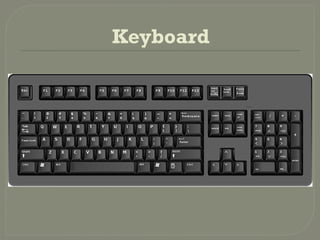
Keyboard
Keyboard
Keyboard is most commonly used input
device.
It is used to enter data in computer.
The buttons on keyboard are called Keys
A standard keyboard contains over 100 keys.
The arrangement of keys on a keyboard is
called keyboard layout.
The most popular layout is QWERTY.
The letter Q,W,E,R,T,Y appear on the top row
of main area of keyboard.
Keys on Keyboard
 Function Keys
F1 to F12 are located on the top of keyboard. The
function keys are used to perform special
functions depend on the software being used.
For example
F1 – Display help in Windows.
F2 – Highlight file or folder for renaming.
F3 – Open Search tool
Alt+F4 Close the current Window
F5 – Refresh the content of window or webpage
Keys on Keyboard
Alphabetic Keys includes all letter keys
in alphabet (A to Z)
Numeric Keys include digits from 0 to 9.
Special Symbol Keys are used to insert
special symbols like , : ;“” {} [] ! @ # $ %
^ & * () /  | ? . - _ ‘’ < > ~
Keys on Keyboard
 Backspace Key used to delete a single
character to the left of the cursor.
 Enter Key used to enter command or to move
the cursor to the beginning of next line.
 Caps lock Key is a toggle key. The character
appear in upper case if it is pressed. The
character appear in lower case if it is not
pressed. Caps Lock turns on when it is pressed.
Keys on Keyboard
Tab Key used to move cursor on the next
tab stop. It is also used in dialog boxes to
move from one option to another.
Space Key used to insert white spaces
between text.
Keys on Keyboard
Modifier Keys
These are used to modify the input of other keys. A specific key
is pressed while holding down one of these keys to the
required result.
Different modifier keys as follows:
Ctrl Key: used in combination with other keys as shortcut to
some commands e.g. Ctrl+S to save a file, Ctrl+O to open a file.
Alt Key: used in combination with other keys to perform special
functions e.g. Alt+f4 to close a file or program.
Shift key: is used to type capital letter and upper symbol shown
on certain keys.
Keys on Keyboard
 Cursor Control Keys are used to move cursor within
text or around the screen.
These Keys are
Home Key is normally used in word processing to move
cursor to the top of screen.
End key is used to move cursor to the right corner of
screen.
Arrows Key are used to move the cursor. These keys have
an up arrow a down arrow
a left arrow and right arrow
Page Up key is used to move cursor one page up on the
screen.
Page Down Key is used to move cursor one page down on
screen.
Keys on Keyboard
Special Purpose Keys:
 Esc key is used to terminate command or current task.
 Delete Key is used to delete a single character to the
right of the cursor. It is also used to delete the selected
object.
 Insert Key is toggle key used to switch between insert
mode and overtype mode.
 Print Screen used to capture everything that appear
on screen.
 Scroll Lock used to lock or unlock the screen in some
programs.
 Pause/Break Key used to pause screen when
information is too fast to read.
Types of Keyboard
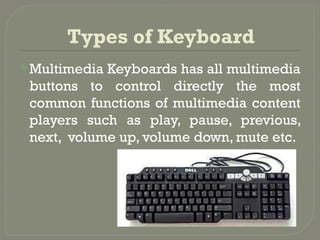
Multimedia Keyboards has all multimedia
buttons to control directly the most
common functions of multimedia content
players such as play, pause, previous,
next, volume up, volume down, mute etc.
Wireless Keyboard:
A keyboard that requires no wire is
called wireless or cordless keyboard. It
transmits data using wireless technology
like radio waves or infrared light waves.
These keyboard models are optimized
for portability.
Ergonomic keyboard
A keyboard that is specially designed to
reduce the chances of wrist injuries
during typing is called ergonomic
keyboard.
The goal of this keyboard is to provide
comfort, efficiency and safety.
Gaming Keyboard:
A gaming keyboard is a type of keybaord
that is specially designed for playing
games on the computer. It includes keys
to customize the keyboard for the games
being played.
Virtual keybaord:
The keyboard used in smartphones is called
a virtual keyboard. This keyboard appears
when needed and disappears when typing
is completed. This can be automatically set
as per need. Also in the windows system, we
can use a virtual keyboard that appears on
the screen. There is no physical object to
carry for a virtual keyboard
Machinal Keyboard

COMPUTER HARDWARE system units input output devices

  • 1.
  • 2.
    Input Devices INPUT •Thedata and instructions given to computer is called input. INPUT DEVICES •A hardware component used to enter data and instructions into computer is called input devices. EXAMPLE •Different input devices are keyboard, pointing devices, touch screen, digital camera, scanner, microphone,barcode reader etc.
  • 3.
  • 4.
    Keyboard Keyboard is mostcommonly used input device. It is used to enter data in computer. The buttons on keyboard are called Keys A standard keyboard contains over 100 keys. The arrangement of keys on a keyboard is called keyboard layout. The most popular layout is QWERTY. The letter Q,W,E,R,T,Y appear on the top row of main area of keyboard.
  • 5.
    Keys on Keyboard Function Keys F1 to F12 are located on the top of keyboard. The function keys are used to perform special functions depend on the software being used. For example F1 – Display help in Windows. F2 – Highlight file or folder for renaming. F3 – Open Search tool Alt+F4 Close the current Window F5 – Refresh the content of window or webpage
  • 6.
    Keys on Keyboard AlphabeticKeys includes all letter keys in alphabet (A to Z) Numeric Keys include digits from 0 to 9. Special Symbol Keys are used to insert special symbols like , : ;“” {} [] ! @ # $ % ^ & * () / | ? . - _ ‘’ < > ~
  • 7.
    Keys on Keyboard Backspace Key used to delete a single character to the left of the cursor.  Enter Key used to enter command or to move the cursor to the beginning of next line.  Caps lock Key is a toggle key. The character appear in upper case if it is pressed. The character appear in lower case if it is not pressed. Caps Lock turns on when it is pressed.
  • 8.
    Keys on Keyboard TabKey used to move cursor on the next tab stop. It is also used in dialog boxes to move from one option to another. Space Key used to insert white spaces between text.
  • 9.
    Keys on Keyboard ModifierKeys These are used to modify the input of other keys. A specific key is pressed while holding down one of these keys to the required result. Different modifier keys as follows: Ctrl Key: used in combination with other keys as shortcut to some commands e.g. Ctrl+S to save a file, Ctrl+O to open a file. Alt Key: used in combination with other keys to perform special functions e.g. Alt+f4 to close a file or program. Shift key: is used to type capital letter and upper symbol shown on certain keys.
  • 10.
    Keys on Keyboard Cursor Control Keys are used to move cursor within text or around the screen. These Keys are Home Key is normally used in word processing to move cursor to the top of screen. End key is used to move cursor to the right corner of screen. Arrows Key are used to move the cursor. These keys have an up arrow a down arrow a left arrow and right arrow Page Up key is used to move cursor one page up on the screen. Page Down Key is used to move cursor one page down on screen.
  • 11.
    Keys on Keyboard SpecialPurpose Keys:  Esc key is used to terminate command or current task.  Delete Key is used to delete a single character to the right of the cursor. It is also used to delete the selected object.  Insert Key is toggle key used to switch between insert mode and overtype mode.  Print Screen used to capture everything that appear on screen.  Scroll Lock used to lock or unlock the screen in some programs.  Pause/Break Key used to pause screen when information is too fast to read.
  • 12.
    Types of Keyboard MultimediaKeyboards has all multimedia buttons to control directly the most common functions of multimedia content players such as play, pause, previous, next, volume up, volume down, mute etc.
  • 13.
    Wireless Keyboard: A keyboardthat requires no wire is called wireless or cordless keyboard. It transmits data using wireless technology like radio waves or infrared light waves. These keyboard models are optimized for portability.
  • 14.
    Ergonomic keyboard A keyboardthat is specially designed to reduce the chances of wrist injuries during typing is called ergonomic keyboard. The goal of this keyboard is to provide comfort, efficiency and safety.
  • 15.
    Gaming Keyboard: A gamingkeyboard is a type of keybaord that is specially designed for playing games on the computer. It includes keys to customize the keyboard for the games being played.
  • 16.
    Virtual keybaord: The keyboardused in smartphones is called a virtual keyboard. This keyboard appears when needed and disappears when typing is completed. This can be automatically set as per need. Also in the windows system, we can use a virtual keyboard that appears on the screen. There is no physical object to carry for a virtual keyboard
  • 17.