TOPIC 3:
COMPUTER SOFTWARE
COMPUTER DEPARTMENT Bishop Stuart
university
1
TOPIC OUTLINE
 Unit 1. Introduction to Software
 Unit 2. System Software
 Unit 3. Application Software
2
TOPIC 3: COMPUTER SOFTWARE
Unit One: Introduction to Software
COMPUTER STUDIES DEPARTMENT
3
Unit Introduction
 The usefulness of computer hardware depends a lot
on available software and the ability of users to
evaluate, monitor, and control the utilization of the
software.
 In Topic one Unit 8 (The Computer System), we met
the term ‘computer software’. We saw that:
 Computer software refers to the electronic
instructions and procedures that control the
operation of a computer.
4
Unit Objectives
 To be able to:
 Define and describe the types/classifications of
software: (definitions with examples)
Application & System Software
 Describe the characteristics of computer
software
5
Unit Introduction (cont.)
 There are two major types of software: system
software and application software.
 Each performs a different function.
 System software e.g. the Operating system
manage and coordinate all the other computer
programs, devices, resources and activities.
 While Application software like, Word-
processors, Paint, Calculator and, Games solve
the specific or exact needs of the user.
6
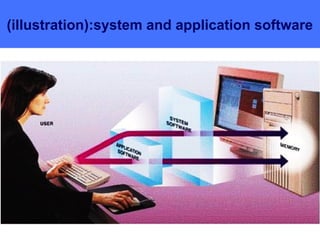
(illustration):system and application software
7
8
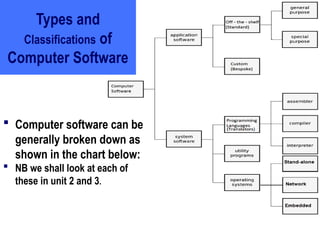
Types and
Classifications of
Computer Software
 Computer software can be
generally broken down as
shown in the chart below:
 NB we shall look at each of
these in unit 2 and 3.
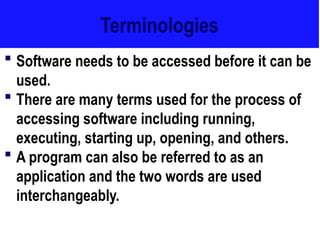
Terminologies
 Software needs to be accessed before it can be
used.
 There are many terms used for the process of
accessing software including running,
executing, starting up, opening, and others.
 A program can also be referred to as an
application and the two words are used
interchangeably.
9
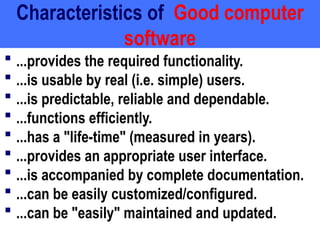
Characteristics of Good computer
software
 ...provides the required functionality.
 ...is usable by real (i.e. simple) users.
 ...is predictable, reliable and dependable.
 ...functions efficiently.
 ...has a "life-time" (measured in years).
 ...provides an appropriate user interface.
 ...is accompanied by complete documentation.
 ...can be easily customized/configured.
 ...can be "easily" maintained and updated.
10
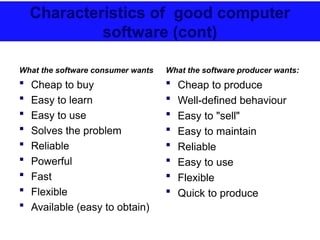
Characteristics of good computer
software (cont)
What the software consumer wants
 Cheap to buy
 Easy to learn
 Easy to use
 Solves the problem
 Reliable
 Powerful
 Fast
 Flexible
 Available (easy to obtain)
What the software producer wants:
 Cheap to produce
 Well-defined behaviour
 Easy to "sell"
 Easy to maintain
 Reliable
 Easy to use
 Flexible
 Quick to produce
11
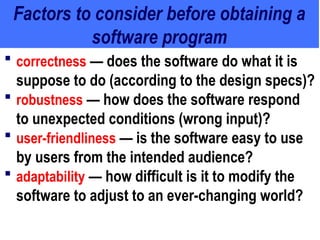
Factors to consider before obtaining a
software program
 correctness — does the software do what it is
suppose to do (according to the design specs)?
 robustness — how does the software respond
to unexpected conditions (wrong input)?
 user-friendliness — is the software easy to use
by users from the intended audience?
 adaptability — how difficult is it to modify the
software to adjust to an ever-changing world?
12
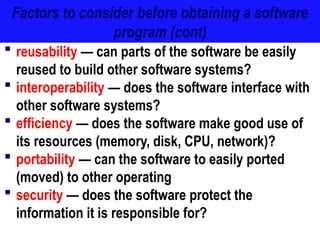
Factors to consider before obtaining a software
program (cont)
 reusability — can parts of the software be easily
reused to build other software systems?
 interoperability — does the software interface with
other software systems?
 efficiency — does the software make good use of
its resources (memory, disk, CPU, network)?
 portability — can the software to easily ported
(moved) to other operating
 security — does the software protect the
information it is responsible for?
13

Computer Computer Software topic three .ppt

  • 1.
    TOPIC 3: COMPUTER SOFTWARE COMPUTERDEPARTMENT Bishop Stuart university 1
  • 2.
    TOPIC OUTLINE  Unit1. Introduction to Software  Unit 2. System Software  Unit 3. Application Software 2
  • 3.
    TOPIC 3: COMPUTERSOFTWARE Unit One: Introduction to Software COMPUTER STUDIES DEPARTMENT 3
  • 4.
    Unit Introduction  Theusefulness of computer hardware depends a lot on available software and the ability of users to evaluate, monitor, and control the utilization of the software.  In Topic one Unit 8 (The Computer System), we met the term ‘computer software’. We saw that:  Computer software refers to the electronic instructions and procedures that control the operation of a computer. 4
  • 5.
    Unit Objectives  Tobe able to:  Define and describe the types/classifications of software: (definitions with examples) Application & System Software  Describe the characteristics of computer software 5
  • 6.
    Unit Introduction (cont.) There are two major types of software: system software and application software.  Each performs a different function.  System software e.g. the Operating system manage and coordinate all the other computer programs, devices, resources and activities.  While Application software like, Word- processors, Paint, Calculator and, Games solve the specific or exact needs of the user. 6
  • 7.
  • 8.
    8 Types and Classifications of ComputerSoftware  Computer software can be generally broken down as shown in the chart below:  NB we shall look at each of these in unit 2 and 3.
  • 9.
    Terminologies  Software needsto be accessed before it can be used.  There are many terms used for the process of accessing software including running, executing, starting up, opening, and others.  A program can also be referred to as an application and the two words are used interchangeably. 9
  • 10.
    Characteristics of Goodcomputer software  ...provides the required functionality.  ...is usable by real (i.e. simple) users.  ...is predictable, reliable and dependable.  ...functions efficiently.  ...has a "life-time" (measured in years).  ...provides an appropriate user interface.  ...is accompanied by complete documentation.  ...can be easily customized/configured.  ...can be "easily" maintained and updated. 10
  • 11.
    Characteristics of goodcomputer software (cont) What the software consumer wants  Cheap to buy  Easy to learn  Easy to use  Solves the problem  Reliable  Powerful  Fast  Flexible  Available (easy to obtain) What the software producer wants:  Cheap to produce  Well-defined behaviour  Easy to "sell"  Easy to maintain  Reliable  Easy to use  Flexible  Quick to produce 11
  • 12.
    Factors to considerbefore obtaining a software program  correctness — does the software do what it is suppose to do (according to the design specs)?  robustness — how does the software respond to unexpected conditions (wrong input)?  user-friendliness — is the software easy to use by users from the intended audience?  adaptability — how difficult is it to modify the software to adjust to an ever-changing world? 12
  • 13.
    Factors to considerbefore obtaining a software program (cont)  reusability — can parts of the software be easily reused to build other software systems?  interoperability — does the software interface with other software systems?  efficiency — does the software make good use of its resources (memory, disk, CPU, network)?  portability — can the software to easily ported (moved) to other operating  security — does the software protect the information it is responsible for? 13