WELCOME
TO
OUR
PRESENTATION
1
GROUP MEMBER
Taufiq Alahi Anik
142011112
Rabaya Yeasmin
113011133
Md Borhan Uddin
142011132
Farhan Ahmed Mahi
142011033
2
3
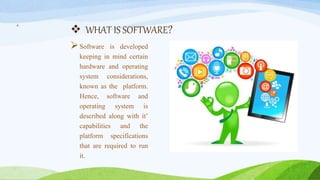
 WHAT IS SOFTWARE?
Software is developed
keeping in mind certain
hardware and operating
system considerations,
known as the platform.
Hence, software and
operating system is
described along with it’
capabilities and the
platform specifications
that are required to run
it.
4
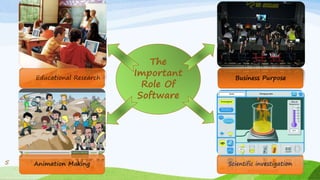
Animation Making
Educational Research Business Purpose
The
Important
Role Of
Software
5
5
6
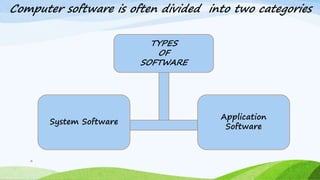
System Software
Application
Software
TYPES
OF
SOFTWARE
Computer software is often divided into two categories
7
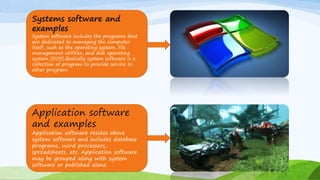
Systems software and
examples
System software includes the programs that
are dedicated to managing the computer
itself, such as the operating system, file
management utilities, and disk operating
system (DOS).Basically system software is a
collection of program to provide service to
other program.
Application software
and examples
Application software resides above
system software and includes database
programs, word processors,
spreadsheets, etc. Application software
may be grouped along with system
software or published alone.
8
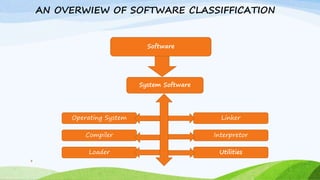
Software
System Software
Interpretor
UtilitiesLoader
Compiler
Operating System Linker
AN OVERWIEW OF SOFTWARE CLASSIFFICATION
9
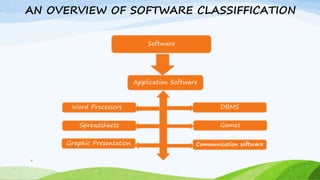
Software
Application Software
Games
Communication softwareGraphic Presentation
Spreadsheets
Word Processors DBMS
AN OVERVIEW OF SOFTWARE CLASSIFFICATION
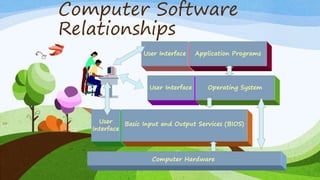
Computer Software
Relationships
10 User
Interface
Basic Input and Output Services (BIOS)
User Interface Operating System
User Interface Application Programs
Computer Hardware
SOFTWARE COMPONENTS
 Definition: Reusabile/Substitutable software artifacts
 A physical packaging classes rusable at the instance level
 Object-Oriented classes reusable at the instance level
 Disctributed in the from of an object code with out source codes
 Systems : CORBRA EJD, JavaBeans ActiveX/COM
Background of component technology
 Need :
 End use computing [EUC]
 Reducing development cost
 Seeds :
 Growth of reuse technology based OO
 Appearances of component market on the Internet
11
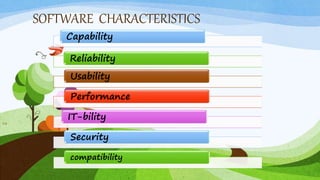
SOFTWARE CHARACTERISTICS
12
Capability
Reliability
Usability
Performance
IT-bility
Security
compatibility
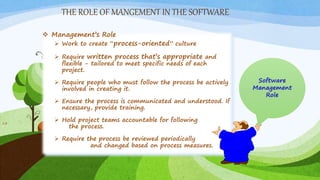
THE ROLE OF MANGEMENT IN THE SOFTWARE
13
 Management’s Role
 Work to create “process-oriented” culture
 Require written process that’s appropriate and
flexible - tailored to meet specific needs of each
project.
 Require people who must follow the process be actively
involved in creating it.
 Ensure the process is communicated and understood. If
necessary, provide training.
 Hold project teams accountable for following
the process.
 Require the process be reviewed periodically
and changed based on process measures.
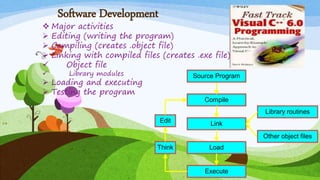
Software Development
 Major activities
 Editing (writing the program)
 Compiling (creates .object file)
 Linking with compiled files (creates .exe file)
 Object file
 Library modules
 Loading and executing
 Testing the program
14
Compile
Link
Library routines
Other object files
Think
Edit
Load
Execute
Source Program
SOFTWARE WHICH WE USE IN OUR DAILY LIFE
1.Microsoft Office.
2.Mozilla Firefox.
3.Adobe Photoshop.
4.Microsoft Power Point 5.
5.VlC Media Player.
15
Advantages of Software
Reliability
Fault tolerance
Data handling efficiency
Speed security
Anytime access
Cheaper
No setup cost
Higher efficiency
Disadvantages of Software
 Need internet
 Speed of internet
 Dependability
 Security
 Minor errors may reflect with
great effect
MOST POPULAR SOFTWARE
1.Ccleaner.
2.Google Chrome.
3.Adobe Reader.
4.Avast.
5. Internet Download Manager.
6.Skype.
7.uTorrent.
8.Flash Player.
9.KM Player.
10.Itunes.
18
19
# Do You Have any
Question…???
THANK YOU…
21

Cse 101(update)

  • 1.
  • 2.
    GROUP MEMBER Taufiq AlahiAnik 142011112 Rabaya Yeasmin 113011133 Md Borhan Uddin 142011132 Farhan Ahmed Mahi 142011033 2
  • 3.
  • 4.
     WHAT ISSOFTWARE? Software is developed keeping in mind certain hardware and operating system considerations, known as the platform. Hence, software and operating system is described along with it’ capabilities and the platform specifications that are required to run it. 4
  • 5.
    Animation Making Educational ResearchBusiness Purpose The Important Role Of Software 5 5
  • 6.
  • 7.
    7 Systems software and examples Systemsoftware includes the programs that are dedicated to managing the computer itself, such as the operating system, file management utilities, and disk operating system (DOS).Basically system software is a collection of program to provide service to other program. Application software and examples Application software resides above system software and includes database programs, word processors, spreadsheets, etc. Application software may be grouped along with system software or published alone.
  • 8.
  • 9.
    9 Software Application Software Games Communication softwareGraphicPresentation Spreadsheets Word Processors DBMS AN OVERVIEW OF SOFTWARE CLASSIFFICATION
  • 10.
    Computer Software Relationships 10 User Interface BasicInput and Output Services (BIOS) User Interface Operating System User Interface Application Programs Computer Hardware
  • 11.
    SOFTWARE COMPONENTS  Definition:Reusabile/Substitutable software artifacts  A physical packaging classes rusable at the instance level  Object-Oriented classes reusable at the instance level  Disctributed in the from of an object code with out source codes  Systems : CORBRA EJD, JavaBeans ActiveX/COM Background of component technology  Need :  End use computing [EUC]  Reducing development cost  Seeds :  Growth of reuse technology based OO  Appearances of component market on the Internet 11
  • 12.
  • 13.
    THE ROLE OFMANGEMENT IN THE SOFTWARE 13  Management’s Role  Work to create “process-oriented” culture  Require written process that’s appropriate and flexible - tailored to meet specific needs of each project.  Require people who must follow the process be actively involved in creating it.  Ensure the process is communicated and understood. If necessary, provide training.  Hold project teams accountable for following the process.  Require the process be reviewed periodically and changed based on process measures.
  • 14.
    Software Development  Majoractivities  Editing (writing the program)  Compiling (creates .object file)  Linking with compiled files (creates .exe file)  Object file  Library modules  Loading and executing  Testing the program 14 Compile Link Library routines Other object files Think Edit Load Execute Source Program
  • 15.
    SOFTWARE WHICH WEUSE IN OUR DAILY LIFE 1.Microsoft Office. 2.Mozilla Firefox. 3.Adobe Photoshop. 4.Microsoft Power Point 5. 5.VlC Media Player. 15
  • 16.
    Advantages of Software Reliability Faulttolerance Data handling efficiency Speed security Anytime access Cheaper No setup cost Higher efficiency
  • 17.
    Disadvantages of Software Need internet  Speed of internet  Dependability  Security  Minor errors may reflect with great effect
  • 18.
    MOST POPULAR SOFTWARE 1.Ccleaner. 2.GoogleChrome. 3.Adobe Reader. 4.Avast. 5. Internet Download Manager. 6.Skype. 7.uTorrent. 8.Flash Player. 9.KM Player. 10.Itunes. 18
  • 19.
    19 # Do YouHave any Question…??? THANK YOU… 21