:::::11010101100101101010101010010110101010101011:::::
:::::11010101100101101010101010010110101010101011:::::
Computer Software Concept
Chapter 2
:::::11010101100101101010101010010110101010101011:::::
:::::11010101100101101010101010010110101010101011:::::
Contents
• Introduction
• Types of software
• Software development
:::::11010101100101101010101010010110101010101011:::::
:::::11010101100101101010101010010110101010101011:::::
Objectives
• At the end of this topic, students should be able
to:
– Differentiate between the two major types of software.
– Describe the general functions of the operating
system.
– Describe the general functions of the application
system.
– Describe the general process of software
development.
:::::11010101100101101010101010010110101010101011:::::
:::::11010101100101101010101010010110101010101011:::::
Introduction
• History
– Less important when computer was first
introduced.
– Why? Computer was literally hardwired
– Software become important today. Why?
• Price of hardware has decreased
• Software development process is slow-complexity
:::::11010101100101101010101010010110101010101011:::::
:::::11010101100101101010101010010110101010101011:::::
Introduction
• Software today…
– Difficult to produce software
– Must carefully engineered and developed
manually
– Requires skills
:::::11010101100101101010101010010110101010101011:::::
:::::11010101100101101010101010010110101010101011:::::
Introduction
• Software ;
– Consists of computer program
– Stored program – instructions are executed in CPU
– Allows the hardware do something useful
• 2 types of software
– System software
– Application software
:::::11010101100101101010101010010110101010101011:::::
:::::11010101100101101010101010010110101010101011:::::
Introduction
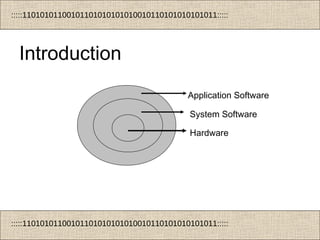
Application Software
System Software
Hardware
:::::11010101100101101010101010010110101010101011:::::
:::::11010101100101101010101010010110101010101011:::::
Types of software
:::::11010101100101101010101010010110101010101011:::::
:::::11010101100101101010101010010110101010101011:::::
Types of software
• Systems software
– Programs which help the user control and make best use
of the hardware
– Intermediary between computer hardware and application
programs
– Control and coordinates computer operation
• Applications software
– Programs that have been written to perform a specific task
– Provide functionality for users
:::::11010101100101101010101010010110101010101011:::::
:::::11010101100101101010101010010110101010101011:::::
Types of software
• System software
– 2 categories:
• Operating system
– Supervises the overall operations of the
computer
• Other type of system software
– System utilities
– System support programs
:::::11010101100101101010101010010110101010101011:::::
:::::11010101100101101010101010010110101010101011:::::
Types of software
• Common microcomputer (desktop) operating systems include:
– Windows
– Mac OS
– Linux
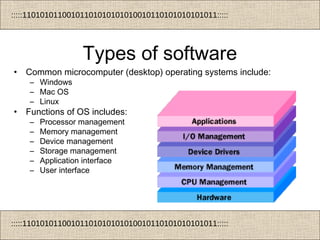
• Functions of OS includes:
– Processor management
– Memory management
– Device management
– Storage management
– Application interface
– User interface
:::::11010101100101101010101010010110101010101011:::::
:::::11010101100101101010101010010110101010101011:::::
Types of software
• Other type of system software
– System utilities.
• Programs that accomplish common tasks such as sorting
records, locating files, and managing memory usage
• E.g.
– Anti-Virus
– Compression
– Backup/Restore
– Registry Cleanup
– Scan disk/disk repair
– Hardware diagnostics
– Encryption/decryption
:::::11010101100101101010101010010110101010101011:::::
:::::11010101100101101010101010010110101010101011:::::
Types of software
• Other type of system software
– System support programs
• supports the operations management and
users
• providing a variety of support services
• e.g. performance monitors, and security
monitors
:::::11010101100101101010101010010110101010101011:::::
:::::11010101100101101010101010010110101010101011:::::
Types of software
• Application software
– 2 categories:
• Generic (general purpose)
– Can be used for a wide variety of tasks
– e.g. spreadsheets can be used for accounts, sales
analysis, forecasting and many others.
• Specific
– Perform a single task.
– E.g. Accounting software is capable of doing only
accounting related tasks.
:::::11010101100101101010101010010110101010101011:::::
:::::11010101100101101010101010010110101010101011:::::
Types of software
• Generic software includes:
– Word processing
– Spreadsheets
– Database management
– Graphics
– Presentation
– Web page authoring
– Web browsing
– Email
:::::11010101100101101010101010010110101010101011:::::
:::::11010101100101101010101010010110101010101011:::::
Types of software
• Common specific applications include:
– Payroll
– School Administration
– Booking systems
– Stock control/warehousing
• Both generic and specialist applications can be
bought custom or off-the-shelf.
:::::11010101100101101010101010010110101010101011:::::
:::::11010101100101101010101010010110101010101011:::::
Software Development
:::::11010101100101101010101010010110101010101011:::::
:::::11010101100101101010101010010110101010101011:::::
Software Development
• What is software development?
– Translation of a user need into a software
product
– Involve software development process.
– Synonym as software process or software
development life cycle (SDLC)
– Every software development project have
generic SDLC
:::::11010101100101101010101010010110101010101011:::::
:::::11010101100101101010101010010110101010101011:::::
Software Development
• There are several software development
model with different approach.
• E.g. : waterfall, iterative, prototyping, etc.
:::::11010101100101101010101010010110101010101011:::::
:::::11010101100101101010101010010110101010101011:::::
Software Development
• Phases in SDLC:
– Feasibility study (survey)
– Requirement analysis
– System analysis
– System design
– System implementation
– System evaluation
– System maintenance
– Documentation
:::::11010101100101101010101010010110101010101011:::::
:::::11010101100101101010101010010110101010101011:::::
System
Analysis
System
Design
System
Implementation
System
Evaluation
Requirement
Analysis
Feasibility
Study
Documentation
System
Maintenance
Software Development Life Cycle
:::::11010101100101101010101010010110101010101011:::::
:::::11010101100101101010101010010110101010101011:::::
Software Development
• Feasibility study
– a process that briefly examine user needs
– conducted within short period of time
– very important as it measures whether to
proceed the project or not
:::::11010101100101101010101010010110101010101011:::::
:::::11010101100101101010101010010110101010101011:::::
Software Development
• Requirement analysis
– to find out what are the users requirement of the
software
– done through interview and discussion session
among users
– important as system design will rely on the
requirements stated
– misunderstood of requirements will lead to major
failure of SW development
:::::11010101100101101010101010010110101010101011:::::
:::::11010101100101101010101010010110101010101011:::::
Software Development
• System analysis
– requirements gathered are being analyzed
– analysis will lead to the next phase –
designing of the software
:::::11010101100101101010101010010110101010101011:::::
:::::11010101100101101010101010010110101010101011:::::
Software Development
• System design
– the exact configuration of HW (processing,
storage, I/O and network components) and
SW (OS or NOS) components is specified
– select application program development tools
(programming language and DBMS)
:::::11010101100101101010101010010110101010101011:::::
:::::11010101100101101010101010010110101010101011:::::
Software Development
• System implementation
– implements the plan formulated during design
phase
– HW and SW are installed, configured and
tested
– entire system are check (functionality) –
meets user’s needs (as defined in analysis
phase)
:::::11010101100101101010101010010110101010101011:::::
:::::11010101100101101010101010010110101010101011:::::
Software Development
• System evaluation
– evaluation is necessary to measure the
success of the development
– evaluation will subsequently leads to better
improvements
– improvements will be done in the
maintenance phase
:::::11010101100101101010101010010110101010101011:::::
:::::11010101100101101010101010010110101010101011:::::
Software Development
• System maintenance
– obtain the input from the evaluation phase
– weakness and mistakes would be corrected
here
– produce better system – which meet users
needs
:::::11010101100101101010101010010110101010101011:::::
:::::11010101100101101010101010010110101010101011:::::
Software Development
• Documentation
– very important – without it difficult to trace
back flow of system being developed – act as
reference
– system reusable and training needs reference
– cost analysis can be done effective based on
documentation
:::::11010101100101101010101010010110101010101011:::::
:::::11010101100101101010101010010110101010101011:::::
End of Chapter 2

Chapter 2 computer software

Editor's Notes

  • #12 Processor Management The OS has manage the execution of processes so that you believe that there are several things happening at once. However, the processor can only do one thing at a time. In order to give the appearance of lots of things happening at the same time, the OS has to switch between different processes thousands of times a second making sure that each process and application receives enough of the processor's time to function properly. Memory Management The OS manages memory (RAM). When applications are loaded they need memory to work with. The OS allocates software RAM to work in. It ensures that the RAM allocated is not used by another application. The OS also manages virtual memory. In this way the computer can run more applications than it has RAM for. For example if a computer was running a word processor and the user wanted to load a spreadsheet application at the same time and there was not enough RAM then the OS uses the hard disc as virtual RAM. Device Management (Input/Output) The OS makes use of queues and buffers, special storage facilities that take a stream of bits (data) from a device, e.g. a keyboard, hold those bits, and then release them to the CPU at a rate slow enough for the CPU to cope with. This function is very important when a number of processes are running and taking up processor time. The OS will instruct a buffer to continue taking input from the device, but to stop sending data to the CPU while the process using the input is suspended. Then, when the process needing input is made active once again, the OS will command the buffer to send data. Device Management (Drivers) The operating system needs to communicate with the various hardware components which make up the computer. Special programs called drivers enable the OS to communicate with these hardware devices. Drivers are needed as the hardware which makes up a PC may be vastly different to that of another PC with the same OS installed. Drivers are translation programs which convert the messages from the OS into messages that the hardware device can understand. Application Interface In much the same way that drivers provide a way for applications (software) to make use of hardware without having to know every detail of the hardware's operation, application program interfaces (APIs) let application programmers use functions of the computer and operating system without having to directly keep track of all the details in the CPU's operation. User Interface The user interface (UI) brings structure to the interaction between a user and the computer. In desktop computers the user interface is a program or set of programs that sits as a layer above the OS. The core operating-system functions - the management of the computer system - lie in the kernel of the operating system. The display manager is separate, though it may be tied tightly to the kernel beneath.
  • #17 Custom Software Advantages: Meets purpose exactly Small hard disk footprint compared to off-the-shelf Specialist Backup Source Code Disadvantages: More expensive than off-the shelf May have mistakes in code (untested) which will cost money to correct Not immediately available Very limited overall backup and support – no books, etc Off-the-Shelf Software Advantages: Usually cheaper than custom-written Already been tested Choice of brands Immediately available no time delay in implementing Support from a variety of sources: e.g. Internet sites, Books, etc. Disadvantages: Large Memory footprint Many features not required Not completely suited to purpose Integrated Package vs. Suite Software Suite Contain common productivity tools in ONE package Limited functionality Usually cheaper than integrated package Often “bundled” with new PCs Integrated Package Separate productivity applications that are bundled together and sold at a discount The applications are "integrated" i.e. have a common interface and can export/import data between apps Open Source vs. Proprietary Applies to all software Some software vendors / communities licence their software as open-source Anybody can develop the source code i.e. customise/improve the application Often but not always free