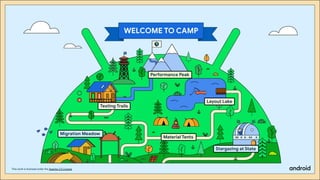
Stargazing at State
Migration Meadow
Testing Trails
Performance Peak
Layout Lake
Material Tents
This work is licensed under the Apache 2.0 License
What is Compose Camp?
Community-organized events focused around
how to build Android apps using Jetpack
Compose, where attendees get hands-on
coding experience with Compose.
This work is licensed under the Apache 2.0 License
Is Compose Camp similar
to Android Study Jams?
Yes! If you’re familiar with Android Study Jams, the learning format is the same. It’s a group of
people coming together to do hands-on learning for a specific Android topic, like a study group.
The difference is that with Compose Camp, the focus is on specifically learning Compose skills
for Android, with a fun camp theme!
This work is licensed under the Apache 2.0 License
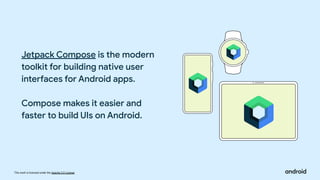
Jetpack Compose is the modern
toolkit for building native user
interfaces for Android apps.
Compose makes it easier and
faster to build UIs on Android.
This work is licensed under the Apache 2.0 License
Benefits of using Jetpack Compose
Less code
Do more with less code
and avoid entire classes
of bugs. Code is simpler
and easier to maintain.
Intuitive
Just describe your UI,
and Compose takes care
of the rest. As app state
changes, your UI
automatically updates.
Accelerates
Development
Compatible with all your
existing code so you can
adopt when and where
you want. Iterate fast with
live previews and full
Android Studio support.
Powerful
Create beautiful apps with
direct access to the
Android platform APIs and
built-in support for
Material Design, Dark
theme, animations, and
more.
This work is licensed under the Apache 2.0 License
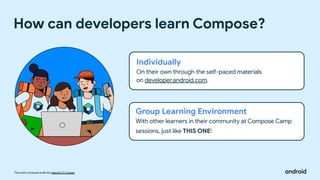
How can developers learn Compose?
Individually
On their own through the self-paced materials
on developer.android.com.
Group Learning Environment
With other learners in their community at Compose Camp
sessions, just like THIS ONE!
This work is licensed under the Apache 2.0 License
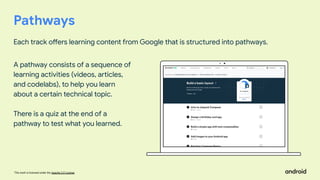
Pathways
Each track offers learning content from Google that is structured into pathways.
A pathway consists of a sequence of
learning activities (videos, articles,
and codelabs), to help you learn
about a certain technical topic.
There is a quiz at the end of a
pathway to test what you learned.
This work is licensed under the Apache 2.0 License
Earn digital badges
For each quiz successfully passed
This work is licensed under the Apache 2.0 License
Carrie Sawyer
See Developer Profile FAQ
Badges are added
to your
Google Developer Profile
This work is licensed under the Apache 2.0 License
Compose apps are written in the
Kotlin programming language.
Kotlin is the language that the
majority of professional Android
developers use to build apps.
This work is licensed under the Apache 2.0 License
Pros of Kotlin
● Faster to compile
● Lightweight
● Prevents applications from increasing size.
● Any chunk of code written in Kotlin is much smaller
compared to Java.
● All the libraries and frameworks made in Java
can run in a Kotlin project.
● It is safe against NullPointerException
This work is licensed under the Apache 2.0 License
Introduction to Kotlin
This work is licensed under the Apache 2.0 License
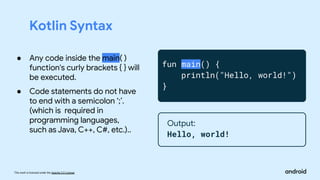
Kotlin Syntax
fun main() {
println("Hello, world!")
}
Output:
Hello, world!
● Any code inside the main( )
function's curly brackets { } will
be executed.
● Code statements do not have
to end with a semicolon ‘;’.
(which is required in
programming languages,
such as Java, C++, C#, etc.)..
This work is licensed under the Apache 2.0 License
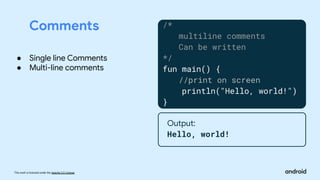
Comments /*
multiline comments
Can be written
*/
fun main() {
//print on screen
println("Hello, world!")
}
Output:
Hello, world!
● Single line Comments
● Multi-line comments
This work is licensed under the Apache 2.0 License
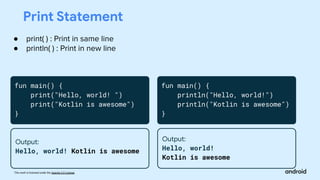
Print Statement
● print( ) : Print in same line
● println( ) : Print in new line
fun main() {
print("Hello, world! ")
print("Kotlin is awesome")
}
Output:
Hello, world! Kotlin is awesome
fun main() {
println("Hello, world!")
println("Kotlin is awesome")
}
Output:
Hello, world!
Kotlin is awesome
This work is licensed under the Apache 2.0 License
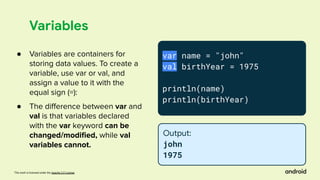
Variables
var name = "john"
val birthYear = 1975
println(name)
println(birthYear)
Output:
john
1975
● Variables are containers for
storing data values. To create a
variable, use var or val, and
assign a value to it with the
equal sign (=):
● The difference between var and
val is that variables declared
with the var keyword can be
changed/modified, while val
variables cannot.
This work is licensed under the Apache 2.0 License
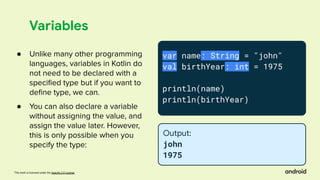
Variables
var name: String = "john"
val birthYear: int = 1975
println(name)
println(birthYear)
Output:
john
1975
● Unlike many other programming
languages, variables in Kotlin do
not need to be declared with a
specified type but if you want to
define type, we can.
● You can also declare a variable
without assigning the value, and
assign the value later. However,
this is only possible when you
specify the type:
This work is licensed under the Apache 2.0 License
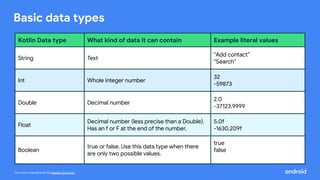
Basic data types
Kotlin Data type What kind of data it can contain Example literal values
String Text
“Add contact”
“Search”
Int Whole integer number
32
-59873
Double Decimal number
2.0
-37123.9999
Float
Decimal number (less precise than a Double).
Has an f or F at the end of the number.
5.0f
-1630.209f
Boolean
true or false. Use this data type when there
are only two possible values.
true
false
This work is licensed under the Apache 2.0 License
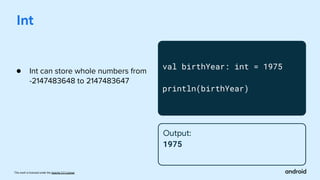
Int
val birthYear: int = 1975
println(birthYear)
Output:
1975
● Int can store whole numbers from
-2147483648 to 2147483647
This work is licensed under the Apache 2.0 License
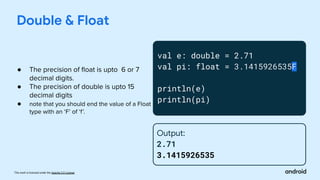
val e: double = 2.71
val pi: float = 3.1415926535F
println(e)
println(pi)
Double & Float
Output:
2.71
3.1415926535
● The precision of float is upto 6 or 7
decimal digits.
● The precision of double is upto 15
decimal digits
● note that you should end the value of a Float
type with an ‘F’ of ‘f’.
This work is licensed under the Apache 2.0 License
Strings
var name: String = "john"
println(name[0])
println(name[1])
Output:
j
o
● Accessing String elements:
To access the characters
(elements) of a string, you must
refer to the index number
inside square brackets.
This work is licensed under the Apache 2.0 License
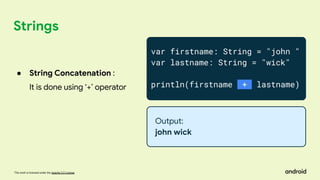
Strings
var firstname: String = "john "
var lastname: String = "wick"
println(firstname + lastname)
Output:
john wick
● String Concatenation :
It is done using ‘+’ operator
This work is licensed under the Apache 2.0 License
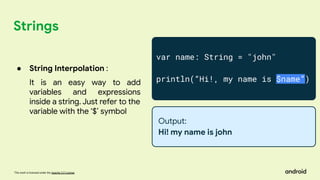
Strings
var name: String = "john"
println(“Hi!, my name is $name”)
Output:
Hi! my name is john
● String Interpolation :
It is an easy way to add
variables and expressions
inside a string. Just refer to the
variable with the ‘$’ symbol
This work is licensed under the Apache 2.0 License
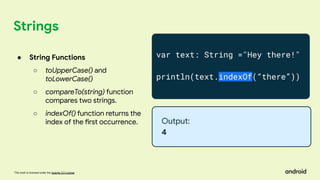
Strings
var text: String ="Hey there!"
println(text.indexOf(“there”))
Output:
4
● String Functions
○ toUpperCase() and
toLowerCase()
○ compareTo(string) function
compares two strings.
○ indexOf() function returns the
index of the first occurrence.
This work is licensed under the Apache 2.0 License
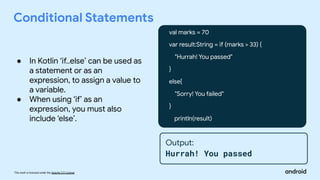
Conditional Statements
val marks = 70
var result:String = if (marks > 33) {
"Hurrah! You passed"
}
else{
"Sorry! You failed"
}
println(result)
Output:
Hurrah! You passed
● In Kotlin ‘if..else’ can be used as
a statement or as an
expression, to assign a value to
a variable.
● When using ‘if’ as an
expression, you must also
include ‘else’.
This work is licensed under the Apache 2.0 License
Conditional Statements
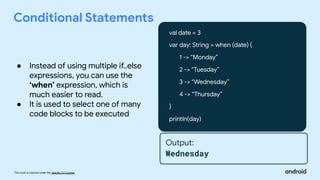
val date = 3
var day: String = when (date) {
1 -> “Monday”
2 -> “Tuesday”
3 -> “Wednesday”
4 -> “Thursday”
}
println(day)
Output:
Wednesday
● Instead of using multiple if..else
expressions, you can use the
‘when’ expression, which is
much easier to read.
● It is used to select one of many
code blocks to be executed
This work is licensed under the Apache 2.0 License
Arrays
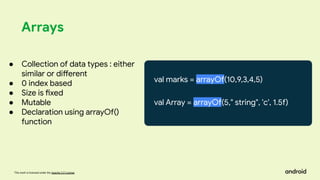
val marks = arrayOf(10,9,3,4,5)
val Array = arrayOf(5," string", 'c', 1.5f)
● Collection of data types : either
similar or different
● 0 index based
● Size is fixed
● Mutable
● Declaration using arrayOf()
function
This work is licensed under the Apache 2.0 License
Arrays
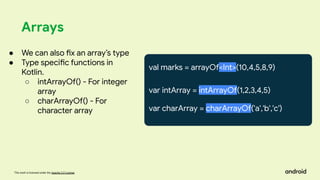
val marks = arrayOf<Int>(10,4,5,8,9)
var intArray = intArrayOf(1,2,3,4,5)
var charArray = charArrayOf('a','b','c')
● We can also fix an array’s type
● Type specific functions in
Kotlin.
○ intArrayOf() - For integer
array
○ charArrayOf() - For
character array
This work is licensed under the Apache 2.0 License
Arrays
val marks = arrayOf<Int>(10,4,5,8,9)
var four = marks[1]
println(marks.size)
● Array element accessing
● Array element modification
● Array Size
Output:
5
This work is licensed under the Apache 2.0 License
Break
This work is licensed under the Apache 2.0 License
Loops
● While loop
● Do while
● For loop
This work is licensed under the Apache 2.0 License
Output:
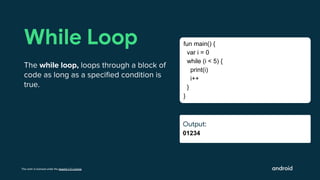
01234
While Loop
The while loop, loops through a block of
code as long as a specified condition is
true.
fun main() {
var i = 0
while (i < 5) {
print(i)
i++
}
}
Output:
Output:
This work is licensed under the Apache 2.0 License
Output:
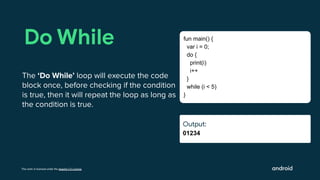
01234
Do While
The ‘Do While’ loop will execute the code
block once, before checking if the condition
is true, then it will repeat the loop as long as
the condition is true.
fun main() {
var i = 0;
do {
print(i)
i++
}
while (i < 5)
}
Output:
Output:
This work is licensed under the Apache 2.0 License
Output:
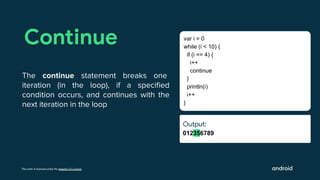
012356789
Continue
The continue statement breaks one
iteration (in the loop), if a specified
condition occurs, and continues with the
next iteration in the loop
var i = 0
while (i < 10) {
if (i == 4) {
i++
continue
}
println(i)
i++
}
Output:
Ouut:
This work is licensed under the Apache 2.0 License
Output:
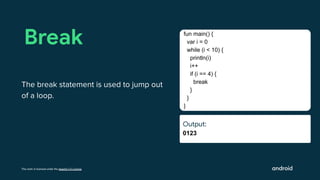
0123
Break
The break statement is used to jump out
of a loop.
fun main() {
var i = 0
while (i < 10) {
println(i)
i++
if (i == 4) {
break
}
}
}
Output:
Ouut:
This work is licensed under the Apache 2.0 License
Output:
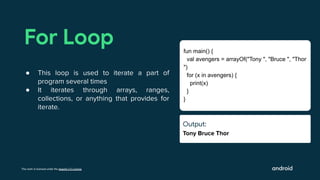
Tony Bruce Thor
For Loop
● This loop is used to iterate a part of
program several times
● It iterates through arrays, ranges,
collections, or anything that provides for
iterate.
fun main() {
val avengers = arrayOf("Tony ", "Bruce ", "Thor
")
for (x in avengers) {
print(x)
}
}
Output:
Ouut:
This work is licensed under the Apache 2.0 License
Output:
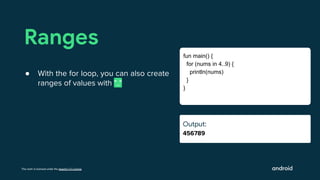
456789
Ranges
● With the for loop, you can also create
ranges of values with ".."
fun main() {
for (nums in 4..9) {
println(nums)
}
}
Output:
Ouut:
This work is licensed under the Apache 2.0 License
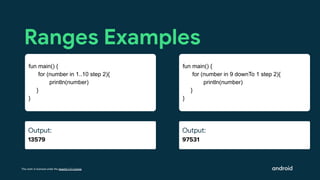
Output:
97531
Ranges Examples
fun main() {
for (number in 9 downTo 1 step 2){
println(number)
}
}
Output:
Ouut:
Output:
13579
fun main() {
for (number in 1..10 step 2){
println(number)
}
}
This work is licensed under the Apache 2.0 License
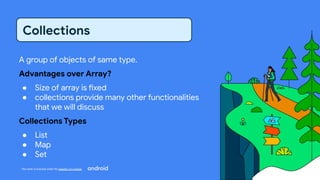
A group of objects of same type.
Advantages over Array?
● Size of array is fixed
● collections provide many other functionalities
that we will discuss
Collections Types
● List
● Map
● Set
Collections
This work is licensed under the Apache 2.0 License
Lists
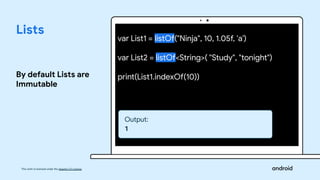
By default Lists are
Immutable
var List1 = listOf("Ninja", 10, 1.05f, 'a')
var List2 = listOf<String>( "Study", "tonight")
print(List1.indexOf(10))
Output:
1
This work is licensed under the Apache 2.0 License
Lists
List can be mutable
also
var List = mutableListOf<String>( "Study", "tonight")
List.add("Play")
print(List[2]))
Output:
“Play”
This work is licensed under the Apache 2.0 License
Maps
Used to store key and
value pair.
Key should be unique
val Map = mapOf<String, Int>("Physics" to 80, "Maths" to 97)
println(Map)
print(Map["Physics"])
Output:
{Physics=80, Maths=97}
80
This work is licensed under the Apache 2.0 License
Maps
Maps can be mutable
also
val Map = mutableMapOf<String, Int>("Physics" to 80,
"Maths" to 97)
println(Map)
Map["Chemistry"] = 90
println(Map)
Output:
{Physics=80, Maths=97}
{Physics=80, Maths=97, Chemistry = 90}
This work is licensed under the Apache 2.0 License
Function Types
● Standard library functions
● User defined functions
Functions
This work is licensed under the Apache 2.0 License
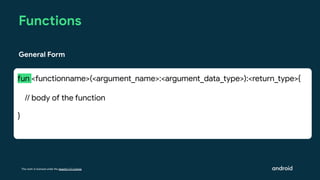
Functions
fun <functionname>(<argument_name>:<argument_data_type>):<return_type>{
// body of the function
}
General Form
This work is licensed under the Apache 2.0 License
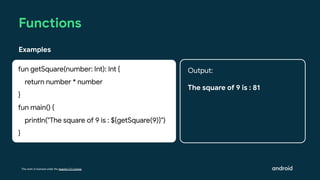
Functions
Examples
fun getSquare(number: Int): Int {
return number * number
}
fun main() {
println("The square of 9 is : ${getSquare(9)}")
}
Output:
The square of 9 is : 81
This work is licensed under the Apache 2.0 License
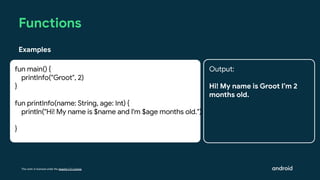
Functions
Examples
fun main() {
printInfo("Groot", 2)
}
fun printInfo(name: String, age: Int) {
println("Hi! My name is $name and I'm $age months old.")
}
Output:
Hi! My name is Groot I’m 2
months old.
This work is licensed under the Apache 2.0 License
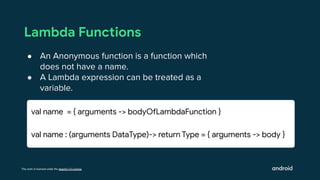
Lambda Functions
● An Anonymous function is a function which
does not have a name.
● A Lambda expression can be treated as a
variable.
val name = { arguments -> bodyOfLambdaFunction }
val name : (arguments DataType)-> return Type = { arguments -> body }
This work is licensed under the Apache 2.0 License
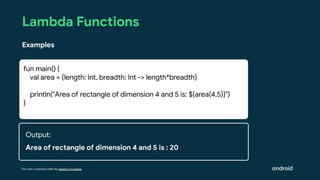
Lambda Functions
Examples
fun main() {
val area = {length: Int, breadth: Int -> length*breadth}
println("Area of rectangle of dimension 4 and 5 is: ${area(4,5)}")
}
Output:
Area of rectangle of dimension 4 and 5 is : 20
This work is licensed under the Apache 2.0 License
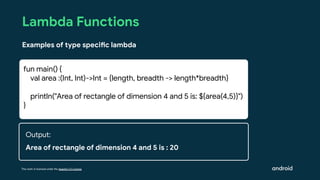
Lambda Functions
Examples of type specific lambda
fun main() {
val area :(Int, Int)->Int = {length, breadth -> length*breadth}
println("Area of rectangle of dimension 4 and 5 is: ${area(4,5)}")
}
Output:
Area of rectangle of dimension 4 and 5 is : 20
This work is licensed under the Apache 2.0 License
Object Oriented
Programming
This work is licensed under the Apache 2.0 License
Class
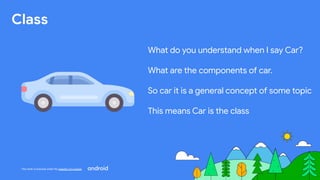
What do you understand when I say Car?
What are the components of car.
So car it is a general concept of some topic
This means Car is the class
This work is licensed under the Apache 2.0 License
Object
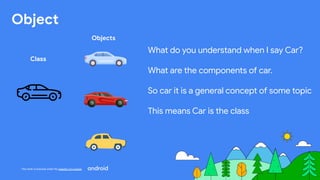
What do you understand when I say Car?
What are the components of car.
So car it is a general concept of some topic
This means Car is the class
Class
Objects
This work is licensed under the Apache 2.0 License
Kotlin Class and Objects
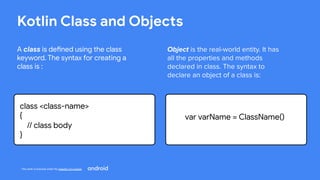
A class is defined using the class
keyword. The syntax for creating a
class is :
class <class-name>
{
// class body
}
Object is the real-world entity. It has
all the properties and methods
declared in class. The syntax to
declare an object of a class is:
var varName = ClassName()
This work is licensed under the Apache 2.0 License
Object of Class
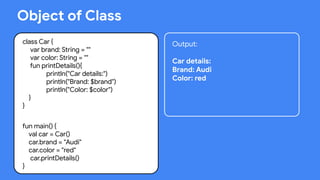
class Car {
var brand: String = ""
var color: String = ""
fun printDetails(){
println("Car details:")
println("Brand: $brand")
println("Color: $color")
}
}
fun main() {
val car = Car()
car.brand = "Audi"
car.color = "red"
car.printDetails()
}
Output:
Car details:
Brand: Audi
Color: red
This work is licensed under the Apache 2.0 License
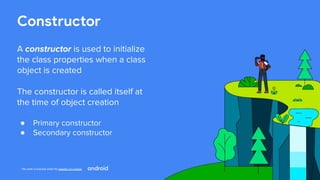
Constructor
A constructor is used to initialize
the class properties when a class
object is created
The constructor is called itself at
the time of object creation
● Primary constructor
● Secondary constructor
This work is licensed under the Apache 2.0 License
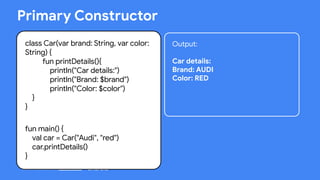
class Car(var brand: String, var color:
String) {
fun printDetails(){
println("Car details:")
println("Brand: $brand")
println("Color: $color")
}
}
fun main() {
val car = Car("Audi", "red")
car.printDetails()
}
Primary Constructor
Output:
Car details:
Brand: AUDI
Color: RED
This work is licensed under the Apache 2.0 License
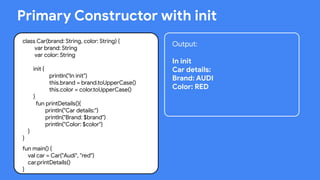
Primary Constructor with init
class Car(brand: String, color: String) {
var brand: String
var color: String
init {
println("In init")
this.brand = brand.toUpperCase()
this.color = color.toUpperCase()
}
fun printDetails(){
println("Car details:")
println("Brand: $brand")
println("Color: $color")
}
}
fun main() {
val car = Car("Audi", "red")
car.printDetails()
}
Output:
In init
Car details:
Brand: AUDI
Color: RED
This work is licensed under the Apache 2.0 License
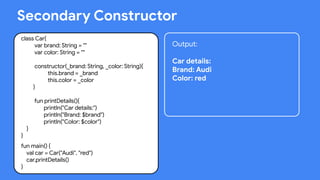
Secondary Constructor
class Car{
var brand: String = ""
var color: String = ""
constructor(_brand: String, _color: String){
this.brand = _brand
this.color = _color
}
fun printDetails(){
println("Car details:")
println("Brand: $brand")
println("Color: $color")
}
}
fun main() {
val car = Car("Audi", "red")
car.printDetails()
}
Output:
Car details:
Brand: Audi
Color: red
This work is licensed under the Apache 2.0 License
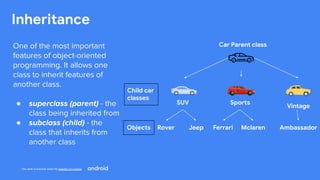
Inheritance
Car Parent class
Child car
classes
Sports
Vintage
Rover Jeep Ambassador
SUV
One of the most important
features of object-oriented
programming. It allows one
class to inherit features of
another class.
● superclass (parent) - the
class being inherited from
● subclass (child) - the
class that inherits from
another class
Ferrari Mclaren
Objects
This work is licensed under the Apache 2.0 License
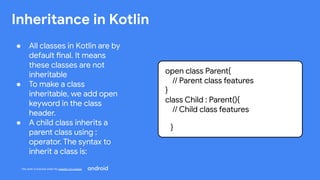
Inheritance in Kotlin
● All classes in Kotlin are by
default final. It means
these classes are not
inheritable
● To make a class
inheritable, we add open
keyword in the class
header.
● A child class inherits a
parent class using :
operator. The syntax to
inherit a class is:
open class Parent{
// Parent class features
}
class Child : Parent(){
// Child class features
}
This work is licensed under the Apache 2.0 License
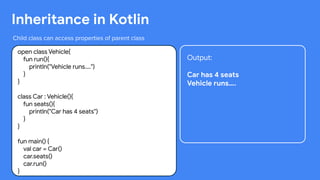
Inheritance in Kotlin
Child class can access properties of parent class
open class Vehicle{
fun run(){
println("Vehicle runs....")
}
}
class Car : Vehicle(){
fun seats(){
println("Car has 4 seats")
}
}
fun main() {
val car = Car()
car.seats()
car.run()
}
Output:
Car has 4 seats
Vehicle runs….
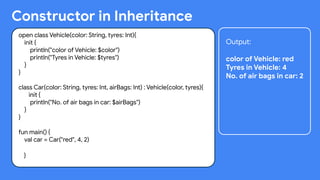
Constructor in Inheritance
open class Vehicle(color: String, tyres: Int){
init {
println("color of Vehicle: $color")
println("Tyres in Vehicle: $tyres")
}
}
class Car(color: String, tyres: Int, airBags: Int) : Vehicle(color, tyres){
init {
println("No. of air bags in car: $airBags")
}
}
fun main() {
val car = Car("red", 4, 2)
}
Output:
color of Vehicle: red
Tyres in Vehicle: 4
No. of air bags in car: 2
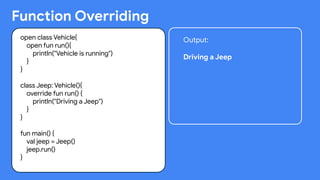
Function Overriding
open class Vehicle{
open fun run(){
println("Vehicle is running")
}
}
class Jeep: Vehicle(){
override fun run() {
println("Driving a Jeep")
}
}
fun main() {
val jeep = Jeep()
jeep.run()
}
Output:
Driving a Jeep
This work is licensed under the Apache 2.0 License
What’s next?
This work is licensed under the Apache 2.0 License
Thank You!
This work is licensed under the Apache 2.0 License

Compose Camp Session 1.pdf

  • 2.
    Stargazing at State MigrationMeadow Testing Trails Performance Peak Layout Lake Material Tents This work is licensed under the Apache 2.0 License
  • 3.
    This work islicensed under the Apache 2.0 License What is Compose Camp? Community-organized events focused around how to build Android apps using Jetpack Compose, where attendees get hands-on coding experience with Compose.
  • 4.
    This work islicensed under the Apache 2.0 License Is Compose Camp similar to Android Study Jams? Yes! If you’re familiar with Android Study Jams, the learning format is the same. It’s a group of people coming together to do hands-on learning for a specific Android topic, like a study group. The difference is that with Compose Camp, the focus is on specifically learning Compose skills for Android, with a fun camp theme!
  • 5.
    This work islicensed under the Apache 2.0 License Jetpack Compose is the modern toolkit for building native user interfaces for Android apps. Compose makes it easier and faster to build UIs on Android.
  • 6.
    This work islicensed under the Apache 2.0 License Benefits of using Jetpack Compose Less code Do more with less code and avoid entire classes of bugs. Code is simpler and easier to maintain. Intuitive Just describe your UI, and Compose takes care of the rest. As app state changes, your UI automatically updates. Accelerates Development Compatible with all your existing code so you can adopt when and where you want. Iterate fast with live previews and full Android Studio support. Powerful Create beautiful apps with direct access to the Android platform APIs and built-in support for Material Design, Dark theme, animations, and more.
  • 7.
    This work islicensed under the Apache 2.0 License How can developers learn Compose? Individually On their own through the self-paced materials on developer.android.com. Group Learning Environment With other learners in their community at Compose Camp sessions, just like THIS ONE!
  • 8.
    This work islicensed under the Apache 2.0 License Pathways Each track offers learning content from Google that is structured into pathways. A pathway consists of a sequence of learning activities (videos, articles, and codelabs), to help you learn about a certain technical topic. There is a quiz at the end of a pathway to test what you learned.
  • 9.
    This work islicensed under the Apache 2.0 License Earn digital badges For each quiz successfully passed
  • 10.
    This work islicensed under the Apache 2.0 License Carrie Sawyer See Developer Profile FAQ Badges are added to your Google Developer Profile
  • 11.
    This work islicensed under the Apache 2.0 License Compose apps are written in the Kotlin programming language. Kotlin is the language that the majority of professional Android developers use to build apps.
  • 12.
    This work islicensed under the Apache 2.0 License Pros of Kotlin ● Faster to compile ● Lightweight ● Prevents applications from increasing size. ● Any chunk of code written in Kotlin is much smaller compared to Java. ● All the libraries and frameworks made in Java can run in a Kotlin project. ● It is safe against NullPointerException
  • 13.
    This work islicensed under the Apache 2.0 License Introduction to Kotlin
  • 14.
    This work islicensed under the Apache 2.0 License Kotlin Syntax fun main() { println("Hello, world!") } Output: Hello, world! ● Any code inside the main( ) function's curly brackets { } will be executed. ● Code statements do not have to end with a semicolon ‘;’. (which is required in programming languages, such as Java, C++, C#, etc.)..
  • 15.
    This work islicensed under the Apache 2.0 License Comments /* multiline comments Can be written */ fun main() { //print on screen println("Hello, world!") } Output: Hello, world! ● Single line Comments ● Multi-line comments
  • 16.
    This work islicensed under the Apache 2.0 License Print Statement ● print( ) : Print in same line ● println( ) : Print in new line fun main() { print("Hello, world! ") print("Kotlin is awesome") } Output: Hello, world! Kotlin is awesome fun main() { println("Hello, world!") println("Kotlin is awesome") } Output: Hello, world! Kotlin is awesome
  • 17.
    This work islicensed under the Apache 2.0 License Variables var name = "john" val birthYear = 1975 println(name) println(birthYear) Output: john 1975 ● Variables are containers for storing data values. To create a variable, use var or val, and assign a value to it with the equal sign (=): ● The difference between var and val is that variables declared with the var keyword can be changed/modified, while val variables cannot.
  • 18.
    This work islicensed under the Apache 2.0 License Variables var name: String = "john" val birthYear: int = 1975 println(name) println(birthYear) Output: john 1975 ● Unlike many other programming languages, variables in Kotlin do not need to be declared with a specified type but if you want to define type, we can. ● You can also declare a variable without assigning the value, and assign the value later. However, this is only possible when you specify the type:
  • 19.
    This work islicensed under the Apache 2.0 License Basic data types Kotlin Data type What kind of data it can contain Example literal values String Text “Add contact” “Search” Int Whole integer number 32 -59873 Double Decimal number 2.0 -37123.9999 Float Decimal number (less precise than a Double). Has an f or F at the end of the number. 5.0f -1630.209f Boolean true or false. Use this data type when there are only two possible values. true false
  • 20.
    This work islicensed under the Apache 2.0 License Int val birthYear: int = 1975 println(birthYear) Output: 1975 ● Int can store whole numbers from -2147483648 to 2147483647
  • 21.
    This work islicensed under the Apache 2.0 License val e: double = 2.71 val pi: float = 3.1415926535F println(e) println(pi) Double & Float Output: 2.71 3.1415926535 ● The precision of float is upto 6 or 7 decimal digits. ● The precision of double is upto 15 decimal digits ● note that you should end the value of a Float type with an ‘F’ of ‘f’.
  • 22.
    This work islicensed under the Apache 2.0 License Strings var name: String = "john" println(name[0]) println(name[1]) Output: j o ● Accessing String elements: To access the characters (elements) of a string, you must refer to the index number inside square brackets.
  • 23.
    This work islicensed under the Apache 2.0 License Strings var firstname: String = "john " var lastname: String = "wick" println(firstname + lastname) Output: john wick ● String Concatenation : It is done using ‘+’ operator
  • 24.
    This work islicensed under the Apache 2.0 License Strings var name: String = "john" println(“Hi!, my name is $name”) Output: Hi! my name is john ● String Interpolation : It is an easy way to add variables and expressions inside a string. Just refer to the variable with the ‘$’ symbol
  • 25.
    This work islicensed under the Apache 2.0 License Strings var text: String ="Hey there!" println(text.indexOf(“there”)) Output: 4 ● String Functions ○ toUpperCase() and toLowerCase() ○ compareTo(string) function compares two strings. ○ indexOf() function returns the index of the first occurrence.
  • 26.
    This work islicensed under the Apache 2.0 License Conditional Statements val marks = 70 var result:String = if (marks > 33) { "Hurrah! You passed" } else{ "Sorry! You failed" } println(result) Output: Hurrah! You passed ● In Kotlin ‘if..else’ can be used as a statement or as an expression, to assign a value to a variable. ● When using ‘if’ as an expression, you must also include ‘else’.
  • 27.
    This work islicensed under the Apache 2.0 License Conditional Statements val date = 3 var day: String = when (date) { 1 -> “Monday” 2 -> “Tuesday” 3 -> “Wednesday” 4 -> “Thursday” } println(day) Output: Wednesday ● Instead of using multiple if..else expressions, you can use the ‘when’ expression, which is much easier to read. ● It is used to select one of many code blocks to be executed
  • 28.
    This work islicensed under the Apache 2.0 License Arrays val marks = arrayOf(10,9,3,4,5) val Array = arrayOf(5," string", 'c', 1.5f) ● Collection of data types : either similar or different ● 0 index based ● Size is fixed ● Mutable ● Declaration using arrayOf() function
  • 29.
    This work islicensed under the Apache 2.0 License Arrays val marks = arrayOf<Int>(10,4,5,8,9) var intArray = intArrayOf(1,2,3,4,5) var charArray = charArrayOf('a','b','c') ● We can also fix an array’s type ● Type specific functions in Kotlin. ○ intArrayOf() - For integer array ○ charArrayOf() - For character array
  • 30.
    This work islicensed under the Apache 2.0 License Arrays val marks = arrayOf<Int>(10,4,5,8,9) var four = marks[1] println(marks.size) ● Array element accessing ● Array element modification ● Array Size Output: 5
  • 31.
    This work islicensed under the Apache 2.0 License Break
  • 32.
    This work islicensed under the Apache 2.0 License Loops ● While loop ● Do while ● For loop
  • 33.
    This work islicensed under the Apache 2.0 License Output: 01234 While Loop The while loop, loops through a block of code as long as a specified condition is true. fun main() { var i = 0 while (i < 5) { print(i) i++ } } Output: Output:
  • 34.
    This work islicensed under the Apache 2.0 License Output: 01234 Do While The ‘Do While’ loop will execute the code block once, before checking if the condition is true, then it will repeat the loop as long as the condition is true. fun main() { var i = 0; do { print(i) i++ } while (i < 5) } Output: Output:
  • 35.
    This work islicensed under the Apache 2.0 License Output: 012356789 Continue The continue statement breaks one iteration (in the loop), if a specified condition occurs, and continues with the next iteration in the loop var i = 0 while (i < 10) { if (i == 4) { i++ continue } println(i) i++ } Output: Ouut:
  • 36.
    This work islicensed under the Apache 2.0 License Output: 0123 Break The break statement is used to jump out of a loop. fun main() { var i = 0 while (i < 10) { println(i) i++ if (i == 4) { break } } } Output: Ouut:
  • 37.
    This work islicensed under the Apache 2.0 License Output: Tony Bruce Thor For Loop ● This loop is used to iterate a part of program several times ● It iterates through arrays, ranges, collections, or anything that provides for iterate. fun main() { val avengers = arrayOf("Tony ", "Bruce ", "Thor ") for (x in avengers) { print(x) } } Output: Ouut:
  • 38.
    This work islicensed under the Apache 2.0 License Output: 456789 Ranges ● With the for loop, you can also create ranges of values with ".." fun main() { for (nums in 4..9) { println(nums) } } Output: Ouut:
  • 39.
    This work islicensed under the Apache 2.0 License Output: 97531 Ranges Examples fun main() { for (number in 9 downTo 1 step 2){ println(number) } } Output: Ouut: Output: 13579 fun main() { for (number in 1..10 step 2){ println(number) } }
  • 40.
    This work islicensed under the Apache 2.0 License A group of objects of same type. Advantages over Array? ● Size of array is fixed ● collections provide many other functionalities that we will discuss Collections Types ● List ● Map ● Set Collections
  • 41.
    This work islicensed under the Apache 2.0 License Lists By default Lists are Immutable var List1 = listOf("Ninja", 10, 1.05f, 'a') var List2 = listOf<String>( "Study", "tonight") print(List1.indexOf(10)) Output: 1
  • 42.
    This work islicensed under the Apache 2.0 License Lists List can be mutable also var List = mutableListOf<String>( "Study", "tonight") List.add("Play") print(List[2])) Output: “Play”
  • 43.
    This work islicensed under the Apache 2.0 License Maps Used to store key and value pair. Key should be unique val Map = mapOf<String, Int>("Physics" to 80, "Maths" to 97) println(Map) print(Map["Physics"]) Output: {Physics=80, Maths=97} 80
  • 44.
    This work islicensed under the Apache 2.0 License Maps Maps can be mutable also val Map = mutableMapOf<String, Int>("Physics" to 80, "Maths" to 97) println(Map) Map["Chemistry"] = 90 println(Map) Output: {Physics=80, Maths=97} {Physics=80, Maths=97, Chemistry = 90}
  • 45.
    This work islicensed under the Apache 2.0 License Function Types ● Standard library functions ● User defined functions Functions
  • 46.
    This work islicensed under the Apache 2.0 License Functions fun <functionname>(<argument_name>:<argument_data_type>):<return_type>{ // body of the function } General Form
  • 47.
    This work islicensed under the Apache 2.0 License Functions Examples fun getSquare(number: Int): Int { return number * number } fun main() { println("The square of 9 is : ${getSquare(9)}") } Output: The square of 9 is : 81
  • 48.
    This work islicensed under the Apache 2.0 License Functions Examples fun main() { printInfo("Groot", 2) } fun printInfo(name: String, age: Int) { println("Hi! My name is $name and I'm $age months old.") } Output: Hi! My name is Groot I’m 2 months old.
  • 49.
    This work islicensed under the Apache 2.0 License Lambda Functions ● An Anonymous function is a function which does not have a name. ● A Lambda expression can be treated as a variable. val name = { arguments -> bodyOfLambdaFunction } val name : (arguments DataType)-> return Type = { arguments -> body }
  • 50.
    This work islicensed under the Apache 2.0 License Lambda Functions Examples fun main() { val area = {length: Int, breadth: Int -> length*breadth} println("Area of rectangle of dimension 4 and 5 is: ${area(4,5)}") } Output: Area of rectangle of dimension 4 and 5 is : 20
  • 51.
    This work islicensed under the Apache 2.0 License Lambda Functions Examples of type specific lambda fun main() { val area :(Int, Int)->Int = {length, breadth -> length*breadth} println("Area of rectangle of dimension 4 and 5 is: ${area(4,5)}") } Output: Area of rectangle of dimension 4 and 5 is : 20
  • 52.
    This work islicensed under the Apache 2.0 License Object Oriented Programming
  • 53.
    This work islicensed under the Apache 2.0 License Class What do you understand when I say Car? What are the components of car. So car it is a general concept of some topic This means Car is the class
  • 54.
    This work islicensed under the Apache 2.0 License Object What do you understand when I say Car? What are the components of car. So car it is a general concept of some topic This means Car is the class Class Objects
  • 55.
    This work islicensed under the Apache 2.0 License Kotlin Class and Objects A class is defined using the class keyword. The syntax for creating a class is : class <class-name> { // class body } Object is the real-world entity. It has all the properties and methods declared in class. The syntax to declare an object of a class is: var varName = ClassName()
  • 56.
    This work islicensed under the Apache 2.0 License Object of Class class Car { var brand: String = "" var color: String = "" fun printDetails(){ println("Car details:") println("Brand: $brand") println("Color: $color") } } fun main() { val car = Car() car.brand = "Audi" car.color = "red" car.printDetails() } Output: Car details: Brand: Audi Color: red
  • 57.
    This work islicensed under the Apache 2.0 License Constructor A constructor is used to initialize the class properties when a class object is created The constructor is called itself at the time of object creation ● Primary constructor ● Secondary constructor
  • 58.
    This work islicensed under the Apache 2.0 License class Car(var brand: String, var color: String) { fun printDetails(){ println("Car details:") println("Brand: $brand") println("Color: $color") } } fun main() { val car = Car("Audi", "red") car.printDetails() } Primary Constructor Output: Car details: Brand: AUDI Color: RED
  • 59.
    This work islicensed under the Apache 2.0 License Primary Constructor with init class Car(brand: String, color: String) { var brand: String var color: String init { println("In init") this.brand = brand.toUpperCase() this.color = color.toUpperCase() } fun printDetails(){ println("Car details:") println("Brand: $brand") println("Color: $color") } } fun main() { val car = Car("Audi", "red") car.printDetails() } Output: In init Car details: Brand: AUDI Color: RED
  • 60.
    This work islicensed under the Apache 2.0 License Secondary Constructor class Car{ var brand: String = "" var color: String = "" constructor(_brand: String, _color: String){ this.brand = _brand this.color = _color } fun printDetails(){ println("Car details:") println("Brand: $brand") println("Color: $color") } } fun main() { val car = Car("Audi", "red") car.printDetails() } Output: Car details: Brand: Audi Color: red
  • 61.
    This work islicensed under the Apache 2.0 License Inheritance Car Parent class Child car classes Sports Vintage Rover Jeep Ambassador SUV One of the most important features of object-oriented programming. It allows one class to inherit features of another class. ● superclass (parent) - the class being inherited from ● subclass (child) - the class that inherits from another class Ferrari Mclaren Objects
  • 62.
    This work islicensed under the Apache 2.0 License Inheritance in Kotlin ● All classes in Kotlin are by default final. It means these classes are not inheritable ● To make a class inheritable, we add open keyword in the class header. ● A child class inherits a parent class using : operator. The syntax to inherit a class is: open class Parent{ // Parent class features } class Child : Parent(){ // Child class features }
  • 63.
    This work islicensed under the Apache 2.0 License Inheritance in Kotlin Child class can access properties of parent class open class Vehicle{ fun run(){ println("Vehicle runs....") } } class Car : Vehicle(){ fun seats(){ println("Car has 4 seats") } } fun main() { val car = Car() car.seats() car.run() } Output: Car has 4 seats Vehicle runs….
  • 64.
    Constructor in Inheritance openclass Vehicle(color: String, tyres: Int){ init { println("color of Vehicle: $color") println("Tyres in Vehicle: $tyres") } } class Car(color: String, tyres: Int, airBags: Int) : Vehicle(color, tyres){ init { println("No. of air bags in car: $airBags") } } fun main() { val car = Car("red", 4, 2) } Output: color of Vehicle: red Tyres in Vehicle: 4 No. of air bags in car: 2
  • 65.
    Function Overriding open classVehicle{ open fun run(){ println("Vehicle is running") } } class Jeep: Vehicle(){ override fun run() { println("Driving a Jeep") } } fun main() { val jeep = Jeep() jeep.run() } Output: Driving a Jeep
  • 66.
    This work islicensed under the Apache 2.0 License What’s next?
  • 67.
    This work islicensed under the Apache 2.0 License Thank You!
  • 68.
    This work islicensed under the Apache 2.0 License
  • 69.
    This work islicensed under the Apache 2.0 License