This work is licensed under the Apache 2.0 License
Day 1 of Compose Camp
● Kotlin Basics
● Installing Android studio
● Build a Basic Layout
This work is licensed under the Apache 2.0 License
Maruthi R
GDSC LEAD SIT
Camp leaders
Abhishek S
Compose Camp Facilitator
This work is licensed under the Apache 2.0 License
What is Compose Camp?
Community-organized events focused around
how to build Android apps using Jetpack
Compose, where attendees get hands-on
coding experience with Compose.
This work is licensed under the Apache 2.0 License
Less code
Do more with less code
And avoid entire classes
Of bugs. Code is simpler,
easier to maintain
Why Jetpack Compose
Intuitive
Just describe your UI,
and compose takes care
of the rest. As app state
changes, your UI
automatically updates
Accelerates
Development
Compatible with all your
existing code so you can
adopt when and where
you want iterate fast with
live previews and full
Android Studio support
Powerful
Create beautiful apps
with direct access to the
Android platform APIs
and built-in support for
Material Design, Dark
Theme, animations, and
more.
This work is licensed under the Apache 2.0 License
● Basic computer literacy
● Basic math skills
● (Optional) Android device & USB cable
Prerequisites
This work is licensed under the Apache 2.0 License
● Set up Android Studio on your computer
● Learn the basics of the Kotlin programming language
● Learn Jetpack Compose
● Learn to create Android App
Compose Camp Learning Objectives
This work is licensed under the Apache 2.0 License
Kotlin
Kotlin is an open-source statically typed
programming language that targets the
JVM, Android, JavaScript and Native.
This work is licensed under the Apache 2.0 License
Jetpack Compose is Android's modern toolkit for building native UI. It
simplifies and accelerates UI development on Android. Quickly bring your
app to life with less code, powerful tools, and intuitive Kotlin APIs.
Jetpack Compose
This work is licensed under the Apache 2.0 License
Ok! Lets get Started
This work is licensed under the Apache 2.0 License
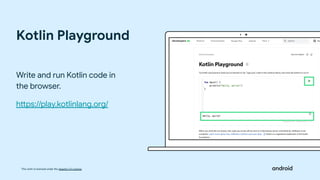
Kotlin Playground
Write and run Kotlin code in
the browser.
https://play.kotlinlang.org/
This work is licensed under the Apache 2.0 License
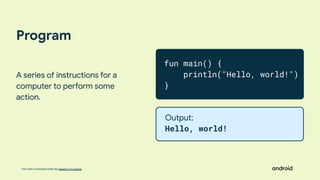
Program
A series of instructions for a
computer to perform some
action.
fun main() {
println("Hello, world!")
}
Output:
Hello, world!
This work is licensed under the Apache 2.0 License
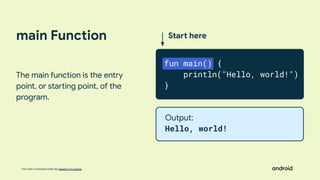
main Function
The main function is the entry
point, or starting point, of the
program.
Start here
fun main() {
println("Hello, world!")
}
Output:
Hello, world!
Functions
A function is a segment of a program that
performs a specific task.
You can have many functions in your program
This work is licensed under the Apache 2.0 License
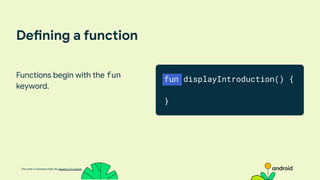
Defining a function
Functions begin with the fun
keyword.
fun displayIntroduction() {
}
This work is licensed under the Apache 2.0 License
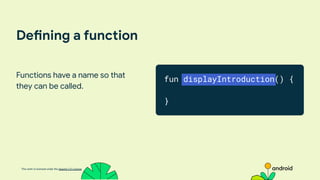
Defining a function
Functions have a name so that
they can be called.
fun displayIntroduction() {
}
This work is licensed under the Apache 2.0 License
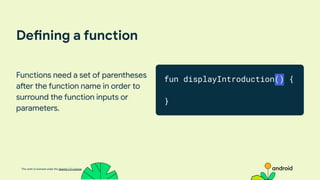
Defining a function
Functions need a set of parentheses
after the function name in order to
surround the function inputs or
parameters.
fun displayIntroduction() {
}
This work is licensed under the Apache 2.0 License
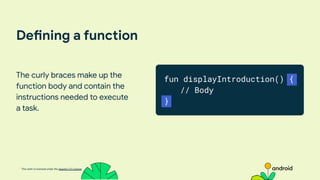
Defining a function
The curly braces make up the
function body and contain the
instructions needed to execute
a task.
fun displayIntroduction() {
// Body
}
This work is licensed under the Apache 2.0 License
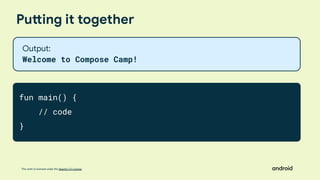
Putting it together
fun main() {
// code
}
Output:
Welcome to Compose Camp!
This work is licensed under the Apache 2.0 License
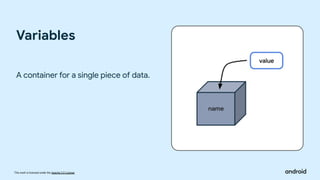
A container for a single piece of data.
Variables
This work is licensed under the Apache 2.0 License
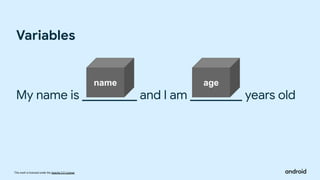
My name is and I am years old
Variables
name age
This work is licensed under the Apache 2.0 License
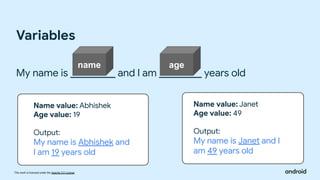
My name is and I am years old
Variables
Name value: Abhishek
Age value: 19
Output:
My name is Abhishek and
I am 19 years old
Name value: Janet
Age value: 49
Output:
My name is Janet and I
am 49 years old
name age
This work is licensed under the Apache 2.0 License
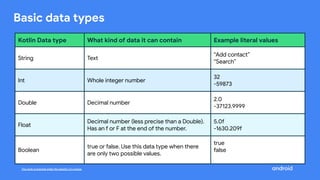
Basic data types
Kotlin Data type What kind of data it can contain Example literal values
String Text
“Add contact”
“Search”
Int Whole integer number
32
-59873
Double Decimal number
2.0
-37123.9999
Float
Decimal number (less precise than a Double).
Has an f or F at the end of the number.
5.0f
-1630.209f
Boolean
true or false. Use this data type when there
are only two possible values.
true
false
This work is licensed under the Apache 2.0 License
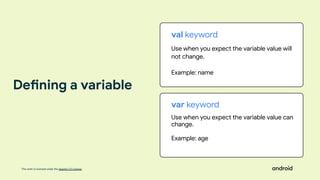
val keyword
Use when you expect the variable value will
not change.
Example: name
var keyword
Use when you expect the variable value can
change.
Example: age
Defining a variable
This work is licensed under the Apache 2.0 License
Defining a variable
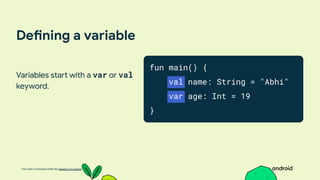
Variables start with a var or val
keyword.
fun main() {
val name: String = "Abhi"
var age: Int = 19
}
This work is licensed under the Apache 2.0 License
Defining a variable
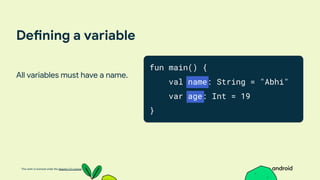
All variables must have a name.
fun main() {
val name: String = "Abhi"
var age: Int = 19
}
This work is licensed under the Apache 2.0 License
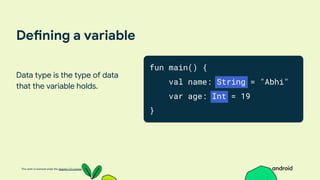
Defining a variable
Data type is the type of data
that the variable holds.
fun main() {
val name: String = "Abhi"
var age: Int = 19
}
This work is licensed under the Apache 2.0 License
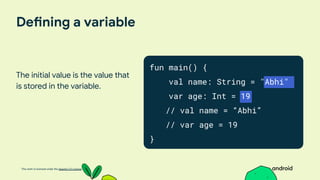
Defining a variable
The initial value is the value that
is stored in the variable.
fun main() {
val name: String = "Abhi"
var age: Int = 19
// val name = “Abhi”
// var age = 19
}
This work is licensed under the Apache 2.0 License
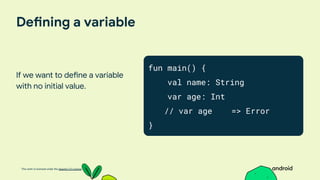
Defining a variable
If we want to define a variable
with no initial value.
fun main() {
val name: String
var age: Int
// var age => Error
}
This work is licensed under the Apache 2.0 License
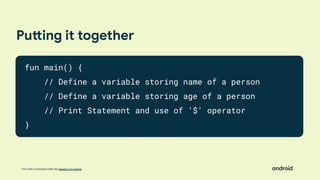
Putting it together
fun main() {
// Define a variable storing name of a person
// Define a variable storing age of a person
// Print Statement and use of ‘$’ operator
}
This work is licensed under the Apache 2.0 License
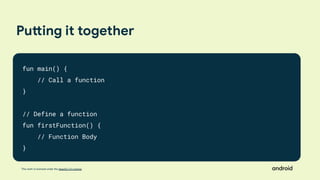
Putting it together
fun main() {
// Call a function
}
// Define a function
fun firstFunction() {
// Function Body
}
This work is licensed under the Apache 2.0 License
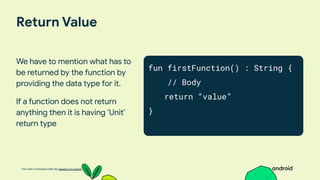
Return Value
We have to mention what has to
be returned by the function by
providing the data type for it.
If a function does not return
anything then it is having ‘Unit’
return type
fun firstFunction() : String {
// Body
return “value”
}
This work is licensed under the Apache 2.0 License
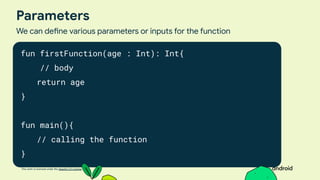
Parameters
We can define various parameters or inputs for the function
fun firstFunction(age : Int): Int{
// body
return age
}
fun main(){
// calling the function
}
This work is licensed under the Apache 2.0 License
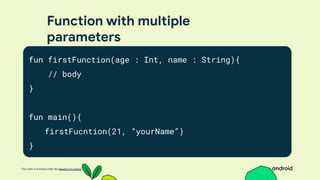
Function with multiple
parameters
fun firstFunction(age : Int, name : String){
// body
}
fun main(){
firstFucntion(21, “yourName”)
}
This work is licensed under the Apache 2.0 License
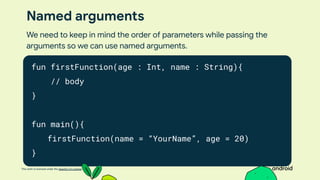
Named arguments
fun firstFunction(age : Int, name : String){
// body
}
fun main(){
firstFunction(name = “YourName”, age = 20)
}
We need to keep in mind the order of parameters while passing the
arguments so we can use named arguments.
This work is licensed under the Apache 2.0 License
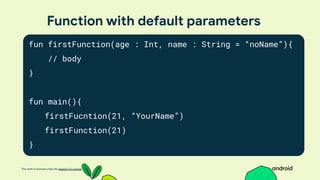
Function with default parameters
fun firstFunction(age : Int, name : String = “noName”){
// body
}
fun main(){
firstFucntion(21, “YourName”)
firstFunction(21)
}
This work is licensed under the Apache 2.0 License
Installing Android Studio
This work is licensed under the Apache 2.0 License
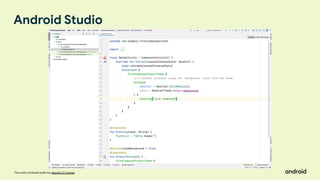
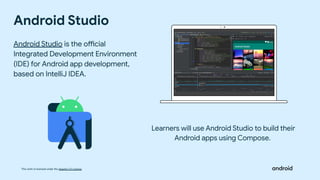
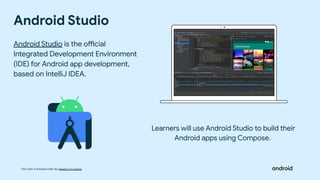
Android Studio
Android Studio is the official
Integrated Development Environment
(IDE) for Android app development,
based on IntelliJ IDEA.
Learners will use Android Studio to build their
Android apps using Compose.
This work is licensed under the Apache 2.0 License
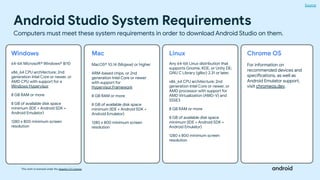
Android Studio System Requirements
Source
Computers must meet these system requirements in order to download Android Studio on them.
Windows
64-bit Microsoft® Windows® 8/10
x86_64 CPU architecture; 2nd
generation Intel Core or newer, or
AMD CPU with support for a
Windows Hypervisor
8 GB RAM or more
8 GB of available disk space
minimum (IDE + Android SDK +
Android Emulator)
1280 x 800 minimum screen
resolution
Mac
MacOS® 10.14 (Mojave) or higher
ARM-based chips, or 2nd
generation Intel Core or newer
with support for
Hypervisor.Framework
8 GB RAM or more
8 GB of available disk space
minimum (IDE + Android SDK +
Android Emulator)
1280 x 800 minimum screen
resolution
Linux
Any 64-bit Linux distribution that
supports Gnome, KDE, or Unity DE;
GNU C Library (glibc) 2.31 or later.
x86_64 CPU architecture; 2nd
generation Intel Core or newer, or
AMD processor with support for
AMD Virtualization (AMD-V) and
SSSE3
8 GB RAM or more
8 GB of available disk space
minimum (IDE + Android SDK +
Android Emulator)
1280 x 800 minimum screen
resolution
Chrome OS
For information on
recommended devices and
specifications, as well as
Android Emulator support,
visit chromeos.dev.
This work is licensed under the Apache 2.0 License
Download Android Studio
Note: If attendees encounter an issue with Android Studio, help them file a bug report.
This work is licensed under the Apache 2.0 License
Android Studio
This work is licensed under the Apache 2.0 License
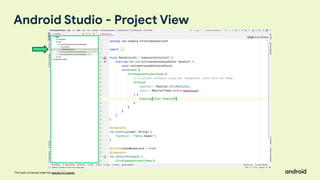
Android Studio - Project View
This work is licensed under the Apache 2.0 License
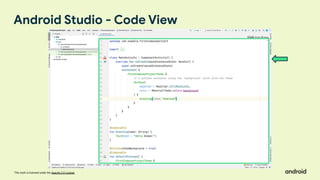
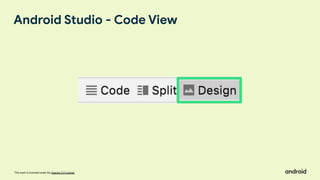
Android Studio - Code View
This work is licensed under the Apache 2.0 License
Android Studio - Code View
This work is licensed under the Apache 2.0 License
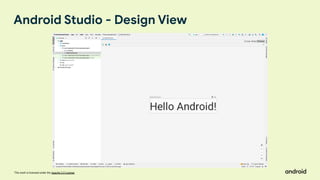
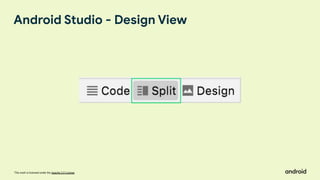
Android Studio - Design View
This work is licensed under the Apache 2.0 License
Android Studio - Design View
This work is licensed under the Apache 2.0 License
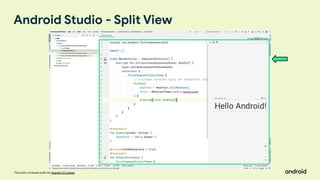
Android Studio - Split View
This work is licensed under the Apache 2.0 License
The Android Emulator emulates Android devices on your computer so
that you can test your application on a variety of devices and Android
API levels without needing to have each physical device.
What is an emulator?
This work is licensed under the Apache 2.0 License
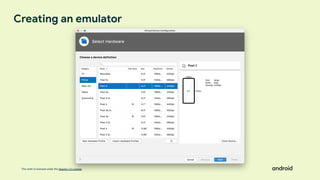
Creating an emulator
This work is licensed under the Apache 2.0 License
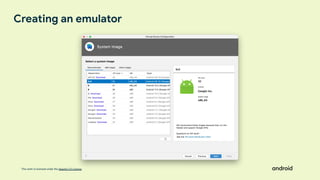
Creating an emulator
This work is licensed under the Apache 2.0 License
Installing Android Studio
This work is licensed under the Apache 2.0 License
Android Studio
Android Studio is the official
Integrated Development Environment
(IDE) for Android app development,
based on IntelliJ IDEA.
Learners will use Android Studio to build their
Android apps using Compose.
This work is licensed under the Apache 2.0 License
THANK YOU
for participating in Compose Camp Day 1

Compose Camp.pdf

  • 1.
    This work islicensed under the Apache 2.0 License
  • 2.
    This work islicensed under the Apache 2.0 License Day 1 of Compose Camp ● Kotlin Basics ● Installing Android studio ● Build a Basic Layout
  • 3.
    This work islicensed under the Apache 2.0 License Maruthi R GDSC LEAD SIT Camp leaders Abhishek S Compose Camp Facilitator
  • 4.
    This work islicensed under the Apache 2.0 License What is Compose Camp? Community-organized events focused around how to build Android apps using Jetpack Compose, where attendees get hands-on coding experience with Compose.
  • 5.
    This work islicensed under the Apache 2.0 License Less code Do more with less code And avoid entire classes Of bugs. Code is simpler, easier to maintain Why Jetpack Compose Intuitive Just describe your UI, and compose takes care of the rest. As app state changes, your UI automatically updates Accelerates Development Compatible with all your existing code so you can adopt when and where you want iterate fast with live previews and full Android Studio support Powerful Create beautiful apps with direct access to the Android platform APIs and built-in support for Material Design, Dark Theme, animations, and more.
  • 6.
    This work islicensed under the Apache 2.0 License ● Basic computer literacy ● Basic math skills ● (Optional) Android device & USB cable Prerequisites
  • 7.
    This work islicensed under the Apache 2.0 License ● Set up Android Studio on your computer ● Learn the basics of the Kotlin programming language ● Learn Jetpack Compose ● Learn to create Android App Compose Camp Learning Objectives
  • 8.
    This work islicensed under the Apache 2.0 License Kotlin Kotlin is an open-source statically typed programming language that targets the JVM, Android, JavaScript and Native.
  • 9.
    This work islicensed under the Apache 2.0 License Jetpack Compose is Android's modern toolkit for building native UI. It simplifies and accelerates UI development on Android. Quickly bring your app to life with less code, powerful tools, and intuitive Kotlin APIs. Jetpack Compose
  • 10.
    This work islicensed under the Apache 2.0 License Ok! Lets get Started
  • 11.
    This work islicensed under the Apache 2.0 License Kotlin Playground Write and run Kotlin code in the browser. https://play.kotlinlang.org/
  • 12.
    This work islicensed under the Apache 2.0 License Program A series of instructions for a computer to perform some action. fun main() { println("Hello, world!") } Output: Hello, world!
  • 13.
    This work islicensed under the Apache 2.0 License main Function The main function is the entry point, or starting point, of the program. Start here fun main() { println("Hello, world!") } Output: Hello, world!
  • 14.
    Functions A function isa segment of a program that performs a specific task. You can have many functions in your program
  • 15.
    This work islicensed under the Apache 2.0 License Defining a function Functions begin with the fun keyword. fun displayIntroduction() { }
  • 16.
    This work islicensed under the Apache 2.0 License Defining a function Functions have a name so that they can be called. fun displayIntroduction() { }
  • 17.
    This work islicensed under the Apache 2.0 License Defining a function Functions need a set of parentheses after the function name in order to surround the function inputs or parameters. fun displayIntroduction() { }
  • 18.
    This work islicensed under the Apache 2.0 License Defining a function The curly braces make up the function body and contain the instructions needed to execute a task. fun displayIntroduction() { // Body }
  • 19.
    This work islicensed under the Apache 2.0 License Putting it together fun main() { // code } Output: Welcome to Compose Camp!
  • 20.
    This work islicensed under the Apache 2.0 License A container for a single piece of data. Variables
  • 21.
    This work islicensed under the Apache 2.0 License My name is and I am years old Variables name age
  • 22.
    This work islicensed under the Apache 2.0 License My name is and I am years old Variables Name value: Abhishek Age value: 19 Output: My name is Abhishek and I am 19 years old Name value: Janet Age value: 49 Output: My name is Janet and I am 49 years old name age
  • 23.
    This work islicensed under the Apache 2.0 License Basic data types Kotlin Data type What kind of data it can contain Example literal values String Text “Add contact” “Search” Int Whole integer number 32 -59873 Double Decimal number 2.0 -37123.9999 Float Decimal number (less precise than a Double). Has an f or F at the end of the number. 5.0f -1630.209f Boolean true or false. Use this data type when there are only two possible values. true false
  • 24.
    This work islicensed under the Apache 2.0 License val keyword Use when you expect the variable value will not change. Example: name var keyword Use when you expect the variable value can change. Example: age Defining a variable
  • 25.
    This work islicensed under the Apache 2.0 License Defining a variable Variables start with a var or val keyword. fun main() { val name: String = "Abhi" var age: Int = 19 }
  • 26.
    This work islicensed under the Apache 2.0 License Defining a variable All variables must have a name. fun main() { val name: String = "Abhi" var age: Int = 19 }
  • 27.
    This work islicensed under the Apache 2.0 License Defining a variable Data type is the type of data that the variable holds. fun main() { val name: String = "Abhi" var age: Int = 19 }
  • 28.
    This work islicensed under the Apache 2.0 License Defining a variable The initial value is the value that is stored in the variable. fun main() { val name: String = "Abhi" var age: Int = 19 // val name = “Abhi” // var age = 19 }
  • 29.
    This work islicensed under the Apache 2.0 License Defining a variable If we want to define a variable with no initial value. fun main() { val name: String var age: Int // var age => Error }
  • 30.
    This work islicensed under the Apache 2.0 License Putting it together fun main() { // Define a variable storing name of a person // Define a variable storing age of a person // Print Statement and use of ‘$’ operator }
  • 31.
    This work islicensed under the Apache 2.0 License Putting it together fun main() { // Call a function } // Define a function fun firstFunction() { // Function Body }
  • 32.
    This work islicensed under the Apache 2.0 License Return Value We have to mention what has to be returned by the function by providing the data type for it. If a function does not return anything then it is having ‘Unit’ return type fun firstFunction() : String { // Body return “value” }
  • 33.
    This work islicensed under the Apache 2.0 License Parameters We can define various parameters or inputs for the function fun firstFunction(age : Int): Int{ // body return age } fun main(){ // calling the function }
  • 34.
    This work islicensed under the Apache 2.0 License Function with multiple parameters fun firstFunction(age : Int, name : String){ // body } fun main(){ firstFucntion(21, “yourName”) }
  • 35.
    This work islicensed under the Apache 2.0 License Named arguments fun firstFunction(age : Int, name : String){ // body } fun main(){ firstFunction(name = “YourName”, age = 20) } We need to keep in mind the order of parameters while passing the arguments so we can use named arguments.
  • 36.
    This work islicensed under the Apache 2.0 License Function with default parameters fun firstFunction(age : Int, name : String = “noName”){ // body } fun main(){ firstFucntion(21, “YourName”) firstFunction(21) }
  • 37.
    This work islicensed under the Apache 2.0 License Installing Android Studio
  • 38.
    This work islicensed under the Apache 2.0 License Android Studio Android Studio is the official Integrated Development Environment (IDE) for Android app development, based on IntelliJ IDEA. Learners will use Android Studio to build their Android apps using Compose.
  • 39.
    This work islicensed under the Apache 2.0 License Android Studio System Requirements Source Computers must meet these system requirements in order to download Android Studio on them. Windows 64-bit Microsoft® Windows® 8/10 x86_64 CPU architecture; 2nd generation Intel Core or newer, or AMD CPU with support for a Windows Hypervisor 8 GB RAM or more 8 GB of available disk space minimum (IDE + Android SDK + Android Emulator) 1280 x 800 minimum screen resolution Mac MacOS® 10.14 (Mojave) or higher ARM-based chips, or 2nd generation Intel Core or newer with support for Hypervisor.Framework 8 GB RAM or more 8 GB of available disk space minimum (IDE + Android SDK + Android Emulator) 1280 x 800 minimum screen resolution Linux Any 64-bit Linux distribution that supports Gnome, KDE, or Unity DE; GNU C Library (glibc) 2.31 or later. x86_64 CPU architecture; 2nd generation Intel Core or newer, or AMD processor with support for AMD Virtualization (AMD-V) and SSSE3 8 GB RAM or more 8 GB of available disk space minimum (IDE + Android SDK + Android Emulator) 1280 x 800 minimum screen resolution Chrome OS For information on recommended devices and specifications, as well as Android Emulator support, visit chromeos.dev.
  • 40.
    This work islicensed under the Apache 2.0 License Download Android Studio Note: If attendees encounter an issue with Android Studio, help them file a bug report.
  • 41.
    This work islicensed under the Apache 2.0 License Android Studio
  • 42.
    This work islicensed under the Apache 2.0 License Android Studio - Project View
  • 43.
    This work islicensed under the Apache 2.0 License Android Studio - Code View
  • 44.
    This work islicensed under the Apache 2.0 License Android Studio - Code View
  • 45.
    This work islicensed under the Apache 2.0 License Android Studio - Design View
  • 46.
    This work islicensed under the Apache 2.0 License Android Studio - Design View
  • 47.
    This work islicensed under the Apache 2.0 License Android Studio - Split View
  • 48.
    This work islicensed under the Apache 2.0 License The Android Emulator emulates Android devices on your computer so that you can test your application on a variety of devices and Android API levels without needing to have each physical device. What is an emulator?
  • 49.
    This work islicensed under the Apache 2.0 License Creating an emulator
  • 50.
    This work islicensed under the Apache 2.0 License Creating an emulator
  • 51.
    This work islicensed under the Apache 2.0 License Installing Android Studio
  • 52.
    This work islicensed under the Apache 2.0 License Android Studio Android Studio is the official Integrated Development Environment (IDE) for Android app development, based on IntelliJ IDEA. Learners will use Android Studio to build their Android apps using Compose.
  • 53.
    This work islicensed under the Apache 2.0 License THANK YOU for participating in Compose Camp Day 1