This work is licensed under the Apache 2.0 License
Compose Camp
Session 2
8 October 2022
Introduction to Kotlin
& Jetpack compose
This work is licensed under the Apache 2.0 License
Akshat Bajpai
Facilitator
Compose Facilitator
This work is licensed under the Apache 2.0 License
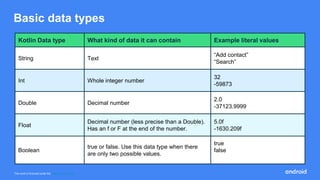
Basic data types
Kotlin Data type What kind of data it can contain Example literal values
String Text
“Add contact”
“Search”
Int Whole integer number
32
-59873
Double Decimal number
2.0
-37123.9999
Float
Decimal number (less precise than a Double).
Has an f or F at the end of the number.
5.0f
-1630.209f
Boolean
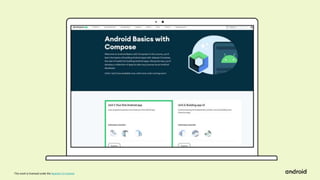
true or false. Use this data type when there

are only two possible values.
true
false
This work is licensed under the Apache 2.0 License
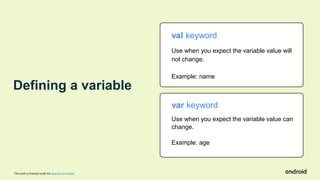
val keyword
Use when you expect the variable value will
not change.
Example: name
var keyword
Use when you expect the variable value can
change.
Example: age
Defining a variable
This work is licensed under the Apache 2.0 License
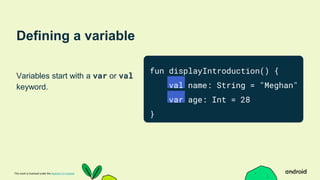
Defining a variable
Variables start with a var or val
keyword.
fun displayIntroduction() {
val name: String = "Meghan"
var age: Int = 28
}
This work is licensed under the Apache 2.0 License
Defining a variable
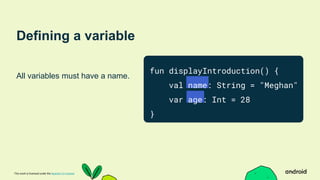
All variables must have a name.
fun displayIntroduction() {
val name: String = "Meghan"
var age: Int = 28
}
This work is licensed under the Apache 2.0 License
Defining a variable
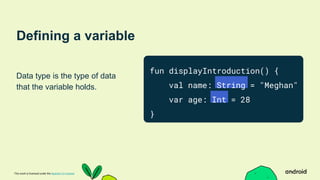
Data type is the type of data
that the variable holds.
fun displayIntroduction() {
val name: String = "Meghan"
var age: Int = 28
}
This work is licensed under the Apache 2.0 License
Defining a variable
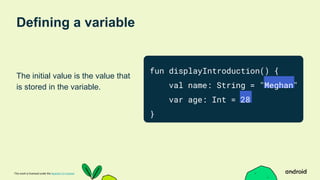
The initial value is the value that
is stored in the variable.
fun displayIntroduction() {
val name: String = "Meghan"
var age: Int = 28
}
This work is licensed under the Apache 2.0 License
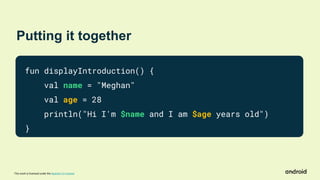
Putting it together
fun displayIntroduction() {
val name = "Meghan"
val age = 28
println("Hi I'm $name and I am $age years old")
}
This work is licensed under the Apache 2.0 License
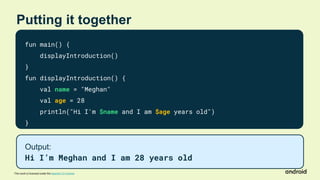
Putting it together
fun main() {
displayIntroduction()
}
fun displayIntroduction() {
val name = "Meghan"
val age = 28
println("Hi I'm $name and I am $age years old")
}
Output:
Hi I’m Meghan and I am 28 years old
This work is licensed under the Apache 2.0 License
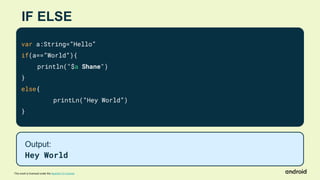
IF ELSE
var a:String=”Hello”
if(a==”World”){
println("$a Shane")
}
else{
printLn(“Hey World”)
}
Output:
Hey World
This work is licensed under the Apache 2.0 License
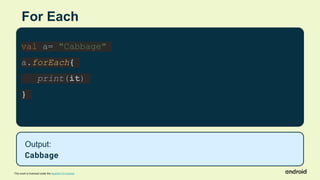
For Each
val a= "Cabbage"
a.forEach{
print(it)
}
Output:
Cabbage
This work is licensed under the Apache 2.0 License
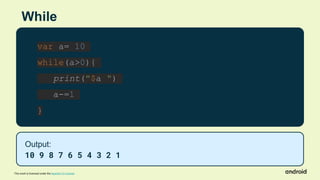
While
var a= 10
while(a>0){
print("$a ")
a-=1
}
Output:
10 9 8 7 6 5 4 3 2 1
This work is licensed under the Apache 2.0 License
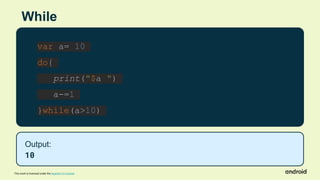
While
var a= 10
do{
print("$a ")
a-=1
}while(a>10)
Output:
10
This work is licensed under the Apache 2.0 License
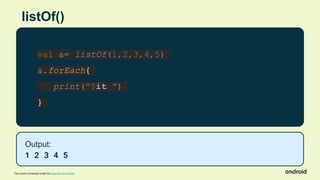
listOf()
val a= listOf(1,2,3,4,5)
a.forEach{
print("$it ")
}
Output:
1 2 3 4 5
This work is licensed under the Apache 2.0 License
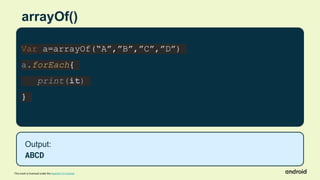
arrayOf()
Var a=arrayOf(“A”,”B”,”C”,”D”)
a.forEach{
print(it)
}
Output:
ABCD
This work is licensed under the Apache 2.0 License
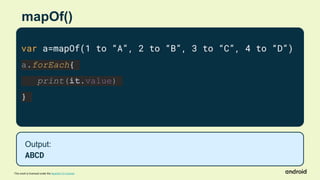
mapOf()
var a=mapOf(1 to “A”, 2 to “B”, 3 to “C”, 4 to “D”)
a.forEach{
print(it.value)
}
Output:
ABCD
This work is licensed under the Apache 2.0 License
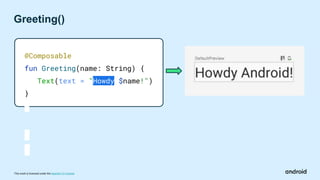
Greeting()
@Composable
fun Greeting(name: String) {
Text(text = "Howdy $name!")
}
This work is licensed under the Apache 2.0 License
What’s coming next:
Layout Lake
This work is
licensed under the
Apache 2.0 License
Material Tents
This work is
licensed under the
Apache 2.0 License
Stargazing at State
This work is licensed under the Apache 2.0 License
Performance Peak
This work is licensed under
the Apache 2.0 License
This work is licensed under the Apache 2.0 License
Share what you’ve
learned using
.#ComposeCamp
on social media
For a chance to be
featured by Android,
submit your tips on
learning Compose to
goo.gle/compose-tips
This work is licensed under the Apache 2.0 License
Let’s talk about
Resources
This work is licensed under the Apache 2.0 License
g.co/android/basics-compose
Start here:
This work is licensed under the Apache 2.0 License
Android Basics
with Compose Course
This work is licensed under the Apache 2.0 License
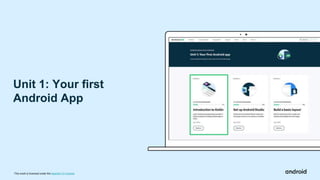
Unit 1: Your first
Android App
This work is licensed under the Apache 2.0 License
A Pathway
This work is licensed under the Apache 2.0 License
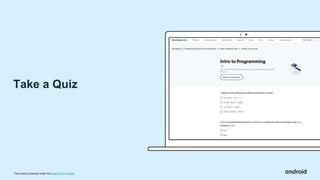
Take a Quiz
This work is licensed under the Apache 2.0 License
Earn badges!
This work is licensed under the Apache 2.0 License
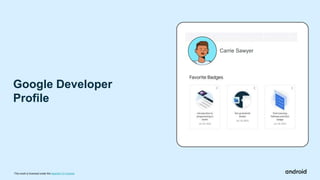
Google Developer
Profile
Carrie Sawyer
This work is licensed under the Apache 2.0 License
See you at the next Compose Camp
Session!
Optional resources to check out:
● Official Android Developers Site: developer.android.com
● Official Android Developers Blog (for announcements)
● Android Developers Medium Blog (for more technical articles)
● Android Developers YouTube channel
● Follow @AndroidDev on Twitter
● Follow @AndroidDev on LinkedIn
● Subscribe to the Android Developer Newsletter
● Kotlin 101 course
This work is licensed under the Apache 2.0 License
Learn More
This work is licensed under the Apache 2.0 License
Share what you’ve
learned using
.#ComposeCamp
on social media
For a chance to be
featured by Android,
submit your tips on
learning Compose to
goo.gle/compose-tips
This work is licensed under the Apache 2.0 License
THANK YOU
for participating Compose Camp Day 2
Do participate in the Upcoming session

Compose Camp Session 2

  • 2.
    This work islicensed under the Apache 2.0 License Compose Camp Session 2 8 October 2022 Introduction to Kotlin & Jetpack compose
  • 3.
    This work islicensed under the Apache 2.0 License Akshat Bajpai Facilitator Compose Facilitator
  • 4.
    This work islicensed under the Apache 2.0 License Basic data types Kotlin Data type What kind of data it can contain Example literal values String Text “Add contact” “Search” Int Whole integer number 32 -59873 Double Decimal number 2.0 -37123.9999 Float Decimal number (less precise than a Double). Has an f or F at the end of the number. 5.0f -1630.209f Boolean true or false. Use this data type when there are only two possible values. true false
  • 5.
    This work islicensed under the Apache 2.0 License val keyword Use when you expect the variable value will not change. Example: name var keyword Use when you expect the variable value can change. Example: age Defining a variable
  • 6.
    This work islicensed under the Apache 2.0 License Defining a variable Variables start with a var or val keyword. fun displayIntroduction() { val name: String = "Meghan" var age: Int = 28 }
  • 7.
    This work islicensed under the Apache 2.0 License Defining a variable All variables must have a name. fun displayIntroduction() { val name: String = "Meghan" var age: Int = 28 }
  • 8.
    This work islicensed under the Apache 2.0 License Defining a variable Data type is the type of data that the variable holds. fun displayIntroduction() { val name: String = "Meghan" var age: Int = 28 }
  • 9.
    This work islicensed under the Apache 2.0 License Defining a variable The initial value is the value that is stored in the variable. fun displayIntroduction() { val name: String = "Meghan" var age: Int = 28 }
  • 10.
    This work islicensed under the Apache 2.0 License Putting it together fun displayIntroduction() { val name = "Meghan" val age = 28 println("Hi I'm $name and I am $age years old") }
  • 11.
    This work islicensed under the Apache 2.0 License Putting it together fun main() { displayIntroduction() } fun displayIntroduction() { val name = "Meghan" val age = 28 println("Hi I'm $name and I am $age years old") } Output: Hi I’m Meghan and I am 28 years old
  • 12.
    This work islicensed under the Apache 2.0 License IF ELSE var a:String=”Hello” if(a==”World”){ println("$a Shane") } else{ printLn(“Hey World”) } Output: Hey World
  • 13.
    This work islicensed under the Apache 2.0 License For Each val a= "Cabbage" a.forEach{ print(it) } Output: Cabbage
  • 14.
    This work islicensed under the Apache 2.0 License While var a= 10 while(a>0){ print("$a ") a-=1 } Output: 10 9 8 7 6 5 4 3 2 1
  • 15.
    This work islicensed under the Apache 2.0 License While var a= 10 do{ print("$a ") a-=1 }while(a>10) Output: 10
  • 16.
    This work islicensed under the Apache 2.0 License listOf() val a= listOf(1,2,3,4,5) a.forEach{ print("$it ") } Output: 1 2 3 4 5
  • 17.
    This work islicensed under the Apache 2.0 License arrayOf() Var a=arrayOf(“A”,”B”,”C”,”D”) a.forEach{ print(it) } Output: ABCD
  • 18.
    This work islicensed under the Apache 2.0 License mapOf() var a=mapOf(1 to “A”, 2 to “B”, 3 to “C”, 4 to “D”) a.forEach{ print(it.value) } Output: ABCD
  • 19.
    This work islicensed under the Apache 2.0 License Greeting() @Composable fun Greeting(name: String) { Text(text = "Howdy $name!") }
  • 20.
    This work islicensed under the Apache 2.0 License What’s coming next:
  • 21.
    Layout Lake This workis licensed under the Apache 2.0 License
  • 22.
    Material Tents This workis licensed under the Apache 2.0 License
  • 23.
    Stargazing at State Thiswork is licensed under the Apache 2.0 License
  • 24.
    Performance Peak This workis licensed under the Apache 2.0 License
  • 25.
    This work islicensed under the Apache 2.0 License Share what you’ve learned using .#ComposeCamp on social media For a chance to be featured by Android, submit your tips on learning Compose to goo.gle/compose-tips
  • 26.
    This work islicensed under the Apache 2.0 License Let’s talk about Resources
  • 27.
    This work islicensed under the Apache 2.0 License g.co/android/basics-compose Start here:
  • 28.
    This work islicensed under the Apache 2.0 License Android Basics with Compose Course
  • 29.
    This work islicensed under the Apache 2.0 License
  • 30.
    This work islicensed under the Apache 2.0 License Unit 1: Your first Android App
  • 31.
    This work islicensed under the Apache 2.0 License A Pathway
  • 32.
    This work islicensed under the Apache 2.0 License Take a Quiz
  • 33.
    This work islicensed under the Apache 2.0 License Earn badges!
  • 34.
    This work islicensed under the Apache 2.0 License Google Developer Profile Carrie Sawyer
  • 35.
    This work islicensed under the Apache 2.0 License See you at the next Compose Camp Session! Optional resources to check out: ● Official Android Developers Site: developer.android.com ● Official Android Developers Blog (for announcements) ● Android Developers Medium Blog (for more technical articles) ● Android Developers YouTube channel ● Follow @AndroidDev on Twitter ● Follow @AndroidDev on LinkedIn ● Subscribe to the Android Developer Newsletter ● Kotlin 101 course
  • 36.
    This work islicensed under the Apache 2.0 License Learn More
  • 37.
    This work islicensed under the Apache 2.0 License Share what you’ve learned using .#ComposeCamp on social media For a chance to be featured by Android, submit your tips on learning Compose to goo.gle/compose-tips
  • 38.
    This work islicensed under the Apache 2.0 License THANK YOU for participating Compose Camp Day 2 Do participate in the Upcoming session

Editor's Notes

  • #5 When you decide what aspects of your app can be variables, it's important to specify what type of data can be stored in those variables. In Kotlin, there are some common basic data types. This table shows a different data type in each row. For each data type, there's a description of what kind of data it can hold and example values. A String holds text so you will use it to store your name, and an Int holds an integer number so you will use it to store your age.
  • #6 Now, let’s jump into how you define a variable. You can declare a variable using either val or var. With val, the variable is read-only, which means you can only read, or access, the value of the variable. Once the value is set, you cannot edit or modify its value. With var, the variable is mutable, which means the value can be changed or modified. The value can be mutated. In Kotlin, it's preferred to use val over var when possible. We will store your name as a val because that will not change. We will store your age as a var because it changes every year.
  • #7 To demonstrate how to define a variable we will define both name and age variables. Before you use a variable, you must declare it. To declare a variable, start with the val or var keyword.
  • #8 All variables must have a name that they can be referenced by.
  • #9 The data type specifies the type of data that the variable holds. Note that a colon separates the name and data type.
  • #10 In the variable declaration, the equal sign symbol (=) follows the data type. The equal sign symbol is called the assignment operator. The assignment operator assigns a value to the variable. The variable’s initial value is the data stored in the variable.
  • #11 Let’s finish putting the displayIntroduction() function together. We have our variables but they don’t do anything yet. Let’s add a print statement to print out your introduction using println to print to the output in Kotlin Playground. In order to print your variables, you will use String templates which allow you to include variable references in a string by using the $ sign before the variable name. [You can learn more about String Templates here]
  • #12 Finally, we will replace the contents of the main() function with a call to the displayIntroduction() function when we run it, “Hi I’m Meghan and I am 28 years old” will print to the output. In this lecture we went over functions and variables and how to put them together to create a function that introduces you. Soon you will go deeper into these concepts and try them out for yourself in the codelabs.
  • #20 When we rebuild, we will see the text “Howdy Android” instead of “Hello Android” in the Design tab.
  • #21 In the next session, you will apply your new Kotlin knowledge to build your first Android app!
  • #26 Great job everyone on your progress! You can post photos or highlights from today’s session on social media using #ComposeCamp. [Include your own developer community and chapter hashtags (i.e. #developerstudentclubs #dsccmu)] Submit any tips you have about learning Compose to goo.gle/compose-tips for a chance to be featured.
  • #27 Okay that’s it! In a moment, I’ll let you get started on the course. Work at your own pace. If you get stuck, you can ask me or the other facilitators who will be available. [Introduce facilitators if applicable.] We’re here to answer whatever questions you have. Also feel free to ask each other for help and work together to find solutions.
  • #28 Open the course page with the link on screen.
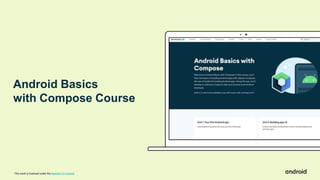
  • #29 You’ll be working through the Android Basics with Compose course. This is an online training course developed by Google for people who want to learn how to build basic Android apps.
  • #30 Then, click Unit 1 to start the Android Basics course.
  • #31 The course is made up of units, and units are composed of pathways. Today we’ll be focused on the first unit, which is shown here. It is made up of 3 pathways. In this session, you’ll work on pathway 1.
  • #32 You may be wondering, what is a pathway? A pathway is an ordered sequence of activities to learn a specific skill. An activity can be a video, hands-on coding tutorial (known as a codelab), an article, or quiz. There are 7 activities in this first pathway. All these activities are meant to help you reach specific learning objectives by the end of this pathway. If you are already familiar with the skill that the pathway teaches, you can skip that pathway and move on to the next one.
  • #33 There’s a quiz at the end of each pathway to check your understanding of what you just learned. Here’s what a sample quiz looks like. There are no limits to the number of retries for a quiz. But if you get a question wrong, try to understand what the concept is (even if you need to look back at the source material), before answering again.
  • #34 After you pass a quiz, you will earn a badge like these!
  • #35 The badges you earn can be saved to your Google Developer Profile. When you are taking the course, be sure to sign in (in the top right corner) and create a Google Developer Profile if you haven’t already. It’s very quick to create. As you earn more badges, you can see them on your Google Developer Profile and favorite them. You can make your profile public so you can share it and show off your badges to friends and colleagues via social media! [Read more on the Google Developer Profile]
  • #36 We are excited to see you at the next Compose Camp session! Before the next session, it is strongly recommended that you download Android Studio. In the meantime you can check out these additional resources, which professional developers use to stay up to date on Android. As you get into more advanced features, you will likely need to learn more programming concepts. You can check out the Learn Kotlin By Example or the Kotlin language website resources for that. Thank you so much for being a part of Compose Camp! Good luck on the beginning of your Android developer journey!
  • #37 If you want to continue learning more on your own, here are some resources.
  • #38 Great job everyone on your progress! You can post photos or highlights from today’s session on social media using #ComposeCamp. [Include your own developer community and chapter hashtags (i.e. #developerstudentclubs #dsccmu)] Submit any tips you have about learning Compose to goo.gle/compose-tips for a chance to be featured.