This work is licensed under the Apache 2.0 License
Android Study Jams
Prior Programming Experience Track: Sessions 1 & 2
This work is licensed under the Apache 2.0 License
Prior Programming Experience Track: Session 1
Android Study Jams
This work is licensed under the Apache 2.0 License
Learning Objectives
० Learn the essentials of the Kotlin programming language
० Build a variety of Android apps
० Best practices for Android development
० Discover resources to continue learning
This work is licensed under the Apache 2.0 License
० Programming experience in an OOP language
० Computer
० Internet connection
Prerequisites
This work is licensed under the Apache 2.0 License
What’s your favorite programming
language and why?
This work is licensed under the Apache 2.0 License
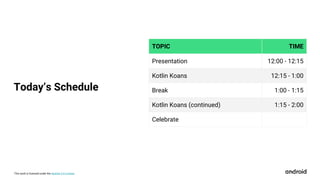
TOPIC TIME
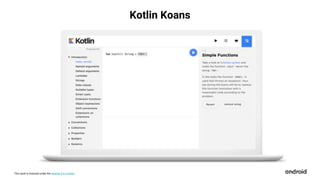
Presentation 12:00 - 12:15
Kotlin Koans 12:15 - 1:00
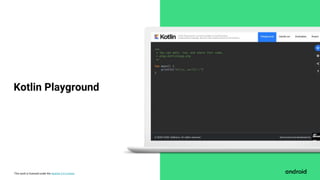
Break 1:00 - 1:15
Kotlin Koans (continued) 1:15 - 2:00
Celebrate
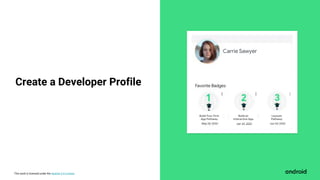
Today’s Schedule
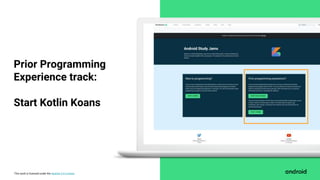
This work is licensed under the Apache 2.0 License
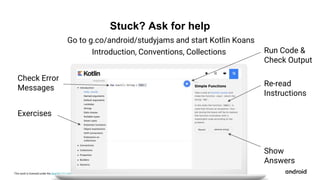
Concept Overview
What is Kotlin?
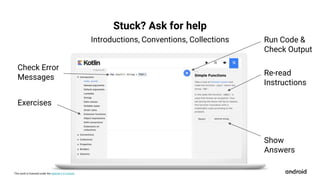
This work is licensed under the Apache 2.0 License
Kotlin is a modern programming language that
helps developers be more productive.
This work is licensed under the Apache 2.0 License
Benefits of Kotlin
● Expressive & Concise
● Safer Code
● Interoperable with Java
● Structured Concurrency
This work is licensed under the Apache 2.0 License
Android Development is Kotlin-First
This work is licensed under the Apache 2.0 License
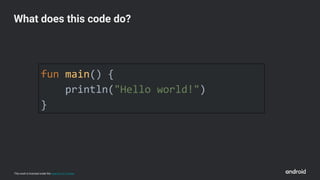
fun main() {
println("Hello world!")
}
What does this code do?
This work is licensed under the Apache 2.0 License
fun main() {
println("Hello world!")
}
What does this code do?
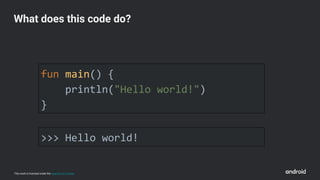
>>> Hello world!
This work is licensed under the Apache 2.0 License
fun main() {
println("Hello world!")
}
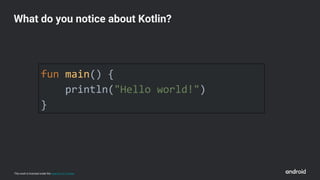
What do you notice about Kotlin?
This work is licensed under the Apache 2.0 License
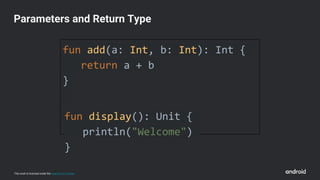
fun add(a: Int, b: Int): Int {
return a + b
}
fun display(): Unit {
println("Welcome")
}
Parameters and Return Type
This work is licensed under the Apache 2.0 License
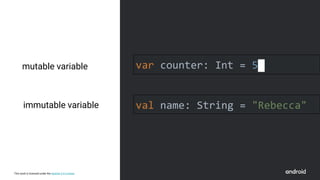
mutable variable var counter: Int = 5
val name: String = "Rebecca"immutable variable
This work is licensed under the Apache 2.0 License
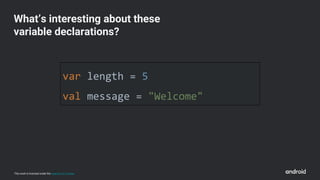
var length = 5
val message = "Welcome"
What’s interesting about these
variable declarations?
This work is licensed under the Apache 2.0 License
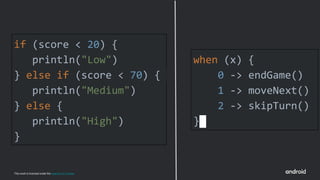
if (score < 20) {
println("Low")
} else if (score < 70) {
println("Medium")
} else {
println("High")
}
when (x) {
0 -> endGame()
1 -> moveNext()
2 -> skipTurn()
}
This work is licensed under the Apache 2.0 License
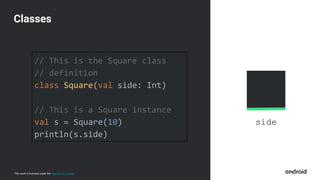
side
// This is the Square class
// definition
class Square(val side: Int)
// This is a Square instance
val s = Square(10)
println(s.side)
Classes
This work is licensed under the Apache 2.0 License
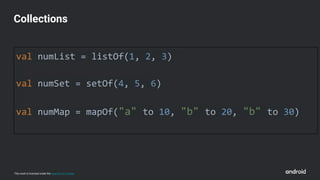
val numList = listOf(1, 2, 3)
val numSet = setOf(4, 5, 6)
val numMap = mapOf("a" to 10, "b" to 20, "b" to 30)
Collections
This work is licensed under the Apache 2.0 License
Logistics
This work is licensed under the Apache 2.0 License
Kotlin Koans
This work is licensed under the Apache 2.0 License
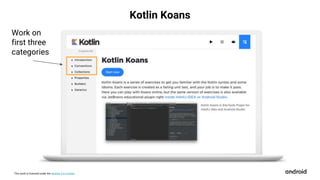
Work on
first three
categories
Kotlin Koans
This work is licensed under the Apache 2.0 License
Kotlin Koans
This work is licensed under the Apache 2.0 License
Kotlin Playground
This work is licensed under the Apache 2.0 License
Let’s get started
This work is licensed under the Apache 2.0 License
Start here:
g.co/android/studyjams
Collect your first badge!
This work is licensed under the Apache 2.0 License
Carrie Sawyer
Build Your First
App Pathway
Build an
Interactive App
Layouts
Pathway
Create a Developer Profile
This work is licensed under the Apache 2.0 License
Prior Programming
Experience track:
Start Kotlin Koans
This work is licensed under the Apache 2.0 License
Exercises
Check Error
Messages
Run Code &
Check Output
Re-read
Instructions
Stuck? Ask for help
Show
Answers
Introduction, Conventions, Collections
Go to g.co/android/studyjams and start Kotlin Koans
This work is licensed under the Apache 2.0 License
Break
This work is licensed under the Apache 2.0 License
Exercises
Check Error
Messages
Run Code &
Check Output
Re-read
Instructions
Stuck? Ask for help
Show
Answers
Introductions, Conventions, Collections
This work is licensed under the Apache 2.0 License
Welcome back
And congrats!
This work is licensed under the Apache 2.0 License
What did you notice about Kotlin?
This work is licensed under the Apache 2.0 License
Share what you’ve
learned with
#AndroidStudyJams
This work is licensed under the Apache 2.0 License
Stay tuned for Session 2
This work is licensed under the Apache 2.0 License
Prior Programming Experience Track: Session 2
Android Study Jams
This work is licensed under the Apache 2.0 License
० Programming experience in an OOP language
० Comfortable with using an IDE
० Familiar with navigating GitHub
० Computer
० Internet connection
० (Optional) Android device & USB cable
Prerequisites
This work is licensed under the Apache 2.0 License
Recap of Session 1
० Functions
० Default and named
arguments
० Strings
० Ranges
० Null Safety
० Lambdas
० Classes
० Collections
० Filter
० Map
० Extension functions
This work is licensed under the Apache 2.0 License
Why are you interested in building Android apps?
This work is
licensed under
the Apache 2.0
License
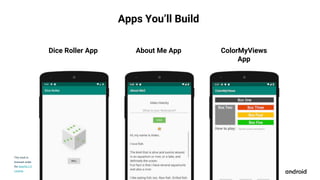
Apps You’ll Build
Dice Roller App About Me App ColorMyViews
App
This work is licensed under the Apache 2.0 License
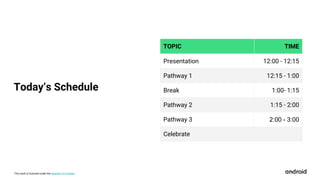
TOPIC TIME
Presentation 12:00 - 12:15
Pathway 1 12:15 - 1:00
Break 1:00- 1:15
Pathway 2 1:15 - 2:00
Pathway 3 2:00 - 3:00
Celebrate
Today’s Schedule
This work is licensed under the Apache 2.0 License
Concept Overview
This work is licensed under the Apache 2.0 License
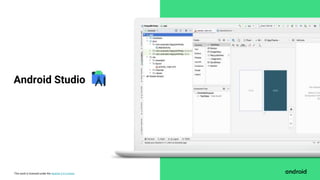
Android Studio
This work is licensed under the Apache 2.0 License
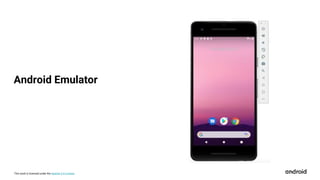
Android Emulator
This work is licensed under the Apache 2.0 License
Layouts
This work is licensed under the Apache 2.0 License
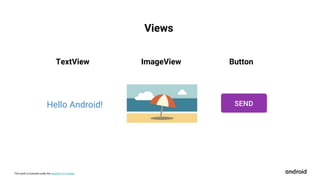
TextView ImageView Button
Hello Android!
Views
This work is licensed under the Apache 2.0 License
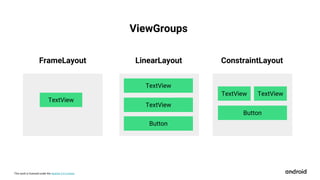
FrameLayout
TextView
TextView
TextView
Button
LinearLayout
TextView
Button
ConstraintLayout
TextView
ViewGroups
This work is licensed under the Apache 2.0 License
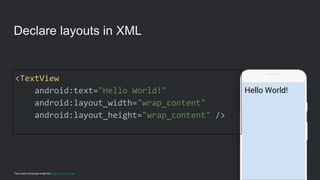
Hello World!
Declare layouts in XML
<TextView
android:text="Hello World!"
android:layout_width="wrap_content"
android:layout_height="wrap_content" />
This work is licensed under the Apache 2.0 License
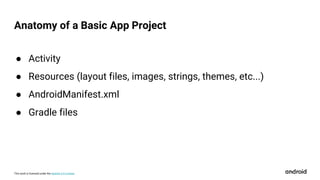
● Activity
● Resources (layout files, images, strings, themes, etc...)
● AndroidManifest.xml
● Gradle files
Anatomy of a Basic App Project
This work is licensed under the Apache 2.0 License
Logistics
Android Kotlin Fundamentals
course
This work is licensed under the Apache 2.0 License
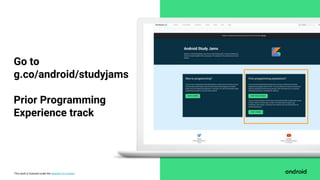
Go to
g.co/android/studyjams
Prior Programming
Experience track
This work is licensed under the Apache 2.0 License
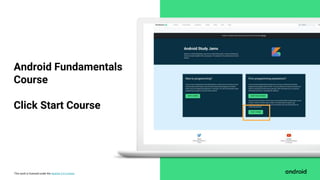
Android Fundamentals
Course
Click Start Course
This work is licensed under the Apache 2.0 License
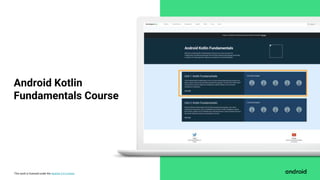
Android Kotlin
Fundamentals Course
This work is licensed under the Apache 2.0 License
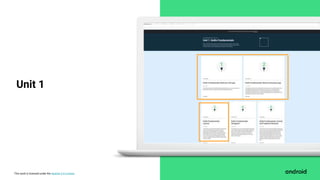
Unit 1
This work is licensed under the Apache 2.0 License
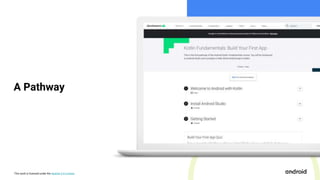
A Pathway
This work is licensed under the Apache 2.0 License
Badges
This work is licensed under the Apache 2.0 License
Let’s get started
This work is licensed under the Apache 2.0 License
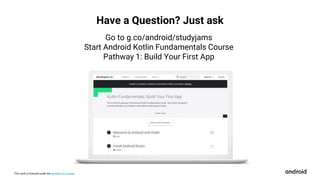
Have a Question? Just ask
Go to g.co/android/studyjams
Start Android Kotlin Fundamentals Course
Pathway 1: Build Your First App
This work is licensed under the Apache 2.0 License
Break
This work is licensed under the Apache 2.0 License
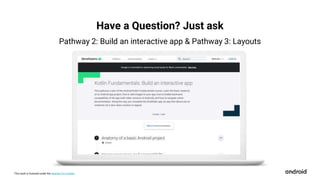
Have a Question? Just ask
Pathway 2: Build an interactive app & Pathway 3: Layouts
This work is licensed under the Apache 2.0 License
Welcome back
And congrats!
This work is licensed under the Apache 2.0 License
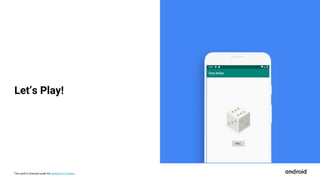
Let’s Play!
This work is licensed under the Apache 2.0 License
Share what you’ve
learned with
#AndroidStudyJams
This work is licensed under the Apache 2.0 License
Learn More
This work is licensed under the Apache 2.0 License
Want to learn more?
● Official Android Developers Site: https://developer.android.com/
● Android Samples on GitHub
● Official Android Developers Blog (for announcements)
● Android Developers Medium Blog (for more technical articles)
● Android Developers YouTube channel
● Follow @AndroidDev on Twitter
● Subscribe to the Android Developer Newsletter
● Kotlin Vocabulary series
● Official Kotlin language site

Prior programming experience track

  • 1.
    This work islicensed under the Apache 2.0 License Android Study Jams Prior Programming Experience Track: Sessions 1 & 2
  • 2.
    This work islicensed under the Apache 2.0 License Prior Programming Experience Track: Session 1 Android Study Jams
  • 3.
    This work islicensed under the Apache 2.0 License Learning Objectives ० Learn the essentials of the Kotlin programming language ० Build a variety of Android apps ० Best practices for Android development ० Discover resources to continue learning
  • 4.
    This work islicensed under the Apache 2.0 License ० Programming experience in an OOP language ० Computer ० Internet connection Prerequisites
  • 5.
    This work islicensed under the Apache 2.0 License What’s your favorite programming language and why?
  • 6.
    This work islicensed under the Apache 2.0 License TOPIC TIME Presentation 12:00 - 12:15 Kotlin Koans 12:15 - 1:00 Break 1:00 - 1:15 Kotlin Koans (continued) 1:15 - 2:00 Celebrate Today’s Schedule
  • 7.
    This work islicensed under the Apache 2.0 License Concept Overview What is Kotlin?
  • 8.
    This work islicensed under the Apache 2.0 License Kotlin is a modern programming language that helps developers be more productive.
  • 9.
    This work islicensed under the Apache 2.0 License Benefits of Kotlin ● Expressive & Concise ● Safer Code ● Interoperable with Java ● Structured Concurrency
  • 10.
    This work islicensed under the Apache 2.0 License Android Development is Kotlin-First
  • 11.
    This work islicensed under the Apache 2.0 License fun main() { println("Hello world!") } What does this code do?
  • 12.
    This work islicensed under the Apache 2.0 License fun main() { println("Hello world!") } What does this code do? >>> Hello world!
  • 13.
    This work islicensed under the Apache 2.0 License fun main() { println("Hello world!") } What do you notice about Kotlin?
  • 14.
    This work islicensed under the Apache 2.0 License fun add(a: Int, b: Int): Int { return a + b } fun display(): Unit { println("Welcome") } Parameters and Return Type
  • 15.
    This work islicensed under the Apache 2.0 License mutable variable var counter: Int = 5 val name: String = "Rebecca"immutable variable
  • 16.
    This work islicensed under the Apache 2.0 License var length = 5 val message = "Welcome" What’s interesting about these variable declarations?
  • 17.
    This work islicensed under the Apache 2.0 License if (score < 20) { println("Low") } else if (score < 70) { println("Medium") } else { println("High") } when (x) { 0 -> endGame() 1 -> moveNext() 2 -> skipTurn() }
  • 18.
    This work islicensed under the Apache 2.0 License side // This is the Square class // definition class Square(val side: Int) // This is a Square instance val s = Square(10) println(s.side) Classes
  • 19.
    This work islicensed under the Apache 2.0 License val numList = listOf(1, 2, 3) val numSet = setOf(4, 5, 6) val numMap = mapOf("a" to 10, "b" to 20, "b" to 30) Collections
  • 20.
    This work islicensed under the Apache 2.0 License Logistics
  • 21.
    This work islicensed under the Apache 2.0 License Kotlin Koans
  • 22.
    This work islicensed under the Apache 2.0 License Work on first three categories Kotlin Koans
  • 23.
    This work islicensed under the Apache 2.0 License Kotlin Koans
  • 24.
    This work islicensed under the Apache 2.0 License Kotlin Playground
  • 25.
    This work islicensed under the Apache 2.0 License Let’s get started
  • 26.
    This work islicensed under the Apache 2.0 License Start here: g.co/android/studyjams Collect your first badge!
  • 27.
    This work islicensed under the Apache 2.0 License Carrie Sawyer Build Your First App Pathway Build an Interactive App Layouts Pathway Create a Developer Profile
  • 28.
    This work islicensed under the Apache 2.0 License Prior Programming Experience track: Start Kotlin Koans
  • 29.
    This work islicensed under the Apache 2.0 License Exercises Check Error Messages Run Code & Check Output Re-read Instructions Stuck? Ask for help Show Answers Introduction, Conventions, Collections Go to g.co/android/studyjams and start Kotlin Koans
  • 30.
    This work islicensed under the Apache 2.0 License Break
  • 31.
    This work islicensed under the Apache 2.0 License Exercises Check Error Messages Run Code & Check Output Re-read Instructions Stuck? Ask for help Show Answers Introductions, Conventions, Collections
  • 32.
    This work islicensed under the Apache 2.0 License Welcome back And congrats!
  • 33.
    This work islicensed under the Apache 2.0 License What did you notice about Kotlin?
  • 34.
    This work islicensed under the Apache 2.0 License Share what you’ve learned with #AndroidStudyJams
  • 35.
    This work islicensed under the Apache 2.0 License Stay tuned for Session 2
  • 36.
    This work islicensed under the Apache 2.0 License Prior Programming Experience Track: Session 2 Android Study Jams
  • 37.
    This work islicensed under the Apache 2.0 License ० Programming experience in an OOP language ० Comfortable with using an IDE ० Familiar with navigating GitHub ० Computer ० Internet connection ० (Optional) Android device & USB cable Prerequisites
  • 38.
    This work islicensed under the Apache 2.0 License Recap of Session 1 ० Functions ० Default and named arguments ० Strings ० Ranges ० Null Safety ० Lambdas ० Classes ० Collections ० Filter ० Map ० Extension functions
  • 39.
    This work islicensed under the Apache 2.0 License Why are you interested in building Android apps?
  • 40.
    This work is licensedunder the Apache 2.0 License Apps You’ll Build Dice Roller App About Me App ColorMyViews App
  • 41.
    This work islicensed under the Apache 2.0 License TOPIC TIME Presentation 12:00 - 12:15 Pathway 1 12:15 - 1:00 Break 1:00- 1:15 Pathway 2 1:15 - 2:00 Pathway 3 2:00 - 3:00 Celebrate Today’s Schedule
  • 42.
    This work islicensed under the Apache 2.0 License Concept Overview
  • 43.
    This work islicensed under the Apache 2.0 License Android Studio
  • 44.
    This work islicensed under the Apache 2.0 License Android Emulator
  • 45.
    This work islicensed under the Apache 2.0 License Layouts
  • 46.
    This work islicensed under the Apache 2.0 License TextView ImageView Button Hello Android! Views
  • 47.
    This work islicensed under the Apache 2.0 License FrameLayout TextView TextView TextView Button LinearLayout TextView Button ConstraintLayout TextView ViewGroups
  • 48.
    This work islicensed under the Apache 2.0 License Hello World! Declare layouts in XML <TextView android:text="Hello World!" android:layout_width="wrap_content" android:layout_height="wrap_content" />
  • 49.
    This work islicensed under the Apache 2.0 License ● Activity ● Resources (layout files, images, strings, themes, etc...) ● AndroidManifest.xml ● Gradle files Anatomy of a Basic App Project
  • 50.
    This work islicensed under the Apache 2.0 License Logistics Android Kotlin Fundamentals course
  • 51.
    This work islicensed under the Apache 2.0 License Go to g.co/android/studyjams Prior Programming Experience track
  • 52.
    This work islicensed under the Apache 2.0 License Android Fundamentals Course Click Start Course
  • 53.
    This work islicensed under the Apache 2.0 License Android Kotlin Fundamentals Course
  • 54.
    This work islicensed under the Apache 2.0 License Unit 1
  • 55.
    This work islicensed under the Apache 2.0 License A Pathway
  • 56.
    This work islicensed under the Apache 2.0 License Badges
  • 57.
    This work islicensed under the Apache 2.0 License Let’s get started
  • 58.
    This work islicensed under the Apache 2.0 License Have a Question? Just ask Go to g.co/android/studyjams Start Android Kotlin Fundamentals Course Pathway 1: Build Your First App
  • 59.
    This work islicensed under the Apache 2.0 License Break
  • 60.
    This work islicensed under the Apache 2.0 License Have a Question? Just ask Pathway 2: Build an interactive app & Pathway 3: Layouts
  • 61.
    This work islicensed under the Apache 2.0 License Welcome back And congrats!
  • 62.
    This work islicensed under the Apache 2.0 License Let’s Play!
  • 63.
    This work islicensed under the Apache 2.0 License Share what you’ve learned with #AndroidStudyJams
  • 64.
    This work islicensed under the Apache 2.0 License Learn More
  • 65.
    This work islicensed under the Apache 2.0 License Want to learn more? ● Official Android Developers Site: https://developer.android.com/ ● Android Samples on GitHub ● Official Android Developers Blog (for announcements) ● Android Developers Medium Blog (for more technical articles) ● Android Developers YouTube channel ● Follow @AndroidDev on Twitter ● Subscribe to the Android Developer Newsletter ● Kotlin Vocabulary series ● Official Kotlin language site

Editor's Notes

  • #3 Hi everyone! My name is <Insert Name> and welcome to Android Study Jams! This is session 1 of the Prior Programming Experience Track. This track is for people who already have prior programming experience, but who are new to building Android apps. If you are new to programming and Android, consider the New to Programming track. The content will be introduced at a slower pace and programming fundamentals will be explained along the way.
  • #4 Let’s talk about what you will learn as part of this track of Android Study Jams. First you will learn the essentials of the Kotlin programming language, the language you’ll use to develop Android apps. Then you will install Android Studio on your computer and build a variety of Android apps in Kotlin by following the codelabs provided in the curriculum. Along the way, you will be learning best practices for Android, including app architecture and UI development. Another goal is to introduce you to the resources for where you can continue to learn Android development on your own.
  • #5 Here are some the prerequisites that will be helpful for this first session of the track. As mentioned earlier, we assume that you already have programming experience in an object-oriented programming language. You will also need a computer with internet connection to do the exercises in this session. [Mention WiFi instructions if necessary. Having access to an Android device is a nice-to-have starting in the next session, but not needed for this first session.]
  • #6 Let’s start with a question so I can get to know a little more about you. What is your favorite programming language and why? You can take out a piece of paper and write your answers down. [Give 2-3 minutes to work and when most people have put down their pencils, proceed.] So, what did everyone write down? [Generate a list of people’s answers] Okay let’s keep those qualities in mind throughout today’s session, where you’ll be learning a new programming language: Kotlin!
  • #7 This is the schedule for today’s session. [Please update this schedule accordingly before your event.] First, we have a short presentation, which we’re doing right now. We’re covering some logistics and a high-level introduction to the concepts, to help you with the hands-on portion of the session later. During the hands-on portion, you’ll be working independently on the Kotlin Koans exercises to get ramped up on Kotlin language basics. Feel free to ask me or your neighbors if you need help. We’ll have a short break later on as well.
  • #8 Alright, let’s dive in and answer this question: what is Kotlin?
  • #9 Kotlin is a modern programming language that helps developers be more productive. It was started as a project by JetBrains in 2010 and was made open source under the Apache 2.0 license, with Kotlin 1.0 released in 2016. The language has quickly gained traction among the developer community and in industry. Kotlin is one of the fastest growing programming languages, according to GitHub. Resources: Kotlin GitHub State of the Octoverse
  • #10 These are some of the key benefits that developers enjoy with Kotlin: The Kotlin language is expressive and concise, allowing you to express your ideas with less code. This reduces the amount of boilerplate code in your project. Kotlin helps you write safer code, with features that help you minimize common programming errors like NullPointerExceptions. Kotlin is 100% interoperable with Java, which means you can call Java-based code from Kotlin and vice-versa. If you already have an existing Android app in Java, you can add as little or as much Kotlin to the project as you want. Another key benefit that Kotlin offers is structured concurrency with Kotlin coroutines. They simplify background task management for everything from network calls to accessing local data, which are common for mobile apps. Kotlin has many great language features, and Kotlin is now the #4 most loved programming language according to the Stack Overflow’s 2020 Survey. Resources: Kotlin Stack Overflow Developer Survey in 2020
  • #11 How does this relate to Android development? In 2017, Google announced that Kotlin would be another officially supported language on Android. Then in 2019, Google announced that Android development would become increasingly Kotlin-first, so that new tools and libraries will first be made available in Kotlin. To further their commitment, Google and JetBrains formed the Kotlin Foundation to protect, promote, and advance the Kotlin language. Within the span of several years, Kotlin has seen rapid adoption in the Android developer ecosystem. Over 70% of the top 1000 Android apps use Kotlin and 60% of professional Android developers use Kotlin. There has never been a better time to start learning Kotlin to take advantage of the latest features on Android. On that note, let’s dive in and look at the basics of what Kotlin code looks like. Resources: Android's Kotlin-first approach
  • #12 What does everyone think this code does? [Continue to get audience participation until someone says “It prints Hello World!”.]
  • #13 Right! It prints Hello world!
  • #14 But what are some things you notice about Kotlin? [Continue to get audience participation until they mention these things.] Functions are declared with the ‘fun’ keyword Kotlin programs need a main() function Kotlin uses curly braces to enclose a function body Semicolons are not needed in Kotlin println function is used to print a line of output to console If after a few people speaking they’re not mentioning all of those listed above, you should jump in and say:] Specifically, every Kotlin program requires a main() function. A function is declared by using the fun keyword in Kotlin, followed by the name of the method, input parameters in parentheses, and then the function body in curly braces. This function prints “Hello world!” to the console. Notice that there’s no semicolons needed. The main() function in Kotlin can take in args as input, which is an array of strings. But the input args are optional and can be omitted as shown above, further simplifying this short program!
  • #15 Here’s other examples of functions in Kotlin Declare them with the fun keyword as you saw before. What’s new here is seeing how function parameters are defined. Following each parameter name, insert a colon followed by a space and then the data type of the parameter. After the parameters, insert a colon followed by a space and then the return type of the function (which is Int in this case). Within the function body, specify the return value of a function with the return keyword in Kotlin. If there is no return value, you can specify Unit as the return type. Or for more concise code, you can just omit the return type from the function declaration, as you saw with the main() function earlier. For more info https://kotlinlang.org/docs/reference/functions.html
  • #16 Next, let’s discuss variables. You can declare variables with the var keyword (for mutable variables) or with the val keyword (for immutable variables). Use var if you want change the value it’s assigned to, like a counter variable that would be updated. Use val if you only need to assign the variable once. In this case, we don’t expect the name to change. It is recommended to use val over var when possible. Note that regardless of whether the keyword var or val was used, the objects themselves may still be mutable or not. For example, you can declare a mutable list with val myList = mutableListOf(). While the reference to the list doesn’t change, you can still add or remove items from myList. For more info https://kotlinlang.org/docs/reference/basic-syntax.html https://play.kotlinlang.org/byExample/01_introduction/03_Variables
  • #17 These are also valid ways to declare variables in Kotlin. What do you notice about this code? [Get some audience participation] No data type is specified. We didn’t need to specify that length is an integer or that message is a String. Kotlin supports type inference, which means you can omit the type in your code when the compiler can infer it. In this case, the Kotlin compiler can infer that length is an integer and message is a String. Type inference is a powerful feature in Kotlin and allows your code to be more concise!
  • #18 Control flow statements in Kotlin may look similar to what you’ve seen in other languages, with some differences. You can write if-else statements as shown here. If the condition within the parentheses is true, then that branch will be executed. If none of the conditions are met, then we fall into the else block. You can also use the when keyword for conditionals, similar to a switch statement in Java. In this example, when x is equal to 0, call the endGame() function. When it’s equal to 1, call moveNext(). And so on. When statements can make your code more compact, instead of creating multiple if/else branches checking the value of a variable. In Kotlin, you can also write for loops and while loops, which aren’t shown here but you can check the documentation for examples. For more info https://kotlinlang.org/docs/reference/control-flow.html https://kotlinlang.org/docs/reference/basic-syntax.html#using-conditional-expressions https://play.kotlinlang.org/byExample/02_control_flow/01_When
  • #19 Kotlin supports both functional and object-oriented programming styles. For OOP, you can create classes and object instances as shown here. Within a single line of code, we can define a class called Square, and it has one property: the length of its side. Then, we instantiate a Square object instance with a length of 10 and store it in a variable called s. Looking at this code, what does this line s.side print? [Answer should be 10] For more info: https://kotlinlang.org/docs/reference/classes.html
  • #20 The Kotlin Standard Library also offers a lot of functionality to help you manage and manipulate collections of items easily. You can create lists, sets, and maps for example. This is just a brief overview of some of the basics of Kotlin and you’ll dive into more details in the hands-on part of this session. For more info: https://kotlinlang.org/docs/reference/collections-overview.html
  • #21 Let’s talk about how the rest of the session will work.
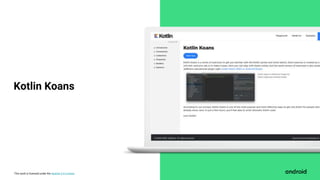
  • #22 You’ll be working through Kotlin Koans, a set of interactive exercises on the Kotlin language website. These exercises will help you ramp up quickly on language syntax and important aspects of the Kotlin language. If you’re wondering, what is a Koan? It’s a paradoxical riddle or puzzle. So Kotlin Koans is a fun play on words!
  • #23 To give you a brief tour of the interface, on the left-hand side, you’ll see the categories of exercises that you’ll work through. For this session together, work through the first 3 categories: Introduction, Conventions, Collections. Exercises in the later categories Properties, Builders, and Generics are optional. You can do them on your own time if you’d like.
  • #24 Once you click into a category and click into an exercise, the instructions for that exercise will appear on the right hand side. You’ll be typing your code in the middle. Some starter code will already be provided for you and you will type your answer in the places marked TODO(). When you think you have your answer, click the blue play button. Some unit tests will be run to verify your code. The output of these tests will show below your code. If you get stuck or want to start over with the original code provided in an exercise, click the Revert button. As you’re working, you can call me over if you have questions. If you truly get stuck, there is an option to Show answer, but use that as a last resort since you’ll remember the concepts much better if you can solve the Koan without looking at the answer.
  • #25 If you click the black “Play” button in the top menu bar, you will open the Kotlin Playground, which is another helpful tool. This allows you to practice writing and running Kotlin code, all within a web browser without needing to install an IDE.
  • #26 That covers the important concepts and logistics for the session, so let’s get started!
  • #27 Start by opening up the landing page for Android Study Jams. You will automatically be awarded this badge for being a participant Android Study Jams! Save it to your developer profile, and create a profile if you haven’t already.
  • #28 All the badges that you earn in this track will be saved there.
  • #29 Then under the Prior Programming Experience track in the right hand box, click the green button to Start Kotlin Koans. Note: Kotlin Koans is an external kotlinlang.org site that is developed by JetBrains.
  • #30 As a reminder, in this session, you’ll work on the Kotlin Koans only in these first 3 categories, as shown in the slide. Introduction Conventions Collections Go ahead and start by going to this link. We will be taking a break at <Insert Time>. I’ll leave these tips up for what to do if you’re stuck. Or as always, I’m available to help if needed. [Mention other facilitators if those are available.] [Leave this up as people work. You can let them work for about 45 minutes and then take a break.]
  • #32 [Leave this up as people work. You can let them work for another 45 minutes until you wrap up.]
  • #33 Welcome back everyone and congrats on the Kotlin Koans you were able to complete!
  • #34 To reflect on what you’ve just learned, what did you notice about Kotlin? How is it similar or different to existing programming languages you may know? [Ask for audience participation]
  • #35 Thank you so much for participating today, everyone! Hope you learned more about Kotlin and feel free to share what you learned on social media. You can post photos or highlights from today’s session on social media using #AndroidStudyJams. [Include your own developer community and chapter hashtags (i.e. #developerstudentclubs #dsccmu)]
  • #36 I’m sure you’re eager to use your new skills in Kotlin and apply them to Android development! Stay tuned for our next session where you’ll start to build your first Android apps in Kotlin. [Insert details about time and location of Session 2 if it’s on a different day than Session 1.]
  • #37 Welcome back to Android Study Jams! This is the Prior Programming Experience track. My name is <Insert Name> and today we’ll be completing session 2 of the track. As a reminder, this track is designed for people with prior programming experience to learn how to build basic Android apps in Kotlin.
  • #38 Here are some of the prerequisites that will be helpful for this session. Prior programming experience, as well as experience with an IDE and GitHub, are all recommended. After this short presentation, you’ll all be working independently on the online course, so you’ll need a computer and access to the internet. [Mention WiFi instructions if necessary.] It’s also helpful if you have an Android device so you can test your app. A USB cable will be needed for connecting your phone to the computer. If you don’t have an Android device, don’t worry, you can still use your computer to emulate an Android device.
  • #39 Last session, you accomplished a lot -- you started to learn about these important topics in Kotlin. Today, you’ll apply that knowledge to building your first Android apps! It’s okay if you feel like you haven’t mastered Kotlin yet. This is just the beginning and you’ll become more comfortable with the Kotlin language with more practice.
  • #40 On that note, let’s talk about why you are here. Why are you interested in building Android apps? Is it because you have an app idea, want to explore a new career path, or just want to try something new? Please turn to the person next to you, introduce yourself, and discuss this for a few minutes. Afterwards, we’ll share. [If you’re running this virtually, you can skip the pairing up and simply have people ideate on their own and share with the group.] [Give 2-3 minutes to discuss, then proceed.] Does anyone want to share their reasons? [Take note of everyone’s interests to drive a discussion for a few minutes.]
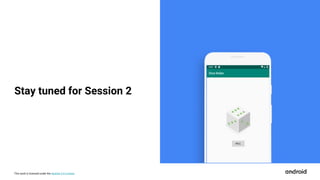
  • #41 Today you’ll be building three Android apps in Kotlin. Each one will help you learn new concepts that build on each other. The first will be a Dice Roller app. It allows you to roll a dice when a button is clicked and get a random value each time. After that, you’ll build an “About Me” app, allowing you to showcase interesting facts about yourself. Or you can customize the app for a friend, family member, or pet. Lastly, you’ll build the ColorMyViews App, an interactive app with a more advanced layout. These apps will introduce to building UI layouts on Android, a key building block of app development.
  • #42 For today’s schedule, we start a brief presentation with some logistics and concepts, which we’re doing right now! The concepts I cover in the presentation is to make the later, hands-on portions easier for everyone. Then, I’ll let you go off to work on the course independently with a short break in the middle. You’ll be working on Pathways 1 through 3 from Unit 1 of the course in today’s session.
  • #43 Let’s start by jumping right into concepts.
  • #44 Android Studio is the official tool that professional Android developers use to build Android apps. There is a lot of functionality available in Android Studio to help you build your app. For example, there are templates to help you create your app, which can generate something like what you see in this screenshot. You can browse project files on the left. You can use the Layout Editor to drag-and-drop UI components and create a layout for your app. Once you add a UI component, you can modify its attributes in the Attributes window on the right hand side.
  • #45 After you install Android Studio on your computer, you’ll create a Hello World app. You will learn to run the app in the emulator, which emulates an Android device on your computer. The emulator allows you to test your app on a variety of devices and versions of the Android platform. If you have a physical device, you’ll get the instructions to run it on your physical device as well.
  • #46 Then you’ll build an interactive Dice Roller app and learn about layouts. A layout defines the structure for the user interface in your app, and layouts in Android are made up of a hierarchy of Views and ViewGroups.
  • #47 Here are some types of views that are provided by Android: TextView for displaying text, ImageView for displaying images, and Button to perform some action when tapped.
  • #48 To position one or more views on screen, use a ViewGroup. Here are some examples of ViewGroups in Android. Use FrameLayout when you have one view that you want to position on the screen. Use LinearLayout to display a row of views or a column of views, as shown in the diagram. Use ConstraintLayout for more complex layouts. You may hear the ViewGroup referred to as the parent, and the views inside it as its children.
  • #49 Declare layouts in Android using XML. For example, this is what a TextView element looks like in XML. The value of the android:text attribute is the text to display, which is Hello World! The layout_width and layout_height attributes are wrap_content, meaning the TextView will be as wide and as tall as the content inside it. Defining the UI layout in XML is one aspect of your app.
  • #50 You’ll also be exploring other aspects of a basic Android app project which include a main activity, resources for your app, an Android Manifest file, and Gradle files. An Activity is how the user interacts with your app and it takes care of creating a window to display your UI in. Resources are the additional files and static content that your code uses, such as layout files, images, audio files, UI strings, themes, and more. Every project also includes an AndroidManifest.xml file. It describes essential information about your app such as the app’s package name, components of the app, and permissions it needs access to. Android uses Gradle to automate and manage the build process for your app. You can configure the build by modifying the Gradle files in your app to specify project dependencies, properties of your app, build variants, and more. This is a quick overview of the anatomy of a basic app project. You’ll have more time to dive in and explore these files firsthand in the course. For more info https://developer.android.com/guide/components/activities/intro-activities https://developer.android.com/guide/topics/resources/providing-resources https://developer.android.com/guide/topics/manifest/manifest-intro https://developer.android.com/studio/build
  • #51 Speaking of the course, let’s talk logistics. You will be working through the first three pathways of the Android Kotlin Fundamentals course on developer.android.com. Let’s look at how you will access and navigate around this online course.
  • #52 Similar to the last session, go to g.co/android/studyjams and look at the Prior Programming Experience track.
  • #53 Under the Android Fundamentals course, click the green button to Start Course.
  • #54 This is what the course looks like. There are 2 units and 10 pathways total, represented by each of these badges. Click the Explore button in Unit 1.
  • #55 In this session, work through the first three pathways of Unit 1: 1) Build your first app, 2) Build an interactive app, and 3) Layouts.
  • #56 When you click into a pathway, this is what it will look like. A pathway is defined as an ordered sequence of learning activities (such as codelabs) to learn a specific skill. At the end of each pathway, you will take a quiz and have a chance to earn a badge.
  • #57 These are the 3 badges for the first 3 pathways of the course. Once you earn a badge, you can save it to your developer profile.
  • #58 Okay that’s it -- let’s get started! If you have any questions (on the content or on setting up Android Studio), feel free to ask me or ask each other. I encourage you to work together to find solutions, especially if you finish early and people around you may need help.
  • #59 I’ll leave this up as you work, so you know what link to go to and to work on Pathway 1 first. [You can give them 45 mins until the break.] If you finish early, you can move ahead to Pathways 2 and 3. I’ll let you know when we’ll take break midway through.
  • #61 [You can give them about 45 minutes for Pathway 2 and 1 hour for Pathway 3. It’s okay if they can’t finish, they can complete the rest on their own.]
  • #62 Alright everyone welcome back! Congratulations on the progress you’ve made so far! How was your experience? What apps were you able to complete?
  • #63 [This activity is designed for in-person meetings.] Let’s play a game where you get to use the Dice Roller app you just created! This is a twist on a group rock paper scissors game you may have played. Pair up and hit the Roll button on your own app at the same time. Whoever has a higher roll, wins. Whoever loses cheers on the winner, as they play against their next component. If you tie, play against the same person again. The game keeps going until there are only 2 people in the room left to play each other, with everyone else cheering each side on, until a grand winner is declared! [If some people didn’t finish the app, that’s totally okay. They can Google “Random number between 1 and 6” and it will do the same thing.] [If you’re meeting virtually, instead of playing the game, you can have folks share how they would extend the app by adding additional features. Or you can have them share if they thought of any future app ideas from building this one.]
  • #64 Hope you all enjoyed the game and learning to create your first Android apps! On social media, you can post photos, highlights, or app screenshots from today using #AndroidStudyJams. [Include your own developer community and chapter hashtags (i.e. #developerstudentclubs #dsccmu)]
  • #65 If you want to continue learning, here are some resources.
  • #66 There are numerous Android development resources available. You can find learning content in a variety of formats - videos, articles, code samples based on how you like to learn best. I also wanted to mention that we’ll be having more Android Study Jams sessions to cover the remaining pathways of the course. Let me know if you’re interested in attending and stay tuned for more information!