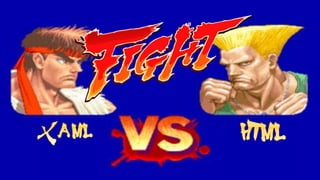
Comparing XAML and HTML:
FIGHT
About Gill Cleeren (aka Mr XAML)
• .NET Architect @Ordina (www.ordina.be)
• Microsoft Regional Director and Client Dev MVP
• Techorama conference owner
• Speaker
• Visug user group lead (www.visug.be)
• Author
• Pluralsight trainer
www.snowball.be
gill@snowball.be
@gillcleeren
About Kevin DeRudder (aka Mr HTML)
• Lecturer at New Media and Communications Technologie
• IE Dev MVP
• Techorama conference owner
• Visug user group lead (www.visug.be)
kevinderudder.wordpress.be
kevin@e-guidelines.be
@kevinderudder
GOAL
• Comparison of 2 technologies
• XAML (Windows 8, Silverlight)
• HTML
• 60 minutes
• 10 topics
• 3 minutes per topic
• YOU DECIDE!
• Please decide quickly!
Match agenda
• Round 1: Layout
• Round 2: Managing styles
• Round 3: Drawing
• Round 4: Local data
• Round 5: Services
• Round 6: Data binding
• Round 7: Audio and video playback
• Round 8: Controls
• Round 9: Uh oh, some OO!
• Round 10: Unit testing
• Final scores!
Requirements for this round
• Responsive, resolution independent
• Easy table based layout
• Layout management system built-in
XAML
Layout in XAML
• Layout is done based on a number of built-in elements (“layout
management elements”)
• General, available in any XAML technology:
• Canvas
• StackPanel
• Grid
• Silverlight
• DockPanel
• WrapPanel
• Windows 8 & Windows Phone 8.1
• GridView
• ListView
• Semantic Zoom
Canvas
• Positional layout
• Positioning of elements is done relative to owning canvas
• Very lightweight container
• “Drawing” panel, similar to a Form in WinForms
• Not the best choice for
flexible, responsive UIs
• Positioning done based on
attached properties
<Canvas Width="150" Height="100" Background="Gray">
<Rectangle Canvas.Top="10" Canvas.Left="10"
Width="130" Height="80" Fill="Blue" />
<Canvas Canvas.Left="20" Canvas.Top="20"
Width="110" Height="60" Background="Black">
<Ellipse Canvas.Top="10"
Canvas.Left="10"
Width="90"
Height="40"
Fill="Orange" />
</Canvas>
</Canvas>
StackPanel
• Automatic layouting of its child elements
• Stacks elements horizontally or vertically
• Very simple control
• OK for flexible Uis
• Not for an entire page though
<StackPanel Background="Gray"
Orientation="Horizontal"
>
<Rectangle Width="100" Height="100"
Fill="Blue" />
<Ellipse Width="100" Height="100"
Fill="Orange" />
</StackPanel>
Grid
• Powerful layout control
• Ready for responsive UIs
• Versatile for all resolutions
• Not “shared” as the same control for tabular data display
• Not visible
• No rows and columns
• Each cell can contain 1 element by default
• More possible due to nesting
• Nesting is often applied for a page
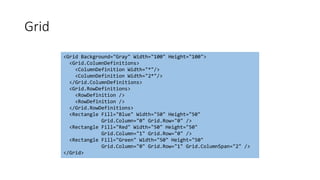
Grid
<Grid Background="Gray" Width="100" Height="100">
<Grid.ColumnDefinitions>
<ColumnDefinition Width="*"/>
<ColumnDefinition Width="2*"/>
</Grid.ColumnDefinitions>
<Grid.RowDefinitions>
<RowDefinition />
<RowDefinition />
</Grid.RowDefinitions>
<Rectangle Fill="Blue" Width="50" Height="50"
Grid.Column="0" Grid.Row="0" />
<Rectangle Fill="Red" Width="50" Height="50"
Grid.Column="1" Grid.Row="0" />
<Rectangle Fill="Green" Width="50" Height="50"
Grid.Column="0" Grid.Row="1" Grid.ColumnSpan="2" />
</Grid>
Windows 8 specific controls
• ListView
• GridView
• FlipView
• Semantic zoom
• Touch-optimized!
HTML
<header />
<main>
<aside></aside>
<section>
<article>
<header />
<footer />
</article>
</section>
</main>
<footer />
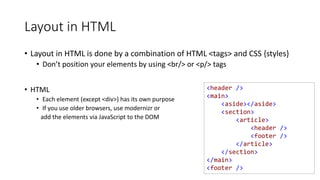
Layout in HTML
• Layout in HTML is done by a combination of HTML <tags> and CSS {styles}
• Don’t position your elements by using <br/> or <p/> tags
• HTML
• Each element (except <div>) has its own purpose
• If you use older browsers, use modernizr or
add the elements via JavaScript to the DOM
main {
display: block;
}
aside > nav {
display: -ms-flex;
-ms-flex-flow: row wrap;
flex-flow: row wrap;
}
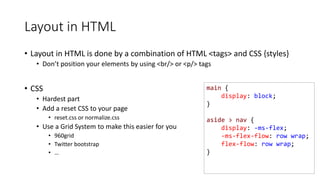
Layout in HTML
• Layout in HTML is done by a combination of HTML <tags> and CSS {styles}
• Don’t position your elements by using <br/> or <p/> tags
• CSS
• Hardest part
• Add a reset CSS to your page
• reset.css or normalize.css
• Use a Grid System to make this easier for you
• 960grid
• Twitter bootstrap
• …
Before I continue: NO TABLES
Comparing XAML and HTML:
FIGHT
Requirements for this round
• Make it easier to work with styles
• Make it possible to make styles use variables
HTML
Styles in HTML
Styles in HTML CSS
• No easy way to maintain large CSS Stylesheets
• SOLUTION: CSS Precompilers
• SASS
• LESS
• Stylus
• CSS Crush
• …
XAML
Styles
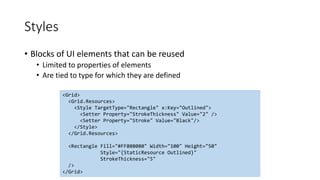
• Blocks of UI elements that can be reused
• Limited to properties of elements
• Are tied to type for which they are defined
<Grid>
<Grid.Resources>
<Style TargetType="Rectangle" x:Key="Outlined">
<Setter Property="StrokeThickness" Value="2" />
<Setter Property="Stroke" Value="Black"/>
</Style>
</Grid.Resources>
<Rectangle Fill="#FF808080" Width="100" Height="50"
Style="{StaticResource Outlined}"
StrokeThickness="5"
/>
</Grid>
Styles
• Should have name and TargetType defined
• TargetType is polymorphic
• Static or dynamic (only in WPF)
• Aren’t really cascading,
although we can build a
hierarchy of styles
• Similar to CSS
<Style x:Key="BaseControl"
TargetType="Control">
<Setter Property="FontWeight"
Value="Bold" />
</Style>
<Style x:Key="ButtonStyle1"
TargetType="Button"
BasedOn="{StaticResource BaseControl}">
<Setter Property="FontFamily"
Value="Verdana" />
<Setter Property="FontSize"
Value="18" />
</Style>
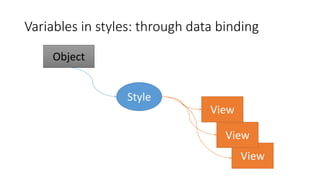
Variables in styles: through data binding
• Inside a style setter, we can do data-binding
• Not really a variable though
• How it works:
• Create an object
• Bind a style to it
• When the object changes, the bound values in the setters will also change
Variables in styles: through data binding
Object
Style
View
View
View
Comparing XAML and HTML:
FIGHT
Requirements
• Vector-based
• Resolution-independent
XAML
Drawing in XAML
• All drawing is vector-based
• No problems with different resolution
• Based on hierarchy of shapes
• Shape base class
• Rectangle
• Ellipse
• Line
• Polygon
• Polyline
• Path
Drawing in XAML
• Basic properties
• Fill
• Stroke
• Width
• Height
• Opacity
• Visibility
• Cursor (depending on platform)
Brushes
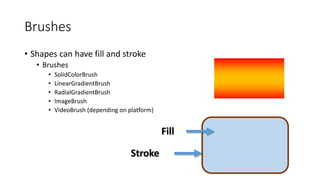
• Shapes can have fill and stroke
• Brushes
• SolidColorBrush
• LinearGradientBrush
• RadialGradientBrush
• ImageBrush
• VideoBrush (depending on platform)
Fill
Stroke
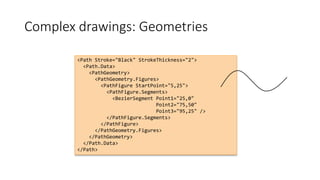
Complex drawings: Geometries
<Path Stroke="Black" StrokeThickness="2">
<Path.Data>
<PathGeometry>
<PathGeometry.Figures>
<PathFigure StartPoint="5,25">
<PathFigure.Segments>
<BezierSegment Point1="25,0"
Point2="75,50"
Point3="95,25" />
</PathFigure.Segments>
</PathFigure>
</PathGeometry.Figures>
</PathGeometry>
</Path.Data>
</Path>
HTML
Drawing in HTML
• Is not so easy, but great things can be achieved
• Posibilities
• Canvas
• SVG
• WebGL
• Plain Old JavaScript
• Which option you pick, JavaScript needs to be your friend
• Or you should try CSS3D
Canvas
• Typical choice for most HTML games
• Simple
• But fast
• Bitmapped area, so drawn objects become part of the canvas which
makes it impossible to attach event handlers
• When objects move, you must redraw the canvas
SVG
• XML based vector graphics format
• Less performant but very flexible
• Each drawn object becomes part of the DOM
• Attach one or more event handlers to it
<svg width="320" height="320">
<defs>
<radialGradient id="circleGrad">
<stop offset="100%" stop-color="rgb( 0, 255, 0)" />
</radialGradient>
</defs>
<ellipse fill="url(#circleGrad)" stroke="#000" cx="50%“ cy="50%" rx="50%" ry="50%">
</ellipse>
</svg>
Comparing XAML and HTML:
FIGHT
Requirements
• Offer simple way to store user data locally
HTML
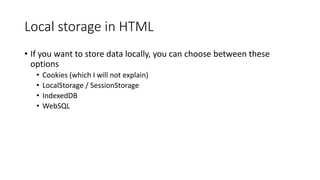
Local storage in HTML
• If you want to store data locally, you can choose between these
options
• Cookies (which I will not explain)
• LocalStorage / SessionStorage
• IndexedDB
• WebSQL
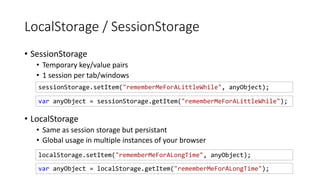
LocalStorage / SessionStorage
• SessionStorage
• Temporary key/value pairs
• 1 session per tab/windows
• LocalStorage
• Same as session storage but persistant
• Global usage in multiple instances of your browser
localStorage.setItem("rememberMeForALongTime", anyObject);
sessionStorage.setItem("rememberMeForALittleWhile", anyObject);
var anyObject = sessionStorage.getItem("rememberMeForALittleWhile");
var anyObject = localStorage.getItem("rememberMeForALongTime");
IndexedDB
• API for client-side storage of data
• Local and session storage is good for small amounts of data
• IndexedDB is ideal for large amounts of data
• Transactional database System
• Boost performance by using indexes
XAML
Local data in Silverlight
• Silverlight and Windows Phone define IsolatedStorage
• Can store data on Client Machine
• Size of storage is quota'd
• Mostly used to save state/settings
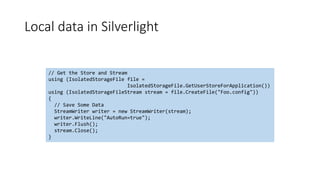
Local data in Silverlight
// Get the Store and Stream
using (IsolatedStorageFile file =
IsolatedStorageFile.GetUserStoreForApplication())
using (IsolatedStorageFileStream stream = file.CreateFile("Foo.config"))
{
// Save Some Data
StreamWriter writer = new StreamWriter(stream);
writer.WriteLine("AutoRun=true");
writer.Flush();
stream.Close();
}
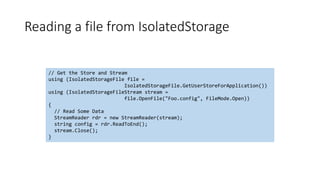
Reading a file from IsolatedStorage
// Get the Store and Stream
using (IsolatedStorageFile file =
IsolatedStorageFile.GetUserStoreForApplication())
using (IsolatedStorageFileStream stream =
file.OpenFile("Foo.config", FileMode.Open))
{
// Read Some Data
StreamReader rdr = new StreamReader(stream);
string config = rdr.ReadToEnd();
stream.Close();
}
IsolatedStorageSettings
• Simple usage to create Application Settings
• Use IsolatedStorageSettings to set/get settings
• ApplicationSettings are per .xap
• SiteSettings are per domain
IsolatedStorageSettings.ApplicationSettings["foo"] = "bar";
string appFoo = IsolatedStorageSettings.ApplicationSettings["foo"] as string;
IsolatedStorageSettings.SiteSettings["foo"] = "bar";
string siteFoo = IsolatedStorageSettings.SiteSettings["foo"] as string;
Local data in Windows 8/Windows Phone 8
• Defines Application Data API
• Local
• Roaming
• Temporary
• Based on
• File system
• Settings (automatically persisted)
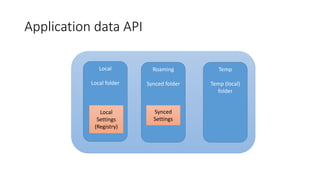
Application data API
Local
Local folder
Roaming
Synced folder
Temp
Temp (local)
folder
Local
Settings
(Registry)
Synced
Settings
Comparing XAML and HTML:
FIGHT
Requirements
• Access (relational) data behind a service
• RESTful interaction with the service
XAML
Services in XAML
• Silverlight, Windows 8 and Windows Phone share server-technologies that
they can communicate with
• ASMX
• WCF
• REST
• RSS
• Sockets
• oData
• …
• Common requirement is asynchronous communication
• Silverlight: callbacks
• Windows 8 and Windows Phone 8: await/async pattern
• Note: WPF can use the full, raw power of .NET and thus has even less restrictions
REST service access in Windows 8
• Defines HttpClient (Silverlight and WP7 used WebClient)
• Works async
• HttpClient defines
• Get(Async)
• Returns an HttpResponseMessage
• Put(Async)
• Post(Async)
• Delete(Async)
RESTful!
• Windows 8.1 introduced a new version of the HttpClient
• Very similar API
Parsing the response
• XML
• Linq-To-XML
• XmlReader/XmlWriter
• XmlSerializer
• JSON:
• Use the JsonObject and feed it the returned string
• DataContractJsonSerializer is also available
• JSON.NET
• Open source via NuGet
• Often the preferred choice
HTML
Services in HTML
• If you want to retrieve data in a browser you have following options
• XMLHttpRequest
• WebSockets
XmlHttpRequest
• XMLHttpRequest defines an API for transferring data between a client
and a server
• Client initiates the request
• Synchronous or Asynchronous
• Based on the HTTP protocol
var xhr = new XMLHttpRequest();
xhr.open("GET", "URL", /*async*/ true);
xhr.onreadystatechange = function () {
if (xhr.readyState == COMPLETE) {
if (xhr.status == 200) {
var data = xhr.responseText;
}
}
}
xhr.send();
WebSockets
• API for socket connections between a browser and a server
• 2-way persistant connection between client and server
• Event-driven responses
• Send messages to the server and receive a response without polling the
server
WebSockets
var socket = new WebSocket("ws://www.mi6.com/socketserver", "yourprotocol");
function sendJamesBondOnASecretMission() {
var msg = {
type: "message",
mission: document.getElementById("mission").value,
id: clientID,
date: Date.now()
};
socket.send(JSON.stringify(msg));
}
socket.onmessage = function (event) {
var data = event.data;
}
Comparing XAML and HTML:
FIGHT
Requirements for this round
• Don’t require us to write code like
TextBox1.Text = Person1.FirstName;
• Support two-way binding mode
HTML
Data binding in HTML
• HTML does not know the concept of data binding
• You have data and you bind it to a control
• Plenty of JavaScript frameworks available to allow datavbinding in HTML
• Knockout
• Angular
• Mustache
• …
• Depending on the framework, the syntax may be different
XAML
• Infrastructure for binding control properties to objects and collections
• Loosely-coupled model, already exists in ASP.NET, WinForms
• Simple and powerful model
• Source
• Any Object
• PropertyPath
• Path To Any Public Property
• Dynamic
• Supports multiple Binding Models
• OneTime, OneWay and TwoWay
Data Binding in XAML
Data binding in XAML
Data
Object
Data bindingUI
Control
Converter
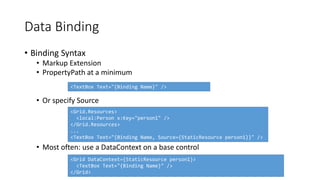
• Binding Syntax
• Markup Extension
• PropertyPath at a minimum
• Or specify Source
• Most often: use a DataContext on a base control
Data Binding
<TextBox Text="{Binding Name}" />
<Grid.Resources>
<local:Person x:Key="person1" />
</Grid.Resources>
...
<TextBox Text="{Binding Name, Source={StaticResource person1}}" />
<Grid DataContext={StaticResource person1}>
<TextBox Text="{Binding Name}" />
</Grid>
• Three Modes for Binding
• TwoWay, OneWay or OneTime
• Binding Syntax for Mode
• Binding Syntax
• OneWay and OneTime work with any object
• Property Based Reads
• TwoWay works with any objects
• Property Based Writes
Data Binding
<TextBlock Content="{Binding Name, Mode=TwoWay}" />
• Binding Interfaces
• Properties use INotifyPropertyChanged interface
• Collections use INotifyCollectionChanged interface
• Use ObservableCollection<> for Bindable Collections
Data Binding
Comparing XAML and HTML:
FIGHT
Requirements for this round
• Easy way of media playback
• Support for common formats
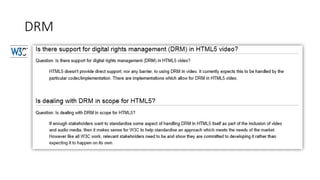
• DRM
XAML
Audio and video in XAML
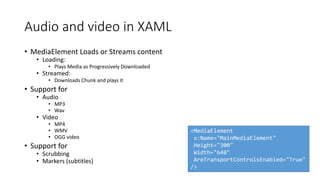
• MediaElement Loads or Streams content
• Loading:
• Plays Media as Progressively Downloaded
• Streamed:
• Downloads Chunk and plays it
• Support for
• Audio
• MP3
• Wav
• Video
• MP4
• WMV
• OGG video
• Support for
• Scrubbing
• Markers (subtitles)
<MediaElement
x:Name="MainMediaElement"
Height="300"
Width="640"
AreTransportControlsEnabled="True"
/>
DRM in XAML
• Silverlight, Windows Phone and Windows 8 support DRM
• Player Framework
• PlayReady Client
• Smooth Streaming SDK
HTML
Audio and video in HTML
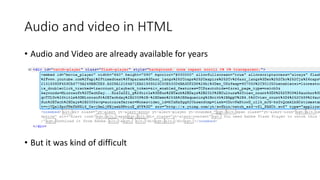
• Audio and Video are already available for years
• But it was kind of difficult
Audio and video in HTML
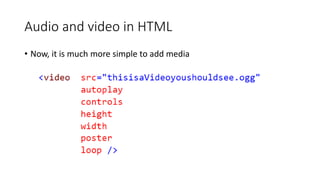
• Now, it is much more simple to add media
Audio and Video in HTML
• But sometimes, codecs can be a pain (even on apple)
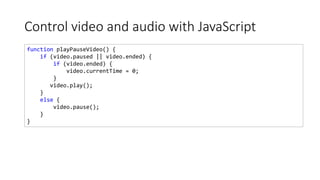
Control video and audio with JavaScript
function playPauseVideo() {
if (video.paused || video.ended) {
if (video.ended) {
video.currentTime = 0;
}
video.play();
}
else {
video.pause();
}
}
DRM
Requirements
• Rich, native control set
• Basic
• Advanced
• Extensible control set
• Data visualizations
HTML
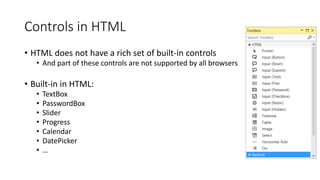
Controls in HTML
• HTML does not have a rich set of built-in controls
• And part of these controls are not supported by all browsers
• Built-in in HTML:
• TextBox
• PasswordBox
• Slider
• Progress
• Calendar
• DatePicker
• …
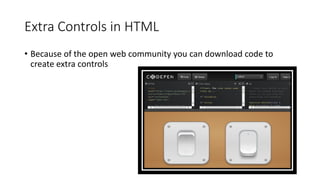
Extra Controls in HTML
• Because of the open web community you can download code to
create extra controls
Extra Controls in HTML
• Because of the open web community you can download code to
create extra controls
Extra Controls in HTML
• Or you can download or buy extra controls
• jQuery UI
• Kendo UI
XAML
XAML controls
• Very rich control set
• Depending on technology
• Built-in in most XAML technologies
• TextBox
• PasswordBox
• Slider
• ProgressBar
• Calendar
• DatePicker
• …
Content controls
• Content controls can contain other content
• One child
• Nested
• Controls
• Button
• CheckBox
• RadioButton
• TabControl
• ScrollViewer
• …
<Button>
<Button.Content>
<StackPanel>
<Image Source="pain.jpg" Width="100" />
<TextBlock TextAlignment="Center"
Text="Click Me" />
</StackPanel>
</Button.Content>
</Button>
List Controls
• Bindable to IList or IEnumerable lists
• ItemsControl
• ListBox
• ComboBox (not in W8 and WP8)
• TabControl (not in W8 and WP8)
• DataGrid (not in W8 and WP8)
• Inherit from ItemsControl
• Similar to a repeater
<ItemsControl>
<Button Content="Click One" />
<Button Content="Click Two" />
</ItemsControl>
Templating of controls
• Endless options when you start to template controls
• Allows re-definition of build-in controls
• Can redefine the XAML that is used to build control
• Look can be changed dramatically by changing XAML
• Feel can be changed
• Can only add built-in behavior
• E.g. no new methods, properties or events
Comparing XAML and HTML:
FIGHT
Requirements for this round
• Support
• Classes
• Interfaces
• Inheritance
• Polymorphism
XAML
OO for XAML/C#
• It’s C# 
• XAML does know about OO principles going on behind the scenes
• DataTemplateSelectors
• Implicit Data Templates
• Data binding properties
HTML
OO for HTML/JavaScript
• Although lots of people thing that you cannot do OO stuff in
JavaScript, you can
• It is not always pretty, but it is possible
JamesBond = (function() {
function JamesBond(name, drink) {
this.name = name;
this.drink = drink;
}
return JamesBond;
})();
sean = new JamesBond("Sean Connery", "Martini");
OO for HTML/JavaScript
• Although lots of people thing that you cannot do OO stuff in
JavaScript, you can
• It is not always pretty, but it is possible
JamesBond = (function() {
function JamesBond(name, drink) {
this.name = name;
this.drink = drink;
}
return JamesBond;
})();
sean = new JamesBond("Sean Connery", "Martini");
OO for HTML/JavaScript
• Today: make your live easier with compilers/transpilers/…
• CoffeeScript
• TypeScript
• …
# CoffeeScript
class JamesBond
constructor: (name, drink) ->
@name = name
@drink = drink
// TypeScript
class JamesBond{
name: string;drink: string;
constructor(name: string, drink: string) {

this.name = name;
this.drink = drink;
}
}
OO for HTML/JavaScript
• ECMAScript 6 will add more OO functionality
• Future version of JavaScript
Comparing XAML and HTML:
FIGHT
Requirements for this round
• Support an easy way for unit testing
• Unit testing frameworks
HTML
Unit testing for HTML/JavaScript
• Bunch of Testing Frameworks available
• QUnit
• Mocha
• TestSwarm
• Jasmine
• Tutti
• …
• Ideal with a JavaScript build system like grunt or gulp
XAML
Unit testing for XAML
• Silverlight includes support for unit testing directly from Visual Studio
• Run in the browser
• Not easy to integrate with build process
• In general, not a great story!
• Windows 8 support Unit Test Library template in
Visual Studio
• Based on Visual Studio Testing Framework
• Integrates with build process
• Other unit testing frameworks are supports
Comparing XAML and HTML:
FIGHT
Final scores
Comparing XAML and HTML:
FIGHT

Comparing xaml and html

  • 1.
    Comparing XAML andHTML: FIGHT
  • 2.
    About Gill Cleeren(aka Mr XAML) • .NET Architect @Ordina (www.ordina.be) • Microsoft Regional Director and Client Dev MVP • Techorama conference owner • Speaker • Visug user group lead (www.visug.be) • Author • Pluralsight trainer www.snowball.be gill@snowball.be @gillcleeren
  • 3.
    About Kevin DeRudder(aka Mr HTML) • Lecturer at New Media and Communications Technologie • IE Dev MVP • Techorama conference owner • Visug user group lead (www.visug.be) kevinderudder.wordpress.be kevin@e-guidelines.be @kevinderudder
  • 4.
    GOAL • Comparison of2 technologies • XAML (Windows 8, Silverlight) • HTML • 60 minutes • 10 topics • 3 minutes per topic • YOU DECIDE! • Please decide quickly!
  • 5.
    Match agenda • Round1: Layout • Round 2: Managing styles • Round 3: Drawing • Round 4: Local data • Round 5: Services • Round 6: Data binding • Round 7: Audio and video playback • Round 8: Controls • Round 9: Uh oh, some OO! • Round 10: Unit testing • Final scores!
  • 7.
    Requirements for thisround • Responsive, resolution independent • Easy table based layout • Layout management system built-in
  • 8.
  • 9.
    Layout in XAML •Layout is done based on a number of built-in elements (“layout management elements”) • General, available in any XAML technology: • Canvas • StackPanel • Grid • Silverlight • DockPanel • WrapPanel • Windows 8 & Windows Phone 8.1 • GridView • ListView • Semantic Zoom
  • 10.
    Canvas • Positional layout •Positioning of elements is done relative to owning canvas • Very lightweight container • “Drawing” panel, similar to a Form in WinForms • Not the best choice for flexible, responsive UIs • Positioning done based on attached properties <Canvas Width="150" Height="100" Background="Gray"> <Rectangle Canvas.Top="10" Canvas.Left="10" Width="130" Height="80" Fill="Blue" /> <Canvas Canvas.Left="20" Canvas.Top="20" Width="110" Height="60" Background="Black"> <Ellipse Canvas.Top="10" Canvas.Left="10" Width="90" Height="40" Fill="Orange" /> </Canvas> </Canvas>
  • 11.
    StackPanel • Automatic layoutingof its child elements • Stacks elements horizontally or vertically • Very simple control • OK for flexible Uis • Not for an entire page though <StackPanel Background="Gray" Orientation="Horizontal" > <Rectangle Width="100" Height="100" Fill="Blue" /> <Ellipse Width="100" Height="100" Fill="Orange" /> </StackPanel>
  • 12.
    Grid • Powerful layoutcontrol • Ready for responsive UIs • Versatile for all resolutions • Not “shared” as the same control for tabular data display • Not visible • No rows and columns • Each cell can contain 1 element by default • More possible due to nesting • Nesting is often applied for a page
  • 13.
    Grid <Grid Background="Gray" Width="100"Height="100"> <Grid.ColumnDefinitions> <ColumnDefinition Width="*"/> <ColumnDefinition Width="2*"/> </Grid.ColumnDefinitions> <Grid.RowDefinitions> <RowDefinition /> <RowDefinition /> </Grid.RowDefinitions> <Rectangle Fill="Blue" Width="50" Height="50" Grid.Column="0" Grid.Row="0" /> <Rectangle Fill="Red" Width="50" Height="50" Grid.Column="1" Grid.Row="0" /> <Rectangle Fill="Green" Width="50" Height="50" Grid.Column="0" Grid.Row="1" Grid.ColumnSpan="2" /> </Grid>
  • 14.
    Windows 8 specificcontrols • ListView • GridView • FlipView • Semantic zoom • Touch-optimized!
  • 15.
  • 16.
    <header /> <main> <aside></aside> <section> <article> <header /> <footer/> </article> </section> </main> <footer /> Layout in HTML • Layout in HTML is done by a combination of HTML <tags> and CSS {styles} • Don’t position your elements by using <br/> or <p/> tags • HTML • Each element (except <div>) has its own purpose • If you use older browsers, use modernizr or add the elements via JavaScript to the DOM
  • 17.
    main { display: block; } aside> nav { display: -ms-flex; -ms-flex-flow: row wrap; flex-flow: row wrap; } Layout in HTML • Layout in HTML is done by a combination of HTML <tags> and CSS {styles} • Don’t position your elements by using <br/> or <p/> tags • CSS • Hardest part • Add a reset CSS to your page • reset.css or normalize.css • Use a Grid System to make this easier for you • 960grid • Twitter bootstrap • …
  • 18.
  • 19.
    Comparing XAML andHTML: FIGHT
  • 21.
    Requirements for thisround • Make it easier to work with styles • Make it possible to make styles use variables
  • 22.
  • 23.
  • 24.
    Styles in HTMLCSS • No easy way to maintain large CSS Stylesheets • SOLUTION: CSS Precompilers • SASS • LESS • Stylus • CSS Crush • …
  • 25.
  • 26.
    Styles • Blocks ofUI elements that can be reused • Limited to properties of elements • Are tied to type for which they are defined <Grid> <Grid.Resources> <Style TargetType="Rectangle" x:Key="Outlined"> <Setter Property="StrokeThickness" Value="2" /> <Setter Property="Stroke" Value="Black"/> </Style> </Grid.Resources> <Rectangle Fill="#FF808080" Width="100" Height="50" Style="{StaticResource Outlined}" StrokeThickness="5" /> </Grid>
  • 27.
    Styles • Should havename and TargetType defined • TargetType is polymorphic • Static or dynamic (only in WPF) • Aren’t really cascading, although we can build a hierarchy of styles • Similar to CSS <Style x:Key="BaseControl" TargetType="Control"> <Setter Property="FontWeight" Value="Bold" /> </Style> <Style x:Key="ButtonStyle1" TargetType="Button" BasedOn="{StaticResource BaseControl}"> <Setter Property="FontFamily" Value="Verdana" /> <Setter Property="FontSize" Value="18" /> </Style>
  • 28.
    Variables in styles:through data binding • Inside a style setter, we can do data-binding • Not really a variable though • How it works: • Create an object • Bind a style to it • When the object changes, the bound values in the setters will also change
  • 29.
    Variables in styles:through data binding Object Style View View View
  • 30.
    Comparing XAML andHTML: FIGHT
  • 32.
  • 33.
  • 34.
    Drawing in XAML •All drawing is vector-based • No problems with different resolution • Based on hierarchy of shapes • Shape base class • Rectangle • Ellipse • Line • Polygon • Polyline • Path
  • 35.
    Drawing in XAML •Basic properties • Fill • Stroke • Width • Height • Opacity • Visibility • Cursor (depending on platform)
  • 36.
    Brushes • Shapes canhave fill and stroke • Brushes • SolidColorBrush • LinearGradientBrush • RadialGradientBrush • ImageBrush • VideoBrush (depending on platform) Fill Stroke
  • 37.
    Complex drawings: Geometries <PathStroke="Black" StrokeThickness="2"> <Path.Data> <PathGeometry> <PathGeometry.Figures> <PathFigure StartPoint="5,25"> <PathFigure.Segments> <BezierSegment Point1="25,0" Point2="75,50" Point3="95,25" /> </PathFigure.Segments> </PathFigure> </PathGeometry.Figures> </PathGeometry> </Path.Data> </Path>
  • 38.
  • 39.
    Drawing in HTML •Is not so easy, but great things can be achieved • Posibilities • Canvas • SVG • WebGL • Plain Old JavaScript • Which option you pick, JavaScript needs to be your friend • Or you should try CSS3D
  • 40.
    Canvas • Typical choicefor most HTML games • Simple • But fast • Bitmapped area, so drawn objects become part of the canvas which makes it impossible to attach event handlers • When objects move, you must redraw the canvas
  • 41.
    SVG • XML basedvector graphics format • Less performant but very flexible • Each drawn object becomes part of the DOM • Attach one or more event handlers to it <svg width="320" height="320"> <defs> <radialGradient id="circleGrad"> <stop offset="100%" stop-color="rgb( 0, 255, 0)" /> </radialGradient> </defs> <ellipse fill="url(#circleGrad)" stroke="#000" cx="50%“ cy="50%" rx="50%" ry="50%"> </ellipse> </svg>
  • 43.
    Comparing XAML andHTML: FIGHT
  • 45.
    Requirements • Offer simpleway to store user data locally
  • 46.
  • 47.
    Local storage inHTML • If you want to store data locally, you can choose between these options • Cookies (which I will not explain) • LocalStorage / SessionStorage • IndexedDB • WebSQL
  • 48.
    LocalStorage / SessionStorage •SessionStorage • Temporary key/value pairs • 1 session per tab/windows • LocalStorage • Same as session storage but persistant • Global usage in multiple instances of your browser localStorage.setItem("rememberMeForALongTime", anyObject); sessionStorage.setItem("rememberMeForALittleWhile", anyObject); var anyObject = sessionStorage.getItem("rememberMeForALittleWhile"); var anyObject = localStorage.getItem("rememberMeForALongTime");
  • 49.
    IndexedDB • API forclient-side storage of data • Local and session storage is good for small amounts of data • IndexedDB is ideal for large amounts of data • Transactional database System • Boost performance by using indexes
  • 51.
  • 52.
    Local data inSilverlight • Silverlight and Windows Phone define IsolatedStorage • Can store data on Client Machine • Size of storage is quota'd • Mostly used to save state/settings
  • 53.
    Local data inSilverlight // Get the Store and Stream using (IsolatedStorageFile file = IsolatedStorageFile.GetUserStoreForApplication()) using (IsolatedStorageFileStream stream = file.CreateFile("Foo.config")) { // Save Some Data StreamWriter writer = new StreamWriter(stream); writer.WriteLine("AutoRun=true"); writer.Flush(); stream.Close(); }
  • 54.
    Reading a filefrom IsolatedStorage // Get the Store and Stream using (IsolatedStorageFile file = IsolatedStorageFile.GetUserStoreForApplication()) using (IsolatedStorageFileStream stream = file.OpenFile("Foo.config", FileMode.Open)) { // Read Some Data StreamReader rdr = new StreamReader(stream); string config = rdr.ReadToEnd(); stream.Close(); }
  • 55.
    IsolatedStorageSettings • Simple usageto create Application Settings • Use IsolatedStorageSettings to set/get settings • ApplicationSettings are per .xap • SiteSettings are per domain IsolatedStorageSettings.ApplicationSettings["foo"] = "bar"; string appFoo = IsolatedStorageSettings.ApplicationSettings["foo"] as string; IsolatedStorageSettings.SiteSettings["foo"] = "bar"; string siteFoo = IsolatedStorageSettings.SiteSettings["foo"] as string;
  • 56.
    Local data inWindows 8/Windows Phone 8 • Defines Application Data API • Local • Roaming • Temporary • Based on • File system • Settings (automatically persisted)
  • 57.
    Application data API Local Localfolder Roaming Synced folder Temp Temp (local) folder Local Settings (Registry) Synced Settings
  • 58.
    Comparing XAML andHTML: FIGHT
  • 60.
    Requirements • Access (relational)data behind a service • RESTful interaction with the service
  • 61.
  • 62.
    Services in XAML •Silverlight, Windows 8 and Windows Phone share server-technologies that they can communicate with • ASMX • WCF • REST • RSS • Sockets • oData • … • Common requirement is asynchronous communication • Silverlight: callbacks • Windows 8 and Windows Phone 8: await/async pattern • Note: WPF can use the full, raw power of .NET and thus has even less restrictions
  • 63.
    REST service accessin Windows 8 • Defines HttpClient (Silverlight and WP7 used WebClient) • Works async • HttpClient defines • Get(Async) • Returns an HttpResponseMessage • Put(Async) • Post(Async) • Delete(Async) RESTful! • Windows 8.1 introduced a new version of the HttpClient • Very similar API
  • 64.
    Parsing the response •XML • Linq-To-XML • XmlReader/XmlWriter • XmlSerializer • JSON: • Use the JsonObject and feed it the returned string • DataContractJsonSerializer is also available • JSON.NET • Open source via NuGet • Often the preferred choice
  • 65.
  • 66.
    Services in HTML •If you want to retrieve data in a browser you have following options • XMLHttpRequest • WebSockets
  • 67.
    XmlHttpRequest • XMLHttpRequest definesan API for transferring data between a client and a server • Client initiates the request • Synchronous or Asynchronous • Based on the HTTP protocol var xhr = new XMLHttpRequest(); xhr.open("GET", "URL", /*async*/ true); xhr.onreadystatechange = function () { if (xhr.readyState == COMPLETE) { if (xhr.status == 200) { var data = xhr.responseText; } } } xhr.send();
  • 68.
    WebSockets • API forsocket connections between a browser and a server • 2-way persistant connection between client and server • Event-driven responses • Send messages to the server and receive a response without polling the server
  • 69.
    WebSockets var socket =new WebSocket("ws://www.mi6.com/socketserver", "yourprotocol"); function sendJamesBondOnASecretMission() { var msg = { type: "message", mission: document.getElementById("mission").value, id: clientID, date: Date.now() }; socket.send(JSON.stringify(msg)); } socket.onmessage = function (event) { var data = event.data; }
  • 70.
    Comparing XAML andHTML: FIGHT
  • 72.
    Requirements for thisround • Don’t require us to write code like TextBox1.Text = Person1.FirstName; • Support two-way binding mode
  • 73.
  • 74.
    Data binding inHTML • HTML does not know the concept of data binding • You have data and you bind it to a control • Plenty of JavaScript frameworks available to allow datavbinding in HTML • Knockout • Angular • Mustache • … • Depending on the framework, the syntax may be different
  • 75.
  • 76.
    • Infrastructure forbinding control properties to objects and collections • Loosely-coupled model, already exists in ASP.NET, WinForms • Simple and powerful model • Source • Any Object • PropertyPath • Path To Any Public Property • Dynamic • Supports multiple Binding Models • OneTime, OneWay and TwoWay Data Binding in XAML
  • 77.
    Data binding inXAML Data Object Data bindingUI Control Converter
  • 78.
    • Binding Syntax •Markup Extension • PropertyPath at a minimum • Or specify Source • Most often: use a DataContext on a base control Data Binding <TextBox Text="{Binding Name}" /> <Grid.Resources> <local:Person x:Key="person1" /> </Grid.Resources> ... <TextBox Text="{Binding Name, Source={StaticResource person1}}" /> <Grid DataContext={StaticResource person1}> <TextBox Text="{Binding Name}" /> </Grid>
  • 79.
    • Three Modesfor Binding • TwoWay, OneWay or OneTime • Binding Syntax for Mode • Binding Syntax • OneWay and OneTime work with any object • Property Based Reads • TwoWay works with any objects • Property Based Writes Data Binding <TextBlock Content="{Binding Name, Mode=TwoWay}" />
  • 80.
    • Binding Interfaces •Properties use INotifyPropertyChanged interface • Collections use INotifyCollectionChanged interface • Use ObservableCollection<> for Bindable Collections Data Binding
  • 81.
    Comparing XAML andHTML: FIGHT
  • 83.
    Requirements for thisround • Easy way of media playback • Support for common formats • DRM
  • 84.
  • 85.
    Audio and videoin XAML • MediaElement Loads or Streams content • Loading: • Plays Media as Progressively Downloaded • Streamed: • Downloads Chunk and plays it • Support for • Audio • MP3 • Wav • Video • MP4 • WMV • OGG video • Support for • Scrubbing • Markers (subtitles) <MediaElement x:Name="MainMediaElement" Height="300" Width="640" AreTransportControlsEnabled="True" />
  • 86.
    DRM in XAML •Silverlight, Windows Phone and Windows 8 support DRM • Player Framework • PlayReady Client • Smooth Streaming SDK
  • 87.
  • 88.
    Audio and videoin HTML • Audio and Video are already available for years • But it was kind of difficult
  • 89.
    Audio and videoin HTML • Now, it is much more simple to add media
  • 90.
    Audio and Videoin HTML • But sometimes, codecs can be a pain (even on apple)
  • 91.
    Control video andaudio with JavaScript function playPauseVideo() { if (video.paused || video.ended) { if (video.ended) { video.currentTime = 0; } video.play(); } else { video.pause(); } }
  • 92.
  • 94.
    Requirements • Rich, nativecontrol set • Basic • Advanced • Extensible control set • Data visualizations
  • 95.
  • 96.
    Controls in HTML •HTML does not have a rich set of built-in controls • And part of these controls are not supported by all browsers • Built-in in HTML: • TextBox • PasswordBox • Slider • Progress • Calendar • DatePicker • …
  • 97.
    Extra Controls inHTML • Because of the open web community you can download code to create extra controls
  • 98.
    Extra Controls inHTML • Because of the open web community you can download code to create extra controls
  • 99.
    Extra Controls inHTML • Or you can download or buy extra controls • jQuery UI • Kendo UI
  • 100.
  • 101.
    XAML controls • Veryrich control set • Depending on technology • Built-in in most XAML technologies • TextBox • PasswordBox • Slider • ProgressBar • Calendar • DatePicker • …
  • 102.
    Content controls • Contentcontrols can contain other content • One child • Nested • Controls • Button • CheckBox • RadioButton • TabControl • ScrollViewer • … <Button> <Button.Content> <StackPanel> <Image Source="pain.jpg" Width="100" /> <TextBlock TextAlignment="Center" Text="Click Me" /> </StackPanel> </Button.Content> </Button>
  • 103.
    List Controls • Bindableto IList or IEnumerable lists • ItemsControl • ListBox • ComboBox (not in W8 and WP8) • TabControl (not in W8 and WP8) • DataGrid (not in W8 and WP8) • Inherit from ItemsControl • Similar to a repeater <ItemsControl> <Button Content="Click One" /> <Button Content="Click Two" /> </ItemsControl>
  • 104.
    Templating of controls •Endless options when you start to template controls • Allows re-definition of build-in controls • Can redefine the XAML that is used to build control • Look can be changed dramatically by changing XAML • Feel can be changed • Can only add built-in behavior • E.g. no new methods, properties or events
  • 105.
    Comparing XAML andHTML: FIGHT
  • 107.
    Requirements for thisround • Support • Classes • Interfaces • Inheritance • Polymorphism
  • 108.
  • 109.
    OO for XAML/C# •It’s C#  • XAML does know about OO principles going on behind the scenes • DataTemplateSelectors • Implicit Data Templates • Data binding properties
  • 110.
  • 111.
    OO for HTML/JavaScript •Although lots of people thing that you cannot do OO stuff in JavaScript, you can • It is not always pretty, but it is possible JamesBond = (function() { function JamesBond(name, drink) { this.name = name; this.drink = drink; } return JamesBond; })(); sean = new JamesBond("Sean Connery", "Martini");
  • 112.
    OO for HTML/JavaScript •Although lots of people thing that you cannot do OO stuff in JavaScript, you can • It is not always pretty, but it is possible JamesBond = (function() { function JamesBond(name, drink) { this.name = name; this.drink = drink; } return JamesBond; })(); sean = new JamesBond("Sean Connery", "Martini");
  • 113.
    OO for HTML/JavaScript •Today: make your live easier with compilers/transpilers/… • CoffeeScript • TypeScript • … # CoffeeScript class JamesBond constructor: (name, drink) -> @name = name @drink = drink // TypeScript class JamesBond{ name: string;drink: string; constructor(name: string, drink: string) { this.name = name; this.drink = drink; } }
  • 114.
    OO for HTML/JavaScript •ECMAScript 6 will add more OO functionality • Future version of JavaScript
  • 115.
    Comparing XAML andHTML: FIGHT
  • 117.
    Requirements for thisround • Support an easy way for unit testing • Unit testing frameworks
  • 118.
  • 119.
    Unit testing forHTML/JavaScript • Bunch of Testing Frameworks available • QUnit • Mocha • TestSwarm • Jasmine • Tutti • … • Ideal with a JavaScript build system like grunt or gulp
  • 120.
  • 121.
    Unit testing forXAML • Silverlight includes support for unit testing directly from Visual Studio • Run in the browser • Not easy to integrate with build process • In general, not a great story! • Windows 8 support Unit Test Library template in Visual Studio • Based on Visual Studio Testing Framework • Integrates with build process • Other unit testing frameworks are supports
  • 122.
    Comparing XAML andHTML: FIGHT
  • 123.
  • 124.
    Comparing XAML andHTML: FIGHT