1
COMPACT & FOLDABLE KEYBOARD
EL 517 Physical and Industrial Design of Electronics System
Master of Technology
in
Electronics Design and Technology
By
BULBUL BRAHMA
Roll No. ELD17026
1st Semester
Department of Electronics and Communication Engineering
School of Engineering, Tezpur University
Tezpur-784028, Assam, India.
November, 2017
2
ABSTRACT
Computer Keyboard is a typewriter device which uses an arrangement of
buttons or keys to act as a mechanical lever or electronic switch. Despite the
development of alternative input devices, such as the mouse, touchscreen, pen
devices, character recognition and voice recognition, the keyboard remains the
most commonly used device for direct (human) input of alphanumeric data into
computers.
The size of the keyboard also matters to be carry along, reduction is limited
by the practical consideration that the keys must be large enough to be easily
pressed by fingers. Therefore, the idea of designing prototype is flexibility of the
keyboard. The foldable tri- fold keyboard with all the alphanumeric keys including
numpads. The partition of keypads in three parts - right hand keys, left hand and
numpads.
3
List of Tables
Table No Title Page No.
1 The Components and materials used 15
2 DIMENSION (BOUNDARY & KEYS) 15
3 DIMENSION (WITHOUT BOUNDARY) 15
4 DIMENSION OF THE RIGHT HAND KEYBOARD 16
5 DIMENSION OF THE LEFT HAND KEYBOARD 16
6 DIMENSION OF THE NUMERIC KEYBOARD (NUMPAD) 16
4
List of figures
Figure No Title Page No.
1 AZERTY Keyboard layout. 7
2 QWERTY Keyboard layout. 7
3 DVORAK Keyboard layout. 8
4 Colemak Keyboard layout. 9
5 Maltron Keyboard layout. 10
6 JCUKEN keyboard layout. 10
7 Keyboard without numeric keys (numpads). 12
8 Numeric Keyboard (numpads). 13
9 The Structure of the Keyboard. 13
10 Keyboard finger position. 14
11 Hacksaw 17
12 Metal smoothing plane. 17
13 Chisel 18
14 Spider ball bearing hinge and nails. 18
15 The Keyboard in folding state. 19
16 The Keyboard in folding state. 19
17 The Left side keyboard fold. 20
18 The numeric keyboard fold. 20
5
Table of Contents
Abstract
List of Tables
List of Figures
Table of Contents
Chapter 1 Introduction 06
Chapter 2 CONTENT OF YOUR STUDY 12
Chapter 3 Design of prototype 15
Chapter 4 Result of the study 19
Chapter 4 Conclusion 21
Reference
6
CHAPTER 1: Introduction
A Computer Keyboard is one of the primary input devices used with a
computer. Keyboards allow you to input letters, numbers and other symbols into a
computer that can serve as commands or be used to type text.
TYPES OF KEYBOARD
There are two major types of computer keyboards: Basic and Extended. The
Basic keyboard contains 104 keys and is enough to perform all the functions that
can be done on a Windows PC. The Extended keyboard may have additional keys,
and the design varies among the companies manufacturing them. These are usually
customized keyboards that are specific to certain operating systems or
applications.
The different types of Keyboard layouts:
(1) AZERTY
(2) QWERTZ
(3) DVORAK
(4) COLEMAK
(5) MALTRON
(6) JCUKEN
AZERTY
AZERTY, used in French-speaking countries across Europe and Africa, is
one such version.
7
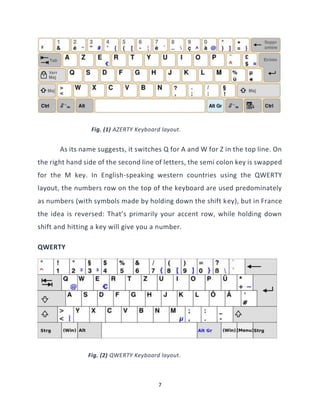
Fig. (1) AZERTY Keyboard layout.
As its name suggests, it switches Q for A and W for Z in the top line. On
the right hand side of the second line of letters, the semi colon key is swapped
for the M key. In English-speaking western countries using the QWERTY
layout, the numbers row on the top of the keyboard are used predominately
as numbers (with symbols made by holding down the shift key), but in France
the idea is reversed: That’s primarily your accent row, while holding down
shift and hitting a key will give you a number.
QWERTY
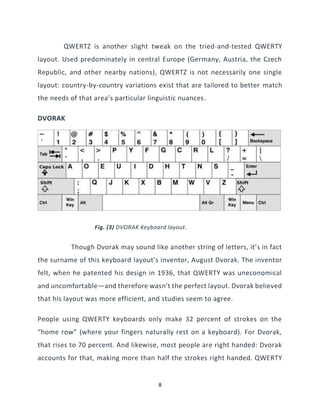
Fig. (2) QWERTY Keyboard layout.
8
QWERTZ is another slight tweak on the tried-and-tested QWERTY
layout. Used predominately in central Europe (Germany, Austria, the Czech
Republic, and other nearby nations), QWERTZ is not necessarily one single
layout: country-by-country variations exist that are tailored to better match
the needs of that area’s particular linguistic nuances.
DVORAK
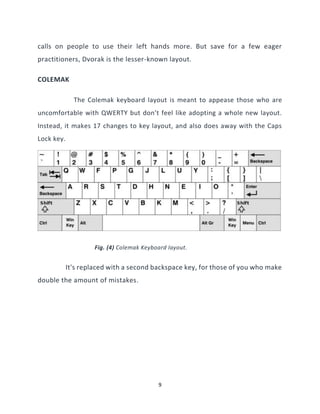
Fig. (3) DVORAK Keyboard layout.
Though Dvorak may sound like another string of letters, it’s in fact
the surname of this keyboard layout’s inventor, August Dvorak. The inventor
felt, when he patented his design in 1936, that QWERTY was uneconomical
and uncomfortable—and therefore wasn’t the perfect layout. Dvorak believed
that his layout was more efficient, and studies seem to agree.
People using QWERTY keyboards only make 32 percent of strokes on the
“home row” (where your fingers naturally rest on a keyboard). For Dvorak,
that rises to 70 percent. And likewise, most people are right handed: Dvorak
accounts for that, making more than half the strokes right handed. QWERTY
9
calls on people to use their left hands more. But save for a few eager
practitioners, Dvorak is the lesser-known layout.
COLEMAK
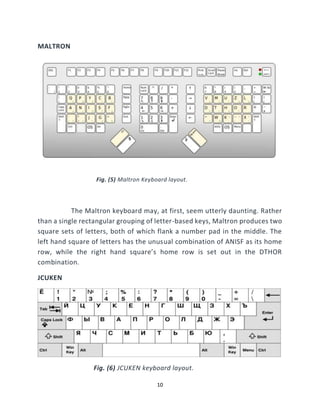
The Colemak keyboard layout is meant to appease those who are
uncomfortable with QWERTY but don’t feel like adopting a whole new layout.
Instead, it makes 17 changes to key layout, and also does away with the Caps
Lock key.
Fig. (4) Colemak Keyboard layout.
It's replaced with a second backspace key, for those of you who make
double the amount of mistakes.
10
MALTRON
Fig. (5) Maltron Keyboard layout.
The Maltron keyboard may, at first, seem utterly daunting. Rather
than a single rectangular grouping of letter-based keys, Maltron produces two
square sets of letters, both of which flank a number pad in the middle. The
left hand square of letters has the unusual combination of ANISF as its home
row, while the right hand square’s home row is set out in the DTHOR
combination.
JCUKEN
Fig. (6) JCUKEN keyboard layout.
11
For some countries—and some languages—QWERTY just won’t
cut it. Russian, for example, uses the Cyrillic alphabet, which is wholly
different from the Latin-based English alphabet. Since 1917 (when Russia
reformed its alphabet to remove some letters), JCUKEN has been the default
layout for Russian keyboards. It’s wholly memorable, for those of you keen to
try it out: its home row reads FYWAPROLDV.
12
CHAPTER 2: CONTENT OF THE STUDY
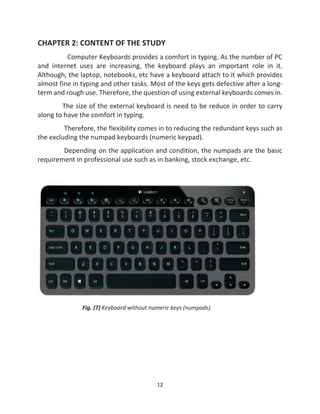
Computer Keyboards provides a comfort in typing. As the number of PC
and internet uses are increasing, the keyboard plays an important role in it.
Although, the laptop, notebooks, etc have a keyboard attach to it which provides
almost fine in typing and other tasks. Most of the keys gets defective after a long-
term and rough use. Therefore, the question of using external keyboards comes in.
The size of the external keyboard is need to be reduce in order to carry
along to have the comfort in typing.
Therefore, the flexibility comes in to reducing the redundant keys such as
the excluding the numpad keyboards (numeric keypad).
Depending on the application and condition, the numpads are the basic
requirement in professional use such as in banking, stock exchange, etc.
Fig. (7) Keyboard without numeric keys (numpads).
13
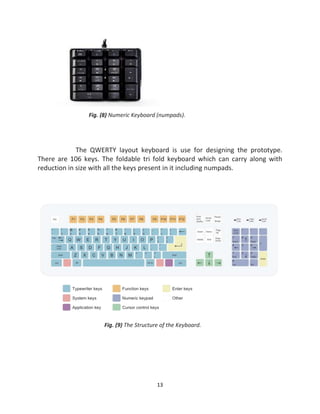
Fig. (8) Numeric Keyboard (numpads).
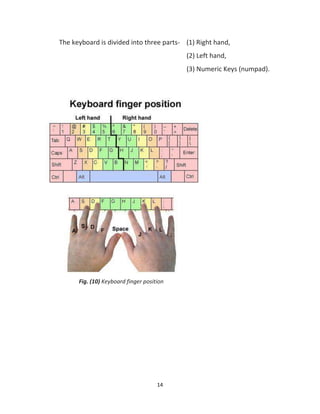
The QWERTY layout keyboard is use for designing the prototype.
There are 106 keys. The foldable tri fold keyboard which can carry along with
reduction in size with all the keys present in it including numpads.
Fig. (9) The Structure of the Keyboard.
14
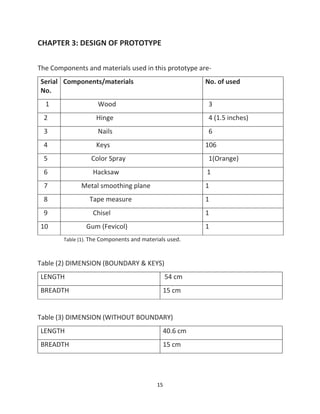
The keyboard is divided into three parts- (1) Right hand,
(2) Left hand,
(3) Numeric Keys (numpad).
Fig. (10) Keyboard finger position
15
CHAPTER 3: DESIGN OF PROTOTYPE
The Components and materials used in this prototype are-
Serial
No.
Components/materials No. of used
1 Wood 3
2 Hinge 4 (1.5 inches)
3 Nails 6
4 Keys 106
5 Color Spray 1(Orange)
6 Hacksaw 1
7 Metal smoothing plane 1
8 Tape measure 1
9 Chisel 1
10 Gum (Fevicol) 1
Table (1). The Components and materials used.
Table (2) DIMENSION (BOUNDARY & KEYS)
LENGTH 54 cm
BREADTH 15 cm
Table (3) DIMENSION (WITHOUT BOUNDARY)
LENGTH 40.6 cm
BREADTH 15 cm
16
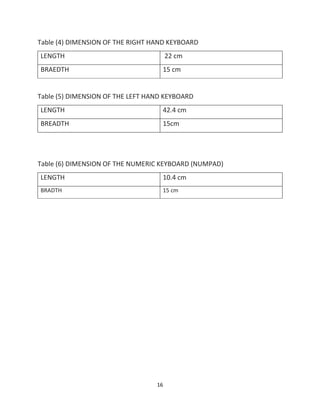
Table (4) DIMENSION OF THE RIGHT HAND KEYBOARD
LENGTH 22 cm
BRAEDTH 15 cm
Table (5) DIMENSION OF THE LEFT HAND KEYBOARD
LENGTH 42.4 cm
BREADTH 15cm
Table (6) DIMENSION OF THE NUMERIC KEYBOARD (NUMPAD)
LENGTH 10.4 cm
BRADTH 15 cm
17
Hacksaw
The Hacksaw was use to cut, divide the piece of wood and to make it in the
required dimension.
Fig. (11) Hacksaw
Metal smoothing plane
Fig. (12) Metal smoothing plane.
It is used to make the surface of the wood smooth and tidy.
18
Chisel
Fig. (13) Chisel.
Chisel for shaped cutting edge of the wood and make the placement to put
the keys on the surface.
Hinge
The Spider Ball Bearing Hinge of 1.5 inches is use for the prototype.
The hinge is attach at the edge of the wood to connect the three parts
together and provide the flexibility to be fold at an angle of 180 degree.
Fig. (14) Spider ball bearing hinge and nails.
The hinge is attach using a nail drill into the wood.
19
CHAPTER 5: RESULT OF THE STUDY
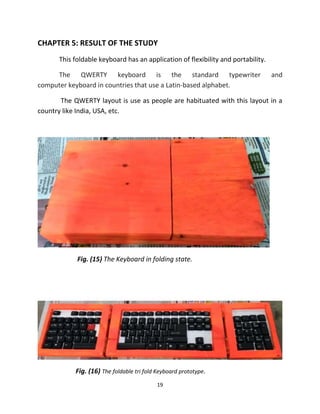
This foldable keyboard has an application of flexibility and portability.
The QWERTY keyboard is the standard typewriter and
computer keyboard in countries that use a Latin-based alphabet.
The QWERTY layout is use as people are habituated with this layout in a
country like India, USA, etc.
Fig. (15) The Keyboard in folding state.
Fig. (16) The foldable tri fold Keyboard prototype.
20
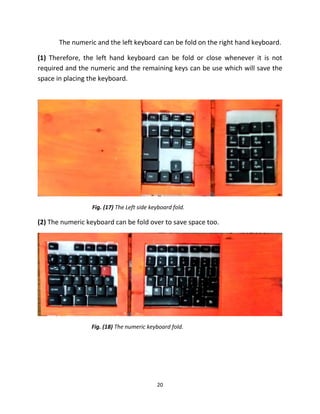
The numeric and the left keyboard can be fold on the right hand keyboard.
(1) Therefore, the left hand keyboard can be fold or close whenever it is not
required and the numeric and the remaining keys can be use which will save the
space in placing the keyboard.
Fig. (17) The Left side keyboard fold.
(2) The numeric keyboard can be fold over to save space too.
Fig. (18) The numeric keyboard fold.
21
CHAPTER 6: CONCLUSION
Computer Keyboard plays an important role in comfort and reliable tying.
The folding keyboard with all the basic required keys containing have the
advantage of ability to use in every sector of applications. Mostly, the foldable
keyboards in market have excluded the numeric keys (numpads) which are the
requirement in business and computer professionals. This prototype design had
cover the advantage over it.
22
REFERENCE
[1] https://www.computerhope.com/issues/pictures/fingers.jpg
[2] https://www.quora.com/
[3] http://mentalfloss.com/article/52483/6-non-qwerty-keyboard-layouts
[4]https://www.google.co.in/search?tbm=isch&sa=1&ei=P3AIWveOLIfo0gTA0ZbA
AQ&q=wood+tools+names&oq=wood+tools+&gs_l=psy-ab
[5] https://qph.ec.quoracdn.net/main-qime7ad8f5f022d0038adfbd32c1aa53a2d-
[6] https://www.computer-hardware-explained.com/computer-keyboard.html
[7] http://www.keyboardtrader.com/keyboard.html
[8] http://www.inthewoodshop.com/ToolReviews/
[9] https://media1.britannica.com/eb-media/53/105053-004-830E2B42.jpg
[10] www.youtube.com
[11] https://www.howtogeek.com/189270/alternative-keyboard-layouts-
explained-dvorak-colemak-and-whether-you-should-care/
23
BULBUL BRAHMA,
ELDT, ECE DEPARTMENT
Tezpur University,
2017, 1st
Semester.
THANK YOU.

COMPACT & FOLDABLE KEYBOARD PROTOTYPE

  • 1.
    1 COMPACT & FOLDABLEKEYBOARD EL 517 Physical and Industrial Design of Electronics System Master of Technology in Electronics Design and Technology By BULBUL BRAHMA Roll No. ELD17026 1st Semester Department of Electronics and Communication Engineering School of Engineering, Tezpur University Tezpur-784028, Assam, India. November, 2017
  • 2.
    2 ABSTRACT Computer Keyboard isa typewriter device which uses an arrangement of buttons or keys to act as a mechanical lever or electronic switch. Despite the development of alternative input devices, such as the mouse, touchscreen, pen devices, character recognition and voice recognition, the keyboard remains the most commonly used device for direct (human) input of alphanumeric data into computers. The size of the keyboard also matters to be carry along, reduction is limited by the practical consideration that the keys must be large enough to be easily pressed by fingers. Therefore, the idea of designing prototype is flexibility of the keyboard. The foldable tri- fold keyboard with all the alphanumeric keys including numpads. The partition of keypads in three parts - right hand keys, left hand and numpads.
  • 3.
    3 List of Tables TableNo Title Page No. 1 The Components and materials used 15 2 DIMENSION (BOUNDARY & KEYS) 15 3 DIMENSION (WITHOUT BOUNDARY) 15 4 DIMENSION OF THE RIGHT HAND KEYBOARD 16 5 DIMENSION OF THE LEFT HAND KEYBOARD 16 6 DIMENSION OF THE NUMERIC KEYBOARD (NUMPAD) 16
  • 4.
    4 List of figures FigureNo Title Page No. 1 AZERTY Keyboard layout. 7 2 QWERTY Keyboard layout. 7 3 DVORAK Keyboard layout. 8 4 Colemak Keyboard layout. 9 5 Maltron Keyboard layout. 10 6 JCUKEN keyboard layout. 10 7 Keyboard without numeric keys (numpads). 12 8 Numeric Keyboard (numpads). 13 9 The Structure of the Keyboard. 13 10 Keyboard finger position. 14 11 Hacksaw 17 12 Metal smoothing plane. 17 13 Chisel 18 14 Spider ball bearing hinge and nails. 18 15 The Keyboard in folding state. 19 16 The Keyboard in folding state. 19 17 The Left side keyboard fold. 20 18 The numeric keyboard fold. 20
  • 5.
    5 Table of Contents Abstract Listof Tables List of Figures Table of Contents Chapter 1 Introduction 06 Chapter 2 CONTENT OF YOUR STUDY 12 Chapter 3 Design of prototype 15 Chapter 4 Result of the study 19 Chapter 4 Conclusion 21 Reference
  • 6.
    6 CHAPTER 1: Introduction AComputer Keyboard is one of the primary input devices used with a computer. Keyboards allow you to input letters, numbers and other symbols into a computer that can serve as commands or be used to type text. TYPES OF KEYBOARD There are two major types of computer keyboards: Basic and Extended. The Basic keyboard contains 104 keys and is enough to perform all the functions that can be done on a Windows PC. The Extended keyboard may have additional keys, and the design varies among the companies manufacturing them. These are usually customized keyboards that are specific to certain operating systems or applications. The different types of Keyboard layouts: (1) AZERTY (2) QWERTZ (3) DVORAK (4) COLEMAK (5) MALTRON (6) JCUKEN AZERTY AZERTY, used in French-speaking countries across Europe and Africa, is one such version.
  • 7.
    7 Fig. (1) AZERTYKeyboard layout. As its name suggests, it switches Q for A and W for Z in the top line. On the right hand side of the second line of letters, the semi colon key is swapped for the M key. In English-speaking western countries using the QWERTY layout, the numbers row on the top of the keyboard are used predominately as numbers (with symbols made by holding down the shift key), but in France the idea is reversed: That’s primarily your accent row, while holding down shift and hitting a key will give you a number. QWERTY Fig. (2) QWERTY Keyboard layout.
  • 8.
    8 QWERTZ is anotherslight tweak on the tried-and-tested QWERTY layout. Used predominately in central Europe (Germany, Austria, the Czech Republic, and other nearby nations), QWERTZ is not necessarily one single layout: country-by-country variations exist that are tailored to better match the needs of that area’s particular linguistic nuances. DVORAK Fig. (3) DVORAK Keyboard layout. Though Dvorak may sound like another string of letters, it’s in fact the surname of this keyboard layout’s inventor, August Dvorak. The inventor felt, when he patented his design in 1936, that QWERTY was uneconomical and uncomfortable—and therefore wasn’t the perfect layout. Dvorak believed that his layout was more efficient, and studies seem to agree. People using QWERTY keyboards only make 32 percent of strokes on the “home row” (where your fingers naturally rest on a keyboard). For Dvorak, that rises to 70 percent. And likewise, most people are right handed: Dvorak accounts for that, making more than half the strokes right handed. QWERTY
  • 9.
    9 calls on peopleto use their left hands more. But save for a few eager practitioners, Dvorak is the lesser-known layout. COLEMAK The Colemak keyboard layout is meant to appease those who are uncomfortable with QWERTY but don’t feel like adopting a whole new layout. Instead, it makes 17 changes to key layout, and also does away with the Caps Lock key. Fig. (4) Colemak Keyboard layout. It's replaced with a second backspace key, for those of you who make double the amount of mistakes.
  • 10.
    10 MALTRON Fig. (5) MaltronKeyboard layout. The Maltron keyboard may, at first, seem utterly daunting. Rather than a single rectangular grouping of letter-based keys, Maltron produces two square sets of letters, both of which flank a number pad in the middle. The left hand square of letters has the unusual combination of ANISF as its home row, while the right hand square’s home row is set out in the DTHOR combination. JCUKEN Fig. (6) JCUKEN keyboard layout.
  • 11.
    11 For some countries—andsome languages—QWERTY just won’t cut it. Russian, for example, uses the Cyrillic alphabet, which is wholly different from the Latin-based English alphabet. Since 1917 (when Russia reformed its alphabet to remove some letters), JCUKEN has been the default layout for Russian keyboards. It’s wholly memorable, for those of you keen to try it out: its home row reads FYWAPROLDV.
  • 12.
    12 CHAPTER 2: CONTENTOF THE STUDY Computer Keyboards provides a comfort in typing. As the number of PC and internet uses are increasing, the keyboard plays an important role in it. Although, the laptop, notebooks, etc have a keyboard attach to it which provides almost fine in typing and other tasks. Most of the keys gets defective after a long- term and rough use. Therefore, the question of using external keyboards comes in. The size of the external keyboard is need to be reduce in order to carry along to have the comfort in typing. Therefore, the flexibility comes in to reducing the redundant keys such as the excluding the numpad keyboards (numeric keypad). Depending on the application and condition, the numpads are the basic requirement in professional use such as in banking, stock exchange, etc. Fig. (7) Keyboard without numeric keys (numpads).
  • 13.
    13 Fig. (8) NumericKeyboard (numpads). The QWERTY layout keyboard is use for designing the prototype. There are 106 keys. The foldable tri fold keyboard which can carry along with reduction in size with all the keys present in it including numpads. Fig. (9) The Structure of the Keyboard.
  • 14.
    14 The keyboard isdivided into three parts- (1) Right hand, (2) Left hand, (3) Numeric Keys (numpad). Fig. (10) Keyboard finger position
  • 15.
    15 CHAPTER 3: DESIGNOF PROTOTYPE The Components and materials used in this prototype are- Serial No. Components/materials No. of used 1 Wood 3 2 Hinge 4 (1.5 inches) 3 Nails 6 4 Keys 106 5 Color Spray 1(Orange) 6 Hacksaw 1 7 Metal smoothing plane 1 8 Tape measure 1 9 Chisel 1 10 Gum (Fevicol) 1 Table (1). The Components and materials used. Table (2) DIMENSION (BOUNDARY & KEYS) LENGTH 54 cm BREADTH 15 cm Table (3) DIMENSION (WITHOUT BOUNDARY) LENGTH 40.6 cm BREADTH 15 cm
  • 16.
    16 Table (4) DIMENSIONOF THE RIGHT HAND KEYBOARD LENGTH 22 cm BRAEDTH 15 cm Table (5) DIMENSION OF THE LEFT HAND KEYBOARD LENGTH 42.4 cm BREADTH 15cm Table (6) DIMENSION OF THE NUMERIC KEYBOARD (NUMPAD) LENGTH 10.4 cm BRADTH 15 cm
  • 17.
    17 Hacksaw The Hacksaw wasuse to cut, divide the piece of wood and to make it in the required dimension. Fig. (11) Hacksaw Metal smoothing plane Fig. (12) Metal smoothing plane. It is used to make the surface of the wood smooth and tidy.
  • 18.
    18 Chisel Fig. (13) Chisel. Chiselfor shaped cutting edge of the wood and make the placement to put the keys on the surface. Hinge The Spider Ball Bearing Hinge of 1.5 inches is use for the prototype. The hinge is attach at the edge of the wood to connect the three parts together and provide the flexibility to be fold at an angle of 180 degree. Fig. (14) Spider ball bearing hinge and nails. The hinge is attach using a nail drill into the wood.
  • 19.
    19 CHAPTER 5: RESULTOF THE STUDY This foldable keyboard has an application of flexibility and portability. The QWERTY keyboard is the standard typewriter and computer keyboard in countries that use a Latin-based alphabet. The QWERTY layout is use as people are habituated with this layout in a country like India, USA, etc. Fig. (15) The Keyboard in folding state. Fig. (16) The foldable tri fold Keyboard prototype.
  • 20.
    20 The numeric andthe left keyboard can be fold on the right hand keyboard. (1) Therefore, the left hand keyboard can be fold or close whenever it is not required and the numeric and the remaining keys can be use which will save the space in placing the keyboard. Fig. (17) The Left side keyboard fold. (2) The numeric keyboard can be fold over to save space too. Fig. (18) The numeric keyboard fold.
  • 21.
    21 CHAPTER 6: CONCLUSION ComputerKeyboard plays an important role in comfort and reliable tying. The folding keyboard with all the basic required keys containing have the advantage of ability to use in every sector of applications. Mostly, the foldable keyboards in market have excluded the numeric keys (numpads) which are the requirement in business and computer professionals. This prototype design had cover the advantage over it.
  • 22.
    22 REFERENCE [1] https://www.computerhope.com/issues/pictures/fingers.jpg [2] https://www.quora.com/ [3]http://mentalfloss.com/article/52483/6-non-qwerty-keyboard-layouts [4]https://www.google.co.in/search?tbm=isch&sa=1&ei=P3AIWveOLIfo0gTA0ZbA AQ&q=wood+tools+names&oq=wood+tools+&gs_l=psy-ab [5] https://qph.ec.quoracdn.net/main-qime7ad8f5f022d0038adfbd32c1aa53a2d- [6] https://www.computer-hardware-explained.com/computer-keyboard.html [7] http://www.keyboardtrader.com/keyboard.html [8] http://www.inthewoodshop.com/ToolReviews/ [9] https://media1.britannica.com/eb-media/53/105053-004-830E2B42.jpg [10] www.youtube.com [11] https://www.howtogeek.com/189270/alternative-keyboard-layouts- explained-dvorak-colemak-and-whether-you-should-care/
  • 23.
    23 BULBUL BRAHMA, ELDT, ECEDEPARTMENT Tezpur University, 2017, 1st Semester. THANK YOU.