Community vs. Enterprise Open Source
WHICH IS RIGHT FOR YOUR BUSINESS?
2 | Community vs. Enterprise Open Source: Which is Right for your Business? perforce.com
Justin Reock
Chief Architect
OpenLogic by Perforce
Presenter
Justin has over 20 years’ experience working in
various software roles and is an outspoken free
software evangelist, delivering enterprise
solutions and community education on
databases, integration work, architecture, and
technical leadership.
He is currently the Chief Architect at OpenLogic
by Perforce.
3 | Community vs. Enterprise Open Source: Which is Right for your Business? perforce.com
What Are We Discussing?
5 | Community vs. Enterprise Open Source: Which is Right for your Business? perforce.com
Community vs. Enterprise/Commercial OSS
• Businesses differ in their behaviors and needs in the way that they consume open source software
• Various patterns have emerged opportunistically to meet the demands of these various requirements
• One rapidly emerging pattern involves a community open source project, or “core” project offered alongside
additional features offered for a cost
• A vendor such as this can benefit from open development while presumably providing value back to the
community, and added value back to the user
• In practice, certain companies succeed in establishing this symbiosis, while others have opportunities for
improvement
• We can see similarities in the sort of features and solution add-ons commonly provided by these organizations
• Note that there will always be inherent benefits to running community upstream versions such as freedom
from license cost obligations and commercial vendor lock-in
6 | Community vs. Enterprise Open Source: Which is Right for your Business? perforce.com
• High Availability
• Disaster Recovery
• Enhanced Security
•Platform Interoperability
• Performance Optimization
• Monitoring / Deployment Management
TYPICAL ADDONS
7 | Community vs. Enterprise Open Source: Which is Right for your Business? perforce.com
We will compare the technical features of several Enterprise Open Source
vendors with their community counterparts, and dive into some of that
functionality:
Postgres vs. EnterpriseDB
Cassandra vs. Datastax
Kafka vs. Confluent
ELK vs. Elastic.co
Puppet vs. Puppet Enterprise
Jenkins vs. Cloudbees
Postgres vs. EnterpriseDB
9 | Community vs. Enterprise Open Source: Which is Right for your Business? perforce.com
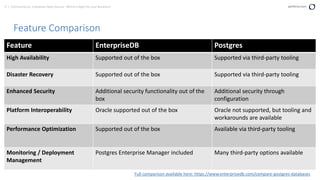
Feature Comparison
Full comparison available here: https://www.enterprisedb.com/compare-postgres-databases
Feature EnterpriseDB Postgres
High Availability Supported out of the box Supported via third-party tooling
Disaster Recovery Supported out of the box Supported via third-party tooling
Enhanced Security Additional security functionality out of the
box
Additional security through
configuration
Platform Interoperability Oracle supported out of the box Oracle not supported, but tooling and
workarounds are available
Performance Optimization Supported out of the box Available via third-party tooling
Monitoring / Deployment
Management
Postgres Enterprise Manager included Many third-party options available
10 | Community vs. Enterprise Open Source: Which is Right for your Business? perforce.com
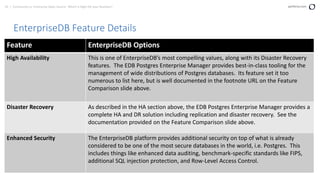
EnterpriseDB Feature Details
Feature EnterpriseDB Options
High Availability This is one of EnterpriseDB’s most compelling values, along with its Disaster Recovery
features. The EDB Postgres Enterprise Manager provides best-in-class tooling for the
management of wide distributions of Postgres databases. Its feature set it too
numerous to list here, but is well documented in the footnote URL on the Feature
Comparison slide above.
Disaster Recovery As described in the HA section above, the EDB Postgres Enterprise Manager provides a
complete HA and DR solution including replication and disaster recovery. See the
documentation provided on the Feature Comparison slide above.
Enhanced Security The EnterpriseDB platform provides additional security on top of what is already
considered to be one of the most secure databases in the world, i.e. Postgres. This
includes things like enhanced data auditing, benchmark-specific standards like FIPS,
additional SQL injection protection, and Row-Level Access Control.
11 | Community vs. Enterprise Open Source: Which is Right for your Business? perforce.com
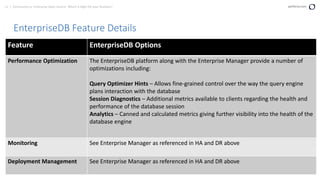
EnterpriseDB Feature Details
Feature EnterpriseDB Options
Performance Optimization The EnterpriseDB platform along with the Enterprise Manager provide a number of
optimizations including:
Query Optimizer Hints – Allows fine-grained control over the way the query engine
plans interaction with the database
Session Diagnostics – Additional metrics available to clients regarding the health and
performance of the database session
Analytics – Canned and calculated metrics giving further visibility into the health of the
database engine
Monitoring See Enterprise Manager as referenced in HA and DR above
Deployment Management See Enterprise Manager as referenced in HA and DR above
12 | Community vs. Enterprise Open Source: Which is Right for your Business? perforce.com
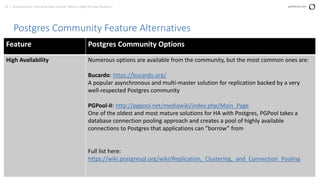
Postgres Community Feature Alternatives
Feature Postgres Community Options
High Availability Numerous options are available from the community, but the most common ones are:
Bucardo: https://bucardo.org/
A popular asynchronous and multi-master solution for replication backed by a very
well-respected Postgres community
PGPool-II: http://pgpool.net/mediawiki/index.php/Main_Page
One of the oldest and most mature solutions for HA with Postgres, PGPool takes a
database connection pooling approach and creates a pool of highly available
connections to Postgres that applications can ”borrow” from
Full list here:
https://wiki.postgresql.org/wiki/Replication,_Clustering,_and_Connection_Pooling
13 | Community vs. Enterprise Open Source: Which is Right for your Business? perforce.com
Postgres Community Feature Alternatives
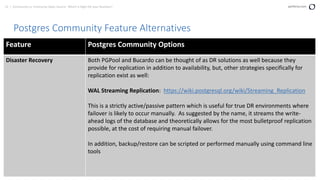
Feature Postgres Community Options
Disaster Recovery Both PGPool and Bucardo can be thought of as DR solutions as well because they
provide for replication in addition to availability, but, other strategies specifically for
replication exist as well:
WAL Streaming Replication: https://wiki.postgresql.org/wiki/Streaming_Replication
This is a strictly active/passive pattern which is useful for true DR environments where
failover is likely to occur manually. As suggested by the name, it streams the write-
ahead logs of the database and theoretically allows for the most bulletproof replication
possible, at the cost of requiring manual failover.
In addition, backup/restore can be scripted or performed manually using command line
tools
14 | Community vs. Enterprise Open Source: Which is Right for your Business? perforce.com
Postgres Community Feature Alternatives
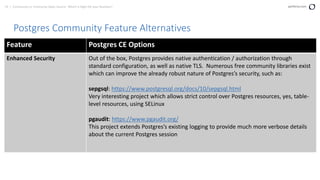
Feature Postgres CE Options
Enhanced Security Out of the box, Postgres provides native authentication / authorization through
standard configuration, as well as native TLS. Numerous free community libraries exist
which can improve the already robust nature of Postgres’s security, such as:
sepgsql: https://www.postgresql.org/docs/10/sepgsql.html
Very interesting project which allows strict control over Postgres resources, yes, table-
level resources, using SELinux
pgaudit: https://www.pgaudit.org/
This project extends Postgres’s existing logging to provide much more verbose details
about the current Postgres session
15 | Community vs. Enterprise Open Source: Which is Right for your Business? perforce.com
Postgres Community Feature Alternatives
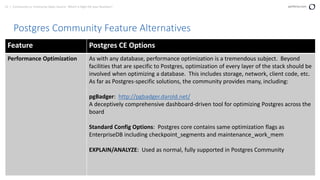
Feature Postgres CE Options
Performance Optimization As with any database, performance optimization is a tremendous subject. Beyond
facilities that are specific to Postgres, optimization of every layer of the stack should be
involved when optimizing a database. This includes storage, network, client code, etc.
As far as Postgres-specific solutions, the community provides many, including:
pgBadger: http://pgbadger.darold.net/
A deceptively comprehensive dashboard-driven tool for optimizing Postgres across the
board
Standard Config Options: Postgres core contains same optimization flags as
EnterpriseDB including checkpoint_segments and maintenance_work_mem
EXPLAIN/ANALYZE: Used as normal, fully supported in Postgres Community
16 | Community vs. Enterprise Open Source: Which is Right for your Business? perforce.com
Postgres Community Feature Alternatives
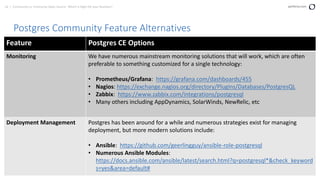
Feature Postgres CE Options
Monitoring We have numerous mainstream monitoring solutions that will work, which are often
preferable to something customized for a single technology:
• Prometheus/Grafana: https://grafana.com/dashboards/455
• Nagios: https://exchange.nagios.org/directory/Plugins/Databases/PostgresQL
• Zabbix: https://www.zabbix.com/integrations/postgresql
• Many others including AppDynamics, SolarWinds, NewRelic, etc
Deployment Management Postgres has been around for a while and numerous strategies exist for managing
deployment, but more modern solutions include:
• Ansible: https://github.com/geerlingguy/ansible-role-postgresql
• Numerous Ansible Modules:
https://docs.ansible.com/ansible/latest/search.html?q=postgresql*&check_keyword
s=yes&area=default#
17 | Community vs. Enterprise Open Source: Which is Right for your Business? perforce.com
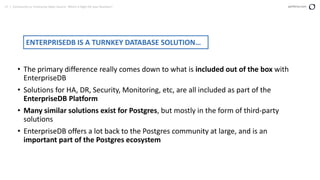
• The primary difference really comes down to what is included out of the box with
EnterpriseDB
• Solutions for HA, DR, Security, Monitoring, etc, are all included as part of the
EnterpriseDB Platform
• Many similar solutions exist for Postgres, but mostly in the form of third-party
solutions
• EnterpriseDB offers a lot back to the Postgres community at large, and is an
important part of the Postgres ecosystem
ENTERPRISEDB IS A TURNKEY DATABASE SOLUTION…
18 | Community vs. Enterprise Open Source: Which is Right for your Business? perforce.com
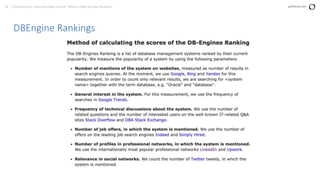
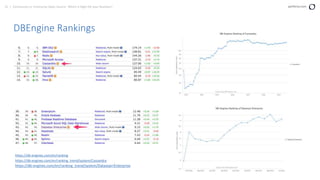
DBEngine Rankings
19 | Community vs. Enterprise Open Source: Which is Right for your Business? perforce.com
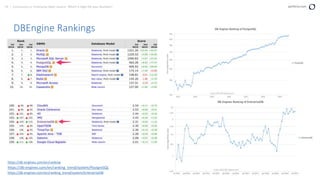
DBEngine Rankings
https://db-engines.com/en/ranking
https://db-engines.com/en/ranking_trend/system/PostgreSQL
https://db-engines.com/en/ranking_trend/system/EnterpriseDB
Cassandra vs. Datastax
21 | Community vs. Enterprise Open Source: Which is Right for your Business? perforce.com
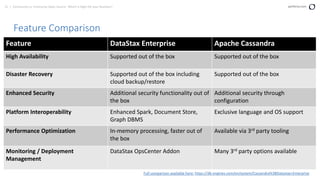
Feature Comparison
Feature DataStax Enterprise Apache Cassandra
High Availability Supported out of the box Supported out of the box
Disaster Recovery Supported out of the box including
cloud backup/restore
Supported out of the box
Enhanced Security Additional security functionality out of
the box
Additional security through
configuration
Platform Interoperability Enhanced Spark, Document Store,
Graph DBMS
Exclusive language and OS support
Performance Optimization In-memory processing, faster out of
the box
Available via 3rd party tooling
Monitoring / Deployment
Management
DataStax OpsCenter Addon Many 3rd party options available
Full comparison available here: https://db-engines.com/en/system/Cassandra%3BDatastax+Enterprise
22 | Community vs. Enterprise Open Source: Which is Right for your Business? perforce.com
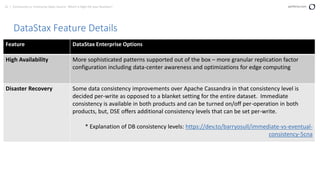
DataStax Feature Details
Feature DataStax Enterprise Options
High Availability More sophisticated patterns supported out of the box – more granular replication factor
configuration including data-center awareness and optimizations for edge computing
Disaster Recovery Some data consistency improvements over Apache Cassandra in that consistency level is
decided per-write as opposed to a blanket setting for the entire dataset. Immediate
consistency is available in both products and can be turned on/off per-operation in both
products, but, DSE offers additional consistency levels that can be set per-write.
* Explanation of DB consistency levels: https://dev.to/barryosull/immediate-vs-eventual-
consistency-5cna
23 | Community vs. Enterprise Open Source: Which is Right for your Business? perforce.com
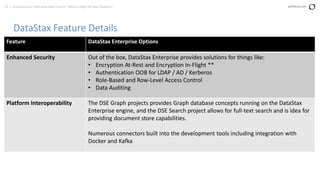
DataStax Feature Details
Feature DataStax Enterprise Options
Enhanced Security Out of the box, DataStax Enterprise provides solutions for things like:
• Encryption At-Rest and Encryption In-Flight **
• Authentication OOB for LDAP / AD / Kerberos
• Role-Based and Row-Level Access Control
• Data Auditing
Platform Interoperability The DSE Graph projects provides Graph database concepts running on the DataStax
Enterprise engine, and the DSE Search project allows for full-text search and is idea for
providing document store capabilities.
Numerous connectors built into the development tools including integration with
Docker and Kafka
24 | Community vs. Enterprise Open Source: Which is Right for your Business? perforce.com
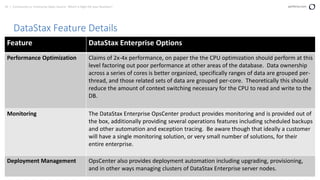
DataStax Feature Details
Feature DataStax Enterprise Options
Performance Optimization Claims of 2x-4x performance, on paper the the CPU optimization should perform at this
level factoring out poor performance at other areas of the database. Data ownership
across a series of cores is better organized, specifically ranges of data are grouped per-
thread, and those related sets of data are grouped per-core. Theoretically this should
reduce the amount of context switching necessary for the CPU to read and write to the
DB.
Monitoring The DataStax Enterprise OpsCenter product provides monitoring and is provided out of
the box, additionally providing several operations features including scheduled backups
and other automation and exception tracing. Be aware though that ideally a customer
will have a single monitoring solution, or very small number of solutions, for their
entire enterprise.
Deployment Management OpsCenter also provides deployment automation including upgrading, provisioning,
and in other ways managing clusters of DataStax Enterprise server nodes.
25 | Community vs. Enterprise Open Source: Which is Right for your Business? perforce.com
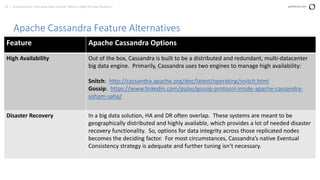
Apache Cassandra Feature Alternatives
Feature Apache Cassandra Options
High Availability Out of the box, Cassandra is built to be a distributed and redundant, multi-datacenter
big data engine. Primarily, Cassandra uses two engines to manage high availability:
Snitch: http://cassandra.apache.org/doc/latest/operating/snitch.html
Gossip: https://www.linkedin.com/pulse/gossip-protocol-inside-apache-cassandra-
soham-saha/
Disaster Recovery In a big data solution, HA and DR often overlap. These systems are meant to be
geographically distributed and highly available, which provides a lot of needed disaster
recovery functionality. So, options for data integrity across those replicated nodes
becomes the deciding factor. For most circumstances, Cassandra’s native Eventual
Consistency strategy is adequate and further tuning isn’t necessary.
26 | Community vs. Enterprise Open Source: Which is Right for your Business? perforce.com
Apache Cassandra Feature Alternatives
Feature Apache Cassandra Options
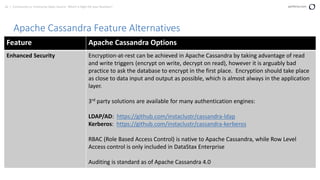
Enhanced Security Encryption-at-rest can be achieved in Apache Cassandra by taking advantage of read
and write triggers (encrypt on write, decrypt on read), however it is arguably bad
practice to ask the database to encrypt in the first place. Encryption should take place
as close to data input and output as possible, which is almost always in the application
layer.
3rd party solutions are available for many authentication engines:
LDAP/AD: https://github.com/instaclustr/cassandra-ldap
Kerberos: https://github.com/instaclustr/cassandra-kerberos
RBAC (Role Based Access Control) is native to Apache Cassandra, while Row Level
Access control is only included in DataStax Enterprise
Auditing is standard as of Apache Cassandra 4.0
27 | Community vs. Enterprise Open Source: Which is Right for your Business? perforce.com
Apache Cassandra Feature Alternatives
Feature Apache Cassandra Options
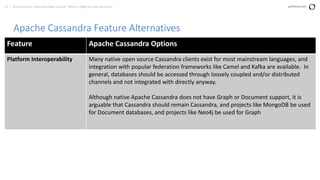
Platform Interoperability Many native open source Cassandra clients exist for most mainstream languages, and
integration with popular federation frameworks like Camel and Kafka are available. In
general, databases should be accessed through loosely coupled and/or distributed
channels and not integrated with directly anyway.
Although native Apache Cassandra does not have Graph or Document support, it is
arguable that Cassandra should remain Cassandra, and projects like MongoDB be used
for Document databases, and projects like Neo4j be used for Graph
28 | Community vs. Enterprise Open Source: Which is Right for your Business? perforce.com
Apache Cassandra Feature Alternatives
Feature Apache Cassandra Options
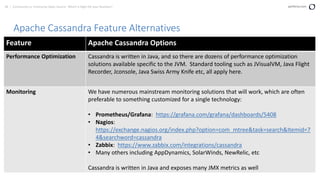
Performance Optimization Cassandra is written in Java, and so there are dozens of performance optimization
solutions available specific to the JVM. Standard tooling such as JVisualVM, Java Flight
Recorder, Jconsole, Java Swiss Army Knife etc, all apply here.
Monitoring We have numerous mainstream monitoring solutions that will work, which are often
preferable to something customized for a single technology:
• Prometheus/Grafana: https://grafana.com/grafana/dashboards/5408
• Nagios:
https://exchange.nagios.org/index.php?option=com_mtree&task=search&Itemid=7
4&searchword=cassandra
• Zabbix: https://www.zabbix.com/integrations/cassandra
• Many others including AppDynamics, SolarWinds, NewRelic, etc
Cassandra is written in Java and exposes many JMX metrics as well
29 | Community vs. Enterprise Open Source: Which is Right for your Business? perforce.com
Apache Cassandra Feature Alternatives
Feature Apache Cassandra Options
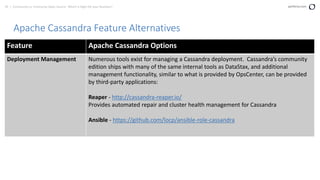
Deployment Management Numerous tools exist for managing a Cassandra deployment. Cassandra’s community
edition ships with many of the same internal tools as DataStax, and additional
management functionality, similar to what is provided by OpsCenter, can be provided
by third-party applications:
Reaper - http://cassandra-reaper.io/
Provides automated repair and cluster health management for Cassandra
Ansible - https://github.com/locp/ansible-role-cassandra
30 | Community vs. Enterprise Open Source: Which is Right for your Business? perforce.com
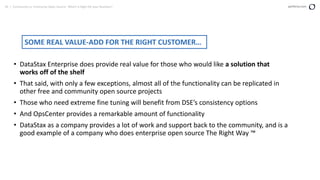
• DataStax Enterprise does provide real value for those who would like a solution that
works off of the shelf
• That said, with only a few exceptions, almost all of the functionality can be replicated in
other free and community open source projects
• Those who need extreme fine tuning will benefit from DSE’s consistency options
• And OpsCenter provides a remarkable amount of functionality
• DataStax as a company provides a lot of work and support back to the community, and is a
good example of a company who does enterprise open source The Right Way ™
SOME REAL VALUE-ADD FOR THE RIGHT CUSTOMER…
31 | Community vs. Enterprise Open Source: Which is Right for your Business? perforce.com
DBEngine Rankings
https://db-engines.com/en/ranking
https://db-engines.com/en/ranking_trend/system/Cassandra
https://db-engines.com/en/ranking_trend/system/Datastax+Enterprise
Kafka vs. Confluent
33 | Community vs. Enterprise Open Source: Which is Right for your Business? perforce.com
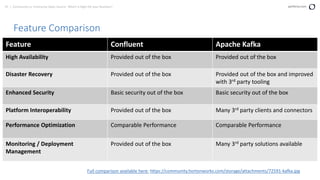
Feature Comparison
Feature Confluent Apache Kafka
High Availability Provided out of the box Provided out of the box
Disaster Recovery Provided out of the box Provided out of the box and improved
with 3rd party tooling
Enhanced Security Basic security out of the box Basic security out of the box
Platform Interoperability Provided out of the box Many 3rd party clients and connectors
Performance Optimization Comparable Performance Comparable Performance
Monitoring / Deployment
Management
Provided out of the box Many 3rd party solutions available
Full comparison available here: https://community.hortonworks.com/storage/attachments/72591-kafka.jpg
34 | Community vs. Enterprise Open Source: Which is Right for your Business? perforce.com
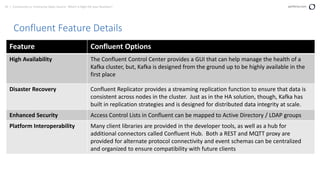
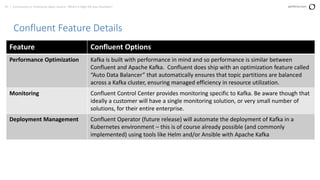
Confluent Feature Details
Feature Confluent Options
High Availability The Confluent Control Center provides a GUI that can help manage the health of a
Kafka cluster, but, Kafka is designed from the ground up to be highly available in the
first place
Disaster Recovery Confluent Replicator provides a streaming replication function to ensure that data is
consistent across nodes in the cluster. Just as in the HA solution, though, Kafka has
built in replication strategies and is designed for distributed data integrity at scale.
Enhanced Security Access Control Lists in Confluent can be mapped to Active Directory / LDAP groups
Platform Interoperability Many client libraries are provided in the developer tools, as well as a hub for
additional connectors called Confluent Hub. Both a REST and MQTT proxy are
provided for alternate protocol connectivity and event schemas can be centralized
and organized to ensure compatibility with future clients
35 | Community vs. Enterprise Open Source: Which is Right for your Business? perforce.com
Confluent Feature Details
Feature Confluent Options
Performance Optimization Kafka is built with performance in mind and so performance is similar between
Confluent and Apache Kafka. Confluent does ship with an optimization feature called
“Auto Data Balancer” that automatically ensures that topic partitions are balanced
across a Kafka cluster, ensuring managed efficiency in resource utilization.
Monitoring Confluent Control Center provides monitoring specific to Kafka. Be aware though that
ideally a customer will have a single monitoring solution, or very small number of
solutions, for their entire enterprise.
Deployment Management Confluent Operator (future release) will automate the deployment of Kafka in a
Kubernetes environment – this is of course already possible (and commonly
implemented) using tools like Helm and/or Ansible with Apache Kafka
36 | Community vs. Enterprise Open Source: Which is Right for your Business? perforce.com
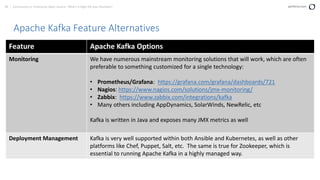
Apache Kafka Feature Alternatives
Feature Apache Kafka Options
High Availability Apache Kafka is built to be a highly available distributed solution, and so HA is native
to its operation. It uses Apache Zookeeper to implement quorum election routines
which ensure that nodes are available to clients across multiple racks and data
centers.
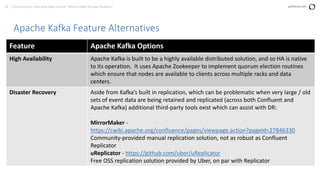
Disaster Recovery Aside from Kafka’s built in replication, which can be problematic when very large / old
sets of event data are being retained and replicated (across both Confluent and
Apache Kafka) additional third-party tools exist which can assist with DR:
MirrorMaker -
https://cwiki.apache.org/confluence/pages/viewpage.action?pageId=27846330
Community-provided manual replication solution, not as robust as Confluent
Replicator
uReplicator - https://github.com/uber/uReplicator
Free OSS replication solution provided by Uber, on par with Replicator
37 | Community vs. Enterprise Open Source: Which is Right for your Business? perforce.com
Apache Kafka Feature Alternatives
Feature Apache Kafka Options
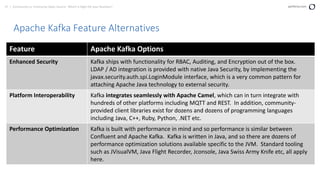
Enhanced Security Kafka ships with functionality for RBAC, Auditing, and Encryption out of the box.
LDAP / AD integration is provided with native Java Security, by implementing the
javax.security.auth.spi.LoginModule interface, which is a very common pattern for
attaching Apache Java technology to external security.
Platform Interoperability Kafka integrates seamlessly with Apache Camel, which can in turn integrate with
hundreds of other platforms including MQTT and REST. In addition, community-
provided client libraries exist for dozens and dozens of programming languages
including Java, C++, Ruby, Python, .NET etc.
Performance Optimization Kafka is built with performance in mind and so performance is similar between
Confluent and Apache Kafka. Kafka is written in Java, and so there are dozens of
performance optimization solutions available specific to the JVM. Standard tooling
such as JVisualVM, Java Flight Recorder, Jconsole, Java Swiss Army Knife etc, all apply
here.
38 | Community vs. Enterprise Open Source: Which is Right for your Business? perforce.com
Apache Kafka Feature Alternatives
Feature Apache Kafka Options
Monitoring We have numerous mainstream monitoring solutions that will work, which are often
preferable to something customized for a single technology:
• Prometheus/Grafana: https://grafana.com/grafana/dashboards/721
• Nagios: https://www.nagios.com/solutions/jmx-monitoring/
• Zabbix: https://www.zabbix.com/integrations/kafka
• Many others including AppDynamics, SolarWinds, NewRelic, etc
Kafka is written in Java and exposes many JMX metrics as well
Deployment Management Kafka is very well supported within both Ansible and Kubernetes, as well as other
platforms like Chef, Puppet, Salt, etc. The same is true for Zookeeper, which is
essential to running Apache Kafka in a highly managed way.
39 | Community vs. Enterprise Open Source: Which is Right for your Business? perforce.com
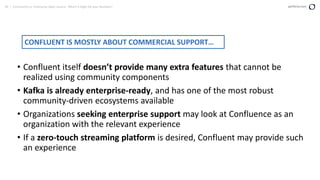
• Confluent itself doesn’t provide many extra features that cannot be
realized using community components
• Kafka is already enterprise-ready, and has one of the most robust
community-driven ecosystems available
• Organizations seeking enterprise support may look at Confluence as an
organization with the relevant experience
• If a zero-touch streaming platform is desired, Confluent may provide such
an experience
CONFLUENT IS MOSTLY ABOUT COMMERCIAL SUPPORT…
ELK vs. Elastic.io
41 | Community vs. Enterprise Open Source: Which is Right for your Business? perforce.com
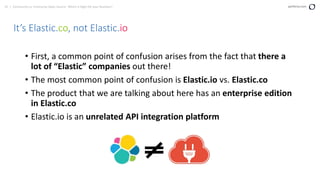
It’s Elastic.co, not Elastic.io
• First, a common point of confusion arises from the fact that there a
lot of “Elastic” companies out there!
• The most common point of confusion is Elastic.io vs. Elastic.co
• The product that we are talking about here has an enterprise edition
in Elastic.co
• Elastic.io is an unrelated API integration platform
42 | Community vs. Enterprise Open Source: Which is Right for your Business? perforce.com
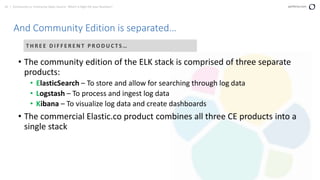
And Community Edition is separated…
• The community edition of the ELK stack is comprised of three separate
products:
• ElasticSearch – To store and allow for searching through log data
• Logstash – To process and ingest log data
• Kibana – To visualize log data and create dashboards
• The commercial Elastic.co product combines all three CE products into a
single stack
T H R E E D I F F E R E N T P R O D U C T S …
43 | Community vs. Enterprise Open Source: Which is Right for your Business? perforce.com
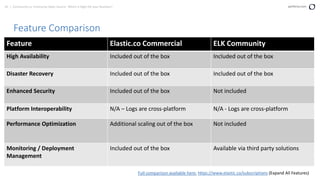
Feature Comparison
Feature Elastic.co Commercial ELK Community
High Availability Included out of the box Included out of the box
Disaster Recovery Included out of the box Included out of the box
Enhanced Security Included out of the box Not included
Platform Interoperability N/A – Logs are cross-platform N/A - Logs are cross-platform
Performance Optimization Additional scaling out of the box Not included
Monitoring / Deployment
Management
Included out of the box Available via third party solutions
Full comparison available here: https://www.elastic.co/subscriptions (Expand All Features)
44 | Community vs. Enterprise Open Source: Which is Right for your Business? perforce.com
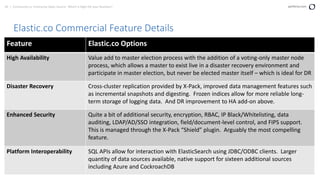
Elastic.co Commercial Feature Details
Feature Elastic.co Options
High Availability Value add to master election process with the addition of a voting-only master node
process, which allows a master to exist live in a disaster recovery environment and
participate in master election, but never be elected master itself – which is ideal for DR
Disaster Recovery Cross-cluster replication provided by X-Pack, improved data management features such
as incremental snapshots and digesting. Frozen indices allow for more reliable long-
term storage of logging data. And DR improvement to HA add-on above.
Enhanced Security Quite a bit of additional security, encryption, RBAC, IP Black/Whitelisting, data
auditing, LDAP/AD/SSO integration, field/document-level control, and FIPS support.
This is managed through the X-Pack “Shield” plugin. Arguably the most compelling
feature.
Platform Interoperability SQL APIs allow for interaction with ElasticSearch using JDBC/ODBC clients. Larger
quantity of data sources available, native support for sixteen additional sources
including Azure and CockroachDB
45 | Community vs. Enterprise Open Source: Which is Right for your Business? perforce.com
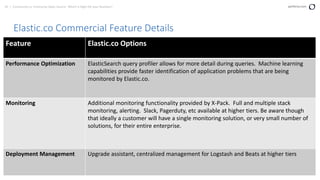
Elastic.co Commercial Feature Details
Feature Elastic.co Options
Performance Optimization ElasticSearch query profiler allows for more detail during queries. Machine learning
capabilities provide faster identification of application problems that are being
monitored by Elastic.co.
Monitoring Additional monitoring functionality provided by X-Pack. Full and multiple stack
monitoring, alerting. Slack, Pagerduty, etc available at higher tiers. Be aware though
that ideally a customer will have a single monitoring solution, or very small number of
solutions, for their entire enterprise.
Deployment Management Upgrade assistant, centralized management for Logstash and Beats at higher tiers
46 | Community vs. Enterprise Open Source: Which is Right for your Business? perforce.com
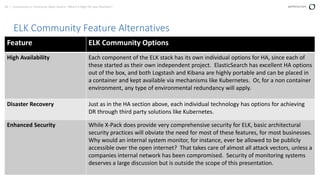
ELK Community Feature Alternatives
Feature ELK Community Options
High Availability Each component of the ELK stack has its own individual options for HA, since each of
these started as their own independent project. ElasticSearch has excellent HA options
out of the box, and both Logstash and Kibana are highly portable and can be placed in
a container and kept available via mechanisms like Kubernetes. Or, for a non container
environment, any type of environmental redundancy will apply.
Disaster Recovery Just as in the HA section above, each individual technology has options for achieving
DR through third party solutions like Kubernetes.
Enhanced Security While X-Pack does provide very comprehensive security for ELK, basic architectural
security practices will obviate the need for most of these features, for most businesses.
Why would an internal system monitor, for instance, ever be allowed to be publicly
accessible over the open internet? That takes care of almost all attack vectors, unless a
companies internal network has been compromised. Security of monitoring systems
deserves a large discussion but is outside the scope of this presentation.
47 | Community vs. Enterprise Open Source: Which is Right for your Business? perforce.com
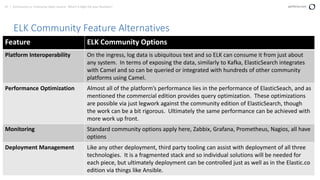
ELK Community Feature Alternatives
Feature ELK Community Options
Platform Interoperability On the ingress, log data is ubiquitous text and so ELK can consume it from just about
any system. In terms of exposing the data, similarly to Kafka, ElasticSearch integrates
with Camel and so can be queried or integrated with hundreds of other community
platforms using Camel.
Performance Optimization Almost all of the platform’s performance lies in the performance of ElasticSeach, and as
mentioned the commercial edition provides query optimization. These optimizations
are possible via just legwork against the community edition of ElasticSearch, though
the work can be a bit rigorous. Ultimately the same performance can be achieved with
more work up front.
Monitoring Standard community options apply here, Zabbix, Grafana, Prometheus, Nagios, all have
options
Deployment Management Like any other deployment, third party tooling can assist with deployment of all three
technologies. It is a fragmented stack and so individual solutions will be needed for
each piece, but ultimately deployment can be controlled just as well as in the Elastic.co
edition via things like Ansible.
48 | Community vs. Enterprise Open Source: Which is Right for your Business? perforce.com
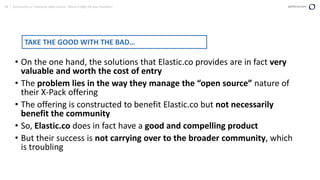
• On the one hand, the solutions that Elastic.co provides are in fact very
valuable and worth the cost of entry
• The problem lies in the way they manage the “open source” nature of
their X-Pack offering
• The offering is constructed to benefit Elastic.co but not necessarily
benefit the community
• So, Elastic.co does in fact have a good and compelling product
• But their success is not carrying over to the broader community, which
is troubling
TAKE THE GOOD WITH THE BAD…
Puppet vs. Puppet Enterprise
50 | Community vs. Enterprise Open Source: Which is Right for your Business? perforce.com
Textbook ‘Enterprise’ Solution
• [HEADER] Master of Puppets …
• Here we see probably the most textbook example of an enterprise using
*other* community open source to build an enterprise solution
• As we will discover, Puppet Orchestrator or the now-deprecated
MCollective mechanisms are the main selling point of Puppet Enterprise
• This is basically just community ActiveMQ, tuned and/or configured for
heavy scale and high availability
• So, as we sometimes see, Puppet Enterprise offers solutions that can also
be realized with community open source
51 | Community vs. Enterprise Open Source: Which is Right for your Business? perforce.com
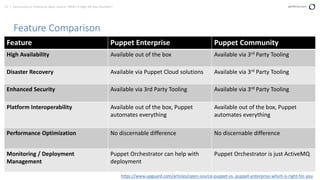
Feature Comparison
Feature Puppet Enterprise Puppet Community
High Availability Available out of the box Available via 3rd Party Tooling
Disaster Recovery Available via Puppet Cloud solutions Available via 3rd Party Tooling
Enhanced Security Available via 3rd Party Tooling Available via 3rd Party Tooling
Platform Interoperability Available out of the box, Puppet
automates everything
Available out of the box, Puppet
automates everything
Performance Optimization No discernable difference No discernable difference
Monitoring / Deployment
Management
Puppet Orchestrator can help with
deployment
Puppet Orchestrator is just ActiveMQ
https://www.upguard.com/articles/open-source-puppet-vs.-puppet-enterprise-which-is-right-for-you
52 | Community vs. Enterprise Open Source: Which is Right for your Business? perforce.com
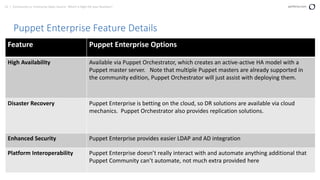
Puppet Enterprise Feature Details
Feature Puppet Enterprise Options
High Availability Available via Puppet Orchestrator, which creates an active-active HA model with a
Puppet master server. Note that multiple Puppet masters are already supported in
the community edition, Puppet Orchestrator will just assist with deploying them.
Disaster Recovery Puppet Enterprise is betting on the cloud, so DR solutions are available via cloud
mechanics. Puppet Orchestrator also provides replication solutions.
Enhanced Security Puppet Enterprise provides easier LDAP and AD integration
Platform Interoperability Puppet Enterprise doesn’t really interact with and automate anything additional that
Puppet Community can’t automate, not much extra provided here
53 | Community vs. Enterprise Open Source: Which is Right for your Business? perforce.com
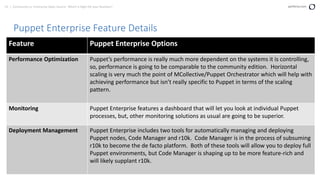
Puppet Enterprise Feature Details
Feature Puppet Enterprise Options
Performance Optimization Puppet’s performance is really much more dependent on the systems it is controlling,
so, performance is going to be comparable to the community edition. Horizontal
scaling is very much the point of MCollective/Puppet Orchestrator which will help with
achieving performance but isn’t really specific to Puppet in terms of the scaling
pattern.
Monitoring Puppet Enterprise features a dashboard that will let you look at individual Puppet
processes, but, other monitoring solutions as usual are going to be superior.
Deployment Management Puppet Enterprise includes two tools for automatically managing and deploying
Puppet nodes, Code Manager and r10k. Code Manager is in the process of subsuming
r10k to become the de facto platform. Both of these tools will allow you to deploy full
Puppet environments, but Code Manager is shaping up to be more feature-rich and
will likely supplant r10k.
54 | Community vs. Enterprise Open Source: Which is Right for your Business? perforce.com
Puppet Community Feature Alternatives
Feature Puppet Community Options
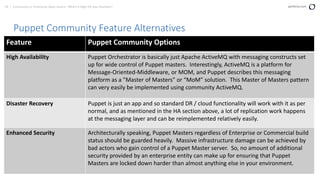
High Availability Puppet Orchestrator is basically just Apache ActiveMQ with messaging constructs set
up for wide control of Puppet masters. Interestingly, ActiveMQ is a platform for
Message-Oriented-Middleware, or MOM, and Puppet describes this messaging
platform as a ”Master of Masters” or “MoM” solution. This Master of Masters pattern
can very easily be implemented using community ActiveMQ.
Disaster Recovery Puppet is just an app and so standard DR / cloud functionality will work with it as per
normal, and as mentioned in the HA section above, a lot of replication work happens
at the messaging layer and can be reimplemented relatively easily.
Enhanced Security Architecturally speaking, Puppet Masters regardless of Enterprise or Commercial build
status should be guarded heavily. Massive infrastructure damage can be achieved by
bad actors who gain control of a Puppet Master server. So, no amount of additional
security provided by an enterprise entity can make up for ensuring that Puppet
Masters are locked down harder than almost anything else in your environment.
55 | Community vs. Enterprise Open Source: Which is Right for your Business? perforce.com
Puppet Community Feature Alternatives
Feature Puppet Community Options
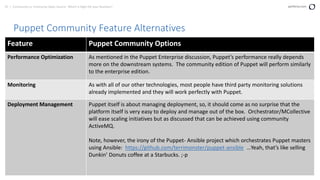
Performance Optimization As mentioned in the Puppet Enterprise discussion, Puppet’s performance really depends
more on the downstream systems. The community edition of Puppet will perform similarly
to the enterprise edition.
Monitoring As with all of our other technologies, most people have third party monitoring solutions
already implemented and they will work perfectly with Puppet.
Deployment Management Puppet itself is about managing deployment, so, it should come as no surprise that the
platform itself is very easy to deploy and manage out of the box. Orchestrator/MCollective
will ease scaling initiatives but as discussed that can be achieved using community
ActiveMQ.
Note, however, the irony of the Puppet- Ansible project which orchestrates Puppet masters
using Ansible: https://github.com/terrimonster/puppet-ansible …Yeah, that’s like selling
Dunkin’ Donuts coffee at a Starbucks. ;-p
56 | Community vs. Enterprise Open Source: Which is Right for your Business? perforce.com
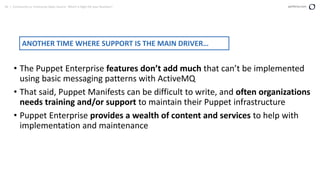
• The Puppet Enterprise features don’t add much that can’t be implemented
using basic messaging patterns with ActiveMQ
• That said, Puppet Manifests can be difficult to write, and often organizations
needs training and/or support to maintain their Puppet infrastructure
• Puppet Enterprise provides a wealth of content and services to help with
implementation and maintenance
ANOTHER TIME WHERE SUPPORT IS THE MAIN DRIVER…
57 | Community vs. Enterprise Open Source: Which is Right for your Business? perforce.com
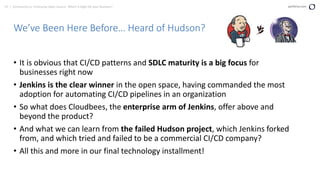
We’ve Been Here Before… Heard of Hudson?
• It is obvious that CI/CD patterns and SDLC maturity is a big focus for
businesses right now
• Jenkins is the clear winner in the open space, having commanded the most
adoption for automating CI/CD pipelines in an organization
• So what does Cloudbees, the enterprise arm of Jenkins, offer above and
beyond the product?
• And what we can learn from the failed Hudson project, which Jenkins forked
from, and which tried and failed to be a commercial CI/CD company?
• All this and more in our final technology installment!
58 | Community vs. Enterprise Open Source: Which is Right for your Business? perforce.com
Cloudbees Does Remarkable Stuff!
• Well beyond the Jenkins platform, Cloudbees has made a business out of helping
people deploy code – they now have a slew of solutions which have nothing to do
with Jenkins: https://www.cloudbees.com/products
• None of their solutions are things that couldn’t be implemented by a customer
given a bit of legwork
• But they do have the right philosophy when it comes to managing code
• And some very smart people work there and are helping businesses change the
way they deploy their infrastructure
59 | Community vs. Enterprise Open Source: Which is Right for your Business? perforce.com
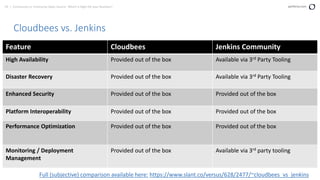
Cloudbees vs. Jenkins
Feature Cloudbees Jenkins Community
High Availability Provided out of the box Available via 3rd Party Tooling
Disaster Recovery Provided out of the box Available via 3rd Party Tooling
Enhanced Security Provided out of the box Provided out of the box
Platform Interoperability Provided out of the box Provided out of the box
Performance Optimization Provided out of the box Provided out of the box
Monitoring / Deployment
Management
Provided out of the box Available via 3rd party tooling
Full (subjective) comparison available here: https://www.slant.co/versus/628/2477/~cloudbees_vs_jenkins
60 | Community vs. Enterprise Open Source: Which is Right for your Business? perforce.com
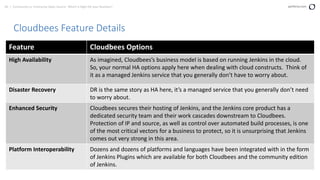
Cloudbees Feature Details
Feature Cloudbees Options
High Availability As imagined, Cloudbees’s business model is based on running Jenkins in the cloud.
So, your normal HA options apply here when dealing with cloud constructs. Think of
it as a managed Jenkins service that you generally don’t have to worry about.
Disaster Recovery DR is the same story as HA here, it’s a managed service that you generally don’t need
to worry about.
Enhanced Security Cloudbees secures their hosting of Jenkins, and the Jenkins core product has a
dedicated security team and their work cascades downstream to Cloudbees.
Protection of IP and source, as well as control over automated build processes, is one
of the most critical vectors for a business to protect, so it is unsurprising that Jenkins
comes out very strong in this area.
Platform Interoperability Dozens and dozens of platforms and languages have been integrated with in the form
of Jenkins Plugins which are available for both Cloudbees and the community edition
of Jenkins.
61 | Community vs. Enterprise Open Source: Which is Right for your Business? perforce.com
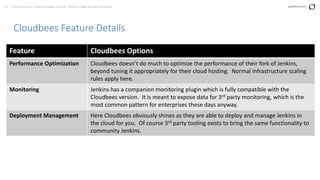
Cloudbees Feature Details
Feature Cloudbees Options
Performance Optimization Cloudbees doesn’t do much to optimize the performance of their fork of Jenkins,
beyond tuning it appropriately for their cloud hosting. Normal infrastructure scaling
rules apply here.
Monitoring Jenkins has a companion monitoring plugin which is fully compatible with the
Cloudbees version. It is meant to expose data for 3rd party monitoring, which is the
most common pattern for enterprises these days anyway.
Deployment Management Here Cloudbees obviously shines as they are able to deploy and manage Jenkins in
the cloud for you. Of course 3rd party tooling exists to bring the same functionality to
community Jenkins.
62 | Community vs. Enterprise Open Source: Which is Right for your Business? perforce.com
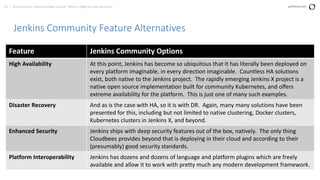
Jenkins Community Feature Alternatives
Feature Jenkins Community Options
High Availability At this point, Jenkins has become so ubiquitous that it has literally been deployed on
every platform imaginable, in every direction imaginable. Countless HA solutions
exist, both native to the Jenkins project. The rapidly emerging Jenkins X project is a
native open source implementation built for community Kubernetes, and offers
extreme availability for the platform. This is just one of many such examples.
Disaster Recovery And as is the case with HA, so it is with DR. Again, many many solutions have been
presented for this, including but not limited to native clustering, Docker clusters,
Kubernetes clusters in Jenkins X, and beyond.
Enhanced Security Jenkins ships with deep security features out of the box, natively. The only thing
Cloudbees provides beyond that is deploying in their cloud and according to their
(presumably) good security standards.
Platform Interoperability Jenkins has dozens and dozens of language and platform plugins which are freely
available and allow it to work with pretty much any modern development framework.
63 | Community vs. Enterprise Open Source: Which is Right for your Business? perforce.com
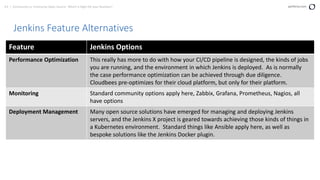
Jenkins Feature Alternatives
Feature Jenkins Options
Performance Optimization This really has more to do with how your CI/CD pipeline is designed, the kinds of jobs
you are running, and the environment in which Jenkins is deployed. As is normally
the case performance optimization can be achieved through due diligence.
Cloudbees pre-optimizes for their cloud platform, but only for their platform.
Monitoring Standard community options apply here, Zabbix, Grafana, Prometheus, Nagios, all
have options
Deployment Management Many open source solutions have emerged for managing and deploying Jenkins
servers, and the Jenkins X project is geared towards achieving those kinds of things in
a Kubernetes environment. Standard things like Ansible apply here, as well as
bespoke solutions like the Jenkins Docker plugin.
64 | Community vs. Enterprise Open Source: Which is Right for your Business? perforce.com
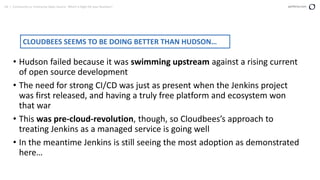
• Hudson failed because it was swimming upstream against a rising current
of open source development
• The need for strong CI/CD was just as present when the Jenkins project
was first released, and having a truly free platform and ecosystem won
that war
• This was pre-cloud-revolution, though, so Cloudbees’s approach to
treating Jenkins as a managed service is going well
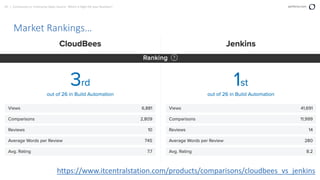
• In the meantime Jenkins is still seeing the most adoption as demonstrated
here…
CLOUDBEES SEEMS TO BE DOING BETTER THAN HUDSON…
65 | Community vs. Enterprise Open Source: Which is Right for your Business? perforce.com
Market Rankings…
https://www.itcentralstation.com/products/comparisons/cloudbees_vs_jenkins
Closing Thoughts…
67 | Community vs. Enterprise Open Source: Which is Right for your Business? perforce.com
Thoughtfulness Pays Off
• As more and more vendors emerge with open core solutions, we should be mindful of the balance between freedom
and convenience
• Many vendors provide valuable solutions and addons which will legitimately improve your experience consuming
open source
• And other vendors have invested heavily in support resources and can provide augmentation to your existing support
infrastructure
• In the end, do the research and ensure you’ll really use the additional functionality
• Scrutinize the vendor and make sure that they are giving back to the communities that they benefit from branding
• Consult with experts and get their opinions!
68 | Community vs. Enterprise Open Source: Which is Right for your Business? perforce.com
Reach Out – I Like People!
LinkedIn – Only Justin Reock in the world!
Blog - https://www.openlogic.com/blog
Email – jreock@perforce.com
69 | Community vs. Enterprise Open Source: Which is Right for your Business? perforce.com
Questions?

Community vs. Commercial Open Source

  • 1.
    Community vs. EnterpriseOpen Source WHICH IS RIGHT FOR YOUR BUSINESS?
  • 2.
    2 | Communityvs. Enterprise Open Source: Which is Right for your Business? perforce.com Justin Reock Chief Architect OpenLogic by Perforce Presenter Justin has over 20 years’ experience working in various software roles and is an outspoken free software evangelist, delivering enterprise solutions and community education on databases, integration work, architecture, and technical leadership. He is currently the Chief Architect at OpenLogic by Perforce.
  • 3.
    3 | Communityvs. Enterprise Open Source: Which is Right for your Business? perforce.com
  • 4.
    What Are WeDiscussing?
  • 5.
    5 | Communityvs. Enterprise Open Source: Which is Right for your Business? perforce.com Community vs. Enterprise/Commercial OSS • Businesses differ in their behaviors and needs in the way that they consume open source software • Various patterns have emerged opportunistically to meet the demands of these various requirements • One rapidly emerging pattern involves a community open source project, or “core” project offered alongside additional features offered for a cost • A vendor such as this can benefit from open development while presumably providing value back to the community, and added value back to the user • In practice, certain companies succeed in establishing this symbiosis, while others have opportunities for improvement • We can see similarities in the sort of features and solution add-ons commonly provided by these organizations • Note that there will always be inherent benefits to running community upstream versions such as freedom from license cost obligations and commercial vendor lock-in
  • 6.
    6 | Communityvs. Enterprise Open Source: Which is Right for your Business? perforce.com • High Availability • Disaster Recovery • Enhanced Security •Platform Interoperability • Performance Optimization • Monitoring / Deployment Management TYPICAL ADDONS
  • 7.
    7 | Communityvs. Enterprise Open Source: Which is Right for your Business? perforce.com We will compare the technical features of several Enterprise Open Source vendors with their community counterparts, and dive into some of that functionality: Postgres vs. EnterpriseDB Cassandra vs. Datastax Kafka vs. Confluent ELK vs. Elastic.co Puppet vs. Puppet Enterprise Jenkins vs. Cloudbees
  • 8.
  • 9.
    9 | Communityvs. Enterprise Open Source: Which is Right for your Business? perforce.com Feature Comparison Full comparison available here: https://www.enterprisedb.com/compare-postgres-databases Feature EnterpriseDB Postgres High Availability Supported out of the box Supported via third-party tooling Disaster Recovery Supported out of the box Supported via third-party tooling Enhanced Security Additional security functionality out of the box Additional security through configuration Platform Interoperability Oracle supported out of the box Oracle not supported, but tooling and workarounds are available Performance Optimization Supported out of the box Available via third-party tooling Monitoring / Deployment Management Postgres Enterprise Manager included Many third-party options available
  • 10.
    10 | Communityvs. Enterprise Open Source: Which is Right for your Business? perforce.com EnterpriseDB Feature Details Feature EnterpriseDB Options High Availability This is one of EnterpriseDB’s most compelling values, along with its Disaster Recovery features. The EDB Postgres Enterprise Manager provides best-in-class tooling for the management of wide distributions of Postgres databases. Its feature set it too numerous to list here, but is well documented in the footnote URL on the Feature Comparison slide above. Disaster Recovery As described in the HA section above, the EDB Postgres Enterprise Manager provides a complete HA and DR solution including replication and disaster recovery. See the documentation provided on the Feature Comparison slide above. Enhanced Security The EnterpriseDB platform provides additional security on top of what is already considered to be one of the most secure databases in the world, i.e. Postgres. This includes things like enhanced data auditing, benchmark-specific standards like FIPS, additional SQL injection protection, and Row-Level Access Control.
  • 11.
    11 | Communityvs. Enterprise Open Source: Which is Right for your Business? perforce.com EnterpriseDB Feature Details Feature EnterpriseDB Options Performance Optimization The EnterpriseDB platform along with the Enterprise Manager provide a number of optimizations including: Query Optimizer Hints – Allows fine-grained control over the way the query engine plans interaction with the database Session Diagnostics – Additional metrics available to clients regarding the health and performance of the database session Analytics – Canned and calculated metrics giving further visibility into the health of the database engine Monitoring See Enterprise Manager as referenced in HA and DR above Deployment Management See Enterprise Manager as referenced in HA and DR above
  • 12.
    12 | Communityvs. Enterprise Open Source: Which is Right for your Business? perforce.com Postgres Community Feature Alternatives Feature Postgres Community Options High Availability Numerous options are available from the community, but the most common ones are: Bucardo: https://bucardo.org/ A popular asynchronous and multi-master solution for replication backed by a very well-respected Postgres community PGPool-II: http://pgpool.net/mediawiki/index.php/Main_Page One of the oldest and most mature solutions for HA with Postgres, PGPool takes a database connection pooling approach and creates a pool of highly available connections to Postgres that applications can ”borrow” from Full list here: https://wiki.postgresql.org/wiki/Replication,_Clustering,_and_Connection_Pooling
  • 13.
    13 | Communityvs. Enterprise Open Source: Which is Right for your Business? perforce.com Postgres Community Feature Alternatives Feature Postgres Community Options Disaster Recovery Both PGPool and Bucardo can be thought of as DR solutions as well because they provide for replication in addition to availability, but, other strategies specifically for replication exist as well: WAL Streaming Replication: https://wiki.postgresql.org/wiki/Streaming_Replication This is a strictly active/passive pattern which is useful for true DR environments where failover is likely to occur manually. As suggested by the name, it streams the write- ahead logs of the database and theoretically allows for the most bulletproof replication possible, at the cost of requiring manual failover. In addition, backup/restore can be scripted or performed manually using command line tools
  • 14.
    14 | Communityvs. Enterprise Open Source: Which is Right for your Business? perforce.com Postgres Community Feature Alternatives Feature Postgres CE Options Enhanced Security Out of the box, Postgres provides native authentication / authorization through standard configuration, as well as native TLS. Numerous free community libraries exist which can improve the already robust nature of Postgres’s security, such as: sepgsql: https://www.postgresql.org/docs/10/sepgsql.html Very interesting project which allows strict control over Postgres resources, yes, table- level resources, using SELinux pgaudit: https://www.pgaudit.org/ This project extends Postgres’s existing logging to provide much more verbose details about the current Postgres session
  • 15.
    15 | Communityvs. Enterprise Open Source: Which is Right for your Business? perforce.com Postgres Community Feature Alternatives Feature Postgres CE Options Performance Optimization As with any database, performance optimization is a tremendous subject. Beyond facilities that are specific to Postgres, optimization of every layer of the stack should be involved when optimizing a database. This includes storage, network, client code, etc. As far as Postgres-specific solutions, the community provides many, including: pgBadger: http://pgbadger.darold.net/ A deceptively comprehensive dashboard-driven tool for optimizing Postgres across the board Standard Config Options: Postgres core contains same optimization flags as EnterpriseDB including checkpoint_segments and maintenance_work_mem EXPLAIN/ANALYZE: Used as normal, fully supported in Postgres Community
  • 16.
    16 | Communityvs. Enterprise Open Source: Which is Right for your Business? perforce.com Postgres Community Feature Alternatives Feature Postgres CE Options Monitoring We have numerous mainstream monitoring solutions that will work, which are often preferable to something customized for a single technology: • Prometheus/Grafana: https://grafana.com/dashboards/455 • Nagios: https://exchange.nagios.org/directory/Plugins/Databases/PostgresQL • Zabbix: https://www.zabbix.com/integrations/postgresql • Many others including AppDynamics, SolarWinds, NewRelic, etc Deployment Management Postgres has been around for a while and numerous strategies exist for managing deployment, but more modern solutions include: • Ansible: https://github.com/geerlingguy/ansible-role-postgresql • Numerous Ansible Modules: https://docs.ansible.com/ansible/latest/search.html?q=postgresql*&check_keyword s=yes&area=default#
  • 17.
    17 | Communityvs. Enterprise Open Source: Which is Right for your Business? perforce.com • The primary difference really comes down to what is included out of the box with EnterpriseDB • Solutions for HA, DR, Security, Monitoring, etc, are all included as part of the EnterpriseDB Platform • Many similar solutions exist for Postgres, but mostly in the form of third-party solutions • EnterpriseDB offers a lot back to the Postgres community at large, and is an important part of the Postgres ecosystem ENTERPRISEDB IS A TURNKEY DATABASE SOLUTION…
  • 18.
    18 | Communityvs. Enterprise Open Source: Which is Right for your Business? perforce.com DBEngine Rankings
  • 19.
    19 | Communityvs. Enterprise Open Source: Which is Right for your Business? perforce.com DBEngine Rankings https://db-engines.com/en/ranking https://db-engines.com/en/ranking_trend/system/PostgreSQL https://db-engines.com/en/ranking_trend/system/EnterpriseDB
  • 20.
  • 21.
    21 | Communityvs. Enterprise Open Source: Which is Right for your Business? perforce.com Feature Comparison Feature DataStax Enterprise Apache Cassandra High Availability Supported out of the box Supported out of the box Disaster Recovery Supported out of the box including cloud backup/restore Supported out of the box Enhanced Security Additional security functionality out of the box Additional security through configuration Platform Interoperability Enhanced Spark, Document Store, Graph DBMS Exclusive language and OS support Performance Optimization In-memory processing, faster out of the box Available via 3rd party tooling Monitoring / Deployment Management DataStax OpsCenter Addon Many 3rd party options available Full comparison available here: https://db-engines.com/en/system/Cassandra%3BDatastax+Enterprise
  • 22.
    22 | Communityvs. Enterprise Open Source: Which is Right for your Business? perforce.com DataStax Feature Details Feature DataStax Enterprise Options High Availability More sophisticated patterns supported out of the box – more granular replication factor configuration including data-center awareness and optimizations for edge computing Disaster Recovery Some data consistency improvements over Apache Cassandra in that consistency level is decided per-write as opposed to a blanket setting for the entire dataset. Immediate consistency is available in both products and can be turned on/off per-operation in both products, but, DSE offers additional consistency levels that can be set per-write. * Explanation of DB consistency levels: https://dev.to/barryosull/immediate-vs-eventual- consistency-5cna
  • 23.
    23 | Communityvs. Enterprise Open Source: Which is Right for your Business? perforce.com DataStax Feature Details Feature DataStax Enterprise Options Enhanced Security Out of the box, DataStax Enterprise provides solutions for things like: • Encryption At-Rest and Encryption In-Flight ** • Authentication OOB for LDAP / AD / Kerberos • Role-Based and Row-Level Access Control • Data Auditing Platform Interoperability The DSE Graph projects provides Graph database concepts running on the DataStax Enterprise engine, and the DSE Search project allows for full-text search and is idea for providing document store capabilities. Numerous connectors built into the development tools including integration with Docker and Kafka
  • 24.
    24 | Communityvs. Enterprise Open Source: Which is Right for your Business? perforce.com DataStax Feature Details Feature DataStax Enterprise Options Performance Optimization Claims of 2x-4x performance, on paper the the CPU optimization should perform at this level factoring out poor performance at other areas of the database. Data ownership across a series of cores is better organized, specifically ranges of data are grouped per- thread, and those related sets of data are grouped per-core. Theoretically this should reduce the amount of context switching necessary for the CPU to read and write to the DB. Monitoring The DataStax Enterprise OpsCenter product provides monitoring and is provided out of the box, additionally providing several operations features including scheduled backups and other automation and exception tracing. Be aware though that ideally a customer will have a single monitoring solution, or very small number of solutions, for their entire enterprise. Deployment Management OpsCenter also provides deployment automation including upgrading, provisioning, and in other ways managing clusters of DataStax Enterprise server nodes.
  • 25.
    25 | Communityvs. Enterprise Open Source: Which is Right for your Business? perforce.com Apache Cassandra Feature Alternatives Feature Apache Cassandra Options High Availability Out of the box, Cassandra is built to be a distributed and redundant, multi-datacenter big data engine. Primarily, Cassandra uses two engines to manage high availability: Snitch: http://cassandra.apache.org/doc/latest/operating/snitch.html Gossip: https://www.linkedin.com/pulse/gossip-protocol-inside-apache-cassandra- soham-saha/ Disaster Recovery In a big data solution, HA and DR often overlap. These systems are meant to be geographically distributed and highly available, which provides a lot of needed disaster recovery functionality. So, options for data integrity across those replicated nodes becomes the deciding factor. For most circumstances, Cassandra’s native Eventual Consistency strategy is adequate and further tuning isn’t necessary.
  • 26.
    26 | Communityvs. Enterprise Open Source: Which is Right for your Business? perforce.com Apache Cassandra Feature Alternatives Feature Apache Cassandra Options Enhanced Security Encryption-at-rest can be achieved in Apache Cassandra by taking advantage of read and write triggers (encrypt on write, decrypt on read), however it is arguably bad practice to ask the database to encrypt in the first place. Encryption should take place as close to data input and output as possible, which is almost always in the application layer. 3rd party solutions are available for many authentication engines: LDAP/AD: https://github.com/instaclustr/cassandra-ldap Kerberos: https://github.com/instaclustr/cassandra-kerberos RBAC (Role Based Access Control) is native to Apache Cassandra, while Row Level Access control is only included in DataStax Enterprise Auditing is standard as of Apache Cassandra 4.0
  • 27.
    27 | Communityvs. Enterprise Open Source: Which is Right for your Business? perforce.com Apache Cassandra Feature Alternatives Feature Apache Cassandra Options Platform Interoperability Many native open source Cassandra clients exist for most mainstream languages, and integration with popular federation frameworks like Camel and Kafka are available. In general, databases should be accessed through loosely coupled and/or distributed channels and not integrated with directly anyway. Although native Apache Cassandra does not have Graph or Document support, it is arguable that Cassandra should remain Cassandra, and projects like MongoDB be used for Document databases, and projects like Neo4j be used for Graph
  • 28.
    28 | Communityvs. Enterprise Open Source: Which is Right for your Business? perforce.com Apache Cassandra Feature Alternatives Feature Apache Cassandra Options Performance Optimization Cassandra is written in Java, and so there are dozens of performance optimization solutions available specific to the JVM. Standard tooling such as JVisualVM, Java Flight Recorder, Jconsole, Java Swiss Army Knife etc, all apply here. Monitoring We have numerous mainstream monitoring solutions that will work, which are often preferable to something customized for a single technology: • Prometheus/Grafana: https://grafana.com/grafana/dashboards/5408 • Nagios: https://exchange.nagios.org/index.php?option=com_mtree&task=search&Itemid=7 4&searchword=cassandra • Zabbix: https://www.zabbix.com/integrations/cassandra • Many others including AppDynamics, SolarWinds, NewRelic, etc Cassandra is written in Java and exposes many JMX metrics as well
  • 29.
    29 | Communityvs. Enterprise Open Source: Which is Right for your Business? perforce.com Apache Cassandra Feature Alternatives Feature Apache Cassandra Options Deployment Management Numerous tools exist for managing a Cassandra deployment. Cassandra’s community edition ships with many of the same internal tools as DataStax, and additional management functionality, similar to what is provided by OpsCenter, can be provided by third-party applications: Reaper - http://cassandra-reaper.io/ Provides automated repair and cluster health management for Cassandra Ansible - https://github.com/locp/ansible-role-cassandra
  • 30.
    30 | Communityvs. Enterprise Open Source: Which is Right for your Business? perforce.com • DataStax Enterprise does provide real value for those who would like a solution that works off of the shelf • That said, with only a few exceptions, almost all of the functionality can be replicated in other free and community open source projects • Those who need extreme fine tuning will benefit from DSE’s consistency options • And OpsCenter provides a remarkable amount of functionality • DataStax as a company provides a lot of work and support back to the community, and is a good example of a company who does enterprise open source The Right Way ™ SOME REAL VALUE-ADD FOR THE RIGHT CUSTOMER…
  • 31.
    31 | Communityvs. Enterprise Open Source: Which is Right for your Business? perforce.com DBEngine Rankings https://db-engines.com/en/ranking https://db-engines.com/en/ranking_trend/system/Cassandra https://db-engines.com/en/ranking_trend/system/Datastax+Enterprise
  • 32.
  • 33.
    33 | Communityvs. Enterprise Open Source: Which is Right for your Business? perforce.com Feature Comparison Feature Confluent Apache Kafka High Availability Provided out of the box Provided out of the box Disaster Recovery Provided out of the box Provided out of the box and improved with 3rd party tooling Enhanced Security Basic security out of the box Basic security out of the box Platform Interoperability Provided out of the box Many 3rd party clients and connectors Performance Optimization Comparable Performance Comparable Performance Monitoring / Deployment Management Provided out of the box Many 3rd party solutions available Full comparison available here: https://community.hortonworks.com/storage/attachments/72591-kafka.jpg
  • 34.
    34 | Communityvs. Enterprise Open Source: Which is Right for your Business? perforce.com Confluent Feature Details Feature Confluent Options High Availability The Confluent Control Center provides a GUI that can help manage the health of a Kafka cluster, but, Kafka is designed from the ground up to be highly available in the first place Disaster Recovery Confluent Replicator provides a streaming replication function to ensure that data is consistent across nodes in the cluster. Just as in the HA solution, though, Kafka has built in replication strategies and is designed for distributed data integrity at scale. Enhanced Security Access Control Lists in Confluent can be mapped to Active Directory / LDAP groups Platform Interoperability Many client libraries are provided in the developer tools, as well as a hub for additional connectors called Confluent Hub. Both a REST and MQTT proxy are provided for alternate protocol connectivity and event schemas can be centralized and organized to ensure compatibility with future clients
  • 35.
    35 | Communityvs. Enterprise Open Source: Which is Right for your Business? perforce.com Confluent Feature Details Feature Confluent Options Performance Optimization Kafka is built with performance in mind and so performance is similar between Confluent and Apache Kafka. Confluent does ship with an optimization feature called “Auto Data Balancer” that automatically ensures that topic partitions are balanced across a Kafka cluster, ensuring managed efficiency in resource utilization. Monitoring Confluent Control Center provides monitoring specific to Kafka. Be aware though that ideally a customer will have a single monitoring solution, or very small number of solutions, for their entire enterprise. Deployment Management Confluent Operator (future release) will automate the deployment of Kafka in a Kubernetes environment – this is of course already possible (and commonly implemented) using tools like Helm and/or Ansible with Apache Kafka
  • 36.
    36 | Communityvs. Enterprise Open Source: Which is Right for your Business? perforce.com Apache Kafka Feature Alternatives Feature Apache Kafka Options High Availability Apache Kafka is built to be a highly available distributed solution, and so HA is native to its operation. It uses Apache Zookeeper to implement quorum election routines which ensure that nodes are available to clients across multiple racks and data centers. Disaster Recovery Aside from Kafka’s built in replication, which can be problematic when very large / old sets of event data are being retained and replicated (across both Confluent and Apache Kafka) additional third-party tools exist which can assist with DR: MirrorMaker - https://cwiki.apache.org/confluence/pages/viewpage.action?pageId=27846330 Community-provided manual replication solution, not as robust as Confluent Replicator uReplicator - https://github.com/uber/uReplicator Free OSS replication solution provided by Uber, on par with Replicator
  • 37.
    37 | Communityvs. Enterprise Open Source: Which is Right for your Business? perforce.com Apache Kafka Feature Alternatives Feature Apache Kafka Options Enhanced Security Kafka ships with functionality for RBAC, Auditing, and Encryption out of the box. LDAP / AD integration is provided with native Java Security, by implementing the javax.security.auth.spi.LoginModule interface, which is a very common pattern for attaching Apache Java technology to external security. Platform Interoperability Kafka integrates seamlessly with Apache Camel, which can in turn integrate with hundreds of other platforms including MQTT and REST. In addition, community- provided client libraries exist for dozens and dozens of programming languages including Java, C++, Ruby, Python, .NET etc. Performance Optimization Kafka is built with performance in mind and so performance is similar between Confluent and Apache Kafka. Kafka is written in Java, and so there are dozens of performance optimization solutions available specific to the JVM. Standard tooling such as JVisualVM, Java Flight Recorder, Jconsole, Java Swiss Army Knife etc, all apply here.
  • 38.
    38 | Communityvs. Enterprise Open Source: Which is Right for your Business? perforce.com Apache Kafka Feature Alternatives Feature Apache Kafka Options Monitoring We have numerous mainstream monitoring solutions that will work, which are often preferable to something customized for a single technology: • Prometheus/Grafana: https://grafana.com/grafana/dashboards/721 • Nagios: https://www.nagios.com/solutions/jmx-monitoring/ • Zabbix: https://www.zabbix.com/integrations/kafka • Many others including AppDynamics, SolarWinds, NewRelic, etc Kafka is written in Java and exposes many JMX metrics as well Deployment Management Kafka is very well supported within both Ansible and Kubernetes, as well as other platforms like Chef, Puppet, Salt, etc. The same is true for Zookeeper, which is essential to running Apache Kafka in a highly managed way.
  • 39.
    39 | Communityvs. Enterprise Open Source: Which is Right for your Business? perforce.com • Confluent itself doesn’t provide many extra features that cannot be realized using community components • Kafka is already enterprise-ready, and has one of the most robust community-driven ecosystems available • Organizations seeking enterprise support may look at Confluence as an organization with the relevant experience • If a zero-touch streaming platform is desired, Confluent may provide such an experience CONFLUENT IS MOSTLY ABOUT COMMERCIAL SUPPORT…
  • 40.
  • 41.
    41 | Communityvs. Enterprise Open Source: Which is Right for your Business? perforce.com It’s Elastic.co, not Elastic.io • First, a common point of confusion arises from the fact that there a lot of “Elastic” companies out there! • The most common point of confusion is Elastic.io vs. Elastic.co • The product that we are talking about here has an enterprise edition in Elastic.co • Elastic.io is an unrelated API integration platform
  • 42.
    42 | Communityvs. Enterprise Open Source: Which is Right for your Business? perforce.com And Community Edition is separated… • The community edition of the ELK stack is comprised of three separate products: • ElasticSearch – To store and allow for searching through log data • Logstash – To process and ingest log data • Kibana – To visualize log data and create dashboards • The commercial Elastic.co product combines all three CE products into a single stack T H R E E D I F F E R E N T P R O D U C T S …
  • 43.
    43 | Communityvs. Enterprise Open Source: Which is Right for your Business? perforce.com Feature Comparison Feature Elastic.co Commercial ELK Community High Availability Included out of the box Included out of the box Disaster Recovery Included out of the box Included out of the box Enhanced Security Included out of the box Not included Platform Interoperability N/A – Logs are cross-platform N/A - Logs are cross-platform Performance Optimization Additional scaling out of the box Not included Monitoring / Deployment Management Included out of the box Available via third party solutions Full comparison available here: https://www.elastic.co/subscriptions (Expand All Features)
  • 44.
    44 | Communityvs. Enterprise Open Source: Which is Right for your Business? perforce.com Elastic.co Commercial Feature Details Feature Elastic.co Options High Availability Value add to master election process with the addition of a voting-only master node process, which allows a master to exist live in a disaster recovery environment and participate in master election, but never be elected master itself – which is ideal for DR Disaster Recovery Cross-cluster replication provided by X-Pack, improved data management features such as incremental snapshots and digesting. Frozen indices allow for more reliable long- term storage of logging data. And DR improvement to HA add-on above. Enhanced Security Quite a bit of additional security, encryption, RBAC, IP Black/Whitelisting, data auditing, LDAP/AD/SSO integration, field/document-level control, and FIPS support. This is managed through the X-Pack “Shield” plugin. Arguably the most compelling feature. Platform Interoperability SQL APIs allow for interaction with ElasticSearch using JDBC/ODBC clients. Larger quantity of data sources available, native support for sixteen additional sources including Azure and CockroachDB
  • 45.
    45 | Communityvs. Enterprise Open Source: Which is Right for your Business? perforce.com Elastic.co Commercial Feature Details Feature Elastic.co Options Performance Optimization ElasticSearch query profiler allows for more detail during queries. Machine learning capabilities provide faster identification of application problems that are being monitored by Elastic.co. Monitoring Additional monitoring functionality provided by X-Pack. Full and multiple stack monitoring, alerting. Slack, Pagerduty, etc available at higher tiers. Be aware though that ideally a customer will have a single monitoring solution, or very small number of solutions, for their entire enterprise. Deployment Management Upgrade assistant, centralized management for Logstash and Beats at higher tiers
  • 46.
    46 | Communityvs. Enterprise Open Source: Which is Right for your Business? perforce.com ELK Community Feature Alternatives Feature ELK Community Options High Availability Each component of the ELK stack has its own individual options for HA, since each of these started as their own independent project. ElasticSearch has excellent HA options out of the box, and both Logstash and Kibana are highly portable and can be placed in a container and kept available via mechanisms like Kubernetes. Or, for a non container environment, any type of environmental redundancy will apply. Disaster Recovery Just as in the HA section above, each individual technology has options for achieving DR through third party solutions like Kubernetes. Enhanced Security While X-Pack does provide very comprehensive security for ELK, basic architectural security practices will obviate the need for most of these features, for most businesses. Why would an internal system monitor, for instance, ever be allowed to be publicly accessible over the open internet? That takes care of almost all attack vectors, unless a companies internal network has been compromised. Security of monitoring systems deserves a large discussion but is outside the scope of this presentation.
  • 47.
    47 | Communityvs. Enterprise Open Source: Which is Right for your Business? perforce.com ELK Community Feature Alternatives Feature ELK Community Options Platform Interoperability On the ingress, log data is ubiquitous text and so ELK can consume it from just about any system. In terms of exposing the data, similarly to Kafka, ElasticSearch integrates with Camel and so can be queried or integrated with hundreds of other community platforms using Camel. Performance Optimization Almost all of the platform’s performance lies in the performance of ElasticSeach, and as mentioned the commercial edition provides query optimization. These optimizations are possible via just legwork against the community edition of ElasticSearch, though the work can be a bit rigorous. Ultimately the same performance can be achieved with more work up front. Monitoring Standard community options apply here, Zabbix, Grafana, Prometheus, Nagios, all have options Deployment Management Like any other deployment, third party tooling can assist with deployment of all three technologies. It is a fragmented stack and so individual solutions will be needed for each piece, but ultimately deployment can be controlled just as well as in the Elastic.co edition via things like Ansible.
  • 48.
    48 | Communityvs. Enterprise Open Source: Which is Right for your Business? perforce.com • On the one hand, the solutions that Elastic.co provides are in fact very valuable and worth the cost of entry • The problem lies in the way they manage the “open source” nature of their X-Pack offering • The offering is constructed to benefit Elastic.co but not necessarily benefit the community • So, Elastic.co does in fact have a good and compelling product • But their success is not carrying over to the broader community, which is troubling TAKE THE GOOD WITH THE BAD…
  • 49.
  • 50.
    50 | Communityvs. Enterprise Open Source: Which is Right for your Business? perforce.com Textbook ‘Enterprise’ Solution • [HEADER] Master of Puppets … • Here we see probably the most textbook example of an enterprise using *other* community open source to build an enterprise solution • As we will discover, Puppet Orchestrator or the now-deprecated MCollective mechanisms are the main selling point of Puppet Enterprise • This is basically just community ActiveMQ, tuned and/or configured for heavy scale and high availability • So, as we sometimes see, Puppet Enterprise offers solutions that can also be realized with community open source
  • 51.
    51 | Communityvs. Enterprise Open Source: Which is Right for your Business? perforce.com Feature Comparison Feature Puppet Enterprise Puppet Community High Availability Available out of the box Available via 3rd Party Tooling Disaster Recovery Available via Puppet Cloud solutions Available via 3rd Party Tooling Enhanced Security Available via 3rd Party Tooling Available via 3rd Party Tooling Platform Interoperability Available out of the box, Puppet automates everything Available out of the box, Puppet automates everything Performance Optimization No discernable difference No discernable difference Monitoring / Deployment Management Puppet Orchestrator can help with deployment Puppet Orchestrator is just ActiveMQ https://www.upguard.com/articles/open-source-puppet-vs.-puppet-enterprise-which-is-right-for-you
  • 52.
    52 | Communityvs. Enterprise Open Source: Which is Right for your Business? perforce.com Puppet Enterprise Feature Details Feature Puppet Enterprise Options High Availability Available via Puppet Orchestrator, which creates an active-active HA model with a Puppet master server. Note that multiple Puppet masters are already supported in the community edition, Puppet Orchestrator will just assist with deploying them. Disaster Recovery Puppet Enterprise is betting on the cloud, so DR solutions are available via cloud mechanics. Puppet Orchestrator also provides replication solutions. Enhanced Security Puppet Enterprise provides easier LDAP and AD integration Platform Interoperability Puppet Enterprise doesn’t really interact with and automate anything additional that Puppet Community can’t automate, not much extra provided here
  • 53.
    53 | Communityvs. Enterprise Open Source: Which is Right for your Business? perforce.com Puppet Enterprise Feature Details Feature Puppet Enterprise Options Performance Optimization Puppet’s performance is really much more dependent on the systems it is controlling, so, performance is going to be comparable to the community edition. Horizontal scaling is very much the point of MCollective/Puppet Orchestrator which will help with achieving performance but isn’t really specific to Puppet in terms of the scaling pattern. Monitoring Puppet Enterprise features a dashboard that will let you look at individual Puppet processes, but, other monitoring solutions as usual are going to be superior. Deployment Management Puppet Enterprise includes two tools for automatically managing and deploying Puppet nodes, Code Manager and r10k. Code Manager is in the process of subsuming r10k to become the de facto platform. Both of these tools will allow you to deploy full Puppet environments, but Code Manager is shaping up to be more feature-rich and will likely supplant r10k.
  • 54.
    54 | Communityvs. Enterprise Open Source: Which is Right for your Business? perforce.com Puppet Community Feature Alternatives Feature Puppet Community Options High Availability Puppet Orchestrator is basically just Apache ActiveMQ with messaging constructs set up for wide control of Puppet masters. Interestingly, ActiveMQ is a platform for Message-Oriented-Middleware, or MOM, and Puppet describes this messaging platform as a ”Master of Masters” or “MoM” solution. This Master of Masters pattern can very easily be implemented using community ActiveMQ. Disaster Recovery Puppet is just an app and so standard DR / cloud functionality will work with it as per normal, and as mentioned in the HA section above, a lot of replication work happens at the messaging layer and can be reimplemented relatively easily. Enhanced Security Architecturally speaking, Puppet Masters regardless of Enterprise or Commercial build status should be guarded heavily. Massive infrastructure damage can be achieved by bad actors who gain control of a Puppet Master server. So, no amount of additional security provided by an enterprise entity can make up for ensuring that Puppet Masters are locked down harder than almost anything else in your environment.
  • 55.
    55 | Communityvs. Enterprise Open Source: Which is Right for your Business? perforce.com Puppet Community Feature Alternatives Feature Puppet Community Options Performance Optimization As mentioned in the Puppet Enterprise discussion, Puppet’s performance really depends more on the downstream systems. The community edition of Puppet will perform similarly to the enterprise edition. Monitoring As with all of our other technologies, most people have third party monitoring solutions already implemented and they will work perfectly with Puppet. Deployment Management Puppet itself is about managing deployment, so, it should come as no surprise that the platform itself is very easy to deploy and manage out of the box. Orchestrator/MCollective will ease scaling initiatives but as discussed that can be achieved using community ActiveMQ. Note, however, the irony of the Puppet- Ansible project which orchestrates Puppet masters using Ansible: https://github.com/terrimonster/puppet-ansible …Yeah, that’s like selling Dunkin’ Donuts coffee at a Starbucks. ;-p
  • 56.
    56 | Communityvs. Enterprise Open Source: Which is Right for your Business? perforce.com • The Puppet Enterprise features don’t add much that can’t be implemented using basic messaging patterns with ActiveMQ • That said, Puppet Manifests can be difficult to write, and often organizations needs training and/or support to maintain their Puppet infrastructure • Puppet Enterprise provides a wealth of content and services to help with implementation and maintenance ANOTHER TIME WHERE SUPPORT IS THE MAIN DRIVER…
  • 57.
    57 | Communityvs. Enterprise Open Source: Which is Right for your Business? perforce.com We’ve Been Here Before… Heard of Hudson? • It is obvious that CI/CD patterns and SDLC maturity is a big focus for businesses right now • Jenkins is the clear winner in the open space, having commanded the most adoption for automating CI/CD pipelines in an organization • So what does Cloudbees, the enterprise arm of Jenkins, offer above and beyond the product? • And what we can learn from the failed Hudson project, which Jenkins forked from, and which tried and failed to be a commercial CI/CD company? • All this and more in our final technology installment!
  • 58.
    58 | Communityvs. Enterprise Open Source: Which is Right for your Business? perforce.com Cloudbees Does Remarkable Stuff! • Well beyond the Jenkins platform, Cloudbees has made a business out of helping people deploy code – they now have a slew of solutions which have nothing to do with Jenkins: https://www.cloudbees.com/products • None of their solutions are things that couldn’t be implemented by a customer given a bit of legwork • But they do have the right philosophy when it comes to managing code • And some very smart people work there and are helping businesses change the way they deploy their infrastructure
  • 59.
    59 | Communityvs. Enterprise Open Source: Which is Right for your Business? perforce.com Cloudbees vs. Jenkins Feature Cloudbees Jenkins Community High Availability Provided out of the box Available via 3rd Party Tooling Disaster Recovery Provided out of the box Available via 3rd Party Tooling Enhanced Security Provided out of the box Provided out of the box Platform Interoperability Provided out of the box Provided out of the box Performance Optimization Provided out of the box Provided out of the box Monitoring / Deployment Management Provided out of the box Available via 3rd party tooling Full (subjective) comparison available here: https://www.slant.co/versus/628/2477/~cloudbees_vs_jenkins
  • 60.
    60 | Communityvs. Enterprise Open Source: Which is Right for your Business? perforce.com Cloudbees Feature Details Feature Cloudbees Options High Availability As imagined, Cloudbees’s business model is based on running Jenkins in the cloud. So, your normal HA options apply here when dealing with cloud constructs. Think of it as a managed Jenkins service that you generally don’t have to worry about. Disaster Recovery DR is the same story as HA here, it’s a managed service that you generally don’t need to worry about. Enhanced Security Cloudbees secures their hosting of Jenkins, and the Jenkins core product has a dedicated security team and their work cascades downstream to Cloudbees. Protection of IP and source, as well as control over automated build processes, is one of the most critical vectors for a business to protect, so it is unsurprising that Jenkins comes out very strong in this area. Platform Interoperability Dozens and dozens of platforms and languages have been integrated with in the form of Jenkins Plugins which are available for both Cloudbees and the community edition of Jenkins.
  • 61.
    61 | Communityvs. Enterprise Open Source: Which is Right for your Business? perforce.com Cloudbees Feature Details Feature Cloudbees Options Performance Optimization Cloudbees doesn’t do much to optimize the performance of their fork of Jenkins, beyond tuning it appropriately for their cloud hosting. Normal infrastructure scaling rules apply here. Monitoring Jenkins has a companion monitoring plugin which is fully compatible with the Cloudbees version. It is meant to expose data for 3rd party monitoring, which is the most common pattern for enterprises these days anyway. Deployment Management Here Cloudbees obviously shines as they are able to deploy and manage Jenkins in the cloud for you. Of course 3rd party tooling exists to bring the same functionality to community Jenkins.
  • 62.
    62 | Communityvs. Enterprise Open Source: Which is Right for your Business? perforce.com Jenkins Community Feature Alternatives Feature Jenkins Community Options High Availability At this point, Jenkins has become so ubiquitous that it has literally been deployed on every platform imaginable, in every direction imaginable. Countless HA solutions exist, both native to the Jenkins project. The rapidly emerging Jenkins X project is a native open source implementation built for community Kubernetes, and offers extreme availability for the platform. This is just one of many such examples. Disaster Recovery And as is the case with HA, so it is with DR. Again, many many solutions have been presented for this, including but not limited to native clustering, Docker clusters, Kubernetes clusters in Jenkins X, and beyond. Enhanced Security Jenkins ships with deep security features out of the box, natively. The only thing Cloudbees provides beyond that is deploying in their cloud and according to their (presumably) good security standards. Platform Interoperability Jenkins has dozens and dozens of language and platform plugins which are freely available and allow it to work with pretty much any modern development framework.
  • 63.
    63 | Communityvs. Enterprise Open Source: Which is Right for your Business? perforce.com Jenkins Feature Alternatives Feature Jenkins Options Performance Optimization This really has more to do with how your CI/CD pipeline is designed, the kinds of jobs you are running, and the environment in which Jenkins is deployed. As is normally the case performance optimization can be achieved through due diligence. Cloudbees pre-optimizes for their cloud platform, but only for their platform. Monitoring Standard community options apply here, Zabbix, Grafana, Prometheus, Nagios, all have options Deployment Management Many open source solutions have emerged for managing and deploying Jenkins servers, and the Jenkins X project is geared towards achieving those kinds of things in a Kubernetes environment. Standard things like Ansible apply here, as well as bespoke solutions like the Jenkins Docker plugin.
  • 64.
    64 | Communityvs. Enterprise Open Source: Which is Right for your Business? perforce.com • Hudson failed because it was swimming upstream against a rising current of open source development • The need for strong CI/CD was just as present when the Jenkins project was first released, and having a truly free platform and ecosystem won that war • This was pre-cloud-revolution, though, so Cloudbees’s approach to treating Jenkins as a managed service is going well • In the meantime Jenkins is still seeing the most adoption as demonstrated here… CLOUDBEES SEEMS TO BE DOING BETTER THAN HUDSON…
  • 65.
    65 | Communityvs. Enterprise Open Source: Which is Right for your Business? perforce.com Market Rankings… https://www.itcentralstation.com/products/comparisons/cloudbees_vs_jenkins
  • 66.
  • 67.
    67 | Communityvs. Enterprise Open Source: Which is Right for your Business? perforce.com Thoughtfulness Pays Off • As more and more vendors emerge with open core solutions, we should be mindful of the balance between freedom and convenience • Many vendors provide valuable solutions and addons which will legitimately improve your experience consuming open source • And other vendors have invested heavily in support resources and can provide augmentation to your existing support infrastructure • In the end, do the research and ensure you’ll really use the additional functionality • Scrutinize the vendor and make sure that they are giving back to the communities that they benefit from branding • Consult with experts and get their opinions!
  • 68.
    68 | Communityvs. Enterprise Open Source: Which is Right for your Business? perforce.com Reach Out – I Like People! LinkedIn – Only Justin Reock in the world! Blog - https://www.openlogic.com/blog Email – jreock@perforce.com
  • 69.
    69 | Communityvs. Enterprise Open Source: Which is Right for your Business? perforce.com Questions?