DEPARTMENT OF COMPUTER SCIENCE
SCHOOL OF SCIENCE AND TECHNOLOGY
FEDERAL POLYTECHNIC BALI
OO BASIC (VISUAL BASIC PROGRAMMING)
COURSE CODE: COM 211
CONCEPT OF PROGRAMMING
The following are some of the related terms that we need to recall:
Program
Programmer
Programming
Programming language
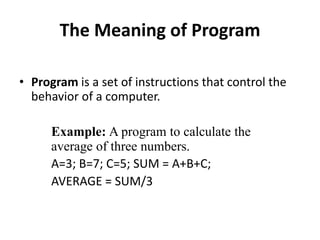
The Meaning of Program
• Program is a set of instructions that control the
behavior of a computer.
Example: A program to calculate the
average of three numbers.
A=3; B=7; C=5; SUM = A+B+C;
AVERAGE = SUM/3
A Programmer
• Programmer is a person who writes a set of
instruction codes that control the behavior of
a computer.
• Programmer is a person who writes computer
Program.
Meaning of Programming
• Programming is a process of creating a set of
instructions code that tell a computer how to
perform a task.
• Programming is an act or process of coding.
Programming language
• Programming language is the language use in
writing set of instruction codes.
• Programming language is the language use in
writing computer program.
Examples of Programming languages
Some of the popular Programming languages are:
 Python
 C
 C++
Java
Visual Basic
etc.
VISUAL BASIC
• VISUAL BASIC is a high-level programming
language used from the earlier DOS version
called BASIC.
• BASIC means Beginners' All-purpose Symbolic
Instruction Code.
Some Features of Visual Basic
• It is a fairly easy programming language to learn.
• The codes look a bit like English Language.
• Visual Basic is an event-driven programming.
• It uses ready-made objects to build user interfaces that
make up the application.
Systems Development Cycle
Most IT projects work in cycles, some of the cycles (stages) are:
Feasibility Study (System Analysis)
Design
Programming (Coding)
Implementation
Feasibility Study (System Analysis)
Systems Analysts draw up plans on how the
users would exactly like the system to work.
System Design
The architectural feature of the system or
program need to be layout by the Computer
architects who will design the input and output
to match the user requirements.
Programming (Coding)
The programmer will take the specifications
from the Systems Analyst and then convert the
plans into actual computer programs.
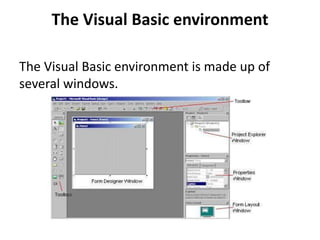
The Visual Basic environment
The Visual Basic environment is made up of
several windows.
The term windows
Windows is a GUI with easily recognized graphic
icons which can be selected using the mouse
and commands chosen from menus.
The Windows of Visual Basic
Some of the windows in Visual Basic
environment includes:
Tools Bar
Toolbox
Form Designer Window
Form Layout Window
Properties Window
Project Explorer window
The toolbar
The Visual Basic tool bar functions like the tool
bar in any other Microsoft application.
It provides shortcuts for many of the common
operating commands.
Steps to Add Tool to Toolbar
• Click View on Menu bar
• Click toolbars
• Tick ✅ on desire tool
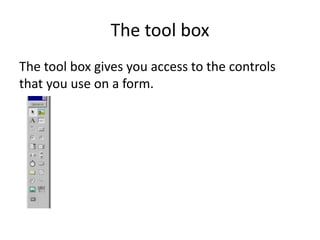
The tool box
The tool box gives you access to the controls
that you use on a form.
Steps to Display Toolbox
• Click View on Menu bar
• Click toolbox or
• Press Ctrl + Alt + X on Keyboard
Controls
A control is an object that is used on forms to
display output or get input.
Some Examples of Controls are:
Button,
label or grid
Text area
Etc.
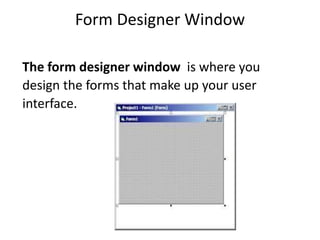
Form Designer Window
The form designer window is where you
design the forms that make up your user
interface.
The Form
Form is an object that make of an User interface
with a collection of controls.
Form is an object that act as a GUI window of an
Application.
Examples of Form
Biodata Form
Contact Form
Etc.
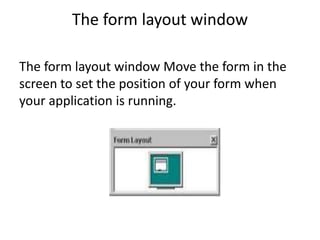
The form layout window
The form layout window Move the form in the
screen to set the position of your form when
your application is running.
Properties Window
The properties window lists all the properties a
control has and their value.
A form, and each control on it, has a set of
properties such as size, position and color.
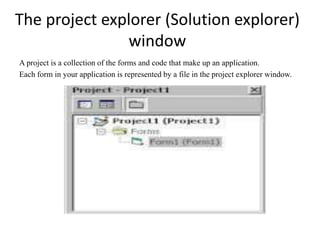
The project explorer (Solution explorer)
window
A project is a collection of the forms and code that make up an application.
Each form in your application is represented by a file in the project explorer window.
Steps to Display Project Explorer
window on VB Environment
• Click View on Menu bar
• Click Project explorer
Starting Visual Basic
From the Windows Start menu,
 choose Programs,
 Microsoft Visual Studio ,
and then Microsoft Visual Basic 10.
Stopping Visual Basic
• Click File menu,
• Choose Exit
• The Microsoft Visual Studio ask you to save
changes in your project.
Creating Simple application
The steps to create new project are:
Click the New Project dialog box from toolbar
Or Chose New Project from the File menu
Select Windows form application
Type the project name in the Name text field
Click OK
Saving the application Files
Save the application so that you can use it later.
The Step to save new files are:
 Click on save button on tools bar or
Right click on file title then
select save form
Or Click save all button on tools bar
Or Click file ,then Click save form or save all.
Running the application
We can see the application in action by running
it .
The steps to run the application are:
Simply pressing F5 key.
Or
click on Debugging button on the standard
tool bar and Select start debugging from the
dialog items,
Stop Running the application
Simply clicking stop Debugging button from the
standard tool bar.
Creating Executable File
The steps to create Executable File are:
Click the New Project dialog box from toolbar
Or Chose New Project from the File menu
Click the dialog box of other project types fr
Select Setup and Deployment wizard.
 Type Application Name
Next steps then Click OK
VISUAL BASIC CHARACTER SETS
The Microsoft Visual basic character sets consist of the
following:
 Alphabet A/ a – Z/z (Both Upper and Lower Case)
 Numeric Digits 0 – 9
 Decimal point (.)
 Grouping Characters (eg. Comma, colons, Semicolons,
single and double apostrophe, parenthesis)
 Relational Operators (eg. =, <>,>,< etc)
 Arithmetic Operators (eg. +, -, /, =. etc)
 Blank character
Data Types
The Visual Basic language works with all kinds of
data.
When you write a program, you need to decide
which data type best fits your program's data
values.
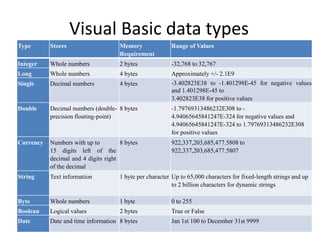
Visual Basic data types
Type Stores Memory
Requirement
Range of Values
Integer Whole numbers 2 bytes -32,768 to 32,767
Long Whole numbers 4 bytes Approximately +/- 2.1E9
Single Decimal numbers 4 bytes -3.402823E38 to -1.401298E-45 for negative values
and 1.401298E-45 to
3.402823E38 for positive values
Double Decimal numbers (double-
precision floating-point)
8 bytes -1.79769313486232E308 to -
4.94065645841247E-324 for negative values and
4.94065645841247E-324 to 1.79769313486232E308
for positive values
Currency Numbers with up to
15 digits left of the
decimal and 4 digits right
of the decimal
8 bytes 922,337,203,685,477.5808 to
922,337,203,685,477.5807
String Text information 1 byte per character Up to 65,000 characters for fixed-length strings and up
to 2 billion characters for dynamic strings
Byte Whole numbers 1 byte 0 to 255
Boolean Logical values 2 bytes True or False
Date Date and time information 8 bytes Jan 1st 100 to December 31st 9999
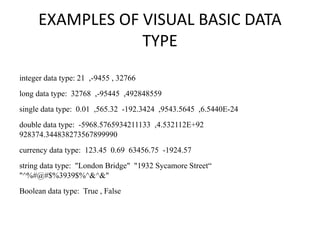
EXAMPLES OF VISUAL BASIC DATA
TYPE
integer data type: 21 ,-9455 , 32766
long data type: 32768 ,-95445 ,492848559
single data type: 0.01 ,565.32 -192.3424 ,9543.5645 ,6.5440E-24
double data type: -5968.5765934211133 ,4.532112E+92
928374.344838273567899990
currency data type: 123.45 0.69 63456.75 -1924.57
string data type: "London Bridge" "1932 Sycamore Street“
"^%#@#$%3939$%^&^&"
Boolean data type: True , False
VARIABLE DECLARATION IN VISUAL
BASIC
Variable Declaration is a way of storing and
retrieving data in a variable.
Declaring Variables means to create and name a
variable.
Defining the variable
defining the variable in Visual Basic required
these two things:
The name of the variable
The data type of the variable
Example: Dim VarName AS DataType
Dim—short for dimension—is a Visual Basic
statement that you write in an application’s
Code window.
Variable naming rules
The naming rules are as follows:
Names can be as short as one character or as
long as 40 characters.
Names must begin with a letter of the alphabet
and can be in either uppercase or lowercase
letters.
After the initial letter, names can contain letters,
numbers, or underscores in names.
Names cannot be a reserved word.
Never define two variables with the same name
EXAMPLES OF VARIABLE DECLARATION
Always use a Dim statement to define variables
before you use variables.
Dim ProductTotal As Currency
Dim Length As Integer
Dim Price As Single
Dim Structure As Double
Dim FirstName As String
Dim Title As String * 20
Assigning Values to Variables
Here is the (syntax) format of the assignment
statement:
VariableName = Expression
MinAge = 18
TodayTemp = 42.1
Dim Sales As Single, NewSales As Single
Sales = 3945.42
NewSales = Sales
Finaly NewSales have the value 3945.42
Assigning String to Caption of Control
This is the first of several program code reviews
that you will find throughout the course.
Sub cmdJoke_Click ()
cmdJoke.Caption = “Hello World"
End Sub
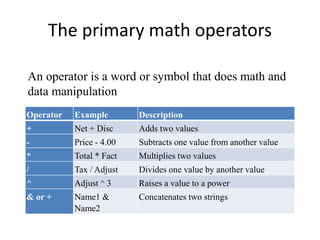
The primary math operators
Operator Example Description
+ Net + Disc Adds two values
- Price - 4.00 Subtracts one value from another value
* Total * Fact Multiplies two values
/ Tax / Adjust Divides one value by another value
^ Adjust ^ 3 Raises a value to a power
& or + Name1 &
Name2
Concatenates two strings
An operator is a word or symbol that does math and
data manipulation
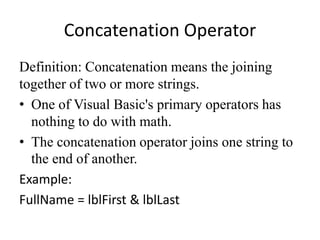
Concatenation Operator
Definition: Concatenation means the joining
together of two or more strings.
• One of Visual Basic's primary operators has
nothing to do with math.
• The concatenation operator joins one string to
the end of another.
Example:
FullName = lblFirst & lblLast
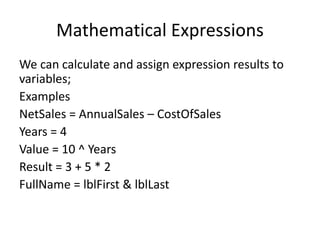
Mathematical Expressions
We can calculate and assign expression results to
variables;
Examples
NetSales = AnnualSales – CostOfSales
Years = 4
Value = 10 ^ Years
Result = 3 + 5 * 2
FullName = lblFirst & lblLast
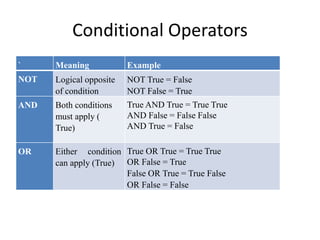
Conditional Operators
` Meaning Example
NOT Logical opposite
of condition
NOT True = False
NOT False = True
AND Both conditions
must apply (
True)
True AND True = True True
AND False = False False
AND True = False
OR Either condition
can apply (True)
True OR True = True True
OR False = True
False OR True = True False
OR False = False
CONTROLS
The following are some of the controls of VB:
 The Form
 Intrinsic Controls
 Focus In on Controls
 etc

COM 211 PRESENTATION.pptx

  • 1.
    DEPARTMENT OF COMPUTERSCIENCE SCHOOL OF SCIENCE AND TECHNOLOGY FEDERAL POLYTECHNIC BALI OO BASIC (VISUAL BASIC PROGRAMMING) COURSE CODE: COM 211
  • 2.
    CONCEPT OF PROGRAMMING Thefollowing are some of the related terms that we need to recall: Program Programmer Programming Programming language
  • 3.
    The Meaning ofProgram • Program is a set of instructions that control the behavior of a computer. Example: A program to calculate the average of three numbers. A=3; B=7; C=5; SUM = A+B+C; AVERAGE = SUM/3
  • 4.
    A Programmer • Programmeris a person who writes a set of instruction codes that control the behavior of a computer. • Programmer is a person who writes computer Program.
  • 5.
    Meaning of Programming •Programming is a process of creating a set of instructions code that tell a computer how to perform a task. • Programming is an act or process of coding.
  • 6.
    Programming language • Programminglanguage is the language use in writing set of instruction codes. • Programming language is the language use in writing computer program.
  • 7.
    Examples of Programminglanguages Some of the popular Programming languages are:  Python  C  C++ Java Visual Basic etc.
  • 8.
    VISUAL BASIC • VISUALBASIC is a high-level programming language used from the earlier DOS version called BASIC. • BASIC means Beginners' All-purpose Symbolic Instruction Code.
  • 9.
    Some Features ofVisual Basic • It is a fairly easy programming language to learn. • The codes look a bit like English Language. • Visual Basic is an event-driven programming. • It uses ready-made objects to build user interfaces that make up the application.
  • 10.
    Systems Development Cycle MostIT projects work in cycles, some of the cycles (stages) are: Feasibility Study (System Analysis) Design Programming (Coding) Implementation
  • 11.
    Feasibility Study (SystemAnalysis) Systems Analysts draw up plans on how the users would exactly like the system to work.
  • 12.
    System Design The architecturalfeature of the system or program need to be layout by the Computer architects who will design the input and output to match the user requirements.
  • 13.
    Programming (Coding) The programmerwill take the specifications from the Systems Analyst and then convert the plans into actual computer programs.
  • 14.
    The Visual Basicenvironment The Visual Basic environment is made up of several windows.
  • 15.
    The term windows Windowsis a GUI with easily recognized graphic icons which can be selected using the mouse and commands chosen from menus.
  • 16.
    The Windows ofVisual Basic Some of the windows in Visual Basic environment includes: Tools Bar Toolbox Form Designer Window Form Layout Window Properties Window Project Explorer window
  • 17.
    The toolbar The VisualBasic tool bar functions like the tool bar in any other Microsoft application. It provides shortcuts for many of the common operating commands.
  • 18.
    Steps to AddTool to Toolbar • Click View on Menu bar • Click toolbars • Tick ✅ on desire tool
  • 19.
    The tool box Thetool box gives you access to the controls that you use on a form.
  • 20.
    Steps to DisplayToolbox • Click View on Menu bar • Click toolbox or • Press Ctrl + Alt + X on Keyboard
  • 21.
    Controls A control isan object that is used on forms to display output or get input. Some Examples of Controls are: Button, label or grid Text area Etc.
  • 22.
    Form Designer Window Theform designer window is where you design the forms that make up your user interface.
  • 23.
    The Form Form isan object that make of an User interface with a collection of controls. Form is an object that act as a GUI window of an Application. Examples of Form Biodata Form Contact Form Etc.
  • 24.
    The form layoutwindow The form layout window Move the form in the screen to set the position of your form when your application is running.
  • 25.
    Properties Window The propertieswindow lists all the properties a control has and their value. A form, and each control on it, has a set of properties such as size, position and color.
  • 26.
    The project explorer(Solution explorer) window A project is a collection of the forms and code that make up an application. Each form in your application is represented by a file in the project explorer window.
  • 27.
    Steps to DisplayProject Explorer window on VB Environment • Click View on Menu bar • Click Project explorer
  • 28.
    Starting Visual Basic Fromthe Windows Start menu,  choose Programs,  Microsoft Visual Studio , and then Microsoft Visual Basic 10.
  • 29.
    Stopping Visual Basic •Click File menu, • Choose Exit • The Microsoft Visual Studio ask you to save changes in your project.
  • 30.
    Creating Simple application Thesteps to create new project are: Click the New Project dialog box from toolbar Or Chose New Project from the File menu Select Windows form application Type the project name in the Name text field Click OK
  • 31.
    Saving the applicationFiles Save the application so that you can use it later. The Step to save new files are:  Click on save button on tools bar or Right click on file title then select save form Or Click save all button on tools bar Or Click file ,then Click save form or save all.
  • 32.
    Running the application Wecan see the application in action by running it . The steps to run the application are: Simply pressing F5 key. Or click on Debugging button on the standard tool bar and Select start debugging from the dialog items,
  • 33.
    Stop Running theapplication Simply clicking stop Debugging button from the standard tool bar.
  • 34.
    Creating Executable File Thesteps to create Executable File are: Click the New Project dialog box from toolbar Or Chose New Project from the File menu Click the dialog box of other project types fr Select Setup and Deployment wizard.  Type Application Name Next steps then Click OK
  • 35.
    VISUAL BASIC CHARACTERSETS The Microsoft Visual basic character sets consist of the following:  Alphabet A/ a – Z/z (Both Upper and Lower Case)  Numeric Digits 0 – 9  Decimal point (.)  Grouping Characters (eg. Comma, colons, Semicolons, single and double apostrophe, parenthesis)  Relational Operators (eg. =, <>,>,< etc)  Arithmetic Operators (eg. +, -, /, =. etc)  Blank character
  • 36.
    Data Types The VisualBasic language works with all kinds of data. When you write a program, you need to decide which data type best fits your program's data values.
  • 37.
    Visual Basic datatypes Type Stores Memory Requirement Range of Values Integer Whole numbers 2 bytes -32,768 to 32,767 Long Whole numbers 4 bytes Approximately +/- 2.1E9 Single Decimal numbers 4 bytes -3.402823E38 to -1.401298E-45 for negative values and 1.401298E-45 to 3.402823E38 for positive values Double Decimal numbers (double- precision floating-point) 8 bytes -1.79769313486232E308 to - 4.94065645841247E-324 for negative values and 4.94065645841247E-324 to 1.79769313486232E308 for positive values Currency Numbers with up to 15 digits left of the decimal and 4 digits right of the decimal 8 bytes 922,337,203,685,477.5808 to 922,337,203,685,477.5807 String Text information 1 byte per character Up to 65,000 characters for fixed-length strings and up to 2 billion characters for dynamic strings Byte Whole numbers 1 byte 0 to 255 Boolean Logical values 2 bytes True or False Date Date and time information 8 bytes Jan 1st 100 to December 31st 9999
  • 38.
    EXAMPLES OF VISUALBASIC DATA TYPE integer data type: 21 ,-9455 , 32766 long data type: 32768 ,-95445 ,492848559 single data type: 0.01 ,565.32 -192.3424 ,9543.5645 ,6.5440E-24 double data type: -5968.5765934211133 ,4.532112E+92 928374.344838273567899990 currency data type: 123.45 0.69 63456.75 -1924.57 string data type: "London Bridge" "1932 Sycamore Street“ "^%#@#$%3939$%^&^&" Boolean data type: True , False
  • 39.
    VARIABLE DECLARATION INVISUAL BASIC Variable Declaration is a way of storing and retrieving data in a variable. Declaring Variables means to create and name a variable.
  • 40.
    Defining the variable definingthe variable in Visual Basic required these two things: The name of the variable The data type of the variable Example: Dim VarName AS DataType Dim—short for dimension—is a Visual Basic statement that you write in an application’s Code window.
  • 41.
    Variable naming rules Thenaming rules are as follows: Names can be as short as one character or as long as 40 characters. Names must begin with a letter of the alphabet and can be in either uppercase or lowercase letters. After the initial letter, names can contain letters, numbers, or underscores in names. Names cannot be a reserved word. Never define two variables with the same name
  • 42.
    EXAMPLES OF VARIABLEDECLARATION Always use a Dim statement to define variables before you use variables. Dim ProductTotal As Currency Dim Length As Integer Dim Price As Single Dim Structure As Double Dim FirstName As String Dim Title As String * 20
  • 43.
    Assigning Values toVariables Here is the (syntax) format of the assignment statement: VariableName = Expression MinAge = 18 TodayTemp = 42.1 Dim Sales As Single, NewSales As Single Sales = 3945.42 NewSales = Sales Finaly NewSales have the value 3945.42
  • 44.
    Assigning String toCaption of Control This is the first of several program code reviews that you will find throughout the course. Sub cmdJoke_Click () cmdJoke.Caption = “Hello World" End Sub
  • 45.
    The primary mathoperators Operator Example Description + Net + Disc Adds two values - Price - 4.00 Subtracts one value from another value * Total * Fact Multiplies two values / Tax / Adjust Divides one value by another value ^ Adjust ^ 3 Raises a value to a power & or + Name1 & Name2 Concatenates two strings An operator is a word or symbol that does math and data manipulation
  • 46.
    Concatenation Operator Definition: Concatenationmeans the joining together of two or more strings. • One of Visual Basic's primary operators has nothing to do with math. • The concatenation operator joins one string to the end of another. Example: FullName = lblFirst & lblLast
  • 47.
    Mathematical Expressions We cancalculate and assign expression results to variables; Examples NetSales = AnnualSales – CostOfSales Years = 4 Value = 10 ^ Years Result = 3 + 5 * 2 FullName = lblFirst & lblLast
  • 48.
    Conditional Operators ` MeaningExample NOT Logical opposite of condition NOT True = False NOT False = True AND Both conditions must apply ( True) True AND True = True True AND False = False False AND True = False OR Either condition can apply (True) True OR True = True True OR False = True False OR True = True False OR False = False
  • 49.
    CONTROLS The following aresome of the controls of VB:  The Form  Intrinsic Controls  Focus In on Controls  etc