Developed by :Abhijeet
Visual
Basic
An Introduction
Developed by :Abhijeet
What is Visual Basic?
 Visual Basic is event-driven. It means that the
code is executed in response to some event
such as clicking a button, selecting a menu
item, loading a window etc. Nothing happens
until an event is detected. Once an event is
detected, the code corresponding to that event
(event procedure) is executed. Program control
is then returned to the event processor.
Developed by :Abhijeet
Visual Basic: Background
 3rd Generation Languages (Procedural)
Use English-like statements (COBOL, Fortran)
 BASIC
Beginner’s All-purpose Symbolic Instruction
Code
Created in 1963 to teach programming with a
limited set of reserved words
In 1975, Bill Gates and Paul Allen developed a
version of Basic that ran in 4K RAM on the Altair
1981 – Basic was default user-interface on IBM-
PCs
1991 – Microsoft introduced Visual Basic
Developed by :Abhijeet
Visual Basic: Background
(cont’d)
 Microsoft “Visual Basic” (VB)
Modified to work within “Windows”
environment
Kept programming language
Added visual text editor
Added graphical “controls” (e.g., command
buttons, check boxes, etc.)
Developed by :Abhijeet
Features of Visual Basic
 It has a full set of controls (labels, text
boxes, list boxes)
 Use of Mouse and keyboard actions.
 It supports string handling and graphics
functions.
 It supports sequential and random
access file support.
 It provides powerful database access
tools.
Developed by :Abhijeet
VB Development Environment
 Integrated Development Environment
Includes all tools needed to develop and
TEST program
 Event-driven: Events are actions that
result from end-user activity
 Object-oriented: Each control is an object
with:
Properties (set in property palette)
Methods (predefined set of actions)
Developed by :Abhijeet
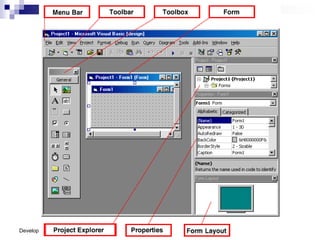
VB Development Environment
(cont’d)
 Project window includes:
Project Explorer (hierarchical list of forms and
modules – view code or view object
Form Module(s)
Code Module(s)
Properties
Toolbox
Other information …
Developed by :Abhijeet
Visual Basic: Files
 VBP file (“project” file)
 Text file: Names of other files in project, info
about the VB environment (e.g., version)
 FRM file (“form” file)
 One .frm file for each form in project
 Can have multiple forms
 VBW (“workspace” file)
 Holds info about forms and development
environment
Developed by :Abhijeet
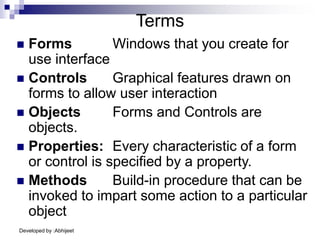
Terms
 Forms Windows that you create for
use interface
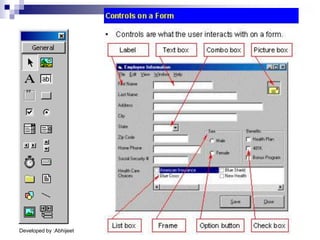
 Controls Graphical features drawn on
forms to allow user interaction
 Objects Forms and Controls are
objects.
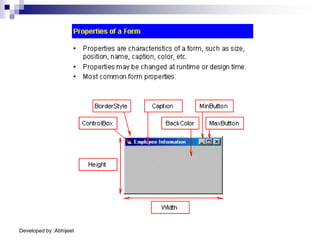
 Properties: Every characteristic of a form
or control is specified by a property.
 Methods Build-in procedure that can be
invoked to impart some action to a particular
object
Developed by :Abhijeet
The VB
Environment
Developed by :Abhijeet
The Toolbox
&
Controls
Developed by :Abhijeet
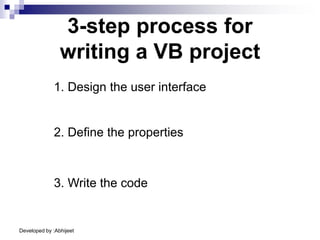
3-step process for
writing a VB project
1. Design the user interface
2. Define the properties
3. Write the code
Developed by :Abhijeet
 Project Explorer Window
Lists the forms, and modules in your current
projects.
 Properties Window
Properties Window is used to assign and
display the different properties of control
Developed by :Abhijeet
Writing
the code
Developed by :Abhijeet
Writing the code
• You can add code to an object by double-clicking
on that object.
• You can also add code by choosing code under
the view menu.
Developed by :Abhijeet
Assignment
Statements
Developed by :Abhijeet
Assignment Statements
• The assignment statement assigns a value to a
property or variable.
• Assignment statements operate from right to left
• That is, the value appearing on the right side of
the equals sign is assigned to the property named
on the left.
• You should read the equals sign as “is assigned
the value”
Developed by :Abhijeet
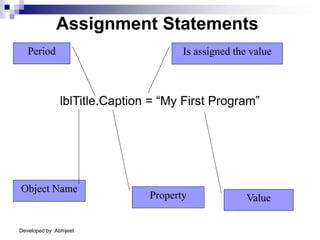
lblTitle.Caption = “My First Program”
Assignment Statements
Object Name
Property Value
Period Is assigned the value
Developed by :Abhijeet
Comments
Developed by :Abhijeet
Comments
• Comments are statements which are not executed when
the program runs.
• The purpose of comments are to explain your
programming code
• VB comments begin with an apostrophe
• In the general declarations of each form put the program
name, your name, date, & a brief description
• Every procedure or function should have a brief description
as to its purpose.
• Every variable used must be commented.
Developed by :Abhijeet
Variables
&
Constants
Developed by :Abhijeet
Variables
A variable is a location in memory where data is
stored.
A variable holds the data assigned to it until a new
value is assigned or the program is finished.
Variables can be changed throughout a program
Developed by :Abhijeet
Constants
A constant is also location in memory where data
is stored.
However, a constant cannot change throughout a
program.
Developed by :Abhijeet
Data Types
The data type of a variable or constant indicates
what type of information will be stored in the
allocated memory space.
Some common data types include :
• Currency (decimal fractions, dollars & cents)
• Integer (whole numbers)
• Double (numbers w/ 14 digits of accuracy)
• Single (numbers w/ 6 digits of accuracy)
• String (letters, digits, & other characters)
Developed by :Abhijeet
When you declare a variable or a named constant,
VB reserves an area of memory and assigns it a
name, called an identifier.
Declarations
The declaration statements establish your
project’s variables and constants, give them
names, and specify the type of data they will hold.
To declare a variable use Dim statement
To declare a constant use Const statement
Developed by :Abhijeet
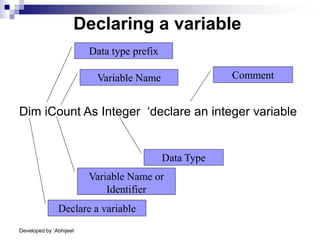
Declaring a variable
Dim iCount As Integer ‘declare an integer variable
Declare a variable
Variable Name or
Identifier
Data type prefix
Variable Name
Data Type
Comment
Developed by :Abhijeet
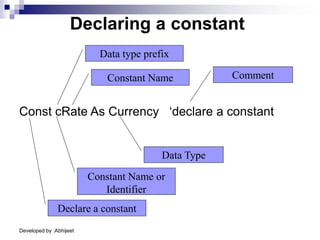
Declaring a constant
Const cRate As Currency ‘declare a constant
Declare a constant
Constant Name or
Identifier
Data type prefix
Constant Name
Data Type
Comment
Developed by :Abhijeet
Functions
Developed by :Abhijeet
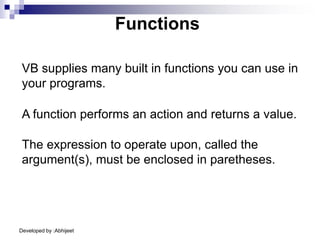
Functions
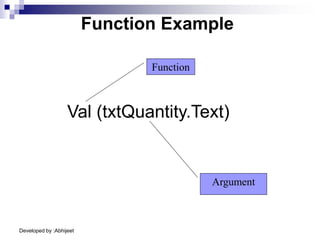
A function performs an action and returns a value.
VB supplies many built in functions you can use in
your programs.
The expression to operate upon, called the
argument(s), must be enclosed in paretheses.
Developed by :Abhijeet
Function Example
Val (txtQuantity.Text)
Function
Argument
Developed by :Abhijeet
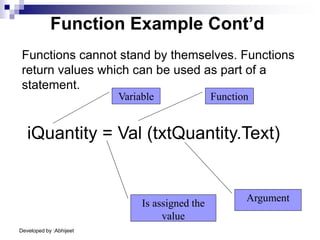
Function Example Cont’d
Functions cannot stand by themselves. Functions
return values which can be used as part of a
statement.
iQuantity = Val (txtQuantity.Text)
Argument
Function
Is assigned the
value
Variable
Developed by :Abhijeet
Some
built-in
Functions
Developed by :Abhijeet
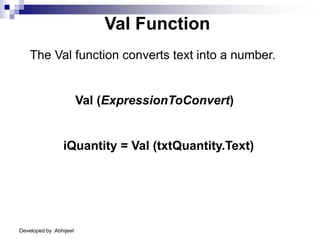
Val Function
The Val function converts text into a number.
iQuantity = Val (txtQuantity.Text)
Val (ExpressionToConvert)
Developed by :Abhijeet
Format Function
The Format function controls the way output is
displayed
lblGst.Caption = Format$(cGst, "Currency")
Format[$] (ExpressionToFormat [, “Description”])
Developed by :Abhijeet
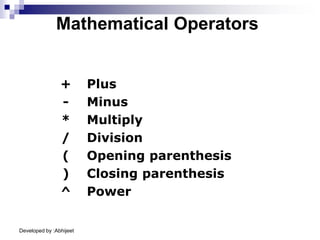
+ Plus
- Minus
* Multiply
/ Division
( Opening parenthesis
) Closing parenthesis
^ Power
Mathematical Operators

Intro_to_VB.PPT

  • 1.
  • 2.
    Developed by :Abhijeet Whatis Visual Basic?  Visual Basic is event-driven. It means that the code is executed in response to some event such as clicking a button, selecting a menu item, loading a window etc. Nothing happens until an event is detected. Once an event is detected, the code corresponding to that event (event procedure) is executed. Program control is then returned to the event processor.
  • 3.
    Developed by :Abhijeet VisualBasic: Background  3rd Generation Languages (Procedural) Use English-like statements (COBOL, Fortran)  BASIC Beginner’s All-purpose Symbolic Instruction Code Created in 1963 to teach programming with a limited set of reserved words In 1975, Bill Gates and Paul Allen developed a version of Basic that ran in 4K RAM on the Altair 1981 – Basic was default user-interface on IBM- PCs 1991 – Microsoft introduced Visual Basic
  • 4.
    Developed by :Abhijeet VisualBasic: Background (cont’d)  Microsoft “Visual Basic” (VB) Modified to work within “Windows” environment Kept programming language Added visual text editor Added graphical “controls” (e.g., command buttons, check boxes, etc.)
  • 5.
    Developed by :Abhijeet Featuresof Visual Basic  It has a full set of controls (labels, text boxes, list boxes)  Use of Mouse and keyboard actions.  It supports string handling and graphics functions.  It supports sequential and random access file support.  It provides powerful database access tools.
  • 6.
    Developed by :Abhijeet VBDevelopment Environment  Integrated Development Environment Includes all tools needed to develop and TEST program  Event-driven: Events are actions that result from end-user activity  Object-oriented: Each control is an object with: Properties (set in property palette) Methods (predefined set of actions)
  • 7.
    Developed by :Abhijeet VBDevelopment Environment (cont’d)  Project window includes: Project Explorer (hierarchical list of forms and modules – view code or view object Form Module(s) Code Module(s) Properties Toolbox Other information …
  • 8.
    Developed by :Abhijeet VisualBasic: Files  VBP file (“project” file)  Text file: Names of other files in project, info about the VB environment (e.g., version)  FRM file (“form” file)  One .frm file for each form in project  Can have multiple forms  VBW (“workspace” file)  Holds info about forms and development environment
  • 9.
    Developed by :Abhijeet Terms Forms Windows that you create for use interface  Controls Graphical features drawn on forms to allow user interaction  Objects Forms and Controls are objects.  Properties: Every characteristic of a form or control is specified by a property.  Methods Build-in procedure that can be invoked to impart some action to a particular object
  • 10.
  • 11.
  • 12.
    Developed by :Abhijeet TheToolbox & Controls
  • 13.
  • 14.
  • 15.
    Developed by :Abhijeet 3-stepprocess for writing a VB project 1. Design the user interface 2. Define the properties 3. Write the code
  • 16.
    Developed by :Abhijeet Project Explorer Window Lists the forms, and modules in your current projects.  Properties Window Properties Window is used to assign and display the different properties of control
  • 17.
  • 18.
    Developed by :Abhijeet Writingthe code • You can add code to an object by double-clicking on that object. • You can also add code by choosing code under the view menu.
  • 19.
  • 20.
    Developed by :Abhijeet AssignmentStatements • The assignment statement assigns a value to a property or variable. • Assignment statements operate from right to left • That is, the value appearing on the right side of the equals sign is assigned to the property named on the left. • You should read the equals sign as “is assigned the value”
  • 21.
    Developed by :Abhijeet lblTitle.Caption= “My First Program” Assignment Statements Object Name Property Value Period Is assigned the value
  • 22.
  • 23.
    Developed by :Abhijeet Comments •Comments are statements which are not executed when the program runs. • The purpose of comments are to explain your programming code • VB comments begin with an apostrophe • In the general declarations of each form put the program name, your name, date, & a brief description • Every procedure or function should have a brief description as to its purpose. • Every variable used must be commented.
  • 24.
  • 25.
    Developed by :Abhijeet Variables Avariable is a location in memory where data is stored. A variable holds the data assigned to it until a new value is assigned or the program is finished. Variables can be changed throughout a program
  • 26.
    Developed by :Abhijeet Constants Aconstant is also location in memory where data is stored. However, a constant cannot change throughout a program.
  • 27.
    Developed by :Abhijeet DataTypes The data type of a variable or constant indicates what type of information will be stored in the allocated memory space. Some common data types include : • Currency (decimal fractions, dollars & cents) • Integer (whole numbers) • Double (numbers w/ 14 digits of accuracy) • Single (numbers w/ 6 digits of accuracy) • String (letters, digits, & other characters)
  • 28.
    Developed by :Abhijeet Whenyou declare a variable or a named constant, VB reserves an area of memory and assigns it a name, called an identifier. Declarations The declaration statements establish your project’s variables and constants, give them names, and specify the type of data they will hold. To declare a variable use Dim statement To declare a constant use Const statement
  • 29.
    Developed by :Abhijeet Declaringa variable Dim iCount As Integer ‘declare an integer variable Declare a variable Variable Name or Identifier Data type prefix Variable Name Data Type Comment
  • 30.
    Developed by :Abhijeet Declaringa constant Const cRate As Currency ‘declare a constant Declare a constant Constant Name or Identifier Data type prefix Constant Name Data Type Comment
  • 31.
  • 32.
    Developed by :Abhijeet Functions Afunction performs an action and returns a value. VB supplies many built in functions you can use in your programs. The expression to operate upon, called the argument(s), must be enclosed in paretheses.
  • 33.
    Developed by :Abhijeet FunctionExample Val (txtQuantity.Text) Function Argument
  • 34.
    Developed by :Abhijeet FunctionExample Cont’d Functions cannot stand by themselves. Functions return values which can be used as part of a statement. iQuantity = Val (txtQuantity.Text) Argument Function Is assigned the value Variable
  • 35.
  • 36.
    Developed by :Abhijeet ValFunction The Val function converts text into a number. iQuantity = Val (txtQuantity.Text) Val (ExpressionToConvert)
  • 37.
    Developed by :Abhijeet FormatFunction The Format function controls the way output is displayed lblGst.Caption = Format$(cGst, "Currency") Format[$] (ExpressionToFormat [, “Description”])
  • 38.
    Developed by :Abhijeet +Plus - Minus * Multiply / Division ( Opening parenthesis ) Closing parenthesis ^ Power Mathematical Operators