 Basic Python
› Data types(Integer, String, List)
› Control flow statements
› List comprehension
 Import NetworkX
import networkx as nx
 Generating a graph
G = nx.Graph()
 Adding a node
G.add_node(“one”)
 Adding nodes
G.add_nodes_from([“two”, “three”])
 Adding an edge
G.add_edge(“one”, “two”)
 Adding edges
G.add_edges_from([(“two”, “three”), (“three”, “one”)])
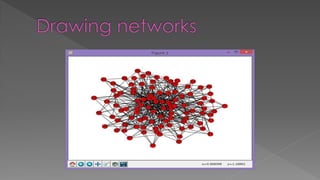
import matplotlib.pyplot as plt
nx.draw(G)
plt.show()
 Path graphs
› G = nx.path_graph(40)
 Cycle graphs
› G = nx.cycle_graph(40)
 Complete graphs
› G = nx.complete_graph(40)
 2D grid graphs
› G = nx.grid_2d_graph(5, 4)
 Random graphs
› G = nx.erdos_renyi_graph(20, 0.3)
› G = nx.barabasi_albert_graph(100, 5)
 The number of degrees
› len(G.nodes())
 The number of edges
› len(G.edges())
 Average degree
› 2 * len(G.edges()) / len(G.nodes())
 Average path length
› Gsub = nx.connected_component_subgraphs(G)[0]
› nx.average_shortest_path_length(G)
 Network density
› nx.density(G)
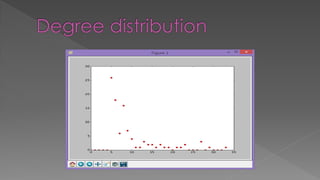
deg = [nx.degree(G,n) for n in G.nodes()]
hist = [0 for i in range(max(deg)+1)]
for d in deg:
hist[d] += 1
plt.plot(range(len(hist)), hist, "or")
plt.show()
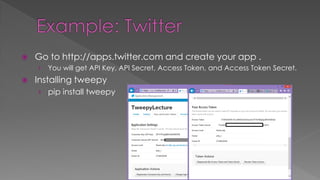
 Go to http://apps.twitter.com and create your app .
› You will get API Key, API Secret, Access Token, and Access Token Secret.
 Installing tweepy
› pip install tweepy
 Next, many, many lines of python code
 You can get the python script(named
Tweepy1.py) at
https://codebreak.com/git/arity/TweepyTutori
al/tree/master/
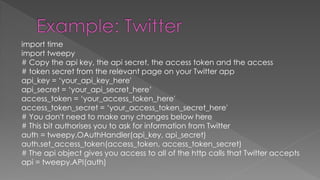
import time
import tweepy
# Copy the api key, the api secret, the access token and the access
# token secret from the relevant page on your Twitter app
api_key = ‘your_api_key_here'
api_secret = ‘your_api_secret_here’
access_token = ‘your_access_token_here'
access_token_secret = ‘your_access_token_secret_here'
# You don't need to make any changes below here
# This bit authorises you to ask for information from Twitter
auth = tweepy.OAuthHandler(api_key, api_secret)
auth.set_access_token(access_token, access_token_secret)
# The api object gives you access to all of the http calls that Twitter accepts
api = tweepy.API(auth)
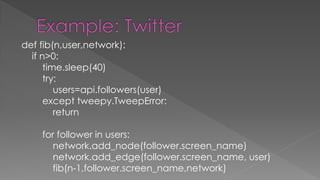
def fib(n,user,network):
if n>0:
time.sleep(40)
try:
users=api.followers(user)
except tweepy.TweepError:
return
for follower in users:
network.add_node(follower.screen_name)
network.add_edge(follower.screen_name, user)
fib(n-1,follower.screen_name,network)
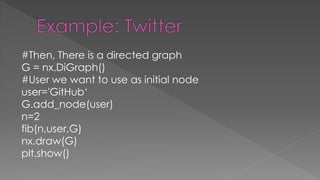
#Then, There is a directed graph
G = nx.DiGraph()
#User we want to use as initial node
user='GitHub‘
G.add_node(user)
n=2
fib(n,user,G)
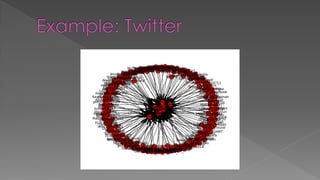
nx.draw(G)
plt.show()
 Graph manipulating functions
› Adding nodes, edges
 Many types of network
 Many network characteristics

PyLecture2 -NetworkX-

  • 2.
     Basic Python ›Data types(Integer, String, List) › Control flow statements › List comprehension
  • 3.
     Import NetworkX importnetworkx as nx  Generating a graph G = nx.Graph()  Adding a node G.add_node(“one”)  Adding nodes G.add_nodes_from([“two”, “three”])  Adding an edge G.add_edge(“one”, “two”)  Adding edges G.add_edges_from([(“two”, “three”), (“three”, “one”)])
  • 4.
    import matplotlib.pyplot asplt nx.draw(G) plt.show()
  • 5.
     Path graphs ›G = nx.path_graph(40)  Cycle graphs › G = nx.cycle_graph(40)  Complete graphs › G = nx.complete_graph(40)  2D grid graphs › G = nx.grid_2d_graph(5, 4)  Random graphs › G = nx.erdos_renyi_graph(20, 0.3) › G = nx.barabasi_albert_graph(100, 5)
  • 7.
     The numberof degrees › len(G.nodes())  The number of edges › len(G.edges())  Average degree › 2 * len(G.edges()) / len(G.nodes())  Average path length › Gsub = nx.connected_component_subgraphs(G)[0] › nx.average_shortest_path_length(G)  Network density › nx.density(G)
  • 8.
    deg = [nx.degree(G,n)for n in G.nodes()] hist = [0 for i in range(max(deg)+1)] for d in deg: hist[d] += 1 plt.plot(range(len(hist)), hist, "or") plt.show()
  • 10.
     Go tohttp://apps.twitter.com and create your app . › You will get API Key, API Secret, Access Token, and Access Token Secret.  Installing tweepy › pip install tweepy
  • 11.
     Next, many,many lines of python code  You can get the python script(named Tweepy1.py) at https://codebreak.com/git/arity/TweepyTutori al/tree/master/
  • 12.
    import time import tweepy #Copy the api key, the api secret, the access token and the access # token secret from the relevant page on your Twitter app api_key = ‘your_api_key_here' api_secret = ‘your_api_secret_here’ access_token = ‘your_access_token_here' access_token_secret = ‘your_access_token_secret_here' # You don't need to make any changes below here # This bit authorises you to ask for information from Twitter auth = tweepy.OAuthHandler(api_key, api_secret) auth.set_access_token(access_token, access_token_secret) # The api object gives you access to all of the http calls that Twitter accepts api = tweepy.API(auth)
  • 13.
    def fib(n,user,network): if n>0: time.sleep(40) try: users=api.followers(user) excepttweepy.TweepError: return for follower in users: network.add_node(follower.screen_name) network.add_edge(follower.screen_name, user) fib(n-1,follower.screen_name,network)
  • 14.
    #Then, There isa directed graph G = nx.DiGraph() #User we want to use as initial node user='GitHub‘ G.add_node(user) n=2 fib(n,user,G) nx.draw(G) plt.show()
  • 16.
     Graph manipulatingfunctions › Adding nodes, edges  Many types of network  Many network characteristics