ColdFusion10: CFScript
Enhancements
WHAT’S NEW IN CF10?
•
•
•
•

Colon separators in structures (key:value pairs).
Use of FOR-IN loop over queries and Java arrays.
Use of ArrayEach() And StructEach().
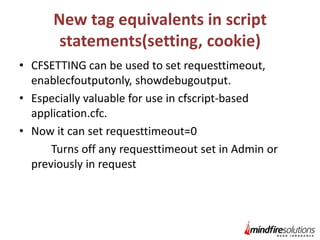
New tag equivalents in script statements(setting,
cookie)
• New tag equivalents as functions(invoke)
• New tag equivalents as CFCs(collection, index,
search)
colon separators in structures
(key:value pairs)
We can now define the key:value pairs within a structure
using colon (:) separator when defining them with implicit
structure notation.
Ex: <cfscript>
student = {firstname:"abc", lastname:"def",
grades:[12,23,45]};
</cfscript>
Also supported:
• <cfset student = {firstName:"Jane", lastName:"Doe",
grades:[77, 84, 91]}>
• Not supported: <cfset name:”Jane”> or name:”Jane”;
Looping Over Queries and Java Arrays
Using For-In Loop
• ColdFusion has long been able to use the for-in
statement to loop over structures
• And ColdFusion 9.0.1 added the ability to loop over
CFML arrays
• Now can loop over query results.
Various Java methods return java arrays
• Can now loop over those in CFSCRIPT
Use of ArrayEach() And StructEach()
• “ArrayEach” is used to loop over an array object.
• The Handle Function can have each element of
the array during looping.
• We can apply our business logic inside the
handler function .
• We can write the handler function as inline
function or a named function which we can reuse
in multiple cases.
• Similarly in StructEach, we can loop over a
structure elements.
New tag equivalents in script
statements(setting, cookie)
• CFSETTING can be used to set requesttimeout,
enablecfoutputonly, showdebugoutput.
• Especially valuable for use in cfscript-based
application.cfc.
• Now it can set requesttimeout=0
Turns off any requesttimeout set in Admin or
previously in request
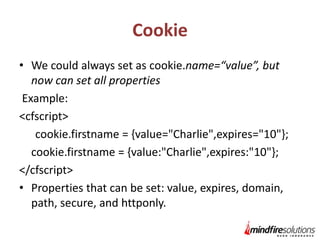
Cookie
• We could always set as cookie.name=“value”, but
now can set all properties
Example:
<cfscript>
cookie.firstname = {value="Charlie",expires="10"};
cookie.firstname = {value:"Charlie",expires:"10"};
</cfscript>
• Properties that can be set: value, expires, domain,
path, secure, and httponly.
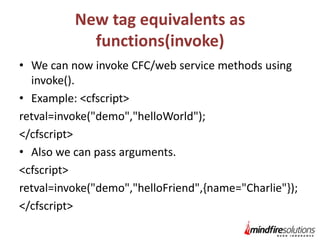
New tag equivalents as
functions(invoke)
• We can now invoke CFC/web service methods using
invoke().
• Example: <cfscript>
retval=invoke("demo","helloWorld");
</cfscript>
• Also we can pass arguments.
<cfscript>
retval=invoke("demo","helloFriend",{name="Charlie"});
</cfscript>
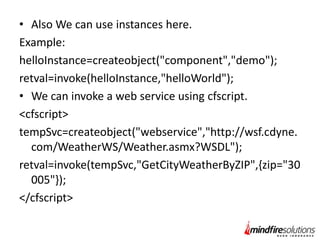
• Also We can use instances here.
Example:
helloInstance=createobject("component","demo");
retval=invoke(helloInstance,"helloWorld");
• We can invoke a web service using cfscript.
<cfscript>
tempSvc=createobject("webservice","http://wsf.cdyne.
com/WeatherWS/Weather.asmx?WSDL");
retval=invoke(tempSvc,"GetCityWeatherByZIP",{zip="30
005"});
</cfscript>
New tag equivalents as
CFCs(collection, index, search)
• Can create a Solr collection in a directory anywhere
on server.
• Can create and delete collections inside cfscript.
• Also can map, optimize, and categoryList (New for
Solr)
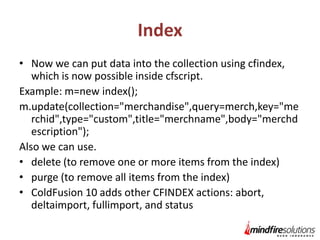
Index
• Now we can put data into the collection using cfindex,
which is now possible inside cfscript.
Example: m=new index();
m.update(collection="merchandise",query=merch,key="me
rchid",type="custom",title="merchname",body="merchd
escription");
Also we can use.
• delete (to remove one or more items from the index)
• purge (to remove all items from the index)
• ColdFusion 10 adds other CFINDEX actions: abort,
deltaimport, fullimport, and status
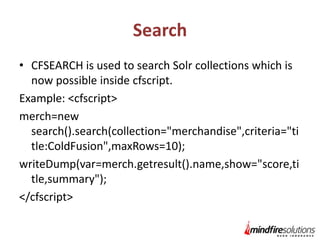
Search
• CFSEARCH is used to search Solr collections which is
now possible inside cfscript.
Example: <cfscript>
merch=new
search().search(collection="merchandise",criteria="ti
tle:ColdFusion",maxRows=10);
writeDump(var=merch.getresult().name,show="score,ti
tle,summary");
</cfscript>
Thank You
Questions??

ColdFusion 10 CFScript Enhancements

  • 1.
  • 2.
    WHAT’S NEW INCF10? • • • • Colon separators in structures (key:value pairs). Use of FOR-IN loop over queries and Java arrays. Use of ArrayEach() And StructEach(). New tag equivalents in script statements(setting, cookie) • New tag equivalents as functions(invoke) • New tag equivalents as CFCs(collection, index, search)
  • 3.
    colon separators instructures (key:value pairs) We can now define the key:value pairs within a structure using colon (:) separator when defining them with implicit structure notation. Ex: <cfscript> student = {firstname:"abc", lastname:"def", grades:[12,23,45]}; </cfscript> Also supported: • <cfset student = {firstName:"Jane", lastName:"Doe", grades:[77, 84, 91]}> • Not supported: <cfset name:”Jane”> or name:”Jane”;
  • 4.
    Looping Over Queriesand Java Arrays Using For-In Loop • ColdFusion has long been able to use the for-in statement to loop over structures • And ColdFusion 9.0.1 added the ability to loop over CFML arrays • Now can loop over query results. Various Java methods return java arrays • Can now loop over those in CFSCRIPT
  • 5.
    Use of ArrayEach()And StructEach() • “ArrayEach” is used to loop over an array object. • The Handle Function can have each element of the array during looping. • We can apply our business logic inside the handler function . • We can write the handler function as inline function or a named function which we can reuse in multiple cases. • Similarly in StructEach, we can loop over a structure elements.
  • 6.
    New tag equivalentsin script statements(setting, cookie) • CFSETTING can be used to set requesttimeout, enablecfoutputonly, showdebugoutput. • Especially valuable for use in cfscript-based application.cfc. • Now it can set requesttimeout=0 Turns off any requesttimeout set in Admin or previously in request
  • 7.
    Cookie • We couldalways set as cookie.name=“value”, but now can set all properties Example: <cfscript> cookie.firstname = {value="Charlie",expires="10"}; cookie.firstname = {value:"Charlie",expires:"10"}; </cfscript> • Properties that can be set: value, expires, domain, path, secure, and httponly.
  • 8.
    New tag equivalentsas functions(invoke) • We can now invoke CFC/web service methods using invoke(). • Example: <cfscript> retval=invoke("demo","helloWorld"); </cfscript> • Also we can pass arguments. <cfscript> retval=invoke("demo","helloFriend",{name="Charlie"}); </cfscript>
  • 9.
    • Also Wecan use instances here. Example: helloInstance=createobject("component","demo"); retval=invoke(helloInstance,"helloWorld"); • We can invoke a web service using cfscript. <cfscript> tempSvc=createobject("webservice","http://wsf.cdyne. com/WeatherWS/Weather.asmx?WSDL"); retval=invoke(tempSvc,"GetCityWeatherByZIP",{zip="30 005"}); </cfscript>
  • 10.
    New tag equivalentsas CFCs(collection, index, search) • Can create a Solr collection in a directory anywhere on server. • Can create and delete collections inside cfscript. • Also can map, optimize, and categoryList (New for Solr)
  • 11.
    Index • Now wecan put data into the collection using cfindex, which is now possible inside cfscript. Example: m=new index(); m.update(collection="merchandise",query=merch,key="me rchid",type="custom",title="merchname",body="merchd escription"); Also we can use. • delete (to remove one or more items from the index) • purge (to remove all items from the index) • ColdFusion 10 adds other CFINDEX actions: abort, deltaimport, fullimport, and status
  • 12.
    Search • CFSEARCH isused to search Solr collections which is now possible inside cfscript. Example: <cfscript> merch=new search().search(collection="merchandise",criteria="ti tle:ColdFusion",maxRows=10); writeDump(var=merch.getresult().name,show="score,ti tle,summary"); </cfscript>
  • 13.
  • 14.