C O G N I T I V E
W A L K T H R O U G H
M A R I A H A Y N I E
1.
INTRO
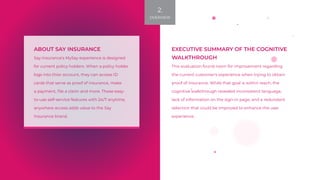
ABOUT SAY INSURANCE
Say Insurance's MySay experience is designed
for current policy holders. When a policy holder
logs into thier account, they can access ID
cards that serve as proof of insurance, make
a payment, file a claim and more. These easy-
to-use self-service features with 24/7 anytime,
anywhere access adds value to the Say
Insurance brand.
EXECUTIVE SUMMARY OF THE COGNITIVE
WALKTHROUGH
This evaluation found room for improvement regarding
the current customer's experience when trying to obtain
proof of insurance. While that goal is within reach, the
cognitive walkthrough revealed inconsistent language,
lack of information on the sign-in page, and a redundant
selection that could be improved to enhance the user
experience.
2.
OVERVIEW
WHAT IS A COGNITIVE
WALKTHROUGH?
A cognitive walkthrough is a technique used to formally evaluate the
learnability of an interface.
Since many users learn a new interface by exploring instead of
using comprehensive training, a cognitive walkthrough helps the
product creators understand if the user can find the information and
functionality they need, when they need it.
3.
METHOD
THE STREAMLINED
APPROACH
For this project, I reviewed the following methodologies:
the Cathleen Wharton et al Cognitive Walkthrough
Rick Spencer's Streamlined Cognitive Walkthrough.
Both methods follow a similar outline:
•	Planning: A usability specialist identifies a user and a task.
•	Analysis: The specialist walks through the task, step-by-step, while
answering key questions at each step from the user's perspective.
•	Findings: Summarize walkthrough findings and identify actionable
steps for revision.
4.
METHOD
HOW IT WORKS
I chose to apply the streamlined cognitive walkthrough
because of its consideration of time pressures and design
defensiveness, two important issues in large development
teams.
Spencer argues that teams can prevent argumentative
design evaluations by adhering to ground rules missing in
Wharton et al's method.
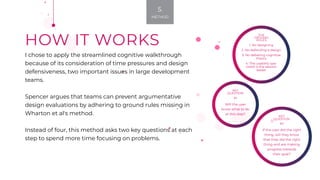
Instead of four, this method asks two key questions at each
step to spend more time focusing on problems.
KEY
QUESTION
#2
If the user did the right
thing, will they know
that they did the right
thing and are making
progress towards
their goal?
KEY
QUESTION
#1
Will the user
know what to do
at this step?
THE
GROUND
RULES
1. No designing
2. No defending a design
3. No debating cognitive
theory
4. The usability spe-
cialist is the session
leader
5.
METHOD
Planning
6.
PLANNING
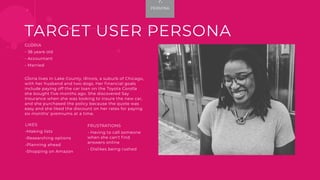
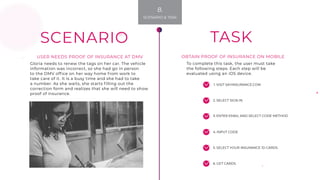
GLORIA
- 36 years old
- Accountant
- Married
Gloria lives in Lake County, Illinois, a suburb of Chicago,
with her husband and two dogs. Her financial goals
include paying off the car loan on the Toyota Corolla
she bought five months ago. She discovered Say
Insurance when she was looking to insure the new car,
and she purchased the policy because the quote was
easy and she liked the discount on her rates for paying
six months' premiums at a time.
TARGET USER PERSONA
FRUSTRATIONS
- Having to call someone
when she can't find
answers online
- Dislikes being rushed
LIKES
-Making lists
-Researching options
-Planning ahead
-Shopping on Amazon
7.
PERSONA
1. VISIT SAYINSURANCE.COM
SCENARIO
2. SELECT SIGN IN
3. ENTER EMAIL AND SELECT CODE METHOD
4. INPUT CODE
5. SELECT YOUR INSURANCE ID CARDS
6. GET CARDS
TASK
To complete this task, the user must take
the following steps. Each step will be
evaluated using an iOS device.
USER NEEDS PROOF OF INSURANCE AT DMV
Gloria needs to renew the tags on her car. The vehicle
information was incorrect, so she had go in person
to the DMV office on her way home from work to
take care of it. It is a busy time and she had to take
a number. As she waits, she starts filling out the
correction form and realizes that she will need to show
proof of insurance.
OBTAIN PROOF OF INSURANCE ON MOBILE
8.
SCENARIO & TASK
Recommendations
16.
RECOMMENDATIONS
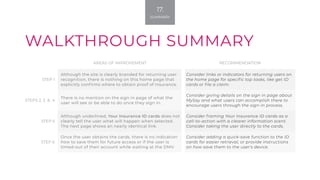
AREAS OF IMPROVEMENT RECOMMENDATION
STEP 1
Although the site is clearly branded for returning user
recognition, there is nothing on this home page that
explicitly confirms where to obtain proof of insurance.
Consider links or indicators for returning users on
the home page for specific top tasks, like get ID
cards or file a claim.
STEPS 2, 3 & 4
There is no mention on the sign in page of what the
user will see or be able to do once they sign in.
Consider giving details on the sign in page about
MySay and what users can accomplish there to
encourage users through the sign-in process.
STEP 5
Although underlined, Your Insurance ID cards does not
clearly tell the user what will happen when selected.
The next page shows an nearly identical link.
Consider framing Your Insurance ID cards as a
call-to-action with a clearer information scent.
Consider taking the user directly to the cards.
STEP 6
Once the user obtains the cards, there is no indication
how to save them for future access or if the user is
timed-out of their account while waiting at the DMV.
Consider adding a quick-save function to the ID
cards for easier retrieval, or provide instructions
on how save them to the user's device.
WALKTHROUGH SUMMARY
17.
SUMMARY
NEXT STEPS
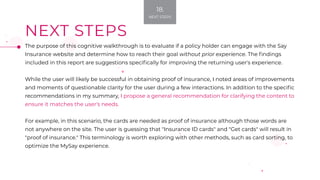
The purpose of this cognitive walkthrough is to evaluate if a policy holder can engage with the Say
Insurance website and determine how to reach their goal without prior experience. The findings
included in this report are suggestions specifically for improving the returning user's experience.
While the user will likely be successful in obtaining proof of insurance, I noted areas of improvements
and moments of questionable clarity for the user during a few interactions. In addition to the specific
recommendations in my summary, I propose a general recommendation for clarifying the content to
ensure it matches the user's needs.
For example, in this scenario, the cards are needed as proof of insurance although those words are
not anywhere on the site. The user is guessing that "Insurance ID cards" and "Get cards" will result in
"proof of insurance." This terminology is worth exploring with other methods, such as card sorting, to
optimize the MySay experience.
18.
NEXT STEPS
PREPARED FOR INFORMATICS 283: USER EXPERIENCE
BY MARIA HAYNIE
mhaynie1@UCI.edu
Photos by Eye for Ebony on Unsplash
19.
END

Cognitive walkthrough

  • 1.
    C O GN I T I V E W A L K T H R O U G H M A R I A H A Y N I E 1. INTRO
  • 2.
    ABOUT SAY INSURANCE SayInsurance's MySay experience is designed for current policy holders. When a policy holder logs into thier account, they can access ID cards that serve as proof of insurance, make a payment, file a claim and more. These easy- to-use self-service features with 24/7 anytime, anywhere access adds value to the Say Insurance brand. EXECUTIVE SUMMARY OF THE COGNITIVE WALKTHROUGH This evaluation found room for improvement regarding the current customer's experience when trying to obtain proof of insurance. While that goal is within reach, the cognitive walkthrough revealed inconsistent language, lack of information on the sign-in page, and a redundant selection that could be improved to enhance the user experience. 2. OVERVIEW
  • 3.
    WHAT IS ACOGNITIVE WALKTHROUGH? A cognitive walkthrough is a technique used to formally evaluate the learnability of an interface. Since many users learn a new interface by exploring instead of using comprehensive training, a cognitive walkthrough helps the product creators understand if the user can find the information and functionality they need, when they need it. 3. METHOD
  • 4.
    THE STREAMLINED APPROACH For thisproject, I reviewed the following methodologies: the Cathleen Wharton et al Cognitive Walkthrough Rick Spencer's Streamlined Cognitive Walkthrough. Both methods follow a similar outline: • Planning: A usability specialist identifies a user and a task. • Analysis: The specialist walks through the task, step-by-step, while answering key questions at each step from the user's perspective. • Findings: Summarize walkthrough findings and identify actionable steps for revision. 4. METHOD
  • 5.
    HOW IT WORKS Ichose to apply the streamlined cognitive walkthrough because of its consideration of time pressures and design defensiveness, two important issues in large development teams. Spencer argues that teams can prevent argumentative design evaluations by adhering to ground rules missing in Wharton et al's method. Instead of four, this method asks two key questions at each step to spend more time focusing on problems. KEY QUESTION #2 If the user did the right thing, will they know that they did the right thing and are making progress towards their goal? KEY QUESTION #1 Will the user know what to do at this step? THE GROUND RULES 1. No designing 2. No defending a design 3. No debating cognitive theory 4. The usability spe- cialist is the session leader 5. METHOD
  • 6.
  • 7.
    GLORIA - 36 yearsold - Accountant - Married Gloria lives in Lake County, Illinois, a suburb of Chicago, with her husband and two dogs. Her financial goals include paying off the car loan on the Toyota Corolla she bought five months ago. She discovered Say Insurance when she was looking to insure the new car, and she purchased the policy because the quote was easy and she liked the discount on her rates for paying six months' premiums at a time. TARGET USER PERSONA FRUSTRATIONS - Having to call someone when she can't find answers online - Dislikes being rushed LIKES -Making lists -Researching options -Planning ahead -Shopping on Amazon 7. PERSONA
  • 8.
    1. VISIT SAYINSURANCE.COM SCENARIO 2.SELECT SIGN IN 3. ENTER EMAIL AND SELECT CODE METHOD 4. INPUT CODE 5. SELECT YOUR INSURANCE ID CARDS 6. GET CARDS TASK To complete this task, the user must take the following steps. Each step will be evaluated using an iOS device. USER NEEDS PROOF OF INSURANCE AT DMV Gloria needs to renew the tags on her car. The vehicle information was incorrect, so she had go in person to the DMV office on her way home from work to take care of it. It is a busy time and she had to take a number. As she waits, she starts filling out the correction form and realizes that she will need to show proof of insurance. OBTAIN PROOF OF INSURANCE ON MOBILE 8. SCENARIO & TASK
  • 9.
  • 10.
    AREAS OF IMPROVEMENTRECOMMENDATION STEP 1 Although the site is clearly branded for returning user recognition, there is nothing on this home page that explicitly confirms where to obtain proof of insurance. Consider links or indicators for returning users on the home page for specific top tasks, like get ID cards or file a claim. STEPS 2, 3 & 4 There is no mention on the sign in page of what the user will see or be able to do once they sign in. Consider giving details on the sign in page about MySay and what users can accomplish there to encourage users through the sign-in process. STEP 5 Although underlined, Your Insurance ID cards does not clearly tell the user what will happen when selected. The next page shows an nearly identical link. Consider framing Your Insurance ID cards as a call-to-action with a clearer information scent. Consider taking the user directly to the cards. STEP 6 Once the user obtains the cards, there is no indication how to save them for future access or if the user is timed-out of their account while waiting at the DMV. Consider adding a quick-save function to the ID cards for easier retrieval, or provide instructions on how save them to the user's device. WALKTHROUGH SUMMARY 17. SUMMARY
  • 11.
    NEXT STEPS The purposeof this cognitive walkthrough is to evaluate if a policy holder can engage with the Say Insurance website and determine how to reach their goal without prior experience. The findings included in this report are suggestions specifically for improving the returning user's experience. While the user will likely be successful in obtaining proof of insurance, I noted areas of improvements and moments of questionable clarity for the user during a few interactions. In addition to the specific recommendations in my summary, I propose a general recommendation for clarifying the content to ensure it matches the user's needs. For example, in this scenario, the cards are needed as proof of insurance although those words are not anywhere on the site. The user is guessing that "Insurance ID cards" and "Get cards" will result in "proof of insurance." This terminology is worth exploring with other methods, such as card sorting, to optimize the MySay experience. 18. NEXT STEPS
  • 12.
    PREPARED FOR INFORMATICS283: USER EXPERIENCE BY MARIA HAYNIE mhaynie1@UCI.edu Photos by Eye for Ebony on Unsplash 19. END