Problems……..
• Application Crashed
• Application Hanged
• Intermittent Issue
• Services are stopped
• Bad Application Performance
• Time Out Issues
• While running one program another program is crashed
Why This Happens
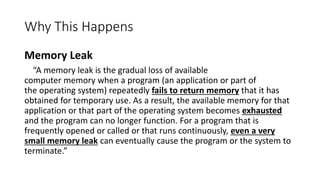
Memory Leak
“A memory leak is the gradual loss of available
computer memory when a program (an application or part of
the operating system) repeatedly fails to return memory that it has
obtained for temporary use. As a result, the available memory for that
application or that part of the operating system becomes exhausted
and the program can no longer function. For a program that is
frequently opened or called or that runs continuously, even a very
small memory leak can eventually cause the program or the system to
terminate.”
• Make the program smaller
• Get(Allocate) more memory
Which One?
MEMORY MANAGEMENT
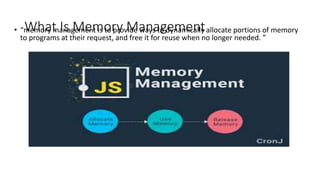
What Is Memory Management• “memory management is to provide ways to dynamically allocate portions of memory
to programs at their request, and free it for reuse when no longer needed. ”
How To Avoid Memory Leaks
• Monitor the resource consumption of your application over time
• Handle Memory Management at application side
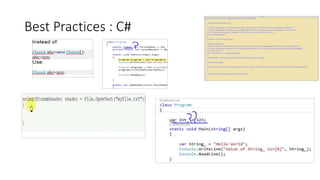
Best Practices : C#Create only the objects as and when needed and dispose it after use.
Decide the scope for each variable and object, if they are required
inside methods declare them inside those methods, do not make
them private
Use the IDisposable interfaces on your custom objects and release
all the resources(if any), un-register from all the events etc
Use ‘using’ if you are working with MemoryStream
Use least static variables or instances, if required then too think
twice whether those objects are required in entire lifetime of program
Do not use GC.Collect() manually,(it is bad practice)
Best Practices : C#
Best Practices : Javascript
• “Based on Garbage Collection as in C#”
• Always keep browser extension update
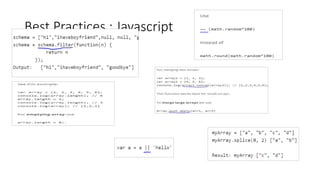
• Use Array Filter
• Use static buffers wherever possible. The compiler automatically frees such
memory.
• Previously allocated memory should be manually freed, after it is no longer
required.
• Use ~~ instead of math functions
• For emptying and array use length
• Merge array using push instead of concat
• Use splice to delete array element
• Get default value using ||
Best Practices : Javascript
Best Practices : Python• “Not based on Garbage Collection but it handles memory management”
Use Slots for your objects
Interning: Beware of Interned Strings!
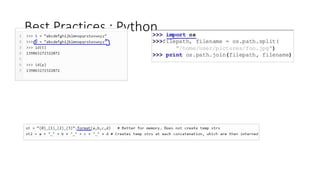
Use Format Instead of ‘+’ for Generating Strings
Use Modules
Use built-in functions wherever possible:
Use Multiprocessing not multithreading
Design and Data Structure
Pick right version
Best Practices : Python
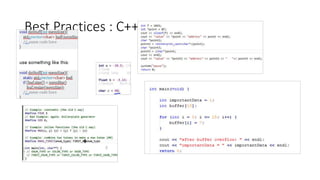
Best Practices : C++“You need to write code about memory management “
Reuse memory ; Try to avoid allocate/deallocate
Use macros instead of small functions
Use int,float instead of char
Try to avoid global variables
Use smart pointers
Use static buffers whenever possible because compiler frees up such kind of
memory automatically
Best Practices : C++
Before writing code Always Ask…
• Is there anything I could be doing more efficiently in my code?
• What (common) optimizations do language engines make?
• What is the language engine unable to optimize for
• Is there anyway I can minify my code?

Coding Best Practices For Memory Management

  • 1.
    Problems…….. • Application Crashed •Application Hanged • Intermittent Issue • Services are stopped • Bad Application Performance • Time Out Issues • While running one program another program is crashed
  • 2.
    Why This Happens MemoryLeak “A memory leak is the gradual loss of available computer memory when a program (an application or part of the operating system) repeatedly fails to return memory that it has obtained for temporary use. As a result, the available memory for that application or that part of the operating system becomes exhausted and the program can no longer function. For a program that is frequently opened or called or that runs continuously, even a very small memory leak can eventually cause the program or the system to terminate.”
  • 3.
    • Make theprogram smaller • Get(Allocate) more memory Which One? MEMORY MANAGEMENT
  • 4.
    What Is MemoryManagement• “memory management is to provide ways to dynamically allocate portions of memory to programs at their request, and free it for reuse when no longer needed. ”
  • 5.
    How To AvoidMemory Leaks • Monitor the resource consumption of your application over time • Handle Memory Management at application side
  • 6.
    Best Practices :C#Create only the objects as and when needed and dispose it after use. Decide the scope for each variable and object, if they are required inside methods declare them inside those methods, do not make them private Use the IDisposable interfaces on your custom objects and release all the resources(if any), un-register from all the events etc Use ‘using’ if you are working with MemoryStream Use least static variables or instances, if required then too think twice whether those objects are required in entire lifetime of program Do not use GC.Collect() manually,(it is bad practice)
  • 7.
  • 8.
    Best Practices :Javascript • “Based on Garbage Collection as in C#” • Always keep browser extension update • Use Array Filter • Use static buffers wherever possible. The compiler automatically frees such memory. • Previously allocated memory should be manually freed, after it is no longer required. • Use ~~ instead of math functions • For emptying and array use length • Merge array using push instead of concat • Use splice to delete array element • Get default value using ||
  • 9.
    Best Practices :Javascript
  • 10.
    Best Practices :Python• “Not based on Garbage Collection but it handles memory management” Use Slots for your objects Interning: Beware of Interned Strings! Use Format Instead of ‘+’ for Generating Strings Use Modules Use built-in functions wherever possible: Use Multiprocessing not multithreading Design and Data Structure Pick right version
  • 11.
  • 12.
    Best Practices :C++“You need to write code about memory management “ Reuse memory ; Try to avoid allocate/deallocate Use macros instead of small functions Use int,float instead of char Try to avoid global variables Use smart pointers Use static buffers whenever possible because compiler frees up such kind of memory automatically
  • 13.
  • 14.
    Before writing codeAlways Ask… • Is there anything I could be doing more efficiently in my code? • What (common) optimizations do language engines make? • What is the language engine unable to optimize for • Is there anyway I can minify my code?