Automatic Clustering
& Classification
Team: Yang
Priyanka
Jithesh
Arun.
Agenda
 Introduction to Clustering and Categorization.
 Types of Clustering
 Application of Clustering
 Application of Categorization
 Example (Quintara, NCSU Libraries)
 Clustering Categorization and Information
Architecture.
 Future works
 Questions ???
Clustering
 It is a process of partitioning a set of data in a set of
meaningful subclasses. Every data in the subclass shares a
common trait.
 It helps a user understand the natural grouping or structure in
a data set.
Categorization
 Classification is a technique used to predict group
membership for data instances. For example, you may wish to
use classification to predict whether the weather on a
particular day will be “sunny”, “rainy” or “cloudy”.
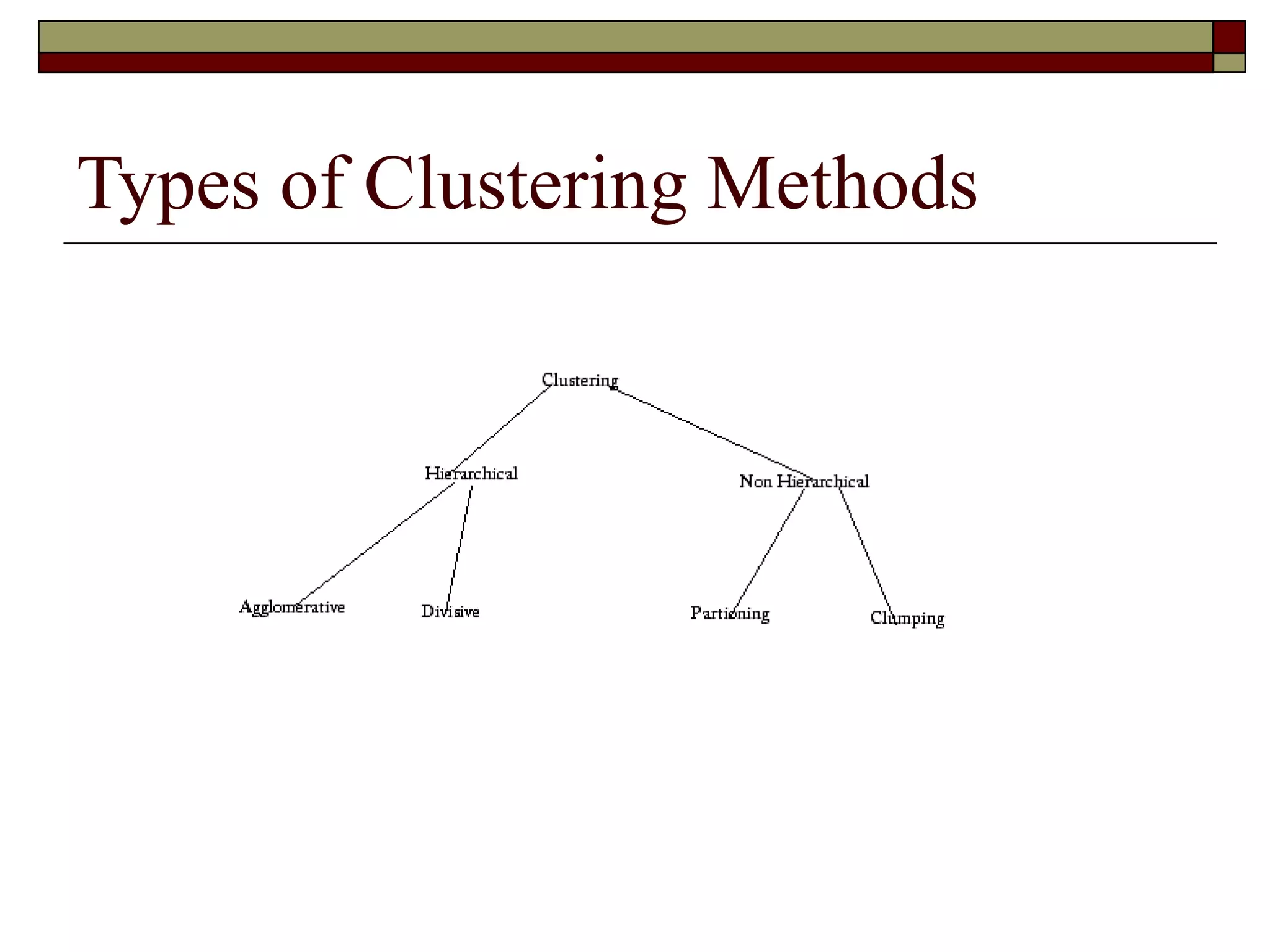
Types of Clustering Methods
How does Clusters Organize Documents?
 The Scatter Gather approach is used for Text Clustering.
 The user scatters documents into clusters, gathers the contents
of 1 or more clusters & re-scatters them to form new clusters.
 In text clustering, the documents are represented as Vectors
where each entry in the vector corresponds to a weighted
feature.
 Features that do not appear are represented as zero.
 Feature space is reduced by eliminating rare features.
 Similarity between 2 documents is the measure of word
overlap between them.
 The similarity measure results in the collection of documents
being clustered.
 The Scatter gather thus shows only a few large clusters
allowing the user to refine the cluster dynamically.
K Means Clustering
 In this K seeds are chosen to represent the
centers of the k resulting clusters.
 Each document is assigned to the cluster with
the most similar seed.
 It is a iterative process. Once every document
has been assigned to a cluster, new seeds can
be computed.
 The assignment process is repeated with these
new seeds.
Applications of Clustering
 Document retrieval and text mining
 Web Snippet
 Pattern classification
 Image segmentation/spatial data analysis
 GIS
 Medical Image Database
 Data mining
 Economic science (e.g. marketing)
 Scientific data exploration (e.g. bioinformatics)
 Tools: SAS, MATHLAB
 Windows NT
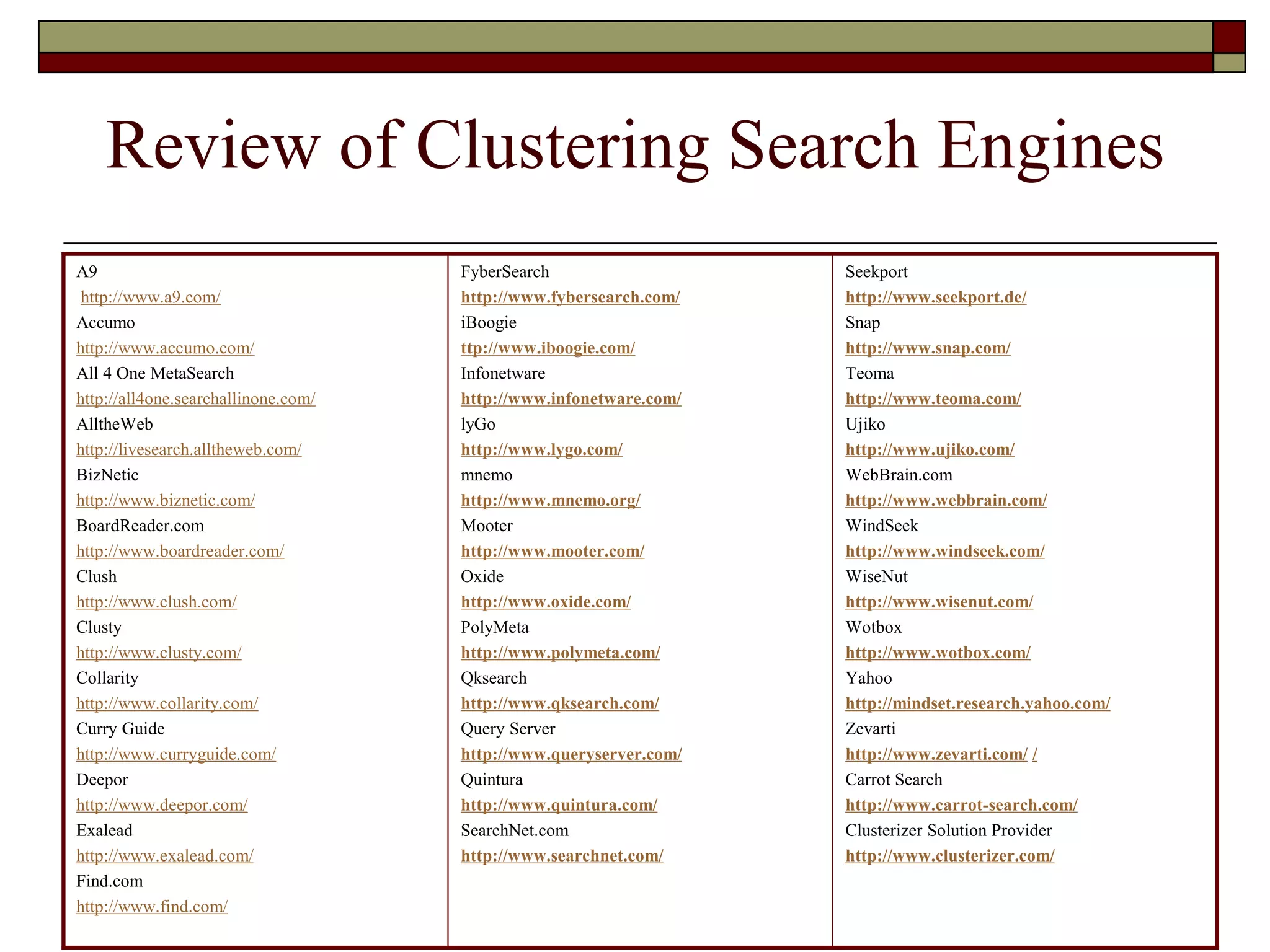
Review of Clustering Search Engines
A9
http://www.a9.com/
Accumo
http://www.accumo.com/
All 4 One MetaSearch
http://all4one.searchallinone.com/
AlltheWeb
http://livesearch.alltheweb.com/
BizNetic
http://www.biznetic.com/
BoardReader.com
http://www.boardreader.com/
Clush
http://www.clush.com/
Clusty
http://www.clusty.com/
Collarity
http://www.collarity.com/
Curry Guide
http://www.curryguide.com/
Deepor
http://www.deepor.com/
Exalead
http://www.exalead.com/
Find.com
http://www.find.com/
FyberSearch
http://www.fybersearch.com/
iBoogie
ttp://www.iboogie.com/
Infonetware
http://www.infonetware.com/
lyGo
http://www.lygo.com/
mnemo
http://www.mnemo.org/
Mooter
http://www.mooter.com/
Oxide
http://www.oxide.com/
PolyMeta
http://www.polymeta.com/
Qksearch
http://www.qksearch.com/
Query Server
http://www.queryserver.com/
Quintura
http://www.quintura.com/
SearchNet.com
http://www.searchnet.com/
Seekport
http://www.seekport.de/
Snap
http://www.snap.com/
Teoma
http://www.teoma.com/
Ujiko
http://www.ujiko.com/
WebBrain.com
http://www.webbrain.com/
WindSeek
http://www.windseek.com/
WiseNut
http://www.wisenut.com/
Wotbox
http://www.wotbox.com/
Yahoo
http://mindset.research.yahoo.com/
Zevarti
http://www.zevarti.com/ /
Carrot Search
http://www.carrot-search.com/
Clusterizer Solution Provider
http://www.clusterizer.com/
Applied Algorithms
Name Single terms as Labels Sentences as Labels Single terms as Labels Sentences as Labels on-line
Flat Clusters Flat Clusters Hierarchy of Clusters Hierarchy of Clusters
WebCat + +
Retriever +
Scatter/Gather +
Wang et al. +
Grouper +
Carrot + +
Lingo + +
Microsoft +
FICH + +
Credo + +
IBM +
SHOC +
CIIRarchies + +
LA +
Highlight + +
WhatsOnWeb + +
SnakeT + +
Mooter + +
Vivisimo + +
Example – Quintura
(http://www.quintura.com/)
 A super-cool UI allows Users to dynamically
move between the various clusters
 Interactive clustering is more interesting than
Clusty clustering.
 Refining Results are faster and more
customize.
 The font size of the terms indicates how
relevant and important Quintura considers the
word or phrase
Classification
 The goal of data classification is to organize and
categorize data into distinct classes
 A model is first created based on the data distribution
 The model is then used to classify new data
 Given the model, a class can be predicted for new data
 Classification Process
 Model Construction
 Model Evaluation
 Model Use
Model Construction - Learning
 Each record is assumed to belong to a pre-defined class, as determined by one of the attributes,
called the class label
 The set of all records used for construction of the model is called training set
 The model is usually presented in the form of classification rules, (IF-Then statements) or decision
trees.
Model Evaluation - Accuracy
 Estimate accuracy rate of the model based on a test set
 The known label of test sample is compared with the classified result from the model
 Accuracy rate: percentage of test set samples correctly classified by the model
 Caution: Test set is independent of training set otherwise over fitting will occur
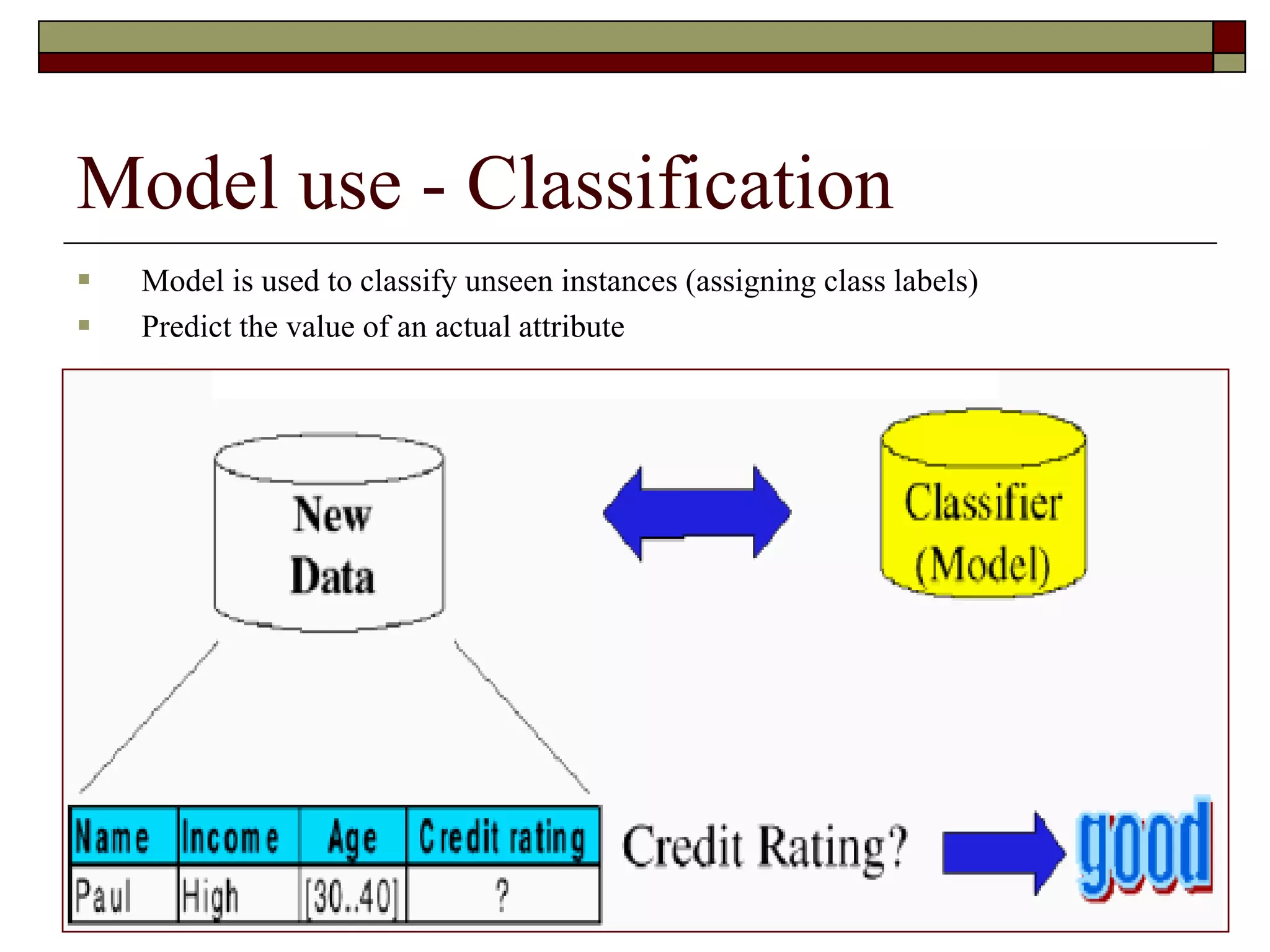
Model use - Classification
 Model is used to classify unseen instances (assigning class labels)
 Predict the value of an actual attribute
Applications of Classification
 Document classification
 BLISS in Libraries
 E-commerce interfaces
 Amazon, eBay
 Medical Domain
 MeSH
 Geodemographic classifications
 ACORN
 Data Mining
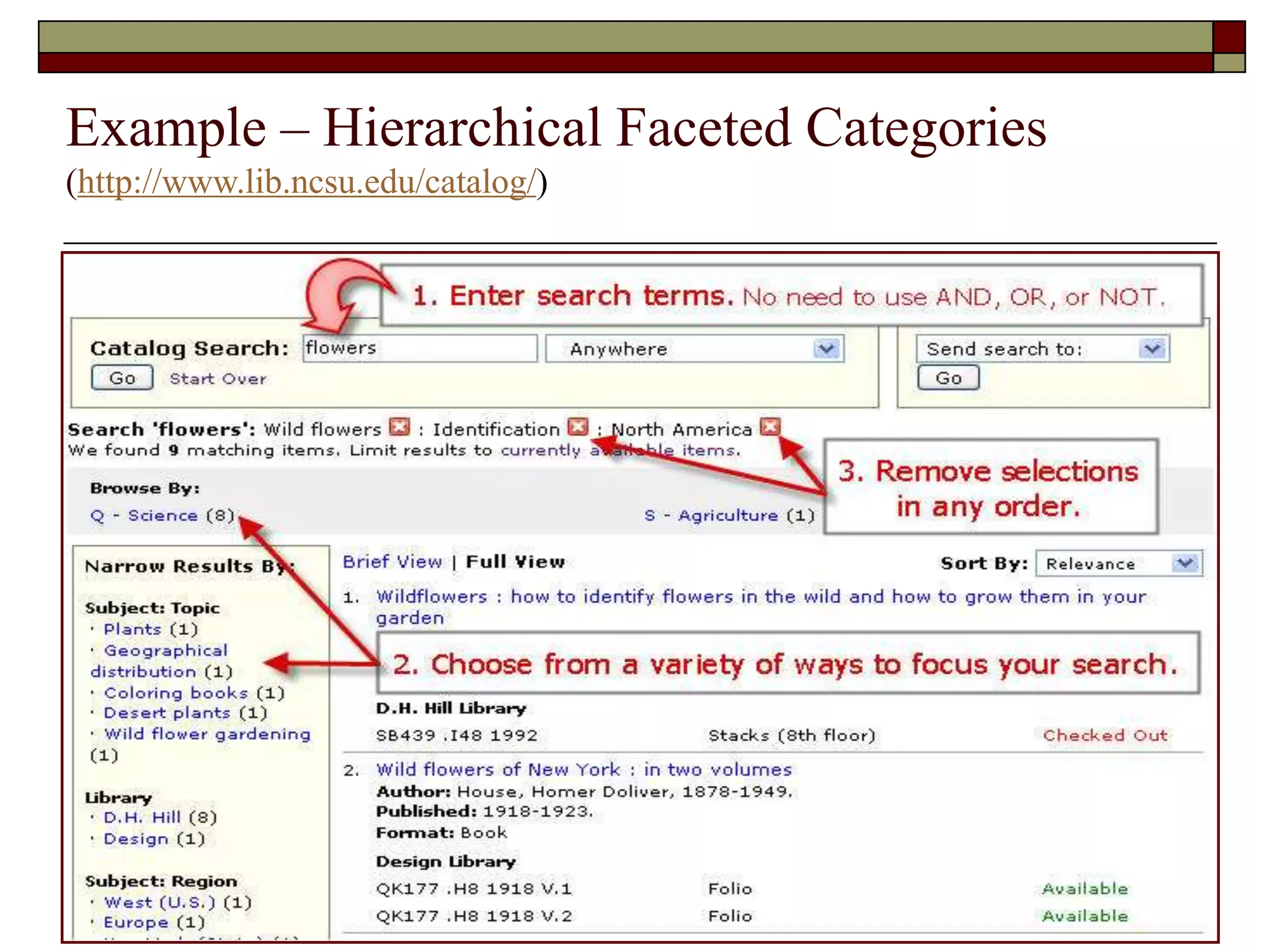
Example – Hierarchical Faceted Categories
(http://www.lib.ncsu.edu/catalog/)
Conclusion for Applications
 Both clustering and classification are
boutique search interfaces
 Applied and used primarily in domain-
specific collections
 It is an open question whether these will
eventually be widely and regularly used
on the open-domain Web
Relevance to Information Architecture
 Well defined Information Architecture must answer
the below mentioned questions
 Locating Search: Where is it?
 Query Entry: How can a user search it?
 Retrieval Results: What did the user find based on the
query?
 Query Refinement: How efficiently can user navigate
from broad to specific query?
 Interaction with other IA components: Besides searching,
components available for users?
 This section will provide answers to these question
using clustering based search website.
Automatic labeling patterns for clusters
 Two promising methods to create labeling
 X2
Test
 Frequent and Predictive Method
 X
2
Test
 This test is implemented in hierarchical clustering.
 It identifies the set of words that are equally likely to occur in children nodes of a current node.
 Such nodes are general for all sub trees of a current node and labeling of current node are made
based on these nodes.
 Bag of nodes used in this implementation excludes stop words
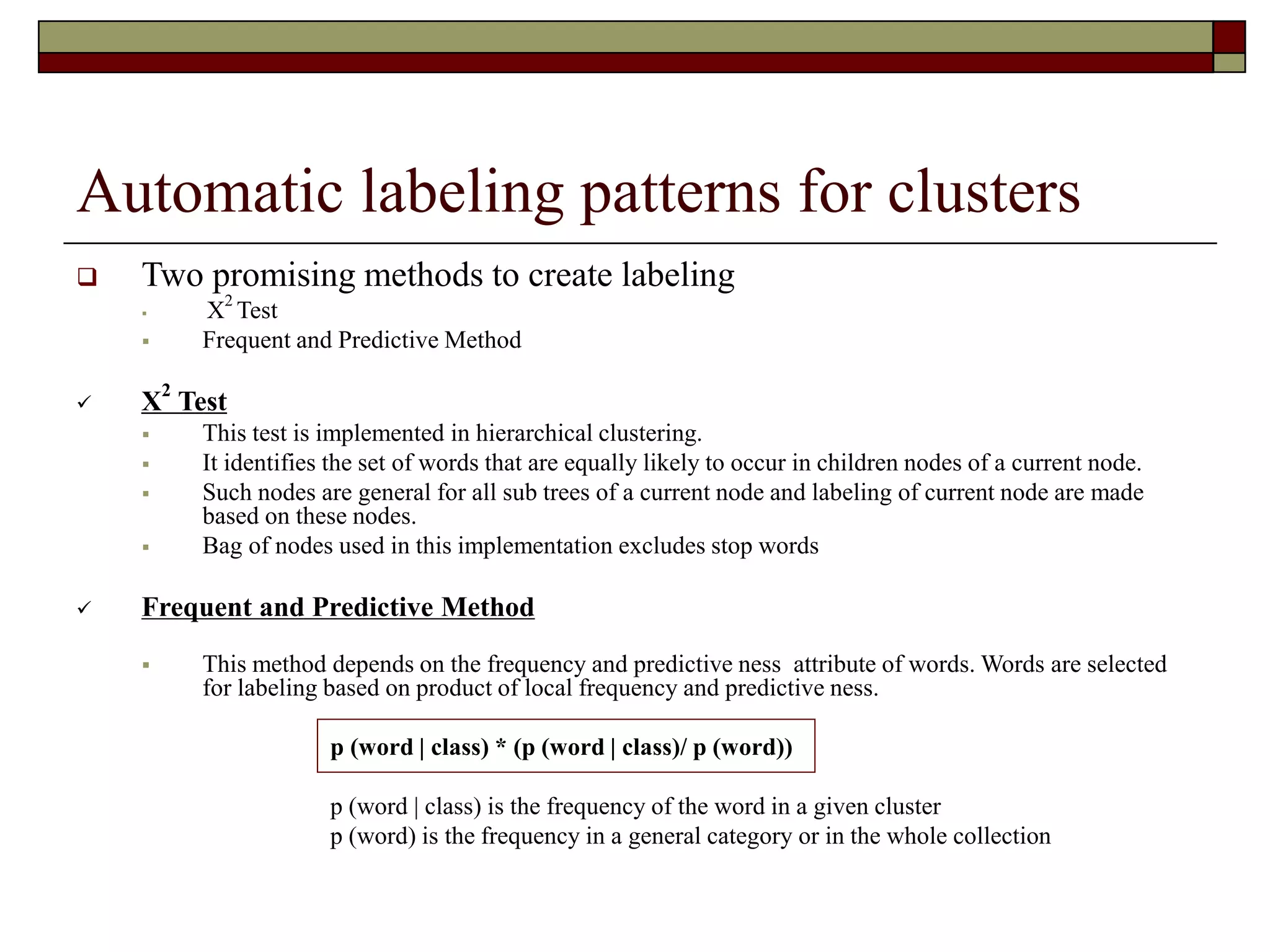
 Frequent and Predictive Method
 This method depends on the frequency and predictive ness attribute of words. Words are selected
for labeling based on product of local frequency and predictive ness.
p (word | class) * (p (word | class)/ p (word))
p (word | class) is the frequency of the word in a given cluster
p (word) is the frequency in a general category or in the whole collection
Quintura – Example (http://www.quintura.com)
 Qunintura is clustering based Search Website. It provides a visual user
experience by creating cluster cloud
 Features
 Visual Mapping
 In-depth Search
 Great Flexibility
 Faster Results
 Design
Query
Cloud
Refined Query
Result
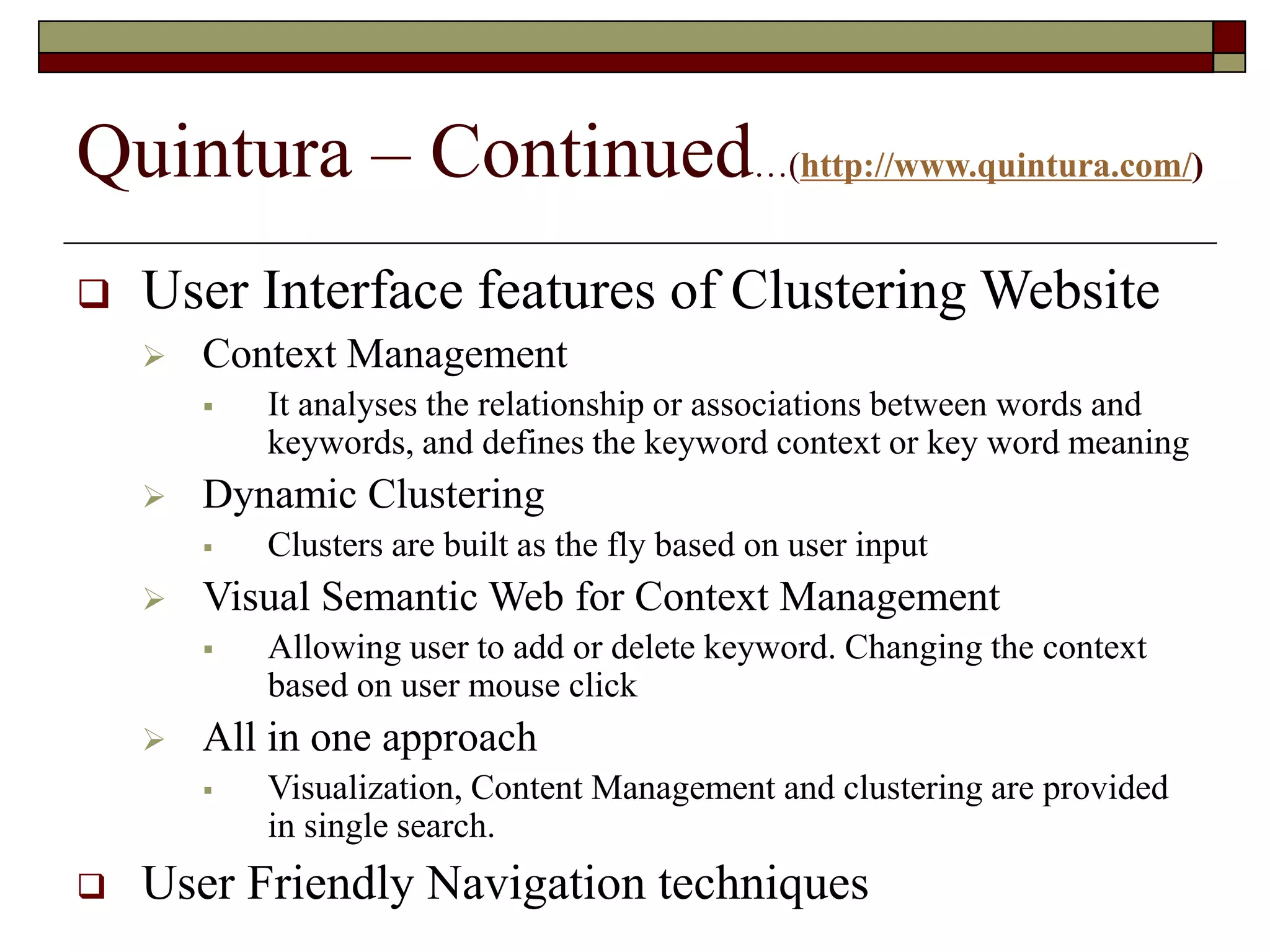
Quintura – Continued…(http://www.quintura.com/)
 User Interface features of Clustering Website
 Context Management
 It analyses the relationship or associations between words and
keywords, and defines the keyword context or key word meaning
 Dynamic Clustering
 Clusters are built as the fly based on user input
 Visual Semantic Web for Context Management
 Allowing user to add or delete keyword. Changing the context
based on user mouse click
 All in one approach
 Visualization, Content Management and clustering are provided
in single search.
 User Friendly Navigation techniques
Quintura – Continued…(http://www.quintura.com/)
 User can change the cluster cloud size in Quintura.
Depending on the user requirement, cloud size can be
adjusted to any number of keywords between 10 to 50.
 Besides entering search keyword, Users are can save
their search or share it with their friends.
 Users are provided with a long tail of keywords, thereby
enabling users to navigate from broad vision to specific
idea.
 Quintura supports visual semantic on web by allowing
users to add/ delete keywords in cluster clod.
 Mouse over the keyword will display the search results.
Pro. & Cons
Clustering Classification
• Identifies meaningful themes that
might not otherwise be discovered
• Themes are data driven
• Differentiate well in heterogeneous
collections
• Scale well semantically
• Domain independent
• Interpretable
• Can describe multiple facets of a
document’s content
• Domain dependent, descriptive
• High variability in quality of results
• Only one view of the many possible
meaningful organizations
• Not effective at differentiating
homogeneous documents
• Require interpretation
• Might not align with a user’s interests
• Do not scale well
• Domain dependent, costly to acquire
• Might not align with a user’s interests
Future
 A new type of decision tree, called an oblique tree, will soon
be available that generates splits based on compound
relationships between independent variables, rather than the
one-variable-at-a-time approach used today.
 Many data mining tools still require a significant level of
expertise from users.
 Tool vendors must design better user interfaces if they hope
to gain wider acceptance of their products.
 Easier interfaces will allow end users with limited technical
skills to achieve good results, yet let experts tweak models in
any number of ways, and rush users at any level of expertise
quickly through their learning curves.
Discussion.
Thank you.

clustering_classification.ppt

  • 1.
  • 2.
    Agenda  Introduction toClustering and Categorization.  Types of Clustering  Application of Clustering  Application of Categorization  Example (Quintara, NCSU Libraries)  Clustering Categorization and Information Architecture.  Future works  Questions ???
  • 3.
    Clustering  It isa process of partitioning a set of data in a set of meaningful subclasses. Every data in the subclass shares a common trait.  It helps a user understand the natural grouping or structure in a data set. Categorization  Classification is a technique used to predict group membership for data instances. For example, you may wish to use classification to predict whether the weather on a particular day will be “sunny”, “rainy” or “cloudy”.
  • 4.
  • 5.
    How does ClustersOrganize Documents?  The Scatter Gather approach is used for Text Clustering.  The user scatters documents into clusters, gathers the contents of 1 or more clusters & re-scatters them to form new clusters.  In text clustering, the documents are represented as Vectors where each entry in the vector corresponds to a weighted feature.  Features that do not appear are represented as zero.  Feature space is reduced by eliminating rare features.  Similarity between 2 documents is the measure of word overlap between them.  The similarity measure results in the collection of documents being clustered.  The Scatter gather thus shows only a few large clusters allowing the user to refine the cluster dynamically.
  • 6.
    K Means Clustering In this K seeds are chosen to represent the centers of the k resulting clusters.  Each document is assigned to the cluster with the most similar seed.  It is a iterative process. Once every document has been assigned to a cluster, new seeds can be computed.  The assignment process is repeated with these new seeds.
  • 7.
    Applications of Clustering Document retrieval and text mining  Web Snippet  Pattern classification  Image segmentation/spatial data analysis  GIS  Medical Image Database  Data mining  Economic science (e.g. marketing)  Scientific data exploration (e.g. bioinformatics)  Tools: SAS, MATHLAB  Windows NT
  • 8.
    Review of ClusteringSearch Engines A9 http://www.a9.com/ Accumo http://www.accumo.com/ All 4 One MetaSearch http://all4one.searchallinone.com/ AlltheWeb http://livesearch.alltheweb.com/ BizNetic http://www.biznetic.com/ BoardReader.com http://www.boardreader.com/ Clush http://www.clush.com/ Clusty http://www.clusty.com/ Collarity http://www.collarity.com/ Curry Guide http://www.curryguide.com/ Deepor http://www.deepor.com/ Exalead http://www.exalead.com/ Find.com http://www.find.com/ FyberSearch http://www.fybersearch.com/ iBoogie ttp://www.iboogie.com/ Infonetware http://www.infonetware.com/ lyGo http://www.lygo.com/ mnemo http://www.mnemo.org/ Mooter http://www.mooter.com/ Oxide http://www.oxide.com/ PolyMeta http://www.polymeta.com/ Qksearch http://www.qksearch.com/ Query Server http://www.queryserver.com/ Quintura http://www.quintura.com/ SearchNet.com http://www.searchnet.com/ Seekport http://www.seekport.de/ Snap http://www.snap.com/ Teoma http://www.teoma.com/ Ujiko http://www.ujiko.com/ WebBrain.com http://www.webbrain.com/ WindSeek http://www.windseek.com/ WiseNut http://www.wisenut.com/ Wotbox http://www.wotbox.com/ Yahoo http://mindset.research.yahoo.com/ Zevarti http://www.zevarti.com/ / Carrot Search http://www.carrot-search.com/ Clusterizer Solution Provider http://www.clusterizer.com/
  • 9.
    Applied Algorithms Name Singleterms as Labels Sentences as Labels Single terms as Labels Sentences as Labels on-line Flat Clusters Flat Clusters Hierarchy of Clusters Hierarchy of Clusters WebCat + + Retriever + Scatter/Gather + Wang et al. + Grouper + Carrot + + Lingo + + Microsoft + FICH + + Credo + + IBM + SHOC + CIIRarchies + + LA + Highlight + + WhatsOnWeb + + SnakeT + + Mooter + + Vivisimo + +
  • 10.
    Example – Quintura (http://www.quintura.com/) A super-cool UI allows Users to dynamically move between the various clusters  Interactive clustering is more interesting than Clusty clustering.  Refining Results are faster and more customize.  The font size of the terms indicates how relevant and important Quintura considers the word or phrase
  • 11.
    Classification  The goalof data classification is to organize and categorize data into distinct classes  A model is first created based on the data distribution  The model is then used to classify new data  Given the model, a class can be predicted for new data  Classification Process  Model Construction  Model Evaluation  Model Use
  • 12.
    Model Construction -Learning  Each record is assumed to belong to a pre-defined class, as determined by one of the attributes, called the class label  The set of all records used for construction of the model is called training set  The model is usually presented in the form of classification rules, (IF-Then statements) or decision trees.
  • 13.
    Model Evaluation -Accuracy  Estimate accuracy rate of the model based on a test set  The known label of test sample is compared with the classified result from the model  Accuracy rate: percentage of test set samples correctly classified by the model  Caution: Test set is independent of training set otherwise over fitting will occur
  • 14.
    Model use -Classification  Model is used to classify unseen instances (assigning class labels)  Predict the value of an actual attribute
  • 15.
    Applications of Classification Document classification  BLISS in Libraries  E-commerce interfaces  Amazon, eBay  Medical Domain  MeSH  Geodemographic classifications  ACORN  Data Mining
  • 16.
    Example – HierarchicalFaceted Categories (http://www.lib.ncsu.edu/catalog/)
  • 17.
    Conclusion for Applications Both clustering and classification are boutique search interfaces  Applied and used primarily in domain- specific collections  It is an open question whether these will eventually be widely and regularly used on the open-domain Web
  • 18.
    Relevance to InformationArchitecture  Well defined Information Architecture must answer the below mentioned questions  Locating Search: Where is it?  Query Entry: How can a user search it?  Retrieval Results: What did the user find based on the query?  Query Refinement: How efficiently can user navigate from broad to specific query?  Interaction with other IA components: Besides searching, components available for users?  This section will provide answers to these question using clustering based search website.
  • 19.
    Automatic labeling patternsfor clusters  Two promising methods to create labeling  X2 Test  Frequent and Predictive Method  X 2 Test  This test is implemented in hierarchical clustering.  It identifies the set of words that are equally likely to occur in children nodes of a current node.  Such nodes are general for all sub trees of a current node and labeling of current node are made based on these nodes.  Bag of nodes used in this implementation excludes stop words  Frequent and Predictive Method  This method depends on the frequency and predictive ness attribute of words. Words are selected for labeling based on product of local frequency and predictive ness. p (word | class) * (p (word | class)/ p (word)) p (word | class) is the frequency of the word in a given cluster p (word) is the frequency in a general category or in the whole collection
  • 20.
    Quintura – Example(http://www.quintura.com)  Qunintura is clustering based Search Website. It provides a visual user experience by creating cluster cloud  Features  Visual Mapping  In-depth Search  Great Flexibility  Faster Results  Design Query Cloud Refined Query Result
  • 21.
    Quintura – Continued…(http://www.quintura.com/) User Interface features of Clustering Website  Context Management  It analyses the relationship or associations between words and keywords, and defines the keyword context or key word meaning  Dynamic Clustering  Clusters are built as the fly based on user input  Visual Semantic Web for Context Management  Allowing user to add or delete keyword. Changing the context based on user mouse click  All in one approach  Visualization, Content Management and clustering are provided in single search.  User Friendly Navigation techniques
  • 22.
    Quintura – Continued…(http://www.quintura.com/) User can change the cluster cloud size in Quintura. Depending on the user requirement, cloud size can be adjusted to any number of keywords between 10 to 50.  Besides entering search keyword, Users are can save their search or share it with their friends.  Users are provided with a long tail of keywords, thereby enabling users to navigate from broad vision to specific idea.  Quintura supports visual semantic on web by allowing users to add/ delete keywords in cluster clod.  Mouse over the keyword will display the search results.
  • 23.
    Pro. & Cons ClusteringClassification • Identifies meaningful themes that might not otherwise be discovered • Themes are data driven • Differentiate well in heterogeneous collections • Scale well semantically • Domain independent • Interpretable • Can describe multiple facets of a document’s content • Domain dependent, descriptive • High variability in quality of results • Only one view of the many possible meaningful organizations • Not effective at differentiating homogeneous documents • Require interpretation • Might not align with a user’s interests • Do not scale well • Domain dependent, costly to acquire • Might not align with a user’s interests
  • 24.
    Future  A newtype of decision tree, called an oblique tree, will soon be available that generates splits based on compound relationships between independent variables, rather than the one-variable-at-a-time approach used today.  Many data mining tools still require a significant level of expertise from users.  Tool vendors must design better user interfaces if they hope to gain wider acceptance of their products.  Easier interfaces will allow end users with limited technical skills to achieve good results, yet let experts tweak models in any number of ways, and rush users at any level of expertise quickly through their learning curves.
  • 25.