Cloud Computing
Module II
Virtualization
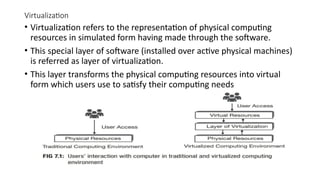
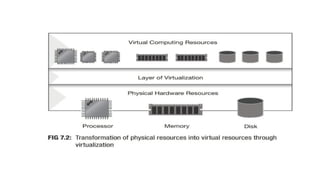
• Virtualization refers to the representation of physical computing
resources in simulated form having made through the software.
• This special layer of software (installed over active physical machines)
is referred as layer of virtualization.
• This layer transforms the physical computing resources into virtual
form which users use to satisfy their computing needs
• The software for virtualization consists of a set of control programs.
• It offers all of the physical computing resources in custom made
simulated (virtual) form which users can utilize to build virtual
computing setup or virtual computers or virtual machines (VM).
• Users can install operating system over virtual computer just like they
do it over physical computer.
• Operating system installed over virtual computing environment is
known as guest operating system.
• When virtualization technique is in place, the guest OS executes as if
it were running directly on the physical machine.
2.1 Levels of virtualization
2.1.1 Implementation levels of virtualization
• Virtualization is a computer architecture technology by which multiple virtual
machines (VMs) are multiplexed in the same hardware machine.
• The purpose of a VM is to enhance resource sharing by many users and improve
computer performance in terms of resource utilization and application flexibility.
• Hardware resources (CPU, memory, I/O devices, etc.) or software resources
(operating system and software libraries) can be virtualized in various functional
layers
• After virtualization, different user applications managed by their own operating
systems (guest OS) can run on the same hardware, independent of the host OS.
• This is often done by adding additional software, called a virtualization layer. This
virtualization layer is known as hypervisor or virtual machine monitor (VMM)
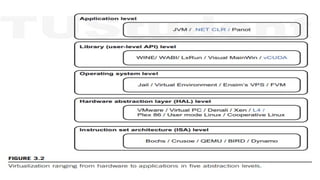
• The main function of the software layer for virtualization is to
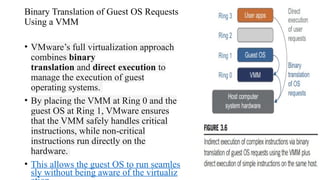
virtualize the physical hardware of a host machine into virtual
resources to be used by the VMs. This can be implemented at various
operational levels.
• Common virtualization layers include
• Instruction set architecture (ISA) level
• Hardware level
• Operating system level
• Library support level
• Application level
2.1.1.1 Instruction Set Architecture Level
• At the ISA level, virtualization is performed by emulating a given ISA by the ISA of the
host machine.
• The basic emulation method is through code interpretation.
• An interpreter program interprets the source instructions to target instructions one by
one.
• One source instruction may require tens or hundreds of native target instructions to
perform its function. Obviously, this process is relatively slow.
• For better performance, dynamic binary translation is desired. This approach translates
basic blocks of dynamic source instructions to target instructions
• . The basic blocks can also be extended to program traces or superblocks to increase
translation efficiency.
• Instruction set emulation requires binary translation and optimization.
• A virtual instruction set architecture (V-ISA) thus requires adding a processor-specific
software translation layer to the compiler
2.1.1.2 Hardware Abstraction Level
• Hardware-level virtualization is performed right on top of the bare
hardware.
• On the one hand, this approach generates a virtual hardware
environment for a VM.
• On the other hand, the process manages the underlying hardware
through virtualization.
• The idea is to virtualize a computer’s resources, such as its processors,
memory, and I/O devices.
• The intention is to upgrade the hardware utilization rate by multiple
users concurrently.
2.1.1.3 Operating System Level
• This refers to an abstraction layer between traditional OS and user
applications.
• OS-level virtualization creates isolated containers on a single physical
server and the OS instances to utilize the hardware and software in data
centers.
• The containers behave like real servers.
• OS-level virtualization is commonly used in creating virtual hosting
environments to allocate hardware resources among a large number of
mutually distrusting users.
• It is also used, to a lesser extent, in consolidating server hardware by
moving services on separate hosts into containers or VMs on one server.
2.1.1.4 Library Support Level
• Virtualization with library interfaces is possible by controlling the
communication link between applications and the rest of a system
through API hooks.
• The software tool WINE has implemented this approach to support
Windows applications on top of UNIX hosts.
• Another example is the vCUDA which allows applications executing
within VMs to leverage GPU hardware acceleration.
2.1.1.5 User-Application Level
• Application-level virtualization is also known as process-level virtualization.
• The most popular approach is to deploy high level language (HLL) VMs.
• In this scenario, the virtualization layer sits as an application program on top of the
operating system, and the layer exports an abstraction of a VM that can run programs
written and compiled to a particular abstract machine definition.
• Any program written in the HLL and compiled for this VM will be able to run on it.
• The Microsoft .NET CLR and Java Virtual Machine (JVM) are two good examples of this class
of VM.
• Other forms of application-level virtualization are known as application isolation, application
sandboxing, or application streaming.
• The process involves wrapping the application in a layer that is isolated from the host OS and
other applications.
• The result is an application that is much easier to distribute and remove from user
workstations
2.1.2 VMM Design Requirements and Providers
• Hardware-level virtualization inserts a layer between real hardware and
traditional operating systems.
• This layer is called the Virtual Machine Monitor (VMM) and manages a
computing system's hardware resources.
• Each time programs access the hardware the VMM captures the
process. i.e. VMM acts as a traditional OS.
• One hardware component, such as the CPU, can be virtualized as
several virtual copies.
• Therefore, several traditional operating systems which are the same or
different can sit on the same set of hardware simultaneously
• There are three requirements for a VMM:
• VMM should provide an environment for programs which is essentially
identical to the original machine.
• Second, programs run in this environment should show, at worst, only minor
decreases in speed.
• Third, a VMM should be in complete control of the system resources.
• Any program run under a VMM should exhibit a function identical to
that which it runs on the original machine directly.
• Two possible exceptions in terms of differences are permitted with
this requirement:
• differences caused by the availability of system resources
• differences caused by timing dependencies.
• The former arises when more than one VM is running on the same
machine
• Exceptions:
1.System Resource Availability:
1. Cause: This difference arises when multiple VMs are running on the same physical
machine.
2. Explanation: When several VMs share the same hardware resources (CPU, memory,
disk, network), the allocation of these resources can vary. For instance, if multiple VMs
demand CPU time simultaneously, the VMM must distribute the CPU time among
them. This can lead to situations where a VM gets fewer resources than it would on a
dedicated machine, affecting the program's performance.
2.Timing Dependencies:
1. Cause: This difference arises due to how timing works within a virtualized environment.
2. Explanation: Programs often rely on specific timing to function correctly (e.g., waiting
for a certain amount of time before proceeding to the next step). In a virtualized
environment, the VMM might introduce variability in timing because it has to manage
multiple VMs, causing delays or differences in timing. This can lead to slight variations
in how a program executes, especially in time-sensitive operations.
• The hardware resource requirements, such as memory, of each VM are
reduced, but the sum of them is greater than that of the real machine
installed.
• The latter qualification is required because of the intervening level of
software and the effect of any other VMs concurrently existing on the
same hardware.
• These two differences pertain to performance, while the function a VMM
provides stays the same as that of a real machine.
• A VMM should demonstrate efficiency in using the VMs. Compared with
a physical machine, no one prefers a VMM if its efficiency is too low
Reduced Resource Requirements per VM:
•Explanation: Each individual VM generally requires fewer hardware resources (like memory) compared to
running the same software on a physical machine. This is because VMMs can optimize and share resources
efficiently among VMs.
Cumulative Resource Usage:
•Explanation: Although each VM might need fewer resources individually, when you add up the resource
requirements of all VMs running on the same hardware, the total can exceed the resources available on the
physical machine. This happens because:
•The VMM itself uses some resources to manage the VMs.
•There might be inefficiencies or overhead associated with virtualization.
•Multiple VMs running simultaneously can lead to higher total resource usage.
Impact of Concurrent VMs:
•Explanation: The presence of multiple VMs running at the same time on the same hardware can affect
performance. Each VM might experience delays or reduced performance due to competition for the same
hardware resources (CPU, memory, etc.).
• Complete control of these resources by a VMM includes the following
aspects:
• The VMM is responsible for allocating hardware resources for programs;
• It is not possible for a program to access any resource not explicitly allocated
to it;
• It is possible under certain circumstances for a VMM to regain control of
resources already allocated.
• Not all processors satisfy these requirements for a VMM.
2.1.3 Virtualization Support at the OS Level
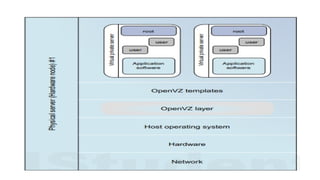
• Operating system virtualization inserts a virtualization layer inside an
operating system to partition a machine’s physical resources.
• It enables multiple isolated VMs within a single operating system kernel.
• This kind of VM is often called a virtual execution environment (VE),
Virtual Private System (VPS), or simply container.
• This means a VE has its own set of processes, file system, user accounts,
network interfaces with IP addresses, routing tables, firewall rules, and
other personal settings.
• Although VEs can be customized for different people, they share the
same operating system kernel. Therefore, OS-level virtualization is also
called single-OS image virtualization
Advantages
• Compared to hardware-level virtualization, the benefits of OS
extensions are twofold:
• VMs at the operating system level have minimal startup/shutdown costs, low
resource requirements, and high scalability;
• For an OS-level VM, it is possible for a VM and its host environment to
synchronize state changes when necessary.
• These benefits can be achieved via two mechanisms of OS-level virtualization:
• All OS-level VMs on the same physical machine share a single operating system kernel;
• The virtualization layer can be designed in a way that allows processes in VMs to access
as many resources of the host machine as possible, but never to modify them.
Disadvantages of OS Extensions
• The main disadvantage of OS extensions is that all the VMs at
operating system level on a single container must have the same kind
of guest operating system.
• That is, although different OS-level VMs may have different operating
system distributions, they must pertain to the same operating system
family.
• For example, a Windows distribution such as Windows XP cannot run
on a Linux-based container
2.1.4 Middleware Support for Virtualization
• Library-level virtualization is also known as user-level Application
Binary Interface (ABI) or API emulation.
• This type of virtualization can create execution environments for
running alien programs on a platform rather than creating a VM to
run the entire operating system
2.2 VIRTUALIZATION STRUCTURES/TOOLS AND MECHANISMS
• Depending on the position of the virtualization layer, there are several
classes of VM architectures, namely
• The hypervisor architecture
• Paravirtualization
• Host-based virtualization
2.2.1 Hypervisor and Xen Architecture
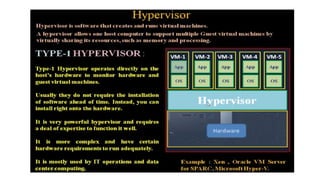
• The hypervisor supports hardware-level virtualization on bare metal
devices like CPU, memory, disk and network interfaces.
• The hypervisor software sits directly between the physical hardware
and its OS. This virtualization layer is referred to as either the VMM or
the hypervisor.
• The hypervisor provides hypercalls for the guest OSes and
applications.
The Xen Architecture
• Xen is an open source hypervisor program developed by Cambridge
University.
• Xen is a microkernel hypervisor, which separates the policy from the
mechanism.
• The Xen hypervisor implements all the mechanisms, leaving the policy
to be handled by Domain 0
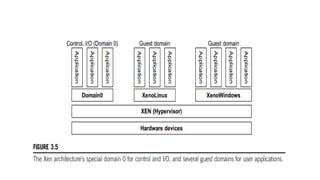
• The core components of a Xen system are the hypervisor, kernel, and
applications.
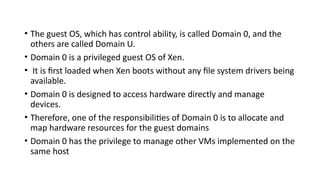
• The guest OS, which has control ability, is called Domain 0, and the
others are called Domain U.
• Domain 0 is a privileged guest OS of Xen.
• It is first loaded when Xen boots without any file system drivers being
available.
• Domain 0 is designed to access hardware directly and manage
devices.
• Therefore, one of the responsibilities of Domain 0 is to allocate and
map hardware resources for the guest domains
• Domain 0 has the privilege to manage other VMs implemented on the
same host
2.2.1 Binary Translation with Full Virtualization
• Depending on implementation technologies, hardware virtualization
can be classified into two categories:
• Full virtualization
• Host-based virtualization.
• Full virtualization does not need to modify the host OS. It relies on
binary translation to trap and to virtualize the execution of certain
sensitive, nonvirtualizable instructions. The guest OSes and their
applications consist of noncritical and critical instructions.
• In a host-based system, both host and guest OS are used. A
virtualization software layer is built between the host OS and guest OS
Full Virtualization
• In full virtualization, noncritical instructions run directly on
the hardware for efficiency, while critical instructions are
intercepted and emulated by the VMM to ensure proper
execution.
• Both hypervisors and VMMs are essential components of full virtualiz
ation, providing the necessary environment and management for virtua
l machines
.
Why are only critical instructions trapped into the VMM?
• This is because binary translation can incur a large performance
overhead. Noncritical instructions do not control hardware or
threaten the security of the system, but critical instructions do.
Therefore, running noncritical instructions on hardware not only can
promote efficiency, but also can ensure system security
Binary Translation of Guest OS Requests
Using a VMM
• VMware’s full virtualization approach
combines binary
translation and direct execution to
manage the execution of guest
operating systems.
• By placing the VMM at Ring 0 and the
guest OS at Ring 1, VMware ensures
that the VMM safely handles critical
instructions, while non-critical
instructions run directly on the
hardware.
• This allows the guest OS to run seamles
sly without being aware of the virtualiz
Host-Based Virtualization
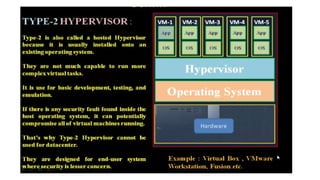
• In this architecture, a virtualization layer is installed on top
of the host operating system (OS).
• The host OS continues to manage the hardware resources.
• Guest operating systems (guest OSes) are installed and
run on top of this virtualization layer.
• Dedicated applications can run on the virtual machines
(VMs) created by the virtualization layer.
• Other applications can still run directly on the host OS.
Advantages:
1.No Modification Needed: Users can install this VM architecture without
modifying the host OS.
2.Simplified Design and Deployment: The virtualizing software relies on
the host OS to provide device drivers and other low-level services,
simplifying the VM design and making deployment easier.
3.Compatibility: This approach is compatible with many host machine
configurations.
• Performance Impact: Compared to the hypervisor/VMM
architecture, the performance of the host-based architecture
may be lower.
• Layered Mapping: When an application requests hardware
access, it involves four layers of mapping (application, guest OS,
virtualization layer, host OS), which can significantly degrade
performance.
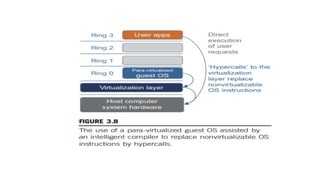
Para-Virtualization with Compiler Support
• Para-virtualization requires modifications to the guest operating
system (OS).
• Special APIs are provided, which necessitate substantial changes in
the OS and user applications.
• Performance degradation is a critical issue in virtualized systems.
• Para-virtualization aims to reduce the overhead associated with
virtualization, thereby improving performance by modifying only the
guest OS kernel.
• In para-virtualization, VMM layer is typically placed between the
hardware and the OS.
Para-Virtualization Architecture
• The x86 processor architecture has four rings (0 to 3) that define
privilege levels.
• Ring 0: Highest privilege level, where the OS kernel runs.
• Ring 3: Lowest privilege level, where user-level applications run.
• The virtualization layer is installed at Ring 0, which can cause
issues if different instructions at Ring 0 conflict.
• An intelligent compiler assists in replacing non-virtualizable
instructions with hypercalls.
• This ensures that the guest OS can communicate effectively with
the hypervisor.
VIRTUALIZATION OF CPU, MEMORY, AND I/O DEVICES
Hardware Virtualization
• To support virtualization, processors such as the x86 employ a special running
mode and instructions, known as hardware-assisted virtualization.
• Modern operating systems and processors allow multiple
processes to run simultaneously.
• Without protection mechanisms, instructions from different
processes could access hardware directly, potentially causing
system crashes.
• For running user-level applications with limited access to hardware
we have user mode.
• For running the OS kernel with full access to hardware (also known
as privileged mode) we use Supervisor Mode.
• Hardware-assisted virtualization uses special processor
modes and instructions to support virtualization efficiently.
• The VMM and guest OS run in different modes, with
sensitive instructions trapped by the VMM.
• Mode switching is handled by the hardware, and companies
like Intel and AMD provide proprietary technologies for this
purpose.
• Modern processors have user and supervisor modes to
ensure controlled access to hardware, with privileged
instructions running in supervisor mode.
•
Hardware-assisted virtualization helps manage the complexi
ty of virtualized environments by providing efficient support
for virtualization tasks
CPU Virtualization
• A VM duplicates an existing computer system, with most
instructions running directly on the host processor for efficiency.
• Critical instructions are categorized into privileged, control-
sensitive, and behavior-sensitive instructions, which are handled
by the VMM to ensure system stability.
• A CPU architecture is virtualizable if it supports running VM
instructions in user mode while the VMM runs in supervisor
mode. RISC architectures are naturally virtualizable, while x86
architectures have limitations.
• In UNIX-like systems, system calls are handled by triggering
interrupts that pass control to the OS kernel.
Memory Virtualization
• In virtual memory virtualization, the traditional one-stage
mapping of virtual memory to physical memory is extended
to a two-stage mapping process in a virtualized
environment.
• The guest OS manages the first stage (virtual memory to
physical memory), while the VMM manages the second
stage (physical memory to machine memory).
• MMU virtualization supports this process, ensuring that the
guest OS can operate without being aware of the underlying
complexity.
• This allows efficient sharing and dynamic allocation of
physical system memory among multiple VMs.
IO Virtualization
• I/O virtualization involves managing the routing of
input/output (I/O) requests between virtual devices and the
shared physical hardware. This allows multiple virtual
machines (VMs) to share the same physical I/O devices (like
network cards, storage devices, etc.) efficiently.
• Three Ways to Implement I/O Virtualization
1.Full Device Emulation:
1. Description: This approach emulates well-known, real-world devices.
2. How It Works: The virtual machine monitor (VMM) or hypervisor creates a virtual version of a physical
device. The guest OS interacts with this virtual device as if it were a real one.
3. Advantages: Compatibility with a wide range of guest operating systems and applications, as they
see familiar devices.
4. Disadvantages: Can be slower due to the overhead of emulating the device.
2.Para-Virtualization:
1. Description: This approach requires modifications to the guest OS to be aware of the virtual
environment.
2. How It Works: The guest OS uses special APIs to interact with the VMM, bypassing some of the
overhead associated with full device emulation.
3. Advantages: Improved performance compared to full device emulation because it reduces the
overhead.
4. Disadvantages: Requires changes to the guest OS, which may not always be possible or desirable.
3.Direct I/O:
1. Description: This approach allows the guest OS to access physical devices directly.
2. How It Works: The VMM provides a direct path to the physical device, minimizing the overhead.
3. Advantages: Highest performance since it eliminates most of the virtualization overhead.
4. Disadvantages: More complex to implement and may require specific hardware support.

cloudcomputingmodule2virtualizationbossss

  • 1.
  • 2.
    Virtualization • Virtualization refersto the representation of physical computing resources in simulated form having made through the software. • This special layer of software (installed over active physical machines) is referred as layer of virtualization. • This layer transforms the physical computing resources into virtual form which users use to satisfy their computing needs
  • 3.
    • The softwarefor virtualization consists of a set of control programs. • It offers all of the physical computing resources in custom made simulated (virtual) form which users can utilize to build virtual computing setup or virtual computers or virtual machines (VM). • Users can install operating system over virtual computer just like they do it over physical computer. • Operating system installed over virtual computing environment is known as guest operating system. • When virtualization technique is in place, the guest OS executes as if it were running directly on the physical machine.
  • 7.
    2.1 Levels ofvirtualization
  • 8.
    2.1.1 Implementation levelsof virtualization • Virtualization is a computer architecture technology by which multiple virtual machines (VMs) are multiplexed in the same hardware machine. • The purpose of a VM is to enhance resource sharing by many users and improve computer performance in terms of resource utilization and application flexibility. • Hardware resources (CPU, memory, I/O devices, etc.) or software resources (operating system and software libraries) can be virtualized in various functional layers • After virtualization, different user applications managed by their own operating systems (guest OS) can run on the same hardware, independent of the host OS. • This is often done by adding additional software, called a virtualization layer. This virtualization layer is known as hypervisor or virtual machine monitor (VMM)
  • 9.
    • The mainfunction of the software layer for virtualization is to virtualize the physical hardware of a host machine into virtual resources to be used by the VMs. This can be implemented at various operational levels. • Common virtualization layers include • Instruction set architecture (ISA) level • Hardware level • Operating system level • Library support level • Application level
  • 10.
    2.1.1.1 Instruction SetArchitecture Level • At the ISA level, virtualization is performed by emulating a given ISA by the ISA of the host machine. • The basic emulation method is through code interpretation. • An interpreter program interprets the source instructions to target instructions one by one. • One source instruction may require tens or hundreds of native target instructions to perform its function. Obviously, this process is relatively slow. • For better performance, dynamic binary translation is desired. This approach translates basic blocks of dynamic source instructions to target instructions • . The basic blocks can also be extended to program traces or superblocks to increase translation efficiency. • Instruction set emulation requires binary translation and optimization. • A virtual instruction set architecture (V-ISA) thus requires adding a processor-specific software translation layer to the compiler
  • 11.
    2.1.1.2 Hardware AbstractionLevel • Hardware-level virtualization is performed right on top of the bare hardware. • On the one hand, this approach generates a virtual hardware environment for a VM. • On the other hand, the process manages the underlying hardware through virtualization. • The idea is to virtualize a computer’s resources, such as its processors, memory, and I/O devices. • The intention is to upgrade the hardware utilization rate by multiple users concurrently.
  • 12.
    2.1.1.3 Operating SystemLevel • This refers to an abstraction layer between traditional OS and user applications. • OS-level virtualization creates isolated containers on a single physical server and the OS instances to utilize the hardware and software in data centers. • The containers behave like real servers. • OS-level virtualization is commonly used in creating virtual hosting environments to allocate hardware resources among a large number of mutually distrusting users. • It is also used, to a lesser extent, in consolidating server hardware by moving services on separate hosts into containers or VMs on one server.
  • 13.
    2.1.1.4 Library SupportLevel • Virtualization with library interfaces is possible by controlling the communication link between applications and the rest of a system through API hooks. • The software tool WINE has implemented this approach to support Windows applications on top of UNIX hosts. • Another example is the vCUDA which allows applications executing within VMs to leverage GPU hardware acceleration.
  • 14.
    2.1.1.5 User-Application Level •Application-level virtualization is also known as process-level virtualization. • The most popular approach is to deploy high level language (HLL) VMs. • In this scenario, the virtualization layer sits as an application program on top of the operating system, and the layer exports an abstraction of a VM that can run programs written and compiled to a particular abstract machine definition. • Any program written in the HLL and compiled for this VM will be able to run on it. • The Microsoft .NET CLR and Java Virtual Machine (JVM) are two good examples of this class of VM. • Other forms of application-level virtualization are known as application isolation, application sandboxing, or application streaming. • The process involves wrapping the application in a layer that is isolated from the host OS and other applications. • The result is an application that is much easier to distribute and remove from user workstations
  • 15.
    2.1.2 VMM DesignRequirements and Providers • Hardware-level virtualization inserts a layer between real hardware and traditional operating systems. • This layer is called the Virtual Machine Monitor (VMM) and manages a computing system's hardware resources. • Each time programs access the hardware the VMM captures the process. i.e. VMM acts as a traditional OS. • One hardware component, such as the CPU, can be virtualized as several virtual copies. • Therefore, several traditional operating systems which are the same or different can sit on the same set of hardware simultaneously
  • 16.
    • There arethree requirements for a VMM: • VMM should provide an environment for programs which is essentially identical to the original machine. • Second, programs run in this environment should show, at worst, only minor decreases in speed. • Third, a VMM should be in complete control of the system resources.
  • 17.
    • Any programrun under a VMM should exhibit a function identical to that which it runs on the original machine directly. • Two possible exceptions in terms of differences are permitted with this requirement: • differences caused by the availability of system resources • differences caused by timing dependencies. • The former arises when more than one VM is running on the same machine
  • 18.
    • Exceptions: 1.System ResourceAvailability: 1. Cause: This difference arises when multiple VMs are running on the same physical machine. 2. Explanation: When several VMs share the same hardware resources (CPU, memory, disk, network), the allocation of these resources can vary. For instance, if multiple VMs demand CPU time simultaneously, the VMM must distribute the CPU time among them. This can lead to situations where a VM gets fewer resources than it would on a dedicated machine, affecting the program's performance. 2.Timing Dependencies: 1. Cause: This difference arises due to how timing works within a virtualized environment. 2. Explanation: Programs often rely on specific timing to function correctly (e.g., waiting for a certain amount of time before proceeding to the next step). In a virtualized environment, the VMM might introduce variability in timing because it has to manage multiple VMs, causing delays or differences in timing. This can lead to slight variations in how a program executes, especially in time-sensitive operations.
  • 19.
    • The hardwareresource requirements, such as memory, of each VM are reduced, but the sum of them is greater than that of the real machine installed. • The latter qualification is required because of the intervening level of software and the effect of any other VMs concurrently existing on the same hardware. • These two differences pertain to performance, while the function a VMM provides stays the same as that of a real machine. • A VMM should demonstrate efficiency in using the VMs. Compared with a physical machine, no one prefers a VMM if its efficiency is too low
  • 20.
    Reduced Resource Requirementsper VM: •Explanation: Each individual VM generally requires fewer hardware resources (like memory) compared to running the same software on a physical machine. This is because VMMs can optimize and share resources efficiently among VMs. Cumulative Resource Usage: •Explanation: Although each VM might need fewer resources individually, when you add up the resource requirements of all VMs running on the same hardware, the total can exceed the resources available on the physical machine. This happens because: •The VMM itself uses some resources to manage the VMs. •There might be inefficiencies or overhead associated with virtualization. •Multiple VMs running simultaneously can lead to higher total resource usage. Impact of Concurrent VMs: •Explanation: The presence of multiple VMs running at the same time on the same hardware can affect performance. Each VM might experience delays or reduced performance due to competition for the same hardware resources (CPU, memory, etc.).
  • 21.
    • Complete controlof these resources by a VMM includes the following aspects: • The VMM is responsible for allocating hardware resources for programs; • It is not possible for a program to access any resource not explicitly allocated to it; • It is possible under certain circumstances for a VMM to regain control of resources already allocated. • Not all processors satisfy these requirements for a VMM.
  • 22.
    2.1.3 Virtualization Supportat the OS Level • Operating system virtualization inserts a virtualization layer inside an operating system to partition a machine’s physical resources. • It enables multiple isolated VMs within a single operating system kernel. • This kind of VM is often called a virtual execution environment (VE), Virtual Private System (VPS), or simply container. • This means a VE has its own set of processes, file system, user accounts, network interfaces with IP addresses, routing tables, firewall rules, and other personal settings. • Although VEs can be customized for different people, they share the same operating system kernel. Therefore, OS-level virtualization is also called single-OS image virtualization
  • 24.
    Advantages • Compared tohardware-level virtualization, the benefits of OS extensions are twofold: • VMs at the operating system level have minimal startup/shutdown costs, low resource requirements, and high scalability; • For an OS-level VM, it is possible for a VM and its host environment to synchronize state changes when necessary. • These benefits can be achieved via two mechanisms of OS-level virtualization: • All OS-level VMs on the same physical machine share a single operating system kernel; • The virtualization layer can be designed in a way that allows processes in VMs to access as many resources of the host machine as possible, but never to modify them.
  • 25.
    Disadvantages of OSExtensions • The main disadvantage of OS extensions is that all the VMs at operating system level on a single container must have the same kind of guest operating system. • That is, although different OS-level VMs may have different operating system distributions, they must pertain to the same operating system family. • For example, a Windows distribution such as Windows XP cannot run on a Linux-based container
  • 26.
    2.1.4 Middleware Supportfor Virtualization • Library-level virtualization is also known as user-level Application Binary Interface (ABI) or API emulation. • This type of virtualization can create execution environments for running alien programs on a platform rather than creating a VM to run the entire operating system
  • 27.
    2.2 VIRTUALIZATION STRUCTURES/TOOLSAND MECHANISMS • Depending on the position of the virtualization layer, there are several classes of VM architectures, namely • The hypervisor architecture • Paravirtualization • Host-based virtualization
  • 28.
    2.2.1 Hypervisor andXen Architecture • The hypervisor supports hardware-level virtualization on bare metal devices like CPU, memory, disk and network interfaces. • The hypervisor software sits directly between the physical hardware and its OS. This virtualization layer is referred to as either the VMM or the hypervisor. • The hypervisor provides hypercalls for the guest OSes and applications.
  • 29.
    The Xen Architecture •Xen is an open source hypervisor program developed by Cambridge University. • Xen is a microkernel hypervisor, which separates the policy from the mechanism. • The Xen hypervisor implements all the mechanisms, leaving the policy to be handled by Domain 0 • The core components of a Xen system are the hypervisor, kernel, and applications.
  • 31.
    • The guestOS, which has control ability, is called Domain 0, and the others are called Domain U. • Domain 0 is a privileged guest OS of Xen. • It is first loaded when Xen boots without any file system drivers being available. • Domain 0 is designed to access hardware directly and manage devices. • Therefore, one of the responsibilities of Domain 0 is to allocate and map hardware resources for the guest domains • Domain 0 has the privilege to manage other VMs implemented on the same host
  • 32.
    2.2.1 Binary Translationwith Full Virtualization • Depending on implementation technologies, hardware virtualization can be classified into two categories: • Full virtualization • Host-based virtualization. • Full virtualization does not need to modify the host OS. It relies on binary translation to trap and to virtualize the execution of certain sensitive, nonvirtualizable instructions. The guest OSes and their applications consist of noncritical and critical instructions. • In a host-based system, both host and guest OS are used. A virtualization software layer is built between the host OS and guest OS
  • 33.
    Full Virtualization • Infull virtualization, noncritical instructions run directly on the hardware for efficiency, while critical instructions are intercepted and emulated by the VMM to ensure proper execution. • Both hypervisors and VMMs are essential components of full virtualiz ation, providing the necessary environment and management for virtua l machines .
  • 34.
    Why are onlycritical instructions trapped into the VMM? • This is because binary translation can incur a large performance overhead. Noncritical instructions do not control hardware or threaten the security of the system, but critical instructions do. Therefore, running noncritical instructions on hardware not only can promote efficiency, but also can ensure system security
  • 35.
    Binary Translation ofGuest OS Requests Using a VMM • VMware’s full virtualization approach combines binary translation and direct execution to manage the execution of guest operating systems. • By placing the VMM at Ring 0 and the guest OS at Ring 1, VMware ensures that the VMM safely handles critical instructions, while non-critical instructions run directly on the hardware. • This allows the guest OS to run seamles sly without being aware of the virtualiz
  • 36.
    Host-Based Virtualization • Inthis architecture, a virtualization layer is installed on top of the host operating system (OS). • The host OS continues to manage the hardware resources. • Guest operating systems (guest OSes) are installed and run on top of this virtualization layer. • Dedicated applications can run on the virtual machines (VMs) created by the virtualization layer. • Other applications can still run directly on the host OS.
  • 37.
    Advantages: 1.No Modification Needed:Users can install this VM architecture without modifying the host OS. 2.Simplified Design and Deployment: The virtualizing software relies on the host OS to provide device drivers and other low-level services, simplifying the VM design and making deployment easier. 3.Compatibility: This approach is compatible with many host machine configurations. • Performance Impact: Compared to the hypervisor/VMM architecture, the performance of the host-based architecture may be lower. • Layered Mapping: When an application requests hardware access, it involves four layers of mapping (application, guest OS, virtualization layer, host OS), which can significantly degrade performance.
  • 38.
    Para-Virtualization with CompilerSupport • Para-virtualization requires modifications to the guest operating system (OS). • Special APIs are provided, which necessitate substantial changes in the OS and user applications. • Performance degradation is a critical issue in virtualized systems. • Para-virtualization aims to reduce the overhead associated with virtualization, thereby improving performance by modifying only the guest OS kernel. • In para-virtualization, VMM layer is typically placed between the hardware and the OS.
  • 39.
    Para-Virtualization Architecture • Thex86 processor architecture has four rings (0 to 3) that define privilege levels. • Ring 0: Highest privilege level, where the OS kernel runs. • Ring 3: Lowest privilege level, where user-level applications run. • The virtualization layer is installed at Ring 0, which can cause issues if different instructions at Ring 0 conflict. • An intelligent compiler assists in replacing non-virtualizable instructions with hypercalls. • This ensures that the guest OS can communicate effectively with the hypervisor.
  • 41.
    VIRTUALIZATION OF CPU,MEMORY, AND I/O DEVICES Hardware Virtualization • To support virtualization, processors such as the x86 employ a special running mode and instructions, known as hardware-assisted virtualization. • Modern operating systems and processors allow multiple processes to run simultaneously. • Without protection mechanisms, instructions from different processes could access hardware directly, potentially causing system crashes. • For running user-level applications with limited access to hardware we have user mode. • For running the OS kernel with full access to hardware (also known as privileged mode) we use Supervisor Mode.
  • 42.
    • Hardware-assisted virtualizationuses special processor modes and instructions to support virtualization efficiently. • The VMM and guest OS run in different modes, with sensitive instructions trapped by the VMM. • Mode switching is handled by the hardware, and companies like Intel and AMD provide proprietary technologies for this purpose. • Modern processors have user and supervisor modes to ensure controlled access to hardware, with privileged instructions running in supervisor mode. • Hardware-assisted virtualization helps manage the complexi ty of virtualized environments by providing efficient support for virtualization tasks
  • 43.
    CPU Virtualization • AVM duplicates an existing computer system, with most instructions running directly on the host processor for efficiency. • Critical instructions are categorized into privileged, control- sensitive, and behavior-sensitive instructions, which are handled by the VMM to ensure system stability. • A CPU architecture is virtualizable if it supports running VM instructions in user mode while the VMM runs in supervisor mode. RISC architectures are naturally virtualizable, while x86 architectures have limitations. • In UNIX-like systems, system calls are handled by triggering interrupts that pass control to the OS kernel.
  • 44.
    Memory Virtualization • Invirtual memory virtualization, the traditional one-stage mapping of virtual memory to physical memory is extended to a two-stage mapping process in a virtualized environment. • The guest OS manages the first stage (virtual memory to physical memory), while the VMM manages the second stage (physical memory to machine memory). • MMU virtualization supports this process, ensuring that the guest OS can operate without being aware of the underlying complexity. • This allows efficient sharing and dynamic allocation of physical system memory among multiple VMs.
  • 45.
    IO Virtualization • I/Ovirtualization involves managing the routing of input/output (I/O) requests between virtual devices and the shared physical hardware. This allows multiple virtual machines (VMs) to share the same physical I/O devices (like network cards, storage devices, etc.) efficiently.
  • 46.
    • Three Waysto Implement I/O Virtualization 1.Full Device Emulation: 1. Description: This approach emulates well-known, real-world devices. 2. How It Works: The virtual machine monitor (VMM) or hypervisor creates a virtual version of a physical device. The guest OS interacts with this virtual device as if it were a real one. 3. Advantages: Compatibility with a wide range of guest operating systems and applications, as they see familiar devices. 4. Disadvantages: Can be slower due to the overhead of emulating the device. 2.Para-Virtualization: 1. Description: This approach requires modifications to the guest OS to be aware of the virtual environment. 2. How It Works: The guest OS uses special APIs to interact with the VMM, bypassing some of the overhead associated with full device emulation. 3. Advantages: Improved performance compared to full device emulation because it reduces the overhead. 4. Disadvantages: Requires changes to the guest OS, which may not always be possible or desirable. 3.Direct I/O: 1. Description: This approach allows the guest OS to access physical devices directly. 2. How It Works: The VMM provides a direct path to the physical device, minimizing the overhead. 3. Advantages: Highest performance since it eliminates most of the virtualization overhead. 4. Disadvantages: More complex to implement and may require specific hardware support.