-Ravinder Lohia


©Ravinder Lohia   29 December 2011   1
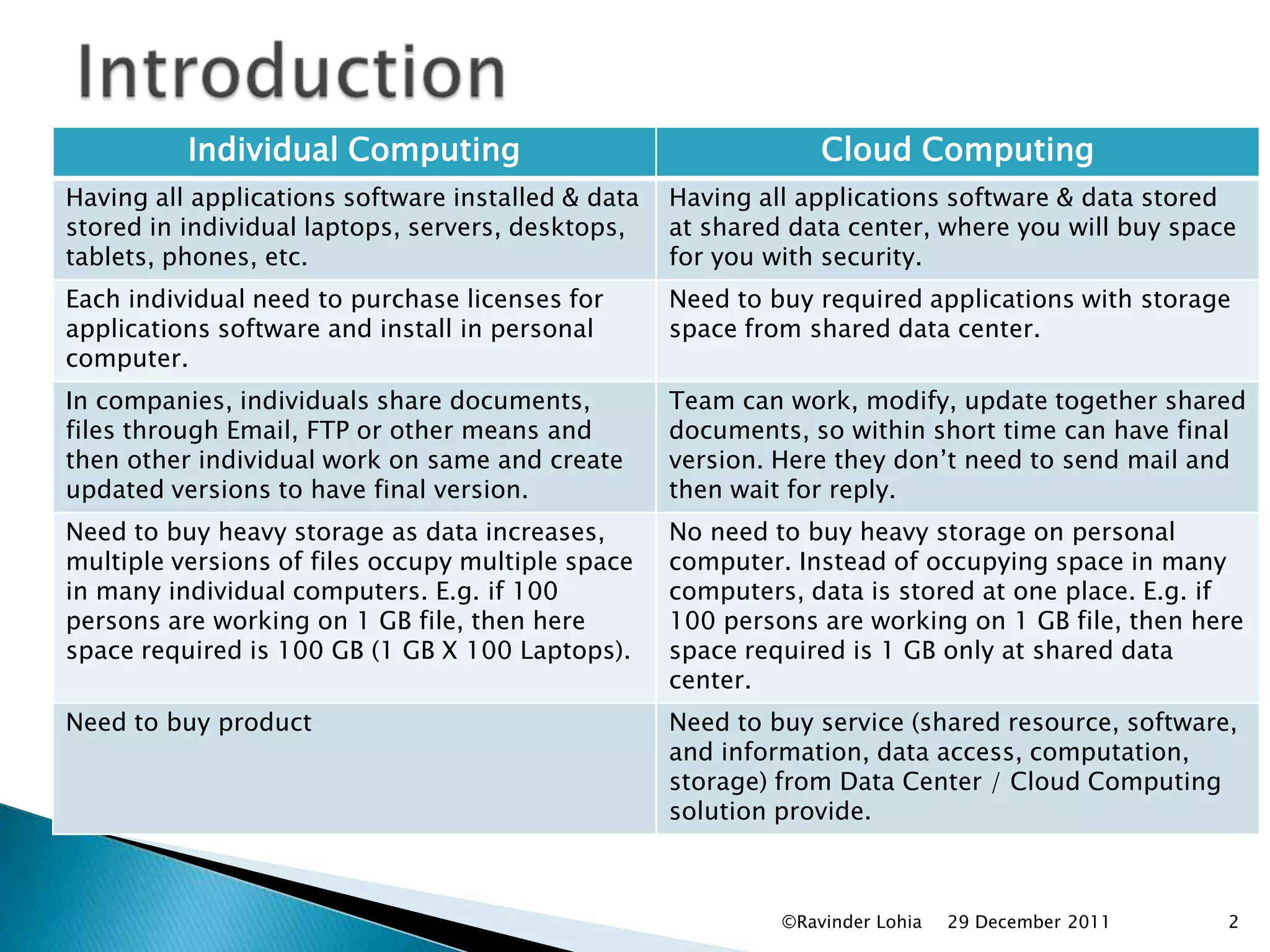
Individual Computing                                   Cloud Computing
Having all applications software installed & data   Having all applications software & data stored
stored in individual laptops, servers, desktops,    at shared data center, where you will buy space
tablets, phones, etc.                               for you with security.
Each individual need to purchase licenses for       Need to buy required applications with storage
applications software and install in personal       space from shared data center.
computer.
In companies, individuals share documents,          Team can work, modify, update together shared
files through Email, FTP or other means and         documents, so within short time can have final
then other individual work on same and create       version. Here they don’t need to send mail and
updated versions to have final version.             then wait for reply.
Need to buy heavy storage as data increases,        No need to buy heavy storage on personal
multiple versions of files occupy multiple space    computer. Instead of occupying space in many
in many individual computers. E.g. if 100           computers, data is stored at one place. E.g. if
persons are working on 1 GB file, then here         100 persons are working on 1 GB file, then here
space required is 100 GB (1 GB X 100 Laptops).      space required is 1 GB only at shared data
                                                    center.
Need to buy product                                 Need to buy service (shared resource, software,
                                                    and information, data access, computation,
                                                    storage) from Data Center / Cloud Computing
                                                    solution provide.


                                                             ©Ravinder Lohia   29 December 2011   2
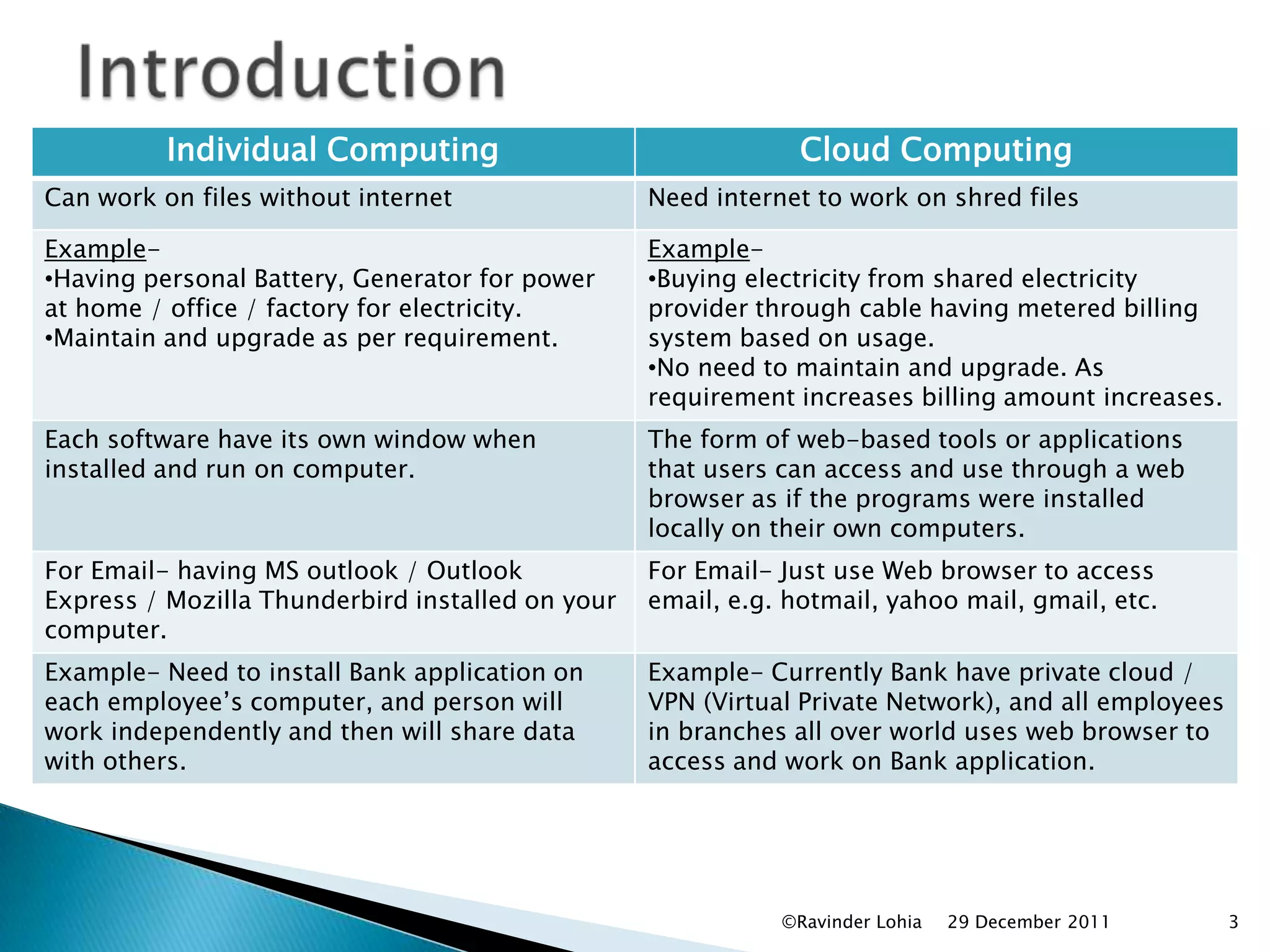
Individual Computing                                 Cloud Computing
Can work on files without internet                Need internet to work on shred files

Example-                                          Example-
•Having personal Battery, Generator for power     •Buying electricity from shared electricity
at home / office / factory for electricity.       provider through cable having metered billing
•Maintain and upgrade as per requirement.         system based on usage.
                                                  •No need to maintain and upgrade. As
                                                  requirement increases billing amount increases.
Each software have its own window when            The form of web-based tools or applications
installed and run on computer.                    that users can access and use through a web
                                                  browser as if the programs were installed
                                                  locally on their own computers.
For Email- having MS outlook / Outlook            For Email- Just use Web browser to access
Express / Mozilla Thunderbird installed on your   email, e.g. hotmail, yahoo mail, gmail, etc.
computer.
Example- Need to install Bank application on      Example- Currently Bank have private cloud /
each employee’s computer, and person will         VPN (Virtual Private Network), and all employees
work independently and then will share data       in branches all over world uses web browser to
with others.                                      access and work on Bank application.


                                                             ©Ravinder Lohia   29 December 2011      3
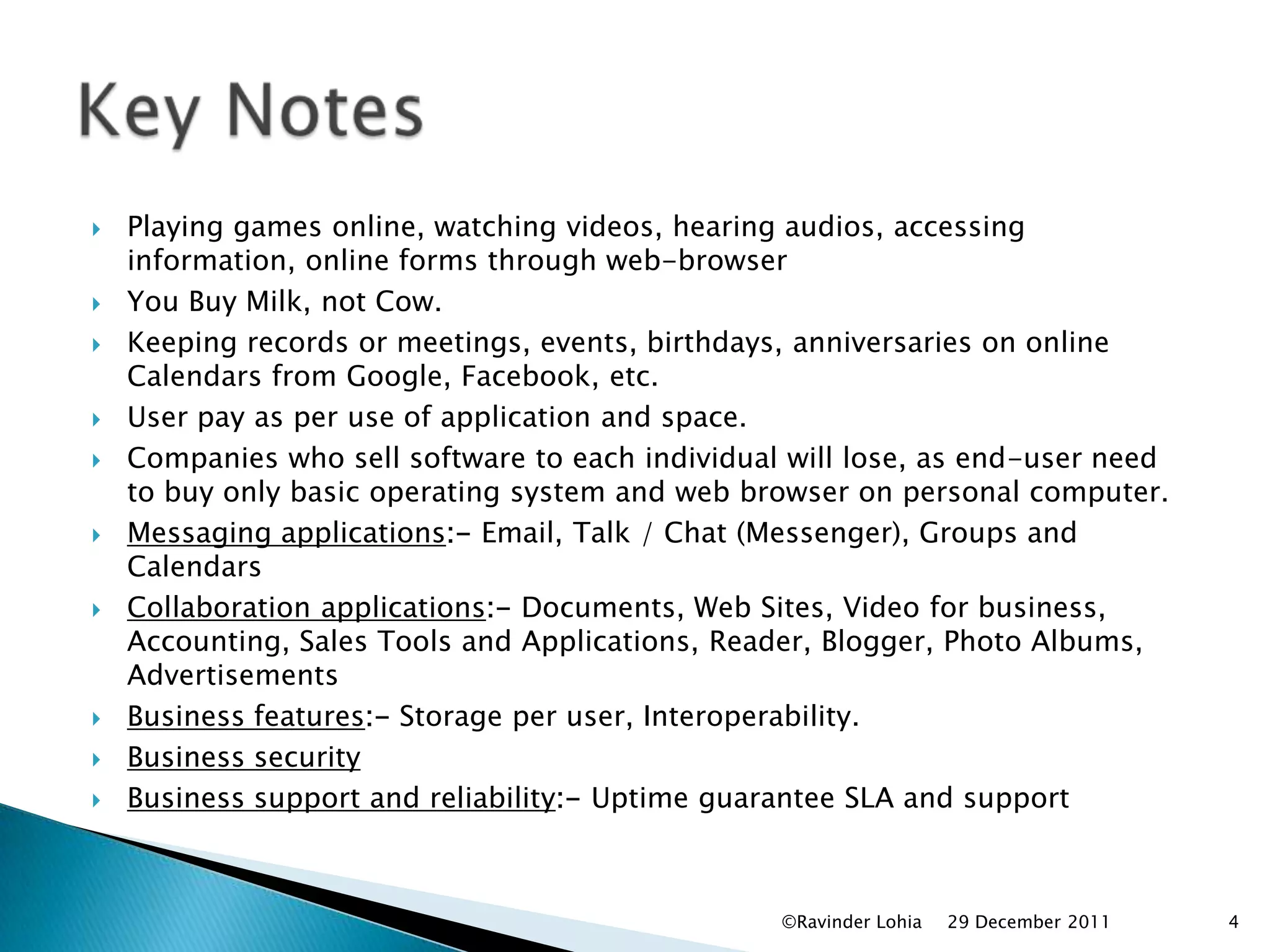
   Playing games online, watching videos, hearing audios, accessing
    information, online forms through web-browser
   You Buy Milk, not Cow.
   Keeping records or meetings, events, birthdays, anniversaries on online
    Calendars from Google, Facebook, etc.
   User pay as per use of application and space.
   Companies who sell software to each individual will lose, as end-user need
    to buy only basic operating system and web browser on personal computer.
   Messaging applications:- Email, Talk / Chat (Messenger), Groups and
    Calendars
   Collaboration applications:- Documents, Web Sites, Video for business,
    Accounting, Sales Tools and Applications, Reader, Blogger, Photo Albums,
    Advertisements
   Business features:- Storage per user, Interoperability.
   Business security
   Business support and reliability:- Uptime guarantee SLA and support


                                                  ©Ravinder Lohia   29 December 2011   4
   Client- Laptop, Phone, Mobile, Tablet, Desktop
    Computer
   Application- Cloud application services or "Software
    as a Service (SaaS)" deliver software as a service over
    the Internet, eliminating the need to install and run
    the application on the customer's own computers and
    simplifying maintenance and support.
   Platform- platform as a service (PaaS), e.g. Windows,
    Android, Linux, etc.
   Infrastructure- Infrastructure as a service (IaaS)-
    Supplies complete end-to-end solution (Client,
    Application, Platform, Server Space)
   Server- Hardware & Software


                                     ©Ravinder Lohia   29 December 2011   5
   Public cloud- for all.
   Community cloud- for several organizations
    from a specific community with common
    concerns.
   Hybrid cloud- composition of two or more
    clouds (private, community, or public)
   Private cloud- for single organization.


                              ©Ravinder Lohia   29 December 2011   6
   Work Smarter :- Communicate, organize and
    collaborate from anywhere.
   Communicate With Ease :-
    Email, chat, messaging, phone, voice or video call
    from a single interface.
   Organize Efficiently :- Plan meetings and projects
    easily. View colleagues calendars. Schedule events
    quickly. Smart Schedule.
   Collaborate More :- Share ideas, work faster and
    innovate at speed. Work together in real time with
    shared documents.
   Be Productive Anywhere :- Communicate, organize
    and collaborate while mobile. Web applications
    increase productivity

                                    ©Ravinder Lohia   29 December 2011   7
   Cloud computing with google.com- For
    Small, Medium Business, Enterprise
   www.softlayer.com : - Build your own cloud-
    Linux & Windows Cloud hosting.
   http://www.ibm.com/cloud-computing/us/en/
   http://aws.amazon.com/ec2/
   And many more…


                               ©Ravinder Lohia   29 December 2011   8
Please provide feedback-
    ravilohia@yahoo.com
     Facebook & Linkedin
       www.ravilohia.com
          www.inpas.com


 ©Ravinder Lohia   29 December 2011   9

Cloud computing by ravinder lohia

  • 1.
  • 2.
    Individual Computing Cloud Computing Having all applications software installed & data Having all applications software & data stored stored in individual laptops, servers, desktops, at shared data center, where you will buy space tablets, phones, etc. for you with security. Each individual need to purchase licenses for Need to buy required applications with storage applications software and install in personal space from shared data center. computer. In companies, individuals share documents, Team can work, modify, update together shared files through Email, FTP or other means and documents, so within short time can have final then other individual work on same and create version. Here they don’t need to send mail and updated versions to have final version. then wait for reply. Need to buy heavy storage as data increases, No need to buy heavy storage on personal multiple versions of files occupy multiple space computer. Instead of occupying space in many in many individual computers. E.g. if 100 computers, data is stored at one place. E.g. if persons are working on 1 GB file, then here 100 persons are working on 1 GB file, then here space required is 100 GB (1 GB X 100 Laptops). space required is 1 GB only at shared data center. Need to buy product Need to buy service (shared resource, software, and information, data access, computation, storage) from Data Center / Cloud Computing solution provide. ©Ravinder Lohia 29 December 2011 2
  • 3.
    Individual Computing Cloud Computing Can work on files without internet Need internet to work on shred files Example- Example- •Having personal Battery, Generator for power •Buying electricity from shared electricity at home / office / factory for electricity. provider through cable having metered billing •Maintain and upgrade as per requirement. system based on usage. •No need to maintain and upgrade. As requirement increases billing amount increases. Each software have its own window when The form of web-based tools or applications installed and run on computer. that users can access and use through a web browser as if the programs were installed locally on their own computers. For Email- having MS outlook / Outlook For Email- Just use Web browser to access Express / Mozilla Thunderbird installed on your email, e.g. hotmail, yahoo mail, gmail, etc. computer. Example- Need to install Bank application on Example- Currently Bank have private cloud / each employee’s computer, and person will VPN (Virtual Private Network), and all employees work independently and then will share data in branches all over world uses web browser to with others. access and work on Bank application. ©Ravinder Lohia 29 December 2011 3
  • 4.
    Playing games online, watching videos, hearing audios, accessing information, online forms through web-browser  You Buy Milk, not Cow.  Keeping records or meetings, events, birthdays, anniversaries on online Calendars from Google, Facebook, etc.  User pay as per use of application and space.  Companies who sell software to each individual will lose, as end-user need to buy only basic operating system and web browser on personal computer.  Messaging applications:- Email, Talk / Chat (Messenger), Groups and Calendars  Collaboration applications:- Documents, Web Sites, Video for business, Accounting, Sales Tools and Applications, Reader, Blogger, Photo Albums, Advertisements  Business features:- Storage per user, Interoperability.  Business security  Business support and reliability:- Uptime guarantee SLA and support ©Ravinder Lohia 29 December 2011 4
  • 5.
    Client- Laptop, Phone, Mobile, Tablet, Desktop Computer  Application- Cloud application services or "Software as a Service (SaaS)" deliver software as a service over the Internet, eliminating the need to install and run the application on the customer's own computers and simplifying maintenance and support.  Platform- platform as a service (PaaS), e.g. Windows, Android, Linux, etc.  Infrastructure- Infrastructure as a service (IaaS)- Supplies complete end-to-end solution (Client, Application, Platform, Server Space)  Server- Hardware & Software ©Ravinder Lohia 29 December 2011 5
  • 6.
    Public cloud- for all.  Community cloud- for several organizations from a specific community with common concerns.  Hybrid cloud- composition of two or more clouds (private, community, or public)  Private cloud- for single organization. ©Ravinder Lohia 29 December 2011 6
  • 7.
    Work Smarter :- Communicate, organize and collaborate from anywhere.  Communicate With Ease :- Email, chat, messaging, phone, voice or video call from a single interface.  Organize Efficiently :- Plan meetings and projects easily. View colleagues calendars. Schedule events quickly. Smart Schedule.  Collaborate More :- Share ideas, work faster and innovate at speed. Work together in real time with shared documents.  Be Productive Anywhere :- Communicate, organize and collaborate while mobile. Web applications increase productivity ©Ravinder Lohia 29 December 2011 7
  • 8.
    Cloud computing with google.com- For Small, Medium Business, Enterprise  www.softlayer.com : - Build your own cloud- Linux & Windows Cloud hosting.  http://www.ibm.com/cloud-computing/us/en/  http://aws.amazon.com/ec2/  And many more… ©Ravinder Lohia 29 December 2011 8
  • 9.
    Please provide feedback- ravilohia@yahoo.com Facebook & Linkedin www.ravilohia.com www.inpas.com ©Ravinder Lohia 29 December 2011 9