PLATINE
  Synchronous and distributed
cooperative platform for e-working
 PLate-forme de Télé-Ingénierie
coopérative synchroNe distribuéE


                 Véronique Baudin
         E-mail: veronique.baudin@laas.fr
          LAAS-CNRS PLUME-RELIER
Agenda
                   1.  PLATINE description
                   2.  Use case demonstration
                   3.  Technology transfer
                     –  What
                     –  Why
                     –  Which licence
                   4.  Learned lessons
                     –  Unfortunate aspects
                     –  Nice surprises
                   5.  Conclusion
November 17 2009            FOSSa - Grenoble    2
1. PLATINE description
•  Offers a lot of mechanisms that can be used in different
   contexts: e-learning, co-design, cooperative work, …..
•  Software platform used to support remote collaboration
   among users.
•  Two main kinds of interactions can be found within
   collaborative groups:
    –  asynchronous collaboration, that does not require the group
       members to be present at the same time;
    –  synchronous collaboration, where remote users work at the same
       time.
•  PLATINE is mainly devoted to synchronous collaboration.
•  Developed since 1998, used and deployed in European
   and French projects.

November 17 2009            FOSSa - Grenoble                       3
1. PLATINE description
•  3 kinds of components
    –  A module for off-line session preparation
    –  Asynchronous session state display with an “asynchronous” chat
    –  Synchronous components
        •  a synchronous session state display
        •  a multi user visioconference
        •  a multipoint chat
        •  an application sharing
        •  a shared whiteboard
        •  a session manager
•  A PLATINE session is composed of
    –  an asynchronous phase,
    –  a synchronous phase.
•  Some roles can be defined for one session, and the chairman
   attribute can be assigned to some roles.
•  The chairman can manage the synchronous phase of a session.

November 17 2009                FOSSa - Grenoble                        4
1. PLATINE description
•  Technical characteristics

    –  Mainly developed using JAVA
    –  External components:
         •  VNC for application sharing
         •  VIC and RAT alternatives for the visioconference tool
    –  Automatic deployment for session participants
         •  JAVA WebStart
    –  Multicast visioconference
         •  Optional reflector module


November 17 2009                FOSSa - Grenoble                    5
1. PLATINE description
•  Requirements

    –  Hardware:
       Pentium (or Centrino) PC minimum 1Ghz, 512 Mbytes RAM
    –  Input/output multimedia devices:
       webcam, microphone, headset, ... correctly configured and
       installed. These devices should be recognized by jmstudio
       (from jmf2.1.1e)
    –  Operating Systems:
       Windows XP , Fedora , MacOSX
    –  Java :
         •    You can use jre 1.4.2_10 version (less than jre1.5.0 version) .
         •    On your WebStart install, you have to verify the selected jre version
         •    1.4.2-11 for the Java Runtime Environment (see item J2SEv1.4.2_11)
         •    2.1.1e for the Java Multimedia Framework


November 17 2009                    FOSSa - Grenoble                                  6
2. Use case demonstration
•  Lab@Future (IST project 2002-2005) objectives:
    –  The experiments realized correspond to learning
       cases where students gain knowledge by themselves.
    –  Teachers are present in the same student session to
       answer to students and to remotely help them in case
       of difficulty.
    –  Difficulties appear in handling the experiment specific
       tool but also while resolving the problem.
•  Experiment from the mechatronics domain using
   the FluidSim software

November 17 2009         FOSSa - Grenoble                    7
2. Use case demonstration
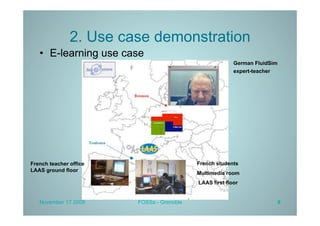
   •  E-learning use case
                                                         German FluidSim
                                                         expert-teacher


French teacher office                      French students
LAAS ground floor
                                           Multimedia room
                                           LAAS first floor


   November 17 2009     FOSSa - Grenoble                                   8
2. Use case demonstration
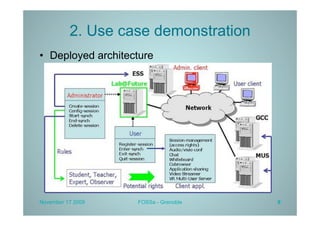
•  Deployed architecture


November 17 2009    FOSSa - Grenoble   9
2. Use case demonstration
•  Specific tools                  •  Generic
    –  FluidSim (Bremen)              communication
    –  Mixed reality platform         components
       (Bremen)                         –  Vic, Rat
                                        –  VNC server (Bremen)
                                        –  Session State Display
                                        –  VNC client


November 17 2009          FOSSa - Grenoble                     10
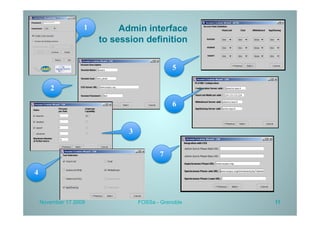
1        Admin interface
                       to session definition


                                              5

       2

                                              6


                              3


                                         7

4


    November 17 2009              FOSSa - Grenoble   11
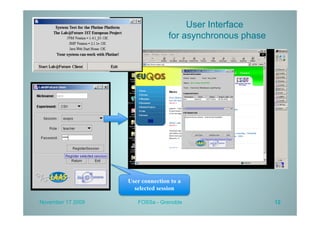
User Interface
                                  for asynchronous phase


                   User connection to a
                     selected session

November 17 2009      FOSSa - Grenoble                     12
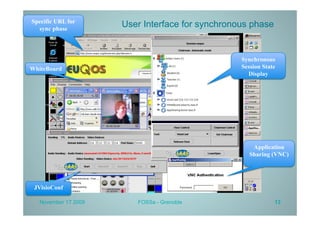
Specific URL for
  sync phase
                      User Interface for synchronous phase


                                                  Synchronous
WhiteBoard                                        Session State
                                                    Display


                                                      Application
                                                     Sharing (VNC)


 JVisioConf

   November 17 2009      FOSSa - Grenoble                     13
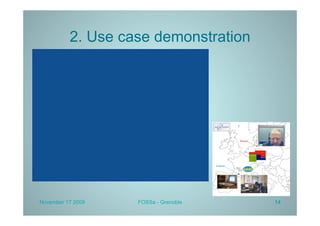
2. Use case demonstration


November 17 2009   FOSSa - Grenoble   14
3. Technology transfer
    •  Observations

         •  PLATINE is a prototype developed in a research lab in order
            to demonstrate new transport protocols and new cooperative
            protocols
         •  No human ressources apart from research projects
         •  We have not found any company to support the industrial
            completion of the prototype


November 17 2009             FOSSa - Grenoble                         15
3. Technology transfer
    •  Which result can be transferred ?
         •  Some PLATINE components for academic or industrial
            partners
    •  Why this choice ?
         •  In the fields of network transport protocols and of computer
            supported cooperative work (CSCW), the researchers need
            communicating components
         •  PLATINE components can be used, so we decide to share
            them easily
    •  Which licence ?
         •  CeCILL-B because it « follows the principle of the popular
            BSD license and its variants (Apache, X11 or W3C among
            others). In exchange for strong citation obligations (in all
            software incorporating a program covered by CeCILL-B and
            also through a Web site), the author authorizes the reuse of
            its software without any other constraints.. » http://
            www.cecill.info/index.en.html

November 17 2009              FOSSa - Grenoble                         16
3. Technology transfer
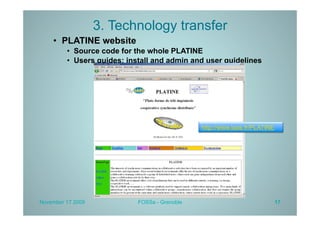
    •  PLATINE website
         •  Source code for the whole PLATINE
         •  Users guides: install and admin and user guidelines


                                               http://www.laas.fr/PLATINE


November 17 2009            FOSSa - Grenoble                                17
3. Technology transfer
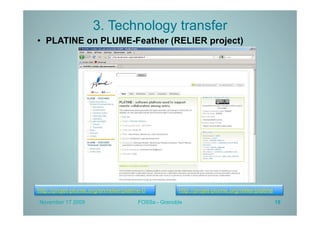
•  PLATINE on PLUME-Feather (RELIER project)


http://projet-plume.org/en/relier/platine-0           http://projet-plume.org/relier/platine
November 17 2009                        FOSSa - Grenoble                                       18
4. Learned lessons
•  Unfortunate aspects
    –  Not enough time and human ressources at
       LAAS to complete our platform
    –  No community created
    –  Not enough time to support external projects
           •  Tokushima University (Japan): cooperation with a
              phd student (2004-2006)
           •  Lakehead University (Canada): cooperation with
              a teacher after the ED-MEDIA Conference 2005
              (2005-2006)


November                17 2009
                              FOSSa - Grenoble               19
4. Learned lessons
•  Nice surprises
    –  A very good entry point for new research projects:
           •    2002-2005: IST Lab@Future using all PLATINE
                components + automatic deployment with JavaWebStart
           •    2006-2008: IST Sat6 using JVisioConference + SIP
           •    2004-2008: IST EuQoS using JVisioConference + QoS
           •    2007-2010: ITEA UseNET using Jchat + automatic
                deployment for mobile phones (J2ME, OSGi, Android, …..)
    –  Always available, interesting for a lot of people:
           •    892 reads of French RELIER card since 09 2008,
           •    299 reads of English card since 04 2009


November                   17 2009
                                 FOSSa - Grenoble                     20
5. Conclusion
•  PLATINE : an enriching experience from
   both technical and human point of view
•  A nice way to introduce me in RELIER
   project


November 17 2009      FOSSa - Grenoble      21
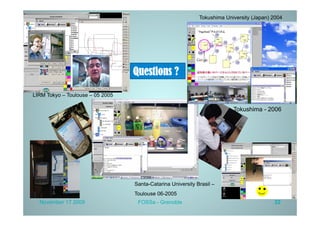
Tokushima University (Japan) 2004


                                  Questions ?

LIRM Tokyo – Toulouse – 05 2005

                                                                          Tokushima - 2006


                                  Santa-Catarina University Brasil –
                                  Toulouse 06-2005
  November 17 2009                 FOSSa - Grenoble                                       22

Platine Fossa

  • 1.
    PLATINE Synchronousand distributed cooperative platform for e-working PLate-forme de Télé-Ingénierie coopérative synchroNe distribuéE Véronique Baudin E-mail: veronique.baudin@laas.fr LAAS-CNRS PLUME-RELIER
  • 2.
    Agenda 1.  PLATINE description 2.  Use case demonstration 3.  Technology transfer –  What –  Why –  Which licence 4.  Learned lessons –  Unfortunate aspects –  Nice surprises 5.  Conclusion November 17 2009 FOSSa - Grenoble 2
  • 3.
    1. PLATINE description • Offers a lot of mechanisms that can be used in different contexts: e-learning, co-design, cooperative work, ….. •  Software platform used to support remote collaboration among users. •  Two main kinds of interactions can be found within collaborative groups: –  asynchronous collaboration, that does not require the group members to be present at the same time; –  synchronous collaboration, where remote users work at the same time. •  PLATINE is mainly devoted to synchronous collaboration. •  Developed since 1998, used and deployed in European and French projects. November 17 2009 FOSSa - Grenoble 3
  • 4.
    1. PLATINE description • 3 kinds of components –  A module for off-line session preparation –  Asynchronous session state display with an “asynchronous” chat –  Synchronous components •  a synchronous session state display •  a multi user visioconference •  a multipoint chat •  an application sharing •  a shared whiteboard •  a session manager •  A PLATINE session is composed of –  an asynchronous phase, –  a synchronous phase. •  Some roles can be defined for one session, and the chairman attribute can be assigned to some roles. •  The chairman can manage the synchronous phase of a session. November 17 2009 FOSSa - Grenoble 4
  • 5.
    1. PLATINE description • Technical characteristics –  Mainly developed using JAVA –  External components: •  VNC for application sharing •  VIC and RAT alternatives for the visioconference tool –  Automatic deployment for session participants •  JAVA WebStart –  Multicast visioconference •  Optional reflector module November 17 2009 FOSSa - Grenoble 5
  • 6.
    1. PLATINE description • Requirements –  Hardware: Pentium (or Centrino) PC minimum 1Ghz, 512 Mbytes RAM –  Input/output multimedia devices: webcam, microphone, headset, ... correctly configured and installed. These devices should be recognized by jmstudio (from jmf2.1.1e) –  Operating Systems: Windows XP , Fedora , MacOSX –  Java : •  You can use jre 1.4.2_10 version (less than jre1.5.0 version) . •  On your WebStart install, you have to verify the selected jre version •  1.4.2-11 for the Java Runtime Environment (see item J2SEv1.4.2_11) •  2.1.1e for the Java Multimedia Framework November 17 2009 FOSSa - Grenoble 6
  • 7.
    2. Use casedemonstration •  Lab@Future (IST project 2002-2005) objectives: –  The experiments realized correspond to learning cases where students gain knowledge by themselves. –  Teachers are present in the same student session to answer to students and to remotely help them in case of difficulty. –  Difficulties appear in handling the experiment specific tool but also while resolving the problem. •  Experiment from the mechatronics domain using the FluidSim software November 17 2009 FOSSa - Grenoble 7
  • 8.
    2. Use casedemonstration •  E-learning use case German FluidSim expert-teacher French teacher office French students LAAS ground floor Multimedia room LAAS first floor November 17 2009 FOSSa - Grenoble 8
  • 9.
    2. Use casedemonstration •  Deployed architecture November 17 2009 FOSSa - Grenoble 9
  • 10.
    2. Use casedemonstration •  Specific tools •  Generic –  FluidSim (Bremen) communication –  Mixed reality platform components (Bremen) –  Vic, Rat –  VNC server (Bremen) –  Session State Display –  VNC client November 17 2009 FOSSa - Grenoble 10
  • 11.
    1 Admin interface to session definition 5 2 6 3 7 4 November 17 2009 FOSSa - Grenoble 11
  • 12.
    User Interface for asynchronous phase User connection to a selected session November 17 2009 FOSSa - Grenoble 12
  • 13.
    Specific URL for sync phase User Interface for synchronous phase Synchronous WhiteBoard Session State Display Application Sharing (VNC) JVisioConf November 17 2009 FOSSa - Grenoble 13
  • 14.
    2. Use casedemonstration November 17 2009 FOSSa - Grenoble 14
  • 15.
    3. Technology transfer •  Observations •  PLATINE is a prototype developed in a research lab in order to demonstrate new transport protocols and new cooperative protocols •  No human ressources apart from research projects •  We have not found any company to support the industrial completion of the prototype November 17 2009 FOSSa - Grenoble 15
  • 16.
    3. Technology transfer •  Which result can be transferred ? •  Some PLATINE components for academic or industrial partners •  Why this choice ? •  In the fields of network transport protocols and of computer supported cooperative work (CSCW), the researchers need communicating components •  PLATINE components can be used, so we decide to share them easily •  Which licence ? •  CeCILL-B because it « follows the principle of the popular BSD license and its variants (Apache, X11 or W3C among others). In exchange for strong citation obligations (in all software incorporating a program covered by CeCILL-B and also through a Web site), the author authorizes the reuse of its software without any other constraints.. » http:// www.cecill.info/index.en.html November 17 2009 FOSSa - Grenoble 16
  • 17.
    3. Technology transfer •  PLATINE website •  Source code for the whole PLATINE •  Users guides: install and admin and user guidelines http://www.laas.fr/PLATINE November 17 2009 FOSSa - Grenoble 17
  • 18.
    3. Technology transfer • PLATINE on PLUME-Feather (RELIER project) http://projet-plume.org/en/relier/platine-0 http://projet-plume.org/relier/platine November 17 2009 FOSSa - Grenoble 18
  • 19.
    4. Learned lessons • Unfortunate aspects –  Not enough time and human ressources at LAAS to complete our platform –  No community created –  Not enough time to support external projects •  Tokushima University (Japan): cooperation with a phd student (2004-2006) •  Lakehead University (Canada): cooperation with a teacher after the ED-MEDIA Conference 2005 (2005-2006) November 17 2009 FOSSa - Grenoble 19
  • 20.
    4. Learned lessons • Nice surprises –  A very good entry point for new research projects: •  2002-2005: IST Lab@Future using all PLATINE components + automatic deployment with JavaWebStart •  2006-2008: IST Sat6 using JVisioConference + SIP •  2004-2008: IST EuQoS using JVisioConference + QoS •  2007-2010: ITEA UseNET using Jchat + automatic deployment for mobile phones (J2ME, OSGi, Android, …..) –  Always available, interesting for a lot of people: •  892 reads of French RELIER card since 09 2008, •  299 reads of English card since 04 2009 November 17 2009 FOSSa - Grenoble 20
  • 21.
    5. Conclusion •  PLATINE: an enriching experience from both technical and human point of view •  A nice way to introduce me in RELIER project November 17 2009 FOSSa - Grenoble 21
  • 22.
    Tokushima University (Japan)2004 Questions ? LIRM Tokyo – Toulouse – 05 2005 Tokushima - 2006 Santa-Catarina University Brasil – Toulouse 06-2005 November 17 2009 FOSSa - Grenoble 22