CLIENT SERVER COMPUTING
PRESENTED BY
(MR. KARTHIKEYAN A.P/CSE)
SYLLABUS
CLIENT/SERVER ADMINISTRATION AND
MANAGEMENT
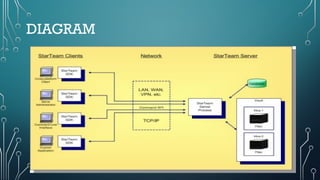
• Server administrators install, configure, and maintain various types of hardware and software,
which often involves creating user accounts, carrying out backup and recovery functions, and
monitoring the performance of servers at all times. They need to configure, manage, and
implement operating systems.
• Server management is the process of administering a server to ensure optimal and safe
performance. The main objective of this IT activity is to keep the server and its associated
systems in a desired, consistent state. Managing a server requires various administrative and
maintenance tasks.
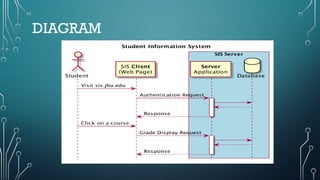
DIAGRAM
ESSENTIAL SERVER MANAGEMENT
TASKS
There were 5 types of tasks available in server management. They
are:
• Setup and Configuration
• Hardware Maintainance
• Software Management
• Server Monitoring
• Ensuring Safe Operations
ADVANTAGES OF SERVER
MANAGEMENT
• Top-tier experts
• Lower operational costs
• Reliable support
• Eliminate time-consuming tasks
• Faster turnaround
CLIENT/SERVER SOFTWARE
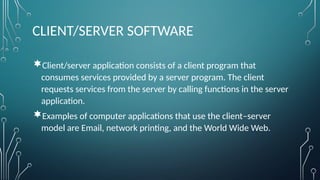
Client/server application consists of a client program that
consumes services provided by a server program. The client
requests services from the server by calling functions in the server
application.
Examples of computer applications that use the client–server
model are Email, network printing, and the World Wide Web.
DIAGRAM
TESTING TECHNIQUES
Client-Server Testing
• Client Server Application is an Application that requires to be preinstalled on the client’s
Desktop or laptop. In these testing, the client sends a request to the server and the server
sends a response back to the client with the required information. Thus, it is also known as
Two-Tier Application Testing. For example, Email, FTP, etc.
TYPES:
 GUI Testing.
 Manual Testing.
 Configuration Testing.
 Interoperability Testing.
GUI TESTING
• There are two types of interfaces for a computer application. Command Line
Interface is where you type text and computer responds to that command.
GUI stands for Graphical User Interface where you interact with the computer
using images rather than text.
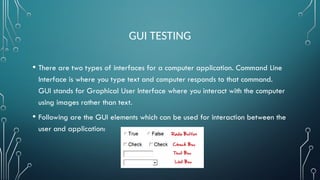
• Following are the GUI elements which can be used for interaction between the
user and application:
GUI TESTING
• GUI Testing is a software testing type that checks the Graphical User Interface of
the Software. The purpose of Graphical User Interface (GUI) Testing is to ensure
the functionalities of software application work as per specifications by checking
screens and controls like menus, buttons, icons, etc.
• GUI is what the user sees. Say if you visit guru99.com what you will see say
homepage it is the GUI (graphical user interface) of the site. A user does not see
the source code. The interface is visible to the user. Especially the focus is on the
design structure, images that they are working properly or not.
GUI TESTING
Need of GUI Testing
• Now the basic concept of GUI testing is clear. The few questions that will strike in
your mind will be
• Why do GUI testing?
• Is it really needed?
• Does testing of functionally and logic of Application is not more than enough??
Then why to waste time on UI testing.
GUI Testing Techniques
• GUI Testing Techniques can be categorized into three parts:
• Manual Based Testing
• Under this approach, graphical screens are checked manually by testers in conformance with the
requirements stated in the business requirements document.
Record and Replay
• GUI testing can be done using automation tools. This is done in 2 parts. During Record, test steps are
captured by the automation tool. During playback, the recorded test steps are executed on the
Application Under Test. Example of such tools – QTP.
GUI TESTING
GUI Testing Tools
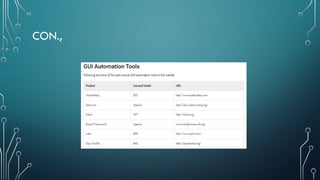
• Following is a list of popular GUI Testing Tools :
• Selenium
• QTP
• Cucumber
• SilkTest
• TestComplete
• Squish GUI Tester
MANUAL TESTING
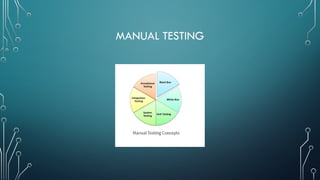
• Manual Testing is a type of software testing in which test cases are executed manually by a
tester without using any automated tools. The purpose of Manual Testing is to identify the bugs,
issues, and defects in the software application. Manual software testing is the most primitive
technique of all testing types and it helps to find critical bugs in the software application.
• Any new application must be manually tested before its testing can be automated. Manual
Software Testing requires more effort but is necessary to check automation feasibility. Manual
Testing concepts does not require knowledge of any testing tool. One of the Software Testing
Fundamental is “100% Automation is not possible“. This makes Manual Testing imperative.
MANUAL TESTING
MANUAL TESTING
Tools to Automate Manual Testing
• Selenium
• QTP
• Jmeter
• Loadrunner
• TestLink
• Quality Center(ALM)
CONFIGURATION TESTING
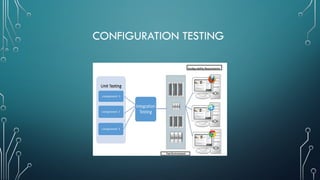
• Configuration Testing is a software testing technique in which the software application is tested with
multiple combinations of software and hardware in order to evaluate the functional requirements and
find out optimal configurations under which the software application works without any defects or flaws.
Pre-requisites for Configuration Testing
• For any project before starting with the config test, we have to follow some pre-requisites
• Creation of matrix which consists of various combinations of software and hardware configurations
• Prioritizing the configurations as its difficult to test all the configurations
• Testing every configuration based on prioritization.
CONFIGURATION TESTING
INTEROPERABILITY TESTING
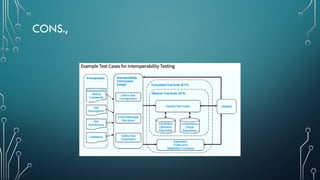
• Interoperability Testing is a software testing type, that checks whether the software
can interact with other software components and systems. The purpose of
Interoperability tests is to ensure that the software product is able to communicate
with other components or devices without any compatibility issues.
• In other words, interoperability testing means to prove that end-to-end functionality
between two communicating systems is as specified by the requirements. For
example, interoperability testing is done between smartphones and tablets to check
data transfer via Bluetooth.
CON.,
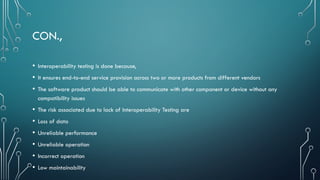
• Interoperability testing is done because,
• It ensures end-to-end service provision across two or more products from different vendors
• The software product should be able to communicate with other component or device without any
compatibility issues
• The risk associated due to lack of Interoperability Testing are
• Loss of data
• Unreliable performance
• Unreliable operation
• Incorrect operation
• Low maintainability
CONS.,
CON.,
Disadvantages of Interoperability Testing
• The Disadvantages in Interoperability Testing are
• Determining root causes of defects
• Accurate Measurement
• Scalability of testing
• Network complexity
• Testing the Test Equipment
• Documenting Test Results and Learnings
• Inadequate requirements
ADVANTAGES & DISADVANTAGES OF TESTING
TECHNIQUES
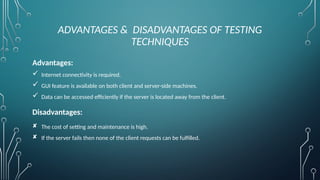
Advantages:
 Internet connectivity is required.
 GUI feature is available on both client and server-side machines.
 Data can be accessed efficiently if the server is located away from the client.
Disadvantages:
 The cost of setting and maintenance is high.
 If the server fails then none of the client requests can be fulfilled.
TESTING ASPECTS
User Interface Testing.
Manual Support Testing.
Functionality Testing.
Compatibility Testing & Configuration Testing.
Intersystem Testing.
USER INTERFACE TESTING
• User interface testing, a testing technique used to identify the presence of defects
is a product/software under test by using Graphical user interface [GUI].
Approaches:
• Manual Based - Based on the domain and application knowledge of the tester.
• Capture and Replay - Based on capture and replay of user actions.
• Model-based testing - Based on the execution of user sessions based on a GUI
model. Various GUI models are briefly discussed below.
CON.,
MANUAL SUPPORT TESTING
• It involves testing of all the functions performed by the people while
preparing the data and using these data from automated system.
• Verify - manual support documents and procedures are correct.
" Determine -
Manual support responsibility is correct
Manual support people are adequately trained.
Manual support and automated segment are properly interfaced.
CON.,
FUNCTIONALITY TESTING
• FUNCTIONAL TESTING is a type of software testing that validates the software system against the
functional requirements/specifications. The purpose of Functional tests is to test each function of the software
application, by providing appropriate input, verifying the output against the Functional requirements.
The prime objective of Functional testing is checking the functionalities of the software system. It mainly
concentrates on –
• Mainline functions: Testing the main functions of an application
• Basic Usability: It involves basic usability testing of the system. It checks whether a user can freely navigate
through the screens without any difficulties.
• Accessibility: Checks the accessibility of the system for the user
• Error Conditions: Usage of testing techniques to check for error conditions. It checks whether suitable error
messages are displayed.
CON.,
• Tools
• Selenium – Popular Open Source Functional Testing Tool
• QTP – Very user-friendly Functional Test tool by HP
• JUnit– Used mainly for Java applications and this can be used in Unit and System Testing
• soapUI – This is an open source functional testing tool, mainly used for Web service testing. It
supports multiple protocols such as HTTP, SOAP, and JDBC.
• Watir – This is a functional testing tool for web applications. It supports tests executed at the
web browser and uses a ruby scripting language
COMPATIBILITY TESTING & CONFIGURATION
TESTING
• Configuration and compatibility testing entails validation of an application’s behavior in a
variety of environments. It determines the instant or long term effects of configuration
alteration on the system’s performance and behavior. This testing is essential to validate
compatible configurations and to get alert to incompatible ones.
• At ITQCR, our configuration and compatibility testing facilitate applications to run
impeccably across multiple Browsers, OSs & Mobiles. Whether you have shopping online
applications, educational software, network software, websites, or utilities, our compatibility
services can build a configuration methodology and matrix to identify the most favorable
number of blends.
CON.,
BROWSER COMPATIBILITY
• Test your Web application for correct function on several browsers, including Firefox, IE, Chrome, Opera, and
Safari. Ideally your Web
• application handles browser differences elegantly.
• Check application function with a variety of browser security profile settings
• Verify application function with browser features turned-off (JavaScript, Cookies)
• Check browser rendering of your application’s user interface
• Check the browser’s security settings for cross domain access and hacks
• Verify consistent application function across multiple versions of a browser
INTERSYSTEM TESTING
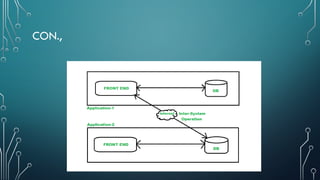
• The process of testing the integration functions and integration points between
multiple systems which are using a common source of data is called inter-
system testing. The main objective of this testing is to ensure that common
resources are accessible to multiple systems consistently and accurately as per
requirement. As for a single operation, two or more applications are
interdependent on each other that’s why it is also called Interoperability
Testing. It is also called external interface testing.
CON.,
CON.,
Example of Inter System Testing:
• You are using Axis bank ATM card to withdraw money from SBI ATM. So here the
communication of data happens between SBI and AXIS bank internally after which you only
get the cash. That means here two different systems are using some common set of data that
is centrally accessible, ensuring it properly happens is nothing but inter-system testing.
• Another example can be booking train tickets through PAYTM or any third-party Online
Payment application which makes the use of customer IRCTC data. Here the communication
of data happens within two systems.
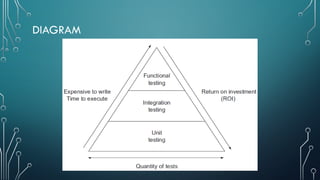
DIAGRAM
MEASURES OF COMPLETENESS
• A measure of data completeness is the percentage of missing data entries. For
instance, a column of 500 with 100 missing fields has a completeness degree of
80%. Depending on your business, 20% of missing entries can translate into
losing hundreds of thousands of dollars in prospects and leads!
• In software testing, there are two measures of completeness, code coverage
and path coverage. Code coverage is a white box testing technique to determine
how much of a program’s source code has been tested. There are several fronts
on which code coverage is measured.
• It determines what areas have not been executed and tested and creates new
test cases to analyze these areas.
TESTING C/S APPLICATION.
 Testing is the process of evaluating and verifying that a software product or application
does what it is supposed to do. The benefits of testing include preventing bugs, reducing
development costs and improving performance.
 The tests performed on these types of applications would be:
 Manual Support Testing. Functionality Testing. Compatibility Testing & Configuration
Testing. Intersystem Testing.
• The structure of Client/Server Systems requires new approaches to testing them. A system
can go wrong due to input/output errors, server down, records locked, lost messages and
many more and then it requires to test the system response for these events. Performance
and scalability testing is done to get valid results based on an insightful analysis of how
systems respond to increasing load, and what makes them fail in various ways. With these
information loads, testing is performed.
THANK YOU…..

CLIENT SERVER COMPUTING FINAL UNIT 5.pptx

  • 1.
    CLIENT SERVER COMPUTING PRESENTEDBY (MR. KARTHIKEYAN A.P/CSE)
  • 2.
  • 3.
    CLIENT/SERVER ADMINISTRATION AND MANAGEMENT •Server administrators install, configure, and maintain various types of hardware and software, which often involves creating user accounts, carrying out backup and recovery functions, and monitoring the performance of servers at all times. They need to configure, manage, and implement operating systems. • Server management is the process of administering a server to ensure optimal and safe performance. The main objective of this IT activity is to keep the server and its associated systems in a desired, consistent state. Managing a server requires various administrative and maintenance tasks.
  • 4.
  • 5.
    ESSENTIAL SERVER MANAGEMENT TASKS Therewere 5 types of tasks available in server management. They are: • Setup and Configuration • Hardware Maintainance • Software Management • Server Monitoring • Ensuring Safe Operations
  • 6.
    ADVANTAGES OF SERVER MANAGEMENT •Top-tier experts • Lower operational costs • Reliable support • Eliminate time-consuming tasks • Faster turnaround
  • 7.
    CLIENT/SERVER SOFTWARE Client/server applicationconsists of a client program that consumes services provided by a server program. The client requests services from the server by calling functions in the server application. Examples of computer applications that use the client–server model are Email, network printing, and the World Wide Web.
  • 8.
  • 9.
    TESTING TECHNIQUES Client-Server Testing •Client Server Application is an Application that requires to be preinstalled on the client’s Desktop or laptop. In these testing, the client sends a request to the server and the server sends a response back to the client with the required information. Thus, it is also known as Two-Tier Application Testing. For example, Email, FTP, etc. TYPES:  GUI Testing.  Manual Testing.  Configuration Testing.  Interoperability Testing.
  • 10.
    GUI TESTING • Thereare two types of interfaces for a computer application. Command Line Interface is where you type text and computer responds to that command. GUI stands for Graphical User Interface where you interact with the computer using images rather than text. • Following are the GUI elements which can be used for interaction between the user and application:
  • 11.
    GUI TESTING • GUITesting is a software testing type that checks the Graphical User Interface of the Software. The purpose of Graphical User Interface (GUI) Testing is to ensure the functionalities of software application work as per specifications by checking screens and controls like menus, buttons, icons, etc. • GUI is what the user sees. Say if you visit guru99.com what you will see say homepage it is the GUI (graphical user interface) of the site. A user does not see the source code. The interface is visible to the user. Especially the focus is on the design structure, images that they are working properly or not.
  • 12.
    GUI TESTING Need ofGUI Testing • Now the basic concept of GUI testing is clear. The few questions that will strike in your mind will be • Why do GUI testing? • Is it really needed? • Does testing of functionally and logic of Application is not more than enough?? Then why to waste time on UI testing.
  • 13.
    GUI Testing Techniques •GUI Testing Techniques can be categorized into three parts: • Manual Based Testing • Under this approach, graphical screens are checked manually by testers in conformance with the requirements stated in the business requirements document. Record and Replay • GUI testing can be done using automation tools. This is done in 2 parts. During Record, test steps are captured by the automation tool. During playback, the recorded test steps are executed on the Application Under Test. Example of such tools – QTP.
  • 14.
    GUI TESTING GUI TestingTools • Following is a list of popular GUI Testing Tools : • Selenium • QTP • Cucumber • SilkTest • TestComplete • Squish GUI Tester
  • 15.
    MANUAL TESTING • ManualTesting is a type of software testing in which test cases are executed manually by a tester without using any automated tools. The purpose of Manual Testing is to identify the bugs, issues, and defects in the software application. Manual software testing is the most primitive technique of all testing types and it helps to find critical bugs in the software application. • Any new application must be manually tested before its testing can be automated. Manual Software Testing requires more effort but is necessary to check automation feasibility. Manual Testing concepts does not require knowledge of any testing tool. One of the Software Testing Fundamental is “100% Automation is not possible“. This makes Manual Testing imperative.
  • 16.
  • 17.
    MANUAL TESTING Tools toAutomate Manual Testing • Selenium • QTP • Jmeter • Loadrunner • TestLink • Quality Center(ALM)
  • 18.
    CONFIGURATION TESTING • ConfigurationTesting is a software testing technique in which the software application is tested with multiple combinations of software and hardware in order to evaluate the functional requirements and find out optimal configurations under which the software application works without any defects or flaws. Pre-requisites for Configuration Testing • For any project before starting with the config test, we have to follow some pre-requisites • Creation of matrix which consists of various combinations of software and hardware configurations • Prioritizing the configurations as its difficult to test all the configurations • Testing every configuration based on prioritization.
  • 19.
  • 20.
    INTEROPERABILITY TESTING • InteroperabilityTesting is a software testing type, that checks whether the software can interact with other software components and systems. The purpose of Interoperability tests is to ensure that the software product is able to communicate with other components or devices without any compatibility issues. • In other words, interoperability testing means to prove that end-to-end functionality between two communicating systems is as specified by the requirements. For example, interoperability testing is done between smartphones and tablets to check data transfer via Bluetooth.
  • 21.
    CON., • Interoperability testingis done because, • It ensures end-to-end service provision across two or more products from different vendors • The software product should be able to communicate with other component or device without any compatibility issues • The risk associated due to lack of Interoperability Testing are • Loss of data • Unreliable performance • Unreliable operation • Incorrect operation • Low maintainability
  • 22.
  • 23.
    CON., Disadvantages of InteroperabilityTesting • The Disadvantages in Interoperability Testing are • Determining root causes of defects • Accurate Measurement • Scalability of testing • Network complexity • Testing the Test Equipment • Documenting Test Results and Learnings • Inadequate requirements
  • 24.
    ADVANTAGES & DISADVANTAGESOF TESTING TECHNIQUES Advantages:  Internet connectivity is required.  GUI feature is available on both client and server-side machines.  Data can be accessed efficiently if the server is located away from the client. Disadvantages:  The cost of setting and maintenance is high.  If the server fails then none of the client requests can be fulfilled.
  • 25.
    TESTING ASPECTS User InterfaceTesting. Manual Support Testing. Functionality Testing. Compatibility Testing & Configuration Testing. Intersystem Testing.
  • 26.
    USER INTERFACE TESTING •User interface testing, a testing technique used to identify the presence of defects is a product/software under test by using Graphical user interface [GUI]. Approaches: • Manual Based - Based on the domain and application knowledge of the tester. • Capture and Replay - Based on capture and replay of user actions. • Model-based testing - Based on the execution of user sessions based on a GUI model. Various GUI models are briefly discussed below.
  • 27.
  • 28.
    MANUAL SUPPORT TESTING •It involves testing of all the functions performed by the people while preparing the data and using these data from automated system. • Verify - manual support documents and procedures are correct. " Determine - Manual support responsibility is correct Manual support people are adequately trained. Manual support and automated segment are properly interfaced.
  • 29.
  • 30.
    FUNCTIONALITY TESTING • FUNCTIONALTESTING is a type of software testing that validates the software system against the functional requirements/specifications. The purpose of Functional tests is to test each function of the software application, by providing appropriate input, verifying the output against the Functional requirements. The prime objective of Functional testing is checking the functionalities of the software system. It mainly concentrates on – • Mainline functions: Testing the main functions of an application • Basic Usability: It involves basic usability testing of the system. It checks whether a user can freely navigate through the screens without any difficulties. • Accessibility: Checks the accessibility of the system for the user • Error Conditions: Usage of testing techniques to check for error conditions. It checks whether suitable error messages are displayed.
  • 31.
    CON., • Tools • Selenium– Popular Open Source Functional Testing Tool • QTP – Very user-friendly Functional Test tool by HP • JUnit– Used mainly for Java applications and this can be used in Unit and System Testing • soapUI – This is an open source functional testing tool, mainly used for Web service testing. It supports multiple protocols such as HTTP, SOAP, and JDBC. • Watir – This is a functional testing tool for web applications. It supports tests executed at the web browser and uses a ruby scripting language
  • 32.
    COMPATIBILITY TESTING &CONFIGURATION TESTING • Configuration and compatibility testing entails validation of an application’s behavior in a variety of environments. It determines the instant or long term effects of configuration alteration on the system’s performance and behavior. This testing is essential to validate compatible configurations and to get alert to incompatible ones. • At ITQCR, our configuration and compatibility testing facilitate applications to run impeccably across multiple Browsers, OSs & Mobiles. Whether you have shopping online applications, educational software, network software, websites, or utilities, our compatibility services can build a configuration methodology and matrix to identify the most favorable number of blends.
  • 33.
    CON., BROWSER COMPATIBILITY • Testyour Web application for correct function on several browsers, including Firefox, IE, Chrome, Opera, and Safari. Ideally your Web • application handles browser differences elegantly. • Check application function with a variety of browser security profile settings • Verify application function with browser features turned-off (JavaScript, Cookies) • Check browser rendering of your application’s user interface • Check the browser’s security settings for cross domain access and hacks • Verify consistent application function across multiple versions of a browser
  • 34.
    INTERSYSTEM TESTING • Theprocess of testing the integration functions and integration points between multiple systems which are using a common source of data is called inter- system testing. The main objective of this testing is to ensure that common resources are accessible to multiple systems consistently and accurately as per requirement. As for a single operation, two or more applications are interdependent on each other that’s why it is also called Interoperability Testing. It is also called external interface testing.
  • 35.
  • 36.
    CON., Example of InterSystem Testing: • You are using Axis bank ATM card to withdraw money from SBI ATM. So here the communication of data happens between SBI and AXIS bank internally after which you only get the cash. That means here two different systems are using some common set of data that is centrally accessible, ensuring it properly happens is nothing but inter-system testing. • Another example can be booking train tickets through PAYTM or any third-party Online Payment application which makes the use of customer IRCTC data. Here the communication of data happens within two systems.
  • 37.
  • 38.
    MEASURES OF COMPLETENESS •A measure of data completeness is the percentage of missing data entries. For instance, a column of 500 with 100 missing fields has a completeness degree of 80%. Depending on your business, 20% of missing entries can translate into losing hundreds of thousands of dollars in prospects and leads! • In software testing, there are two measures of completeness, code coverage and path coverage. Code coverage is a white box testing technique to determine how much of a program’s source code has been tested. There are several fronts on which code coverage is measured. • It determines what areas have not been executed and tested and creates new test cases to analyze these areas.
  • 39.
    TESTING C/S APPLICATION. Testing is the process of evaluating and verifying that a software product or application does what it is supposed to do. The benefits of testing include preventing bugs, reducing development costs and improving performance.  The tests performed on these types of applications would be:  Manual Support Testing. Functionality Testing. Compatibility Testing & Configuration Testing. Intersystem Testing. • The structure of Client/Server Systems requires new approaches to testing them. A system can go wrong due to input/output errors, server down, records locked, lost messages and many more and then it requires to test the system response for these events. Performance and scalability testing is done to get valid results based on an insightful analysis of how systems respond to increasing load, and what makes them fail in various ways. With these information loads, testing is performed.
  • 40.