Sri Lanka Institute of Information
Technology
Master of Science (Information Management) Degree Program
Social Computing
Class Activity 05
W.M.J.H. Fernando
MS18901290
2
Skype
Skype is a telecommunications application software product that focusses in provided that video
chat and voice calls between computers, tablets, mobile devices, the Xbox One console, and
smartwatches via the Internet and to regular telephones. Skype in addition provides instant
messaging services. Users may transmit both text and video messages, and may exchange digital
documents such as images, text, and video. Skype allows video conference calls.
Skype implements a freemium business model.
Much of the service is free, but Skype Credit or a
subscription is required to call a landline or a mobile
phone number. At the end of 2010, there were over
660 million worldwide users, with over 300 million
estimated active each month as of August 2015.At
one point in February 2012, there were 34 million users concurrently online on Skype.
First released in August 2003, Skype was created by the Swede Niklas Zennström and the Dane Janus
Friis, in cooperation with Ahti Heinla, Priit Kasesalu, and Jaan Tallinn, Estonians who developed the
backend that was also used in the music-sharing application Kazaa. [1]
To do the day to day activity some network administrators have banned Skype on corporate,
government, home and education network, citing such reasons as inappropriate usage of resources,
excessive bandwidth usage and security concerns.
3
Main features
Skype offers several features based around calling (both free and paid), messaging (including instant,
voice and text messaging (SMS)), video chat, and file and screen sharing. The following is a diagram
of Skype's features: [2]
Skype
Video
Group video calls
Video chat
Call
Skype to Skype calls
Calls to mobile and landline
Group calls
Skype numbers
Forward calls
Caller ID
Skype to go
Message
Mojus and emoticons
Video messaging
Instant messaging
send text (SMS)
voice messaging
Group me
Sharing
Send files
Screen sharing
Group screen sharing
Send contacts
Other
4
1. Video
• Group video calls
Skype, group video calling is available to everyone free on their mobile devices, tablets and
computers, it’s easier than ever.
Group video calls are subject to a fair convention limit of 100 hours per month with no more
than 10 hours per day and a limit of 4 hours per individual video call. Once these limits have
been reached, the video will switch off and the call will convert to an audio call.
• Video chat
This is free service offer by Skype. It is face to face catch up. Enjoy free video chat with
anyone who also has Skype and a webcam or compatible smartphone. Up to 10 people can
share their video at the same time while the rest can participate over audio. To that they use
HD video calling.
2. Calling
• Skype to Skype calls
To make free international calls – and free local calls – any time. Skype to Skype calls are
always free, so go ahead, and call your best friend to make weekend plans or touch base
with a client on the other side of the world. With internet calling feature, you can reach out
any time – and talk as long as you like.
• Call mobile and landline numbers
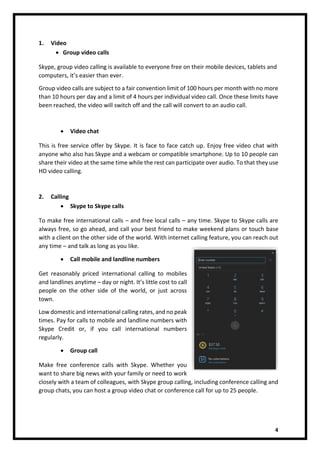
Get reasonably priced international calling to mobiles
and landlines anytime – day or night. It’s little cost to call
people on the other side of the world, or just across
town.
Low domestic and international calling rates, and no peak
times. Pay for calls to mobile and landline numbers with
Skype Credit or, if you call international numbers
regularly.
• Group call
Make free conference calls with Skype. Whether you
want to share big news with your family or need to work
closely with a team of colleagues, with Skype group calling, including conference calling and
group chats, you can host a group video chat or conference call for up to 25 people.
5
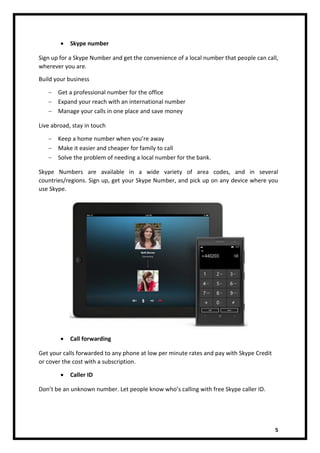
• Skype number
Sign up for a Skype Number and get the convenience of a local number that people can call,
wherever you are.
Build your business
 Get a professional number for the office
 Expand your reach with an international number
 Manage your calls in one place and save money
Live abroad, stay in touch
 Keep a home number when you’re away
 Make it easier and cheaper for family to call
 Solve the problem of needing a local number for the bank.
Skype Numbers are available in a wide variety of area codes, and in several
countries/regions. Sign up, get your Skype Number, and pick up on any device where you
use Skype.
• Call forwarding
Get your calls forwarded to any phone at low per minute rates and pay with Skype Credit
or cover the cost with a subscription.
• Caller ID
Don’t be an unknown number. Let people know who’s calling with free Skype caller ID.
6
• Skype To Go
Skype To Go makes international calling easy and affordable. Using your mobile or landline,
you can make and receive international calls at very low rates.
3. Messaging
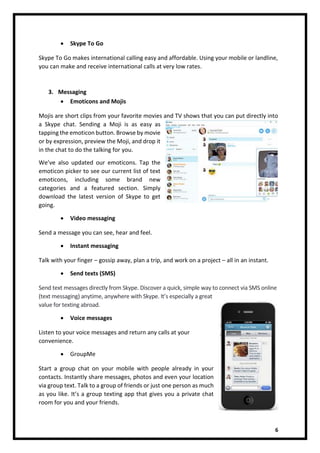
• Emoticons and Mojis
Mojis are short clips from your favorite movies and TV shows that you can put directly into
a Skype chat. Sending a Moji is as easy as
tapping the emoticon button. Browse by movie
or by expression, preview the Moji, and drop it
in the chat to do the talking for you.
We’ve also updated our emoticons. Tap the
emoticon picker to see our current list of text
emoticons, including some brand new
categories and a featured section. Simply
download the latest version of Skype to get
going.
• Video messaging
Send a message you can see, hear and feel.
• Instant messaging
Talk with your finger – gossip away, plan a trip, and work on a project – all in an instant.
• Send texts (SMS)
Send text messages directly from Skype. Discover a quick, simple way to connect via SMS online
(text messaging) anytime, anywhere with Skype. It’s especially a great
value for texting abroad.
• Voice messages
Listen to your voice messages and return any calls at your
convenience.
• GroupMe
Start a group chat on your mobile with people already in your
contacts. Instantly share messages, photos and even your location
via group text. Talk to a group of friends or just one person as much
as you like. It’s a group texting app that gives you a private chat
room for you and your friends.
7
4. Sharing
• Send files
Send files, photo and video of any size over Skype. Simply drop or add the file into your Skype
chat.
• Screen sharing
Screen sharing is the easy way to collaborate with a friend or colleague. Use our screen
sharing feature with anyone else on Skype – and collaborate on projects, plans, and more.
• Group screen sharing
Get everyone on the same page on a group video call.
• Send contacts
Share a contact, number and Skype Name easily. [3]
Skype Technology
Skype uses are very happy with the impression of free or cheap phone and video calls that they give
little supposed to how it works. Skype combines several different technologies, some of which may
not be obvious at first glance. Understanding these technologies may mean you change the way use
Skype. [3]
• VOIP
The main technology on Skype is voice-over-internet-protocol. This system allows call to be carried
over an Internet connection rather than a phone line. Unlike a phone service, the Internet doesn't
cost more to transfer data around the world than to transfer it to the house next door. This means
that Skype can charge much less than phone companies to carry long-distance and international calls,
yet still charge enough to make a profit. VOIP simply converts the sound of your voice (and the
picture with video calls) into computer data. It reduces the quality of the audio to reduce the data
demands. This works in the same way as music file formats such as mp3, meaning that the audio is
reduced in quality but not to the point that most callers will notice.
• Numbers
Several smartphone systems have Skype applications that let you make and receive Skype calls on
your phone. This may be confusing since technically you aren't making a phone call in the normal
way: Instead, you are using an Internet service with your phone handset acting as a speaker and a
microphone. These types of calls don't count toward your ordinary phone use and any applicable
minute limits, but they do consume Internet data and count toward any monthly data cap.
• Peer-to-peer
One of the least understood points about Skype is that it doesn't use direct connections. When two
people speak on Skype, the data doesn't run straight from one caller's device to the other. In fact, it
8
doesn't simply run from one caller to Skype and then from Skype to the receiver of the call. All
computers logged in to Skype are connected in a peer-to-peer network, which runs in the same way
as those used for both legal and illegal file sharing. Whenever you make a call, the data is routed
through a combination of Skype users' computers to find the most efficient path. As a result, Skype
itself drastically reduces the amount of data flowing into and out of its own equipment, cutting its
costs.
• Supernodes
One of the main ways Skype's peer-to-peer-network works is by assigning some user's computers as
"supernodes." Skype then treats these as hubs in the network, a bit like a major railway station that
connects to multiple railway lines. On a computer assigned as a supernode, Skype uses a continuously
increasing amount of bandwidth and could notably impair the performance of the computer's
Internet connection. You can set your computer to refuse to act as a supernode for Skype. It is a
complicated process, however, that involves editing your Windows Registry, so it's not suitable
unless you are a very competent computer user. More practical ways to limit the chances of
computer acting as a supernode include restarting it or disconnecting from the Internet at regular
intervals; only having Skype running when you need to make or receive a call or disconnecting and
reconnecting to Skype at regular intervals. [4]
Proprietary rights
• The software, products and Skype websites contain proprietary and confidential
information that is protected by IP law
• The content and compilation of content included on the Skype Websites, (excluding
User Submissions) such as sounds, text, graphics, logos, icons, images, audio clips,
digital downloads and software, are the property of Skype.
• Skype and/or its licensors retain exclusive ownership of the Software, Products and
Skype Websites and all intellectual property therein (whether or not registered and
anywhere in the world).
• “Skype”, related trademarks and logos and the “S” logo are trademarks of Skype. Skype
has registered and filed applications to register its trademarks in many countries
worldwide. Skype’s trademarks and trade dress may not be used in connection with any
product or service that is not Skype’s, in any manner that is likely to reason confusion
among customers, or in any way that disparages or disrepute Skype. All other
trademarks not owned by Skype or any of its related companies that appear on this site
are the property of their respective owners. There are not permitted to and shall not
register or use any trade name, trademark, logo, domain name or any other name or
sign that fit in any of Skype’s intellectual property (in whole or part) or that is
disconcertingly similar thereto. [4]
9
Skype privacy
The Privacy Statement also describes how Microsoft uses your content, which is your
communications with others; postings submitted by you to Microsoft via the Services; and the files,
photos, documents, audio, digital works, livestreams and videos that you upload, store, broadcast or
share through the Services ("Your Content"). Where processing is based on consent and to the extent
permitted by law, by agreeing to these Terms, you consent to Microsoft’s collection, use and
disclosure of Your Content and Data as described in the Privacy Statement. [5]
Software License and Restrictions
Software License. Unless accompanied by a separate Microsoft license agreement (for example, if
you are using a Microsoft application that is included with and a part of Windows, then the Microsoft
Software License Terms for the Windows Operating System govern such software), any software
provided by us to you as part of the Services is subject to these Terms. Applications acquired through
Office Store, Windows Store and Xbox Store are subject to section 14(b)(i) below.
a. If you comply with these Terms, we grant you the right to install and use one copy of the software
per device on a worldwide basis for use by only one person at a time as part of your use of the
Services. For certain devices, such software may be pre-installed for your personal, non-commercial
use of the Services. The software or website that is part of the Services may include third-party code.
Any third-party scripts or code, linked to or referenced from the software or website, are licensed to
you by the third parties that own such code, not by Microsoft. Notices, if any, for the third-party code
are included for your information only.
b. The software is licensed, not sold, and Microsoft reserves all rights to the software not expressly
granted by Microsoft, whether by implication, estoppel, or otherwise. This license does not give you
any right to, and you may not:
i. Circumvents or bypass any technological protection measures in or relating to the software or
Services;
ii. Disassemble, decompile, decrypt, hack, emulate, exploit, or reverse engineer any software or
other aspect of the Services that is included in or accessible through the Services, except and
only to the extent that the applicable copyright law expressly permits doing so;
iii. Separate components of the software or Services for use on different devices;
iv. Publish, copy, rent, lease, sell, export, import, distribute, or lend the software or the Services,
unless Microsoft expressly authorizes you to do so;
v. Transfer the software, any software licenses, or any rights to access or use the Services;
vi. Use the Services in any unauthorized way that could interfere with anyone else’s use of them
or gain access to any service, data, account, or network;
vii. Enable access to the Services or modify any Microsoft-authorized device (e.g., Xbox One, Xbox
360, Microsoft Surface, etc.) by unauthorized third-party applications. [5]
10
Contracting Entity, Choice of Law, Jurisdiction
• Contracting Entity. For use of free and paid consumer Skype-branded Services, you're
contracting with, and all references to “Microsoft” in these Terms mean, Skype Communications
S.à.r.l, 23 – 29 Rives de Clausen, L-2165 Luxembourg. For all other Services, you're contracting
with Microsoft Corporation, One Microsoft Way, Redmond, WA 98052, U.S.A.
• Choice of Law and Place to Resolve Disputes. If you live in (or, if a business, your principal place
of business is in) the United States, the laws of the state where you live (or, if a business, where
your principal place of business is located) govern all claims, regardless of conflict of laws
principles, except that the Federal Arbitration Act governs all provisions relating to arbitration.
You and we irrevocably consent to the exclusive jurisdiction and venue of the state or federal
courts in King County, Washington, for all disputes arising out of or relating to these Terms or
the Services that are heard in court (excluding arbitration and small claims court). [5]
Skype patents
Patent applications and other patent rights owned or controlled by Skype or its Affiliates that would
be infringed by any unlicensed manufacture, use, sale, offer for sale or importation of the Silk Codec
that is implemented by the Skype Silk Software made publicly available by Skype at
http://dev.skype.com/silk.
Referance
[1] “Skype,” Wikipedia. 06-Oct-2018.
[2] “Skype Features.” [Online]. Available: http://www.skaip.org/features. [Accessed: 10-Oct-2018].
[3] “Features | Find out what Skype can do for you | Skype.” [Online]. Available:
https://www.skype.com/en/features/. [Accessed: 23-Oct-2018].
[4] “Skype Connect Terms for Non U.S. Customers.” [Online]. Available:
https://www.skype.com/en/legal/tou-connect/. [Accessed: 23-Oct-2018].
[5] “Microsoft Services Agreement.” [Online]. Available: https://www.microsoft.com/en-
us/servicesagreement/. [Accessed: 14-Oct-2018].

Class activity 5

  • 1.
    Sri Lanka Instituteof Information Technology Master of Science (Information Management) Degree Program Social Computing Class Activity 05 W.M.J.H. Fernando MS18901290
  • 2.
    2 Skype Skype is atelecommunications application software product that focusses in provided that video chat and voice calls between computers, tablets, mobile devices, the Xbox One console, and smartwatches via the Internet and to regular telephones. Skype in addition provides instant messaging services. Users may transmit both text and video messages, and may exchange digital documents such as images, text, and video. Skype allows video conference calls. Skype implements a freemium business model. Much of the service is free, but Skype Credit or a subscription is required to call a landline or a mobile phone number. At the end of 2010, there were over 660 million worldwide users, with over 300 million estimated active each month as of August 2015.At one point in February 2012, there were 34 million users concurrently online on Skype. First released in August 2003, Skype was created by the Swede Niklas Zennström and the Dane Janus Friis, in cooperation with Ahti Heinla, Priit Kasesalu, and Jaan Tallinn, Estonians who developed the backend that was also used in the music-sharing application Kazaa. [1] To do the day to day activity some network administrators have banned Skype on corporate, government, home and education network, citing such reasons as inappropriate usage of resources, excessive bandwidth usage and security concerns.
  • 3.
    3 Main features Skype offersseveral features based around calling (both free and paid), messaging (including instant, voice and text messaging (SMS)), video chat, and file and screen sharing. The following is a diagram of Skype's features: [2] Skype Video Group video calls Video chat Call Skype to Skype calls Calls to mobile and landline Group calls Skype numbers Forward calls Caller ID Skype to go Message Mojus and emoticons Video messaging Instant messaging send text (SMS) voice messaging Group me Sharing Send files Screen sharing Group screen sharing Send contacts Other
  • 4.
    4 1. Video • Groupvideo calls Skype, group video calling is available to everyone free on their mobile devices, tablets and computers, it’s easier than ever. Group video calls are subject to a fair convention limit of 100 hours per month with no more than 10 hours per day and a limit of 4 hours per individual video call. Once these limits have been reached, the video will switch off and the call will convert to an audio call. • Video chat This is free service offer by Skype. It is face to face catch up. Enjoy free video chat with anyone who also has Skype and a webcam or compatible smartphone. Up to 10 people can share their video at the same time while the rest can participate over audio. To that they use HD video calling. 2. Calling • Skype to Skype calls To make free international calls – and free local calls – any time. Skype to Skype calls are always free, so go ahead, and call your best friend to make weekend plans or touch base with a client on the other side of the world. With internet calling feature, you can reach out any time – and talk as long as you like. • Call mobile and landline numbers Get reasonably priced international calling to mobiles and landlines anytime – day or night. It’s little cost to call people on the other side of the world, or just across town. Low domestic and international calling rates, and no peak times. Pay for calls to mobile and landline numbers with Skype Credit or, if you call international numbers regularly. • Group call Make free conference calls with Skype. Whether you want to share big news with your family or need to work closely with a team of colleagues, with Skype group calling, including conference calling and group chats, you can host a group video chat or conference call for up to 25 people.
  • 5.
    5 • Skype number Signup for a Skype Number and get the convenience of a local number that people can call, wherever you are. Build your business  Get a professional number for the office  Expand your reach with an international number  Manage your calls in one place and save money Live abroad, stay in touch  Keep a home number when you’re away  Make it easier and cheaper for family to call  Solve the problem of needing a local number for the bank. Skype Numbers are available in a wide variety of area codes, and in several countries/regions. Sign up, get your Skype Number, and pick up on any device where you use Skype. • Call forwarding Get your calls forwarded to any phone at low per minute rates and pay with Skype Credit or cover the cost with a subscription. • Caller ID Don’t be an unknown number. Let people know who’s calling with free Skype caller ID.
  • 6.
    6 • Skype ToGo Skype To Go makes international calling easy and affordable. Using your mobile or landline, you can make and receive international calls at very low rates. 3. Messaging • Emoticons and Mojis Mojis are short clips from your favorite movies and TV shows that you can put directly into a Skype chat. Sending a Moji is as easy as tapping the emoticon button. Browse by movie or by expression, preview the Moji, and drop it in the chat to do the talking for you. We’ve also updated our emoticons. Tap the emoticon picker to see our current list of text emoticons, including some brand new categories and a featured section. Simply download the latest version of Skype to get going. • Video messaging Send a message you can see, hear and feel. • Instant messaging Talk with your finger – gossip away, plan a trip, and work on a project – all in an instant. • Send texts (SMS) Send text messages directly from Skype. Discover a quick, simple way to connect via SMS online (text messaging) anytime, anywhere with Skype. It’s especially a great value for texting abroad. • Voice messages Listen to your voice messages and return any calls at your convenience. • GroupMe Start a group chat on your mobile with people already in your contacts. Instantly share messages, photos and even your location via group text. Talk to a group of friends or just one person as much as you like. It’s a group texting app that gives you a private chat room for you and your friends.
  • 7.
    7 4. Sharing • Sendfiles Send files, photo and video of any size over Skype. Simply drop or add the file into your Skype chat. • Screen sharing Screen sharing is the easy way to collaborate with a friend or colleague. Use our screen sharing feature with anyone else on Skype – and collaborate on projects, plans, and more. • Group screen sharing Get everyone on the same page on a group video call. • Send contacts Share a contact, number and Skype Name easily. [3] Skype Technology Skype uses are very happy with the impression of free or cheap phone and video calls that they give little supposed to how it works. Skype combines several different technologies, some of which may not be obvious at first glance. Understanding these technologies may mean you change the way use Skype. [3] • VOIP The main technology on Skype is voice-over-internet-protocol. This system allows call to be carried over an Internet connection rather than a phone line. Unlike a phone service, the Internet doesn't cost more to transfer data around the world than to transfer it to the house next door. This means that Skype can charge much less than phone companies to carry long-distance and international calls, yet still charge enough to make a profit. VOIP simply converts the sound of your voice (and the picture with video calls) into computer data. It reduces the quality of the audio to reduce the data demands. This works in the same way as music file formats such as mp3, meaning that the audio is reduced in quality but not to the point that most callers will notice. • Numbers Several smartphone systems have Skype applications that let you make and receive Skype calls on your phone. This may be confusing since technically you aren't making a phone call in the normal way: Instead, you are using an Internet service with your phone handset acting as a speaker and a microphone. These types of calls don't count toward your ordinary phone use and any applicable minute limits, but they do consume Internet data and count toward any monthly data cap. • Peer-to-peer One of the least understood points about Skype is that it doesn't use direct connections. When two people speak on Skype, the data doesn't run straight from one caller's device to the other. In fact, it
  • 8.
    8 doesn't simply runfrom one caller to Skype and then from Skype to the receiver of the call. All computers logged in to Skype are connected in a peer-to-peer network, which runs in the same way as those used for both legal and illegal file sharing. Whenever you make a call, the data is routed through a combination of Skype users' computers to find the most efficient path. As a result, Skype itself drastically reduces the amount of data flowing into and out of its own equipment, cutting its costs. • Supernodes One of the main ways Skype's peer-to-peer-network works is by assigning some user's computers as "supernodes." Skype then treats these as hubs in the network, a bit like a major railway station that connects to multiple railway lines. On a computer assigned as a supernode, Skype uses a continuously increasing amount of bandwidth and could notably impair the performance of the computer's Internet connection. You can set your computer to refuse to act as a supernode for Skype. It is a complicated process, however, that involves editing your Windows Registry, so it's not suitable unless you are a very competent computer user. More practical ways to limit the chances of computer acting as a supernode include restarting it or disconnecting from the Internet at regular intervals; only having Skype running when you need to make or receive a call or disconnecting and reconnecting to Skype at regular intervals. [4] Proprietary rights • The software, products and Skype websites contain proprietary and confidential information that is protected by IP law • The content and compilation of content included on the Skype Websites, (excluding User Submissions) such as sounds, text, graphics, logos, icons, images, audio clips, digital downloads and software, are the property of Skype. • Skype and/or its licensors retain exclusive ownership of the Software, Products and Skype Websites and all intellectual property therein (whether or not registered and anywhere in the world). • “Skype”, related trademarks and logos and the “S” logo are trademarks of Skype. Skype has registered and filed applications to register its trademarks in many countries worldwide. Skype’s trademarks and trade dress may not be used in connection with any product or service that is not Skype’s, in any manner that is likely to reason confusion among customers, or in any way that disparages or disrepute Skype. All other trademarks not owned by Skype or any of its related companies that appear on this site are the property of their respective owners. There are not permitted to and shall not register or use any trade name, trademark, logo, domain name or any other name or sign that fit in any of Skype’s intellectual property (in whole or part) or that is disconcertingly similar thereto. [4]
  • 9.
    9 Skype privacy The PrivacyStatement also describes how Microsoft uses your content, which is your communications with others; postings submitted by you to Microsoft via the Services; and the files, photos, documents, audio, digital works, livestreams and videos that you upload, store, broadcast or share through the Services ("Your Content"). Where processing is based on consent and to the extent permitted by law, by agreeing to these Terms, you consent to Microsoft’s collection, use and disclosure of Your Content and Data as described in the Privacy Statement. [5] Software License and Restrictions Software License. Unless accompanied by a separate Microsoft license agreement (for example, if you are using a Microsoft application that is included with and a part of Windows, then the Microsoft Software License Terms for the Windows Operating System govern such software), any software provided by us to you as part of the Services is subject to these Terms. Applications acquired through Office Store, Windows Store and Xbox Store are subject to section 14(b)(i) below. a. If you comply with these Terms, we grant you the right to install and use one copy of the software per device on a worldwide basis for use by only one person at a time as part of your use of the Services. For certain devices, such software may be pre-installed for your personal, non-commercial use of the Services. The software or website that is part of the Services may include third-party code. Any third-party scripts or code, linked to or referenced from the software or website, are licensed to you by the third parties that own such code, not by Microsoft. Notices, if any, for the third-party code are included for your information only. b. The software is licensed, not sold, and Microsoft reserves all rights to the software not expressly granted by Microsoft, whether by implication, estoppel, or otherwise. This license does not give you any right to, and you may not: i. Circumvents or bypass any technological protection measures in or relating to the software or Services; ii. Disassemble, decompile, decrypt, hack, emulate, exploit, or reverse engineer any software or other aspect of the Services that is included in or accessible through the Services, except and only to the extent that the applicable copyright law expressly permits doing so; iii. Separate components of the software or Services for use on different devices; iv. Publish, copy, rent, lease, sell, export, import, distribute, or lend the software or the Services, unless Microsoft expressly authorizes you to do so; v. Transfer the software, any software licenses, or any rights to access or use the Services; vi. Use the Services in any unauthorized way that could interfere with anyone else’s use of them or gain access to any service, data, account, or network; vii. Enable access to the Services or modify any Microsoft-authorized device (e.g., Xbox One, Xbox 360, Microsoft Surface, etc.) by unauthorized third-party applications. [5]
  • 10.
    10 Contracting Entity, Choiceof Law, Jurisdiction • Contracting Entity. For use of free and paid consumer Skype-branded Services, you're contracting with, and all references to “Microsoft” in these Terms mean, Skype Communications S.à.r.l, 23 – 29 Rives de Clausen, L-2165 Luxembourg. For all other Services, you're contracting with Microsoft Corporation, One Microsoft Way, Redmond, WA 98052, U.S.A. • Choice of Law and Place to Resolve Disputes. If you live in (or, if a business, your principal place of business is in) the United States, the laws of the state where you live (or, if a business, where your principal place of business is located) govern all claims, regardless of conflict of laws principles, except that the Federal Arbitration Act governs all provisions relating to arbitration. You and we irrevocably consent to the exclusive jurisdiction and venue of the state or federal courts in King County, Washington, for all disputes arising out of or relating to these Terms or the Services that are heard in court (excluding arbitration and small claims court). [5] Skype patents Patent applications and other patent rights owned or controlled by Skype or its Affiliates that would be infringed by any unlicensed manufacture, use, sale, offer for sale or importation of the Silk Codec that is implemented by the Skype Silk Software made publicly available by Skype at http://dev.skype.com/silk. Referance [1] “Skype,” Wikipedia. 06-Oct-2018. [2] “Skype Features.” [Online]. Available: http://www.skaip.org/features. [Accessed: 10-Oct-2018]. [3] “Features | Find out what Skype can do for you | Skype.” [Online]. Available: https://www.skype.com/en/features/. [Accessed: 23-Oct-2018]. [4] “Skype Connect Terms for Non U.S. Customers.” [Online]. Available: https://www.skype.com/en/legal/tou-connect/. [Accessed: 23-Oct-2018]. [5] “Microsoft Services Agreement.” [Online]. Available: https://www.microsoft.com/en- us/servicesagreement/. [Accessed: 14-Oct-2018].