Skype
By
Kashif
Skype’s Popularity










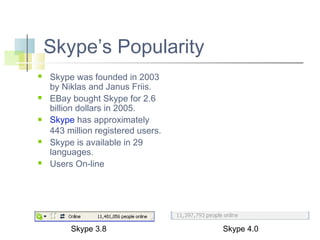
Skype was founded in 2003
by Niklas and Janus Friis.
EBay bought Skype for 2.6
billion dollars in 2005.
Skype has approximately
443 million registered users.
Skype is available in 29
languages.
Users On-line

Skype 3.8

Skype 4.0
What is Skype?





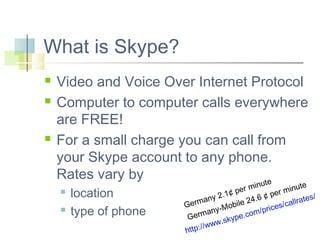
Video and Voice Over Internet Protocol
Computer to computer calls everywhere
are FREE!
For a small charge you can call from
your Skype account to any phone.
Rates vary by
te



location
type of phone

u
te
r min
minu
pe
¢
er
s/
y 2.1
6¢p
24.
lrate
man
ile
cal
Ger
ices/
-Mob
/pr
ny
.com
erma
G
ype
w.sk
ww
ttp://
h
Materials Needed






Skype software
High speed Internet connection
Webcam with Microphone
Speakers
Computer







At least a 1GHz Processor, 512 MB RAM.
Recommend 2GHz CPU, 1GB RAM, 300 kb/s for
HQ video
Laptop/headset

Windows (2000, XP, Vista) with Directx 9.0
Getting Started






Download and Install Skype
Set Up A Skype Account
Launch Skype
Set Your Privacy Level
Start Using Skype
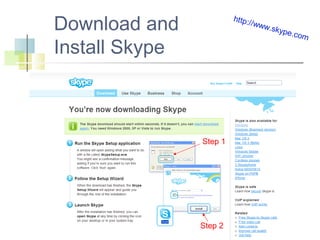
Download and
Install Skype

http:/
/www
.skyp
e.com

Step 1

Step 2
Install Skype






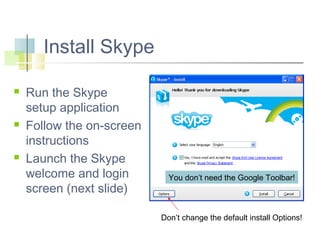
Run the Skype
setup application
Follow the on-screen
instructions
Launch the Skype
welcome and login
screen (next slide)

You don’t need the Google Toolbar!

Don’t change the default install Options!
Set Up A Skype Account


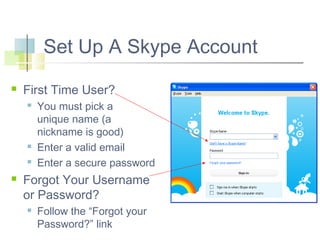
First Time User?







You must pick a
unique name (a
nickname is good)
Enter a valid email
Enter a secure password

Forgot Your Username
or Password?


Follow the “Forgot your
Password?” link
Forgot
It Already




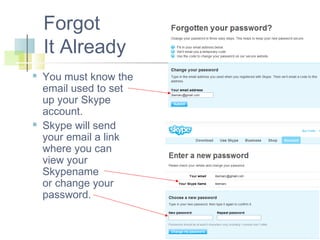
You must know the
email used to set
up your Skype
account.
Skype will send
your email a link
where you can
view your
Skypename
or change your
password.
Skype Login


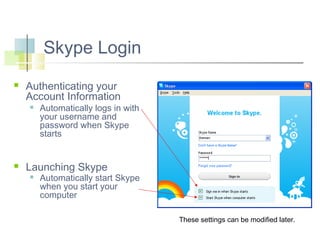
Authenticating your
Account Information




Automatically logs in with
your username and
password when Skype
starts

Launching Skype


Automatically start Skype
when you start your
computer
These settings can be modified later.
Launching Skype
Default View
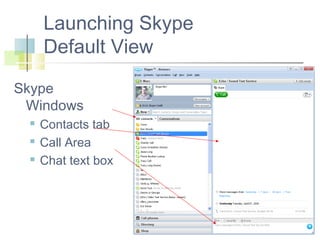
Skype
Windows




Contacts tab
Call Area
Chat text box
Privacy Issues




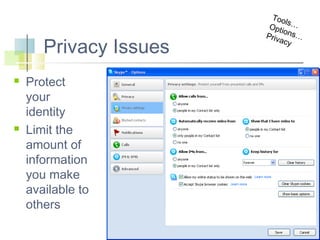
Protect
your
identity
Limit the
amount of
information
you make
available to
others

Too
ls
Opt …
io
Priv ns…
acy
Start Using Skype


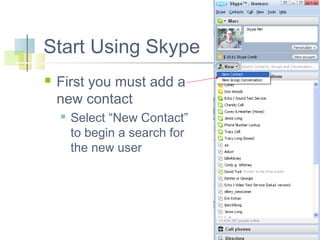
First you must add a
new contact


Select “New Contact”
to begin a search for
the new user
Search for a Contact


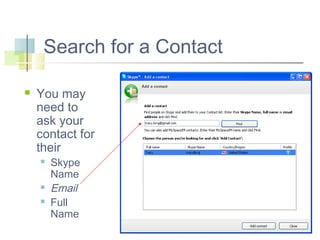
You may
need to
ask your
contact for
their





Skype
Name
Email
Full
Name
Introduce Yourself
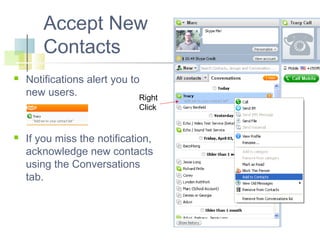
Accept New
Contacts


Notifications alert you to
new users.
Right
Click



If you miss the notification,
acknowledge new contacts
using the Conversations
tab.
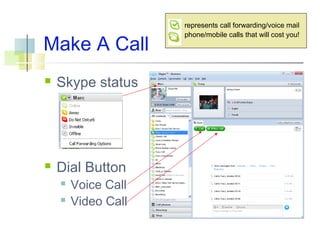
Make A Call


Skype status



Dial Button



Voice Call
Video Call

represents call forwarding/voice mail
phone/mobile calls that will cost you!
Skype Basics






Calls
Chats and SMS
Contacts
Profile
Snapshots

Send Files
 Conference Calls
 Group Chats
 Share Your Desktop

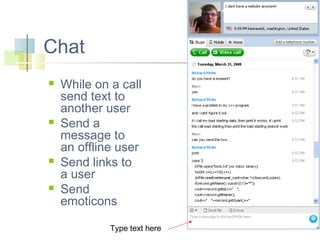
Chat








While on a call
send text to
another user
Send a
message to
an offline user
Send links to
a user
Send
emoticons
Type text here
Sending a Message
To An Offline User


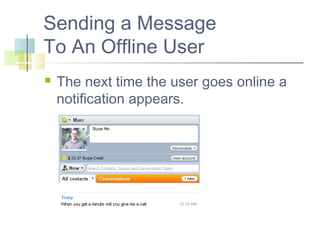
The next time the user goes online a
notification appears.
SMS






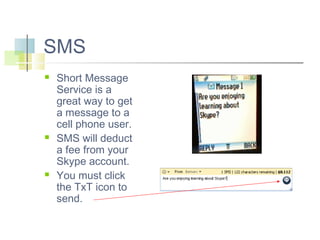
Short Message
Service is a
great way to get
a message to a
cell phone user.
SMS will deduct
a fee from your
Skype account.
You must click
the TxT icon to
send.
More With Contacts




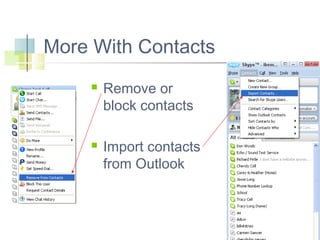
Remove or
block contacts
Import contacts
from Outlook
Importing from an Email
Address Book
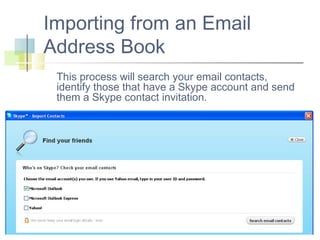
This process will search your email contacts,
identify those that have a Skype account and send
them a Skype contact invitation.
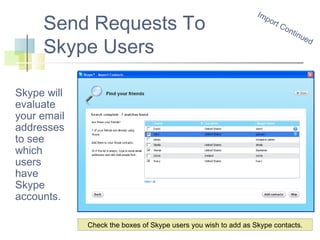
Send Requests To
Skype Users

Im
po
rt

Co
ntin
ue
d

Skype will
evaluate
your email
addresses
to see
which
users
have
Skype
accounts.
Check the boxes of Skype users you wish to add as Skype contacts.
Skype … P
rofi

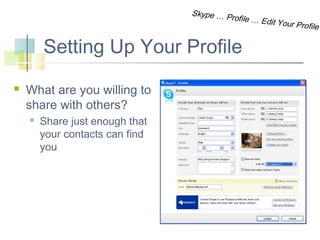
Setting Up Your Profile


What are you willing to
share with others?


Share just enough that
your contacts can find
you

le … Edit Y

our Profile
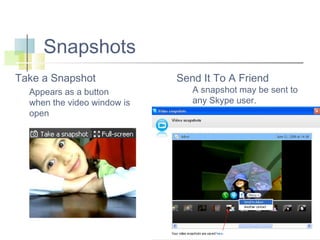
Snapshots
Take a Snapshot
Appears as a button
when the video window is
open

Send It To A Friend

A snapshot may be sent to
any Skype user.
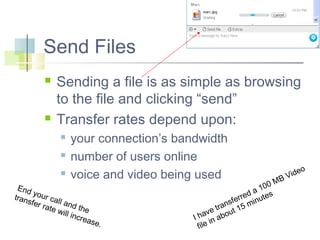
Send Files




Sending a file is as simple as browsing
to the file and clicking “send”
Transfer rates depend upon:




your connection’s bandwidth
number of users online
voice and video being used

End
y
tran our cal
sfer
l
rate and the
will
incre
ase.

M
00
1
d a tes
e
ferr minu
s
tran t 15
e
hav abou
I
in
file

o
ide
BV
Receiving a File




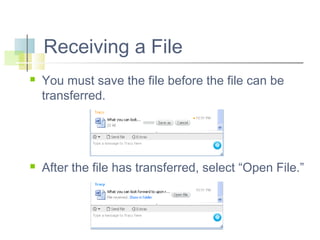
You must save the file before the file can be
transferred.

After the file has transferred, select “Open File.”
Conference Calls


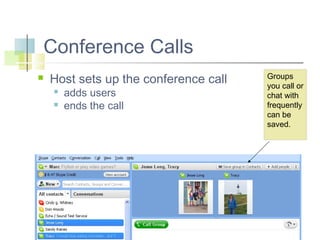
Host sets up the conference call



adds users
ends the call

Groups
you call or
chat with
frequently
can be
saved.


Group Chat



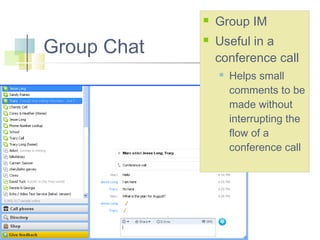
Group IM
Useful in a
conference call


Helps small
comments to be
made without
interrupting the
flow of a
conference call
Sharing Your Desktop


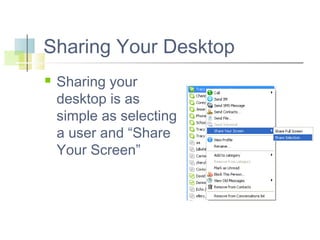
Sharing your
desktop is as
simple as selecting
a user and “Share
Your Screen”
Skype Revenue (in millions of $)
180
160
140
120
100







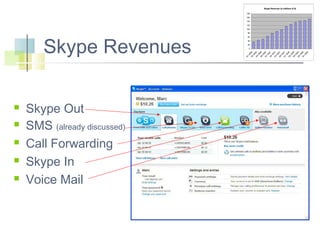
Skype Out
SMS (already discussed)
Call Forwarding
Skype In
Voice Mail

60
40
20

Q

1

2

20
06
20
Q 06
3
20
Q 06
4
20
Q 06
1
20
Q 07
2
20
Q 07
3
20
Q 07
4
20
Q 07
1
20
Q 08
2
20
Q 08
3
20
Q 08
4
20
Q 08
1
20
09

0

Q

Skype Revenues

80
SkypeOut




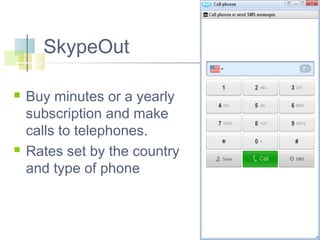
Buy minutes or a yearly
subscription and make
calls to telephones.
Rates set by the country
and type of phone
Call Forwarding






Too
l
Cal s…Opt
l Fo
rwa ions…C
rdin
alls
g

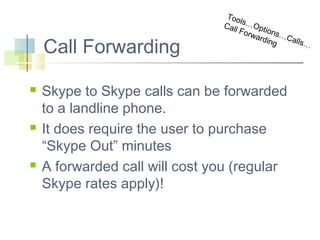
Skype to Skype calls can be forwarded
to a landline phone.
It does require the user to purchase
“Skype Out” minutes
A forwarded call will cost you (regular
Skype rates apply)!

…
Skype In




This allows anyone to use a phone
to call a number and it will ring your
Skype account.
Limited availability
Skype In Education










Record a conversation with a
scientist
Teach a lesson remotely
Have a group chat with students in a
lab
Work in a collaborate environment
Students can share projects they
have been working on with others in
a group
Carry out online interviews with
someone
Skype In Education (Cont.)








Record an interview with students or
fellow teachers for students to listen to.
Record the work of a conference session
where students plan a project between
two sites and turn in the recorded call.
World language classes can practice
speaking with students in another
language.
Connect students in rural areas
References


Annick LIVEbrary Online Classroom



Skype Other Classrooms!






Getting Started Video
Skype Tutorials
Skype Help
Broadband Speed Test
References (Continued)







How to Record Skype Conversations:
Tools, Resources, Tips
Skype Announces SIP Gateway
Service for IP PBXes
Is Skype for Sale?
10 Best Skype Alternatives

Skype Presentation

  • 1.
  • 2.
    Skype’s Popularity      Skype wasfounded in 2003 by Niklas and Janus Friis. EBay bought Skype for 2.6 billion dollars in 2005. Skype has approximately 443 million registered users. Skype is available in 29 languages. Users On-line Skype 3.8 Skype 4.0
  • 3.
    What is Skype?    Videoand Voice Over Internet Protocol Computer to computer calls everywhere are FREE! For a small charge you can call from your Skype account to any phone. Rates vary by te   location type of phone u te r min minu pe ¢ er s/ y 2.1 6¢p 24. lrate man ile cal Ger ices/ -Mob /pr ny .com erma G ype w.sk ww ttp:// h
  • 4.
    Materials Needed      Skype software Highspeed Internet connection Webcam with Microphone Speakers Computer     At least a 1GHz Processor, 512 MB RAM. Recommend 2GHz CPU, 1GB RAM, 300 kb/s for HQ video Laptop/headset Windows (2000, XP, Vista) with Directx 9.0
  • 5.
    Getting Started      Download andInstall Skype Set Up A Skype Account Launch Skype Set Your Privacy Level Start Using Skype
  • 6.
  • 7.
    Install Skype    Run theSkype setup application Follow the on-screen instructions Launch the Skype welcome and login screen (next slide) You don’t need the Google Toolbar! Don’t change the default install Options!
  • 8.
    Set Up ASkype Account  First Time User?     You must pick a unique name (a nickname is good) Enter a valid email Enter a secure password Forgot Your Username or Password?  Follow the “Forgot your Password?” link
  • 9.
    Forgot It Already   You mustknow the email used to set up your Skype account. Skype will send your email a link where you can view your Skypename or change your password.
  • 10.
    Skype Login  Authenticating your AccountInformation   Automatically logs in with your username and password when Skype starts Launching Skype  Automatically start Skype when you start your computer These settings can be modified later.
  • 11.
  • 12.
    Privacy Issues   Protect your identity Limit the amountof information you make available to others Too ls Opt … io Priv ns… acy
  • 13.
    Start Using Skype  Firstyou must add a new contact  Select “New Contact” to begin a search for the new user
  • 14.
    Search for aContact  You may need to ask your contact for their    Skype Name Email Full Name
  • 15.
  • 16.
    Accept New Contacts  Notifications alertyou to new users. Right Click  If you miss the notification, acknowledge new contacts using the Conversations tab.
  • 17.
    Make A Call  Skypestatus  Dial Button   Voice Call Video Call represents call forwarding/voice mail phone/mobile calls that will cost you!
  • 18.
    Skype Basics      Calls Chats andSMS Contacts Profile Snapshots Send Files  Conference Calls  Group Chats  Share Your Desktop 
  • 19.
    Chat     While on acall send text to another user Send a message to an offline user Send links to a user Send emoticons Type text here
  • 20.
    Sending a Message ToAn Offline User  The next time the user goes online a notification appears.
  • 21.
    SMS    Short Message Service isa great way to get a message to a cell phone user. SMS will deduct a fee from your Skype account. You must click the TxT icon to send.
  • 22.
    More With Contacts   Removeor block contacts Import contacts from Outlook
  • 23.
    Importing from anEmail Address Book This process will search your email contacts, identify those that have a Skype account and send them a Skype contact invitation.
  • 24.
    Send Requests To SkypeUsers Im po rt Co ntin ue d Skype will evaluate your email addresses to see which users have Skype accounts. Check the boxes of Skype users you wish to add as Skype contacts.
  • 25.
    Skype … P rofi SettingUp Your Profile  What are you willing to share with others?  Share just enough that your contacts can find you le … Edit Y our Profile
  • 26.
    Snapshots Take a Snapshot Appearsas a button when the video window is open Send It To A Friend A snapshot may be sent to any Skype user.
  • 27.
    Send Files   Sending afile is as simple as browsing to the file and clicking “send” Transfer rates depend upon:    your connection’s bandwidth number of users online voice and video being used End y tran our cal sfer l rate and the will incre ase. M 00 1 d a tes e ferr minu s tran t 15 e hav abou I in file o ide BV
  • 28.
    Receiving a File   Youmust save the file before the file can be transferred. After the file has transferred, select “Open File.”
  • 29.
    Conference Calls  Host setsup the conference call   adds users ends the call Groups you call or chat with frequently can be saved.
  • 30.
     Group Chat  Group IM Usefulin a conference call  Helps small comments to be made without interrupting the flow of a conference call
  • 31.
    Sharing Your Desktop  Sharingyour desktop is as simple as selecting a user and “Share Your Screen”
  • 32.
    Skype Revenue (inmillions of $) 180 160 140 120 100      Skype Out SMS (already discussed) Call Forwarding Skype In Voice Mail 60 40 20 Q 1 2 20 06 20 Q 06 3 20 Q 06 4 20 Q 06 1 20 Q 07 2 20 Q 07 3 20 Q 07 4 20 Q 07 1 20 Q 08 2 20 Q 08 3 20 Q 08 4 20 Q 08 1 20 09 0 Q Skype Revenues 80
  • 33.
    SkypeOut   Buy minutes ora yearly subscription and make calls to telephones. Rates set by the country and type of phone
  • 34.
    Call Forwarding    Too l Cal s…Opt lFo rwa ions…C rdin alls g Skype to Skype calls can be forwarded to a landline phone. It does require the user to purchase “Skype Out” minutes A forwarded call will cost you (regular Skype rates apply)! …
  • 35.
    Skype In   This allowsanyone to use a phone to call a number and it will ring your Skype account. Limited availability
  • 36.
    Skype In Education       Recorda conversation with a scientist Teach a lesson remotely Have a group chat with students in a lab Work in a collaborate environment Students can share projects they have been working on with others in a group Carry out online interviews with someone
  • 37.
    Skype In Education(Cont.)     Record an interview with students or fellow teachers for students to listen to. Record the work of a conference session where students plan a project between two sites and turn in the recorded call. World language classes can practice speaking with students in another language. Connect students in rural areas
  • 38.
    References  Annick LIVEbrary OnlineClassroom  Skype Other Classrooms!     Getting Started Video Skype Tutorials Skype Help Broadband Speed Test
  • 39.
    References (Continued)     How toRecord Skype Conversations: Tools, Resources, Tips Skype Announces SIP Gateway Service for IP PBXes Is Skype for Sale? 10 Best Skype Alternatives

Editor's Notes

  • #3 “EBay would consider selling the business unit (SKYPE) if it couldn't be integrated with its auction or PayPal payment system. … So is eBay looking to unload Skype? The answer is probably yes and no. Because Skype isn't core to eBay's online auction business, experts believe that eBay would be happy to let Skype go, at the right price. But Skype, which just posted a 26 percent gain in revenue for the fourth quarter compared to a year ago, happens to be one of the only bright spots in eBay's overall business, which means that eBay isn't desperate to let it go. … Based on its current financials, the highest price that eBay could hope to get for Skype is about $1.6 billion, Friedland said. And he said that would be a generous offer. eBay itself has valued the Skype assets on its balance sheet at $2 billion, so it's unlikely the company would accept a lower figure. “ http://news.cnet.com/8301-1035_3-10150446-94.html
  • #4 Germany$ 0.021$ 0.024Germany - Mobile (Others)$ 0.246$ 0.283 Another Skype service allows POTS phones calls to a Skype number.
  • #5 Video calls require at least 1 GHz CPU, 512MB RAM, and 256kbit/s up- and download speed. High Quality Video calls require at least 2 GHz CPU, 1GB RAM, and 300kbit/s up- and download speed.
  • #11 These settings are profile dependent.