CI CD WORKFLOW
By Team CALMS Squad
Tools used:-
GitHub:- To manage the code and its versioning.
Jenkins:- To trigger Build Jobs via webhooks and executing Ansible scripts.
Sonarqube: For Analysis of Code
Ansible:- To execute commands on Remote workstations and servers
Docker:- Used to run Containers
Workflow
1. Setup.yml script will be run by developer on his workstation (manually)
(One time job)
2. Setup.yml will be run on server by DevOps (one time) (manually)
3. Developer will Run Skeleton.yml manually on his workstation (First time
and then Occasionally when any updates for the docker image are added)
4. Create a fresh project folder (manual Initial one time job only on developer
workstation)
a. By doing git init
b. git remote add
c. Git push
d. Database will be setup with drush site-install (First time only)
5. DevOps will run Skeleton.yml manually on server (First time and then
Occasionally when any updates for the docker image are added)
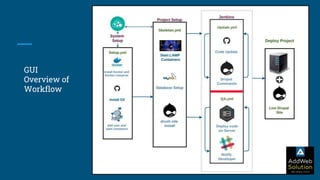
GUI
Overview of
Workflow
Workflow (Continued..)
1. Following tasks are recurring until project ends:
a. When developer will push code and export configs(drush cex) from his local machine
to git repository, Jenkins will be called and update.yml will be triggered which will
i. git clone onto staging server, production server (same script will be run but with
different creds)
ii. Setup database on the servers
iii. Import configs using drush cim
b. Jenkins will trigger QA.yml which will run test cases on the build and send the result
to SOnarQube and if
i. successful then deploy the code on server and report to developer
ii. Failed then will report to developer.
Ansible Scripts:-
1. Setup.yml
a. Run system setup script which will
i. Install Git, Docker
ii. Install Docker compose
iii. add system user in docker group
iv. Call compose file and start the containers
2. Update.yml
a. Code update when pushed or pulled via developer
b. Run defined steps of drupal (For e.g. drush cr)
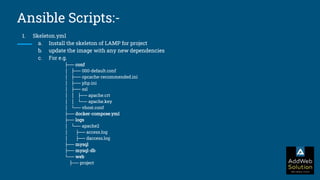
Ansible Scripts:-
1. Skeleton.yml
a. Install the skeleton of LAMP for project
b. update the image with any new dependencies
c. For e.g.
├── conf
│ ├── 000-default.conf
│ ├── opcache-recommended.ini
│ ├── php.ini
│ ├── ssl
│ │ ├── apache.crt
│ │ └── apache.key
│ └── vhost.conf
├── docker-compose.yml
├── logs
│ └── apache2
│ ├── access.log
│ ├── daccess.log
├── mysql
├── mysql-db
└── web
├── project
Reach us at :
Email:
1. hi@addwebsolution.com or
2. contact@addwebsolution.com
Phone:
1. +1-302-261-5724
2. +44-020-8144-0266
3. +91 903 317 7471
We are Social:
Team Culture | LinkedIn | Happy Clients | Twitter

CI CD WORKFLOW

  • 1.
    CI CD WORKFLOW ByTeam CALMS Squad
  • 2.
    Tools used:- GitHub:- Tomanage the code and its versioning. Jenkins:- To trigger Build Jobs via webhooks and executing Ansible scripts. Sonarqube: For Analysis of Code Ansible:- To execute commands on Remote workstations and servers Docker:- Used to run Containers
  • 3.
    Workflow 1. Setup.yml scriptwill be run by developer on his workstation (manually) (One time job) 2. Setup.yml will be run on server by DevOps (one time) (manually) 3. Developer will Run Skeleton.yml manually on his workstation (First time and then Occasionally when any updates for the docker image are added) 4. Create a fresh project folder (manual Initial one time job only on developer workstation) a. By doing git init b. git remote add c. Git push d. Database will be setup with drush site-install (First time only) 5. DevOps will run Skeleton.yml manually on server (First time and then Occasionally when any updates for the docker image are added)
  • 4.
  • 5.
    Workflow (Continued..) 1. Followingtasks are recurring until project ends: a. When developer will push code and export configs(drush cex) from his local machine to git repository, Jenkins will be called and update.yml will be triggered which will i. git clone onto staging server, production server (same script will be run but with different creds) ii. Setup database on the servers iii. Import configs using drush cim b. Jenkins will trigger QA.yml which will run test cases on the build and send the result to SOnarQube and if i. successful then deploy the code on server and report to developer ii. Failed then will report to developer.
  • 6.
    Ansible Scripts:- 1. Setup.yml a.Run system setup script which will i. Install Git, Docker ii. Install Docker compose iii. add system user in docker group iv. Call compose file and start the containers 2. Update.yml a. Code update when pushed or pulled via developer b. Run defined steps of drupal (For e.g. drush cr)
  • 7.
    Ansible Scripts:- 1. Skeleton.yml a.Install the skeleton of LAMP for project b. update the image with any new dependencies c. For e.g. ├── conf │ ├── 000-default.conf │ ├── opcache-recommended.ini │ ├── php.ini │ ├── ssl │ │ ├── apache.crt │ │ └── apache.key │ └── vhost.conf ├── docker-compose.yml ├── logs │ └── apache2 │ ├── access.log │ ├── daccess.log ├── mysql ├── mysql-db └── web ├── project
  • 8.
    Reach us at: Email: 1. hi@addwebsolution.com or 2. contact@addwebsolution.com Phone: 1. +1-302-261-5724 2. +44-020-8144-0266 3. +91 903 317 7471 We are Social: Team Culture | LinkedIn | Happy Clients | Twitter