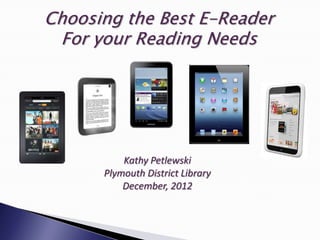
Choosing the Best E-Reader
 For your Reading Needs


          Kathy Petlewski
      Plymouth District Library
          December, 2012
   Your Budget!
   What do you want to do with your e-reader?
   Will you be reading at night or during the day?
   Do you plan to only purchase e-books or do you
    want to borrow from the Library?
   Will you be the only person to use this or will you be
    sharing it?
   What is available on the market and things to
    consider in making your selection.
 Dedicated e-readers can range from
  $69 up to $300 for e-ink (black & white)
  devices.
 Color e-readers associated with book
  sellers (Kindles and Nooks) list from
  $139 to $499.
 Color tablets (iPad, Nexus, Samsung
  Galaxy Tab, Microsoft Surface) cost
  between $199 and $849.
   Only read e-books, either purchased or borrowed
    from a library.
   Read e-books and listen to some e-audiobooks.
   Read e-books but also be able to get e-mail and go
    on social media sites like Facebook & play games.
   Read e-books, play games, use a full-blown web
    browser, and also view movies & TV shows.
   Do all of the above, plus Skype, take photos and do
    word processing tasks.
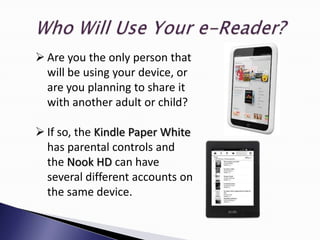
 Are you the only person that
  will be using your device, or
  are you planning to share it
  with another adult or child?

 If so, the Kindle Paper White
  has parental controls and
  the Nook HD can have
  several different accounts on
  the same device.
Purchase from Amazon, Barnes & Noble, Google
Books, or iBooks.

Download free or inexpensive books from Project
Gutenberg, Smashwords, or OpenLibrary.org.

Borrow OverDrive e-books free of charge from
your local library.
   PDL is part of a 25-member consortium for e-books
    and audio e-books.
   These books are provided by OverDrive in several
    formats: EPUB & PDF for e-readers and WMA & MP3
    for iPods and MP3 players.
   E-books are single user licenses, so you must place a
    hold on books that are “checked out” electronically.
   Titles are checked out for either 7 or 14 days. After
    that time they will cease to work.
   Android tablets (Google Nexus, Samsung Galaxy
    Tablet and Droid smart phones ) have a free
    OverDrive “app” at the Marketplace.
   iPads, iPhones & iPod Touch use an “app” from the
    Apple App Store.
   Get the Nook Color and Nook HD Tablets “app” from
    Barnes & Noble.
    Once the apps are installed, you can download your
    ebooks directly to your device.
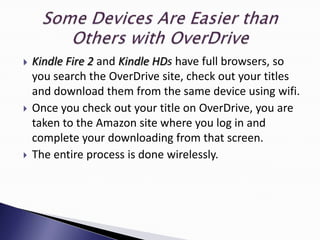
   Kindle Fire 2 and Kindle HDs have full browsers, so
    you search the OverDrive site, check out your titles
    and download them from the same device using wifi.
   Once you check out your title on OverDrive, you are
    taken to the Amazon site where you log in and
    complete your downloading from that screen.
   The entire process is done wirelessly.
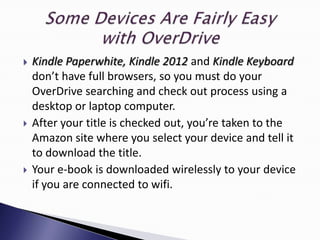
   Kindle Paperwhite, Kindle 2012 and Kindle Keyboard
    don’t have full browsers, so you must do your
    OverDrive searching and check out process using a
    desktop or laptop computer.
   After your title is checked out, you’re taken to the
    Amazon site where you select your device and tell it
    to download the title.
   Your e-book is downloaded wirelessly to your device
    if you are connected to wifi.
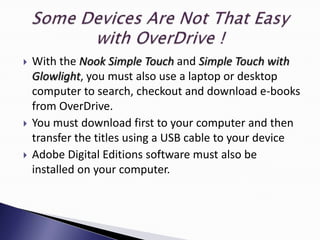
   With the Nook Simple Touch and Simple Touch with
    Glowlight, you must also use a laptop or desktop
    computer to search, checkout and download e-books
    from OverDrive.
   You must download first to your computer and then
    transfer the titles using a USB cable to your device
   Adobe Digital Editions software must also be
    installed on your computer.
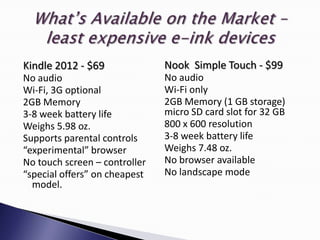
Kindle 2012 - $69              Nook Simple Touch - $99
No audio                       No audio
Wi-Fi, 3G optional             Wi-Fi only
2GB Memory                     2GB Memory (1 GB storage)
3-8 week battery life          micro SD card slot for 32 GB
Weighs 5.98 oz.                800 x 600 resolution
Supports parental controls     3-8 week battery life
“experimental” browser         Weighs 7.48 oz.
No touch screen – controller   No browser available
“special offers” on cheapest   No landscape mode
  model.
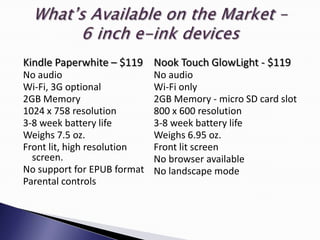
Kindle Paperwhite – $119 Nook Touch GlowLight - $119
No audio                     No audio
Wi-Fi, 3G optional           Wi-Fi only
2GB Memory                   2GB Memory - micro SD card slot
1024 x 758 resolution        800 x 600 resolution
3-8 week battery life        3-8 week battery life
Weighs 7.5 oz.               Weighs 6.95 oz.
Front lit, high resolution   Front lit screen
  screen.                    No browser available
No support for EPUB format   No landscape mode
Parental controls
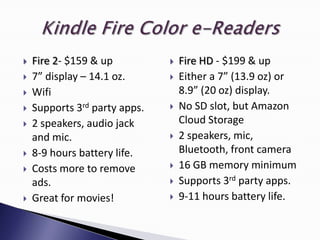
   Fire 2- $159 & up             Fire HD - $199 & up
   7” display – 14.1 oz.         Either a 7” (13.9 oz) or
   Wifi                           8.9” (20 oz) display.
   Supports 3rd party apps.      No SD slot, but Amazon
   2 speakers, audio jack         Cloud Storage
    and mic.                      2 speakers, mic,
   8-9 hours battery life.        Bluetooth, front camera
   Costs more to remove          16 GB memory minimum
    ads.                          Supports 3rd party apps.
   Great for movies!             9-11 hours battery life.
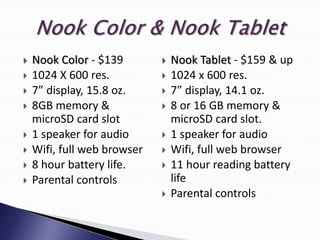
   Nook Color - $139           Nook Tablet - $159 & up
   1024 X 600 res.             1024 x 600 res.
   7” display, 15.8 oz.        7” display, 14.1 oz.
   8GB memory &                8 or 16 GB memory &
    microSD card slot            microSD card slot.
   1 speaker for audio         1 speaker for audio
   Wifi, full web browser      Wifi, full web browser
   8 hour battery life.        11 hour reading battery
   Parental controls            life
                                Parental controls
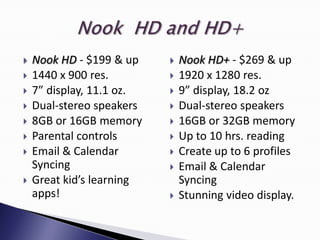
   Nook HD - $199 & up       Nook HD+ - $269 & up
   1440 x 900 res.           1920 x 1280 res.
   7” display, 11.1 oz.      9” display, 18.2 oz
   Dual-stereo speakers      Dual-stereo speakers
   8GB or 16GB memory        16GB or 32GB memory
   Parental controls         Up to 10 hrs. reading
   Email & Calendar          Create up to 6 profiles
    Syncing                   Email & Calendar
   Great kid’s learning       Syncing
    apps!                     Stunning video display.
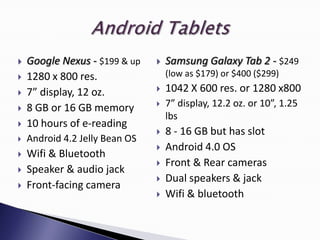
   Google Nexus - $199 & up       Samsung Galaxy Tab 2 - $249
   1280 x 800 res.                 (low as $179) or $400 ($299)
   7” display, 12 oz.             1042 X 600 res. or 1280 x800
   8 GB or 16 GB memory           7” display, 12.2 oz. or 10”, 1.25
                                    lbs
   10 hours of e-reading
                                   8 - 16 GB but has slot
   Android 4.2 Jelly Bean OS
                                   Android 4.0 OS
   Wifi & Bluetooth
                                   Front & Rear cameras
   Speaker & audio jack
                                   Dual speakers & jack
   Front-facing camera
                                   Wifi & bluetooth
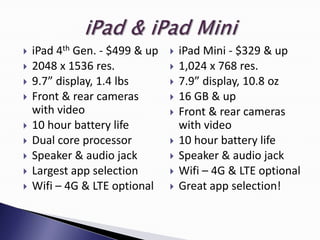
   iPad 4th Gen. - $499 & up      iPad Mini - $329 & up
   2048 x 1536 res.               1,024 x 768 res.
   9.7” display, 1.4 lbs          7.9” display, 10.8 oz
   Front & rear cameras           16 GB & up
    with video                     Front & rear cameras
   10 hour battery life            with video
   Dual core processor            10 hour battery life
   Speaker & audio jack           Speaker & audio jack
   Largest app selection          Wifi – 4G & LTE optional
   Wifi – 4G & LTE optional       Great app selection!
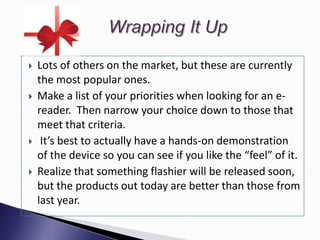
   Lots of others on the market, but these are currently
    the most popular ones.
   Make a list of your priorities when looking for an e-
    reader. Then narrow your choice down to those that
    meet that criteria.
    It’s best to actually have a hands-on demonstration
    of the device so you can see if you like the “feel” of it.
   Realize that something flashier will be released soon,
    but the products out today are better than those from
    last year.
Thanks for attending today!

Choosing best ereader for your Reading Needs

  • 1.
    Choosing the BestE-Reader For your Reading Needs Kathy Petlewski Plymouth District Library December, 2012
  • 2.
    Your Budget!  What do you want to do with your e-reader?  Will you be reading at night or during the day?  Do you plan to only purchase e-books or do you want to borrow from the Library?  Will you be the only person to use this or will you be sharing it?  What is available on the market and things to consider in making your selection.
  • 3.
     Dedicated e-readerscan range from $69 up to $300 for e-ink (black & white) devices.  Color e-readers associated with book sellers (Kindles and Nooks) list from $139 to $499.  Color tablets (iPad, Nexus, Samsung Galaxy Tab, Microsoft Surface) cost between $199 and $849.
  • 4.
    Only read e-books, either purchased or borrowed from a library.  Read e-books and listen to some e-audiobooks.  Read e-books but also be able to get e-mail and go on social media sites like Facebook & play games.  Read e-books, play games, use a full-blown web browser, and also view movies & TV shows.  Do all of the above, plus Skype, take photos and do word processing tasks.
  • 5.
     Are youthe only person that will be using your device, or are you planning to share it with another adult or child?  If so, the Kindle Paper White has parental controls and the Nook HD can have several different accounts on the same device.
  • 6.
    Purchase from Amazon,Barnes & Noble, Google Books, or iBooks. Download free or inexpensive books from Project Gutenberg, Smashwords, or OpenLibrary.org. Borrow OverDrive e-books free of charge from your local library.
  • 7.
    PDL is part of a 25-member consortium for e-books and audio e-books.  These books are provided by OverDrive in several formats: EPUB & PDF for e-readers and WMA & MP3 for iPods and MP3 players.  E-books are single user licenses, so you must place a hold on books that are “checked out” electronically.  Titles are checked out for either 7 or 14 days. After that time they will cease to work.
  • 8.
    Android tablets (Google Nexus, Samsung Galaxy Tablet and Droid smart phones ) have a free OverDrive “app” at the Marketplace.  iPads, iPhones & iPod Touch use an “app” from the Apple App Store.  Get the Nook Color and Nook HD Tablets “app” from Barnes & Noble.  Once the apps are installed, you can download your ebooks directly to your device.
  • 9.
    Kindle Fire 2 and Kindle HDs have full browsers, so you search the OverDrive site, check out your titles and download them from the same device using wifi.  Once you check out your title on OverDrive, you are taken to the Amazon site where you log in and complete your downloading from that screen.  The entire process is done wirelessly.
  • 10.
    Kindle Paperwhite, Kindle 2012 and Kindle Keyboard don’t have full browsers, so you must do your OverDrive searching and check out process using a desktop or laptop computer.  After your title is checked out, you’re taken to the Amazon site where you select your device and tell it to download the title.  Your e-book is downloaded wirelessly to your device if you are connected to wifi.
  • 11.
    With the Nook Simple Touch and Simple Touch with Glowlight, you must also use a laptop or desktop computer to search, checkout and download e-books from OverDrive.  You must download first to your computer and then transfer the titles using a USB cable to your device  Adobe Digital Editions software must also be installed on your computer.
  • 12.
    Kindle 2012 -$69 Nook Simple Touch - $99 No audio No audio Wi-Fi, 3G optional Wi-Fi only 2GB Memory 2GB Memory (1 GB storage) 3-8 week battery life micro SD card slot for 32 GB Weighs 5.98 oz. 800 x 600 resolution Supports parental controls 3-8 week battery life “experimental” browser Weighs 7.48 oz. No touch screen – controller No browser available “special offers” on cheapest No landscape mode model.
  • 13.
    Kindle Paperwhite –$119 Nook Touch GlowLight - $119 No audio No audio Wi-Fi, 3G optional Wi-Fi only 2GB Memory 2GB Memory - micro SD card slot 1024 x 758 resolution 800 x 600 resolution 3-8 week battery life 3-8 week battery life Weighs 7.5 oz. Weighs 6.95 oz. Front lit, high resolution Front lit screen screen. No browser available No support for EPUB format No landscape mode Parental controls
  • 14.
    Fire 2- $159 & up  Fire HD - $199 & up  7” display – 14.1 oz.  Either a 7” (13.9 oz) or  Wifi 8.9” (20 oz) display.  Supports 3rd party apps.  No SD slot, but Amazon  2 speakers, audio jack Cloud Storage and mic.  2 speakers, mic,  8-9 hours battery life. Bluetooth, front camera  Costs more to remove  16 GB memory minimum ads.  Supports 3rd party apps.  Great for movies!  9-11 hours battery life.
  • 15.
    Nook Color - $139  Nook Tablet - $159 & up  1024 X 600 res.  1024 x 600 res.  7” display, 15.8 oz.  7” display, 14.1 oz.  8GB memory &  8 or 16 GB memory & microSD card slot microSD card slot.  1 speaker for audio  1 speaker for audio  Wifi, full web browser  Wifi, full web browser  8 hour battery life.  11 hour reading battery  Parental controls life  Parental controls
  • 16.
    Nook HD - $199 & up  Nook HD+ - $269 & up  1440 x 900 res.  1920 x 1280 res.  7” display, 11.1 oz.  9” display, 18.2 oz  Dual-stereo speakers  Dual-stereo speakers  8GB or 16GB memory  16GB or 32GB memory  Parental controls  Up to 10 hrs. reading  Email & Calendar  Create up to 6 profiles Syncing  Email & Calendar  Great kid’s learning Syncing apps!  Stunning video display.
  • 17.
    Google Nexus - $199 & up  Samsung Galaxy Tab 2 - $249  1280 x 800 res. (low as $179) or $400 ($299)  7” display, 12 oz.  1042 X 600 res. or 1280 x800  8 GB or 16 GB memory  7” display, 12.2 oz. or 10”, 1.25 lbs  10 hours of e-reading  8 - 16 GB but has slot  Android 4.2 Jelly Bean OS  Android 4.0 OS  Wifi & Bluetooth  Front & Rear cameras  Speaker & audio jack  Dual speakers & jack  Front-facing camera  Wifi & bluetooth
  • 18.
    iPad 4th Gen. - $499 & up  iPad Mini - $329 & up  2048 x 1536 res.  1,024 x 768 res.  9.7” display, 1.4 lbs  7.9” display, 10.8 oz  Front & rear cameras  16 GB & up with video  Front & rear cameras  10 hour battery life with video  Dual core processor  10 hour battery life  Speaker & audio jack  Speaker & audio jack  Largest app selection  Wifi – 4G & LTE optional  Wifi – 4G & LTE optional  Great app selection!
  • 19.
    Lots of others on the market, but these are currently the most popular ones.  Make a list of your priorities when looking for an e- reader. Then narrow your choice down to those that meet that criteria.  It’s best to actually have a hands-on demonstration of the device so you can see if you like the “feel” of it.  Realize that something flashier will be released soon, but the products out today are better than those from last year.
  • 20.