Choosing the Best E-Reader for Your Reading Needs
                              Kathy Petlewski, Electronic Resources Librarian
                                  Plymouth District Library – Dec. 2012


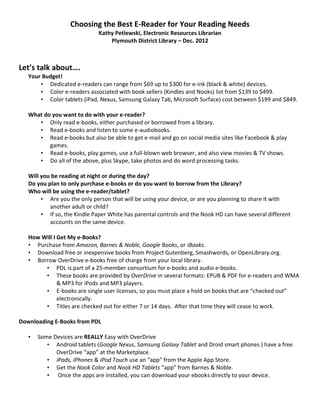
Let’s talk about….
   Your Budget!
       • Dedicated e-readers can range from $69 up to $300 for e-ink (black & white) devices.
       • Color e-readers associated with book sellers (Kindles and Nooks) list from $139 to $499.
       • Color tablets (iPad, Nexus, Samsung Galaxy Tab, Microsoft Surface) cost between $199 and $849.

   What do you want to do with your e-reader?
      • Only read e-books, either purchased or borrowed from a library.
      • Read e-books and listen to some e-audiobooks.
      • Read e-books but also be able to get e-mail and go on social media sites like Facebook & play
          games.
      • Read e-books, play games, use a full-blown web browser, and also view movies & TV shows.
      • Do all of the above, plus Skype, take photos and do word processing tasks.

   Will you be reading at night or during the day?
   Do you plan to only purchase e-books or do you want to borrow from the Library?
   Who will be using the e-reader/tablet?
        • Are you the only person that will be using your device, or are you planning to share it with
           another adult or child?
        • If so, the Kindle Paper White has parental controls and the Nook HD can have several different
           accounts on the same device.

   How Will I Get My e-Books?
   • Purchase from Amazon, Barnes & Noble, Google Books, or iBooks.
   • Download free or inexpensive books from Project Gutenberg, Smashwords, or OpenLibrary.org.
   • Borrow OverDrive e-books free of charge from your local library.
        • PDL is part of a 25-member consortium for e-books and audio e-books.
        • These books are provided by OverDrive in several formats: EPUB & PDF for e-readers and WMA
              & MP3 for iPods and MP3 players.
        • E-books are single user licenses, so you must place a hold on books that are “checked out”
              electronically.
        • Titles are checked out for either 7 or 14 days. After that time they will cease to work.

Downloading E-Books from PDL

   •   Some Devices are REALLY Easy with OverDrive
          • Android tablets (Google Nexus, Samsung Galaxy Tablet and Droid smart phones ) have a free
             OverDrive “app” at the Marketplace.
          • iPads, iPhones & iPod Touch use an “app” from the Apple App Store.
          • Get the Nook Color and Nook HD Tablets “app” from Barnes & Noble.
          • Once the apps are installed, you can download your ebooks directly to your device.
•   Some Devices are Easier than others with OverDrive
       • Kindle Fire 2 and Kindle HDs have full browsers, so you search the OverDrive site, check out
          your titles and download them from the same device using wifi.
       • Once you check out your title on OverDrive, you are taken to the Amazon site where you log in
          and complete your downloading from that screen.
       • The entire process is done wirelessly.

•   Some Devices are Fairly Easy to use with OverDrive.
       • Kindle Paperwhite, Kindle 2012 and Kindle Keyboard don’t have full browsers, so you must do
          your OverDrive searching and check out process using a desktop or laptop computer.
       • After your title is checked out, you’re taken to the Amazon site where you select your device
          and tell it to download the title.
       • Your e-book is downloaded wirelessly to your device if you are connected to wifi.

•   Some Devices are Not That Easy with OverDrive!
       • With the Nook Simple Touch and Simple Touch with Glowlight, you must also use a laptop or
          desktop computer to search, checkout and download e-books from OverDrive.
       • You must download first to your computer and then transfer the titles using a USB cable to your
          device
       • Adobe Digital Editions software must also be installed on your computer.


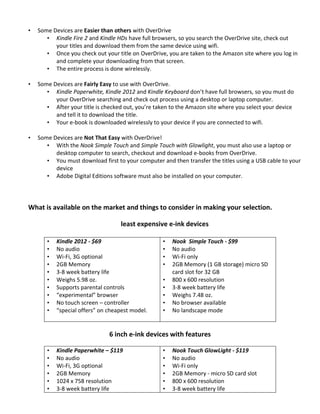
What is available on the market and things to consider in making your selection.

                                   least expensive e-ink devices

       •   Kindle 2012 - $69                       •   Nook Simple Touch - $99
       •   No audio                                •   No audio
       •   Wi-Fi, 3G optional                      •   Wi-Fi only
       •   2GB Memory                              •   2GB Memory (1 GB storage) micro SD
       •   3-8 week battery life                       card slot for 32 GB
       •   Weighs 5.98 oz.                         •   800 x 600 resolution
       •   Supports parental controls              •   3-8 week battery life
       •   “experimental” browser                  •   Weighs 7.48 oz.
       •   No touch screen – controller            •   No browser available
       •   “special offers” on cheapest model.     •   No landscape mode


                               6 inch e-ink devices with features

       •   Kindle Paperwhite – $119                •   Nook Touch GlowLight - $119
       •   No audio                                •   No audio
       •   Wi-Fi, 3G optional                      •   Wi-Fi only
       •   2GB Memory                              •   2GB Memory - micro SD card slot
       •   1024 x 758 resolution                   •   800 x 600 resolution
       •   3-8 week battery life                   •   3-8 week battery life
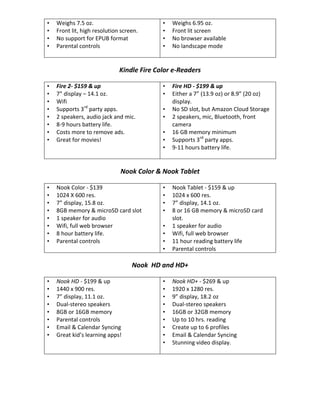
•   Weighs 7.5 oz.                          •   Weighs 6.95 oz.
•   Front lit, high resolution screen.      •   Front lit screen
•   No support for EPUB format              •   No browser available
•   Parental controls                       •   No landscape mode


                              Kindle Fire Color e-Readers

•   Fire 2- $159 & up                       •   Fire HD - $199 & up
•   7” display – 14.1 oz.                   •   Either a 7” (13.9 oz) or 8.9” (20 oz)
•   Wifi                                        display.
•   Supports 3rd party apps.                •   No SD slot, but Amazon Cloud Storage
•   2 speakers, audio jack and mic.         •   2 speakers, mic, Bluetooth, front
•   8-9 hours battery life.                     camera
•   Costs more to remove ads.               •   16 GB memory minimum
•   Great for movies!                       •   Supports 3rd party apps.
                                            •   9-11 hours battery life.


                              Nook Color & Nook Tablet

•   Nook Color - $139                       •   Nook Tablet - $159 & up
•   1024 X 600 res.                         •   1024 x 600 res.
•   7” display, 15.8 oz.                    •   7” display, 14.1 oz.
•   8GB memory & microSD card slot          •   8 or 16 GB memory & microSD card
•   1 speaker for audio                         slot.
•   Wifi, full web browser                  •   1 speaker for audio
•   8 hour battery life.                    •   Wifi, full web browser
•   Parental controls                       •   11 hour reading battery life
                                            •   Parental controls

                                   Nook HD and HD+

•   Nook HD - $199 & up                     •   Nook HD+ - $269 & up
•   1440 x 900 res.                         •   1920 x 1280 res.
•   7” display, 11.1 oz.                    •   9” display, 18.2 oz
•   Dual-stereo speakers                    •   Dual-stereo speakers
•   8GB or 16GB memory                      •   16GB or 32GB memory
•   Parental controls                       •   Up to 10 hrs. reading
•   Email & Calendar Syncing                •   Create up to 6 profiles
•   Great kid’s learning apps!              •   Email & Calendar Syncing
                                            •   Stunning video display.
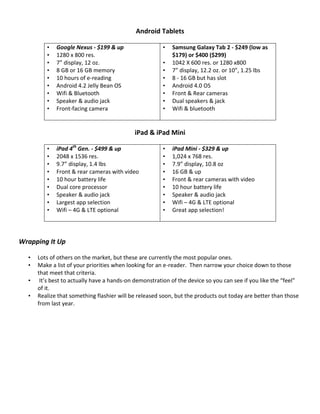
Android Tablets

         •   Google Nexus - $199 & up                  •   Samsung Galaxy Tab 2 - $249 (low as
         •   1280 x 800 res.                               $179) or $400 ($299)
         •   7” display, 12 oz.                        •   1042 X 600 res. or 1280 x800
         •   8 GB or 16 GB memory                      •   7” display, 12.2 oz. or 10”, 1.25 lbs
         •   10 hours of e-reading                     •   8 - 16 GB but has slot
         •   Android 4.2 Jelly Bean OS                 •   Android 4.0 OS
         •   Wifi & Bluetooth                          •   Front & Rear cameras
         •   Speaker & audio jack                      •   Dual speakers & jack
         •   Front-facing camera                       •   Wifi & bluetooth


                                            iPad & iPad Mini

         •   iPad 4th Gen. - $499 & up                 •   iPad Mini - $329 & up
         •   2048 x 1536 res.                          •   1,024 x 768 res.
         •   9.7” display, 1.4 lbs                     •   7.9” display, 10.8 oz
         •   Front & rear cameras with video           •   16 GB & up
         •   10 hour battery life                      •   Front & rear cameras with video
         •   Dual core processor                       •   10 hour battery life
         •   Speaker & audio jack                      •   Speaker & audio jack
         •   Largest app selection                     •   Wifi – 4G & LTE optional
         •   Wifi – 4G & LTE optional                  •   Great app selection!


Wrapping It Up

  •   Lots of others on the market, but these are currently the most popular ones.
  •   Make a list of your priorities when looking for an e-reader. Then narrow your choice down to those
      that meet that criteria.
  •    It’s best to actually have a hands-on demonstration of the device so you can see if you like the “feel”
      of it.
  •   Realize that something flashier will be released soon, but the products out today are better than those
      from last year.

Choosing best e-reader_notes

  • 1.
    Choosing the BestE-Reader for Your Reading Needs Kathy Petlewski, Electronic Resources Librarian Plymouth District Library – Dec. 2012 Let’s talk about…. Your Budget! • Dedicated e-readers can range from $69 up to $300 for e-ink (black & white) devices. • Color e-readers associated with book sellers (Kindles and Nooks) list from $139 to $499. • Color tablets (iPad, Nexus, Samsung Galaxy Tab, Microsoft Surface) cost between $199 and $849. What do you want to do with your e-reader? • Only read e-books, either purchased or borrowed from a library. • Read e-books and listen to some e-audiobooks. • Read e-books but also be able to get e-mail and go on social media sites like Facebook & play games. • Read e-books, play games, use a full-blown web browser, and also view movies & TV shows. • Do all of the above, plus Skype, take photos and do word processing tasks. Will you be reading at night or during the day? Do you plan to only purchase e-books or do you want to borrow from the Library? Who will be using the e-reader/tablet? • Are you the only person that will be using your device, or are you planning to share it with another adult or child? • If so, the Kindle Paper White has parental controls and the Nook HD can have several different accounts on the same device. How Will I Get My e-Books? • Purchase from Amazon, Barnes & Noble, Google Books, or iBooks. • Download free or inexpensive books from Project Gutenberg, Smashwords, or OpenLibrary.org. • Borrow OverDrive e-books free of charge from your local library. • PDL is part of a 25-member consortium for e-books and audio e-books. • These books are provided by OverDrive in several formats: EPUB & PDF for e-readers and WMA & MP3 for iPods and MP3 players. • E-books are single user licenses, so you must place a hold on books that are “checked out” electronically. • Titles are checked out for either 7 or 14 days. After that time they will cease to work. Downloading E-Books from PDL • Some Devices are REALLY Easy with OverDrive • Android tablets (Google Nexus, Samsung Galaxy Tablet and Droid smart phones ) have a free OverDrive “app” at the Marketplace. • iPads, iPhones & iPod Touch use an “app” from the Apple App Store. • Get the Nook Color and Nook HD Tablets “app” from Barnes & Noble. • Once the apps are installed, you can download your ebooks directly to your device.
  • 2.
    Some Devices are Easier than others with OverDrive • Kindle Fire 2 and Kindle HDs have full browsers, so you search the OverDrive site, check out your titles and download them from the same device using wifi. • Once you check out your title on OverDrive, you are taken to the Amazon site where you log in and complete your downloading from that screen. • The entire process is done wirelessly. • Some Devices are Fairly Easy to use with OverDrive. • Kindle Paperwhite, Kindle 2012 and Kindle Keyboard don’t have full browsers, so you must do your OverDrive searching and check out process using a desktop or laptop computer. • After your title is checked out, you’re taken to the Amazon site where you select your device and tell it to download the title. • Your e-book is downloaded wirelessly to your device if you are connected to wifi. • Some Devices are Not That Easy with OverDrive! • With the Nook Simple Touch and Simple Touch with Glowlight, you must also use a laptop or desktop computer to search, checkout and download e-books from OverDrive. • You must download first to your computer and then transfer the titles using a USB cable to your device • Adobe Digital Editions software must also be installed on your computer. What is available on the market and things to consider in making your selection. least expensive e-ink devices • Kindle 2012 - $69 • Nook Simple Touch - $99 • No audio • No audio • Wi-Fi, 3G optional • Wi-Fi only • 2GB Memory • 2GB Memory (1 GB storage) micro SD • 3-8 week battery life card slot for 32 GB • Weighs 5.98 oz. • 800 x 600 resolution • Supports parental controls • 3-8 week battery life • “experimental” browser • Weighs 7.48 oz. • No touch screen – controller • No browser available • “special offers” on cheapest model. • No landscape mode 6 inch e-ink devices with features • Kindle Paperwhite – $119 • Nook Touch GlowLight - $119 • No audio • No audio • Wi-Fi, 3G optional • Wi-Fi only • 2GB Memory • 2GB Memory - micro SD card slot • 1024 x 758 resolution • 800 x 600 resolution • 3-8 week battery life • 3-8 week battery life
  • 3.
    Weighs 7.5 oz. • Weighs 6.95 oz. • Front lit, high resolution screen. • Front lit screen • No support for EPUB format • No browser available • Parental controls • No landscape mode Kindle Fire Color e-Readers • Fire 2- $159 & up • Fire HD - $199 & up • 7” display – 14.1 oz. • Either a 7” (13.9 oz) or 8.9” (20 oz) • Wifi display. • Supports 3rd party apps. • No SD slot, but Amazon Cloud Storage • 2 speakers, audio jack and mic. • 2 speakers, mic, Bluetooth, front • 8-9 hours battery life. camera • Costs more to remove ads. • 16 GB memory minimum • Great for movies! • Supports 3rd party apps. • 9-11 hours battery life. Nook Color & Nook Tablet • Nook Color - $139 • Nook Tablet - $159 & up • 1024 X 600 res. • 1024 x 600 res. • 7” display, 15.8 oz. • 7” display, 14.1 oz. • 8GB memory & microSD card slot • 8 or 16 GB memory & microSD card • 1 speaker for audio slot. • Wifi, full web browser • 1 speaker for audio • 8 hour battery life. • Wifi, full web browser • Parental controls • 11 hour reading battery life • Parental controls Nook HD and HD+ • Nook HD - $199 & up • Nook HD+ - $269 & up • 1440 x 900 res. • 1920 x 1280 res. • 7” display, 11.1 oz. • 9” display, 18.2 oz • Dual-stereo speakers • Dual-stereo speakers • 8GB or 16GB memory • 16GB or 32GB memory • Parental controls • Up to 10 hrs. reading • Email & Calendar Syncing • Create up to 6 profiles • Great kid’s learning apps! • Email & Calendar Syncing • Stunning video display.
  • 4.
    Android Tablets • Google Nexus - $199 & up • Samsung Galaxy Tab 2 - $249 (low as • 1280 x 800 res. $179) or $400 ($299) • 7” display, 12 oz. • 1042 X 600 res. or 1280 x800 • 8 GB or 16 GB memory • 7” display, 12.2 oz. or 10”, 1.25 lbs • 10 hours of e-reading • 8 - 16 GB but has slot • Android 4.2 Jelly Bean OS • Android 4.0 OS • Wifi & Bluetooth • Front & Rear cameras • Speaker & audio jack • Dual speakers & jack • Front-facing camera • Wifi & bluetooth iPad & iPad Mini • iPad 4th Gen. - $499 & up • iPad Mini - $329 & up • 2048 x 1536 res. • 1,024 x 768 res. • 9.7” display, 1.4 lbs • 7.9” display, 10.8 oz • Front & rear cameras with video • 16 GB & up • 10 hour battery life • Front & rear cameras with video • Dual core processor • 10 hour battery life • Speaker & audio jack • Speaker & audio jack • Largest app selection • Wifi – 4G & LTE optional • Wifi – 4G & LTE optional • Great app selection! Wrapping It Up • Lots of others on the market, but these are currently the most popular ones. • Make a list of your priorities when looking for an e-reader. Then narrow your choice down to those that meet that criteria. • It’s best to actually have a hands-on demonstration of the device so you can see if you like the “feel” of it. • Realize that something flashier will be released soon, but the products out today are better than those from last year.