Tiltproof Incorporated

                                                                    Document No.
                                                                    Effective Date    01/04/2008
               Chargeback Repayment                                 Revision Date     5/01/2008
                                                                    Approval          GN – SM


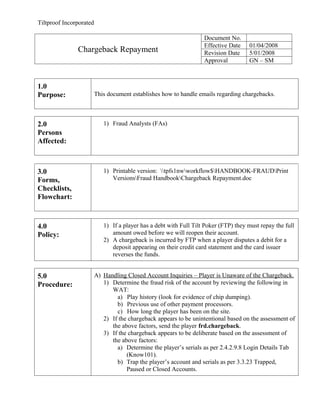
1.0
Purpose:                 This document establishes how to handle emails regarding chargebacks.


2.0                         1) Fraud Analysts (FAs)
Persons
Affected:


3.0                         1) Printable version: tpfs1nwworkflow$HANDBOOK-FRAUDPrint
Forms,                         VersionsFraud HandbookChargeback Repayment.doc
Checklists,
Flowchart:


4.0                         1) If a player has a debt with Full Tilt Poker (FTP) they must repay the full
Policy:                        amount owed before we will reopen their account.
                            2) A chargeback is incurred by FTP when a player disputes a debit for a
                               deposit appearing on their credit card statement and the card issuer
                               reverses the funds.


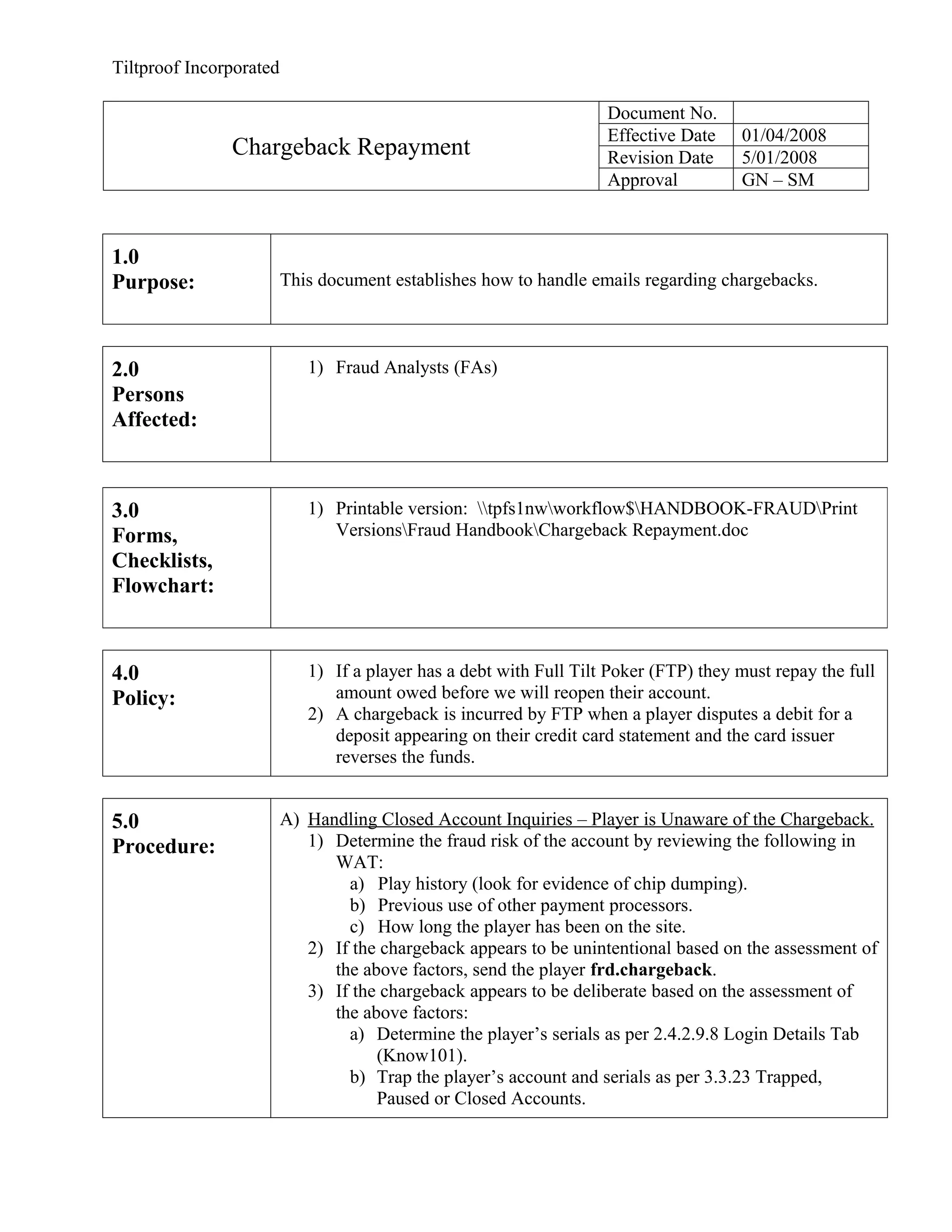
5.0                      A) Handling Closed Account Inquiries – Player is Unaware of the Chargeback.
Procedure:                  1) Determine the fraud risk of the account by reviewing the following in
                               WAT:
                                 a) Play history (look for evidence of chip dumping).
                                 b) Previous use of other payment processors.
                                 c) How long the player has been on the site.
                            2) If the chargeback appears to be unintentional based on the assessment of
                               the above factors, send the player frd.chargeback.
                            3) If the chargeback appears to be deliberate based on the assessment of
                               the above factors:
                                 a) Determine the player’s serials as per 2.4.2.9.8 Login Details Tab
                                     (Know101).
                                 b) Trap the player’s account and serials as per 3.3.23 Trapped,
                                     Paused or Closed Accounts.
Tiltproof Incorporated


                                  c)       Notate the account with: “TRP: Player is trapped
                                       because they initiated a Credit Card chargeback.
                                       Trapped serials: [List serials here]. Player is
                                       banned from FTP, unless Fraud management reverses the
                                       decision.”
                                  d) Send the player frd.cb.guilt.

                         B) Handling Responses to frd.chargeback.
                            1) If the player does not want to repay the chargeback, inform them their
                               account will remain closed until they repay their debt.
                            2) If the player wants to repay their debt, review their transaction history as
                               per 2.4.2.9.3 Transaction History Tab (Know101) to verify if any funds
                               have been seized from their account for the chargeback.
                                 a) If we seized an amount less than the amount of the debt, proceed
                                     to C) Handling Requests to Deposit Funds Owed.
                                           We seized $50 from their account, but their debt is $200.
                                 b) If we seized an amount greater than the amount of the debt,
                                     request a deposit as per 5.17 Requesting a Seizure or Deposit.
                                           We seized $200 from their account, but their debt is $50.
                                 c) If no funds have been seized from the account, compare the
                                     account balance to the amount of the debt.
                                          i) If the account balance is less than the amount of the debt,
                                             proceed to C) Handling Requests to Deposit Funds Owed.
                                                   Their account balance is $50, but their debt is $200.
                                         ii) If the account balance is more than the amount of the debt,
                                             request a seizure as per 5.17 Requesting a Seizure or
                                             Deposit.
                                                   Their account balance is $200, but their debt is $50.

                         C) Handling Requests to Deposit Funds Owed
                            1) Under the “Security and Limits” tab in WAT, click on the following
                               rights to disable them:
                                    “No Chat”
                                    “No Mix”
                                    “No Ring Games”
                                    “No Tourn”
                            2) Ensure that the following rights remain enabled:
                                    No Txfr
                                    No Dep
                            3)     Notate the note box with your initials.
                            4) Select “Save”.
                            5) Under the “Accounts and Limits” tab in WAT, locate the “Player to
                               Player” account listed under “Account Type”.


                                  a) Select the “Edit” button corresponding to this account.
Tiltproof Incorporated

                                  b) Reduce the “Withdrawal Amounts (d/w/m)” limit to $0/$0/$0.
                                  c)     Notate the note box with your initials.
                                  d) Select “Submit”.
                            6)       Notate the account with: “UNPAUS: Unpaused and placed
                                 restrictions on account. Player wants to repay debt of
                                 $_____. Once player has deposited and emails in, pause
                                 account and route email to the Credit Card Dispute queue
                                 in Kana.”

                            7)       Notate the “Alerts” section with: “DO NOT APPROVE ANY
                                 OUTGOING P2P TRANSFERS. Alert Fraud team member should
                                 this player attempt and outgoing P2P.”
                            8) Unpause the account in WAT as per 3.3.23 Trapped, Paused or Closed
                                Accounts.
                            9) Send the player frd.cb.repay.
                            10) When the player confirms that the funds are in their account:
                                 a) If the funds are sufficient, request a seizure as per 5.17 Requesting
                                    a Seizure or Deposit.
                                 b) If the funds do not cover the amount owed, email the player to
                                    inform them more funds must be deposited.

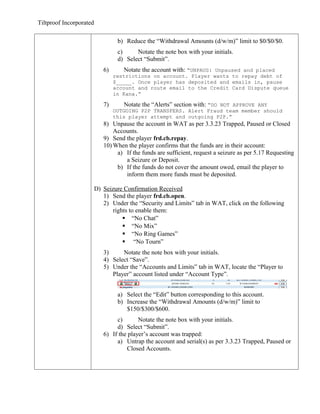
                         D) Seizure Confirmation Received
                            1) Send the player frd.cb.open.
                            2) Under the “Security and Limits” tab in WAT, click on the following
                                rights to enable them:
                                     “No Chat”
                                     “No Mix”
                                     “No Ring Games”
                                     “No Tourn”
                            3)     Notate the note box with your initials.
                            4) Select “Save”.
                            5) Under the “Accounts and Limits” tab in WAT, locate the “Player to
                               Player” account listed under “Account Type”.


                                  a) Select the “Edit” button corresponding to this account.
                                  b) Increase the “Withdrawal Amounts (d/w/m)” limit to
                                     $150/$300/$600.
                                 c)       Notate the note box with your initials.
                                 d) Select “Submit”.
                            6) If the player’s account was trapped:
                                 a) Untrap the account and serial(s) as per 3.3.23 Trapped, Paused or
                                     Closed Accounts.
Tiltproof Incorporated


                              b)       Notate the account with: “UNTRP: Player has repaid
                                   chargeback and is currently in good standing.
                                   Untrapped serials [List serials here].”
                         7) If the player’s account was paused:
                              a) Unpause as per 3.3.23 Trapped, Paused or Closed Accounts.
                              b)       Notate the account with: “UNPAUS: Player has repaid
                                   chargeback and is currently in good standing.”

                         8)      Remove the note in the “Alerts” section.
                         9) If the amount was paid in full, enter the following in Chargeback-NSF
                             Repayment list.xls in [S:FTP_Fraud_DepartmentDAILY
                             DEPS+SEIZURES]:
                              a) Player ID
                              b) Amount of repayment
                                     Full amount
                              c) Date of repayment
                              d) Fraud Analyst
                         10) Log into <https://admin.iesnare.com/index.php>.
                               Subscriber: FullTilt Poker.
                         11) Under Account Search, enter the Player IX.


                         12) Expand “Chains To Evidence”.


                         13) Select the evidence.
                               Evidence will need to be retracted this way for all devices listed.
Tiltproof Incorporated

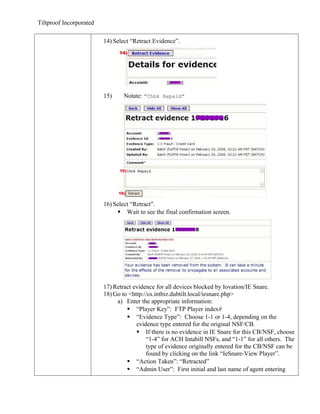
                         14) Select “Retract Evidence”.


                         15)     Notate: “Chbk Repaid”


                         16) Select “Retract”.
                               Wait to see the final confirmation screen.


                         17) Retract evidence for all devices blocked by Iovation/IE Snare.
                         18) Go to <http://cs.intbiz.dubtilt.local/iesnare.php>
                              a) Enter the appropriate information:
                                   “Player Key”: FTP Player index#
                                   “Evidence Type”: Choose 1-1 or 1-4, depending on the
                                      evidence type entered for the original NSF/CB.
                                       If there is no evidence in IE Snare for this CB/NSF, choose
                                          “1-4” for ACH Intabill NSFs, and “1-1” for all others. The
                                          type of evidence originally entered for the CB/NSF can be
                                          found by clicking on the link “IeSnare-View Player”.
                                   “Action Taken”: “Retracted”
                                   “Admin User”: First initial and last name of agent entering
Tiltproof Incorporated

                                         information.
                                            jslade or gnguyen
                                      “Comments”: Reason for the retraction.
                                            CC CB repaid”, “eChecks NSF repaid
                                  b) Select “Submit”.

                         E) Deposit Confirmation Received
                            1) Send the player frd.cb.open.
                            2) If the player’s account was trapped:
                                 a) Untrap the account and serial(s) as per 3.3.23 Trapped, Paused or
                                     Closed Accounts.
                                  b)       Notate the account with: “UNTRP: Player has repaid
                                       chargeback and is currently in good standing.
                                       Untrapped serials [List serials here]”.
                            3) If the player’s account was paused:
                                 a) Unpause as per 3.3.23 Trapped, Paused or Closed Accounts.
                                  b)       Notate the account with: “UNPAUS: Player has repaid
                                       chargeback and is currently in good standing”.


6.0
Definitions:


7.0                      May 1/08
Revision                    Proc – D) – info to submit to dubtilt iesnare added
                         Feb 26/08
History:
                            Proc – D) – update spreadsheet and retract evidence from devices
                         Jan 9/08
                            Proc – C) – notate the Alerts section
                            Proc – D) – remove the Alerts note

Chargeback repayment

  • 1.
    Tiltproof Incorporated Document No. Effective Date 01/04/2008 Chargeback Repayment Revision Date 5/01/2008 Approval GN – SM 1.0 Purpose: This document establishes how to handle emails regarding chargebacks. 2.0 1) Fraud Analysts (FAs) Persons Affected: 3.0 1) Printable version: tpfs1nwworkflow$HANDBOOK-FRAUDPrint Forms, VersionsFraud HandbookChargeback Repayment.doc Checklists, Flowchart: 4.0 1) If a player has a debt with Full Tilt Poker (FTP) they must repay the full Policy: amount owed before we will reopen their account. 2) A chargeback is incurred by FTP when a player disputes a debit for a deposit appearing on their credit card statement and the card issuer reverses the funds. 5.0 A) Handling Closed Account Inquiries – Player is Unaware of the Chargeback. Procedure: 1) Determine the fraud risk of the account by reviewing the following in WAT: a) Play history (look for evidence of chip dumping). b) Previous use of other payment processors. c) How long the player has been on the site. 2) If the chargeback appears to be unintentional based on the assessment of the above factors, send the player frd.chargeback. 3) If the chargeback appears to be deliberate based on the assessment of the above factors: a) Determine the player’s serials as per 2.4.2.9.8 Login Details Tab (Know101). b) Trap the player’s account and serials as per 3.3.23 Trapped, Paused or Closed Accounts.
  • 2.
    Tiltproof Incorporated c) Notate the account with: “TRP: Player is trapped because they initiated a Credit Card chargeback. Trapped serials: [List serials here]. Player is banned from FTP, unless Fraud management reverses the decision.” d) Send the player frd.cb.guilt. B) Handling Responses to frd.chargeback. 1) If the player does not want to repay the chargeback, inform them their account will remain closed until they repay their debt. 2) If the player wants to repay their debt, review their transaction history as per 2.4.2.9.3 Transaction History Tab (Know101) to verify if any funds have been seized from their account for the chargeback. a) If we seized an amount less than the amount of the debt, proceed to C) Handling Requests to Deposit Funds Owed.  We seized $50 from their account, but their debt is $200. b) If we seized an amount greater than the amount of the debt, request a deposit as per 5.17 Requesting a Seizure or Deposit.  We seized $200 from their account, but their debt is $50. c) If no funds have been seized from the account, compare the account balance to the amount of the debt. i) If the account balance is less than the amount of the debt, proceed to C) Handling Requests to Deposit Funds Owed.  Their account balance is $50, but their debt is $200. ii) If the account balance is more than the amount of the debt, request a seizure as per 5.17 Requesting a Seizure or Deposit.  Their account balance is $200, but their debt is $50. C) Handling Requests to Deposit Funds Owed 1) Under the “Security and Limits” tab in WAT, click on the following rights to disable them:  “No Chat”  “No Mix”  “No Ring Games”  “No Tourn” 2) Ensure that the following rights remain enabled:  No Txfr  No Dep 3) Notate the note box with your initials. 4) Select “Save”. 5) Under the “Accounts and Limits” tab in WAT, locate the “Player to Player” account listed under “Account Type”. a) Select the “Edit” button corresponding to this account.
  • 3.
    Tiltproof Incorporated b) Reduce the “Withdrawal Amounts (d/w/m)” limit to $0/$0/$0. c) Notate the note box with your initials. d) Select “Submit”. 6) Notate the account with: “UNPAUS: Unpaused and placed restrictions on account. Player wants to repay debt of $_____. Once player has deposited and emails in, pause account and route email to the Credit Card Dispute queue in Kana.” 7) Notate the “Alerts” section with: “DO NOT APPROVE ANY OUTGOING P2P TRANSFERS. Alert Fraud team member should this player attempt and outgoing P2P.” 8) Unpause the account in WAT as per 3.3.23 Trapped, Paused or Closed Accounts. 9) Send the player frd.cb.repay. 10) When the player confirms that the funds are in their account: a) If the funds are sufficient, request a seizure as per 5.17 Requesting a Seizure or Deposit. b) If the funds do not cover the amount owed, email the player to inform them more funds must be deposited. D) Seizure Confirmation Received 1) Send the player frd.cb.open. 2) Under the “Security and Limits” tab in WAT, click on the following rights to enable them:  “No Chat”  “No Mix”  “No Ring Games”  “No Tourn” 3) Notate the note box with your initials. 4) Select “Save”. 5) Under the “Accounts and Limits” tab in WAT, locate the “Player to Player” account listed under “Account Type”. a) Select the “Edit” button corresponding to this account. b) Increase the “Withdrawal Amounts (d/w/m)” limit to $150/$300/$600. c) Notate the note box with your initials. d) Select “Submit”. 6) If the player’s account was trapped: a) Untrap the account and serial(s) as per 3.3.23 Trapped, Paused or Closed Accounts.
  • 4.
    Tiltproof Incorporated b) Notate the account with: “UNTRP: Player has repaid chargeback and is currently in good standing. Untrapped serials [List serials here].” 7) If the player’s account was paused: a) Unpause as per 3.3.23 Trapped, Paused or Closed Accounts. b) Notate the account with: “UNPAUS: Player has repaid chargeback and is currently in good standing.” 8) Remove the note in the “Alerts” section. 9) If the amount was paid in full, enter the following in Chargeback-NSF Repayment list.xls in [S:FTP_Fraud_DepartmentDAILY DEPS+SEIZURES]: a) Player ID b) Amount of repayment  Full amount c) Date of repayment d) Fraud Analyst 10) Log into <https://admin.iesnare.com/index.php>.  Subscriber: FullTilt Poker. 11) Under Account Search, enter the Player IX. 12) Expand “Chains To Evidence”. 13) Select the evidence.  Evidence will need to be retracted this way for all devices listed.
  • 5.
    Tiltproof Incorporated 14) Select “Retract Evidence”. 15) Notate: “Chbk Repaid” 16) Select “Retract”.  Wait to see the final confirmation screen. 17) Retract evidence for all devices blocked by Iovation/IE Snare. 18) Go to <http://cs.intbiz.dubtilt.local/iesnare.php> a) Enter the appropriate information:  “Player Key”: FTP Player index#  “Evidence Type”: Choose 1-1 or 1-4, depending on the evidence type entered for the original NSF/CB.  If there is no evidence in IE Snare for this CB/NSF, choose “1-4” for ACH Intabill NSFs, and “1-1” for all others. The type of evidence originally entered for the CB/NSF can be found by clicking on the link “IeSnare-View Player”.  “Action Taken”: “Retracted”  “Admin User”: First initial and last name of agent entering
  • 6.
    Tiltproof Incorporated information.  jslade or gnguyen  “Comments”: Reason for the retraction.  CC CB repaid”, “eChecks NSF repaid b) Select “Submit”. E) Deposit Confirmation Received 1) Send the player frd.cb.open. 2) If the player’s account was trapped: a) Untrap the account and serial(s) as per 3.3.23 Trapped, Paused or Closed Accounts. b) Notate the account with: “UNTRP: Player has repaid chargeback and is currently in good standing. Untrapped serials [List serials here]”. 3) If the player’s account was paused: a) Unpause as per 3.3.23 Trapped, Paused or Closed Accounts. b) Notate the account with: “UNPAUS: Player has repaid chargeback and is currently in good standing”. 6.0 Definitions: 7.0 May 1/08 Revision Proc – D) – info to submit to dubtilt iesnare added Feb 26/08 History: Proc – D) – update spreadsheet and retract evidence from devices Jan 9/08 Proc – C) – notate the Alerts section Proc – D) – remove the Alerts note