Chapter 1
Computer Abstractions
and Technology
Dr. Nivine Güler
[Adapted from Computer Organization and Design,
Patterson & Hennessy, © 2012, UCB]
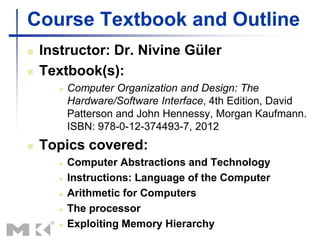
Course Textbook and Outline
 Instructor: Dr. Nivine Güler
 Textbook(s):
 Computer Organization and Design: The
Hardware/Software Interface, 4th Edition, David
Patterson and John Hennessy, Morgan Kaufmann.
ISBN: 978-0-12-374493-7, 2012
 Topics covered:
 Computer Abstractions and Technology
 Instructions: Language of the Computer
 Arithmetic for Computers
 The processor
 Exploiting Memory Hierarchy
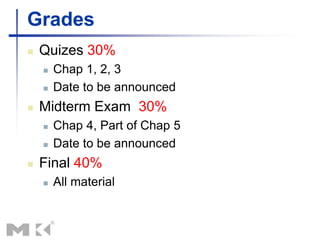
Grades
 Quizes 30%
 Chap 1, 2, 3
 Date to be announced
 Midterm Exam 30%
 Chap 4, Part of Chap 5
 Date to be announced
 Final 40%
 All material
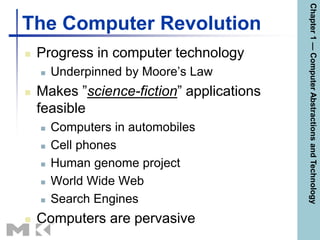
The Computer Revolution
 Progress in computer technology
 Underpinned by Moore’s Law
 Makes ”science-fiction” applications
feasible
 Computers in automobiles
 Cell phones
 Human genome project
 World Wide Web
 Search Engines
 Computers are pervasive
Chapter
1
—
Computer
Abstractions
and
Technology
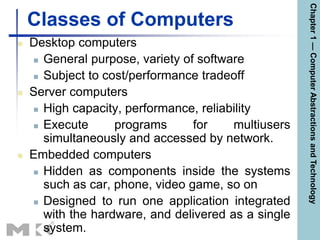
Classes of Computers
 Desktop computers
 General purpose, variety of software
 Subject to cost/performance tradeoff
 Server computers
 High capacity, performance, reliability
 Execute programs for multiusers
simultaneously and accessed by network.
 Embedded computers
 Hidden as components inside the systems
such as car, phone, video game, so on
 Designed to run one application integrated
with the hardware, and delivered as a single
system.
Chapter
1
—
Computer
Abstractions
and
Technology
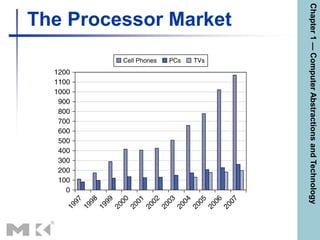
The Processor Market
Chapter
1
—
Computer
Abstractions
and
Technology
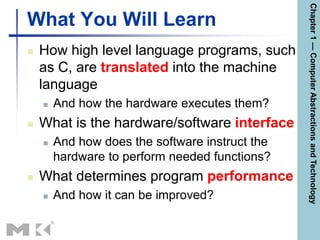
What You Will Learn
 How high level language programs, such
as C, are translated into the machine
language
 And how the hardware executes them?
 What is the hardware/software interface
 And how does the software instruct the
hardware to perform needed functions?
 What determines program performance
 And how it can be improved?
Chapter
1
—
Computer
Abstractions
and
Technology
What You Will Learn
 How can hardware designers improve
performance?
 What is parallel processing
 Switching from sequential processing to
parallel processing
Chapter
1
—
Computer
Abstractions
and
Technology
Understanding Performance
 Algorithm
 Determines number of operations executed
 Programming language, compiler, architecture
 Determine number of machine instructions executed
per operation
 Processor and memory system
 Determine how fast instructions are executed
 I/O system (including OS)
 Determines how fast I/O operations are executed
Chapter
1
—
Computer
Abstractions
and
Technology
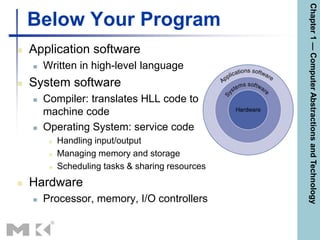
Below Your Program
 Application software
 Written in high-level language
 System software
 Compiler: translates HLL code to
machine code
 Operating System: service code
 Handling input/output
 Managing memory and storage
 Scheduling tasks & sharing resources
 Hardware
 Processor, memory, I/O controllers
Chapter
1
—
Computer
Abstractions
and
Technology
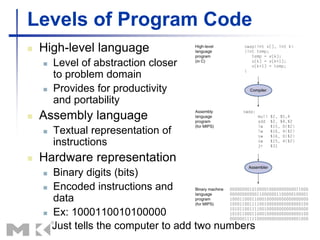
Levels of Program Code
 High-level language
 Level of abstraction closer
to problem domain
 Provides for productivity
and portability
 Assembly language
 Textual representation of
instructions
 Hardware representation
 Binary digits (bits)
 Encoded instructions and
data
 Ex: 1000110010100000
Just tells the computer to add two numbers
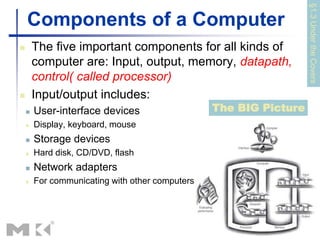
Components of a Computer
 The five important components for all kinds of
computer are: Input, output, memory, datapath,
control( called processor)
 Input/output includes:
 User-interface devices
 Display, keyboard, mouse
 Storage devices
 Hard disk, CD/DVD, flash
 Network adapters
 For communicating with other computers
§1.3
Under
the
Covers
The BIG Picture
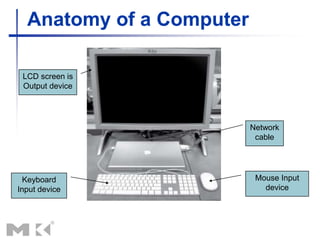
Anatomy of a Computer
LCD screen is
Output device
Keyboard
Input device
Mouse Input
device
Network
cable
Inside the Processor (CPU)
 Datapath: The component of the processor
that performs arithmetic operations
 Control: The component of the processor
that commands the datapath, memory, and
I/O devices according to the instructions of
the program
 Cache memory: consists of small and fast
SRAM memory for immediate access to
data
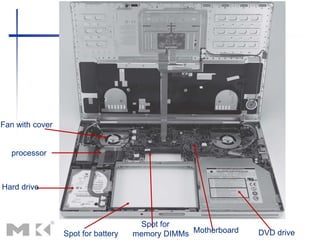
Hard drive
processor
Fan with cover
Spot for
memory DIMMs
Spot for battery Motherboard DVD drive
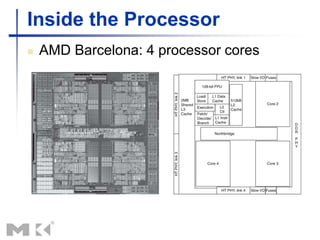
Inside the Processor
 AMD Barcelona: 4 processor cores
Abstractions
 Abstraction helps us deal with complexity
 Hide lower-level detail
 Instruction set architecture (ISA)
 The hardware/software interface :
encompasses all the information necessary to
write a machine language program
 Application binary interface
 The ISA combined with the system software
interface
 Implementation
 Hardware that obeys the architecture abstraction.
Defining Performance
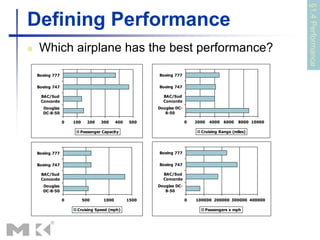
 Which airplane has the best performance?
0 100 200 300 400 500
Douglas
DC-8-50
BAC/Sud
Concorde
Boeing 747
Boeing 777
Passenger Capacity
0 2000 4000 6000 8000 10000
Douglas DC-
8-50
BAC/Sud
Concorde
Boeing 747
Boeing 777
Cruising Range (miles)
0 500 1000 1500
Douglas
DC-8-50
BAC/Sud
Concorde
Boeing 747
Boeing 777
Cruising Speed (mph)
0 100000 200000 300000 400000
Douglas DC-
8-50
BAC/Sud
Concorde
Boeing 747
Boeing 777
Passengers x mph
§1.4
Performance
Response Time and Throughput
 Response time
 How long it takes to do a task
 Throughput
 Total work done per unit time
 e.g., tasks/transactions/… per hour
 How are response time and throughput affected
by
 Replacing the processor with a faster version?
 Adding more processors?
 We’ll focus on response time for now…
Relative Performance
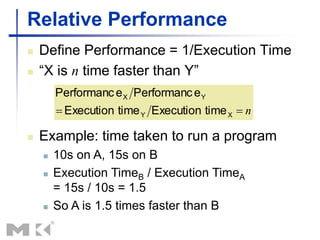
 Define Performance = 1/Execution Time
 “X is n time faster than Y”
n

 X
Y
Y
X
time
Execution
time
Execution
e
Performanc
e
Performanc
 Example: time taken to run a program
 10s on A, 15s on B
 Execution TimeB / Execution TimeA
= 15s / 10s = 1.5
 So A is 1.5 times faster than B
 Please do the HOMEWORK!
Thank you all

Chapter 1 — Computer Abstractions and Technology — 37

Chapter_1_Computer_Abstractions_and_Tech.ppt

  • 1.
    Chapter 1 Computer Abstractions andTechnology Dr. Nivine Güler [Adapted from Computer Organization and Design, Patterson & Hennessy, © 2012, UCB]
  • 2.
    Course Textbook andOutline  Instructor: Dr. Nivine Güler  Textbook(s):  Computer Organization and Design: The Hardware/Software Interface, 4th Edition, David Patterson and John Hennessy, Morgan Kaufmann. ISBN: 978-0-12-374493-7, 2012  Topics covered:  Computer Abstractions and Technology  Instructions: Language of the Computer  Arithmetic for Computers  The processor  Exploiting Memory Hierarchy
  • 3.
    Grades  Quizes 30% Chap 1, 2, 3  Date to be announced  Midterm Exam 30%  Chap 4, Part of Chap 5  Date to be announced  Final 40%  All material
  • 4.
    The Computer Revolution Progress in computer technology  Underpinned by Moore’s Law  Makes ”science-fiction” applications feasible  Computers in automobiles  Cell phones  Human genome project  World Wide Web  Search Engines  Computers are pervasive Chapter 1 — Computer Abstractions and Technology
  • 5.
    Classes of Computers Desktop computers  General purpose, variety of software  Subject to cost/performance tradeoff  Server computers  High capacity, performance, reliability  Execute programs for multiusers simultaneously and accessed by network.  Embedded computers  Hidden as components inside the systems such as car, phone, video game, so on  Designed to run one application integrated with the hardware, and delivered as a single system. Chapter 1 — Computer Abstractions and Technology
  • 6.
  • 7.
    What You WillLearn  How high level language programs, such as C, are translated into the machine language  And how the hardware executes them?  What is the hardware/software interface  And how does the software instruct the hardware to perform needed functions?  What determines program performance  And how it can be improved? Chapter 1 — Computer Abstractions and Technology
  • 8.
    What You WillLearn  How can hardware designers improve performance?  What is parallel processing  Switching from sequential processing to parallel processing Chapter 1 — Computer Abstractions and Technology
  • 9.
    Understanding Performance  Algorithm Determines number of operations executed  Programming language, compiler, architecture  Determine number of machine instructions executed per operation  Processor and memory system  Determine how fast instructions are executed  I/O system (including OS)  Determines how fast I/O operations are executed Chapter 1 — Computer Abstractions and Technology
  • 10.
    Below Your Program Application software  Written in high-level language  System software  Compiler: translates HLL code to machine code  Operating System: service code  Handling input/output  Managing memory and storage  Scheduling tasks & sharing resources  Hardware  Processor, memory, I/O controllers Chapter 1 — Computer Abstractions and Technology
  • 11.
    Levels of ProgramCode  High-level language  Level of abstraction closer to problem domain  Provides for productivity and portability  Assembly language  Textual representation of instructions  Hardware representation  Binary digits (bits)  Encoded instructions and data  Ex: 1000110010100000 Just tells the computer to add two numbers
  • 12.
    Components of aComputer  The five important components for all kinds of computer are: Input, output, memory, datapath, control( called processor)  Input/output includes:  User-interface devices  Display, keyboard, mouse  Storage devices  Hard disk, CD/DVD, flash  Network adapters  For communicating with other computers §1.3 Under the Covers The BIG Picture
  • 13.
    Anatomy of aComputer LCD screen is Output device Keyboard Input device Mouse Input device Network cable
  • 14.
    Inside the Processor(CPU)  Datapath: The component of the processor that performs arithmetic operations  Control: The component of the processor that commands the datapath, memory, and I/O devices according to the instructions of the program  Cache memory: consists of small and fast SRAM memory for immediate access to data
  • 15.
    Hard drive processor Fan withcover Spot for memory DIMMs Spot for battery Motherboard DVD drive
  • 16.
    Inside the Processor AMD Barcelona: 4 processor cores
  • 17.
    Abstractions  Abstraction helpsus deal with complexity  Hide lower-level detail  Instruction set architecture (ISA)  The hardware/software interface : encompasses all the information necessary to write a machine language program  Application binary interface  The ISA combined with the system software interface  Implementation  Hardware that obeys the architecture abstraction.
  • 18.
    Defining Performance  Whichairplane has the best performance? 0 100 200 300 400 500 Douglas DC-8-50 BAC/Sud Concorde Boeing 747 Boeing 777 Passenger Capacity 0 2000 4000 6000 8000 10000 Douglas DC- 8-50 BAC/Sud Concorde Boeing 747 Boeing 777 Cruising Range (miles) 0 500 1000 1500 Douglas DC-8-50 BAC/Sud Concorde Boeing 747 Boeing 777 Cruising Speed (mph) 0 100000 200000 300000 400000 Douglas DC- 8-50 BAC/Sud Concorde Boeing 747 Boeing 777 Passengers x mph §1.4 Performance
  • 19.
    Response Time andThroughput  Response time  How long it takes to do a task  Throughput  Total work done per unit time  e.g., tasks/transactions/… per hour  How are response time and throughput affected by  Replacing the processor with a faster version?  Adding more processors?  We’ll focus on response time for now…
  • 20.
    Relative Performance  DefinePerformance = 1/Execution Time  “X is n time faster than Y” n   X Y Y X time Execution time Execution e Performanc e Performanc  Example: time taken to run a program  10s on A, 15s on B  Execution TimeB / Execution TimeA = 15s / 10s = 1.5  So A is 1.5 times faster than B
  • 21.
     Please dothe HOMEWORK! Thank you all  Chapter 1 — Computer Abstractions and Technology — 37

Editor's Notes