Chapter 1 - Introduction
1.1 Introduction and Definition
 Definition of a Distributed System
 Characteristics of Distributed System
 Organization and Goals of A Distributed Systems
 Hardware Concept and Software Concept
 The Client-Server model
2
1.1 Introduction and Definition
 a distributed system is:
a collection of independent computers that appears to its
users as a single coherent system - computer
(Tanenbaum & Van Steen)
 this definition has two aspects:
1. hardware: autonomous machines
2. software: a single system view for the users
 Distributed system involves a collection of autonomous
computers, they are independent systems that posses
their own memory and CPU
 Distributed system consists of multiple software
Components that are on multiple computers, but runs as a
single system
3
1.1 Introduction and Definition
 A distributed system contains multiple nodes that are
physically separated but linked together using network
 The computers that are in distributed system can be
physically close together and connected by LAN
 Or they can be geographically distant and connected by a
WAN
 Distributed computing has become increasingly common
due advances that have made machines and networks
cheaper and faster
 Examples of distributed
 Distributed database
 World wide web
 Email
4
1.1 Introduction and Definition
 Distributed system example
 Think about a large bank system with hundreds
of branch offices all over the country. Each office
has a master computer to store local accounts
and handle local transactions .In addition, each
computer has the ability to talk all other branch
computers and with central computer at
headquarter. If transactions can be done without
regarding to where costumer and account is
5
Characteristics of Distributed Systems
 differences between the computers and the ways they
communicate are hidden from users
 users and applications can interact with a distributed
system in a consistent and uniform way regardless of
location
 distributed systems should be easy to expand and scale
 a distributed system is normally continuously available,
even if there may be partial failures
6
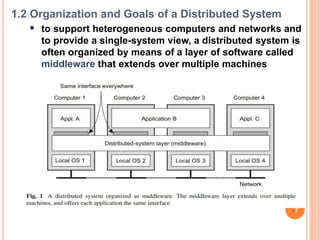
1.2 Organization and Goals of a Distributed System
 to support heterogeneous computers and networks and
to provide a single-system view, a distributed system is
often organized by means of a layer of software called
middleware that extends over multiple machines
7
 Goals of a distributed system: a distributed system
should
 easily connect users with resources (printers, computers,
storage facilities, data, files, Web pages, ...)
 reasons: economics, to collaborate and exchange
information
 be transparent: hide the fact that the resources and
processes are distributed across multiple computers
 be open
 be scalable
 Transparency in a Distributed System
 a distributed system that is able to present itself to users
and applications as if it were only a single computer
system is said to be transparent
8
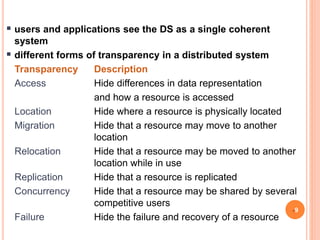
 users and applications see the DS as a single coherent
system
 different forms of transparency in a distributed system
Transparency Description
Access Hide differences in data representation
and how a resource is accessed
Location Hide where a resource is physically located
Migration Hide that a resource may move to another
location
Relocation Hide that a resource may be moved to another
location while in use
Replication Hide that a resource is replicated
Concurrency Hide that a resource may be shared by several
competitive users
Failure Hide the failure and recovery of a resource
9
 Openness in a Distributed System
 a distributed system should be open
 So that different open systems would be able to interact and use
services from each other
 interoperability
 components of different origin can communicate
 Support portability
 components work on different platforms
 We need well-defined interfaces
 such services are often specified through interfaces often described using an
Interface Definition Language (IDL):
 specify only syntax: the names of the functions, types of parameters, return
values
 Distributed system should be independent from heterogeneity of the
underlying environment
 Hardware, Software Platforms, and Languages
 an Open Distributed System is a system that offers services according to
standard rules that describe the syntax and semantics of those services;
e.g., protocols in networks 10
 Scalability in Distributed Systems
 a distributed system should be scalable: there are three
dimensions
 size: adding more users and resources to the system
 geographically: users and resources may be far apart
 administratively: should be easy to manage even if it
spans many administrative organizations
 A distributed system is scalable if it will remain effective
when the number of resources and users is significantly
increased
 but a scalable system may exhibit performance problems
11
 scalability problems: performance problems caused by
limited capacity of servers and networks
 Solution :Simply improving their capacity (e.g., by
increasing memory, upgrading CPUs, or replacing network
modules) is often a solution
 Scaling Techniques
 how to solve scaling problems for geographical scalability
 three possible solutions: hiding communication latencies,
distribution, and replication
12
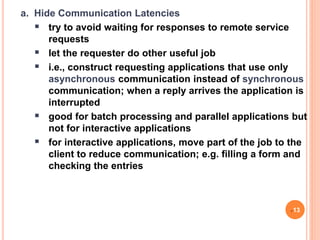
a. Hide Communication Latencies
 try to avoid waiting for responses to remote service
requests
 let the requester do other useful job
 i.e., construct requesting applications that use only
asynchronous communication instead of synchronous
communication; when a reply arrives the application is
interrupted
 good for batch processing and parallel applications but
not for interactive applications
 for interactive applications, move part of the job to the
client to reduce communication; e.g. filling a form and
checking the entries
13
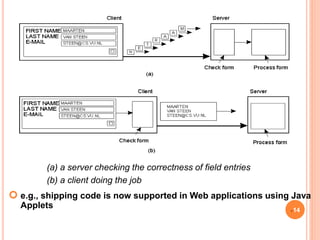
 e.g., shipping code is now supported in Web applications using Java
Applets
(a) a server checking the correctness of field entries
(b) a client doing the job
14
b. Distribution
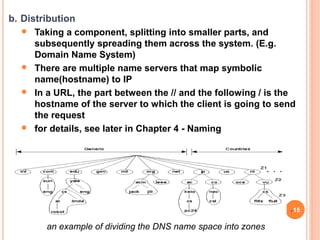
 Taking a component, splitting into smaller parts, and
subsequently spreading them across the system. (E.g.
Domain Name System)
 There are multiple name servers that map symbolic
name(hostname) to IP
 In a URL, the part between the // and the following / is the
hostname of the server to which the client is going to send
the request
 for details, see later in Chapter 4 - Naming
an example of dividing the DNS name space into zones
15
c. Replication
 replicate components across a distributed system to
increase availability and for load balancing, leading
to better performance
 that makes multiple copies of the same services or
data available at different machines
 By placing a replica close to the place where it is
accessed, also reduces communication latency
 caching (a special form of replication)
 but, caching and replication may lead to consistency
problems (see Chapter 6 - Consistency and
Replication)
16
1.3 Hardware and Software Concepts
 Hardware Concepts
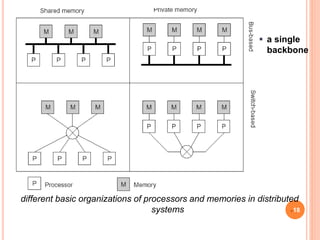
different classification schemes exist
 multiprocessors - with shared memory
 multicomputer - that do not share memory
 can be homogeneous or heterogeneous
17
 a single
backbone
different basic organizations of processors and memories in distributed
systems 18
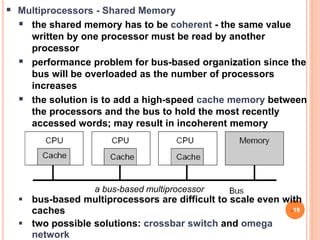
a bus-based multiprocessor
 Multiprocessors - Shared Memory
 the shared memory has to be coherent - the same value
written by one processor must be read by another
processor
 performance problem for bus-based organization since the
bus will be overloaded as the number of processors
increases
 the solution is to add a high-speed cache memory between
the processors and the bus to hold the most recently
accessed words; may result in incoherent memory
 bus-based multiprocessors are difficult to scale even with
caches
 two possible solutions: crossbar switch and omega
network
19
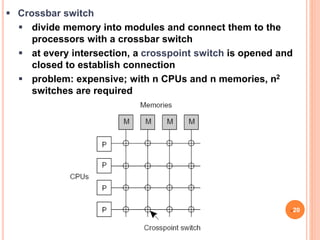
 Crossbar switch
 divide memory into modules and connect them to the
processors with a crossbar switch
 at every intersection, a crosspoint switch is opened and
closed to establish connection
 problem: expensive; with n CPUs and n memories, n2
switches are required
20
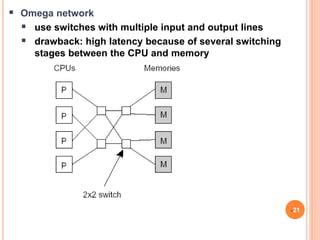
 Omega network
 use switches with multiple input and output lines
 drawback: high latency because of several switching
stages between the CPU and memory
21
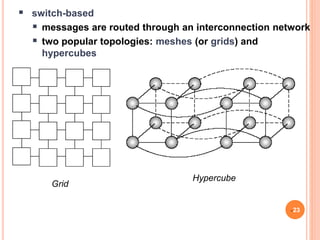
 Homogeneous Multicomputer Systems
 also referred to as System Area Networks (SANs)
 could be bus-based or switch-based
 bus-based
 shared multi access network such as Fast Ethernet can
be used and messages are broadcasted
 performance drops highly with more than 25-100 nodes
22
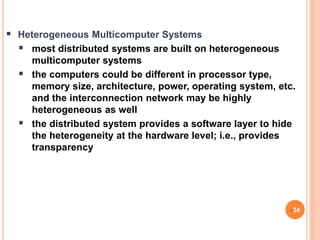
Grid
Hypercube
 switch-based
 messages are routed through an interconnection network
 two popular topologies: meshes (or grids) and
hypercubes
23
 Heterogeneous Multicomputer Systems
 most distributed systems are built on heterogeneous
multicomputer systems
 the computers could be different in processor type,
memory size, architecture, power, operating system, etc.
and the interconnection network may be highly
heterogeneous as well
 the distributed system provides a software layer to hide
the heterogeneity at the hardware level; i.e., provides
transparency
24
Software Concepts
 OSs in relation to distributed systems
distributed OSs (DOS)
 network OSs (NOS)
 Middleware
25
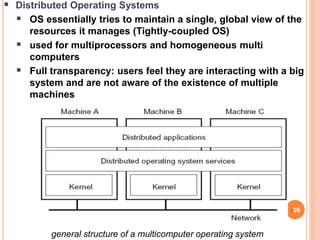
 Distributed Operating Systems
 OS essentially tries to maintain a single, global view of the
resources it manages (Tightly-coupled OS)
 used for multiprocessors and homogeneous multi
computers
 Full transparency: users feel they are interacting with a big
system and are not aware of the existence of multiple
machines
26
general structure of a multicomputer operating system
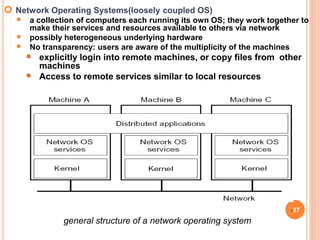
 Network Operating Systems(loosely coupled OS)
 a collection of computers each running its own OS; they work together to
make their services and resources available to others via network
 possibly heterogeneous underlying hardware
 No transparency: users are aware of the multiplicity of the machines
 explicitly login into remote machines, or copy files from other
machines
 Access to remote services similar to local resources
general structure of a network operating system
27
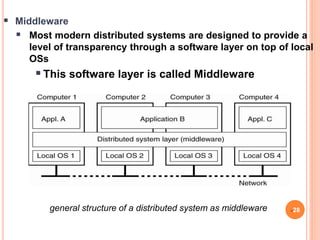
 Middleware
 Most modern distributed systems are designed to provide a
level of transparency through a software layer on top of local
OSs
This software layer is called Middleware
28
general structure of a distributed system as middleware
 Middleware
 Middleware hides the differences between various
computers and the ways in which they communicate
It provides a single-system view
As a result, middleware facilitates the
integration and interaction of various
networked applications in a consistent and
uniform manner
29
different middleware models exist
 through Remote Procedure Calls (RPCs) - calling a procedure
on a remote machine
 distributed object invocation
 Message-oriented middleware
 (details later in Chapter 2 - Communication)
 middleware services
 access transparency: by hiding the low-level message
passing(calling a procedure or invoking an object
remotely)
 Naming : such as a URL in the WWW
 Distributed transactions: by allowing multiple read and
write operations to occur atomically(TPM)
 Security: middleware authenticate access to data and
services 30
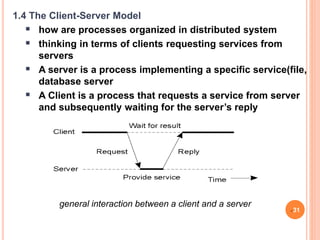
general interaction between a client and a server
1.4 The Client-Server Model
 how are processes organized in distributed system
 thinking in terms of clients requesting services from
servers
 A server is a process implementing a specific service(file,
database server
 A Client is a process that requests a service from server
and subsequently waiting for the server’s reply
31
1.4 The Client-Server Model
 Client-Server Architectures
 how to physically distribute a client-server application
across several machines:
 Two-Tired architecture
Physically distribute a client‐server application
across two machines:
1. A client machine containing only the programs
implementing (part of) the user-interface level
2. A server machine containing the rest, that is the
programs implementing the processing and data
level
 Everything is handled by the server while the client is
essentially no more than dump terminal, possibly with a
pretty graphical interface 32
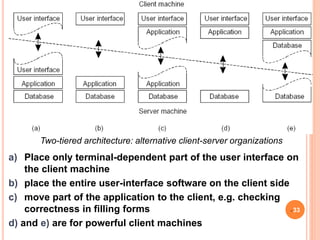
Two-tiered architecture: alternative client-server organizations
a) Place only terminal-dependent part of the user interface on
the client machine
b) place the entire user-interface software on the client side
c) move part of the application to the client, e.g. checking
correctness in filling forms
d) and e) are for powerful client machines
33
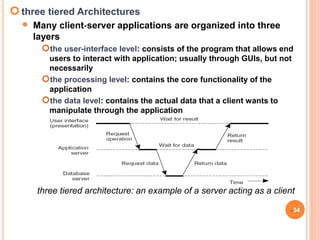
three tiered Architectures
 Many client‐server applications are organized into three
layers
the user-interface level: consists of the program that allows end
users to interact with application; usually through GUIs, but not
necessarily
the processing level: contains the core functionality of the
application
the data level: contains the actual data that a client wants to
manipulate through the application
34
three tiered architecture: an example of a server acting as a client
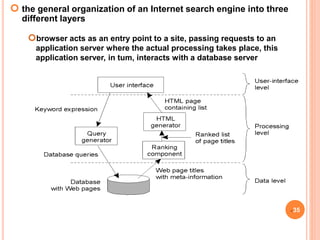
 the general organization of an Internet search engine into three
different layers
35
browser acts as an entry point to a site, passing requests to an
application server where the actual processing takes place, this
application server, in tum, interacts with a database server
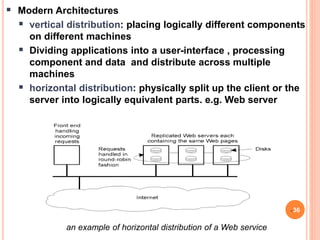
an example of horizontal distribution of a Web service
 Modern Architectures
 vertical distribution: placing logically different components
on different machines
 Dividing applications into a user-interface , processing
component and data and distribute across multiple
machines
 horizontal distribution: physically split up the client or the
server into logically equivalent parts. e.g. Web server
36
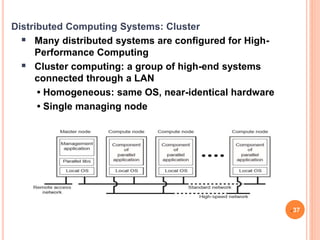
Distributed Computing Systems: Cluster
 Many distributed systems are configured for High-
Performance Computing
 Cluster computing: a group of high-end systems
connected through a LAN
• Homogeneous: same OS, near-identical hardware
• Single managing node
37
Distributed Computing Systems: Grid
 Grid computing: lots of nodes from everywhere
• Heterogeneous
•Dispersed across several organizations
•Can easily span a wide-area network
 To allow for collaborations, grids generally use virtual
organizations.
• A group of users that will allow for authorization on
resource allocation
38
Distributed Computing Systems: Cloud
 Cloud computing: make a distinction between four layers.
 Hardware: processors, routers, power and cooling
systems. Customers normally never get to see these.
 Infrastructure: deploys virtualization techniques. Evolves
around allocating and managing virtual storage devices
and virtual servers. (IaaS)
 Platform: provides higher-level abstractions for storage
and such. (PaaS)
 Application: actual applications, such as office suites, e.g.,
text processors, spreadsheet applications. (SaaS)
39
Distributed Computing Systems: Cloud
40

Chapter One.ppt

  • 1.
    Chapter 1 -Introduction
  • 2.
    1.1 Introduction andDefinition  Definition of a Distributed System  Characteristics of Distributed System  Organization and Goals of A Distributed Systems  Hardware Concept and Software Concept  The Client-Server model 2
  • 3.
    1.1 Introduction andDefinition  a distributed system is: a collection of independent computers that appears to its users as a single coherent system - computer (Tanenbaum & Van Steen)  this definition has two aspects: 1. hardware: autonomous machines 2. software: a single system view for the users  Distributed system involves a collection of autonomous computers, they are independent systems that posses their own memory and CPU  Distributed system consists of multiple software Components that are on multiple computers, but runs as a single system 3
  • 4.
    1.1 Introduction andDefinition  A distributed system contains multiple nodes that are physically separated but linked together using network  The computers that are in distributed system can be physically close together and connected by LAN  Or they can be geographically distant and connected by a WAN  Distributed computing has become increasingly common due advances that have made machines and networks cheaper and faster  Examples of distributed  Distributed database  World wide web  Email 4
  • 5.
    1.1 Introduction andDefinition  Distributed system example  Think about a large bank system with hundreds of branch offices all over the country. Each office has a master computer to store local accounts and handle local transactions .In addition, each computer has the ability to talk all other branch computers and with central computer at headquarter. If transactions can be done without regarding to where costumer and account is 5
  • 6.
    Characteristics of DistributedSystems  differences between the computers and the ways they communicate are hidden from users  users and applications can interact with a distributed system in a consistent and uniform way regardless of location  distributed systems should be easy to expand and scale  a distributed system is normally continuously available, even if there may be partial failures 6
  • 7.
    1.2 Organization andGoals of a Distributed System  to support heterogeneous computers and networks and to provide a single-system view, a distributed system is often organized by means of a layer of software called middleware that extends over multiple machines 7
  • 8.
     Goals ofa distributed system: a distributed system should  easily connect users with resources (printers, computers, storage facilities, data, files, Web pages, ...)  reasons: economics, to collaborate and exchange information  be transparent: hide the fact that the resources and processes are distributed across multiple computers  be open  be scalable  Transparency in a Distributed System  a distributed system that is able to present itself to users and applications as if it were only a single computer system is said to be transparent 8
  • 9.
     users andapplications see the DS as a single coherent system  different forms of transparency in a distributed system Transparency Description Access Hide differences in data representation and how a resource is accessed Location Hide where a resource is physically located Migration Hide that a resource may move to another location Relocation Hide that a resource may be moved to another location while in use Replication Hide that a resource is replicated Concurrency Hide that a resource may be shared by several competitive users Failure Hide the failure and recovery of a resource 9
  • 10.
     Openness ina Distributed System  a distributed system should be open  So that different open systems would be able to interact and use services from each other  interoperability  components of different origin can communicate  Support portability  components work on different platforms  We need well-defined interfaces  such services are often specified through interfaces often described using an Interface Definition Language (IDL):  specify only syntax: the names of the functions, types of parameters, return values  Distributed system should be independent from heterogeneity of the underlying environment  Hardware, Software Platforms, and Languages  an Open Distributed System is a system that offers services according to standard rules that describe the syntax and semantics of those services; e.g., protocols in networks 10
  • 11.
     Scalability inDistributed Systems  a distributed system should be scalable: there are three dimensions  size: adding more users and resources to the system  geographically: users and resources may be far apart  administratively: should be easy to manage even if it spans many administrative organizations  A distributed system is scalable if it will remain effective when the number of resources and users is significantly increased  but a scalable system may exhibit performance problems 11
  • 12.
     scalability problems:performance problems caused by limited capacity of servers and networks  Solution :Simply improving their capacity (e.g., by increasing memory, upgrading CPUs, or replacing network modules) is often a solution  Scaling Techniques  how to solve scaling problems for geographical scalability  three possible solutions: hiding communication latencies, distribution, and replication 12
  • 13.
    a. Hide CommunicationLatencies  try to avoid waiting for responses to remote service requests  let the requester do other useful job  i.e., construct requesting applications that use only asynchronous communication instead of synchronous communication; when a reply arrives the application is interrupted  good for batch processing and parallel applications but not for interactive applications  for interactive applications, move part of the job to the client to reduce communication; e.g. filling a form and checking the entries 13
  • 14.
     e.g., shippingcode is now supported in Web applications using Java Applets (a) a server checking the correctness of field entries (b) a client doing the job 14
  • 15.
    b. Distribution  Takinga component, splitting into smaller parts, and subsequently spreading them across the system. (E.g. Domain Name System)  There are multiple name servers that map symbolic name(hostname) to IP  In a URL, the part between the // and the following / is the hostname of the server to which the client is going to send the request  for details, see later in Chapter 4 - Naming an example of dividing the DNS name space into zones 15
  • 16.
    c. Replication  replicatecomponents across a distributed system to increase availability and for load balancing, leading to better performance  that makes multiple copies of the same services or data available at different machines  By placing a replica close to the place where it is accessed, also reduces communication latency  caching (a special form of replication)  but, caching and replication may lead to consistency problems (see Chapter 6 - Consistency and Replication) 16
  • 17.
    1.3 Hardware andSoftware Concepts  Hardware Concepts different classification schemes exist  multiprocessors - with shared memory  multicomputer - that do not share memory  can be homogeneous or heterogeneous 17
  • 18.
     a single backbone differentbasic organizations of processors and memories in distributed systems 18
  • 19.
    a bus-based multiprocessor Multiprocessors - Shared Memory  the shared memory has to be coherent - the same value written by one processor must be read by another processor  performance problem for bus-based organization since the bus will be overloaded as the number of processors increases  the solution is to add a high-speed cache memory between the processors and the bus to hold the most recently accessed words; may result in incoherent memory  bus-based multiprocessors are difficult to scale even with caches  two possible solutions: crossbar switch and omega network 19
  • 20.
     Crossbar switch divide memory into modules and connect them to the processors with a crossbar switch  at every intersection, a crosspoint switch is opened and closed to establish connection  problem: expensive; with n CPUs and n memories, n2 switches are required 20
  • 21.
     Omega network use switches with multiple input and output lines  drawback: high latency because of several switching stages between the CPU and memory 21
  • 22.
     Homogeneous MulticomputerSystems  also referred to as System Area Networks (SANs)  could be bus-based or switch-based  bus-based  shared multi access network such as Fast Ethernet can be used and messages are broadcasted  performance drops highly with more than 25-100 nodes 22
  • 23.
    Grid Hypercube  switch-based  messagesare routed through an interconnection network  two popular topologies: meshes (or grids) and hypercubes 23
  • 24.
     Heterogeneous MulticomputerSystems  most distributed systems are built on heterogeneous multicomputer systems  the computers could be different in processor type, memory size, architecture, power, operating system, etc. and the interconnection network may be highly heterogeneous as well  the distributed system provides a software layer to hide the heterogeneity at the hardware level; i.e., provides transparency 24
  • 25.
    Software Concepts  OSsin relation to distributed systems distributed OSs (DOS)  network OSs (NOS)  Middleware 25
  • 26.
     Distributed OperatingSystems  OS essentially tries to maintain a single, global view of the resources it manages (Tightly-coupled OS)  used for multiprocessors and homogeneous multi computers  Full transparency: users feel they are interacting with a big system and are not aware of the existence of multiple machines 26 general structure of a multicomputer operating system
  • 27.
     Network OperatingSystems(loosely coupled OS)  a collection of computers each running its own OS; they work together to make their services and resources available to others via network  possibly heterogeneous underlying hardware  No transparency: users are aware of the multiplicity of the machines  explicitly login into remote machines, or copy files from other machines  Access to remote services similar to local resources general structure of a network operating system 27
  • 28.
     Middleware  Mostmodern distributed systems are designed to provide a level of transparency through a software layer on top of local OSs This software layer is called Middleware 28 general structure of a distributed system as middleware
  • 29.
     Middleware  Middlewarehides the differences between various computers and the ways in which they communicate It provides a single-system view As a result, middleware facilitates the integration and interaction of various networked applications in a consistent and uniform manner 29
  • 30.
    different middleware modelsexist  through Remote Procedure Calls (RPCs) - calling a procedure on a remote machine  distributed object invocation  Message-oriented middleware  (details later in Chapter 2 - Communication)  middleware services  access transparency: by hiding the low-level message passing(calling a procedure or invoking an object remotely)  Naming : such as a URL in the WWW  Distributed transactions: by allowing multiple read and write operations to occur atomically(TPM)  Security: middleware authenticate access to data and services 30
  • 31.
    general interaction betweena client and a server 1.4 The Client-Server Model  how are processes organized in distributed system  thinking in terms of clients requesting services from servers  A server is a process implementing a specific service(file, database server  A Client is a process that requests a service from server and subsequently waiting for the server’s reply 31
  • 32.
    1.4 The Client-ServerModel  Client-Server Architectures  how to physically distribute a client-server application across several machines:  Two-Tired architecture Physically distribute a client‐server application across two machines: 1. A client machine containing only the programs implementing (part of) the user-interface level 2. A server machine containing the rest, that is the programs implementing the processing and data level  Everything is handled by the server while the client is essentially no more than dump terminal, possibly with a pretty graphical interface 32
  • 33.
    Two-tiered architecture: alternativeclient-server organizations a) Place only terminal-dependent part of the user interface on the client machine b) place the entire user-interface software on the client side c) move part of the application to the client, e.g. checking correctness in filling forms d) and e) are for powerful client machines 33
  • 34.
    three tiered Architectures Many client‐server applications are organized into three layers the user-interface level: consists of the program that allows end users to interact with application; usually through GUIs, but not necessarily the processing level: contains the core functionality of the application the data level: contains the actual data that a client wants to manipulate through the application 34 three tiered architecture: an example of a server acting as a client
  • 35.
     the generalorganization of an Internet search engine into three different layers 35 browser acts as an entry point to a site, passing requests to an application server where the actual processing takes place, this application server, in tum, interacts with a database server
  • 36.
    an example ofhorizontal distribution of a Web service  Modern Architectures  vertical distribution: placing logically different components on different machines  Dividing applications into a user-interface , processing component and data and distribute across multiple machines  horizontal distribution: physically split up the client or the server into logically equivalent parts. e.g. Web server 36
  • 37.
    Distributed Computing Systems:Cluster  Many distributed systems are configured for High- Performance Computing  Cluster computing: a group of high-end systems connected through a LAN • Homogeneous: same OS, near-identical hardware • Single managing node 37
  • 38.
    Distributed Computing Systems:Grid  Grid computing: lots of nodes from everywhere • Heterogeneous •Dispersed across several organizations •Can easily span a wide-area network  To allow for collaborations, grids generally use virtual organizations. • A group of users that will allow for authorization on resource allocation 38
  • 39.
    Distributed Computing Systems:Cloud  Cloud computing: make a distinction between four layers.  Hardware: processors, routers, power and cooling systems. Customers normally never get to see these.  Infrastructure: deploys virtualization techniques. Evolves around allocating and managing virtual storage devices and virtual servers. (IaaS)  Platform: provides higher-level abstractions for storage and such. (PaaS)  Application: actual applications, such as office suites, e.g., text processors, spreadsheet applications. (SaaS) 39
  • 40.

Editor's Notes