Linked List
Linked List
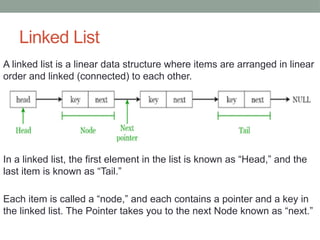
A linked list is a linear data structure where items are arranged in linear
order and linked (connected) to each other.
In a linked list, the first element in the list is known as “Head,” and the
last item is known as “Tail.”
Each item is called a “node,” and each contains a pointer and a key in
the linked list. The Pointer takes you to the next Node known as “next.”
How the LinkedList works
The LinkedList stores its items in "containers." The list has
a link to the first container and each container has a link to
the next container in the list.
To add an element to the list, the element is placed into a
new container and that container is linked to one of the
other containers in the list.
Example
import java.util.LinkedList;
class Main {
public static void main(String[] args){
// create linkedlist
LinkedList<String> animals = new LinkedList<>();
// Add elements to LinkedList
animals.add("Dog");
animals.add("Cat");
animals.add("Cow");
System.out.println("LinkedList: " + animals);
}
}
How linked list works
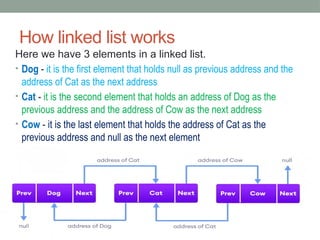
Here we have 3 elements in a linked list.
• Dog - it is the first element that holds null as previous address and the
address of Cat as the next address
• Cat - it is the second element that holds an address of Dog as the
previous address and the address of Cow as the next address
• Cow - it is the last element that holds the address of Cat as the
previous address and null as the next element
Example
// Import the LinkedList class
import java.util.LinkedList;
public class Main { public static void main(String[] args) {
LinkedList<String> StudentName = new LinkedList<String>();
StudentName.add(“Hassan");
StudentName.add(“Mohamed");
StudentName.add(“Ali");
StudentName.add(“Sucad");
System.out.println(StudentName);
}
}
Methods of Java LinkedList
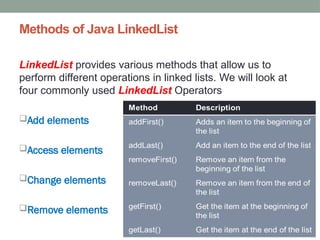
LinkedList provides various methods that allow us to
perform different operations in linked lists. We will look at
four commonly used LinkedList Operators
Add elements
Access elements
Change elements
Remove elements
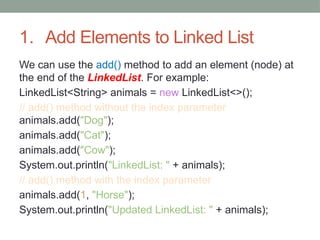
1. Add Elements to Linked List
We can use the add() method to add an element (node) at
the end of the LinkedList. For example:
LinkedList<String> animals = new LinkedList<>();
// add() method without the index parameter
animals.add("Dog");
animals.add("Cat");
animals.add("Cow");
System.out.println("LinkedList: " + animals);
// add() method with the index parameter
animals.add(1, "Horse");
System.out.println("Updated LinkedList: " + animals);
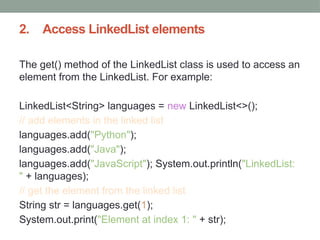
2. Access LinkedList elements
The get() method of the LinkedList class is used to access an
element from the LinkedList. For example:
LinkedList<String> languages = new LinkedList<>();
// add elements in the linked list
languages.add("Python");
languages.add("Java");
languages.add("JavaScript"); System.out.println("LinkedList:
" + languages);
// get the element from the linked list
String str = languages.get(1);
System.out.print("Element at index 1: " + str);
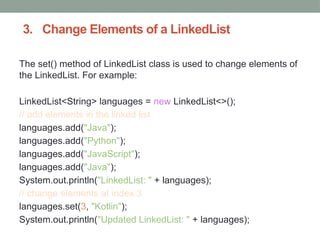
3. Change Elements of a LinkedList
The set() method of LinkedList class is used to change elements of
the LinkedList. For example:
LinkedList<String> languages = new LinkedList<>();
// add elements in the linked list
languages.add("Java");
languages.add("Python");
languages.add("JavaScript");
languages.add("Java");
System.out.println("LinkedList: " + languages);
// change elements at index 3
languages.set(3, "Kotlin");
System.out.println("Updated LinkedList: " + languages);
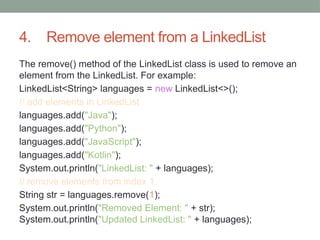
4. Remove element from a LinkedList
The remove() method of the LinkedList class is used to remove an
element from the LinkedList. For example:
LinkedList<String> languages = new LinkedList<>();
// add elements in LinkedList
languages.add("Java");
languages.add("Python");
languages.add("JavaScript");
languages.add("Kotlin");
System.out.println("LinkedList: " + languages);
// remove elements from index 1
String str = languages.remove(1);
System.out.println("Removed Element: " + str);
System.out.println("Updated LinkedList: " + languages);
Another example
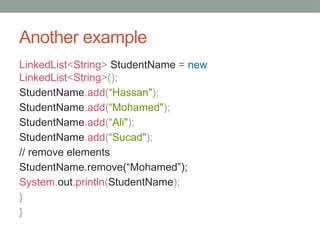
LinkedList<String> StudentName = new
LinkedList<String>();
StudentName.add(“Hassan");
StudentName.add(“Mohamed");
StudentName.add(“Ali");
StudentName.add(“Sucad");
// remove elements
StudentName.remove(“Mohamed”);
System.out.println(StudentName);
}
}
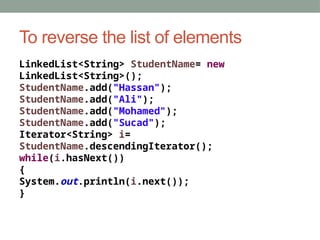
To reverse the list of elements
LinkedList<String> StudentName= new
LinkedList<String>();
StudentName.add("Hassan");
StudentName.add("Ali");
StudentName.add("Mohamed");
StudentName.add("Sucad");
Iterator<String> i=
StudentName.descendingIterator();
while(i.hasNext())
{
System.out.println(i.next());
}
Types of Linked List
•Singular Linked List
•Doubly Linked List
•Circular Linked List
Singular Linked List
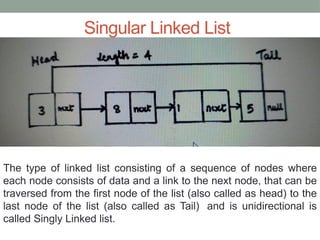
The type of linked list consisting of a sequence of nodes where
each node consists of data and a link to the next node, that can be
traversed from the first node of the list (also called as head) to the
last node of the list (also called as Tail) and is unidirectional is
called Singly Linked list.
The syntax to define a node in a singular linked list is
as follows:
public class SinglyLinkedList
{
class Node
{
int data;
Node next;
public Node(int data)
{
this.data = data;
this.next = null;
}
}
}
Creating Single Nodes List
public class IntNode {
//create an int that holds the data
public int data;
// create a pointer to the next node
public IntNode next;
// build a constructor to accept the values and points to next
public IntNode(int data, IntNode next) {
this.data = data;
this.next = next;
}
// add one method to return the data
public String toString() {
return data + " ";
}
//create the main method to run the program
public static void main(String[] args) {
IntNode front = new IntNode(25,null);
System.out.println(front);
} }
Another Example
public class IntNode {
//create an int that holds the data
int data;
// create a pointer to the next node
IntNode next;
// build a constructor to accept the values and points to next
public IntNode(int data, IntNode next) {
this.data = data;
this.next = next;
}
// add one method to return the data
public String toString() {
return data + " ";
}
//create the main method to run the program
public static void main(String[] args) {
IntNode LastNode = new IntNode(25,null);
IntNode MiddNode = new IntNode(21,LastNode);
IntNode FirstNode = new IntNode(15,MiddNode);
System.out.print(FirstNode);
System.out.print(MiddNode);
System.out.print(LastNode);
} }
Singly linked list to store and display string
public class
SinglyLinkedList {
ListNode head;
public static class
ListNode {
String data;
ListNode next;
// constructor
public ListNode(String
data) {
this.data = data;
this.next = null;
}}
public void display() {
ListNode current = head;
while(current != null) {
System.out.println(current.
data + "-->");
current = current.next;
}
System.out.print("null");
public static void
main(String[] args) {
SinglyLinkedList sll = new
SinglyLinkedList();
sll.head = new
ListNode(“Ahmed");
ListNode second = new
ListNode(“Mohamed");
ListNode third = new
ListNode(“Ali");
ListNode fourth = new
ListNode(“Gedi");
sll.head.next = second;
second.next = third;
third.next = fourth;
sll.display();
}}
Doubly Linked List
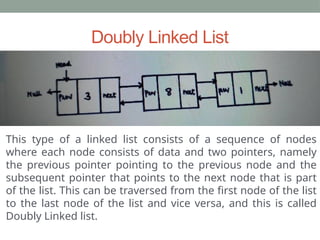
This type of a linked list consists of a sequence of nodes
where each node consists of data and two pointers, namely
the previous pointer pointing to the previous node and the
subsequent pointer that points to the next node that is part
of the list. This can be traversed from the first node of the list
to the last node of the list and vice versa, and this is called
Doubly Linked list.
The syntax to define a node in a doubly linked list is
as follows:
public class DoublyLinkedList
{
class Node
{
int data;
Node previous;
Node next;
public Node(int data)
{
this.data = data;
}
}
}
DoublyLinked list example
Example program in the Notepad
Circular Linked List
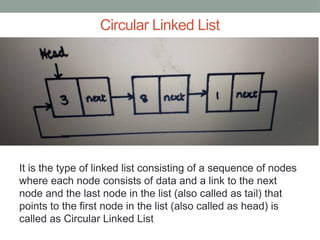
It is the type of linked list consisting of a sequence of nodes
where each node consists of data and a link to the next
node and the last node in the list (also called as tail) that
points to the first node in the list (also called as head) is
called as Circular Linked List
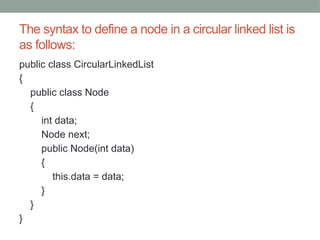
The syntax to define a node in a circular linked list is
as follows:
public class CircularLinkedList
{
public class Node
{
int data;
Node next;
public Node(int data)
{
this.data = data;
}
}
}

Chapter 4 Linked List introduction lessons.pptx

  • 1.
  • 2.
    Linked List A linkedlist is a linear data structure where items are arranged in linear order and linked (connected) to each other. In a linked list, the first element in the list is known as “Head,” and the last item is known as “Tail.” Each item is called a “node,” and each contains a pointer and a key in the linked list. The Pointer takes you to the next Node known as “next.”
  • 3.
    How the LinkedListworks The LinkedList stores its items in "containers." The list has a link to the first container and each container has a link to the next container in the list. To add an element to the list, the element is placed into a new container and that container is linked to one of the other containers in the list.
  • 4.
    Example import java.util.LinkedList; class Main{ public static void main(String[] args){ // create linkedlist LinkedList<String> animals = new LinkedList<>(); // Add elements to LinkedList animals.add("Dog"); animals.add("Cat"); animals.add("Cow"); System.out.println("LinkedList: " + animals); } }
  • 5.
    How linked listworks Here we have 3 elements in a linked list. • Dog - it is the first element that holds null as previous address and the address of Cat as the next address • Cat - it is the second element that holds an address of Dog as the previous address and the address of Cow as the next address • Cow - it is the last element that holds the address of Cat as the previous address and null as the next element
  • 6.
    Example // Import theLinkedList class import java.util.LinkedList; public class Main { public static void main(String[] args) { LinkedList<String> StudentName = new LinkedList<String>(); StudentName.add(“Hassan"); StudentName.add(“Mohamed"); StudentName.add(“Ali"); StudentName.add(“Sucad"); System.out.println(StudentName); } }
  • 7.
    Methods of JavaLinkedList LinkedList provides various methods that allow us to perform different operations in linked lists. We will look at four commonly used LinkedList Operators Add elements Access elements Change elements Remove elements
  • 8.
    1. Add Elementsto Linked List We can use the add() method to add an element (node) at the end of the LinkedList. For example: LinkedList<String> animals = new LinkedList<>(); // add() method without the index parameter animals.add("Dog"); animals.add("Cat"); animals.add("Cow"); System.out.println("LinkedList: " + animals); // add() method with the index parameter animals.add(1, "Horse"); System.out.println("Updated LinkedList: " + animals);
  • 9.
    2. Access LinkedListelements The get() method of the LinkedList class is used to access an element from the LinkedList. For example: LinkedList<String> languages = new LinkedList<>(); // add elements in the linked list languages.add("Python"); languages.add("Java"); languages.add("JavaScript"); System.out.println("LinkedList: " + languages); // get the element from the linked list String str = languages.get(1); System.out.print("Element at index 1: " + str);
  • 10.
    3. Change Elementsof a LinkedList The set() method of LinkedList class is used to change elements of the LinkedList. For example: LinkedList<String> languages = new LinkedList<>(); // add elements in the linked list languages.add("Java"); languages.add("Python"); languages.add("JavaScript"); languages.add("Java"); System.out.println("LinkedList: " + languages); // change elements at index 3 languages.set(3, "Kotlin"); System.out.println("Updated LinkedList: " + languages);
  • 11.
    4. Remove elementfrom a LinkedList The remove() method of the LinkedList class is used to remove an element from the LinkedList. For example: LinkedList<String> languages = new LinkedList<>(); // add elements in LinkedList languages.add("Java"); languages.add("Python"); languages.add("JavaScript"); languages.add("Kotlin"); System.out.println("LinkedList: " + languages); // remove elements from index 1 String str = languages.remove(1); System.out.println("Removed Element: " + str); System.out.println("Updated LinkedList: " + languages);
  • 12.
    Another example LinkedList<String> StudentName= new LinkedList<String>(); StudentName.add(“Hassan"); StudentName.add(“Mohamed"); StudentName.add(“Ali"); StudentName.add(“Sucad"); // remove elements StudentName.remove(“Mohamed”); System.out.println(StudentName); } }
  • 13.
    To reverse thelist of elements LinkedList<String> StudentName= new LinkedList<String>(); StudentName.add("Hassan"); StudentName.add("Ali"); StudentName.add("Mohamed"); StudentName.add("Sucad"); Iterator<String> i= StudentName.descendingIterator(); while(i.hasNext()) { System.out.println(i.next()); }
  • 14.
    Types of LinkedList •Singular Linked List •Doubly Linked List •Circular Linked List
  • 15.
    Singular Linked List Thetype of linked list consisting of a sequence of nodes where each node consists of data and a link to the next node, that can be traversed from the first node of the list (also called as head) to the last node of the list (also called as Tail) and is unidirectional is called Singly Linked list.
  • 16.
    The syntax todefine a node in a singular linked list is as follows: public class SinglyLinkedList { class Node { int data; Node next; public Node(int data) { this.data = data; this.next = null; } } }
  • 17.
    Creating Single NodesList public class IntNode { //create an int that holds the data public int data; // create a pointer to the next node public IntNode next; // build a constructor to accept the values and points to next public IntNode(int data, IntNode next) { this.data = data; this.next = next; } // add one method to return the data public String toString() { return data + " "; } //create the main method to run the program public static void main(String[] args) { IntNode front = new IntNode(25,null); System.out.println(front); } }
  • 18.
    Another Example public classIntNode { //create an int that holds the data int data; // create a pointer to the next node IntNode next; // build a constructor to accept the values and points to next public IntNode(int data, IntNode next) { this.data = data; this.next = next; } // add one method to return the data public String toString() { return data + " "; } //create the main method to run the program public static void main(String[] args) { IntNode LastNode = new IntNode(25,null); IntNode MiddNode = new IntNode(21,LastNode); IntNode FirstNode = new IntNode(15,MiddNode); System.out.print(FirstNode); System.out.print(MiddNode); System.out.print(LastNode); } }
  • 19.
    Singly linked listto store and display string public class SinglyLinkedList { ListNode head; public static class ListNode { String data; ListNode next; // constructor public ListNode(String data) { this.data = data; this.next = null; }} public void display() { ListNode current = head; while(current != null) { System.out.println(current. data + "-->"); current = current.next; } System.out.print("null"); public static void main(String[] args) { SinglyLinkedList sll = new SinglyLinkedList(); sll.head = new ListNode(“Ahmed"); ListNode second = new ListNode(“Mohamed"); ListNode third = new ListNode(“Ali"); ListNode fourth = new ListNode(“Gedi"); sll.head.next = second; second.next = third; third.next = fourth; sll.display(); }}
  • 20.
    Doubly Linked List Thistype of a linked list consists of a sequence of nodes where each node consists of data and two pointers, namely the previous pointer pointing to the previous node and the subsequent pointer that points to the next node that is part of the list. This can be traversed from the first node of the list to the last node of the list and vice versa, and this is called Doubly Linked list.
  • 21.
    The syntax todefine a node in a doubly linked list is as follows: public class DoublyLinkedList { class Node { int data; Node previous; Node next; public Node(int data) { this.data = data; } } }
  • 22.
    DoublyLinked list example Exampleprogram in the Notepad
  • 23.
    Circular Linked List Itis the type of linked list consisting of a sequence of nodes where each node consists of data and a link to the next node and the last node in the list (also called as tail) that points to the first node in the list (also called as head) is called as Circular Linked List
  • 24.
    The syntax todefine a node in a circular linked list is as follows: public class CircularLinkedList { public class Node { int data; Node next; public Node(int data) { this.data = data; } } }