SPL – Practical Session 2
• Topics:
– C++ Memory Management
– Pointers
C++ Memory Handling
Memory Model, Pointers
Variables in C++ Memory System
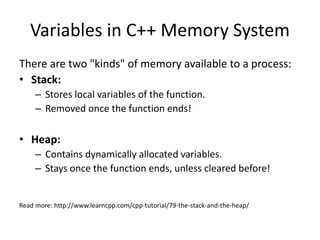
There are two "kinds" of memory available to a process:
• Stack:
– Stores local variables of the function.
– Removed once the function ends!
• Heap:
– Contains dynamically allocated variables.
– Stays once the function ends, unless cleared before!
Read more: http://www.learncpp.com/cpp-tutorial/79-the-stack-and-the-heap/
Pointers
• A pointer is a variable that holds the address of some other variable.
• In Java, you can’t directly access the memory of such object! Only by
reference.
• In C++, you can access them directly! Alter them any way you like, without any
limitations!
Benefit: More control than Java.
Drawback: Memory leaks, Memory corruption.
• A 64-bit computer can address 264 bytes!
• Each memory cell is 1 byte. (byte-accessible machines – most of the machines
today)
• Each pointer takes a static size of 4 bytes in a 32bit OS, and 8bytes in a 64bit
OS.
• Pointers themselves are saved on the stack.
Java vs. C++
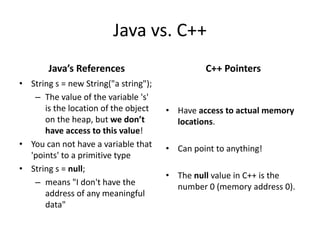
Java’s References
• String s = new String("a string");
– The value of the variable 's'
is the location of the object
on the heap, but we don’t
have access to this value!
• You can not have a variable that
'points' to a primitive type
• String s = null;
– means "I don't have the
address of any meaningful
data"
C++ Pointers
• Have access to actual memory
locations.
• Can point to anything!
• The null value in C++ is the
number 0 (memory address 0).
Pointers – Bit Level
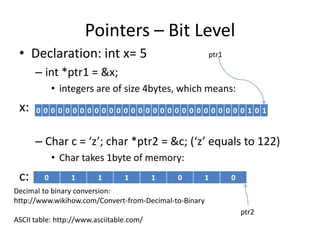
• Declaration: int x= 5
– int *ptr1 = &x;
• integers are of size 4bytes, which means:
x:
– Char c = ‘z’; char *ptr2 = &c; (‘z’ equals to 122)
• Char takes 1byte of memory:
c:
0 0 0 0 0 0 0 0 0 0 0 0 0 0 0 0 0 0 0 0 0 0 0 0 0 0 0 0 0 1 0 1
0 1 1 1 1 0 1 0
ptr1
ptr2
Decimal to binary conversion:
http://www.wikihow.com/Convert-from-Decimal-to-Binary
ASCII table: http://www.asciitable.com/
Pointers
...
...
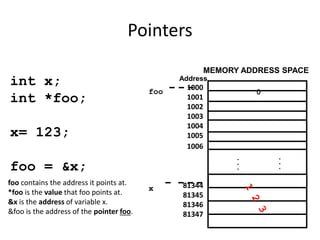
MEMORY ADDRESS SPACE
1000
1001
1002
1003
1004
1005
1006
81344
81345
81346
81347
Address
int x;
int *foo;
x= 123;
foo = &x;
foo
x
0
foo contains the address it points at.
*foo is the value that foo points at.
&x is the address of variable x.
&foo is the address of the pointer foo.
Comparing Pointers
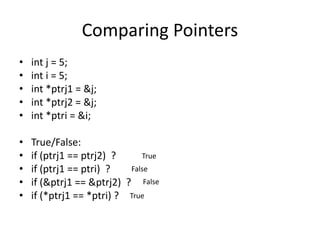
• int j = 5;
• int i = 5;
• int *ptrj1 = &j;
• int *ptrj2 = &j;
• int *ptri = &i;
• True/False:
• if (ptrj1 == ptrj2) ?
• if (ptrj1 == ptri) ?
• if (&ptrj1 == &ptrj2) ?
• if (*ptrj1 == *ptri) ?
True
False
False
True
Assigning a value to a dereferenced
pointer
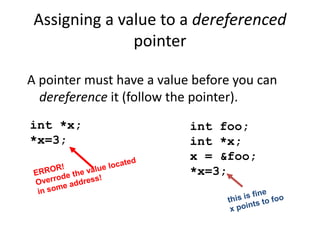
A pointer must have a value before you can
dereference it (follow the pointer).
int *x;
*x=3;
int foo;
int *x;
x = &foo;
*x=3;
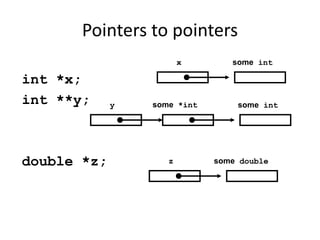
Pointers to pointers
int *x;
int **y;
double *z;
x some int
some *int some int
y
z some double
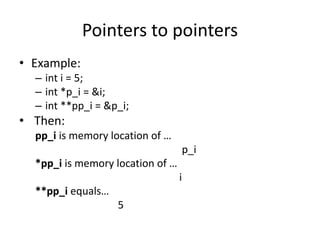
Pointers to pointers
• Example:
– int i = 5;
– int *p_i = &i;
– int **pp_i = &p_i;
• Then:
pp_i is memory location of …
p_i
*pp_i is memory location of …
i
**pp_i equals…
5
Pointers and Arrays
• Array name is basically a const pointer
pointing at the beginning of the array.
• You can use the [] operator with pointers!
• Example:
– int A[5];
– Creates a memory block of 5 integers on the stack
(5x4bytes) where A (the pointer) points at the
beginning of the array -> A[0]. (A = &A)
A
Pointers and Arrays
int *x;
int a[5]={-1,-2,-3,-4,-5};
x = &a[2];
for (int i=0;i<3;i++)
x[i]++;
x is “the address of a[2] ”
x[i] is the same as a[i+2]
-1 -2 -3 -4 -5
a
x[0]
x[1] x[2]
x
Pointer arithmetic
• Integer math operations can be used with pointers: +, -,
++, --, +=, -=
• If you increment a pointer, it will be increased by the size
of whatever it points to.
• Incrementing pointers will basically make it point to the
“next” element in memory.
int a[5];
a[0] a[1] a[2] a[3] a[4]
int *ptr = a;
*ptr
*(ptr+2)
*(ptr+4)
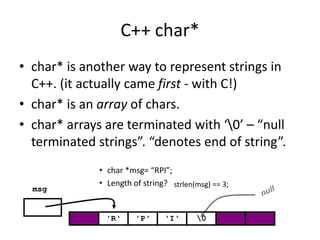
C++ char*
• char* is another way to represent strings in
C++. (it actually came first - with C!)
• char* is an array of chars.
• char* arrays are terminated with ‘0’ – “null
terminated strings”. “denotes end of string”.
• char *msg= “RPI”;
• Length of string?
'R‘
msg
'P‘ 'I‘ 0
strlen(msg) == 3;
Using the Heap
• All primitives are stored in the stack,
• All that is made without new command
is stored in the stack. (except global variables and initailized char* –
splab!)
• Using the new keyword, we can now
allocate memory on the heap.
– int *i = new int;
– string *str = new string(“hi there, heap is cozy!”);
– int *arr = new int[5];
• Deleting these objects can be done
by using the delete keyword.
– delete i;
– delete str;
– delete[] arr;
Safe Delete:
if (0 != p){
delete p;
p=0;
}
DO NOT DELETE A PONTER
NOT ALLOCATED BY NEW
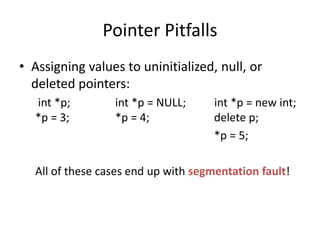
Pointer Pitfalls
• Assigning values to uninitialized, null, or
deleted pointers:
int *p; int *p = NULL; int *p = new int;
*p = 3; *p = 4; delete p;
*p = 5;
All of these cases end up with segmentation fault!
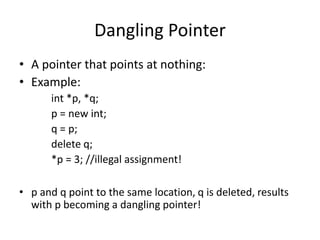
Dangling Pointer
• A pointer that points at nothing:
• Example:
int *p, *q;
p = new int;
q = p;
delete q;
*p = 3; //illegal assignment!
• p and q point to the same location, q is deleted, results
with p becoming a dangling pointer!
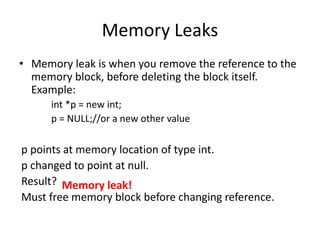
Memory Leaks
• Memory leak is when you remove the reference to the
memory block, before deleting the block itself.
Example:
int *p = new int;
p = NULL;//or a new other value
p points at memory location of type int.
p changed to point at null.
Result?
Must free memory block before changing reference.
Memory leak!
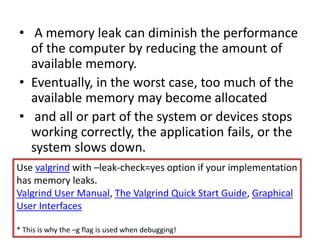
• A memory leak can diminish the performance
of the computer by reducing the amount of
available memory.
• Eventually, in the worst case, too much of the
available memory may become allocated
• and all or part of the system or devices stops
working correctly, the application fails, or the
system slows down.
Use valgrind with –leak-check=yes option if your implementation
has memory leaks.
Valgrind User Manual, The Valgrind Quick Start Guide, Graphical
User Interfaces
* This is why the –g flag is used when debugging!
• DO NOT FORGET TO SUBMIT:
– Homework0
– Homework1
– Homework2
The Targilonim help your exercise the things we
learnt so far!
• READ COURSE ANNOUNCEMETNS!
• Presentations: www.cs.bgu.ac.il/~jumanan
Before You Leave!

SPL_PS2 (1).ppt

  • 1.
    SPL – PracticalSession 2 • Topics: – C++ Memory Management – Pointers
  • 2.
  • 3.
    Variables in C++Memory System There are two "kinds" of memory available to a process: • Stack: – Stores local variables of the function. – Removed once the function ends! • Heap: – Contains dynamically allocated variables. – Stays once the function ends, unless cleared before! Read more: http://www.learncpp.com/cpp-tutorial/79-the-stack-and-the-heap/
  • 4.
    Pointers • A pointeris a variable that holds the address of some other variable. • In Java, you can’t directly access the memory of such object! Only by reference. • In C++, you can access them directly! Alter them any way you like, without any limitations! Benefit: More control than Java. Drawback: Memory leaks, Memory corruption. • A 64-bit computer can address 264 bytes! • Each memory cell is 1 byte. (byte-accessible machines – most of the machines today) • Each pointer takes a static size of 4 bytes in a 32bit OS, and 8bytes in a 64bit OS. • Pointers themselves are saved on the stack.
  • 5.
    Java vs. C++ Java’sReferences • String s = new String("a string"); – The value of the variable 's' is the location of the object on the heap, but we don’t have access to this value! • You can not have a variable that 'points' to a primitive type • String s = null; – means "I don't have the address of any meaningful data" C++ Pointers • Have access to actual memory locations. • Can point to anything! • The null value in C++ is the number 0 (memory address 0).
  • 6.
    Pointers – BitLevel • Declaration: int x= 5 – int *ptr1 = &x; • integers are of size 4bytes, which means: x: – Char c = ‘z’; char *ptr2 = &c; (‘z’ equals to 122) • Char takes 1byte of memory: c: 0 0 0 0 0 0 0 0 0 0 0 0 0 0 0 0 0 0 0 0 0 0 0 0 0 0 0 0 0 1 0 1 0 1 1 1 1 0 1 0 ptr1 ptr2 Decimal to binary conversion: http://www.wikihow.com/Convert-from-Decimal-to-Binary ASCII table: http://www.asciitable.com/
  • 7.
    Pointers ... ... MEMORY ADDRESS SPACE 1000 1001 1002 1003 1004 1005 1006 81344 81345 81346 81347 Address intx; int *foo; x= 123; foo = &x; foo x 0 foo contains the address it points at. *foo is the value that foo points at. &x is the address of variable x. &foo is the address of the pointer foo.
  • 8.
    Comparing Pointers • intj = 5; • int i = 5; • int *ptrj1 = &j; • int *ptrj2 = &j; • int *ptri = &i; • True/False: • if (ptrj1 == ptrj2) ? • if (ptrj1 == ptri) ? • if (&ptrj1 == &ptrj2) ? • if (*ptrj1 == *ptri) ? True False False True
  • 9.
    Assigning a valueto a dereferenced pointer A pointer must have a value before you can dereference it (follow the pointer). int *x; *x=3; int foo; int *x; x = &foo; *x=3;
  • 10.
    Pointers to pointers int*x; int **y; double *z; x some int some *int some int y z some double
  • 11.
    Pointers to pointers •Example: – int i = 5; – int *p_i = &i; – int **pp_i = &p_i; • Then: pp_i is memory location of … p_i *pp_i is memory location of … i **pp_i equals… 5
  • 12.
    Pointers and Arrays •Array name is basically a const pointer pointing at the beginning of the array. • You can use the [] operator with pointers! • Example: – int A[5]; – Creates a memory block of 5 integers on the stack (5x4bytes) where A (the pointer) points at the beginning of the array -> A[0]. (A = &A) A
  • 13.
    Pointers and Arrays int*x; int a[5]={-1,-2,-3,-4,-5}; x = &a[2]; for (int i=0;i<3;i++) x[i]++; x is “the address of a[2] ” x[i] is the same as a[i+2] -1 -2 -3 -4 -5 a x[0] x[1] x[2] x
  • 14.
    Pointer arithmetic • Integermath operations can be used with pointers: +, -, ++, --, +=, -= • If you increment a pointer, it will be increased by the size of whatever it points to. • Incrementing pointers will basically make it point to the “next” element in memory. int a[5]; a[0] a[1] a[2] a[3] a[4] int *ptr = a; *ptr *(ptr+2) *(ptr+4)
  • 15.
    C++ char* • char*is another way to represent strings in C++. (it actually came first - with C!) • char* is an array of chars. • char* arrays are terminated with ‘0’ – “null terminated strings”. “denotes end of string”. • char *msg= “RPI”; • Length of string? 'R‘ msg 'P‘ 'I‘ 0 strlen(msg) == 3;
  • 16.
    Using the Heap •All primitives are stored in the stack, • All that is made without new command is stored in the stack. (except global variables and initailized char* – splab!) • Using the new keyword, we can now allocate memory on the heap. – int *i = new int; – string *str = new string(“hi there, heap is cozy!”); – int *arr = new int[5]; • Deleting these objects can be done by using the delete keyword. – delete i; – delete str; – delete[] arr; Safe Delete: if (0 != p){ delete p; p=0; } DO NOT DELETE A PONTER NOT ALLOCATED BY NEW
  • 17.
    Pointer Pitfalls • Assigningvalues to uninitialized, null, or deleted pointers: int *p; int *p = NULL; int *p = new int; *p = 3; *p = 4; delete p; *p = 5; All of these cases end up with segmentation fault!
  • 18.
    Dangling Pointer • Apointer that points at nothing: • Example: int *p, *q; p = new int; q = p; delete q; *p = 3; //illegal assignment! • p and q point to the same location, q is deleted, results with p becoming a dangling pointer!
  • 19.
    Memory Leaks • Memoryleak is when you remove the reference to the memory block, before deleting the block itself. Example: int *p = new int; p = NULL;//or a new other value p points at memory location of type int. p changed to point at null. Result? Must free memory block before changing reference. Memory leak!
  • 20.
    • A memoryleak can diminish the performance of the computer by reducing the amount of available memory. • Eventually, in the worst case, too much of the available memory may become allocated • and all or part of the system or devices stops working correctly, the application fails, or the system slows down. Use valgrind with –leak-check=yes option if your implementation has memory leaks. Valgrind User Manual, The Valgrind Quick Start Guide, Graphical User Interfaces * This is why the –g flag is used when debugging!
  • 21.
    • DO NOTFORGET TO SUBMIT: – Homework0 – Homework1 – Homework2 The Targilonim help your exercise the things we learnt so far! • READ COURSE ANNOUNCEMETNS! • Presentations: www.cs.bgu.ac.il/~jumanan Before You Leave!