Event-driven programming
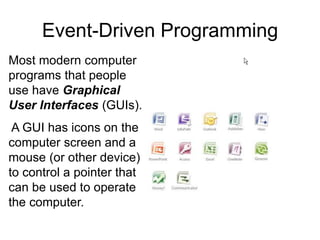
Most modern computer
programs that people
use have Graphical
User Interfaces (GUIs).
A GUI has icons on the
computer screen and a
mouse (or other device)
to control a pointer that
can be used to operate
the computer.
Event-Driven Programming
An Introduction to Programming Using Alice
Most modern computer
programs that people
use have Graphical
User Interfaces (GUIs).
A GUI has icons on the
computer screen and a
mouse (or other device)
to control a pointer that
can be used to operate
the computer.
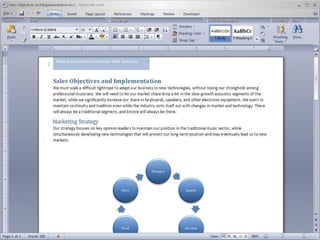
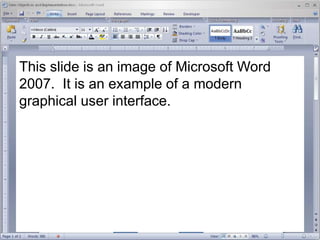
This slide is an image of Microsoft Word
2007. It is an example of a modern
graphical user interface.
Modern GUIs like the Word 2007 interface require
the use of event-driven programming.
An event occurs whenever an event listener
detects an event trigger and responds by running
a method called an event handler.
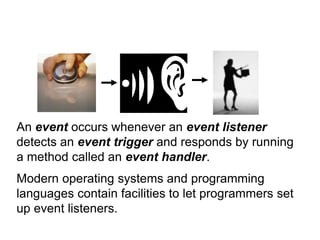
An event occurs whenever an event listener
detects an event trigger and responds by running
a method called an event handler.
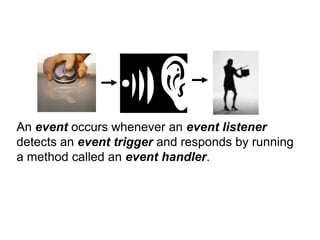
An event occurs whenever an event listener
detects an event trigger and responds by running
a method called an event handler.
Modern operating systems and programming
languages contain facilities to let programmers set
up event listeners.
An event trigger can be almost any activity or
condition selected by the programmer, such as a
mouse movement, someone pressing the enter
key, or a bank account balance changing.
An event handler is a method that is activated
when the event trigger occurs.
Almost any method can serve as an event handler,
such as those that play sounds, initiate data
communications, or perform calculations.
In Alice…
• Events can be used to control objects
moving in 3D space.
– Detect when some object moves
– Detect when two objects collide
– Make objects move in response to mouse or
keyboard commands.
• So before discussing events in Alice, let’s
talk about 3D space a little more.
3D space
• A dimension is a way of measuring
something.
• We create a dimension whenever we
assign a value on a continuous scale to
some property.
• Example: On a scale of 1 to 100, how
much do you approve of George Bush’s
performance as president?
Measuring distance
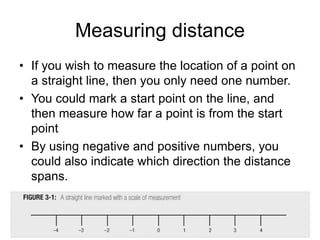
• If you wish to measure the location of a point on
a straight line, then you only need one number.
• You could mark a start point on the line, and
then measure how far a point is from the start
point
• By using negative and positive numbers, you
could also indicate which direction the distance
spans.
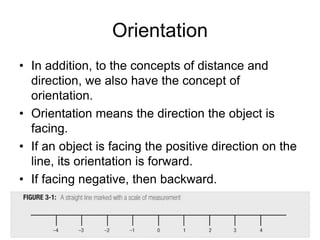
Orientation
• In addition, to the concepts of distance and
direction, we also have the concept of
orientation.
• Orientation means the direction the object is
facing.
• If an object is facing the positive direction on the
line, its orientation is forward.
• If facing negative, then backward.
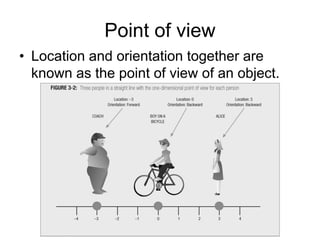
Point of view
• Location and orientation together are
known as the point of view of an object.
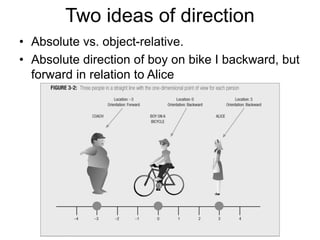
Two ideas of direction
• Absolute vs. object-relative.
• Absolute direction of boy on bike I backward, but
forward in relation to Alice
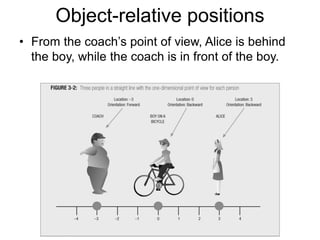
Object-relative positions
• From the coach’s point of view, Alice is behind
the boy, while the coach is in front of the boy.
Position in 2D
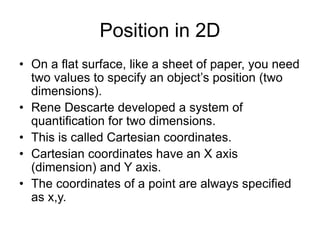
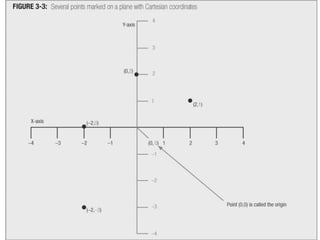
• On a flat surface, like a sheet of paper, you need
two values to specify an object’s position (two
dimensions).
• Rene Descarte developed a system of
quantification for two dimensions.
• This is called Cartesian coordinates.
• Cartesian coordinates have an X axis
(dimension) and Y axis.
• The coordinates of a point are always specified
as x,y.
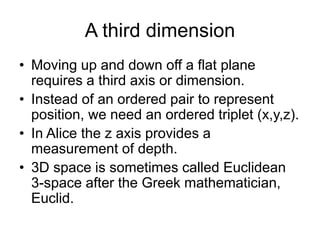
A third dimension
• Moving up and down off a flat plane
requires a third axis or dimension.
• Instead of an ordered pair to represent
position, we need an ordered triplet (x,y,z).
• In Alice the z axis provides a
measurement of depth.
• 3D space is sometimes called Euclidean
3-space after the Greek mathematician,
Euclid.
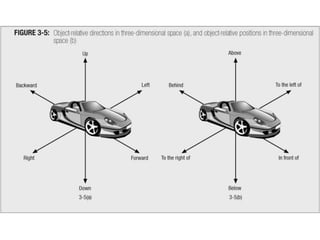
Absolute vs. Object-relative
• For all objects we must be aware of
absolute position and direction
• However, we are most commonly
concerned with object-relative position and
direction.
More on object-relativity
• We must also frequently consider the
movement of objects from the perspective
of other objects.
• See SharkAsSeenByExample.a2w
Events in Alice
Events in Alice
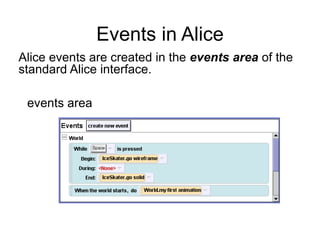
Alice events are created in the events area of the
standard Alice interface.
events area
Events in Alice
Alice events are created in the events area of the
standard Alice interface.
events area
Events in Alice
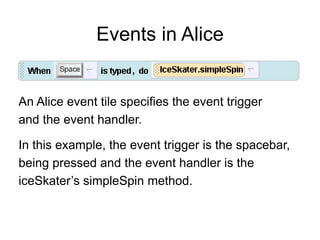
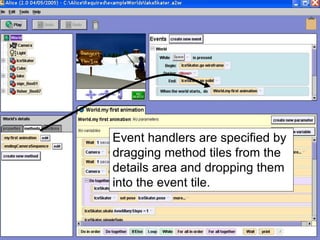
An Alice event tile specifies the event trigger
and the event handler.
In this example, the event trigger is the spacebar,
being pressed and the event handler is the
iceSkater’s simpleSpin method.
Events in Alice
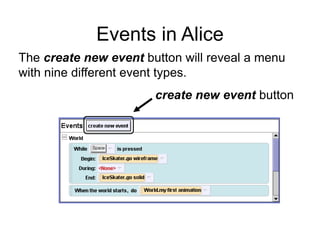
create new event button
The create new event button will reveal a menu
with nine different event types.
Events in Alice
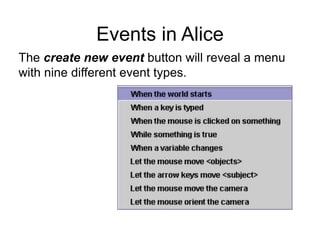
The create new event button will reveal a menu
with nine different event types.
Events in Alice
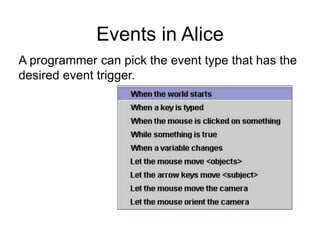
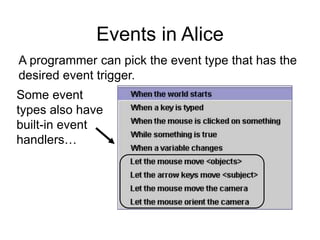
A programmer can pick the event type that has the
desired event trigger.
Events in Alice
Some event
types also have
built-in event
handlers…
A programmer can pick the event type that has the
desired event trigger.
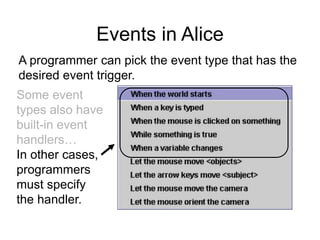
Events in Alice
Some event
types also have
built-in event
handlers…
In other cases,
programmers
must specify
the handler.
A programmer can pick the event type that has the
desired event trigger.
Event handlers are specified by
dragging method tiles from the
details area and dropping them
into the event tile.
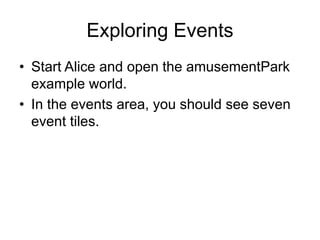
Exploring Events
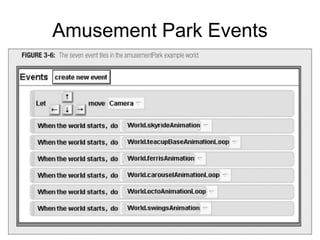
• Start Alice and open the amusementPark
example world.
• In the events area, you should see seven
event tiles.
Amusement Park Events
Event-Driven Programming
• Events are an important part of Alice
programming, allowing the creation of interactive
worlds with keyboard and mouse user controls.
• Most modern programming languages allow
programmers to add events to new software.
• Events can be used for many other purposes,
such as controlling burglar alarms, checking
remote sensors, or checking for system events,
like printers running out of paper.
• Events are an important part of modern
computer programming.

03a-IntroductionToEventDrivenProgramming.ppt

  • 1.
  • 2.
    Most modern computer programsthat people use have Graphical User Interfaces (GUIs). A GUI has icons on the computer screen and a mouse (or other device) to control a pointer that can be used to operate the computer. Event-Driven Programming
  • 3.
    Event-Driven Programming An Introductionto Programming Using Alice Most modern computer programs that people use have Graphical User Interfaces (GUIs). A GUI has icons on the computer screen and a mouse (or other device) to control a pointer that can be used to operate the computer.
  • 4.
    This slide isan image of Microsoft Word 2007. It is an example of a modern graphical user interface.
  • 5.
    Modern GUIs likethe Word 2007 interface require the use of event-driven programming. An event occurs whenever an event listener detects an event trigger and responds by running a method called an event handler.
  • 6.
    An event occurswhenever an event listener detects an event trigger and responds by running a method called an event handler.
  • 7.
    An event occurswhenever an event listener detects an event trigger and responds by running a method called an event handler. Modern operating systems and programming languages contain facilities to let programmers set up event listeners.
  • 8.
    An event triggercan be almost any activity or condition selected by the programmer, such as a mouse movement, someone pressing the enter key, or a bank account balance changing.
  • 9.
    An event handleris a method that is activated when the event trigger occurs. Almost any method can serve as an event handler, such as those that play sounds, initiate data communications, or perform calculations.
  • 10.
    In Alice… • Eventscan be used to control objects moving in 3D space. – Detect when some object moves – Detect when two objects collide – Make objects move in response to mouse or keyboard commands. • So before discussing events in Alice, let’s talk about 3D space a little more.
  • 11.
    3D space • Adimension is a way of measuring something. • We create a dimension whenever we assign a value on a continuous scale to some property. • Example: On a scale of 1 to 100, how much do you approve of George Bush’s performance as president?
  • 12.
    Measuring distance • Ifyou wish to measure the location of a point on a straight line, then you only need one number. • You could mark a start point on the line, and then measure how far a point is from the start point • By using negative and positive numbers, you could also indicate which direction the distance spans.
  • 13.
    Orientation • In addition,to the concepts of distance and direction, we also have the concept of orientation. • Orientation means the direction the object is facing. • If an object is facing the positive direction on the line, its orientation is forward. • If facing negative, then backward.
  • 14.
    Point of view •Location and orientation together are known as the point of view of an object.
  • 15.
    Two ideas ofdirection • Absolute vs. object-relative. • Absolute direction of boy on bike I backward, but forward in relation to Alice
  • 16.
    Object-relative positions • Fromthe coach’s point of view, Alice is behind the boy, while the coach is in front of the boy.
  • 17.
    Position in 2D •On a flat surface, like a sheet of paper, you need two values to specify an object’s position (two dimensions). • Rene Descarte developed a system of quantification for two dimensions. • This is called Cartesian coordinates. • Cartesian coordinates have an X axis (dimension) and Y axis. • The coordinates of a point are always specified as x,y.
  • 19.
    A third dimension •Moving up and down off a flat plane requires a third axis or dimension. • Instead of an ordered pair to represent position, we need an ordered triplet (x,y,z). • In Alice the z axis provides a measurement of depth. • 3D space is sometimes called Euclidean 3-space after the Greek mathematician, Euclid.
  • 21.
    Absolute vs. Object-relative •For all objects we must be aware of absolute position and direction • However, we are most commonly concerned with object-relative position and direction.
  • 23.
    More on object-relativity •We must also frequently consider the movement of objects from the perspective of other objects. • See SharkAsSeenByExample.a2w
  • 24.
  • 25.
    Events in Alice Aliceevents are created in the events area of the standard Alice interface. events area
  • 26.
    Events in Alice Aliceevents are created in the events area of the standard Alice interface. events area
  • 27.
    Events in Alice AnAlice event tile specifies the event trigger and the event handler. In this example, the event trigger is the spacebar, being pressed and the event handler is the iceSkater’s simpleSpin method.
  • 28.
    Events in Alice createnew event button The create new event button will reveal a menu with nine different event types.
  • 29.
    Events in Alice Thecreate new event button will reveal a menu with nine different event types.
  • 30.
    Events in Alice Aprogrammer can pick the event type that has the desired event trigger.
  • 31.
    Events in Alice Someevent types also have built-in event handlers… A programmer can pick the event type that has the desired event trigger.
  • 32.
    Events in Alice Someevent types also have built-in event handlers… In other cases, programmers must specify the handler. A programmer can pick the event type that has the desired event trigger.
  • 33.
    Event handlers arespecified by dragging method tiles from the details area and dropping them into the event tile.
  • 34.
    Exploring Events • StartAlice and open the amusementPark example world. • In the events area, you should see seven event tiles.
  • 35.
  • 36.
    Event-Driven Programming • Eventsare an important part of Alice programming, allowing the creation of interactive worlds with keyboard and mouse user controls. • Most modern programming languages allow programmers to add events to new software. • Events can be used for many other purposes, such as controlling burglar alarms, checking remote sensors, or checking for system events, like printers running out of paper. • Events are an important part of modern computer programming.