•Chapter One
•Introduction to Operating System
• By: Kidanemariam F.
DDUIOT CoSc3023 1
24-Apr-24
Chapter’s
Contents
Role and purpose of operating system
History of operating system development
Computer system organization
Operating system operation
Operating system services
Types of an operating systems
DDUIOT CoSc3023 2
24-Apr-24
Role and Purpose of operating system
What is operating system?
Software that acts as an intermediary between a user of a computer and
the computer hardware.
Operating system goals:
 Execute user programs and make solving user problems easier.
 Make the computer system convenient to use.
 Use the computer hardware in an efficient manner.
Operating System Functions:
 Resource allocation - manages and allocates resources.
 Control program - controls the execution of user programs and
operation of I/O devices.
 Kernel - the one program running at all times (all else being application
programs).
DDUIOT CoSc3023 3
24-Apr-24
History of operating system
In the 1950s some technologies emerged that allowed a “simpler” interaction
between the user and the computer.
Resident monitor: - this is a system that loads the program into the computer,
reading it from a tape or punched cards.
This technology gave rise to the first operating system in history, created in 1956
for an IBM 704 computer, which was responsible for loading programs
successively (starting with the next one when the previous one had finished
loading), reducing the work time required.
Temporary storage: this is a system that also tried to increase speed by
simultaneously loading programs and executing tasks. In the 1960s, the rise of the
integrated circuit launched the power of computers, and operating systems
responded by becoming increasingly complex and offering new techniques.
Multiprogramming: - In this technique, the main memory already holds more than
one program, and the operating system is responsible for allocating the machine’s
resources to execute tasks based on existing needs.
DDUIOT CoSc3023 4
24-Apr-24
Timeshare: - This is a system that assigns the execution of applications within a
group of users working online.
Real time: - it is used specially in the area of telecommunications, it is responsible
for processing events external to the computer, so that, once a certain time has
passed without success, it considers them as failed.
Multiprocessor: - these are systems that try to manage the readings and writings
made in memory by two programs that are running simultaneously, in order to avoid
errors. As their name suggests, they are designed for use in computers that use more
than one processor.
In the 1970s, IT continued to become increasingly complex, resulting in the first
versions of some of the operating systems that have served as the basis for many of
the ones we use today, such as UNIX.
The operating systems of this decade are still available only to highly qualified users,
and their complexity means that they consume a large amount of resources. Among
the most outstanding, in addition to UNIX, we find MULTICS, BDOS and CP/M,
widely used in computers with Intel microprocessor.
History of operating system ...Cont’d
DDUIOT CoSc3023 5
24-Apr-24
The 1980s gave rise to the boom in commercial computing. The arrival of computers in
thousands of offices and homes changes the focus of operating systems, forcing the
development of more user-friendly systems that introduced graphic elements such as
menus.
In this decade the development is such that it gives rise to some operating systems
already legendary, and that contribute to the rise of computing in later decades, such
as C++, SunOS (developed by Sun Microsystems and derived from UNIX), AmigaOS
(developed for the Commodore Amiga) and some classics such as these:-
MS-DOS: - developed by Microsoft for IBM PCs, which contributed enormously to
the popularization of computing and gave rise to Windows systems.
Mac OS: - a system of Macintosh computers developed by Apple Inc, launched in
1984, and which included a novel graphic interface and the use of the mouse (a
rarity at that time for users that were used to typing commands).
The decade of the 90’s continues with the explosive line marked in the 80’s, giving rise
to many of the operating systems that, in more modern versions, we use today:
History of operating system ...Cont’d
DDUIOT CoSc3023 6
24-Apr-24
GNU/Linux: it was developed based on UNIX, and which is one of the greatest
exponents of free software. Today, GNU/Linux is widely used all over the world,
having a pre-eminence close to 100% in fields as striking as supercomputers.
Solaris: - also developed on UNIX basis by Sun Microsystems for servers and
workstations.
Microsoft Windows: - which has resulted in a popular family of commercially
successful operating systems used by millions of users around the world.
In the first decade of the present century, new operating systems continue to
succeed each other, perhaps with less impact than those that emerged in the
previous decade, but have their own place. Highlights include SymbOS,
MorphOS, Darwin, Mac OS, Haiku and OpenSolaris.
So now we see the current decade, in which the rise of phones gives rise to some
popular operating systems, including Android, developed by Google or iOS,
created by Apple.
History of operating system ...Cont’d
DDUIOT CoSc3023 7
24-Apr-24
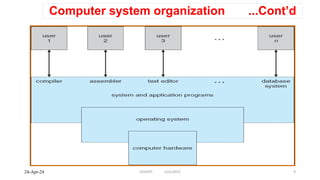
Computer system organization
Computer system can be divided into four components
Hardware - provides basic computing resources.
Includes: -CPU, memory, I/O devices, ...
Operating system - Controls and coordinates use of hardware among
various applications and users
Application programs - define the ways in which the system resources are
used to solve the computing problems of the users.
Includes: Word processors, compilers, web browsers, database systems,
video games ...
Users
People, machines, other computers
DDUIOT CoSc3023 8
24-Apr-24
Computer system organization ...Cont’d
DDUIOT CoSc3023 9
24-Apr-24
• Computer-system operation
• One or more CPUs, device controllers connect through common bus
providing access to shared memory
• Concurrent execution of CPUs and devices competing for memory cycles
Computer system organization ...Cont’d
DDUIOT CoSc3023 10
24-Apr-24
Operating system operation
 Interrupt driven by hardware
 Software error or request creates exception or trap
 Division by zero, request for operating system service
 Other process problems include infinite loop, processes modifying each other or
the operating system
 Dual-mode operation allows OS to protect itself and other system components
 User mode: execution done on behalf of a user.
 Monitor mode (also kernel mode or system mode) : execution done on behalf
of operating system.
 Mode bit added to computer hardware to indicate the current mode: monitor (0)
or user (1).
 Some instructions designated as privileged, only executable in kernel mode
 System call changes mode to kernel, return from call resets it to user
DDUIOT CoSc3023 11
24-Apr-24
Operating system services
One set of operating system service provides functions that are helpful to user.
 Program execution - ability to load a program into memory and to run it.
 I/O operations - since user programs cannot execute I/O operations directly,
the operating system must provide some means to perform I/O.
 File-system manipulation - capability to read, write, create, and delete files.
 Communications - exchange of information between processes executing
either on the same computer or on different systems tied together by a
network. Implemented via shared memory or message passing.
 Error detection - ensure correct computing by detecting errors in the CPU and
memory hardware, in I/O devices, or in user programs.
DDUIOT CoSc3023 12
24-Apr-24
Operating system service ...Cont’d
Additional operating-system functions exist not for helping the user, but
rather for ensuring efficient system operation.
 Resource allocation - allocating resources to multiple users or multiple
processes running at the same time.
 Accounting - keep track of and record which users use how much and
what kinds of computer resources for account billing or for accumulating
usage statistics.
 Protection - ensuring that all access to system resources is controlled.
DDUIOT CoSc3023 13
24-Apr-24
Operating system common component
o User interface
o Process Management
o Main Memory Management
o Secondary-Storage Management
o I/O System Management
o File Management
o Protection System
o Networking
DDUIOT CoSc3023 14
24-Apr-24
Types of Operating Systems
oBatch Operating System.
oMulti-Programming System.
oMulti-Processing System.
oMulti-Tasking Operating System.
oTime-Sharing Operating System.
oDistributed Operating System.
oNetwork Operating System.
oReal-Time Operating System
DDUIOT CoSc3023 15
24-Apr-24
The End!
DDUIOT CoSc3023 16
24-Apr-24

Chapter 1~Introduction to Operating System.pptx

  • 1.
    •Chapter One •Introduction toOperating System • By: Kidanemariam F. DDUIOT CoSc3023 1 24-Apr-24
  • 2.
    Chapter’s Contents Role and purposeof operating system History of operating system development Computer system organization Operating system operation Operating system services Types of an operating systems DDUIOT CoSc3023 2 24-Apr-24
  • 3.
    Role and Purposeof operating system What is operating system? Software that acts as an intermediary between a user of a computer and the computer hardware. Operating system goals:  Execute user programs and make solving user problems easier.  Make the computer system convenient to use.  Use the computer hardware in an efficient manner. Operating System Functions:  Resource allocation - manages and allocates resources.  Control program - controls the execution of user programs and operation of I/O devices.  Kernel - the one program running at all times (all else being application programs). DDUIOT CoSc3023 3 24-Apr-24
  • 4.
    History of operatingsystem In the 1950s some technologies emerged that allowed a “simpler” interaction between the user and the computer. Resident monitor: - this is a system that loads the program into the computer, reading it from a tape or punched cards. This technology gave rise to the first operating system in history, created in 1956 for an IBM 704 computer, which was responsible for loading programs successively (starting with the next one when the previous one had finished loading), reducing the work time required. Temporary storage: this is a system that also tried to increase speed by simultaneously loading programs and executing tasks. In the 1960s, the rise of the integrated circuit launched the power of computers, and operating systems responded by becoming increasingly complex and offering new techniques. Multiprogramming: - In this technique, the main memory already holds more than one program, and the operating system is responsible for allocating the machine’s resources to execute tasks based on existing needs. DDUIOT CoSc3023 4 24-Apr-24
  • 5.
    Timeshare: - Thisis a system that assigns the execution of applications within a group of users working online. Real time: - it is used specially in the area of telecommunications, it is responsible for processing events external to the computer, so that, once a certain time has passed without success, it considers them as failed. Multiprocessor: - these are systems that try to manage the readings and writings made in memory by two programs that are running simultaneously, in order to avoid errors. As their name suggests, they are designed for use in computers that use more than one processor. In the 1970s, IT continued to become increasingly complex, resulting in the first versions of some of the operating systems that have served as the basis for many of the ones we use today, such as UNIX. The operating systems of this decade are still available only to highly qualified users, and their complexity means that they consume a large amount of resources. Among the most outstanding, in addition to UNIX, we find MULTICS, BDOS and CP/M, widely used in computers with Intel microprocessor. History of operating system ...Cont’d DDUIOT CoSc3023 5 24-Apr-24
  • 6.
    The 1980s gaverise to the boom in commercial computing. The arrival of computers in thousands of offices and homes changes the focus of operating systems, forcing the development of more user-friendly systems that introduced graphic elements such as menus. In this decade the development is such that it gives rise to some operating systems already legendary, and that contribute to the rise of computing in later decades, such as C++, SunOS (developed by Sun Microsystems and derived from UNIX), AmigaOS (developed for the Commodore Amiga) and some classics such as these:- MS-DOS: - developed by Microsoft for IBM PCs, which contributed enormously to the popularization of computing and gave rise to Windows systems. Mac OS: - a system of Macintosh computers developed by Apple Inc, launched in 1984, and which included a novel graphic interface and the use of the mouse (a rarity at that time for users that were used to typing commands). The decade of the 90’s continues with the explosive line marked in the 80’s, giving rise to many of the operating systems that, in more modern versions, we use today: History of operating system ...Cont’d DDUIOT CoSc3023 6 24-Apr-24
  • 7.
    GNU/Linux: it wasdeveloped based on UNIX, and which is one of the greatest exponents of free software. Today, GNU/Linux is widely used all over the world, having a pre-eminence close to 100% in fields as striking as supercomputers. Solaris: - also developed on UNIX basis by Sun Microsystems for servers and workstations. Microsoft Windows: - which has resulted in a popular family of commercially successful operating systems used by millions of users around the world. In the first decade of the present century, new operating systems continue to succeed each other, perhaps with less impact than those that emerged in the previous decade, but have their own place. Highlights include SymbOS, MorphOS, Darwin, Mac OS, Haiku and OpenSolaris. So now we see the current decade, in which the rise of phones gives rise to some popular operating systems, including Android, developed by Google or iOS, created by Apple. History of operating system ...Cont’d DDUIOT CoSc3023 7 24-Apr-24
  • 8.
    Computer system organization Computersystem can be divided into four components Hardware - provides basic computing resources. Includes: -CPU, memory, I/O devices, ... Operating system - Controls and coordinates use of hardware among various applications and users Application programs - define the ways in which the system resources are used to solve the computing problems of the users. Includes: Word processors, compilers, web browsers, database systems, video games ... Users People, machines, other computers DDUIOT CoSc3023 8 24-Apr-24
  • 9.
    Computer system organization...Cont’d DDUIOT CoSc3023 9 24-Apr-24
  • 10.
    • Computer-system operation •One or more CPUs, device controllers connect through common bus providing access to shared memory • Concurrent execution of CPUs and devices competing for memory cycles Computer system organization ...Cont’d DDUIOT CoSc3023 10 24-Apr-24
  • 11.
    Operating system operation Interrupt driven by hardware  Software error or request creates exception or trap  Division by zero, request for operating system service  Other process problems include infinite loop, processes modifying each other or the operating system  Dual-mode operation allows OS to protect itself and other system components  User mode: execution done on behalf of a user.  Monitor mode (also kernel mode or system mode) : execution done on behalf of operating system.  Mode bit added to computer hardware to indicate the current mode: monitor (0) or user (1).  Some instructions designated as privileged, only executable in kernel mode  System call changes mode to kernel, return from call resets it to user DDUIOT CoSc3023 11 24-Apr-24
  • 12.
    Operating system services Oneset of operating system service provides functions that are helpful to user.  Program execution - ability to load a program into memory and to run it.  I/O operations - since user programs cannot execute I/O operations directly, the operating system must provide some means to perform I/O.  File-system manipulation - capability to read, write, create, and delete files.  Communications - exchange of information between processes executing either on the same computer or on different systems tied together by a network. Implemented via shared memory or message passing.  Error detection - ensure correct computing by detecting errors in the CPU and memory hardware, in I/O devices, or in user programs. DDUIOT CoSc3023 12 24-Apr-24
  • 13.
    Operating system service...Cont’d Additional operating-system functions exist not for helping the user, but rather for ensuring efficient system operation.  Resource allocation - allocating resources to multiple users or multiple processes running at the same time.  Accounting - keep track of and record which users use how much and what kinds of computer resources for account billing or for accumulating usage statistics.  Protection - ensuring that all access to system resources is controlled. DDUIOT CoSc3023 13 24-Apr-24
  • 14.
    Operating system commoncomponent o User interface o Process Management o Main Memory Management o Secondary-Storage Management o I/O System Management o File Management o Protection System o Networking DDUIOT CoSc3023 14 24-Apr-24
  • 15.
    Types of OperatingSystems oBatch Operating System. oMulti-Programming System. oMulti-Processing System. oMulti-Tasking Operating System. oTime-Sharing Operating System. oDistributed Operating System. oNetwork Operating System. oReal-Time Operating System DDUIOT CoSc3023 15 24-Apr-24
  • 16.